1
Setting the Time Table Program
The time table program function allows automatic selection of print color (black or red),
an external time signal, and automatic selection of a column to print records in. These
functions can be set by the day of the week and time period.
• No time table program is factory-set. (The default is: print in black; no external time
signal; and print in Column 1.)
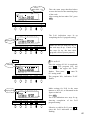
• The PROGRAM button stays lit up during its setting operation.
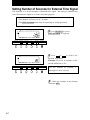
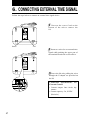
The time table program is explained using the following example.
Day advance time:
05:00
Sunday
Next day
05:00
12:00
Print in red/in Column 5
Print in red/in Column 6
"P-01"
Day advance time:
05:00
Monday - Saturday
"P-02"
09:00
Print in black/
in Column 1
12:00
17:30
Next day
05:00
Print in red/
in Column 2
Print in red/
in Column 3
Print in black/
in Column 4
"P-03"
"P-04"
"P-05"
Signal
Signal
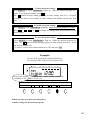
The following is the time table based on the case above.
Program No. Day of week
Time
Print color
External time
Print column
signal
P-01
Sun.
05:00
Red
5
P-02
Sun.
12:00
Red
6
P-03
Mon. - Sat.
09:00
Red
2
P-04
Mon. - Sat.
12:00
Red
3
P-05
Mon. - Sat.
17:30
Black
4
are always printed in black in Column 1 for the time period with no program setting.
•Times
One
programmed
begins at the day advance time.
• See "Setting Day day
Advance Time" in this section for details.
•Up to 32 programs can be set (P-01 through P-32).
18