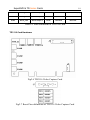
1
SuperDVR & TD Series Cards
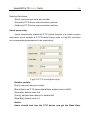
1
1 INTRODUCTION................................... 8
TU
UT
TU
UT
1.1 Summarization ............................................. 8
TU
UT
TU
UT
1.2 System Requirements ................................ 10
TU
UT
TU
UT
1.2.1 TD3004~TD3216 series cards system requirements ··················10
1.2.2 TD3316 system requirements ····················································11
1.2.3TD3101、3104 USB cards system requirements ························12
1.2.4TD4104 card system requirements ·············································13
TU
UT
TU
UT
TU
UT
TU
UT
1.3 System Specifications ................................ 14
TU
UT
TU
UT
2 HARDWARE INSTALLATION ............ 14
TU
UT
TU
UT
2.1 Video Capture Card Hardware ................ 14
TU
UT
TU
UT
TD3004 Card Hardware ·····································································14
TD3008 Card Hardware ·····································································15
TD3016 Card Hardware ·····································································16
TD3116 Card Hardware ·····································································18
TD3216 Card Hardware ·····································································19
TD3316 Card Hardware ·····································································20
TD3101 USB Card Hardware·····························································23
TD3104 USB Card Hardware·····························································24
TD4104 Card Hardware ·····································································25
Alarm Board Hardware ······································································27
TU
UT
TU
UT
TU
UT
TU
UT
TU
UT
TU
UT
TU
UT
TU
UT
UT
TU
TU
UT
SuperDVR & TD Series Cards
2
Connect Audio Signal·········································································28
TU
UT
2.2 Install Video Capture Card Driver .......... 28
TU
UT
TU
UT
3 MAIN DISPLAY INTERFACE ............. 32
TU
UT
TU
UT
3.1 Display Control Panel................................ 33
TU
UT
TU
UT
Display Control Panel ········································································33
Display Modes ···················································································34
Flip Pages···························································································34
Auto Dwell display Mode ··································································34
Quick Switch······················································································35
TU
UT
TU
UT
TU
UT
TU
UT
TU
UT
3.2 Login ........................................................... 35
TU
UT
TU
UT
3.3 Record......................................................... 36
TU
UT
TU
UT
Record Modes ····················································································36
Record Setup ······················································································36
Record Status Panel············································································38
Manual Record Mode ·········································································38
Sensor Alarm Record Mode ·······························································39
Motion Detection Record Mode ·························································39
Schedule Record ················································································39
Recycling Record ···············································································40
TU
UT
TU
UT
TU
UT
TU
UT
TU
UT
TU
UT
TU
UT
TU
UT
4 SYSTEM SETUP ................................ 40
TU
UT
TU
UT
SuperDVR & TD Series Cards
3
4.1 Basic Configuration ................................... 42
TU
UT
TU
UT
4.2 Video Configuration .................................. 44
TU
UT
TU
UT
4.3 Motion Detection configuration................ 46
TU
UT
TU
UT
Set Motion Detection Area ·································································47
Set Motion Detection Sensitivity ························································47
TU
UT
TU
UT
4.4 Schedule configuration .............................. 48
TU
UT
TU
UT
4.5 Motion Detection Alarm Configuration ... 49
TU
UT
TU
UT
Alarm Triggering Conditions Configuration ·······································49
Alarm Record ·····················································································52
Alarm Output ·····················································································53
Auto Mail Function ············································································54
TU
UT
TU
UT
TU
UT
TU
UT
4.6 P.T.Z Control Configuration ..................... 57
TU
UT
TU
UT
Protocol Setup ····················································································57
Serial ports setup ················································································58
TU
UT
TU
UT
4.7 Users Configuration .................................. 59
TU
UT
TU
UT
Change User rights ·············································································59
Add User 60
Delete User ························································································61
UT
UT
TU
TU
TU
UT
SuperDVR & TD Series Cards
4
5 P.T.Z CONTROL ................................. 61
TU
UT
TU
UT
6 RECORD SEARCH AND PLAYING
TU
UT
TU
BACK....................................................... 66
UT
6.1 Record Search ............................................ 67
TU
UT
TU
UT
6.2 Record Playing back and Control ............ 68
TU
UT
TU
UT
6.3 Other Functions ......................................... 72
TU
UT
TU
UT
Record File Backup ············································································72
Delete Record Files ············································································73
Capture Pictures ·················································································74
Image Zoom In / Out ··········································································77
TU
UT
TU
UT
TU
UT
TU
UT
7 REMOTE SURVEILLANCE AND
TU
UT
TU
PLAYING BACK ...................................... 79
UT
7.1 Remote Live Surveillance.......................... 79
TU
UT
TU
UT
Remote Surveillance Server Configuration ········································80
Remote Surveillance Client-side Setup···············································80
TU
UT
TU
UT
7.2 Remote Playing back ................................. 87
TU
UT
TU
UT
SuperDVR & TD Series Cards
5
Remote Playing back server Configuration ········································87
Remote Playing back Client-side Setup ··············································88
Remote Playing back Configuration and Control ·······························93
TU
UT
TU
UT
TU
UT
7.3 Mobile Surveillance ................................... 97
TU
UT
TU
UT
Introduction to Mobile Surveillance ···················································97
Client Configuration of Windows Mobile ··········································97
Client Configuration of Symbian 60 ···················································99
TU
UT
TU
UT
TU
UT
APPENDIX ............................................ 104
TU
UT
APPENDIX 1: DIFFERENCES AMONG TD
TU
SERIES CARD ...................................... 104
UT
APPENDIX 2: FREQUENTLY ASKED
TU
QUESTIONS .......................................... 105
UT
Appendix 2.1 About Installation ..................... 105
TU
UT
Appendix 2.1.1 Cannot Install the SuperDVR Driver ·······················105
Appendix 2.1.2 Why cannot run SuperDVR at the windows 2003
operate system? ················································································105
Appendix 2.1.3 ‘Unspecified error’ in the End of Installation ··········105
Appendix 2.1.4 Can’t find TD series Devices in Device Manager ····106
TU
UT
TU
UT
TU
TU
UT
UT
SuperDVR & TD Series Cards
6
Appendix 2.2 How to Use SuperDVR ............. 106
TU
UT
Appendix 2.2.1 Meanings of the indicator lights ······························106
Appendix 2.2.2 How does the different record mode work? ·············106
Appendix 2.2.3 How to set recycling record mode on the system? ···107
Appendix 2.2.4 How to set auto reboot function? ·····························107
Appendix 2.2.5 How to quickly use the schedule record function?···108
Appendix 2.2.6 What are the byte rates for different image qualities
from highest to normal? ···································································108
Appendix 2.2.7 The frame rate seems to be lower than what I set?···108
Appendix 2.2.8 Why I can’t select more channels to backup? ··········108
Appendix 2.2.9 When should I select manual Gain Control? ············108
TU
UT
TU
UT
TU
UT
TU
UT
TU
UT
TU
UT
TU
UT
TU
UT
TU
UT
Appendix 2.3 How to Use Network Function 109
TU
UT
Appendix 2.3.1 How to monitor on the client-side? ·························109
Appendix 2.3.2 Why I can’t download the client-side software? ······109
Appendix 2.3.3 Why can’t the server be configured at the client-side?
109
Appendix 2.3.4 Why I can’t see the images? ····································110
Appendix 2.3.5 What should I do if the Internet speed is quite slow?
110
Appendix 2.3.6 Why I can’t start WebCam server or RPB server? ···110
TU
UT
TU
UT
TU
UT
TU
UT
TU
UT
TU
UT
Appendix 2.4 Other questions ..........................111
TU
UT
Appendix 2.4.1 Why computer display doesn’t work, and why I can’t
access window system? ···································································· 111
Appendix 2.4.2 Why I can’t find the recorded files? ························ 111
Appendix 2.4.3 Why the screens display is unstable with dithering and
water-wave images? ········································································· 111
TU
UT
TU
UT
TU
UT
SuperDVR & TD Series Cards
7
Appendix 2.4.4 Why does it delay to play back, and it’s slow to close
and open the driver? ········································································· 111
Appendix 2.4.5 Why I can’t play back? ············································112
Appendix 2.4.6 Why do I see some gray blocks on time progress bar
area when play back? ·······································································112
Appendix 2.4.7 Why do I see some old record sections that can’t be
covered when play back? ·································································112
TU
UT
TU
UT
TU
UT
TU
UT
APPENDIX 3 QUICK START FOR USING
TU
UT
112
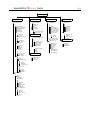
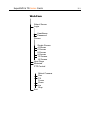
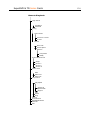
APPENDIX 4 FUNCTION TREE ........... 116
TU
UT
SuperDVR & TD Series Cards
8
1 Introduction
1.1 Summarization
Thank you for choosing our digital video capture cards.
1Channel, 4 Channel, 8 Channel and 16 Channel cards adopt MPEG4
compression format, and enable maximum 16 channels real-time or none
real-time surveillance. Our cards are mature and cost-effective products that
should be your ideal choices. They enable synchronous audio and video
compression and transmission, with their powerful compression rate and
network transmission function. They are widely used in banks, intelligent
communities, traffic management units, medical systems, educational systems,
armed forces and so on.
This manual is suitable for SuperDVR 4.3, which supports TD3004,
TD3008, TD3016, TD3116, TD3216, TD3316, TD4104, TD3101, and TD3104
cards.
In this manual, you will learn how to install the hardware and driver
(software), and how to setup the systems of this range of products. Please
make sure your operations with the products are strictly in accordance with the
manual, so as to keep the stability of the digital surveillance systems.
The following are standard functions of the products:
(1) Schedule record mode
Users can choose any term in a day to record and set up record modes,
i.e. sensor alarm record, motion detection record, manual record, Schedule
Record.
SuperDVR & TD Series Cards
9
(2) Motion detection mode
Motion detection areas are adjustable and maximum 16 areas for each
channel. Users can also set motion detection sensitivity for each channel. The
system begins to record only when motion of the detected object happens, and
it will stop recording after a certain period, this function is adjustable by users.
(3) Sensor alarm record mode
With extra alarm board, the system enables alarm input and output.
(4) Recycling record mode
Users can set recording storage sequence for HDD partitions. The
recording storage will automatically swap to the next partition when it is full. If
all the partitions are full and recycling record mode is enabled, the former
recorded data will be covered by new data. Users can also set HDD minimum
storage alarm. Then once the present storage space is less then the minimum
storage and recycling record mode is not enabled, the record will automatically
stop.
(5) P.T.Z control function
Support a number of decoders. Users can control multiple speed domes
and integrative cameras, including pan, tilt, zoom, focus and iris adjustment
for P.T.Z devices. Support preset point and auto scout.
(6) Users management
Different users have different rights, user names and passwords, so as to
ensure system security.
(7) Multi-channel display
Support different multi-channel display modes, full screen display and
auto dwell display.
(8) Watch dog function
The 16 Channels card has watchdog function. In case SuperDVR driver
or windows system is frozen, the watchdog will restart the computer and login
SuperDVR system again automatically.
(9) One PC support 1 to 4 cards of the same model, the maximum frame
SuperDVR & TD Series Cards
10
rate can be 200 fps and 16 channels at most.
(10) Support 320x240 / 640x480 (NTSC), 352x288 / 704x576(PAL)
standard resolutions.
(11) Image color adjustable for each channel, including contrast, lightness,
hue and saturation.
(12) MPEG4 compression format, greatly reduce HDD usage
(13) Powerful video playing back functions, including playing back, pause,
stop, fast-forward, single-frame play and image capture.
(14) Support advanced search mode. Users can search by date/time,
camera, record mode, and random combination of the three methods.
(15) Support recorded files backup, delete by date/time, camera.
(16) Convenient to extend system functions by software upgrade.
(17) Supply multiple languages, including Chinese (Traditional), English,
German, Spanish, Portuguese and other customized languages.
(18) CPU and storage resources saving by advanced technology
(19) Remote Surveillance and P.T.Z control through LAN, Intranet, and
Internet.
(20) Support alarm pre-record.
(21) Support buzzer, email alarm out.
(22) Can greatly decrease fragmented files while using NTFS partition.
(23) User-friendly graphical user interface.
1.2 System Requirements
1.2.1 TD3004~TD3216 series cards system requirements
Card
PC Module
TD3004、TD3008、TD3016、TD3116、TD3216
SuperDVR & TD Series Cards
CPU
Motherboard
11
Intel PIII processor,minimum 800MHz
Intel 815/845/865/915 series
HDD
80G minimum
RAM
256M minimum
VGA
GeForce2,GeForce4,FX5200,ATI Rage128
OS
Windows2000 / XP
DirectX
9.0
Table1.1 TD3004~TD3216 series cards system requirements
Notice, motherboards listed below which has passed the test can work well
with TD3004~TD3216: GIGA: GA-8IRXI (Intel 845D)
GA-8IE2004 (Intel 845E)
GA-6OXT (Intel 815EP)
GA-8PE800 (Intel 845PE)
GA-8IPE1000-G (Intel 865PE)
ASUS: P4S8X (Sis 648)
TUSL2-C (Intel 815EP)
P4P800 (Intel 865PE)
MSI: MS-6566E (Intel 845E)
Intel845DDA+ (Intel 845E)
1.2.2 TD3316 system requirements
Card
TD3316
PC Module
CPU
Motherboard
Intel P4 2.8G minimum
Intel 865/915
HDD
160G minimum
RAM
512M minimum
VGA
NVIDIA GeForce MX440/FX5200
ATI RADEON 7500/ X300/ X250/ X5518
SuperDVR & TD Series Cards
OS
12
Windows 2000(SP4 above)/ Windows XP(SP1above)
DirectX
9.0
Table1.2 TD3316 system requirement
Notice, motherboards listed below which has passed the test can work well
with TD3316:
Foxconn 865A01(Intel 865)
Ga-81pe1000-G 865(Intel 865)
Asus P4p800 865(Intel 865)
ASUS P5GD1-VM
MSI 6728
915(Intel 915)
865(Intel 865)
Abit IS7-E 865(Intel 865)
ASUS-P4GPL-X 915(Intel 915)
ASROCK 775I915PL-SATA2 915(Intel 915)
1.2.3TD3101、3104 USB cards system requirements
Card
TD3101, TD3104
PC Module
CPU
Motherboard
Intel P4 Celeron processor,minimum 1700MHz
Intel 845/865/915 series
HDD
80G minimum
RAM
256M minimum
VGA
GeForce2,GeForce4,FX5200,ATI Rage128
OS
Windows 2000(SP4 above)/2003(SP1 above)/XP(SP2 above)
DirectX
9.0
USB
2.0
Table1.3 TD3101、3104 system requirements
SuperDVR & TD Series Cards
13
1.2.4TD4104 card system requirements
Card
TD4104
PC Module
CPU
Intel P4 Celeron processor 2.0G minimum
Motherboard
Intel 845/865/915 series
HDD
80G minimum
RAM
256M minimum
VGA
GeForce MX400、ATI 9200、(32M above)
OS
Windows 2000/2003/XP
DirectX
9.0
Table1.4 TD4104 system requirements
Notice, motherboards listed below which has passed the test can work well
with TD4104:
ASROCK 775I915PL-SATA2
Asus P4p800SE
ASUS P5VDC-X
GA G8i845GVW-RZ
GA-k8vT890
MSI 865PE
IWILL i845G
Foxconn 865GV
Special Notice:
If recorded disk partition’s format is FAT32 and the system has run
for a long time, the system will create a lot of data fragments that may
results in system runs slowly. It’s recommended to make disk
defragmenter every 10 to 30 days. We strongly suggest that use NTFS
format for record disk partition.
SuperDVR & TD Series Cards
14
1.3 System Specifications
Format: PAL/NTSC
Resolution: TD3004、3008、3016、3116、3216 、3101、3104 support
320x240 / 640x480 (NTSC), 352x288 / 704x576(PAL), TD3316 supports 352×
240 / 704×480(NTSC), 352x288 / 704x576(PAL)and TD4104 supports 320×
240(NTSC) , 352×288(PAL).
Maximum Frame rate per channel: 25 fps (PAL), 30 ftp (NTSC)
Screen set: resolution 1024×768, color quality 16 bits or 32 bits
Compression code rate: 50kbps – 1.2Mbps
Data format: MPEG4
2 Hardware installation
2.1 Video Capture Card Hardware
TD3004 Card Hardware
SuperDVR & TD Series Cards
15
Fig 2.1 TD3004 Video Capture Card
Pin Port
Define
Interpret
1PIN
5V
Power Source (5V)
2PIN
ALARM_COM
Alarm COM
3PIN
ALARM_NC
Alarm Normal Close
4PIN
ALARM_IN1
Alarm Input 1
5PIN
ALARM_NO
Alarm Normal Open
6PIN
ALARM_IN2
Alarm Input 2
7PIN
GND
Ground
8PIN
ALARM_IN3
Alarm Input 3
9PIN
GND
Ground
10PIN
ALARM_IN4
Alarm Input 4
Table 2.1 TD3004 card pins
TD3008 Card Hardware
Fig2.2 TD3008 Video Capture Card
SuperDVR & TD Series Cards
16
Fig2.3 pin definitions of TD3008 Video Capture Card
TD3016 Card Hardware
Fig2.4 TD3016 Video Capture Card circuit link for Watchdog function
SuperDVR & TD Series Cards
17
Fig2.5 TD3016 Video Capture Card Alarm Port
The Alarm Port pin definitions of TD3016 Card are as below:
Pin Port
Define
Interpret
Pin Port
Define
Interpret
Pin1
Alarm_in1
Alarm Input 1
Pin21
Alarm_out5
Alarm Output 5
Pin2
Alarm_in2
Alarm Input 2
Pin22
Alarm_out6
Alarm Output 6
Pin3
Alarm_in3
Alarm Input 3
Pin23
Alarm_out7
Alarm Output 7
Pin4
Alarm_in4
Alarm Input 4
Pin24
Alarm_out8
Alarm Output 8
Pin5
Alarm_in5
Alarm Input 5
Pin25
Alarm_out9
Alarm Output 9
Pin6
Alarm_in6
Alarm Input 6
Pin26
Alarm_out10
Alarm Output 10
Pin7
Alarm_in7
Alarm Input 7
Pin27
Alarm_out11
Alarm Output 11
Pin8
Alarm_in8
Alarm Input 8
Pin28
Alarm_out12
Alarm Output 12
Pin9
Alarm_in9
Alarm Input 9
Pin29
Alarm_out13
Alarm Output 13
Pin10
Alarm_in10
Alarm Input 10
Pin30
Alarm_out14
Alarm Output 14
Pin11
Alarm_in11
Alarm Input 11
Pin31
Alarm_out15
Alarm Output 15
Pin12
Alarm_in12
Alarm Input 12
Pin32
Alarm_out16
Alarm Output 16
Pin13
Alarm_in13
Alarm Input 13
Pin33
Alarm_Com
Alarm COM
Pin14
Alarm_in14
Alarm Input 14
Pin34
Alarm_NO
Alarm Normal Open
Pin15
Alarm_in15
Alarm Input 15
Pin35
Alarm_NC
Alarm Normal
Close
Pin16
Alarm_in16
Alarm Input 16
Pin36
GND
Ground
Pin17
Alarm_out1
Alarm Output 1
Pin37
GND
Ground
SuperDVR & TD Series Cards
18
Pin18
Alarm_out2
Alarm Output 2
Pin38
5V
Power Source (5V)
Pin19
Alarm_out3
Alarm Output 3
Pin39
Not Used
Not Used
Pin20
Alarm_out4
Alarm Output 4
Pin40
Not Used
Not Used
Table2.2 Pins definitions of TD3016 Card
TD3116 Card Hardware
Fig2.6 TD3116 Video Capture Card
Fig2.7 Reset Pins definitions of TD3116 Video Capture Card
SuperDVR & TD Series Cards
Fig2.8 Pins definitions of TD3116 Video Capture Card
TD3216 Card Hardware
Fig2.9 TD3216 Video Capture Card
19
SuperDVR & TD Series Cards
Fig2.10 Pins definitions of TD3216 Video Capture Card
TD3316 Card Hardware
Fig2.11 TD3316 Video Capture Card
20
SuperDVR & TD Series Cards
21
P2
DFD202-F-26-R-T
10
19
11
20
12
21
13
22
14
23
15
24
16
25
17
26
18
1
2
3
4
5
6
7
8
27
28
9
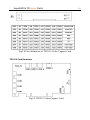
Fig2.12 Audio Connector
PIN1 AUDIO2 PIN11 AUDIO3
PIN2 AUDIO4 PIN12 AUDIO5
PIN3 AUDIO6 PIN13 AUDIO7
PIN4 AUDIO8 PIN14 AUDIO9
PIN5 AUDIO10 PIN15 AUDIO11
PIN6 AUDIO12 PIN16 AUDIO13
PIN7 AUDIO14 PIN17
PIN8 AUDIO15
PIN9 AUDIO16
/
GND
PIN10 AUDIO1 PIN26
Table2.3 definitions of Audio connector’s PINs
SuperDVR & TD Series Cards
J1
GiL-G-8P-S3T2-E
1
2
3
4
5
6
7
8
J2
GiL-G-8P-S3T2-E
1
2
3
4
5
6
7
8
J3
GiL-G-8P-S3T2-E
1
2
3
4
5
6
7
8
22
PIN1
VIN-1
PIN2
GND
PIN3
VIN-2
PIN4
GND
PIN5
VIN-3
PIN6
GND
PIN7
VIN-4
PIN8
GND
PIN1
VIN-5
PIN2
GND
PIN3
VIN-6
PIN4
GND
PIN5
VIN-7
PIN6
GND
PIN7
VIN-8
PIN8
GND
PIN1
VIN-9
PIN2
GND
PIN3
VIN-10
PIN4
GND
PIN5
VIN-11
PIN6
GND
PIN7
VIN-12
PIN8
GND
SuperDVR & TD Series Cards
J4
GiL-G-8P-S3T2-E
1
2
3
4
5
6
7
8
23
PIN1
VIN-13
PIN2
GND
PIN3
VIN-14
PIN4
GND
PIN5
VIN-15
PIN6
GND
PIN7
VIN-116
PIN8
GND
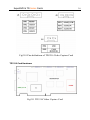
Fig2.13 Video PINs definition
TD3101 USB Card Hardware
Audio input(white)
Video input (yellow)
USB Connection
SuperDVR & TD Series Cards
24
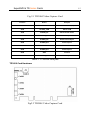
Fig2.14 TD3101 USB Video Capture Card
TD3104 USB Card Hardware
Audio input (white)
Video input (yellow)
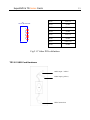
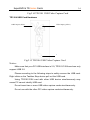
7
Fig2.15 TD3104 USB Video Capture Card
Notice:
Make sure that your PC USB interface is 2.0; TD3101/3104 card can only
support USB 2.0.
Please according to the following steps to safely remove the USB card:
Right clicks on the Taskbar Stop device pull out the USB card.
Using TD3101/3104 card with other USB device simultaneously may
cause PC cannot identify USB card.
Do not insert two or more USB video capture cards simultaneously.
Do not use with the other PCI video capture card simultaneously.
SuperDVR & TD Series Cards
25
TD4104 Card Hardware
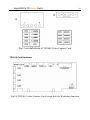
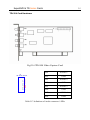
Fig2.16 TD4104 Video Capture Card
J5
GiL-G-8P-S3T2-E
1
2
3
4
5
6
7
8
PIN1
AUDIO-1
PIN2
GND
PIN3
AUDIO-2
PIN4
GND
PIN5
AUDIO-3
PIN6
GND
PIN7
AUDIO-4
PIN8
GND
Table2.17 definitions of Audio connector’s PINs
SuperDVR & TD Series Cards
26
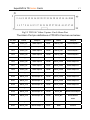
Fig2.18 TD4104 Video Capture Card
PIN1
VIDEO-1
PIN2
GND
PIN3
PIN4
PIN5
PIN6
PIN7
PIN8
PIN9
GND
PIN10 AUDIO-1
VIDEO-2 PIN11 AUDIO-2
GND
PIN12 AUDIO-3
VIDEO-3 PIN13 AUDIO-4
GND
PIN14
NULL
VIDEO-4 PIN15
GND
GND
Table2.19 definitions of Audio and video connector’s PINs
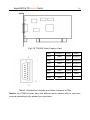
Notice: Our TD4104 cards have two different ports, please refer to your user
manual according to the product you purchase
SuperDVR & TD Series Cards
27
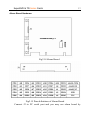
Alarm Board Hardware
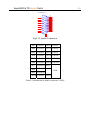
Fig2.18 Alarm Board
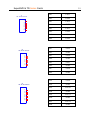
Fig2.15 Pins definitions of Alarm Board
Connect J2 to PC serial port and you may use alarm board by
SuperDVR & TD Series Cards
28
SuperDVR system.
Connect Audio Signal
For TD3004/3008/3016/3116/3216/4104, connect the audio input device
to the microphone connector on the motherboard.
Note:
Before installing the Video Capture Card hardware in PCI port of the
motherboard, make sure you’ve installed Microsoft DirectX 9.0. Then turn on
the computer, the system will remind you to “Found new hardware”.
Notice: Just click “cancel” and ignore the pop-up message.
Insert the CD that contains TD series capture card driver into the CD
tray, and run Setup.exe program to install the driver. The default installation
path is ‘C:\Program Files\SuperDVR’.
Notice: In case it warns that ‘Can’t find card’ when running the SuperDVR
software, please restart the computer.
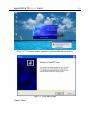
2.2 Install Video Capture Card Driver
Run Setup.exe, and the installation interface appears as below:
SuperDVR & TD Series Cards
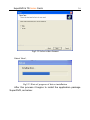
Fig2.30 TD series video capture card installation interface
Fig2.31 Welcome page
Select ‘Next’,
29
SuperDVR & TD Series Cards
30
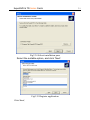
Fig2.32 Select video format
Select ‘Next’,
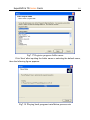
Fig2.33 Rate of progress of driver installation
After this process it begins to install the application package
SuperDVR, as below:
SuperDVR & TD Series Cards
Fig2.34 Select installation pass
Select the suitable option, and click ‘Next’.
Fig2.35 Register application
Click ‘Next’,
31
SuperDVR & TD Series Cards
32
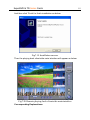
Fig2.36 Driver and application installation finished
Click ‘Finish’
Now, after all the processes are finished, restart the computer and launch
the surveillance program. It will create a shortcut on the desktop.
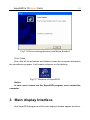
Fig2.37 Shortcut of SuperDVR
Notice:
In case users cannot run the SuperDVR program, users restart the
computer.
3 Main display Interface
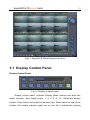
Run SuperDVR program and the main display interface appear as below:
SuperDVR & TD Series Cards
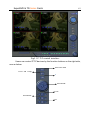
33
Fig3.1 SuperDVR Main Display Interface
3.1 Display Control Panel
Display Control Panel
Fig3.2 Display control panel
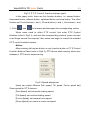
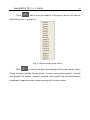
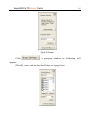
‘Display control panel’ includes ‘Display Mode’ buttons and disk free
space indicator, ‘Auto Dwell’ button, 1, 4, 6, 8, 9, 13, 16channels display
buttons. Every button has its built-in indicator light. When switch on and off the
buttons, the relative indicator lights turn on and off to indicate the working
SuperDVR & TD Series Cards
34
status.
Notice: Users can judge which buttons are working by the color of
the buttons.
Free space
Display Modes
1CH
4CH
6CH
8CH
9CH
13CH
16CH
Fig3.3 Display Modes Panel
Notice:
In case the card installed is 4CH CARD, then only 1CH and 4CH
buttons are valid.
In case the cards installed are 2 pieces of 4CH CARDS or a piece of
8CH card, then only 1CH, 4CH, 6CH, 8CH, 9CH buttons are valid.
In case the cards installed are 4 pieces of 4CH CARDS or 2 pieces of
8CH cards or a 16CH card, then 1CH, 4CH, 6CH, 8CH, 9CH, 13CH and
16CH buttons are all valid.
Flip Pages
When the display mode is 1CH, 4CH, 6CH, 8CH, 9CH or 13CH,
click
, system will display the next page according to the display mode.
Auto Dwell display Mode
In case users want to see all the channels in sequence, then click
and enter Auto Dwell display mode.
SuperDVR & TD Series Cards
35
Quick Switch
In case the present display mode is 4CH, 9CH or 16CH, by clicking any
image or the present display mode is 6CH, 8CH or 13CH, by clicking the
bigger image, the display will quickly switch to corresponding single channel
display mode. When the present display mode is 6CH, 8CH or 13CH, by
clicking any image other than the bigger one, users can change the position of
the image with the bigger one. By clicking the single image again, it will return
to the former display mode.
3.2 Login
Click
, and login window appears. Input the user name and
password, the default user name is ‘SYSTEM’ with no password, users can
access to the main interface. Users can change password for SYSTEM and
create new user names and passwords once has entered the system.
Time & Date
Login
Search and Playback
Configuration
PTZ Control
Exit
Display Mode Panel
Alarm out status
Camera status
SuperDVR & TD Series Cards
36
Fig3.4 Main Interface
3.3 Record
Record Modes
According to different record triggering methods, TD series video
capture cards offer users with 4 kinds of record modes:
(1)
Schedule record mode (timer)
(2)
Manual record mode
(3)
Motion Detection record mode
(4)
Sensor Alarm record mode
Motion Detection record mode and Sensor Alarm record mode are
together called as Alarm Record.
Multiple cameras record
In case users use multiple cameras to record, every camera works
separately and the record file also saved separately. The parameters, i.e.
camera ID, record date/time and record mode are all saved together with the
record file.
Record Setup
Fig3.5 Record Configuration Panel
SuperDVR & TD Series Cards
37
In the ‘Record Panel’ of the Basic Configuration page, users can set all
kinds of necessary parameters for recording.
[Time stamp]: By selecting the options, the record date / time message
appears in the record file images.
[Switch]: By selecting the options, users can turn on corresponding
cameras. In case there is no camera for some channel, don’t select the option
so as to save system resource.
[Manual record]: By selecting the options, the relative camera images will
be recorded and saved all the time.
[Manual recording frame rate]: Select the record frame rate for manual
record mode
[Schedule Record]: Schedule record option.
[Schedule Record Frame Rate]: Select Schedule Record frame rate
[Motion Detection]: By selecting the options, users can set relative
channels’ record mode as motion detection
[Motion Record Frame Rate]: Select record frame rate for Motion
Detection record mode
[Sensor Record Frame Rate]: If sensors are utilized to trigger recording,
users can select record frame rate here.
[Camera Security]: The users are divided into three standards: Normal
user, Power user and Administrator. By selecting the options, only
administrators can see the corresponding channels.
[Record Quality]: Select record image quality here.
[Audio In]: SuperDVR4.3 system can support one channel of microphone
audio input signal on the PC motherboard and audio inputs on the card if it has..
Users can choose one video channel associate these audio signals.
Note:
Users can select more than one record mode.
SuperDVR & TD Series Cards
38
Record Status Panel
Fig3.6 Record Status Panel and Alarm Output Status Panel
Meanings of indicator light colors in row one are as below:
(1)
Normal State
(2)
Manual Record State
(3)
Schedule Record State
(4)
Motion Detection Record State
(5)
Sensor Alarm Record State
(6)
Video Loss State
When the indicator light color turns into
in row two, it means there
is alarm output.
Manual Record Mode
Manual Record mode is the most commonly used record mode. In case
there is any special event happens, users can select this record mode and
record timely.
Note: You can select high frame rate for short time manual record,
while select low frame rate for long time Schedule Record.
SuperDVR & TD Series Cards
39
Sensor Alarm Record Mode
Users can use sensors to trigger sensor alarm record for relative
channels. At that time, the record status indicator light will turn red
.
Motion Detection Record Mode
It will enable the system to detect image changes and begin to record by
activating motion detection and motion alarm record. For instance, somebody
opens the door, and the system detects image changes and begins to record,
then users can play back the recorded file and find out who opened door.
When there is no movement, the system won’t record and that’s helpful for
saving system resource, and convenient for searching for event record file.
The indicator light color in the record status panel is yellow
.
Note: Users may need to setup in three places so as to enable motion
detection record.
(1) Select ‘Motion Detection’ for certain channels in ‘Basic Configuration’
(2) Configure the motion detection areas for certain channels in ‘Motion
Detection configuration’
(3) Configure working schedule for certain channels in ‘Schedule
configuration’
Schedule Record
Users can set working schedule for all kinds of record modes in
‘Schedule configuration’. The green light
in record status panel shows
the corresponding channel is in Schedule Record mode. Users can change
record mode to manual record at any time, and the green light
will
SuperDVR & TD Series Cards
change into blue light
40
.
Please refer to chapter 4.4 for details.
Recycling Record
If users enable Recycling Record function and all the selected HDD
partitions are full, the former record data will be covered by the latest record
data.
Users can set recording storage sequence for HDD partitions. The
recording storage will automatically jump to the next partition when it’s full. If all
the partitions are full and recycling record mode has been enabled, the new
data will overwrite the former recorded data automatically. Users can also set
HDD minimum storage alarm. Then once the present storage space is less
then the minimum storage and recycling record mode hasn’t been enabled, the
record will automatically stop.
4 System Setup
Click
and enter the main setup interface.
SuperDVR & TD Series Cards
Fig4.1 Basic Configuration
The definitions of the buttons in Fig4.1 are as below:
Basic Configuration
Schedule configuration
Video configuration
Motion Detection Configuration
41
SuperDVR & TD Series Cards
42
Alarm Configuration
P.T.Z Configuration
User Configuration
Return
4.1 Basic Configuration
Click
and enter the basic configuration page where users can
setup the system or just use the defaults.
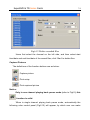
Fig4.2 Caption and General Configuration
[Dwell Interval.]: If users enable Auto Dwell function in the main interface page,
users can set the dwell time of a page here.
SuperDVR & TD Series Cards
43
[Caption]: There are four options, None, ID, Name and ID/Name for users to
select for all the channels.
‘None’ means no title;
‘ID’ means camera numbers, i.e. 1, 2, 3 and so on
‘Name’ means camera names, i.e. Cam1, Cam2 and so on
‘ID/Name’ means both camera number and camera name, i.e.
1/Cam1, 2/Cam2 and so on
[Resolution]: There are four options,320×240、352×288、352×240、640×
480 for users to select for all the channels. As the video may have interlace
lines if the users select 640x480, users may choose
for
solve this problem, but it will occupy much more CPU loading.
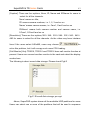
[Call Monitor] Only TD3016, TD3216 and TD3316 have call monitor function at
present. Users can connect another monitor to the card and select the display
modes here.
The following is about record data storage. Please check Fig4.3
Fig4.3 Record data storage precept
Above, SuperDVR system shows all the available HDD partitions for users.
Users can select one or more of the partitions that will be used in sequence
SuperDVR & TD Series Cards
44
from up to bottom. Please refer to chapter 3.3.8 to learn more about recycling
record.
In the following area in the basic configuration page, users can input the
computer user name and password in the relative boxes. Then when restarting
the computer system, it will access to the system with the user name and
password input in the boxes.
Fig4.4 Computer System Reboot setups
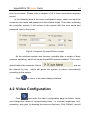
As the windows system may become unstable after a couple of days
continue operating, which will cause SuperDVR system unstable? Then users
should reboot the computer. Select
the interval by day,
and set
which will guide the system to reboot automatically
according to the setups.
Click
to return to the main display interface.
4.2 Video Configuration
Click
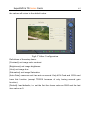
and enter the video configuration page as below. Users
can change the values of corresponding items, i.e. contrast, brightness, hue,
saturation, auto gain, by drawing the levers on the bars. Click ‘Default’, and all
SuperDVR & TD Series Cards
45
the values will return to the default value.
Fig4.5 Video Configuration
Definitions of the setup items:
[Contrast]: set image color contrast
[Brightness]: set image brightness
[Hue]: set image hue
[Saturation]: set image Saturation
[Auto Gain]: users can set it as auto or manual. Only 4CH Card and 16CH card
have this function (except TD3316 because of only having manual gain
function).
[Default]: load defaults, i.e. set the first four items value as 5000 and the last
item value as 0.
SuperDVR & TD Series Cards
46
4.3 Motion Detection configuration
Click
and enter Motion Detection Configuration page, TD3004,
TD3008, TD3016, TD3116, TD3216, TD3101, TD3104 and TD4104 as below:
Fig4.6 Motion Detection Configuration
Definition of the setup items:
[Sensitivity]: users can set motion detection sensitivity here.
[Select all]: select all the areas of the channel as detection area
[Clear]: clear all the detection areas and then users can select
customized detection areas by cursor.
SuperDVR & TD Series Cards
47
TD3316:
Fig4.7 TD3316’s configuration page
[Speed]: motion detection sensitivity.
[Block Number]: set grid’s number.
[Defaults]: set as default.
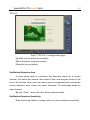
Set Motion Detection Area
In case users want to customize the detection areas for a certain
channel, first select the camera, then select ‘Clear’ and drag the cursor in the
box in the left side. Now, users can see a green box appears which shows the
motion detection area. Users can select maximum 16 customized areas for
each channel.
By click ‘Clear’, users can clear all the selected areas.
Set Motion Detection Sensitivity
Draw the bar and select a certain value for motion detection sensitivity.
SuperDVR & TD Series Cards
48
4.4 Schedule configuration
Click
and enter Schedule Configuration page as below:
Fig4.8 Schedule Configuration
Our TD series system offers the users with powerful schedule
configuration options. Every channel has three kinds of record modes, i.e.
schedule record, motion detection record and sensor alarm record. We provide
users to set schedules from Sunday to Monday separately for all of the three
record modes. Sensor alarm record mode has the highest priority among all
record modes. Here users can set schedules for it.
When users need to edit schedule for a channel, first select the camera
name in the three record modes group, and select the color bars on the right
side, then select ‘Edit’ to edit schedules. Click ‘Add’ to add schedule for a
certain channel.
Note: the added schedule should not be reduplicate to the former
settings.
SuperDVR & TD Series Cards
49
Click ‘Delete’ to delete schedule. Click ‘Clear All’ to delete all the
schedules of a certain channel.
See the Fig4.8 and learn how to edit schedules for a channel:
Fig 4.9 Edit Schedule
4.5 Motion Detection Alarm Configuration
Alarm Triggering Conditions Configuration
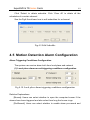
The system can receive alarm both from local place and network
(1) Local place alarm record triggering conditions configuration
Fig 4.10 Local place alarm triggering conditions configuration
Relative Explanations:
[Buzzer]: Users can select whether to open the computer buzzer if the
alarms have been triggered and also select how long the buzzer rings
[PreRecord]: Users can select whether to enable alarm pre-record and
SuperDVR & TD Series Cards
50
also pre-record time.
[Motion Holding Time]: Motion sensor may detect some movement, only if
the movement lasts for a period exceeding the default time, then the alarm
record will begin and buzzer beeps.
[Disk Shortage Alarm]: If the HDD available space is less then the set
value, the buzzer will beep if ‘Buzzer’ has been selected.
(2) Alarm output terminal in LAN
Fig 4.11 Alarm output terminal in LAN
Select ‘Remote Alarm’, and enter the area as Fig4.10 shows.
Click ‘Add’ to add alarm output terminals in LAN. Look the figure below:
SuperDVR & TD Series Cards
51
Fig 4.12 Add alarm output terminal in LAN
Find the terminal computer and click ‘OK’, and users can see the name
of the selected terminal will appear in the box as below:
Fig4.13 List of alarm output LAN terminals
Note: this function is only valid in LAN, not in Internet.
SuperDVR & TD Series Cards
52
Alarm Record
Fig4.14 Alarm trigger method configuration
Every sensor can trigger multiple channels to record. For example, if
users select CAM1, CAM4 and CAM5 for Sensor2, then once the sensor is
activated, CAM1, CAM4 and CAM5 will begin to record. Users can also select
the voltage, high and low, for alarm signals.
SuperDVR & TD Series Cards
53
Alarm Output
Fig4.15 Alarm output Configuration
[Video Loss]: Users can select alarm output for this option. For example,
users select alarm_out1 and alarm_out3 and remote alarm for video loss.
Then video loss of any channel will trigger alarm_out1, alarm_out3 to show red
light in the Alarm output status panel (refer to Fig3.6 for reference), and the
system will give out related warning message to the terminals in List of alarm
output LAN terminals (refer to Fig 4.12)
[Disk Alarm]: when HDD available space is less than the set value (refer
to Fig4.9), it will trigger selected alarms.
[Sensor 1]: If users have mounted sensors, when the sensors have
been activated, then it will trigger the selected output alarms.
[Sensor 2] – [sensor 16] TD3004 card has maximum 4 sensors, and
TD3016 and TD3116 card have maximum 16 sensors.
[Motion 1]: Users can set motion detection alarm output by different
alarms and remote alarm.
[Motion 2] - [Motion 16] 4CH card has maximum 4 motion alarms, 8CH
SuperDVR & TD Series Cards
54
card has maximum 8 motion alarms, and 16CH card has maximum 16 motion
alarms.
Notes:You should choose our additional alarm device board while using
TD3008, TD3216,TD3316,TD4104 cards for alarm I/O.
Auto Mail Function
Press
in the main interface and access to the following
Alarm Configuration area where users can make motion detection alarm
setup, sensor alarm setup and short of HDD space alarm setup. Now users
can select the above-mentioned alarms to be output by Auto Mail.
Fig 4.16 Alarm output configuration
Click ‘Auto mail’ icon on the top left side and enter the following
area to make Auto Mail setup:
SuperDVR & TD Series Cards
55
Fig 4.17 AutoMail setup interface
In this area, users can set receiver and sender’s E-mail SMTP
server and address. Note: the address of receiver and sender can be the
same.
Receiver’s E-mail Address
Sender’s E-mail Address
Sender’s SMTP Server
Fig4.18 Auto Mail Setup
E-mail Subject
Sender’s Password
Sender User Name
SuperDVR & TD Series Cards
56
To test the settings, click ‘Send Mail Test’. If all settings are okay,
message ‘Message Sent Successfully’ will pop up. If some settings are
wrong, there will pop up corresponding warning message.
Enable ‘Attachment’, then the present image when an alarm
triggered will be sent to appointed mailbox.
Channel Name
Display Time
Image format
Resolution
Fig 4.19 Attachment Setup
Note: for every alarm event, only one picture will be sent.
Users can put into a short message to make introduction of the Auto
Mail, so the receiver will know what happened.
SuperDVR & TD Series Cards
57
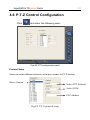
4.6 P.T.Z Control Configuration
Click
and enter the following area:
Fig4.20 PTZ configuration panel
Protocol Setup
Users can select different protocols, serial port number for P.T.Z devices.
Select Camera
Select PTZ Protocol
Select
Select Protocol
COM
PTZ Address
Fig4.21 P.T.Z protocol setup
SuperDVR & TD Series Cards
58
Relative Definitions:
[Port]: users can set serial port number
[Protocol]: P.T.Z device communication protocol
[Address]: P.T.Z device communication address
Serial ports setup
Users should firstly enable the P.T.Z control function of a certain camera
and select a port number in P.T.Z Protocol Setup (refer to Fig4.22), and then
set corresponding parameters in the area below:
Fig4.22 P.T.Z serial port setup
Relative explain:
[Port]: users can set port number
[Baud Rate]: set P.T.Z device Baud Rate, default value is 9600
[Data bits]: default value is 8
[Parity]: odd and even parity bit, default Null
[Stop Bits]: default value is 1
Notice:
Users should look into the P.T.Z device and get the Baud Rate,
SuperDVR & TD Series Cards
59
Protocol, and Address first, then set their values accordingly.
4.7 Users Configuration
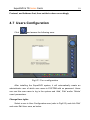
Click
and access the following area:
Fig4.23 User configuration
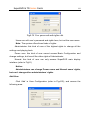
After installing the SuperDVR system, it will automatically create an
administrator user of which user name is SYSTEM with no password. Users
can use this user name to log in the system and ‘Add’, ‘Edit’ and/or ‘Delete’
users’ parameters.
Change User rights
Select a user in User Configuration area (refer to Fig4.23), and click ‘Edit’
and enter Edit User area, as below:
SuperDVR & TD Series Cards
60
Fig4.24 User password and rights edit
Users can edit user’s password and rights here, but not the user name.
Note: The system offers three kinds of rights:
Administrator: this kind of user of the highest rights to change all the
settings and playing back.
Power user: this kind of user cannot access Basic Configuration and
change settings, but has all the other rights of Administrator.
Normal: this kind of user can only access SuperDVR main display
interface (refer to Fig3.1)
Notice:
Administrators can change Power users and Normal users’ rights,
but can’t change other administrators’ rights.
Add User
Click ‘Add’ in User Configuration (refer to Fig4.25), and access the
following area:
SuperDVR & TD Series Cards
61
Fig4.25 Add user
Input user name, password, confirm password and select user rights, and
then click ’OK’.
Delete User
Select the user name in User Configuration (refer to Fig4.26), and click
‘Delete’, and confirm delete. See below:
Fig4.26 Confirm delete user
5 P.T.Z control
Click
in the SuperDVR main display interface (refer to Fig3.1)
and access to the following area:
SuperDVR & TD Series Cards
62
Fig5.1 P.T.Z control interface
Users can control P.T.Z devices by the function buttons on the right side,
see as below:
Goto Preset Point
Preset and Group
8
PAN and Tilt
Focus
Zoom In/Out
Iris
SuperDVR & TD Series Cards
63
Fig5.2 P.T.Z Control function buttons panel
In the upper circle, there are five function buttons, i.e. upward button,
downward button, leftward button, rightward button and stop button. The other
buttons are Focus buttons (+ and -), Zoom buttons (+ and -), Iris buttons (+ and
-). Click
and
to increase and decrease the corresponding values.
When users need to utilize P.T.Z control, first enter P.T.Z Control
Interface (refer to Fig5.1), and click the corresponding channel (users can see
a red fringe around the channel), then users can begin to control the enabled
P.T.Z control enabled camera.
Notice:
After pressing left mouse button on any function button in P.T.Z Control
Function Buttons Panel (refer to Fig5.2), PTZ device starts moving, when user
releases it, PTZ device stops moving.
Fig 5.3 Speed adjustment
Users can select different Pan speed, Tilt speed, Focus speed and
Zoom speed for P.T.Z devices.
[Pan Speed]: set horizontal rotating speed
[Tilt Speed]: set vertical rotating speed
[Focus Speed]: set camera focus speed
[Zoom Speed]: set zoom in/ zoom out speed
SuperDVR & TD Series Cards
Click
64
and a pop-up window will appear; users can choose
different preset or group set.
Fig 5.4 Preset and group select
Click
to set Preset point and change Preset point name. Every
Group includes multiple Preset points. In case users select preset1, preset2
and preset3 for group1, preset1, preset2 and preset3 will be automatically
accessed in sequence after users select group1 for auto scout.
SuperDVR & TD Series Cards
65
Fig 5.5 Preset
Click
, a pop-pup window as following will
appear:
[Dwell]: users can set the dwell time of a page here.
SuperDVR & TD Series Cards
66
Fig 5.6 Group configuration
6 Record Search and Playing back
Click
in the SuperDVR Main Display Interface (refer to Fig3.1)
and access to the following areas:
Fig6.1 Search and playing back Interface
This interface is divided into 4 parts, i.e. record search area, record
playing back area, record play area and other functions area.
Press
and return to the live surveillance status.
SuperDVR & TD Series Cards
67
6.1 Record Search
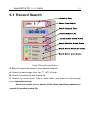
Search By Date
Record Time Display
Search Original Files
Search Backup Files
Search Manual Record Events
Search Schedule Record Events
Search Motion Detection Events
Search Sensor Alarm Events
Fig6.2 Record search area
A, B and C marks the areas of three search methods.
A: Search by date (range from Jan 1st, 1971 till now)
P
P
B: Search in backup file and original file
C: Search by record mode. This is useful when user wants to look through
some important events.
Users can select one or above of the three searching methods to
search for needed record file.
SuperDVR & TD Series Cards
68
6.2 Record Playing back and Control
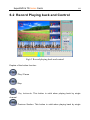
Fig6.3 Record playing back and control
Explain of the button function:
: Play / Pause
: Stop
: Play backwards. This button is valid when playing back by single
channel
: Previous Section. This button is valid when playing back by single
SuperDVR & TD Series Cards
69
channel
: Next Section. This button is valid when playing back by single channel
: Previous Frame. This button is valid when playing back by single
channel playing back pause mode
: Next Frame. This button is valid when playing back by single channel
playing back pause mode
Users can select suitable play speed in the area as below:
Fig6.4 Play Speed Controller
The following area shows the record files of different channels:
Fig6.5 Record Files Browser
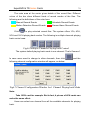
The upper bar shows the hours in a whole day. Click the bar, and it will be
magnified 10 times, therefore users can see the detailed time marks. When
searching for a certain section of the file, users can draw the scrolling-bar to
the area that most likely contains the needed section. If necessary, click the
bar once and see the magnified time marks for precise search.
The left side shows the available channels. When a certain channel has
been selected for playing back, the background color will be highlighted, or it’s
dark gray, and a tick sign will appear beside the channel title.
SuperDVR & TD Series Cards
70
The main area at the center gives details of the record files. Different
colors of the bar show different kinds of record modes of the files. The
following are the definitions of the color bars:
Manual Record Events
Schedule Record Events
Motion Detection Record Events
Sensor Alarm Record Events
Click
to play selected record files. The system offers 1Ch, 4CH,
9CH and 16CH playing back modes. The following is multiple channels playing
back control area:
Fig6.6 Multiple Channels Playing back Control
The system default playing back mode is one channel. That’s Camera1.
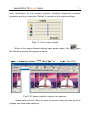
In case users need to change to other channels, then click
and the
following channel configuration window will appear, as below:
Fig6.7 Channel Configuration Window for 1 Channel Playing back Mode
Note:
Take 16CH card for example. But in fact, 4 pieces of 4CH cards can
make the same effect.
Users can select one channel from all the available channels for playing
back.
SuperDVR & TD Series Cards
71
In case user needs to play back 4 channels at the same time, then
click
, and the following channel configuration window will appear, as
below:
Fig6.8 Channel configuration dialog for 4-channel playing back mode
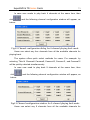
Users can select any four channels from all the available channels for
playing back.
The system offers quick select methods for users. For example: by
selecting ‘Third 4 Channels’ Camera9, Camera10, Camera11, and Camera12
will be quickly selected simultaneously.
In case user need to play back 9 channels at the same time, then
click
, and the following channel configuration window will appear, as
below:
Fig6.9 Channel configuration window for 9-channel playing back mode
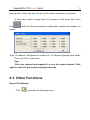
Users can select any 9 channels from all the available channels for
SuperDVR & TD Series Cards
72
playing back. Users can also use the quick select methods by the system.
In case user needs to play back 16 channels at the same time, then
click
, and the following channel configuration window will appear, as
below:
Fig6.10 channel configuration window for 16-channel playing back mode
Then click ‘OK’ to play back.
Tips:
Click any channel and magnify it to see the single channel. Click
again to return to the former playing back mode.
6.3 Other Functions
Record File Backup
Click
and enter the following menu:
SuperDVR & TD Series Cards
73
Fig6.11 Recorded files backup
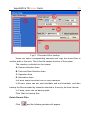
Users can select corresponding cameras and copy the record files to
another path in this area. This is the file backup function of the system.
The interface is divided into four areas:
A: Camera Selection Area
B: Time and Date Selection Area
C: Operation Area
D: Information Area
In A area, users can select one or more cameras;
In B area, users can set start time/date and end time/date, and then
backup the files recorded by channels selected in A area by the time interval;
In C area, users can set backup path
Click ‘Start’ to backup files.
Delete Record Files
Click
and the following window will appear:
SuperDVR & TD Series Cards
74
Fig6.12 Delete recorded files
Users first select the channel on the left side, and then select start
time/date and end time/date of the record files, click ‘Start’ to delete files.
Capture Pictures
The definitions of the function buttons are as below:
: Capture picture
: Print setup
: Print captured picture
Notice:
Only in one channel playing back pause mode (refer to Fig6.1) this
function is valid.
When in single channel playing back pause mode, automatically the
following color control panel (Fig6.12) will appear, by which user can make
SuperDVR & TD Series Cards
75
color rectification for the present channel, including brightness, contrast,
saturation and hue, and press ‘Default’ to recover to the original settings.
Fig6.13 Color control panel
When in the single channel playing back pause mode, click
and
the following window will appear as below:
Fig6.14 Capture multiple images in sequence
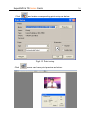
Select path and click ‘Save’ to save the picture. User can also print the
images that have been captured.
SuperDVR & TD Series Cards
Click
and make corresponding print setup as below:
Fig6.15 Print setup
Click
users can have print preview as below:
76
SuperDVR & TD Series Cards
77
Fig6.16 Print preview
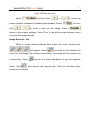
Select
and then click
or
picture upward, downward, leftward and rightward. Select
click
to move the
and then
to zoom in and out the image. Press
,
return to the original settings. Press ‘Print’ in the print preview window, users
can print the image directly.
Image Zoom In / Out
When in single channel playing back state, the zoom control icons
will appear. Select
and click on the channel will
zoom out the image. By clicking continuously, the image will be zoomed out
continuously. Select
effect. Click
and do the some operations to get the opposite
and recover the original size. Take the following three
pictures for example,
SuperDVR & TD Series Cards
Fig6.17 Example: original size
78
SuperDVR & TD Series Cards
79
Fig6.18 Example: zoomed out
Fig6.19 Example: zoomed in
7
Remote Surveillance and Playing
back
7.1 Remote Live Surveillance
Our TD series surveillance system supports Remote Surveillance
through LAN, Internet and Intranet. Simply enable web cam function of the
system on a computer which is connected to Internet, and the computer
system will become an Internet web cam server. On any other computer that
SuperDVR & TD Series Cards
80
connects to Internet or the same LAN network, input the SuperDVR server
address in IE browser, the end users can get high quality real time image from
the server and also control the P.T.Z devices.
Remote Surveillance Server Configuration
Users should firstly enable the Web Camera Services in Basic
Configuration (refer to Fig4.1) and set other settings as below:
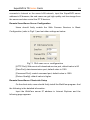
Fig7.1 Web cam server configuration
[HTTP Port]: Web service & download service port, default value is 80
[Data Port]: data transmission port, default value is 1159
[Command Port]: control command port, default value is 1259
[Picture Quality]: default value is higher
Remote Surveillance Client-side Setup
On the client-side, users should firstly install the WebCam program. And
the following is the detailed information.
Input the WebCam server IP address in Internet Explorer and the
following page appears:
SuperDVR & TD Series Cards
81
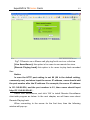
Fig7.2 Remote surveillance and playing back services selection
[Live Surveillance]: this option is for users to see remote live view.
[Remote Playing back]: this option is for users to play back recorded
files.
Notice:
In case the HTTP port setting is not 80 (80 is the default setting,
commonly use), and when input the server IP address, users should add
the port number after the IP address. For example, the server IP address
is 211.148.96.234, and the port number is 81, then users should input
http://211.148.96.234:81 .
HTU
UTH
Select Live Surveillance, and click ‘OK’ to install Remote Surveillance
client-side program as below. In the next chapter, we will learn more about
Remote Playing back.
When connecting to the server for the first time, then the following
window will pop-up:
SuperDVR & TD Series Cards
82
Fig7.3 Inquiry for installing WebCam downloading component
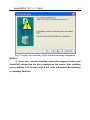
Notice:
If users have already installed client-side program before and
SuperDVR version has not been changed on the server, after inputting
server address in IE browser, Fig7.9 will come out without downloading
or installing WebCam.
SuperDVR & TD Series Cards
83
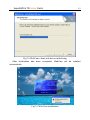
Fig7.4 WebCam client-side driver initializing
After initialization has been completed, WebCam will be installed
automatically.
Fig7.5 WebCam installation
SuperDVR & TD Series Cards
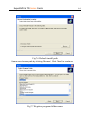
Fig7.6 Default install path
Users can choose path by clicking ‘Browse’. Click ‘Next’ to continue:
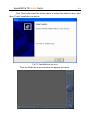
Fig7.7 Register program folder name
84
SuperDVR & TD Series Cards
85
Click ‘Next’ after input the folder name or select the default name, and
then ‘Finish’ installation as below:
Fig7.8 Installation success
Then the WebCam main interface will appear as below:
SuperDVR & TD Series Cards
86
Fig7.9 WebCam main interface
Click
and input user name and password, as below:
Fig7.10 Login webcam
Click ‘Options’ and enter the advanced setting area. Users
can modify default Server IP、Data Port and Command Port .
Note:
The default User name is SYSTEM without password. Users can
set user name and password at the server end (refer to Fig4.23).
After logging into server, you will get the first channel video from server,
and you can adjust screen mode just like SuperDVR, the bellow is the
WebCam surveillance mode interface.
SuperDVR & TD Series Cards
87
Fig7.11 WebCam surveillance state
Alarm state monitor and PTZ control are all same as SuperDVR, we
would not need to give detail explanation here.
7.2 Remote Playing back
Remote Playing back server Configuration
For using our powerful remote playing back function, users should first
enable Web Cam service and Remote Playing back Service in Basic
Configuration (refer to Fig4.1 and Fig7.12).
Fig7.12 Remote playing back service configuration
[RPB Port]: the default value is 13551
SuperDVR & TD Series Cards
88
Note:
Uses can enable remote playing back service without running the
SuperDVR. Just enter the installation folder of SuperDVR, and activate
MediaServer, users can also enable the RPB service.
Once the remote playing back service has been enabled, there will be
an icon on the taskbar to remind users the service has been activated.
Fig7.13 Remote playing back service activated
Remote Playing back Client-side Setup
Users should also first download and install playing back program. This
chapter will guide users how to make it.
Input server address in IE browser, and the following interface appears:
SuperDVR & TD Series Cards
Fig7.14 Remote surveillance and playing back services selection
Select ‘Remote playing back’ and click ‘OK’,
Fig7.15 installing remote playing back program
89
SuperDVR & TD Series Cards
90
Notice:
In case users have already installed the remote playing back
program before and SuperDVR version has not been changed, there is
no need to download and install it again, it will go to Fig7.20 directly.
After initialization has been completed, users need to install the program.
First select installation path as below:
Fig7.16 Default install path
Users can set another path by clicking ‘Browse’. Click ‘Next’ to continue:
SuperDVR & TD Series Cards
91
Fig7.17 Register program folder name
Click ‘Next’ after inputting the folder name or selecting the default name,
then the following figure appears:
Fig7.18 Playing back program installation process rate
SuperDVR & TD Series Cards
And then click ‘Finish’ to finish installation as below:
Fig7.19 Installation success
Then the playing back client-side main interface will appear as below:
Fig7.20 Remote playing back client-side main interface
Corresponding Explanations:
92
SuperDVR & TD Series Cards
93
: Log in
: Minimum
: Setup
: Exit
: Play
: Pause
: Begin / Stop record
: Slow down playing speed
: Accelerate playing speed
: Play at the original speed
Remote Playing back Configuration and Control
7.2.1.1 Setup
Before logging in the server, first click
corresponding settings,
and make
SuperDVR & TD Series Cards
94
IP address
Port No.
Record file save path
Fig7.21 Client-side configuration
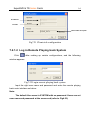
7.2.1.2 Log in Remote Playing back System
Click
after making up certain configurations, and the following
window appears.
Fig7.22 Login remote playing back system
Input the right user name and password and enter the remote playing
back main interface as below:
Note:
The default User name is SYSTEM with no password. Users can set
user name and password at the server end (refer to Fig4.23).
SuperDVR & TD Series Cards
95
Fig7.23 Remote playing back main interface
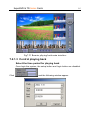
7.2.1.3 Control playing back
Select the time period for playing back
Once login the system, the setup button and login button are disabled.
Click
and the following window appear.
SuperDVR & TD Series Cards
96
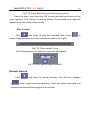
Fig7.24 Select date/time period for playing back
Select the date / time, then click ‘OK’ to save the setting and return to the
main interface. Click ‘Cancel’ to give up setting. The selected time / date will
appear at the left bottom of the screen.
Play Control
Click
and begin to play the recorded files. Press
to
pause. Users can draw the lever as below to select time to play.
Fig7.25 Time control Lever
The following area is for users to control the play speed.
Fig7.26 Play speed control module
Remote Record
Click
to
and begin to record remotely. And the icon changes
. Click it again and stop recording. Users can select save path and
compression format before logging in the system.
SuperDVR & TD Series Cards
97
7.3 Mobile Surveillance
Introduction to Mobile Surveillance
In SuperDVR system, the mobile surveillance can be realized by
connecting the mobile phone to the system. For time being, the function is
supported by Windows Mobile system and Symbian Series 60 Developer
Platform 2.0 intelligent mobile phone system. So far, the types of phones on
which the function has been tested include mini 02, Xda II, Xda Atom, pocket
PC phone edition, dopod 696, dopod 900, dopod 838, which are based on
Windows Mobile system, and Nokia 6260, Nokia N70, Nokia 3230,
Nokia6680 based on Smybian Series 60 system.
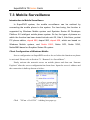
Client Configuration of Windows Mobile
Server configuration on SuperDVR needs to be set before the function on phone
is activated. Please refer to Section 7.1 “Remote Live Surveillance”.
Firstly activate the network access on mobile phone and then run “Internet
Explorer” after the server configuration has been done. Input the server’s address and
the connection is built up shown as below:
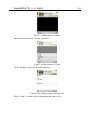
Figure7.27 connected to the server
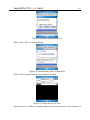
Click “PCam v1.0.6.5291”. A dialog box pops up:
SuperDVR & TD Series Cards
98
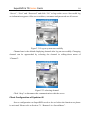
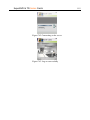
Figure7.28 downloading dialog box
Please click “Yea” to start installing:
Figure7.29 downloading status information
PCam will be opened after the download is finished:
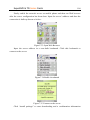
Figure7.30 Main layout of PCam
Input the server’s address, username and password respectively in the columns of
SuperDVR & TD Series Cards
99
“Server”, “User” and “Password” and click “Go” to log on the server. Successful log
on information appears if the server address, username and password are all correct.
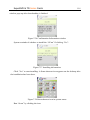
Figure7.31 Log on system successfully
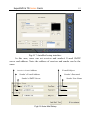
Channel one is the default displaying channel after log on successfully. Changing
channel can be approached by selecting the channel in rolling-down menu of
“Channel”:
Figure7.32 selecting channel
Click “Stop” to disconnect the communication with the server.
Client Configuration of Symbian 60
Server configuration on SuperDVR needs to be set before the function on phone
is activated. Please refer to Section 7.1 “Remote Live Surveillance”.
SuperDVR & TD Series Cards
100
Firstly enable the network access on mobile phone and then run Web browser
after the server configuration has been done. Input the server’s address and then the
connection is built up shown as below:
Figure7.33 Open Web Browser
Input the server address in a new-built bookmark. Click this bookmark to
connect to the server.
Figure7.34 Build a bookmark
Figure7.35 Connect to the server
Click “install package” to start downloading and a confirmation information
SuperDVR & TD Series Cards
101
window pops up after downloading is finished.
Figure7.36 Confirmation Information window
System reminds of whether to install the “SCam” if clicking “Yes”:
Figure7.37 Installing information
Click “Yes” to start installing. A Scam shortcut icon appears on the desktop after
the installation has been done.
Figure7.38 Scam shortcut icon in system menu
Run “Scam” by clicking the icon:
SuperDVR & TD Series Cards
Figure7.39 Main layout of Scam
Enter the main menu by clicking “Options”,
Figure7.40 Main menu of Scam
Click “Setting” to set the log-in information,
Figure7.41Configure log-in information
Click “Login” to build up the communication with server,
102
SuperDVR & TD Series Cards
Figure7.42 Connecting to the server
Figure7.43 Log on successfully
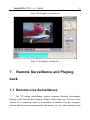
T
103
SuperDVR & TD Series Cards
104
T
Appendix
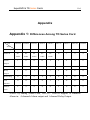
Appendix 1: Differences Among TD Series Card
Card
TD3004
TD3008
TD3016
TD3116
TD3216
TD3316
TD3101
TD3104
TD4104
4
8
16
16
16
16
1
4
4
PC
PC
PC
PC
PC
16
1
2
4
Audio
Audio
Audio
Audio
Audio
1
0
16
16
0
0
0
0
0
Alarm In
4
0
16
16
0
0
0
0
0
Relay
1
0
1
1
1
0
N
N
N
Watch Dog
N
Y
Y
Y
Y
N
N
N
N
Call
N
N
Y
N
Y
Y
N
N
N
Y
Y
Y
N
N
Y
N
N
N
Item
Video Input
Audio In
Alarm
Output
Output
Monitor
Manual
Gain
Notice: by adding Alarm Card, TD3316、TD4104 support 16 channels
Alarm in、4 channels Alarm output and 1 channel Relay Output.
SuperDVR & TD Series Cards
105
Appendix 2: Frequently Asked Questions
Appendix 2.1 About Installation
Appendix 2.1.1 Cannot Install the SuperDVR Driver
Possible causes:
(1) TD series capture card hasn’t been installed. Before installing driver,
users should install capture card hardware in the PCI slot in the
computer case.
⑵TD series capture card hasn’t been installed correctly. Please unplug
the card and install it again or change to another PCI slot.
⑶Not compatible with PC hardware.
Appendix 2.1.2 Why cannot run SuperDVR at the windows
2003 operate system?
Enabled Hardware Acceleration and DirectX Acceleration:
Hardware Acceleration: click properties of display ' s table setting
advanced “Trouble shooting”, pull the hardware acceleration spooler of the
page to full , click “ok” and Exit.
DirectX Acceleration: click “start” →“Run”, input “dxdiag” and click
“enter”, Come into the “DirectX Tools”, select “Display”, click and enabled the
three buttons “DirectDraw 、Direct3D and AGP Texture”.
Appendix 2.1.3 ‘Unspecified error’ in the End of Installation
Possible causes as below:
(1) On English version Window XP system, by using driver below
SuperDVR3.0.2, the unspecified error will appear, as the databases
SuperDVR & TD Series Cards
106
are not well compatible.
(2) Microsoft Windows system database has been destroyed. Reinstall
windows system or try to install SuperDVR driver above
SuperDVR3.1.1 to solve the problem.
(3) Relative Windows support files has been lost or been destroyed,
need to reinstall window system, or try to install SuperDVR driver
above SuperDVR3.1.1 to solve the problem.
Appendix 2.1.4 Can’t find TD series Devices in Device Manager
Enter the Device Manager and cannot find corresponding TD series
Devices, the possible cause may be as below:
(1) Windows system error. Restart computer.
(2) TD series card error. Change for a valid one.
(3) Install SuperDVR
Appendix 2.2 How to Use SuperDVR
Appendix 2.2.1 Meanings of the indicator lights
Grey- Normal state
Red—Sensor alarm
Yellow- Motion detection alarm
Blue-Video loss
Bottle Green- Manual record state
Reseda- Schedule record state
Note:
Users can refer to Fig3.6 to learn more.
Appendix 2.2.2 How does the different record mode work?
SuperDVR & TD Series Cards
107
Users can set more than one record modes in Record setup (refer to
Fig3.5), but actually, there is only one valid record mode for recording.
The priority order of the record modes is: Sensor Alarm Record >
Motion Detection Record > Manual Record > Schedule Record
Appendix 2.2.3 How to set recycling record mode on the
system?
Select ‘Recycle’ in basic configuration, refer to Fig4.1.
Users can select multiple HDD partitions to save record files. It won’t
cover former files until all the partitions’ available storage spaces are less than
100MB.
In case users haven’t enabled recycling record mode and the partitions’
storage spaces are less than 100MB, the alarm will ring and the HDD usage
indicator will turn red.
Tips:
It is recommended that install SuperDVR into the partition installed
with windows system (normally C:), and save record files in HDD
partition D:
Appendix 2.2.4 How to set auto reboot function?
In case Microsoft Windows system continuously runs for a couple of
days, the system may become unstable, therefore it’s suggested to restart the
computer every few of days.
In the basic configuration (refer to Fig4.1), input Windows user name
and password (Note: not SuperDVR user name and password), and select
time interval, then the Windows system will automatically restart according to
the set time.
In case the Windows system closed abnormally, i.e. power supply is cut
off, and when computer reboot next time, SuperDVR system will automatically
restart, and keep the settings as before.
SuperDVR & TD Series Cards
108
Tips:
Users do not need enable auto reboot function, but it’s suggested
to input the Windows user name and password in the relative area,
therefore when meeting abnormal system exit, users don’t need to be
troubled to input Windows and SuperDVR user names and passwords.
Appendix 2.2.5 How to quickly use the schedule record
function?
Press ‘Shift’ or ‘Ctrl’ key, and draw the cursor in corresponding areas to
make schedules for multiple channels.
Appendix 2.2.6 What are the byte rates for different image
qualities from highest to normal?
When on PAL system and the frame rate is 25 fps, bit rate for the
highest image quality is about 120K Byte/s, and for the lowest image quality is
about 30K Byte/s.
Appendix 2.2.7 The frame rate seems to be lower than what I
set?
There is frame loss in image switch therefore the real record frame rate
is about relatively lower than the theoretic value.
Appendix 2.2.8 Why I can’t select more channels to backup?
Please draw the mouse in the channel selection area, or utilize Shift and
Ctrl key for assistance.
Appendix 2.2.9 When should I select manual Gain Control?
In case the video signal is seriously decreasing, and the color images
turn to black and white, use manual gain control may of be helpful.
SuperDVR & TD Series Cards
109
Appendix 2.3 How to Use Network Function
Appendix 2.3.1 How to monitor on the client-side?
First enable ‘Web cameras service’ in basic configuration (refer to
Fig4.1).
Input the server Internet address in IE browser on the client-side, and
the necessary web cam driver will be downloaded automatically, then users
need to install the driver. After access the web cam main interface, click ‘login’
and input user name and password to log in the system. (Refer to Chapter 7 to
learn more)
Appendix 2.3.2 Why I can’t download the client-side software?
The possible causes:
The client-side computer hasn’t properly connected to Internet or LAN.
The server-end hasn’t enabled ‘web cameras service’
The default Http port is 80. It may be conflict with other Web servers, for
example IIS. If true, please change another port.
Windows XP SP2 will block the OCX download. You should enable
‘Internet Option Æ Security Settings Æ Download unsigned ActiveX controls’.
Appendix 2.3.3 Why can’t the server be configured at the
client-side?
The possible causes:
It can not be configured at the client-side, when the server is being
configured at the server-end.
Only the last configuration is valid if server different configuration are
deployed simultaneously.
SuperDVR & TD Series Cards
110
Appendix 2.3.4 Why I can’t see the images?
The possible causes:
The VGA card is too outdated.
Have not installed newer DirectDraw.
SuperDVR cannot run in Window 98 system.
Data port or command port is conflicts with other network services.
The user is connected to Internet through LAN, and the network
administrator hasn’t enabled corresponding data port or command port.
The client-side has installed firewall software that may stop video
transmission.
MPEG4 codec has not been installed properly, please download new
version WebCam.
Bad network speed.
Appendix 2.3.5 What should I do if the Internet speed is quite
slow?
The more channels opened, and the slower the video transmission
speed, therefore try to use one channel display mode when the network speed
is slow.
Tips:
There may be some surplus channels that have no video input.
Switching off the channels is of help to improve transmission speed. (Refer to
Basic Configuration about switching on/off channels.)
Appendix 2.3.6 Why I can’t start WebCam server or RPB server?
Possible causes:
Other software is using these ports. If so, please change WebCam ports
configuration or stop other softwares.
SuperDVR & TD Series Cards
111
Appendix 2.4 Other questions
Appendix 2.4.1 Why computer display doesn’t work, and why I can’t
access window system?
The capture card may not be well installed. Unplug the card and try it
again.
Note:
Please unplug the power plug of the computer, so as to avoid
damaging the motherboard chip set.
Appendix 2.4.2 Why I can’t find the recorded files?
HDD space is not enough.
Appendix 2.4.3 Why the screens display is unstable with
dithering and water-wave images?
Possible causes:
Camera electrical power is not enough.
There
is
external
electromagnetic
disturbance,
or
electrostatic
disturbance of camera BNC connector (It’s suggested to connect ground wire
to the connector).
User hasn’t installed necessary VGA driver.
VGA card problem. Try reinstalling the VGA card, or changing another
VGA card.
Appendix 2.4.4 Why does it delay to play back, and it’s slow to
close and open the driver?
Possible causes:
Windows system problem. Try to reboot the computer.
There are too many recorded files or too many fragments on the HDD,
SuperDVR & TD Series Cards
112
therefore it takes time to search for the files, you need delete the files that you
don’t need, or need to make disk defragmenter now.
Capture card problem.
Computer hardware system is too ouDRated.
Appendix 2.4.5 Why I can’t play back?
Windows media player has been damaged, or decoder hasn’t been
installed properly. It’s suggested to reinstall the relative software system.
Computer problem, recorded files have been damaged. It’s suggested
to fix these files using SuperAVIFix program.
Appendix 2.4.6 Why do I see some gray blocks on time progress bar area
when play back?
Possible causes:
User has deleted these recorded files.
SuperDVR has deleted recorded file when recycle option being is
chosen.
Recorded files can’t be opened because the recording is on.
Appendix 2.4.7 Why do I see some old record sections that can’t be
covered when play back?
Possible causes:
You have ever selected disk partitions different from the current.
These recorded files are being played back when covering it.
Database of recorded log was damaged.
You have ever installed SuperDVR on different directories..
Appendix 3 Quick Start For Using
SuperDVR & TD Series Cards
113
Before installing the PCI card, check PC requirements:
1. P III 800 MHZ
2. 256 MB RAM
3. Windows 2000 (SP4 min) or Win XP (SP1 min)
4. NVIDIA Video Card with 32 MB min or similar
5. DirectX 9.0 minimum
6. 80 GB HDD
Installation Instruction:
1. Insert the PCI card. (But do not connect the Camera yet.)
2. Launch windows
3. Windows will come up with Hardware wizard. Just click CANCEL
4. Put the installation CD in and open up SuperDVR folder run the "setup
file"
5. Follow the steps and in Windows XP, it will come up with a message
say this program has not passed windows logo testing, just "Continued
anyway"
6. Reboot computer once it is completed.
FOR COMPLETE INTRUCTIONS, REFER TO THE MANUAL.
Once Boot up, On Desktop there will be "SuperDVR" icon. opened well.
If this program recognizes the PCI card, program will open just fine.
Please log in first to the program.
Once your program is opened, now connect the Camera.
Done.
Troubleshooting:
Q: When opening the SuperDVR program, it says "Can't find card"
A: Reboot one more time. If still same problem, click Start – Program –
SuperDVR & TD Series Cards
114
SuperDVR – Install and then Uninstall. Reboot computer. After reboot,
go back to start-program-SuperDVR-install. Now click on INSTALL to
reinstall driver. Then Reboot.
If for some reason still “cant find card”, uninstall driver again. Shut down
computer. Move PCI Card to another slot. Reboot. And CANCEL when
windows detect it.
Then reinstall driver by going to start-program-SuperDVR-install.
FOR OTHER SETTINGs IN THE PROGRAM PLEASE READ THE
MANUAL.
Q: How to setup the web client to monitor from Internet?
A:
-
On Main Computer where the DVR card installed:
-
Make sure the computer connected to Internet. DSL or Cable
Modem preferably.
Find out your IP address. You can go to this link to find the IP
address http://lawrencegoetz.com/programs/ipinfo/
Open up the SuperDVR program and go to basic configuration.
Check and ENABLE Web Camera Service and Remote Play
Back Service.
Make Note on Data Port, Command Port and RPB port.
-
HTU
-
-
UTH
NOTE: IF YOU ARE CONNECTING TO INTERNET USING
ROUTER, YOU NEED TO configure THE SETUP OF THE
ROUTER AND DO THE PORT FORWARDING. PORTS THAT
NEED TO BE FORWARDED: 80, 1159, 1259 AND 13551. CHECK
YOUR ROUTER MANUAL ON HOW TO SETUP THAT.
SuperDVR & TD Series Cards
-
115
On Remote Client Computer:
- Minimum Requirement for the client computer:
1. P III 800 MHZ
2. 256 MB RAM
3. Windows 2000 (SP4 min) or Win XP (SP1 min)
4. NVIDIA Video Card with 32 MB min or similar
5. DirectX 9.0 minimum
6. 80 GB HDD
- - Open up Internet Explorer.
- If you are running XP with SP2 do the following: on Internet
explorer, click on TOOLS and Internet Option.
Security Tab, Custom
Level, and “ ENABLE DOWNLOAD UNSIGNED ACTIVEX
CONTROLS”
- In the column of the Internet explorer, type in the IP address of
Main Computer
- Click OK on Live Surveillance. This will download the webcam
program. And then you can download Remote Playing back as
well.
- On Desktop now you should see WEBCAM and REMOTE
PLAYING BACK icon.
- Open up webcam, click on KEY symbol icon, user name: system.
Password blank unless you setup a password within the main
computer. Server: this the IP address of the main computer. Data
port: 1159 and Command port: 1259. Click OK. Now you should
be able to view the live video from main computer.
- To Play Back the VIDEO that has been recorded in Main
Computer, Open up REMOTE PLAYING BACK.
- Click on CONFIG. Remote server: the IP address of main
SuperDVR & TD Series Cards
116
computer. IP port: 13551. OK
- Click LOGIN. OK. Now you should be able to play back the
recorded video from main computer.
FOR MORE DETAILS INFO: READ THE MANUAL.
Appendix 4 Function Tree
SuperDVR & TD Series Cards
117
SuperDVR
Account
Login
Logout
Live
Screen
Single Screen
4 Screen
6 Screen
8 Screen
9 Screen
13 Screen
16 Screen
Full Screen
Next Page
AutoDwell
Disk Space
Record Status
Alarm State
Minimize
Config
See Next Page
Search&Play
Search
Date
Time
Events
Play Control
Play/Pause
Reverse/Pause
Stop
Previous Frame
Next Frame
Previous Section
Next Section
Audio Mute
Audio Soudness
Screen
Single Screen
4 Screen
9 Screen
16 Screen
Zoom
Capture
Print Setup
Print
Backup
Select Cameras
Time Range
Target Device
Target Path
Attach PlayFile
Delete
Select Cameras
Time Range
PTZ Control
Select Camera
Move Control
Left
Right
Up
Down
Stop
Zoom Control
Zoom Out
Zoom In
Focus Control
Far
Near
Iris Control
Open
Close
Speed Adjust
Pan Speed Adjust
Tilt Speed Adjust
Focus Speed
Zoom Speed
Preset Points Config
Preset Points Set
Select Point
Name
Save
Preset Group Set
Select Group
Group Name Edit
Choose Group Points
Dwell Interval
Save
Goto Preset Point
Select Preset Point
Select Group
SuperDVR & TD Series Cards
118
Conf i g
Basic Config
Video ProcAmp
System Config
Caption Mode
Interval of AutoDwell
CallMonitor Mode
Resolution
DeInterlace
Storage Disk
Select Disk
Recycle
Windows Auto Login
Select Camera
Brightness
Contrast
Hue
Saturation
Gain Mode
Auto Gain Enabled
Gain Value
Enable
Interval
Time Set
Live Audio
Audio Config
Select Channel
Gain Adjust
Network Service
Http Port
WebCam Service
Enable
Data Port
Command Port
RPB Service
Enable
RPB Port
Video Quality
Camera Config
Switch
Name
Time Stamp
Record Mode
Schedule
Manual
Motion Dectect
Sensor
Record Quality
Record Frame Rate
Schedule
Manual
Motion Dectect
Sensor
Security
System Config
Buzzer
Disk Shortage
Motion Hold Time
Sensor Hold Time
Prerecord Enable
Prerecord Time
Remote Alarm
Schedule Config
Select Schedule Type
UserName
Password
Auto Reboot
Alarm Config
Schedule record
Motion Detect
Sensor Alarm
Alarm Output
Schedule Operate
Select Schedule
Add
Edit
Delete
Motion Detect Config
Select Camera
Motion Area
Sensitivity
Enable
PC List
Sensor Alarm Config
Output Device Config
AutoMail Config
SMTP Server
User Name
Email From
Password
Send To
Subject
Message Body
Attach Picture
Send Mail Test
PTZ Config
Serial Port
Port Index
Baud rate
Data bits
Parity bits
Stop bits
Protocol
Select Camera
Enable
Protocol Type
Address
Authorization
Add User
Edit Rights
Delete User
SuperDVR & TD Series Cards
WebCam
Select Server
Login
UserName
Password
Screen
Single Screen
4 Screen
6 Screen
8 Screen
9 Screen
13 Screen
16 Screen
Next Page
Minimize
PTZ Control
Select Camera
Pan
Tilt
Focus
Zoom
Iris
Stop
Exit
119
SuperDVR & TD Series Cards
Remote Playback
Login Server
UserName
Password
Config
Select Server
Server IP or name
IP Port
Record
Save Path
Frame Speed
Advance
Compressor
Quality
Screen Mode Choice
Single
Screen 4
Screen 9
Screen 16
Date & Time
Date
Start Time
Stop Time
Play Control
Play Speed
Speed Up
Speed Down
Original
Play
Pause
Drag
Record
Event Browse
BandWidth Monitor
Minimize
Exit
120