1
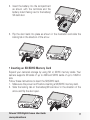
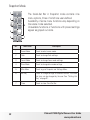
2. Insert the battery into the compartment
as shown with the terminals and the
battery indent facing next to the battery/
SD card door.
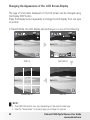
3. Flip the door back into place as shown in the illustration and slide the
locking tab in the direction of the arrow.
• Inserting an SD/SDHC Memory Card
Expand your camera’s storage by using SD or SDHC memory cards. Your
camera supports SD cards of up to 4GB and SDHC cards of up to 16GB in
size.
Follow these instructions to insert the SD/SDHC card.
1. Make sure the power is off before inserting a SD/SDHC memory card.
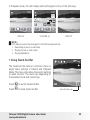
2. Slide the locking tab on the battery/SD card door in the direction of the
arrow and flip the door open.
Polaroid t1035 Digital Camera User Guide
www.polaroid.com
17