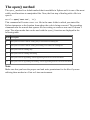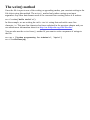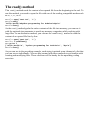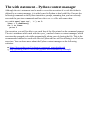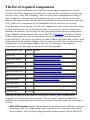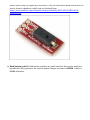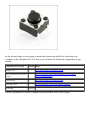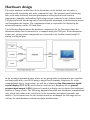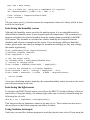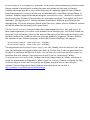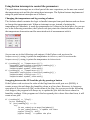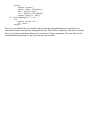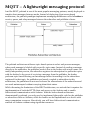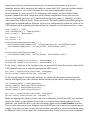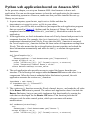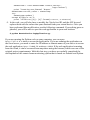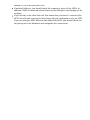
1
PythonProgrammingforArduino TableofContents PythonProgrammingforArduino Credits AbouttheAuthor AbouttheReviewers www.PacktPub.com Supportfiles,eBooks,discountoffers,andmore Whysubscribe? FreeaccessforPacktaccountholders Preface Whatthisbookcovers Whatyouneedforthisbook Whothisbookisfor Conventions Readerfeedback Customersupport Downloadingtheexamplecode Downloadingthecolorimagesofthisbook Errata Piracy Questions 1.GettingStartedwithPythonandArduino IntroductiontoPython WhyweusePython Whendoweuseotherlanguages InstallingPythonandSetuptools InstallingPython Linux Ubuntu FedoraandRedHat Windows MacOSX InstallingSetuptools Linux Windows MacOSX Installingpip InstallingPythonpackages ThefundamentalsofPythonprogramming Pythonoperatorsandbuilt-intypes Operators Built-intypes Datastructures Lists Tuples Sets Dictionaries Controllingtheflowofyourprogram Theifstatement Theforstatement Thewhilestatement Built-infunctions Conversions Mathoperations Stringoperations IntroductiontoArduino History WhyArduino? Arduinovariants TheArduinoUnoboard InstallingtheArduinoIDE Linux MacOSX Windows GettingstartedwiththeArduinoIDE WhatisanArduinosketch? Workingwithlibraries UsingArduinoexamples Compilinganduploadingsketches UsingtheSerialMonitorwindow IntroductiontoArduinoprogramming Comments Variables Constants Datatypes Conversions Functionsandstatements Thesetup()function Theloop()function ThepinMode()function Workingwithpins Statements Summary 2.WorkingwiththeFirmataProtocolandthepySerialLibrary ConnectingtheArduinoboard Linux MacOSX Windows Troubleshooting IntroducingtheFirmataprotocol WhatisFirmata? UploadingaFirmatasketchtotheArduinoboard TestingtheFirmataprotocol GettingstartedwithpySerial InstallingpySerial PlayingwithapySerialexample BridgingpySerialandFirmata Summary 3.TheFirstProject–Motion-triggeredLEDs Motion-triggeredLEDs–theprojectdescription Theprojectgoal Thelistofcomponents Thesoftwareflowdesign Thehardwaresystemdesign IntroducingFritzing–ahardwareprototypingsoftware Workingwiththebreadboard Designingthehardwareprototype Testinghardwareconnections Method1–usingastandaloneArduinosketch Theprojectsetup TheArduinosketch Thesetup()function Theloop()function WorkingwithcustomArduinofunctions Testing Troubleshooting Method2–usingPythonandFirmata Theprojectsetup WorkingwithPythonexecutablefiles ThePythoncode WorkingwithpyFirmatamethods WorkingwithPythonfunctions Testing Troubleshooting Summary 4.DivingintoPython-ArduinoPrototyping Prototyping WorkingwithpyFirmatamethods SettinguptheArduinoboard ConfiguringArduinopins Thedirectmethod Assigningpinmodes Workingwithpins Reportingdata Manualoperations Thewrite()method Theread()method Additionalfunctions Upcomingfunctions PrototypingtemplatesusingFirmata Potentiometer–continuousobservationfromananaloginput Connections ThePythoncode Buzzer–generatingsoundalarmpattern Connections ThePythoncode DCmotor–controllingmotorspeedusingPWM Connections ThePythoncode LED–controllingLEDbrightnessusingPWM Connections ThePythoncode Servomotor–movingthemotortoacertainangle Connections ThePythoncode PrototypingwiththeI2Cprotocol ArduinoexamplesforI2Cinterfacing ArduinocodingfortheTMP102temperaturesensor ArduinocodingfortheBH1750lightsensor PyMataforquickI2Cprototyping InterfacingTMP102usingPyMata InterfacingBH1750usingPyMata UsefulpySerialcommands Connectingwiththeserialport Readingalinefromtheport Flushingtheporttoavoidbufferoverflow Closingtheport Summary 5.WorkingwiththePythonGUI LearningTkinterforGUIdesign YourfirstPythonGUIprogram TherootwidgetTk()andthetop-levelmethods TheLabel()widget ThePackgeometrymanager TheButton()widget–interfacingGUIwithArduinoandLEDs TheEntry()widget–providingmanualuserinputs TheScale()widget–adjustingthebrightnessofanLED TheGridgeometrymanager TheCheckbutton()widget–selectingLEDs TheLabel()widget–monitoringI/Opins RemakingyourfirstPython-ArduinoprojectwithaGUI Summary 6.StoringandPlottingArduinoData WorkingwithfilesinPython Theopen()method Thewrite()method Theclose()method Theread()method Thewithstatement–Pythoncontextmanager UsingCSVfilestostoredata StoringArduinodatainaCSVfile Gettingstartedwithmatplotlib ConfiguringmatplotlibonWindows ConfiguringmatplotlibonMacOSX Upgradingmatplotlib Troubleshootinginstallationerrors SettingupmatplotlibonUbuntu Plottingrandomnumbersusingmatplotlib PlottingdatafromaCSVfile Plottingreal-timeArduinodata IntegratingplotsintheTkinterwindow Summary 7.TheMidtermProject–aPortableDIYThermostat Thermostat–theprojectdescription Projectbackground Projectgoalsandstages Thelistofrequiredcomponents Hardwaredesign Softwareflowforuserexperiencedesign Stage1–prototypingthethermostat TheArduinosketchforthethermostat Interfacingthetemperaturesensor Interfacingthehumiditysensor Interfacingthelightsensor UsingArduinointerrupts DesigningtheGUIandplotinPython UsingpySerialtostreamsensordatainyourPythonprogram DesigningtheGUIusingTkinter Plottingpercentagehumidityusingmatplotlib Usingbuttoninterruptstocontroltheparameters Changingthetemperatureunitbypressingabutton SwappingbetweentheGUIandtheplotbypressingabutton Troubleshooting Stage2–usingaRaspberryPiforthedeployablethermostat WhatisaRaspberryPi? InstallingtheoperatingsystemandconfiguringtheRaspberryPi WhatdoyouneedtobeginusingtheRaspberryPi? PreparinganSDcard TheRaspberryPisetupprocess UsingaportableTFTLCDdisplaywiththeRaspberryPi ConnectingtheTFTLCDusingGPIO ConfiguringtheTFTLCDwiththeRaspberryPiOS OptimizingtheGUIfortheTFTLCDscreen Troubleshooting Summary 8.IntroductiontoArduinoNetworking Arduinoandthecomputernetworking Networkingfundamentals ObtainingtheIPaddressofyourcomputer Windows MacOSX Linux NetworkingextensionsforArduino ArduinoEthernetShield ArduinoWiFiShield ArduinoYún ArduinoEthernetlibrary TheEthernetclass TheIPAddressclass TheServerclass TheClientclass Exercise1–awebserver,yourfirstArduinonetworkprogram DevelopingwebapplicationsusingPython Pythonwebframework–web.py Installingweb.py YourfirstPythonwebapplication Essentialweb.pyconceptsfordevelopingcomplexwebapplications HandlingURLs TheGETandPOSTmethods Templates Forms Exercise2–playingwithweb.pyconceptsusingtheArduinoserialinterface RESTfulwebapplicationswithArduinoandPython DesigningREST-basedArduinoapplications WorkingwiththeGETrequestfromArduino TheArduinocodetogeneratetheGETrequest TheHTTPserverusingweb.pytohandletheGETrequest WorkingwiththePOSTrequestfromArduino TheArduinocodetogeneratethePOSTrequest TheHTTPserverusingweb.pytohandlethePOSTrequest Exercise3–aRESTfulArduinowebapplication TheArduinosketchfortheexercise Theweb.pyapplicationtosupportRESTrequests Whydoweneedaresource-constrainedmessagingprotocol? MQTT–Alightweightmessagingprotocol IntroductiontoMQTT Mosquitto–anopensourceMQTTbroker SettingupMosquitto GettingfamiliarwithMosquitto GettingstartedwithMQTTonArduinoandPython MQTTonArduinousingthePubSubClientlibrary InstallingthePubSubClientlibrary DevelopingtheArduinoMQTTclient MQTTonPythonusingpaho-mqtt Installingpaho-mqtt Usingthepaho-mqttPythonlibrary Exercise4–MQTTGatewayforArduino DevelopingArduinoastheMQTTclient DevelopingtheMQTTGatewayusingMosquitto ExtendingtheMQTTGatewayusingweb.py TestingyourMosquittoGateway Summary 9.ArduinoandtheInternetofThings GettingstartedwiththeIoT ArchitectureofIoTwebapplications Hardwaredesign TheIoTcloudplatforms Xively–acloudplatformfortheIoT SettingupanaccountonXively WorkingwithXively AlternativeIoTplatforms ThingSpeak Carriots DevelopingcloudapplicationsusingPythonandXively InterfacingArduinowithXively UploadingArduinodatatoXively DownloadingdatatoArduinofromXively AdvancedcodetouploadanddownloaddatausingArduino Python–uploadingdatatoXively Thebasicmethodforsendingdata Uploadingdatausingawebinterfacebasedonweb.py Python–downloadingdatafromXively ThebasicmethodforretrievingdatafromXively Retrievingdatafromtheweb.pywebinterface Triggers–customnotificationsfromXively YourowncloudplatformfortheIoT GettingfamiliarwiththeAmazonAWSplatform SettingupanaccountonAWS CreatingavirtualinstanceontheAWSEC2service Loggingintoyourvirtualinstance CreatinganIoTplatformontheEC2instance InstallingthenecessarypackagesonAWS Configuringthesecurityofthevirtualinstance Testingyourcloudplatform TestingtheMosquittoservice Configuringandtestingbasicsecurity Uploadingandtestingaprojectontheinstance Summary 10.TheFinalProject–aRemoteHomeMonitoringSystem ThedesignmethodologyforIoTprojects Projectoverview Theprojectgoals Theprojectrequirements Designingsystemarchitecture Themonitoringstation Thecontrolcenter Thecloudservices DefiningUXflow Thelistofrequiredcomponents Definingtheprojectdevelopmentstages Stage1–amonitoringstationusingArduino Designingthemonitoringstation TheArduinosketchforthemonitoringstation Publishingsensorinformation Subscribingtoactuatoractions Programminganinterrupttohandlethepressofabutton Testing Stage2–acontrolcenterusingPythonandtheRaspberryPi Thecontrolcenterarchitecture ThePythoncodeforthecontrolcenter CreatingtheGUIusingTkinter CommunicatingwiththeMosquittobroker Calculatingthesystem’sstatusandsituationawareness CommunicatingwithXively Checkingandupdatingthebuzzer’sstatus Testingthecontrolcenterwiththemonitoringstation SettingupthecontrolcenterontheRaspberryPi Stage3–awebapplicationusingXively,Python,andAmazoncloudservice Architectureofthecloudservices PythonwebapplicationhostedonAmazonAWS Testingthewebapplication Testingandtroubleshooting Extendingyourremotehomemonitoringsystem Utilizingmultiplemonitoringstations Extendingsensorycapabilities ImprovingUX Expandingcloud-basedfeatures Improvingintelligenceforsituationawareness Creatinganenclosureforhardwarecomponents Summary 11.Tweet-a-PowerStrip Projectoverview Projectrequirements Systemarchitecture Requiredhardwarecomponents Relays PowerSwitchTail Userexperienceflow Developmentanddeploymentstages Stage1–asmartpowerstripwithArduinoandrelays Hardwaredesign TheArduinocode Stage2–thePythoncodetoprocesstweets Pythonsoftwareflow SettinguptheTwitterapplication ThePythoncode Testingandtroubleshooting Extendingtheprojectwithadditionalfeatures Summary Index PythonProgrammingforArduino PythonProgrammingforArduino Copyright©2015PacktPublishing Allrightsreserved.Nopartofthisbookmaybereproduced,storedinaretrievalsystem, ortransmittedinanyformorbyanymeans,withoutthepriorwrittenpermissionofthe publisher,exceptinthecaseofbriefquotationsembeddedincriticalarticlesorreviews. Everyefforthasbeenmadeinthepreparationofthisbooktoensuretheaccuracyofthe informationpresented.However,theinformationcontainedinthisbookissoldwithout warranty,eitherexpressorimplied.Neithertheauthor,norPacktPublishing,andits dealersanddistributorswillbeheldliableforanydamagescausedorallegedtobecaused directlyorindirectlybythisbook. PacktPublishinghasendeavoredtoprovidetrademarkinformationaboutallofthe companiesandproductsmentionedinthisbookbytheappropriateuseofcapitals. However,PacktPublishingcannotguaranteetheaccuracyofthisinformation. Firstpublished:February2015 Productionreference:1230215 PublishedbyPacktPublishingLtd. LiveryPlace 35LiveryStreet BirminghamB32PB,UK. ISBN978-1-78328-593-8 www.packtpub.com Credits Author PratikDesai Reviewers JuanRamónGonzález MarcoSchwartz JoshVanderLinden CommissioningEditor SaleemAhmed AcquisitionEditor JamesJones ContentDevelopmentEditor PriyankaShah TechnicalEditor AnkitaThakur CopyEditors JasmineNadar VikrantPhadke ProjectCoordinator MiltonDsouza Proofreaders SafisEditing MariaGould AmeeshaGreen PaulHindle Indexer MariammalChettiyar Graphics AbhinashSahu ProductionCoordinator ManuJoseph CoverWork ManuJoseph AbouttheAuthor PratikDesai,PhD,isthePrincipalScientistandcofounderofaconnecteddevicesstartup,ImbueLabs,wherehedevelopsscalableandinteroperablearchitectureforwearable devicesandInternetofThings(IoT)platformsduringtheday.Atnight,heleadsthe developmentofanopensourceIoTinitiative,theSemanticRepositoryofThings.Pratik has8yearsofresearchanddesignexperienceinvariouslayersoftheIoTandits predecessortechnologiessuchaswirelesssensornetworks,RFID,andmachine-tomachine(M2M)communication.HisdomainsofexpertisearetheIoT,SemanticWeb, machinelearning,robotics,andartificialintelligence. PratikcompletedhisMSandPhDfromWrightStateUniversity,Ohio,andcollaborated withtheOhioCenterofExcellenceinKnowledge-enabledComputing(Kno.e.sis)during hisdoctoralresearch.Hisdoctoralresearchwasfocusedondevelopingsituation awarenessframeworksforIoTdevices,enablingsemanticweb-basedreasoningand handlingtheuncertaintyassociatedwithsensordata. Inhispersonallife,PratikisanavidDIYjunkieandlikestogethands-onexperienceon upcomingtechnologies.Heextensivelyexpresseshisviewsontechnologyandshares interestingdevelopmentsonTwitter(@chheplo). Iwouldliketodedicatethebooktomyparents,whowereresponsibleforbuildingthe foundationofwhatIamtoday.Thebookwouldnothavebeenpossiblewithoutthe patience,support,andencouragementfrommybelovedwife,Sachi.Iwouldalsoliketo thankherforlandingherphotographyskillsthatwereusedindevelopmentofsomeofthe importantimagesusedinthebook.Iwouldalsoliketoextendmysinceregratitudetothe editorsfortheirvaluablefeedbacks. AbouttheReviewers JuanRamónGonzálezisatechnicalengineerofcomputersystemsandlivesinSeville (Andalusia,Spain).Forthepast9years,hehasbeenworkingonfreesoftware-based projectsfortheregionalMinistryofEducationbyusingPython,C++,andJavaScript, amongotherprogramminglanguages. HeisoneofthemainmembersoftheCGAprojectinAndalusia(CentrodeGestión AvanzadoorAdvancedManagementCenter),whichmanagesanetworkwithmorethan 4,000serverswithDebianand500,000clientcomputersthatrunGuadalinex,a customizedUbuntu-basedoperatingsystemforAndalusianschools. Asasoftwaredeveloperwhohasapassionforelectronicsandastronomy,hestartedone ofthefirstprojectstocontrolatelescopewiththeArduinomicrocontrollerbyusinga computerwiththeStellariumsoftwareandadriverdevelopedwithPythonto communicatewiththetelescope.Thisproject’ssourcesarepublishedonthecollaborative platformGitHub.Youcanseethewholecodeandtheprototypeat https://github.com/juanrmn/Arduino-Telescope-Control. MarcoSchwartzisanelectricalengineer,entrepreneur,andblogger.Hehasamaster’s degreeinelectricalengineeringandcomputersciencefromSupélec,France,anda master’sdegreeinmicroengineeringfromEPFL,Switzerland. Marcohasmorethan5yearsofexperienceworkinginthedomainofelectrical engineering.Hisinterestsgravitatearoundelectronics,homeautomation,theArduinoand theRaspberryPiplatforms,opensourcehardwareprojects,and3Dprinting. HerunsseveralwebsitesaroundArduino,includingtheOpenHomeAutomationwebsite thatisdedicatedtobuildinghomeautomationsystemsusingopensourcehardware. MarcohaswrittenabookonhomeautomationandArduinocalledArduinoHome AutomationProjects,PacktPublishing.Hehasalsowrittenabookonhowtobuild InternetofThingsprojectswithArduinocalledInternetofThingswiththeArduinoYun, PacktPublishing. JoshVanderLindenisalifelongtechnologyenthusiastwhohasbeenprogrammingsince theageof10.Heenjoyslearningandbecomingproficientwithnewtechnologies.Hehas designedandbuiltsoftware,rangingfromsimpleshellscriptstoscalablebackendserver softwaretointeractivewebanddesktopuserinterfaces.Joshhasbeenwritingsoftware professionallyusingPythonsince2007,andhehasbeenbuildingpersonalArduino-based projectssince2010. www.PacktPub.com Supportfiles,eBooks,discountoffers,and more Forsupportfilesanddownloadsrelatedtoyourbook,pleasevisitwww.PacktPub.com. DidyouknowthatPacktofferseBookversionsofeverybookpublished,withPDFand ePubfilesavailable?YoucanupgradetotheeBookversionatwww.PacktPub.comandas aprintbookcustomer,youareentitledtoadiscountontheeBookcopy.Getintouchwith usat<[email protected]>formoredetails. Atwww.PacktPub.com,youcanalsoreadacollectionoffreetechnicalarticles,signup forarangeoffreenewslettersandreceiveexclusivediscountsandoffersonPacktbooks andeBooks. https://www2.packtpub.com/books/subscription/packtlib DoyouneedinstantsolutionstoyourITquestions?PacktLibisPackt’sonlinedigital booklibrary.Here,youcansearch,access,andreadPackt’sentirelibraryofbooks. Whysubscribe? FullysearchableacrosseverybookpublishedbyPackt Copyandpaste,print,andbookmarkcontent Ondemandandaccessibleviaawebbrowser FreeaccessforPacktaccountholders IfyouhaveanaccountwithPacktatwww.PacktPub.com,youcanusethistoaccess PacktLibtodayandview9entirelyfreebooks.Simplyuseyourlogincredentialsfor immediateaccess. Preface IntheeraoftheInternetofThings(IoT),ithasbecomeveryimportanttorapidlydevelop andtestprototypesofyourhardwareproductswhilealsoaugmentingthemusingsoftware features.TheArduinomovementhasbeenthefront-runnerinthishardwarerevolution, andthroughitssimpleboarddesignsithasmadeitconvenientforanyonetodevelopDIY hardwareprojects.Thegreatamountofsupportthatisavailablethroughtheopensource communityhasmadethedifficultiesthatareassociatedwiththedevelopmentofa hardwareprototypeathingofthepast.Onthesoftwarefront,Pythonhasbeenthecrown jeweloftheopensourcesoftwarecommunityforasignificantamountoftime.Pythonis supportedbyahugeamountoflibrariestodevelopvariousfeatures,suchasgraphicaluser interfaces,plots,messaging,andcloudapplications. Thisbooktriestobringyouthebestofbothhardwareandsoftwareworldstohelpyou developexcitingprojectsusingArduinoandPython.Themaingoalofthebookistoassist thereadertosolvethedifficultproblemofinterfacingArduinohardwarewithPython libraries.Meanwhile,asasecondarygoal,thebookalsoprovidesyouwithexercisesand projectsthatcanbeusedasblueprintsforyourfutureIoTprojects. Thebookhasbeendesignedinsuchawaythateverysuccessivechapterhasincreasing complexityintermsofmaterialthatiscoveredandalsomorepracticalvalue.Thebook hasthreeconceptualsections(gettingstarted,implementingPythonfeatures,andnetwork connectivity)andeachsectionconcludeswithapracticalprojectthatintegratesthe conceptsthatyoulearnedinthatsection. ThetheoreticalconceptsandexercisescoveredinthebookaremeanttogiveyouhandsonexperiencewithPython-Arduinoprogramming,whiletheprojectsaredesignedtoteach youhardwareprototypingmethodologiesforyourfutureprojects.However,youwillstill needextensiveexpertiseineachdomaintodevelopacommercialproduct.Intheend,I hopetoprovideyouwithsufficientknowledgetojump-startyourjourneyinthisnovel domainoftheIoT. Whatthisbookcovers Chapter1,GettingStartedwithPythonandArduino,introducesthefundamentalsofthe ArduinoandPythonplatforms.Italsoprovidescomprehensiveinstallationand configurationstepstosetupthenecessarysoftwaretools. Chapter2,WorkingwiththeFirmataProtocolandthepySerialLibrary,discussesthe interfacingoftheArduinohardwarewiththePythonprogrambyexplainingtheFirmata protocolandtheserialinterfacinglibrary. Chapter3,TheFirstProject–Motion-triggeredLEDs,providescomprehensiveguidelines tocreateyourfirstPython-Arduinoproject,whichcontrolsdifferentLEDsaccordingto thedetectedmotion. Chapter4,DivingintoPython-ArduinoPrototyping,takesyoubeyondthebasic prototypingthatweperformedinthepreviousprojectandprovidesanin-depthdescription ofprototypingmethods,withappropriateexamples. Chapter5,WorkingwiththePythonGUI,beginsourtwo-chapterjourneyintodeveloping graphicalinterfacesusingPython.ThechapterintroducestheTkinterlibrary,which providesthegraphicalfrontendfortheArduinohardware. Chapter6,StoringandPlottingArduinoData,coversPythonlibraries,CSVand matplotlibthatareusedtostoreandplotthesensordatarespectively. Chapter7,TheMidtermProject–aPortableDIYThermostat,containsapracticaland deployableprojectthatutilizesthematerialthatwecoveredinpreviouschapterssuchas serialinterfacing,agraphicalfrontend,andaplotofthesensordata. Chapter8,IntroductiontoArduinoNetworking,introducescomputernetworkingfor ArduinowhileutilizingvariousprotocolstoestablishEthernetcommunicationbetween thePythonprogramandArduino.Thischapteralsoexploresamessagingprotocolcalled MQTT,withbasicexamples.ThisprotocolisspecificallydesignedforresourceconstrainedhardwaredevicessuchasArduino. Chapter9,ArduinoandtheInternetofThings,discussesthedomainoftheIoTwhile providingstep-by-stepguidelinestodevelopcloud-basedIoTapplications. Chapter10,TheFinalProject–aRemoteHomeMonitoringSystem,teachesadesign methodologyforthehardwareproduct,followedbyacomprehensiveprojectthat interfacesthecloudplatformwithArduinoandPython. Chapter11,Tweet-a-PowerStrip,containsanotherIoTprojectthatisbasedoneverything thatwelearnedinthebook.Theprojectexploresauniqueapproachtointegrateasocial network,Twitter,withthePython-Arduinoapplication. Whatyouneedforthisbook Tobeginwith,youwilljustneedacomputerwithoneofthesupportedoperatingsystems, Windows,MacOSX,orLinux.Thebookrequiresvariousadditionalhardware componentsandsoftwaretoolstoimplementprogrammingexercisesandprojects.Alist ofrequiredhardwarecomponentsandlocationstoobtainthesecomponentsareincluded ineachchapter. Intermsofsoftware,thebookitselfprovidesstep-by-stepguidelinestoinstalland configureallthenecessarysoftwarepackagesanddependentlibrariesthatareutilized throughoutthebook.Notethattheexercisesandprojectsincludedinthebookare designedforPython2.7andtheyhavenotbeentestedagainstPython3+. Whothisbookisfor Ifyouareastudent,ahobbyist,adeveloper,oradesignerwithlittleornoprogramming andhardwareprototypingexperienceandyouwanttodevelopIoTapplications,thenthis bookisforyou. Ifyouareasoftwaredeveloperandinterestedingainingexperiencewithhardware domain,thisbookwillhelpyoutogetstarted.Ifyouareahardwareengineerwhowants tolearnadvancesoftwarefeatures,thisbookcanhelpyoutobeginwith. Conventions Inthisbook,youwillfindanumberoftextstylesthatdistinguishbetweendifferentkinds ofinformation.Herearesomeexamplesofthesestylesandanexplanationoftheir meaning. Codewordsintext,databasetablenames,foldernames,filenames,fileextensions, pathnames,dummyURLs,userinput,andTwitterhandlesareshownasfollows:“While assigningthevaluetotheweightvariable,wedidn’tspecifythedatatype,butthePython interpreterassigneditasanintegertype,int.” Ablockofcodeissetasfollows: /* Blink TurnsonanLEDonforonesecond,thenoffforonesecond,repeatedly. Thisexamplecodeisinthepublicdomain. */ //Pin13hasanLEDconnectedonmostArduinoboards. //giveitaname: intled=13; //thesetuproutinerunsoncewhenyoupressreset: voidsetup(){ //initializethedigitalpinasanoutput. pinMode(led,OUTPUT); } //thelooproutinerunsoverandoveragainforever: voidloop(){ digitalWrite(led,HIGH);//turntheLEDon(HIGHisthevoltagelevel) delay(1000);//waitforasecond digitalWrite(led,LOW);//turntheLEDoffbymakingthevoltageLOW delay(1000);//waitforasecond } Anycommand-lineinputoroutputiswrittenasfollows: $sudoeasy_installpip Newtermsandimportantwordsareshowninbold.Wordsthatyouseeonthescreen, forexample,inmenusordialogboxes,appearinthetextlikethis:“IntheSystem window,clickontheAdvancedsystemsettingsintheleftnavigationbartoopena windowcalledSystemProperties.” Note Warningsorimportantnotesappearinaboxlikethis. Tip Tipsandtricksappearlikethis. Readerfeedback Feedbackfromourreadersisalwayswelcome.Letusknowwhatyouthinkaboutthis book—whatyoulikedordisliked.Readerfeedbackisimportantforusasithelpsus developtitlesthatyouwillreallygetthemostoutof. Tosendusgeneralfeedback,simplye-mail<[email protected]>,andmentionthe book’stitleinthesubjectofyourmessage. Ifthereisatopicthatyouhaveexpertiseinandyouareinterestedineitherwritingor contributingtoabook,seeourauthorguideatwww.packtpub.com/authors. Customersupport NowthatyouaretheproudownerofaPacktbook,wehaveanumberofthingstohelp youtogetthemostfromyourpurchase. Downloadingtheexamplecode Youcandownloadtheexamplecodefilesfromyouraccountathttp://www.packtpub.com forallthePacktPublishingbooksyouhavepurchased.Ifyoupurchasedthisbook elsewhere,youcanvisithttp://www.packtpub.com/supportandregistertohavethefilesemaileddirectlytoyou. Downloadingthecolorimagesofthisbook WealsoprovideyouwithaPDFfilethathascolorimagesofthescreenshots/diagrams usedinthisbook.Thecolorimageswillhelpyoubetterunderstandthechangesinthe output.Youcandownloadthisfilefrom: http://www.packtpub.com/sites/default/files/downloads/5938OS_ColoredImages.pdf. Errata Althoughwehavetakeneverycaretoensuretheaccuracyofourcontent,mistakesdo happen.Ifyoufindamistakeinoneofourbooks—maybeamistakeinthetextorthe code—wewouldbegratefulifyoucouldreportthistous.Bydoingso,youcansaveother readersfromfrustrationandhelpusimprovesubsequentversionsofthisbook.Ifyoufind anyerrata,pleasereportthembyvisitinghttp://www.packtpub.com/submit-errata, selectingyourbook,clickingontheErrataSubmissionFormlink,andenteringthe detailsofyourerrata.Onceyourerrataareverified,yoursubmissionwillbeacceptedand theerratawillbeuploadedtoourwebsiteoraddedtoanylistofexistingerrataunderthe Erratasectionofthattitle. Toviewthepreviouslysubmittederrata,goto https://www.packtpub.com/books/content/supportandenterthenameofthebookinthe searchfield.TherequiredinformationwillappearundertheErratasection. Piracy PiracyofcopyrightedmaterialontheInternetisanongoingproblemacrossallmedia.At Packt,wetaketheprotectionofourcopyrightandlicensesveryseriously.Ifyoucome acrossanyillegalcopiesofourworksinanyformontheInternet,pleaseprovideuswith thelocationaddressorwebsitenameimmediatelysothatwecanpursuearemedy. Pleasecontactusat<[email protected]>withalinktothesuspectedpirated material. Weappreciateyourhelpinprotectingourauthorsandourabilitytobringyouvaluable content. Questions Ifyouhaveaproblemwithanyaspectofthisbook,youcancontactusat <[email protected]>,andwewilldoourbesttoaddresstheproblem. Chapter1.GettingStartedwithPython andArduino ThischapterintroducesthePythonprogramminglanguageandtheopensourceelectronic prototypingplatformArduino.ThefirstsectionofthechapterfocusesonPythonand brieflydescribesthebenefitsofPythonalongwithinstallationandconfigurationsteps. TheremainingpartofthechapterdescribesArduinoandArduino’sdevelopment environment. Attheendofthischapter,youwillhaveconfiguredaprogrammingenvironmentforboth PythonandArduinoforyourfavoriteoperatingsystem.Ifyouareabeginnerwitheither orbothplatforms(thatis,PythonandArduino),itisadvisablethatyoufollowthegiven stepsinthischapter,asthelaterchapterswillassumethatyouhavetheexact configurationdescribedhere.Ifyouhavepreviousexperienceofworkingwiththese platforms,youcanskiptothenextchapter. IntroductiontoPython SinceitsintroductionbyGuidovanRossumin1991,Pythonhasgrownintooneofthe mostwidelyusedgeneral-purpose,high-levelprogramminglanguages,andissupported byoneofthelargestopensourcedevelopercommunities.Pythonisanopensource programminglanguagethatincludesalotofsupportinglibraries.Theselibrariesarethe bestfeatureofPython,makingitoneofthemostextensibleplatforms.Pythonisa dynamicprogramminglanguage,anditusesaninterpretertoexecutecodeatruntime ratherthanusingacompilertocompileandcreateexecutablebytecodes. ThephilosophybehindthedevelopmentofPythonwastocreateflexible,readable,and clearcodetoeasilyexpressconcepts.Theemphasisonusingwhitespaceindentationina uniquewaydifferentiatesPythonfromotherpopularhigh-levellanguages.Python supportsfunctional,imperative,andobject-orientedprogrammingwithautomaticmemory management. WhyweusePython Pythonisconsideredtobeoneoftheeasiestlanguagestolearnforfirst-time programmers.Comparedtootherpopularobject-orientedlanguagessuchasC++and Java,Pythonhasthefollowingmajorbenefitsforprogrammers: Itiseasytoreadandunderstand Itenablesrapidprototypingandreducesdevelopmenttime Ithasahumongousamountoffreelibrarypackages Pythonhasahugeopensourcecommunitythatdrivesforththeeffortforcontinuous improvementofPythonasaprogramminglanguage.ThePythoncommunityisalso responsibleforthedevelopmentofalargeamountofopenlibrarypackages,whichcanbe usedtobuildapplicationsthatspanfromdynamicwebsitestocomplexdataanalysis applications,aswellasthedevelopmentofsimpleGUI-basedapplicationstoplotcharts fromcomplexmathfunctions.ThemajorityofPythonlibrarypackageshave systematicallymaintainedthecodethatwasobtainedfromthecommunitywithregular updates.ThedefactorepositorythatindexesthelargestnumberofPythonpackagesis PyPI(http://pypi.python.org).PyPIalsoprovidessimplewaystoinstallvariouspackages onyouroperatingsystem,whichwillbecoveredintheupcomingsection. Whileworkingwiththehardwareplatform,itisnecessarytohavesomemeansof communicationbetweenthehardwareandthecomputerthatyouareusingfor development.Amongthecommoncomputertohardwareinterfacingmethods,serial-portbasedcommunicationisthemostpopular,anditisreallysimpletoestablish,especially fortheArduinoplatform.PythonprovidesalibrarycalledpySerialthatisreallyeasyto useandquicktoimplementtointerfaceaserialport.Itisreallysimpletousesimilar librariesandPython’sinteractiveprogrammingabilitiestorapidlytestandimplementyour projectideas. Nowadays,complexInternetofThings(IoT)applicationsnotonlyrequireserial communicationsupport,buttheyalsoneedadditionalhigh-levelfeaturessuchas graphicaluserinterfaces(GUIs)foroperatingsystems,webinterfacesforremote access,plotsfordatavisualization,toolsfordataanalysis,interfacesfordatastorage,and soon.UsinganyotherprogramminglanguagesuchasC++orJava,thedevelopmentof thesefeatureswouldrequirealargeamountofprogrammingeffortduetothedistributed andunorganizednatureofthesupportingtools.Thankfully,Pythonhasbeenvery successfulatprovidingsupportforthesetypesofapplicationsforyears.Pythonhasa numberoflibrariestosupportthedevelopmentofeachofthefeaturesmentionedhere, whichareavailablethroughPyPI.Theselibrariesareopensource,easytouse,andwidely supportedbythecommunity.ThismakesPythonalanguageofchoiceforIoT applications.Additionally,Pythonalsohassupporttocreateandshipyourcustom-built applicationsaslibrariessothateveryoneelsecanalsoutilizethemintheirprojects.Thisis ahelpfulfeatureifyouaredevelopingcustomprotocols,APIs,oralgorithmsforyourown hardwareproducts. Whendoweuseotherlanguages So,whenshouldwenotusePythonforourprojects?Asmentionedearlier,Pythonisa dynamiclanguagethatreducesdevelopmenttime,butitalsomakestheexecutionofyour codeslowerascomparedtootherstatichigh-levellanguagessuchasC,C++,andJava. Thesestaticlanguagesuseacompilertocompilethecodeandcreatebinariesthatget executedduringruntime,therebyincreasingtheruntimeperformance.Whenthe performanceofthecodeismoreimportantthanalongerdevelopmenttimeandhigher cost,youshouldconsiderthesestaticlanguages.SomeotherdrawbacksofPythoninclude beingmemoryheavy,nothavingthepropersupportforthreading,andlackingdata protectionfeatures.Inshort,wecansaythateventhoughPythonprovidesquickerand easierwaysforquickprototyping,weshouldconsiderotherstatichigh-levellanguagesfor developmentafterwearedonetestingourprototypeandwearereadytoshipourproduct. Nowadays,thisscenarioischangingrapidlyandcompanieshavestartedutilizingPython fortheirindustrialproducts. Note YoucanobtainmorePython-relatedinformationfromtheofficialwebsiteat http://www.python.org. InstallingPythonandSetuptools Pythoncomesintwoversions:Pythonv2.xandPythonv3.x.(Here,xrepresentsan appropriateversionnumber.)WhilePythonv2.xisalegacybranchandhasbetterlibrary support,Pythonv3.xisthefutureofPython.MostLinuxdistributionsandMacOSX operatingsystemsareequippedwithPython,andtheyhavev2.xastheirpreferredand defaultversionofPython.WewillbeusingPythonv2.7asthedefaultversionofPython fortherestofthebookduetothefollowingreasons: ItisthemostcurrentversionofthePythonv2.xbranch Ithaslargecommunitysupportandsolutionsforitsknownissuesareavailable throughsupportforums ItissupportedbymostofthemajorPythonlibraries Eventhoughthecodesamples,exercises,andprojectsprovidedinthisbookshouldwork inanyvariantofPython2.7.x,it’sbettertohavethelatestversion. InstallingPython Yourfondnessforanoperatingsystemisdevelopedduetomultiplefactors,andyoucan neverignoresomeone’sbiastowardsaparticularOS.Thus,thisbookprovidesinstallation andconfigurationguidelinesforthreeofthemostpopularoperatingsystems:Linux,Mac OSX,andWindows.Let’sbeginbyconfiguringPythonforaLinuxcomputer. Linux ThemajorityofLinuxdistributionscomewithPythonpreinstalled.Tocheckthelatest versionoftheinstalledPython,usethefollowingcommandattheterminalwindow: $python-V MakesurethatyouareusinganuppercaseVastheoptionforthepreviouscommand. Onceyouexecuteitontheterminal,itwillprintthecompleteversionnumberofyour currentPythoninstallation.Iftheversionis2.7.x,youaregoodtogoandyourLinuxis updatedwiththelatestversionofPythonthatisrequiredforthisbook.However,ifyou haveanyversionthatislessthanorequalto2.6.x,youwillneedtofirstupgradePythonto thelatestversion.Thisprocesswillrequirerootprivileges,asPythonwillbeinstalledasa systemcomponentthatwillreplacethepreviousversions. Ubuntu IfyouareusingUbuntu11.10orlaterversions,youshouldalreadyhavePythonv2.7.x installedonyourmachine.YoucanstillupgradePythontothelatestrevisionofv2.7.x usingthefollowingcommand: $sudoapt-getupdate&&sudoapt-get--only-upgradeinstallpython IfyouarerunninganolderversionofUbuntu(suchas10.04orolder),youshouldhave 2.6asthedefaultversion.Inthiscase,youwillneedtorunthefollowingsetofcommands toinstallversion2.7: $sudoadd-apt-repositoryppa:fkrull/deadsnakes $sudoapt-getupdate $sudoapt-getinstallpython2.7 ThefirstcommandwilladdanexternalUbunturepository,whichwillallowyoutoinstall anyversionofPython.Thenextcommandwillupdateandindexthelistofavailable packages.ThelastcommandwillinstallthelatestversionofPython2.7. FedoraandRedHat FedoraandRedHatLinuxalsoshipswithPythonasanin-builtpackage.Ifyouwantto upgradetheversionofPythontothelatestone,runthefollowingcommandatthe terminal: $sudoyumupgradepython Tip Downloadingtheexamplecode Youcandownloadtheexamplecodefilesfromyouraccountathttp://www.packtpub.com forallthePacktPublishingbooksyouhavepurchased.Ifyoupurchasedthisbook elsewhere,youcanvisithttp://www.packtpub.com/supportandregistertohavethefilesemaileddirectlytoyou. Windows InstallationandconfigurationofPythononWindowsisnotasstraightforwardasitisfor Linux.Firstofall,you’llneedtodownloadacopyofPythonfrom http://www.python.org/getit. YouneedtobecarefulabouttheversionofPythonthatyouaredownloading.Fromthe systempropertiesofyourWindowsOS,checkwhethertheoperatingsystemisof32bitor 64bit.Atthetimethisbookwasbeingwritten,thelatestversionofPythonwas2.7.6.So, downloadthelatestavailableversionofPython,butmakesurethatitis2.7.xandnot3.x. Formanythird-partyPythonlibraries,theinstallationbinaryfilesforWindowsare compiledforthe32-bitversion.Duetothisreason,wewillrecommendthatyouinstallthe 32-bitversionofPythonforyourWindowsOS. IfyouarereallyfamiliarwithPythonandknowyourwayaroundinstallinglibraries,you caninstallthe64-bitversionofPython.Selectandrunthedownloadedfiletoinstall Python.Althoughyoucaninstallittoanycustomlocation,itisadvisabletousethe defaultinstallationlocationastheupcomingconfigurationstepsusethedefaultlocation. Oncetheinstallationiscomplete,youcanfindthePythoncommand-linetoolandIDLE (PythonGUI)fromtheStartmenu. AlthoughyoucanalwaysopenthesetoolsfromtheStartmenuforbasicscripting,we willmodifytheWindowssystemparameterstomakePythonaccessiblethroughthe Windowscommandprompt.Toaccomplishthis,wewillhavetosetupPATHin environmentvariablesforthelocationofthePythoninstallationdirectory.Let’sopen SystemPropertiesbyright-clickingonMyComputerandthenselectingProperties. Otherwise,youcanalsonavigatetoStart|ControlPanel|SystemandSecurity| System. Youwillbeabletoseeawindowsimilartotheonethatisdisplayedinthefollowing screenshot.TheSystemwindowshowsyouthebasicinformationaboutyourcomputer, includingthetypeofWindowsoperatingsystemthatyouareusing(suchasthe32-bitor the64-bitversion): IntheSystemwindow,clickonAdvancedsystemsettingsintheleftnavigationbarto openawindowcalledSystemProperties.ClickontheEnvironmentVariables…button intheSystemPropertieswindow,whichislocatedatthebottomofthewindow.Thiswill openaninterfacesimilartotheoneshowninthefollowingscreenshot.InEnvironment Variables,youneedtoupdatethePATHsystemvariabletoaddPythontothedefault operatingsystem’spath. ClickonthePATHoptionasdisplayedinthefollowingscreenshot,whichwillpopupan EditSystemVariablewindow.AddC:\Python27orthefullpathofyourcustomPython installationdirectoryattheendofyourexistingPATHvariable.Itisrequiredtoputa semicolon(;)beforethePythoninstallationpath.IfyoualreadyseePython’slocationin thePathvariable,yoursystemissetupforPythonandyoudon’tneedtoperformany changes: ThemainbenefitofaddingPythontotheenvironmentvariablesistoenableaccesstothe Pythoninterpreterfromthecommandprompt.Incaseyoudon’tknow,theWindows commandpromptcanbeaccessedbynavigatingtoStart|Programs|Accessories| CommandPrompt. MacOSX MacOSXshipswithapreinstalledcopyofPython,butduetothelongreleasecycleof theoperatingsystem,thefrequencyofupdatesforthedefaultPythonapplicationisslow. ThelatestversionofMacOSX,whichis10.9Maverick,comesequippedwithPython 2.7.5,whichisthelatestversion: Tests-Mac:~test$python Python2.7.5(default,Aug252013,00:04:04) [GCC4.2.1CompatibleAppleLLVM5.0(clang-500.0.68)]ondarwin Type"help","copyright","credits"or"license"formoreinformation. >>> PreviousversionssuchasMacOSX10.8MountainLionandMacOSX10.7Lion includedPython2.7.2andPython2.7.1respectively,whicharealsocompatibleversions forthisbook.IfyouareanexperiencedPythonuserorsomeonewhowantstoworkwith thelatestversionofPython,youcandownloadthelatestversionfrom http://www.python.org/getit. OlderversionsofMacOSXsuchasSnowLeopardandlater,whichcamewithanolder versionofPython,canbeupdatedtothelatestversionbydownloadingandinstallingit fromhttp://www.python.org/getit. InstallingSetuptools Setuptoolsisalibrarycontainingacollectionofutilitiesforbuildinganddistributing Pythonpackages.Themostimportanttoolfromthiscollectioniscalledeasy_install.It allowsausertolookintoPyPI,thePythonpackagerepositorythatwementioned previously,andprovidesasimpleinterfacetoinstallanypackagebyname.The easy_installutilityautomaticallydownloads,builds,installs,andmanagespackagesfor theuser.Thisutilityhasbeenusedinthelaterpartofthisbooktoinstallthenecessary packagesrequiredfortheupcomingprojectsofPythonandArduino.Although easy_installhasbeenusedasasimplewayofinstallingPythonpackages,itmissesout onafewusefulfeaturessuchastrackingactions,supportforuninstallation,andsupport forotherversioncontrolsystems.Inrecentyears,thePythoncommunityhasstarted adoptinganothertoolcalledpipovereasy_installthatsupportsthesefeatures.Asboth easy_installandpiputilizethesamePyPIrepository,goingforward,youcanuseanyof theseutilitiestoinstalltherequiredPythonpackages. Justtonarrowdownthescope,wewillbefocusingonmethodstoinstallSetuptoolsand thedefaultutilitiesthatgetinstalledwithit,thatis,easy_install.Laterinthissection, wewillalsoinstallpip,justincaseyouwanttouseittoo.Let’sfirstbeginbyinstalling Setuptoolsforthevariousoperatingsystems. Linux InUbuntu,Setuptoolsisavailableinthedefaultrepositoryanditcanbeinstalledusingthe followingcommand: $sudoapt-getinstallpython-setuptools ForFedora,itcanbeinstalledusingthedefaultsoftwaremanageryum: $sudoyuminstallpython-setuptools ForotherLinuxdistributions,itcanbedownloadedandbuiltusingthefollowingsinglelinescript: $wgethttps://bitbucket.org/pypa/setuptools/raw/bootstrap/ez_setup.py-O- |sudopython OnceitisinstalledonyourLinuxdistribution,easy_installcanbedirectlyaccessed fromtheterminalasabuilt-incommand. Windows InstallationofSetuptoolsisnotthatstraightforwardforWindowsascomparedtoLinux.It requirestheusertodownloadtheez_setup.pyfilefromtheWindowssectionat https://pypi.python.org/pypi/setuptools. Oncethisisdownloaded,pressShiftandright-clickinthefolderwhereyoudownloaded theez_setup.pyfile.SelectOpencommandwindowhereandexecutethefollowing command: >pythonez_setup.py ThiswillinstallSetuptoolsintheScriptsfolderofyourdefaultPythoninstallationfolder. UsingthesamemethodthatweusedwhenweaddedPythontoEnvironmentVariables, nowincludeSetuptoolsbyaddingC:\Python27\ScriptstoPATH,followedbythe semicolon(;). ThiswillenabletheinstallationofvariousPythonpackagesusingeasy_installtoyour PythonpackagesfoldercalledLibs.Onceyouhaveaddedthepackagemanagertothe environmentvariables,youneedtocloseandreopenthecommandpromptforthese changestotakeeffect. MacOSX SetuptoolscanbeinstalledinMacOSXusinganyofthefollowingmethods.Itis advisableforbeginnerstousethefirstmethod,asthesecondmethodrequirestheexternal packagemanagerHomebrew. IfyouhaveneverworkedwithHomebrewbefore,youwillneedtofollowthesestepsto installSetuptoolsonyourMac: 1. Downloadez_setup.pyfromtheUnix/Macsectionat https://pypi.python.org/pypi/setuptools. 2. Opentheterminalandnavigatetothedirectorywhereyoudownloadedthisfile.For mostbrowsers,thefilegetssavedtotheDownloadfolder. 3. RunthefollowingcommandintheterminaltobuildandsetupSetuptools: $sudopythonez_setup.py IfyouarefamiliarwithHomebrew-basedsoftwareinstallation,justfollowthesequick stepstoinstallSetuptools: 1. First,installwgetfromHomebrewifyoudon’thaveitalready: $brewinstallwget 2. Onceyouhaveinstalledwget,runthefollowingcommandintheterminal: $wgethttps://bitbucket.org/pypa/setuptools/raw/bootstrap/ez_setup.py -O-|python Note MoreinformationregardingtheHomebrewutilitycanbeobtainedfrom http://brew.sh. YoucaninstallHomebrewonyourMacbyrunningthefollowingsimplescriptinthe terminal: ruby-e"$(curl-fsSL https://raw.githubusercontent.com/Homebrew/install/master/install)" Installingpip AsyouhavesuccessfullyinstalledSetuptools,let’suseittoinstallpip.ForLinuxorMac OSX,youcanrunthefollowingcommandintheterminaltoinstallpip: $sudoeasy_installpip ForWindows,openthecommandpromptandexecutethefollowingcommand: >easy_install.exepip Ifyouhavealreadyinstalledpiponyourcomputer,pleasemakesurethatyouupgradeit tothelatestversiontoovercomethefewbugsthatareassociatedwiththeupgrade.You canupgradepipusingthefollowingcommandattheterminal: $sudoeasy_install--upgradepip Sinceyouhavealreadyusedeasy_installtoinstallaPythonpackage,let’sgetourselves morefamiliarwithPythonpackagemanagement. InstallingPythonpackages Withtheinstallationofpip,youhavetwodifferentoptionstoinstallanythird-party PythonpackagelistedonthePyPirepository(http://pypi.python.org).Thefollowingare thevariousproceduresthatyouneedtoknowtoworkwiththeinstallationofPython packages.Inthefollowingexamples,thetermPackageNameisapseudonamethatisused foraPythonpackagethatyouwanttoworkwith.Foryourpackageofchoice,identifythe appropriatepackagenamefromthePyPiwebsiteandputitsnameinplaceof PackageName.Insomecases,youwillneedroot(superuser)privilegestoinstallor uninstallapackage.Youcanusesudofollowedbyanappropriatecommandforthese cases. ToinstallaPythonpackage,executethefollowingcommandattheterminal: $easy_installPackageName Otherwise,youcanalsoexecutethefollowingcommand: $pipinstallPackageName Ifyouwanttoinstallaspecificversionofapackage,youcanusethefollowingcommand: $easy_install"PackageName==version" Ifyouarenotawareoftheexactversionnumber,youcanalsousecomparisonoperators suchas>,<,>=,or<=tospecifyarangefortheversionnumber.Botheasy_installand pipwillselectthebestmatchingversionofthepackagefromtherepositoryandinstallit: $easy_install"PackageName>version" Meanwhile,forpip,youcanusethefollowingidenticalcommandstoperformsimilar operations: $pipinstallPackageName==version $pipinstall"PackageName>=version" Asanexample,ifyouwanttoinstallaversionbetween1.0and3.0,youwillneedtouse thefollowingcommand: $pipinstall"PackageName>=0.1,<=0.3" Itisreallyeasytoupgradeapackageusingeithereasy_installorpip.Thecommand optionsusedbybotharealsoverysimilar: $easy_install--upgradePackageName $pipinstall--upgradePackageName Althougheasy_installdoesn’tsupportcleanuninstallationofapackage,youcanusethe followingcommandtomakesurethatPythonstopssearchingforthespecifiedpackage. Later,carefullyremovethepackagefilesfromtheinstallationdirectory: $easy_install-mxNPackageName Amuchbetterwaytoperformacleanuninstallationofthemajorityofpackagesistouse pipinsteadofeasy_install: $pipuninstallPackageName AdetailedlistofthePythonpackagessupportedbySetuptoolscanbefoundatthePyPI websiteathttps://pypi.python.org/. ThefundamentalsofPython programming Ifyouhavepreviousexperienceofworkingwithanyotherprogramminglanguage, Pythonisveryeasytogetstartedwith.Ifyouhaveneverdoneprogrammingbefore,this sectionwillwalkyouthroughsomeofthebasicsofPython.Ifyouhavealreadyworked withPython,youshouldskipthissectionandmoveontothenextone. Assumingthatthesetupinstructionsarefollowedcorrectly,let’sopenthePython interpreterbyexecutingthePythoncommandattheterminalorthecommandprompt.You shouldgetresultssimilartothosedisplayedinthefollowingscreenshot.Ifyouhave installedPythonbydownloadingthesetupfilesfromthewebsite,youshouldhavethe Pythonintegrateddevelopmentenvironment(IDLE)installedaswell.Youcanalso startthePythoninterpreterbyopeningitsIDLEfromthelocationwhereitwasinstalled. Asyoucansee,afterprintingsomesysteminformation,theinterpreteropensaprompt withthreegreater-thansigns(>>>),whichisalsoknownastheprimaryprompt.The interpreterisnowintheinteractivemodeanditisreadytoexecutescriptsfromthe prompt. ToclosetheinteractivemodeofthePythoninterpreter,runtheeitherexit()orquit(),at theprimaryprompt.Anothermethodtoexitfromtheinteractivemodeistousethe keyboardshortcutCtrl+D. Note NotethatPython’sbuilt-infunctionsarecasesensitive.Thismeansthefollowing: exit()≠EXIT()≠Exit() TheofficialPythonwebsiteprovidescomprehensivetutorialsforbeginnerstogetstarted withPythonprogramming.ItishighlyrecommendedthatyouvisittheofficialPython tutorialsathttps://docs.python.org/2/tutorial/index.htmlifyouarelookingfordetailed programmingtutorialsascomparedtotheupcomingbriefoverviews. Pythonoperatorsandbuilt-intypes NowthatyouhaveabriefidearegardingthePythonprompt,let’sgetyoufamiliarwith someofthebasicPythoncommands.Fortheseexercises,wewillbeusingthePython IDLE,whichalsoopenswiththePythoninteractiveprompt.Youwillrequireamethodto describethecodesegments,tasks,andcommentswhenwritinglargeandcomplexcode. Non-executablecontentiscalledcommentsinanyprogramminglanguage,andinPython, theystartwiththehashtagcharacter(#).Likecomments,youwillbefrequentlyrequired tochecktheoutputbyprintingonthepromptusingtheprintcommand: >>>#FundamentalofPython >>>#Myfirstcomment >>>name="John"#Thisismyname >>>printname John Note InsteadofIDLE,youcanalsoaccessthePythoninteractivepromptfromtheterminal. WhenusingPythonfromtheterminal,makesurethatyouaretakingcareofthe indentationproperly. Operators Pythonsupportstheusageofbasicmathematicaloperatorssuchas+,-,*,and/,directly fromtheinterpreter.Usingtheseoperators,youcanperformbasiccalculationsinthe prompt,asshowninthefollowingexamples.Trytheseoperationsinyourpromptinorder tostartusingthePythoninterpreterasacalculator: >>>2+2 4 >>>(2*3)+1 7 >>>(2*3)/5 1 Note WhenworkingwiththePythoninterpreter,itisrecommendedthatyoufollowtheStyle GuideforPythonCode,whichisalsopopularlyknownasPEP-8orpep8.Formore informationaboutPEP-8,visithttps://www.python.org/dev/peps/pep-0008/. Built-intypes Pythonisadynamicallytypedlanguage,whichmeansthatyoudon’thavetoexplicitly declarethetypeofthevariableswheninitializingthem.Whenyouassignavaluetoa variable,thePythoninterpreterautomaticallydeducesthedatatype.Forexample,let’s declarethefollowingvariablesintheinteractivemodeoftheinterpreter: >>>weight=height=5 >>>weight*height 25 >>>type(weight) <type'int'> Whileassigningthevaluetotheweightvariable,wedidn’tspecifythedatatype,butthe Pythoninterpreterassigneditasanintegertype,int.Theinterpreterassignedtheinttype duetothereasonthatthenumericalvaluedidn’tcontainanydecimalpoints.Let’snow declareavariablewithavaluecontainingadecimalpoint.Thebuilt-infunctiontype() thatcanbeusedtofindoutthedatatypeofaspecifiedvariable: >>>length=6.0 >>>weight*height*length 150.0 >>>type(length) <type'float'> Asyoucansee,theinterpreterassignsthedatatypeasfloat.Theinterpretercanalso deducethetypeofcomplexnumbers,asshowninfollowingexamples.Youcanaccessthe realandimaginaryvalueofacomplexnumberusingthedot(.)operatorfollowedbyreal andimag: >>>val=2.0+3.9j >>>val.real 2.0 >>>val.imag 3.9 Justtoplaymorewithcomplexnumbers,let’strytheabs()andround()functionsas displayedinthefollowingexamples.Theyarebuilt-inPythonfunctionstoobtainthe absolutevalueandtheroundednumberrespectively: >>>abs(val) 4.382921400162225 >>>round(val.imag) 4.0 Likenumbers,thePythoninterpretercanalsoautomaticallyidentifythedeclarationof stringdatatypes.InPython,stringvaluesareassignedusingsingleordoublequotes aroundthevalue.Whentheinterpreterseesanyvalueenclosedwithinquotes,itconsiders ittobeastring.Pythonsupportstheusageofthe+operatortoconcatenatestrings: >>>s1="Hello" >>>s2="World!" >>>s1+s2 'HelloWorld!' >>>s1+""+s2 'HelloWorld!' Acharactertypeisastringofsizeoneandtheindividualcharactersofastringcanbe accessedbyusingindexnumbers.Thefirstcharacterofastringisindexedas0.Playwith thefollowingscriptstounderstandindexing(subscripting)inPython: >>>s1[0] 'H' >>>s1[:2] 'He' >>>s1+s2[5:] 'Hello!' Note Similartotheprimarypromptwithdefaultnotation>>>,thePythoninteractiveinterpreter alsohasasecondarypromptthatusesthreedots(…)whenitisbeingusedfromthe terminal.Youwon’tbeabletoseethethreedotsinIDLEwhenyouusethesecondary prompt.Thesecondarypromptisusedforamultilineconstruct,whichrequirescontinuous lines.Executethefollowingcommandsbymanuallytypingthemintheinterpreter,anddo notforgettoindentthenextlineaftertheifstatementwithatab: >>>age=14 >>>ifage>10orage<20: ...print"teen" teen Datastructures Pythonsupportsfourmaindatastructures(list,tuple,set,anddictionary)andthere areanumberofimportantbuilt-inmethodsaroundthesedatastructures. Lists Listsareusedtogrouptogethervaluesofsingleormultipledatatypes.Theliststructure canbeassignedbystatingvaluesinsquarebracketswithacomma(,)asaseparator: >>>myList=['a',2,'b',12.0,5,2] >>>myList ['a',2,'b',12.0,5,2] Likestrings,valuesinalistcanbeaccessedusingindexnumbers,whichstartsfrom0.A featurecalledslicingisusedbyPythontoobtainaspecificsubsetorelementofthedata structureusingthecolonoperator.Inastandardformat,slicingcanbespecifiedusingthe myList[start:end:increment]notation.Hereareafewexamplestobetterunderstand thenotionofslicing: Youcanaccessasingleelementinalistasfollows: >>>myList[0] 'a' Youcanaccessalltheelementsinthelistbyhavingemptystartandendvalues: >>>myList[:] ['a',2,'b',12.0,5,2] Youcanprovidestartandendindexvaluestoobtainaspecificsubsetofthelist: >>>myList[1:5] [2,'b',12.0,5] Useoftheminussymbolwithanindexnumbertellstheinterpretertousethatindex numberbackwards.Inthefollowingexample,-1backwardsactuallyrepresentsthe indexnumber5: >>>myList[1:-1] [2,'b',12.0,5] Youcanobtaineveryotherelementofthelistbyprovidingtheincrementvaluewith startandendvalues: >>>myList[0:5:2] ['a','b',5] Youcancheckthelengthofalistvariableusingthelen()method.Theusageofthis methodwillbehandyintheupcomingprojects: >>>len(myList) 6 Youcanalsoperformvariousoperationstoaddordeleteelementsintheexistinglist. Forexample,ifyouwanttoaddanelementattheendofthelist,usetheappend() methodonthelist: >>>myList.append(10) >>>myList ['a',2,'b',12.0,5,2,10] Toaddanelementataspecificlocation,youcanusetheinsert(i,x)method, whereidenotestheindexvalue,whilexistheactualvaluethatyouwanttoaddto thelist: >>>myList.insert(5,'hello') >>>myList ['a',2,'b',12.0,5,'hello',2,10] Similarly,youcanusepop()toremoveanelementfromthelist.Asimplepop() functionwillremovethelastelementofthelist,whileanelementataspecific locationcanberemovedusingpop(i),whereiistheindexnumber: >>>myList.pop() 10 >>>myList ['a',2,'b',12.0,5,'hello',2] >>>myList.pop(5) 'hello' >>>myList ['a',2,'b',12.0,5,2] Tuples TuplesareimmutabledatastructuressupportedbyPython(differentfromthemutable structuresoflists).Animmutabledatastructuremeansthatyoucannotaddorremove elementsfromthetupledatastructure.Duetotheirimmutableproperties,tuplesarefaster toaccesscomparedtolistsandaremostlyusedtostoreaconstantsetofvaluesthatnever change. Thetupledatastructureisdeclaredlikelist,butbyusingparenthesesorwithoutany brackets: >>>tupleA=1,2,3 >>>tupleA (1,2,3) >>>tupleB=(1,'a',3) >>>tupleB (1,'a',3) Justlikeinalistdatastructure,valuesintuplecanbeaccessedusingindexnumbers: >>>tupleB[1] 'a' Astuplesareimmutable,listmanipulationmethodssuchasappend(),insert(),and pop()don’tapplyfortuples. Sets ThesetdatastructureinPythonisimplementedtosupportmathematicalsetoperations. Thesetdatastructureincludesanunorderedcollectionofelementswithoutduplicates. Withitsmathematicalusecases,thisdatastructureismostlyusedtofindduplicatesin lists,asconversionofalisttoasetusingtheset()functionremovesduplicatesfromthe list: >>>listA=[1,2,3,1,5,2] >>>setA=set(listA) >>>setA set([1,2,3,5]) Dictionaries Thedictdatastructureisusedtostorekey-valuepairsindexedbykeys,whicharealso knowninotherlanguagesasassociativearrays,hashes,orhashmaps.Unlikeotherdata structures,dictvaluescanbeextractedusingassociatedkeys: >>>boards={'uno':328,'mega':2560,'lily':'128'} >>>boards['lily'] '128' >>>boards.keys() ['lily','mega','uno'] Note YoucanlearnmoreaboutPythondatastructuresandassociatedmethodsat https://docs.python.org/2/tutorial/datastructures.html. Controllingtheflowofyourprogram Justlikeanyotherlanguage,Pythonsupportscontrollingtheprogramflowusing compoundstatements.Inthissection,wewillbrieflyintroducethesestatementstoyou. YoucangetdetailedinformationaboutthemfromtheofficialPythondocumentationat https://docs.python.org/2/reference/compound_stmts.html. Theifstatement Theifstatementisthemostbasicandstandardstatementusedtosetupconditionalflow. Tobetterunderstandtheifstatement,executethefollowingcodeinthePythoninterpreter withdifferentvaluesoftheagevariable: >>>age=14 >>>ifage<18andage>12: print"Teen" elifage<13: print"Child" else: print"Adult" ThiswillresultinTeenbeingprintedontheinterpreter. Theforstatement Python’sforstatementiteratesovertheelementsofanysequenceaccordingtotheorder oftheelementsinthatsequence: >>>celsius=[13,21,23,8] >>>forcincelsius: print"Fahrenheit:"+str((c*1.8)+32) ThiswillresultinthePythoninterpretergeneratingthefollowingoutputthatwilldisplay thecalculatedFahrenheitvaluesfromthegivenCelsiusvalues: Fahrenheit:55.4 Fahrenheit:69.8 Fahrenheit:73.4 Fahrenheit:46.4 Thewhilestatement ThewhilestatementisusedtocreateacontinuousloopinaPythonprogram.Awhile loopkeepsiteratingoverthecodeblockuntiltheconditionisprovedtrue: >>>count=5 >>>while(count>0): printcount count=count-1 Thewhilestatementwillkeepiteratingandprintingthevalueofthevariablecountand alsoreduceitsvalueby1untilthecondition,thatis(count>0),becomestrue.Assoon asthevalueofcountislowerthanorequalto0,thewhileloopwillexitthecodeblock andstopiterating. TheothercompoundstatementssupportedbyPythonaretry/catchandwith.These statementswillbeexplainedindetailintheupcomingchapters.Pythonalsoprovidesloop controlstatementssuchasbreak,continue,andpassthatcanbeusedwhilealoopis beingexecutedusingthecompoundstatementsmentionedearlier.Youcanlearnmore aboutthesePythonfeaturesfromhttps://docs.python.org/2/tutorial/controlflow.html. Built-infunctions Pythonsupportsanumberofusefulbuilt-infunctionsthatdonotrequireanyexternal librariestobeimported.Wehavedescribedafewofthesefunctionsasacollectionofa respectivecategory,accordingtotheirfunctionalities. Conversions Conversionmethodssuchasint(),float(),andstr()canconvertotherdatatypesinto integer,float,orstringdatatypesrespectively: >>>a='a' >>>int(a,base=16) 10 >>>i=1 >>>str(i) '1' Similarly,list(),set(),andtuple()canbeusedtoconvertonedatastructureinto another. Mathoperations Pythonalsosupportsbuilt-inmathematicalfunctionsthatcanfindtheminimumand/or maximumvaluesfromalist.Checkoutthefollowingexamplesandplayaroundwiththe differentdatastructurestounderstandthesemethods: >>>list=[1.12,2,2.34,4.78] >>>min(list) 1.12 >>>max(list) 4.78 Thepow(x,y)functionreturnsthevalueofxtothepowerofy: >>>pow(3.14159,2) 9.869587728099999 Stringoperations Pythonprovideseasyaccesstostringmanipulationthroughbuilt-infunctionsthatare optimizedforperformance.Let’stakealookatthefollowingexamples: Codetoreplaceoccurrencesofastringorsubstringwithadifferentone: >>>str="HelloWorld!" >>>str.replace("World","Universe") 'HelloUniverse!' Codetosplitastringwithaseparatingcharacterwherethedefaultcharacterisspace: >>>str="HelloWorld!" >>>str.split() ['Hello','World!'] Codetosplitastringfromaseparatingcharacterforanyothercharacter: >>>str2="John,Merry,Tom" >>>str2.split(",") ['John','Merry','Tom'] Codetoconvertanentirestringvalueintouppercaseorlowercase: >>>str="HelloWorld!" >>>str.upper() 'HELLOWORLD!' >>>str.lower() 'helloworld!' Note ThePythondocumentationontheofficialwebsitecoverseverybuilt-infunctionin detailwithexamples.ForbetterunderstandingofPythonprogramming,visit https://docs.python.org/2/library/functions.html. IntroductiontoArduino Anyelectronicproductthatneedscomputationorinterfacingwithothercomputersfirst requiresaquickprototypingoftheconceptusingsimpletools.Arduinoisanopensource hardwareprototypingplatformdesignedaroundapopularmicrocontrollerfamily,andit includesasimplesoftwaredevelopmentenvironment.Besidesprototyping,youcanalso useArduinoforthedevelopmentofyourowndo-it-yourself(DIY)projects.Arduino bridgesthecomputationalworldwiththephysicalworldbylettingyousimplyconnectthe sensorsandactuatorswithacomputer.Basically,youcanwritecodetomonitorand controlvariouselectroniccomponentsinyourdailylifebyusingArduino’sinput/output pinsandmicrocontroller.Examplesofthesecomponentsincludemotors,thermostats, lights,switches,andmanymore. History In2005,MassimoBanzi,theItaliancofounderofArduino,developedthetechnologyfor hisstudentsatInteractionDesignInstituteIvrea(IDII).Sincethen,Arduinohas developedintooneofthelargestopensourcehardwareplatforms.Allsoftware componentsandschematicsoftheArduinodesignareopensource,andyoucanbuythe hardwareataverylowcost—approximately30dollars—oryoucanevenmakeit yourself. WhyArduino? ThemajorgoaloftheArduinocommunityistocontinuouslyimprovetheArduino platformwiththefollowingobjectivesinmind: TheArduinoplatformshouldbeanaffordableplatform Itshouldbeeasytouseandeasytocode Itshouldbeanopensourceandextensiblesoftwareplatform Itshouldbeanopensourceandextensiblehardwareplatform Itshouldhavecommunity-supportedDIYprojects ThesesimplebutpowerfulobjectiveshavemadeArduinoapopularandwidelyused prototypingplatform.ArduinousesAtmel’sATmegaseriesofmicrocontrollersthatare basedonthepopularhardwarearchitectureofAVR.Thehugesupportthatisavailablefor AVRarchitecturealsomakesArduinoahardwareplatformofchoice.Thefollowing imageshowsthebasicversionoftheArduinoboard,whichiscalledArduinoUno(Uno meansoneinItalian): Arduinovariants Likeanyotherproject,hardwarerequirementsaredrivenbyprojectspecifications.Ifyou aredevelopingaprojectthatrequiresyoutointerfacewithalargenumberofexternal components,youneedaprototypingplatformthathasasufficientnumberofinput/output (I/O)pinsforinterfacing.Ifyouareworkingonaprojectthatneedstoperformahuge amountofcomplexcalculations,yourequireaplatformwithmorecomputationcapability. Fortunately,theArduinoboardexistsin16differentofficialversions,andeachversionof Arduinodiffersfromtheothersintermsofformfactor,computationalpower,I/Opins, andotheron-boardfeatures.ArduinoUnoisthebasicandmostpopularversion,whichis sufficientenoughforsimpleDIYprojects.Forthemajorityofexercisesinthisbook,we willbeusingtheArduinoUnoboard.Youcanalsouseanotherpopularvariantcalled ArduinoMega,whichisalargerboardwithextrapinsandapowerfulmicrocontroller. Thefollowingtableshowsthecomparisonofsomeofthemorepopularandactive variantsoftheArduinoboard: Name Processor Processor frequency Digital I/O DigitalI/Owith PWM Analog I/O ArduinoUno ATmega328 16MHz 14 6 6 Arduino Leonardo ATmega32u4 16MHz 14 6 12 ArduinoMega ATmega2560 16MHz 54 14 16 ArduinoNano ATmega328 16MHz 14 6 8 ArduinoDue AT91SAM3X8E 84MHz 54 12 12 LilyPadArduino ATmega168vor ATmega328v 8MHz 14 6 6 Anyofthesevariantscanbeprogrammedusingacommonintegrateddevelopment environmentcalledArduinoIDE,whichisdescribedintheupcomingsection.Youcan selectanyoneoftheseArduinoboardsaccordingtoyourprojectrequirements,andthe ArduinoIDEshouldbeabletocompileanddownloadtheprogramtotheboard. TheArduinoUnoboard AsUnoisgoingtobethedefactoboardforthemajorityoftheprojectsinthisbook,let’s getourselvesfamiliarwiththeboard.ThelatestrevisionoftheUnoboardisbasedon Atmel’sATmega328microcontroller.TheboardextendstheI/Opinsofthe microcontrollertotheperipheral,whichcanthenbeutilizedtointerfacecomponentsusing wires.Theboardhasatotalof20pinstointerface,outofwhich14aredigitalI/Opinsand 6areanaloginputpins.Fromthe14digitalI/Opins,6pinsalsosupportpulse-width modulation(PWM),whichsupportsthecontrolleddeliveryofpowertoconnected components. Theboardoperateson5V.ThemaximumcurrentratingofthedigitalI/Opinsis40mA, whichissufficienttodrivemostoftheDIYelectroniccomponents,excludingmotorswith highcurrentrequirements. WhilethepreviousimageprovidedanoverviewoftheUnoboard,thefollowingdiagram describesthepinsontheUnoboard.Asyoucansee,thedigitalpinsarelocatedonone sideoftheboardwhiletheanalogpinsareontheoppositeside.Theboardalsohasa coupleofpowerpinsthatcanbeusedtoprovide5Vand3.3Vofpowertoexternal components.Theboardcontainsgroundpinsonbothsidesoftheboardaswell.Wewill beextensivelyusing5Vofpowerandgroundpinsforourprojects.DigitalpinsD0and D1supportserialinterfacingthroughtheTx(transmission)andRx(receiver)interfaces respectively.TheUSBportontheboardcanbeusedtoconnectArduinowithacomputer. NowthatwearefamiliarwiththeArduinohardware,let’smoveontoprogrammingthe Arduinoboard. InstallingtheArduinoIDE ThefirststeptostartgettingfamiliarwithArduinoistoinstalltheArduinointegrated developmentenvironment(IDE).Accordingtotheoperatingsystemthatyouselectedat thebeginningofthePythoninstallationsection,followtheappropriatesubsectionto installthecorrectIDE. Linux TheinstallationoftheArduinoIDEisreallysimpleinUbuntu.TheUbunturepository alreadyincludestheArduinoIDEwiththerequireddependencies. ForUbuntu12.04oranewerversion,executethefollowingcommandintheterminalto installArduino: $sudoapt-getupdate&&sudoapt-getinstallarduinoarduino-core ThelatestversionoftheArduinoIDEintheUbunturepositoryis1.0.3.Youcanobtain moreinformationregardingotherUbuntu-relatedquestionsat http://playground.arduino.cc/Linux/Ubuntu. ForFedora17oranewerversionofRedHatLinux,executethefollowingscriptinthe terminal: $sudoyuminstallarduino AnswerstoadditionalinstallationquestionsforFedoracanbeobtainedat http://playground.arduino.cc/Linux/Fedora. MacOSX ToinstalltheArduinoIDEonMacOSX(10.7ornewer),performthefollowingsteps: 1. Fromhttp://arduino.cc/en/Main/Software,downloadthelatestversionoftheArduino IDEforMacOSX,whichwas1.0.5whenthisbookwasbeingwritten. 2. UnzipanddragArduinototheapplicationfolder. TheArduinoIDEisbuiltinJavaandrequiresthatyourcomputerisequippedwiththe appropriateversionofJava.OpentheIDEfromyourapplications.Ifyoudon’thaveJava installedonyourMac,theprogramwillpromptyouwithapop-upwindowandaskyouto installJavaSE6runtime.GoaheadandinstallJava(aspertherequest)astheOSXwill automaticallyinstallitforyou. Windows InstallationofArduinoforWindowsisverysimple.Downloadthesetupfilefrom http://arduino.cc/en/Main/Software.SelectthemostrecentversionoftheArduinoIDE, thatis,1.0.xoranewerversion. MakesureyoudownloadtheappropriateversionoftheArduinoIDEaccordingtoyour operatingsystem,thatis,32bitor64bit.InstalltheIDEtothedefaultlocationas specifiedintheinstallationwizard.Onceinstalled,youcanopentheIDEbynavigatingto Start|Programs. GettingstartedwiththeArduinoIDE TheArduinoIDEisacross-platformapplicationdevelopedinJavathatcanbeusedto develop,compile,anduploadprogramstotheArduinoboard.OnlaunchingtheArduino IDE,youwillfindaninterfacesimilartotheonedisplayedinthefollowingscreenshot. TheIDEcontainsatexteditorforcoding,amenubartoaccesstheIDEcomponents,a toolbartoeasilyaccessthemostcommonfunctions,andatextconsoletocheckthe compileroutputs.AstatusbaratthebottomshowstheselectedArduinoboardandtheport namethatitisconnectedto,asshownhere: WhatisanArduinosketch? AnArduinoprogramthatisdevelopedusingtheIDEiscalledasketch.Sketchesare codedinArduinolanguage,whichisbasedonacustomversionofC/C++.Onceyouare donewithwritingthecodeinthebuilt-intexteditor,youcansaveitusingthe.ino extension.Whenyousavethesesketchfiles,theIDEautomaticallycreatesafolderto storethem.Ifyouareusinganyothersupportingfilesforasketch,suchasheaderfilesor libraryfiles,theyareallstoredatthislocation(whichisalsocalledasketchbook). Toopenanewsketchbook,opentheArduinoIDEandselectNewfromtheFilemenu,as showninthefollowingscreenshot: Youwillbepromptedwithanemptytexteditor.Thetexteditorsupportsstandardfeatures (thatis,copy/paste,select,find/replace,andsoon).BeforewegoaheadwithanArduino program,let’sexploretheothertoolsprovidedbytheIDE. Note TheArduinoIDEversionpriorto1.0usedthe.pdeextensiontosavesketchbooks. Startingfrom1.0,theyaresavedwiththe.inoextension.Youcanstillopenfileswiththe .pdeextensioninthelatestIDE.Later,theIDEwillconvertittothe.inoextensionwhen yousavethem. Workingwithlibraries TheArduinoIDEuseslibrariestoextendthefunctionalitiesofexistingsketches.Libraries areasetoffunctionscombinedtoperformtasksaroundaspecificcomponentorconcept. Themajorityofthebuilt-inArduinolibrariesprovidemethodstostartworkingwith externalhardwarecomponents.YoucanimportanylibrarybynavigatingtoSketch| ImportLibrary…,asshowninthefollowingscreenshot: Youcanalsousealibraryforyoursketchbyjustspecifyingthelibrarywiththe#include statementatthebeginningofthesketch,thatis,#include<Wire.h>. TheArduinoIDEalsoprovidesthecapabilitytoaddanexternallibrarythatsupportsa specifichardwareorprovidesadditionalfeatures.Intheupcomingchapters,wewillbe dealingwithsomeoftheseexternallibraries,andwewillgothroughtheprocessof importingthematthattime. Youcanlearnmoreaboutbuilt-inArduinolibrariesfrom http://arduino.cc/en/Reference/Libraries. UsingArduinoexamples TheArduinoIDEcontainsalargenumberofbuilt-inexamplesketches.Theseexamples aredesignedtogettheuserfamiliarwithbasicArduinoconceptsandbuilt-inArduino libraries.TheexamplesarewellmaintainedbytheArduinocommunitysincetheyhave comprehensivesupportforeachexamplethroughtheArduinowebsite (http://arduino.cc/en/Tutorial/HomePage).IntheArduinoIDE,youcanaccessthese examplesbynavigatingtoFile|Examples,asshowninthefollowingscreenshot: Let’sstartwithasimplein-builtexample.OpentheBlinkexamplebynavigatingtoFile| Examples|01.Basics|Blink.TheIDEwillopenanewwindowcontainingcodethatis similartothecodeinthefollowingprogram: /* Blink TurnsonanLEDonforonesecond,thenoffforonesecond,repeatedly. Thisexamplecodeisinthepublicdomain. */ //Pin13hasanLEDconnectedonmostArduinoboards. //giveitaname: intled=13; //thesetuproutinerunsoncewhenyoupressreset: voidsetup(){ //initializethedigitalpinasanoutput. pinMode(led,OUTPUT); } //thelooproutinerunsoverandoveragainforever: voidloop(){ digitalWrite(led,HIGH);//turntheLEDon(HIGHisthevoltagelevel) delay(1000);//waitforasecond digitalWrite(led,LOW);//turntheLEDoffbymakingthevoltageLOW delay(1000);//waitforasecond } ThisArduinosketchisdesignedtoblinkanLEDondigitalpin13.Youmustbe wonderingwhywedidn’tdiscussoraskyoutobringanyhardware.That’sbecausethe ArduinoUnoboardisequippedwithanon-boardLEDthatisconnectedtodigitalpin13. Now,insteadofdivingdeeperintotheArduinocode,wearegoingtofocusontheprocess ofdealingwiththeArduinoboardthroughtheIDE. Compilinganduploadingsketches OnceyouhaveyourcodeopenedintheIDE,thefirstthingyouneedtodoistoselectthe typeofArduinoboardonwhichyouaregoingtouploadyoursketch.TheArduinoIDE needstoknowthetypeofboardinordertocompiletheprogramfortheappropriate microcontroller,asdifferentArduinoboardscanhavedifferentAtmelmicrocontrollers. Therefore,youneedtoperformthisstepbeforeyougoaheadwiththecompilingor uploadingoftheprogramtotheboard. YoucanselecttheArduinoboardbynavigatingtoTools|Board,asdisplayedinthe followingscreenshot: SelectArduinoUnofromthelistofboards,unlessyouareusingadifferentArduino board.Onceyouhaveselectedtheboard,youcangoaheadandcompilethesketch.You cancompilethesketchbynavigatingtoSketch|Verify/Compilefromthemenubaror byusingthekeyboardshortcutCtrl+R.Ifeverythingissetupwell,youshouldbeableto compilethecodewithoutanyerror. Aftersuccessfullycompilingthesketch,itistimetouploadthecompiledcodetothe Arduinoboard.Todothis,youneedtomakesurethatyourArduinoIDEisproperly connectedtoyourcomputer.Ifitisnotalreadyconnected,connectyourArduinoboardto yourcomputerusingaUSBport.Now,itistimetoletyourIDEknowtheserialporton whichtheboardisconnected.NavigatetoTools|SerialPortsandselecttheappropriate serialport. Note InthecaseofsomeLinuxdistributions,youmaynotbeabletoseeoruploadtheArduino programtotheboardduetopermissionrestriction(s)ontheserialport.Runningthe followingcommandontheterminalshouldsolvethatproblem: $sudousermod-a-Guucp,dialout,lock<username> YoucannowuploadthecompiledsketchtoyourArduinoboardbynavigatingtoFile| Upload.Thisprocesswillusetheserialconnectiontoburnthecompiledfirmwareinthe microcontroller.PleasewaitforsometimeoruntiltheLEDs(TxandRxLEDs)onthe boardstopflashing.Now,youhaveyourArduinoboardreadywithyourfirstsketch.You canobservetheperformanceoftheblinkingLEDneardigitalpin13. UsingtheSerialMonitorwindow Inthepreviousprocess,weusedaUniversalSerialBus(USB)cabletoconnectyour ArduinoboardtoaUSBportofyourcomputer.TheUSBportisanindustrialstandardto provideaninterfaceforconnectingvariouselectroniccomponentstoacomputerusingthe serialinterface.WhenyouconnectanArduinoboardusingUSB,thecomputeractually interfacesitasaserialperipheraldevice.Throughoutthebook,wearegoingtorefertothe connectionsmadeusingaUSBasserialconnections.TheSerialMonitorwindowisa built-inutilityoftheArduinoIDE.TheSerialMonitorwindowcanbeaccessedby navigatingtoTools|SerialMonitororbyusingtheCtrl+Shift+Mkeyboardshortcut.It canbeconfiguredtoobservedatathatisbeingsentorreceivedontheserialportthatis usedtoconnecttheArduinoboardtothecomputer.Youcanalsosetthebaudrateforthe serialcommunicationusingthedrop-downmenuoption.Thisutilityisgoingtobevery useful(furtheroninthebook)whentestingyourprototypesandtheirperformances. IntroductiontoArduinoprogramming TheArduinoplatformwasintroducedtosimplifyelectronichardwareprototypingfor everyone.Forthisreason,Arduinoprogrammingwasintendedtobeeasytolearnby nonprogrammerssuchasdesigners,artists,andstudents.TheArduinolanguageis implementedinC/C++,whilethefundamentalsofthesketchandprogramstructuresare derivedfromanopensourceprogramminglanguagecalledProcessingandanopensource electronicprototypinglanguagecalledWiring. Comments ArduinofollowsacommentingformatthatisadoptedfromCanditissimilartohigherlevellanguages;however,itisdifferentfromthePythoncommentformatthatwelearned earlierinthischapter.Therearevariousmethodsofcommenting,whichareasfollows: Blockcomment:Thisisdonebycoveringthecommentedtextbetween/*and*/: /*Thisisacomment. *Arduinowillignoreanytexttillitfindsuntiltheendingcomment syntax,whichis, */ Single-lineorinlinecomment:Thisisdonebyusing//beforetheline: //Thissyntaxonlyappliestooneline. //Youhavetouseitagainforeachnextlineofcomment. intpin=13;//Selectedpin13 Usually,ablockcommentatthebeginningofthesketchismostlyusedtodescribethe programasawhole.Single-linecommentsareusedtodescribespecificfunctionsorto-do notes,suchasthefollowingone: //TODO:explainvariablesnext. Variables Likeanyotherhigh-levellanguage,avariableisusedtostoredatawiththreecomponents: aname,avalue,andatype.Forexample,considerthefollowingstatement: intpin=10; Here,pinisthevariablenamethatisdefinedwiththetypeintandholdsthevalue10. Laterinthecode,alloccurrencesofthepinvariablewillretrievedatafromthe declarationthatwejustmadehere.Youcanuseanycombinationofalpha-numeric characterstoselectthevariablenameaslongasthefirstcharacterisnotanumber. Constants IntheArduinolanguage,constantsarepredefinedvariablesthatareusedtosimplifythe program: HIGH,LOW:WhileworkingwithdigitalpinsontheArduinoboard,onlytwodistinct voltagestagesarepossibleatthesepins.Ifapinisbeingusedtoobtainaninput,any measureabove3VisconsideredaHIGHstate.Ifyouareusingapinforoutput,then theHIGHstatewillsetthepinvoltageto5V.Theoppositevoltagelevelsare consideredasLOWstates. false,true:Theseareusedtorepresentlogicaltrueandfalselevels.falseis definedas0andtrueismostlydefinedas1. INPUT,OUTPUT:TheseconstantsareusedtodefinetherolesoftheArduinopins.If yousetthemodeofanArduinopinasINPUT,theArduinoprogramwillpreparethe pintoreadsensors.Similarly,theOUTPUTsettingpreparesthepinstoprovidea sufficientamountofcurrenttotheconnectedsensors. Wewillutilizetheseconstantslaterinthebookandwewillalsoexplainthemwith examplecode. Datatypes Thedeclarationofeachcustomvariablerequirestheusertospecifythedatatypethatis associatedwiththevariable.TheArduinolanguageusesastandardsetofdatatypesthat areusedintheClanguage.Alistofthesedatatypesandtheirdescriptionsareasfollows: void:Thisisusedinthefunctiondeclarationtoindicatethatthefunctionisnotgoing toreturnanyvalue: voidsetup(){ //actions } boolean:Variablesdefinedwiththedatatypebooleancanonlyholdoneoftwo values,trueorfalse: booleanledState=false; byte:Thisisusedtostorean8-bitunsignednumber,whichisbasicallyanynumber from0to255: byteb=0xFF; int:Thisisshortforintegers.Itstores16-bit(ArduinoUno)or32-bit(ArduinoDue) numbersanditisoneoftheprimarynumberstoragedatatypesfortheArduino language.Althoughintwillbeusedtodeclarenumbersthroughoutthebook,the Arduinolanguagealsohaslongandshortnumberdatatypesforspecialcases: intvarInt=2147483647; longvarLong=varInt; shortvarShort=-32768; float:Thisdatatypeisusedfornumberswithdecimalpoints.Thesearealsoknown asfloating-pointnumbers.floatisoneofthemorewidelyuseddatatypesalong withinttorepresentnumbersintheArduinolanguage: floatvarFloat=1.111; char:Thisdatatypestoresacharactervalueandoccupies1byteofmemory.When providingavaluetochardatatypes,characterliteralsaredeclaredwithsingle quotes: charmyCharacater='P'; array:Anarraystoresacollectionofvariablesthatisaccessiblebyanindex number.IfyouarefamiliarwitharraysinC/C++,itwillbeeasierforyoutoget started,astheArduinolanguageusesthesameC/C++arrays.Thefollowingare someofthemethodstoinitializeanarray: intmyIntArray[]={1,2,3,4,5}; inttempValues[5]={32,55,72,75}; charmsgArray[10]="hello!"; Anarraycanbeaccessedusinganindexnumber(wheretheindexstartsfromnumber 0): myIntArray[0]==1 msgArray[2]=='e' Conversions Conversionfunctionsareusedtoconvertanydatatypevalueintotheprovideddatatypes. TheArduinolanguageimplementsthefollowingconversionfunctionsthatcanbeutilized duringprogramming: char():Thisconvertsthevalueofanydatatypetothecharacterdatatype byte():Thisconvertsthevalueofanydatatypetothebytedatatype int():Thisconvertsthevalueofanydatatypetotheintegerdatatype float():Thisconvertsthevalueofanydatatypetothefloating-pointnumberdata type Asademonstrationofusingthesefunctions,checkoutthefollowingexample: intmyInt=10; floatmyfloat=float(myInt); Implementationoftheprecedingcodewillcreateafloating-pointvariable,myFloat,with value10.0usingtheintegervalueinitializedbythemyIntvariable. Functionsandstatements Functions,alsocalledsubroutinesorprocedures,areapieceofcodeimplementedtodo specifictasks.TheArduinolanguagehassomepredefinedfunctionsandtheusercanalso writecustomfunctionstoimplementcertainprogramlogic.Thesecustomfunctionscan thenbecalledfromanypartofthesketchtoperformaspecifictask.Functionshelp programmerstosimplifydebugging,toreducechancesforerror,andtoorganizecoding concepts: voidblinkLED(){ //actionA; //actionB; } TheArduinolanguagehasasetoflibraryfunctionstosimplifytheprogramming experience.AlthoughnotalloftheselibraryfunctionsarerequiredbyanArduinosketch, setup()andloop()aremandatoryfunctionsandtheyarerequiredtosuccessfully compilethesketch. Thesetup()function WhenArduinorunsasketch,itfirstlooksforthesetup()function.Thesetup()function isusedtoexecuteimportantprogrammingsubroutinesbeforetherestoftheprogram,such asdeclaringconstants,settinguppins,initializingserialcommunication,orinitializing externallibraries.WhenArduinorunstheprogram,itexecutesthesetup()functionsonly once.IfyoucheckouttheBlinksketchthatweusedintheprevioussection,youcansee theinitializationofthesetup()function,asdisplayedinthefollowingcodesnippet: voidsetup(){ //initializethedigitalpinasanoutput. pinMode(led,OUTPUT); } Asyoucanseeinourexample,weusedthepinMode()functiontoassigntheroleofthe LEDpininthesetup()function. Theloop()function OnceArduinohasexecutedthesetup()function,itstartsiteratingtheloop()function continuously.Whilesetup()containstheinitializationparameters,loop()containsthe logicalparametersofyourprogram: voidloop(){ digitalWrite(led,HIGH); delay(1000); digitalWrite(led,LOW); delay(1000); } AsyoucanseeintheprecedingcodesnippetfromtheBlinksketch,theloop()function executesthemaincodethatblinkstheLEDandrepeatstheprocessiteratively. ThepinMode()function ThepinMode()functionisusedtosetthebehaviorofArduino.Aswesawinthesetup() functionoftheBlinksketch,thepinMode()functionconfigurestheLEDpinforOUTPUT: pinMode(led,OUTPUT) Here,theledvariableisassignedtodigitalpin13,whosemodewillbechangedbythe pinMode()function. Workingwithpins Onceyouaredoneconfiguringthepinsthatwillbeusedbyyourprogram,youalsoneed helpinreadingtheinputfromthesepinsorforsendingsignalstothem.Arduinoprovides afewspecificfunctionstohandlethesescenarios: digitalWrite():ThiswasdevelopedfordigitalI/Opins.Thisfunctionsetsthepin toHIGH(5V)orLOW(0V),whicharealreadyconfiguredasOUTPUTusingpinMode(). Forexample,thefollowinglineofcodesetsdigitalpin13toHIGH: digitalWrite(13,HIGH); digitalRead():SimilartodigitalWrite(),thisfunctionhelpsyoutoreadthestate ofadigitalpinthatisconfiguredasINPUT: value=digitalRead(13); analogRead():Thisfunctionreadsthevaluefromaspecificanalogpin.Thevalueis linearlymappedbetweentheintegervalueof0and1023torepresentthevoltage from0Vto5V: value=analogRead(0); analogWrite():Thisfunctionisusedtoprovideanalogoutputresultsatadigitalpin. ThetechniqueiscalledPWM,andthiswillbeexplainedinChapter4,Divinginto Python-ArduinoPrototyping.Itisstillimportanttonotethatthisfunctionisnot designedforalldigitalpins,butitisonlyforpinsthataredesignatedasPWMpins. Statements Ifyouarefamiliarwithanyotherobject-orientedprogramminglanguage,youmusthave usedstatementsextensivelyforyourprograms.TheArduinolanguageusestraditional C/C++statementssuchasif/else,while,switch/case,andfortocontroltheflowof yourprogram.Insteadofdivingdeepintothesestatementsrightnow,theyaredescribed laterinthebookwithpracticalexamples. Summary Alright!Youhavesuccessfullycompletedthecomparativelymundanetasksofinstalling andconfiguringPythonandtheArduinoIDE.Yoursystem,whetheritisaMacOSX, Linux,orWindowssystem,isnowreadyfortheupcomingchapters.Inthischapter,we wentthroughthehistoryandbuildingblocksofArduino.Wealsolearnedthebasicsof PythonprogrammingandtheArduinolanguage.Now,youarereadytogetyourhandson realhardwareandstartexploringcomputertohardwareinterfacing.Inthenextchapter, wewillgothroughthefirststepofinterfacing,thatis,connectingArduinotothecomputer usingaserialinterface. Chapter2.WorkingwiththeFirmata ProtocolandthepySerialLibrary Inthepreviouschapter,youlearnedthefundamentalsofthePythonprogramming languageandtheArduinohardwareplatformsothatyoucouldgetstarted.Ifyouare readingthischapterdirectlywithoutgoingthroughthepreviouschapter,itisassumedthat youhavesomelevelofexpertiseorworkingexperiencewiththesetechnologies.This chapterdescribestwoimportantcomponentsthatarerequiredtobridgeArduinowith Python: TheArduinoFirmataprotocol Python’sseriallibrarycalledpySerial AlthoughtheFirmataprotocolisusefultointerfaceArduinowithPython,itcanalsobe usedasanindependenttooltodevelopalargevarietyofapplications. ItistimetotakeyourArduinohardwareoutandstartgettingyourhandsdirty.Duringthe courseofthischapter,youwillrequireanLED,abreadboard,anda1kilo-ohmresistoras wellasthecomponentsthatyoualreadyusedinthepreviouschapter,thatis,ArduinoUno andaUSBcable. Note IfyouareusinganyothervariantofArduino,youcanobtainfurtherinformationaboutit fromhttp://arduino.cc/en/Guide/HomePageorthecommunity-supportedArduinoforum thatislocatedathttp://forum.arduino.cc/. ConnectingtheArduinoboard Asmentionedinthepreviouschapter,thisbooksupportsallmajoroperatingsystems,and thissectionwillprovideyouwithstepstoconnectandconfiguretheArduinoboardfor theseoperatingsystems.Inthepreviouschapter,weutilizedexamplecodetogetstarted withtheArduinoIDE.IfyouwereunabletosuccessfullycommunicatewithArduinoby followingtheinformationgiveninthepreviouschapter,followtheinstructionsprovided inthissectiontoestablishaconnectionbetweenyourcomputerandyourArduino.First, connectyourArduinoboardtoyourcomputer’sUSBportusingaUSBcableandfollow thestepsaccordingtoyouroperatingsystem. Linux IfyouareusingthelatestversionofUbuntuLinux,onceyouconnecttheArduinoboard andopentheArduinoIDE,youwillbeaskedtoaddyourusernametothedailoutgroup, asdisplayedinthefollowingscreenshot.ClickontheAddbuttonandlogoutfromthe system.Youdon’tneedtorestartthecomputerforthechangestotakeeffect.Loginwith thesameusernameandopentheArduinoIDE. Ifyoudon’tseethisdialogbox,checkwhetheryoucanseetheSerialPortoptioninthe ToolsmenuoftheArduinoIDE.Itispossiblethattheinstallationofotherprogramsmight haveaddedyourusernametothedailoutgroupalready.Ifyoudon’tgetthedialogboxand don’thaveanyoptionstoselectinSerialPort,executethefollowingscriptinthe terminal,where<username>isyourLinuxusername: $sudousermod-a-Gdialout<username> Thisscriptwilladdyourusernametothedialoutgroup,anditshouldalsoworkforother Linuxversions.InLinux,theArduinoboardmostlygetsconnectedas/dev/ttyACMx, wherexistheintegervalueanddependsonyourphysicalportaddress.Ifyouareusing anyotherdistributionofLinuxotherthanUbuntu,youmightwanttocheckouttheproper groupsassociatedwiththeArduinoserialportfromtheLinuxinstallationpage (http://playground.arduino.cc/Learning/Linux)oftheArduinowebsite. Note FortheFedoraLinuxdistribution,addtheuucpandlockgroupswiththedialoutgroup tocontroltheserialport: $sudousermod-a-Guucp,dialout,lock<username> MacOSX InMacOSX,whenyouconnectyourArduinothroughaserialport,theOSconfiguresit asanetworkinterface.InOSXMavericks,oncetheArduinoboardisconnected,open NetworkfromSystemPreferences.Adialogboxshouldappearthatstatesthatanew networkinterfacehasbeendetected.ClickonOKforThunderboltBridgeandthenclick onApply.Thefollowingscreenshotdisplaysthedialogboxtoaddanewnetwork interface: ForOSXLionorlaterversions,onconnectingtheArduinoboard,adialogboxwill appearthatwillaskyoutoaddanewnetworkinterface.Inthiscase,youwillnothaveto navigatetoyournetworkpreferences.IfyouseethenetworkinterfacewiththestatusNot connectedandhighlightedinred,don’tworryaboutitasitshouldworkjustfine. OpentheArduinoIDEandnavigatetoSerialPortfromtheToolsmenu.Youshouldbe abletoseeoptionssimilartothosedisplayedinthefollowingscreenshot.Theserialport onwhichtheArduinoboardisconnectedmightvaryaccordingtoyourOSXversionand thephysicalporttowhichitisconnected.Makesurethatyouselectattyinterfacefora USBmodem.Asdisplayedinthefollowingscreenshot,theArduinoboardisconnectedto theserialport/dev/tty.usbmodemfd121: Windows TheconfigurationoftheArduinoserialportisverystraightforwardifyouareusing Windows.WhenyouconnectyourArduinoboardtheveryfirsttime,theoperatingsystem willautomaticallyinstallthenecessarydriversbyitself.Oncethisprocessiscomplete, selectanappropriateCOMportfromtheSerialPortoptioninthemenubar.Fromthe mainmenu,navigatetoTools|SerialPortandselecttheCOMport. Troubleshooting Evenafterfollowingthestepsmentionedearlier,ifyoustilldon’tseethehighlighted SerialPortoptionasdisplayedinthefollowingscreenshot,thenyouhavegotaproblem. Therecanbetwomainreasonsforthis:theserialportisbeingusedbyanotherprogramor theArduinoUSBdriversarenotinstalledproperly. IfanyprogramotherthantheArduinoIDEisusingthespecificserialport,terminatethat programandrestarttheArduinoIDE.SometimesinLinux,thebrlttylibraryconflicts withtheArduinoserialinterface.Removethislibrary,logout,andlogbackin: $sudoapt-getremovebrltty InWindows,reinstallingtheArduinoIDEalsoworks,asthisprocessinstallsand configurestheArduinoUSBdriveragain. Tip TheArduinoboardcanbeusedbyonlyoneprogramatatime.Itisveryimporttomake surethatanypreviouslyusedprogramorotherservicesarenotusingtheserialportor ArduinowhenyoutrytousetheArduinoIDE.Thischeckwillbecomeveryimportant whenwestartusingmultipleprogramstocontrolArduinointhenextsection. AssumingthatyoucannowselecttheserialportintheArduinoIDE,wecangoahead withcompilinganduploadingsketchestoyourArduinoboard.TheArduinoIDEships withpreinstalledexamplesketcheswithwhichyoucanplayaround.However,beforewe goaheadandstartplayingwithcomplexexamples,let’sgothroughthenextsection, whichexplainstheFirmataprotocolandalsoguidesyouthroughstep-by-stepinstructions tocompileanduploadasketch. IntroducingtheFirmataprotocol BeforeArduino,thedomainofmicrocontroller-basedapplicationswaslimitedto hardwareprogrammers.Arduinomadeitsimplefordevelopersthatcamefromother softwarefieldsandevenforthenon-codingcommunitytodevelopmicrocontroller-based hardwareapplications.Arduinoconsistsofasimplehardwaredesignwitha microcontrollerandI/Opinstointerfaceexternaldevices.IfonecanwriteanArduino sketchthatcantransferthecontrolofthemicrocontrollerandthesepinstoanexternal softwaremechanism,thenitwillreduceone’seffortstouploadArduinosketchesforevery modification.ThisprocesscanbeperformedbydevelopingsuchanArduinoprogramthat canthenbecontrolledusingaserialport.ThereexistsaprotocolcalledFirmata,which doesexactlythat. WhatisFirmata? Firmataisagenericprotocolthatallowscommunicationbetweenthemicrocontrollerand thesoftwarethatishostedonacomputer.Anysoftwarefromanycomputerhostthatis capableofserialcommunicationcancommunicatewiththemicrocontrollerusingFirmata. FirmatagivescompleteaccessofArduinodirectlytothesoftwareandeliminatesthe processesofmodifyinganduploadingArduinosketches. ToutilizetheFirmataprotocol,adevelopercanuploadasketchthatsupportstheprotocol totheArduinoclientasaonetimeprocess.Afterwards,thedevelopercanwritecustom softwareonthehostcomputerandperformcomplextasks.Thissoftwarewillprovide commandsviaaserialporttotheArduinoboardthatisequippedwithFirmata.Heorshe cankeepalteringthelogiconthehostcomputerwithoutinterruptingtheArduino hardware. ThepracticeofwritingcustomArduinosketchesisstillvalidforstandaloneapplications wheretheArduinoboardhastoperformatasklocally.Wewillexploreboththeseoptions intheupcomingchapters. Note YoucanlearnmoreabouttheFirmataprotocolanditslatestversionfromtheofficial websiteathttp://www.firmata.org. UploadingaFirmatasketchtotheArduinoboard ThebestwaytostarttestingtheFirmataprotocolistouploadastandardFirmataprogram totheArduinoboardandusethetestingsoftwarefromthehost.Inthissection,weare goingtodemonstrateamethodtouploadanArduinosketch,whichhasthisstandard Firmataprogram,totheboard.Thisisgoingtobethedefaultmethodtouploadanysketch inthefuture. ImplementationoftheFirmataprotocolrequiresthelatestversionoftheFirmatafirmware andyoudon’thavetoworryaboutwritingit.ThelatestArduinoIDEshipswithastandard versionoftheFirmatafirmware,andwerecommendthatyouusethelatestIDEtoavoid anyconflict.Now,followthefollowingstepstouploadtheprogramtoyourArduino board: 1. Asshowninthefollowingscreenshot,opentheStandardFirmatasketchby navigatingtoFile|Examples|Firmata|StandardFirmataintheArduinoIDE: 2. Thisactionwillopenanothersketchbookinanewwindowwiththe StandardFirmatasketchloadedintheeditor.Donotmodifyanythinginthesketch andgoaheadwiththecompilingprocessthatisdescribedinthenextstep.Itis importantnottomodifyanythinginthecodeasthetestsoftwarethatwearegoingto usecomplieswiththelatestunchangedfirmware. 3. OncetheStandardFirmatasketchisopened,thenextstepistocompileitforyour Arduinoboard.Intheprevioussection,wealreadyconnectedtheArduinoboardto thecomputerandselectedtheproperserialport.However,ifthenewsketchbookhas adifferentconfigurationthanthat,followthestepsfromtheprevioussection,thatis, selecttheappropriateserialportandtheArduinoboardtype. 4. Tocompilethecurrentsketch,clickontheVerifyiconfromthetoolbarasdisplayed inthefollowingscreenshot.YoucanalsocompileitbynavigatingtoSketch|Verify /CompileorclickingonCtrl+R(command+RifyouareusingMacOSX): Thecompilationprocessshouldcompletewithoutanyerrorsasweareusingdefault examplecodefromtheIDEitself.Nowit’stimetouploadthesketchtotheboard. Makesurethatyouhaveconnectedtheboard. 5. Presstheuploadiconinthetoolbarasdisplayedinthefollowingscreenshot.This actionwilluploadthecompiledcodetoyourArduinoboard: Oncompletion,youshouldseetheDoneuploading.textintheIDE,asdisplayedinthe followingscreenshot: YourArduinoboardisnowreadywiththelatestFirmatafirmwareandiswaitingfora requestfromyourcomputer.Let’smoveontothenextsectionandstarttestingtheFirmata protocol. TestingtheFirmataprotocol Inthepreviouschapter,weusedanon-boardLEDatpin13totesttheBlinkprogram. Thistime,wearegoingtouseanexternalLEDtogetyoustartedwiththeassemblyof hardwarecomponentsusingyourArduinoboard.Asalltheupcomingexercisesand projectswillrequireyoutointerfacehardwarecomponentssuchassensorsandactuators toyourArduinoboardusingabreadboard,wewantyoutostartgettinghands-on experiencewithwiringthesecomponents. NowisthetimetousetheLEDthatweaskedyoutogetatthebeginningofthechapter. BeforewestartwiringtheLED,let’sfirstunderstandthephysicsofit.TheLEDthatyou obtainedshouldhavetwolegs:ashortoneandalongone.Theshortlegisconnectedto thecathodeoftheLEDanditneedstobeconnectedtothegroundviaaresistor.Asyou canseeinthefollowingfigure,weareusinga1k-ohmresistortogroundthecathodeof theLED.Thelongleg,whichisconnectedtotheanode,needstoconnecttooneofthe digitalpinsoftheArduinoboard. Asshowninthefollowingfigure,wehaveconnectedtheanodetothedigitalpinnumber 13.Lookatthefigureandwiretheconnectionasdisplayed.Makesurethatyou disconnecttheArduinoboardfromthehostcomputertoavoidanykindofdamagefrom staticelectricity. Inthisexample,wearegoingtouseanLEDtotestsomebasicfunctionalitiesofthe Firmataprotocol.WehavealreadyuploadedtheFirmatacodetotheArduinoboardand wearereadytocontroltheLEDfromthehostcomputer. Note TheprecedingwiringfigurewascreatedusinganopensourcetoolcalledFritzing.Weare goingtocovertheFritzingtoolcomprehensivelyinthenextchapter,asitwillbeour standardsoftwaretocreatethewiringdiagrambeforeweperformtheactualphysical wiring. TherearemultiplewaystocommunicatewiththeArduinoboardfromthehostcomputer usingFirmata,suchaswritingyourownprograminPythonusingthesupportedlibraryor usingtheprebuilttestingsoftware.Startingfromthenextsection,wearegoingtowrite ourownprogramstouseFirmata,butatthisstage,let’suseafreelyavailabletoolfor testingpurposes.TheofficialFirmatawebsite,http://www.firmata.org,alsoprovidestest toolsthatyoucandownloadfromtheFirmataTestProgramsectiononthemainpage. Thewebsiteincludesadifferentvariantofthetoolcalledfirmata_testfordifferent operatingsystems.Usingthefollowingsteps,youcantesttheimplementationofthe Firmataprotocol: 1. Downloadtheappropriateversionofthefirmata_testprogramtoyourcomputer. 2. Now,connectyourArduinoboardwiththeLEDtothehostcomputerusingtheUSB cableandrunthedownloadedfirmata_testprogram.Youwillbeabletoseean emptywindowonthesuccessfulexecutionoftheprogram. 3. Asdisplayedinthefollowingscreenshot,selecttheappropriateportfromthedropdownmenu.MakesuretoselectthesameportthatyouusedtouploadtheArduino sketch. Tip Atthispoint,makesurethatyourArduinoIDEisnotconnectedtotheboardusing thesameportnumber.Aswementionedearlier,theserialinterfacegrantsexclusive accesstoonlyoneapplicationatatime. 4. OnceyouselecttheArduinoserialport,theprogramwillloadmultipledrop-down boxesandbuttonswithlabelsthatcontainthepinnumber.Youcanseeinthe followingscreenshotthattheprogramisloadedwith12digitalpins(frompin2to pin13)andsixanalogpins(frompin14topin19).AsweareusingtheArduinoUno boardforourapplications,thetestprogramonlyloadspinsthatarepartofArduino Uno.IfyouareusingArduinoMegaoranyotherboard,thenumberofpinsdisplayed intheprogramwillbeaccordingtothepinssupportedbythatparticularvariantofthe Arduinoboard. Tip Workingwiththefirmata_testprogramonLinux OnaLinuxplatform,youmighthavetomodifythepropertyofthedownloadedfile andmakeitexecutable.Fromthesamedirectory,runthefollowingcommandinthe terminaltomakeitexecutable: $chmod+xfirmata_test Onceyouhavechangedthepermissions,usethefollowingcommandtorunthe programfromtheterminal: $./firmata_test 5. Asyoucanseeintheprogramwindow,youhavetwoothercolumnsaswellasthe columncontainingthelabels.Thesecondcolumnintheprogramletsyouselectthe rolefortheappropriatepins.Youcanspecifytheroleofdigitalpins(inthecaseof ArduinoUno,from2to13)asinputoroutput.Asdisplayedinthefollowing screenshot,youwillseeLowinthethirdcolumnassoonasyouselecttheroleof pins2and3asinputpins.Thisiscorrect,aswedon’thaveanyinputconnectedto thesepins.Youcanplaywiththeprogrambychangingtherolesandvaluesof multiplepins. AswehaveconnectedtheLEDtodigitalpin13,wearenotexpectinganyphysical changesontheboardwhileyouareplayingaroundwiththeotherpins. 6. Now,selectpin13asanoutputpinandpresstheLowbutton.Thiswillchangethe button’slabeltoHighandyouwillseethattheLEDisturnedon.Byperformingthis action,wehavechangedthelogicofthedigitalpin13to1,thatis,High,which translatesto+5voltsatthepin.ThispotentialwillbesufficienttolighttheLED.You canchangethelevelofpin13backto0byclickingonthebuttonagainandturningit toLow.Thiswillchangethepotentialbackto0volts. Theprogramthatweusedhereisperfecttotestthefundamentals,butitcannotbeusedto writecomplexapplicationsusingtheFirmataprotocol.Inreal-worldapplications,we reallyneedtoexecutetheFirmatamethodsusingcustomcode,whichinadditionto switchingtheLEDstatusalsoincludestheimplementationofsmartlogicandalgorithms, interfacingothercomponents,andsoon.WearegoingtousePythonforthese applications,startingfromthenextsection. GettingstartedwithpySerial YoulearnedabouttheFirmataprotocolintheprevioussection.Thisisaneasyandquick waytostartworkingwithArduino.AlthoughtheFirmataprotocolhelpsyoutodevelop complexapplicationsfromyourcomputerwithoutmodifyingtheArduinosketch,weare notreadytostartcodingtheseapplications. Thefirststeptowardswritingthesecomplexapplicationsistoprovideaninterface betweenyourprogrammingenvironmentandtheArduinoviaaserialport.Inthisbook, youwillberequiredtoestablishaconnectionbetweenthePythoninterpreterandArduino foreveryprojectthatwedevelop. Writingyourownlibrary,whichincludesimplementationoffunctionsandspecifications toenablecommunicationonaserialprotocol,isaninconvenientandtimeconsuming process.Wearegoingtoavoidthatbyusinganopensource,wellmaintainedPython librarycalledpySerial. ThepySeriallibraryenablescommunicationwithArduinobyencapsulatingtheaccess fortheserialport.ThismoduleprovidesaccesstotheserialportsettingsthroughPython propertiesandallowsyoutoconfiguretheserialportdirectlythroughtheinterpreter. pySerialwillbethebridgeforanyfuturecommunicationbetweenthePythonand Arduino.Let’sstartbyinstallingpySerial. InstallingpySerial WeinstalledthepackagemanagerSetuptoolsinChapter1,GettingStartedwithPython andArduino.Ifyouhaveskippedthatchapterandarenotsureaboutit,thenpleasego throughthatsection.IfyoualreadyknowhowtoinstallandconfigurePythonlibrary packages,skiptheseinstallationsteps. Fromthisstage,wearegoingtouseonlypip-basedinstallationcommandsduetotheir obviousadvantagesthatweredescribedinChapter1,GettingStartedwithPythonand Arduino: 1. Openaterminalorcommandpromptandexecutethefollowingcommand: >pipinstallpyserial TheWindowsoperatingsystemdoesnotrequireadministrator-leveluseraccessto executethecommand,butyoushouldhaverootprivilegestoinstallPythonpackages inUnix-basedoperatingsystems,asfollows: $sudopipinstallpyserial IfyouwanttoinstallthepySeriallibraryfromsource,downloadthearchivefrom http://pypi.python.org/pypi/pyserial,unpackit,andfromthepySerialdirectory,run thefollowingcommand: $sudopythonsetup.pyinstall 2. IfPythonandSetuptoolsareinstalledproperly,youshouldseethefollowingoutput atthecommandlineaftertheinstallationiscomplete: . . Processingdependenciesforpyserial Finishedprocessingdependenciesforpyserial ThismeansthatyouhavesuccessfullyinstalledthepySeriallibraryandyouare goodtogotothenextsection. 3. Now,tocheckwhetherornotpySerialissuccessfullyinstalled,startyourPython interpreterandimportthepySeriallibraryusingthefollowingcommand: >>>importserial PlayingwithapySerialexample YourArduinoboardhastheFirmatasketchStandardFirmatafromthepreviousexample. ToplaywithpySerial,wearenotgoingtousetheFirmataprotocolanymore.Instead,we aregoingtouseanothersimpleArduinosketchthatimplementsserialcommunicationthat canbecapturedonthePythoninterpreter. StickingwiththepromiseofnotperforminganycodingfortheArduinosketch,let’sselect anexamplesketchfromtheArduinoIDE: 1. Asdisplayedinthefollowingscreenshot,navigatetoFile|Examples|01.Basics| DigitalReadSerial. 2. CompileanduploadtheprogramtotheArduinoboardusingthesamemethodthat wasdescribedearlier.SelecttheappropriateserialportonwhichyourArduinois connectedandmakeanoteofit.Asyoucanseeinthesketch,thissimpleArduino codetransmitsthestatusofdigitalpin2thatisontheserialportwithabaudrateof 9600bps. 3. WithoutdisconnectingtheArduinoboardfromyourcomputer,openthePython interpreter.Then,executethefollowingcommandsonthePythoninterpreter.Make surethatyoureplace/dev/ttyACM0withtheportnamethatyounoteddownearlier: >>>importserial >>>s=serial.Serial('/dev/ttyACM0',9600) >>>whileTrue: prints.readline() 4. Onexecution,youshouldgetrepeated0valuesinthePythoninterpreter.PressCtrl+ Ctoterminatethiscode.Asyoucansee,theArduinocodewillkeepsending messagesduetotheloopfunctionthatwasusedinthesketch.Wedon’thave anythingconnectedtopin2,andbecauseofthis,wearegettingthestatus0,thatis, Low. 5. Ifyouknowwhatyouaredoing,youcanconnectanydigitalsensortopin2andrun thescriptagaintoseethechangedstatus. IntheprecedingPythonscript,theserial.Serialmethodinterfacesandopensthe specifiedserialport,whilethereadline()methodreadseachlinefromthisinterface, terminatedwith\n,thatis,thenewlinecharacter. Note Thenewlinecharacterisaspecialcharacterthatsignifiestheendofalineoftext.Itisalso knownasEndofLine(EOL)orLinefeed+CarriageReturn(LF+CR).Learnmore aboutthenewlinecharacterathttp://en.wikipedia.org/wiki/Newline. BridgingpySerialandFirmata IntheFirmatasection,wealreadylearnedhowusefulitistousetheFirmataprotocol insteadofconstantlymodifyingtheArduinosketchanduploadingitforsimpleprograms. pySerialisasimplelibrarythatprovidesabridgebetweenArduinoandPythonviaa serialport,butitlacksanysupportfortheFirmataprotocol.Asmentionedearlier,the biggestbenefitofPythoncanbedescribedinonesentence,“Thereisalibraryforthat.” So,thereexistsaPythonlibrarycalledpyFirmatathatisbuiltonpySerialtosupportthe Firmataprotocol.ThereareafewotherPythonlibrariesthatalsosupportFirmata,butwe willonlybefocusingonpyFirmatainthischapter.Wewillbeextensivelyusingthis libraryforvariousupcomingprojectsaswell: 1. Let’sstartbyinstallingpyFirmatajustlikeanyotherPythonpackagebyusing Setuptools: $sudopininstallpyfirmata Intheprevioussection,whiletestingpySerial,weuploadedtheDigitalSerialRead sketchtotheArduinoboard. 2. TocommunicateusingtheFirmataprotocol,youneedtouploadthe StandardFirmatasketchagain,justaswedidintheUploadingaFirmatasketchto theArduinoboardsection. 3. Onceyouhaveuploadedthissketch,openthePythoninterpreterandexecutethe followingscript.Thisscriptimportsthepyfirmatalibrarytotheinterpreter.Italso definesthepinnumberandtheport. >>>importpyfirmata >>>pin=13 >>>port='/dev/ttyACM0' 4. Afterthis,weneedtoassociatetheportwiththemicrocontrollerboardtype: >>>board=pyfirmata.Arduino(port) Whileexecutingthepreviousscript,twoLEDsontheArduinowillflickerasthe communicationlinkbetweenthePythoninterpreterandtheboardgetsestablished.In theTestingtheFirmataprotocolsection,weusedaprebuiltprogramtoturnanLED onandoff.OncetheArduinoboardisassociatedtothePythoninterpreter,these functionscanbeperformeddirectlyfromtheprompt. 5. YoucannowstartplayingwithArduinopins.TurnontheLEDbyexecutingthe followingcommand: >>>board.digital[pin].write(1) 6. YoucanturnofftheLEDbyexecutingthefollowingcommand.Here,inboth commands,wesetthestateofdigitalpin13bypassingvalues1(High)or0(Low): >>>board.digital[pin].write(0) 7. Similarly,youcanalsoreadthestatusofapinfromtheprompt: >>>board.digital[pin].read() Ifwecombinedthisscriptinanexecutablefilewitha.pyextension,wecanhavea PythonprogramthatcanberundirectlytocontroltheLEDratherthanrunningthese individualscriptsonaterminal.Later,thisprogramcanbeextendedtoperformcomplex functionswithoutwritingorchangingtheArduinosketch. Note AlthoughwearerunningindividualscriptsatthePythonprompt,wewillbegoing throughtheprocessofcreatingPythonexecutablefilesinthenextchapter. Summary ByintroducingtheFirmatalibrary,weavoidedwritinganycustomArduinosketchesin thischapter.Wewillcontinuethispracticeduringtheremainingpartofthisbookandwill onlyuseormakecustomsketcheswhenrequired.Inthischapter,youinteractedwiththe ArduinoboardbymakingtheLEDblink,whichistheeasiestwaytogetstartedona hardwareproject.Nowit’stimeforyourfirstproject,wherewearealsogoingtomake somemoreLEDsblink.Onemightaskthequestionthatifwehavealreadydoneit,then whydoweneedanotherprojecttomakeLEDsblink?Let’sfindout. Chapter3.TheFirstProject–MotiontriggeredLEDs Intheprecedingchapter,youlearnedthebasicsofPython-Arduinointerfacing.Wewent throughsomeexercisestoprovidehands-onexperiencewithausefulArduinoprotocol, Firmata,andthePythonlibrary.Now,it’stimeforyourfirst‘Python+Arduino’project. Wewillstartthischapterbydiscussingtheprojectgoalsandtherequiredcomponentsto designthesoftwareflowandthehardwarelayoutfortheproject.Justlikeanyother microcontroller-basedhardwareproject,youcanusecodeandimplementtheentirelogic ofyourprojectonArduinoitself.However,thegoalofthisbookistohelpyoutoutilize Pythoninsuchawaythatyoucansimplifyandextendyourhardwareprojects.Although wewillbeusingahybridapproachwithaPythonprogramassistedbyanArduinosketch intheupcomingchapters,wewouldlikeyoutogetfamiliarwithbothwaysof programming.Asthisisyourfirstexperienceofbuildingahardwareproject,thechapter providesyouwithtwodifferentprogrammingmethodsfortheproject:justusingan ArduinosketchandusingaPythonprogramwiththeFirmataprotocolonArduino.The methodwiththeArduinosketchisincludedsothatyougetthecompleteexperiencewith theArduinocomponentssuchasI/Opinsandserialcommunication. Motion-triggeredLEDs–theproject description Whenyoustartlearninganyprogramminglanguage,inmostcases,youwillbewriting codetoprint‘HelloWorld!’.Meanwhile,inhardwareprojects,themajorityoftutorials beginbyhelpingausertowritethecodetoblinkanLED.Theseexercisesorprojectsare usefulfordeveloperstogetstartedwiththelanguage,butmostly,theydonotcarryany importancetowardsreal-worldapplications.However,wedon’twanttooverwhelmyou withacomplexandsophisticatedprojectthatmightrequireyoutohaveagoodamountof domainknowledge. WhileworkingwiththeFirmataprotocolinthepreviouschapter,wealreadyblinkedan LEDontheArduinoboard.Tokeepthetraditionalive(ofhavingablinkingLEDasafirst majorproject)andalsobuildexcitementtowardstheproject,let’sputatwistinthe blinkingLEDproject.Inthisproject,wewillblinktwodifferentLEDs,butinsteadof performingtheseactionsinarandommanner,wewilldoitforeventsthataremeasured usingamotionsensor.Althoughthedifficultlyleveloftheprojectissimplesinceitis yourfirstproject,itcarriesreal-worldapplicationvalueandcanbeusedasasimple applicationinyourday-to-daylife. Theprojectgoal Theprojectgoalcanbedescribedinonesentenceasfollows:“Generateanalertusinga redLEDforanydetectedmotionanddisplaythenormalconditionusingagreenLED.”In comprehensivelistofgoals,youwillhavetoperformthefollowingtaskstosatisfythe mentionedprojectgoal: Detectanymotionintheenvironmentasaneventusingapassiveinfrared(PIR) sensor PerformablinkactionusingaredLEDforthisevent Otherwise,performablinkactionusingagreenLED Keepthesysteminloopaftertheactionhasbeenperformedandwaitforthenext event TheprojectcanbeimplementedasaDIYapplicationoraspartofotherprojectswith minormodifications.Thefollowingaresomeexampleswheretheconceptsfromthis projectcanbeutilized: AsaDIYsecuritysystem,tomonitormovementinaroom (http://www.instructables.com/id/PIR-Sensor-Security/) Insmarthomeapplications,itcanbeusedtoautomaticallyturnofflightsifnooneis present(http://www.instructables.com/id/Arduino-Home-Monitor-System/) Itcanbeusedinautomaticgaragedooropenerapplicationswiththesupportof additionalhardwarecomponentsandappropriatecode InDIYwildliferecordingprojects,itcanbeusedtotriggeracamerainsteadofan LEDwhenanymotionisdetected(http://www.instructables.com/id/Motiontriggered-camera/) Thelistofcomponents Inthepreviouschapter,weonlyusedanLEDforprogrammingusingArduino,an ArduinoUSBcable,andacomputer.Themajorhardwarecomponentrequiredforthis projectisaPIRmotionsensor.YouwillalsoneedanadditionalLED.Werecommendthat youhaveadifferentcoloredLEDthantheonethatyoualreadyhave.Thedescriptionof thenecessarycomponentsisasfollows: PIRsensors:ThesearewidelyusedasmotiondetectionsensorsforDIYprojects. Theyaresmall,inexpensive,consumelesspower,andarecompatiblewithhardware platformssuchasArduino.APIRsensorusesapairofpyroelectricsensorsthat detectinfraredradiation.Ifthereisnomotion,theoutputofthesesensorscancels eachotherout.Anymovementintheenvironmentwillproducedifferentlevelsof infraredradiationbythesepyroelectricsensorsandthedifferencewilltriggeran outputthatisHIGH(+5volts).WewillbeusingthePIRsensorthatissoldby SparkFun,andyoucanobtainitfromhttps://www.sparkfun.com/products/8630.The PIRsensorcomesequippedwiththerequiredprintedcircuitboard(PCB).Ithas rangeofupto20feet(6meters),whichissufficientfortheproject.Thefollowing imagedisplaysthePIRsensoravailableontheSparkFunwebsite: Source:SparkfunInc. LEDs:WerecommendthatyouusegreenandredLEDsfortheproject.Iftheyare unavailable,youcanuseanytwoLEDswithdifferentcolors. Wires,resistors,andthebreadboard:Youwillrequireabunchofwiresanda breadboardtocompletetheconnections.Asabestpractice,haveatleastthree differentcolorsofwireconnectorstorepresentpower,ground,andsignal.Youwill alsoneedtwo220ohmandone10kilo-ohmpullresistors. TheArduinoboard:TheArduinoUnoboardissufficientfortheproject requirements.YoucanalsouseArduinoMegaoranyotherArduinoboardforthis project.TheprojectrequiresonlythreeI/OpinsandanyavailableArduinoboardis equippedwithmorethanthreeI/Opins. AUSBcable:YouwillneedaUSBcabletouploadtheArduinocodeandperform serialcommunicationwiththeArduinoboard. Acomputer:WehavealreadyconfiguredacomputerwithPythonandtheArduino IDEforyourfavoriteoperatingsysteminthepreviouschapters.Youwillneedthis computerfortheproject.Makesurethatyouhaveallthesoftwarecomponentsthat weinstalledandconfiguredinthepreviouschapters. Thesoftwareflowdesign Thefirststep,beforejumpingtoworkonanyhardwaresystem,istodesigntheproject flowusinglogic.Werecommendthatyouhaveyourprojectsketchedasaflowchartto betterunderstandthelayoutofthecomponentsandtheflowofthecode.Thefollowing diagramshowstheflowoftheprojectwhereyoucanseethattheprojectrunsinloops oncemotionisdetectedandtheappropriateLEDactionsareperformed: Asyoucansee,theprogramlogicstartsbydetectingthestateofthePIRsensorand performstheappropriateactionsaccordingly.WithasingleArduinoinstruction,youcan onlyturntheLEDonoroff.Toperformtheblinkingoperation,wewillneedtorepeatedly performtheturning-onandturning-offactionswithatimedelaybetweentheactions.We willalsoinsertadelaybetweentheexecutionofeachsuccessiveloopsothatthePIR sensoroutputcansettledown.Notethatwewillusethesameflowwhenwritingthecode forboththeprogrammingmethods. Thehardwaresystemdesign Designingadiagramforyoursoftwareflowhelpsyoutowritetheprogramandalso assistsyouinidentifyingactionsandeventsfortheproject.Theprocessofhardware systemdesignincludescircuitconnections,schematicdesign,simulation,verification,and testing.Thisdesignprocessprovidesadetailedunderstandingoftheprojectandthe hardwarecomponents.Italsohelpsinpreliminaryverificationandtestingoftheproject architecture.Beforewejumptothehardwaredesignprocessofthisproject,let’sget ourselvesfamiliarwiththehelpfultools. IntroducingFritzing–ahardwareprototypingsoftware Youarenotrequiredtodesignthehardwaresystemforthisproject.Byandlarge,inthis book,thehardwaresystemdesignswillbeprovided,astheprimaryfocusofthebookis onprogrammingratherthanhardwaredesign. Ifyouareinterestedinsystemdesignorrapidprototypingofthehardwarecomponents, theopensourcesoftwaretoolusedforthispurposeiscalledFritzing.Theschematicsfor yourprojectscanbedesignedusingFritzinganditcanbeobtainedfrom http://fritzing.org/download/. Fritzingisacommunity-supportedelectronicdesignautomationsoftwareinitiativefor designers,artists,andhobbyists.Itletsyouconvertyourhardwaresketchfrompaperto softwareasacircuitdiagram.FritzingalsoprovidesyouwithatooltocreatePCBlayouts fromyourdesigns.FritzingextensivelysupportsArduinoandotherpopularopensource DIYhardwareplatforms.YoucanexploreFritzingviabuilt-inexampleprojects. InstallandrunFritzing.Thefollowingscreenshotshowsoneofthedefaultprojectsthat aredisplayedafteropeningFritzing: Asyoucansee,atoolboxcontainingvirtualhardwarecomponentsislocatedtotheright oftheopenedwindow.Themaineditingspace,locatedinthecenter,letstheuserdragand dropcomponentsfromthetoolboxandalsoallowstheusertocompleteconnections betweenthesecomponents.YoucanlearnmoreaboutthefeaturesprovidedbyFritzing andgothroughsomehands-ontutorialsathttp://fritzing.org/learning/. Workingwiththebreadboard OnceyouarefamiliarwithFritzing,youhavetheflexibilitytocreateyourowncircuits,or youcanalwaysusetheFritzingfilesprovidedwiththebook.However,thereisanother challenge,thatis,portingyourvirtualcircuittoaphysicalone.Oneofthefundamental componentsusedbyelectronicsprojectsthatletyouimplementconnectionsandbuildthe physicalcircuitisthebreadboard. Thebreadboardcontainsintelligentlyorganizedmetalrowshiddenunderanassembly containingplasticholes.Thisassemblyhelpstheusertoconnectwireswithoutgoing throughanysolderingwork.Itisreallyeasytoinsertandremovewiresorelectronics componentsthroughtheholes.Thefollowingfigureshowsasmallbreadboardwitha coupleofcomponentsandafewwireconnections: Note Findoutmoreaboutbreadboardsandthetutorialstousethemat http://learn.sparkfun.com/tutorials/how-to-use-a-breadboard. Abreadboardmostlyhastwotypesofconnectionstrips:terminalstripsandpowerrails. Asdisplayedintheprecedingfigure,terminalstripsareverticalcolumnswithelectrically shortedholes.Insimplewords,onceyouconnectanycomponenttooneoftheterminal strips,thecomponentwillbeelectricallyconnectedtoeachholeinthecolumn.The columnsofterminalstripsareseparatedbytheDualin-linePackage(DIP)supportgap. (DIPisacommonhousingforelectronicscomponents.)Inthesamecolumn,terminal stripsaboveandbelowtheDIPsupportgapareelectricallyindependent.Meanwhile,the powerrailsareshortedhorizontallythroughouttheentirerowofthebreadboard.The powerrailsaremostlyusedtoconnectpositiveandgroundconnectionsfromthepower supply,soitcanbedistributedeasilytoallcomponents. Note Historyofbreadboards Intheearlyyearsofelectronics,peopleusedactualbreadboards(thatwereusedtocut bread)toconnecttheirlargecomponentswithjustnailsandwires.Onceelectronics componentsstartedgettingsmaller,theboardtoassemblecircuitsalsobecamebetter.The termstuckthroughthisevolution,andwestillcallthemodernboardsbreadboards.Ifyou areinterested,youcancheckouthttp://www.instructables.com/id/Use-a-real-BreadBoard-for-prototyping-your-circui/,whichprovidesinstructionstoassembleacircuit usingtheoriginalbreadboards. Designingthehardwareprototype It’stimetocollectthehardwarecomponentsmentionedearlierandstartbuildingthe system.Thenextfigureshowsthecircuitfortheprojectthathasbeendevelopedusing Fritzing.Ifyouhavepriorexperienceofworkingwithcircuitassembly,goaheadand connectthecomponentsasdisplayedinthefigure: Ifthisisyourfirstexperienceofworkingwithsensorsandthebreadboard,usethe followingstepstocompletethecircuitassembly: 1. ConnectVCC(+5V)andgroundfromtheArduinotothebreadboard. 2. Connecttheanode(longlead)oftheredLEDtodigitalpin12oftheArduinoboard. Connectthecathode(shortlead)oftheredLEDtogroundwith220ohmresistors. 3. Connecttheanode(longlead)ofthegreenLEDtodigitalpin13oftheArduino board.Connectthecathode(shortlead)ofthegreenLEDtogroundwith220ohm resistors. 4. ConnectVDDofthePIRsensortoVCConthebreadboard.Usethesamewirecolor torepresentthesamecategoryofconnections.Thiswillgreatlyhelpin troubleshootingthecircuit. 5. Connectthesignal(middlepin)ofthePIRsensortoArduinodigitalpin7witha10 kilo-ohmpull-upresistor. Themajorityofexpertspreferaschematicdiagraminsteadoftheprototypediagramthat weusedpreviously.Schematicdiagramsareusefulwhenyouareusingcompatible componentsinsteadoftheexactcomponentsfromtheprototypediagram.Thefollowingis aschematicdiagramoftheelectronicscircuitthatwedesignedearlier.Thisdiagramis alsoobtainedusingFritzing: YoursystemisnowreadytoruntheArduinoprogram.Aswewillbeusingthesame hardwareforboththeprogrammingmethods,youarealmostdoneworkingwith electronicsunlessyouencounteraproblem.Justtomakesurethateverythingisconnected perfectly,let’scheckouttheseconnectionsinthenextsection. Note Notethatpull-upresistorsareusedtomakesurethattheoutputsignalfromaPIRsensor settlesattheexpectedlogiclevel. Testinghardwareconnections Oncethecircuitconnectionsarecomplete,youcangodirectlytotheprogramming sections.Asabestpractice,werecommendthatyouverifythecircuitconnectionsand checkthesensor’sstatus.WeareassumingthatyourArduinoboardisalreadyequipped withtheStandardFirmatasketchthatwediscussedinthepreviouschapter.Otherwise, refertothepreviouschapteranduploadtheStandardFirmatasketchtoyourArduino board. ThebestwaytoverifyourcircuitimplementationistousetheFirmatatestprogramthat weusedinthepreviouschapter.Accordingtotheprojectsetup,thePIRsensorprovides eventinputstoArduinopin7.Inthetestprogram,changethetypeofpin7toInputand waveyourhandoverthesensor,andyoushouldbeabletoseethestatusofthepinas High,asdisplayedinthefollowingscreenshot: ChecktheLEDconnectionsbysettinguppins12and13asoutputpinsandtogglingthe buttonstosetthestatusofthepins.IfyouseetheLEDsblinkingwhileyouaretoggling thebutton,thenyourconnectionsareworkingperfectly. Ifyoucannotsuccessfullyperformthesechecks,verifyandrepeatthedesignsteps. Method1–usingastandaloneArduino sketch Aswediscussedinthepreviouschapters,aprojectcanbeimplementedbycreating project-specificnativeArduinocodeorbyusingaPython-Arduinohybridapproach. ThenativeArduinosketchesareusefulinapplicationswherenegligibleorno communicationwithacomputersystemisrequired.Althoughthistypeofstandalone projectenablescontinuousoperationintheabsenceofserialconnectivity,itisdifficultto keepupdatinganduploadinganArduinosketchforminormodifications. Ifyoulookatthevariousapplicationsofthisproject,youwillnoticethatonlyafewof themrequiretheprojecttobeimplementedasastandalonesystemthatjustdetectsmotion andblinksLEDs.ThistypeofsystemcanbeeasilyimplementedbyasimpleArduino sketch. Theprojectsetup Beforewegoaheadwiththeproject,makesurethatyouhavethefollowingthingsin place: Thehardwarecomponentsaresetupandarefunctioningcorrectly YourArduinoisconnectedtothecomputerusingaUSBcable YourcomputerhastheArduinoIDEandyoucanaccesstheconnectedArduinoboard throughtheIDE TheArduinosketch ThissectiondescribestheArduinocodefortheproject.Beforewegetintoastep-by-step descriptionofthecode,let’sfirstfollowthesestepstoruntheproject: 1. OpentheArduinoIDE. 2. FromtheFilemenu,openanewsketchbook. 3. CopythefollowingArduinocodetothesketchandsaveit: intpirPin=7;//PinnumberforPIRsensor intredLedPin=12;//PinnumberforRedLED intgreenLedPin=13;//PinnumberforGreenLED voidsetup(){ Serial.begin(9600); pinMode(pirPin,INPUT); pinMode(redLedPin,OUTPUT); pinMode(greenLedPin,OUTPUT); } voidloop(){ intpirVal=digitalRead(pirPin); if(pirVal==LOW){//wasmotiondetected blinkLED(greenLedPin,"Nomotiondetected."); }else{ blinkLED(redLedPin,"Motiondetected."); } } //FunctionwhichblinksLEDatspecifiedpinnumber voidblinkLED(intpin,Stringmessage){ digitalWrite(pin,HIGH); Serial.println(message); delay(1000); digitalWrite(pin,LOW); delay(2000); } 4. CompileanduploadthesketchtotheArduinoboard. Now,youhavecompletedyourprojectwiththefirstprogrammingmethodand successfullydeployedittoyourhardware.Itshouldberunningthedesignedalgorithmto detectmotioneventsandperformtheblinkaction. Asyourprojectisfunctioningproperly,it’stimetounderstandthecode.Likeanyother Arduinoprogram,thecodehastwomandatoryfunctions:setup()andloop().Italsohas acustomfunction,blinkLED(),foraspecificactionthatwillbeexplainedlater. Thesetup()function Asyoucanseeintheprecedingcodesnippet,weassignedvariablestotheArduinopinat thebeginningoftheprogram.Inthesetup()function,weconfiguredthesevariablestobe definedasinputoroutputpins: pinMode(pirPin,INPUT); pinMode(redLedPin,OUTPUT); pinMode(greenLedPin,OUTPUT); Here,pirPin,redLedPin,andgreenLedPinaredigitalpins7,12,and13respectively.In thesamefunction,wealsoconfiguredtheArduinoboardtoprovideserialconnectivelyat thebaudrateof9600bps: Serial.begin(9600); Theloop()function Intheloop()function,wearerepeatedlymonitoringtheinputfromthepirPindigitalpin todetectmotion.TheoutputofthispinisHIGHwhenmotionisdetectedandLOW otherwise.Thislogicisimplementedusingasimpleif-elsestatement.Whenthis conditionissatisfied,thefunctioncallsauser-definedfunction,blinkLED(),toperform theappropriateactionontheLEDs. User-definedfunctionsareaveryimportantaspectofanyprogramminglanguage.Let’s spendsometimelearninghowyoucancreateyourownArduinofunctionstoperform variousactions. WorkingwithcustomArduinofunctions Functionsareusedwhenasegmentofcodeisrepeatedlyexecutedtoperformthesame action.Ausercancreateacustomfunctiontoorganizethecodeorperformreoccurring actions.Tosuccessfullyutilizeacustomfunction,auserneedstocallthemfrom mandatoryArduinofunctionssuchasloop(),setup(),oranyotherfunctionthatleadsto thesemandatoryfunctions: return-typefunction_name(parameters){ #Actiontobeperformed Action_1; Action_2; Returnexpression; } IntheprecedingArduinofunctionframework,return-typecanbeanyArduinodatatype suchasint,float,string,andsoon,orvoidifthecodeisnotreturninganything.The followingisthecustomfunctionthatweusedinourprojectcode: voidblinkLED(intpin,Stringmessage){ digitalWrite(pin,HIGH); Serial.println(message); delay(1000); digitalWrite(pin,LOW); delay(2000); } Inourproject,theblinkLED()functionisnotretuninganyvaluewhenitiscalledfrom theloop()function.Hence,return-typeisvoid.Whencallingthefunction,wepassthe pinnumberandamessageasparameters: blinkLED(greenLedPin,"Nomotiondetected."); Theseparametersarethenutilizedintheperformedaction(writingamessageonaserial portandsettinguptheLEDstatus)bytheblinkLED()function.Thisfunctionalso introducesadelaytoperformtheblinkactionbyusingthedelay()function. Testing WeverifiedthedesignedsystemintheTestinghardwareconnectionsectionusingmanual inputsviatheFirmatatestprogram.Aswehavenowimplementedthesoftwaredesign,we needtoverifythattheprojectisperformingobjectivetasksautonomouslyandrepeatedly. WiththeUSBportconnectedtothecomputer,opentheserialmonitoringtoolfromthe ArduinoIDEbynavigatingtoTools|SerialMonitororbypressingCtrl+Shift+M.You shouldstartseeingamessagesimilartotheonedisplayedinthefollowingscreenshoton theSerialMonitorwindow: WhilewritingtheblinkLED()functiontoperformactions,weincludedanactiontowrite astringviaaserialport.MoveyourhandoverthePIRsensorinsuchawaythatthePIR sensorcandetectmotion.ThiseventshouldtriggerthesystemtoblinktheredLEDand displayastring,Motiondetected,ontheserialmonitor.Onceyoustaysteadyandavoid anymotionforawhile,youwillbeabletoseethegreenLEDblinkinguntilthenext movementgetsdetectedviathePIRsensor. Troubleshooting Troubleshootingisanimportantprocessifanythinggoesawry.Theseareafewexample problemsandthetroubleshootingstepsforthem: Serialoutputiscorrect,buttherearenoblinkingLEDs: ChecktheLEDconnectionsonthebreadboard TheLEDblinks,butthereisnoserialoutput: Checktheportonwhichtheserialmonitorisconfigured Checkwhetherthebaudrateintheserialmonitoriscorrect(9600bps) ThereisnoserialoutputandnoblinkingLEDs: CheckthePIRsensorconnectionandmakesurethatyouaregettingsignalfrom thePIRsensor CheckyourArduinocode Checkpowerandgroundconnections Method2–usingPythonandFirmata Inthepreviouschapter,wediscussedthebenefitsofusingPythonprogrammingthatis assistedbyFirmataoverusingnativeArduinosketches.ThePython-basedprogramming approachprovidestangibleexperiencewhenperforminganyalgorithmicorparametric changes.Inthissection,wearegoingtoexplorethesebenefitsandalsolearnimportant Pythonprogrammingparadigms. Theprojectsetup Let’smakesurethatyouhavedonethefollowingbeforewegoaheadwithPython programming: Madesurethatthehardwarecomponentsaresetup,asdescribedinthesystemdesign ConnectedtheArduinotoyourcomputerusingaUSBcable UploadedtheStandardFirmatasketchbacktoArduino MadesurethatyouhavePythonandthePythonpackages(pySerialandpyFirmata) installedonyourcomputer ObtainedatexteditortowritePythoncodes WorkingwithPythonexecutablefiles Inthepreviouschapters,weexploredPythonprogrammingusingtheinteractivePython interpreter.However,whenworkingwithlargeprojects,itisverydifficulttokeepusing thePythoninteractiveinterpreterforrepetitivetasks.Likeotherprogramminglanguages, thepreferredmethodistocreatePythonexecutablefilesandrunthemfromtheterminal. Pythonexecutablefilescarrythe.pyextensionandareformattedasplaintext.Anytext editorcanbeusedtocreatethesefiles.ThepopulareditorsusedtocreateandeditPython filesareNotepad++,nano,vi,andsoon.Thislistalsoincludesthedefaulteditorthatis shippedwiththePythonsetupfilescalledIDLE.Youcanusetheeditorofyourchoice, butmakesurethatyousavethefileswiththe.pyextension.Let’scopythefollowinglines ofcodeinanewfileandsaveitastest.py: #!/usr/bin/python a="Python" b="Programming" printa+""+b Torunthisfile,executethefollowingcommandontheterminalwherethetest.pyfileis saved: $pythontest.py YoushouldbeabletoseethetextPythonProgrammingprintedontheterminal.Asyou cansee,thefilestartswith#!/usr/bin/python,whichisthedefaultPythoninstallation location.ByaddingthislineinyourPythoncode,youcandirectlyexecuteaPythonfile fromtheterminal.InUnix-basedoperatingsystems,youneedtomakethetest.pyfile executablethroughthefollowingcommand: $chmod+xtest.py Now,asyourfileisexecutable,youcandirectlyrunthefileusingthefollowing command: $./test.py Note ForUnix-basedoperatingsystems,analternativewaytoprovidethePythoninterpreter locationistousethefollowinglineofcodeinsteadoftheonethatweused: #!/usr/bin/envpython InWindowsoperatingsystems,Pythonfilesautomaticallybecomeexecutablebecauseof the.pyextension.Youcanjustruntheprogramfilesbydouble-clickingandopening them. ThePythoncode AsyounowknowhowtocreateandrunPythoncode,let’screateanewPythonfilewith thefollowingcodesnippetandrunit.Makesuretochangethevalueoftheportvariable accordingtoyouroperatingsystem,asdescribedinthepreviouschapter: #!/usr/bin/python #Importrequiredlibraries importpyfirmata fromtimeimportsleep #DefinecustomfunctiontoperformBlinkaction defblinkLED(pin,message): printmessage board.digital[pin].write(1) sleep(1) board.digital[pin].write(0) sleep(1) #AssociateportandboardwithpyFirmata port='/dev/ttyACM0' board=pyfirmata.Arduino(port) #Useiteratorthreadtoavoidbufferoverflow it=pyfirmata.util.Iterator(board) it.start() #Definepins pirPin=board.get_pin('d:7:i') redPin=12 greenPin=13 #CheckforPIRsensorinput whileTrue: #IgnorecasewhenreceivingNonevaluefrompin value=pirPin.read() whilevalueisNone: pass ifvalueisTrue: #PerformBlinkusingcustomfunction blinkLED(redPin,"MotionDetected") else: #PerformBlinkusingcustomfunction blinkLED(greenPin,"NomotionDetected") #Releasetheboard board.exit() YouhavesuccessfullycreatedandexecutedyourfirstArduinoprojectusingPython. Therearetwomainprogrammingcomponentsinthiscode:pyFirmatamethodsandthe Pythonfunctiontoperformtheblinkingaction.Theprogramrepeatedlydetectsthemotion eventsandperformstheblinkingaction.Intheprevioussection,thisproblemwassolved byusingthedefaultArduinofunctionloop().Inthismethod,wehaveimplementedthe whilestatementtokeeptheprograminloopuntilthecodeismanuallyterminatedbythe user.YoucanterminatethecodeusingthekeyboardcombinationCtrl+C. WorkingwithpyFirmatamethods AspartofworkingwiththeArduinoboardandtheFirmataprotocol,youhavetostartby initializingtheArduinoboardasavariable.ThepyFirmatamethodthatletsauserassign theboardtoaPythonvariableisasfollows: board=pyfirmata.Arduino(port) Oncethevalueofthevariableisassigned,youcanperformvariousactionssuchas readingapinorsendingasignaltothepinusingthatvariable.Toassignaroletoapin, theget_pin()methodisused.Inthefollowinglineofcode,drepresentsthedigitalpin,7 isthepinnumber,andirepresentsthatthetypeofpinisaninputpin: pirPin=board.get_pin('d:7:i') Onceapinanditsroleareassignedtoavariable,thatvariablecanbeusedtoreadorwrite valuesonthepin: Value=pirPin.read() Onecandirectlywritedatatoaspecificpin,asdescribedinfollowingcode: board.digital[pin].write(1) Here,thewrite(1)methodsendsaHIGHsignaltothepin.Wewillbelearningadditional pyFirmatamethodsintheupcomingchapters. WorkingwithPythonfunctions APythonfunctionbeginswiththedefkeywordfollowedbythefunctionnameandthe inputparametersorarguments.Thefunctiondefinitionendswithacolon(:)anditis indentedafterwards.Thereturnstatementterminatesthefunction.Italsopassesthe expressiontotheplacewherethefunctioniscalled.Ifthereturnstatementiskept withoutanexpression,itisconsideredtopassthereturnvalueNone: deffunction_name(parameters): action_1 action_2 return[expression] Theprecedingframeworkcanbeusedtocreatecustomfunctionstoperformrecurring tasks.Inourproject,wehavetheblinkLED(pin,message)functiontoperformthe blinkingLEDaction.Thisfunctionsends1(HIGH)and0(LOW)valuetothespecified digitalpinwhilealsoprintingmessageontheterminal.Italsointroducesdelaytosimulate theblinkingaction: defblinkLED(pin,message): printmessage board.digital[pin].write(1) sleep(1) board.digital[pin].write(0) sleep(1) Testing YoucanstarttestingtheprojectassoonasyourunthePythoncodeontheterminal.If everythinggoesaccordingtodesign,youshouldbeabletoseethefollowingoutputinthe terminal: YoushouldbeabletoseetheMotionDetectedstringontheterminalwhenanymotionis detectedbythePIRsensor.Ifyoufindanyabnormalbehaviorintheoutput,thenplease checkthePythoncode. AbenefitofusingPythonisthatminormodificationssuchaschangingtheblinkingspeed orswappingrolesoftheLEDscanbeperformedbyjustchangingthePythoncode, withoutdealingwiththeArduinoortheelectricalcircuit. Troubleshooting Whenyouruntheproject,youmightrequiretroubleshootingforthefollowingprobable problems: Serialoutputiscorrect,buttherearenoblinkingLEDs: ChecktheLEDconnectionsonthebreadboard TheLEDblinks,butthereisnoserialoutput: CheckwhetheryouhavesuccessfullyinstalledthestandardFirmatasketchto theboard ThereisnoserialoutputandnoblinkingLEDs: CheckwhetheranyprogramotherthanPythonisusingtheserialport.Closeany programthatmightbeusingthatserialport,includingtheArduinoIDE. Verifyallthecircuitconnections. MakesurethattheportnamespecifiedinthePythoncodeiscorrect. Summary Betweenthetwoprogrammingmethodsthatyoulearnedinthischapter,themethodthat usesjustanArduinosketchrepresentsthetraditionalparadigmofprogramminga microcontroller.Whilethismethodissimpletoimplement,itlackstheextensivenessthat isachievedbyPython-Arduinointerfacing.AlthoughwewilluseextensiveArduino codinginalltheprojectsbeginningfromnow,exercisesandprojectswillhavePythonArduinointerfacingastheprimarywayofprogramming. Startingfromthenextchapter,wearegoingtoexploretheadditionalaspectsofPython programmingthatcanextendtheusabilityofanArduino-basedhardwareprojectwhile keepingtheprogrammingdifficultylevelstoaminimum.WewillbeginwithPythonArduinoprototypingandthencreategraphicalinterfacesforuserinteraction,before stoppingforthesecondprojectthatutilizestheseconcepts. Chapter4.DivingintoPython-Arduino Prototyping Onthecompletionofthefirstproject,yousuccessfullystartedPython-Arduino interfacing.Wealsointerfacedmultiplehardwarecomponents,thatis,motionsensorand LEDswithArduinoviadigitalpins.Duringtheproject,youlearnedmoreaboutthe FirmataprotocolwhileutilizingsimplePythonmethodsthathelpedyoutoestablisha connectionbetweenyourArduinoboardandthePythonprogram.Whenyouareworking oncomplexprojects,youneedmorethanbasicmethodstoimplementthedifferent featuresthatarerequiredbytheprojectsandtheirassociatedelectronicscomponents.This chapterisdesignedtogiveyouacomprehensiveexperienceofinterfacingsothatyoucan startworkingonhardproblemsfromthenextchapteronwards.Wehavedescribedvarious interfacingprotocolsatthePython-ArduinoandArduino-to-componentslevels.This chapteralsoincludespracticalexamplesfortheseprotocolswithappropriatecodeand circuitdiagrams.Inthischapter,wearegoingtocoverthefollowingmaintopics: IntroductiontoPrototyping DetaileddescriptionofvariouspyFirmatamethodstoportArduinofunctionalities intoPython Python-ArduinointerfacingexamplesusingFirmataforbasicelectroniccomponents suchasthepotentiometer,thebuzzer,theDCmotor,andtheservomotor Introductiontotheinter-integratedcircuit(I2C)protocolandprototypingexamples fortheI2Ccomponentssuchasthetemperaturesensor(TMP102)andthelight sensor(BH1750) Prototyping Justforamoment,let’sstepbackandlookattheprojectthatwebuiltintheprevious chapter.Theprojecthadaverysimplegoalandwewereabletodevelopitquite comfortably.However,theprojectiscertainlynotreadytobeaconsumerproductsinceit doesn’thavesignificantfunctionalitiesandmostimportantly,itisnotarobustproductthat canberepeatedlyproducedasitis.Whatyoucantellaboutyourcurrentprojectisthatit isaDIYprojectforpersonaluseorjustamodelthatcanbedevelopedfurthertobeagreat product. Now,ifyouarelookingtodevelopacommercialproductorjustaDIYprojectthatis reallyrobustandscalable,youmustconsiderstartingitbymakingamodelfirst.Atthis stage,youneedtoenvisiontheproductwiththerequiredfeaturesthatneedtobe developedandthenumberofcomponentsthatarerequiredtodeploythesefeatures. Prototypingisbasicallyarapidwaytocreateaworkingmodelofyourenvisionedidea beforedevelopingitintoafullyfunctionalprojectorproduct.Theproofofconcept prototypethatisdevelopedduringthisprototypingprocessletsyoutoidentifythe feasibilityofyouridea,andinsomecases,ithelpsyoutoexplorethepotentialofyour project.Theprototypingorfunctionalmodel-makingprocessisessentialforanyindustry andnotjustforelectronics. Intheelectronicsdomain,prototypingcanbeusedattheveryfirststageofinterfacing componentstoacomputer,insteadofdirectlyspendingasignificantamountofresources fortheschematicdesign,PCBmanufacturing,anddevelopingthecompletecodebase. Thisstagehelpsyoutoidentifymajorflawsinyourcircuitdesignandcheckthemutual compatibilityoftheselectedcomponents. Fortunately,ArduinoandtheexistingsoftwaresupportaroundArduinohavereally simplifiedelectronics’prototyping.Intheupcomingsections,wewillgothroughvarious helperfunctionsandinterfacingexercisestohelpyouproceedwithyourownprojects. Theseexamplesortemplatesaredesignedinsuchafashionthattheycanbeusedasa blueprintforlargerprojects. Beforedivingintotheseprototypingexamples,let’sunderstandtwodifferentabstractions ofinterfacingthatwearegoingtoexploreinthischapter: InterfacingArduinowithPython:WehavelearnedtheeasiestmethodofPythonArduinointerfacingusingtheFirmataprotocol.OntheArduinoboard,theFirmata protocolisimplementedusingtheStandardFirmatafirmware,whileonthePython end,weusedtheFirmatalibraries,pyFirmataorpyMata,forPython.Another Python-Arduinointerfacingmethodincludestheuseofsimplebutnonstandardserial commandsusingthecustomArduinosketchandthepySeriallibraryinthePython program.Itisalsopossibletouseacomputernetworktoestablishcommunication betweenPythonandArduino,whichiscoveredlaterinthebook. InterfacingelectroniccomponentswithArduino:Thesecondinterfacing abstractionisassociatedwithArduinoandthephysicalcomponents.Aswealready did,variouselectronicscomponentscanbesimplyinterfacedwiththeArduinoboard usingdigitaloranalogpins.Thesecomponentsdealwitheitherdigitaloranalog signals.AfewdigitalpinsontheArduinoboardsupportPWMcommunicationfor specifichardwaredevices.TheotheralternativeinterfacingmethodsincludeI2Cand serialperipheralinterface(SPI)communication.TheI2Cmethodis comprehensivelyexplainedinthefinalsectionofthischapter. WorkingwithpyFirmatamethods ThepyFirmatapackageprovidesusefulmethodstobridgethegapbetweenPythonand Arduino’sFirmataprotocol.Althoughthesemethodsaredescribedwithspecific examples,youcanusetheminvariousdifferentways.Thissectionalsoprovidesa detaileddescriptionofafewadditionalmethodsthatwerenotusedinthepreviousproject andliststhemissingfeatures. SettinguptheArduinoboard TosetupyourArduinoboardinaPythonprogramusingpyFirmata,youneedto specificallyfollowthestepsthatwehavecovered.Wehavedistributedtheentirecodethat isrequiredforthesetupprocessintosmallcodesnippetsineachstep.Whilewritingyour code,youwillhavetocarefullyusethecodesnippetsthatareappropriateforyour application.YoucanalwaysrefertotheexamplePythonfilescontainingthecomplete code.Beforewegoahead,let’sfirstmakesurethatyourArduinoboardisequippedwith thelatestversionoftheStandardFirmataprogramandisconnectedtoyourcomputer: 1. DependingupontheArduinoboardthatisbeingutilized,startbyimportingthe appropriatepyFirmataclassestothePythoncode.Currently,theinbuiltpyFirmata classesonlysupporttheArduinoUnoandArduinoMegaboards: frompyfirmataimportArduino InthecaseofArduinoMega,usethefollowinglineofcode: frompyfirmataimportArduinoMega 2. Beforewestartexecutinganymethodsthatareassociatedwithhandlingpins,you needtoproperlysetuptheArduinoboard.Toperformthistask,wehavetofirst identifytheUSBporttowhichtheArduinoboardisconnectedandassignthis locationtoavariableintheformofastringobject.ForMacOSX,theportstring shouldapproximatelylooklikethis: port='/dev/cu.usbmodemfa1331' ForWindows,usethefollowingstringstructure: port='COM3' InthecaseoftheLinuxoperatingsystem,usethefollowinglineofcode: port='/dev/ttyACM0' Theport’slocationmightbedifferentaccordingtoyourcomputerconfiguration.You canidentifythecorrectlocationofyourArduinoUSBportbyusingtheArduino IDE,asdescribedinChapter2,WorkingwiththeFirmataProtocolandthepySerial Library. 3. OnceyouhaveimportedtheArduinoclassandassignedtheporttoavariableobject, it’stimetoengageArduinowithpyFirmataandassociatethisrelationshiptoanother variable: board=Arduino(port) Similarly,forArduinoMega,usethis: board=ArduinoMega(port) 4. ThesynchronizationbetweentheArduinoboardandpyFirmatarequiressometime. Addingsleeptimebetweentheprecedingassignmentandthenextsetofinstructions canhelptoavoidanyissuesthatarerelatedtoserialportbuffering.Theeasiestway toaddsleeptimeistousetheinbuiltPythonmethod,sleep(time): fromtimeimportsleep sleep(1) Thesleep()methodtakessecondsastheparameterandafloating-pointnumbercan beusedtoprovidethespecificsleeptime.Forexample,for200milliseconds,itwill besleep(0.2). Atthispoint,youhavesuccessfullysynchronizedyourArduinoUnoorArduinoMega boardtothecomputerusingpyFirmata.Whatifyouwanttouseadifferentvariant(other thanArduinoUnoorArduinoMega)oftheArduinoboard? AnyboardlayoutinpyFirmataisdefinedasadictionaryobject.Thefollowingisa sampleofthedictionaryobjectfortheArduinoboard: arduino={ 'digital':tuple(xforxinrange(14)), 'analog':tuple(xforxinrange(6)), 'pwm':(3,5,6,9,10,11), 'use_ports':True, 'disabled':(0,1)#Rx,Tx,Crystal } ForyourvariantoftheArduinoboard,youhavetofirstcreateacustomdictionary object.Tocreatethisobject,youneedtoknowthehardwarelayoutofyourboard. Forexample,anArduinoNanoboardhasalayoutsimilartoaregularArduinoboard, butithaseightinsteadofsixanalogports.Therefore,theprecedingdictionaryobject canbecustomizedasfollows: nano={ 'digital':tuple(xforxinrange(14)), 'analog':tuple(xforxinrange(8)), 'pwm':(3,5,6,9,10,11), 'use_ports':True, 'disabled':(0,1)#Rx,Tx,Crystal } AsyouhavealreadysynchronizedtheArduinoboardearlier,modifythelayoutofthe boardusingthesetup_layout(layout)method: board.setup_layout(nano) ThiscommandwillmodifythedefaultlayoutofthesynchronizedArduinoboardto theArduinoNanolayoutoranyothervariantforwhichyouhavecustomizedthe dictionaryobject. ConfiguringArduinopins OnceyourArduinoboardissynchronized,itistimetoconfigurethedigitalandanalog pinsthataregoingtobeusedaspartofyourprogram.ArduinoboardhasdigitalI/Opins andanaloginputpinsthatcanbeutilizedtoperformvariousoperations.Aswealready know,someofthesedigitalpinsarealsocapableofPWM. Thedirectmethod Nowbeforewestartwritingorreadinganydatatothesepins,wehavetofirstassign modestothesepins.IntheArduinosketch-basedapproachthatweusedintheprevious chapter,weusedthepinModefunction,thatis,pinMode(11,INPUT)forthisoperation. Similarly,inpyFirmata,thisassignmentoperationisperformedusingthemodemethodon theboardobjectasshowninthefollowingcodesnippet: frompyfirmataimportArduino frompyfirmataimportINPUT,OUTPUT,PWM #SettingupArduinoboard port='/dev/cu.usbmodemfa1331' board=Arduino(port) #Assigningmodestodigitalpins board.digital[13].mode=OUTPUT board.analog[0].mode=INPUT ThepyFirmatalibraryincludesclassesfortheINPUTandOUTPUTmodes,whichare requiredtobeimportedbeforeyouutilizedthem.Theprecedingexampleshowsthe delegationofdigitalpin13asanoutputandtheanalogpin0asaninput.Themode methodisperformedonthevariableassignedtotheconfiguredArduinoboardusingthe digital[]andanalog[]arrayindexassignment. ThepyFirmatalibraryalsosupportsadditionalmodessuchasPWMandSERVO.ThePWM modeisusedtogetanalogresultsfromdigitalpins,whiletheSERVOmodehelpsadigital pintosettheangleoftheshaftbetween0to180degrees.ThePWMandSERVOmodesare explainedwithdetailedexampleslaterinthischapter.Ifyouareusinganyofthesemodes, importtheirappropriateclassesfromthepyFirmatalibrary.Oncetheseclassesare importedfromthepyFirmatapackage,themodesfortheappropriatepinscanbeassigned usingthefollowinglinesofcode: board.digital[3].mode=PWM board.digital[10].mode=SERVO Note Inelectronics,PWMisasignalmodulationtechniquethatisgreatlyusedtoprovide controlledamountofpowertocomponents.Whiledealingwithdigitalsignals,thePWM techniqueisusedtoobtainanalogresultsbyutilizingsquarewavesandcontrollingthe widthofthesignal. Aswealreadyknow,thedigitalpinsoftheArduinoboardcanonlyhavetwostates,5V (HIGH)and0V(LOW).Onecangeneratesquarepulsesbycontrollingtheswitching patternbetweenHIGHandLOWandthusgeneratethepulse.Bychangingthewidthof thesepulses,youcansimulateanyvoltagebetween0Vand5V.Asyoucanseeinthe followingdiagram,wehaveasquarewavewith25percentwidthofthedutycycle.It meansthatwearesimulating0.25*5V=1.25Vfortheperiodofthatdutycycle: TheArduinolanguagesupportsPWMusingtheanalogWrite()function,wherethe voltagerangebetween0Vand5Vislinearlyscaledforvaluesbetween0and255.For example,50percentdutycycle(simulationof2.5V)translatestoavalueof127,which canbecodedinArduinoasanalogWrite(13,127).Here,thenumber13representsthe digitalpinthatsupportsPWMontheArduinoUnoboard.Similarly,a20percentduty cycle(1V)translatestoanalogWrite(13,64). Assigningpinmodes Thedirectmethodofconfiguringpinsismostlyusedforasinglelineofexecutioncalls.In aprojectcontainingalargecodeandcomplexlogic,itisconvenienttoassignapinwith itsroletoavariableobject.Withanassignmentlikethis,youcanlaterutilizetheassigned variablethroughouttheprogramforvariousactions,insteadofcallingthedirectmethod everytimeyouneedtousethatpin.InpyFirmata,thisassignmentcanbeperformedusing theget_pin(pin_def)method: frompyfirmataimportArduino port='/dev/cu.usbmodemfa1311' board=Arduino(port) #pinmodeassignment ledPin=board.get_pin('d:13:o') Theget_pin()methodletsyouassignpinmodesusingthepin_defstringparameter, 'd:13:o'.Thethreecomponentsofpin_defarepintype,pinnumber,andpinmode separatedbyacolon(:)operator.Thepintypes(analoganddigital)aredenotedwitha anddrespectively.Theget_pin()methodsupportsthreemodes,iforinput,oforoutput, andpforPWM.Inthepreviouscodesample,'d:13:o'specifiesthedigitalpin13asan output.Inanotherexample,ifyouwanttosetuptheanalogpin1asaninput,the parameterstringwillbe'a:1:i'. Workingwithpins NowyouhaveconfiguredyourArduinopins,it’stimetostartperformingactionsusing them.Twodifferenttypesofmethodsaresupportedwhileworkingwithpins:reporting methodsandI/Ooperationmethods. Reportingdata Whenpinsgetconfiguredinaprogramasanaloginputpins,theystartsendinginput valuestotheserialport.Iftheprogramdoesnotutilizethisincomingdata,thedatastarts gettingbufferedattheserialportandquicklyoverflows.ThepyFirmatalibraryprovides thereportinganditeratormethodstodealwiththisphenomenon. Theenable_reporting()methodisusedtosettheinputpintostartreporting.This methodneedstobeutilizedbeforeperformingareadingoperationonthepin: board.analog[3].enable_reporting() Oncethereadingoperationiscomplete,thepincanbesettodisablereporting: board.analog[3].disable_reporting() Intheprecedingexample,weassumedthatyouhadalreadysetuptheArduinoboardand configuredthemodeoftheanalogpin3asINPUT. ThepyFirmatalibraryalsoprovidestheIterator()classtoreadandhandledataoverthe serialport.Whileworkingwithanalogpins,werecommendthatyoustartaniterator threadinthemainlooptoupdatethepinvaluetothelatestone.Iftheiteratormethodis notused,thebuffereddatamightoverflowyourserialport.Thisclassisdefinedinthe utilmoduleofthepyFirmatapackageandneedstobeimportedbeforeitisutilizedin thecode: frompyfirmataimportArduino,util #SettinguptheArduinoboard port='COM3' board=Arduino(port) sleep(5) #StartIteratortoavoidserialoverflow it=util.Iterator(board) it.start() Manualoperations AswehaveconfiguredtheArduinopinstosuitablemodesandtheirreporting characteristic,wecanstartmonitoringthem.ThepyFirmatalibraryprovidesthewrite() andread()methodsfortheconfiguredpins. Thewrite()method Thewrite()methodisusedtowriteavaluetothepin.Ifthepin’smodeissettoOUTPUT, thevalueparameterisaBoolean,thatis,0or1: board.digital[pin].mode=OUTPUT board.digital[pin].write(1) Ifyouhaveusedanalternativemethodofassigningthepin’smode,youcanusethe write()methodasfollows: ledPin=board.get_pin('d:13:o') ledPin.write(1) InthecaseofthePWMsignal,theArduinoacceptsavaluebetween0and255that representsthelengthofthedutycyclebetween0and100percent.ThepyFirmatalibrary providesasimplifiedmethodtodealwiththePWMvaluesasinsteadofvaluesbetween0 and255,youcanjustprovideafloatvaluebetween0and1.0.Forexample,ifyouwanta 50percentdutycycle(2.5Vanalogvalue),youcanspecify0.5withthewrite()method. ThepyFirmatalibrarywilltakecareofthetranslationandsendtheappropriatevalue,that is,127,totheArduinoboardviatheFirmataprotocol: board.digital[pin].mode=PWM board.digital[pin].write(0.5) Similarly,fortheindirectmethodofassignment,youcanusesomecodesimilartothe followingsnippet: pwmPin=board.get_pin('d:13:p') pwmPin.write(0.5) IfyouareusingtheSERVOmode,youneedtoprovidethevalueindegreesbetween0and 180.Unfortunately,theSERVOmodeisonlyapplicablefordirectassignmentofthepins andwillbeavailableinfutureforindirectassignments: board.digital[pin].mode=SERVO board.digital[pin].write(90) Theread()method Theread()methodprovidesanoutputvalueatthespecifiedArduinopin.Whenthe Iterator()classisbeingused,thevaluereceivedusingthismethodisthelatestupdated valueattheserialport.Whenyoureadadigitalpin,youcangetonlyoneofthetwo inputs,HIGHorLOW,whichwilltranslateto1or0inPython: board.digital[pin].read() TheanalogpinsofArduinolinearlytranslatetheinputvoltagesbetween0and+5Vto0 and1023.However,inpyFirmata,thevaluesbetween0and+5Varelinearlytranslated intothefloatvaluesof0and1.0.Forexample,ifthevoltageattheanalogpinis1V,an Arduinoprogramwillmeasureavaluesomewherearound204,butyouwillreceivethe floatvalueas0.2whileusingpyFirmata’sread()methodinPython. Additionalfunctions Besidesthemethodthathasalreadybeendescribed,thepyFirmatalibraryalsoprovides someutilityfunctionsforadditionalcustomization,whichareasfollows: servo_config(pin,min_pulse=544,max_pulse=2400,angle=0):Thismethodhelps tosetuptheSERVOmodewithfurthercustomizationsuchastheminimumpulse value,maximumpulsevalue,andstartingangle.Onecansettheinitialangleofthe servomotorusingtheangleparameter. pass_time(seconds):Thismethodprovidesafunctionalitysimilartothatfoundin thedefaultPython’sdefaultmethodsleep()thatisprovidedbythetimemodule. However,thepass_timefunctionprovidesanon-blockingtimeoutinseconds. get_firmata_version():Thisfunctionreturnsatuplethatcontainstheversionof theFirmataprotocolfromtheArduinoboard: board.get_firmata_version() exit():WerecommendthatyoudisconnecttheArduinoboardfrompyFirmataonce youhavecompletedrunningyourcode.Thiswillfreetheserialport,whichcanbe thenutilizedbyotherprograms: board.exit() Upcomingfunctions ThepyFirmatalibraryiscurrentlyunderdevelopmentanditcontinuouslyreceives updatestoaddandimprovevariousmethods.AlthoughmostofthenativeArduino methodsareavailableinthepyFirmatalibraryviatheFirmataprotocol,therearefew functionsthatarestillmissingorunderdevelopmentandtheyareasfollows: pulseIn/pulseOut:ThesenativeArduinofunctionswaitfortheArduinopinto achievethespecifiedvalue.Thewaitingperiodisreturnedinmicroseconds.This methodiswidelyusedbyPing(ultrasonicdistancemeasurement)sensors. ImplementationofthismethodusingpyFirmatarequiresmajorchangestothe standardFirmataprotocol. shiftIn/shiftOut:Thesefunctionsshiftabyteofdatainorout,onebitatatime. ThepyFirmatalibrarylackssupportsforthesefunctionsandcanbeimplemented usingthevariousPythonprogrammingtricks. PrototypingtemplatesusingFirmata Thegoalofthissectionistoprovideprototypingtemplateswhilealsoexplainingvarious Pythonmethodsandprogrammingtechniques.Ittriestocoversomeofthemostpopular sensorswithcodingexamplesthatareusedbyDIYArduinoprojects.Thissectionis designedtoutilizetheFirmataprotocoltoimplementthesePythonprograms.Italso includesvariousPythonprogrammingparadigmssuchasworkingwithindefiniteloops, creatingcustomfunctions,workingwithrandomnumbers,acquiringmanualinputsfrom prompt,andsoon.Theseprototypingtemplatesaredesignedinsuchawaythattheycan beeasilyincludedinlargeprojectsortheycanbeblueprintsforalargerprojectthatcanbe developedaroundthem.YoulearnedaboutthepyFirmatapackagecomprehensivelyinthe previoussectionandwewillonlyutilizethosepyFirmatafunctionsintheupcoming examples.AnalternativePythonlibrarythatsupportstheFirmataprotocoliscoveredlater inthechapter. Potentiometer–continuousobservationfroman analoginput Apotentiometerisavariableresistorthatcanbecontrolledusingaknob.Ithasthree terminalsoutofwhichtwoofthemareVrefandground,whilethethirdoneprovidesa variableoutput.Theoutputofthepotentiometervariesbetweenthesuppliedvoltages, accordingtothepositionoftheknob.InArduino,youcanconnectthepotentiometerwith +5Vandthegroundpinsoftheboardtoprovidethesupplyvoltage.Whenthevariable terminalisinterfacedwiththeArduinoanaloginput,thisvoltagevaluestranslatesbetween 0and1023respectively.InthecaseofpyFirmata,thevalueoftheanalogobservation translatesbetween0and1. Thiscodingtemplatecontainingthepotentiometercanbeappliedtoprojectsinwhich externalmanualcontroltoasystemisrequired.Thepotentiometeroutputthattranslatesto theanaloginputofArduinocanbeusedtocontrolanactuatorsuchasamotororanLED. Insomecases,theinputcanalsobeusedtocontroltheflowoftheprogrambyapplying itsvaluestoavariable. Connections ConnecttheoutputofthepotentiometertoanalogpinA0asshowninthefollowing diagram.CompletethecircuitbyconnectingVrefandthegroundterminalsofthe potentiometersto+5VandthegroundoftheArduinoboardrespectively: ThePythoncode AssumingthatyoualreadyhavetheStandardFirmatafirmwareuploadedtotheArduino board,youarerequiredtorunaPythoncodeonyourcomputertocompleteitsinterfacing withthepotentiometer.APythoncodetemplatewiththenamepotentiometer.pytohelp yougetstartedwiththisexampleislocatedinthecodebundleofthisbook,whichcanbe downloadedfromhttps://www.packtpub.com/books/content/support/1961.Let’sopenthis filetounderstandtheprogram.Asyoucansee,weareusingthepyFirmatalibrarywith otherPythonmodulessuchastimeandos: frompyfirmataimportArduino,util fromtimeimportsleep importos Inthesecondstepoftheprogram,weareinitializingtheArduinoboardandstartingthe Iterator()functionoverit: port='COM3' board=Arduino(port) sleep(5) it=util.Iterator(board) it.start() Oncetheboardhasbeeninitialized,weneedtoassignaroletotheanalogpin,0,asitis goingtobeusedasaninputpin.Weareusingtheget_pin()methodtoassignaroleto theanalogpin,0: a0=board.get_pin('a:0:i') Now,aspartofthemainprogram,weneedtocontinuouslymonitortheoutputofthe potentiometeratthepin,a0,thatwejustdefined.Weareusingthewhilestatementto createanindefiniteloopforthescriptthatwillreadandprinttheanaloginput.The problemwiththisindefinitewhileloopisthattheprogramwillnotcloseproperlywhenit isinterruptedanditwillnotreleasetheboardbyexecutingtheboard.exit()method.To avoidthis,wewilluseanothercontrolstatementfromthePythonprogrammingparadigm, calledtry/except: try: whileTrue: p=a0.read() printp exceptKeyboardInterrupt: board.exit() os._exit() Usingthisstatement,theprogramwillkeeprunningthewhileloopuntilthekeyboard interruptionoccurs,whichisCtrl+C,andtheprogramwillexecutethescriptunderthe exceptstatement.Thisincludesreleasingtheboardusingboard.exit()andexistingthe programusingtheos._exit()method.Insummary,theprogramwillkeepprintingthe outputofthepotentiometeruntilsomeonepressesCtrl+Ctointerrupttheprogram. Note Thetry/exceptstatementprovidesaveryefficientwaytocaptureexceptionsinPython. Itisadvisabletoutilizethisstatementthroughoutthedevelopmentprocesstocleverly debugyourprograms.YoucanlearnaboutPythonerrorsandexceptionsfromthe followinglinks: https://docs.python.org/2/reference/compound_stmts.html#try https://docs.python.org/2/tutorial/errors.html Buzzer–generatingsoundalarmpattern Digitalbuzzersensorsareusedinvariousapplicationsthatrequirealarmnotifications. ThesesensorsproducesoundwhentheyaresuppliedwithadigitalHIGHvalue(thatis, +5V),whichcanbeprovidedbyusingArduinodigitalpins.SimilartotheLEDexample inthepreviouschapter,theyareveryeasytointerfacewithArduino.However,ratherthan performingasimpledigitaloutput,weareimplementingPythonprogrammingtricksto generatedifferentsoundpatternsandproducevarioussoundeffects.Thesamecode templatecanbealsousedtoproducedifferentLEDblinkpatterns. Note Ananalogdigitalbuzzercanbefoundathttp://www.amazon.com/Arduino-CompatibleSpeaker-arduino-sensors/dp/B0090X0634. Connections Asdisplayedinthefollowingcircuitdiagram,connecttheVCCandthegroundofthe sensorboardto5VandthegroundpinoftheArduinoboardrespectively.Connectthe signalpinofthesensortothedigitalpin2viathe220-ohmresistor.Youcanuseany digitalpintoconnectthebuzzer.JustmakesurethatyouupdatethePythoncodetoreflect thepinthatyouhaveselected. ThePythoncode Inthecodeexample,twodifferentsoundpatternsaregeneratedusingarraysoftime delays.Toperformtheseactions,wearegoingtoimplementacustomPythonfunction thatwilltakethepinnumber,therecurrencetime,andthepatternnumberasinput.Before wejumptoexplainthecode,let’sopentheprogramfile,buzzerPattern.py,fromthe codefolder.Inthebeginningofthecode,youcanfindthePythonfunction, buzzerPattern()thatwillbecalledfromthemainprogramwithappropriateoptions.As thisfunctionisthecoreoftheentireprogram,let’strytounderstandit.Thefunction containstwohardcodedpatternarrays,pattern1andpattern2.Eachcontainstheonand offtimeforthebuzzerforasecond,whichisthedutycycleofthepattern.Forexample,in pattern1,0.8representsthetimethebuzzerneedstobeonand0.2representsthe opposite.Thefunctionwillrepeatthisbuzzerpatternforrecurrencetimesthatis specifiedbythefunctionargument.Oncetheforloopwiththevalueofrecurrenceis started,thefunctionwillcheckforthepatternnumberfromthefunctionargumentand executethepattern.Weareusingtheflagvariabletoalternativelyuseelementsofthe patternarraytocontrolthebuzzer.Oncetheentirerecurrenceloopiscomplete,wewill turnoffthebuzzercompletelyagain,ifitison,andsafelydisengagetheboardusingthe exit()method: defbuzzerPattern(pin,recurrence,pattern): pattern1=[0.8,0.2] pattern2=[0.2,0.8] flag=True foriinrange(recurrence): ifpattern==1: p=pattern1 elifpattern==2: p=pattern2 else: print"Pleaseentervalidpattern.1or2." exit fordelayinp: ifflagisTrue: board.digital[pin].write(1) flag=False sleep(delay) else: board.digital[pin].write(0) flag=True sleep(delay) board.digital[pin].write(0) board.exit() Tip Ifyouwanttochangethetimedelaysorimplementatotallydifferentpattern,youcan playaroundwiththepatternarrays. Theremainingpartoftheprogramisrelativelysimpleasitcontainscodeforimporting librariesandinitializingtheArduinoboard.Oncetheboardisinitialized,wewillexecute thebuzzerPattern()functionwiththeinputargument,(2,10,1).Thisargumentwill askthefunctiontoplaypattern110timesonthepinnumber2: frompyfirmataimportArduino fromtimeimportsleep port='/dev/cu.usbmodemfa1331' board=Arduino(port) sleep(5) buzzerPattern(2,10,1) DCmotor–controllingmotorspeedusingPWM DCmotorsarewidelyusedinroboticsapplications.Theyareavailableinawiderangeof voltagespecifications,dependingupontheapplication.Inthisexample,weareutilizinga 5VDCmotorbecausewewanttosupplythepowerusingtheArduinoboarditself.Asthe Arduinodigitalpincanonlyhavetwostates,thatis,HIGH(+5V)orLOW(0V),itis impossibletocontrolthespeedofthemotorusingjusttheOUTPUTmode.Asasolution,we aregoingtoimplementthePWMmodeviadigitalpinsthatarecapableofsupportingPWM. WhileusingpyFirmata,pinsconfiguredwiththePWMmodetakeanyfloatinputvalues between0and1.0,whichrepresent0Vand5Vrespectively. Connections Dependingupontheload,DCmotorscansometimesdrawlargeamountsofcurrentand harmtheArduinoboard.ToavoidanydamagetotheArduinoboardduetoanylarge accidentalcurrentdraw,wewilluseatransistorasaswitch,whichonlyusesasmall amountofcurrenttocontrolthelargeamountofcurrentintheDCmotor.Tocompletethe circuitconnectionasdisplayedinthefollowingdiagram,youwillneedanNPNtransistor (TIP120,N2222,orasimilarone),onediode(1N4001orsimilarone)anda220-ohm resistorwithyourDCmotor.Connectthebaseofthetransistortothedigitalpin3thatalso supportsthePWMmode.Connecttheremainingcomponentsasdisplayedinthediagram: Note Tofindoutmoreabouttransistorterminals(collector,emitter,andbase)andtoassociate transistorpinswiththeirrespectiveterminals,youcanrefertotheirdatasheetsorthe followingwebsites: http://en.wikipedia.org/wiki/Transistor http://www.onsemi.com/pub/Collateral/TIP120-D.PDF http://www.mouser.com/ds/2/68/PN2221-2222A-11964.pdf ThePythoncode ThePythonrecipewiththenamedcMotorPWM.pyforaDCmotorislocatedinthecode bundleofthisbook,whichcanbedownloadedfrom https://www.packtpub.com/books/content/support/1961.OpenthePythonfiletofurther understandtheusageofPWMtocontrolthespeedoftheDCmotor.Thecustomfunction, dcMotorControl(),takesmotorspeedandtimedurationasinputparametersasdescribed inthefollowingcodesnippet: defdcMotorControl(r,deltaT): pwmPin.write(r/100.00) sleep(deltaT) pwmPin.write(0) Justlikethepreviousexamples,weareusingasimilarcodetoimportthenecessary libraryandinitializetheArduinoboard.Afterinitialization,weareassigningthemodeof thedigitalpin3asPWM,whichcanbeseenfromtheutilizationoftheget_pin('d:3:p') method.Thiscodereflectstheindirectmodeofpinmodeassignmentthatwelearnedin theprevioussection: #Setmodeofpin3asPWM pwmPin=board.get_pin('d:3:p') Aspartofcollectingmanualinputsfromtheuser,wearerunningacombinationofthe try/exceptstatement(toreleasetheboardonexit)andthewhilestatement(toobtain continuousinputsfromtheuser).Thecodetemplateintroducestheinput()methodto obtaincustomvalues(motorspeedanddurationtorunthemotor)fromPython’s interactiveterminal.Oncethesevaluesareobtainedfromtheuser,theprogramcallsthe dcMotorControl()functiontoperformthemotoraction: try: whileTrue: r=input("Entervaluetosetmotorspeed:") if(r>100)or(r<=0): print"Enterappropriatevalue." board.exit() break t=input("Howlong?(seconds)") dcMotorControl(r,t) exceptKeyboardInterrupt: board.exit() os._exit LED–controllingLEDbrightnessusingPWM Intheprevioustemplate,wecontrolledthespeedofDCmotorusingPWM.Onecanalso controlthebrightnessoftheLEDusingthesamemethod.Insteadofaskingtheuserto inputbrightness,wearegoingtousethePythonmodulerandominthistemplate.Wewill usethismoduletogeneratearandomnumberbetween1and100,whichwillbelaterused towritethatvalueonthepinandrandomlychangethebrightnessoftheLED.This randint()functionisareallyusefulfeatureprovidedbytherandommoduleanditis widelyusedintestingprototypesbyrapidlysendingrandomsignals. Note Therandint()functiontakestherandint(startValue,endValue)syntaxandreturns therandomintegerbetweentherangeestablishedbystartValueandendValue. Connections Likeweusedinthepreviouschapter’sproject,wewillneedapull-upresistortoconnect theLEDwiththeArduinopin.Asdisplayedinthefollowingdiagram,simplyconnectthe anodeoftheLED(longerleg)tothedigitalpin11viaone220-ohmresistorandconnect thecathode(shorterleg)totheground: Itisimportanttonotethatthedigitalpin11onArduinoUnoisalsocapableofperforming PWMalongwithdigitalpins3,5,6,9,and10. ThePythoncode ThePythoncodewiththetitleledBrightnessPWM.pyforthisexerciseislocatedinthe codebundleofthisbook,whichcanbedownloadedfrom https://www.packtpub.com/books/content/support/1961.Openthefiletoexplorethecode. Asyoucanseeinthiscodetemplate,afloatvaluebetween0and1.0israndomlyselected beforepassingittothePWMpin.ThismethodgeneratesrandomLEDbrightnessfora givenamountoftime.Thispracticecanbeusedtogeneraterandominputsamplesfor variousothertestingprojects. Asyoucansee,thefirstfewlinesofthecodeimportthenecessarylibrariesandinitialize theboard.Althoughtheboardvariable,/dev/cu.usbmodemfa1311,isselectedforMacOS X,youcanuseyouroperatingsystem’sspecificvariablenameinthefollowingcode snippet.Youcanobtainmoreinformationaboutchoosingthisvariablenamefromthe SettinguptheArduinoboardsectionatthebeginningofthischapter. frompyfirmataimportArduino,INPUT,PWM fromtimeimportsleep importrandom port='/dev/cu.usbmodemfa1311' board=Arduino(port) sleep(5) Inthisexample,weareutilizingthedirectmethodofpinmodeassignment.Asyoucan seeinthefollowingcodesnippet,thedigitalpin11isbeingassignedtothePWMmode: pin=11 board.digital[pin].mode=PWM Oncethepinmodeisassigned,theprogramwillrunaloopusingtheforstatementwhile randomlygeneratinganintegernumberbetween0and100,andthensendtheappropriate PWMvaluetothepinaccordingtothegeneratednumber.Withtheexecutionofthis,you willbeabletoseetheLEDrandomlychangingitsbrightnessforapproximately10 seconds: foriinrange(0,99): r=random.randint(1,100) board.digital[pin].write(r/100.00) sleep(0.1) Onceyouaredonewiththeloop,youneedtosafelydisengagetheArduinoboardafter turningofftheLEDonelasttime.ItisagoodpracticetoturnofftheLEDorany connectedsensorattheendoftheprogrambeforeexitingtheboard,topreventanysensor fromrunningaccidentally: board.digital[pin].write(0) board.exit() Note IfyouwanttohomogenouslyglowtheLEDinsteadofrandomlychangingitsbrightness, replacethecodeintheforloopwiththefollowingcodesnippet.Here,wearechanging thePWMinputtotheincrementingvariable,i,insteadoftherandomvariable,r: foriinrange(0,99): board.digital[pin].write(i/100.00) sleep(0.1) Servomotor–movingthemotortoacertainangle Servomotorsarewidelyusedelectroniccomponentsinapplicationssuchaspan-tilt cameracontrol,roboticarms,mobilerobotmovements,andsoonwhereprecise movementofthemotorshaftisrequired.Thisprecisecontrolofthemotorshaftis possiblebecauseofthepositionsensingdecoder,whichisanintegralpartofthe servomotorassembly.Astandardservomotorallowstheangleoftheshafttobeset between0and180degrees.ThepyFirmatalibraryprovidestheSERVOmodethatcanbe implementedoneverydigitalpin.Thisprototypingexerciseprovidesatemplateand guidelinestointerfaceaservomotorwithPython. Connections Typically,aservomotorhaswiresthatarecolor-codedred,black,andyellowrespectively toconnectwiththepower,ground,andsignaloftheArduinoboard.Connectthepower andthegroundoftheservomotorto5VandthegroundoftheArduinoboard.As displayedinthefollowingdiagram,connecttheyellowsignalwiretothedigitalpin13: Ifyouwanttouseanyotherdigitalpin,makesurethatyouchangethepinnumberinthe Pythonprograminthenextsection.Onceyouhavemadetheappropriateconnections, let’smoveontothePythonprogram. ThePythoncode ThePythonfileconsistingofthiscodeisnamedservoCustomAngle.pyandislocatedin thecodebundleofthisbook,whichcanbedownloadedfrom https://www.packtpub.com/books/content/support/19610.OpenthisfileinyourPython editor.Likeotherexamples,thestartingsectionoftheprogramcontainsthecodetoimport thelibrariesandsetuptheArduinoboard: frompyfirmataimportArduino,SERVO fromtimeimportsleep #SettinguptheArduinoboard port='COM5' board=Arduino(port) #NeedtogivesometimetopyFirmataandArduinotosynchronize sleep(5) NowthatyouhavePythonreadytocommunicatewiththeArduinoboard,let’sconfigure thedigitalpinthatisgoingtobeusedtoconnecttheservomotortotheArduinoboard.We willcompletethistaskbysettingthemodeofpin13toSERVO: #Setmodeofthepin13asSERVO pin=13 board.digital[pin].mode=SERVO ThesetServoAngle(pin,angle)customfunctiontakesthepinsonwhichtheservomotor isconnectedandthecustomangleasinputparameters.Thisfunctioncanbeusedasapart ofvariouslargeprojectsthatinvolveservos: #CustomangletosetServomotorangle defsetServoAngle(pin,angle): board.digital[pin].write(angle) sleep(0.015) Inthemainlogicofthistemplate,wewanttoincrementallymovethemotorshaftinone directionuntilitachievesthemaximumachievableangle(180degrees)andthenmoveit backtotheoriginalpositionwiththesameincrementalspeed.Inthewhileloop,wewill asktheusertoprovideinputtocontinuethisroutine,whichwillbecapturedusingthe raw_input()function.Theusercanenterthecharacterytocontinuethisroutineorenter anyothercharactertoaborttheloop: #Testingthefunctionbyrotatingmotorinbothdirection whileTrue: foriinrange(0,180): setServoAngle(pin,i) foriinrange(180,1,-1): setServoAngle(pin,i) #Continueorbreakthetestingprocess i=raw_input("Enter'y'tocontinueorEntertoquit):") ifi=='y': pass else: board.exit() break Whileworkingwithalltheseprototypingexamples,weusedthedirectcommunication methodbyusingdigitalandanalogpinstoconnectthesensorswithArduino.Now,let’s getfamiliarwithanotherwidelyusedcommunicationmethodbetweenArduinoandthe sensors,whichiscalledI2Ccommunication. PrototypingwiththeI2Cprotocol Intheprevioussection,sensorsoractuatorsweredirectlycommunicatingwithArduino viadigital,analog,orPWMpins.Thesemethodsareutilizedbyalargenumberofbasic, low-levelsensorsandyouwillbewidelyusingtheminyourfutureArduinoprojects. Besidethesemethods,thereisawidevarietyofpopularsensorsthatarebasedon integratedcircuit(IC),whichrequiredifferentwaysofcommunication.TheseIC-based advancedsensorsutilizeI2C-orSPIbus-basedmethodstocommunicatewiththe microcontroller.AswearegoingtouseI2C-basedsensorsintheupcomingprojects,the sectionwillonlycovertheI2Cprotocolandpracticalexampletounderstandtheprotocol inabetterway.OnceyouunderstandthefundamentalsoftheI2Cprotocol,youcanlearn theSPIprotocolveryquickly. Note YoucanlearnmoreaboutSPIprotocolandthesupportedArduinoSPIlibraryfromthe followinglinks: http://arduino.cc/en/Reference/SPI http://www.instructables.com/id/Using-an-Arduino-to-Control-or-Test-an-SPIelectro/ In1982,thePhilipscompanyneededtofindoutasimpleandefficientwaytoestablish communicationbetweenamicrocontrollerandtheperipheralchipsonTVsets,whichled tothedevelopmentoftheI2Ccommunicationprotocol.TheI2Cprotocolconnectsthe microcontrollerortheCPUtoalargenumberoflow-speedperipheraldevicesusingjust twowires.ExamplesofsuchperipheraldevicesorsensorsincludeI/Odevices,A/D converters,D/Aconverters,EEPROM,andmanysimilardevices.I2Cusestheconceptof master-slavedevices,wherethemicrocontrolleristhemasterandtheperipheralsarethe slavedevices.ThefollowingdiagramshowsanexampleoftheI2Ccommunicationbus: Asdisplayedintheprecedingdiagram,themasterdevicecontainstwobidirectionallines: SerialDataLine(SDA)andSerialClockLine(SCL).InthecaseofArduinoUno,the analogpins4and5provideinterfacesforSDAandSCL.Itisimportanttonotethatthese pinconfigurationswillchangewithdifferentvariantsoftheArduinoboard.Theperipheral sensorsthatareworkingasslavesconnecttotheselines,whicharealsosupportedbythe pullresistors.ThemasterdeviceisresponsibleforgeneratingtheclocksignalontheSCL andinitializingcommunicationwiththeslaves.Theslavedevicesreceivetheclockand respondtothecommandssentbythemasterdevice. Theorderoftheslavedevicesisnotimportantasthemasterdevicecommunicateswith theslavesusingtheirpartaddress.Toinitializethecommunication,themastersendsone ofthefollowingtypesofmessageonthebuswiththespecificpartaddress: Asinglemessageinwhichdataiswrittenontheslave Asinglemessageinwhichdataisreadfromtheslave Multiplemessagesinwhichfirstdataisrequestedfromtheslaveandthenthe receiveddataisread TosupportI2CprotocolinArduinoprogramming,theArduinoIDEcomesequippedwith adefaultlibrarycalledWire.ThislibrarycanbeimportedtoyourArduinosketchby addingthefollowinglineofcodeatthebeginningofyourprogram: #include<Wire.h> ToinitializeI2Ccommunication,theWirelibraryusesacombinationofthefollowing functionstowritedataontheslavedevice: Wire.beginTransmission(0x48); Wire.write(0); Wire.endTransmission(); Theseslavedevicesaredifferentiatedusinguniquepartaddresses.Asyoucanseeinthe precedingexample,0x48isthepartaddressofaconnectedslavedevice. TheWirelibraryalsoprovidestheWire.read()andWire.requestFrom()functionsto readandrequestdatafromtheslavedevices.Thesefunctionsareexplainedindetailinthe nextsection. Note YoucanlearnmoreabouttheI2CprotocolandtheWirelibraryfromthefollowinglinks: http://www.instructables.com/id/I2C-between-Arduinos/ http://arduino.cc/en/reference/wire ArduinoexamplesforI2Cinterfacing InordertopracticeprototypingexercisesfortheI2Cprotocol,let’sutilizetwopopular I2Csensorsthatdetecttemperatureandambientlightintheenvironment.Asthefirststep towardsunderstandingI2Cmessaging,wewillworkwithArduinosketchesforI2C interfacing,andlater,wewilldevelopsimilarfunctionalitiesusingPython. ArduinocodingfortheTMP102temperaturesensor TMP102isoneofthewidelyuseddigitalsensorstomeasureambienttemperature. TMP102providesbetterresolutionandaccuracycomparedtotraditionalanalog temperaturesensorssuchasLM35orTMP36.ThefollowingisanimageofTMP102: ThepreviousimageshowsabreakoutboardwiththeavailablepinsfortheTMP102 sensor.PleasekeepinmindthattheTMP102sensorthatyouobtainmighthaveadifferent pinlayoutcomparedtotheonedisplayedintheimage.Itisalwaysadvisabletocheckthe datasheetofyoursensorbreakoutboardbeforemakinganyconnections.Asyoucanseein theimage,theTMP102sensorsupportstheI2CprotocolandisequippedwithSDAand SCLpins.Connectanalogpins4and5ofyourArduinoUnoboardtotheSDAandSCL pinsoftheTMP102sensor.Also,connect+5Vandthegroundasdisplayedinthe followingdiagram.Inthisexample,weareusingtheArduinoUnoboardasthemasterand TMP102astheslaveperipheral,wherethepartaddressofTMP102is0x48inhex: Note YoucanobtaintheTMP102sensorbreakoutboardfromSparkFunElectronicsat https://www.sparkfun.com/products/11931. Thedatasheetofthisboardcanbeobtainedat https://www.sparkfun.com/datasheets/Sensors/Temperature/tmp102.pdf. Now,connectyourArduinoboardtoyourcomputerusingaUSBcableandcreateanew sketchintheArduinoIDEusingthefollowingcodesnippet.Onceyouhaveselectedthe appropriateserialportandtypeofboardintheArduinoIDE,uploadandrunthecode.If allthestepsareperformedasdescribed,onexecution,youwillbeabletoseethe temperaturereadinginCelsiusandFahrenheitintheSerialMonitorwindow: #include<Wire.h> intpartAddress=0x48; voidsetup(){ Serial.begin(9600); Wire.begin(); } voidloop(){ Wire.requestFrom(partAddress,2); byteMSB=Wire.read(); byteLSB=Wire.read(); intTemperatureData=((MSB<<8)|LSB)>>4; floatcelsius=TemperatureData*0.0625; Serial.print("Celsius:"); Serial.println(celsius); floatfahrenheit=(1.8*celsius)+32; Serial.print("Fahrenheit:"); Serial.println(fahrenheit); delay(500); } Intheprecedingcodesnippet,theWire.requestFrom(partAddress,2)functionrequests twobytesfromtheslaveTMP102.Theslavesendsdatabytestothemaster,whichget capturedbytheWire.read()functionandarestoredastwodifferentbits:most significantbit(MSB)andleastsignificantbit(LSB).Thesebytesareconvertedintoan integervalue,whichisthenconvertedintotheactualCelsiusreadingbymultiplyingthe incrementalfractionoftheTMP102sensorthatisobtainedfromthedatasheet.TMP102is oneoftheeasiestI2CsensorstointerfacewithArduinoasthesensorvaluescanbe obtainedviaasimpleI2Crequestmethod. ArduinocodingfortheBH1750lightsensor BH1750isadigitallightsensorthatmeasurestheamountofvisiblelightinagivenarea. AlthoughvariousDIYprojectsutilizesimplephotocellsasacheapalternative,the BH1750sensorisknownforhigherresolutionandaccuracyinawiderangeof applications.Theambientlight,alsocalledluminousfluxorlux,ismeasuredinunit lumen.TheBH1750sensorsupportsI2Ccommunicationwithpartaddress0x23,with 0x5CasthesecondaryaddressifyouareusingmultipleBH1750sensors.Thefollowingis animageofatypicalbreakoutboardconsistingofBH1750: ConnecttheSDAandSCLpinsoftheBH1750breakoutboardtoanalogpins4and5of theArduinoUnoboard,asdisplayedinthefollowingcircuitdiagram.Also,completethe +5Vandgroundconnectionsasdisplayedinthefollowingdiagram: Inthepreviousexample,weusedfunctionsfromtheWirelibrarytocompletetheI2C communication.AlthoughBH1750isasimpleandconvenientI2Csensor,inthecaseofa sensorwithmultiplemeasurementcapabilities,itisnotconvenienttocodedirectlyusing theWirelibrary.Inthissituation,youcanusesensor-specificArduinolibrariesthatare developedbythemanufacturerortheopensourcecommunity.ForBH1750,wewill demonstratetheuseofsuchalibrarytoassisttheI2Ccoding.Beforewecanusethis library,wewillhavetoimportittotheArduinoIDE.Itisreallyimportanttoknowthe processofimportinglibrariestoyourArduinoIDEasyouwillberepeatingthisprocessto installotherlibrariesinfuture.ExecutethefollowingstepstoimporttheBH1750libraryto yourArduinoIDE: 1. DownloadandextractChapter7,TheMidtermProject–aPortableDIYThermostat, codeexamplesinafolder. 2. OpentheArduinoIDEandnavigatetoSketch|ImportLibrary…|Add Library…. 3. Whenyouareaskedforadirectory,gototheBH1750folderinthedownloadedfile andclickonSelect. 4. Tocheckifyourlibraryisinstalled,navigatetoSketch|ImportLibrary…andlook forBH1750inthedrop-downlist. 5. Finally,restarttheArduinoIDE. Tip IfyouareusinganArduinoIDEwithversion1.0.4oranolderversion,youmightnot beabletofindtheImportLibrary…optionfromthemenu.Inthiscase,youneedto followthetutorialathttp://arduino.cc/en/Guide/Libraries. TheBH1750libraryhasamethodtodirectlyobtainambientlightvalues.Let’stestthis libraryusingabuilt-incodeexample. AfterrestartingyourArduinoIDE,navigatetoFile|Examples|BH1750andopenthe BH1750testArduinosketch.ThisshouldopenthefollowingcodesnippetintheArduino IDE.SetupanappropriateserialportanduploadthecodetoyourArduinoboard.Once thecodeisexecuted,youwillbeabletochecktheluminousflux(lux)valuesusingthe serialmonitoroftheArduinoIDE.Makesurethattheserialmonitorisconfiguredto9600 baud: #include<Wire.h> #include<BH1750.h> BH1750lightMeter; voidsetup(){ Serial.begin(9600); lightMeter.begin(); Serial.println("Running…"); } voidloop(){ uint16_tlux=lightMeter.readLightLevel(); Serial.print("Light:"); Serial.print(lux); Serial.println("lx"); delay(1000); } Asyoucanseefromtheprecedingcodesnippet,wehaveimportedtheBH1750libraryby includingBH1750.hfilewithWire.h.ThislibraryprovidesthereadLightLevel() function,whichwillfetchtheambientlightvaluefromthesensorandprovideitasan integer.AstheArduinocoderunsinaloopwithadelayof1000milliseconds,thelux valueswillbefetchedfromthesensorandsenttotheserialporteverysecond.Youcan observethesevaluesintheSerialMonitorwindow. PyMataforquickI2Cprototyping WehavebeenusingpyFirmataasourdefaultPythonlibrarytointerfacetheFirmata protocol.ThepyFirmatalibraryisaveryusefulPythonlibrarytogetstartedwiththe Firmataprotocol,asitprovidesmanysimpleandeffectivemethodstodefinetheFirmata portsandtheirroles.Duetothesereasons,weextensivelyusedpyFirmataforrapid prototypingintheprevioussection.AlthoughpyFirmatasupportsanalog,digital,PWM, andSERVOmodeswitheasy-to-usemethods,itprovideslimitedsupporttotheI2C protocol. Inthissection,wearegoingtouseadifferentPythonFirmatalibrarycalledPyMatatoget familiarwithPython-basedprototypingofI2Csensors.ThePyMatalibrarysupports regularFirmatamethodsandalsoprovidesfullsupportfortheI2Cmessagingprotocol. PyMatacanbeeasilyinstalledusingSetuptools,whichweusedinthepreviouschaptersto installotherPythonlibraries.WeareassumingthatyoualreadyhaveSetuptoolsandpip onyourcomputer.Let’sstartperformingthefollowingsteps: 1. ToinstallPyMataonaWindowscomputer,executethefollowingcommandinthe commandprompt: C:\>easy_install.exepymata 2. IfyouareusingLinuxorMacOSX,usethefollowingcommandintheterminalto installthePyMatalibrary: $sudopipinstallpymata 3. Ifeverythingissetupproperly,thisprocesswillcompletewithoutanyerror.Youcan confirmPyMatabyopeningPython’sinteractivepromptandimportingPyMata: >>>importPyMata 4. Iftheexecutionoftheprecedingcommandfails,youneedtochecktheinstallation processforanyerror.Resolvetheerrorandrepeattheinstallationprocess. InterfacingTMP102usingPyMata InordertoutilizePyMatafunctionalities,youwillneedyourArduinoboardtobeequipped withthestandardfirmatafirmwarejustlikethepyFirmatalibrary.Beforeweproceedto explainthePyMatafunctions,let’sfirstrunthefollowingcodesnippet.Connectyour TMP102temperaturesensorasexplainedintheprevioussection.UsingtheArduinoIDE, navigatetoFile|Examples|FirmataanduploadthestandardFirmatasketchfromthere toyourArduinoboard.Now,createaPythonexecutablefileusingthefollowingcode snippet.Changethevalueofport(COM5),ifneeded,toanappropriateportnameas requiredbyyouroperatingsystem.Finally,runtheprogram: importtime fromPyMata.pymataimportPyMata #InitializeArduinousingportname port=PyMata("COM5") #ConfigureI2Cpin port.i2c_config(0,port.ANALOG,4,5) #Oneshotreadaskingperipheraltosend2bytes port.i2c_read(0x48,0,2,port.I2C_READ) #Waitforperipheraltosendthedata time.sleep(3) #Readfromtheperipheral data=port.i2c_get_read_data(0x48) #Obtaintemperaturefromreceiveddata TemperatureSum=(data[1]<<8|data[2])>>4 celsius=TemperatureSum*0.0625 printcelsius fahrenheit=(1.8*celsius)+32 printfahrenheit firmata.close() Ontheexecutionoftheprecedingcodesnippet,youwillbeabletoseethetemperature readinginFahrenheitandCelsius.Asyoucanseefromtheinlinecommentsinthecode, thefirststeptoutilizeArduinousingPyMataistoinitializetheportusingthePyMata constructor.PyMatasupportstheconfigurationofI2Cpinsviathei2c_config()function. PyMataalsosupportssimultaneousreadingandwritingoperationsviathei2c_read()and i2c_write()functions. InterfacingBH1750usingPyMata InthecaseofBH1750,thepreviousPyMatacodesnippetcanbeutilizedwithminor modificationstoobtainambientlightsensordata.Asthefirstchange,youwanttoreplace thepartaddressofTMP102(0x48)withtheoneofBH1750(0x23)inthefollowingcode snippet.Youwillalsohavetoconverttherawvaluesreceivedfromthesensorintothelux valueusingthegivenformula.Afterthesemodifications,runthefollowingprogramfrom theterminal: importtime fromPyMata.pymataimportPyMata port=PyMata("COM5") port.i2c_config(0,port.ANALOG,4,5) #RequestBH1750tosend2bytes port.i2c_read(0x23,0,2,port.I2C_READ) #WaitforBH1750tosendthedata time.sleep(3) #ReaddatafromBH1750 data=port.i2c_get_read_data(0x23) #Obtainluxvaluesfromreceiveddata LuxSum=(data[1]<<8|data[2])>>4 lux=LuxSum/1.2 printstr(lux)+'lux' firmata.close() Onrunningtheprecedingcodesnippet,youwillbeabletoseetheambientlightsensor readinginluxattheterminal.ThisprocesscanbeusedinalargenumberofI2Cdevices toreadtheregisteredinformation.IncomplexI2Cdevices,youwillhavetofollowtheir datasheetorexamplestoorganizethereadandwritecommandsoftheI2C. UsefulpySerialcommands ThestandardFirmataprotocolandPython’sFirmatalibrariesareveryusefulfortestingor quickprototypingoftheI2Csensors.Althoughtheyhavemanyadvantages,Firmatabasedprojectsfacethefollowingdisadvantages: Delayinreal-timeexecution:Firmata-basedapproachesrequireaseriesofserial communicationmessagestoreceiveandsenddata,whichaddsadditionaldelayand reducesthespeedofexecution. Unwantedspace:TheFirmataprotocolcontainsalargeamountofadditionalcodeto supportvariousotherArduinofunctions.Inawell-definedproject,youdon’treally needthecompletesetoffunctions. Limitedsupport:AlthoughaversionofFirmataincludesI2Csupport,itisquite difficulttoimplementcomplexI2Cfunctionswithoutaddingdelay. Insummary,youcanalwaysuseFirmata-basedapproachestoquicklyprototypeyour projects,butwhenyouareworkingonproduction-leveloradvancedprojects,youcanuse alternativemethods.Inthesescenarios,youcanusecustomArduinocodethatis supportedbyPython’sseriallibrary,pySerial,toenablecommunicationforveryspecific functionalities.Inthissection,wearegoingtocoverafewhelpfulpySerialmethodsthat youcanuseifyouhavetoutilizethelibrarydirectly. Connectingwiththeserialport OnceyouhaveconnectedyourArduinotoaUSBportofyourcomputer,youcanopenthe portinyourPythoncodeusingtheSerialclassasdisplayedinthefollowingcode example: importserial port=serial.Serial('COM5',9600,timeout=1) Inadditiontoportnameandbaudrate,youcanalsospecifyanumberofserialport parameterssuchastimeout,bytesize,parity,stopbits,andsoonusingSerial().Itis necessarytoinitializetheserialportbeforeexecutinganyothercommandfromthe pySeriallibrary. Readingalinefromtheport Oncetheserialportisopened,youcanstartreadingtheportusingreadline().The readline()functionrequiresthetimeouttobespecifiedwhileinitializingtheport, otherwisethecodecanterminatewithanexception: line=port.readline() Thereadline()functionwillprocesseachlinefromtheportthatisterminatedwiththe endlinecharacter\n. Flushingtheporttoavoidbufferoverflow WhileworkingwithpySerial,itisnecessarytoflushtheinputbuffertoavoidbuffer overflowandmaintainreal-timeoperations: port.flushInput() Iftheport’sbaudrateishighandtheprocessingoftheinputdataisslow,bufferoverflow mayoccur,reducingthespeedofexecutionandmakingtheexperiencesluggish. Closingtheport Itisagoodcodingpracticetoclosetheserialportoncetheprocessiscomplete.This practicecaneliminatetheport-blockingproblemoncethePythoncodeisterminated: port.close() Summary Inthischapter,youlearnedimportantmethodsthatarerequiredtosuccessfullyinterface theArduinoboardwithPython.Youwerealsointroducedtovariousprototypingcode templateswithpracticalapplications.Theseprototypingtemplateshelpedustolearnnew PythonprogramingparadigmsandFirmatamethods.Laterinthechapter,wedivedfurther intoprototypingbylearningmoreaboutthedifferentwaysofestablishingcommunication betweensensorsandtheArduinoboard.Althoughwecoveredavastamountof programmingconceptswiththeseprototypingexamples,thegoalofthechapterwasto makeyoufamiliarwiththeinterfacingproblemsandprovidequickrecipesforyour projects. Weareassumingthatbynowyouarecomfortabletestingyoursensorsorproject prototypesusingPythonandArduino.It’stimetostartworkingtowardscreatingyour applicationsthathavecomplexPythonfeaturessuchasusercontrols,charts,andplots.In thenextchapter,wearegoingtodevelopcustomgraphicaluserinterfaces(GUIs)foryour Python-Arduinoprojects. Chapter5.WorkingwiththePythonGUI Inthefirstfourchapters,weusedthePythoninteractivepromptorArduinoserialmonitor toobservetheresults.Themethodofusingtext-basedoutputonpromptmaybeusefulfor basicandquickprototyping,butwhenitcomestoanadvancedlevelofprototypingand demonstratingyourprototypeorfinalproduct,youneedtohaveanicelookinganduserfriendlyinterface.GUIhelpsuserstounderstandvariouscomponentsofyourhardware projectandeasilyinteractwithit.Itcanalsohelpyoutovalidatetheresultsfromyour project. PythonhasanumberofwidelyusedGUIframeworkssuchasTkinter,wxPython,PyQt, PySide,andPyGTK.Eachoftheseframeworkspossessesanalmostcompletesetoffeatures thatarerequiredtocreateprofessionalapplications.Duetothecomplexityinvolved,these frameworkshavedifferentlevelsoflearningcurvesforfirst-timePythonprogrammers. Now,asthisbookisdedicatedtoPythonprogrammingforArduino-basedprojects,we can’tspendalargeamountoftimelearningthenitty-grittyofaspecificframework. Instead,wewillchooseourinterfacelibrarybasedonthefollowingcriteria: Easetoinstallandgetstarted Easetoimplementwithnegligiblelearningefforts Useofminimumcomputationalresources TheframeworkthatsatisfiesalltheserequirementsisTkinter (https://wiki.python.org/moin/TkInter).TkinterisalsothedefaultstandardGUIlibrary deployedwithallPythoninstallations. Note AlthoughTkinteristhede-factoGUIpackageforPython,youcanlearnmoreaboutother GUIframeworksthatwerementionedearlierfromtheirofficialwebsites,whichareas follows: wxPython:http://www.wxpython.org/ PyGTK:http://www.pygtk.org/ PySide:http://qt-project.org/wiki/PySide PyQt:http://sourceforge.net/projects/pyqt/ LearningTkinterforGUIdesign Tkinter,shortforTkinterface,isacross-platformPythoninterfacefortheTkGUItoolkit. TkinterprovidesathinlayeronPythonwhileTkprovidesthegraphicalwidgets.Tkinter isacross-platformlibraryandgetsdeployedaspartofPythoninstallationpackagesfor majoroperatingsystems.ForMacOSX10.9,TkinterisinstalledwiththedefaultPython framework.ForWindows,whenyouinstallPythonfromtheinstallationfile,Tkintergets installedwithit. Tkinterisdesignedtotakeminimalprogrammingeffortsfordevelopinggraphical applications,whilealsobeingpowerfulenoughtoprovidesupportforthemajorityofGUI applicationfeatures.Ifrequired,Tkintercanalsobeextendedwithplugins.Tkintervia Tkoffersanoperatingsystem’snaturallookandfeelafterthereleaseofTkVersion8.0. TotestyourcurrentversionoftheTktoolkit,usethefollowingcommandsonthePython prompt: >>>importTkinter >>>Tkinter._test() Youwillbepromptedwithanimagesimilartothatdisplayedinthefollowingscreenshot thatcontainsinformationaboutyourTkversion: Ifyoufaceanyproblemingettingthiswindow,checkyourPythoninstallationand reinstallit,asyouwon’tbeabletomovefurtheraheadinthischapterwithouttheTkinter libraryandtheTktoolkit. TheTkinterinterfacesupportsvariouswidgetstodevelopGUIs.Thefollowingtable describesafewoftheimportantwidgetsthatwewillbeusinginthischapter: Widget Description Tk() Thisistherootwidgetthatisrequiredbyeachprogram Label() Thisshowsatextoranimage Button() Thisisasimplebuttonthatcanbeusedtoexecuteactions Entry() Thisisatextfieldtoprovideinputstotheprogram Scale() Thisprovidesanumericvaluebydraggingtheslider Checkbox() Thisenablesyoutotogglebetweentwovaluesbycheckingthebox Note AdetaileddescriptionoftheTkinterfunctionsandmethodstoimplementthemajorityof functionalitiesprovidedbytheTktoolkitcanbeobtainedfrom https://docs.python.org/2/library/tk.html. YourfirstPythonGUIprogram Aswediscussedinanearlierchapter,thefirstprogramwhilelearninganyprogramming languageincludesprintingHelloWorld!.Now,aswearestartingPythonprogramming forGUI,let’sstartbyprintingthesamestringinaGUIwindowinsteadofaprompt. JusttostartwithGUIprogramming,wearegoingtoexecuteaPythonprogramandthen jumpintoexplainingthestructureandthedetailsofthecode.Let’screateaPython executablefileusingthefollowinglinesofcode,nameithelloGUI.py,andthenrunit. Theexecutionprocessshouldcompletewithoutanydependencyerrors: importTkinter #Initializemainwindowswithtitleandsize top=Tkinter.Tk() top.title("HelloGUI") top.minsize(200,30) #Labelwidget helloLabel=Tkinter.Label(top,text="HelloWorld!") helloLabel.pack() #Startandopenthewindow top.mainloop() Youshouldbepromptedwiththefollowingwindowonthesuccessfulexecutionofthe precedingcodesnippet.Asyoucansee,theHelloWorld!stringhasbeenprintedinside thewindowandhasHelloGUIasthetitleofthewindow: So,whatexactlyhappened?Asyoucanseefromthecodesnippet,weinstantiatedvarious Tkinterwidgetsonebyonetoobtainthisresult.Thesewidgetsarethebuildingblocksfor anyPythonGUIapplicationthatisdevelopedusingTkinter.Let’sstartwiththefirstand themostimportantwidget,Tk(). TherootwidgetTk()andthetop-levelmethods TheTk()widgetinitializesamainemptywindowwithatitlebar.Thisisarootwidget anditisrequiredbyeachprogramonlyonce.Themainwindowgetsitsdecorationand stylesfromtheoperatingsystem’senvironment.Therefore,whenyourunthesame Tkintercodeondifferentoperatingsystems,youwillgetthesamewindowandtitlebar butinadifferentstyle. Onceyoucreatearootwidget,youcanperformsometop-levelmethodstodecorate, describe,orresizethiswindow.Incode,weareusingthetitle()methodtosetthetitle ofthemainwindow.Thistitle()methodtakesastringasaninputargument: Top=Tkinter.Tk() top.title("HelloGUI") Next,wecalltheminsize()methodonthemainwindowtosettheminimumsizeofthe windowwiththeargument(width,height): top.minsize(200,30) Similarly,youcanalsousethemaxsize()methodtospecifythemaximumsizethatthe mainwindowshouldhave.Intheminsize()andmaxsize()methods,thevaluesofwidth andheightareprovidedinthenumberofpixels. Oncetheentireprogramhasbeeninstantiated,themainloop()functionisrequiredtostart theeventloop: top.mainloop() Youwon’tbeabletoseeanyotherwidgets,includingthemainwindow,ifthecodedoes notenterinthemaineventloop.Theeventloopwillbealiveuntilthewindowismanually closedorthequitmethodiscalled. Youmighthavevariousquestionsaboutupdatingthewindow,programmaticallyclosing it,arrangingwidgetsinthegrid,andsoon.Therearedefinitelyalotmoretop-level methodsthantheonesspecifiedearlier. TheLabel()widget TheotherwidgetusedinthecodebesideTk()isLabel().TheTkinterwidgetsarepart ofthewidgethierarchy,whereLabel()isthechildoftherootwidget,Tk().Thiswidget cannotbecalledwithoutspecifyingtherootwidgetorthemainwindowonwhichthe labelneedstobedisplayed.Themajoruseofthiswidgetistodisplaytextorimageinthe mainwindow.Inthefollowinglineofcode,weuseittodisplaytheHelloWorld!string: helloLabel=Tkinter.Label(top,text="HelloWorld!") Here,wecreatedandinitializedalabelobjectcalledhelloLabel,whichhastwoinput parameters:thetopvariablethatspecifiestherootwidgetandatextstring.TheLabel() widgetishighlycustomizableandacceptsvariousconfigurationparametersforadjusting thewidth,border,background,andjustificationasoptions.Examplesinvolvingthese customizationsarecoveredintheupcomingsections.Youcanlearnmoreaboutthe supportedinputargumentsathttp://effbot.org/tkinterbook/label.htm. ThePackgeometrymanager ThePackgeometrymanagerorganizeswidgetsinrowsandcolumns.Tousethis,Tkinter requiresthepack()methodtobecalledforeachwidgettomakethewidgetvisibleonthe mainwindow: helloLabel.pack() ThePackgeometrymanagercanbeusedbyallTkinterwidgets,exceptroot,toorganize thewidgetintherootwindow.Inthecaseofmultiplewidgets,ifthepositionsforthe widgetsarenotspecified,thePackmanagerarrangestheminthesamerootwindow.The Packmanagerissimpletoimplement,butithasalimitationintermsofitsdegreeof customization.Analternativegeometrymanagerthatishelpfultocreateacomplexlayout iscalledGrid,whichisexplainedintheupcomingsections. Wewillcoveradditionalwidgetsandtheirassociatedmethodsintheupcomingcoding exercises.Intheseexercises,wewillexplaineachindividualwidgetwithpractical applicationstogiveyouabetterunderstandingoftheusecases. TheButton()widget–interfacingGUI withArduinoandLEDs Nowthatyouhavehadyourfirsthands-onexperienceincreatingaPythongraphical interface,let’sintegrateArduinowithit.Pythonmakesiteasytointerfacevarious heterogeneouspackageswithineachotherandthatiswhatyouaregoingtodo.Inthenext codingexercise,wewilluseTkinterandpyFirmatatomaketheGUIworkwithArduino. Inthisexercise,wearegoingtousetheButton()widgettocontroltheLEDsinterfaced withtheArduinoboard. Beforewejumptotheexercises,let’sbuildthecircuitthatwewillneedforallupcoming programs.ThefollowingisaFritzingdiagramofthecircuitwhereweusetwodifferent coloredLEDswithpullupresistors.ConnecttheseLEDstodigitalpins10and11onyour ArduinoUnoboard,asdisplayedinthefollowingdiagram: Note Whileworkingwiththeprogramsprovidedinthisandupcomingsections,youwillhave toreplacetheArduinoportthatisusedtodefinetheboardvariableaccordingtoyour operatingsystem.TofindoutwhichportyourArduinoboardisconnectedto,followthe detailedinstructionsprovidedinChapter2,WorkingwiththeFirmataProtocolandthe pySerialLibrary.Also,makesurethatyouprovidethecorrectpinnumberinthecodeif youareplanningtouseanypinsotherthan10and11.Forsomeexercises,youwillhave tousethePWMpins,somakesurethatyouhavecorrectpins. Inthepreviousexercise,weaskedyoutousetheentirecodesnippetasaPythonfileand runit.Thismightnotbepossibleintheupcomingexercisesduetothelengthofthe programandthecomplexityinvolved.Therefore,wehaveassembledtheseexercisesin theprogramfilesthatcanbeaccessedfromthecodefolderofChapter4,Divinginto Python-ArduinoPrototyping,whichcanbedownloadedfrom https://www.packtpub.com/books/content/support/1961.FortheButton()widget exercise,opentheexampleButton.pyfilefromthecodefolderofChapter4,Divinginto Python-ArduinoPrototyping.Thecodecontainsthreemaincomponents: ThepyFirmatalibraryandArduinoconfigurations TheTkinterwidgetdefinitionsforabutton TheLEDblinkfunctionthatgetsexecutedwhenyoupressthebutton Asyoucanseeinthefollowingcodesnippet,wehavefirstimportedlibrariesand initializedtheArduinoboardusingpyFirmatamethods.Forthisexercise,weareonly goingtoworkwithoneLEDandwehaveinitializedonlytheledPinvariableforit: importTkinter importpyfirmata fromtimeimportsleep port='/dev/cu.usbmodemfa1331' board=pyfirmata.Arduino(port) sleep(5) ledPin=board.get_pin('d:11:o') Note AsweareusingthepyFirmatalibraryforalltheexercisesinthischapter,makesurethat youhaveuploadedthelatestversionofthestandardFirmatasketchonyourArduino board. Inthesecondpartofthecode,wehaveinitializedtherootTkinterwidgetastopand providedatitlestring.Wehavealsofixedthesizeofthiswindowusingtheminsize() method.Inordertogetmorefamiliarwiththerootwidget,youcanplayaroundwiththe minimumandmaximumsizeofthewindow: top=Tkinter.Tk() top.title("BlinkLEDusingbutton") top.minsize(300,30) TheButton()widgetisastandardTkinterwidgetthatismostlyusedtoobtainthe manual,externalinputstimulusfromtheuser.LiketheLabel()widget,theButton() widgetcanbeusedtodisplaytextorimages.UnliketheLabel()widget,itcanbe associatedwithactionsormethodswhenitispressed.Whenthebuttonispressed, Tkinterexecutesthemethodsorcommandsspecifiedbythecommandoption: startButton=Tkinter.Button(top, text="Start", command=onStartButtonPress) startButton.pack() Inthisinitialization,thefunctionassociatedwiththebuttonisonStartButtonPressand the"Start"stringisdisplayedasthetitleofthebutton.Similarly,thetopobjectspecifies theparentortherootwidget.Oncethebuttonisinstantiated,youwillneedtousethe pack()methodtomakeitavailableinthemainwindow. Intheprecedinglinesofcode,theonStartButonPress()functionincludesthescriptsthat arerequiredtoblinktheLEDsandchangethestateofthebutton.Abuttonstatecanhave thestateasNORMAL,ACTIVE,orDISABLED.Ifitisnotspecified,thedefaultstateofany buttonisNORMAL.TheACTIVEandDISABLEDstatesareusefulinapplicationswhen repeatedpressingofthebuttonneedstobeavoided.AfterturningtheLEDonusingthe write(1)method,wewilladdatimedelayof5secondsusingthesleep(5)function beforeturningitoffwiththewrite(0)method: defonStartButtonPress(): startButton.config(state=Tkinter.DISABLED) ledPin.write(1) #LEDisonforfixamountoftimespecifiedbelow sleep(5) ledPin.write(0) startButton.config(state=Tkinter.ACTIVE) Attheendoftheprogram,wewillexecutethemainloop()methodtoinitiatetheTkinter loop.Untilthisfunctionisexecuted,themainwindowwon’tappear. Torunthecode,makeappropriatechangestotheArduinoboardvariableandexecutethe program.Thefollowingscreenshotwithabuttonandtitlebarwillappearastheoutputof theprogram.ClickingontheStartbuttonwillturnontheLEDontheArduinoboardfor thespecifiedtimedelay.Meanwhile,whentheLEDison,youwillnotbeabletoclickon theStartbuttonagain.Now,inthisparticularprogram,wehaven’tprovidedsufficient codetosafelydisengagetheArduinoboardanditwillbecoveredinupcomingexercises. TheEntry()widget–providingmanual userinputs Inthepreviousexercise,youusedabuttontoblinktheLEDontheArduinoboardfora fixedamountoftime.Let’ssaythatyouwanttochangethisfixedtimedelayandspecifya valueaccordingtoyourapplication’srequirement.Toperformthisoperation,youwill needawidgetthatacceptscustomvaluesthatcanthenbeconvertedintothedelay.Just likeanyotherGUIframework,Tkinterprovidestheinterfaceforasimilarwidgetcalled Entry()andwewillutilizethisinthenextexercise. KeepthesameArduinoandLEDconfigurationsthatyouusedforthepreviousexercise andopentheexampleEntry.pyfile.Inthebeginningofthecode,youwillfindthesame configurationfortheArduinoboardandtheLEDpinthatweusedintheprevious exercise.Movingontothenextstage,youwillbeabletoseethefollowingcodesnippet thatdefinestherootwidget.Inthiscodesnippet,wehavechangedthetitleofthemain windowtoreflectthepremiseoftheexercise.Theuseofuniquestringsforthetitleofthe windowwillhelpyoutodifferentiatethesewindowsaccordingtotheirproperties,when youaredealingwithmultiplewindowsinoneapplication: top=Tkinter.Tk() top.title("SpecifytimeusingEntry") AlthoughtheEntry()widgetcanbeeasilyinitializedbyspecifyingtheparentwidgetas theonlyparameter,italsosupportsalargenumberofparameterstocustomizethewidget. Forexample,inourexercise,weareusingthebdparametertospecifythewidthofthe widgetborderandwidthtoprovidetheexpectedwidthofthewidget.Youcanlearnmore abouttheavailableoptionsathttp://effbot.org/tkinterbook/entry.htm: timePeriodEntry=Tkinter.Entry(top, bd=5, width=25) timePeriodEntry.pack() timePeriodEntry.focus_set() startButton=Tkinter.Button(top, text="Start", command=onStartButtonPress) startButton.pack() Intheprecedinglinesofcode,wehaveinitializedtwowidgetobjectsinourmainwindow: timePeriodEntryfortheEntry()widgetandstartButtonthatweusedintheprevious exercisefortheButton()widget.ThePackgeometrymanageralwayssetsthegraphical pointertothelastwidgetthathasbeenaddedtothemainwindow.Wecanmanuallyshift thefocusofthegraphicalpointertothetimePeriodEntrywidgetusingthefocus_set() method. ContrarytotheonStartButtonPress()functioninthepreviousexercise,thisfunction doesn’tusethetimedelayfix.It,instead,obtainsthevaluefromthetimePeriodEntry object.Youcanusetheget()methodtoobtaintheenteredvaluefromthe timePeriodEntryobjectandconvertitintoafloatingvalueusingthefloat()function. Asyoucanseeinthefollowingcodesnippet,weusethisfloatvalueasthetimedelay betweenswitchingtheLEDofffromtheonstate: defonStartButtonPress(): #ValuefordelayisobtainedfromtheEntrywidgetinput timePeriod=timePeriodEntry.get() timePeriod=float(timePeriod) startButton.config(state=Tkinter.DISABLED) ledPin.write(1) sleep(timePeriod) ledPin.write(0) startButton.config(state=Tkinter.ACTIVE) OnceyouhaveunderstoodtheprocessofinitializingtheEntry()widgetandthemethod toobtainacustomvaluefromit,let’sexecutethecode. Whenyourunthisexercise,youshouldbeabletoseeawindowsimilartotheone displayedinthefollowingscreenshot.Enteratimedelayvalueinsecondsandclickon StarttoseetheresultsontheLED.Basically,whenthebuttonispressed,theprogram willcalltheonStartButtonPress()functionanditwillutilizethisvaluetoproducethe timedelay. TheScale()widget–adjustingthe brightnessofanLED Inthissection,wewilldevelopsomecodetochangeanLED’sbrightnessusingthe PythonGUI.Previously,welearnedthatyoucanuseadigitalpinofArduinotoproduce ananalogoutputusingPWM.AlthoughyoucanusetheEntry()widgettoprovideone timevalueforthePWMsignal,itwillbeusefultohaveawidgetthatcandynamically providethisvalue.Asbrightnesscanbefluctuatedbetween0and100percent,itmakes sensetouseasliderthatvariesbetween0and100.TheTkinterlibraryprovidesthiskind ofslidinginterfaceusingtheScale()widget. AsweareworkingtochangethebrightnessoftheLEDandsupplyanaloginput,wewill beusingadigitalpinwiththePWMsupport.Inthepreviousexercise,weuseddigitalpin 11,whichalreadysupportsPWM.Ifyouareusingacustomversionofthecircuitdifferent totheoneprovidedearlier,werecommendthatyouchangeittoapinthatsupportsPWM. Nowitistimetoopentheprogramfile,exampleScale.py,forthisexercise. Thefirststageoftheprogramthatinvolvesimportingthenecessarylibrariesand initializingtheArduinoboardusingpyFirmataisalmostthesameasintheprevious exercise.Changethestringthatisusedtospecifytheappropriatevaluefortheport variableaccordingtotheoperatingsystemandtheportthatyouareusing.Wewillalso instantiatetherootwindowwiththeuniquetitleforthisexercise,aswedidintheprevious exercises.Thispartoftheprogramwilloftenreoccurforalargenumberofexercisesand youcanrefertothepreviousexerciseformoreinformation. Inthenextstage,wewillcontinuebuildingthecodethatwedevelopedearliertoprovidea manualtimedelayfortheLED.WewillalsousethesameEntry()widgettoobtainthe timeintervalasaninput: timePeriodEntry=Tkinter.Entry(top, bd=5, width=25) timePeriodEntry.pack() timePeriodEntry.focus_set() TheScale()widgetoffersasliderknobthatcanbemovedoverafixedscaletoprovidea numericvalueasanoutput.Thestartingandtheendingvaluesforthisscaleareprovided usingthefrom_andtooptions.Theorientationofthisslidercanalsobeconfiguredusing theorientoption,wheretheacceptablevaluesfortheorientationareHORIZONTALand VERTICAL.However,youwillhavetoimportHORIZONTALandVERTICALconstantsfromthe Tkinterlibrarybeforeutilizingthemhere. Ifnooptionsareprovided,thedefaultwidgetusesthescalefrom0to100andthevertical orientation.Inourprogram,wehaveusedthehorizontalorientationasademonstrationof theorientoption.Onceyouhavedefinedthewidgetobject,brightnessScale,youwill havetoaddittothePackgeometrymanagerusingpack(): brightnessScale=Tkinter.Scale(top, from_=0,to=100, orient=Tkinter.HORIZONTAL) brightnessScale.pack() Inordertostarttheprocessandreusethepreviouscode,wehavekepttheinstantiationof thestartButtonwidgetandtheonStartButtonPressfunctionasitis.However,the propertyofthefunctionischangedtoaccommodatetheScale()widget: startButton=Tkinter.Button(top, text="Start", command=onStartButtonPress) startButton.pack() InthisversionoftheonStartButtonPress()function,wewillobtaintheledBrightness valuebyusingtheget()methodonthebrightnessScalewidgetobject,wheretheget() methodwillreturnthevalueofthecurrentlocationoftheslider.AsthePWMinput requiresvaluesbetween0and1,andtheobtainedslidervalueisbetween0and100,we willconverttheslidervalueintotheappropriatePWMinputbydividingitwith100.This newvaluewillthenbeusedwiththewrite()methodandthiswillultimatelyturnonthe LEDwiththeappliedbrightnessforthetimeperiodthatisprovidedbythe timePeriodEntryvalue: defonStartButtonPress(): timePeriod=timePeriodEntry.get() timePeriod=float(timePeriod) ledBrightness=brightnessScale.get() ledBrightness=float(ledBrightness) startButton.config(state=Tkinter.DISABLED) ledPin.write(ledBrightness/100.0) sleep(timePeriod) ledPin.write(0) startButton.config(state=Tkinter.ACTIVE) ForinformationabouttheScale()widget,youcanreferto http://effbot.org/tkinterbook/scale.htm.Now,runtheexampleScale.pyfile.Youwillbe abletoseethefollowingscreenshotwiththeEntry()andScale()widgets.Enterthetime delay,dragtheslidertothebrightnessthatyouwant,andthenclickontheStartbutton: YouwillbeabletoseetheLEDlightupwiththebrightnesssetbytheScale()widget. OncetheLEDisturnedoffafterthegiventimedelay,youcanresettheslidertoanother positiontodynamicallyvarythevalueforthebrightness. TheGridgeometrymanager Inthepreviousexercise,weaddedthreedifferentwidgetstotherootwindowusingthe Packgeometrymanagerandthepack()method.Wedidn’tactivelyorganizethese widgetsbutthePackmanagerautomaticallyarrangedthemintheverticalposition.While designingameaningfulinterface,youneedtoarrangethesewidgetsintheappropriate order.Ifyoulookatthepreviousoutputwindow,itisreallydifficulttoidentifythe functionofeachwidgetortheirassociationwithothers.Inordertodesignanintuitive GUI,youalsoneedtodescribethesewidgetsusingtheappropriatelabels.Asasolution, TkinterprovidesanalternativewaytoorganizeyourwidgetsthatiscalledGrid geometrymanager. TheGridgeometrymanagerprovidesatwo-dimensional(2D)tableinterfacetoarrange widgets.Everycellthatresultsfromtherowandcolumnofthe2Dtablecanbeusedasa placeforthewidgets.Youwilllearnthevariousoptionsthatareprovidedbythegrid() classtoorganizewidgetsinthenextprogrammingexercise.Openthe exampleGridManager.pyfilefromthecodefolderofthischapter.Intermsof functionalities,thisfilecontainsthesameprogramthatwebuiltinthepreviousexercise. However,wehaveaddedmoreLabel()widgetsandorganizedthemusingtheGrid geometrymanagertosimplifytheGUIandmakeitmoreuseful. Asyoucanobserveinthecode,thetimePeriodEntryobject(anEntry()widget)now usesthegrid()methodinsteadofthepack()method.Thegrid()methodisinitialized withthecolumnandrowoptions.Thevaluessuppliedfortheseoptionsdeterminethe positionofthecellwherethetimePeriodEntryobjectwillbeplaced. Ontheotherhand,wehavealsocreatedalabelobjectusingtheLabel()widgetand placeditbesidetheEntry()widgetinthesamerow.Thelabelcontainsadescription stringthatisspecifiedusingthetextoption.Afterplacingitinacellusingthegrid() method,widgetsarearrangedinthecenterinthatcell.Tochangethisalignment,youcan usethestickyoptionwithoneormorevaluesfromN,E,S,andW,thatis,north,east, south,andwest: timePeriodEntry=Tkinter.Entry(top,bd=5) timePeriodEntry.grid(column=1,row=1) timePeriodEntry.focus_set() Tkinter.Label(top,text="Time(seconds)").grid(column=2,row=1) Wehaverepeatedthispracticeofplacingthewidgetinacellanddescribingitusinga Label()widgetfortheobjectsoftheScale()andButton()widgetsaswell: brightnessScale=Tkinter.Scale(top,from_=0,to=100, orient=Tkinter.HORIZONTAL) brightnessScale.grid(column=1,row=2) Tkinter.Label(top,text="Brightness(%)").grid(column=2,row=2) startButton=Tkinter.Button(top,text="Start",command=onStartButtonPress) startButton.grid(column=1,row=3) Asyoucanseeintheprecedingcodesnippet,weareusingdifferentrowvaluesforthe widgetswhilehavingsimilarcolumnvalues.Asaresult,ourwidgetswillbeorganizedin thesamecolumnandtheywillhavetheirdescriptionlabelsinthenextcolumnofthesame row.Youcanskiptotheoutputwindowifyouwanttocheckthisorganizationpattern. Sofar,wewererelyingontheusertomanuallyclosethemainwindow.However,youcan createanotherButton()widgetandthroughthat,callthemethodtoclosethiswindow.In thiscodingexercise,wehaveanadditionalbuttoncomparedtothepreviousexercisethat iscalledexitButton.Thecommandparameterassociatedwiththisbuttonisquit,which endstheloopstartedbytheTkintermethodtop.mainloop()andclosestheGUI: exitButton=Tkinter.Button(top, text="Exit", command=top.quit) exitButton.grid(column=2,row=3) Inthiscodesample,thequitmethodisinitializedasacommandoptionanditcanbealso becalledasamethod: top.quit() Beforewegoaheadtothenextstep,performtheappropriatechangesinthecodeandrun theprogram.Youwillbepromptedwithawindowsimilartotheonedisplayedinthe followingscreenshot: Thereddottedlinesareinsertedlatertohelpyouidentifythegridandtheywon’tappear inthewindowthatisopenedbyrunningtheprogram.Youcannowclearlyidentifythe roleofeachwidgetduetothepresenceofthedescriptionlabelbesidethem.Intheopened window,playaroundwiththetimeandbrightnessvalueswhileusingtheStartandExit buttonstoperformtheassociatedactions.Fromthenextexercise,wewillstartusingthe grid()methodregularlytoarrangethewidgets. TheCheckbutton()widget–selecting LEDs Whiledevelopingcomplexprojects,youwillencounterscenarioswhereyouhaveto dependontheusertoselectsingleormultipleoptionsfromagivensetofvalues.For example,whenyouhavemultiplenumbersofLEDsinterfacedwiththeArduinoboard andyouwanttheusertoselectanLEDorLEDsthatneedtobeturnedon.Thislevelof customizationmakesyourinterfacemoreinteractiveanduseful.TheTkinterlibrary providesaninterfaceforastandardwidgetcalledCheckbutton()thatenablesthemanual selectionprocessfromthegivenoptions. Inthisexercise,wearegoingtoworkwithboththeLEDs,greenandred,thatyou connectedtotheArduinoboardatthebeginning.TheentirePythonprogramforthis exerciseislocatedinthecodefolderwiththenameexampleCheckbutton.py.Openthe filewiththesameeditorthatyouhavebeenusingallalong.Thisprogramimplementsthe Checkbutton()widgetforuserstoselecttheredand/orgreenLEDwhentheStartbutton isclicked. Tounderstandtheentireprogramlogic,let’sstartfromtheinitializationandimportingof thelibraries.Asyoucansee,nowwehavetwopinassignmentsfordigitalpins10and11 asredPinandgreenPinrespectively.ThecodefortheinitializationoftheArduinoboard isunchanged: port='/dev/cu.usbmodemfa1331' board=pyfirmata.Arduino(port) sleep(5) redPin=board.get_pin('d:10:o') greenPin=board.get_pin('d:11:o') InourutilizationoftheCheckbutton()widget,weareusingaveryusefulTkinter variableclassthatiscalledIntVar().TheTkintervariablecantellthesystemwhenthe valueofthevariableischanged.TobetterunderstandtheTkintervariableclassandits specificutilizationinourexercise,takealookatthefollowingcodesnippetfromthe program: redVar=Tkinter.IntVar() redCheckBox=Tkinter.Checkbutton(top, text="RedLED", variable=redVar) redCheckBox.grid(column=1,row=1) TheCheckbutton()widgetletsauserselectbetweentwodifferentvalues.Thesevalues areusually1(on)or0(off),makingtheCheckbutton()widgetaswitch.Tocapturethis selection,thevariableoptionisrequiredinthewidgetdefinition.Avariablecanbe initializedusingoneoftheTkintervariableclass,IntVar(). Asyoucansee,theredVarvariableobjectthatisinstantiatedusingtheIntVar()classis usedforthevariableoptionwhiledefiningtheCheckbutton()widget,redCheckButton. Therefore,anyoperationontheredCheckButtonobjectwillbetranslatedtotheredVar variableobject.AsIntVar()isaTkinterclass,itautomaticallytakescareofanychanges inthevariablevaluesthroughtheCheckbutton()widget.Therefore,itisadvisabletouse theTkintervariableclassfortheCheckbutton()widgetinsteadofthedefaultPython variables.AfterdefiningtheCheckbutton()widgetfortheredLED,wehaverepeated thisprocessforthegreenLED,asshowninthefollowingcodesnippet: greenVar=Tkinter.IntVar() greenCheckBox=Tkinter.Checkbutton(top, text="GreenLED", variable=greenVar) greenCheckBox.grid(column=2,row=1) ThisprogramalsocontainstheStartandExitbuttonsandtheirrespectiveassociation withtheonStartButtonPressandtop.quit()functions,similartohowweusedthemin thepreviousexercise.Whencalled,theonStartButtonPressfunctionwillobtainthe valuesoftheIntVar()variables,redVarandgreenVar,usingtheget()method.Inthis case,thevariablevalueoftheCheckbutton()widgetwillbe1whenitischeckedand0 otherwise.Thiswillenabletheprogramtosendthevalue1or0totheArduinopinusing thewrite()methodbycheckingoruncheckingthewidgetandultimately,turntheLED onoroff: defonStartButtonPress(): redPin.write(redVar.get()) greenPin.write(greenVar.get()) Asyoucansee,thecodealsoimplementsanadditionalStopbuttontoturnofftheLEDs thatwereturnedonusingtheStartbutton: stopButton=Tkinter.Button(top, text="Stop", command=onStopButtonPress) stopButton.grid(column=2,row=2) TheonStopButtonPrerss()functionassociatedwiththisbuttonturnsoffboththeLEDs byusingwrite(0)onboththepins: defonStopButtonPress(): redPin.write(0) greenPin.write(0) SinceyouhavenowlearnedabouttheTkintervariablesandtheCheckbutton()widget, let’srunthePythonprogram,exampleCheckbutton.py.Asyoucanseeinthenext screenshot,theGUIhastwoCheckbutton()widgetseachfortheredandgreenLEDs.As thereisaseparateinitializationoftheCheckbutton()widgets,ausercancheckboththe redandgreenLEDs.TkinteralsoprovidessimilarwidgetssuchasRadiobutton()and Listbox()forcaseswhereyouwanttoselectonlyasinglevaluefromthegivenoptions. Note YoucanlearnmoreabouttheRadiobutton()andListbox()widgetsfromthefollowing webpages: http://effbot.org/tkinterbook/radiobutton.htm http://effbot.org/tkinterbook/listbox.htm TheLabel()widget–monitoringI/Opins Arduinoprojectsoftendealwithreal-timesystemsandarerequiredtocontinuously monitorinputvaluesfromdigitalandanalogpins.Therefore,ifthesevaluesarebeing displayedonagraphicalinterface,theyneedtobeupdatedperiodicallyorwhenthestate ofapinchanges. IfyouobservethepreviousGUIexercises,youwillnoticethatweinitializedtheroot windowusingmainloop()attheendofthecode,whichstartedtheTkinterloopand initializedallthewidgetswiththeupdatedvalues.Oncethemainloop()wasinitialized, wedidnotuseanyotherTkinterclassormethodtoperiodicallyupdatethewidgetswith thelatestvalues. Inthisexercise,wewilluseapotentiometertoprovidevariableinputtotheanalogpin0, whichwillbereflectedbyTkinter’sLabel()widget.Toupdatethelabelanddisplaythe valuesoftheanaloginput,wearegoingtoimplementafewPythonandTkintertricks. Asweareusingapotentiometertoprovideinput,youwillneedtochangethecircuitas displayedinthefollowingdiagram,beforejumpingtothePythonprogram: ThePythonfileforthisexerciseislocatedinthecodefolderasthe workingWithLabels.pyfile.Forthisexercise,let’srunthecodefirsttounderstandthe premiseoftheexercise.MakesurethatyouhavetheappropriatestringfortheArduino boardwhenyoudefinetheportvariable.Onsuccessfulexecution,theprogramwill displaythefollowingscreenshotandyoucanclickontheStartbuttontoinitiatethe continuousupdateofthepotentiometer’sinputvalue: So,howdidwedothis?Thiscodecontainscomplexlogicandadifferentprogramflow comparedtowhatwehavedonesofar.Asyoucanseefromthecode,weareusinga variablecalledflagtotrackthestateoftheExitbuttonwhilecontinuouslyrunningthe whileloopthatmonitorsandupdatesthevalue.Tounderstandtheprogramproperly,let’s firstgetfamiliarwiththefollowingnewTkinterclassesandmethods: BooleanVar():JustliketheIntVar()variableclassthatweusedtotracktheinteger values,BooleanVar()isaTkintervariableclassthattrackschangesinBoolean: flag=Tkinter.BooleanVar(top) flag.set(True) Intheprecedingcodesnippet,wehavecreatedavariableobject,flag,usingthe BooleanVar()classandsetthevalueoftheobjectasTrue.BeingaBooleanobject, flagcanonlyhavetwovalues,TrueorFalse.Tkinteralsoprovidesclassesfor stringanddoubletypewiththeStringVar()andDoubleVar()classesrespectively. Duetothis,whentheStartbuttonisclicked,thesystemstartsupdatingtheanalog readvalue.TheExitbuttonsetstheflagvariabletofalse,breaksthewhileloop, andstopsthemonitoringprocess. update_idletasks:WhileusingtheTkinterlibraryinPython,youcanlinka PythoncodetoanychangesthathappeninaTk()widget.ThislinkedPythoncodeis calledacallback.Theupdate_idletasksmethodcallsallidletaskswithout processinganycallbacks.Thismethodalsoredrawsthegeometrywidgets,if required: AnalogReadLabel.update_idletasks() Inourexercise,thismethodcanbeusedtocontinuouslyupdatethelabelwiththe latestpotentiometervalue. update:Thistop-levelmethodprocessesallthependingeventsandcallbacksand alsoredrawsanywidget,ifitisnecessary: top.update() Weareusingthismethodwiththerootwindowsothatitcanperformthecallbackfor theStartbutton. Nowlet’sgobacktotheopenedPythonprogram.Asyoucansee,besidesassigningan analogpinthroughtheget_pin()methodandinitializingtheIterator()classoverthe Arduinoboard,thecodecontainssimilarprogrammingpatternsthatweusedinthe exercisesfortheotherTkinterwidgets.Inthiscode,weareperformingthereadoperation fortheanalogpininsidetheonStartButtonPress()functionThisfunctionchecksthe statusoftheflagvariablewhileperformingtheread()operationonthepinand subsequentlyupdatesthevalueoftheanalogReadLabel()widgetifthevalueoftheflag variableisTrue.IfthevalueoftheflagvariableisfoundtobeFalse,thefunctionwill exitafterdisengagingtheArduinoboardandclosingtherootwindow.Duetotheuseof thewhilestatement,thisprocesswillcontinuouslychecktheflagvalueuntilitisbroken bytheonExitButtonPress()functionbychangingtheflagvaluetoFalse: defonStartButtonPress(): whileTrue: ifflag.get(): analogReadLabel.config(text=str(a0.read())) analogReadLabel.update_idletasks() top.update() else: break board.exit() top.destroy() TheonExitButtonPress()functioniscalledfromtheExitbuttonanditsimplyresetsthe flagvariabletoFalseusingtheset()method: defonExitButtonPress(): flag.set(False) RemakingyourfirstPython-Arduino projectwithaGUI Justtorefreshyourmemory,Iwouldliketoremindyouthatwecreatedamotion detectionsystemthatgeneratedalertsbyblinkingtheredLEDwhenamotionwas detected.Whileworkingwiththeproject,wewereprintingthestateoftheproximity sensorontothePythonprompt.Inthisexercise,wearegoingtousetheconceptsthatyou learnedinthepreviousexercisesandwewillcreateaninterfaceforourproject. Aspartofthisexercise,youhavetoconnectthesamecircuitthatweusedinChapter3, TheFirstProject–Motion-triggeredLEDs.Makesureyouhavetheexactsamecircuit withthePIRsensorandtheLEDsbeforeyoumoveahead.Onceyouarereadywithyour hardware,openthefirstProjectWithGUI.pyfilefromthecodefolderofthischapter.In thecode,changetheappropriateportvaluesandruntheGUIfortheproject. Asyoucanseeinthepinassignments,wenowhavethreedigitalpins—twoofthemas outputsandoneasaninput.TheoutputpinsareassignedtotheredandgreenLEDswhile theinputpinisassignedtothePIRmotionsensor.IfthePIRsensorisinidlemode,we willperformaonetimeread()operationtowakeupthesensor: pirPin=board.get_pin('d:8:i') redPin=board.get_pin('d:10:o') greenPin=board.get_pin('d:11:o') pirPin.read() OneoftheimportantfunctionsthatisimplementedbythecodeisblinkLED().This functionupdatestheLabel()widgetthatisassignedtodescribethestatusofthemotion sensor.ItalsoblinksthephysicalLEDsusingthewrite()methodandtheinsertedtime delay.Asinputparameters,theblinkLED()functionacceptsthepinobjectandamessage stringfromthefunctioncall,wherethepinobjects,thatis,redPinorgreenPin,shouldbe oneofthepinassignmentfortheLEDs: defblinkLED(pin,message): MotionLabel.config(text=message) MotionLabel.update_idletasks() top.update() pin.write(1) sleep(1) pin.write(0) sleep(1) TheothertwoTkinterrelatedfunctions,onStartButtonPress()and onExitButtonPress(),arebasicallyderivedfromthepreviousexercise.Inthisversionof onStartButtonPress(),wecalltheblinkLED()functioniftheflagvariableisTrueand themotionisdetectedusingpinPir.read(): defonStartButtonPress(): whileTrue: ifflag.get(): ifpirPin.read()isTrue: blinkLED(redPin,"MotionDetected") else: blinkLED(greenPin,"NomotionDetected") else: break board.exit() top.destroy() Theprogramalsoinstantiatestwobuttons,StartandExit,andonelabelusingthe methodssimilartothoseweusedinthepreviousexercises. Asyoucanobservefromthecode,thelogicbehindthemotiondetectionsystemisstillthe same.Weareonlyaddingalayerofgraphicalinterfacetodisplaythestateofthedetected motioncontinuouslyusingaLabel()widget.WehavealsoaddedtheStartandExit buttonstocontroltheprojectexecutioncycle.Onceyourunthecode,youwillbeableto seeawindowsimilartotheonedisplayedinthefollowingscreenshot.ClickontheStart buttonandwaveinfrontofthemotionsensor.Ifthesensordetectsthemotion,thelabel willchangefromNomotiondetectedtoMotiondetected. Summary Nowyouhavehands-onexperienceofbuildingabasicGUItohandleArduinoprojects. Withminormodificationstotheincludedexercises,youcanusethemtocreateaGUIfor alargevarietyofArduinoprototypingprojects.Intheprevioustwoexercises,we displayedthesensoroutputsasstringsinlabelwidgets.Itwillbemoremeaningfulifthese numericalvaluesareplottedasagraphandstoredforfurtheranalysis.Thisiswhatyou aregoingtoperforminthenextchapter. Chapter6.StoringandPlottingArduino Data SensorsthatareconnectedtoArduinoproducelotsofanaloganddigitaldata.Analog sensorsproducedatapointsasnumericalinformationwhiledigitalsensorsproduce Booleanvalues,thatis,1(on)or0(off).Untilnow,weprintedthisdataasastringonthe commandpromptordisplayeditinaGUI.Thedatawasbeingprintedinrealtimeandit wasnotbeingsavedforanyfurtheranalysis.Insteadofusingthestringformat,ifthedata isprintedasaplotorgraph,itwillprovideusefulinformationforustorapidlyunderstand itandderiveconclusions.Plotsareevenmoreusefulforreal-timeapplicationsastheycan provideinformationregardingthesystem’sbehaviorforbetterunderstandingofthedata. Thischapterisorganizedaroundtwomajorsections:storingtheArduinosensordataand plottingthisdata.WewillstartbycreatingandmanipulatingfilesusingPython.Afterthat, wewillworkwithmethodsforstoringArduinodataintheCSVfileformat.Inthesecond section,youwillbeintroducedtothePythonplottinglibrary,matplotlib.Then,wewill workwithexamplesthatdealwithplottingdatafromasavedfileandalsofromreal-time sensorreadings.Intheend,wewilltrytointegratethematplotlibplotswiththeTkinter windowthatwecreatedinthepreviouschapter. Intermsofhardwarecomponents,wewillbeworkingwithfamiliarsensorssuchasa potentiometerandthePIRmotionsensor,whichweusedinthepreviouschapters,so,you willnothavetolearnorbuyanyadditionalsensorsforthischapter. WorkingwithfilesinPython Pythonprovidesbuilt-inmethodstocreateandmodifyfiles.File-relatedPython operationsareusefulinalargenumberofprogrammingexercises.Thesemethodsare providedbystandardPythonmodulesanddonotrequireinstallationofadditional packages. Theopen()method Theopen()methodisadefaultmethodthatisavailableinPythonanditisoneofthemost widelyusedfunctionstomanipulatefiles.Now,thefirststepofdealingwithafileisto openit: >>>f=open('test.txt','w') Thiscommandwillcreateatest.txtfileinthesamefolderinwhichyoustartedthe Pythoninterpreterorthelocationfromwherethecodeisbeingexecuted.Thepreceding commandusesthewmodethatopensafileforwritingorcreatesanewoneifitdoesn’t exist.Theothermodesthatcanbeusedwiththeopen()functionaredisplayedinthe followingtable: Mode Description w Thisopensorcreatesafileforwritingonly.Itoverwritesanexistingfile. w+ Thisopensorcreatesafileforwritingandreading.Itoverwritesanexistingfile. r Thisopensafileforreadingonly. r+ Thisopensafileforreadingandwriting. a Thisopensafileforappending.Itstartsappendingfromtheendofthedocument. a+ Thisopensafileforappendingandreading.Itstartsappendingfromtheendofthedocument. Note Makesurethatyouhavetheproperreadandwritepermissionsforthefilesifyouare utilizingthesemodesinaUnixorLinuxenvironment. Thewrite()method Oncethefileisopeninoneofthewritingorappendingmodes,youcanstartwritingtothe fileobjectusingthismethod.Thewrite()methodonlytakesastringasaninput argument.Anyotherdataformatneedstobeconvertedintoastringbeforeitiswritten: >>>f.write("HelloWorld!\n") Inthisexample,wearewritingtheHelloWorld!stringthatendswithanewline character,\n.Thisnewlinecharacterhasbeenexplainedinthepreviouschapterandyou canobtainmoreinformationaboutitathttp://en.wikipedia.org/wiki/Newline. Youcanalsousethewritelines()methodifyouwanttowriteasequenceofstringsto thefile: >>>sq=["PythonprogrammingforArduino\n","Bye\n"] >>>f.writelines(sq) Theclose()method Theclose()methodclosesthefileandfreesystemresourcesthatareoccupiedbythefile. Oncetheyareclosed,youcan’tusethefileobjectasithasbeenflushedalready.Itisa goodpracticetoclosethefileonceyouaredoneworkingwithafile: >>>f.close() Theread()method Thisread()methodreadsthecontentofanopenedfilefromthebeginningtotheend.To usethismethod,youneedtoopenthefilewithoneofthereadingcompatiblemodessuch asw+,r,r+,ora+: >>>f=open('test.txt','r') >>>f.read() 'HelloWorld!\nPythonprogrammingforArduino\nBye\n' >>>f.close() Astheread()methodgrabstheentirecontentsofthefileintomemory,youcanuseit withtheoptionalsizeparametertoavoidanymemorycongestionwhileworkingwith largefiles.Asanalternativemethod,youcanusethereadlines()methodtoreadthe contentofanopenedfilelinebyline: >>>f=open('test.txt','r') >>>l=f.readlines() >>>printl ['HelloWorld!\n','PythonprogrammingforArduino\n','Bye\n'] >>>f.close() Asyoucanseeintheprecedingexample,eachstringisprintedasanelementofalistthat youcanaccessindividually.Youcanplayaroundwiththesemethodstogetfamiliarwith creatingandmodifyingfiles.Theseexerciseswillbehandyfortheupcomingcoding exercises. Thewithstatement–Pythoncontextmanager Althoughthewithstatementcanbeusedtocovertheexecutionofacodeblockthatis definedbyacontextmanager,itiswidelyusedinPythontodealwithfiles.Executethe followingcommandonthePythoninteractiveprompt,assumingthatyouhavealready executedthepreviouscommandsandhavethetest.txtfilewithsomedata: >>>withopen('test.txt','r')asf: lines=f.readlines() forlinlines: printl Onexecution,youwillbeabletoseeeachlineofthefileprintedonthecommandprompt. Thewithstatementwhileusedwiththeopen()methodcreatesacontextmanager,which executesthewrappedcodewhileautomaticallytakingcareofclosingthefile.Thisisthe recommendedmethodtoworkwithfilesinPythonandwewillbeutilizingitinallofour exercises.YoucanlearnmoreaboutthePythoncontextmanageronthefollowing websites: https://docs.python.org/2/reference/compound_stmts.html#with http://preshing.com/20110920/the-python-with-statement-by-example/ UsingCSVfilestostoredata Nowyouknowmethodstoopen,manipulate,andclosefilesusingPython.Intheprevious examples,weusedthePythoninterpreterandstringdatatogetfamiliarwiththese methods.Butwhenitcomestosavingalargenumberofnumericalvaluesfromsensor data,thecommaseparatedvalues(CSV)fileformatisoneofthemostwidelyusedfile formatsotherthantext.Asthenamestates,valuesareseparatedandstoredusingcommas orotherdelimiterssuchasaspaceortab.Pythonhasabuilt-inmoduletodealwithCSV files. Tobeginwith,usethefollowingcodesnippettocreateaPythonfileandrunyourfirst CSVprogram: importcsv data=[[1,2,3],['a','b','c'],['Python','Arduino','Programming']] withopen('example.csv','w')asf: w=csv.writer(f) forrowindata: w.writerow(row) YoucanalsoopenthecsvWriter.pyfilefromthischapter’scodefolder,whichcontains thesamecode.Afterexecutingthecode,youwillbeabletofindafilenamed example.csvinthesamelocationasthisfile,whichwillcontainthedataseparatedwith commas. Asyoucanseeinthecode,theCSVmoduleoffersthewriter()functionontheopened filethatinitializesawriterobject.Thewriterobjecttakesasequenceorarrayofdata (integer,float,string,andsoon)asinputandjoinsthevaluesofthisarrayusingthe delimitercharacter: w=csv.writer(f) Intheprecedingexample,sincewearenotusingadelimiteroption,theprogramwilltake thedefaultcharactercommaasthedelimiter.Ifyouwanttousespaceasthedelimiter character,youcanusethefollowingwriter()option: w=csv.writer(f,delimiter='') Towriteeachelementofalisttoanewlineofthiswriterobject,weusethewriterow() method. Similarly,PythonCSVmodulealsoprovidesthereader()functiontoreadaCSVfile. Checkoutthefollowingexampletolearnmoreaboutthisfunction,oryoucanopenthe csvReader.pyfilefromthenextchapter’scodefolder: importcsv withopen('example.csv','r')asfile: r=csv.reader(file) forrowinr: printrow Thereader()functioncreatesareaderobjecttoiterateoverlinesintheopenedCSVfile. Thereaderobjectretrieveseachelementofarowbysplittingitusingthedelimiter.You canaccesseachlineofthefilebyiteratingovertheobjectusingtheforloopasdisplayed intheprecedingcodesnippet,orusethenext()methodeverytimeyouwanttoaccessthe nextline.Onexecutionofthepreviouscode,youwillbeabletoseethreeseparatearray liststhatareprintedwiththreeindividualelements. Tip ToopentheCSVfilesexternally,youcanuseaspreadsheetprogramsuchasMicrosoft Excel,OpenOfficeCalc,orAppleNumbers. StoringArduinodatainaCSVfile Intheprevioustwosections,youlearnedmethodstostorevaluesinaCSVfile.Although thedatarequiredforthefilewasalreadyinitializedinthecode,thesamecodecouldbe modifiedtostoreArduinoinputdata. TobeginwithstoringArduinodata,let’screateacircuitthatproducesthesevaluesforus. WeusedamotionsensorintheprojectofChapter3,TheFirstProject–Motion-triggered LEDs,andapotentiometerintheexerciseofChapter4,DivingintoPython-Arduino Prototyping.Wewillbeusingthesetwosensorstoprovideuswithdigitalandanalog inputvaluesrespectively.Todevelopthecircuitrequiredforthisexercise,connectthe potentiometertotheanalogpin0andthePIRmotionsensortodigitalpin11,asdisplayed inthefollowingdiagram: ConnectotherArduinopinssuchas5Vandtheground,asshownintheprecedingFritzing diagram.AswearegoingtousepyFirmatatointerfacePythonwiththeArduinoboard, youwillhavetouploadtheStandardFirmatasketchtotheArduinoboardusingthe methoddescribedinChapter3,TheFirstProject–Motion-triggeredLEDs. Note Whenyouareworkingwithprototyping,youreallydon’tneedlarge,powerful,and computation-intensivedatabasestodealwithinformation.Theeasiestandquickestwayto workwithsensordatainthisphaseisbyusingCSVfiles. OnceyouhaveyourArduinoboardreadywiththeappropriateconnections,usethe followingcodesnippettocreateaPythonfileandrunit.Youcanalsoopenthe csvArduinoStore.pyfilefromthischapter’scodefolder: importcsv importpyfirmata fromtimeimportsleep port='/dev/cu.usbmodemfa1331' board=pyfirmata.Arduino(port) it=pyfirmata.util.Iterator(board) it.start() pirPin=board.get_pin('d:11:i') a0=board.get_pin('a:0:i') withopen('SensorDataStore.csv','w')asf: w=csv.writer(f) w.writerow(["Number","Potentiometer","Motionsensor"]) i=0 pirData=pirPin.read() potData=a0.read() whilei<25: sleep(1) ifpirDataisnotNone: i+=1 row=[i,potData,pirData] w.writerow(row) print"Done.CSVfileisready!" board.exit() Whilethecodeisrunning,rotatetheknobofthepotentiometerandwaveyourhandin frontofthemotionsensors.Thisactionwillhelpyoutogenerateandmeasuredistinct valuesfromthesesensors.Meanwhile,theprogramwilllogthisdatainthe SensorDataStore.csvfile.Whencomplete,opentheSensorDataStore.csvfileusing anytextviewerorspreadsheetprogramandyouwillbeabletoseethesesensorvalues storedinthefile.Now,let’strytounderstandtheprogram. Asyoucanobservefromthecode,wearenotutilizinganewmoduletointerfacethe Arduinoboardorstoresensorvaluestothefile.Instead,wehaveutilizedthesame methodsthatweusedinthepreviousexercises.Thecodehastwodistinctcomponents: Python-ArduinointerfacingandstoringdatatoaCSVfile.Byskippingtheexplanationof pyFirmatamethodstointerfacetheArduinoboard,let’sfocusonthecodethatis associatedwithstoringthesensordata.ThefirstlinethatwewillwritetotheCSVfile usingwriterow()istheheaderlinethatexplainsthecontentofthecolumns: w.writerow(["Number","Potentiometer","Motionsensor"]) Later,wewillobtainthereadingsfromthesensorsandwritethemtotheCSVfile,as showninthefollowingcodesnippet.Wewillrepeatthisprocess25timesasdefinedby thevariable,i.Youcanchangethevalueofiaccordingtoyourrequirements. whilei<25: sleep(1) ifpirDataisnotNone: i+=1 row=[i,potData,pirData] w.writerow(row) Thenextquestionishowcanyouutilizethiscodingexerciseinyourcustomprojects?The programhasthreemainsectionsthatcanbecustomizedtoaccomplishyourproject requirements,whichareasfollows: Arduinopins:YoucanchangetheArduinopinnumbersandthenumberofpinsto beutilized.Youcandothisbyaddingadditionalsensorvaluestotherowobject. TheCSVfile:Thenameofthefileanditslocationcanbechangedfrom SensorDataStore.csvtotheonethatisspecifictoyourapplication. Thenumberofdatapoints:Wehavecollected25differentpairsofdatapoints whilerunningthewhileloopfor25iterations.Youcanchangethisvalue.Youcan alsochangethetimedelaybetweeneachsuccessivepointfromonesecond,asused intheprogram,tothevaluethatyouneed. Gettingstartedwithmatplotlib ThematplotliblibraryisoneofthemostpopularandwidelysupportedPythonplotting libraries.AlthoughmatplotlibisinspiredbyMATLAB,itisindependentofMATLAB. SimilartootherPythonlibrariesthatwehavebeenusing,itisanopensourcePython library.Thematplotliblibraryassistsincreating2Dplotsfromsimplelinesofcodefrom easytousebuilt-infunctionsandmethods.Thematplotliblibraryisextensivelyusedin Python-basedapplicationsfordatavisualizationandanalysis.ItutilizesNumPy(theshort formofnumericalPython)andSciPy(shortformofscientificPython)packagesfor mathematicalcalculationsfortheanalysis.Thesepackagesaremajordependenciesfor matplotlibincludingfreetypeandpyparsing.Makesurethatyouhavethesepackages preinstalledonyoursystemifyouareusinganyotherinstallationmethodsbesidesthe onesmentionedinthenextsection.Youcanobtainmoreinformationaboutthe matplotliblibraryfromitsofficialwebsite(http://matplotlib.org/). ConfiguringmatplotlibonWindows BeforeweinstallmatplotlibonWindows,makesurethatyouhaveyourWindows operatingsystemwiththelatestversionofPython2.xdistribution.InChapter1,Getting StartedwithPythonandArduino,weinstalledSetuptoolstodownloadandinstall additionalPythonpackages.MakesurethatyouhaveSetuptoolsinstalledandconfigured properly.Beforeweadvancefurther,wewillhavetoinstalldependenciesformatplotlib. Openthecommandpromptandusethefollowingcommandtoinstallthedateutiland pyparsingpackages: >easy_install.exepython_dateutil >easy_install.exepyparsing Onceyouhavesuccessfullyinstalledthesepackages,downloadandinstallthe precompiledNumPypackagefromhttp://sourceforge.net/projects/numpy/.Makesurethat youchoosetheappropriateinstallationfilesforPython2.7andthetypeofyourWindows operatingsystem. Now,yourcomputershouldhavesatisfiedalltheprerequisitesformatplotlib.Download andinstalltheprecompiledmatplotlibpackagefrom http://matplotlib.org/downloads.html. Inthisinstallationprocess,wehaveavoidedtheusageofSetuptoolsforNumPyand matplotlibbecauseofsomeknownissuesrelatedtomatplotlibintheWindows operatingsystem.IfyoucanfigureoutwaystoinstallthesepackagesusingSetuptools, thenyoucanskiptheprecedingmanualsteps. ConfiguringmatplotlibonMacOSX InstallationofmatplotlibonMacOSXcanbedifficultdependingupontheversionof MacOSXandtheavailabilityofdependencies.MakesurethatyouhaveSetuptools installedasdescribedinChapter1,GettingStartedwithPythonandArduino.Assuming thatyoualreadyhaveSetuptoolsandpip,runthefollowingcommandontheterminal: $sudopipinstallmatplotlib Executingthiscommandwillleadtooneofthefollowingthreepossibilities: Successfulinstallationofthelatestmatplotlibversion Notificationthattherequirementsarealreadysatisfiedbuttheinstalledversionis olderthanthecurrentversion,whichis1.3atthemoment Errorwhileinstallingthematplotlibpackage Ifyouencounterthefirstpossibility,thenyoucanadvancetothenextsection;otherwise followthetroubleshootinginstructions.Youcancheckyourmatplotlibversionusingthe followingcommandsonthePythoninteractiveprompt: >>>importmatplotlib >>>matplotlib.__version__ Upgradingmatplotlib Ifyouencounterthesecondpossibility,whichstatesthattheexistingversionofthe matplotlibisolderthanthecurrentversion,usethefollowingcommandtoupgradethe matplotlibpackage: $sudopipinstall–-upgradematplotlib Gothroughthenextsectionincaseyouendupwitherrorsduringthisupgrade. Troubleshootinginstallationerrors Ifyouencounteranyerrorsduringthematplotlibinstallationviapip,itismostlikely thatyouaremissingsomedependencypackages.Followthesestepsonebyoneto troubleshoottheerrors. Tip Aftereverystep,useoneofthefollowingcommandstocheckwhethertheerroris resolved: $sudopipinstallmatplotlib $sudopipinstall–-upgradematplotlib 1. InstallXcodefromApple’sAppStore.OpenXcodeandnavigatetotheDownload tabinPreferences….DownloadandinstallCommandLineToolsfrom Preferences….Thisstepshouldsolveanycompilation-relatederrors. 2. Installhomebrewusingthefollowingcommandintheterminal: $ruby-e"$("$(curl-fsSL https://raw.github.com/Homebrew/homebrew/go/install)")" 3. Installthefollowingpackagesusinghomebrew: $brewinstallfreetype $brewinstallpkg-config Ifyoustillreceiveanerrorwiththefreetypepackage,trytocreatealinkfor freetypeusingthefollowingcommand: $brewlinkfreetype $ln-s/usr/local/opt/freetype/include/freetype2 /usr/local/include/freetype Ifyoureceiveanyfurthererrorsafterperformingtheprecedingsteps,gotothe matplotlibforumsathttp://matplotlib.1069221.n5.nabble.com/forthosespecific errors. Note IfyouusematplotlibinMacOSX,youneedtosetuptheappropriatedrawing backendasshowninthefollowingcodesnippet: importmatplotlib matplotlib.use('TkAgg''') Youcanlearnmoreaboutdrawingbackendsformatplotlibat http://matplotlib.org/faq/usage_faq.html#what-is-a-backend. SettingupmatplotlibonUbuntu Theinstallationofmatplotlibandtherequireddependenciesisaverystraightforward processonUbuntu.WecanperformthisoperationwithoutusingSetuptoolsandwiththe helpoftheUbuntupackagemanager.Thefollowingsimplecommandshoulddothetrick foryou: $sudoapt-getinstallpython-matplotlib Whenpromptedtoselectdependencies,clickonYestoinstallthemall.Youshouldbe abletofindthematplotlibpackageinotherpopularLinuxdistributionstoo. Plottingrandomnumbersusing matplotlib Thematplotliblibraryprovidesacollectionofbasicplotting-relatedfunctionsand methodsviathepyplotframework.Thepyplotframeworkcontainsfunctionsforcreating figures,drawingplots,settinguptitles,settingupaxes,andmanyadditionalplotting methods.Oneoftheimportfunctionsprovidedbypyplotisfigure().Thisinitializesan emptyfigurecanvasthatcanbeselectedforyourplotorasetofplots: fig1=pyplot.figure(1) Youcansimilarlycreatemultiplefiguresbyspecifyinganumberastheparameter,thatis, figure(2).Ifafigurewiththisnumberalreadyexists,themethodactivatestheexisting figurethatcanthenbefurtherusedforplotting. Thematplotliblibraryprovidestheplot()methodtocreatelinecharts.Theplot() methodtakesalistoranarraydatastructurethatismadeupofintegerorfloatingpoint numbersasinput.Iftwoarraysareusedasinputs,plot()utilizesthemasvaluesforthex axisandtheyaxis.Ifonlyonelistorarrayisprovided,plot()assumesittobethe sequencevaluesfortheyaxisandusesauto-generatedincrementalvaluesforthexaxis: pyplot.plot(x,y) Thethirdoptionalparameterthatissupportedbytheplot()methodisfortheformat string.Theseparametershelpuserstochangethestyleoflineandmarkerswithdifferent colors.Inourexample,weareusingthesolidlinestyle.So,theplot()functionforour plotlookslikethis: pyplot.plot(x,y,'-') Theplot()functionprovidesaselectionfromalargecollectionofstylesandcolors.To findmoreinformationabouttheseparameters,usePython’shelp()functiononthe plot()functionofmatplotlib: >>>importmatplotlib >>>help(matplotlib.pyplot.plot) Thishelp()functionwillprovidethenecessaryinformationtocreateplottingstyleswith differentmarkers,linestyles,andcolors.Youcanexitthishelpmenubytypingqatthe prompt. Now,aswehaveexploredplottingsufficiently,let’screateyourfirstPythonplotusingthe followingcodesnippet.Theprogramcontainingthiscodeisalsolocatedinthischapter’s codefolderwiththenameplotBasic.py: frommatplotlibimportpyplot importrandom x=range(0,25) y=[random.randint(0,100)forrinrange(0,25)] fig1=pyplot.figure() pyplot.plot(x,y,'-') pyplot.title('FirstPlot-Randomintegers') pyplot.xlabel('XAxis') pyplot.ylabel('YAxis') pyplot.show() Inthepreviousexercise,werandomlygeneratedadatasetfortheyaxisusingthe randint()method.Youcanseeaplotdepictingthisdatawiththesolidlinestyleinan openedwindowafterrunningtheprogram.Asyoucanseeinthecodesnippet,weused theadditionalpyplotmethodssuchastitle(),xlabel(),ylabel(),andplot().These methodsareself-explanatoryandtheyarelargelyusedtomakeyourplotsmore informativeandmeaningful. Atendoftheexample,weusedoneofthemostimportantpyplotmethodscalledshow(). Theshow()methoddisplaysthegeneratedplotsinafigure.Thismethodisnotmandatory todisplayfigureswhenrunningfromPython’sinteractiveprompt.Thefollowing screenshotillustratestheplotofrandomlygeneratedvaluesusingmatplotlib: PlottingdatafromaCSVfile Atthebeginningofthechapter,wecreatedaCSVfilefromArduinodata.Wewillbe usingthatSensorDataStore.csvfileforthissection.Ifyourecall,weusedtwodifferent sensorstologthedata.Hence,wehavetwoarraysofvalues,onefromadigitalsensorand anotherfromtheanalogone.Now,inthepreviousexample,wejustplottedonesetof valuesfortheyaxis.So,howarewegoingtoplottwoarraysseparatelyandina meaningfulway? Let’sstartbycreatinganewPythonprogramusingthefollowinglinesofcodeorby openingtheplotCSV.pyfilefromthischapter’scodefolder: importcsv frommatplotlibimportpyplot i=[] mValues=[] pValues=[] withopen('SensorDataStore.csv','r')asf: reader=csv.reader(f) header=next(reader,None) forrowinreader: i.append(int(row[0])) pValues.append(float(row[1])) ifrow[2]=='True': mValues.append(1) else: mValues.append(0) pyplot.subplot(2,1,1) pyplot.plot(i,pValues,'-') pyplot.title('Lineplot-'+header[1]) pyplot.xlim([1,25]) pyplot.xlabel('XAxis') pyplot.ylabel('YAxis') pyplot.subplot(2,1,2) pyplot.bar(i,mValues) pyplot.title('Barchart-'+header[2]) pyplot.xlim([1,25]) pyplot.xlabel('XAxis') pyplot.ylabel('YAxis') pyplot.tight_layout() pyplot.show() Inthisprogram,wehavecreatedtwoarraysofsensorvalues—pValuesandmValues—by readingtheSensorDataStore.csvfilerowbyrow.Here,pValuesandmValuesrepresent thesensordataforthepotentiometerandthemotionsensorrespectively.Oncewehad thesetwolists,weplottedthemusingthematplotlibmethods. Thematplotliblibraryprovidesvariouswaystoplotdifferentarraysofvalues.Youcan individuallyplotthemintwodifferentfiguresusingfigure(),thatis,figure(1)and figure(2),orplotbothinasingleplotinwhichtheyoverlayeachother.Thepyplot methodalsooffersathirdmeaningfulalternativebyallowingmultipleplotsinasingle figureviathesubplot()method: pyplot.subplot(2,1,1) Thismethodisstructuredassubplot(nrows,ncols,plot_number),whichcreatesgrids onthefigurecanvasusingrowandcolumnnumbers,thatis,nrowsandncols respectively.Thismethodplacestheplotonthespecificcellthatisprovidedbythe plot_numberparameter.Forexample,throughsubplot(2,1,1),wecreatedatableof tworowsandonecolumnandplacedthefirstsubplotinthefirstcellofthetable. Similarly,thenextsetofvalueswasusedforthesecondsubplotandwasplacedinthe secondcell,thatis,row2andcolumn1: pyplot.subplot(2,1,2) Inthefirstsubplot,wehaveusedtheplot()methodtocreateaplotusingtheanalog valuefromthepotentiometer,thatis,pValues.Whileinthesecondsubplot,wecreateda barchartinsteadofalinecharttodisplaythedigitalvaluesfromthemotionsensor.The barchartfunctionalitywasprovidedbythebar()method. Asyoucanseeinthecodesnippet,wehaveutilizedanadditionalpyplot()methodcalled xlim().Thexlim([x_minimum,x_maximum])orylim([y_minimum,y_maximum]) methodsareusedtoconfinetheplotbetweenthegivenmaximumandminimumvaluesof theparticularaxes. Beforewedisplayedthesesubplotsinthefigureusingtheshow()method,weusedthe tight_layout()functiontoorganizethetitleandlabeltextsinthefigure.The tight_layout()functionisaveryimportantmatplotlibmodulethatnicelyfitthe subplotparametersinonefigure.Youcanchecktheeffectsofthismodulebycommenting thatlineandrunningthecodeagain.Thefollowingscreenshotshowsthesesubplotswith labelsandatitleinonefigureobject: Plottingreal-timeArduinodata Inthepreviouschapter,whiledealingwithGUIandArduinodata,youmusthavenoticed thatthecodewasupdatingtheinterfacewitheverynewvaluethatwasobtainedfromthe Arduinosensors.Similarly,inthisexercise,wewillberedrawingtheploteverytimewe receivenewvaluesfromArduino.Basically,wewillbeplottingandupdatingareal-time chartinsteadofplottingtheentiresetofsensorvaluesaswedidinthepreviousexercise. WewillbeusingthesameArduinocircuitthatyoubuiltinthepreviousexercises.Here, wewillutilizeonlythepotentiometersectionofthecircuittoobtaintheanalogsensor values.Now,beforeweexplainthenewmethodsusedinthisexercise,let’sfirstopenthe programfileforthisexercise.Youcanfindtheprogramfilefromthischapter’sfolder;itis namedplotLive.py.Inthecode,changetheappropriateparametersfortheArduino boardandexecutethecode.Whilethecodeisrunning,rotatetheknobofthe potentiometertoobservethereal-timechangesintheplot. Onrunningtheprogram,youwillgetascreensimilartothefollowingscreenshotthat showsaplotfromreal-timeArduinodata. Onecanmakevariousconclusionsaboutthepotentiometer’sknobrotationorsomeother sensorbehaviorbyjustlookingattheplot.Thesetypesofplotsarewidelyusedinthe graphicaldashboardforreal-timemonitoringapplications.Now,let’strytounderstandthe methodsthatareusedinthefollowingcodesnippettomakethispossible. importsys,csv frommatplotlibimportpyplot importpyfirmata fromtimeimportsleep importnumpyasnp #AssociateportandboardwithpyFirmata port='/dev/cu.usbmodemfa1321'' board=pyfirmata.Arduino(port) #Usingiteratorthreadtoavoidbufferoverflow it=pyfirmata.util.Iterator(board) it.start() #Assignaroleandvariabletoanalogpin0 a0=board.get_pin(''a:0:i'') #Initializeinteractivemode pyplot.ion() pData=[0]*25 fig=pyplot.figure() pyplot.title(''Real-timePotentiometerreading'') ax1=pyplot.axes() l1,=pyplot.plot(pData) pyplot.ylim([0,1]) #real-timeplottingloop whileTrue: try: sleep(1) pData.append(float(a0.read())) pyplot.ylim([0,1]) delpData[0] l1.set_xdata([iforiinxrange(25)]) l1.set_ydata(pData)#updatethedata pyplot.draw()#updatetheplot exceptKeyboardInterrupt: board.exit() break Thereal-timeplottinginthisexerciseisachievedbyusingacombinationofthepyplot functionsion(),draw(),set_xdata(),andset_data().Theion()methodinitializesthe interactivemodeofpyplot.Theinteractivemodehelpstodynamicallychangethexandy valuesoftheplotsinthefigure: pyplot.ion() OncetheinteractivemodeissettoTrue,theplotwillonlybedrawnwhenthedraw() methodiscalled. JustlikethepreviousArduinointerfacingexercises,atthebeginningofthecode,we initializedtheArduinoboardusingpyFirmataandthesetuppinstoobtainthesensor values.Asyoucanseeinthefollowinglineofcode,aftersettinguptheArduinoboard andpyplotinteractivemode,weinitializedtheplotwithasetofblankdata,0inourcase: pData=[0]*25 Thisarrayforyvalues,pData,isthenusedtoappendvaluesfromthesensorinthewhile loop.Thewhileloopkeepsappendingthenewestvaluestothisdataarrayandredrawsthe plotwiththeseupdatedarraysforthexandyvalues.Inthisexample,weareappending newsensorvaluesattheendofthearraywhilesimultaneouslyremovingthefirstelement ofthearraytolimitthesizeofthearray: pData.append(float(a0.read())) delpData[0] Theset_xdata()andset_ydata()methodsareusedtoupdatethexandyaxesdatafrom thesearrays.Theseupdatedvaluesareplottedusingthedraw()methodoneachiteration ofthewhileloop: l1.set_xdata([iforiinxrange(25)]) l1.set_ydata(pData)#updatethedata pyplot.draw()#updatetheplot Youwillalsonoticethatweareutilizinganxrange()functiontogeneratearangeof valuesaccordingtotheprovidedlength,whichis25inourcase.Thecodesnippet,[ifor iinxrange(25)],willgeneratealistof25integernumbersthatstartincrementallyat0 andendat24. IntegratingplotsintheTkinterwindow DuetothepowerfulintegrationcapabilitiesofPython,itisveryconvenienttointerface theplotsgeneratedbythematplotliblibrarywiththeTkintergraphicalinterface.Inthe lastexerciseofthepreviouschapter,weintegratedTkinterwithpyFirmatatoimplement theprojectofChapter3,TheFirstProject–Motion-triggeredLEDs,withtheGUI.Inthis exercise,wewillextendthisintegrationfurtherbyutilizingmatplotlib.Wewillperform thisactionbyutilizingthesameArduinocircuitthatwehavebeenusinginthischapter andexpandthecodethatweusedinthepreviousexercise.Meanwhile,wearenot introducinganynewmethodsinthisexercise;insteadwewillbeutilizingwhatyou learneduntilnow.OpentheplotTkinter.pyfilefromthischapter’scodefolder. Asmentionedearlier,theprogramutilizesthreemajorPythonlibrariesandinterfacesthem witheachothertodevelopanexcellentPython-Arduinoapplication.Thefirstinterfacing pointisbetweenTkinterandmatplotlib.Asyoucanseeinthefollowinglinesofcode, wehaveinitializedthreebuttonobjects,startButton,pauseButton,andexitButton,for theStart,Pause,andExitbuttonsrespectively: startButton=Tkinter.Button(top, text="Start", command=onStartButtonPress) startButton.grid(column=1,row=2) pauseButton=Tkinter.Button(top, text="Pause", command=onPauseButtonPress) pauseButton.grid(column=2,row=2) exitButton=Tkinter.Button(top, text="Exit", command=onExitButtonPress) exitButton.grid(column=3,row=2) TheStartandExitbuttonsprovidecontrolpointsformatplotliboperationssuchas updatingtheplotandclosingtheplotthroughtheirrespectiveonStartButtonPress()and onExitButtonPress()functions.TheonStartButtonPress()functionalsoconsistsof theinterfacingpointbetweenthematplotlibandpyFirmatalibraries.Asyoucanobserve fromthefollowingcodesnippet,wewillstartupdatingtheplotusingthedraw()method andtheTkinterwindowusingtheupdate()methodforeachobservationfromtheanalog pina0,whichisobtainedusingtheread()method: defonStartButtonPress(): whileTrue: ifflag.get(): sleep(1) pData.append(float(a0.read())) pyplot.ylim([0,1]) delpData[0] l1.set_xdata([iforiinxrange(25)]) l1.set_ydata(pData)#updatethedata pyplot.draw()#updatetheplot top.update() else: flag.set(True) break TheonExitButtonPress()functionimplementstheexitfunctionasdescribedbythe nameitself.ItclosesthepyplotfigureandtheTkinterwindowbeforedisengagingthe Arduinoboardfromtheserialport. Now,executetheprogramaftermakingtheappropriatechangestotheArduinoport parameter.Youshouldbeabletoseeawindowonyourscreenthatissimilartotheone displayedinthefollowingscreenshot.Withthiscode,youcannowcontrolyourreal-time plotsusingtheStartandPausebuttons.ClickontheStartbuttonandstartrotatingthe potentiometerknob.WhenyouclickonthePausebutton,youcanobservethatthe programhasstoppedplottingnewvalues.WhilePauseispressed,evenrotatingtheknob willnotresultinanyupdatestotheplot. AssoonasyouclickontheStartbuttonagain,youwillagainseetheplotgetupdated withreal-timevalues,discardingthevaluesgeneratedwhilepaused.ClickontheExit buttontosafelyclosetheprogram: Summary Inthischapter,weintroducedtwomajorPythonprogrammingparadigms:creating, reading,andwritingfilesusingPythonwhilealsostoringdataintothesefilesandplotting sensorvaluesandupdatingplotsinrealtime.Wealsoexploredmethodstostoreandplot real-timeArduinosensordata.BesideshelpingyouinyourArduinoprojects,these methodscanalsobeusedinyoureverydayPythonprojects.Throughoutthechapter,using simpleexercises,weinterfacedthenewlylearnedCSVandmatplotlibmoduleswiththe TkinterandpyFirmatamodulesthatwelearnedinthepreviouschapters.Inthenext chapter,youwillbeintroducedtoyoursecondproject—aportableunitthatmeasuresand displaysenvironmentaldatasuchastemperature,humidity,andambientlight.Wewillbe utilizingtheconceptsthatwehavelearnedsofartobuildthisproject. Chapter7.TheMidtermProject–a PortableDIYThermostat AfterthefirstPython-Arduinoproject,youlearnedtheprocessofprototypingvarious sensors,developinguserinterfaces,andplottingsensordata.Theconceptsthatyou learnedinthepreviouschapterscanbeutilizedtocreateawidevarietyofArduino-based hardwareprojects.Theinceptionofagoodapplicationconceptalwaysbeginswitharealworldnecessityandendsupasapracticalprojectifitisexecutedproperly.Inthischapter, wewilldemonstratethisproject-buildingprocesswithanexampleofaportablesensor unit.Asyoucanestimatefromthechaptertitle,wewillbebuildingasimpleandportable DIYthermostatthatcanbedeployedwithoutadesktopcomputeroralaptop. Tobeginwith,wewilldescribetheproposedthermostatwithspecificgoalsandprocesses toachievethem.Oncethestrategytoachievethesegoalshasbeenlaiddown,youwillbe introducedtothetwosuccessiveprogrammingstagestodevelopthedeployableand portableunit.Inthefirststage,wewillutilizeatraditionalcomputertosuccessfully developtheprogramtointerfaceArduinowithPython.Inthesecondstage,wewill replacethiscomputerwithaRaspberryPitomakeitportableanddeployable. Thermostat–theprojectdescription Fromthemultipleprojectsthatwecanbuildusingthethingsthatyoulearned,aproject thathelpsyoutomonitoryoursurroundingenvironmentreallystandsoutasanimportant real-worldapplication.Fromthevariousenvironment-monitoringprojectssuchasweather station,thermostat,andplantmonitoringsystem,wewillbedevelopingthethermostatas itfocusesonindoorenvironmentandcanbepartofyourdailyroutine. Thethermostatisoneofthemostimportantcomponentsofanyremotehomemonitoring systemandhomeautomationsystem.Apopularcommercialexampleofaconnected thermostatistheNestThermostat(https://www.nest.com),whichprovidesintelligent remotemonitoringandschedulingfeaturesforyourexistinghome’sheatingandcooling system.Beforewethinkaboutafull-stackproductsuchasNest,weneedfirstneedto buildaDIYthermostatwiththebasicsetoffeatures.Later,wecanbuilduponthisproject byaddingfeaturestoimprovetheDIYthermostatexperience.Let’sfirstoutlinethe featuresthatweareplanningtoimplementinthisversionofthethermostatproject. Projectbackground Temperature,humidity,andambientlightarethethreemainphysicalcharacteristicsthat wewanttomonitorusingthethermostat.Intermsofuserexperience,wewanttohavean elegantuserinterfacetodisplaythemeasuredsensordata.Theuserexperiencecanbe moreresourcefulifanyofthissensordataisplottedasalinegraph.Inthecaseofa thermostat,thevisualrepresentationofthesensordataprovidesamoremeaningful comprehensionoftheenvironmentthanjustdisplayingplainnumericalvalues. Oneofthemajorobjectivesoftheprojectistomakethethermostatportableand deployablesothatitcanbeusedinyourday-to-daylife.Tosatisfythisrequirement,the thermostatdisplayneedstobechangedfromaregularmonitortosomethingsmalland moreportable.Toensureitsreal-worldandmeaningfulapplication,thethermostatshould demonstratereal-timeoperation. Itisimportanttonotethatthethermostatwillnotbeinterfacingwithanyactuatorssuchas homecoolingandheatingsystems.Astheinterfacingofthesesystemswiththethermostat projectrequireshigh-levelunderstandingandexperienceofworkingwithheatingand coolingsystems,itwilldeviatetheflowofthechapterfromitsoriginalgoalofteaching youArduinoandPythonprogramming. Projectgoalsandstages Inordertodescribethefeaturesthatwewanttohaveinthethermostat,let’sfirstidentify thegoalsandmilestonestoachievetheseobjectives.Themajorgoalsfortheprojectcan bedeterminedasfollows: Identifythenecessarysensorsandhardwarecomponentsfortheproject Designandassemblethecircuitforthethermostatusingthesesensorsandthe Arduinoboard Designaneffectiveuserexperienceanddevelopsoftwaretoaccommodatetheuser experience Developandimplementcodetointerfacethedesignedhardwarewiththesoftware components Thecodedevelopmentprocessofthethermostatprojectisdividedintotwomajorstages. Theobjectivesofthefirststageincludesensorinterfacing,thedevelopmentofthe Arduinosketch,andthedevelopmentofthePythoncodeonyourregularcomputerthat youhavebeenusingallalong.Thecodingmilestoneforthefirststagecanbefurther distributedasfollows: DeveloptheArduinosketchtointerfacesensorsandbuttonswhileprovidingoutput ofthesensordatatothePythonprogramviatheserialport DevelopthePythoncodetoobtainsensordatafromtheserialportusingthe pySeriallibraryanddisplaythedatausingGUIthatisdesignedinTkinter Createaplottodemonstratethereal-timehumidityreadingsusingthematplotlib library Inthesecondstage,wewillattachtheArduinohardwaretoasingle-boardcomputeranda miniaturedisplaytomakeitmobileanddeployable.Themilestonetoachieveobjectiveof thesecondstageareasfollows: Installandconfigureasingle-boardcomputer,RaspberryPi,torunthePythoncode fromthefirststage InterfaceandconfiguretheminiaturescreenwiththeRaspberryPi OptimizetheGUIandplotwindowtoadjusttothissmallscreen’sresolution Inthefollowingsubsectionofthissection,youwillbenotifiedaboutthelistofrequired componentsforboththestages,followedbythehardwarecircuitdesignandthesoftware flowdesign.Theprogrammingexercisesforthesestagesareexplainedinthenexttwo sectionsofthechapter. Thelistofrequiredcomponents Insteadofgoingthroughtheprocessofidentifyingtherequiredcomponents,wehave alreadyselectedthecomponentsforthisprojectbasedontheirutilizationintheprevious exercises,easeofuse,andavailability.Youcanreplacethesecomponentsaccordingto theiravailabilityatthetimeyouarebuildingthisprojectoryourfamiliaritywithother sensors.Justmakesurethatyoutakecareofmodificationsinthecircuitconnectionsand code,ifthesenewcomponentsarenotcompatiblewiththeonesthatweareusing. Inthefirststageofprototyping,wewillneedcomponentstodeveloptheelectroniccircuit forthethermostatunit.Aswementionedearlier,wearegoingtomeasuretemperature, humidity,andambientlightthroughourunit.Wealreadylearnedaboutthetemperature sensorTMP102andtheambientlightsensorBH1750inChapter4,DivingintoPythonArduinoPrototyping.Wewillbeusingthesesensorsforthisprojectwiththehumidity sensorHIH-4030.TheprojectwillutilizethesameArduinoUnoboardthatyouhavebeen usingthroughoutthepreviouschapterswiththenecessarycables.Wewillalsoneedtwo pushbuttonstoprovidemanualinputstotheunit.Thesummaryoftherequired componentsforthefirststageisprovidedinthefollowingtable: Component(firststage) Quantity Website ArduinoUno 1 https://www.sparkfun.com/products/11021 USBcableforArduino 1 https://www.sparkfun.com/products/512 Breadboard 1 https://www.sparkfun.com/products/9567 TMP102temperaturesensor 1 https://www.sparkfun.com/products/11931 HIH-4030humiditysensor https://www.sparkfun.com/products/9569 1 BH1750ambientlightsensor 1 http://www.robotshop.com/en/dfrobot-light-sensor-bh1750.html Pushbuttonswitch 2 https://www.sparkfun.com/products/97 1kilo-ohmresistor 2 10kilo-ohmresistor 2 Connectionwires Asrequired Althoughthetableprovideslinksforfewspecificwebsite,youcanobtainthese componentsfromyourpreferredproviders.ThetwomajorcomponentsHIH-4030 humiditysensorandpushbuttonswitchthatwehaven’tusedpreviouslyaredescribedas follows: HIH-4030humiditysensor:Thismeasuresandprovidesrelativehumidityresultsas ananalogoutput.Theoutputofthesensorcanbedirectlyconnectedtoanyanalog pinofArduino.ThefollowingimageshowsthebreakoutboardwiththeHIH-4030 sensorthatissoldbySparkFunElectronics.YoucanlearnmoreabouttheHIH-4030 sensorfromitsdatasheet,whichcanbeobtainedfrom https://www.sparkfun.com/datasheets/Sensors/Weather/SEN-09569-HIH-4030datasheet.pdf: Pushbuttonswitch:Pushbuttonswitchesaresmallswitchesthatcanbeusedona breadboard.Whenpressed,theswitchoutputchangesitsstatustoHIGH,whichis LOWotherwise. Inthesecondstage,wearegoingtomakethesensorunitmobilebyreplacingyour computerwithaRaspberryPi.Forthat,youwillneedthefollowingcomponentstoget started: Component(secondstage) Quantity Image RaspberryPi 1 https://www.sparkfun.com/products/11546 MicroUSBcablewithapower adapter 1 http://www.amazon.com/CanaKit-Raspberry-Supply-AdapterCharger/dp/B00GF9T3I0/ 8GBSDcard 1 https://www.sparkfun.com/products/12998 TFTLCDscreen 1 http://www.amazon.com/gp/product/B00GASHVDU/ AUSBhub Optional Furtherexplanationsofthesecomponentsareprovidedlaterinthechapter. Hardwaredesign Theentirehardwarearchitectureofthethermostatcanbedividedintotwounits,a physicalworldinterfacingunitandacomputationunit.Thephysicalworldinterfacing unit,asitsnameindicates,monitorsphenomenonofthephysicalworldsuchas temperature,humidity,andambientlightusingsensorsconnectedtotheArduinoboard. Thephysicalworldinterfacingunitisinterchangeablymentionedasthethermostatsensor unitthroughoutthechapter.Thecomputationalunitisresponsiblefordisplayingthe sensorinformationviatheGUIandplots. Thefollowingdiagramshowsthehardwarecomponentsforthefirststagewherethe thermostatsensorunitisconnectedtoacomputerusingtheUSBport.Inthethermostat sensorunit,varioussensorcomponentsareconnectedtotheArduinoboardusingI2C, analog,anddigitalpins: Inthesecondprogrammingstagewherewearegoingmakeourthermostatintoamobile anddeployableunit,youwillbeusingasingle-boardcomputer,RaspberryPi,asthe computationaldevice.Inthisstage,wewilluseaminiaturethin-filmtransistorliquidcrystaldisplay(TFTLCD)screenthatisconnectedtoaRaspberryPiviageneralpurposeinput/output(GPIO)pinsandisusedasadisplayunittoreplacethetraditional monitororlaptopscreen.Thefollowingdiagramshowsthisnewthermostatcomputational unit,whichtrulyreducestheoverallsizeofthethermostatandmakesitportableand mobile.CircuitconnectionsfortheArduinoboardareunchangedforthisstageandwe willusethesamehardwarewithoutanymajormodifications. Asthecommonunitforbothstagesoftheproject,theArduino-centricthermostatsensor unitrequiresslightlymorecomplexcircuitconnectionscomparedtootherexercisesthat youhavebeenthrough.Inthissection,wearegoingtointerfacethenecessarysensorsand pushbuttonstotheirrespectivepinsontheArduinoboardandyouwillneedabreadboard tomaketheseconnections.IfyouarefamiliarwithPCBprototyping,youcancreateyour ownPCBboardbysolderingthesecomponentsandavoidthebreadboard.PCBboardsare morerobustcomparedtobreadboardsandlesspronetolooseconnections.Usethe followinginstructionsandtheFritzingdiagramtocompletethecircuitconnections: 1. Asyoucanseeinthefollowingdiagram,connecttheSDAandSCLpinsofTMP102 andBH1750toanalogpins4and5oftheArduinoboardandcreateanI2Cbus.To maketheseconnections,youcanusemultiplecolor-codedwirestosimplifythe debuggingprocess. 2. Usetwo10kilo-ohmpull-upresistorswiththeSDAandSCLlines. 3. ContrarytotheseI2Csensors,theHIH-4030humiditysensorisasimpleanalog sensorandcanbedirectlyconnectedtotheanalogpin.ConnecttheHIH-4030tothe analogpinA0. 4. ConnectVCCandthegroundofTMP102,BH1750,andHIH-4030to+5Vandthe groundoftheArduinoboardusingpowerstripsofthebreadboard,asdisplayedinthe diagram.Werecommendthatyouuseredandblackwirestorepresentthe+5Vand groundlinesrespectively. 5. ThepushbuttonprovidestheoutputasHIGHorLOWstateandinterfacedusing digitalpins.Asdisplayedinthecircuit,connectthesepushbuttonstodigitalpins2 and3usingtwo1kilo-ohmresistors. 6. Completetheremainingconnectionsasdisplayedinthefollowingdiagram.Make surethatyouhavefirmlyconnectedallthewiresbeforepoweringuptheArduino board: Note MakesurethatyoualwaysdisconnectyourArduinoboardfromthepowersourceora USBportbeforemakinganyconnections.Thiswillpreventanydamagetotheboarddue toshortcircuiting. Completealltheconnectionsforthethermostatsensorunitbeforeheadingtothenext section.Asthisunitisbeingusedinboththeprogrammingstages,youwon’tbe performinganyfurtherchangestothethermostatsensorunit. Softwareflowforuserexperiencedesign Oneofthecriticalcomponentsofanyprojectisitsusabilityoraccessibility.Whenyouare workingonmakingyourprojectprototypeintoaproduct,itisnecessarytohavean intuitiveandresourcefuluserinterfacesothattheusercaneasilyinteractwithyour product.Hence,itisnecessarytodefinetheuserexperienceandsoftwareflowofaproject beforeyoustartcoding.Thesoftwareflowincludestheflowchartandthelogical componentsoftheprogramthatarederivedfromtheprojectrequirements.Accordingto thegoalsthatwehavedefinedforthethermostatproject,thesoftwareflowcanbe demonstratedinthefollowingdiagram: Intheimplementation,thesoftwareflowoftheprojectbeginsbymeasuringthe temperature,humidity,andambientlightfromArduinoandprintingthemonaserialport linebyline.ThePythonprogramobtainsthesensordatafromArduinoviatheserialport beforepresentingthedataonthescreen.Meanwhile,thePythonprogramkeepslooking foranewlineofdata. Ausercaninteractwiththethermostatusingapushbutton,whichwilllettheuserchange theunitforthetemperaturedata.Oncethebuttonispressed,theflaggetschangedto HIGHandthetemperatureunitischangedtoCelsiusfromitsdefaultunit,Fahrenheit.If thebuttonispressedagain,theoppositeprocesswillhappenandtheunitwillbechanged backtoitsdefaultvalue.Similarly,anotheruserinteractionpointisthesecondpushbutton thatallowsausertoopenaplotforreal-timehumidityvalues.Thesecondpushbutton alsoutilizesasimilarmethodofusingflagstocapturetheinputandopensanewplot window.Ifthesamebuttonispushedsequentially,theprogramwillclosetheplotwindow. Stage1–prototypingthethermostat Inthisprototypingstage,wewilldeveloptheArduinoandPythoncodeforourthermostat, whichwillbelaterusedinthesecondstagewithminorchanges.Beforeyoustartthe codingexercise,makesurethatyouhavethethermostatsensorunitreadywiththe Arduinoboardandtheconnectedsensors,asdescribedintheprevioussection.Forthis stage,youwillbeusingyourregularcomputerwhichisequippedwiththeArduinoIDE andthePythonprogrammingenvironment.Theprototypingstagerequirestwolevelsof programming,theArduinosketchforthethermostatsensorunitandthePythoncodefor thecomputationalunit.Let’sgetstartedwithcodingforourthermostat. TheArduinosketchforthethermostat ThegoalofthisArduinoprogramistointerfacesensors,getmeasurementsfromthe sensors,andprintthemontheserialport.Aswediscussedearlier,ratherthanusingthe standardFirmatasketchthatweusedinthepreviousproject,wearegoingtodevelopa customArduinosketchinthisproject.Togetstarted,opentheThermostat_Arduino.ino sketchfromthischapter’scodefolder,whichispartofthesourcecodethatyoureceived forthebook. ConnecttheUSBportoftheArduinoboard,whichisnowpartofthethermostatsensor unit,toyourcomputer.SelecttheappropriateboardandportnamesintheArduinoIDE andverifythecode.UploadthecodetoyourArduinoboardandopentheSerialMonitor windowoncethecodeissuccessfullyuploaded.Youshouldbeabletoseetextsimilarto thatdisplayedinthefollowingscreenshot: TheArduinocodestructureandbasicdeclarationsarealreadyexplainedinvarious sectionsthroughoutthebook.Insteadofexplainingtheentirecodelinebyline,wewill focushereonthemaincomponentsofthesoftwareflowthatwedescribedearlier. Interfacingthetemperaturesensor IntheArduinosketch,thetemperaturedataisobtainedfromtheTMP102sensorusingthe getTemperature()function.ThefunctionimplementstheWirelibraryontheI2Caddress ofTMP102toreadthesensordata.Thisisthenconvertedintopropertemperaturevalues: floatgetTemperature(){ Wire.requestFrom(tmp102Address,2); byteMSB=Wire.read(); byteLSB=Wire.read(); //it'sa12bitint,usingtwo'scomplimentfornegative intTemperatureSum=((MSB<<8)|LSB)>>4; floatcelsius=TemperatureSum*0.0625; returncelsius; } ThegetTemperature()functionreturnsthetemperaturevaluesinCelsius,whichisthen senttotheserialport. Interfacingthehumiditysensor Althoughthehumiditysensorprovidestheanalogoutput,itisnotstraightforwardto obtainrelativehumiditysinceitalsodependsuponthetemperature.ThegetHumidity() functioncalculatestherelativehumidityfromtheanalogoutputprovidedbytheHIH4030sensor.Theformulastocalculatetherelativehumidityareobtainedfromthe datasheetandreferenceexamplesofthesensor.Ifyouareusingadifferenthumidity sensor,pleasemakesurethatyouchangetheformulasaccordingly,astheymaychange theresultssignificantly: floatgetHumidity(floatdegreesCelsius){ //caculaterelativehumidity floatsupplyVolt=5.0; //Getthesensorvalue: intHIH4030_Value=analogRead(HIH4030_Pin); //converttovoltagevalue floatvoltage=HIH4030_Value/1023.*supplyVolt; //convertthevoltagetoarelativehumidity floatsensorRH=161.0*voltage/supplyVolt-25.8; floattrueRH=sensorRH/(1.0546-0.0026*degreesCelsius); returntrueRH; } Aswearecalculatingrelativehumidity,thereturnedhumidityvaluesaresenttotheserial portwithpercentageastheunit. Interfacingthelightsensor TointerfacetheBH1750lightsensor,wewillusetheBH1750Arduinolibrary,whichwe usedearlier.Usingthislibrary,theambientlightvaluecanbedirectlyobtainedusingthe followinglineofcode: uint16_tlux=lightMeter.readLightLevel(); Thislineprovidestheluminancevaluesintheunitoflux.Thesevaluesarealsosentto theserialportsothePythonprogramcanutilizeitfurther. UsingArduinointerrupts UntilnowyouusedtheArduinoprogramtoreadthephysicalstateofanI/Opinusingthe DigitalRead()orAnalogRead()functions.Howwouldyouautomaticallyobtainthestate changeinsteadofperiodicallyreadingthepinsandwaitingforthestatetochange? ArduinointerruptsprovideaveryconvenientwayofcapturingsignalsfortheArduino board.Interruptsareaverypowerfulwayofautomaticallycontrollingvariousthingsin Arduino.ArduinosupportsinterruptsusingtheattachInterrupt()method.Intermsof thephysicalpins,ArduinoUnoprovidestwointerrupts:interrupt0(ondigitalpin2)and interrupt1(ondigitalpin3).VariousArduinoboardshavedifferentspecificationsfor interruptpins.IfyouareusinganyboardotherthanUno,pleaserefertoArduino’swebsite tofindoutabouttheinterruptpinforyourboard. TheattachInterrupt()functiontakesthreeinputarguments(pin,ISR,andmode).In theseinputarguments,pinreferstothenumberoftheinterruptpin,ISR(whichstandsfor InterruptServiceRoutine)referstothefunctionthatgetscalledwhentheinterruptoccurs, andmodedefinestheconditionwhentheinterruptshouldbetriggered.Wehaveutilized thisfunctioninourArduinoprogram,asdescribedinthefollowingcodesnippet: attachInterrupt(0,button1Press,RISING); attachInterrupt(1,button2Press,RISING); ThesupportedmodeforattachInterrupt()areLOW,CHANGE,RISING,andFALLING.Inour case,theinterruptsaretriggeredwhenthemodeisRISING,thatis,thepingoesfromlow tohigh.Forinterruptsdeclaredat0and1,wecallthebutton1Pressandbutton2Press functionsthatwillchangeflagTemperatureandflagPlotrespectively.When flagTemperatureissettoHIGH,ArduinosendsthetemperatureinCelsius,otherwiseit sendsthetemperatureinFahrenheit.WhenflagPlotisHIGH,Arduinowillprinttheflag ontheserialport,whichwillbeusedbythePythonprogramlatertoopentheplot window.YoucanlearnmoreaboutArduinointerruptsfromthetutorialat http://arduino.cc/en/Reference/attachInterrupt. DesigningtheGUIandplotinPython Onceyourthermostatsensorunitstartssendingsensordatatotheserialport,itistimeto executethesecondpartofthisstage,thePythoncodefortheGUIandtheplot.Fromthis chapter’scodefolder,openthePythonfilecalledThermostat_Stage1.py.Inthefile,go tothelinethatcontainstheSerial()functionwheretheserialportisdeclared.Change theserialportnamefromCOM5totheappropriateone.Youcanfindthisinformationfrom theArduinoIDE.Savethechangeandexittheeditor.Fromthesamefolder,runthe followingcommandontheterminal: $pythonThermostat_Stage1.py ThiswillexecutethePythoncodeandyouwillbeabletoseetheGUIwindowonthe screen. UsingpySerialtostreamsensordatainyourPythonprogram Asdescribedinthesoftwareflow,theprogramreceivesthesensordatafromtheArduino usingthepySeriallibrary.ThecodethatdeclarestheserialportinthePythoncodeisas follows: Importserial port=serial.Serial('COM5',9600,timeout=1) ItisveryimportanttospecifythetimeoutparameterwhileusingthepySeriallibrary,as thecodemayhaveanerroriftimeoutisnotspecified. DesigningtheGUIusingTkinter TheGUIforthisprojectisdesignedusingtheTkinterlibrarythatweusedearlier.Asa GUI-buildingexercise,threecolumnsoflabels(labelstodisplaythesensortype,the observationvalues,andobservationunits)areprogrammedasshowninthefollowing codesnippet: #Labelsforsensorname Tkinter.Label(top,text="Temperature").grid(column=1,row=1) Tkinter.Label(top,text="Humidity").grid(column=1,row=2) Tkinter.Label(top,text="Light").grid(column=1,row=3) #Labelsforobservationvalues TempLabel=Tkinter.Label(top,text="") TempLabel.grid(column=2,row=1) HumdLabel=Tkinter.Label(top,text="") HumdLabel.grid(column=2,row=2) LighLabel=Tkinter.Label(top,text="") LighLabel.grid(column=2,row=3) #Labelsforobservationunit TempUnitLabel=Tkinter.Label(top,text="") TempUnitLabel.grid(column=3,row=1) HumdUnitLabel=Tkinter.Label(top,text="%") HumdUnitLabel.grid(column=3,row=2) LighUnitLabel=Tkinter.Label(top,text="lx") LighUnitLabel.grid(column=3,row=3) OnceyouinitializethecodeandbeforeyouclickontheStartbutton,youwillbeableto seethefollowingwindow.Theobservationlabelsarepopulatedwithoutanyvaluesatthis stage: OncetheStartbuttonisclicked,theprogramwillengagethethermostatsensorunitand startreadingthesensorvaluesfromtheserialport.Usingthelinesthatareobtainedfrom theserialport,theprogramwillpopulatetheobservationlabelswiththeobtainedvalues. Thefollowingcodesnippetupdatesthetemperaturevaluesintheobservationlabeland alsoupdatesthetemperatureunit: TempLabel.config(text=cleanText(reading[1])) TempUnitLabel.config(text="C") TempUnitLabel.update_idletasks() Intheprogram,weareusingsimilarmethodsforhumidityandambientlighttoupdate theirlabelsrespectively.Asyoucanseeinthefollowingscreenshot,theGUInowhasthe valuesforthetemperature,humidity,andambientlightreadings: TheStartandExitbuttonsareprogrammedtocalltheonStartButtonPress()and onExitButtonPress()functionswhentheyareclickedbytheuser.The onStartButtonPress()functionexecutesthecodenecessarytocreatetheuserinterface, whiletheonExitButtonPress()functionclosesalltheopenedwindows,disconnectsthe thermostatsensorunit,andexitsthecode: StartButton=Tkinter.Button(top, text="Start", command=onStartButtonPress) StartButton.grid(column=1,row=4) ExitButton=Tkinter.Button(top, text="Exit", command=onExitButtonPress) ExitButton.grid(column=2,row=4) YoucanplaywiththeStartandExitbuttonstoexplorethePythoncode.Toobservethe changesinthesensorreadings,trytoblowairorplaceanobstacleoverthethermostat sensorunit.Iftheprogramdoesn’tbehaveappropriately,checktheterminalforerror messages. Plottingpercentagehumidityusingmatplotlib Wewillusethematplotliblibrarytoplottherelativehumidityvaluesinrealtime.We willplottherelativehumidityvaluesinthisproject,astherangeofthedataisfixed between0and100percent.Usingasimilarmethod,youcanalsoplottemperatureand ambientlightsensorvalues.Whiledevelopingthecodetoplottemperatureandambient lightsensordata,makesurethatyouareusingappropriaterangestocoverthesensordata inthesameplot.Now,aswehavespecifiedintheonStartButtonPress()function,a windowsimilartothefollowingscreenshotwillpopuponceyoupressthepushbuttonfor theplot: Thefollowingcodesnippetisresponsibleforplottingthelinechartusingthehumidity sensorvalues.Thevaluesarelimitedbetween0and100ontheyaxis,wheretheyaxis representstherelativehumidityrange.Theplotisupdatedeverytimetheprogram receivesanewhumidityvalue: pyplot.figure() pyplot.title('Humidity') ax1=pyplot.axes() l1,=pyplot.plot(pData) pyplot.ylim([0,100]) Usingbuttoninterruptstocontroltheparameters Thepushbuttoninterruptsareacriticalpartoftheuserexperience,astheusercancontrol thetemperatureunitandtheplotusingtheseinterrupts.ThePythonfeaturesimplemented usingthepushbuttoninterruptsareasfollows. Changingthetemperatureunitbypressingabutton TheArduinosketchcontainsthelogictohandleinterruptsfrompushbuttonsandusethem tochangethetemperatureunit.Whenaninterruptoccurs,insteadofprintingthe temperatureinFahrenheit,itsendsthetemperatureinCelsiustotheserialport.Asyoucan seeinthefollowingscreenshot,thePythoncodejustprintstheobtainednumericvalueof thetemperatureobservationandtheassociatedunitofmeasurementwithit: Asyoucanseeinthefollowingcodesnippet,ifthePythoncodereceivesthe Temperature(C)string,itprintsthetemperatureinCelsius,andifitreceivesthe Temperature(F)string,itprintsthetemperatureinFahrenheit: if(reading[0]=="Temperature(C)"): TempLabel.config(text=cleanText(reading[1])) TempUnitLabel.config(text="C") TempUnitLabel.update_idletasks() if(reading[0]=="Temperature(F)"): TempLabel.config(text=cleanText(reading[1])) TempUnitLabel.config(text="F") TempUnitLabel.update_idletasks() SwappingbetweentheGUIandtheplotbypressingabutton IfthePythoncodereceivesthevalueoftheflagfromtheserialportas1(HIGH),it createsanewplotanddrawsthehumidityvaluesasalinechart.However,itclosesany openplotsifitreceives0(LOW)asthevalueoftheflag.Asyoucanseeinthefollowing codesnippet,theprogramwillalwaystrytoupdatetheplotwiththelatestvaluesfor humidityreadings.Iftheprogramcan’tfindanopenedplottodrawthisvaluefrom,itwill createanewplot: if(reading[0]=="Flag"): printreading[1] if(int(reading[1])==1): try: l1.set_xdata(np.arange(len(pData))) l1.set_ydata(pData)#updatethedata pyplot.ylim([0,100]) pyplot.draw()#updatetheplot except: pyplot.figure() pyplot.title('Humidity') ax1=pyplot.axes() l1,=pyplot.plot(pData) pyplot.ylim([0,100]) if(int(reading[1])==0): try: pyplot.close('all') l1=None except: Bynow,youshouldhaveacompleteideaabouttheprogramsthatarerequiredbythe thermostatsensorunitandthecomputationunit.Duetothecomplexityinvolved,youmay faceafewknownproblemsduringtheexecutionoftheseprograms.Youcanrefertothe Troubleshootingsectionincaseyourunintoanytrouble. Troubleshooting Herearesomeoftheerrorsthatyoumayfind,andtheirfixes: I2Csensorreturnstheerrorstring: ChecktheconnectionstotheSDAandSCLpins. Confirmthatyouareprovidingenoughdelaybetweenthereadingcyclesofthe sensor.Checkthedatasheetforthedelayandmessagesequence. Theplotwindowflickersinsteadofstayingonwhenthebuttonispressed: Don’ttrytopressitmultipletimes.Holdandletgoquickly.Makesurethatyour buttonisconnectedproperly. AdjustthedelayintheArduinosketch. Stage2–usingaRaspberryPiforthe deployablethermostat WehavenowcreatedathermostatthatexistsasanArduinoprototypewhilethePython programrunsfromyourcomputer.Thisprototypeisstillnowherenearadeployableor mobilestateduetotheconnectedcomputer,andthedisplaymonitorifyouareusinga desktopcomputer.Areal-worldthermostatdeviceshouldhaveasmallfootprint,portable size,andminiaturedisplaytoshowlimitedinformation.Thepopularandpracticalwayto achievethisgoalistouseasmallsingle-boardcomputerthatiscapableofhostingan operatingsystemandhenceprovidingtheessentialPythonprogramminginterface.For thisstageoftheproject,wewillbeutilizingasingle-boardcomputer—aRaspberryPi— withasmallLCDdisplay. Note Notethatthisstageoftheprojectisoptionalunlessyouwanttoextendthepreviousstage oftheprojecttoadevicethatcanbeusedonaregularbasis.Ifyouarereferringtothe projecttojustlearnPythonprogramming,youcanskipthisentiresection. ThefollowingisanimageoftheRaspberryPiModelB: Ifyouhaven’tworkedwithasingle-boardcomputerbefore,youmayhavealotof unansweredquestions,suchas“WhatexactlydoesaRaspberryPiconsistsof?”,“What arethebenefitsofusingaRaspberryPiinourproject?”,and“Can’twejustuseArduino forthat?”.Thesearelegitimatequestionsandwewilltrytoanswertheminthefollowing section. WhatisaRaspberryPi? TheRaspberryPiisasmall(almostthesizeofacreditcard)single-boardcomputerthat wasdevelopedwiththeinitialaimofhelpingstudentslearnthebasicsofcomputer science.Today,theRaspberryPimovement,guidedbytheRaspberryPiFoundation,has turnedintoaDIYphenomenonandcapturedtheattentionofenthusiastsanddevelopers aroundtheworld.ThecapabilitiesandfeaturesshippedwithaRaspberryPiatanominal cost($35)haveboostedthepopularityofthedevice. Thetermsingle-boardcomputerisusedfordevicesthathaveallthenecessary componentstorunanoperatingsystemononeboard,suchasaprocessor,RAM,graphics processor,storagedevice,andbasicadaptorsforexpansion.Thismakesasingle-board computeranappropriatecandidateforportableapplications,astheycanbepartofthe portablehardwaredevicethatwearetryingtocreate.Althoughtherewereanumberof single-boardcomputersinthemarketbeforetheintroductionoftheRaspberryPi,theopen sourcenatureofthehardwareandtheeconomicalpricearethemainreasonsbehindthe popularityandrapidadoptionoftheRaspberryPi.Thefollowingfigureshowsthe RaspberryPiModelBwithitsmajorcomponents: ThecomputationalcapabilitiesoftheRaspberryPiareadequateforrunningatrimmed downversionofLinuxOS.Althoughpeoplehadtriedtousemanytypesofoperating systemsonaRaspberryPi,wewillbeusingthedefaultandrecommendedoperating systemcalledRaspbian.RaspbianisaDebiandistribution-basedopensourceLinuxOS, whichisoptimizedfortheRaspberryPi.TheRaspberryPiusesanSDcardasthestorage device,whichwillbeusedtostoreyourOSandprogramfiles.InRaspbian,youcanavoid runningtheunnecessaryOScomponentsthatareshippedwithtraditionalOSes.These includetheInternetbrowser,communicationapplication,andinsomecaseseventhe graphicalinterface. Afteritsintroduction,theRaspberryPihasgonethroughafewmajorupgrades.The earlierversion,calledModelA,didnotincludetheEthernetportandonlyhadamemory of256MB.Inourproject,weareusingtheRaspberryPi’sModelBthathasadedicated Ethernetport,512MBmemory,anddualUSBports.ThelatestversionsofRaspberryPi, ModelB+,canbealsousedasitisalsoequippedwithanEthernetport. Installingtheoperatingsystemandconfiguringthe RaspberryPi AlthoughtheRaspberryPiisacomputer,itisdifferentthantraditionaldesktopcomputers whenitcomestointerfacingperipheraldevices.InsteadofsupportingtraditionalVGAor DVIdisplayports,theRaspberryPiprovidesaRCAvideoportforTVsandanHDMIport forthelatestgenerationofmonitorsandTVs.Inaddition,theRaspberryPihasonlytwo USBportsthatneedtobeutilizedforconnectingvariousperipheraldevicessuchasthe mouse,thekeyboard,theUSBwirelessadapter,andtheUSBmemorystick.Let’sget startedbycollectingcomponentsandcablestostartworkingwithaRaspberryPi. WhatdoyouneedtobeginusingtheRaspberryPi? ThehardwarecomponentsrequiredtogetstartedwithaRaspberryPiareasfollows: ARaspberryPi:Forthisstageoftheproject,youwillneedaRaspberryPiversion ModelBorlatest.YoucanbuytheRaspberryPifrom http://www.raspberrypi.org/buy. Apowercable:TheRaspberryPirunson5VDCandrequiresatleast750mA current.ThepowerisappliedthroughthemicroUSBportthatislocatedonthe board.Inthisproject,youwillneedamicroUSBpowersupply.Optionally,youcan useamicroUSB-basedphonechargertosupplypowertotheRaspberryPi. Adisplaycable:IfyouhaveanHDMImonitororaTV,youcanuseanHDMIcable toconnectittoyourRaspberryPi.IfyouwanttouseyourVGAorDVI-based monitor,youwillneedaVGAtoHDMIorDVItoHDMIadapterconverter.Youcan buytheseadapterconvertersfromAmazonorBestBuy. AnSDcard:Youarerequiredtohaveatleastan8GBSDcardtogetstarted.Itis preferabletouseanSDcardthathasaqualityofclass4orbetter.Youcanalsobuy anSDcardwiththepreinstalledOSat http://swag.raspberrypi.org/collections/frontpage/products/noobs-8gb-sd-card. Note TheRaspberryPiModelB+requiresamicroSDcardinsteadofaregularSDcard. Amouseandkeyboard:YouwillneedastandardUSBkeyboardandaUSBmouse toworkwiththeRaspberryPi. AUSBhub(optional):SincetheModelBhasjusttwoUSBports,youwillhaveto removeexistingdevicesfromtheUSBportstomakespaceforanotherdeviceifyou wanttoconnectaWi-Fiadapterormemorysticktoit.AUSBhubcanbehandyto attachmultipleperipheralcomponentstoyourRaspberryPi.Werecommendthatyou useaUSBhubwithexternalpowersupply,astheRaspberryPicandrivealimited numberofperipheraldevicesthroughtheUSBportsduetopowerlimitations. PreparinganSDcard ToinstallandconfiguresoftwarecomponentssuchasPythonandtherequiredlibraries, firstweneedanoperatingsystemfortheRaspberryPi.ARaspberryPiofficiallysupports Linux-basedopensourceoperatingsystemsthatarepreconfiguredforcustomRaspberry Pihardwarecomponents.Variousversionsoftheseoperatingsystemsareavailableon RaspberryPi’swebsite(http://www.raspberrypi.org/downloads). RaspberryPi’swebsiteprovidesavarietyofOSesforuserswhorangefromnewbiesto experts.Itisdifficultforafirst-timeusertoidentifytheappropriateOSanditsinstallation process.IfthisisyourfirstattemptwithaRaspberryPi,werecommendthatyouusethe NewOutOfBoxSoftware(NOOBS)package.DownloadthelatestversionofNOOBS fromthepreviouslink.TheNOOBSpackageincludesfewdifferentoperatingsystemssuch asRaspbian,Pidora,Archlinux,andRaspBMC.NOOBSstreamlinestheentireinstallation processandhelpsyoutoinstallandconfigureyourpreferredversionoftheOSeasily.Itis importanttonotethatNOOBSisjustaninstallationpackageandyouwillbeleftwithonly theRaspbianOSonceyoucompletethegiveninstallationsteps. RaspberryPiusestheSDcardtohosttheoperatingsystemandyouneedtopreparethe SDcardfromyourcomputerbeforeplacingitintotheSDcardslotoftheRaspberryPi. InsertyourSDcardintoyourcomputerandmakesurethatyouhaveabackupofany importantinformationthatisontheSDcard.Duringtheinstallationprocess,youwilllose allthedatastoredontheSDcard.Let’sstartbypreparingyourSDcard. FollowthesestepstoprepareanSDcardfromWindows: 1. YouwillrequireasoftwaretooltoformatandpreparetheSDcardforWindows.You candownloadthefreelyavailableformattingtoolfrom https://www.sdcard.org/downloads/formatter_4/eula_windows/. 2. DownloadandinstalltheformattingtoolonyourWindowscomputer. 3. InsertyourSDcardandstarttheformattingtool. 4. Intheformattingtool,opentheOptionsmenuandsetFORMATSIZE ADJUSTMENTtoON. 5. SelecttheappropriateSDcardandclickonFormat. 6. Then,waitfortheformattingtooltofinishformattingtheSDcard.Oncethisisdone, extractthedownloadedNOOBSZIPfiletotheSDcard.Makesurethatyouextractthe contentoftheZIPfoldertotherootlocationoftheSDcard. FollowthesedirectionstoprepareSDcardfromMacOSX: 1. YouwillrequireasoftwaretooltoformatandpreparetheSDcardforMacOSX. Youcandownloadthefreelyavailableformattingtoolfrom https://www.sdcard.org/downloads/formatter_4/eula_mac/. 2. Downloadandinstalltheformattingtoolonyourmachine. 3. InsertyourSDcardandruntheformattingtool. 4. Intheformattingtool,selectOverwriteFormat. 5. SelecttheappropriateSDcardandclickonFormat. 6. Then,waitfortheformattingtooltofinishformattingtheSDcard.Oncethisisdone, extractthedownloadedNOOBSZIPfiletotheSDcard.Makesurethatyouextractthe contentoftheZIPfoldertotherootlocationoftheSDcard. FollowthesestepstopreparetheSDcardfromUbuntuLinux: 1. ToformattheSDcardonUbuntu,youcanuseaformattingtoolcalledgparted. Installgpartedusingthefollowingcommandontheterminal: $sudoapt-getinstallgparted 2. InsertyourSDcardandrungparted. 3. Inthegpartedwindow,selecttheentireSDcardandformatitusingFAT32. 4. Oncetheformatprocessiscomplete,extractthedownloadedNOOBSZIPfiletothe SDcard.MakesurethatyouextractthecontentoftheZIPfoldertotherootlocation oftheSDcard. Tip Ifyouhaveanytroublefollowingthesesteps,youcanrefertotheofficial documentationforpreparingtheSDcardforaRaspberryPiat http://www.raspberrypi.org/documentation/installation/installing-images/. TheRaspberryPisetupprocess OnceyouhavepreparedyourSDcardwithNOOBS,insertitintotheSDcardslotofthe RaspberryPi.Connectyourmonitor,mouse,andkeyboardbeforeconnectingthemicro USBcableforthepoweradapter.Onceyouconnectthepoweradapter,theRaspberryPi willturnonautomaticallyandyouwillbeabletoseetheinstallationprocessonthe monitor.Ifyouarenotabletoseeanyprogressonthemonitorafterconnectingthepower adapter,refertothetroubleshootingsectionthatisavailablelaterinthischapter. OncetheRaspberryPibootsup,itwillrepartitiontheSDcardandshowyouthefollowing installationscreensothatyoucangetstarted: Note Theprecedingscreenshotistakenfromraspberry_pi_F01_02_5a.jpgbySimonMonk andislicensedunderAttributionCreativeCommonslicense (https://learn.adafruit.com/assets/11384). 1. Asafirst-timeuser,selectRaspbian[RECOMMENDED]astherecommended operatingsystemandclickontheInstallOSbutton.RaspbianisaDebian-basedOS thatisoptimizedfortheRaspberryPianditsupportsusefulLinuxcommandsthatwe havealreadylearnedinthepreviouschapters.Theprocesswilltakeabout10to20 minutestocomplete. 2. Onsuccessfulcompletion,youwillbeabletoseeascreensimilartotheone displayedinthefollowingscreenshot.Thescreenshotdisplaystheraspi-configtool thatwillletyousetuptheinitialparameters.Wewillskipthisprocesstocomplete theinstallation.Select<Finish>andpressEnter: 3. Youcangobacktothisscreenagain,incaseyouwanttochangeanyparameter,by typingthefollowingcommandintheterminal: $sudoraspi-config 4. RaspberryPiwillnowrebootandyouwillbepromptedtothedefaultloginscreen. Loginusingthedefaultusernamepiandpasswordraspberry. 5. YoucanstartthegraphicaldesktopoftheRaspberryPibytypingthefollowing commandintheterminal: $startx 6. TorunthePythoncodethatwedevelopedinthefirststage,youwillneedtosetup requiredPythonlibrariesontheRaspberryPi.Youwillhavetoconnectyour RaspberryPitotheInternetusingtheEthernetcabletoinstallthepackages.Install therequiredPythonpackagesontheRaspberryPiterminalusingthefollowing command: $sudoapt-getinstallpython-setuptools,python-matplotlib,python- numpy 7. InstallpySerialusingSetuptools: $sudoeasy_installpyserial Now,yourRaspberryPiisreadywithanoperatingsystemandthenecessarycomponents tosupportPython-Arduinoprogramming. UsingaportableTFTLCDdisplaywiththe RaspberryPi TFTLCDisagreatwaytoexpandtheRaspberryPi’sfunctionalitiesandavoidtheuseof largedisplaydevices.TheseTFTLCDdisplayscanbeinterfaceddirectlywithGPIOpins. TFTLCDscreensareavailableinvariousshapesandsize,butfortheRaspberryPiwe recommendthatyouuseascreenwithasizesmallerthanorequalto3.2inchesdueto interfacingconvenience.Mostofthesesmallscreensdonotrequireadditionalpower supplyandcanbedirectlypoweredusingtheGPIOpins.Inafewcases,touchscreen versionsarealsoavailabletoextendthefunctionalityoftheRaspberryPi. Inthisproject,weareusingaTontec2.4inchTFTLCDscreenthatcanbedirectly interfacedwiththeRaspberryPiviaGPIO.AlthoughyoucanuseanyavailableTFTLCD screen,thisbookonlycoverthesetupandconfigurationprocessforthisparticularscreen. Inmostcases,manufacturersofthesescreensprovidedetailedconfigurationtutorialson theirwebsites.RaspberryPiforumsandblogsareanothergoodplacestolookforhelpif youareusingadifferenttypeoftheTFTLCDscreen.Thefollowingimageshowsthe backoftheTontec2.4inchTFTLCDscreenwiththelocationoftheGPIOpins.Let’sget startedandusethisscreenwithyourRaspberryPi: ConnectingtheTFTLCDusingGPIO Beforewecanusethescreen,wewillhavetoconnectittotheRaspberryPi.Let’s disconnectthemicroUSBpoweradapterfromtheRaspberryPiandlocatetheGPIOmale pinsneartheRCAvideoportontheRaspberryPi.GetyourTFTscreenandconnectthe GPIOpinsassuchyoucanseeRaspberryPiandthescreenasdisplayedinthefollowing image.Inhandfulcases,thenotationsonthescreenwillbemisleading,andthereforewe suggestthatyoufollowtheguidelinesfromthemanufacturertomaketheconnections: OnceyourscreenisconnectedtotheRaspberryPi,poweritupusingthemicroUSB cable.DonotdisconnectyourHDMIcableyet,asyourscreenisstillnotready.Beforewe goaheadwithanyoftheconfigurationsteps,let’sfirstconnecttheRaspberryPitothe Internet.ConnecttheEthernetportoftheRaspberryPitoyourhomeorofficenetwork usinganEthernetcable.Now,let’sconfiguretheTFTLCDscreenintheRaspbianOSto makeitworkproperly. ConfiguringtheTFTLCDwiththeRaspberryPiOS OnceyourRaspberryPiispoweredup,loginusingyourusernameandpassword. CompletethefollowingstepstoconfigurethescreenwithyourRaspberryPi: 1. Downloadthesupportingfilesandmanualusingthefollowingcommandonthe terminal: $wgethttps://s3.amazonaws.com/tontec/24usingmanual.zip 2. Unzipthefile.Thefollowingcommandwillextractthefilesintothesamedirectory: $unzip24usingmanual.zip 3. Navigatetothesrcdirectory: $cdcdmztx-ext-2.4/src/ 4. Enterfollowingcommandtocompilethesourcefiles: $make 5. Openthebootconfigurationfiles: $sudopico/boot/config.txt 6. Intheconfig.txtfile,locateanduncommentthefollowinglinesofcode: framebuffer_width=320 framebuffer_height=240 7. Saveandexitthefile. 8. Now,everytimetheRaspberryPirestartsweneedtoexecuteacommandtostartthe TFTLCDscreen.Todothis,opentherc.localfileusingthefollowingcommand: $sudopico/etc/rc.local 9. Addthefollowinglineofcodetothefilethatstartsthescreen: sudo/home/pi/mztx-ext-2.4/src/mztx06a& 10. Saveandexitthefile.Then,reboottheRaspberryPiusingthefollowingcommand: $sudoreboot YoucanremoveyourHDMImonitornowandstartworkingwithyourTFTLCDscreen. Onethingthatyouwillhavetokeepinmindisthatthescreenresolutionisverysmalland itisnotoptimizedforcoding.WeprefertousetheHDMImonitortoperformthemajor codemodificationsthatarerequiredinthenextsection.TheutilizationoftheTFTLCD screeninthisprojectistoaccommodatethemobilityandportabilityrequirementsofthe thermostat. OptimizingtheGUIfortheTFTLCDscreen TheresolutionoftheTFTLCDscreenthatweconfiguredintheprevioussectionisonly 320x240pixels,butthewindowsthatwecreatedinfirstprogrammingstagearequite large.Therefore,beforewecopyandrunourPythoncodeontheRaspberryPi,weneedto adjustafewparametersinthecode. Inyourregularcomputerwhereyouhavethischapter’sfolderfromthebook’ssource code,opentheThermostat_Stage2.pyfile.Thisfilecontainsthedetailsofthe modificationrequiredtoobtaintheoptimumsizewithminorcosmeticchanges.Youwill beusingthisfile,insteadoftheonethatweusedinthepreviousstage,onyourRaspberry Pi.Theseadjustmentsinthecodeareexplainedinthefollowinglinesofcode. Thefirstmajoralterationisintheportname.FortheRaspberryPi,youneedtochangethe nameoftheArduinoportfromthatyouwereusinginthefirststageto/dev/ttyACM0, whichistheaddressassignedtoArduinointhemajorityofthecases: port=serial.Serial('/dev/ttyACM0',9600,timeout=1) Inthisprogramfile,thesizeoftheTkintermainwindowandthematplotlibfigureare alsoadjustedtofitthescreensize.Ifyouareusingadifferent-sizedscreen,changethe followinglinesofcodeappropriately: top.minsize(320,160) pyplot.figure(figsize=(4,3)) Now,withtheprecedingchanges,theGUIwindowshouldbeabletofitwithinRaspberry Pi’sscreen.AstheRaspberryPi’sscreenwillbeusedasthededicatedscreenforthe thermostatapplication,weneedtoadjustthetextsizeonthescreentofitthewindow properly.Addthefont=("Helvetica",20)textinthedeclarationofthelabelsto increasethefontsize.Thefollowinglineofcodeshowschangesthatareperformedonthe labelstocontainthesensornames: Tkinter.Label(top, text="Humidity", font=("Helvetica",20)).grid(column=1,row=2) Similarly,thefontoptionisaddedtotheobservationlabels: HumdUnitLabel=Tkinter.Label(top, text="%", font=("Helvetica",20)) Thelabelsfortheobservationunitalsocarrysimilarmodifications: HumdLabel.config(text=cleanText(reading[1]), font=("Helvetica",20)) TheThermostat_Stage2.pyfilealreadyincludestheprecedingmodificationsandis readytorunonyourRaspberryPi.Beforeyourunthefile,firstweneedtocopythefileto theRaspberryPi.Atthisstage,theUSBhubwillbeveryhandytocopythefiles.Ifyou don’thaveaUSBhub,youcanutilizetwoavailableUSBportssimultaneouslytoattach theUSBpendrive,mouse,andkeyboard.WiththeuseoftheUSBhub,connecttheUSB pendrivecontainingthePythonfilesandcopythemtothehomefolder.AttachtheUSB portoftheArduinoboardtooneoftheendsoftheUSBhub.Fromthestartmenuofthe RaspberryPi,opentheLXTerminalprogrambynavigatingtoAccessories|LXterminal. RunthePythoncodefromthehomefolderandyouwillbeabletoseetheoptimizeduser interfacewindowthatopensontheRaspberryPi’sscreen.Ifeverystepmentionedinthe chapterisperformedcorrectly,youwillbeabletoseethesensorobservationbeingprinted whenyouclickontheStartbutton: Attheendofthechapter,youmustbewonderingwhatamobileunitwithsensors, Arduino,RaspberryPi,andTFTscreenmightlooklike.Thefollowingimageshowsa samplethermostatthatwasdevelopedusingtheinstructionsgiveninthischapter.Weused anacrylicsheettoholdtheRaspberryPiandtheArduinoboardtogetherandcreateda compactformfactor: Troubleshooting Thereareafewknownproblemsthatyoumayfaceinthisstageoftheproject.The followingsectiondescribestheseproblemsandtheirquickfixes: TheRaspberryPiisnotbootingup: MakesurethattheSDcardisformattedproperlywiththespecifiedtools.The RaspberryPiwon’tbootiftheSDcardisnotpreparedproperly. ChecktheHDMIcableandthemonitortoseewhethertheyareworkingfine. MakesurethatthepoweradapteriscompatiblewiththeRaspberryPi. TheTFTLCDscreendoesn’tturnon: MakesurethatthescreenisproperlyconnectedtotheGPIOpinsofthe RaspberryPi. IfyouareusinganyotherTFTLCDscreen,makesurefromitsdatasheetthat yourscreendoesn’trequireadditionalpower. Checkwhetherthescreenisproperlyconfiguredusingthestepsdescribedinthe OptimizingtheGUIfortheTFTLCDscreensection. ThereisaslowrefreshrateofthesensordataontheRaspberryPi: TrydecreasingthedelaybetweeneachserialmessagethatissentbyArduino. Terminateanyotherapplicationthatisrunninginthebackground. Summary Withthisproject,wesuccessfullycreatedaportableanddeployablethermostatusing Arduino,whichmonitorstemperature,humidity,andambientlight.Duringthisprocess, weassembledthethermostatsensorunitusingthenecessarycomponentsanddeveloped customArduinoprogramtosupportthem.WealsoutilizedPythonprogrammingmethods includingGUIdevelopmentandplotsusingTkinterandmatplotliblibraries respectively.Laterinthechapter,weutilizedtheRaspberryPitoconvertamereproject prototypeintoapracticalapplication.Henceforth,youshouldbeabletodevelopsimilar projectsthatrequireyoutoobserveandvisualizereal-timesensorinformation. Goingforward,wewillbeexpandingthisprojecttoaccommodateupcomingtopicssuch asArduinonetworking,cloudcommunication,andremotemonitoring.Inthenextlevelof thethermostatproject,wewillintegratetheseadvancedfeaturesandmakeitareally resourcefulDIYprojectthatcanbeusedineverydaylife.Inthenextchapter,wearegoing tostartthenextstageofourjourneyfrommakingsimplePython-Arduinoprojectsto Internet-connectedandremotelyaccessibleIoTprojects. Chapter8.IntroductiontoArduino Networking Sofar,weusedahardwiredserialconnectiontointeractwithArduino,aserialmonitorto observetheArduinoserialdata,andaPythonseriallibrary(pySerial)totransferdata betweentheArduinoandPythonapplications.Duringthisentireexchange,therangeof communicationwaslimitedduetothehardwiredserialconnection.Asasolution,youcan useawirelessprotocolsuchasZigBee,Bluetooth,orotherRFchannelstoestablisha communicationchannelforaremoteserialinterface.Thesewirelessprotocolsare extensivelyusedinremotehardwareapplications,andtheyusetheserialinterfaceto transferdata.Duetotheiruseofserialcommunication,theseprotocolsrequireverylittle tonoadditionalprogrammingchangesontheArduinoorPythonside.Youmayrequire additionalhardwaretoenabletheseprotocols,however.Themajorbenefitofthese protocolsisthattheyarereallyeasytoimplement.However,theyarerestrictedwithonly asmallgeographicalcoverageareaandlimiteddatabandwidth. Besidesserialcommunicationmethods,theotherwaytoremotelyaccessyourArduino deviceistouseacomputernetwork.Today,computernetworksarethemostprolificway ofcommunicatingbetweencomputingunits.Inthenexttwochapters,wewillexplore variousnetworkingtechniquesusingArduinoandPython,whichrangefromestablishing verybasicEthernetconnectivitytodevelopingcomplex,cloud-basedwebapplications. Inthischapter,wewillcoverthefollowingtopics: Thefundamentalsofnetworkingandhardwareextensionsthatenablenetworkingfor Arduino PythonframeworksusedtodevelopHypertextTransferProtocol(HTTP)web serversonyourcomputer InterfacingArduino-basedHTTPclientswiththePythonwebserver IoTmessagingprotocolMQTT(wewillinstallamiddlewaretoolcalledMosquitto toenableMQTTonourcomputer) Utilizingthepublisher/subscriberparadigm,usedbyMQTT,todevelopArduinoPythonwebapplications Arduinoandthecomputernetworking Computernetworkingisahugedomain,andcoveringeveryaspectofnetworkingisnot themainobjectiveofthisbook.Wewill,however,trytoexplainafewfundamentalsof computernetworkingwhereverthisknowledgewillneedtobeapplied.Unliketheserial interfaceapproach,whereapoint-to-pointconnectionisrequiredbetweendevices,the network-basedapproachprovidesdistributedaccesstoresources.Specificallyinhardware applicationswhereasinglehardwareunitisrequiredtobeaccessedbymultipleendpoints (forexample,inapersonalcomputer,mobilephone,orremoteserver),thecomputer networkstandssuperior. Inthissection,wewillcoverthebasicsofnetworkingandhardwarecomponentsthat enablenetworkinginArduino.Laterinthischapter,wewillusetheArduinolibraryanda built-inexampletodemonstratehowremoteaccesstoArduinousingyourlocalnetwork works. Networkingfundamentals Wheneveryouseeacomputerormobiledevice,youarealsolookingatsometypeof computernetworkbeingusedtoconnectthosedeviceswithotherdevices.Insimple terms,acomputernetworkisagroupofinterconnectedcomputationaldevices(alsocalled networknodes)thatallowtheexchangeofdatabetweenthesedevices.Thesenetwork nodesincludevariousdevicessuchasyourpersonalcomputers,mobilephones,servers, tablets,routers,andotherpiecesofnetworkinghardware. Acomputernetworkcanbeclassifiedintonumeroustypesaccordingtoparameterssuch asgeographicallocation,networktopology,andorganizationalscope.Intermsof geographicalscale,anetworkcanbecategorizedintolocalareanetwork(LAN),home areanetwork(HAN),wideareanetwork(WAN),andsoon.Whenyouareutilizing yourhomeroutertoconnecttotheInternet,youareusingtheLANcreatedbyyourrouter. Withregardstotheorganizationthathandlesthenetwork,LANcanbeconfiguredas Intranet,Extranet,andInternet.TheInternetisthelargestexampleofanycomputer network,asitinterconnectsalltypesofnetworksdeployedglobally.Inyour implementationofvariousprojectsthroughoutthisbook,youwillmostlybeusingyour LANandtheInternetfortheexchangeofdatabetweenanArduino,yourcomputer,the RaspberryPi,andthecloudservices. Tostandardizecommunicationbetweennetworknodes,variousgoverningbodiesand organizationshavecreatedasetofrulescalledprotocols.Inthelargelistofstandard protocols,thereareafewprotocolsthatyourcomputerusesonadailybasis.The examplesofthoseprotocolsassociatedwiththelocalareanetworkincludeEthernetand Wi-Fi.IntheIEEE802familyofstandards,theIEEE802.3standarddescribesdifferent typesofwiredconnectivitybetweennodesinalocalareanetwork,alsocalledEthernet. Similarly,WirelessLAN(alsoreferredtoasWi-Fi),ispartoftheIEEE802.11standard, whereacommunicationchanneluseswirelessfrequencybandstoexchangedata. MostnetworknodesdeployedwithIEEE802standards(thatis,Ethernet,Wi-Fi,andso on)haveauniqueidentifierassignedtothenetworkinterfacehardware,calledamedia accesscontrol(MAC)address.Thisaddressisassignedbythemanufacturerandis mostlyfixedforeachnetworkinterface.WhileusingArduinofornetworkconnectivity, wewillneedtheMACaddresstoenablenetworking.AMACaddressisa48-bitaddress, andinhuman-friendlyformitcontainssixgroupsoftwohexadecimaldigits.Forexample, 01:23:45:67:89:abisthehuman-readableformofa48-bitMACaddress. WhiletheMACaddressisassociatedwiththehardware-level(thatis,“physical”) protocols,theInternetProtocol(IP)isacommunicationprotocolthatiswidelyusedat theInternetleveltoenableinternetworkingbetweennetworkednodes.Inthe implementationofversion4oftheIPprotocolsuite(IPv4),eachnetworknodeisassigned a32-bitnumbercalledtheIPaddress(forexample,192.168.0.1).Whenyouconnecta computer,phone,oranyotherdevicetoyourlocalhomenetwork,anIPaddressis assignedtothatdevicebyyourrouter.OneofthemostpopularIPaddressesis127.0.0.1, whichisalsocalledthelocalhostIPaddress.ApartfromtheIPaddressassignedtoa computerbythenetwork,eachcomputeralsohasthelocalhostIPaddressassociatedwith it.ThelocalhostIPaddressisveryusefulwhenyouwanttointernallyaccessorcallyour computerfromthesamedevice.Inthecaseofaremote-accessapplication,youneedto knowtheIPaddressassignedbythenetwork. ObtainingtheIPaddressofyourcomputer Arduinoisaresource-constraineddevice,andthereforeitcanonlydemonstratealimited amountofnetworkcapability.WhileworkingwithArduino-basedprojectsthatincludethe utilizationofacomputernetwork,youwillrequireaserverorGatewayinterface.These interfacesinclude,butarenotlimitedto,adesktopcomputer,alaptop,theRaspberryPi, andotherremotecomputinginstances.Ifyouareusingtheseinterfacesaspartofyour hardwareproject,youwillneedtheirIPaddresses.Ensurethattheyareunderthesame networkasyourArduino.ThefollowingarethetechniquestoobtainIPaddressesinmajor operatingsystems. Windows InmostversionsoftheWindowsOS,youcanobtaintheIPaddressfromtheNetwork ConnectionutilityinControlPanel.NavigatetoControlPanel|NetworkandInternet |NetworkConnectionsandopentheLocalAreaConnectionStatuswindow.Clickon theDetailsbuttontoseethedetailsoftheNetworkConnectionDetailswindow.Asyou canseeinthisscreenshot,theIPaddressofthenetworkinterfaceislistedasIPv4 Addressintheopenedwindow: YoucanalsoobtaintheIPaddressofyourcomputerusingthebuilt-inipconfigutility. OpentheCommandPromptandenterthefollowingcommand: >ipconfig Asyoucanseeinthefollowingscreenshot,theIPaddressofyourcomputerislistedunder theEthernetadapter.Ifyouareusingawirelessconnectiontoconnecttoyournetwork, theEthernetadapterwillbereplacedbythewirelessEthernetadapter. MacOSX IfyouareusingMacOSX,youcanobtaintheIPaddressfromthenetworksettings.Open SystemPreferencesandclickontheNetworkicon.Youwillseeawindowsimilarto whatisshowninthenextscreenshot.Intheleftsidebar,clickontheinterfaceyouare lookingtoobtaintheIPaddressof. IfyouwanttogettheIPaddressusingtheterminal,youcanusethefollowingcommand. Thiscommandwillrequireyoutoenterthesystemnameoftheinterface,en0: $ipconfiggetifaddren0 Ifyouareconnectedtomultiplenetworksandarenotawareofthenetworkname,youcan findthelistofIPaddressesassociatedwithyourcomputer,usingthecommandshown here: $ifconfig|grepinet Asyoucanseeinthisscreenshot,youwillgetallthenetworkaddressesassociatedwith yourMaccomputerandothernetworkparameters: Linux OntheUbuntuOS,youcanobtaintheIPaddressofyourcomputerfromtheNetwork Settingsutility.Toopenit,navigatetoSystemSettings|Networkandclickonthe adapterthroughwhichthecomputerisconnectedtoyourhomenetwork.Youcanselectan appropriateadaptertoobtaintheIPaddress,asdisplayedinthefollowingscreenshot: InaLinux-basedsystem,therearemultiplewaysofobtainingtheIPaddressfromthe commandline.Youcanusethesamecommand(ifconfig)thatweusedinMacOSXin theLinuxenvironmenttoobtaintheIPaddressofyourcomputer: $ifconfig YoucanobtaintheIPaddressfromtheinetaddrfieldoftheappropriateadapter,as displayedinthisscreenshot: Ifsupportedbyyouroperatingsystem,anothercommandthatcanbeutilizedtoobtainthe IPaddressishostname: $hostname–I BecarefulwhenusingthisutilitytoobtaintheIPaddress,asyoumayendupgettingthe IPaddressofadifferentadapterifyouarenotfamiliarwiththesupportedcommand optionsoftheutility. Note IfyouaregoingtoconnectyourArduinotothesamelocalareanetworkasyourcomputer, makesureyouarechoosingtheproperIPaddressthatiscoveredbythesamedomainas thatofyourcomputer.AlsoensurethatnoothernetworkdeviceisusingthesameIP addressthatyouhaveselectedforyourArduino.ThispracticewillhelpyouavoidIP addressconflictswithinthenetwork. NetworkingextensionsforArduino TherearevarioushardwaredevicesavailableintheArduinocommunitythatenable networkingfortheArduinoplatform.Amongthesedevices,afewcanbeusedas extensionsforyourexistingArduinoboard,whileothersexistasstandaloneArduino moduleswithnetworkingcapabilities.Themostpopularextensionsusedtoenable networkingaretheArduinoEthernetShieldandArduinoWiFiShield.Similarly,Arduino YúnisanexampleofastandaloneArduinoplatformthatincludesbuilt-innetworking capabilities.Inthisbook,wearegoingtodevelopvariousnetworkingapplicationsaround theArduinoEthernetShield.Therearealsoafewotherextensions(ArduinoGSMShield) andstandaloneArduinoplatforms(ArduinoEthernet,ArduinoTre,andsoon),butweare notgoingtocoverthemindetail.Let’sgetfamiliarwiththefollowingArduinoextensions andboard. ArduinoEthernetShield TheArduinoEthernetShieldisanofficiallysupportedandopensourcenetworkextension designedtoworkwithArduinoUno.TheEthernetShieldisequippedwithanRJ45 connectortoenableEthernetnetworking.TheEthernetShieldisdesignedtomountontop ofArduinoUnoanditextendsthelayoutofthepinsfromyourArduinoUnotothetopof theboard.TheEthernetShieldisalsoequippedwithamicroSDcardslottostore importantfilesoverthenetwork.Justlikemostoftheseshieldextensions,theEthernet ShieldispoweredbytheArduinoboarditisattachedto. Source:http://arduino.cc/en/uploads/Main/ArduinoEthernetShield_R3_Front.jpg EveryEthernetShieldboardisequippedwithauniquehardware(MAC)address.Youcan seeitonthebackoftheboard.Youmaywanttonotedownthishardwareaddress,asit willberequiredfrequentlyintheupcomingexercises.Alsomakesurethatyouget familiarwithmountingtheArduinoEthernetShieldforthoseexercises.BuyanArduino EthernetShieldmodulefromSparkFunorAmazonbeforeyourstartworkingonany exercises.YoucanobtainadditionalinformationaboutthisShieldat http://arduino.cc/en/Main/ArduinoEthernetShield. ArduinoWiFiShield TheArduinoWiFiShieldhasalayoutsimilartothatoftheArduinoEthernetShieldasfar asmountingontopoftheArduinoboardisconcerned.InsteadoftheEthernetRJ45 connector,theWiFiShieldcontainscomponentstoenablewirelessnetworking.Usingthe WiFiShield,youcanconnecttotheIEEE802.11(Wi-Fi)wirelessnetworks,whichisone ofthemostpopularwaysofconnectingcomputerstothehomenetworknowadays. Source:http://arduino.cc/en/uploads/Main/A000058_front.jpg TheArduinoWiFiShieldrequiresadditionalpowerthroughaUSBconnector.Italso containsamicroSDslottosavefiles.JustliketheEthernetShield,youcanviewtheMAC addressonthebackoftheboard.MoreinformationabouttheArduinoWiFiShieldcanbe foundathttp://arduino.cc/en/Main/ArduinoWi-FiShield. ArduinoYún UnliketheEthernetShieldandtheWiFiShield,theArduinoYúnisastandalonevariant oftheArduinoboard.ItincludesbothEthernet-andWi-Fi-basednetworkconnectivity,in additiontothebasicArduinocomponent—themicrocontroller.Yúnisequippedwiththe latestandmorepowerfulprocessingunitscomparedtoUno.Insteadofthetraditionalway ofusingArduinocode,YúnsupportsalightweightversionoftheLinuxoperatingsystem, providingfunctionalitysimilartoasingle-boardcomputersuchastheRaspberryPi.You canuseyourArduinoIDEtoprogramYúnevenwhilerunningUnixshellscripts. Source:http://arduino.cc/en/uploads/Main/ArduinoYunFront_2.jpg YoucanfindmoreinformationaboutYúnattheArduinoofficialwebsite,at http://arduino.cc/en/Main/ArduinoBoardYun. ArduinoEthernetlibrary TheArduinoEthernetlibraryprovidessupportfortheEthernetprotocol,andhence providessupportforEthernetextensionsofArduino,suchastheEthernetShield.Thisisa standardArduinolibraryanditgetsdeployedwiththeArduinoIDE. Thelibraryisdesignedtoacceptincomingconnectionrequestswhendeployedasaserver andwhilemakingoutgoingconnectionstootherserverswhenbeingutilizedasaclient. Thelibraryconcurrentlysupportsuptofourconnectionsduetothelimitedcomputation capabilityoftheArduinoboard.TousetheEthernetlibraryinyourArduinoprogram,the firststepyouhavetotakeistoimportitintoyourArduinosketch: #include<Ethernet.h> TheEthernetlibraryimplementsvariousfunctionalitiesthroughspecificclasses,whichare describedasfollows. Tip Wearegoingtodescribeonlytheimportantmethodsprovidedbytheseclasses.Youcan obtainmoreinformationregardingthislibraryanditsclassesfrom http://arduino.cc/en/Reference/Ethernet. TheEthernetclass TheEthernetclassisacoreclassoftheEthernetlibrary,anditprovidesmethodsto initializethislibraryandthenetworksettings.Thisisanessentialclassforanyprogram thatwantstousetheEthernetlibrarytoestablishconnectionsthroughtheEthernetShield. TheprimaryinformationrequiredtoestablishthisconnectionistheMACaddressofthe device.You’llneedtocreateavariablethathastheMACaddressasanarrayof6bytes,as describedhere: bytemac[]={0xDE,0xAD,0xBE,0xEF,0xFE,0xED}; TheEthernetlibrarysupportstheDynamicHostControlProtocol(DHCP),whichis responsiblefordynamicallyassigningIPaddressestonewnetworknodes.Ifyourhome networkisconfiguredtosupportDHCP,youcanestablishtheEthernetconnectionusing thebegin(mac)methodfromtheEthernetclass: Ethernet.begin(mac); KeepinmindthatwhenyouareinitializinganEthernetconnectionusingthisclass,you areonlyinitializingtheEthernetconnectionandsettinguptheIPaddress.Thismeansthat youstillneedtoconfigureArduinoasaserveroraclientinordertoenablefurther communication. TheIPAddressclass InapplicationswhereyouhavetomanuallyassigntheIPaddresstoyourArduinodevice, youwillhavetousetheIPAddressclassoftheEthernetlibrary.Thisclassprovides methodstospecifytheIPaddress,whichcanbeeitherlocalorremotedependinguponthe application: IPAddressip(192,168,1,177); TheIPaddresscreatedusingthismethodcanbeusedintheinitializationofthenetwork connectionthatweperformedintheprevioussection.IfyouwanttoassignamanualIP addresstoyourArduino,youcanusethebegin(mac,ip)methodwiththeMACandIP addresses: Ethernet.begin(mac,ip); TheServerclass TheServerclassisdesignedtocreateaserverusingtheEthernetlibraryonArduino, whichlistenstoincomingconnectionrequestsforaspecificport.TheEthernetServer() method,whenspecifiedwithinintegervalueoftheportnumber,initializestheserveron Arduino: EthernetServerserver=EthernetServer(80); Byspecifyingport80inthepreviouslineofcode(whichrepresentstheHTTPprotocolon theTCP/IPsuite),wehavespecificallycreatedawebserverusingtheEthernetlibrary.To startlisteningtotheincomingconnectionrequests,youhavetousethebegin()method ontheserverobject: server.begin(); Oncetheconnectionisestablished,youcanrespondtoarequestusingvariousmethods supportedbytheserverclass,suchaswrite(),print(),andprintln(). TheClientclass TheClientclassprovidesmethodstocreateanEthernetclienttoconnectand communicatewithservers.TheEthernetClient()methodinitializesaclientthatcanbe connectedtoaspecificserverusingitsIPaddressandportnumber.Theconnect(ip, port)methodontheclientobjectwillestablishaconnectionwiththeserveronthe mentionedIPaddress: EthernetClientclient; client.connect(server,80); TheClientclassalsohastheconnected()method,whichprovidesthestatusofthe currentconnectioninbinary.Thisstatuscanbetrue(connected)orfalse(disconnected). Thismethodisusefulfortheperiodicmonitoringoftheconnectionstatus: client.connected() Otherimportantclientmethodsincluderead()andwrite().Thesemethodshelpthe Ethernetclienttoreadtherequestfromtheserverandtosendmessagestotheserver respectively. Exercise1–awebserver,yourfirstArduino networkprogram ThebestwaytotesttheArduinoEthernetlibraryandtheEthernetShieldisbyusingthe built-inexamplesthataredeployedwiththeArduinoIDE.Ifyouareusingversion1.xof theArduinoIDE,youcanfindabunchofEthernetexamplesbynavigatingtoFile| Examples|Ethernet.Byutilizingoneoftheseexamples,wearegoingtobuildaweb serverthatdeliversthesensorvalueswhenrequestedbyawebbrowser.AsArduinowill beconnectedtoyourhomenetworkthroughtheEthernet,youwillbeabletoaccessit fromanyothercomputerconnectedtoyournetwork.Themajorgoalsforthisexerciseare listedhere: UsetheArduinoEthernetlibrarywiththeArduinoEthernetShieldextensionto createawebserver RemotelyaccessArduinousingyourhomecomputernetwork UtilizeadefaultArduinoexampletoprovidehumidityandmotionsensorvalues usingawebserver Toachievethesegoals,theexerciseisdividedintothefollowingstages: DesignandbuildhardwarefortheexerciseusingyourArduinoandtheEthernet Shield RunadefaultexamplefromtheArduinoIDEasthestartingpointoftheexercise Modifytheexampletoaccommodateyourhardwaredesignandredeploythecode ThefollowingisaFritzingdiagramofthecircuitrequiredforthisexercise.Thefirstthing youshoulddoismounttheEthernetShieldontopofyourArduinoUno.Ensurethatall thepinsoftheEthernetShieldarealignedwiththecorrespondingpinsoftheArduino Uno.Thenyouneedtoconnectthepreviouslyusedhumiditysensor,HIH-4030,andthe PIRmotionsensor. Note WhiledeployingtheArduinohardwareforremoteconnectivitywithoutUSB,youwill havetoprovideexternalpowerfortheboard,asyounolongerhaveaUSBconnectionto powertheboard. NowconnectyourArduinoUnotoacomputerusingaUSBcable.Youwillalsoneedto connectArduinotoyourlocalhomenetworkusinganEthernetcable.Todothat,usea straightCAT5orCAT6cableandconnectoneendofthecabletoyourhomerouter.This routershouldbethesamedevicethatprovidesnetworkaccesstothecomputeryouare using.ConnecttheotherendoftheEthernetcabletotheEthernetportoftheArduino EthernetShieldboard.Ifthephysical-levelconnectionhasbeenestablishedcorrectly,you shouldseeagreenlightontheport. Nowit’stimetostartcodingyourfirstEthernetexample.OpentheWebServerexample bynavigatingtoFile|Examples|Ethernet|WebServerinyourArduinoIDE.Asyou cansee,theEthernetlibraryisincludedwiththeotherrequiredlibrariesandthesupported code.Inthecode,youwillneedtochangetheMACandIPaddressestomakeitworkfor yourconfiguration.WhileyoucanobtaintheMACaddressoftheEthernetShieldfrom thebackoftheboard,youwillhavetoselectanIPaddressaccordingtoyourhome networkconfiguration.AsyouhavealreadyobtainedtheIPaddressofthecomputeryou areworkingwith,selectanotheraddressintherange.Ensurethatnoothernetworknodeis usingthisIPaddress.UsetheseMACandIPaddressestoupdatethefollowingvaluesin yourcode.Youwillneedtorepeatthesestepsforeveryexercisewhenyouaredealing withArduinoEthernet: bytemac[]={0x90,0xA2,0xDA,0x0D,0x3F,0x62}; IPAddressip(10,0,0,75); Tip IntheIPnetwork,thevisiblerangeofIPaddressesforyournetworkisafunctionof anotheraddresscalledsubnetworkorsubnet.ThesubnetofyourLANIPnetworkcan helpyouselecttheappropriateIPaddressfortheEthernetShieldintherangeoftheIP addressofyourcomputer.Youcanlearnaboutthebasicsofthesubnetat http://en.wikipedia.org/wiki/Subnetwork. Beforeventuringfurtherintothecode,compilethecodewiththesemodificationsand uploadittoyourArduino.Oncetheuploadingprocessiscompletedsuccessfully,opena webbrowserandentertheIPaddressthatyouhadspecifiedintheArduinosketch.If everythinggoesfine,youshouldseetextdisplayingthevaluesoftheanalogpins. Tobetterunderstandwhathappenedhere,let’sgobacktothecode.Asyoucansee,atthe beginningofthecodeweinitializetheEthernetserverlibraryonport80usingthe EthernetServermethodfromtheEthernetlibrary: EthernetServerserver(80); Duringtheexecutionofsetup(),theprograminitializestheEthernetconnectionthrough theEthernetShieldusingtheEthernet.being()methodwiththemacandipvariables thatyoudefinedearlier.Theserver.begin()methodwillstarttheserverfromhere.Both ofthesestepsaremandatorytostartaserverifyouareusingtheEthernetlibraryfor servercode: Ethernet.begin(mac,ip); server.begin(); Intheloop()function,weinitializeaclientobjecttolistentoincomingclientrequests usingtheEthernetClientmethod.Thisobjectwillrespondtoanyrequestcomingfrom connectedclientsthattrytoaccesstheEthernetserverthroughport80: EthernetClientclient=server.available(); Onreceivingtherequest,theprogramwillwaitfortherequestpayloadtoend.Thenitwill replytotheclientwithformattedHTMLdatausingtheclient.print()method: while(client.connected()){ if(client.available()){ charc=client.read(); Serial.write(c); #Responsecode } IfyoutrytoaccesstheArduinoserverfromthebrowser,youwillseethatthewebserver repliestotheclientswiththeanalogpinreadings.Now,toobtainthepropervaluesofthe humidityandPIRsensorsthatweconnectedinthehardwaredesign,youwillhaveto performthefollowingmodificationtothecode.Youwillnoticeherethatwearereplying totheclientswiththecalculatedvaluesofrelativehumidity,insteadofrawreadingsfrom alltheanalogpins.Wehavealsomodifiedthetextthatwillbeprintedinthewebbrowser tomatchthepropersensortitle: if(c=='\n'&¤tLineIsBlank){ //sendastandardhttpresponseheader client.println("HTTP/1.1200OK"); client.println("Content-Type:text/html"); client.println("Connection:close"); client.println("Refresh:5"); client.println(); client.println("<!DOCTYPEHTML>"); client.println("<html>"); floatsensorReading=getHumidity(analogChannel,temperature); client.print("RelativeHumidityfromHIH4030is"); client.print(sensorReading); client.println("%<br/>"); client.println("</html>"); break; } Inthisprocess,wealsoaddedanArduinofunction,getHumidity(),thatwillcalculatethe relativehumidityfromthevaluesobservedfromtheanalogpins.Wehavealreadyuseda similarfunctiontocalculaterelativehumidityinoneofthepreviousprojects: floatgetHumidity(intanalogChannel,floattemperature){ floatsupplyVolt=5.0; intHIH4030_Value=analogRead(analogChannel); floatanalogReading=HIH4030_Value/1023.0*supplyVolt; floatsensorReading=161.0*analogReading/supplyVolt-25.8; floathumidityReading=sensorReading/(1.0546-0.0026*temperature); returnhumidityReading; } YoucanimplementthesechangestotheWebServerArduinoexampleforthetesting phase,orjustopentheWebServer_Custom.inosketchfromtheExercise1-Web Serverfolderofyourcodedirectory.Asyoucanseeintheopenedsketchfile,wehave alreadymodifiedthecodetoreflectthechanges,butyouwillstillhavetochangethe MACandIPaddressestotheappropriateaddresses.Onceyouaredonewiththeseminor changes,compileanduploadthesketchtoArduino. Ifeverythinggoesasplanned,youshouldbeabletoaccessthewebserverusingyourweb browser.OpentheIPaddressofyourrecentlypreparedArduinointhewebbrowser.You shouldbeabletoreceiveasimilarresponseasdisplayedinthefollowingscreenshot. Althoughweareonlydisplayinghumidityvaluesthroughthissketch,youcaneasily attachmotionsensorvaluesusingadditionalclient.print()methods. Justlikethemechanismweimplementedinthisexercise,awebserverrespondstothe requestmadebyawebbrowseranddeliversthewebpagesyouarelookingfor.Although thismethodisverypopularanduniversallyusedtodeliverwebpages,thepayload containsalotofadditionalmetadatacomparedtotheactualsizeofthesensorinformation. Also,theserverimplementationusingtheEthernetserverlibraryoccupiesalotofthe Arduino’sresources.Arduino,beingaresource-constraineddevice,isnotsuitablefor runningaserverapplication,astheArduino’sresourcesshouldbeprioritizedtohandlethe sensorsratherthancommunication.Moreover,thewebservercreatedusingtheEthernet librarysupportsaverylimitedamountofconnectionsatatime,makingitunusablefor large-scaleapplicationsandmultiusersystems. ThebestapproachtoovercomethisproblemisbyusingArduinoasaclientdevice,orby usinglightweightcommunicationprotocolsthataredesignedtoworkwithresourceconstrainedhardwaredevices.Inthenextfewsections,youaregoingtolearnand implementtheseapproachesforArduinocommunicationontheEthernet. DevelopingwebapplicationsusingPython Byimplementingthepreviousprogram,youhaveenablednetworkingonArduino.Inthe precedingexample,wecreatedanHTTPwebserverusingmethodsavailablefromthe Ethernetlibrary.BycreatinganArduinowebserver,wemadetheArduinoresources availableonthenetwork.Similarly,Pythonalsoprovidesextensibilitybywayofvarious librariestocreatewebserverinterfaces.ByrunningthePython-basedwebserveronyour computerorotherdevicessuchastheRaspberryPi,youcanavoidusingArduinotohost thewebserver.Webapplicationscreatedusinghigh-levellanguagessuchasPythoncan alsoprovideadditionalcapabilitiesandextensibilitycomparedtoArduino. Inthissection,wewillusethePythonlibrary,web.py,tocreateaPythonwebserver.We willalsousethislibrarytocreateinteractivewebapplicationsthatwillenablethetransfer ofdatabetweenanArduinoclientandawebbrowser.Afteryouhavelearnedthebasicsof web.py,wewillinterfaceArduinowithweb.pyusingserialportstomakeArduino accessiblethroughthePythonwebserver.ThenwewillupgradetheArduino communicationmethodfromtheserialinterfacetoHTTP-basedmessaging. Pythonwebframework–web.py AwebservercanbedevelopedinPythonusingvariouswebframeworkssuchasDjango, bottle,Pylon,andweb.py.Wehaveselectedweb.pyasthepreferredwebframeworkdue toitssimpleyetpowerfulfunctionalities. Theweb.pylibrarywasinitiallydevelopedbythelateAaronSwartzwiththegoalof developinganeasyandstraightforwardapproachtocreatewebapplicationsusingPython. Thislibraryprovidestwomainmethods,GETandPOST,tosupporttheHTTP RepresentationStateTransfer(REST)architecture.Thisarchitectureisdesignedto supporttheHTTPprotocolbysendingandreceivingdatabetweenclientsandtheserver. Today,theRESTarchitectureisimplementedbyahugenumberofwebsitestotransfer dataoverHTTP. Installingweb.py Togetstartedwithweb.py,youneedtoinstalltheweb.pylibraryusingSetuptools.We installedSetuptoolsforvariousoperatingsystemsinChapter1,GettingStartedwith PythonandArduino.OnLinuxandMacOSX,executeeitherofthesecommandsonthe terminaltoinstallweb.py: $sudoeasy_installweb.py $sudopipinstallweb.py OnWindows,opentheCommandPromptandexecutethefollowingcommand: >easy_install.exeweb.py IfSetuptoolsissetupcorrectly,youshouldbeabletoinstallthelibrarywithoutany difficulty.Toverifytheinstallationofthelibrary,openthePythoninteractivepromptand runthiscommandtoseewhetheryouhaveimportedthelibrarywithoutanyerrors: >>>importweb YourfirstPythonwebapplication Implementingawebserverusingweb.pyisaverysimpleandstraightforwardprocess. Theweb.pylibraryrequiresthedeclarationofamandatorymethod,GET,tosuccessfully startthewebserver.Whenaclienttriestoaccesstheserverusingawebbrowseror anotherclient,web.pyreceivesaGETrequestandreturnsdataasspecifiedbythemethod. Tocreateasimplewebapplicationusingtheweb.pylibrary,createaPythonfileusingthe followinglinesofcodeandexecutethefileusingPython.Youcanalsorunthe webPyBasicExample.pyfilefromthecodefolderofthischapter: importweb urls=( '/','index' ) classindex: defGET(self): return"Hello,world!" if__name__=="__main__": app=web.application(urls,globals()) app.run() Onexecution,youwillseethattheserverisnowrunningandaccessiblethroughthe http://0.0.0.0:8080address.Astheserverprogramisrunningonthe0.0.0.0IP address,youcanaccessitusingthesamecomputer,localhost,oranyothercomputerfrom thesamenetwork. Tocheckouttheserver,openawebbrowserandgotohttp://0.0.0.0:8080.Whenyou aretryingtoaccesstheserverfromthesamecomputer,youcanalsouse http://127.0.0.1:8080orhttp://localhost:8080.The127.0.0.1IPaddressactually standsforlocalhost,thatis,thenetworkaddressofthesamecomputeronwhichthe programisrunning.Youwillbeabletoseetheresponseoftheserverdisplayedinthe browser,asshowninthefollowingscreenshot: Tounderstandhowthissimplecodeworks,checkouttheGETmethodinthepreviouscode snippet.Asyoucansee,whenthewebbrowserrequeststheURL,theGETmethodreturns theHello,world!stringtothebrowser.Meanwhile,youcanalsoobservetwoother mandatoryweb.pycomponentsinyourcode:theurlsandweb.application()methods. Theweb.pylibraryrequiresinitializationoftheresponselocationinthedeclarationofthe urlsvariable.Everyweb.py-basedwebapplicationrequirestheapplication(urls, global())methodtobecalledtoinitializethewebserver.Bydefault,theweb.py applicationsrunonportnumber8080,whichcanbechangedtoanotherportnumberby specifyingitduringexecution.Forexample,ifyouwanttorunyourweb.pyapplicationon port8888,executethefollowingcommand: $pythonwebPyBasicExample.py8888 Althoughthisonlyreturnssimpletext,youhavenowsuccessfullycreatedyourfirstweb applicationusingPython.Wewilltakeitforwardfromhereandcreatemorecomplexweb applicationsintheupcomingchaptersusingtheweb.pylibrary.Todevelopthesecomplex applications,wewillrequiremorethanjusttheGETmethod.Let’sstartexploringadvance conceptstofurtherenhanceyourfamiliaritywiththeweb.pylibrary. Essentialweb.pyconceptsfordevelopingcomplex webapplications Theweb.pylibraryhasbeendesignedtoprovideconvenientandsimplemethodsto developdynamicwebsitesandwebapplicationsusingPython.Usingweb.py,itisreally easytobuildcomplexwebsitesbyutilizingjustafewadditionalPythonconceptsalong withwhatyoualreadyknow.Duetothislimitedlearningcurveandeasy-to-implement methods,web.pyisoneofthequickestwaystocreatewebapplicationsinany programminglanguage.Let’sbeginwithunderstandingtheseweb.pyconceptsindetail. HandlingURLs Youmighthavenoticedthatinourfirstweb.pyprogram,wedefinedavariablecalled urlsthatpointstotherootlocation(/)oftheIndexclass: urls=( '/','index' ) Intheprecedingdeclaration,thefirstpart,'/',isaregularexpressionusedtomatchthe actualURLrequests.Youcanuseregularexpressionstohandlecomplexqueriescoming toyourweb.pyserverandpointthemtotheappropriateclass.Inweb.py,youcan associatedifferentlandingpagelocationswithappropriateclasses.Forexample,ifyou wanttoredirectthe/datalocationtothedataclassinadditiontotheIndexclass,youcan changetheurlsvariableasfollows: urls=( '/','index', '/data','data', ) Withthisprovision,whenaclientsendsarequesttoaccessthehttp://<ipaddress>:8080/dataaddress,therequestwillbedirectedtowardsthedataclassandthen theGETorPOSTmethodofthatclass. TheGETandPOSTmethods Inexercise1,wherewecreatedanArduino-basedwebserverrunningonport80,weused awebbrowsertoaccessthewebserver.Webbrowsersareoneofthemostpopulartypes ofwebclientsusedtoaccessawebserver;cURL,Wget,andwebcrawlersaretheother types.AwebbrowserusesHTTPtocommunicatewithanywebservers,includingthe Arduinowebserverthatweused.GETandPOSTaretwofundamentalmethodssupported bytheHTTPprotocoltoaddressserverrequestscomingfromawebbrowser. WheneveryouaretryingtoopenawebsiteinyourbrowseroranyotherHTTPclient,you areactuallyrequestingtheGETfunctionfromthewebserver;forexample,whenyouopen awebsiteURL,http://www.example.com/,youarerequestingthatthewebserverthat hoststhiswebsiteservesyoutheGETrequestforthe'/'location.IntheHandlingURLs section,youlearnedhowtoassociatetheweb.pyclasseswithURLlandinglocations. UsingtheGETmethodprovidedbytheweb.pylibrary,youcanassociatetheGETrequest withindividualclasses.OnceyouhavecapturedtheGETrequest,youneedtoreturn appropriatevaluesastheresponsetotheclient.Thefollowingcodesnippetshowshowthe GET()functionwillbecalledwhenanyonemakesaGETrequesttothe'/'location: defGET(self): f=self.submit_form() f.validates() t=75 returnrender.test(f,t); ThePOSTfunctionoftheHTTPprotocolismainlyusedtosubmitaformoranyotherdata tothewebserver.Inmostcases,POSTisembeddedinawebpage,andarequesttothe serverisgeneratedwhenausersubmitsthecomponentcarryingthePOSTfunction.The web.pylibraryalsoprovidesthePOST()function,whichiscalledwhenawebclienttries tocontacttheweb.pyserverusingthePOSTmethod.Inmostimplementationsofthe POST()function,therequestincludessomekindofdatasubmittedthroughforms.Youcan retrieveindividualformelementsusingf['Celsius'].valuewhichwillgiveyouavalue associatedwiththeformelementcalledCelsius.OncethePOST()functionhasperformed theprovidedactions,youcanreturnappropriateinformationtotheclientinresponseto thePOSTrequest: defPOST(self): f=self.submit_form() f.validates() c=f['Celsius'].value t=c*(9.0/5.0)+32 returnrender.test(f,t) Templates NowyouknowhowtoredirectanHTTPrequesttoanappropriateURL,andalsohowto implementmethodstorespondtotheseHTTPrequests(thatis,GETandPOST).Butwhat aboutthewebpagethatneedstoberenderedoncetherequestisreceived?Tounderstand therenderingprocess,let’sstartwithcreatingafoldercalledtemplatesinthesame directorywhereourweb.pyprogramisgoingtobeplaced.Thisfolderwillstorethe templatesthatwillbeusedtorenderthewebpageswhenrequested.Youhavetospecify thelocationofthistemplatefolderintheprogramusingthetemplate.render()function, asdisplayedinthefollowinglineofcode: render=web.template.render('templates') Onceyouhaveinstantiatedtherenderingfolder,itistimetocreatetemplatefilesforyour program.Accordingtotherequirementsofyourprogram,youcancreateasmany templatefilesasyouwant.AlanguagecalledTempletorisusedtocreatethesetemplate filesinweb.py.Youcanlearnmoreaboutitathttp://webpy.org/templetor.Eachtemplate filecreatedusingTempletorneedstobestoredintheHTMLformatwiththe.html extension. Let’screateafilecalledtest.htmlinthetemplatesfolderusingatexteditorandpaste thefollowingcodesnippetintothefile: $defwith(form,i) <formmethod="POST"> $:form.render() </form> <p>Valueis:$:i</p> Asyoucanseeintheprecedingcodesnippet,thetemplatefilebeginswiththe$def with()expression,whereyouneedtospecifytheinputargumentsasvariableswithinthe brackets.Oncethetemplateisrendered,thesewillbetheonlyvariablesyoucanutilizefor thewebpage;forexample,inthepreviouscodesnippet,wepassedtwovariables(form andi)asinputvariables.Weutilizedtheformobjectusing$:form.render()torenderit insidethewebpage.Whenyouneedtorendertheformobject,youcandirectlypassthe othervariablebysimplydeclaringit(thatis,$:i).TempletorwillrendertheHTMLcode ofthetemplatefileasitis,whileutilizingthevariablesintheinstanceswheretheyare beingused. Nowyouhaveatemplatefile,test.html,readytobeusedinyourweb.pyprogram. WheneveraGET()orPOST()functionisexecuted,youarerequiredtoreturnavaluetothe requestingclient.Althoughyoucanreturnanyvariablefortheserequests,includingNone, youwillhavetorenderatemplatefilewheretheresponseisassociatedwithloadingaweb page.Youcanreturnthetemplatefileusingtherender()function,followedbythe filenameofthetemplatefileandinputarguments: returnrender.test(f,i); Asyoucanseeintheprecedinglineofcode,wearereturningtherenderedtest.html pagebyspecifyingtherender.test()function,wheretest()isjustthefilenamewithout the.htmlextension.Thefunctionalsoincludesaformobject,f,andvariable,i,thatwill bepassedasinputarguments. Forms Theweb.pylibraryprovidessimplewaysofcreatingformelementsusingtheForm module.ThismoduleincludesthecapabilitytocreateHTMLformelements,obtaininputs fromusers,andvalidatetheseinputsbeforeutilizingtheminthePythonprogram.Inthe followingcodesnippet,wearecreatingtwoformelements,TextboxandButton,usingthe Formlibrary: submit_form=form.Form( form.Textbox('Celsius',description='Celsius'), form.Button('submit',type="submit",description='submit') ) BesidesTextbox(whichobtainstextinputfromusers)andButton(whichsubmitsthe form),theFormmodulealsoprovidesafewotherformelements,suchasPasswordto obtainhiddentextinput,Dropboxtoobtainamutuallyexclusiveinputfromadrop-down list,Radiotoobtainmutuallyexclusiveinputsfrommultipleoptions,andCheckboxto selectabinaryinputfromthegivenoptions.Whilealloftheseelementsareveryeasyto implement,youshouldselectformelementsonlyaccordingtoyourprogram requirements. Intheweb.pyimplementationofForm,thewebpageneedstoexecutethePOSTmethod everytimetheformissubmitted.Asyoucaninseeinthefollowingimplementationofthe forminthetemplatefile,weareexplicitlydeclaringtheformsubmissionmethodasPOST: $defwith(form,i) <formmethod="POST"> $:form.render() </form> Exercise2–playingwithweb.pyconceptsusingthe Arduinoserialinterface Nowyouhaveageneralideaofthebasicweb.pyconceptsusedtobuildawebapplication. Inthisexercise,wewillutilizetheconceptsyoulearnedtocreateanapplicationtoprovide theArduinowithsensorinformation.Asthegoalofthisexerciseistodemonstratethe web.pyserverforArduinodata,wearenotgoingtoutilizetheEthernetShieldfor communication.Instead,wewillcapturetheArduinodatausingtheserialinterface,while usingtheweb.pyservertorespondtotherequestscomingfromdifferentclients. Asyoucanseeinthefollowingdiagram,weareusingthesamehardwarethatyou designedforexercise1,butwithoututilizingtheEthernetconnectiontoourhomerouter. Yourcomputerrunningtheweb.pyserver,whichisalsoapartofyourhomenetwork,will servetheclientrequests. Inthefirststep,wearegoingtocodeArduinotoperiodicallysendthehumiditysensor valuetotheserialinterface.FortheArduinocode,openthe WebPySerialExample_Arduino.inosketchfromtheExercise2folderofyourcode directory.AsyoucanseeinthefollowingcodesnippetoftheArduinosketch,weare sendingrawvaluesfromtheanalogporttotheserialinterface.Nowcompileandupload thesketchtoyourArduinoboard.OpentheSerialMonitorwindowfromtheArduino IDEtoconfirmthatyouarereceivingtherawhumidityobservations.Onceyouhave confirmedit,closetheSerialMonitorwindow.Youwon’tbeabletorunthePythoncode iftheSerialMonitorwindowisusingtheport: voidloop(){ intanalogChannel=0; intHIH4030_Value=analogRead(analogChannel); Serial.println(HIH4030_Value); delay(200); } OncetheArduinocodeisrunningproperly,itistimetoexecutethePythonprogram, whichcontainstheweb.pyserver.ThePythonprogramforthisexerciseislocatedinthe WebPySerialExample_Pythondirectory.OpenthewebPySerialExample.pyfileinyour codeeditor.ThePythonprogramisorganizedintwosections:capturingsensordatafrom theserialinterfaceusingthepySeriallibrary,andusingtheweb.pyserver-basedserverto respondtotherequestsfromtheclients. Inthefirststageofthecode,weareinterfacingtheserialportusingtheSerial()method fromthepySeriallibrary.Don’tforgettochangetheserialportnameasitmaybe differentforyourcomputer,dependingontheoperatingsystemandphysicalportthatyou areusing: importserial port=serial.Serial('/dev/tty.usbmodemfa1331',9600,timeout=1) Oncetheportobjectfortheserialportiscreated,theprogramstartsreadingthetext comingfromthephysicalport,usingthereadline()method.Usingthe relativeHumidity()function,weconverttherawhumiditydatatoappropriaterelative humidityobservations: line=port.readline() ifline: data=float(line) humidity=relativeHumidity(line,25) Onthewebserverside,wewillbeusingallthemajorweb.pycomponentsyoulearnedin theprevioussectiontocompletethisgoal.Aspartofit,weareimplementinganinput formforthetemperaturevalue.Wewillcapturethisuserinputandutilizeitwiththeraw sensordatatocalculaterelativehumidity.Therefore,weneedtodefinetherenderobject tousethetemplatedirectory.Inthisexercise,weareonlyusingthedefaultlandingpage location('/')forthewebserver,whichisdirectedtowardstheIndexclass: render=web.template.render('templates') AsyoucanseeintheWebPySerialExample_Pythonfolder,wehaveadirectorycalled templates.Thisdirectorycontainsatemplatewiththebase.htmlfilename.Asthisisan HTMLfile,itislikelythatifyoujustclickonthefile,itopensinawebbrowser.Make surethatyouopenthefileinatexteditor.Intheopenedfile,you’llseethatweare initializingthetemplatefilewith$defwith(form,humidity).Inthisinitialization,form andhumidityareinputvariablesthatarerequiredbythetemplateduringtherendering process.Thetemplatedeclarestheactual<form>elementwiththe$:form.render() method,whiledisplayingthehumidityvalueusingthe$humidityvariable: <formmethod="POST"> $:form.render() </form> <h3>RelativeHumidityis:</h3> <pname="temp">$humidity</p> Althoughthetemplatefilerenderstheformvariable,wehavetodefinethisvariableinthe Pythonprogramfirst.Asyoucanseeinthefollowingcodesnippet,wehavedeclareda variablecalledsubmit_formusingtheform.Form()methodoftheweb.pylibrary.The submit_formvariableincludesaTextboxelementtocapturethetemperaturevalueanda Buttonelementtoenablethesubmitaction: submit_form=form.Form( form.Textbox('Temperature',description='Temperature'), form.Button('submit',type="submit",description='submit') ) Whenyouwanttoaccessthecurrentsubmittedvaluesofthesubmit_formvariable,you willhavetovalidatetheformusingthevalidates()method: f=self.submit_form() f.validates() Nowwehavetheuser-facingwebpageandinputcomponentsdesignedfortheexercise.It istimetodefinethetwomainmethods,GETandPOST,torespondtotherequestcoming fromthewebpage.Whenyoulaunchorrefreshthewebpage,theweb.pyservergenerates theGETrequest,whichisthenhandledbytheGETfunctionoftheIndexclass.Soduring theexecutionoftheGETmethod,theprogramobtainsthelatestrawhumidityvaluefrom theserialportandcalculatestherelativehumidityusingtherelativeHumidity()method. Note IntheprocessofdealingwiththeGETrequest,wearenotsubmittinganyformwiththe userinput.Forthisreason,intheGETmethod,wewillusethedefaultvalueoftemperature (25)fortherelativeHumidity()method. Oncethehumidityvalueisderived,theprogramwillrenderthebasetemplateusingthe render.base()function,asdisplayedinthefollowingcodesnippet,wherebase()refers tothebasetemplate: defGET(self): f=self.submit_form() f.validates() line=port.readline() ifline: data=float(line) humidity=relativeHumidity(line,25) returnrender.base(f,humidity); else: returnrender.base(f,"Notvaliddata"); ContrarytotheGETmethod,thePOSTmethodisinvokedwhentheformissubmittedtothe webpage.Thesubmittedformincludesthetemperaturevalueprovidedbytheuser,which willbeusedtoobtainthevalueoftherelativehumidity.LiketheGET()function,the POST()functionalsorendersthebasetemplatewiththerecenthumidityvalueoncethe humidityiscalculated: defPOST(self): f=self.submit_form() f.validates() temperature=f['Temperature'].value line=port.readline() ifline: data=float(line) humidity=relativeHumidity(line,float(temperature)) returnrender.base(f,humidity); else: returnrender.base(f,"Notvaliddata"); Nowitistimetoruntheweb.py-basedwebserver.InthePythonprogram,makethe necessarychangestoaccommodatetheserialportnameandanyotherappropriatevalues. Ifeverythingisconfiguredcorrectly,youwillbeabletoexecutetheprogramfromthe terminalwithoutanyerrors.Youcanaccessthewebserver,whichisrunningonport8080, fromawebbrowseronthesamecomputer,thatis,http://localhost:8080.Nowthe goaloftheexerciseistodemonstratetheremoteaccessibilityofthewebserverfromyour homenetwork,andyoucandothisbyopeningthewebsitefromanothercomputerinyour network,thatis,http://<ip-address>:8080,where<ip-address>referstotheIP addressofthecomputerthatisrunningtheweb.pyservice. Theprecedingscreenshotshowshowthewebapplicationwilllookwhenopenedinaweb browser.Whenyouloadthewebsite,youwillbeabletoseearelativehumidityvalue obtainedusingtheGETmethod.Nowyoucanenteranappropriatetemperaturevalueand pressthesubmitbuttontoinvokethePOSTmethod.Onsuccessfulexecution,youwillbe abletoseethelatestrelativehumidityvalue,whichiscalculatedbasedonthetemperature valuethatyousubmitted. RESTfulwebapplicationswithArduino andPython Inthepreviousexercise,weimplementedtheGETandPOSTrequestsusingtheweb.py library.Theserequestsareactuallypartofthemostpopularcommunicationarchitectureof theWorldWideWeb(WWW)calledREST.TheRESTarchitectureimplementsaclientserverparadigmusingtheHTTPprotocolforoperationssuchasPOST,READ,andDELETE. TheGET()andPOST()functions,implementedusingweb.py,arefunctionalsubsetsof thesestandardHTTPRESToperations,thatis,GET,POST,UPDATE,andDELETE.TheREST architectureisdesignedfornetworkapplications,websites,andwebservicestoestablish communicationthroughHTTP-basedcalls.Ratherthanbeingjustasetofstandardrules, theRESTarchitectureutilizesexistingwebtechnologiesandprotocols,makingitacore componentofthemajorityofthewebsitesweusetoday.Duetothisreason,theWWW canbeconsideredtobethelargestimplementationofREST-basedarchitecture. DesigningREST-basedArduinoapplications TheRESTarchitectureusesaclient-servermodel,wheretheserveractsasacentralized nodeinthenetwork.Itrespondstotherequestsmadebythedistributednetworknodes (calledclients)thatqueryit.Inthisparadigm,theclientinitiatesarequestforthestate directedtowardstheserver,whiletheserverrespondstothestaterequestwithoutstoring theclientcontext.Thiscommunicationisalwaysone-directionalandalwaysinitiatedfrom theclientside. TofurtherexplainthestatetransferfortheGETandPOSTrequests,checkouttheprevious diagram.WhenaclientsendsaGETrequesttoaserverusingaURL,theserverresponds withrawdataastheHTTPresponse.Similarly,inthePOSTrequest,theclientsendsdataas payloadtotheserver,whiletheserverrespondswithsimplya“receivedconfirmation” message. RESTmethodsarerelativelysimpletoimplementanddevelopusingsimpleHTTPcalls. WearegoingtostartdevelopingArduinonetworkingapplicationsusingREST-based requests,astheyareeasytoimplementandunderstandandaredirectlyavailablethrough examples.WewillbeginbyindividuallyimplementingREST-basedArduinoclientsfor HTTP-basedGETandPOSTmethods.Laterinthischapter,wewillgothroughanexercise tocombinetheGETandPOSTmethodsthroughthesameArduinoRESTclient,while developingtheHTTPserverusingweb.py. WorkingwiththeGETrequestfromArduino Inthisexercise,wewillimplementtheHTTPGETclientonArduino,whileusinganHTTP serverthatwasdevelopedusingweb.py.Thepremiseofthisprogrammingexerciseisto usetheEthernetShieldextensionandtheEthernetlibrarytodevelopaphysicalArduino HTTPclientthatsupportstheGETrequest. TheArduinocodetogeneratetheGETrequest TheArduinoIDEshipswithafewbasicexamplesthatutilizetheEthernetlibrary.Oneof theseexamplesisWebClient,whichcanbefoundbynavigatingtoFile|Examples| Ethernet|WebClient.ItisdesignedtodemonstratetheGETrequestbyimplementingthe HTTPclientonArduino.OpenthissketchintheArduinoIDE,aswearegoingtousethis sketchandmodifyittoaccommodatetheArduinohardwarewecreated. ThefirstthingyouneedtochangeintheopenedsketchistheIPaddressandtheMAC addressofyourArduinoEthernetShield.Replacethefollowingvariableswiththe variablesappropriateforyoursystem.ThefollowingcodesnippetshowstheIPaddress andtheMACaddressforourhardware,andyouneedtochangeittoaccommodateyours: bytemac[]={0x90,0xA2,0xDA,0x00,0x47,0x28}; IPAddressip(10,0,0,75); Asyoucansee,theexampleusesGoogleasaservertogetaresponse.Youneedtochange thisaddresstoreflecttheIPaddressofyourcomputer,whichwillhosttheweb.pyserver: charserver[]="10.0.0.20"; Inthesetup()function,youwillhavetochangetheserverIPaddressagain.Alsochange thedefaultHTTPport(80)totheportusedbyweb.py(8080): if(client.connect(server,8080)){ Serial.println("connected"); //MakeaHTTPrequest: client.println("GET/dataHTTP/1.1"); client.println("Host:10.0.0.20"); client.println("Connection:close"); client.println(); } Onceyouhavemadeallofthesechanges,gototheArduino_GET_Webpy\ArduinoGET folderandopentheArduinoGET.inosketch.Compareyourmodifiedsketchwiththis sketchandperformtheappropriatechanges.Nowyoucansaveyoursketchandcompile yourcodeforanyerrors. Atthisstage,weareassumingthatyouhavetheArduinoEthernetShieldmountedon yourArduinoUno.ConnecttheEthernetShieldtoyourlocalnetworkusinganEthernet cable,andconnectUnowithyourcomputerusingaUSBcable.Uploadthesketchtothe ArduinoboardandopentheSerialMonitorwindowtochecktheactivity.Atthisstage, Arduinowouldnotbeabletoconnecttotheserverbecauseyourweb.pyserverisstillnot running.Youcanclosetheserialmonitorfornow. TheHTTPserverusingweb.pytohandletheGETrequest Inyourfirstweb.pyapplication,youdevelopedaserverthatreturnedHello,world! whenrequestedfromawebbrowser.Despitealltheadditionaltasksitcanperform,your webbrowserisanHTTPclientatitscore.Thismeansthatifyourfirstweb.pyservercode wasabletorespondtotheGETrequestmadebythewebbrowser,itshouldalsobeableto respondtotheArduinowebclient.Tocheckthisout,openyourfirstweb.pyprogram, webPyBasicExample.py,andchangethereturnstringfromHelloWorld!totest.Weare performingthisstringchangetodifferentiateitfromtheotherinstancesofthisprogram. ExecutethePythonprogramfromtheterminalandopentheSerialMonitorwindowin theArduinoIDEagain.Thistime,youwillbeabletoseethatyourArduinoclientis receivingaresponsefortheGETrequestitsenttotheweb.pyserver.Asyoucanseeinthe followingscreenshot,youwillbeabletoseetheteststringprintedintheSerialMonitor window,whichisreturnedbytheweb.pyserverfortheGETrequest: AlthoughinthisexamplewearereturningasimplestringfortheGETrequest,youcan extendthismethodtoobtaindifferentuser-specifiedparametersfromthewebserver.This GETimplementationcanbeusedinalargenumberofapplicationswhereArduinorequires repeatedinputfromtheuserorotherprograms.Butwhatifthewebserverrequiresinput fromtheArduino?Inthatcase,wewillhavetousethePOSTrequest.Let’sdevelopan ArduinoprogramtoaccommodatetheHTTPPOSTrequest. WorkingwiththePOSTrequestfromArduino SincewehavenowimplementedtheGETrequest,wecanuseasimilarapproachto exercisethePOSTrequest.Insteadofaskingtheservertoprovidearesponseforastate request,wewillsendsensordataaspayloadfromArduinointheimplementationofthe POSTrequest.Similarly,ontheserverside,wewillutilizeweb.pytoacceptthePOST requestanddisplayitthroughawebbrowser. TheArduinocodetogeneratethePOSTrequest OpentheArduinosketchArduinoPOST.inofromtheArduino_POST_Webpy\ArduinoPOST folderofthecoderepository.Asinthepreviousexercise,youwillfirsthavetoprovidethe IPaddressandtheMACaddressofyourArduino. Onceyouhavecompletedthesebasicchanges,observethefollowingcodesnippetforthe implementationofthePOSTrequest.Youmightnoticethatwearecreatingpayloadforthe POSTrequestasthevariabledatafromthevaluesobtainedfromanalogpin0: Stringdata; data+=""; data+="Humidity"; data+=analogRead(analogChannel); InthefollowingArduinocode,we’llfirstcreateaclientobjectusingtheEthernetlibrary. Intherecurringloop()function,we’llusethisclientobjecttoconnecttotheweb.py serverrunningonourcomputer.YouwillhavetoreplacetheIPaddressintheconnect() methodwiththeIPaddressofyourweb.pyserver.Onceconnected,we’llcreateacustom POSTmessagewiththepayloaddatawecalculatedpreviously.TheArduinoloop() functionwillperiodicallysendtheupdatedsensorvaluegeneratedbythiscodesampleto theweb.pyserver: if(client.connect("10.0.0.20",8080)){ Serial.println("connected"); client.println("POST/dataHTTP/1.1"); client.println("Host:10.0.0.20"); client.println("Content-Type:application/x-www-form-urlencoded"); client.println("Connection:close"); client.print("Content-Length:"); client.println(data.length()); client.println(); client.print(data); client.println(); Serial.println("Datasent."); } Onceyouhaveperformedthechanges,compileanduploadthissketchtotheArduino board.Astheweb.pyserverisyetnotimplemented,thePOSTrequestthatoriginatedfrom Arduinowillnotbeabletoreachitsdestinationsuccessfully,solet’screatetheweb.py servertoacceptPOSTrequests. TheHTTPserverusingweb.pytohandlethePOSTrequest InthisimplementationofthePOSTmethod,werequiretwoweb.pyclasses,indexand data,toindividuallyserverequestsfromthewebbrowserandArduinorespectively.As wearegoingtousetwoseparateclassestoupdatecommonsensorvalues(thatis, humidityandtemperature),wearegoingtodeclarethemasglobalvariables: globaltemperature,humidity temperature=25 AsyoumayhavenoticedintheArduinocode(client.println("POST/data HTTP/1.1")),weweresendingthePOSTrequesttotheURLlocatedat/data.Similarly, wewillusethedefaultrootlocation,'/',tolandanyrequestcomingfromtheweb browser.Theserequestsfortherootlocationwillbehandledbytheindexclass,justaswe coveredinexercise2: urls=( '/','index', '/data','data', ) ThedataclasstakescareofanyPOSTrequestoriginatingfromthe/datalocation.Inthis case,thesePOSTrequestscontainpayloadthathassensorinformationattachedbythe ArduinoPOSTclient.Onreceivingthemessage,themethodsplitsthepayloadstringinto sensor-typeandvalue,updatingtheglobalvalueofthehumidityvariableinthisprocess: classdata: defPOST(self): globalhumidity i=web.input() data=web.data() data=data.split()[1] humidity=relativeHumidity(data,temperature) returnhumidity EachPOSTrequestreceivedfromArduinoupdatestherawhumidityvalue,whichis representedbythedatavariable.Weareusingthesamecodefromexercise2toobtain manualtemperaturevaluesfromtheuser.Therelativehumidityvalue,humidity,is updatedaccordingtothetemperaturevalueyouupdatedusingthewebbrowserandthe rawhumidityvalueisobtainedfromyourArduino. TocheckoutthePythoncode,opentheWebPyEthernetPOST.pyfilefromthecode repository.Aftermakingtheappropriatechanges,executethecodefromtheterminal.If youdon’tstartgettinganyupdatesfromtheArduinoontheterminal,youshouldrestart Arduinotoreestablishtheconnectionwiththeweb.pyserver.Onceyoustartseeing periodicupdatesfromtheArduinoPOSTrequestsattheterminal,openthelocationofthe webapplicationinyourbrowser.Youwillbeabletoseesomethingsimilartothe precedingscreenshot.Here,youcansubmitthemanualtemperaturevalueusingtheform, whilethebrowserwillreloadwiththeupdatedrelativehumidityaccordingtothe temperaturevalueentered. Exercise3–aRESTfulArduinowebapplication ThegoalofthisexerciseistosimplycombinetheGETandPOSTmethodsyoulearnedin theprevioustwosectionsinordertocreateacompleteRESTexperienceusingArduino andPython.Thearchitectureforthisexercisecanbedescribedasfollows: TheArduinoclientperiodicallyusestheGETrequesttoobtainthesensortypefrom theserver.Itusesthissensortypetoselectasensorforobservation.Inourcase,itis eitherahumidityormotionsensor. ThewebserverrespondstotheGETrequestbyreturningthecurrentsensortypeofthe sensorselectedbytheuser.Theuserprovidesthisselectionthroughaweb application. Afterreceivingthesensortype,theArduinoclientutilizesPOSTtosendsensor observationtotheserver. ThewebserverreceivesthePOSTdataandupdatesthesensorobservationforthat particularsensortype. Ontheuserside,thewebserverobtainsthecurrentsensortypethroughtheweb browser. Whenthesubmitbuttoninthebrowserispressed,theserverupdatesthesensor valueinthebrowserwiththelatestvalue. TheArduinosketchfortheexercise UsingthesameArduinohardwarewebuilt,opentheArduinosketchnamed WebPyEthernetArduinoGETPOST.inofromtheExercise3-RESTfulapplication Arduinoandwebpycodefolder.Aswedescribedintheexercise’sarchitectureearlier,the ArduinoclientshouldperiodicallysendGETrequeststotheserverandgetthe correspondingvalueofthesensortypeintheresponse.Aftercomparingthesensortype, theArduinoclientfetchesthecurrentsensorobservationfromtheArduinopinsandsends thatobservationbacktotheserverusingPOST: if(client.connected()){ if(client.find("Humidity")){ #Fetchhumiditysensorvalue if(client.connect("10.0.0.20",8080)){ #Posthumidityvalues } } else{ #Fetchmotionsensorvalue if(client.connect("10.0.0.20",8080)){ #Postmotionvalues } } #Adddelay } Afterchangingtheappropriateserver’sIPaddressinthecode,compileanduploaditto theArduino.OpentheSerialMonitorwindow,whereyouwillfindunsuccessful connectionattempts,asyourweb.pyserverisnotyetrunning.Closeanyotherinstanceor programoftheweb.pyserverrunningonyourcomputer. Theweb.pyapplicationtosupportRESTrequests OpentheWebPyEthernetGETPOST.pyfilefromtheExercise3-RESTfulapplication Arduinoandwebpycodefolder.Asyoucansee,theweb.pybasedwebserverimplements twoseparateclasses,indexanddata,tosupporttheRESTarchitecturefortheweb browserandtheArduinoclient,respectively.Weareintroducinganewconceptforthe Formelement,calledDropdown().UsingthisFormmethod,youcanimplementthedropdownselectionmenuandasktheusertoselectoneoptionfromthelistofoptions: form.Dropdown('dropdown', [('Humidity','Humidity'),('Motion','Motion')]), form.Button('submit', type="submit",description='submit')) Inthepreviousweb.pyprogram,weimplementedtheGETandPOSTmethodsfortheindex classandonlythePOSTmethodforthedataclass.Movingforwardinthisexercise,we’ll alsoaddtheGETmethodtothedataclass.Thismethodreturnsthevalueofthe sensorTypevariablewhentheGETrequestismadeforthe/datalocation.Fromtheuser side,thevalueofthesensorTypevariableisupdatedwhentheformgetssubmittedwith anoption.ThisactionsendsaselectedvaluetothePOSTmethodoftheindexclass, ultimatelyupdatingthesensorTypevalue: classdata: defGET(self): returnsensorType defPOST(self): globalhumidity,motion i=web.input() data=web.data() data=data.split()[1] ifsensorType=="Humidity": humidity=relativeHumidity(data,temperature) returnhumidity else: motion=data returnmotion BeforeyourunthisPythonprogram,makesureyouhavecheckedeverycomponentofthe codeandupdatedthevalueswhereneeded.Thenexecutethecodefromtheterminal.Your webserverwillnowrunonyourlocalcomputerontheportnumber8080.Power-cycle yourArduinodeviceincasetheconnectionattemptfromArduinofails.Totestyour system,openthewebapplicationfromyourwebbrowser.Youwillseeawebpageopenin yourbrowser,asdisplayedinthefollowingscreenshot: Youcanchoosethesensortypefromthedropdownmenu(HumidityorMotion)before pressingtheSubmitbutton.Onsubmission,youwillbeabletoseethepageupdatedwith theappropriatesensortypeanditscurrentvalue. Whydoweneedaresource-constrainedmessaging protocol? Intheprevioussection,youlearnedhowtousetheHTTPRESTarchitecturetosendand receivedatabetweenyourArduinoandthehostserver.TheHTTPprotocolwasoriginally designedtoservetextualdatathroughwebpagesontheInternet.Thedatadelivery mechanismusedbyHTTPrequiresacomparativelylargeamountofcomputationand networkresources,whichmaybesufficientforacomputersystembutnotforresourceconstrainedhardwareplatformssuchasArduino.Aswediscussedearlier,theclient-server paradigmimplementedbytheHTTPRESTarchitecturecreatesatightlycoupledsystem. Inthisparadigm,bothsides(theclientandtheserver)needtobeconstantlyactive,orlive, torespond.Also,theRESTarchitectureonlyallowsunidirectionalcommunicationfrom clienttoserver,whererequestsarealwaysinitializedbytheclientandtheserverresponds totheclient.Thisrequest-response-basedarchitectureisnotsuitableforconstrained hardwaredevicesbecauseof(butnotlimitedto)thefollowingreasons: Thesedevicesshouldavoidactivecommunicationmodetosavepower Thecommunicationshouldhavelessdataoverhaultosavenetworkresources Theyusuallydonothaveenoughcomputationalresourcestoenablebidirectional RESTcommunication,thatis,implementingbothclientandservermechanismson eachside Thecodeshouldhaveasmallerfootprintduetostorageconstraints Tip TheREST-basedarchitecturecanstillbeusefulwhentheapplicationspecifically requiresarequest-responsearchitecture,butmostsensor-basedhardwareapplications arelimitedduetotheprecedingpoints. Amongotherdatadeliveryparadigmsthatsolvetheprecedingproblems,thearchitecture basedonpublisher/subscriber(pub/sub)standstall.Thepub/subarchitectureenables bidirectionalcommunicationcapabilitiesbetweenthenodethatgeneratesthedata (Publisher)andthenodethatconsumesthedata(Subscriber).Wearegoingtouse MQTTastheprotocolthatusesthepub/submodelofmessagetransportation.Let’sbegin bycoveringthepub/subarchitectureandMQTTindetail. MQTT–Alightweightmessagingprotocol JustlikeREST,pub/subisoneofthemostpopularmessagingpatterns,mostlydeployedto transfershortmessagesbetweennodes.Insteadofdeployingclient-server-based architecture,thepub/subparadigmimplementsmessagingmiddlewarecalledabrokerto receive,queue,andrelaymessagesbetweenthesubscriberandpublisherclients: Thepub/subarchitectureutilizesatopic-basedsystemtoselectandprocessmessages, whereeachmessageislabeledwithaspecifictopicname.Insteadofsendingamessage directlytothesubscriber,thepublishersendsitfirsttothebrokerwithatopicname.Ina totallyindependentprocess,thesubscriberregistersitssubscriptionforparticulartopics withthebroker.Intheeventofreceivingamessagefromthepublisher,thebroker performstopic-basedfilteringonthatmessagebeforeforwardingittothesubscribers registeredforthattopic.Aspublishersarelooselycoupledtosubscribersinthis architecture,thepublishersdonotneedtoknowthewhereaboutsofthesubscribersand canworkuninterruptedwithoutworryingabouttheirstatus. WhilediscussingthelimitationsoftheRESTarchitecture,wenoticedthatitrequiresthe implementationofboththeHTTPclientandserverontheArduinoendtoenable bidirectionalcommunicationwithArduino.Withthebroker-basedarchitecture demonstratedbypub/sub,youonlyneedtoimplementlightweightcodeforthepublisher orsubscriberclientonArduino,whilethebrokercanbeimplementedonadevicewith morecomputationresources.Henceforth,youwillhavebidirectionalcommunication enabledonArduinowithoutusingsignificantresources. IntroductiontoMQTT MessageQueueTelemetryTransport(MQTT)isaverysimple,easy,andopen implementationofthepub/subparadigm.IBMhasbeenworkingonstandardizingand supportingtheMQTTprotocol.Thedocumentationforthelatestspecificationofthe MQTTprotocol,v3.1,canbeobtainedfromtheofficialMQTTwebsiteat http://www.mqtt.org. Asastandardformachinemessaging,MQTTisdesignedtobeextremelylightweightand withasmallerfootprintforcode,whilealsousingalowernetworkbandwidthfor communication.MQTTisveryspecificallydesignedtoworkonembeddedsystems—like hardwareplatformssuchasArduinoandotherappliances—thatcarrylimitedprocessor andmemoryresources.WhileMQTTisatransportlayermessagingprotocol,ituses TCP/IPfornetwork-levelconnectivity.AsMQTTisdesignedtosupportthepub/sub messagingparadigm,theimplementationofMQTTonyourhardwareapplicationprovides supportforone-to-manydistributedmessaging,eliminatingthelimitationofunidirectional communicationdemonstratedbyHTTPREST.AsMQTTisagnosticofthecontentofthe payload,thereisnorestrictiononthetypeofmessageyoucanpassusingthisprotocol. Duetoallthebenefitsassociatedwiththepub/subparadigmanditsimplementationinthe MQTTprotocol,wewillbeusingtheMQTTprotocolfortherestoftheexercisestohave messagescommunicatedbetweenArduinoanditsnetworkedcomputer.Toachievethis, wewillbeusingtheMQTTbrokertoprovidethegroundworkformessage communicationandhosttopics,whiledeployingtheMQTTpublisherandsubscriber clientsattheArduinoandPythonends. Mosquitto–anopensourceMQTTbroker Aswedescribed,MQTTisjustaprotocolstandard,anditstillrequiressoftwaretoolsso thatitcanbeimplementedinactualapplications.Mosquittoisanopensource implementationofthemessagebroker,whichsupportsthelatestversionoftheMQTT protocolstandard.TheMosquittobrokerenablesthepub/subparadigmimplementedby theMQTTprotocol,whileprovidingalightweightmechanismtoenablemessaging betweenmachines.DevelopmentofMosquittoissupportedthroughcommunityefforts. MosquittoisoneofthemostpopularMQTTimplementations,freelyavailableandwidely supportedontheInternet.Youcanobtainfurtherinformationregardingtheactualtooland communityfromitswebsite,athttp://www.mosquitto.org. SettingupMosquitto TheinstallationandconfigurationofMosquittoareverystraightforwardprocesses.Atthe timeofwritingthisbook,thelatestversionofMosquittois1.3.4.Youcanalsoobtainthe latestupdatesandinstallationinformationregardingMosquittoat http://www.mosquitto.org/download/. OnWindows,youcansimplydownloadthelatestversionoftheinstallationfilesfor Windows,whichismadeforWin32orWin64systems.Downloadandruntheexecutable filetoinstalltheMosquittobroker.TorunMosquittofromthecommandprompt,youwill havetoaddtheMosquittodirectorytothePATHvariablesintheenvironmentvariablesof thesystemproperties.InChapter1,GettingStartedwithPythonandArduino,we comprehensivelydescribedtheprocessofaddingaPATHvariabletoinstallPython.Using thesamemethod,addthepathoftheMosquittoinstallationdirectoryattheendofthe PATHvalue.Ifyouareusinga64-bitoperatingsystem,youshoulduseC:\ProgramFiles (x86)\mosquitto.Fora32-bitoperatingsystem,youshoulduseC:\Program Files\mosquittoasthepath.Onceyouaredonewithaddingthisvalueattheendofthe PATHvalue,closeanyexistingcommandpromptwindowsandopenanewCommand Promptwindow.Youcanvalidatetheinstallationbytypingthefollowingcommandinthe newlyopenedwindow.Ifeverythingisinstalledandconfiguredcorrectly,thefollowing commandshouldexecutewithoutanyerrors: C:\>mosquitto ForMacOSX,thebestwaytoinstallMosquittoistousetheHomebrewtool.Wealready wentthroughtheprocessofinstallingandconfiguringHomebrewinChapter1,Getting StartedwithPythonandArduino.InstalltheMosquittobrokerbysimplyexecutingthe followingscriptontheterminal.ThisscriptwillinstallMosquittowiththeMosquitto utilitiesandalsoconfigurethemtorunfromtheterminalascommands: $brewinstallmosquitto OnUbuntu,thedefaultrepositoryalreadyhastheinstallationpackageforMosquitto. DependingontheversionofUbuntuyouareusing,thisMosquittoversioncouldbeolder thanthecurrentversion.Inthatcase,youmustaddthisrepositoryfirst: $sudoapt-add-repositoryppa:mosquitto-dev/mosquitto-ppa $sudoapt-getupdate NowyoucaninstalltheMosquittopackagesbysimplyrunningthefollowingcommand: $sudoapt-getinstallmosquittomosquitto-clients GettingfamiliarwithMosquitto Duetothemultipleinstallationmethodsinvolvedfordifferentoperatingsystems,the initializationofMosquittomaybedifferentforyourinstance.Insomecases,Mosquitto mightalreadyberunningonyourcomputer.ForaUnix-basedoperatingsystem,youcan checkwhetherMosquittoisrunningornotwiththiscommand: $psaux|grepmosquitto Unlessyoufindarunninginstanceofthebroker,youcanstartMosquittobyexecutingthe followingcommandintheterminal.Afterexecutingit,youshouldbeabletoseethe brokerrunningwhileprintingtheinitializationparametersandotherrequestscomingtoit: $mosquitto WhenyouinstalledtheMosquittobroker,theinstallationprocesswouldalsohave installedafewMosquittoutilities,whichincludetheMQTTclientsforthepublisherand thesubscriber.TheseclientutilitiescanbeusedtocommunicatewithanyMosquitto broker. Tousethesubscriberclientutility,mosquitto_sub,usethefollowingcommandatthe terminalwiththeIPaddressoftheMosquittobroker.Aswearecommunicatingtothe Mosquittobrokerrunningonthesamecomputer,youcanavoidthe–h<Broker-IP> option.Thesubscriberutilityusesthe–toptiontospecifythenameofthetopicthatyou areplanningtosubscribe.Asyoucansee,wearesubscribingtothetesttopic: $mosquitto_sub-h<Broker-IP>-ttest Similartothesubscriberclient,thepublisherclient(mosquitto_pub)canbeusedto publishamessagetothebrokerforaspecifictopic.Asdescribedinthefollowing command,youarerequiredtousethe–moptionfollowedbyamessagetosuccessfully publishit.Inthiscommand,wearepublishingaHellomessageforthetesttopic: $mosquitto_pub-h<Broker-IP>-ttest-mHello OtherimportantMosquittoutilitiesincludemosquitto_passwordandmosquitto.conf, whichcanbeusedtomanagetheMosquittopasswordfilesandthesetupbroker configuration,respectively. GettingstartedwithMQTTonArduino andPython NowthatyouhavetheMosquittobrokerinstalledonyourcomputer,itmeansthatyou haveaworkingbrokerthatimplementstheMQTTprotocol.Ournextgoalistodevelop theMQTTclientsinArduinoandalsoinPythonsothattheywillworkaspublishersand subscribers.AfterimplementingtheMQTTclients,wewillhaveafully-functionalMQTT system,wheretheseclientscommunicatethroughtheMosquittobroker.Let’sbeginwith deployingMQTTontheArduinoplatform. MQTTonArduinousingthePubSubClientlibrary AsMQTTisanetwork-basedmessagingprotocol,youwillalwaysneedanEthernet Shieldtocommunicatewithyournetwork.Forthefollowingexercise,wewillcontinue usingthesamehardwarethatwehavebeenusingthroughoutthischapter. InstallingthePubSubClientlibrary TouseArduinoforpub/subandenablesimpleMQTTmessaging,youneedtheArduino clientlibraryforMQTT,alsoknownasthePubSubClientlibrary.ThePubSubClient libraryhelpsyoudevelopArduinoasanMQTTclient,whichcanthencommunicatewith theMQTTserver(Mosquittobrokerinourcase)runningonyourcomputer.Asthelibrary providesmethodstocreateonlyanMQTTclientandnotabroker,thefootprintofthe Arduinocodeisquitesmallcomparedtoothermessagingparadigms.ThePubSubClient libraryextensivelyutilizesthedefaultArduinoEthernetlibraryandimplementsthe MQTTclientasasubclassoftheEthernetclient. TogetstartedwiththePubSubClientlibrary,you’llfirstneedtoimportthelibrarytoyour ArduinoIDE.DownloadthelatestversionofthePubSubClientArduinolibraryfrom https://github.com/knolleary/pubsubclient/.Onceyouhavethefiledownloaded,importit toyourArduinoIDE. WewillbeusingoneoftheexamplesinstalledwiththePubSubClientlibrarytoget started.ThegoaloftheexerciseistoutilizeabasicexampletocreateanArduinoMQTT client,whileperformingminormodificationstoaccommodatethelocalnetwork parameters.WewillthenusetheMosquittocommandsyoulearnedintheprevioussection totesttheArduinoMQTTclient.Meanwhile,ensurethatyourMosquittobrokeris runninginthebackground. DevelopingtheArduinoMQTTclient Let’sstartwithopeningthemqtt_basicexamplebynavigatingtoFile|Examples| PubSubClientinourArduinoIDEmenu.Intheopenedprogram,changetheMACandIP addressvaluesforArduinobyupdatingthemac[]andip[]variables,respectively.Inthe previoussection,yousuccessfullyinstalledandtestedtheMosquittobroker.UsetheIP addressofthecomputerrunningMosquittotoupdatetheserver[]variable: bytemac[]={0x90,0xA2,0xDA,0x0D,0x3F,0x62}; byteserver[]={10,0,0,20}; byteip[]={10,0,0,75}; Asyoucanseeinthecode,weareinitializingtheclientusingtheIPaddressoftheserver, Mosquittoportnumber,andEthernetclient.Beforeusinganyothermethodforthe PubSubClientlibrary,youwillalwayshavetoinitializetheMQTTclientusingasimilar method: EthernetClientethClient; PubSubClientclient(server,1883,callback,ethClient); Furtheroninthecode,weareusingthepublish()andsubscribe()methodsonthe clientclasstopublishamessagefortheoutTopictopicandsubscribetotheinTopic topic.Youcanspecifythenameoftheclientusingtheclient.connect()method.Asyou canseeinthefollowingcodesnippet,wearedeclaringarduinoClientasthenamefor thisclient: Ethernet.begin(mac,ip); if(client.connect("arduinoClient")){ client.publish("outTopic","helloworld"); client.subscribe("inTopic"); } Asweareusingthiscodeinthesetup()function,theclientwillonlypublishthehello worldmessageonce—duringtheinitializationofthecode—whilethesubscribemethod willkeeplookingfornewmessagesforinTopicduetotheuseoftheclient.loop() methodintheArduinoloop()function: client.loop(); Now,whilerunningMosquittointhebackground,openanotherterminalwindow.Inthis terminalwindow,runthefollowingcommand.Thiscommandwilluseacomputer-based MosquittoclienttosubscribetotheoutTopictopic: $mosquitto_sub-t"outTopic" CompileyourArduinosketchanduploadit.Assoonastheuploadprocessiscomplete, youwillbeabletoseethehelloworldstringprinted.Basically,assoonastheArduino codestartsrunning,theArduinoMQTTclientwillpublishthehelloworldstringtothe MosquittobrokerfortheoutTopictopic.Ontheotherside,thatis,onthesideofthe Mosquittoclient,you’vestartedusingthemosquitto_subutilityandwillreceivethis message,asitissubscribedtooutTopic. AlthoughyouranthemodifiedArduinoexample,mqtt_basic,youcanalsofindthecode forthisexercisefromthischapter’scodefolder.Inthisexercise,theArduinoclientisalso subscribedtoinTopictoreceiveanymessagethatoriginatesforthistopic.Unfortunately, theprogramdoesn’tdisplayordealwithmessagesitobtainsasasubscriber.Totestthe subscriberfunctionalitiesoftheArduinoMQTTclient,let’sopenthemqtt_advance Arduinosketchfromthischapter’scodefolder. Asyoucanseeinthefollowingcodesnippet,wehaveaddedcodetodisplaythereceived messageinthecallback()method.Thecallback()methodwillbecalledwhenthe clientreceivesanymessagefromthesubscribedtopics.Therefore,youcanimplementall typesoffunctionalityonthereceivedmessagefromthecallback()method: voidcallback(char*topic,byte*payload,unsignedintlength){ //handlemessagearrived Serial.print(topic); Serial.print(':'); Serial.write(payload,length); Serial.println(); } Inthismqtt_advanceArduinosketch,wehavealsomovedthepublishingstatementof outTopicfromsetup()totheloop()function.Thisactionwillhelpustoperiodically publishthevalueforoutTopic.Infuture,wewillexpandthismethodtousesensor informationasmessagessothattheotherdevicescanobtainthosesensorvaluesby subscribingtothesesensortopics: voidloop() { client.publish("outTopic","FromArduino"); delay(1000); client.loop(); } Afterupdatingthemqtt_advancesketchwiththeappropriatenetworkaddresses,compile anduploadthesketchtoyourArduinohardware.TotesttheArduinoclient,usethesame mosquitto_subcommandtosubscribetooutTopic.Thistime,youwillperiodicallyget updatesforoutTopicontheterminal.Tocheckoutthesubscriberfunctionalityofyour Arduinoclient,openyourSerialMonitorwindowinyourArduinoIDE.OncetheSerial Monitorwindowbeginsrunning,executethefollowingcommandintheterminal: $mosquitto_pub–t"inTopic"–m"Test" YoucanseeintheSerialMonitorwindowthattheTesttextisprintedwiththetopic nameasinTopic.Henceforth,yourArduinowillserveasbothanMQTTpublisherandan MQTTsubscriber.Nowlet’sdevelopaPythonprogramtoimplementtheMQTTclients. MQTTonPythonusingpaho-mqtt Inthepreviousexercise,wetestedtheArduinoMQTTclientusingcommand-lineutilities. UnlessthepublishedandsubscribedmessagesarecapturedinPython,wecannotutilize themtodevelopalltheotherapplicationswe’vebuiltsofar.Totransfermessagesbetween theMosquittobrokerandthePythoninterpreter,weuseaPythonlibrarycalledpahomqtt.Thislibraryusedtobecalledmosquitto-pythonbeforeitwasdonatedtothePaho project.IdenticaltotheArduinoMQTTclientlibrary,thepaho-mqttlibraryprovides similarmethodstodeveloptheMQTTpub/subclientusingPython. Installingpaho-mqtt LikeallotherPythonlibrariesweused,paho-mqttcanalsobeinstalledusingSetuptools. Toinstallthelibrary,runthiscommandintheterminal: $sudopipinstallpaho-mqtt FortheWindowsoperatingsystem,useeasy_install.exetoinstallthelibrary.Onceitis installed,youcancheckthesuccessfulinstallationofthelibraryusingthefollowing commandinthePythoninteractiveterminal: >>>importpaho.mqtt.client Usingthepaho-mqttPythonlibrary Thepaho-mqttPythonlibraryprovidesverysimplemethodstoconnecttoyourMosquitto broker.Let’sopenthemqttPython.pyfilefromthischapter’scodefolder.Asyoucansee, wehaveinitializedthecodebyimportingthepaho.mqtt.clientlibrarymethod: importpaho.mqtt.clientasmq JustliketheArduinoMQTTlibrary,thepaho-mqttlibraryalsoprovidesmethodsto connecttotheMosquittobroker.Asyoucansee,wehavenamedourclient mosquittoPythonbysimplyusingtheClient()method.Thelibraryalsoprovides methodsforactivities,forexample,whentheclientreceivesamessage,on_message,and publishesamessage,on_publish.Onceyouhaveinitializedthesemethods,youcan connectyourclienttotheMosquittoserverbyspecifyingtheserverIPaddressandthe portnumber. Tosubscribetoorpublishforatopic,yousimplyneedtoimplementthesubscribe()and publish()methodsontheclient,respectively,asdisplayedinthefollowingcodesnippet. Inthisexercise,weareusingtheloop_forever()methodfortheclienttoperiodically checkthebrokerforanynewmessages.Asyoucanseeinthecode,weareexecutingthe publishTest()functionbeforethecontrolenterstheloop: cli=mq.Client('mosquittoPython') cli.on_message=onMessage cli.on_publish=onPublish cli.connect("10.0.0.20",1883,15) cli.subscribe("outTopic",0) publishTest() cli.loop_forever() Itisveryimportanttorunalltherequiredfunctionsorpiecesofcodebeforeyouenterthe loop,astheprogramwillentertheloopwiththeMosquittoserveronceloop_forever()is executed.Duringthisperiod,theclientwillonlyexecutetheon_publishandon_message methodsforanyupdateonthesubscribedorpublishedtopics. Toovercomethissituation,weareimplementingthemultithreadingparadigmofthe Pythonprogramminglanguage.Althoughwearenotgoingtodivedeepinto multithreading,thefollowingexamplewillteachyouenoughtoimplementbasic programminglogic.TounderstandmoreaboutthePythonthreadinglibraryandsupported methods,visithttps://docs.python.org/2/library/threading.html. Tobetterunderstandourimplementationofthethreadingmethod,checkoutthefollowing codesnippet.Asyoucanseeinthecode,weareimplementingrecursionforthe publishTest()functionevery5seconds,usingtheTimer()threadingmethod.Usingthis method,theprogramwillstartanewthreadthatisseparatefromthemainprogramthread thatcontainstheloopforMosquitto.Every5seconds,thepublishTest()functionwillbe executed,recursivelyrunningthepublish()method,andultimatelypublishingamessage forinTopic: importthreading defpublishTest(): cli.publish("inTopic","FromPython") threading.Timer(5,publishTest).start() Now,inthemainthread,whentheclientgetsanewmessagefromthesubscribedtopics, thethreadinvokestheonMessage()function.Inthecurrentimplementationofthis function,wearejustprintingthetopicandmessagefordemonstrationpurposes.Inreal applications,thisfunctioncanbeusedtoimplementanykindofoperationonthereceived message,forexample,writingamessagetoadatabase,runninganArduinocommand, selectinganinput,callingotherfunctions,andsoon.Inshort,thisfunctionistheentry pointofanyinputyoureceivethroughtheMosquittobrokerfromyoursubscribedtopics: defonMessage(mosq,obj,msg): printmsg.topic+":"+msg.payload Similarly,everytimeyoupublishamessagefromthesecondthread,theonPublish() functionisexecutedbytheprogram.Justlikethepreviousfunction,youcanimplement variousoperationswithinthisfunction,whilethefunctionbehavesastheexitpointofany messagepublishedusingthisPythonMQTTclient.Inthecurrentimplementationof onPublish(),wearenotperforminganyoperations: defonPublish(mosq,obj,mid): pass IntheopenedPythonfile,mqttPython.py,youwillonlyneedtochangetheIPaddressof theserverrunningtheMosquittobroker.IfyouarerunningtheMosquittobrokeronthe samecomputer,youcanuse127.0.0.1astheIPaddressofthelocalhost.Beforeyou executethisPythonfile,ensurethatyourArduinoisrunningwiththeMQTTclientwe createdinthepreviousexercise.Onceyourunthiscode,youcanstartseeingthemessages beingsentfromyourArduinointhePythonterminal,asdisplayedinthefollowing screenshot.Wheneveranewmessageisreceived,thePythonprogramprintstheoutTopic topicnamefollowedbytheFromArduinomessage.ThisconfirmsthatthePythonclient isreceivingmessagesforoutTopic,towhichitissubscribed.Ifyoulookbackatthe Arduinocode,youwillnoticethatitisthesamemessagethatwewerepublishingfromthe Arduinoclient. Now,toconfirmthepublishingoperationofthePythonMQTTclient,let’sopentheSerial MonitorwindowfromyourArduinoIDE.AsyoucanseeintheSerialMonitorwindow, textthatcontainstheinTopictopicnameandtheFromPythonmessageisbeingprinted every5seconds.ThisvalidatesthePythonpublisher,aswearepublishingthesame messageforthesametopicevery5secondsthroughthepublishTest()function. Exercise4–MQTTGatewayforArduino Inexercise3,weusedtheRESTarchitecturetotransfermotionandhumiditysensordata betweenourArduinoandthewebbrowser.Inthisexercise,wewilldevelopanMQTT GatewayusingtheMosquittobrokerandtheMQTTclientstotransfersensorinformation fromourArduinotothewebbrowser.Thegoaloftheexerciseistoreplicatethesame componentsthatweimplementedintheRESTexercise,butwiththeMQTTprotocol. Asyoucanseeinthearchitecturalsketchofthesystem,wehaveArduinowiththe EthernetShieldconnectedtoourhomenetwork,whilethecomputerisrunningthe MosquittobrokerandthePythonapplicationsonthesamenetwork.Weareusingthesame sensors(thatis,amotionsensorandahumiditysensor)andthesamehardwaredesignthat weusedinthepreviousexercisesinthischapter. Inthesoftwarearchitecture,wehavetheArduinocodethatinterfaceswiththehumidity andmotionsensorsusinganalogpin0anddigitalpin3,respectively.Usingthe PubSubClientlibrary,theArduinopublishessensorinformationtotheMosquittobroker. OntheMQTTGateway,wehavetwodifferentPythonprogramsrunningonthecomputer. Thefirstprogramusesthepaho-mqttlibrarytosubscribeandretrievesensorinformation fromtheMosquittobrokerandthenpostittothewebapplication.ThesecondPython program,whichisbasedonweb.py,implementsthewebapplicationswhileobtaining sensorvaluesfromthefirstPythonprogram.Thisprogramprovidesauserinterfacefront fortheMQTTGateway. AlthoughbothoftheprecedingPythonprogramscanbepartofasingleapplication,we aredelegatingthetasksofcommunicatingwithMosquittoandservinginformationusing thewebapplicationtoseparateapplicationsforthefollowingreasons: Wewanttodemonstratethefunctionsofbothlibraries,paho-mqttandweb.py,in separateapplications Ifyouwanttorunroutinesbasedonpaho-mqttandweb.pyinthesameapplication, youwillhavetoimplementmultithreading,asbothoftheseroutinesneedtoberun independently WealsowanttodemonstratethetransferofinformationbetweenthetwoPython programsusingPython-basedRESTmethodswiththehelpofthehttpliblibrary Inthisexercise,wearelabelinghumidityandmotionsensorinformationwiththetopic labelsArduino/humidityandArduino/motion,respectively.TheArduino-basedMQTT publisherandthePython-basedMQTTsubscriberwillbeutilizingthesetopicnamesif theywanttotransferinformationthroughtheMosquittobroker.Beforewebeginwith implementingtheMQTTclientonourArduino,let’sstarttheMosquittobrokeronour computer. DevelopingArduinoastheMQTTclient ThegoaloftheArduinoMQTTclientistoperiodicallypublishthehumidityandmotion datatotheMosquittobrokerrunningonyourcomputer.OpentheStep1_Arduino.ino sketchfromtheExercise4-MQTTgatewayfolderinyourcoderepository.Likeallthe otherexercises,youfirstneedtochangetheMACaddressandtheserveraddressvalue, andassignanIPaddressforyourArduinoclient.Onceyouaredonewiththese modifications,youcanseethesetup()functionthatwearepublishingasaone-time connectionmessagetotheMosquittobrokertochecktheconnection.Youcanimplement asimilarfunctiononaperiodicbasisifyouhaveaproblemwithkeepingyourMosquitto connectionalive: if(client.connect("Arduino")){ client.publish("Arduino/connection","Connected."); } Intheloop()method,weareexecutingthepublishData()functionevery5seconds.It containsthecodetopublishsensorinformation.Theclient.loop()methodalsohelpsus keeptheMosquittoconnectionaliveandavoidstheconnectiontimeoutfromthe Mosquittobroker. voidloop() { publishData(); delay(5000); client.loop(); } Asyoucanseeinthefollowingcodesnippet,thepublishData()functionobtainsthe sensorvaluesandpublishesthemusingtheappropriatetopiclabels.Youmighthave noticedthatweareusingthedtostrf()functioninthisfunctiontochangethedataformat beforepublishing.Thedtostrf()functionisafunctionprovidedbythedefaultArduino librarythatconvertsadoublevalueintoanASCIIstringrepresentation.Wearealso addingadelayofanother5secondsbetweenthesuccessivepublishingofsensordatato avoidanydatabufferingissues: voidpublishData() { floathumidity=getHumidity(22.0); humidityC=dtostrf(humidity,5,2,message_buff2); client.publish("Arduino/humidity",humidityC); delay(5000); intmotion=digitalRead(MotionPin); motionC=dtostrf(motion,5,2,message_buff2); client.publish("Arduino/motion",motionC); } Completeanyothermodificationyouwanttoimplement,andthencompileyourcode.If yourcodeiscompiledsuccessfully,youcanuploadittoyourArduinoboard.Ifyour Mosquittoisrunning,youwillbeableseethatanewclientisconnectedasArduino, whichistheclientnameyouspecifiedintheprecedingArduinocode. DevelopingtheMQTTGatewayusingMosquitto YoucanhavetheMosquittobrokerrunningonthesamecomputerastheMosquitto Gateway,oronanyothernodeinyourlocalnetwork.Forthisexercise,let’srunitonthe samecomputer.OpentheprogramfilenamedmosquittoGateway.pyforthisstagefrom theStep2_Gateway_mosquittofolder,whichisinsidetheExercise4-MQTTgateway folder.ThefirststageoftheGatewayapplicationincludesthepaho-mqttbasedPython program,whichsubscribestotheMosquittobrokerfortheArduino/humidityand Arduino/motiontopics: cli.subscribe("Arduino/humidity",0) cli.subscribe("Arduino/motion",0) WhenthisMQTTsubscriberprogramreceivesamessagefromthebroker,itcallsthe onMessage()function,aswe’vealreadydescribedinthepreviouscodingexercise.This methodthenidentifiestheappropriatesensortypeandsendsthedatatotheweb.py programusingthePOSTmethod.WeareusingthedefaultPythonlibrary,httplib,to implementthePOSTmethodinthisprogram.Whileusingthehttpliblibrary,youhaveto usetheHTTPConnection()methodtoconnecttothewebapplicationrunningonport number8080. Note Althoughthisprogramrequiresthatyourwebapplication(secondstage)mustrunin parallel,wearegoingtoimplementthiswebapplicationintheupcomingsection.Make surethatyoufirstrunthewebapplicationfromthenextsectionbeforeexecutingthis program;otherwiseyouwillendupwitherrors. Theimplementationofthislibraryrequiresthatyoufirstimportthelibraryintoyour program.Beingabuilt-inlibrary,httplibdoesnotrequireanadditionalsetupprocess: importhttplib Oncetheconnectionisestablishedwiththewebapplication,youhavetopreparethedata thatneedstobesentinthePOSTmethod.Thehttplibmethodusestherequest()method ontheopenedconnectiontopostthedata.Youcanalsousethesamemethodinother applicationstoimplementtheGETfunction.Onceyouaredonewithsendingthedata,you canclosetheconnectionusingtheclose()method.Inthecurrentimplementationofthe httpliblibrary,wearecreatingandclosingtheconnectiononeachmessage.Youcanalso declaretheconnectionoutsidetheonMessage()functionandcloseitwhenyouterminate theprogram: defonMessage(mosq,obj,msg): printmsg.topic connection=httplib.HTTPConnection('10.0.0.20:8080') ifmsg.topic=="Arduino/motion": data="motion:"+msg.payload connection.request('POST','/data',data) postResult=connection.getresponse() printpostResult elifmsg.topic=="Arduino/humidity": data="humidity:"+msg.payload connection.request('POST','/data',data) postResult=connection.getresponse() printpostResult else: pass connection.close() Onceyouhaveperformedtheappropriatemodifications,suchaschangingtheIPaddress oftheMosquittobrokerandtheweb.pyapplication,gotothenextexercisebeforerunning thecode. ExtendingtheMQTTGatewayusingweb.py TheMQTTGatewaycodeprovidestheuserinterfacewiththesensorinformationusing theweb.pybasedwebapplication.Thecodeisquitesimilartowhatyouimplementedin exercise3.TheprogramfileisnamedGatewayWebApplication.pyandlocatedinyour Exercise4-MQTTgatewaycodefolder.Inthisapplication,wehaveremovedthesensor selectionprocessbysimplyimplementingabutton,displayedasRefresh.Thisapplication waitsforthePOSTmessagefromthepreviousprogram,whichwillbereceivedonthe http://<ip-address>:8080/dataURL,ultimatelytriggeringthedataclass.ThePOST methodinthisclasswillsplitthereceivedstringtoidentifyandupdatethevalueofthe humidityandmotionglobalsensorvariables: classdata: defPOST(self): globalmotion,humidity i=web.input() data=web.data() data=data.split(":") ifdata[0]=="humidity": humidity=data[1] elifdata[0]=="motion": motion=data[1] else: pass return"Ok" ThedefaultURL,http://<ip-address>:8080/,displaysthebasetemplatewiththe Refreshbutton,populatedusingtheForm()method.Asdisplayedinthefollowingcode snippet,thedefaultindexclassrendersthetemplatewiththeupdated(current)humidity andmotionvalueswhenitreceivestheGETorPOSTrequest: classindex: submit_form=form.Form( form.Button('Refresh', type="submit", description='refresh') ) #GETfunction defGET(self): f=self.submit_form() returnrender.base(f,humidity,motion) #POSTfunction defPOST(self): f=self.submit_form() returnrender.base(f,humidity,motion) Runtheprogramfromthecommandline.Makesurethatyouarerunningbothprograms fromseparateterminalwindows. TestingyourMosquittoGateway Youhavetofollowthesestepsinthespecifiedordertosuccessfullyexecuteandtestall thecomponentsofthisexercise: 1. RuntheMosquittobroker. 2. RuntheArduinoclient.Ifitisrunningalready,restarttheprogrambypoweringoff theArduinoclientandpoweringitonagain. 3. ExecutethewebapplicationinyourterminalorfromtheCommandPrompt. 4. Runthepaho-mqttGatewayprogram. Ifyoufollowthissequence,allofyourprogramswillstartwithoutanyerrors.Ifyouget anyerrorswhileexecuting,makesurethatyoufollowalltheinstructionscorrectly,while alsoconfirmingtheIPaddressesinyourprograms.TocheckoutyourArduinoMQTT client,opentheSerialMonitorwindowinyourArduinoIDE.Youwillbeabletoseethe periodicpublicationofthesensorinformation,asdisplayedinthisscreenshot: NowopenawebbrowseronyourcomputerandgototheURLofyourwebapplication. Youshouldbeabletoseeawindowthatlookslikewhatisshowninthefollowing screenshot.YoucanclickontheRefreshbuttontocheckouttheupdatedsensorvalues. Note Wehavesetadelayof5secondsbetweensuccessivesensorupdates.Henceforth,you won’tbeabletoseetheupdatedvaluesifyourapidlypresstheRefreshbutton. OntheGatewayprogramterminal,youwillbeabletoseethelabelofthetopiceverytime theprogramreceivesanewmessagefromMosquitto.Ifthedelaybetweensuccessive sensorupdatesisnotsufficientandhttplibdoesn’thaveenoughtimetogettheresponse backfromtheweb.pyapplication,theprogramwillgenerateanerrormessagewiththe httplibfunction.Althoughwerequireanadditionaldelayforhttplibtosuccessively sendthedataandreceivetheresponse,wewillbeabletoavoidthisdelaywhenwe implementthecorePythoncodewiththreading,avoidingtheentirenotionofPOSTin betweentheprograms: Withthisexercise,youhaveimplementedtwodifferenttypesofmessagingarchitectureto transferdatabetweenyourArduinoandyourcomputerorwebapplicationsusingyour homenetwork.Althoughwerecommendtheuseofhardware-centricandlightweight MQTTmessagingparadigmsoverRESTarchitecture,youcanuseeitherofthese communicationmethodsaccordingtotheapplication’srequirements. Summary Connectivitytocomputernetworkscanreallyopenuplimitlesspossibilitiesforfuture applicationdevelopmentusingArduino.Westartedthechapterbyexplainingimportant computernetworkfundamentals,whilealsocoveringhardwareextensionsthatenable computernetworkingforArduino.Regardingthevariousmethodsofenabling networking,webeganthechapterbyestablishingawebserverforArduino.Weconcluded thatthewebserveronArduinoisnotthebestwayfornetworkcommunicationduetothe limitednumberofconnectionsofferedbythewebserver.Thenwedemonstratedtheuse ofArduinoasawebclienttoenableHTTP-basedGETandPOSTrequests.Althoughthis methodisusefulforrequest-basedcommunicationandrequiresfewerresourcescompared toawebserver,itisstillnotthebestwayforsensorcommunicationduetotheadditional dataoverhead.Inthelaterpartofthechapter,wedescribedalightweightmessaging protocol,MQTT,designedspecificallyforsensorcommunication.Wedemonstratedits superioritytoHTTP-basedprotocolsusingafewexercises. WiththehelpofeachmethodofArduinoEthernetcommunication,youlearnedabout compatiblePythonlibrariesusedtosupportthesecommunicationmethods.Weusedthe web.pylibrarytodevelopawebserverusingPython,anddemonstratedtheuseofthe librarywithmultipleexamples.TosupporttheMQTTprotocol,weexploredanMQTT broker,Mosquitto,andemployedthePythonlibrary,paho_mqtt,toservetheMQTT requests. Overall,wecoveredeverymajoraspectofArduinoandPythoncommunicationmethods throughoutthischapter,anddemonstratedthemwithsimpleexercises.Intheupcoming chapters,wewillbuilduponthebasicsyoulearnedinthischapter,inordertodevelop advancedArduino-PythonprojectsthatwillenableremoteaccesstoourArduinohardware throughtheInternet. Chapter9.ArduinoandtheInternetof Things Inthepreviouschapter,welearnedhowtoaccessArduinousingEthernetfromaremote location.ThemainobjectivewastogetyoustartedwithdevelopingArduino-based networkapplicationsusingPython.Wewereabletoaccomplishthisusingvarioustools suchastheweb.pyPythonlibrary,MosquittoMQTTbroker,andtheArduinoEthernet library.RemoteaccesstosensordataviaaPython-likeextensiblelanguagecanopenup limitlesspossibilitiesforsensor-basedwebapplications.Inrecentyears,therapidgrowth oftheseapplicationshasenabledthedevelopmentofadomaincalledtheInternetof Things(IoT). Inthelastchapter,weworkedonArduinonetworking.However,itwaslimitedtoLAN andthepremiseoftheexerciseswaslimitedtoyourhomeoroffice.Wedidn’teven involvetheInternettoenableglobalaccessinourexercises.TraditionalIoTapplications requireArduinotobeaccessedremotelyfromanypartoftheworldviatheInternet.Inthis chapter,wewillextendtheArduinonetworkingconceptsbyinterfacingArduinowith cloud-basedplatforms.Wewillalsodevelopwebapplicationstoaccessthesensordata fromthesecloudplatforms.Laterinthechapter,wewillgothroughtheprocessofsetting upyourcloud-basedmessagingplatformtoservesensordata.Attheendofthischapter, youshouldbeabletodesignanddevelopfull-stackIoTapplications,usingArduino, Python,andthecloud. GettingstartedwiththeIoT LongbeforetheInternet,sensor-andactuator-basedelectroniccontrolsystemsexistedin high-techautomationsystems.Inthosesystems,sensorswereinterfacedtothe microcontrollerviahard-wiredconnections.Duetoextensibilitylimitations,thecoverage areaofthesesystemswasgeographicallyrestricted.Examplesofthesehigh-techsystems includedfactoryautomation,satellitesystems,weaponsystems,andsoon.Inmostcases, thesensorsusedinthesesystemswerehugeandthemicrocontrollerswerealsolimitedby theirlowcomputationalcapabilities. Withrecentadvancementsintechnology,especiallyinthesemiconductorindustry,the physicalsizeofsensorsandmicrocontrollershassignificantlyreduced.Ithasalsobeen madepossibletomanufacturelow-costandhighlyefficientelectroniccomponents,hence todayitisrelativelyinexpensivetodevelopsmallandefficientsensor-basedhardware products.ArduinoandRaspberryPiaregreatexamplesoftheseachievements.These sensor-andactuator-basedhardwaresystemsinterfacewiththephysicalworldthatwelive in.Thesensorsmeasurevariouselementsfromthephysicalenvironment,whilethe actuatorsmanipulatethephysicalenvironment.Thesetypesofhardware-basedelectronic systemsarealsoknownasphysicalsystems. Ontheotherfront,advancementsinthesemiconductorindustryalsoenabledthe developmentofhighlyefficientcomputationunits,empoweringpersonalcomputerand networkingindustries.Thismovementledtotheworldwidenetworkofconnected computerscalledCyberWorldortheInternet.Everyday,petabytesofdatagetgenerated andtransferredacrosstheInternet. ThedomainofIoTstandsatthecrossroadsoftheseprogressesinphysicalandcyber systems,whereancienthardwiredsensor-basedsystemsarereadytogetupgradedtomore powerfulandefficientsystemsthatarealsohighlyconnectedthroughtheInternet.Dueto thelargenumberofsensorsinvolved,thesesystemsgenerateandsendanavalancheof data.Thedatageneratedbythesesensorshasalreadyeclipsedthedatageneratedby humans. TheIoThasstartedtobecomeasignificantdomaininrecentyearsafteralargenumberof consumerIoTproductshavestartedenteringthemarket.Theseproductsinclude applicationsinhomeautomation,healthcare,activitytracking,smartenergy,andsoon. OneofthemajorreasonsbehindtherapidgrowthoftheIoTdomainistheintroductionof thesevisiblesolutions.Inalargenumberofcases,thiswasmadepossibleduetofastand inexpensiveprototypingthatwasenabledbyArduinoandotheropensourcehardware platforms. Uptothispointinthebook,wehavelearnedvariousmethodsofinterfacingsensorsand thendevelopingapplicationsusingtheseconnectedsensors.Inthischapter,wewilllearn thelaststepinthedevelopmentofafull-stackIoTapplication—enablingaccessforyour Python-ArduinoapplicationthroughtheInternet.Now,let’strytofirstunderstandthe architectureoftheIoT. ArchitectureofIoTwebapplications Inthisbook,wehavecoveredthreemajorconceptsinthefirsteightchapters: Physicallayer:WeusedvarioussensorsandactuatorswiththeArduinoboardto dealwiththephysicalenvironment.Thesensorssuchasthetemperaturesensor, humiditysensor,andmotionsensorwereusedmeasuredthephysicalphenomenon, whiletheactuatorssuchasLEDswereutilizedtoalterorproducephysicalelements. Computationlayer:WeusedArduinosketchesandPythonprogramstoconvert thesephysicalelementsintonumericaldata.Wealsoutilizedthesehigh-level languagestoperformvariouscomputationssuchascalculatingrelativehumidity, developinguserinterfaces,plottingdata,andprovidingwebinterfaces. Interfacinglayer:Throughoutthematerialthatwecovered,wealsoutilizedvarious interfacingmethodstoestablishcommunicationbetweenArduinoandPython.For interfacingpartoftheinterfacinglayerbetweenthephysicalandcomputationlayers, weusedserialportlibraries,establishednetwork-basedcommunicationusingthe RESTandMQTTprotocol,anddevelopedwebapplications. Asyoucansee,wehavedevelopedapplicationswithtightly-coupledphysical, computation,andinterfacinglayers.Intheresearchdomain,thesetypesofapplicationsare alsoknownascyber-physicalsystems.Oneofthewidelyusedandpopulartermsforthe domainofcyber-physicalsystemistheIoT.Althoughthecyber-physicaldomainis thoroughlydefinedcomparedtotheIoT,theIoThasrecentlygainedmorepopularitydue tothelargenumberofsubdomains—industrialInternet,wearabledevices,connected devices,smartgrid,andsoon—thatarecoveredunderthisumbrellaterm.Insimple terms,anapplicationcanqualifyasanIoTapplicationifitconsistsofhardwaredevices thatdealwiththephysicalworldandhavesufficientcomputationalcapabilitieswith Internetconnectivity.Let’strytounderstandthearchitectureoftheIoTfromthematerial thatwehavealreadycovered. Onthephysicalside,thefollowingfigureshowsthehardwarecomponentsthatweutilized todealwiththephysicalenvironment.Thesensorsandactuatorsthatinterfacewiththe actualphysicalworldcanbeconnectedtoArduinousingmultiplelow-levelprotocols. ThesecomponentscanbeconnectedusingGPIOpinsandusingtheI2CorSPIprotocols. ThedataacquiredfromthesecomponentsgetsprocessedontheArduinoboardusingthe codethatisuploadedbytheuser.AlthoughtheArduinocodecanbemadeself-reliantto executetaskswithoutanyexternalinputs,theseinputsfromusersorotherapplicationsare requiredinadvancedapplications. Aspartofthecommunicationlayer,Arduinocanbeconnectedlocallytoothercomputers usingUSB.OnecanextendthecoveragerangebyutilizingEthernet,Wi-Fi,oranyother radiocommunicationmethod. Asillustratedinthefollowingfigure,thesensordataiscollectedusingcomputationunits foradvanceprocessing.Thesecomputationunitsarepowerfulenoughtohostoperating systemsandprogrammingplatforms.Inthisbook,weutilizedPythontodevelopvarious featuresatthecomputationlayer.Atthislevel,weperformedhigh-levelcomputationtasks suchasdevelopinggraphicaluserinterfacesusingtheTkinterlibrary,plottingcharts usingthematplotliblibrary,anddevelopingwebapplicationsusingtheweb.pylibrary. Inallthecodingexercisesthatweperformedpreviously,thephysicalcoverageareasof theprojectswerelimitedbecauseofhardwiredserialinterfacesorlocalEthernetnetwork, asdisplayedinthefollowingfigure: Todevelopfull-stackIoTapplications,weneedtoremotelyaccessArduinoorhostthe computationlayerontheInternet.Inthischapter,wearegoingtoworkonthismissing linkanddevelopvariousapplicationstoprovideInternetconnectivitytotheexercises.To performthisoperation,wearegoingtoutilizeacommercialcloudplatforminthefirst sectionanddevelopourcustomizedplatforminthelatersection. Asthefocusofthischapterisgoingtobeoncloudconnectivity,wearenotgoingto developahardwarecircuitforeachexercise.Wewillgothroughthehardwaredesign exerciseonlyonceandkeepusingthesamehardwareforalltheprogrammingexercises. Similarly,wewillalsoreusetheweb.pyprogramsthatwedevelopedintheprevious chaptertofocusoncodesnippetsthatareassociatedwithPythonlibrariestodevelop cloudapplications. Hardwaredesign Let’sbeginbydevelopingstandardhardwareforalltheupcomingexercises.Wewillneed theArduinoboardthatisattachedtotheEthernetShieldtousetheEthernetprotocolfor networkconnectivity.Intermsofcomponents,youwillbeusingsimplesensorsand actuatorsthatyoualreadyusedinthepreviouscodingexercises.WewillusethePIR motionsensorandtheHIH-4030humiditysensortoprovidedigitalandanalogoutputs, respectively.WewillalsohaveanLEDaspartofthehardwaredesignandthiswillbe usedincodingexercisesasanactuator.Formoreinformationregardingthepropertiesand detailedexplanationsofthesesensors,youcanrefertopreviouschapters. Tobeginassemblyofthehardwarecomponents,firstattachtheEthernetShieldontopof theArduinoboard.Connectthesensorsandactuatorstotheappropriatepins,asdisplayed inthefollowingfigure.Onceyouhavethehardwareassembled,youcanconnectthe EthernetShieldtoyourhomerouterusingtheEthernetcable.Youwillneedtopowerthe boardusingtheUSBcabletouploadtheArduinocodefromyourcomputer.Incaseyou wanttodeploytheArduinoboardtoaremotelocation,youwillneedanexternal5V supplytopowerArduino. TheIoTcloudplatforms ThetermIoTcloudplatformisusedforthecloudplatformsthatprovideveryspecific services,protocolsupport,andweb-basedtoolsforIoTapplications.Inmoreinformal terms,thesecloudIoTplatformscanbeusedtouploadyoursensordataandaccessthem fromanywhereusingtheInternet.Withthesebasicfeatures,theyalsoprovidetoolsto access,visualize,andprocessyoursensordataonvariousplatformssuchascomputers andsmartphones.ExamplesofsimilarIoTcloudplatformsincludeXively (http://www.xively.com),2lemetry(http://www.2lemetry.com),Carriots (http://www.carriots.com),ThingSpeak(http://thingspeak.com),andsoon. ThefollowingfigureshowsthearchitectureofanIoTsystemwithanArduino-based sensorsystemthatissendingdatatoacloudplatform,whileacomputationunitis accessingthedataremotelyfromthecloud: Xively,beingtheoldestandmostpopularIoTplatform,hasalargeamountofcommunitybasedonlinehelpthatisavailableforbeginners.Thisisoneofthemajorreasonswhywe havechosenXivelyasourplatformofchoicefortheupcomingexercises.Recently, Xivelyhaschangedtheirpolicyofcreatingfreedeveloperaccountsandauserhasto requestaccesstothisfreeaccountinsteadofobtainingonefreely.Incaseyouwanttouse anotherplatformotherthanXively,wehavebrieflycoveredafewsimilarplatformsatthe endofthissection. Xively–acloudplatformfortheIoT XivelyisoneoftheveryfirstIoT-specificcloudplatformsthatwasfoundedin2007as Pachube.Itwentthroughmultiplenamechanges,asitwascalledCosm,butitiscurrently knownasXively.XivelyprovidesanIoTcloudplatformwithtoolsandservicesto developconnecteddevices,products,andsolutions.Asmentionedonitswebsite,Xively isthepubliccloudthatisspecificallybuiltfortheIoT. SettingupanaccountonXively Now,wecangoaheadandsetupanewuseraccountfortheXivelyplatform.Tosetupan account,youneedtoexecutefollowingstepsinthegivenorder: 1. TobeginthesignupprocessonXively.com,openhttps://xively.com/signupinaweb browser. 2. Onthesignuppage,youwillbepromptedtoselecttheusernameandthepassword, asdisplayedinthefollowingscreenshot: 3. Onthenextpage,youwillbeaskedtoentersomeadditionalinformationthat includesyourfullname,organization’sname,country,zipcode,timezone,andso on.FillouttheformappropriatelyandclickontheSignUpbutton: 4. Xivelywillsendanactivatione-mailtothee-mailaccountthatyouspecifiedinthe form.Openthee-mailandclickontheactivationlink.Checkyourspamfolderifyou don’tseethee-mailinyourinbox. 5. Onceyouclickontheactivationlink,youwillberedirectedtothewelcomepageon Xively’swebsite.Weadviseyoutogothroughthetutorialsprovidedonthewelcome page,asitwillhelpyoutogetfamiliarwiththeXivelyplatform. 6. Aftercompletingthetutorials,youcancomebacktothemainuserscreenfromthe pageusingthehttps://xively.com/loginlink. Ifyouarenotalreadyloggedin,youwillrequireyoure-mailaddressastheusername andanappropriatepasswordtologintotheXivelyplatform. WorkingwithXively TheXivelyplatformletsyoucreateclouddeviceinstancesthatcanbeconnectedtothe actualhardwaredevice,app,orservice.Performthefollowingstepsinordertoworkwith Xively: 1. TobeginworkingwiththeXivelyplatform,addadevicefromthemainpage,as displayedinthefollowingscreenshot: 2. OnceyouclickontheAddDevicebutton,itwillpromptyoutothefollowing windowwhereyouwillbeaskedtoprovidethedevicename,description,and privacystatusofthedevicethatyouaregoingtoassign.Intheform,selectadevice namethatyouwantyourdevelopmentdevicetobecalled,provideabrief description,andselectPrivateDeviceastheprivacystatus: 3. OnceyouclicktheAddDevicebutton,Xivelywillcreateadeviceinstancewith automatically-generatedparametersandpromptyoutothedevelopmentworkbench environment.Onthepageofthedevicethatyoujustadded,youcanseevarious identificationandsecurityparameterssuchasProductID,SerialNumber,FeedID, FeedURL,andAPIEndpoint.Fromamongtheseparameters,youwillfrequently needtheFeedIDinformationfortheupcomingexercises: 4. AuniqueandsecureAPIkeyofthenewlycreateddeviceisalsolocatedintherighthandsidebarofthepage.ThisAPIkeyisveryimportantandneedstobesecured justlikeyourpassword,asanyonewiththeAPIkeycanaccessthedevice. 5. Now,toremotelyaccessthisdevice,opentheterminalandusethecURLcommand tosenddatatoit.Inthefollowingcommand,changethe<Your_Feed_ID>and <Your_API_key>valueswiththeonesavailableforyourdevice: $curl--requestPUT--data"0,10"--header"X-ApiKey:<Your_API_key" https://api.xively.com/v2/feeds/<Your_Feed_ID>.csv 6. Asyoucansee,thepreviouscommandsentthevalueof10onchannel0ofyour deviceonXively.Afterexecutingthepreviouscommand,youwillnoticethatthe XivelyworkbenchisupdatedwiththeinformationthatyoujustsentusingcURL: 7. Trysendingmultiplevaluesonchannel0usingthepreviouscommand.Onthe Xivelyworkbench,youwillbeabletoseeaplotbeinggeneratedbythesevaluesin realtime.Accesstheplotbyclickingonchannel0intheworkbench: Usingthemethodthatweusedinthisexample,wecanalsoconfigureArduinotosend sensorvaluesautomaticallytotheXivelyplatform.Thiswillenablethestorageand visualizationofArduinodataonXively. AlternativeIoTplatforms Inthissection,wehaveprovidedimportantlinksfortheThingSpeakandCarriots platforms.Aswearenotcoveringtheseplatformsindetail,theselinkswillhelpyouto findsimilarexamplestointerfaceArduinoandPythonwithThingSpeakandCarriots. ThingSpeak ThetutorialsinthefollowinglinkswillhelpyoutogetfamiliarwiththeThingSpeak platformifyouchosetouseitinsteadofXively: Theofficialwebsite:https://thingspeak.com/ UsingArduinoandEthernettoupdateaThingSpeakchannel: http://community.thingspeak.com/tutorials/arduino/using-an-arduino-ethernet-shieldto-update-a-thingspeak-channel/ ArduinoexamplesforThingSpeak:https://github.com/iobridge/ThingSpeakArduino-Examples CommunicatingwithThingSpeakusingPython: http://www.australianrobotics.com.au/news/how-to-talk-to-thingspeak-with-pythona-memory-cpu-monitor UsingArduinoandPythontotalktoaThingSpeakchannel: http://vimeo.com/19064691 SeriesofThingSpeaktutorials:http://community.thingspeak.com/tutorials/ ThingSpeakisanopensourceplatformandyoucancreateyourowncustomizedversion ofThingSpeakusingthefilesprovided.Youcanobtainthesefilesandtheassociated guidelinefromhttps://github.com/iobridge/ThingSpeak. Carriots Carriotsalsoprovidesafree,basicaccountfordevelopers.IfyouwanttouseCarriotsas analternativetoXively,usethetutorialsinthefollowinglinkstogetstarted: Theofficialwebsite:https://www.carriots.com/ SettingupanaccountonCarriots:https://learn.adafruit.com/wireless-gardeningarduino-cc3000-wifi-modules/setting-up-your-carriots-account TheCarriotslibraryforArduino:https://github.com/carriots/arduino_library ACarriotsexampleforArduino:https://github.com/carriots/arduino_examples ConnectCarriotstothePythonwebapplication: http://www.instructables.com/id/Connect-your-Carriots-Device-to-Panics-Status-Boa/ Developingcloudapplicationsusing PythonandXively Now,youhaveabasicideaabouttheavailablecommercialIoTplatformsandyoucan selectoneaccordingtoyourcomfortlevelandrequirements.Itwillbeverydifficultto comprehensivelyexplaineverycloudplatformwithpracticalexamples,astheobjectiveof thischapteristomakeyoufamiliarwithintegratingthecloudplatformwithPythonand Arduino.Forthisreason,wearegoingtouseXivelyasthedefactoIoTcloudplatformfor therestoftheintegrationexercises. NowthatyouknowhowtocreateanaccountonXivelyandworkwiththeXively platform,itistimetostartinterfacingrealhardwarewiththeXivelyplatform.Inthis section,wewillgothroughmethodstouploadanddownloaddatafromXively.Wewill combinetheArduinohardwarethatwebuiltwiththePythonprogramstoshowyoubasic methodsofcommunicatingwithXively. InterfacingArduinowithXively ThefirststagetoestablishcommunicationwithXivelyincludesinterfacingtheArduino boardwiththeXivelyplatformviastandaloneArduinocode.Wehavealreadybuiltthe necessaryhardwareusingtheArduinoUno,EthernetShield,andafewsensors.Let’s connectittoyourcomputerusingtheUSBport.YoualsoneedtoconnecttheEthernet ShieldtoyourhomerouterusingtheEthernetcable. UploadingArduinodatatoXively TheArduinoIDEhasabuilt-inexamplethatcanbeusedtocommunicatewiththeXively service.ThisisknownasPachubeClient(PachubewasXively’spreviousname). Note Itisimportanttonotethatthereasonbehindusingthisdefaultexampleistogiveyoua jump-startintheinterfacingexercises.Thisparticularsketchisratheroldandmayget droppedasadefaultexerciseintheupcomingreleasesoftheArduinoIDE.Inthatcase, youcandirectlyjumptothenextexerciseordevelopyourcustomsketchtoperformthe sameexercise. PerformthefollowingstepstouploadArduinodatatoXively: 1. OpentheArduinoIDEandthenopenthePachubeClientexamplebynavigatingto File|Examples|Ethernet|PachubeClient. 2. ToestablishcommunicationwithXively,youwillneedthefeedIDandtheAPIkey ofyourXivelydevice,whichyouobtainedinthelastsection. 3. IntheopenedArduinosketch,performthefollowingchangesusingtheobtainedfeed IDandAPIkey.YoucanspecifyanyprojectnamefortheUSERAGENTparameter: #defineAPIKEY"<Your-API-key>" #defineFEEDID<Your-feed-ID> #defineUSERAGENT"<Your-project-name>" 4. IntheArduinosketch,youwillalsohavetochangetheMACaddressandtheIP addressofyourEthernetShield.Youshouldbefamiliarwithobtainingthese addressesfromtheexercisethatyouperformedinthepreviouschapter.Usethese valuesandmodifythefollowinglinesofcodeappropriately: bytemac[]={0x90,0xA2,0xDA,0x0D,0x3F,0x62}; IPAddressip(10,0,0,75); 5. AstheopenedArduinoexamplewascreatedforthePachube,youneedtoupdatethe serveraddresstoapi.xively.comasspecifiedinthefollowingcodesnippet. CommenttheIPaddresslineaswewillnotneeditanymoreandaddtheserver[] parameter: //IPAddressserver(216,52,233,122); charserver[]="api.xively.com"; 6. InthesendData()function,changethechannelnametoHumidityRawaswehaveour HIH-4030humiditysensorconnectedtotheanalogport.Wearenotperformingany relativehumiditycalculationsatthisstageandaregoingtouploadjusttherawdata fromthesensor: //here'stheactualcontentofthePUTrequest: client.print("HumidityRaw,"); client.println(thisData); 7. Onceyouhaveperformedthesechanges,opentheXivelyClientBasic.inofilefrom thefoldercontainingcodesforthischapter.Comparethemwithyourcurrentsketch andcompile/uploadthesketchtotheArduinoboardifeverythingseemssatisfactory. Onceyouhaveuploadedthecode,opentheSerialMonitorwindowintheArduino IDEtoobservethefollowingoutput: 8. IfyouseeanoutputintheSerialMonitorwindowthatissimilartotheone displayedinthepreviousscreenshot,yourArduinoissuccessfullyconnectedto XivelyandisuploadingdataontheHumidityRawchannel. 9. OpenyourdeviceinXively’swebsiteandyouwillbeabletoseeanoutputthatis similartothefollowingscreenshotonthewebpage.Thisconfirmsthatyouhave successfullyuploadeddatatoanIoTcloudplatformusingyourremotely-located Arduino: DownloadingdatatoArduinofromXively Inthepreviouscodingexercise,weusedadefaultArduinoexampletocommunicatewith Xively.However,XivelyalsoprovidesaveryefficientArduinolibrarywithbuilt-in functionsforrapidprogramming.Inthenextexercise,wewilluseanalternativemethod tocommunicatewiththeXivelyplatformusingtheXively-Arduinolibrary.Althoughyou canuseeitherofthesemethods,werecommendthatyouusetheXively-Arduinolibrary asitisofficiallymaintainedbyXively. Inthisexercise,wewilldownloaddigitalvaluesfromachannelcalledLED.Later,we willusethesedigitalvalues,0and1,toswitchanLEDthatisconnectedtoourArduino board.Asaninputtothischannel,wewillalterthecurrentvalueofthechannelonthe Xivelyplatform’swebsitewhilelettingtheArduinodownloadthatvalueandperformthe appropriatetask. Let’sbeginbyimportingtheXively-Arduinolibraryanditsdependencies.Asyoualready knowhowtoimportlibrariesintheArduinoIDE,visit https://github.com/amcewen/HttpClienttodownloadandimporttheHttpClientlibrary. ThisisadependencythatisrequiredbytheXively-Arduinolibrarytofunction. OnceyouhaveimportedtheHttpClientlibrary,downloadtheXively-Arduinolibrary fromhttps://github.com/xively/xively_arduinoandrepeattheimportprocess. TheXively-Arduinolibraryshipswithfewexamplessothatyoucangetstarted.Wewill usetheirexampleasbasecodefordownloadingdataforourexercise. 1. IntheArduinoIDE,navigatetoFile|Examples|Xively_arduino| DatastreamDownloadandopentheDatastreamDownloadexample.Changethe defaultAPIkeytoyourownAPIkeythatwasobtainedfromthedevicethatyou created.Asdisplayedinthefollowingcodesnippet,youneedtoalsoidentifyyour channelname,whichisLEDinthiscase: charxivelyKey[]="<Your-API-key>"; charledId[]="LED"; 2. TheXively-ArduinolibraryrequiresyoutodefinetheXivelyDatastreamvariable asanarray.Youcanalsospecifymultipledatastreamsaccordingtoyourapplication: XivelyDatastreamdatastreams[]={ XivelyDatastream(ledId,strlen(ledId),DATASTREAM_FLOAT), }; 3. YoualsoneedtodeclareavariablecalledfeedusingtheXivelyFeedfunction.As displayedinthefollowinglineofcode,replacethedefaultfeedIDwiththe appropriateone.Intheinitializationofthefeedvariable,thevalue1representsthe numberofdatastreamsintheXivelyDatastreamarray: XivelyFeedfeed(<Your-feed-ID>,datastreams,1); 4. Inourexercise,wewanttoperiodicallyretrievethevalueoftheLEDchanneland turntheactualLEDonoroffaccordingly.Inthefollowingcodesnippet,weobtain thefloatvaluefromfeed[0],where0specifiesthedatastreamlocatedatthe0 positioninthedatastreamsarray: Serial.print("LEDvalueis:"); Serial.println(feed[0].getFloat()); if(feed[0].getFloat()>=1){ digitalWrite(ledPin,HIGH); } else{ digitalWrite(ledPin,LOW); } 5. Asyounowknowthattheparametersneedtobechangedforthisexercise,openthe XivelyLibBasicRetrieveData.inoArduinosketchfromthecodefolder.Thissketch containstheexactcodethatyouneedtousefortheexercise.Althoughthissketch includesthenecessarymodifications,youwillstillhavetochangethevaluesfor account-specificparameters,thatis,theAPIkey,feedID,andsoon.Beforeyougo aheadanduploadthissketch,gototheXivelyplatformandcreateachannelcalled LEDwithCurrentValueas1,asdisplayedinthefollowingscreenshot: 6. Now,compileanduploadthecodetoyourArduino. 7. OnceyouhaveuploadedthecompiledcodetoyourArduino,opentheSerial Monitorwindowandwaitforanoutputthatissimilartotheonedisplayedin followingscreenshot.YouwillnoticethattheLEDontheArduinohardwareis turnedon: 8. YoucangobacktotheXivelyLEDchannelandchangetheCurrentValuefieldto 0.Withinafewseconds,youwillnoticethattheLEDontheArduinohardwareis turnedoff.Withthisexercise,youhavesuccessfullyestablishedtwo-way communicationbetweenArduinoandtheXivelyplatform. AdvancedcodetouploadanddownloaddatausingArduino IntheprevioustwoArduinoexercises,weindividuallyperformedtheuploadingand downloadingtasks.Inthisexercise,wewanttocreateanArduinoprogramwherewecan uploaddatafromtheconnectedsensors(thePIRmotionsensorandtheHIH-4030 humiditysensor)whileretrievingthevaluetocontroltheLED.OpentheArduinosketch, XivelyLibAdvance.ino,whichcontainsthecodethatdemonstratesboththe functionalities.Asyoucanseeinthefollowingcodesnippet,wehavedefinedthree separatechannelsforeachcomponentwhilehavingindependentXivelyDatastream objectsforupload(datastreaU[])anddownload(datastreamD[]).Similarly,wehave alsocreatedtwodifferentfeeds,feedUandfeedD.Themainreasonbehinddelegatingthe uploadanddownloadtaskstodifferentobjectsistoindependentlyupdatethevalueofthe LEDchannelwhileuploadingthedatastreamforchannels,HumidityRawandMotionRaw: charledId[]="LED"; charhumidityId[]="HumidityRaw"; charpirId[]="MotionRaw"; intledPin=2; intpirPin=3; XivelyDatastreamdatastreamU[]={ XivelyDatastream(humidityId,strlen(humidityId),DATASTREAM_FLOAT), XivelyDatastream(pirId,strlen(pirId),DATASTREAM_FLOAT), }; XivelyDatastreamdatastreamD[]={ XivelyDatastream(ledId,strlen(ledId),DATASTREAM_FLOAT), }; XivelyFeedfeedU(<Your-feed-ID>,datastreamU,2); XivelyFeedfeedD(<Your-feed-ID>,datastreamD,1); Intheloop()functionoftheArduinocode,weperiodicallyfetchthecurrentvalueofthe LEDchannelfromfeedDandthenperformtheLEDaction: intretD=xivelyclient.get(feedD,xivelyKey); Serial.print("xivelyclient.getreturned"); Inthesecondstageoftheperiodicfunction,weobtaintherawsensorvaluesfromthe analoganddigitalpinsoftheArduinoboardandthenuploadthosevaluesusingfeedU: inthumidityValue=analogRead(A0); datastreamU[0].setFloat(humidityValue); intpirValue=digitalRead(pirPin); datastreamU[1].setFloat(pirValue); intretU=xivelyclient.put(feedU,xivelyKey); Serial.print("xivelyclient.putreturned"); MaketheappropriatechangesinthecodetoaccommodatefeedIDandAPIkeyandthen uploadthesketchtotheArduinoboard.OnceyouuploadthisArduinosketchtoyour platform,youshouldbeabletoseethefollowingoutputontheSerialMonitorwindow. YoucannowdisconnectyourArduinofromtheUSBportandconnecttheexternalpower supply.NowthatyouhaveconnectedyourArduinoassemblytoyourlocalnetworkusing anEthernetcable,youcanplacetheArduinoassemblyatanylocationinyourworkplace. Python–uploadingdatatoXively SimilartohowweinterfacedArduinotoXively,wewillnowexploremethodstoconnect theXivelyplatformviaPythonandthuscompletetheloop.Inthissection,wewillfocus ondifferentwaysofuploadingdatatoXivelyusingPython.Wewillstartwithabasic methodofcommunicatingwithXivelyandextenditfurtherwithweb.pytoimplementthe interfaceusingawebapplication. Tobeginwith,let’sfirstinstallXively’sPythonlibrary,xively-python,onyourcomputer usingthefollowingcommand: $sudopipinstallxively-python Thebasicmethodforsendingdata Onceagain,youwillneedtheAPIkeyandfeedIDofyourvirtualdevicethatyoucreated ontheXivelyplatform.Python,assistedbythexively-pythonlibrary,providesvery simplemethodstoestablishacommunicationchannelwiththeXivelyplatform.From yourcodefolder,opentheuploadBasicXively.pyfile.Asspecifiedinthecode,replace theFEED_IDandAPI_KEYvariableswiththeappropriatefeedIDandAPIkey: FEED_ID="<Your-feed-ID>" API_KEY="<Your-API-key>" UsingtheXivelyAPIClientmethod,createanapiinstanceandcreatethefeedvariable byusingtheapi.feeds.get()method: api=xively.XivelyAPIClient(API_KEY) feed=api.feeds.get(FEED_ID) JustaswedidintheArduinoexercises,youwillneedtocreatedatastreamsforeach channelfromthefeeds.Asspecifiedinthefollowingcodesnippet,trytogetthespecified channelfromthefeedorcreateoneifitisnotpresentontheXivelyvirtualdevice.You canalsospecifytagsandothervariableswhilecreatinganewchannel: try: datastream=feed.datastreams.get("Random") exceptHTTPErrorase: print"HTTPError({0}):{1}".format(e.errno,e.strerror) datastream=feed.datastreams.create("Random",tags="python") print"Creating'Random'datastream" Onceyouhaveopenedthedatastreamforachannel,youcanspecifythecurrentvalue usingthedatastream.cuurent_valuemethodandupdatethevalue,whichwillupload thisvaluetothespecifiedchannel: datastream.current_value=randomValue datastream.at=datetime.datetime.utcnow() datastream.update() OnceyouhaveperformedthespecifiedmodificationstotheuploadBasicXively.pyfile, executeitusingthefollowingcommand: $pythonuploadBasicXively.py OpenyourvirtualdeviceontheXivelywebsitetofindtheRandomchannelpopulatedwith thedatathatyouuploaded.Itwilllooksimilartothefollowingscreenshot: Uploadingdatausingawebinterfacebasedonweb.py Inthepreviouschapter,weworkedwiththeweb.pylibrarywhiledevelopingtemplates andwebapplications.Inthisexercise,wewillutilizeoneoftheprogramsinwhichwe createdtheweb.pyformswiththeXivelycodethatwedevelopedinthepreviousexercise. ThegoalofthisexerciseistosenddatatotheLEDchannelusingawebapplicationwhile observingtheLED’sbehaviorontheArduinohardware. YoucanfindthePythonprogramforthisexerciseinthischapter’sfolderwiththename uploadWebpyXively.py.Asyoucanseeinthecode,weareusingtheweb.pyformsto obtaintwoinputs,ChannelandValue.Wewillusetheseinputstomodifythecurrent valueoftheLEDchannel: submit_form=form.Form( form.Textbox('Channel',description='Channel'), form.Textbox('Value',description='Value'), form.Button('submit',type="submit",description='submit') ) Thetemplatefile,base.html,isalsomodifiedtoaccommodateminorchangesthatare requiredbythisexercise.AsyoucanseeintheopenedPythonfile,weareusingthesame codethatweusedtointerfacewithXivelyinthepreviousexercise.Theonlymajor modificationisdonetothedatastream.update()method,whichisnowplacedinthe POST()function.Thismethodwillbeexecutedwhenyousubmittheform.Onceyou changetheAPIkeyandfeedIDinthisfile,executethePythoncodeandopen http://localhost:8080inyourwebbrowser.Youcanseethewebapplicationrunning, asdisplayedinthefollowingscreenshot.Enterthevalueasdisplayedinthefiguretoturn ontheLEDontheArduinoboard.YoucanchangetheValueparameterto0toturnoffthe LED. Python–downloadingdatafromXively TheprocessofdownloadingdatafromXivelyincludesrequestingtheCurrentValue parameterforthespecifiedchannel.Inthenextexercise,wewilldevelopareferencecode thatwillbeusedinthenextdownloadingexercise.Inthatexercise,wewilldevelopan advancedwebapplicationtoretrievedatafromaspecificXivelychannel. AsweareusingfunctionsbasedontheRESTprotocoltocommunicatewithXively, Xivelywillnotsimplynotifyyouaboutanynew,availableupdate,insteadyouwillhave torequestit.Atthispoint,itisimportanttonotethatwewillhavetoperiodicallyrequest datafromXively.However,Xivelyprovidesanalternativemethodcalledtriggersto overcomethisproblem,whichisexplainedlaterinthissection. ThebasicmethodforretrievingdatafromXively Justliketheuploadingexercises,thedownloadingexercisesalsorequireasimilarcodeto instantiatetheXivelyAPIClient()andapi.feeds.get()methods.Asweareretrieving thedatainsteadofsendingit,wewillonlyusethefeed.datastreams.get()methodand avoidthefeed.datastreams.create()method.Thedownloadprocessrequiresthe channeltobealreadypresentandthisisthemainreasonwhyweonlyhavetousethe get()method: try: datastream=feed.datastreams.get("Random") exceptHTTPErrorase: print"HTTPError({0}):{1}".format(e.errno,e.strerror) print"Requestedchanneldoesn'texist" Oncethedatastreamobjectisinitialized,thelatestavailablevaluefromthechannelcan beobtainedusingthedatastream.current_valuemethod: latestValue=datastream.current_value Toenablethecompletecodetoperformthisexercise,openthedownloadXivelyBasic.py codeandchangethevaluesforthefeedIDandAPIkeytotheappropriateones.Inthis exercise,weareworkingwiththeRandomchannelthatwecreatedintheuploading exercise.BeforeyouexecutethisPythoncode,youneedtoexecutethe uploadXivelyBasic.pyfilethatwillcontinuouslyproviderandomdatatotheRandom channel.Now,youcanexecutethedownloadXivelyBasic.pyfilethatwillfetchthe currentvalueoftheRandomchannelperiodically(withadelayspecifiedbythesleep() function).Asyoucanseeinthefollowingscreenshot,wearegettinganewvalueforthe Randomchannelevery10seconds: Retrievingdatafromtheweb.pywebinterface ThisisanadvancedexercisewherewewilluploaddatatooneXivelychannelafter fetchingdatafromanotherXivelychannel,andprocessitbyusingthedataenteredviathe webform.Asyouknow,theanalogpinonwhichtheHIH-4030sensorisconnected providesyouwithrawsensorvalue,whereastherelativehumiditydependsuponthevalue ofthecurrenttemperature.Inthisexercise,wewilldevelopawebapplicationsothatthe usercanmanuallyenterthetemperaturevalueandwewillusethistocalculaterelative humidityfromtherawsensordata. Beforewebeginwiththedetailsofthecode,let’sfirstopentheuploadWebpyXively.py file,changetheappropriateparameters,andexecutethefile.Now,inawebbrowser,open thehttp://localhost:8080location.Youwillbeabletoseefollowingwebapplication, askingyoutoprovideitwiththecurrenttemperaturevalue.Meanwhile,uploadthe XivelyLibAdvance.inosketchtotheArduinoboardaftermakingtheappropriatechanges. Withthisprogram,Arduinowillstartsendingrawmotionandhumidityvaluestothe MotionRawandHumidityRawchannels.Inthewebapplicationthatisrunning,submitthe formwiththecustomtemperaturevalueandyouwillbeabletoseethewebapplication loadthecurrentrelativehumidityinpercentageunits.Internally,whenyousubmittedthe form,thewebapplicationretrievedthecurrentrawhumidityvaluefromtheHumidityRaw channel,executedtherelativeHumidity(data,temperature)function,uploadedthe calculatedhumidityvaluetoanewchannelcalledHumidity,andthendisplayedthatvalue inthewebapplication. IfyouopenyourXivelyplatformpageonawebbrowser,youwillbeabletoseeanewly createdHumiditychannelwiththecurrentvalueforrelativehumidity.Youcansubmit multiplevaluesfortemperatureinthewebapplicationtoseetheresultsreflectedonthe graphoftheHumiditychannel,asdisplayedinthefollowingscreenshot.Althoughthis exercisedemonstratesasingleusecase,thiswebapplicationcanbeextendedinmultiple waystocreatecomplexapplications. Triggers–customnotificationsfromXively TheXivelyplatformprimarilydeploysservicesbasedontheRESTprotocol,which doesn’thaveaprovisiontoautomaticallypublishdatawhenitisupdatedwithanew value.Inordertoovercomethislimitation,Xivelyimplementstheconceptoftriggers, whichprovideadditionalfunctionalitybeyondjustpublishingdatawhenitischanged. Throughthis,youcanbasicallycreateatriggerforanychanneltoperformthePOST operationonthespecifiedlocationwhenconditionsthataresetforthattriggerget satisfiedbytheincomingdata.Forexample,youcansetatriggerontheHumiditychannel tosendyouanotificationwhenthevalueofhumiditychanges,thatis,increasesaboveor decreasebelowagiventhreshold.YoucancreateatriggerinyourXivelyplatform accountbyjustclickingontheAddTriggerbutton,asdisplayedinthefollowing screenshot: Whilecreatingatrigger,youcanspecifythechannelyouwanttomonitorandthe conditiontotriggeranotificationonthespecifiedHTTPPOSTURL.Asshowninthe followingscreenshot,completetheinformationforChannel,Condition,andHTTP POSTURLbeforesavingthetrigger.Themajordrawbackwiththisapproachisthat XivelyrequiresanactualURLtosendthePOSTnotification.Ifyourcurrentcomputer doesn’thaveastaticIPaddressoraDNSaddress,thetriggerwon’tbeabletosendyou thenotification: YourowncloudplatformfortheIoT Intheprevioussection,weworkedwithacommercialIoTplatformthatalsoprovides restricted,freeaccesstobasicfunctionalities.Wealsolearnedvariouswaysto communicatewithXivelythatisbasedontheRESTprotocol.Foranysmallprojectsor prototypes,XivelyandothersimilarIoTplatformsprovideasufficientsolutionandare thereforerecommendedbyus.However,thelimitedfreeserviceprovidedbyXivelymay notsatisfyallofyourrequirementstodevelopafull-stackIoTproduct.Thefollowingare afewcaseswhereyoumaywanttoconfigureordevelopyourownIoTplatform: DevelopyourowncommercialIoTplatform Developcustomfeaturesthatareexclusivetoyourproduct Addmorecontrolfeaturesandcommunicationprotocolswhilealsosecuringyour data Requireaninexpensivesolutionforlarge-scaleprojects Thissectionwillguideyouthroughthestep-by-stepprocessofcreatinganelementary small-levelIoTcloudplatform.Thegoalofthesectionistomakeyoufamiliarwiththe requirementsandtheprocessofcreatinganIoTplatform.Todevelopalarge-scale, diverse,andfeature-richplatformsuchasXively,youwillneedasignificantamountof knowledgeandexperienceinthedomainsofcloudanddistributedcomputing. Unfortunately,cloudanddistributedcomputingareoutofscopeofthisbookandwewill stickwiththeimplementationofthebasicfeatures. TodevelopacloudplatformthatisaccessiblethroughtheInternet,youwillatleast requireacomputationalunitwithInternetconnectionandastaticIPorDNSaddress. Today,themajorityofconsumer-orientedInternetServiceProviders(ISPs)donot providestaticIPswiththeirInternetservice,makingitdifficulttohostaserverathome. However,variouscompaniessuchasAmazon,Google,andMicrosoft,providefreeor cost-effectivecloudcomputingservices,whichmakeiteasiertohostyourcloudontheir platforms.Theseservicesarehighlyscalableandtheyareequippedwithalargeamountof featurestosatisfythemajorityofconsumerrequirements.Inthefollowingsection,you willbecreatingyourfirstcloudcomputinginstanceonAmazonWebServices(AWS). Laterinthischapter,wewillinstallandconfiguretheappropriatesoftwaretoolssuchas Python,Mosquittobroker,andsoon,toutilizethisAmazoninstanceasanIoTcloud platform. Note Themajorreasonbehinddevelopingorconfiguringapersonalcloudplatformistohave accesstoyourIoThardwarethroughtheInternet.DuetothelackofastaticIPaddressfor yourhomenetwork,youmaynotbeabletoaccessyouprototypesorprojectsfroma remotelocation.Acloudplatformcanbeusedasthedefactocomputationunitforyour network-basedprojects. GettingfamiliarwiththeAmazonAWSplatform AWSisacollectionofvariouscloudservicesofferedbyAmazon,whichtogethermakeup acloudcomputingplatform.Oneoftheoriginalandmostpopularservicesofferedby AWSisitsElasticComputerCloud(EC2)service.TheEC2serviceletsausercreate instancesofavirtualmachinewithdifferentcombinationsofcomputationpowerand operatingsystemsfromtheirlargecloudinfrastructure.Itisalsoreallyeasytochangethe computationalpropertiesofthesevirtualinstancesatanytime,makingthemhighly scalable.WhenyouaretryingtocreateyourownIoTplatformusingEC2,thisscalability featuregreatlyhelpsyouasyoucanexpandorcompressthesizeofyourinstances accordingtodemand.IfyouarenotfamiliarwiththeconceptofcloudcomputingorAWS asaparticularproduct,youcanlearnmoreaboutthemfromhttp://aws.amazon.com. TheEC2cloudplatformisdifferentfromXivelyasitprovidesgeneral-purposecloud instances,virtualmachines,withcomputationpowerandstoragethatcanbeconvertedto anyfeature-specificplatformbyinstallingandconfiguringplatform-specificsoftware.Itis importanttonotethatyoureallydonothavetobeanexpertincloudcomputingtofurther advanceinthischapter.Theupcomingsectionsprovideanintuitiveguidetoperformbasic tasks,suchassettingupanaccount,creatingandconfiguringyourvirtualmachines,and installingsoftwaretoolstocreateIoTplatforms. SettingupanaccountonAWS Amazonprovidesoneyearoffreeaccesstothebasicinstanceofthecloud-basedvirtual machine.Thisinstanceincludes750hoursoffreeusagetimepermonthandthisisgreater thanthenumberofhoursinanymonth,therebymakingitfreefortheentiremonth.The datastoragecapacityandbandwidthoftheAWSaccountaresufficientforbasicIoTor Arudinoprojects.TocreateafreeaccountforayearonAmazon’sAWScloudplatform, performthefollowingsteps: 1. Openhttp://aws.amazon.comandclickonthebuttonthatasksyoutotryAWSfor freeorsomeothersimilartext. 2. ThisactionwillleadyoutoaSignInorCreateanAWSAccountpageasdisplayed inthefollowingscreenshot.Enterthee-mailaddressthatyouwanttouseforthis accountwhenyouselecttheIamanewuser.optionandclickontheSigninusing oursecureserverbutton.IfyoualreadyhaveanAWSaccountandyouknowhowto createanaccountonAmazonAWS,youcanusethosecredentialsandskiptothe nextsection: Note Amazononlyallowsonefreeinstanceforeachaccount.IfyouareanexistingAWS userandyourfreeinstanceisalreadyoccupiedwithanotherapplication,youcanuse thesameinstancetoaccommodatetheMQTTbrokerorbuyanotherinstance. 3. Onthenextpage,youwillbepromptedtoenteryourname,e-mailaddress,anda password,asdisplayedinthefollowingscreenshot.Fillintheinformationto continuewiththesignupprocess: 4. Youwillbeaskedtoenteryourcreditcardinformationduringthesignupprocess. However,youwon’tbechargedforusingtheservicesincludedinthefreeaccount. Yourcreditcardwillbeonlyusedifyouexceedanylimitationsorbuyanyadditional services. 5. Thenextstageincludestheverificationofyouraccountusingyourphonenumber. Followtheinstructionsthataredisplayedinthefollowingscreenshottocompletethe identityverificationprocess: 6. Onceyouhaveverifiedyouridentity,youwillberedirectedtothepagethatliststhe availableAmazonAWSplans.Selecttheappropriateplanthatyouwanttosubscribe toandcontinue.Ifyouarenotsure,youcanselecttheBasic(Free)planoption, whichwerecommendforourpurpose.TheAmazonManagementConsolepage willletyouselectotherplansifyouwanttoupgradethecurrentone. 7. LaunchtheAmazonmanagementconsole. AsyouhaveanAmazonAWSaccountnow,let’screateyourvirtualinstanceonit. CreatingavirtualinstanceontheAWSEC2service InordertocreateavirtualinstanceonAmazon’sEC2platform,firstlogintoAWSusing yourcredentialsandopenthemanagementconsole.Next,clickontheEC2taband executethefollowinginstructionsstepbystep: 1. OntheEC2Consolepage,gotoCreateInstanceandclickontheLaunchInstance button.Thiswillopenawizardtocreateaninstancethatwillguideyouthroughthe setupprocess: 2. Onthefirstpageofthewizard,youwillbepromptedtoselectanoperatingsystem foryourvirtualinstance.SelectUbuntuServer14.04LTSasdisplayedinthenext screenshot,whichiseligibleforthefreetier.Toavoidanychargesforusingan advancedinstance,makesurethattheoptionyouselectiseligibleforthefreetier: 3. Innextwindow,youwillbepromptedwithalistofoptionsthathavedifferent configurationsofcomputationalcapacity.FromtheGeneralpurposefamily,select thet2.microtype,whichiseligibleforthefreetier.Thecomputationalcapabilities providedbythet2.microtieraresufficientfortheexercisesthatwearegoingto performinthebookandformostoftheDIYprojects.Makesurethatyoudonot selectanyothertierunlessyouareconfidentofyourselection. 4. Onceyouhaveselectedthespecifiedtier,clickontheReviewandLaunchbuttonto reviewthefinalconfigurationoftheinstance. 5. Reviewtheconfigurationandmakesurethatyouhaveselectedtheappropriate options,asmentionedearlier.YoucannowclickontheLaunchbuttontoproceed further. 6. Thiswillopenapop-upwindowthatwillpromptyoutocreateanewkeypairthat willbeusedforauthenticationintheupcomingsteps: 7. Asshowninthepreviousscreenshot,selectCreateanewkeypairfromthefirst drop-downmenuwhileprovidinganameforthekeypair.ClickontheDownload KeyPairbuttontodownloadthekey.Thedownloadedkeywillhavethenamethat youprovidedinthepreviousoptionwiththe.pemextension.Ifyoualreadyhavean existingkey,youcanselecttheappropriateoptionsfromthefirstdrop-downmenu. Youwillneedthiskeyeverytimeyouwanttologintothisinstance.Savethiskeyin asafeplace. 8. Onceagain,clickontheLaunchInstancesbuttontofinallystarttheinstance.Your virtualinstanceislaunchedonAWSnowanditisrunningintheEC2. 9. Now,clickontheViewInstancebuttonthatwilltakeyoubacktotheEC2console window.Youwillbeabletoseeyourrecentlycreatedt2.microinstanceinthelist. 10. Tofindoutmoredetailsaboutyourvirtualinstance,selectitfromthelist.Assoonas youselectyourinstance,youwillbeabletoseeadditionalinformationinthebottom tab.ThisinformationincludesthepublicDNS,privateDNS,publicIPaddress,and soon. 11. Savethisinformation,asyouwillneedittologintoyourinstance. Now,youhavesuccessfullycreatedandturnedonavirtualcloudinstanceusingAmazon AWS.However,thisinstanceisrunningintheAmazonEC2andyouwillhaveto remotelyauthenticateintothisinstancetoaccessitsresources. Loggingintoyourvirtualinstance Inreality,yourvirtualinstanceisavirtualcomputeronacloudwithcomputation resourcesthataresimilartoyourregularcomputer.Younowneedtologintotherunning virtualinstancetoaccessfiles,runscripts,andinstalladditionalpackages.Toestablisha secureauthenticationandaccessprocedure,youneedtousetheSecureShell(SSH) protocolandtherearemultiplewaystouseSSHfromyourcomputer.Ifyouareusing MacOSXorUbuntu,anSSHclientprogramalreadyexistswithinyouroperatingsystem. ForWindows,youcandownloadthePuTTYSSHclientfromhttp://www.putty.org/. FromtheEC2managementwindow,retrievethepublicIPaddressofyourinstance.To usethedefaultSSHclientintheLinuxorMacenvironment,opentheterminaland navigatetothefolderwhereyouhavesavedyourkeyfilewiththe.pemextension.Inthe terminalwindow,executethefollowingcommandtomakeyourkeyaccessible: $chmod400test.pem Onceyouhavechangedpermissionforyourkeyfile,runthefollowingcommandtologin tothevirtualinstance.Inthecommand,youwillhavetoreplace<key-name>withthefile nameofyourkeyand<public-IP>withthepublicIPthatyouretrievedfromthe managementconsole: $ssh–i<key-name>.pemubuntu@<public-IP> Onceyouexecutethiscommand,youwillbeaskedtocontinuewiththeconnection processifyouareauthenticatingtheinstancefortheveryfirsttime.Attheprompt,write yesandpressEntertocontinue.Onsuccessfulauthentication,youwillbeabletoseethe commandpromptofyourvirtualinstanceinthesameterminalwindow. IncaseyouareusingtheWindowsoperatingsystemandarenotsureaboutthestatusof yourSSHclient,selectyourinstanceintheEC2windowandclickontheConnectbutton inthetopnavigationbar,whichisdisplayedinthefollowingscreenshot: Thisactionwillopenapop-upwindowwithashorttutorialthatexplainstheconnection process.Thistutorialisalsolinkedtothestep-by-stepauthenticationguideforPuTTY. CreatinganIoTplatformontheEC2instance AsyouhavesuccessfullysetupanAmazonEC2instance,youhaveavirtualcomputer thatisrunninginthecloudandhasastaticIPaddresstoenableremoteaccess.However, thisinstancecannotbecategorizedasanIoTplatform,asitonlycontainsaplainoperating system(UbuntuLinuxinourcase)andlacksthenecessarysoftwarepackagesand configurations. TherearetwodistinctwaysofsettingupacustomIoTcloudplatformonyourvirtual instance: SettingupanopensourceIoTplatformsuchasThingSpeak Separatelyinstallingandconfiguringtherequiredsoftwaretools KeepthefollowingpointsinmindwhensettingupanopensourceIoTplatform: ThingSpeakisoneoftheopensourceIoTplatformsthatprovidessupportingfilesto createandhostyourownreplicaoftheThingSpeakplatform. SettingupthisplatformonyourAWSinstanceisquitesimpleandyoucanobtainthe necessaryfilesandguidelinestoinstallitvia https://github.com/iobridge/ThingSpeak. AlthoughthispersonalizedversionoftheThingSpeakplatformwillprovide sufficienttoolstostartdevelopingIoTapplications,thefunctionalitiesoftheplatform willbeconfinedtothesuppliedfeatureset.Tohavecompletecontrolover customization,youmayhavetousethenextoption. Ifyouwanttoseparatelyinstallandconfigurethenecessarysoftwaretools,here’swhat youneedtoremember: Thisoptionincludesfurnishingproject-specificsoftwaretoolssuchasPythonandthe MosquittobrokerwiththerequiredPythonlibrariessuchasweb.pyandpaho_mqtt. Wehavealreadyworkedwithexercisesthatimplementedapplicationswhichwere basedontheMosquittobrokerandweb.py.ThisversionofthecustomIoTcloud platformcanreducethecomplexityofinstallingadditionalopensourceplatform toolsandstillprovidethenecessarysupporttohostapplications. TheArduinoprogramcandirectlycommunicatewiththiscustomplatformusing RESTorMQTTprotocols.Itcanalsobehaveastheremotecomputationunitto communicatewithXivelyorotherthird-partyIoTcloudplatforms. Inthenextsection,wewillbegintheplatformdeploymentprocessbyinstallingthe Mosquittobrokerandthenecessarypackagesonyourvirtualinstance.Thiswillbe followedbytheconfigurationofthevirtualinstancetosupporttheMQTTprotocol.Once yourIoTcloudplatformisupandrunning,youcanjustrunthePython-basedMosquitto codefromthelastchapterfromtheinstancewithminorornomodifications.Infuture,this IoTplatformthatcontainstheMosquittobrokerandthePythonprojectcanbeextendedto accommodateadditionalfeatures,protocols,andextrasecurity. InstallingthenecessarypackagesonAWS UsingtheSSHprotocolandthekeypair,logintoyourvirtualinstance.Onceyouareat theCommandPrompt,thefirsttaskthatyouneedtoperformistoupdatealltheoutdated packagesinUbuntu,theoperatingsystemofyourvirtualinstance.Successivelyexecute thefollowingcommands: $sudoapt-getupdate $sudoapt-getupgrade UbuntualreadycomeswiththelatestversionofPython.However,youwillstillneedto installSetuptoolstoinstalltheadditionalPythonpackages: $sudoapt-getinstallpython-setuptools Ubuntu’spackagerepositoryalsohostsMosquittoanditcanbedirectlyinstalledusingthe followingcommand.Withthiscommand,wewillinstalltheMosquittobroker,Mosquitto client,andallotherdependenciestogether.Duringtheinstallation,youwillbeaskedto confirmtheinstallationofadditionalpackages.EnterYesattheterminalandproceedwith theinstallation: $sudoapt-getinstallmosquitto* NowyouhaveinstalledtheMosquittobrokeronyourvirtualinstanceandyoucanrunit byexecutingtheMosquittocommand.TodevelopPython-basedMosquittoapplications, weneedthePythonMosquittolibraryonourinstance.Let’sinstallthelibraryusing Setuptools,throughthefollowingcommands: $sudoeasy_installpip $sudopipinstallpaho_mqtt Inthepreviouschapter,wedevelopedawebapplicationbasedonweb.pythatutilizesthe paho_mqttlibrarytosupporttheMQTTprotocol.Aswiththefirstproject,wearegoingto deploythesamewebapplicationontheEC2-basedvirtualinstancetodemonstrateyour customIoTcloudplatform.Asadependencyofthisproject,youfirstneedtheweb.py Pythonlibrary,whichyoucaninstallusingthefollowingcommand: $sudopipinstallweb.py NowyouhaveallthenecessarysoftwarepackagestoruntheIoTapplication.Tomake yourwebapplicationaccessibleviatheInternet,youneedtoconfigurethesecurityofyou virtualinstance. Configuringthesecurityofthevirtualinstance First,wewillconfigurethevirtualinstancetosecurelyhosttheMosquittobroker.Later, wewillgothroughthemethodstosetupbasicsecuritytopreventtheabuseofyour Mosquittoserverbyautomatedbotsorspammingattempts. Tochangeanyparametersonyourvirtualinstance,youwillhavetousetheSecurity GroupstoolsfromtheNetwork&SecuritysectionofyourAWSManagementConsole page.OpentheSecurityGroupssection,asdisplayedinthefollowingscreenshot: Eachvirtualinstancehasadefaultsecuritygroupthatisgeneratedautomaticallytoallow accesstoyourinstancethroughtheSSHport22.Thissecurityconfigurationisresponsible forlettingyouaccessyourvirtualinstancethroughtheSSHclientfromyourcomputer. TheMosquittobrokerusestheTCPportnumber1883toestablishcommunicationwith publishersandsubscriberclients.ToallowincomingaccessfromthisMosquittoport,you willhavetoeditthecurrentinboundrulesandaddanentryforport1883: OnceyouclickontheEditbutton,thewebsitewillopenapop-upwindowtoaddnew rulesandedittheexistingrules.ClickontheAddRulebuttontocreateanadditionalrule toaccommodatetheMosquittobroker: Asdisplayedinthefollowingscreenshot,entertheTCPport’snumberas1883and completetheotherinformationintheform.Onceyouhavecompletedtheformwiththe givenvalues,savetherulesandexitthewindow: Now,withthisconfiguration,port1883isaccessiblebyotherdevicesandenablesremote communicationwiththeMosquittobroker.Youcanusethesamemethodtoaddarulefor port8080toallowaccesstoPython’swebapplicationsthatweredevelopedusingweb.py. Infuture,youcanaddanyadditionalportstoallowaccesstovariousservices.Althoughit isveryeasytochangethesecurityrulesonyourvirtualinstance,makesurethatyou refrainfromopeningexcessiveportstoavoidanysecurityrisk. Testingyourcloudplatform Inthistestingsection,wewillfirstperformchecksfortheMosquittobrokerfromyour computerandthensetupauthenticationparametersfortheMosquittobroker.Later,we willuploadfilesandfolderscontainingthePythoncodetoourvirtualinstanceusingthe SSHfiletransferprotocol. TestingtheMosquittoservice ThefirstthingthatwearegoingtocheckonourIoTplatformistheaccessibilityofthe Mosquittobroker.Opentheterminalonyourcomputerandexecutethefollowing command,afterreplacing<Public-IP>withthepublicIPorpublicDNSaddressofyour virtualinstance: $mosquitto_pub-h<Public-IP>-ttest-m3 Thiscommandwillpublishthemessagevalue3forthetesttopicfortheMosquitto brokerthatisspecifiedatthegivenIPaddress;inourcase,thisisthevirtualinstance. Now,openaseparateterminalwindowandexecutethefollowingcommandtosubscribe tothetesttopiconourbroker: $mosquitto_sub-h<Public-IP>-ttest Ontheexecutionofthiscommand,youwillbeabletoseethelatestvaluethatispublished forthistopic.Usethemosquitto_pubcommandtopostmultiplemessagesandyoucan seetheoutputofthesemessagesintheotherterminalwindowthatisrunningthe mosquitto_subcommand. Configuringandtestingbasicsecurity Asyousawinthepreviousexample,thepublishingandsubscribingcommandsjustused theIPaddresstosendandreceivedatawithoutusinganyauthenticationparameters.This isamajorsecurityloophole,asanyoneontheInternetcansenddatatoyourMosquitto broker.Toavoidunauthorizedaccesstoyourbroker,youhavetoestablishauthentication credentials.Youcanspecifytheseparametersbyfollowingthesestepsinthegivenorder: 1. IfyouhavenotalreadyloggedintoyourinstancethroughSSH,openaterminal windowandloginusingSSH.Onceyouareloggedin,navigatetotheMosquitto directoryandcreateanewfilecalledpasswdusingthefollowingsetofcommands. Wewillusethisfiletostoretheusernamesandpasswords: $cd/etc/mosquitto $sudonanopasswd 2. Inthefile,entertheusernameandpasswordinformationseparatedbyusingthecolon operator(:).Fortestingpurposes,wewillusethefollowingcredentials,whichcanbe changedanytimeonceyouaremorefamiliarwiththeMosquittoconfiguration: user:password 3. PressCtrl+Xtosaveandexitthefilefromthenanoeditor.Whenyouareprompted toconfirmthesaveoperation,selectYandpressEnter. 4. Inthesamefolder,opentheMosquittoconfigurationfileusingthenanoeditor: $sudonanomosquitto.conf 5. Intheopenedfile,scrolldownthetextcontentuntilyoureachthesecuritysection.In thissection,findthe#allow_anonymoustruelineofthecodeandreplaceitwith allow_anonymousfalse.Makesurethatyouhaveremovedthe#symbol.Withthis operation,wehavedisabledtheanonymousaccesstotheMosquittobrokerandonly thoseclientswithpropercredentialscanaccessit. 6. Afterperformingthepreviouschanges,scrollfurtherdowninthefile,uncomment theline#password_file,andreplaceitwiththis: password_file/etc/mosquitto/passwd 7. Nowthatyouhaveconfiguredthebasicsecurityparametersforyourbroker,you mustrestarttheMosquittoserviceforthechangestotakeeffect.InUbuntu, Mosquittoisinstalledaspartofthebackgroundserviceandyoucanrestartitusing thefollowingcommand: $sudoservicemosquittorestart 8. Totesttheseauthenticationconfigurations,openanotherterminalwindowinyour computerandexecutethefollowingcommandwiththepublicIPaddressofyour instance.Ifyouareabletosuccessfullypublishyourmessagewithoutanyerrors, yourMosquittobrokernowhasasecurityconfiguration: $mosquitto_pub-uuser-Ppassword-h<Public-Ip>-ttest-m3 9. Also,checkyourMosquittosubscriberusingthefollowingcommand: $mosquitto_sub-uuser-Ppassword-h<Public-Ip>-ttest Uploadingandtestingaprojectontheinstance Aswediscussedinthepreviouschapters,youcanalwaysuseyourcomputerfor developmentpurposes.Onceyouarereadyfordeployment,youcanutilizethisnewly configuredvirtualinstanceasthedeploymentunit.Youcancopyyourfilesfromyour localcomputertothevirtualinstanceusingautilitycalledPuTTY (https://docs.aws.amazon.com/AWSEC2/latest/UserGuide/putty.html)orusingtheSCP (SSHcopy)command. Nowitistimetouploadtheprojectfilesfromthefinalcodingexerciseoftheprevious chapter,whichimplementedtheMQTTprotocolusingPythonandtheMosquittolibrary. Asareminder,thefinalexerciseislocatedinthefoldernamedExercise4-MQTT gatewayofthepreviouschapter’scoderepository.WewillbeusingtheSCPutilityto uploadthesefilestoyourvirtualinstance.Beforeweusethisutility,let’sfirstcreatea directoryonyourvirtualinstance.Logintoyourvirtualinstanceandgototheuser directoryofthevirtualinstancebyusingthefollowingcommand: $ssh–i<key-name>.pemubuntu@<public-ip> $cd~ Usingthecharactertilde(~)withthecdcommandwillchangethecurrentdirectorytothe homedirectory,unlessyouareplanningtouseanyotherlocationonyourvirtualinstance. Atthislocation,createanewemptydirectorynamedprojectbyusingfollowing command: $mkdirproject Now,onthecomputeryouareworkingon(MacOSXorLinux),openanotherterminal windowandusethefollowingcommandtocopytheentiredirectorytotheremote instance: $scp-v-itest.pem-r<project-folder-path>ubuntu@<your-ec2-static- ip>:~/project Onceyouhavesuccessfullycopiedthefilestothislocation,youcangobacktothe terminalthatisloggedintoyourvirtualinstanceandchangethedirectorytoproject: $cdproject Beforerunninganycommands,makesurethatyouhavechangedtheappropriateIP addressesintheArduinosketchandthePythonprograms.Youwillhavetoreplacethe previousIPaddresswiththeoneofyourvirtualinstance.Nowthatyouhavemadethese changes,youcanexecutethePythoncodecontainingtheMosquittoGatewayandweb applicationtostarttheprogram.Openyourwebbrowserfromthehttp://<PublicIp>:8080locationtoseeyouwebapplicationrunningonthecustomIoTplatform.From nowon,youshouldbeabletoaccessthisapplicationfromanyremotelocationthrough theInternet. Tip DonotforgettochangetheIPaddressoftheMosquittobrokerintheArduinosketchand uploadthesketchtotheArduinoboardagain.Youmaynotbeabletoobtainthesensor dataiftheappropriateIPaddresschangesarenotapplied. Summary Attheendofthischapter,andhencetheendofthecontextualpartofthebook,youshould beabletodevelopyourownInternetofThingsprojects.Inthischapter,weuseda commercialIoTcloudplatformtohandleyoursensordata.Wealsodeployedacloud instancetohostopensourceIoTtoolsandcreatedourownversionofthecustomizedIoT cloudplatform.Certainly,thecontentthatyoulearnedisnotsufficienttodevelopscalable andfully-stackedcommercialproducts,butitisreallyhelpfultogetyoustartedwith them.Inalargenumberofcases,thismaterialissufficienttodevelopDIYprojectsand productprototypesthatwillultimatelyleadyoutothefinalproduct.Inthenexttwo chapters,wewillputthematerialthatwelearnedtothetestanddeveloptwocompleteIoT hardwareprojects.Wearealsogoingtolearnaprojectdevelopmentmethodologythatis specifictohardware-basedIoTproducts,whichcanbeappliedtoconvertyourprototypes intorealproducts. Chapter10.TheFinalProject–aRemote HomeMonitoringSystem Itisnowtimetocombineeverytopicthatwelearnedinthepreviouschaptersintoa projectthatcombinesArduinoprogramming,PythonGUIdevelopment,MQTT messagingprotocol,andaPython-basedcloudapplication.Asyoumighthavealready figuredoutfromthechaptertitle,wearegoingtodeveloparemotehomemonitoring systemusingthesecomponents. Thefirstsectionofthechaptercoverstheprojectdesignprocess,includinggoals, requirements,architecture,andUX.Oncewearedonewiththedesignprocess,wewill jumpintotheactualdevelopmentoftheproject,whichisdividedintothreeseparate stages.Next,wewillcovercommontroubleshootingtopicsthatareusuallyfacedwhile workingwithlargeprojects.InoureffortstodeveloputilizableDIYprojects,thelater sectioncoverstipsandfeaturestoextendtheproject.Asthisisquitealargeproject comparedtootherprojectsinthebook,wearenotgoingtojumpstraightintotheactual developmentprocesswithouthavinganystrategy.Let’sstartbygettingourselvesfamiliar withthestandarddesignmethodologyforhardwareprojects. ThedesignmethodologyforIoTprojects Theprocessofdevelopingacomplexproductthattightlycoupleshardwaredeviceswith high-levelsoftwareservicesrequiresanadditionallevelofplanning.Forthisproject,we willexerciseaproperproductdevelopmentapproachtohelpyougetfamiliarwiththe processofcreatingreal-worldhardwareprojects.Thismethodcanthenbeusedtoplan yourownprojectsandtakethemtothenextlevel.Thefollowingdiagramdescribesa typicalprototypedevelopmentprocess,whichalwaysbeginsbydefiningthemajorgoals thatyouwanttoachievewithyourproduct: Onceyouhavedefinedthesetofmajorgoals,youneedtobreakthemdownintoproject requirementsthatincludeeverydetailofthetasksthatyourprototypeshouldexecuteto achievethesegoals.Usingtheprojectrequirements,youneedtosketchouttheoverall architectureofthesystem.ThenextstepincludestheprocessofdefiningtheUXflowthat willhelpyoutolayouttheuserinteractionpointsforyoursystem.Atthisstage,youwill beabletoidentifyanychangesthatarerequiredinthesystemarchitectureandthe hardwareandsoftwarecomponentstostartthedevelopment. Asyouhavedefinedtheinteractionpoints,nowyouneedtodistributetheentireproject developmentprocessintomultiplestagesanddelegatethetasksbetweenthesestages. Onceyouhavecompletedthedevelopmentofthesestages,youwillhavetointerface thesestageswitheachotheraccordingtoyourarchitectureanddebugthecomponentsifit isneeded.Attheend,youwillhavetotestyourprojectasawholesystemand troubleshootminorproblems.Inhardwareprojects,itisverydifficulttoworkonyour electriccircuitsagainafterthecompletionofcomplexdevelopmentprocesses,asthe changescanhaverecurringeffectsonallothercomponents.Thisprocesswillhelpyouto minimizeanyhardwarereworkandsubsequentsoftwaremodifications. Nowthatyouhavelearnedaboutthemethodology,let’sbeginwiththeactual developmentprocessforourremotehomemonitoringsystem. Projectoverview Thesmarthomeisoneofthemostwell-definedandpopularsubdomainsoftheIoT.The mostimportantfeatureofanysmarthomeisitscapabilitytomonitorthephysical environment.Fortunately,theexercisesandprojectsthatwecoveredintheprevious chaptersincludecomponentsandfeaturesthatcanbeusedforthesamepurpose.Inthis chapter,wearegoingtodefineaprojectthatwillutilizetheseexistingcomponentsand programmingexercises.InthemidtermprojectofChapter7,TheMidtermProject–a PortableDIYThermostat,wecreatedadeployablethermostatwiththeabilitytomeasure temperature,humidity,andambientlight.Ifwewanttoutilizethismidtermproject,the nearestIoTprojectthatwecanbuildontopofitistheremotehomemonitoringsystem. TheprojectwillhaveArduinoasthemainpointofinteractionbetweenthephysical environmentandthesoftware-basedservices.WewillhaveaPythonprogramasthe middlelayer,whichwillbridgethesensorinformationcomingfromArduinowiththe user-facinggraphicalinterface.Let’sstartbydefiningthegoalsthatwewanttoachieve andtheprojectrequirementstosatisfythesegoals. Theprojectgoals TheNestthermostatprovidesanideaofthetypeoffeaturesthataproperlydesigned remotemonitoringsystemwithprofessionalfeaturesshouldhave.Achievingthislevelof systemcapabilitiesrequiresalotofdevelopmenteffortfromalargeteam.Althoughitwill bedifficulttoincludeeachofthefeaturesthataresupportedbyacommercialsystemin ourproject,wewillstilltrytoimplementthecommonfeaturesthatcanbeincorporatedby aprototypeproject. Thetop-levelfeaturesthatweareplanningtoincorporateinthisprojectcanbedescribed bythefollowinggoals. Observethephysicalenvironmentandmakeitaccessibleremotely Providebasiclevelcontrolstotheusertointeractwiththesystem Demonstrateaprimitivelevelofbuilt-insituationalawareness Theprojectrequirements Nowthatwehavedefinedthemajorgoals,let’sconvertthemintodetailedsystem requirements.Onthecompletionoftheproject,thesystemshouldbeabletosatisfythe followingrequirements: Itmustbeabletoobservephysicalphenomenonsuchastemperature,humidity, motion,andambientlight. Itshouldprovidelocalaccesstosensorinformationandcontroloveractuatorssuch asabuzzer,abuttonswitch,andanLED. Themonitoringshouldbedonebyaunitthatisdevelopedusingtheopensource hardwareplatform,Arduino. Themonitoringunitshouldbelimitedtocollectsensorinformationandcommunicate ittothecontrolunit. Thecontrolunitshouldnotcompriseofadesktopcomputerorlaptop.Instead,it shouldbemadedeployableusingaplatformsuchasaRaspberryPi. Thecontrolunitshoulddemonstrateaprimitivelevelofsituationawareness capabilitybyutilizingthecollectedsensorinformation. Thecontrolunitshouldhaveagraphicalinterfacetoprovidethesensor’sobservation andthecurrentstateofthesystem. ThesystemmustbeaccessibleviatheInternetusingcloud-basedservices. Thewebapplicationthatprovidesremoteaccessshouldhavethecapabilitytodisplay thesensor’sobservationsthroughawebbrowser. Thesystemshouldalsoprovidebasiccontroloftheactuatorstocompletetheremote accessexperiencebyusingthewebapplication. Asthemonitoringunitcanbeconstrainedbycomputationresources,thesystem shouldusehardware-orientedmessagingprotocolstotransferinformation. Althoughtherearemanyotherminorrequirementsthatcanbepartofourproject,they havebeenskippedinthisbook.Ifyouhaveanyadditionalplansforyourremotehome monitoringsystem,thisisthetimethatyoumustdefinetheserequirementsbeforeyou jumpintodesigningthearchitecture.Anyfuturechangestotherequirementscan significantlyaffectthedevelopmentstageandmakehardwareandsoftwaremodification difficult.Inthelastsectionofthechapter,wehavelaiddownanumberofadditional featuresthatyoumaywanttoconsiderimplementingforyourfutureprojects. Designingsystemarchitecture Continuingfromprojectgoals,first,youneedtosketchoutahigh-levelarchitectureofthe system.Thisarchitecturalsketchshouldincludemajorcomponentsthatenablethesystem topassoninformationbetweenthesensorsandtheremoteusers.Thefollowingfigure showsanarchitecturalsketchforourproject: Accordingtothegoals,theusershouldbeabletoaccessthesystemusingtheInternet;this meansthatweneedcloudcomponentsinthearchitecture.Thesystemalsoneedsto monitorthephysicalenvironmentusingaresource-constraineddevice,andthiscanbe executedusingArduino.Themiddlelayer,whichconnectsthecloudserviceandthe sensorsystem,canbebuiltusingaRaspberryPi.Inthelastproject,weconnectedArduino andtheRaspberryPiusingaserialconnection,butwewanttomoveawayfromserial connectionsandstartusingourhome’sEthernetnetworktomakethesystemdeployable. Hence,theArduino-basedunitisconnectedtothenetworkusingEthernetwhilethe RaspberryPiusesWi-Fitoconnecttothesamenetwork. Inordertolayouttheoverallsystemarchitecture,let’sutilizethesketchthatwedesigned, whichcanbeseenintheprecedingfigure.Asyoucanseeinthenextfigure,wehave convertedtheoverallsystemintothreemainarchitecturalunits: Monitoringstation Controlcenter Cloudservice Inthisfigure,wehaveaddressedeachandeverymajorcomponentthatwearegoingto utilizeintheprojectalongwiththeirassociationtoeachother.Inthefollowingsections, wearegoingtodefinethesethreemainunitsbriefly.Thecomprehensivedescriptionand implementationstepsfortheseunitsareprovidedlaterinthechapterunderseparate sections. Themonitoringstation Weneedaresource-constrainedandrobustunitthatwillcommunicatewiththephysical environmentperiodically.ThismonitoringunitcanbebuiltusingArduinosincelow-level microcontrollerprogrammingcanprovideuninterruptedstreamofsensordata.Theusage ofArduinoatthisstagewillalsohelpustoavoidthedirectinterfacingofbasiclow-level sensorswithcomputersthatarerunningoncomplexoperatingsystems.Thesensorsand theactuatorsareconnectedtoArduinousingdigital,analog,PWM,andI2Cinterfaces. Thecontrolcenter Thecontrolcenterbehavesasthemainuserinteractionpointbetweenthesensor informationandtheuser.Itisalsoresponsibleforconveyingthesensorinformationfrom themonitoringstationtothecloudservices.Thecontrolcentercanbedevelopedusing yourregularcomputerorasingle-boardcomputersuchasaRaspberryPi.Wearegoingto utilizeaRaspberryPisinceitcanbeeasilydeployedasahardwareunitanditisalso capableenoughathostingPythonprograms.Wewillreplaceacomputerscreenwitha smallTFTLCDscreenfortheRaspberryPitodisplaytheGUI. Thecloudservices ThemainpurposeofthecloudservicesistoprovideanInternet-basedinterfaceforthe controlcentersothattheusercanaccessitremotely.Beforewehostawebapplicationto performthisoperation,wewillneedanintermediatedatarelay.Thissensordatarelay worksasahostbetweenthecloud-basedwebapplicationandthecontrolcenter.Inthis project,wewillbeusingXivelyastheplatformtocollectthissensordata.Theweb applicationcanbehostedonanInternetserver;inourcase,wearegoingtouseAmazon AWSduetoourfamiliaritywithit. DefiningUXflow Now,althoughweknowwhatthearchitectureoftheoverallsystemlookslike,wehaven’t definedhowtheuserisgoingtointeractwithit.Thisprocessofdesigninguserinteraction foroursystemwillalsohelpustofigureoutdataflowbetweenmajorcomponents. Let’sbeginwiththecomponentsthatareoperatinglocallyatyourhouse,thatis,the monitoringstationandthecontrolcenter.Asyoucanseefromthefollowingfigure,we haveourfirstuserinteractionpointatthecontrolcenter.Theusercanobservethe informationoractuponitifthesystem’sstatusisanalert.Theuseractiontodismissthe alertpromptsmultipleoperationstotakeplaceatthecontrolcenterandthemonitoring station.Werecommendyouthoroughlyexaminethefiguretobetterunderstandtheflow ofthesystem. Similarly,theseconduserinteractionpointislocatedatthewebapplication.Theweb applicationdisplaystheobservationsandsystem’sstatusthatwecalculatedatthecontrol centerandprovidesaninterfacetodismissthealert.Inthisscenario,thedismissaction willtravelthroughXivelytothecontrolcenterwheretheappropriateactionsforthe controlcenterwillremainthesameasinthepreviousscenario.However,intheweb application,theuserhastoloadthewebbrowsereverytimetorequestthedata,whichwas happeningautomaticallyatthecontrolcenter.Takealookatthefollowingfigureto understandtheUXflowforthewebapplication: Thelistofrequiredcomponents Thenecessarycomponentsfortheprojectarederivedusingthreemaincriteria: Easeofavailability CompatibilitywiththeArduinoboard Familiaritywiththecomponentsduetopreviousutilizationinthisbook Thisisthelistofthecomponentsthatyouwillneedtostartworkingontheproject.Ifyou havecompletedthepreviousexercisesandprojects,youshouldalreadyhavemostofthe components.Ifyoudon’twanttodisassembletheprojects,youcanobtainthemfromthe websitesofSparkFun,Adafruit,orAmazon,whoselinksareprovideinthenexttable. Thehardwarecomponentsforthemonitoringstationareasfollows: Component(firststage) Quantity Link ArduinoUno 1 https://www.sparkfun.com/products/11021 ArduinoEthernetShield 1 https://www.sparkfun.com/products/9026 Breadboard 1 https://www.sparkfun.com/products/9567 TMP102temperaturesensor 1 https://www.sparkfun.com/products/11931 HIH-4030humiditysensor 1 https://www.sparkfun.com/products/9569 Miniphotocell 1 https://www.sparkfun.com/products/9088 PIRmotionsensor 1 https://www.sparkfun.com/products/8630 Super-fluxRGBLED,common anode 1 http://www.adafruit.com/product/314 Buzzer 1 http://www.adafruit.com/products/160 Pushbuttonswitch 1 https://www.sparkfun.com/products/97 1 https://www.sparkfun.com/products/512 1 http://www.amazon.com/Arduino-9V-1A-PowerAdapter/dp/B00CP1QLSC/ Resistors As required 220ohm,1kilo-ohm,and10kilo-ohm Connectionwires As required USBcableforArduino (fordevelopmentstage) Arduinopowersupply (fordeploymentstage) Thehardwarecomponentsforthecontrolcenterareasfollows: Component(firststage) Quantity Link RaspberryPi 1 https://www.sparkfun.com/products/11546 TFTLCDscreen 1 http://www.amazon.com/gp/product/B00GASHVDU/ SDcard(8GB) 1 https://www.sparkfun.com/products/12998 Wi-Fidongle 1 http://www.amazon.com/Edimax-EW-7811Un-150Mbps-RaspberrySupports/dp/B003MTTJOY RaspberryPipowersupply 1 http://www.amazon.com/CanaKit-Raspberry-Supply-AdapterCharger/dp/B00GF9T3I0 Keyboard,mouse,USBhub, andmonitor As Requriedfordevelopmentanddebuggingstages required Definingtheprojectdevelopmentstages Asperthesystemarchitecture,wehavethreemainunitsthatcollaborativelycreatethe remotehomemonitoringproject.Theoverallhardwareandsoftwaredevelopmentprocess isalsoalignedwiththesethreeunitsandcanbedistributedasfollows: Monitoringstationdevelopmentstage Controlcenterdevelopmentstage Webapplicationdevelopmentstage Thesoftwaredevelopmentforthemonitoringstationstageincludesdevelopingthe Arduinocodetomonitorsensorsandperformactuatoractionsononeside,while publishingthisinformationtothecontrolcenterontheotherside.Themiddlelayerofthe developmentstage,thatis,theRaspberryPi-basedcontrolcenter,hoststheMosquitto broker.ThisstagealsocontainsthePythonprogramthatcontainstheGUI,situation awarenesslogic,andsubroutinestocommunicatewiththeXivelycloudservice.Thelast stage,thecloudservices,includestwodistinctcomponents,sensordatarelayandaweb application.WewillbeusingtheXivelyplatformasoursensordatarelayandtheweb applicationwillbedevelopedinPythonontheAmazonAWScloudinstance.Now,let’s jumpintotheactualdevelopmentprocessandourfirststopwillbetheArduino-based monitoringstation. Stage1–amonitoringstationusing Arduino Aswediscussed,themaintasksofthemonitoringsystemsaretointerfacesensor componentsandcommunicatetheinformationgeneratedbythesesensorstotheobservers. YouwillbeusingArduinoUnoasthecentralmicrocontrollercomponenttointegratethese sensorsandactuators.WealsoneedameansofcommunicationbetweentheArduinoUno andthecontrolcenterandwewillbeutilizingtheArduinoEthernetShieldforthis purpose.Let’sdiscussthehardwarearchitectureofthemonitoringstationandits components. Designingthemonitoringstation WealreadydesignedunitsbasedonArduinoandtheEthernetShieldinvariousexercises inChapter8,IntroductiontoArduinoNetworking,andChapter9,ArduinoandtheInternet ofThings.Therefore,wehaveassumedthatyouarefamiliarwithinterfacingtheEthernet ShieldwiththeArduinoboard.Wewillconnectvarioussensorsandactuatorswiththe Arduinoboard,asdisplayedinthefollowingdiagram.Asyoucanseeinthisdiagram,the sensorswillprovidethedatatotheArduinoboardwhiletheactuatorswillseekthedata fromtheArduinoboard.Althoughweareautomaticallycollectingenvironmentdatafor thesesensors,thedatafromthebuttonwillbecollectedfrommanualuserinputs. CheckoutthefollowingFritzingdiagramforthedetailedconnectionsinthemonitoring station.Asyoucanseeinourhardwaredesign,thetemperaturesensorTMP102is connectedthroughtheI2Cinterface,whichmeansthatwewillneedtheSDAandSCL lines.Wewillbeusinganalogpins5and6oftheArduinoboardtointerfaceSDAand SCLrespectively.Thehumidity(HIH-4030)andambientlightsensorsalsoprovideanalog outputandareconnectedtotheanalogpinsoftheArduinoboard.Meanwhile,thebuzzer, thebuttonswitch,andthePIRmotionsensorareconnectedthroughthedigitalI/Opins. Thesuper-fluxRGBLEDisacommonanodeLED;thismeansthatitisalwayspowered usingthecommonanodepinsandtheR,G,andBpinsarecontrolledbyusingthePWM pins. Makesurethatyouproperlyconnectallthecomponentstothepinsthatarespecifiedin thefollowingdiagram: Note YoucanlearnmoreabouttheinterfacingofRGBLEDwithArduinofromthetutorialat https://learn.adafruit.com/all-about-leds. IfyouareusinganArduinoboardotherthanArduinoUno,youwillhavetoadjustthe appropriatepinnumbersintheArduinocode.Inaddition,makesurethatthisArduino boardiscompatiblewiththeEthernetShield. Intermsofcircuitconnections,youcanuseabreadboardasshownintheprevious diagram,orifyouarecomfortable,youcanuseaPCBprototypeboardandsolderthe components.Inoursetup,wefirsttestedthecomponentsonthebreadboardandoncethey weretested,wesolderedthecomponents,asshowninthefollowingfigure.Ifyouventure tosolderthePCBboard,makesurethatyouhavethenecessarycomponentsforthejob. ThePCBprototypewillyieldarobustperformancecomparedtothebreadboard,butit willalsomakeitdifficultforyoutodebugandchangethecomponentsafterwards. Ifyouarereadywithyourcircuitconnection,connectyourArduinotoyourcomputer usingtheUSBcable.Also,connecttheEthernetShieldtoyourhomerouterusingan Ethernetcable. TheArduinosketchforthemonitoringstation Beforejumpingintothecodingstage,makesurethatyouhavecollectedtheprebuilt Arduinocodefortheproject.Youcanfinditinthecodefolderofthischapterwiththe filenameArduino_monitoring_station.ino.Thecodeimplementsthenecessarylogicto supporttheoverallUXflowatthemonitoringstation,whichwediscussedintheprevious section.Inthefollowingsections,wewillgothroughthemajorareasoftheprogramso thatyoucanbetterunderstandthesecodesnippets.Now,openthissketchintheArduino IDE.YouarealreadyfamiliarwithsettinguptheIPaddressforArduino.Youalsolearned howtousetheArduinoMQTTlibraryPubSubClientinthepreviouschapter,which meansthatyourArduinoIDEshouldalreadyhavethePubSubClientlibraryinstalledon it.Atthebeginningofthecode,wehavealsodeclaredfewconstants,suchastheIP addressesoftheMQTTserverandArduinoandthepinnumbersofvarioussensorand actuators. Note YouwillhavetochangetheIPaddressofthemonitoringstationandthecontrolcenter accordingtoyournetworksetup.Makesurethatyouperformthesemodificationsbefore uploadingtheArduinocode. Inthecodestructure,wehavetwomandatoryArduinofunctions,setup()andloop().In thesetup()function,wewillsetuptheArduinopintypesandtheMQTTsubscriber channels.Inthesamefunction,wewillalsoattachaninterruptforthepressofthebutton whilesettingupthetimerforthepublishData()function. Publishingsensorinformation ThepublishData()functionreadsthesensorinputsandpublishesthisdatatothe Mosquittobrokerthatislocatedonthecontrolcenter.Asyoucanseeinthefollowing codesnippet,wearemeasuringsensorsvaluesonebyoneandpublishingthemtothe brokerusingtheclient.publish()method: voidpublishData(){ Wire.requestFrom(partAddress,2); byteMSB=Wire.read(); byteLSB=Wire.read(); intTemperatureData=((MSB<<8)|LSB)>>4; floatcelsius=TemperatureData*0.0625; temperatureC=dtostrf(celsius,5,2,message_buff2); client.publish("MonitoringStation/temperature",temperatureC); floathumidity=getHumidity(celsius); humidityC=dtostrf(humidity,5,2,message_buff2); client.publish("MonitoringStation/humidity",humidityC); intmotion=digitalRead(MotionPin); motionC=dtostrf(motion,5,2,message_buff2); client.publish("MonitoringStation/motion",motionC); intlight=analogRead(LightPin); lightC=dtostrf(light,5,2,message_buff2); client.publish("MonitoringStation/light",lightC); } Ifyoucheckoutthesetup()function,youwillnoticethatwehaveusedalibrarycalled SimpleTimertosetupatimermethodforthisfunction.Thismethodexecutesthe publishData()functionperiodicallywithoutinterruptingandblockingtheactualflowof theArduinoexecutioncycle.Inthefollowingcodesnippet,thenumber300000represents thetimedelayinmilliseconds,thatis,5minutes: timer.setInterval(300000,publishData); Note YouwillneedtodownloadandimporttheSimpleTimerlibrarytocompileandrunthe codesuccessfully.Youcandownloadthelibraryfrom https://github.com/infomaniac50/SimpleTimer. Subscribingtoactuatoractions Youcanseeinthesetup()functionthatweareinitializingthecodebysubscribingtothe MonitoringStation/ledandMonitoringStation/buzzerchannels.The client.subscribe()methodwillmakesurethatwhenevertheMosquittobrokergetsany updatesforthesechannels,theArduino-basedmonitoringsystemgetsnotified: if(client.connect("MonitoringStation")){ client.subscribe("MonitoringStation/led"); client.subscribe("MonitoringStation/buzzer"); } Programminganinterrupttohandlethepressofabutton Wehavetakencareofthepublishingandsubscribingfunctionsofthemonitoringstation. Now,wewillneedtointegratethebuttonswitchthatiscontrolledbyinputsfromtheuser. IntheArduinoprogrammingroutines,werunaperiodiclooptocheckthestatusofthe pins.However,thismaynotbeusefulifthebuttonispressedsinceitrequiresimmediate action.ThisactionofpressingthebuttonishandledusingtheArduinointerrupts,as showninthefollowinglineofcode: attachInterrupt(0,buttonPress,RISING); Theprecedinglineofcodeassociatesaninterruptatpin0(digitalpin2)withthe buttonPress()function.Thisfunctionsetsoffthebuzzerswheneverthestateofthe interruptischanged.Inotherwords,whenthebuttonispressedbytheuser,thebuzzer willbeinstantaneouslyturnedoffirrespectiveofthecurrentstatusofthebuzzer: voidbuttonPress(){ digitalWrite(BUZZER,LOW); Serial.println("Setbuzzeroff"); } Testing ThecurrentArduinocodecommunicateswiththecontrolcenterforpublishingand subscribingthedata,butwehaven’tyetsetuptheMosquittobrokertohandlethese requests.YoucanstillgoaheadanduploadtheArduinosketchtoyourmonitoringstation usingtheUSBcable.Thiswillnotresultinanyfruitfulactionsfromthemonitoring stationandyouwillonlybeabletousetheSerial.prinln()commandtoprintvarious sensormeasurements.Therefore,wewilldevelopthecontrolcenternextsothatwecan startaddressingcommunicationrequestsfromthemonitoringstation. Stage2–acontrolcenterusingPython andtheRaspberryPi Inordertodeliverthestatusofthesystemandothersensorobservationstotheuser,the controlcenterneedstoperformvariousoperationsthatincludeobtainingrawsensordata fromthemonitoringstation,calculatingthestatusofthesystem,reportingthisdatatothe cloudservices,anddisplayingobservationusingGUI.Whilethecontrolcenterincludes twomajorhardwarecomponents(theRaspberryPiandTFTLCDscreen),itisalso comprisedoftwomajorsoftwarecomponents(theMosquittobrokerandPythoncode)to handlethecontrolcenterlogic. Tip WeareusingaRaspberryPiinsteadofaregularcomputeraswewantthecontrolcenterto beadeployableandportableunitthatcanbemountedonawall. YoucanstilluseyourowncomputertoeditandtestthePythoncodefordevelopment purposesinsteadofusingaRaspberryPidirectly.However,werecommendthatyou switchbacktotheRaspberryPionceyouarereadyfordeployment. Thecontrolcenterarchitecture TheRaspberryPiisthemaincomputationunitofthecontrolcenterandworksasthebrain oftheentiresystem.SincetheRaspberryPiisusedasareplacementforaregular computer,thearchitectureofthecontrolcentercaninterchangeablyuseacomputerin placeoftheRaspberryPi.Asyoucanseeinthefollowingdiagram,thecontrolcenteris connectedtothehomenetworkusingWi-Fiandthiswillmakeitaccessibletothe monitoringstation.ThecontrolcenterincludestheMosquittobroker;thisisusedasthe communicationpointbetweenthemonitoringstationandthePythonprogramforthe controlcenter.ThePythonprogramutilizestheTkinterlibraryforGUIandthe paho_mqttlibrarytocommunicatewiththeMosquittobroker.Byutilizingthesetwo libraries,wecanconveysensorinformationfromthemonitoringstationtotheuser. However,wewillneedaseparatearrangementtoestablishcommunicationbetweenthe controlcenterandcloudservices.Inouroverallsystemarchitecture,thecontrolcenteris designedtocommunicatewiththeintermediatedatarelay,Xively.ThePythoncodeuses thexively-pythonlibrarytoenablethiscommunication. InChapter8,IntroductiontoArduinoNetworking,wealreadyprovidedyouwithmethods toinstalltheMosquittobroker,thePython-mosquittolibrary,andthexively-python library.WealsolearnedtheprocessofsettinguptheTFTLCDscreenwiththeRaspberry PiinChapter7,TheMidtermProject–aPortableDIYThermostat.Pleaserefertothose tutorialsincaseyouhaven’tcompletedthoseexercisesyet.Assumingthatyouhave configuredtheMosquittobrokerandtherequiredPythonlibraries,youcanmoveontothe nextsection,whichincludestheactualPythonprogramming. ThePythoncodeforthecontrolcenter BeforeyoustartinterfacingtheselibrariesinthePythoncode,startyourMosquittobroker firstfromthecommandlineusingthissimplecommand: $mosquitto Makesurethatyourestartyourmonitoringstationeverytimeyoustartorrestartthe Mosquittobroker.Thisactionwillmakesurethatyourmonitoringstationisconnectedto theMosquittobroker,sincetheprocessofestablishingtheconnectiononlygetsexecuted onceinourArduinocode,thatis,atthebeginningofthesetupprocess. ThePythoncodeforthecurrentprojectislocatedinthecodefolderofthischapterwith thenamecontrolCenter.py.OpenthisfileusingyourPythonIDEandmodifythevalues oftheappropriateparametersbeforeexecutingit.TheseparametersincludetheIPaddress oftheMosquittobrokeralongwiththefeedIDandtheAPIkeyoftheXivelyvirtual device.YoushouldalreadyhavethefeedIDandtheAPIkeyofyourXivelyvirtualdevice fromthepreviouschapter: cli.connect("10.0.0.18",1883,15) FEED_ID="<feed-id>" API_KEY="<api-key" IfyouareusingalocalinstanceoftheMosquittobroker,youcanreplacetheIPaddress with127.0.0.1.Otherwise,replacethe10.0.0.18addresswiththeappropriateIPaddress ofthecomputerthatishostingtheMosquittobroker.Let’strytounderstandthecodenow. Note SometimesonMacOSX,youwon’tbeabletorunTkinterwindowandPythonthreads inparallelduetoanunknownbug.Youshouldbeabletoexecutetheprogram successfullyinWindowsandLinuxenvironments.Thisprogramhasbeentestedwiththe RaspberryPi,whichmeansyouwon’tencounterthesamebugwhiledeployingthecontrol center. CreatingtheGUIusingTkinter Inthepreviousexercises,wealwaysusedasinglePythonthreadtoruntheprogram.This practicewillnothelpustoperformmultipletasksinparallelsuchasobtainingsensor observationfromthemonitoringstationandsimultaneouslyupdatingtheGUIwiththat information.Asasolution,wehaveintroducedmultithreadinginthisexercise.Aswe needtwoseparateloops,oneeachforTkinterandpaho-mqtt,wewillberunningthem independentlyinseparatethreads.Themainthreadwillrunmethodsthatarerelatedto Mosquittoandthecloudservices,whilethesecondthreadwillhandletheTkinterGUI.In thefollowingcodesnippet,youcanseethatwehaveinitializedthe controlCenterWindow()classwiththethreading.threadparameter.Therefore,when weexecutewindow=controlCenterWindow()inthemainprogram,itwillcreateanother threadforthisclass.Basically,thisclasscreatestheGUIwindowwhilepopulatinglabels andotherGUIcomponents.Thelabelsneedtobeupdatedwhennewsensorobservations arrive,aredeclaredasclassvariables,andareaccessiblefromtheclassinstant.Asyoucan seeinthefollowingcodesnippet,wehavedeclaredthelabelsfortemperature,humidity, light,andmotionasclassvariables: classcontrolCenterWindow(threading.Thread): def__init__(self): #Tkintercanvas threading.Thread.__init__(self) self.start() defcallback(self): self.top.quit() defrun(self): self.top=Tkinter.Tk() self.top.protocol("WM_DELETE_WINDOW",self.callback) self.top.title("ControlCenter") self.statusValue=Tkinter.StringVar() self.statusValue.set("Normal") self.tempValue=Tkinter.StringVar() self.tempValue.set('-') self.humdValue=Tkinter.StringVar() self.humdValue.set('-') self.lightValue=Tkinter.StringVar() self.lightValue.set('-') self.motionValue=Tkinter.StringVar() self.motionValue.set('No') #Begincodesubsection #DeclaresTkintercomponents #Includedinthecodesampleofthechapter #Endcodesubsection self.top.mainloop() Thepreviouscodesnippetdoesn’tcontaintheportionwherewedeclaredtheTkinter components,asitissimilartowhatwecodedinthemidtermproject.Ifyouhave questionsregardingTkinter-relatedissues,pleaserefertoChapter6,StoringandPlotting ArduinoData,andChapter7,TheMidtermProject–aPortableDIYThermostat. CommunicatingwiththeMosquittobroker Atthecontrolcenterlevel,wesubscribetotopicsthatarepublishedfromthemonitoring station,thatis,MonitoringStation/temperature,MonitoringStation/humidity,andso on.IfyouhaveperformedanymodificationtotheArduinocodetochangetheMQTT topics,youneedtoreflectthosechangesinthissection.Ifthetopicspublishedbythe monitoringstationdonotmatchthetopicsinthecontrolcenter’scode,youwillnotget anyupdates.AsyoucanseeinthePythoncode,weareassociatingtheon_messageand on_publishmethodswithveryimportantfunction.Wheneveramessagearrivesfromthe subscriber,theclientwillcallthefunctionsassociatedwiththeon_messagemethod. However,everytimeamessagegetspublishedfromthePythoncode,theonPublish() functionwillgetcalled: cli=mq.Client('ControlCenter') cli.on_message=onMessage cli.on_publish=onPublish cli.connect("10.0.0.18",1883,15) cli.subscribe("MonitoringStation/temperature",0) cli.subscribe("MonitoringStation/humidity",0) cli.subscribe("MonitoringStation/motion",0) cli.subscribe("MonitoringStation/light",0) cli.subscribe("MonitoringStation/buzzer",0) cli.subscribe("MonitoringStation/led",0) Calculatingthesystem’sstatusandsituationawareness Thecontrolcenterisassignedwiththetaskofcalculatingthestatusoftheoverallsystem. ThecontrolcentercalculatesthestatusofthesystemasAlert,Caution,orNormalusing thecurrentvaluesoftemperatureandhumidity.Tocalculatethestatus,thecontrolcenter executesthecalculateStatus()functioneverytimeitgetsanupdateforthetemperature orhumidityfromthemonitoringstation.Accordingtothecurrentsituationawareness logic,ifthetemperatureismeasuredabove45degreeCelsiusorbelow5degreeCelsius, wecallthesystem’sstatusasAlert.Similarly,youcanidentifytherangeoftemperature andhumidityvaluesforCautionandNormalstatusesfromthefollowingcodesnippet: defcalculateStatus(): if(tempG>45): if(humdG>80): status="HighTemperature,HighHumidity" elif(humdG<20): status="HighTemperature,LowHumidity" else: status="HighTemperature" setAlert(status) elif(tempG<5): if(humdG>80): status="LowTemperature,HighHumidity" elif(humdG<20): status="LowTemperature,LowHumidity" else: status="LowTemperature" setAlert(status) else: if(humdG>80): status="HighHumidity" setCaution(status) elif(humdG<20): status="LowHumidity" setCaution(status) else: status="Normal" setNormal(status) CommunicatingwithXively ThecontrolcenterisalsorequiredtocommunicatewithXivelywhenitreceivesa messagefromthesubscribedtopics.Wearealreadyfamiliarwiththeprocessofsettingup virtualdevicesanddatastreamsonXively.OpenyourXivelyaccountandcreateavirtual devicecalledControlCenter.NotedownthefeedIDandAPIkeyforthisdeviceand replacetheminthecurrentcode.Onceyouhavethesevalues,createtheTemperature, Humidity,Light,Motion,Buzzer,andStatuschannelsinthisvirtualdevice. LookingatthePythoncode,youcanseethatwehavedeclaredtheindividualdatastream foreachtopicandassociatedthemwiththeappropriateXivelychannel.Thefollowing codesnippetshowsthedatastreamforjustthetemperatureobservation,butthecodealso containsasimilarconfigurationforalltheothersensorobservations: try: datastreamTemp=feed.datastreams.get("Temperature") exceptHTTPErrorase: print"HTTPError({0}):{1}".format(e.errno,e.strerror) datastreamTemp=feed.datastreams.create("Temperature",tags="C") print"Creatingnewchannel'Temperature'" Oncethecontrolcenterreceivesamessagefromthemonitoringstation,itupdatesthedata streamwiththelatestvaluesandpushesthesechangestoXively.Atthesametime,we willalsoupdatetheappropriatelabelintheTkinterGUIusingtheonMessage()function. Wewillusethesamecodesnippetforallthesubscribedchannels: ifmsg.topic=="MonitoringStation/temperature": tempG=float(msg.payload) window.tempValue.set(tempG) datastreamTemp.current_value=tempG try: datastreamTemp.update() exceptHTTPErrorase: print"HTTPError({0}):{1}".format(e.errno,e.strerror) Thecontrolcenteralsoimplementsthefunctiontosetthesystem’sstatusacrossthe system,onceitiscalculatedusingthecalculateStatus()function.Therearethree differentfunctionstoperformthistaskusingamethodthatissimilartowhatwedescribed inthepreviouscodesnippet.ThesefunctionsincludesetAlert(),setCaution(),and setNormal()andtheseareassociatedwithAlert,Caution,andNormalrespectively. Whileupdatingthesystem’sstatus,thesefunctionsalsoperformbuzzerandLEDactions bypublishingtheLEDandbuzzervaluestotheMosquittobroker: defsetAlert(status): window.statusValue.set(status) datastreamStatus.current_value="Alert" try: datastreamStatus.update() exceptHTTPErrorase: print"HTTPError({0}):{1}".format(e.errno,e.strerror) cli.publish("MonitoringStation/led",'red') cli.publish("MonitoringStation/buzzer",'ON') Checkingandupdatingthebuzzer’sstatus Inthecontrolcenter,wesetthebuzzer’sstatustoONifthesystem’sstatusisdeterminedas Alert.IfyoulookbackattheUXflow,youwillnoticethatwealsowanttoincludea featurefortheusertomanuallyturnoffthebuzzer.ThecheckBuzzerFromXively() functionkeepstrackofthebuzzer’sstatusfromXivelyandiftheusermanuallyturnsoff thebuzzerusingthewebapplication,thisfunctionsetsoffthebuzzer. TocontinuethisprocessindependentlyfromtheGUIandsituationawarenessthreads,we willneedtocreateanotherthreadforthisfunction.Thetimeronthisthreadwill automaticallyexecutethefunctionevery30seconds: defcheckBuzzerFromXively(): try: datastreamBuzzer=feed.datastreams.get("Buzzer") buzzerValue=datastreamBuzzer.current_value buzzerValue=str(buzzerValue) cli.publish("MonitoringStation/buzzer",buzzerValue) exceptHTTPErrorase: print"HTTPError({0}):{1}".format(e.errno,e.strerror) print"Requestedchanneldoesn'texist" threading.Timer(30,checkBuzzerFromXively).start() Withthisfunctionrunninginaseparatethreadevery30seconds,thecontrolcenterwill checkthestatusoftheXivelychannelandstopthebuzzerifthestatusissettoOFF.We willexplainhowtheusercanupdatetheXivelychannelforthebuzzerinthenextsection. Testingthecontrolcenterwiththemonitoring station AssumingyourMosquittobrokerisrunning,executethecontrolCenter.pycodewiththe changedparameters.Then,startthemonitoringstation.Afterafewmoments,youwillsee ontheterminalthatthecontrolcenterhasalreadystartedgettingmessagesfromthe publishersthatareinitializedonthemonitoringstation.Theupdateintervalforthe messagesfromthepublisheratthecontrolcenterdependsupontheconfiguredpublishing intervalatthemonitoringstation. Note TheArduinocodeexecutestheprocessofconnectingtotheMosquittobrokeronlyonce afterpoweringon.IfyoustartyourMosquittobrokerafterthat,itwon’tbeableto communicatewiththebroker.So,youneedtomakesurethatyoustarttheMosquitto brokerbeforepoweringonthemonitoringstation. IfyouneedtorestarttheMosquittobrokerforanyreason,removeandrestartthe monitoringstationfirst. Onexecutionoftheprogram,youwillbeabletoseeasmallGUIwindow,asshowninthe followingscreenshot.Thiswindowdisplaysthesensor’svaluesfortemperature,humidity, ambientlight,andmotion.Alongwiththesevalues,theGUIalsodisplaysthestatusofthe system,whichisNormalinthisscreenshot.Youcanalsoobservethateverytimethe controlcentergetsupdatesfromthemonitoringstation,thesystem’sstatusandsensor observationschangeinrealtime: Ifthissetupisworkingcorrectlyonyourcomputer,let’smoveontodeploythecontrol centerontheRaspberryPi. SettingupthecontrolcenterontheRaspberryPi TheprocessofinstallingtheRaspbianoperatingsystemisexplainedinChapter7,The MidtermProject–aPortableDIYThermostat.Youcanusethesamemodulethatyou usedintheMidtermprojectorsetupanewone.OnceyouhaveinstalledRaspbianand configuredtheTFTscreen,connecttheWi-FidonglethroughaUSBport.Atthisstage, weassumethatyourRaspberryPiisconnectedwithamonitor,akeyboard,andamouse toperformthebasicchanges.Althoughwewon’trecommendit,youcanalsousetheTFT screenforthefollowingoperations,ifyouarecomfortablewithit: 1. StartyourRaspberryPiandlogin.Atthecommandprompt,executethefollowing commandtoenterthevisualdesktopmode: $startx 2. Onceyourgraphicaldesktopstarts,youwillbeabletoseetheiconoftheWiFi configutility.Double-clickonthisiconandopentheWiFiconfigutility.Scanfor wirelessnetworksandconnecttotheWi-Finetworkthathasthemonitoringstation. Whenasked,enterthepasswordofyournetworkintheformwindowcalledPSK, andconnecttoyournetwork. 3. Now,yourRaspberryPiisconnectedtothelocalhomenetworkandtotheInternet throughit.It’stimetoupdatetheexistingpackagesandinstalltherequiredones.To updatetheRaspberryPi’sexistingsystem,executethefollowingcommandsinthe terminal: $sudoapt-getupdate $sudoapt-getupgrade 4. Onceyoursystemisupdatedwiththelatestversion,it’stimetoinstalltheMosquitto brokeronyourRaspberryPi.TheRaspbianOShasMosquittointhedefault repository,butitdoesn’thavethecurrentversionthatweneed.Toinstallthelatest versionofMosquitto,executefollowingcommandsintheterminal: $curl-Ohttp://repo.mosquitto.org/debian/mosquitto-repo.gpg.key $sudoapt-keyaddmosquitto-repo.gpg.key $rmmosquitto-repo.gpg.key $cd/etc/apt/sources.list.d/ $sudocurl-Ohttp://repo.mosquitto.org/debian/mosquitto-repo.list $sudoapt-getupdate $sudoapt-getinstallmosquitto,mosquitto-clients 5. ToinstallotherPythondependencies,let’sfirstinstalltheSetuptoolspackageusing apt-get: $sudoapt-getinstallpython-setuptools 6. UsingSetuptools,wecannowinstallalltherequiredPythonlibrariessuchas paho_mqtt,xively-python,andweb.py: $sudoeasy_installpip $sudopipinstallxively-pythonweb.pypaho_mqtt Nowthatwehaveinstalledallthenecessarysoftwaretoolsthatarerequiredtorunour controlcenterontheRaspberryPi,itistimetoconfiguretheRaspberryPisothatitcan provideuninterruptedoperationforacriticalsystemsuchasaremotehomemonitoring system: 1. InthecurrentconfigurationoftheRaspberryPi,thescreenoftheRaspberryPiwill gotosleepaftersometimeandtheWi-Ficonnectionwillbeterminatedwhenthis happens.Toavoidthisproblemandforcethescreentoremainactive,youwillneed toperformthefollowingchanges.Openthelightdm.conffileusingthefollowing command: $sudonano/etc/lightdm/lightdm.conf 2. Inthefile,navigatetotheSetDefaultssectionandeditthefollowingline: xserver-command-X–s0dpms 3. NowthatyourRaspberryPiissetup,itistimetocopytheprogramfilefromyour computertotheRaspberryPi.YoucanuseSCP,PuTTY,orjustaUSBdriveto transferthenecessaryfiletotheRaspberryPi. Ifyouinstallandconfigureeverythingasspecified,yourprogramshouldrunwithoutany errors.YoucanrunthePythonprogramconstantlyinthebackgroundusingthefollowing command: $nohuppythoncontrolCenter.py& ThelastthingthatwewanttosetupontheRaspberryPiistheTFTLCDscreen.The installationandconfigurationprocessesoftheTFTLCDscreenaredescribedinChapter 7,TheMidtermProject–aPortableDIYThermostat.Pleasefollowthestepsinthegiven ordertosetupthescreen.ThecontrolcentermodulealongwiththeRaspberryPiandthe TFTscreencannowbedeployedinanypartofyourhouse. Stage3–awebapplicationusingXively, Python,andAmazoncloudservice Thecloudservicesmoduleoftheoverallsystemenablesremoteaccesstoyourmonitoring stationthroughtheInternet.Theunitinteractswiththeuserviaawebapplicationasan extendedversionofthecontrolcenter.Withtheuseofthiswebapplication,theusercan observethesensorinformationfromthemonitoringstationandthesystem’sstatus calculatedbythecontrolcenterwhilehavingremotecontroltoturnoffthebuzzer.So, whatdoesthearchitectureofthecloudserviceslooklike? Architectureofthecloudservices Thearchitectureofthecloudservicesmodulewithitsassociatedcomponentsisdisplayed inthefollowingdiagram.Inthecloudservicesarchitecture,weareusingXivelyasthe intermediatedatarelaybetweenthewebapplicationandthecontrolcenter.Thecontrol centerpushestheobservationsobtainedfromthemonitoringstationtotheXively channels.Xivelystoresandrelaysthedatatothewebapplicationthatishostedonthe AmazonAWS.TheserverinstanceontheAmazonAWSisusedtomaketheweb applicationaccessiblethroughtheInternet.TheserverinstancerunstheUbuntuoperating systemandthewebapplicationthatisdevelopedusingtheweb.pylibraryinPython. Inthepreviousstage,wealreadycoveredtheprocessofsettingupXivelyandthe channelstoaccommodatesensordata.Inthecontrolcentercode,wealsoexplainedhow wecanpushtheupdatedobservationstotheappropriateXivelychannels.Therefore,we reallydonothaveanygroundtocoverfortheXivelyplatformatthisstageandwecan moveontothewebapplication. PythonwebapplicationhostedonAmazonAWS Inthepreviouschapter,wesetupanAmazonAWScloudinstancetohostaweb application.Youcanusethesameinstancetohostthewebapplicationfortheremote homemonitoringsystemtoo.However,makesurethatyouhaveinstalledtheweb.py libraryonyourserver. 1. Inyourcomputer,opentheWeb_Applicationfolderandthenthe RemoteMonitoringApplication.pyfileinyoureditor. 2. Inthecode,youwillbeabletoseethatwejustexpandthewebapplicationprogram thatwecreatedinChapter9,ArduinoandtheInternetofThings.Weusethe templatesbasedonweb.pyandtheGET()andPOST()functionstoenabletheweb application. 3. Intheapplication,wefetchinformationfromeachXivelychannelandprocessitvia aseparatefunction.Forexample,thefetchTempXively()functionobtainsthe temperatureinformationfromXively.EverytimethePOST()functionisexecuted, thefetchTempXively()functionfetchesthelatestvalueoftemperaturereadingfrom Xively.Thisalsomeansthatthewebapplicationdoesnotpopulateandrefreshthe latestinformationautomaticallyandwaitsforPOST()toexecutetheappropriate functions: deffetchTempXively(): try: datastreamTemp=feed.datastreams.get("Temperature") exceptHTTPErrorase: print"HTTPError({0}):{1}".format(e.errno,e.strerror) print"Requestedchanneldoesn'texist" returndatastreamTemp.current_value 4. Thewebapplicationalsoprovidesaccesstocontrolthebuzzerfromtheuser interface.ThefollowingcodesnippetaddstheBuzzerOffbuttonwithotherForm components.Whentheformissubmittedafterthisbuttonispressed,theweb applicationexecutesthesetBuzzer()function: inputData=web.input() ifinputData.btn=="buzzerOff": setBuzzer("OFF") 5. ThesetBuzzer()functionaccesstheXivelychannel,Buzzer,andsendstheoffvalue iftheBuzzerOffbuttonispressed.Thecurrentwebapplicationdoesn’tincludethe BuzzerOnbutton,butyoucaneasilyimplementthisfunctionalitybyreusingthe codethatwedevelopedfortheBuzzerOffbutton.Thisfunctionprovidesthe referencecodeforothercontrolpoints,whichyoucanreusewithminor modifications: defsetBuzzer(statusTemp): try: datastream=feed.datastreams.get("Buzzer") exceptHTTPErrorase: print"HTTPError({0}):{1}".format(e.errno,e.strerror) datastream=feed.datastreams.create("Buzzer", tags="buzzer") print"CreatingnewChannel'Buzzer" datastream.current_value=statusTemp try: datastream.update() exceptHTTPErrorase: print"HTTPError({0}):{1}".format(e.errno,e.strerror) 6. Inthecode,youwillalsohavetomodifytheXivelyfeedIDandtheAPIkeyand replacethemwiththevaluesthatyourobtainedfromyourvirtualdevice.Onceyou haveperformedthismodification,runthefollowingcommand.Ifeverythinggoesas planned,youwillbeabletoopenthewebapplicationinyourwebbrowser. $pythonRemoteMonitoringApplication.py IfyouarerunningthePythoncodeonyourcomputer,youcanopen http://127.0.0.1:8080toaccesstheapplication.Ifyouarerunningtheapplicationon thecloudserver,youneedtoentertheIPaddressordomainnameofyourservertoaccess thewebapplication,http://<AWS-IP-address>:8080.Ifthewebapplicationisrunning fromthecloud,itcanbeaccessedfromanywhereusingtheInternet,whichwasoneofthe originalprojectrequirements.Withthislaststep,youhavesuccessfullycompletedthe developmentoftheremotehomemonitoringsystemthatisbasedonArduinoandPython. Testingthewebapplication Whenyouopenthewebapplicationinabrowser,youwillbeabletoseeasimilaroutput asshowninthefollowingscreenshot.Asyoucansee,thewebapplicationdisplaysthe temperature,humidity,light,andmotionvalues.TheRefreshbuttonfetchesthesensor datafromXivelyagainandloadstheapplicationoncemore.TheBuzzerOffbuttonsets thevalueoftheXively’sBuzzerchanneltoOFF,whichthengetpickedupbythecontrol center,anditturnsoffthebuzzeratthemonitoringstationsubsequently: Testingandtroubleshooting Duetothenumberofcomponentsinvolvedandcomplexprogrammingassociatedwith them,theoverallprojectisacomplexsystemtotestanddebug.Beforeyoujumpinto troubleshooting,makesurethatyouhaveproperlyfollowedthestepsthatweredescribed intheprevioussectionsinorder.Thefollowingareafewsolutionstopossibleproblems thatcanoccurduringtheexecutionoftheproject: Troubleshootindividualsensorperformance: Ifyoursensormeasurementsarewayofftheexpectedvalues,thefirstthingthat youwanttoevaluateistheconnectionofthesensorpinstotheArduinoboard. Makesurethatyouhaveconnectedthedigital,analog,andPWMpinscorrectly. CheckwhetheryourEthernetShieldboardisproperlyconnectedtoArduino Uno. Evaluatetheconnectionsofthe5Vpowersupplyandgroundforeach component. AvoidXively’supdatelimit Xivelyimposesalimitonthemaximumnumberoftransactionsthatyoucan performinalimitedamountoftime.Whilerunningyourcontrolcentercode,if youencounteranerrorforexceedingthelimit,waitfor5minutesbeforeyour accesslimitgetslifted. IncreasethedelaybetweenconsecutiveXivelyupdatesatthecontrolcenter level: threading.Timer(120,checkBuzzerFromXively).start() Reducethefrequencyofpublishedmessagesatthemonitoringstation: timer.setInterval(600000,publishData); YoucanalsocombinevariousXivelychannelsbyformattingdataintoJSONor XML. WorkingwiththemaximumcurrentdrawlimitationofArudino: The+5VpowerpinanddigitalpinofArduinocanprovideamaximumcurrent of200mAand40mArespectively.Whenrunningsensorsdirectlyfromthe Arduinoboard,makesurethatyoudonotexceedtheselimits. Makesurethecombinedcurrentrequirementofallthesensorsislessthan200 mA.Otherwise,thecomponentswon’tbeabletogetenoughpowertorunand thiswilltranslateintofaultysensorinformation. Youcanprovideexternalpowertothecomponentsthatrequirelargeamountsof currentandcontrolthispowermechanismviaArduinoitself.Youwillneeda transistorthatisactingasaswitchthatcanthenbecontrolledusingthedigital pinsofArduino.Thetutorialathttps://learn.adafruit.com/adafruit-arduinolesson-13-dc-motors/transistorsshowsasimilarexampleforaDCmotor. Solvenetworkproblems: Insomescenarios,yourmonitoringstationwon’tbeabletocommunicatewith thecontrolcenterduetonetworkproblems. ThisproblemcanbesolvedbyusingmanualIPaddressesforboth,Arduinoand theRaspberryPi.Inourproject,weuseamanualIPaddressfortheArduino,but theRaspberryPiisconnectedusingtheWi-Finetwork.Inmostcases,whenyou areusingyourhomeWi-Finetwork,Wi-Firoutersaresetuptoprovidedynamic IPaddressestothedeviceeverytimetheyreconnecttotherouter. YoucansolvethisbyconfiguringyourWi-FiroutertoafixedIPaddressforthe RaspberryPi.AsthetypeandmodeloftheWi-Firouterisdifferentforevery scenario,youwillhavetouseitsusermanualoronlinehelpforumsforsettingit up. Workingwithbuzzer-relatedissues: Sometimesthebuzzersoundcanbetooloudortooquiet,dependinguponthe sensorthatyouareusing.YoucanusePWMtoconfiguretheintensityofthe buzzer.Inourproject,weusedtheArduinodigitalpin9toconnectthebuzzer. ThispinalsosupportsPWM.InyourArduinocode,modifythelinetoreflect changesforthePWMpin.ReplacethedigitalWrite(BUZZER,HIGH);line withanalogWrite(BUZZER,127);. Thisroutinewillreducetheintensityofthebuzzerbyhalffromtheoriginal level.YoucanalsochangethePWMvaluefrom0to255andsettheintensityof thebuzzersoundfromlowesttohighest. ControlcenterGUIcalibration: DependinguponthesizeoftheTFTLCDscreenthatyouareusing,youwill havetoadjustthesizeofthemainwindowofTkinter. First,runthecurrentcodeonyourRaspberryPiandifyouseethattheGUI windowdoesnotmatchthescreen,addthefollowinglineofcodeafter initializingthemainwindow: top.minsize(320,200) Thiscodewillfixtheproblemwiththesizefora2.8inchTFTLCDscreen.In thepreviouscodesnippet,320and200representthepixelsizesforwidthand lengthrespectively.Forotherscreensizes,changethepixelsizeaccordingly. TesttheLED: Incurrentcodeconfiguration,theLEDisturnedononlywhenthesystem changestoAlertorCaution.Thatmeansyouwon’tbeabletotesttheLEDs unlessthesesituationsoccur.Tocheckwhethertheyareworkingcorrectly, executethefollowingcommandatthecontrolcenter: $mosquitto_pub–t"MonitoringStation/led"–m"red" ThiscommandwilllightuptheLEDinred.ToturnofftheLED,justuseoff insteadofredinthepreviouscode. Ifnothinglightsup,youshouldchecktheconnectionwiresoftheLEDs.In addition,checkfornetwork-relatedissuesastheMosquittoitselfmightnotbe working. Ifyouseeanycolorotherthanred,thismeansthatyouhaven’tconnectedthe LEDcorrectlyandyouneedtointerchangethepinconfigurationofyourLED. IfyouareusinganLEDdifferentthansuper-fluxRGB,youshouldcheckout thepinlayoutinthedatasheetandreorganizetheconnections. Extendingyourremotehomemonitoring system TosuccessfullycreatecommercialproductsfromDIYprojectprototypes,youwillneedan additionallayeroffeaturesontopofbasicfunctionalities.Thesefeaturesactuallymake thingsconvenientforauserwhentheyinteractwiththesystem.Theotherdistinguishable featureisthetangibilityofthesystem,whichmakeslarge-scaleproductionandsupport possible.Althoughthereareplentyoffeaturesthatyoucanimplement,werecommendthe followingmajorimprovementstoelevatethelevelofthecurrentproject. Utilizingmultiplemonitoringstations Inthisproject,wedevelopedamonitoringstationasaprototypewitharangeof functionalitythatisdemonstratedbyaremotehomemonitoringsystem.Aremote monitoringsystemcanhavemultiplenumbersofmonitoringstationstocovervarious geographicallocations,suchasdifferentroomsinsideahouse,ordifferentofficecubicles. Basically,alargenumberofmonitoringstationscancoveranextendedareaandprovide efficientsurveillanceofthedomainthatyouaretryingtomonitor.Ifyouwanttoextend thecurrentprojectwithanarrayofmonitoringstations,youwillrequiresomeofthe followingmodifications: Eachmonitoringstationcanhaveitsowncontrolcenteroracentralizedcontrol centerforallofthem,dependingupontheapplicationrequirements. YouwillhavetoupdatethePythoncodeforthecontrolcentertoaccommodatethe changes.ExamplesofthesechangesincludemodifyingtopictitlesforMQTT, coordinatingbetweenthesemonitoringstations,updatingdatamodelsforXively updates,andsoon. ThefreeXivelyaccountmaynotbeabletohandlethelargeamountsofdatacoming fromthemonitoringstations.Inthiscase,youcaneitheroptimizetheupdaterate and/orpayloadsizeorupgradeyourXivelyaccounttocomplywiththerequirements. YoucanalsoresorttootherfreeservicessuchasThingSpeak,Dweet.io,andCarriots, butyouwillhavetomakesubstantialmodificationstotheexistingcodestructure. Youcanalsoupdatethewebapplicationtoprovideyouwithaselectionmenuforthe monitoringstationsordisplayallofthematonce.Youwillalsohavetochangethe codetoyieldthemodifieddatamodels. Extendingsensorycapabilities Intermofsensors,weareonlyinterfacingtemperature,humidity,ambientlight,and motionsensors.However,theactuationislimitedtothebuzzerandLED.Youcan implementthefollowingchangestoimprovethesensorycapabilitiesoftheproject. Inarealscenario,aremotehomemonitoringsystemshouldbeabletointerfacewith otherexistingsensorssuchasthesecuritysystem,monitoringcameras,refrigerator sensors,doorsensors,andgaragesensorsthroughoutahome. Youcanalsointerfacethisprojectwithotherappliancessuchastheairconditioner, heater,andsecurityalarm,whichcanhelpyoutocontroltheenvironmentthatyou arealreadymonitoring.Asatrial,thesecomponentscanbeinterfacedusingasetof relaysandswitches. Youcanupgradethecurrentsensorsatthemonitoringstationwithmorepowerful, efficient,andaccuratesensors.However,themonitoringstationwiththeupgraded sensorsmayrequireamorepowerfulversionofArduinowithmoreI/Opinsand computationcapabilities. Youcanalsouseadditionalsensorsotherthanthoseusedinthisprojectatthe monitoringstation.Therearelargeamountofheterogeneous,Arduino-supportedDIY sensorsthatyoucanbuyofftheshelf.ExamplesofthesesensorsincludetheAlcohol GasSensor(MQ-3),LPGGasSensor(MQ-6),CarbonMonoxideSensor(MQ-7), MethaneGasSensor(MQ-4),andsoon.Thesesensorscanbesimplyinterfacedwith theArduinojustliketheothersensorsthatweconnectedearlier. Toaccommodatethesechanges,youwillberequiredtochangethecontrolcenter logicandalgorithms.Ifyouareinterfacingathird-partycomponent,youmayalso havetorevisitthesystemarchitectureandadjustit. Similarly,youwillalsohavetorunfrequentupdatestoXivelyfortheadditional numberofsensors,makingthefreeversioninadequate.Toresolvethis,youcanpay forthecommercialversionofaXivelyaccountorusealimitednumberofrequests usingaJSONfileformatsimilartotheonedisplayedinthefollowingcodesnippet: { "version":"1.0.0", "datastreams":[ { "id":"example", "current_value":"333" }, { "id":"key", "current_value":"value" }, { "id":"datastream", "current_value":"1337" } ] } ImprovingUX Whenwedesignedtheuserexperienceforthisproject,ourgoalwastodemonstratethe usefulnessofaUXdesignindevelopingthesoftwareflow.InthecurrentUXdesign,the controlcenterandthewebapplicationhavelimitedcontrolandfeaturesforauser.The followingareafewchangesthatyouneedtoimplementtoimprovetheUXoftheproject: Addtooltipsandpropernamingconventionsforthevariousdescriptions.Implement aproperlayouttodifferentiatebetweenthevariousinformationcategories. AddbuttonsforthebuzzerandtheLEDcontrolonthecontrolcenterGUI. Inthewebapplication,useaJavaScriptandAjax-basedinterfacetoautomatically refreshthechangesinsensorvalues. ProvideaUImechanismsothattheusercanchangetheupdateintervalatthecontrol centerandthewebapplication.Oncethesechangesaremade,propagatethem througheachprogramsothatthemonitoringstationcanstartpublishingmessagesat thenewinterval. Expandingcloud-basedfeatures Inthecurrentsetup,weareusingtwostagestoprovidecloud-basedcapabilitiesand enableremotemonitoring.WehaveXivelyasadatarelayandAmazonAWStohostthe webapplication.Ifyouareworkingonacommercial-gradeproductandwanttoreduce thecomplexityofthearchitecture,youcanimplementthefollowingchanges: Youcandevelopyourowndatarelayonyourcloudinstanceusingopensourcetools suchasThingSpeak.Yourcontrolcenterwillthencommunicatedirectlytoyour serverandeliminatedependencyonthird-partyIoTservices. IfXivelyisyourplatform,youcanalsouseadditionalfeatures,suchasgraphson yoursmartphone,whichareprovidedbyXively.Onceyourphoneispairedwith Xively,youcanaccessthisfeaturedirectly. Alternatively,youcanuseothercloudservicessuchasMicrosoftAzureandGoogle AppengineinsteadofAmazonAWS.Youcanalsosetupyourowncloudserver, dependinguponyourfamiliaritywithcloudcomputing.Althoughhavingyourown cloudwillgiveyoucompletecontroloftheserver,third-partyservicessuchas Amazoncanbemorecosteffectiveandrequirelessmaintenancecomparedtoselfhostedservers. Ifyouareplanningtodevelopalarge-scalesystemthatisbasedonthecurrent architecture,youcanincreasethecomputingcapabilityofyourexistingcloud instance.Youcanalsoimplementadistributedserversystemtoaccommodatethe largenumberofremotemonitoringsystemsthatcanbeaccessedbyanevengreater numberofusers. Improvingintelligenceforsituationawareness Inthisproject,wehaveusedfourdifferentsensorstomonitorthephysicalenvironment— eachsensorobtainsuserinputswithtwotypesofactuatorsfornotification.Althoughwe areusingagoodamountofinformationsources,oursituationawarenessalgorithmis limitedtoidentifyingout-of-rangetemperatureandhumidityvalues.Youcanimplementa fewextendedfeaturestomakeyoursystemmoreversatileanduseful: Implementdifferentlogicfordayandnightscenarios,whichcanhelpyoutoavoid unwarrantedfalsealarmsatnight. Implementanintruderdetectionalgorithmusingthemotionsensorforwhenyouare notathome. Utilizeacombinationofambientlightsensorvalueswithmotionsensorstoidentify energywastage.Forexample,ascenarioinwhichmorelightisrecordedduringthe nightwhenthemotionsaresignificantlylowexplainsthatyoumayhaveforgottento turnoffthelightsduringthenight. Creatinganenclosureforhardwarecomponents Justlikesoftware-basedfeatures,thehardwarecomponentsalsorequireamajorrevampif youdevelopacommercial-gradeproduct.Nowadays,3Dprintershavebecomeviableand itisreallyeasytodesignandprintplastic3Dcomponents.Youcanalsouseprofessional 3DprintingservicessuchasShapeways(http://www.shapeways.com),Sculpteo (http://www.sculpteo.com),ormakexyz(http://www.makexyz.com)foryourenclosures. Youcanevenusealasercutterorothermeansofmodelmakingtocreatethehardware enclosures.Theseareafewhardwareimprovementsthatyoucanimplement: Thesensorandactuatorsthatareassembledonaprototypeboardcanbeorganizedon aPCBandpermanentlyfixedforstableandrobustoperation. Ahardwareenclosureforthemonitoringstationcanmakeitportableandeasily deployableinanyenvironment.Whendesigningthisenclosure,youshouldalso considertheproperplacementofthemotionsensorandtheambientlightsensor, alongwithabuttontomakethemaccessibletotheuser. TheRaspberryPiandTFTLCDscreen,whichmakeupthecontrolcenterhardware, canalsobeenclosedinamountablepackage. AddingtouchscreencapabilitiestotheTFTLCDscreencanenableadditional controloverthesystem,expandingtheUXusecases. Summary Inthischapter,wedevelopedaworkingprototypeofaremotehomemonitoringsystem andalsolearnedtheprocessofhardwareproductdevelopmentsimultaneously.Inthe project,weutilizedmostofthehardwarecomponentsandsoftwaretoolsthatweused throughoutthebook.Webeganbydesigningthesystemarchitecturesothatwecould coordinatetheutilizationofthesetools.Later,weventuredintotheactualdevelopment stages,whichincludeddesigningthehardwareunitsanddevelopingprogramstorunthese units.Intheend,weprovidedalistofimprovementstomakethisprototypeintoareal commercialproduct.Youarewelcometousethismethodologytodevelopyourfuture projectsandproducts,asyounowhaveexperienceworkingwiththisone. Inthelastchapter,wearegoingtoutilizethesameprojectdevelopmentmethodologyto createaninterestingprojectthatutilizesyourmessagesfromasocialnetworkwebsiteto giveyoucontroloveryourhardware. Chapter11.Tweet-a-PowerStrip SmartpowermanagementunitsorstripsarepartofsomeofthemostpopularIoT subdomains,smarthomesandsmartgrids.Nowadays,smartpowerstripsare commerciallyavailableandprovidealargenumberoffeatures,suchasremoteaccess, smartpowerusage,andpowermanagement.Inthisproject,wearegoingtocreateasmart DIYpowerstripthatcanbecontrolledremotelyusingstatusmessagespostedonTwitter, thepopularsocialmediawebsite(http://www.twitter.com).Thesemessagesarealso knownastweets.Basically,justlikeyoucancontrolsensorsremotelyusingaweb browser,youcancontrolthembysendingatweet.We’vealreadyworkedwithlow-power sensorsinthepreviousproject,solet’sworkwithACappliancesinthisproject.Wewill beimplementingthesameprojectdevelopmentmethodsthatweutilizedintheprevious project.Thischapteravoidsadditionalexplanationsabouttheprocessandsticksonlyto thedetailsassociatedwiththeproject. Projectoverview ThisprojectrequiresthedevelopmentofasmartpowerstripusingArduinoandPython, whilethecontrolinputstothestripsaretweets.Althoughweareonlyenablingremote accesstothepowerstrip,therearealargenumberofadditionalfeaturesthatcanbe implementedinfuturetoelevatethisDIYprojecttoacommercialproduct. Themajorgoalswewanttoachieveinthisprojectareasfollows: Theusershouldbeabletoturntheindividualpowerportsonandoffusing customizedtweets TheusershouldbeabletocheckthestatusofthepowerportsusingTwitter Projectrequirements Herearetheinitialprojectrequirements,derivedfromthegoals: Thesystemshouldhave110V(or220V)ACpowerportsinterfacedwithrelays. AnArduino-basedunitshouldbeabletocontroltheserelays,ultimatelycontrolling theapplianceconnectedthroughthepowerports. Thesystemshouldbeabletodecodethetweetssentbytheuserandconvertthem intoappropriatecontrolmessagesforArduino. ThePython-basedprogramthatprocessesthetweetsshouldthenpublishthese messagessothatArduinocancompletethoseactionsusingtherelays. Tosumup,therelaysshouldbecontrolledinanearreal-timemannerusingthe tweetssentbytheuser. Thesystemshouldalsounderstandkeywordstocheckthestatusoftherelaysand automaticallytweetthestatus.Thesystemshouldprocessatweetonlyonceand shouldbeabletorememberthelasttweetprocessed. Note 110Vversus220VACpower Dependingonthecountry,yourACpowersupplymayhavevoltageratingsof 110/120Vor220/240V.Althoughthecircuitdiagramusedbythisprojectmentionsa 110VACpowersupply,thesamecircuitshouldalsoworkfora220Vpowersupply. Ifyouareusinga220Vsupply,checkoutthefollowingnotesbeforemoving forward: Ensurethattheappliancesyouaretryingtooperate,suchasfans,lights,andso on,areratedforsimilarACpower Youhavetoensurethattherelaysusedbytheprojectarecompatiblewithyour ACpowersupply ArduinoworksonaDCpowersupply,anditisnotaffectedbyanyvariationin ACpower Systemarchitecture Fromtheprecedingrequirements,let’ssketchthearchitectureoftheTweet-a-PowerStrip system.Thesystemarchitecturetriestoutilizethehardwarecomponentsandsoftware toolsyoulearnedinthepreviouschapters,whilehavingarelaycomponentastheonly exceptionalcomponent.Asyoucanseeinthearchitectureinthefollowingdiagram,we areemployingtherelaytocontrolvarioushomeappliances.Theseappliancesareusually poweredbyacommon110VACpowersupplyavailableineachhome.Insteadof controllingasingleappliance,weareimplementingafour-channelrelaytocontrolatleast fourappliances,suchasalamp,afan,atoaster,andacoffeemachine. TherelayiscontrolledusingthedigitalpinsoftheArduinoUnoboard,whichutilizesthe EthernetShieldtoconnecttoyourhomenetwork.Acomputationunitthatmayconsistof acomputer,aRaspberryPi,oraserver,usesPythonanditssupportinglibrariestoaccess tweets.ThecomputationunitalsodeploysaMosquittobroker.Thisbrokerhandlesthe topicsfromthePythonprogramandArduinotocontroltherelays.Theusercanpost tweetscontainingkeywordsfromanyplatform,suchasaphoneorabrowser,andthe tweetsareultimatelycapturedbythecomputationunit. Requiredhardwarecomponents Thisprojectwillrequirethefollowinghardwarecomponentsthroughoutthedevelopment andthedeploymentstages: Component Amount Website/note ArduinoUno 1 https://www.sparkfun.com/products/11021 ArduinoEthernetShield 1 https://www.sparkfun.com/products/9026 Relay(four-channel,Arduinocompatible) 1 http://www.amazon.com/JBtek-Channel-Module-ArduinoRaspberry/dp/B00KTEN3TM/ PowerSwitchTail 4 Powerstrip Optional Breadboard 1 Fordevelopmentstage USBcableforArduino 1 Fordevelopmentstage Arduinopowersupply 1 Fordeploymentstage Electrictape Asper requirements Connectionwires Asper requirements http://www.powerswitchtail.com/ Alternativetorelay Relays Asyoucanseeinthefollowingimage,weareintroducinganewhardwarecomponent thatwasnotutilizedinanyofthepreviouschapters—arelay: Thisisanelectromagneticdevicethatuseselectricitytobeoperatedasaswitch.Atypical relaycontainsthreecontactsonthehigh-powerside,normallyconnected(NC),common (C),andnormallyopen(NO).Theotherside(thecontrolside)oftherelayrequiresan activationvoltagetotoggletheconnectionfromcommon-NCtocommon-NO.Thisaction demonstratestheswitchfunctionalitiesfortheconnectiononthehigh-powerside.We’ll useArduino-compatiblerelaysfrommanufacturerssuchasKeyesorSainSmart.These relaysareavailableinsingle-,two-orfour-channelconfigurations.Onthehigh-power side,therelayssupportupto250V,10AACpoweror30V,10ADCpower.Therelaysare controlledusing5VDConthelow-powerside,whichisprovidedusingthedigitalI/O pinsoftheArduinoboard. PowerSwitchTail WorkingwithACpowercanbehazardousifyouhaven’tdealtwithitpreviouslyorifyou arenotfamiliarwiththenecessaryprecautionsandmeasurements.Ifyouarenot comfortablewithworkingwithopenrelaysorconnectingACpowertothem,thereis anotherdevicethatyoucanusetoreplacetherelay—thePowerSwitchTail,asafely enclosedboxthatcontainsopticallyisolatedsolid-staterelaysandprovidesaconvenient waytointerfaceyourACappliancewiththeArduinoboard.Thefollowingisanimageof thePowerSwitchTail,whichcanbeobtainedfromitsofficialwebsite (http://www.powerswitchtail.com/): Note Ifyouaredealingwitha220V/240Vpowersupply,thePowerSwitchTailwebsitealso providesanassemblykitfor200Vto240Vpowersupply,at http://www.powerswitchtail.com/Pages/PowerSwitchTail240vackit.aspx. Itisreallyeasytoassemblethekitfromtheguidelinesprovidedat http://www.powerswitchtail.com/Documents/PSSRTK%20Instructions.pdf. Forthisproject,youwillneedfourofthesedevicestoreplacethefour-channelrelaythat wearegoingtouse.Asyoucanseeinthefollowingdiagram,oneendoftheTailgoesinto theregularpowerport,whileyouneedtoconnectyourappliancetotheotherport. Meanwhile,youcanusethethreecontrolinputstocontroltherelay.Weareusingoneof thedigitalI/OpinsoftheArduinoboardtosendthecontrolsignaltotheTail.Whengoing aheadwiththeTailsinsteadoftherelays,makesurethatyoumakenecessaryamendments totheupcominghardwaredesign. Userexperienceflow Fromthesystemarchitecturewehavecreated,whatshouldtheuserexperience(UX) flowwhileworkingwiththeTweet-a-PowerStripbe?WehavedividedtheUXintotwo separatesections:controllingthepowertotheappliances,andcheckingthestatusofthe powerstrip. InthefirstUXflowdesign,asdisplayedinthefollowingdiagram,theuserbeginsby sendingatweetcontainingthenameoftheappliance(#fan,#lamp,#toaster,or#coffee) andthecontrolcommand(#onor#off).Thesystemshouldbeabletohandlethetweet fromthepointofparsinguntiltheappliancehasbehavedasaskedfor.Thesystemshould alsoprovideahassle-freeexperiencefortheuser,wheretheuserdoesn’thavetoperform anyfurtheractionsthansimplysendingtweets. Similarly,theusershouldbeabletopost#status#checktweetsandsimplyobtainthe statusreportpostedbackbythesystem.Thesystemshouldhandlecheckingthestatusof thepowerports,publishingittothecomputationunit,andpostingatweetwiththe messagewithoutanyadditionalinputfromtheuser. ThefollowingdiagramshowstheUXflowforcheckingthesystemstatus: Developmentanddeploymentstages Accordingtothearchitecture,werequiretwomaindevelopmentstagestocompletethe project.Thefirststage,whichinteractswiththeappliancethroughtherelays,isdeveloped usingArduino.Thisunitsubscribestothetopicsassociatedwiththeappliances,andonce itreceivesanappropriatemessage,itexecutestheactionontherelaylevel.Inthesecond stage,wedealwiththeindividualtweets,whereweparsethetweetsfromtheTwitter account,checkforduplicates,decodeactionsfromthemessages,andalsoposttweetswith statusreports.Duringthesedevelopmentstages,wearegoingtouseabreadboardand jumperwirestotesttheArduinoandPythonprograms.Atthisstage,theprojectisstillnot readytodeployasaportableunitfordailyusage. ThedeploymentstagecontainstasksofcreatingaPCBforthebreadboardconnections andinsulatingwirestoavoidanyelectrichazard.Youcanalsobuyorcreateanenclosure boxtoisolatetheopenhardwarefromphysicalcontact.Asthedevelopmentstagecontains everythingthatisrequiredtoconverttheprojectintoitsworkingstate,wearenotgoingto divedeepintothedeploymentstage.Youcanperformadditiondeploymenttasks accordingtoyourpersonalrequirements. Let’sstartfromthehardwaredesignstageanddevelopthephysicalsectionofthesmart powerstripusingArduino. Stage1–asmartpowerstripwith Arduinoandrelays ThehardwareofTweet-a-PowerStripcontainsArduinoasthemaincontrollerunitthat interfaceswiththerelaysandtheEthernetShieldtocommunicatewiththecomputation unit.TheArduinocodeimplementstheMQTTclient,usingthePubSubClientlibraryto publishandsubscribetothetopics.Althoughweareusingsomeexampleappliancesto controltheuseoftherelay,youcanselectanyotherapplianceyouown.Youcanalsouse acommercialpowerstripinsteadofanindividualpowerplug. Hardwaredesign Whileassemblingthehardwarecomponents,asdisplayedinthefollowingdiagram,make sureyouarepreciseinconnectingtheapplianceswiththeACpowerplugs.Onewireof theACplugisdirectlyconnectedtotheappliance,whiletheotherisconnectedbetween theCandNOportsoftherelay.Wehaveconnectedthecontrolsideoftherelaytothe digitalpinofourArduino.Asweareusingafour-channelrelay,wewillhavetoutilize fourdigitalIOpinsfromtheArduinoboard.Completetheremainingconnectionsas shownhere: Connectingthehardwareunitisfairlysimple,butrequiresalotofprecisionbecauseit involveshigh-powerACconnections. Tip Youshouldcovertheopen110VACpowercordsgoingtotherelayandtheappliance withelectrictapetoavoidanytypeofelectricalhazard.Keepingtheselivewiresopencan bereallydangerousduetothelargeamountofcurrentbeingcarriedbythem.Inthe deploymentstage,aplasticcoveroraboxaroundtherelayunitcanalsobehelpfulin coveringthelivepowerwires. Onceyouarereadywiththeconnections,connecttheArduinoboardtoyourcomputer usingaUSBport,asshowninthefollowingimage: TheArduinocode TheArduinosketchforthissectionislocatedinthefoldercontainingthechaptercode withtheArduino_powerstrip.inofilename.YoucanopenthefileintheArduinoIDEto explorethecode.Asusual,youwillhavetochangetheIPaddressesofthedeviceandthe MosquittoservertotheappropriateIPaddresses,whilealsochangingtheMACaddressof theEthernetShield.ThefollowingcodesnippetshowsthedeclarationoftheArduinopins andtheirrolesinthemainfunction,setup().Makesurethatyouareusingthesamepin numbersthatyouhaveusedtoconnecttherelay.Alternatively,youcanchangethe appliancenametothatoftheapplianceyouareusing.Also,makesurewhateverchanges youmakeinthevariablenamesshouldbereflectedintheentirecodetoavoidany compilationerrors: pinMode(FAN,OUTPUT); pinMode(LAMP,OUTPUT); pinMode(TOASTER,OUTPUT); pinMode(COFFEEMAKER,OUTPUT); fanStatus=false; lampStatus=false; toasterStatus=false; coffeemakerStatus=false; digitalWrite(FAN,LOW); digitalWrite(LAMP,LOW); digitalWrite(TOASTER,LOW); digitalWrite(COFFEEMAKER,LOW); Inthesetup()function,thecodealsosubscribestotheappropriateMQTTchannelsso thatitcanreceivemessagesfromtheMosquittobrokerassoonastheyareavailable.As youcansee,wearealsosubscribingtothePowerStrip/statuscheckchanneltodealwith thestatusreport: if(client.connect("PowerStrip")){ client.subscribe("PowerStrip/fan"); client.subscribe("PowerStrip/lamp"); client.subscribe("PowerStrip/toaster"); client.subscribe("PowerStrip/coffeemaker"); client.subscribe("PowerStrip/statuscheck"); } Inthecallback()function,weusetheifstatementtomatchthetopicwiththe appropriatedigitalWrite()action.Asyoucansee,wearesettingupHIGHandLOW statusesforthedigitalpinwhentheprogramreceivesonandoffmessages,respectively (forthatappliance).Withthisaction,wearealsochangingthestateoftheBoolean variableassociatedwiththeappliance,whichwillbehelpfulinretrievingthestatusofthe port.Thesameprocessisthenrepeatedforallappliances: if(topicS=="PowerStrip/fan"){ if(payloadS.equalsIgnoreCase("on")){ digitalWrite(FAN,HIGH); fanStatus=true; } if(payloadS.equalsIgnoreCase("off")){ digitalWrite(FAN,LOW); fanStatus=false; } } Whenthesystemreceivesagetmessagethatisassociatedwiththestatuscheck,the programcreatesamessageusingtheBooleanvariablesthatwetoggledearlier.The programthenpublishesthestatustothePowerStrip/statusreportchannel: if(topicS.equals("PowerStrip/statuscheck")){ if(payloadS.equalsIgnoreCase("get")){ Stringreport=""; if(fanStatus)report+="Fan:on,"; elsereport+="Fan:off,"; if(lampStatus)report+="Lamp:on,"; elsereport+="Lamp:off,"; if(toasterStatus)report+="Toaster:on,"; elsereport+="Toaster:off,"; if(coffeemakerStatus)report+="Coffeemaker:on"; elsereport+="Coffeemaker:off"; report.toCharArray(reportChar,100); client.publish("PowerStrip/statusreport",reportChar); } } Justaswedidinthepreviousproject,youcansetupthecodetoperiodicallysendkeep alivemessagestoavoidtheterminationoftheconnectionwiththeMosquittobroker. Onceyouarereadywiththecode,connecttheEthernetcable,compilethecode,andthen uploadittoyourArduino.YourArduinoshouldbeinreceivingmodenow,anditwillwait forthemessagefromthesubscribedchannels.Aswediscussedintheprevioustheproject, youneedtoensurethatyourMosquittobrokerisrunningontheserverIPaddressyou specifiedintheArduinocode. Stage2–thePythoncodetoprocess tweets AstheuserisinteractingwiththesystemattheleveloftheTwitterapplication,wedonot requireadeployablecomputationorcontrolunitforthisproject.Duetothis,wecanjust useanycomputercapableofhostingPythonandMosquittoasthecomputationunit.You stillneedtoensurethattheunitisalwaysonandconnectedtotheInternet,otherwisethe systemwillnotworkasexpected.Forsimplicity,youcandeploythesystemonthe Raspberry-Pi-basedcontrolcenterthatyoudevelopedinthepreviousproject,orevenon theAmazonAWSserver.Forthedevelopmentstage,let’sstartwiththeregularcomputer thatyouhavebeenusingallalong.WeareassumingthatthiscomputerhastheMosquitto brokerinstalledandrunning.NotedowntheIPaddressofthisunit,asyouwillneeditin theArduinocodethatyoudevelopedintheprevioussection. Pythonsoftwareflow ThePythoncodedealswithtwoservicesduringexecution,theTwitterAPItogetorpost tweetsandtheMosquittobrokertorelaymessagestothehardwareunit.Theprogram beginsbyparsingthelatesttweetfromtheuseraccountandcheckingwhetherithasbeen utilizedinthepreviousactionornot.Thisavoidsanycommandduplication,asthe frequencyofnewtweetsissignificantlylowerthanthefrequencyoftheprogramloop. Oncethecodefindsanewtweetwiththeappropriatekeywordstoperformoperationson theappliance(orappliances),itpublishesthemessagetotheMosquittobroker.Ifthe tweetcontainsamessagetocheckthestatus,thecoderequeststhestatusfromyour Arduinoandpostsanewtweetwiththestatusafterreceivingit. Thefollowingdiagramshowsthedetailedprogramflowofthecomputationunit: Youcanchangetheprogramflowtoaccommodateanyotherfeatureyouwanttoaddat thePythonlevel.Thelogicbehindidentifyingandtogglingtheappliancecanbe improvisedtoaccommodatemorecomplextweettext. SettinguptheTwitterapplication WeareassumingthatyouhaveaTwitteraccountbynow.Ifyoudon’t,youcancreatea newaccountjustforthisprojecttoavoidchangestoyourownprofile.Withthe introductionofthelatestAPIs,TwitterrequiresyoutoauthenticateusingOAuthbefore accessinganyinformationfromyouraccount.Todothat,youwillhavetocreateaTwitter appusingyouraccount.ExecutethefollowingstepsinordertocreateanewTwitterapp forthisproject: 1. LogintoyourTwitteraccountandopenthehttps://apps.twitter.comaddressinyour webbrowser. 2. ClickontheCreateNewAppicononthepage,andyouwillbedirectedtoapage askingforyourapplicationdetails,asdisplayedinthefollowingscreenshot: 3. Fillinalltherequireddetails(markedwithredasterisks)andcontinuetothenext page.Ensurethatyourapplicationnameisunique,asTwitterasksforaunique applicationname. 4. Onceyourapplicationiscreated,youcanclickontheAPIKeystabandfindthe consumerkey(APIkey)andconsumersecret(APIsecret)foryourapp.Savethis informationinasafeplace,asyouwillneedthemtoauthenticatewiththeTwitter API. 5. AstheUXoftheTweet-a-PowerStripprojectrequiresthesystemtoautomatically sendthesystemstatus,weneedread-and-writeaccesstoourapplication.Gotothe Permissionstab,selecttheReadandWriteoption,andsaveitforthechangesto takeeffect. 6. Onceyouaredonewithsettingupthepermissionsfortheapplication,gobacktothe APIkeystabandclickontheCreateAccessTokenicontogenerateanewaccess tokenforthisapplication.Afterawhile,youshouldbeabletoseetheaccesstoken onthesamepage,asdisplayedinthisscreenshot: 7. SavetheAccesstokenandAccesstokensecretinformation.Yourapplicationisnow readyforuseandcanhelpyoutoauthenticatewiththeTwitterAPI. Nowlet’smoveontothePythoncode. ThePythoncode Beforeyoujumpintothecode,youarerequiredtoinstalltheTwitterlibraryforPython. UsetheSetuptoolsorpiptoinstallthelibraryusingthefollowingcommand.Weare assumingthatyoualreadyhavethelatestpaho_mqttlibraryinstalledonyourcomputer: $sudopipinstallpython-twitter ThePythoncodeforthissectionislocatedinthecodefolderwiththe PythonTweetAPowerStrip.pyfilename.OpenthecodeinyourIDEandstartexploringit. ThecodecontainstwoparallelthreadstohandlethetweetsandtheMosquittolibrary separately. Asyoucanseeinthefollowingcodesnippet,weareusingtheApiclassfromthepythontwitterlibrarytoestablishaconnectionwiththeTwitterAPI.Weareusingtheconsumer key,consumersecret,accesstokenkey,andaccesstokensecretvaluesforthis authentication.Oncetheauthenticationisestablished,theApiclasscanbeusedtogetthe lateststatusfromthetimelineusingtheGetHomeTimeline()functioncall,andtopostthe newstatususingthePostUpdate()functioncall.TheGetHomeTimeline()functiongives anarrayofstatusesfromtheuser;weneedthelateststatus,whichcanbefetchedusing statuses[0](thefirstelementofthearray): api=twitter.Api(consumer_key='<consumer-key>', consumer_secret='<consumer-secret>', access_token_key='<access-token-key>', access_token_secret='access-token-secret>') Oncewehaveretrievedthelatesttweet,weneedtomakesurethatwehaven’tusedthat tweetalready.SowesavethelatesttweetIDinaglobalvariable,aswellasinafilein caseweneedtorunthecodeagain: withopen('lastTweetID.txt','w+')asfh: lastTweetId=fh.readline() print"InitializingwithID:"+lastTweetId WeretrievetheIDoftheprevioustweetfromthelastTweetID.txtfiletomatchwiththe latestID.Ifitdoesn’tmatch,weupdatethelastTweetID.txtfilewiththelatestIDfor thenextloop: iflastTweetId!=str(currentStatus.id): lastTweetId=str(currentStatus.id) print"UpdatedfilewithID:"+lastTweetId withopen('lastTweetID.txt','w+')asfh: fh.write(lastTweetId) currentStatusText=currentStatus.text printcurrentStatusText Oncewehaveidentifiedthelatestuniquetweet,weusethePythonstringoperationto decodethekeywordsfortheapplianceandpowercommands.Asyoucanseeinthe followingcodesnippet,thekeywordwearelookingforinthetweetedtexttoaccessthe fanis#fan.Oncewehaveidentifiedthatthemessageisdirectedtothefan,wecheckfor actionkeywordssuchas#onand#off,andthentaketheassociatedactionofpublishing themessagetotheMosquittobroker.Werepeatthisactionforalltheappliancesconnected tothesystem.YourArduinotakesanactionusingthepublishedmessage,andcompletes theUXflowforthecontrolledappliances: if"#fan"incurrentStatusText.lower(): if"#on"incurrentStatusText.lower(): cli.publish("PowerStrip/fan","on") if"#off"incurrentStatusText.lower(): cli.publish("PowerStrip/fan","off") Similarly,whenthecodereceivesanupdatefromthePowerStrip/statusreporttopic,it obtainsthestatusfromthemessagepayloadandpostsitasanewtweettotheuser timelineofthatTwitteraccount.ThiscompletestheUXflowforthestatuscheckusing Twitter: defonMessage(mosq,obj,msg): ifmsg.topic=="PowerStrip/statusreport": printmsg.payload api.PostUpdate(msg.payload) Testingandtroubleshooting Testingcansimplybeperformedbypostingthe#fan#onstatustotheTwitteraccount usedinthisproject.Youshouldbeabletoseethefanturningonbyusingthecommand shownhere: Similarly,sendthe#fan#offstatustoturnoffthefan.Youmayfindsomelagging,asthe loopusedtoretrievethetweetsissetwithadelayofaminute. Toaccessthestatusofthesystem,postthe#status#getstatustotheaccount,andyou willbeabletoseethesystemstatusautomaticallypostedbythecomputationunit. ThetweetshowninthefollowingscreenshotisgeneratedusingtheTweet-a-PowerStrip unit.Itdisplaysthestatusofalltheconnectedappliances. Whileworkingwiththesystem,youwillwanttoeitheravoidthefollowingscenariosor troubleshootthem: 'Twitterratelimitexceed'error:Twitterimposesalimitonthenumberof requestsyoucanmaketotheirpublicAPI.IfyouarerequestingtheAPItoooften (thisoftenoccurswhenyoureducethesleeptimebetweenconsecutivequeries),your applicationwillexitwithanexception.Toavoidthis,setalongersleeptimeinthe PythonprogramloopbeforerequestingtheAPIagain.Thereisatrade-offbetween thefrequencyofrequestsandtheresponsetimeofyourappliances.Youcanlearn aboutthislimitationathttp://dev.twitter.com/rest/public/rate-limitingandadjustyour requestintervalaccordingly.Onceyouhavereceivedthiserror,youwillhavetowait forsometime(approximately10to15minutes)beforemakingrequeststothe TwitterAPIagain. 'Read-onlyapplicationcannotpost'error:Thiserrorwillonlyoccurifyou forgottochangethepermissionsonyourapplicationtoReadandWritefromRead only.Makesurethatyouhaveperformedthischange.Also,Twittertakessometime forthechangestotakeeffect. Extendingtheprojectwithadditional features Thecurrentsystemcanbeexpandedtoincludemultiplefeatures: Youcanstartsavingthetimedurationinwhichaparticularappliancewasonoroff, andthenprovideadetailedanalysistotheuser.Youcanalsousethisinformationto calculatetheenergybeingexpendedbytheseappliances. Youcanutilizethecurrentmeasurementsensorstocalculatethepowerloadateach port.Combiningitwiththetimethedevicewason,youcancalculatevery comprehensivepowerusagetofurtherimprovepowermanagement. Youcanusethesystemclockwiththemotionsensortointelligentlyturnoffthe applianceduringnightsandperiodsofnoactivity. TheTweet-a-PowerStripprojectcanbeinterfacedwiththeremotehomemonitoring systemthatwedevelopedinthepreviousproject,inordertoobtainuseful informationfromothersensorsbeingusedinthesamehouse. OneofthemodificationsyoucaneasilyimplementistoutilizeTwitter’sprivate messagesinsteadofitstweetstocontroltheappliances.Thiswillextendtheaccess permissionsofyoursystemtoothertrustedTwitteraccounts.Forsecurityreasons, youshouldtightentheaccesslevelandonlyletapprovedpeoplepostsuchmessages toyouraccount. Summary YouhavenowsuccessfullycompletedtwodifferentIoTprojectsusingjusttwobase technologies,ArduinoandPython.Withthecurrentproject,itisobviousthatitisvery easytointerfaceanyothertechnology,tool,orAPIwithArduinoandPython.Theproject developmentmethodologyweusedinthesetwoprojectswillalsohelpyouwithyourDIY projectsandotherfutureproducts.Happyprototyping!Andhappycoding! Index A AmazonAWSplatform about/GettingfamiliarwiththeAmazonAWSplatform URL/GettingfamiliarwiththeAmazonAWSplatform account,settingup/SettingupanaccountonAWS analogdigitalbuzzer URL/Buzzer–generatingsoundalarmpattern architecture,IoTwebapplications about/ArchitectureofIoTwebapplications physicallayer/ArchitectureofIoTwebapplications computationlayer/ArchitectureofIoTwebapplications interfacinglayer/ArchitectureofIoTwebapplications Arduino about/IntroductiontoArduino history/History objectives/WhyArduino? variants/Arduinovariants Unoboard/TheArduinoUnoboard URL,forinstallationonLinux/Linux interfacing,withPython/Prototyping computernetworking/Arduinoandthecomputernetworking Arduino,interfacingwithXively about/InterfacingArduinowithXively Arduinodata,uploading/UploadingArduinodatatoXively data,downloadingtoArduino/DownloadingdatatoArduinofromXively advancedcode,fordatauploadanddownload/Advancedcodetouploadand downloaddatausingArduino Arduinoboard StandardFirmatasketch,uploading/UploadingaFirmatasketchtotheArduino board settingup,pyFirmatamethodsused/SettinguptheArduinoboard Arduinoboardconnection establishing/ConnectingtheArduinoboard establishing,onLinux/Linux establishing,onMacOSX/MacOSX establishing,onWindows/Windows troubleshooting/Troubleshooting Arduinocode,Tweet-a-PowerStrip/TheArduinocode Arduinodata storing,inCSVfile/StoringArduinodatainaCSVfile plotting,fromCSVfile/PlottingdatafromaCSVfile ArduinoEthernetlibrary about/ArduinoEthernetlibrary URL/ArduinoEthernetlibrary Ethernetclass/TheEthernetclass IPAddressclass/TheIPAddressclass Serverclass/TheServerclass Clientclass/TheClientclass ArduinoEthernetShield about/ArduinoEthernetShield URL/ArduinoEthernetShield ArduinoIDE about/Arduinovariants,GettingstartedwiththeArduinoIDE installing/InstallingtheArduinoIDE installing,onLinux/Linux URL,forinstallationonUbuntu/Linux URL,forinstallationonFedora/Linux installing,onMacOSX/MacOSX installing,onWindows/Windows URL,forsetupfile/Windows sketch/WhatisanArduinosketch? libraries/Workingwithlibraries examples,using/UsingArduinoexamples URL,forbuilt-inexamples/UsingArduinoexamples sketch,compiling/Compilinganduploadingsketches sketch,uploading/Compilinganduploadingsketches serialmonitor,using/UsingtheSerialMonitorwindow Arduinointerrupts about/UsingArduinointerrupts using/UsingArduinointerrupts referencelink/UsingArduinointerrupts Arduinopins configuring/ConfiguringArduinopins configuring,withdirectmethod/Thedirectmethod pinmodes,assigning/Assigningpinmodes workingwith/Workingwithpins data,reporting/Reportingdata monitoring/Manualoperations write()method,using/Thewrite()method read()method,using/Theread()method Arduinoprogramming about/IntroductiontoArduinoprogramming comments/Comments variables/Variables constants/Constants datatypes/Datatypes conversionfunctions/Conversions statements/Functionsandstatements functions/Functionsandstatements Arduinosketch,monitoringstation about/TheArduinosketchforthemonitoringstation sensorinformation,publishing/Publishingsensorinformation actuatoractions,subscribingto/Subscribingtoactuatoractions interrupt,programming/Programminganinterrupttohandlethepressofa button ArduinoWiFiShield about/ArduinoWiFiShield URL/ArduinoWiFiShield ArduinoYún about/ArduinoYún URL/ArduinoYún arraydatatype about/Datatypes B BH1750lightsensor interfacing,Arduinoused/ArduinocodingfortheBH1750lightsensor interfacing,PyMatalibraryused/InterfacingBH1750usingPyMata booleandatatype about/Datatypes breadboard using/Workingwiththebreadboard URL/Workingwiththebreadboard history/Workingwiththebreadboard referencelink/Workingwiththebreadboard broker about/MQTT–Alightweightmessagingprotocol built-infunctions about/Built-infunctions conversionmethods/Conversions mathoperations/Mathoperations stringoperations/Stringoperations URL/Stringoperations built-intypes about/Pythonoperatorsandbuilt-intypes,Built-intypes datastructures/Datastructures Button()widget about/LearningTkinterforGUIdesign,TheButton()widget–interfacingGUI withArduinoandLEDs using/TheButton()widget–interfacingGUIwithArduinoandLEDs buzzer using/Buzzer–generatingsoundalarmpattern connections/Connections Pythoncode/ThePythoncode bytedatatype about/Datatypes C callback about/TheLabel()widget–monitoringI/Opins Carriots about/Carriots chardatatype about/Datatypes Checkbox()widget about/LearningTkinterforGUIdesign Checkbutton()widget about/TheCheckbutton()widget–selectingLEDs used,forselectingLEDs/TheCheckbutton()widget–selectingLEDs Clientclass about/TheClientclass close()method used,forclosingfile/Theclose()method comments about/Comments blockcomment/Comments single-lineorinlinecomment/Comments computernetworking about/Arduinoandthecomputernetworking IPaddress,obtaining/ObtainingtheIPaddressofyourcomputer networkingextensions,forArduino/NetworkingextensionsforArduino ArduinoEthernetlibrary/ArduinoEthernetlibrary webserver,buildingwithArduino/Exercise1–awebserver,yourfirst Arduinonetworkprogram constants about/Constants controlcenter,remotehomemonitoringsystem about/Stage2–acontrolcenterusingPythonandtheRaspberryPi architecture/Thecontrolcenterarchitecture Pythoncode/ThePythoncodeforthecontrolcenter GUI,creatingwithTkinter/CreatingtheGUIusingTkinter Mosquittobroker,communicatingwith/CommunicatingwiththeMosquitto broker systemstatus,calculating/Calculatingthesystem’sstatusandsituation awareness Xively,communicatingwith/CommunicatingwithXively buzzerstatus,checking/Checkingandupdatingthebuzzer’sstatus buzzerstatus,updating/Checkingandupdatingthebuzzer’sstatus testing,withmonitoringstation/Testingthecontrolcenterwiththemonitoring station settingup,onRaspberryPi/SettingupthecontrolcenterontheRaspberryPi conversionfunctions char()/Conversions byte()/Conversions int()/Conversions float()/Conversions about/Conversions CSVfile about/UsingCSVfilestostoredata used,forstoringdata/UsingCSVfilestostoredata Arduinodata,storing/StoringArduinodatainaCSVfile data,plotting/PlottingdatafromaCSVfile customcloudplatform,IoT configuring/YourowncloudplatformfortheIoT AmazonAWSplatform/GettingfamiliarwiththeAmazonAWSplatform cyber-physicalsystems/ArchitectureofIoTwebapplications D datastructures about/Datastructures list/Lists tuples/Tuples sets/Sets dictionaries/Dictionaries URL/Dictionaries datatypes about/Datatypes void/Datatypes boolean/Datatypes byte/Datatypes int/Datatypes float/Datatypes char/Datatypes array/Datatypes DCmotors using/DCmotor–controllingmotorspeedusingPWM connections/Connections Pythoncode/ThePythoncode deploymentstage,Tweet-a-PowerStrip about/Developmentanddeploymentstages designmethology,IoTprojects about/ThedesignmethodologyforIoTprojects developmentstage,Tweet-a-PowerStrip about/Developmentanddeploymentstages developmentstages,remotehomemonitoringsystem defining/Definingtheprojectdevelopmentstages do-it-yourself(DIY)projects about/IntroductiontoArduino Dualin-linePackage(DIP) about/Workingwiththebreadboard DynamicHostControlProtocol(DHCP) about/TheEthernetclass E EC2service about/GettingfamiliarwiththeAmazonAWSplatform electroniccomponents interfacing,withArduino/Prototyping EndofLine(EOL) about/PlayingwithapySerialexample Entry()widget about/LearningTkinterforGUIdesign,TheEntry()widget–providingmanual userinputs used,forprovidingmanualuserinputs/TheEntry()widget–providingmanual userinputs Ethernetclass about/TheEthernetclass ez_setup.pyfile URL,fordownloading/Windows,MacOSX F Fedora/RedHatLinux Python,installing/FedoraandRedHat files workingwith/WorkingwithfilesinPython manipulating,withopen()method/Theopen()method write()method,using/Thewrite()method closing,close()methodused/Theclose()method read()method,using/Theread()method withstatement,using/Thewithstatement–Pythoncontextmanager Firmata about/IntroducingtheFirmataprotocol URL/WhatisFirmata?,TestingtheFirmataprotocol StandardFirmatasketch,uploadingtoArduinoboard/UploadingaFirmata sketchtotheArduinoboard testing/TestingtheFirmataprotocol andpySeriallibrary,bridging/BridgingpySerialandFirmata Firmatalibraries disadvantages/UsefulpySerialcommands floatdatatype about/Datatypes formattingtool,SDcard URL,fordownloading/PreparinganSDcard forstatement about/Theforstatement Fritzing about/TestingtheFirmataprotocol using/IntroducingFritzing–ahardwareprototypingsoftware URL/IntroducingFritzing–ahardwareprototypingsoftware functions about/Functionsandstatements setup()function/Thesetup()function loop()function/Theloop()function pinMode()function/ThepinMode()function functions,pins digitalWrite()function/Workingwithpins digitalRead()function/Workingwithpins analogRead()function/Workingwithpins analogWrite()function/Workingwithpins G general-purposeinput/output(GPIO)pins about/Hardwaredesign graphicaluserinterfaces(GUIs) about/WhyweusePython Grid about/ThePackgeometrymanager Gridgeometrymanager about/TheGridgeometrymanager GUI,thermostat designing/DesigningtheGUIandplotinPython pySerial,usedforstreamingsensordata/UsingpySerialtostreamsensordata inyourPythonprogram designing,Tkinterused/DesigningtheGUIusingTkinter percentagehumidity,plottingwithmatplotlib/Plottingpercentagehumidity usingmatplotlib buttoninterrupts,using/Usingbuttoninterruptstocontroltheparameters buttoninterrupts,usedforchangingtemperatureunit/Changingthetemperature unitbypressingabutton buttoninterrupts,usedforswappingbetweenGUIandplot/Swappingbetween theGUIandtheplotbypressingabutton H hardwarecomponents,RaspberryPi RaspberryPi/WhatdoyouneedtobeginusingtheRaspberryPi? powercable/WhatdoyouneedtobeginusingtheRaspberryPi? displaycable/WhatdoyouneedtobeginusingtheRaspberryPi? SDcard/WhatdoyouneedtobeginusingtheRaspberryPi? mouse/WhatdoyouneedtobeginusingtheRaspberryPi? keyboard/WhatdoyouneedtobeginusingtheRaspberryPi? USBhub(optional)/WhatdoyouneedtobeginusingtheRaspberryPi? hardwarecomponents,remotehomemonitoringsystem about/Thelistofrequiredcomponents hardwarecomponents,Tweet-a-PowerStrip about/Requiredhardwarecomponents relays/Relays PowerSwitchTail/PowerSwitchTail hardwaredesign,IoT about/Hardwaredesign,TheIoTcloudplatforms hardwaredesign,Tweet-a-PowerStrip about/Hardwaredesign hardwaresystemdesign,motion-triggeredLEDs Fritzing,using/IntroducingFritzing–ahardwareprototypingsoftware breadboard,using/Workingwiththebreadboard hardwareprototype,designing/Designingthehardwareprototype help()function about/Plottingrandomnumbersusingmatplotlib HIH-4030humiditysensor using/Thelistofrequiredcomponents homeareanetwork(HAN) about/Networkingfundamentals Homebrew URL,/MacOSX installing/MacOSX I I2Cprotocol referencelink/PrototypingwiththeI2Cprotocol ifstatement about/Theifstatement input/output(I/O)pins about/Arduinovariants installation,ArduinoIDE onLinux/Linux onMacOSX/MacOSX onWindows/Windows installation,paho-mqttlibrary/Installingpaho-mqtt installation,pip about/Installingpip installation,PubSubClientlibrary/InstallingthePubSubClientlibrary installation,pySeriallibrary about/InstallingpySerial installation,Python about/InstallingPythonandSetuptools onLinux/Linux onUbuntu/Ubuntu onFedora/RedHatLinux/FedoraandRedHat onWindows/Windows onMacOSX/MacOSX installation,Pythonpackages about/InstallingPythonpackages installation,Setuptools about/InstallingSetuptools onLinux/Linux onWindows/Windows onMacOSX/MacOSX installation,web.py about/Installingweb.py intdatatype about/Datatypes integratedcircuit(IC) about/PrototypingwiththeI2Cprotocol integrateddevelopmentenvironment(IDE) about/InstallingtheArduinoIDE integrateddevelopmentenvironment(IDLE) about/ThefundamentalsofPythonprogramming InternetofThings(IoT)applications about/WhyweusePython InternetProtocol(IP) about/Networkingfundamentals IoT gettingstartedprocess/GettingstartedwiththeIoT hardwaredesign/Hardwaredesign,TheIoTcloudplatforms cloudapplications,developingwithPythonandXively/Developingcloud applicationsusingPythonandXively customcloudplatform/YourowncloudplatformfortheIoT IoTcloudplatform,onEC2instance creating/CreatinganIoTplatformontheEC2instance necessarypackages,installingonAWS/Installingthenecessarypackageson AWS virtualinstancesecurity,configuring/Configuringthesecurityofthevirtual instance testing/Testingyourcloudplatform Mosquittoservice,testing/TestingtheMosquittoservice basicsecurity,configuring/Configuringandtestingbasicsecurity basicsecurity,testing/Configuringandtestingbasicsecurity project,uploadingoninstance/Uploadingandtestingaprojectontheinstance project,testingoninstance/Uploadingandtestingaprojectontheinstance IoTcloudplatforms Xively/TheIoTcloudplatforms,Xively–acloudplatformfortheIoT 2lemetry/TheIoTcloudplatforms Carriots/TheIoTcloudplatforms,Carriots ThingSpeak/TheIoTcloudplatforms,ThingSpeak IoTprojects designmethodology/ThedesignmethodologyforIoTprojects IoTwebapplications architecture/ArchitectureofIoTwebapplications IPaddress about/Networkingfundamentals obtaining/ObtainingtheIPaddressofyourcomputer obtaining,forWindows/Windows obtaining,forMacOSX/MacOSX obtaining,forLinux/Linux IPAddressclass about/TheIPAddressclass L Label()widget about/LearningTkinterforGUIdesign,TheLabel()widget,TheLabel() widget–monitoringI/Opins used,formonitoringI/Opins/TheLabel()widget–monitoringI/Opins leastsignificantbit(LSB) about/ArduinocodingfortheTMP102temperaturesensor LED brightness,controllingwithPWM/LED–controllingLEDbrightnessusing PWM connections/Connections Pythoncode/ThePythoncode libraries,ArduinoIDE about/Workingwithlibraries URL/Workingwithlibraries Linefeed+CarriageReturn(LF+CR) about/PlayingwithapySerialexample Linux Python,installing/Linux Setuptools,installing/Linux ArduinoIDE,installing/Linux Arduinoboardconnection,establishing/Linux IPaddress,obtaining/Linux Listbox()widget about/TheCheckbutton()widget–selectingLEDs URL/TheCheckbutton()widget–selectingLEDs localareanetwork(LAN) about/Networkingfundamentals localhostIPaddress about/Networkingfundamentals loop()function about/Theloop()function using/Theloop()function M MacOSX Python,installing/MacOSX Setuptools,installing/MacOSX ArduinoIDE,installing/MacOSX Arduinoboardconnection,establishing/MacOSX matplotlib,configuring/ConfiguringmatplotlibonMacOSX SDcard,preparing/PreparinganSDcard IPaddress,obtaining/MacOSX matplotlib about/Gettingstartedwithmatplotlib URL/Gettingstartedwithmatplotlib,ConfiguringmatplotlibonWindows configuring,onWindows/ConfiguringmatplotlibonWindows configuring,onMacOSX/ConfiguringmatplotlibonMacOSX upgrading/Upgradingmatplotlib installationerrors,troubleshooting/Troubleshootinginstallationerrors referencelink/Troubleshootinginstallationerrors settingup,onUbuntu/SettingupmatplotlibonUbuntu used,forplottingrandomnumbers/Plottingrandomnumbersusingmatplotlib mediaaccesscontrol(MAC)address about/Networkingfundamentals monitoringstation,remotehomemonitoringsystem defining/Stage1–amonitoringstationusingArduino,Designingthe monitoringstation Arduinosketch/TheArduinosketchforthemonitoringstation Mosquitto about/Mosquitto–anopensourceMQTTbroker URL/Mosquitto–anopensourceMQTTbroker settingup/SettingupMosquitto initialization/GettingfamiliarwithMosquitto mostsignificantbit(MSB) about/ArduinocodingfortheTMP102temperaturesensor motion-triggeredLEDs developing/Motion-triggeredLEDs–theprojectdescription projectgoals/Theprojectgoal examples/Theprojectgoal onlineresources/Theprojectgoal softwareflowdesign/Thesoftwareflowdesign hardwaresystemdesign/Thehardwaresystemdesign hardwareconnections,testing/Testinghardwareconnections motion-triggeredLEDs,components PIRsensors/Thelistofcomponents LEDs/Thelistofcomponents wires/Thelistofcomponents resistors/Thelistofcomponents breadboard/Thelistofcomponents Arduinoboard/Thelistofcomponents USBcable/Thelistofcomponents computer/Thelistofcomponents motion-triggeredLEDs,usingArduinosketch developing/Method1–usingastandaloneArduinosketch projectsetup/Theprojectsetup coding/TheArduinosketch setup()function,using/Thesetup()function loop()function,using/Theloop()function customArduinofunctions,using/WorkingwithcustomArduinofunctions testing/Testing troubleshooting/Troubleshooting motion-triggeredLEDs,usingPythonandFirmata developing/Method2–usingPythonandFirmata projectsetup/Theprojectsetup Pythonexecutablefiles,using/WorkingwithPythonexecutablefiles coding/ThePythoncode pyFirmatamethods,using/WorkingwithpyFirmatamethods Pythonfunctions,using/WorkingwithPythonfunctions testing/Testing troubleshooting/Troubleshooting MQTT about/MQTT–Alightweightmessagingprotocol URL/IntroductiontoMQTT Mosquitto/Mosquitto–anopensourceMQTTbroker MQTT,onArduino PubSubClientlibrary,using/MQTTonArduinousingthePubSubClientlibrary ArduinoMQTTclient,developing/DevelopingtheArduinoMQTTclient MQTT,onPython paho-mqttlibrary,using/MQTTonPythonusingpaho-mqtt,UsingthepahomqttPythonlibrary MQTTGateway developing,forArduino/Exercise4–MQTTGatewayforArduino Arduinodeveloping,asMQTTclient/DevelopingArduinoastheMQTTclient developing,Mosquittoused/DevelopingtheMQTTGatewayusingMosquitto extending,web.pyused/ExtendingtheMQTTGatewayusingweb.py testing/TestingyourMosquittoGateway N NestThermostat URL/Thermostat–theprojectdescription networking fundamentals/Networkingfundamentals localareanetwork(LAN)/Networkingfundamentals homeareanetwork(HAN)/Networkingfundamentals wideareanetwork(WAN)/Networkingfundamentals protocols/Networkingfundamentals mediaaccesscontrol(MAC)address/Networkingfundamentals InternetProtocol(IP)/Networkingfundamentals IPaddress/Networkingfundamentals localhostIPaddress/Networkingfundamentals networkingextensions,forArduino about/NetworkingextensionsforArduino ArduinoEthernetShield/ArduinoEthernetShield ArduinoWiFiShield/ArduinoWiFiShield ArduinoYún/ArduinoYún newlinecharacter about/PlayingwithapySerialexample URL/PlayingwithapySerialexample NewOutOfBoxSoftware(NOOBS) about/PreparinganSDcard NumPypackage URL/ConfiguringmatplotlibonWindows O open()method used,formanipulatingfiles/Theopen()method modes/Theopen()method operators about/Pythonoperatorsandbuilt-intypes,Operators P Packgeometrymanager about/ThePackgeometrymanager paho-mqttlibrary about/MQTTonPythonusingpaho-mqtt installing/Installingpaho-mqtt using/Usingthepaho-mqttPythonlibrary passiveinfrared(PIR)sensor about/Theprojectgoal using/Thelistofcomponents URL/Thelistofcomponents PEP-8 URL/Operators physicalsystems/GettingstartedwiththeIoT pinMode()function about/ThepinMode()function pip installing/Installingpip plot()function about/Plottingrandomnumbersusingmatplotlib portableTFTLCDdisplay using/UsingaportableTFTLCDdisplaywiththeRaspberryPi connecting,GPIOused/ConnectingtheTFTLCDusingGPIO configuring,withRaspberryPiOS/ConfiguringtheTFTLCDwiththe RaspberryPiOS GUI,optimizing/OptimizingtheGUIfortheTFTLCDscreen potentiometer connections/Connections Pythoncode/ThePythoncode PowerSwitchTail URL/PowerSwitchTail Processing about/IntroductiontoArduinoprogramming protocols about/Networkingfundamentals prototyping about/Prototyping prototyping,thermostat about/Stage1–prototypingthethermostat Arduinosketch/TheArduinosketchforthethermostat temperaturesensor,interfacing/Interfacingthetemperaturesensor humiditysensor,interfacing/Interfacingthehumiditysensor lightsensor,interfacing/Interfacingthelightsensor troubleshooting/Troubleshooting prototyping,withI2Cprotocol about/PrototypingwiththeI2Cprotocol Arduinoexamples/ArduinoexamplesforI2Cinterfacing TMP102temperaturesensor,usingArduino/ArduinocodingfortheTMP102 temperaturesensor BH1750lightsensor,usingArduino/ArduinocodingfortheBH1750light sensor PyMatalibrary,using/PyMataforquickI2Cprototyping TMP102temperaturesensor,usingPyMatalibrary/InterfacingTMP102using PyMata BH1750lightsensor,usingPyMatalibrary/InterfacingBH1750usingPyMata pySerialcommands,using/UsefulpySerialcommands prototypingtemplates,usingFirmata about/PrototypingtemplatesusingFirmata potentiometer/Potentiometer–continuousobservationfromananaloginput buzzer,using/Buzzer–generatingsoundalarmpattern DCmotor,using/DCmotor–controllingmotorspeedusingPWM LED/LED–controllingLEDbrightnessusingPWM servomotors,using/Servomotor–movingthemotortoacertainangle PubSubClientlibrary using/MQTTonArduinousingthePubSubClientlibrary installing/InstallingthePubSubClientlibrary URL/InstallingthePubSubClientlibrary pulse-widthmodulation(PWM) about/TheArduinoUnoboard pushbuttonswitch using/Thelistofrequiredcomponents pyFirmatamethods workingwith/WorkingwithpyFirmatamethods used,forsettingupArduinoboard/SettinguptheArduinoboard used,forconfiguringArduinopins/ConfiguringArduinopins used,forworkingwithArduinopins/Workingwithpins servo_config(pin,min_pulse=544,max_pulse=2400,angle=0)/Additional functions pass_time(seconds)/Additionalfunctions get_firmata_version()/Additionalfunctions exit()/Additionalfunctions pulseIn/pulseOut/Upcomingfunctions shiftIn/shiftOut/Upcomingfunctions PyPI URL/WhyweusePython,InstallingPythonpackages about/WhyweusePython pyplotframework about/Plottingrandomnumbersusingmatplotlib figure()function/Plottingrandomnumbersusingmatplotlib show()method/Plottingrandomnumbersusingmatplotlib pySerialcommands using/UsefulpySerialcommands used,forconnectingwithserialport/Connectingwiththeserialport used,forreadingalinefromport/Readingalinefromtheport used,forflushingporttoavoidbufferoverflow/Flushingtheporttoavoid bufferoverflow used,forclosingport/Closingtheport pySeriallibrary about/GettingstartedwithpySerial installing/InstallingpySerial URL/InstallingpySerial example/PlayingwithapySerialexample andFirmata,bridging/BridgingpySerialandFirmata Python about/IntroductiontoPython benefits/WhyweusePython usageconsiderations/Whendoweuseotherlanguages URL/Whendoweuseotherlanguages installing/InstallingPythonandSetuptools installing,onLinux/Linux installing,onUbuntu/Ubuntu installing,onFedora/RedHatLinux/FedoraandRedHat installing,onWindows/Windows URL,fordownloading/Windows,MacOSX installing,onMacOSX/MacOSX pip,installing/Installingpip URL,fordocumentation/Controllingtheflowofyourprogram Pythoncode,Tweet-a-PowerStrip about/ThePythoncode Pythoncontextmanager referencelink/Thewithstatement–Pythoncontextmanager Pythondata,downloadingtoXively about/Python–downloadingdatafromXively basicmethod,forretrievingdata/Thebasicmethodforretrievingdatafrom Xively dataretrieving,fromweb.pywebinterface/Retrievingdatafromtheweb.py webinterface customnotifications,fromXively/Triggers–customnotificationsfromXively triggers/Triggers–customnotificationsfromXively Pythondata,uploadingtoXively about/Python–uploadingdatatoXively basicmethod,forsendingdata/Thebasicmethodforsendingdata webinterfaceused/Uploadingdatausingawebinterfacebasedonweb.py Pythonexecutablefiles using/WorkingwithPythonexecutablefiles Pythonfunctions using/WorkingwithPythonfunctions defkeyword/WorkingwithPythonfunctions PythonGUI Tkinter/LearningTkinterforGUIdesign firstprogram/YourfirstPythonGUIprogram Python-Arduinoproject,remaking/RemakingyourfirstPython-Arduino projectwithaGUI Pythonpackages installing/InstallingPythonpackages installing,$pipinstall*PackageName>=version*commandused/Installing Pythonpackages Pythonprogramming fundamentals/ThefundamentalsofPythonprogramming operators/Pythonoperatorsandbuilt-intypes,Operators built-intypes/Pythonoperatorsandbuilt-intypes,Built-intypes comments/Pythonoperatorsandbuilt-intypes programflow,controlling/Controllingtheflowofyourprogram ifstatement/Theifstatement forstatement/Theforstatement whilestatement/Thewhilestatement Pythonsoftwareflow,Tweet-a-PowerStrip about/Pythonsoftwareflow Pythonthreadinglibrary URL/Usingthepaho-mqttPythonlibrary Pythontutorials URL/ThefundamentalsofPythonprogramming,Thewhilestatement R Radiobutton()widget about/TheCheckbutton()widget–selectingLEDs URL/TheCheckbutton()widget–selectingLEDs RaspberryPi about/WhatisaRaspberryPi? Raspbian/WhatisaRaspberryPi? versions/WhatisaRaspberryPi? configuring/InstallingtheoperatingsystemandconfiguringtheRaspberryPi operatingsystem,installing/Installingtheoperatingsystemandconfiguringthe RaspberryPi hardwarecomponents/WhatdoyouneedtobeginusingtheRaspberryPi? URL/WhatdoyouneedtobeginusingtheRaspberryPi?,PreparinganSD card SDcard,preparing/PreparinganSDcard setupprocess/TheRaspberryPisetupprocess read()method using/Theread()method real-timeArduinodata plotting/Plottingreal-timeArduinodata remotehomemonitoringsystem projectoverview/Projectoverview projectgoals/Theprojectgoals projectrequirements/Theprojectrequirements systemarchitecture,designing/Designingsystemarchitecture UXflow,defining/DefiningUXflow hardwarecomponents/Thelistofrequiredcomponents developmentstages,defining/Definingtheprojectdevelopmentstages monitoringstation,Arduinoused/Stage1–amonitoringstationusingArduino testing/Testing,Testingandtroubleshooting controlcenter,using/Stage2–acontrolcenterusingPythonandtheRaspberry Pi webapplication/Stage3–awebapplicationusingXively,Python,and Amazoncloudservice troubleshooting/Testingandtroubleshooting extending/Extendingyourremotehomemonitoringsystem multiplemonitoringstations,utilizing/Utilizingmultiplemonitoringstations sensorycapabilities,extending/Extendingsensorycapabilities UX,improving/ImprovingUX cloud-basedfeatures,expanding/Expandingcloud-basedfeatures improvedintelligence,forsituationawareness/Improvingintelligencefor situationawareness hardwareenclosures,creating/Creatinganenclosureforhardwarecomponents RepresentationStateTransfer(REST) about/Pythonwebframework–web.py RESTfulwebapplications developing,withArduinoandPython/RESTfulwebapplicationswithArduino andPython designing/DesigningREST-basedArduinoapplications GETrequest,implementing/WorkingwiththeGETrequestfromArduino GETrequest,generating/TheArduinocodetogeneratetheGETrequest GETrequest,handlingwithweb.py/TheHTTPserverusingweb.pytohandle theGETrequest POSTrequest,implementing/WorkingwiththePOSTrequestfromArduino POSTrequest,generating/TheArduinocodetogeneratethePOSTrequest POSTrequest,handlingwithweb.py/TheHTTPserverusingweb.pytohandle thePOSTrequest architecture/Exercise3–aRESTfulArduinowebapplication Arduinosketch/TheArduinosketchfortheexercise web.pywebapplication/Theweb.pyapplicationtosupportRESTrequests resource-constrainedmessagingprotocol,using/Whydoweneedaresourceconstrainedmessagingprotocol? S Scale()widget about/LearningTkinterforGUIdesign,TheScale()widget–adjustingthe brightnessofanLED used,foradjustingbrightnessofLED/TheScale()widget–adjustingthe brightnessofanLED SDcard referencelink/WhatdoyouneedtobeginusingtheRaspberryPi?,Preparing anSDcard preparing/PreparinganSDcard preparing,fromWindows/PreparinganSDcard preparing,fromMacOSX/PreparinganSDcard preparing,fromUbuntuLinux/PreparinganSDcard SecureShell(SSH)protocol/Loggingintoyourvirtualinstance SerialClockLine(SCL) about/PrototypingwiththeI2Cprotocol SerialDataLine(SDA) about/PrototypingwiththeI2Cprotocol serialmonitor using/UsingtheSerialMonitorwindow serialperipheralinterface(SPI) about/Prototyping Serverclass about/TheServerclass servomotors using/Servomotor–movingthemotortoacertainangle connections/Connections Pythoncode/ThePythoncode setup()function using/Thesetup()function Setuptools installing/InstallingSetuptools about/InstallingSetuptools installing,onLinux/Linux installing,onWindows/Windows installing,onMacOSX/MacOSX sketch about/WhatisanArduinosketch? compiling/Compilinganduploadingsketches uploading/Compilinganduploadingsketches sketchbook about/WhatisanArduinosketch? slicing about/Lists StandardFirmatafirmware using/Prototyping statements about/Functionsandstatements,Statements subnetwork/subnet about/Exercise1–awebserver,yourfirstArduinonetworkprogram referencelink/Exercise1–awebserver,yourfirstArduinonetworkprogram systemarchitecture,remotehomemonitoringsystem designing/Designingsystemarchitecture monitoringstation/Themonitoringstation controlcenter/Thecontrolcenter cloudservices/Thecloudservices systemarchitecture,Tweet-a-PowerStrip about/Systemarchitecture T Templetor about/Templates URL/Templates thermostat building/Thermostat–theprojectdescription projectdescription/Thermostat–theprojectdescription projectbackground/Projectbackground projectstages/Projectgoalsandstages projectgoals/Projectgoalsandstages requiredcomponents,identifying/Thelistofrequiredcomponents hardwaredesign/Hardwaredesign softwareflow,foruserexperiencedesign/Softwareflowforuserexperience design prototyping/Stage1–prototypingthethermostat GUI,designing/DesigningtheGUIandplotinPython plot,designing/DesigningtheGUIandplotinPython deploying,RaspberryPiused/Stage2–usingaRaspberryPiforthedeployable thermostat thermostat,prototyping Arduinointerrupts,using/UsingArduinointerrupts thermostat,usingRaspberryPi deploying/Stage2–usingaRaspberryPiforthedeployablethermostat portableTFTLCDdisplay,using/UsingaportableTFTLCDdisplaywiththe RaspberryPi TFTLCDconnection,usingGPIO/ConnectingtheTFTLCDusingGPIO TFTLCD,configuring/ConfiguringtheTFTLCDwiththeRaspberryPiOS GUI,optimizingforTFTLCDscreen/OptimizingtheGUIfortheTFTLCD screen troubleshooting/Troubleshooting thin-filmtransistorliquid-crystaldisplay(TFTLCD) about/Hardwaredesign ThingSpeak about/ThingSpeak Tk()widget about/LearningTkinterforGUIdesign,TherootwidgetTk()andthetop-level methods Tkinter about/LearningTkinterforGUIdesign Packgeometrymanager/ThePackgeometrymanager Gridgeometrymanager/TheGridgeometrymanager plots,integrating/IntegratingplotsintheTkinterwindow Tkinter,widgets Tk()/LearningTkinterforGUIdesign Label()/LearningTkinterforGUIdesign Button()/LearningTkinterforGUIdesign Entry()/LearningTkinterforGUIdesign Scale()/LearningTkinterforGUIdesign Checkbox()/LearningTkinterforGUIdesign Tkinterclass about/TheLabel()widget–monitoringI/Opins BooleanVar()method/TheLabel()widget–monitoringI/Opins update_idletasksmethod/TheLabel()widget–monitoringI/Opins updatemethod/TheLabel()widget–monitoringI/Opins TMP102temperaturesensor interfacing,Arduinoused/ArduinocodingfortheTMP102temperaturesensor interfacing,PyMatalibraryused/InterfacingTMP102usingPyMata transistorterminals referencelink/Connections troubleshooting Tweet-a-PowerStrip/Testingandtroubleshooting troubleshooting,Arduinoboardconnection about/Troubleshooting Tweet-a-PowerStrip projectoverview/Projectoverview projectrequirements/Projectrequirements systemarchitecture/Systemarchitecture hardwarecomponents/Requiredhardwarecomponents userexperienceflow/Userexperienceflow developmentstage/Developmentanddeploymentstages deploymentstage/Developmentanddeploymentstages smartpowerstripwithArduino/Stage1–asmartpowerstripwithArduinoand relays hardwaredesign/Hardwaredesign Arduinocode/TheArduinocode Pythoncode/Stage2–thePythoncodetoprocesstweets,ThePythoncode Pythonsoftwareflow/Pythonsoftwareflow Twitterapplication,settingup/SettinguptheTwitterapplication testing/Testingandtroubleshooting troubleshooting/Testingandtroubleshooting multiplefeatures,adding/Extendingtheprojectwithadditionalfeatures Twitterapplication,Tweet-a-PowerStrip settingup/SettinguptheTwitterapplication U Ubuntu Python,installing/Ubuntu matplotlib,settingup/SettingupmatplotlibonUbuntu UbuntuLinux SDcard,preparing/PreparinganSDcard UniversalSerialBus(USB) about/UsingtheSerialMonitorwindow Unoboard about/TheArduinoUnoboard userexperience(UX)flow,Tweet-a-PowerStrip about/Userexperienceflow V variables about/Variables virtualinstance,onAWSEC2service creating/CreatingavirtualinstanceontheAWSEC2service logginginto/Loggingintoyourvirtualinstance voiddatatype about/Datatypes W web.py used,fordevelopingwebapplications/Pythonwebframework–web.py installing/Installingweb.py basicconcepts/Essentialweb.pyconceptsfordevelopingcomplexweb applications URL,handling/HandlingURLs GETmethods/TheGETandPOSTmethods POSTmethods/TheGETandPOSTmethods templates/Templates forms/Forms withArduinoserialinterface/Exercise2–playingwithweb.pyconceptsusing theArduinoserialinterface webapplication,remotehomemonitoringsystem about/Stage3–awebapplicationusingXively,Python,andAmazoncloud service architecture/Architectureofthecloudservices Pythonwebapplication,hostedonAmazonAWS/Pythonwebapplication hostedonAmazonAWS testing/Testingthewebapplication,Testingandtroubleshooting webapplications developing,withPython/DevelopingwebapplicationsusingPython developing,web.pyused/Pythonwebframework–web.py implementing,web.pyused/YourfirstPythonwebapplication whilestatement about/Thewhilestatement wideareanetwork(WAN) about/Networkingfundamentals Windows Python,installing/Windows Setuptools,installing/Windows ArduinoIDE,installing/Windows Arduinoboardconnection,establishing/Windows matplotlib,configuring/ConfiguringmatplotlibonWindows SDcard,preparing/PreparinganSDcard IPaddress,obtaining/Windows Wirelibrary about/PrototypingwiththeI2Cprotocol URL/PrototypingwiththeI2Cprotocol Wiring about/IntroductiontoArduinoprogramming withstatement using/Thewithstatement–Pythoncontextmanager WorldWideWeb(WWW) about/RESTfulwebapplicationswithArduinoandPython write()method used,forworkingwithfiles/Thewrite()method X Xively/Architectureofthecloudservices Xively,IoTcloudplatforms about/Xively–acloudplatformfortheIoT account,settingup/SettingupanaccountonXively workingwith/WorkingwithXively Adruino,interfacingwith/InterfacingArduinowithXively