1
4052_SKY+ LEAFLET
3/8/06
3:12 pm
Page 1
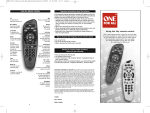
D USING THE KEYS
E IMPORTANT NOTES ON THE BATTERIES
When the batteries are low, Sky Guide shows you a message
onscreen. Replace the batteries as soon as you see the message.
tv
press to control
your TV
Sky
press to control
your Sky+ box
box office
access Box Office
programmes
standby
turn your Sky+
box or TV on/off
tv guide
check out TV
listings
mute
turn your TV’s
sound on/off
vol + and change your
TV’s volume
arrows
use when
watching
a programme
to see what’s on
AND highlight
the option
you want
services
set up a range of
features such as
parental controls,
subtitles and
favourites
interactive
press for a
variety of
interactive
services
get more
information about
what you’re
watching or a
highlighted
programme
text
switch to
text mode
ch + and change the
channel
back up
jump back to the
previous page
select
select and
confirm
the option
you want
play/pause
pause live TV or
play/pause a
recorded
programme
rewind
rewind live TV or a
recorded programme
R
record the programme
colours
select a variety
of onscreen options
help
turn on subtitles
or audio description
AND get help on
using Sky Guide
fast forward
fast forward
the programme
stop
stop playback of
the programme
numbers
select channel numbers
or menu options
•
If you leave your remote control without batteries for longer
than 10 minutes, the TV compatibility settings are lost. After
replacing the batteries you can control your Sky+ box as
usual but you have to set it up to work with your TV, as
described in this leaflet
•
Don’t leave flat batteries in your remote control
•
Always replace both batteries at the same time; don’t
mix old and new batteries or mix different battery types
•
When you throw away old batteries, make sure they
go to an environmentally friendly collection point.
F MAKE YOUR REMOTE CONTROL
LAST LONGER
•
Don’t drop it
•
Don’t let it come into contact with any liquids
•
Use a dry cloth to clean it.
G IF YOU HAVE ANY PROBLEMS
PLEASE REFER TO:
•
your Sky+ box user guide;
•
the Sky Accessory pages of sky.com;
•
access help pages by pressing Interactive > Sky Customer
Service > Equipment help on your remote control.
Otherwise call our technical helpline; Access details by
pressing Services > Telephone Numbers > and locate Technical
Help (Sky).
703686
USING YOUR
SKY+ REMOTE
CONTROL
This remote control is compatible with your Sky+ box and with
most TV sets. All you have to do is set up the remote control to
work with your particular equipment. Please read this leaflet
carefully to make sure the setup is done properly, then keep it
in a safe place in case you need it in the future.
© Copyright British Sky Broadcasting Limited 2006. All rights reserved.
Sky, Sky+ and Sky Guide are trademarks owned by and used under licence
from British Sky Broadcasting Group Plc.
Infomation correct at time of going to print (August 2006)
SKY+ REMOTE
4052_SKY+ LEAFLET
3/8/06
3:12 pm
Page 2
A FIRST THINGS FIRST
There are two AA batteries included in the pack. Before you can
do anything you need to put the batteries in the remote control,
as follows:
1 Follow the diagrams below to remove the battery cover.
2 Insert the batteries, matching the + and - signs.
3 Once the batteries are in, put the cover back on, making
sure the catch clicks into place.
When you’re using the remote control, make sure:
B SETTING UP THE REMOTE CONTROL
TO WORK WITH YOUR TV
1
2
3
4
5
6
• you point it straight at the Sky+ box (or TV);
• there’s nothing blocking the infrared receiver on the
Sky+ box (or TV).
Hold the remote
in one hand, use
your forefinger
of the other to
release the clip.
7
Ease the cover
off in direction
shown.
8
SKY+ REMOTE
Turn on your TV and Sky+ box.
Find your TV’s brand in the list opposite.
Press tv on your remote control.
Hold down select and the red key together for about
two seconds until the light on the remote control
flashes twice.
Press tv again.
Key in the 4-digit code of your TV brand. The light
on the remote control flashes twice. If you see it
flash only once, check you’ve got the right code
and enter it again.
Press the standby key on your remote control. If the
TV switches off, press select. The light on the remote
control flashes twice. If the TV doesn’t switch off,
press tv then standby. Keep doing this (press tv then
standby) until the TV turns off, then press select.
The settings are made and your remote control should
now work with your TV.
If you can’t find your brand, refer to your Sky Guide
by selecting > interactive > Sky Customer Service >
Equipment help > How do I programme my Sky remote
to operate my TV and follow the onscreen instructions.
Write the number here for future reference: _ _ _ _
C TV SETUP CODES
Aiwa
Akai
Akura
Alba
Amstrad
Baird
Bang & Olufsen
Beko
Beon
BPL
Brionvega
Bush
Crown
Daewoo
Decca
Dual
Epson
Ferguson
Fidelity
Finlandia
Finlux
Fisher
Fujitsu
Funai
Genexxa
Goldstar
Goodmans
Granada
Grundig
Harwood
Hinari
Hitachi
Hyundai
InFocus
ITT
JVC
Loewe
Matsui
Memorex
0406
0098
0042
0043
0063
0117
0118
0125
0899
0115
0147
0157
0225
0092
0244
0257
2108
0293
0294
0296
0297
0154
0313
0179
0330
0056
0335
0340
0345
0361
0365
0145
1206
0995
0384
0053
0442
0477
0037
Metz
Minoka
Mitsubishi
NEC
NEI
Nikkai
Nokia
Nordmende
Orion
Panasonic
Philips
Pioneer
Proline
Protech
Pye
Relisys
Roadstar
Saba
Saisho
Salora
Samsung
Sanyo
Schneider
Seleco
Sharp
Siemens
Sony
Soundwave
Tandy
Tatung
Technics
Techwood
Telefunken
Thomson
Thorn
Thorn-Ferguson
Toshiba
Wharfedale
0491
0921
0150
0170
0514
0528
0536
0537
0549
0051
0081
0166
0592
0595
0600
2214
0625
0645
0649
0651
0060
0159
0665
0672
0093
0680
0000
0702
0741
0049
0250
0750
0757
0771
0772
0936
0156
1535
To go back to the factory settings, press tv then hold down select and the red key
together for about two seconds until the red light on the remote control flashes twice.
Then key in the sequence 9-8-1.
706047_Sky_111_Ofa:Sky_Remote_Eye_Instruct_702870
03-04-2007
14:09
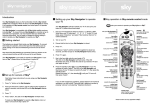
YOUR SKY REMOTE CONTROL
TV
To control the
functions of your TV
Important information about the batteries
Sky
Press to control your
Sky/HD box
Box Office
To access the Box
Office programs
Power
To turn your
Sky/HD box or
TV on/off
TV Guide
To preview the
complete TV listings
Services
To activate special
features
for example:
Parental controls,
Subtitles and
Favorites
Mute
To turn the sound
on your TV on/off
Arrows
To view the TV
listing on other
channels, while
staying on
the current channel.
To highlight
the option
you require.
Interactive
Press for a selection
of interactive
services also
gives access to
information
about the program
you’re watching or a
highlighted program
Text
Puts you into
the text mode
Ch + and –
To change
the channels
Back up
To return to the
previous page
Select
To select or confirm the
option you want
Colours
To select a variety of
onscreen options
Help
To activate the subtitles
or audio description.
Also to get help on
using the Sky Guide
Play/Pause
Plays recorded programs
or pauses live TV
Fast Forward
To fast forward
recorded program
Rewind
Rewinds recorded
programs or live TV
Stop
To stop the program
playing
R
Records programs
Pagina 1
Numbers
To select channel
numbers or menu
options
If the batteries require replacing a message will appear on the Sky
Guide, when this message appears you should replace the batteries
straight away this will ensure that no information is lost.
• If you do not replace the batteries within 10 minutes all of the
settings that you have programmed into the remote control for
the TV are lost. If this occurs you will need to refer to the section
‘How to setup your remote to control your TV’ and reinstall
the TV.
• Never leave old batteries inside your remote
• When replacing batteries always replace both batteries never mix
batteries (old & new or different brands of batteries)
• Remember when disposing of old batteries always dispose of
them at recycle points.
Tips to increase the longevity of your remote control
• Do not let it fall
• Be careful around liquid products
• When cleaning the remote use a dry cloth
Should you require further assistance,
please use the following:
• The user manual for the Sky+ box
• The website www.sky.com
• Via the ‘interactive’, ‘Sky Customer Service’, ‘equipment help on
your remote control’.
Alternatively contact the technical helpline, you will find the details
to do this press ‘Services’, ‘Telephone Numbers’, ‘Technical Help’.
UNIVERSAL ELECTRONICS / ONE FOR ALL warrants to the original purchaser that
this product will be free from defects in materials and workmanship under normal
and correct use for a period of one (1) year from the date of original purchase. This
product will be repaired or if necessary replaced free of charge if it has been proven
to be defective within the one (1) year warranty period. The forwarding costs are on
the account of the owner; the costs of returning the product are on the account of
UNIVERSAL ELECTRONICS / ONE FOR ALL. This warranty does not cover damage or
failures caused by products or services not supplied by UNIVERSAL ELECTRONICS /
ONE FOR ALL, or which result from not mounting the product according to manual
instructions. This also applies when the product has been modified / repaired by
others than UNIVERSAL ELECTRONICS / ONE FOR ALL or if a fault is the result from
accident, misuse, abuse, neglect, mishandling, misapplication, faulty installation,
improper maintenance, alteration, modifications, fire, water, lightning, natural
disasters, wrong use or carelessness. To obtain warranty service during the warranty
period, please notice that we need your original purchase receipt so that we may
establish your eligibility for service.
If you have bought this product for purposes, which are not related to your trade,
business or profession, please remind that you may have legal rights under your
national legislation governing the sale of consumer goods. This guarantee does not
affect those rights.
706047
SKY 111
RDN-1030407
5
6
Using the Sky+ remote control
This is the original remote control for your Sky+ box,
it can also be used for many different brands of TV’s.
If you would like to control your TV please follow
the instructions mentioned in this user guide.
It is always advisable to keep this user guide
in a safe place for future use
706047_Sky_111_Ofa:Sky_Remote_Eye_Instruct_702870
03-04-2007
14:09
To begin with
Pagina 2
How to set up your remote to control your TV.
Please find included in the packaging two AA batteries, insert
these into the remote control following the guide below:
1
Ensure the TV and Sky+ box are on with a picture
1
Remove the battery cover as shown below
2
Check on the list opposite for the brand of your TV.
2
Correctly insert the batteries
3
Press TV
3
After inserting the batteries, replace the battery cover
correctly (you should feel it click into place)
4
Press RED and Select together until the remote blinks twice.
5
Press TV again
6
Enter the 4-digit code (chosen from the list on the page
opposite for your brand) the remote should blink two times,
if it only blinks once check the code and enter it again.
7
Aim the remote at the TV and press Power, if the TV turns
off, press Select and the remote blinks twice and stores the
code. If the TV does not turn off, keep alternating between
TV and Power until the TV turns off, once the TV turns off
press the Select key to store the code. The remote control
should now work with you TV.
8
Should you be unable to locate your brand check in the Sky
Guide under the ‘Interactive’, ‘Sky Customer Services’,
Equipment Help’, ‘How do I program my Sky remote to
operate my TV’ use these instructions to install your TV.
Make sure that there is nothing obstructing the infrared
receiver on the Sky+ box or TV when you are using
the remote control.
Always point the remote directly at the Sky+ box or TV.
For future reference, you can make a note
of your code here: _ _ _ _
2
3
TV SETUP CODES
Aiwa
Akai
Akura
Alba
Amstrad
Baird
Bang & Olufsen
Beko
Beon
BPL
Brionvega
Bush
Crown
Daewoo
Decca
Dual
Epson
Ferguson
Fidelity
Finlandia
Finlux
Fisher
Fujitsu
Funai
Genexxa
Goldstar
Goodmans
Granada
Grundig
Harwood
Hinari
Hitachi
Hyundai
InFocus
ITT
JVC
Loewe
Matsui
Memorex
0406
0098
0042
0043
0063
0117
0118
0125
0899
0115
0147
0157
0225
0092
0244
0257
2108
0293
0294
0296
0297
0154
0313
0179
0330
0056
0335
0340
0345
0361
0365
0145
1206
0995
0384
0053
0442
0477
0037
Metz
Minoka
Mitsubishi
NEC
NEI
Nikkai
Nokia
Nordmende
Orion
Panasonic
Philips
Pioneer
Proline
Protech
Pye
Relisys
Roadstar
Saba
Saisho
Salora
Samsung
Sanyo
Schneider
Seleco
Sharp
Siemens
Sony
Soundwave
Tandy
Tatung
Technics
Techwood
Telefunken
Thomson
Thorn
Thorn-Ferguson
Toshiba
Wharfedale
4
0491
0921
0150
0170
0514
0528
0536
0537
0549
0051
0081
0166
0592
0595
0600
2214
0625
0645
0649
0651
0060
0159
0665
0672
0093
0680
0000
0702
0741
0049
0250
0750
0757
0771
0772
0936
0156
1535