1
6.5
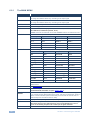
Controlling via the Infrared Remote Control Transmitter
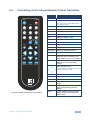
Keys
SIZE
CV1
COMP2
HDMI1
POWER
CV2
PC1
HDMI2
INFO
PC2
SDI
EXIT
FREEZE BLANK
POWER
Set the size of the image displayed
Turn the VP-690 ON or OFF
OFF in this case means that the unit
is in standby mode
COMP1
NATIVE
MENU
SIZE
Function
CV1
Select the composite video 1 input
CV2
Select the composite video 2 input
COMP1
Select the component video 1 input
COMP2
Select the component video 2 input
PC1
Select the UXGA 1 input
PC2
Select the UXGA 2 input
HDMI1
Select the HDMI1 input
HDMI2
Select the HDMI2 input
SDI
Select the SDI input
XGA Reset
Reset the resolution to XGA
720p Reset
Reset the resolution to 720p
INFO
Displays the selected input, the
input and output resolutions and
the firmware versions on the OSD
NATIVE
Select the output resolution via the
EDID of the connected HDMI
monitor
MUTE
Four navigation keys
Left and right arrow keys also function
as output volume control
OK
LR-34
Figure 6: Infrared Remote Control Transmitter
VP-690 - Controlling the VP-690
Press to accept changes
MENU
Enter the OSD menu
EXIT
EXIT the menu
FREEZE
Freeze/unfreeze the output video
image
BLANK
Toggle between a blank screen
(blue or black screen) and the
display
MUTE
Toggle between muting (blocking
out the sound) and enabling the
audio output
17