1
PCT2785
Touch LED LCD Monitor
USER'S GUIDE
www.planar.com
Content
Operation Instructions...................................................................................................................................................1
Unpacking Instructions .................................................................................................................................................2
Safety Precautions...........................................................................................................................................................2
Package Overview ...........................................................................................................................................................3
Front View of the Product ............................................................................................................................................4
Rear View of the Product ..............................................................................................................................................4
Quick Installation .............................................................................................................................................................5
Webcam Installation.......................................................................................................................................................6
Basic Operation and Calibration/Reset Instructions...........................................................................................8
Advanced Operation—OSD Menu......................................................................................................................... 10
Supporting Timing Modes ........................................................................................................................................ 13
Technical Information ................................................................................................................................................. 14
Wall-Mount Installation Instructions..................................................................................................................... 15
Troubleshooting............................................................................................................................................................ 16
Planar Support ............................................................................................................................................................... 17
Operation Instructions
Thank you for purchasing the PCT2785 multi-touch, edge-lit LED LCD monitor. Please read this
guide thoroughly before installation.
FCC RADIO FREQUENCY INTERFERENCE STATEMENT
WARNING: (FOR FCC CERTIFIED MODELS)
This LED Monitor has been tested and found compliant with the limits for a Class B digital device,
pursuant to part 15 of the FCC Rules. These limits are designed to provide proper protection
against harmful interference to a residential installation. This Touch LED LCD Monitor generates,
uses, and can radiate radio frequency energy. Harmful interference to radio communication may
be the result if it‘s not properly installed and used. However, there is no guarantee that
interference will not occur in a particular installation. If this Touch LED LCD Monitor does cause
serious interference to radio or television reception, resetting may correct it. Moreover, users are
encouraged to reduce interference by doing one or more of the following:
Reorient or relocate the receiving antenna.
Move the Touch LED LCD Monitor and the receiver further away from each other.
Connect the Touch LED LCD Monitor into an outlet on a circuit different from that to which
the receiver is connected.
Consult your local dealer or a qualified technician.
FCC Warning:
To assure a continued FCC compliance, a user must use a grounded power supply cord and the
provided shielded video interface cable with bonded ferrite cores. Also, any unauthorized
changes or modifications to this Touch LED LCD Monitor would void the user‘s authority to
operate this device.
Note: If necessary, shielded interface cables and AC power cord must be used to meet the
emission level limits.
According to WEEE regulation, this Touch LED LCD Monitor can't be handled as normal trash in Europe when
it is out of usage. Please refer to the recycle information on Planar’s website to handle it.
For more information on how to recycle your product, please visit http://www.planar.com/about/green/
1
Unpacking Instructions
Remove the Touch LED LCD Monitor out of the package and take off the plastic bag and
Polystyrene Foam.
Pull the base from Parallel versus Panel to Vertical.
Adjust the Panel between 15° leaning forward and 70° leaning backward.
Safety Precautions
Follow all warnings, precautions and maintenance as recommended in this user’s manual to
maximize the life of your unit.
Do:
Turn off the product before cleaning.
Touch screen surface may be cleaned using a soft clean cloth moistened with mild window
glass commercial cleaners or 50/50 mixture of water and isopropyl alcohol.
Use a soft cloth moistened with mild detergent to clean the display housing.
Disconnect the power plug from AC outlet if the product is not going to be used for an
extended period of time.
Don’t:
Do not touch the LED Display screen surface with sharp or hard objects.
Do not use abrasive cleaners, waxes or solvents for your cleaning.
Do not operate the product under the following conditions:
o Extremely hot, cold or humid environment.
o Areas susceptible to excessive dust and dirt.
o Near any appliance generating a strong magnetic field.
o In direct sunlight.
If smoke, abnormal noise or odor emits from your Touch LED LCD Monitor, remove the power
cord immediately and call your service center.
Never remove the rear cover of your Touch LED LCD Monitor. The display unit inside contains
high-voltage parts and may cause electric shock.
Never try to repair your Touch LED LCD Monitor yourself. Always call your service center or a
qualified technician to fix it.
Due to safety concerns, if the VESA mounting kit is purchased separately, please
make sure the mounting kit is UL-listed, and replaceable only by service personnel.
2
Package Overview
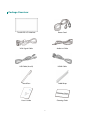
Touch LED LCD Monitor
Power Cord
VGA Signal Cable
Audio-in Cable
USB Cable (A to B)
HDMI Cable
Touch Pen
Cable Wrap
User’s Guide
Cleaning Cloth
3
Front View of the Product
①
② ③
①
Webcam LED indicator
②
Webcam
③
Microphone
④
OSD Turn On/ Off
⑤
Scroll Down/ Adjust Decrease/ Audio Adjust/ Auto *
⑥
Scroll UP/ Adjust Increase/ Audio Adjust/ Mute *
⑦
Input select/ Confirm Selection
⑧
Power On/ Off/ LED Indicator
* Hot keys Instructions please see “Using the OSD Menu” on page 8.
4
④ ⑤ ⑥ ⑦⑧
Rear View of the Product
①
② ③ ④
⑤⑥ ⑦
①
Power Input
②
Up-stream USB port (to PC)
③
USB port-A (support USB 3.0 plug play device)
④
USB port-B (support USB 3.0 plug play device)
⑤
Audio Input
⑥
Headphone Jack
⑦
DisplayPort Input (DisplayPort 20 pin)
⑧
VGA Input (D-Sub 15 pin)
⑨
HDMI input (HDMI 19 pin)
5
⑧
⑨
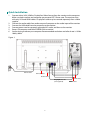
Quick Installation
1.
2.
3.
4.
5.
6.
Connect either VGA, HDMI or DisplayPort Video Source from the monitor to the computer.
Make sure both monitor and computer are powered OFF. Please note. The monitor ships
with only VGA and HDMI cables. DisplayPort cable may be sourced separately from a cable
supplier.
Connect the audio cable from audio output of computer to the audio input of the monitor.
Connect the USB cable from the computer to the monitor.
Connect power cord to a properly grounded AC outlet, and then to the monitor.
Power-ON computer and then POWER-ON the monitor.
Set the timing mode on your computer. Recommended resolution and refresh rate is 1920 x
1080 @ 60Hz.
Figure 1:
PC
Power cable
USB 3.0 cable
Audio cable
VGA cable
DisplayPort cable
(not supplied)
6
HDMI cable
Webcam Installation
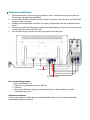
1.
2.
3.
4.
5.
Download the free “Instant messaging software” such as Yahoo Messenger, or Skype from
the Internet. Complete the installation.
Use the USB 3.0 cable (included with the monitor) to connect the monitor to one of the USB
3.0 ports of the computer.
Windows will automatically search for the camera, and proceed with the installation of the
driver.
Connect one end of the Microphone cable to the “Microphone in” port of the computer, and
connect the other end to the “MIC” port.
Start the Messenger software, and enjoy the pleasure of video chat.
PC
USB 3.0 cable
Microphone cable
Basic System Requirements
‧ Microsoft Windows 7, 8
‧ Pentium or compatible processor, 400 GHz
‧ USB Port
‧ Messenger Software (supporting video chat function), Video Software, or Video
Conferencing System
Hardware Installation
Connect your webcam’s USB cable to an available USB 3.0 port on your computer. Windows
automatically detects the device.
7
Basic Operation and Calibration/Reset Instructions
Before using the Touch LED LCD Monitor:
Connect external equipment properly.
Insert the power plug, and the power LED indicator will light orange.
Power On/Off
To turn the Touch LED LCD Monitor on/off:
Press
button on the front. The power LED indicator light will be blue when the Touch LED
LCD Monitor is on.
Using the OSD Menu
Use OSD menus to adjust settings by using the menu button on the front of the Touch LED LCD
Monitor.
1
2
Displays main menu
Exits from OSD menu
Selects between VGA, HDMI, DisplayPort or Auto mode
Select the desired item when in OSD menu
▼
When not in OSD menu, directly enters Picture Mode, press 3 seconds
enters Auto Image Adjust.
Select the desired item when in OSD menu
▲
▼+▲
When not in OSD menu, directly enters Audio Adjust menu, press 3
seconds enters Mute mode.
Recalls both Contrast and Brightness (when not in OSD menu)
OSD Lock Out Function
When Touch LED LCD Monitor is in normal mode, the “OSD Lock Out” function can be enabled.
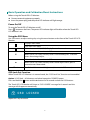
Option 1: OSD lock – all 4 buttons are locked except the “POWER” button.
Press and hold the 1 button and the ▲ button for 10 seconds to lock the OSD buttons.
The Touch LED LCD Monitor will show an “OSD LOCKED” message for 3 seconds and the
message will disappear automatically.
Repeat this step to unlock.
8
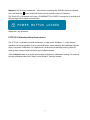
Option 2: OSD & Power button lock – all 5 buttons including the “POWER” button are locked.
Press and hold the 1 button and the ▼ button for 10 seconds to lock all 5 buttons.
The Touch LED LCD Monitor will show a “POWER BUTTON LOCKED” message for 3 seconds and
the message will disappear automatically.
Repeat this step to unlock.
PCT2785 Calibration/Reset Instructions:
The PCT2785 is available with USB connection. It is Microsoft® Windows® 7, 8 HID (Human
Interface Device) compatible if you use the USB touch screen interface. No additional software
driver is required. Calibration is a simple process and can be invoked by running Tablet PC
Settings from Control Panel and clicking the Calibrate button.
Click the Reset button to reset the touchscreen to the factory calibration settings. To reset the
existing calibration data, click "Reset" in the Tablet PC Settings window.
9
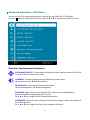
Advanced Operation—OSD Menu
You can use the OSD menu to adjust various settings for your Touch LED LCD Monitor.
Press the 1 button to display the OSD Menu, and use ▲ or ▼ to select the desired OSD menu.
Short Cuts Function from the button(s)
AUTO IMAGE ADJUST: To auto adjust Horizontal Position, Vertical Position, Phase (Fine
Tune) and Clock (H. Size) of the screen.
CONTRAST: To adjust the foreground white level of screen image.
▲: increase contrast, ▼: decrease contrast.
BRIGHTNESS: To adjust the luminance of the video.
▲: increase brightness, ▼: decrease brightness.
ECO MODE: Allows the user to change the ECO mode. Contrast and Brightness
adjustment will be disabled when ECO is active.
Press ▲ or ▼ key to adjust the ECO Mode in three levels.
OVER DRIVE: Allows the user to change the Over Drive strength. Improve the quality of
the motion pictures.
Press ▲ or ▼ key to adjust the Over Drive strength in five levels.
10
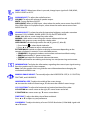
INPUT SELECT: When Input Select is pressed, change Input signal to D-SUB, HDMI,
DISPLAY PORT or AUTO.
AUDIO ADJUST: To adjust the audio functions.
VOLUME: To adjust the volume of speaker output.
MUTE: To turn the Mute ON/OFF.
AUDIO INPUT: When in HDMI input, select where the audio source comes from AUDIO
IN or HDMI. When in DisplayPort input, select where the audio source comes from
AUDIO IN or DP.
COLOR ADJUST: To select the color for improving brightness and color saturation
between COOL, NORMAL, WARM, USER COLOR, and PICTURE MODE.
COOL: Adds blue to screen image for cooler white.
NORMAL: Adds red to screen image for warmer white and richer red.
WARM: Adds green to screen image for a darker color.
USER COLOR: Individual adjustments for red (R), green (G), blue (B).
1. Press button 2 to select the desired color.
2. Press ▲ or ▼ button to adjust selected color.
PICTURE MODE: Provides an optimum display environment depending on the
contents displayed. It contains 4 user-selectable presets.
• STANDARD is for general windows environment and monitor default setting.
• GAME optimized for PC game environment.
• CINEMA optimized for movie and video environment.
• TEXT optimized for text editing and viewing in a word processing environment.
INFORMATION: To display the information, regarding the current input signal coming
from the graphic card in your computer.
Note: See your graphic card user guide for more information about changing the
resolution and refresh rate.
MANUAL IMAGE ADJUST: To manually adjust the HORIZONTAL SIZE, H. /V. POSITION,
FINE TUNE, and SHARPNESS.
HORIZONTAL SIZE: To adjust the width of the screen image.
▲: increase the width of screen image, ▼: decrease the width of screen image.
H./V. POSITION: To adjust the horizontal and vertical position of the video.
H. POSITION: ▲: move screen to the right, ▼: move screen to the left.
V. POSITION: ▲: move screen up, ▼: move screen down.
FINE TUNE: To adjust the delay time of data and clock.
Press ▲ or ▼ to adjust to your preference.
SHARPNESS: To adjust the clarity of a non-Full HD Resolution (1920x1080) signal with
▲ or ▼ button.
11
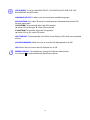
SETUP MENU: To set up LANGUAGE SELECT, OSD POSITION, OSD TIME OUT, OSD
BACKGROUND and LED mode.
LANGUAGE SELECT: To allow users to choose from available languages.
OSD POSITION: Press ▲ or ▼ button to select between horizontal and vertical OSD
Position adjustment.
H. POSITION: To horizontally adjust the OSD position.
▲: move OSD to the right, ▼: move OSD to the left.
V. POSITION: To vertically adjust the OSD position.
▲: move OSD up, ▼: move OSD down.
OSD TIME OUT: To automatically turn off On Screen Display (OSD) after a preset period
of time.
OSD BACKGROUND: Allows the user to turn the OSD background On or Off.
LED: Allows the user to turn the LED Indicator On or Off.
MEMORY RECALL: To recall factory settings for Video & Audio controls.
Press button 2 to select the Memory Recall menu option.
12
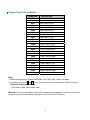
Supporting Timing Modes
STANDARD
VGA
VGA
MAC
VESA
VESA
VESA
VESA
VESA
VESA
MAC
VESA
VESA
VESA
VESA
VESA
MAC
VESA
VESA
VESA
VESA
CVT
VESA
VESA
VESA
RESOLUTION
720 x 400 @ 70Hz
640 x 480 @ 60Hz
640 x 480 @ 67Hz
640 x 480 @ 72Hz
640 x 480 @ 75Hz
800 x 600 @ 56Hz
800 x 600 @ 60Hz
800 x 600 @ 72Hz
800 x 600 @ 75Hz
832 x 624 @ 75Hz
1024 x 768 @ 60Hz
1024 x 768 @ 70Hz
1024 x 768 @ 75Hz
1280 x 960 @ 60Hz
1152 x 864 @ 75Hz
1152 x 870 @ 75Hz
1280 x 1024 @ 60Hz
1280 x 1024 @ 75Hz
1440 x 900 @ 60Hz
1440 x 900 @ 75Hz
1400 x 1050 @ 60Hz
1600 x 1200 @ 60Hz
1680 x 1050 @ 60Hz
1920 x 1080 @ 60Hz
Note:
1. HDMI and DisplayPort supports 480i, 480p, 576i, 576p, 720p, 1080i, and 1080p.
2. Simultaneously press 1 and 2 keys on monitor panel to switch between similar PC timings.
Similar PC Timing on list below:
• 720 x 400 @ 70Hz / 640 x 400 @ 70Hz
Warning: Do not set the graphic card in your computer to exceed these maximum refresh rates.
Doing so may result in permanent damage to your Touch LED LCD Monitor.
13
Technical Information
Panel
27” TFT (with LED backlight)
Power Management
On: 45 Watts (typical), 66 Watts (maximum)
Standby Mode: < 1.0 Watt (USB 3.0)
Off: < 1.0 Watt (USB 3.0)
Displayable Resolution
Full HD 1920 x 1080 max. Vertical Frequency 60Hz max.
Pixel Dimension
0.31125 x 0.31125 mm
Display Color
16.7M
Tilt
15° to 70°
Active Display Area
597.6 mm x 336.15 mm
Temperature
Operating: 0°C ~ +40°C
Storage: -20°C ~ + 60°C
Compliance
FCC-B, CE, UL/cUL, TÜV/Bauart
Power
Input Voltage AC100-240 V
Amplifier spec.
2W x 2
Web Camera
Full HD 1080p
Touch Technology
Multi-Touch Projective Capacitive (USB interface)
Sensor Refresh
120 frames/sec
Output Position Resolution
32767 x 32767
Accuracy
Comply to WIN8 logo requirement
Glass Coating
Non-coating
OS
Microsoft Windows 7, 8
14
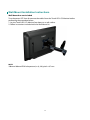
Wall-Mount Installation Instructions
Wall Mount Arm not included
Turn the power OFF then disconnect the cables from the Touch LED LCD Monitor before
performing the procedure below.
1. Lay the Touch LED LCD Monitor face down on a soft surface.
2. Follow instructions included with the Wall Mount kit.
NOTE
100mmx100mm VESA hole pattern (n=4), M4, pitch =0.7 mm
15
Troubleshooting
No power
Make sure A/C power cord is securely connected to the power adapter and the power supply
is firmly connected to the Touch LED LCD Monitor.
Plug another electrical device into the power outlet to verify that the outlet is supplying
proper voltage.
Make sure all signal cables are installed.
Power on but no screen image
Make sure the video cable supplied with the Touch LED LCD Monitor is tightly secured to the
video output port on back of the computer. If not, tightly secure it.
Adjust brightness.
Wrong or abnormal colors
If any colors (red, green, blue) are missing, check the video cable to make sure it is securely
connected. Loose or broken pins in the cable connector could cause an improper connection.
Connect the Touch LED LCD Monitor to another computer.
16
Planar Support
Cables and Accessories
To find cables and accessories for your Planar monitor, touch screen or other Planar products
visit our online store at www.PlanarOnline.com.
Technical Support
Visit Planar at http://www.planar.com/support for operations manuals, touchscreen drivers,
warranty information and access to Planar's Technical Library for online trouble shooting.
To speak with Planar Customer Support please have your model and serial number available
and dial:
Planar Support
Tel: 1-866-PLANAR1 (866-752-6271) or +1 503-748-5799 outside the US.
Hours: 24 hours a day, 7 days a week.
Toll or long distance charges may apply.
17
2013
2001132390T
020-1193-00C