1
h.
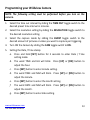
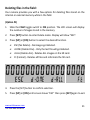
The word DATE and DD will blink. Press [UP] or [DN] button to adjust
the date.
i.
Press [SET] button to enter year setting.
j.
The word DATE and YY will blink. Press [UP] or [DN] button to adjust
the year.
k.
Press and hold [SET] button for 2 seconds to exit the setting mode
and enter into PIR count down mode.
l.
The TEST light will blink and display will show date and number of
pictures taken.
m. Once the program setting has been completed, slide the CAM toggle
switch to OFF position until you are ready for field use.
NOTE: Date & Time setting will be lost whenever the batteries are
removed from camera. Remember to re-set the Date & Time stamp after
you replace the batteries.
www.wildviewcam.com
Toll Free 888-304-6125
14