1
Appendix
A. Troubleshooting
A.1 Power-On-Self-Test
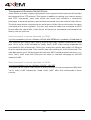
After the power has been turned on, Video Server will perform a self-diagnostic to detect
any possible hardware defects. If the power indicator is dim at the beginning, the system
fails to proceed further without power. While the POST is proceeding, the status LED
indicators will keep blinking interchanged until finished or any fatal error happens. If
either status LED indicator is dim at the beginning, the LED may be broken.
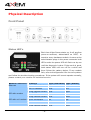
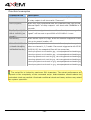
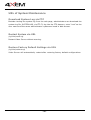
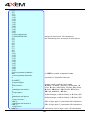
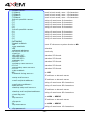
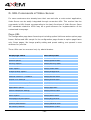
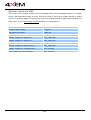
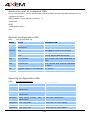
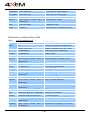
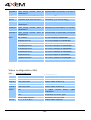
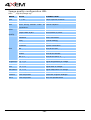
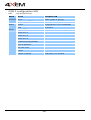
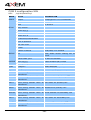
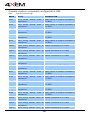
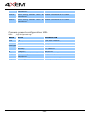
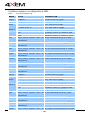
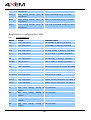
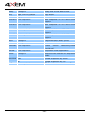
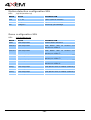
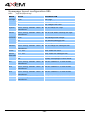
Any possible fatal error has a special pattern shown in the following table. LED1 is the
one below power indicator and LED2 is the lowest one.
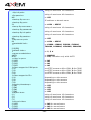
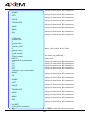
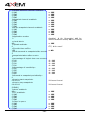
LED pattern after POST Failed function
Troubleshooting
LED1 ON and LED2 ON
1. C heck the LINK LED of the
Ethernet network
attached port on the Ethernet
switch or hub. If it is dim, the
Ethernet cable may be loose or
cross-over.
2. If the cable is OK, the Ethernet
controller is broken. Ask your
reseller for technical service.
LED1 ON and LED2 OFF
Ethernet network
The PCI interface cannot work. Ask
your reseller for technical service.
LED1 OFF and LED2 ON
Ethernet network
The Ethernet controller is broken.
Ask
your
reseller
for
technical
service.
Both LED1 and LED2 blink Video input
The video decoder is broken. Ask
your reseller for technical service.
LED1 blink and LED2 ON
System date and time
The real-time clock is broken. Ask
your reseller for technical service.
LED1 ON and LED2 blink
C amera control via C OM1 The UART controller is broken. Ask
your reseller for technical service.
LED1 OFF and LED2 blink
Camera control via COM2 The UART controller is broken. Ask
or modem interface
- 68 -
your reseller for technical service.