1
User manual LAM4401
06 - How to operate the main oven
How to use the main oven
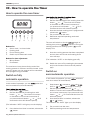
Shelf positions
As your appliance has two ovens please ensure that
the appropriate function and thermostat control are
selected for the oven you wish to use.
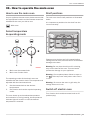
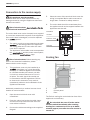
The main oven has 5 shelf positions as illustrated
below
It is important to position the wire shelf into the
runners correctly.
- Main oven
Select temperature
& operating mode
3
2
1
Please ensure shelves are fully inserted before
closing the oven door, failure to do so could lead to
damage to the door.
a
a.
b.
b
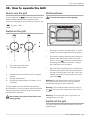
Main oven thermostat knob
Main oven function knob
The operating modes of the electric oven are
selected with the function knob. The temperature is
adjusted with the thermostat knob.
1.
2.
Set thermostat knob to the desired
temperature.
Set function knob to the required operating
mode.
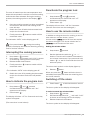
The oven heats up to the selected temperature
and maintains it. During heating, the temperature
indicator light will remain on until the desired
temperature is reached.
Warning -Do not place aluminium foil or baking
trays on the base of the oven. This can lead to
permanent damage to your appliance.
Warning –Do not place plates, dishes or trays on
of the top oven cavity when main oven is
the
in use.
Warning - Do not use the oven or grill cavity for
storage when not in use.
Switch off electric oven
Turn function knob and thermostat knob to off
position (top).
How to operate the main oven _ 11