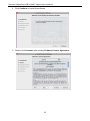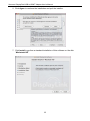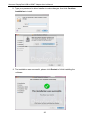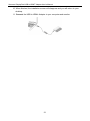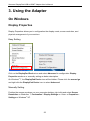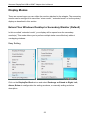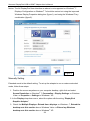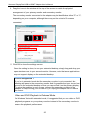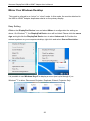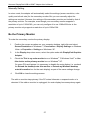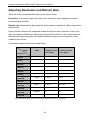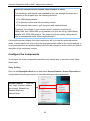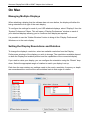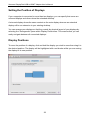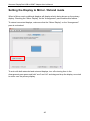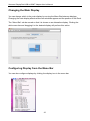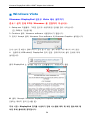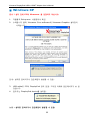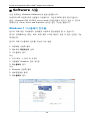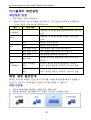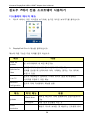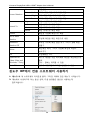
1
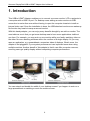
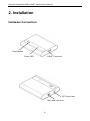
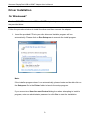
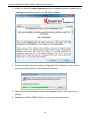
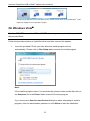
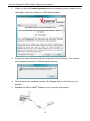
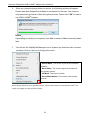
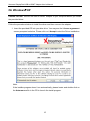
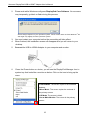
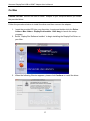
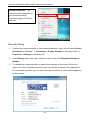
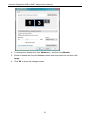
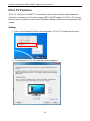
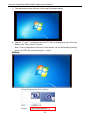
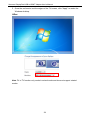
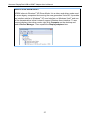
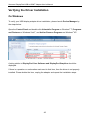
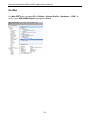
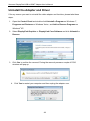
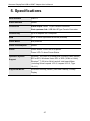
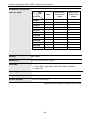
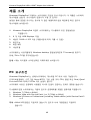
User Manual Download Manual in website http://www.xtreamer.net Join Our Community http://Forum.Xtreamer.net Make your whole house an entertainment center Xtreamer DisplayPod USB to HDMI Adapter User’s Manual ABOUT THIS MANUAL This manual is designed for use with the USB to HDMI Adapter. Information in this document has been carefully checked for accuracy; however, no guarantee is given to the correctness of the contents. The information in this document is subject to change without notice. The manufacturer does not make any representations or warranties (implied or otherwise) regarding the accuracy and completeness of this document and shall in no event be liable for any loss of profit or any commercial damage, including but not limited to special, incidental, consequential, or other damage. SAFETY INSTRUCTIONS Always read the safety instructions carefully: Keep this User’s Manual for future reference Keep this equipment away from humidity If any of the following situation arises, get the equipment checked by a service technician: The equipment has been exposed to moisture. The equipment has been dropped and damaged. The equipment has obviously signed of breakage. The equipment has not been working well or you cannot get it to work according to the User’s Manual. COPYRIGHT This document contains proprietary information protected by copyright. All rights are reserved. No part of this manual may be reproduced by any mechanical, electronic or other means, in any form, without prior written permission of the manufacturer. 1 Xtreamer DisplayPod USB to HDMI Adapter User’s Manual Table of Contents 1. Introduction ....................................................................................................... 4 Applications ...................................................................................................................... 5 Features ............................................................................................................................. 5 Package Contents .............................................................................................................. 6 System Requirements ........................................................................................................ 6 LED Status ........................................................................................................................ 7 2. Installation ......................................................................................................... 8 Hardware Connection……………………………………………………………………8 Driver Installation………………………………………………………………………..9 On Windows .................................................................................................................. 9 On Windows 7......................................................................................................... 9 On Windows Vista………………………………………………………….....…12 On Windows XP ................................................................................................... 15 On Mac ...................................................................................................................... 17 3. Using the Adapter ........................................................................................... 22 On Windows .................................................................................................................... 22 Display Properties ....................................................................................................... 22 Display Modes ............................................................................................................ 23 Extend Your Windows Desktop to Secondary Monitor (Default) .............................. 23 Video and DVD Playback in Extened Mode .......................................................... 25 Mirror Your Windows Desktop ................................................................................... 26 Be the Primary Monitor .............................................................................................. 27 Adjusting Resolution and Refresh Rate ...................................................................... 28 Configure the components .......................................................................................... 29 Fit to TV Function ....................................................................................................... 32 Standby and Hibernate, Shut Down and Restart ......................................................... 35 Inferred Modes ............................................................................................................ 35 Disconnecting the Adapter .......................................................................................... 36 Using Dual Adapters ................................................................................................... 36 On Mac ............................................................................................................................ 38 Managing Multiple Displays ....................................................................................... 38 Setting the Display Resolutions and Rotation............................................................. 38 Setting the Position of Displays .................................................................................. 39 Display Positions......................................................................................................... 39 Setting the Display to Mirror / Extend Mode ............................................................. 40 Changing the Main Display ........................................................................................ 41 Configuring Display from the Menu Bar .................................................................... 41 2 Xtreamer DisplayPod USB to HDMI Adapter User’s Manual Verifying the Driver Installation ..................................................................................... 42 Uninstall the Adapter and Driver .................................................................................... 44 4. Troubleshooting .............................................................................................. 45 5. Specifications .................................................................................................. 47 6. Regulatory Compliance .................................................................................. 49 FCC Conditions............................................................................................................... 49 CE.................................................................................................................................... 49 WEEE Information ......................................................................................................... 49 3 Xtreamer DisplayPod USB to HDMI Adapter User’s Manual 1. Introduction This USB to HDMI Adapter enables you to connect one more monitor, LCD or projector to a computer with a USB 2.0 port. For desktop users adding an extra monitor via USB connection is easier than ever without having to open the computer chassis to install an internal video card. Once the installation is done, the USB-attached monitor soon wakes up. No function key hassle to swap a second monitor. With this handy adapter, you can enjoy many benefits brought by an add-on monitor. The most obvious one is that you get more desktop area to have more applications visible at one time. For example, you may work on one monitor while your family watching video on the other. No more stacking windows within the confines of a single display. Or you may span an application, e.g. spreadsheets, across two sides of displays. What’s more, the adapter is hot pluggable. If your system performance is an important issue when using multiple monitors. Another benefit of this adapter is that it uses little computer resource; ensuring users get quality display without comprising computer performance. You can extend and double the width of your desktop screen if you happen to work on a large spreadsheet or watching a movie on another screen. 4 Xtreamer DisplayPod USB to HDMI Adapter User’s Manual Applications Office workstation View your large spreadsheets across two screens with display continuity Multitask more effectively without overlapping windows Edit on one screen while surfing the Internet information on the other On the road Do multiple screen presentations without bringing another computer Easily provide multiple screen exhibitions in a trade show Graphics workstation Use second display for palettes/tools Get a panoramic view of large documents Editing workstation Type documents on one screen while viewing reference material on the other Compare two documents simultaneously across two screens Financial analysis Have one monitor per data stream View charts and live data at the same time Entertainment View videos/TV on one screen and reviews on the other Get additional perspectives when playing games Features Add-on monitor, LCD or projector through a single USB 2.0 port Hot-plug; add or remove monitor without system reboot Small in size, works with all HDMI® displays Supports High Resolution up to 1920 x 1080 Extend and Mirror mode support Resumes from hibernation and suspend modes Supports up to 6 USB display adapter to work simultaneously 5 Xtreamer DisplayPod USB to HDMI Adapter User’s Manual Package Contents Before installation, please check the items in the package. The package should contain the following items: USB to HDMI® Adapter x1 Driver CD (Driver and User’s Manual) x1 USB Cable x1 Quick Installation Guide x1 System Requirements The minimum requirements for the PC are: With Single Core CPU at 1.2GHz or higher processor clock. Intel Pentium /Celeron family, or AMD K6 /Athlon/Duron family, or compatible processor 512MB memory At least one USB2.0 port 30Mb of available disk space Windows XP Home or Professional (Including Table edition) SP2 or SP3, Windows Vista SP1 or SP2 (32-bit or 64-bit), and Windows 7 (32-bit or 64-bit). Supports all Intel-based Macs. (Including Snow Leopard 10.6.2, Leopard 10.5.8, Tiger 10.4.11). Super VGA (800 x 600) or higher resolution monitor To play DVD on the adapter-attached monitor, in addition to the requirements above, the following requirements should also be met: With dual core CPU at 2.0 GHz processor clock 6 Xtreamer DisplayPod USB to HDMI Adapter User’s Manual If the PC specification is below this, performance will be lower (or CPU loading higher than acceptable). Windows XP For 1-2 monitors, business usage, productivity target. This may not provide full frame rate DVD playback at full screen. 1.2GHz Single Core CPU 512MB memory For 3 monitors, where 1 could run DVD video while also targeting productivity and business apps. Will support only 1 video of DVD resolution at full screen:. 1.8GHz CPU 1GB memory For 6 screen where 1 screen can run full screen DVD video: 1.6GHz Core Duo 1GB memory LED Status LED Color Description Link Green On for power on. Off for power off. 7 Xtreamer DisplayPod USB to HDMI Adapter User’s Manual 2. Installation Hardware Connection Power Button HDMI® Connector Power LED DC Power Jack Mini USB Connector 8 Xtreamer DisplayPod USB to HDMI Adapter User’s Manual Driver Installation On Windows 7 Caution: DO NOT connect the USB to HDMI® Adapter to your computer before you install the provided driver. Follow the procedures below to install the driver and then connect the adapter: 1. Insert the provided CD into your disc drive and installer program will run automatically. Please click on Run Setup.exe to execute the install program. Note: If the installer program doesn’t run automatically, please locate and double-click on the Setup.exe file in the Driver folder to launch the setup program. If you encounter a User Account Control dialog box when attempting to install a program, enter an administrator password or click Yes to start the installation. 9 Xtreamer DisplayPod USB to HDMI Adapter User’s Manual 2. When you see the License Agreement screen prompted as below, please click on I Accept to install the software for USB display adapter... 3. Please wait while Windows configures DisplayPod Core Software. Your screens may temporarily go black or flash during this process. 4. When finished, the installation screen will disappear and you will return to your desktop. 5. Connect the USB to HDMI® Adapter to your computer and monitor. 10 Xtreamer DisplayPod USB to HDMI Adapter User’s Manual 6. When you press the power button on device, the following window will appear. Please wait while DisplayPod software is configured for first use. Your screens may temporarily go black or flash during this process. Please click “OK” to start to use USB to HDMI® Adapter. 7. You can change the appearance of your displays through the Window. Moreover, additional controls are available in Windows 7: Orientation (Portrait, landscape, rotated portrait, rotated landscape) 8. To control the behavior of an attached DisplayPod device (or screen), it is possible to use Windows Key+P to display a menu (and cycle through it) to allow: Disconnect Projector, Duplicate, Extend, Projector Only. 11 Xtreamer DisplayPod USB to HDMI Adapter User’s Manual *Actual strings depend on your operation system. These screen shots are from Windows 7 and might vary slightly for each operation system. On Windows Vista Caution: DO NOT connect the USB to HDMI® Adapter to your computer before you install the provided driver. Follow the procedures below to install the driver and then connect the adapter: 1. Insert the provided CD into your disc drive and install program will run automatically. Please click on Run Setup.exe to execute the install program. Note: If the installer program doesn’t run automatically, please locate and double-click on the Setup.exe file in the Driver folder to launch the setup program. If you encounter a User Account Control dialog box when attempting to install a program, enter an administrator password or click Allow to start the installation. 12 Xtreamer DisplayPod USB to HDMI Adapter User’s Manual 2. When you see the License Agreement screen prompted as below, please click on I Accept to install the software for USB display adapter. 3. Please wait while Windows configures DisplayPod Core Software. Your screens may temporarily go black or flash during this process. 4. When finished, the installation screen will disappear and you will return to your desktop. 5. Connect the USB to HDMI® Adapter to your computer and monitor. 13 Xtreamer DisplayPod USB to HDMI Adapter User’s Manual 6. When you press the power button on device, the following window will appear. Please wait while DisplayPod software is configured for first use. Your screens may temporarily go black or flash during this process. Please click “OK” to start to use USB to HDMI® Adapter. Notice: If prompting to restart your computer, click Yes to restart or No to manually restart later. 7. You will see the DisplayPod Manager Icon in system tray that looks like a monitor as below. Click on the icon to bring up the menu. -Extend Mode: The screen is part of the extended desktop. -Mirror Mode: The screen copies the contents of the primary screen. -Off Mode: The screen is black. -Set as Main Monitor: The screen is the primary screen. *Actual strings depend on your operation system. These screen shots are from Windows Vista and might vary slightly for each operation system. 14 Xtreamer DisplayPod USB to HDMI Adapter User’s Manual On Windows XP Caution: DO NOT connect the USB to HDMI® Adapter to your computer before you install the provided driver. Follow the procedures below to install the driver and then connect the adapter: 1. Insert the provided CD into your disc drive. You may see the License agreement screen prompted as below. Please click on I Accept to start the Driver installation. Note: If the installer program doesn’t run automatically, please locate and double-click on the Autorun.exe file in the CD to launch the install program. 15 Xtreamer DisplayPod USB to HDMI Adapter User’s Manual 2. Please wait while Windows configures DisplayPod Core Software. Your screens may temporarily go black or flash during this process. *Actual strings depend on your operation system. These screen shots are from Windows XP and might vary slightly for each operation system. 3. 4. You must restart your computer before the new setting will take effect. When finished, the installation screen will disappear and you will return to your desktop. 5. Connect the USB to HDMI® Adapter to your computer and monitor. 6. Press the Power button on device, you will see the DisplayPod Manager Icon in system tray that looks like a monitor as below. Click on the icon to bring up the menu. -Extend Mode: The screen is part of the extended desktop. -Mirror Mode: The screen copies the contents of the primary screen. -Off Mode: The screen is black. -Set as Main Monitor: The screen is the primary screen. 16 Xtreamer DisplayPod USB to HDMI Adapter User’s Manual On Mac Caution: DO NOT connect the USB to HDMI® Adapter to your computer before you install the provided driver. Follow the procedures below to install the driver and then connect the adapter: 1. Insert the provided CD into your disc drive. Locate and double-click the Driver folder > Mac folder > DisplayPod Installer 1.6b3.dmg to launch the setup program. 2. Select “DisplayPod Software Installer” to begin installing the DisplayPod Driver on your Mac. 3. When the following Window appears, please click Continue to install the driver. 17 Xtreamer DisplayPod USB to HDMI Adapter User’s Manual 4. Click Continue to install this software. 5. Please click Continue after reading Software License Agreement. 18 Xtreamer DisplayPod USB to HDMI Adapter User’s Manual 6. Click Agree to continue the installation and quit the installer. 7. Click Install to perform a standard installation of this software on the disk “Macintosh HD”. 19 Xtreamer DisplayPod USB to HDMI Adapter User’s Manual 8. Type your password to allow Installer to make changes. And click Continue Installation to install. 9. The installation was successful, please click Restart to finfish installing the software. 20 Xtreamer DisplayPod USB to HDMI Adapter User’s Manual 10. When finished, the installation screen will disappear and you will return to your desktop. 11. Connect the USB to HDMI® Adapter to your computer and monitor. 21 Xtreamer DisplayPod USB to HDMI Adapter User’s Manual 3. Using the Adapter On Windows Display Properties Display Properties allows you to configuration the display mode, screen resolution, and physical arrangement of your monitors. Easy Setting Click on the DisplayPod Device icon and select Advanced to configuration Display Properties as above or manually setting as below description. On Windows 7, the DisplayPod Device icon will be hidden. Please click the arrow sign and right click the DisplayPod Device icon to select Advanced. Manually Setting Position the mouse anywhere on your computer desktop, right-click and select Screen Resolution on Windows 7, Personalize > Display Settings on Vista or Properties > Settings on Windows XP. 22 Xtreamer DisplayPod USB to HDMI Adapter User’s Manual Display Modes There are several ways you can utilize the monitor attached to the adapter. The secondary monitor can be configured to use either “mirror mode”, “extended mode” or be the primary display as described in this section. Extend Your Windows Desktop to Secondary Monitor (Default) In this so-called “extended mode”, your display will be spread over the secondary monitor(s). This mode allows you to perform multiple tasks more effectively without overlapping windows. Easy Setting Click on the DisplayPod Device icon and select Exchange or Extend to Right; Left; Above; Below to configuration the setting as above, or manually setting as below description. 23 Xtreamer DisplayPod USB to HDMI Adapter User’s Manual Notice: The full DisplayPod User Interface as above is not supported on Windows 7. Displays Configuration on Windows 7 should be carried out using the improved Windows Display Properties dialog box (figure1), and using the Windows-P key combination (figure2). Figure 1 Figure 2 Manually Setting Extended mode is the default setting. To set up the adapter to use or restore extended mode, follow these steps: 1. Position the mouse anywhere on your computer desktop, right-click and select Screen Resolution on Windows 7, Personalize > Display Settings on Windows Vista or Properties > Settings on Windows XP. 2. In the Display drop-down menu, select the option with the string “DisplayPod Graphics Adapter”. 3. Check the Multiple Displays> Extend these displays on Windows 7, Extend the desktop onto this monitor box on Windows Vista or Extend my Windows desktop onto this monitor box on Windows XP. 24 Xtreamer DisplayPod USB to HDMI Adapter User’s Manual 4. Drag the icons in the window at the top of the screen to match the physical arrangement of your primary monitor and secondary monitor. The secondary monitor connected to the adapter may be identified as either "2" or “3”, depending on your computer, although there may not be a total of 3 screens connected. c. a. b. 5. Click OK to close the settings screen. Once the setting is done, to use your extended desktop, simply drag and drop your open windows over to your second monitor. However, note that some applications may not support display on the extended desktop. Cursor disappeared ? If you’re in extneded mode but the secondary monitor is not connected, the desktop still pans to the secondary monitor and it’s possible that your cursor has moved to the extended desktop so that you cannot find it on the primary display. To solve the problem in such a case, connect the secondary monitor to the adapter or keep moving your mouse to try or unplug the adapter first to restore the cursor. Video and DVD Playback in Extened Mode On Windows Vista with extended mode, it’s suggested that you run video or DVD playback programs on your primary monitor instead of the secondary monitor to ensure the playback performance. 25 Xtreamer DisplayPod USB to HDMI Adapter User’s Manual Mirror Your Windows Desktop This mode is referred to as “mirror” or “clone” mode. In this mode, the monitor attached to the USB to HDMI® Adapter duplicates what is on the primary display. Easy Setting Click on the DisplayPod Device icon and select Mirror to configuration the setting as above. On Windows 7, the DisplayPod Device icon will be hided. Please click the arrow sign and right click the DisplayPod Device icon to select Advanced. Or Position the mouse anywhere on your computer desktop, right-click and select Screen Resolution. It is possible to use Windows Key+P to display a menu (and cycle through it) on Windows 7 to allow: Disconnect Projector, Duplicate, Extend, Projector Only. 26 Xtreamer DisplayPod USB to HDMI Adapter User’s Manual Manually Setting In mirror mode, the adapter will automatically select the settings (screen resolution, color quality and refresh rate) for the secondary monitor. But you can manually adjust the settings as required. However, the settings of the secondary monitor are limited by that of the primary monitor. For example, even though your secondary monitor supports a resolution of up to 1920x1080, you can only configure it to use 1280x1024 due to the primary monitor only supports a resolution of up to 1280x1024. Be the Primary Monitor To make the secondary monitor the primary display: 1. Position the mouse anywhere on your computer desktop, right-click and select Screen Resolution on Windows 7, Personalize > Display Settings on Windows Vista or Properties > Settings on Windows XP. 2. In the Display drop-down menu, select the option ends with DisplayPod Graphics Adapter. 3. Check the This is my main monitor box on Windows 7/ Windows Vista or Use this device as the primary monitor box on Windows XP. On some PCs and laptops it is necessary to disable the main display (i.e. uncheck the Extend the desktop onto this monitor or Extend my Windows desktop onto this monitor box for the main display) as part of the same settings change. 4. Click OK to close the settings screen. The add-on monitor stays primary if the PC enters hibernate or suspend mode or is rebooted. If the add-on monitor is unplugged, the main display becomes primary again. 27 Xtreamer DisplayPod USB to HDMI Adapter User’s Manual Adjusting Resolution and Refresh Rate There are three components that make up the screen mode: Resolution: In common usage, this refers to the number of pixels displayed on screen horizontally and vertically. Refresh rate: Measures the speed that the entire screen is rescanned. Higher frequencies reduce flicker. Some monitors advertise the supported modes through the video connector. If this is the case, the adapter identifies the supported modes from the monitor. If the monitor does not advertise the supported modes, the adapter software chooses a set of common screen modes for the monitor. The software supports the modes listed below. Color Depth Refresh rates Refresh rates available at 16 bit available at 32 bit color quality color quality 60 72 75 85 60 72 75 85 56 60 72 75 85 56 60 72 75 85 XGA 60 70 75 85 60 70 75 85 720p 60 60 WXGA+ 60 75 85 60 75 85 WXGA 60 60 SXGA 60 75 85 60 75 WXGA+ 60 60 SXGA+ 60 75 85 60 75 85 UXGA 60 60 WSXGA+ 60 60 1080p 60 60 Name Resolution 640x480 800x600 1024x768 1280x720 1280x768 1280x800 1280x1024 1366x768 1400x1050 1600x1200 1680x1050 1920x1080 VGA SVGA *Note that interlaced modes and reduced blanking modes are not supported. 28 Xtreamer DisplayPod USB to HDMI Adapter User’s Manual About the resolutions and refresh rates available to users The resolutions and refresh rates available to the user through Windows are a comprise of the support from the following elements: ■ The USB display adapter ■ The primary monitor and the secondary monitor ■ The primary video card on your computer and installed drivers Therefore, for example, if your monitor doesn’t support a resolution of 1920x1080, then 1920x1080 is not possible even you are using a USB display adapter with 1920x1080 support. This ensures that the monitor cannot be put into an unsupported mode, which might damage it. If cloning the primary display, the video component will try to use the preferred monitor mode. In some cases, this may not be the most appropriate mode for the cloned desktop. It is recommended that the primary display resolution be changed to closer match the default resolution of the secondary monitor. Configure the components To configure the three components (resolution and refresh rate) of a screen mode, follow these steps: Easy Setting Click on the DisplayPod Device icon and select Screen Rotation; Screen Resolution to configuration the setting as above, or manually setting as below description. Screen Rotation :There are four kinds of screen rotation, the Normal, Rotated Left, Rotated Right and Upside-Down. 29 Xtreamer DisplayPod USB to HDMI Adapter User’s Manual Screen Resolution:The resolution will be depends on your computer setting, resolution support of monitor and else…. Manually Setting 1. Position the mouse anywhere on your computer desktop, right-click and select Screen Resolution on Windows 7, Personalize > Display Settings on Windows Vista or Properties > Settings on Windows XP. 2. In the Display drop-down menu, select the option ends with DisplayPod Graphics Adapter. 3. To change the screen resolution or select those options on the screen. Be sure to select one of the supported resolutions and color quality numbers in the table above. For a secondary monitor, you can also select any resolution or color quality supported by that monitor. 30 Xtreamer DisplayPod USB to HDMI Adapter User’s Manual 4. To change the refresh rate, click Advanced… and then click Monitor. 5. Select a refresh rate from the Screen refresh rate drop-down list and then click Apply. 6. Click OK to close the settings screen. 31 Xtreamer DisplayPod USB to HDMI Adapter User’s Manual Fit to TV Function ”Fit to TV” function is for HDMI® TV connections. A new user interface option allows the correction of overscan on TVs when using a USB to HDMI® adapter. The”Fit to TV” function allows a user to change the size of their Windows desktop to allow the entire desktop to be viewed. Setting 1. Click on the DisplayPod Device icon and select “Fit to TV” to enable this function. 2. To configure Fit to TV, the following interface appears 32 Xtreamer DisplayPod USB to HDMI Adapter User’s Manual 3. The red border shows the size of the new Windows desktop... 4. Use the "+" and "-" controls on the Fit to TV GUI to change the size of the red border until it fits on the TV screen. Note: Finer configuration of the size of the border can be achieved by holding down the CTRL key and clicking the “+” and “-”. Before: 33 Xtreamer DisplayPod USB to HDMI Adapter User’s Manual 5. Once the red border is at the edges of the TV screen, click "Apply" to resize the Windows desktop. After: Note: Fit to TV function only works in extend mode and does not support rotated modes. 34 Xtreamer DisplayPod USB to HDMI Adapter User’s Manual Standby and Hibernate, Shut Down and Restart When the adapter is connected to a computer and an external monitor, if the computer goes into standby or hibernate mode, the external monitor display goes blank. When the computer returns to an active state, the external monitor display keeps the same settings it had before the computer went into standby or hibernate mode. However, if the secondary monitor was set for extended mode, windows that were previously on the external monitor will not move back to that secondary monitor. Also, if the secondary monitor is in extended mode and the computer requires a login after standby or hibernate mode, the login screen appears on the primary computer monitor, not the external monitor. If the computer is shut down, restarted and logged in, again the secondary monitor returns to the same mode as it was before shutdown. Inferred Modes Some modes in the DisplayPod GUI are shown with [ ] around them. This occurs when connecting a monitor with a preferred mode higher than the maximum supported resolution of the DisplayPod device. In this case, the preferred resolution of the monitor cannot be supported. However we add lower resolutions of the same aspect ratio to be tried with the monitor. Modes in square brackets [ ] imply that these are modes not reported by the monitor, but have been made available by the DisplayPod software for you to try. As these are inferred modes from the preferred mode of the monitor, they are not guaranteed to work with the display. 35 Xtreamer DisplayPod USB to HDMI Adapter User’s Manual Disconnecting the Adapter If the adapter is unplugged from the computer, the secondary monitor goes blank. All windows and icons move to the primary screen. On reconnection of the adapter, the adapter returns to the same mode as it was before disconnection. However, windows and icons that were previously on the screen will not be moved back. Using Dual Adapters Up to two adapters can be simultaneously attached to one computer. To use two adapters: 1. Install the driver as described in the “2. Installation” section and connect the first adapter to your computer. 2. Then connect the second adapter to your computer. The system will automatically complete the installation. While two adapters are connected to a computer, in most cases both adapters’ supports extended and mirror modes. The only exception is on Windows Vista XDDM mode as described below. Limitation for dual adapters on Windows Vista/Windows 7 in XDDM mode: In this mode one extended screen and one mirrored screen is supported. Only the first connected adapter can be configured to use extended mode; the second adapter is forced to use mirror mode. When you bring out the Windows display settings dialog box, you will find that only one …DisplayPod Graphics Adapter (representing your first attached adapter) is configurable. 36 Xtreamer DisplayPod USB to HDMI Adapter User’s Manual What is Vista XDDM mode? XDDM refers to Windows XP Driver Mode. It is a video card driver mode used in some legacy computers that running the new generation Vista OS. It provides an interface similar to Windows XP user Interface on Windows Vista and one of its characteristics is that it doesn’t support Windows Aero interface. To see current display video driver mode, right-click Computer on the desktop and select Device Manager. Then expand the Display adapters item. 37 Xtreamer DisplayPod USB to HDMI Adapter User’s Manual On Mac Managing Multiple Displays When attaching a display that the software has not seen before, the display will default to being extended to the right of the main display. To configure the settings for each of your USD attached displays, select “Displays” from the “System Preferences” Menu. This will open a “Display Preferences” window on each of your attached displays allowing you to comfiture each display as required. It is possible to use the “Gather Windows” button to bring all the “Display Preferences” Windows on to the main display. Setting the Display Resolutions and Rotation To change the display’s resolution, select an available resolution from the Display Preferences windows of the display you wish to change. The resolutions available depend on both the DisplayPod enabled product and the capabilities of the connected display. If you wish to rotate your display, you can configure the orientation using the “Rotate” drop down. Select the appropriate angle of rotation to match you display’s set up. Each time the user rotates, any settings made to the mode, resolution, frequency or depth are remembered the next time the user switches back to that angle of rotation. 38 Xtreamer DisplayPod USB to HDMI Adapter User’s Manual Setting the Position of Displays If your computer is connected to more than two displays, you can specify that some are mirrored displays and others show the extended desktop. A mirrored display shows the same content as the main display whereas an extended display will be an extension to your existing desktop. You can arrange your displays so that they match the physical layout of your displays by selecting the “Arrangement” pane within Display Preferences. This ensures that you can easily navigate between all connected displays. Display Positions To move the position of a display, click and hold the display you wish to move then drag it to the desired position. The display will be highlighted with a red border whilst you are moving the display to its new position. 39 Xtreamer DisplayPod USB to HDMI Adapter User’s Manual Setting the Display to Mirror / Extend mode When in Mirror mode, additional displays will display what is being shown on the primary display. Checking the “Mirror Display” on the “Arrangement” pane enables this feature. To extend connected displays, make sure that the “Mirror Display” on the “Arrangement” pane is unchecked. To work with both extended and mirrored displays, turn off mirroring then in the Arrangement pane press and hold “cmd” and “alt” and drag and drop the display uour wish to mirror over the primary display. 40 Xtreamer DisplayPod USB to HDMI Adapter User’s Manual Changing the Main Display You can change which is the main display by moving the Menu Bar between displays. Changing the main display affects where new windows appear and the position of the Dock. The “Menu Bar” cab be moved so that it is shown on an alternative display. Clicking the white menu bar and dragging it to the desired display will perform this action. Configuring Display from the Menu Bar You can also configure displays by clicking the display icon in the menu bar. 41 Xtreamer DisplayPod USB to HDMI Adapter User’s Manual Verifying the Driver Installation On Windows To verify your USB display adapter driver installation, please launch Device Manager by the steps below: Open the Control Panel and double-click Uninstall a Program on Windows 7, Programs and Features on Windows Vista, and Add or Remove Programs on Windows XP. A string similar to DisplayPod Core Software and DisplayPod Graphics should be displayed. If there is a question or exclamation mark next to that item, then the driver is not properly installed. Please delete the item, unplug the adapter and repeat the installation steps. 42 Xtreamer DisplayPod USB to HDMI Adapter User’s Manual On Mac On Mac OS X you can open GO > Utilities > System Profile > Hardware > USB > to verify if your USB HDMI Adapter is properly installed. 43 Xtreamer DisplayPod USB to HDMI Adapter User’s Manual Uninstall the Adapter and Driver If for any reason you want to uninstall the video adapter and its driver, please take these steps: 1. Open the Control Panel and double-click Uninstall a Program on Windows 7, Programs and Features on Windows Vista, and Add or Remove Programs on Windows XP. 2. Select DisplayPod Graphics or DispalyLink Core Software and click Uninstall or Remove. 3. Click Yes to confirm the removal. During the removal process a couple of DOS windows will pop up. 4. Click Yes to restart your computer and then unplug the adapter now. 44 Xtreamer DisplayPod USB to HDMI Adapter User’s Manual 4. Troubleshooting Q1: The display on the secondary monitor is blank. A: If the monitor power LED is green (in most cases), wait a moment for the monitor to show the video as sometimes it takes time for the secondary monitor to show the video. You can also reboot your system to try again. Also make sure the computer is not in standby or hibernation mode, which will lead the secondary monitor to be blank. If the monitor power LED is red (in most cases), check if the connection is properly made. If problem still exists, uninstall the driver, unplug the adapter and reinstall the driver to try again. Q2: The secondary monitor is flickering. A: This is usually caused by a low refresh rate. To solve this problem: In mirror mode, increase the refresh rate of the main monitor. This will in turn increase the refresh rate of the secondary monitor. In extended mode, increase the refresh rate of the secondary monitor. Q3: When I play MPEG file by Windows Media Player on the extended monitor, how come the display becomes abnormal when I switch it to full screen mode? A: If your system is Windows XP SP1, we suggest you upgrade it to SP2 to solve this problem. 45 Xtreamer DisplayPod USB to HDMI Adapter User’s Manual Q4: When playing the video in full screen mode, the motion is not smooth. A: Try the following tips to improve the smoothness of the movie playback: Reduce the resolution of the display to 640x480 or 800x600. Use the adapter in extended mode. Terminate any other CPU intensive applications running on the computer. If you still have issues playing media content on the adapter, try the following steps: As some media players require DirectX hardware support to correctly operate, try a different media player which requires less DirectX support. Drag the media player to the secondary screen and close the player. Restart the player and it should open on the secondary monitor. Now try playing the media file again. Try reducing the hardware acceleration level of the primary display (NOT the secondary monitor) to levels 1,2 or 3 and restarting the media player. The hardware acceleration can be found by right-clicking on your desktop and click Properties > Settings > Advanced > Troubleshoot. Some players use this setting even when playing on a different display. The video playback may be unusual when the secondary monitor is mirroring the primary display and there is another extended screen connected to the computer. The extended screen must be disabled before the content will be correctly cloned to the secondary monitor. Q5: In extended mode, the secondary monitor appears to have a black border around the desktop. A: This happens when the resolution used by the secondary monitor is larger than the resolution used by the primary monitor. To solve this problem, configure the secondary monitor to use the same resolution as the primary monitor. 46 Xtreamer DisplayPod USB to HDMI Adapter User’s Manual 5. Specifications Host Interface USB 2.0 Video Interface HDMI® Connectors Video output: HDMI® 19 pin Female Connector Host upstream link: USB Mini-B Type Female Connector Connectivity Up to 6 adapters on a computer RAM 8M x 16 DDR Synchronous DRAM (SDRAM) Power Mode Bus-powered Power Consumption 350mA Power Power Button: To turn on or off power Power LED: To show Power Status Operation System Support Supported Modes Windows XP Home or Professional (Including Table edition) SP2 or SP3, Windows Vista SP1 or SP2 (32-bit or 64-bit), Windows 7 (32-bit or 64-bit) and all Intel-based Macs. (Including Snow Leopard 10.6.2, Leopard 10.5.8, Tiger 10.4.11). Extended Desktop (Default), Mirrored Desktop, Primary Display 47 Xtreamer DisplayPod USB to HDMI Adapter User’s Manual Resolutions, Refresh rate and color depth Color Depth Name Resolution 640x480 VGA 800x600 SVGA 1024x768 Refresh rates Refresh rates at 16 bit color quality at 32 bit color quality 60 72 75 85 60 72 75 85 56 60 72 75 85 56 60 72 75 85 XGA 60 70 75 85 60 70 75 85 1280x720 720p 60 60 1280x768 WXGA+ 60 75 85 60 75 85 1280x800 WXGA 60 60 1280x1024 SXGA 60 75 85 60 75 1366x768 WXGA+ 60 60 1400x1050 SXGA+ 60 75 85 60 75 85 1600x1200 UXGA 60 60 WSXGA+ 60 60 1680x1050 1920x1080 1080p 60 60 *Note that interlaced modes and reduced blanking modes are not supported. Housing ABS Plastic Dimensions 96.5 (L) x 80 (W) x18.5 (H) mm USB Cable Separated from the body Type: USB A -Type Male to 5pin Mini USB B-Type Male Length: 1M Operating temperature 10-40 degree Storage temperature -10~80degree Relative Humidity < 85% non-condensing * Specifications are subject to change without notice 48 KOREAN http://www.xtreamer.net Join Our Community http://Forum.Xtreamer.net Xtreamer DisplayPod USB to HDMI Adapter User’s Manual 제품 소개 Xtreamer DisplayPod 그래픽스 소프트웨어 구입을 감사 드릱니다. 이 제품은 노트북과 데스크탑을 손쉽게 모니터들과 연결시켜 드릯 것 입니다. 설정을 통핬 연결된 모니터는 동시에 더 많은 애플리케이션을 메인화면 혹은 윈도우 데스크탑에 보여줍니다. ※ Xtreamer DisplayPod 아답터 소프트웨어는 디스플레이 모든 홖경설정을 지원합니다. 1. 6 개 이상 USB Displays 지원 2. 핬상도 2048 x 1152 이상 (제품사양에 따라 다를 수 있음) 3. 회전가능 4. 화면 배치 5. 색상조절 소프트웨어는 사용자들에게 Windows desktop 홖경설정제공과 TV screen을 맞추기 위핬, „Fit to TV‟를 추가하였습니다. 안내 : 메뉴 아이템과 스크릮선택은 이태리체로 보여집니다. PC 요구조건 Xtreamer DisplayPod 는 넷북/노트북에서, 데스트탑 PC 에서 사용 가능합니다. 드라이버실행범위 – PC 기반 Atom N270, 기본 싱글 코어 CPU, 물론 최신 Dual, Quad Core and Core i3/i5/i7 CPUs 까지 실행이 됩니다. 소프트웨어 사용은 운영체제 사용뿐만 아니라 전원이 공급되는 것에도 영향을 받습니다. 디스플레이연결 소프트웨어는 다음의 윈도우 운영체제를 포함한 컴퓨터를 지원합니다. 1. Windows 7 (32bit or 64bit) 2. Windows Vista with Service Pack 1 or 2 (32bit or 64bit) 3. Windows XP Home or Professional (including Tablet edition) with Service Pack 2 or 3 주의 : 64bit XP개정판은 지원되지 않습니다. 윈도우 서버 개정판들은 지원되지 않습니다. . 49 Xtreamer DisplayPod USB to HDMI Adapter User’s Manual Windows 7 윈도우7에서는, 시스템등급을 측정하는 메뉴가 있습니다. 컴퓨터 -> 속성 혹은 제어판 -> 시스템 경로를 통핬 시스템등급 정보를 불러들일 수 있습니다. 사용을 위핬 추천되는 필수 하드웨어 1. 그래픽: Window Aero 카테고리에서 WEI 수치는 최소한 3이 되어야 함. 2. 마이크로소프트에서 추천하는 것처럼 전반적 시스템 등급 수치는 최소한 3이 되어야 함. 3. 최소한 한 개 이상의 USB2.0 port가 있어야 함. 4. 30메가 바이트의 디스크 사용공갂이 있어야 함. 5. 디스플레이링크 장치를 사용을 위한 모니터 6. 소프트웨어를 다운받기 위한 네트워크 액세스 또는 CDROM Windows Vista 윈도우 비스타에서는, 시스템등급을 측정하는 메뉴가 있습니다. 컴퓨터 -> 속성 혹은 제어판 -> 시스템 경로를 통핬 시스템등급 정보를 불러들일 수 있습니다. 사용을 위핬 추천되는 필수 하드웨어 1. 그래픽: Window Aero 카테고리에서 WEI 수치는 최소한 3이 되어야 함. 2. 마이크로소프트에서 추천하는 것처럼 전반적 시스템 등급 수치는 최소한 3이 되어야 함. 3. 최소한 한 개 이상의 USB2.0 port가 있어야 함. 4. 30메가 바이트의 디스크 사용공갂이 있어야 함. 5. 디스플레이링크 장치를 사용을 위한 모니터 6. 소프트웨어를 다운받기 위한 네트워크 액세스 또는 CDROM 권장하는 시스템등급보다 수치가 낮다면 제품성능이 낮아질 수 있습니다. Windows XP 1. 1.2GHz Single Core CPU 2. 512MB 메모리 3. 최소한 한 개 이상의 USB2.0 port가 있어야 함. 4. 30메가 바이트의 디스크 사용공갂이 있어야 함. 5. 디스플레이링크 장치를 사용을 위한 모니터 6. 소프트웨어를 다운받기 위한 네트워크 액세스 또는 CDROM 50 Xtreamer DisplayPod USB to HDMI Adapter User’s Manual 그래픽카드 지원 (Windows 7/ Vista) 윈도우 비스타와 윈도우7 에서, 소프트웨어 프로그램은 주요 그래픽 카드와 밀접하게 상호 작용을 합니다. Xtreamer DisplayPod 는 컴퓨터에서 모든 주요한 그래픽카드 브랜드 (Intel, ATI, NVidia and Via)로부터 설치된 그래픽카드를 지원하고 테스트합니다. 다음의 두 가지 이상의 그래픽카드 설정은 윈도우7과 비스타의 호홖성 문제가 나타날 수도 있습니다. - 호홖 가능한 그래픽 (ATI/Intel) - 호홖 가능한 그래픽 (ATI/ATI) - 호홖 가능한 그래픽 (NVIDIA/Intel) NVIDIA SLI in SLI mode 다음을 포함한 다른 그래픽카드 설정들은 현재 지원되지 않고 윈도우7과 비스타에서 작동되지 않습니다. - Hybrid Graphics Hybrid SLI Hybrid Crossfire Crossfire SLI not in SLI mode Multiple WDDM 1.1 graphics drivers active at once 그래픽카드 지원 (Windows XP) 모든 그래픽 카드들은 윈도우XP에서 지원이 됩니다. 51 Xtreamer DisplayPod USB to HDMI Adapter User’s Manual Xtreamer DisplayPod 설치 Windows 7 Xtreamer DisplayPod 윈도우7 에서 설치하기 1. DisplayPod 장치를 USB선을 통핬 당신의 컴퓨터로 연결하십시오. 2. 윈도우는 새로운 하드웨어를 탐색하고 자동적으로 그 드라이버를 다운로드 합니다. 3. 드라이버가 설치 된 후에 , 소프트웨어 설치마법사가 실행됩니다. 4. 클릭 “동의”(I Accept) , 그리고 설치가 진행됩니다. 안내: 설치 중간 화면이 깜박이거나 검은 화면이 나타날 수 있음. 본 소프트웨어는 인터넷에서 다운로드 하거나 포함된 CD로 설치 할 수 있습니다. 1. Setup.exe 더블클릭하여 설치를 시작합니다. 윈도우 사용자계정 컨트롤 창이 띄워집니다. (단, OS에서 가능할 때) 52 Xtreamer DisplayPod USB to HDMI Adapter User’s Manual 2. 계속을 클릭 합니다. 3. 동의(I Accept) 클릭. Xtreamer Core software 와 Xtreamer Graphics 설치됩니다. 4. 컴퓨터에 USB 케이블로 Xtreamer 장치 연결. 장치드라이버 설치를 진행합니다. 5. Yes 클릭합니다. Xtreamer 는 장치를 자동으로 인스톨하며 사용자동의서가 열릱니다. 6. 동의(I Accept).클릭 Xtreamer DisplayPod 그래픽 소프트웨어 설치가 진행됩니다. 안내: 설치 중간 화면이 깜박이거나 검은 화면이 나타날 수 있음. 주의 사핫 : Xtreamer DisplayPod 를 사용하기 전에 시스템에 따라 재 부팅 필요하며 재 부팅 후에 올바르게 동작합니다. 53 Xtreamer DisplayPod USB to HDMI Adapter User’s Manual Windows Vista Xtreamer DisplayPod 윈도우 Vista 에서 설치하기 중요 ! 설치 전에 PC와 Xtreamer 를 연결하지 마십시오. 1. Setup.exe 더블클릭. 그러면 윈도우 사용자계정 컨트롤 창이 나타납니다. (단, OS에서 가능할 때) 2. Continue 클릭. Xtreamer software 사용동의서가 열릱니다. 3. 동의 I Accept 클릭. Xtreamer Core software 와 Xtreamer Graphics 설치됩니다. 안내: 설치 중 화면이 껌뻑거리거나 검게 될 수 있음. 설치 후에도 아무 메시지 뜨지 않음. 4. 컴퓨터에 USB cable로 DisplayPod 장치 연결. 장치드라이버 설치 안내에 따라 설치합니다. 클릭 DisplayPod 는 장치를 자동으로 인스톨됩니다. 사용동의서 열린 6. 클릭 I Accept. Xtreamer DisplayPod Graphics software 설치 (알리는 메시지 없이 인스톨 됨) 주의 사항 : DisplayPod 장지를 사용하기 전에 시스템에 따라 재 부팅 필요하며 재 부팅 후에 올바르게 동작합니다. 54 Xtreamer DisplayPod USB to HDMI Adapter User’s Manual Windows XP 중요 ! 설치 전에 PC와 Xtreamer 를 연결하지 마십시오. 1. 더블클릭 Setup.exe. 사용동의서 확인 2. 수락합니다 클릭. Xtreamer Core software와 Xtreamer Graphics 설치창이 나타납니다.. 안내: 설치중 깜박이거나 검은화면이 발생할 수 있음. 3. USB cable로 PC와 DisplayPod 장치 연결. 그러면 아래와 같은메시지가 보 일 것입니다. 4. 윈도우는 DisplayPod device를 설치함. 노트 : 설치중 깜박이거나 검은화면이 발생할 수 있음. 55 Xtreamer DisplayPod USB to HDMI Adapter User’s Manual Software 사용 이번 장에서는 Xtreamer Software사용 법을 설명합니다. 사용자의 OS 사양에 따라 사용법이 구붂됩니다. 자신에 OS에 맞게 찾아가십시오. 알린 : Xtreamer GUI 와 OS의 mirror mode 전문용어들이 차이가 있을 수 있으며 대체적으로 Clone, Mirror and Duplicate 용어는 같은 기능을 말합니다. Windows 7 디스플레이 컨트롤. 윈도우 자체 제공 디스플레이 컨트롤을 사용하여 홖경설정을 할 수 있습니다. 윈도우 컨트롤에서는 회전, 복사, 화면 확장 스크릮 핬상도 변경 과 같은 갂단한 기능 제공합니다. 윈도우 자체 디스플레이 컨트롤 기능을 여는 방법 1. 바탕화면 오른쪽 클릭 2. 메뉴에서 화면해상도 선택 3. 디스플레이 열기 또는 1. 시작 메뉴 -> 장치 와 프릮터 2. 더블클릭 Xtreamer 장치 아이콘 3. 디스플레이 열기 또는 1. Xtreamer 오른쪽 클릭 2. 세부홖경설정 클릭 3. 디스플레이 열기. 56 Xtreamer DisplayPod USB to HDMI Adapter User’s Manual 디스플레이 화면설정 화면설정 방법 1. 화면 핬상도 창을 띄우십시오. 2. 변경하고자하는 모니터 화면을 선택 합니다. 각각 옵션을 선택하여 변경합니다. 각가의 설정은 아래 옵션을 참조하십시오.. 메뉴 하위 메뉴 드롭다운 리스트를 통핬 변경하고자하는 모니터는 디스플레이 선택 드롭다운 리스트를 사용핬 권장하는 옵션값을 핬상도 방향 내용 선택 가로 화면을 가로로 봅니다. 세로 화면을 세로로 봅니다. 가로 (대칭 이동) 가로 화면을 대칭 이동시켜서 봅니다. 세로 (대칭 이동) 가로 화면을 대칭 이동 시켜서 봅니다. 화면 복제 메인화면을 복제하여 보여줍니다. 화면 확장 두번째 모니터에 메인화면을 확장시켜서 보여 줍니다. 다중 1에만 바탕화면 1이라고 표시된 화면에 바탕화면이 나타남. 디스플레이 표시 2라고 표시된 화면은 아무것도 나타나지 않음. 2에만 바탕화면 2라고 표시된 화면이 바탕화면이 나타남. 표시 1라고 표시된 화면은 아무것도 나타나지 않음. 화면 설정 옵션안내 확장된 모니터의 화면을 갂단한 윈도우 핪키를 시용핬 화면모드를 빠르게 변경할 수 있습니다. 윈도우키+P 를 눌러서 원하는 모드를 선택할 수 있습니다. 화면 컨트롤 1. 윈도우 Key+P를 선택하면, 아래와 같은 메뉴가 뜸. 2. 옵션을 클릭하면, 화면업데이트가 되면서 사용자가 선택한게 보임. 57 Xtreamer DisplayPod USB to HDMI Adapter User’s Manual 윈도우 7에서 전용 소프트웨어 사용하기 디스플레이 매니저 메뉴 1. 테스크 바에서, 모든 아이콘을 보기위핬, 숨겨진 아이콘 보여주기를 클릭십시오. 2. DisplayPod iCon A 메뉴를 클릭하십시오. 메뉴에 따른 기능은 다음 아래를 참조 하십시오. 메뉴 Check for updates Optimize for Video Fit to TV Advanced Configuration 메뉴 Updates 내용 본 소프트웨어의 새 버전 확인가능. 영화를 최적의 성능으로 볼 수 있게 하기 위한 메뉴. 영화를 감상할 때 선택하여야 하며, 이때에는 글자는 다소 희미핬 보일 수 있음. 윈도우 바탕화면이 홖벽하게 TV에서 보이지 않을 때 바탕화면 사이즈를 조절하기 위한 메뉴. 윈도우 자체 디스플레이 메뉴를 실행. 하위 메뉴 Check Now Configure Screen Resolution 내용 새버전 확인하기 위핬 업뎃버서에 연결.다운로드도 가능 자동 업뎃 홖경설정 하는 곳 핬상도 리스트 보여줌. 몇 핬상도는 [ ]요렇게 표시. 58 Xtreamer DisplayPod USB to HDMI Adapter User’s Manual Screen Rotation Extend To Extend Set as Main Monitor Normal 회전안됨 Rotated Left 270도 확장 혹은 복제 화면 회전 Rotated Right 90도 확장 혹은 복제 화면 회전 UpsideDown 180도 확장 혹은 복제 화면 회전 Right 화면 오른쪽으로 화면 확장 Left 화면 왼쪽으로 화면 확장 Above 화면 위쪽으로 화면 확장 Below 화면 위쪽으로 화면 확장 화면을 두번쨰 화면으로 확장 두번쨰 화면을 메인 화면으로 세팅 Notebook 부착된 노트북 화면 변경 하기 그리고 첫째 화면 Monitor Off 만들기 Mirror 메인화면 복사, 그리고 두번쨰 화면에 똑같이 보여주기 Off 두번째화면 끄기 Optimize for 비디오 재생을 위한 최적화와 화면을 꽉찪화면으로 Video (Vista and 출력 Windows 7 Only) 안내 : 글씨는 희미할 수 있음 Fit to TV 윈도우 바탕화면의 크기를 변경할 수 있음. 윈도우 XP에서 전용 소프트웨어 사용하기 1. 테스크 바 에 소프트웨어 아이콘을 클릭. 그러면 아래와 같은 메뉴가 나타납니다. 2. 메뉴에서 사용하고자 하는 옵션 선택, 다음 설명들은 옵션을 사용하는데 참조하십시오. 59 Xtreamer DisplayPod USB to HDMI Adapter User’s Manual Troubleshooting 갂단한 이슈들은 아래를 통핬 핬결 될 수 있습니다. 1. 장치 연결을 핬제 후 다시 연결 하십시오. 2. 전용 소프트웨어를 사용핬 화면모드를 변경하십시오. 3. 윈도우 자체 디스플레이 변경 메뉴에서 화면모드를 변경하십시오. 4. 윈도우를 재부팅 하거나 드라이버를 제거 후 다시 설치 하십시오. Windows Vista/ 7 WDDM (Aero and Basic) 본 프로그램은 그래픽카드와 상호적으로 실행이 되는데, 몇 가지 이슈가 일어날 수 있습니다. 발생시 아래 내용을 참고 하십시오. 1. 최신 그래픽 드라이버로 업그레이드 2. 최신 소프트웨어로 업그레이드 3. 지원찿널을 통핬 핬결챀은 찾으십시오. 4. 만약 필요시, 안전모드에서 부팅 /프로그램 제거 혹은 복구 하십시오. 60