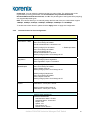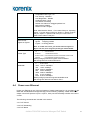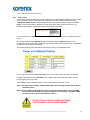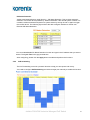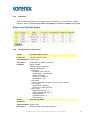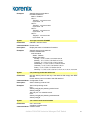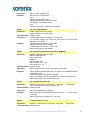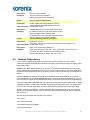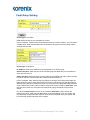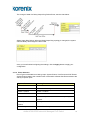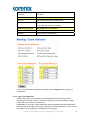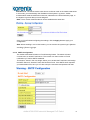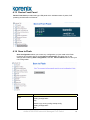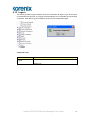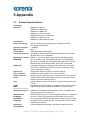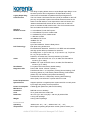
1
Korenix JetNet 4706/4706f Industrial Managed PoE Switch User Manual Version 2.1, 30-Apr, 2008 www.korenix.com JetNet 4706/4706f Industrial Managed PoE Switch 1 Korenix JetNet 4706/4706f Industrial Managed PoE Switch User Manual Copyright Notice Copyright © 2008 Korenix Technology Co., Ltd. All rights reserved. Reproduction in any form or by any means without permission is prohibited. JetNet 4706/4706f Industrial Managed PoE Switch 2 Federal Communications Commission (FCC) Statement This equipment has been tested and found to comply with the limits for a Class A digital device, pursuant to Part 15 of the FCC Rules. These limits are designed to provide reasonable protection against harmful interference when the equipment is operated in a commercial environment. This equipment generates, uses, and can radiate radio frequency energy and, if not installed and used in accordance with the instruction manual, may cause harmful interference to radio communications. Operation of this equipment in a residential area is likely to cause harmful interference in which case the user will be required to correct the interference at his own expense. The user is cautioned that changes and modifications made to the equipment without approval of the manufacturer could void the user's authority to operate this equipment. . JetNet 4706/4706f Industrial Managed PoE Switch 3 Index 1 2 3 4 5 Introduction ............................................................................1 1.1 Overview ......................................................................... 1 1.2 Product Features............................................................. 2 1.3 Package Checklist........................................................... 2 Hardware Installation .............................................................3 2.1 Hardware Introduction..................................................... 3 2.2 Wiring Power Inputs ........................................................ 5 2.3 Wiring Digital Output ....................................................... 6 2.4 Wiring Earth Ground ....................................................... 6 2.5 Wiring 10/100Base-TX Fast Ethernet Ports .................... 6 2.6 Connecting Powered Device (PD) .................................. 7 2.7 Wiring RS-232 Console Cable and pin assignment ........ 8 2.8 DIN-Rail Mounting Installation......................................... 9 2.9 Wall-Mount Installation .................................................... 9 Preparation for Management...............................................10 3.1 Preparation for Serial Console ...................................... 10 3.2 Preparation for Web Interface ....................................... 11 3.3 Preparation for Telnet Console...................................... 13 Feature Configuration..........................................................16 4.1 Command Line Interface (CLI) Introduction .................. 17 4.2 Basic Settings ............................................................... 22 4.3 Port Configuration ......................................................... 38 4.4 Power over Ethernet ..................................................... 41 4.5 Network Redundancy.................................................... 47 4.6 VLAN............................................................................. 57 4.7 Traffic Prioritization........................................................ 60 4.8 Multicast Filtering .......................................................... 64 4.9 SNMP............................................................................ 69 4.10 Security ......................................................................... 73 4.11 Warning......................................................................... 74 4.12 Monitoring and Diagnostic............................................. 83 4.13 Device Front Panel........................................................ 88 4.14 Save to Flash ................................................................ 88 4.15 Logout ........................................................................... 90 Appendix ...............................................................................91 5.1 Product Specifications................................................... 91 5.2 Pin Assignment for RS-232 Console Cable .................. 93 5.3 Korenix Private MIB ...................................................... 93 5.4 Revision History ............................................................ 95 5.5 About Korenix ............................................................... 96 1 Introduction Welcome to the Korenix JetNet 4706/4706f Industrial Managed Power over Ethernet (PoE) Switch User Manual. The following topics are covered in this chapter: 1.1 Overview 1.2 Product Features 1.3 Package Checklist 1.1 Overview The Korenix JetNet 4706/4706f is a 6-port Fast Ethernet Industrial Managed Switch with 4-Port Power over Ethernet injector (10/100Base-TX). JetNet 4706 features 2-Port 10/100Base-TX for uplink; JetNet 4706f features 2-Port Fiber 100Base-FX for long-haul connection. Fiber provides 30km link ability for single mode fiber or 2km link ability for multi-mode fiber. JetNet 4706/4706f is in compliance with IEEE 802.3af Power over Ethernet standards and provides 80W PoE high power forwarding capability in 4-PoE ports totally. In order to apply to a non-standard power source system, JetNet 4706/4706f is equipped with dual mode PoE powering mechanisms, which detects power voltage and executes different powering and disconnecting processes. This feature is suitable for DC24V transit power systems or any application without a DC48V power source. The additional 2-Port allows users to extend network infrastructure for any uplink or connection as redundant ring architecture with nonstop transmission mechanism – Rapid Super Ring (RSR). The RSR function provides network redundancy with 5ms backup time when the main path is disconnected and also integrates the 2004-edition of IEEE 802.1d standard for Rapid Spanning Tree protocol including STP function. To obtain superior transmission performance, JetNet 4706/4706f adopts QoS function with WRR forward scheduling and Port-based VLAN. These features make sure real-time service can be processed with low forwarding latency. JetNet 4706/4706f provides various software features including PoE schedule control and Link Partner Live Detect Function (LPLD), Port-based VLAN, DHCP Client/Server, IGMP snooping, IGMP query, RSTP, Network Time Protocol (NTP), Rate Control, and firmware upgrade functions. In particular, the Link Partner Live Detect (LPLD) and PoE Scheduling Control functions can save maintenance time and effort with pre-defined scheduling control and auto recovery of remote devices without a manual reboot. JetNet 4706/4706f uses IP-31 aluminum mechanical housing to deliver superior thermal radiation and protection for non-stop operation under high operating temperatures. In addition, JetNet 4706/4706f supports comprehensive and user-friendly management interfaces including SNMP, Web interface, Telnet and local RS-232 console with Command Line Interface (CLI), and JetView. Most commands are familiar with Cisco products and do not need to relearn rules (with the exception of PoE control commands). To build a smart, cost-efficient IP surveillance infrastructure, JetNet 4706/4706f is the best choice. . JetNet 4706/4706f Industrial Managed PoE Switch 1 1.2 Product Features The Korenix JetNet 4706/4706f has the following features: SNMP, Web, Console Management, and JetView Windows Utility 4 10/100TX with PoE injector 2-Port 10/100Base-TX for uplink (JetNet 4706) 2-Port Fiber 100Base-FX for uplink (JetNet 4706f) IEEE 802.3af Power over Ethernet compliance End-Span PoE wiring architecture with 4,5,7,8 powering Pins Provides Scheduling PoE Power Control Active Link Partner Live Detect (LPLD) function DC48V or DC24V PoE System Redundancy power function Over current protection Rapid Super Ring within 5ms Network backup time Rapid Dual Homing Auto Ring Coupling IEEE 802.1D:2004 RSTP Port Based VLAN IEEE 802.1p class of service and TOS DiffServ QoS Rate Control and Flow Control IGMP Snooping and IGMP query DHCP Client / Server IP31 aluminum housing for improved thermal radiation -10~60 °C (14~140°F) operating temperature. 1.2KV Hi-Pot testing passed (IEEE standard compliance) Note: Detailed specifications are listed in Appendix 5.1. 1.3 Package Checklist The Korenix JetNet 4706/4706f includes the following items: One Industrial Managed PoE switch- JetNet 4706 or JetNet 4706f One DIN-Rail clip One wall mounting plate and screws One RS-232 DB-9 to RJ-45 console cable Documentation and Software CD Quick Installation Guide If any of the above items are missing or damaged, please contact your local sales representative. JetNet 4706/4706f Industrial Managed PoE Switch 2 2 Hardware Installation The following topics are covered in this chapter: 2.1 Hardware Introduction Dimensions Panel Layout Bottom View 2.2 Wiring Power Inputs 2.3 Wiring Digital Input 2.4 Wiring Relay Output 2.5 Wiring Fast Ethernet Ports 2.6 Wiring Combo Ports 2.7 Wiring RS-232 console cable and pin assignment 2.8 DIN-Rail Mounting Installation 2.9 Wall-Mount Installation 2.1 Hardware Introduction Dimensions JetNet 4706/4706f Industrial Gigabit Switch dimensions: 174.8mm W x 46.5mm H x 136mm D (6.98”W x 1.82”H x 5.31”D) JetNet 4706/4706f Industrial Managed PoE Switch 3 Mylar Layout There is one Mylar stick on the top side of the JetNet 4706/4706f. It includes four LEDs for the system alarm, power, and Ring Master; and ten LEDs for the port operating status. For details, please check the following figure Mylar Layout. Mylar Layout Port Layout JetNet 4706/4706f includes 4-Port 10/100TX with embedded PoE injector function in ports #1 ~#4; the PoE ports can deliver a maximum of 100w in totally. There is also 1 reset button and 1 console port in RJ-45 type connector. JetNet 4706 comes with 2-Port 10/100Base-TX for uplink; JetNet 4706f comes with 2-Port Fiber 100Base-FX. See the following figures. JetNet 4706 JetNet 4706f JetNet 4706/4706f Industrial Managed PoE Switch 4 Side View On the right-side of the JetNet 4706/4706f Industrial Managed PoE Switch, there is a terminal block connector and earth ground screw. The terminal block connector includes 2 power inputs and 1 relay alarm output. Earth Ground 2.2 Wiring Power Inputs Follow the steps below to wire JetNet 4706/4706f redundant DC power inputs. Alarm Relay Output 1A @ DC 24V Power 2 V+ V- Power 1 V+ V- 1. Make sure the power terminal block is unplugged. 2. Insert the positive and negative wires into the respective V+ and V- terminal block connector contacts. 3. Tighten the wire-clamp screws to prevent DC wires from becoming loose. 4. Power 1 and Power 2 support power redundancy and polarity reverse protection functions. 5. Positive and negative power system inputs are both accepted, but Power 1 and Power 2 must apply the same mode. Note 1: Remember to unplug the power terminal block before making wire connections. Otherwise, your screwdriver can inadvertently short your terminal connections to the grounded enclosure. Note 2: Suitable electric wire ranges from 12 to 24 AWG. Note 3: If the 2 power inputs are both connected, JetNet 4706/4706f will be powered from the highest connected voltage. The unit will signal an alarm for loss of power in either PWR1 or PWR2. JetNet 4706/4706f Industrial Managed PoE Switch 5 The following diagram is the wiring architecture for your reference. Be sure the power supply is UL Listed Power supply with output Rating 24-55 Vdc, minimum 2.5 A 2.3 Wiring Digital Output JetNet 4706/4706f provides one digital output, also known as Relay Output. The relay contacts are energized (open) for normal operation and will close under faulty conditions; faulty conditions can include power failure, Ethernet port link break, or other predefined events configurable in the JetNet 4706/4706f user interface. Wiring the digital output is exactly the same as wiring power inputs introduced in section 2.2 (see 2.2 Wiring Power Inputs). 2.4 Wiring Earth Ground To ensure the system will not be damaged by noise or electric shock, we suggest making a direct connection between the JetNet 4706/4706f and earth ground to avoid system damage. 1. On the right side of the JetNet 4706/4706f, there is one earth ground screw. 2. Loosen the earth ground screw with a screwdriver 3. Tighten the screw after the earth ground wire is connected. 2.5 Wiring 10/100Base-TX Fast Ethernet Ports The JetNet 4706/4706f is equipped with 4-Port Power over Ethernet (PoE) injectors with high power forwarding capability in ports #1~#4. The 10/100Base-TX Fast Ethernet ports support 10Base-T and 100Base-TX, full or half duplex modes. All the 10/100Base-TX Fast Ethernet ports will auto-detect signals from connected devices in order to decide the correct link speed and duplex mode. Auto MDI/MDIX allows users to connect another switch, hub or workstation without changing Straight-Through or Crossover Cables. Note that Crossover Cables cross-connect the transmitter lines to the receiver lines at the opposite end. JetNet 4706/4706f Industrial Managed PoE Switch 6 Straight-Through Cabling Schematic Crossover Cabling Schematic Note: The Ethernet cables use pins 1, 2, 3, and 6 of an 8-pin RJ-45 connector. The signals of these pins are converted by the automatic MDI-X function, as shown in the table below: Pin MDI-X Signals MDI Signals 1 RD+ TD+ 2 RD- TD- 3 TD+ RD+ 6 TD- RD- Connect one side of an Ethernet cable into any switch port and connect the other side to your attached device. The LINK LED will light up when the cable is correctly connected. Refer to the LED Indicators section for descriptions of each LED indicator. Always make sure that the cables between the switches and attached devices (e.g. switch, hub, or workstation) are less than 100m (328 ft) apart. The wiring cable types are as follows: 10Base-T: 2-pair UTP/STP Cat. 3, 5e, 6 cable, EIA/TIA-568-B.2 100-ohm (up to 100m) 100Base-TX: 2-pair UTP/STP Cat. 5e, 6 cable, EIA/TIA-568-B.2 100-ohm (up to 100m) 2.6 Connecting Powered Device (PD) JetNet 4706/4706f is equipped with 4-Port PoE injectors which are in compliance with IEEE 802.3af standards for 15.4w forwarding capability and IEEE 802.3at pre-standard for high power. The powering architecture of JetNet 4706/4706f follows IEEE 802.3af Alternative B mode standards of conductor assignment.The following table shows the pin assignment of alternative A and B for the PSE (Power Source Equipment). Conductor Alternative A (MDI-X) Alternative A (MDI) 1 RX & Negative Vport Tx & Positive Vport 2 RX & Negative Vport TX & Positive Vport 3 TX & Positive Vport RX & Negative port Alternative B (All) 4 Positive Vport 5 Positive Vport 6 7 TX & Positive Vport RX & Negative Vport Negative Vport JetNet 4706/4706f Industrial Managed PoE Switch 7 8 Negative Vport Pin assignment of PSE Make sure the twisted pair cable is bound with the standard RJ-45 pin, especially pins 4, 5, 7 and 8. If the RJ-45 is bound with the wrong pin number, JetNet 4706/4706f will not recognize the PD and will not forward DC power to the PD. This is because the JetNet 4706/4706f switch follows the Alternative B mode. The IEEE 802.3af indicates that the PD should support mode A and B, but only receive power from either mode A or B. The following table shows the RJ-45 pin out for the PD. PD Pin out Conductor Mode A 1 Positive Vport, Negative Vport 2 Positive Vport, Negative Vport 3 Negative Vport,Positive Vport Mode B 4 Positive Vport, Negative Vport 5 Positive Vport, Negative Vport 6 Negative Vport,Positive Vport 7 Negative Vport,Positive Vport 8 Negative Vport,Positive Vport Note 1: Before installing the Powered Device (PD), please ensure the PD pin assignment follows the IEEE 802.3af PD standards. There are some IEEE 802.3af pre-standard PDs that only accept mode A for power. IEEE 802.3af indicates that the PD should be powered by either Mode A or B. Note 2: For PoE High Power feeding purpose, JetNet4706/JetNet4706f should be wall mounted on control panel to obtain great heat radiation. Caution: The PoE port of JetNet 4706/4706f should not make connection to Ethernet network with outside plant routing includeing campus, due the lighting strike may damage the system through the power system. 2.7 Wiring RS-232 Console Cable and pin assignment Korenix includes one RS-232 DB-9 to RJ-45 cable. 1. Connect the DB-9 connector to the serial communication port ( RS-232) of your PC 2. Open Terminal tool and set up serial settings to 9600, N, 8, 1. (Baud Rate: 9600 / Parity Check: None / Data Bit: 8 / Stop Bit: 1) Then you can access the CLI interface through the console cable. Note: If you lose the cable, please contact your sales representative to purchase a new one. The pin assignment spec is listed in the Appendix. JetNet 4706/4706f Industrial Managed PoE Switch 8 2.8 DIN-Rail Mounting Installation There are 2 DIN-Rail Clips included. Each set of DIN Rail clips include 4 screws and 2 clips. If the DIN-Rail set is missing, please contact a Korenix distributor for help. Use the screws provided to attach the DIN-Rail clip to the wall-mount plate of the JetNet 4706/4706f 2.9 Wall-Mount Installation Follow the steps below to install the JetNet 4706/4706f wall-mount plate. Use the hook holes located at the corners of the wall-mount plate to hang JetNet 4706/4706f onto a wall. Wall-mount JetNet 4706/4706f Industrial Managed PoE Switch 9 3 Preparation for Management The Korenix JetNet 4706/4706f Industrial Managed PoE Switch provides both in-band and out-band configurations. With out-band management; you can configure the switch via RS232 console cable if you do not want to include your admin PC as part of your network. Also, in case you lose network connection, you will still be able to configure the switch via RS232 console cable. Out-band management is not affected by network performance. In-band management allows you to remotely manage the switch via the network. You can choose Telnet or Web-based management. You just need to know the device’s IP address and you can remotely connect to its embedded HTTP web pages or Telnet console. The following topics are covered in this chapter: 3.1 Preparation for Serial Console 3.2 Preparation for Web Interface 3.3 Preparation for Telnet console 3.1 Preparation for Serial Console In the JetNet 4706/4706f package, Korenix has included one RS-232 DB-9 to RJ-45 console cable. Attach the RS-232 DB-9 connector to your PC COM port, then connect the RJ-45 to the console port of JetNet 4706/4706f. If you lose the cable, please follow the console cable Pin assignment to find one (See Appendix). 1. Go to Start -> Program -> Accessories -> Communication -> Hyper Terminal 2. Give a name to the new console connection. 3. Choose the COM name 4. Select correct serial settings. The serial settings for the JetNet 4706/4706f are: Baud Rate: 9600 / Parity Check: None / Data Bit: 8 / Stop Bit: 1 5. After connected, you will see a switch login request. 6. Login to the switch. The default username and password are admin. Booting... Switch login: admin Password: JetNet 4706 (version 2.1-20080409). Copyright 2006-2008 Korenix Technology Co., Ltd. Switch> JetNet 4706/4706f Industrial Managed PoE Switch 10 3.2 Preparation for Web Interface The JetNet 4706/4706f provides HTTP Web Interface and Secure HTTPS Web Interface for web management. 3.2.1 Web Interface The Korenix web management page uses JavaScript. This allows you to use a standard Web browser such as Microsoft Internet Explorer or Mozilla FireFox to configure the switch from anywhere while connected to the network. Before you attempt to use the embedded web interface to manage switch operation, verify that your JetNet 4706/4706f Industrial Ethernet Switch is properly installed on your network and that every PC on the network can access the switch via Web browser. 1. Verify that your network interface card (NIC) is operational, and that your operating system supports TCP/IP protocol. 2. Wire the DC power to the switch and connect your switch to your computer. 3. Make sure that the switch default IP address is 192.168.10.1. 4. Change your computer IP address to 192.168.10.2 or another IP address in the 192.168.10.x subnet (Network Mask: 255.255.255.0). 5. Switch to DOS command mode and ping 192.168.10.1 to verify a normal response time. 6. Launch a web browser (Internet Explorer or Mozilla FireFox) on your PC. 7. Type http://192.168.10.1 (or the IP address of the switch) into the Web address window. Press Enter. 8. Key in the username and password. The default username and password are admin. 9. Click OK. The welcome page of the web-based management interface will now appear. JetNet 4706/4706f Industrial Managed PoE Switch 11 10. Once you enter the web-based management interface, you can change the JetNet 4706/4706f’s IP address to fit your network environment. Note 1: Internet Explorer Version 5.0 or later does not allow Java applets to open sockets by default. Users must directly modify the browser settings to selectively enable Java applets in order to use network ports. Note 2: The Web UI connection session of JetNet 4706/4706f will logout automatically if you do not input anything after 30 seconds. Re-login if this occurs. 3.2.2 Secured Web Interface The Korenix web management page also provides a secure HTTPS login. All the configuration commands will be secure, making it hard for hackers to figure out login password and configuration commands. 1. Launch a web browser (Internet Explorer or Mozilla FireFox) on your PC. 2. Type https://192.168.10.1 (or the IP address of the switch) into the web address window. Press Enter. 3. A popup screen will appear and request you to trust the secure HTTPS connection distributed by JetNet 4706/4706f. Press Yes. 4. The login screen will appear next. 5. Key in the username and password. The default username and password are admin. 6. Click OK. The welcome page of the web-based management interface will now appear. JetNet 4706/4706f Industrial Managed PoE Switch 12 7. 3.3 3.3.1 Once you enter the web-based management interface, all the commands you see will be the same as what appeared through HTTP login. Preparation for Telnet Console Telnet The Korenix JetNet 4706/4706f supports Telnet. You can connect to the switch through Telnet-- the command lines are the same as the RS232 console port. Below are the steps for opening a Telnet connection. 1. Go to Start -> Run -> cmd. Press Enter 2. Type Telnet 192.168.10.1 (or the IP address of the switch). Press Enter 3.3.2 SSH (Secure Shell) The Korenix JetNet 4706/4706f also supports SSH. You can remotely connect to the switch by command line interface. The SSH connection can secure all the configuration commands you send to the switch. SSH is a client/server architecture in which JetNet 4706/4706f is the SSH server. When you want to make a SSH connection with the switch, you should download the SSH client tool first. SSH Client There are many SSH clients you can find on the internet. Fox example, PuTTY is a free and popular Telnet/SSH client. We will use this tool to demonstrate how to log in to the JetNet 4706/4706f through SSH. Note: PuTTY, Copyright 1997-2006 Simon Tatham. Download PuTTY: http://www.chiark.greenend.org.uk/~sgtatham/putty/download.html JetNet 4706/4706f Industrial Managed PoE Switch 13 1. Open SSH Client (PuTTY) In the Session configuration, enter the Host Name (IP Address of your JetNet 4706/4706f) and Port number (default = 22). Choose the “SSH” protocol. Then click on “Open” to start the SSH session console. 2. After clicking on Open, you will see the cipher information in the popup screen. Press "Yes" to accept the Security Alert. JetNet 4706/4706f Industrial Managed PoE Switch 14 3. After a few seconds, the SSH connection to JetNet 4706/4706f will open. 4. Type in the login name and password. The default login name and password are admin. 5. All the commands you see in SSH are the same as the CLI commands you see via RS232 console. The next chapter will introduce in detail how to use the command line to configure the switch. JetNet 4706/4706f Industrial Managed PoE Switch 15 4 Feature Configuration This chapter explains how to configure the JetNet 4706/4706f software and its features. The following topics are covered in this chapter: 4.1 Command Line Interface (CLI) Introduction 4.2 Basic Settings 4.3 Port Configuration 4.4 Power over Ethernet 4.5 Network Redundancy 4.6 VLAN 4.7 Traffic Prioritization 4.8 Multicast Filtering 4.9 SNMP 4.10 Security 4.11 Warning 4.12 Monitor and Diag 4.13 Device Front Panel 4.14 Save to Flash 4.15 Logout JetNet 4706/4706f Industrial Managed PoE Switch 16 4.1 Command Line Interface (CLI) Introduction The Command Line Interface (CLI) is the user interface of the switch’s embedded software system. You can view the system information, see the status, configure the switch and receive a response back from the system by keying in a command. There are different command modes. Each command mode has its own access ability, its own available command lines, and its own different command lines to enter and exit. These modes are User EXEC, Privileged EXEC, Global Configuration, and (Port/VLAN) Interface Configuration modes. User EXEC mode: As long as you login to the switch through CLI, you will be in the User EXEC mode. You can ping, telnet remote device, and show some basic information. Types enable to enter the next mode, and exit to logout. Below is a full command list. Switch> enable exit list ping quit show telnet traceroute Turn on privileged mode command Exit current mode and down to previous mode Print command list Send echo messages Exit current mode and down to previous mode Show running system information Open a telnet connection Trace route to destination Privileged EXEC mode: Type enable in the User EXEC mode to enter the Privileged EXEC mode. In this mode, the system allows you to view current configurations, reset to default, reload the switch, show the system’s information, save a configuration, and enter the global configuration mode. You can type configure terminal to enter the next mode or exit to leave, to see a list of available command by types “? ”. Following diagram shows the commands. Switch(config)# ? access-list administrator arp clock default end exit hostname interface ip list log mac mac-address-table no ntp password qos relay rmon router smtp-server Add an access list entry Administrator account setting Set a static ARP entry Configure time-of-day clock Set a command to its defaults End current mode and change to enable mode Exit current mode and down to previous mode Set system's network name Select an interface to configure IP information Print command list Logging control Global MAC configuration subcommands mac address table Negate a command or set its defaults Configure NTP Assign the terminal connection password Quality of Service (QoS) relay output type information Remote monitoring Enable a routing process SMTP server configuration JetNet 4706/4706f Industrial Managed PoE Switch 17 Global Configuration mode: Type configure terminal in privileged EXEC mode. You can then enter the global configuration mode. In global configuration mode, you can configure all the features that the system provides. Type interface IFNAME/VLAN to enter interface configuration mode and exit to leave, or ? for command list. Available commands for global configuration mode are shown below. Switch# configure terminal Switch(config)# access-list Add an access list entry administrator Administrator account setting arp Set a static ARP entry clock Configure time-of-day clock default Set a command to its defaults end End current mode and change to enable mode exit Exit current mode and down to previous mode hostname Set system's network name interface Select an interface to configure ip IP information list Print command list log Logging control mac Global MAC configuration subcommands mac-address-table mac address table multiple-super-ring Configure Multiple Super Ring no Negate a command or set its defaults ntp Configure NTP password Assign the terminal connection password poe Configure power over ethernet qos Quality of Service (QoS) relay relay output type information rmon Remote monitoring t E bl ti (Port) Interface Configuration: Type interface IFNAME in global configuration mode. You can then enter interface configuration mode. In this mode, you can configure port settings. The port interface name for fast Ethernet port 1 is fa1; fast Ethernet 6 is fa6. You can type the interface name accordingly when you want to enter a specific interface configuration mode. You can type exit to leave or “?” for a list of available commands. JetNet 4706/4706f Industrial Managed PoE Switch 18 Below are the available commands for port interface configuration mode. Switch(config)# interface fa2 Switch(config-if)# auto-negotiation Enables auto-negotiation state of a given port description Interface specific description duplex Specifies the duplex mode of operation for a port end End current mode and change to enable mode exit Exit current mode and down to previous mode flowcontrol Sets the flow-control value for an interface list Print command list loopback Specifies the loopback mode of operation for a port mac MAC interface commands mdix Enables mdix state of a given port no Negate a command or set its defaults poe Configure power over ethernet qos Quality of Service (QoS) quit Exit current mode and down to previous mode rate-limit Rate limit configuration shutdown Shutdown the selected interface spanning-tree the spanning-tree protocol speed Specifies the speed of a Fast Ethernet port. switchport Set switching mode characteristics (VLAN) Interface Configuration: Type interface VLAN VLAN-ID in global configuration mode. You can then enter the VLAN interface configuration mode. In this mode, you can configure the settings for a specific VLAN. The VLAN interface name for VLAN 1 is VLAN 1; VLAN 2 is VLAN 2. You can type exit to leave or “? “ for a list of available commands. Available commands for the VLAN interface configuration mode appear below. Switch(config)# interface vlan 1 JetNet 4706f(config-if)# description Interface specific description end End current mode and change to enable mode exit Exit current mode and down to previous mode ip Interface Internet Protocol config commands list Print command list no Negate a command or set its defaults quit Exit current mode and down to previous mode shutdown Shutdown the selected interface JetNet 4706/4706f Industrial Managed PoE Switch 19 The following is a summary of command modes. Command Main Function Enter and Exit Method Prompt Mode User EXEC This is the first level of access. Enter: Type login to login Switch> Users can ping, telnet remote Exit: Type exit to logout device, and show basic Next mode: Type enable to information enter privileged EXEC mode. Privileged In this mode, the system Enter: Type enable in User EXEC allows you to view current EXEC mode. Switch# configuration, reset to default, Exec: Type disable to exit to reload the switch, show the user EXEC mode. system’s information, save a Type exit to logout configuration, and enter global Next Mode: Type configure configuration mode. terminal to enter global configuration command. Global In global configuration mode, Enter: Type configure configuration you can configure all the terminal in privileged EXEC features that the system mode provides Exit: Type exit or end or press Switch(config)# Ctrl-Z to exit. Next mode: Type interface IFNAME/ VLAN VID to enter interface configuration mode Port In this mode, you can Interface configure port-related settings. in global configuration mode. configuration Enter: Type interface IFNAME Switch(config-if)# Exit: Type exit or Ctrl+Z to global configuration mode. Type end to privileged EXEC mode. VLAN In this mode, you can Enter: Type interface VLAN Interface configure settings for specific VID in global configuration Configuration VLAN. mode. Switch(config-vlan)# Exit: Type exit or Ctrl+Z to global configuration mode. Type end to privileged EXEC mode. JetNet 4706/4706f Industrial Managed PoE Switch 20 Here are some useful commands for you to see all or specific commands available to you. Save time and avoid typing errors. ? Shows all the available commands in the mode you are currently in. It also shows you the next command you can/should type. Switch(config)# interface (?) IFNAME Interface's name vlan Select a vlan to configure (Character)? Shows all the available commands for what you input as “Character.” Switch(config)# a? access-list administrator arp Add an access list entry Administrator account setting Set a static ARP entry Tab Key Helps you input commands quicker. If there is only one available command, hitting the tab key can help you automatically generate the command. Switch# co (tab) (tab) Switch# configure terminal Switch(config)# ac (tab) Switch(config)# access-list Ctrl+C Stops an unfinished command. Ctrl+S Locks the screen of the terminal. You will not be able to input a command. Ctrl+Q Unlocks a locked screen. Ctrl+Z Exits configuration mode. An alert message appears when multiple users try to configure the switch. If the administrator is in configuration mode, then Web users will not be able to change the settings. JetNet 4706/4706f only allows one administrator at a time to configure the switch. JetNet 4706/4706f Industrial Managed PoE Switch 21 4.2 Basic Settings This section provides you with instructions on how to configure switch information, set the IP address, and configure the username and password of the system. It also allows you to upgrade the firmware, backup and restore a configuration, reload the system to factory default, and reboot the system. The following is included in this section: 4.2.1 Switch Setting 4.2.2 Admin Password 4.2.3 IP Configuration 4.2.4 Time Setting 4.2.5 DHCP Server 4.2.6 Backup and Restore 4.2.7 Firmware Upgrade 4.2.8 Factory Default 4.2.9 System Reboot 4.2.10 CLI Commands for Basic Settings 4.2.1 Switch Setting You can assign a System name, Location, Contact and view the system information. The following figure is the Web UI for Switch Setting. Figure 4.2.1.1 JetNet 4706/4706f Industrial Managed PoE Switch 22 System Name: Assign a name to the device. You can input up to 64 characters. After you configure the name, the CLIP system will select the first 12 characters as the name for the CLIP system. System Location: Specify the switch’s physical location. You can input up to 64 characters. System Contact: Specify contact people. Enter the name, e-mail address or other information about the administrator. You can input up to 64 characters. System OID: Set the SNMP object ID of the switch. You can follow the path to find its private MIB in the MIB browser. Note: When you attempt to view a private MIB, you should compile private MIB files into your MIB browser first. System Description: View a description of the system. JetNet 4706/4706f Industrial Management Ethernet Switch is the name of this device. Firmware Version: Display the firmware version installed on this device. MAC Address: Display the unique hardware address (MAC address) assigned by the manufacturer. Once you have finished the configuration, click the Apply button to apply your settings. Note: Always remember to select Save to save your settings. Otherwise, the settings you made will be lost when the switch is powered off. 4.2.2 Admin Password You can change the username and password to enhance security The following figure is the Web UI for Admin Password Username: Key in a new username. The default setting is admin. Password: Key in a new password. The default setting is admin. Confirm Password: Re-enter the new password to confirm it. Once you finish configuring the settings, click the Apply button to apply your configuration. JetNet 4706/4706f Industrial Managed PoE Switch 23 The following figure is the popup alert window when the incorrect username is entered. 4.2.3 IP Configuration This function allows users to configure the switch’s IP address settings. DHCP Client: Enable or Disable DHCP Client function. When DHCP Client function is enabled, an IP address will be assigned to the switch from the network’s DHCP server. In this mode, the default IP address will be replaced by the one assigned by the DHCP server. If DHCP Client is disabled, then the IP address that you specified will be used instead. IP Address: You can assign the IP address reserved by your network for your JetNet. If DHCP Client function is enabled, you don’t need to assign an IP address, as it will be overwritten by the DHCP server. The default IP address is 192.168.10.1. Subnet Mask: Assign the subnet mask for the IP address. If DHCP Client function is enabled, you don’t need to assign the subnet mask. The default Subnet Mask is 255.255.255.0. Note: In the CLI, we use the enabled subnet mask to represent the number displayed in the web UI. For example, 8 stands for 255.0.0.0; 16 stands for 255.255.0.0; 24 stands for 255.255.255.0. Gateway: Assign the gateway for the switch. The default gateway is 192.168.10.254. Note: In the CLI, we use 0.0.0.0/0 to represent the default gateway. Once you finish configuring the settings, click the Apply button to apply your configuration. JetNet 4706/4706f Industrial Managed PoE Switch 24 4.2.4 Time Setting Time Setting source allow user to set the time by manually or through NTP server. It also provide time synchronize from PC. Network Time Protocol (NTP) is used to synchronize computer clocks on the internet. You can configure NTP settings here to synchronize the clocks of several switches on the network. JetNet4706/4706f also provides Daylight Saving function. Manual Setting: User can select Manual setting to change time as user want and also click the icon “Get Time From PC” to sync time from your PC. NTP client: Select the Time Setting Source to NTP client can let device enable the NTP client.It allow JetNet4706/4706f get time from 2 different NTP servers. The system will send request packet to acquire current time from the NTP server. JetNet 4706/4706f Industrial Managed PoE Switch 25 Time zone: Select the time zone where the switch is located. For your reference, the following table lists the time zones of different locations. The default time zone is GMT (Greenwich Mean Time). Switch(config)# clock timezone 01 (GMT-12:00) Eniwetok, Kwajalein 02 (GMT-11:00) Midway Island, Samoa 03 (GMT-10:00) Hawaii 04 (GMT-09:00) Alaska 05 (GMT-08:00) Pacific Time (US & Canada) , Tijuana 06 (GMT-07:00) Arizona 07 (GMT-07:00) Mountain Time (US & Canada) 08 (GMT-06:00) Central America 09 (GMT-06:00) Central Time (US & Canada) 10 (GMT-06:00) Mexico City 11 (GMT-06:00) Saskatchewan 12 (GMT-05:00) Bogota, Lima, Quito 13 (GMT-05:00) Eastern Time (US & Canada) 14 (GMT-05:00) Indiana (East) 15 (GMT-04:00) Atlantic Time (Canada) 16 (GMT-04:00) Caracas, La Paz 17 (GMT-04:00) Santiago 18 (GMT-03:00) NewFoundland 19 (GMT-03:00) Brasilia 20 (GMT-03:00) Buenos Aires, Georgetown 21 (GMT-03:00) Greenland 22 (GMT-02:00) Mid-Atlantic 23 (GMT-01:00) Azores 24 (GMT-01:00) Cape Verde Is. 25 (GMT) Casablanca, Monrovia 26 (GMT) Greenwich Mean Time: Dublin, Edinburgh, Lisbon, London 27 (GMT+01:00) Amsterdam, Berlin, Bern, Rome, Stockholm, Vienna 28 (GMT+01:00) Belgrade, Bratislava, Budapest, Ljubljana, Prague 29 (GMT+01:00) Brussels, Copenhagen, Madrid, Paris 30 (GMT+01:00) Sarajevo, Skopje, Sofija, Vilnius, Warsaw, Zagreb 31 (GMT+01:00) West Central Africa 32 (GMT+02:00) Athens, Istanbul, Minsk 33 (GMT+02:00) Bucharest 34 (GMT+02:00) Cairo 35 (GMT+02:00) Harare, Pretoria 36 (GMT+02:00) Helsinki, Riga, Tallinn 37 (GMT+02:00) Jerusalem 38 (GMT+03:00) Baghdad 39 (GMT+03:00) Kuwait, Riyadh 40 (GMT+03:00) Moscow, St. Petersburg, Volgograd 41 (GMT+03:00) Nairobi 42 (GMT+03:30) Tehran 43 (GMT+04:00) Abu Dhabi, Muscat 44 (GMT+04:00) Baku, Tbilisi, Yerevan 45 (GMT+04:30) Kabul 46 (GMT+05:00) Ekaterinburg 47 (GMT+05:00) Islamabad, Karachi, Tashkent 48 (GMT+05:30) Calcutta, Chennai, Mumbai, New Delhi 49 (GMT+05:45) Kathmandu JetNet 4706/4706f Industrial Managed PoE Switch 26 50 51 52 53 54 55 56 57 58 59 60 61 62 63 64 65 66 67 68 69 70 71 72 73 74 (GMT+06:00) Almaty, Novosibirsk (GMT+06:00) Astana, Dhaka (GMT+06:00) Sri Jayawardenepura (GMT+06:30) Rangoon (GMT+07:00) Bangkok, Hanoi, Jakarta (GMT+07:00) Krasnoyarsk (GMT+08:00) Beijing, Chongqing, Hong Kong, Urumqi (GMT+08:00) Irkutsk, Ulaan Bataar (GMT+08:00) Kuala Lumpur, Singapore (GMT+08:00) Perth (GMT+08:00) Taipei (GMT+09:00) Osaka, Sapporo, Tokyo (GMT+09:00) Seoul (GMT+09:00) Yakutsk (GMT+09:30) Adelaide (GMT+09:30) Darwin (GMT+10:00) Brisbane (GMT+10:00) Canberra, Melbourne, Sydney (GMT+10:00) Guam, Port Moresby (GMT+10:00) Hobart (GMT+10:00) Vladivostok (GMT+11:00) Magadan, Solomon Is., New Caledonia (GMT+12:00) Aukland, Wellington (GMT+12:00) Fiji, Kamchatka, Marshall Is. (GMT+13:00) Nuku'alofa Daylight Saving Time: Set when Enable Daylight Saving Time start and end, During the Daylight Saving Time, the device’s time is one hour earlier than the actual time. Once you have finished the configuration, click the Apply button to apply your configuration. 4.2.5 DHCP Server You can select to Enable or Disable DHCP Server function. JetNet 4706/4706f will assign a new IP address to link partners. DHCP Server configuration After selecting to enable DHCP Server function, type in the Network IP address for the DHCP server IP pool, Subnet Mask, Default Gateway address and Lease Time for client. JetNet 4706/4706f Industrial Managed PoE Switch 27 Once you have finished the configuration, click the Apply button to apply your configuration Excluded Address: You can type a specific address into the IP Address field for the DHCP server reserved IP address. The IP address that is listed in the Excluded Address List Table will not be assigned to the network device. Add or remove an IP address from the Excluded Address List by clicking the Add or Remove button. Manual Binding: JetNet 4706/4706f provides a MAC address and IP address binding and removing function. You can type in the specified IP and MAC address, and then click the Add button to add a new MAC&IP address binding rule for a specified link partner, like PLC or any device without DHCP client function. To remove from the binding list, just select the rule to remove and click the Remove button. JetNet 4706/4706f Industrial Managed PoE Switch 28 DHCP Leased Entries: JetNet 4706/4706f provides an assigned IP address list for user check. It will show the MAC and IP address that was assigned by JetNet 4706/4706f. Click the Reload button to refresh the listing. 4.2.6 Backup and Restore With the Backup command, you can save current configuration files saved in the switch’s flash to the admin PC or TFTP server. This will allow you to go to the Restore command later, in order to restore the configuration file back to the switch. Before you restore the configuration file, you must place the backup configuration file into the PC or TFTP server. The switch will then download this file back to the flash. There are 2 modes for users to backup/restore the configuration file, Local File mode and TFTP Server mode. Local File mode: In this mode, the switch acts as the file server. Users can browse the JetNet 4706/4706f Industrial Managed PoE Switch 29 target folder and then type in the file name to backup the configuration. Users can also browse the target folder and select existing configuration files to restore the configuration back to the switch. This mode is only provided by Web UI; CLI is not supported. TFTP Server mode: In this mode, the switch acts as TFTP client. Before you do so, make sure that your TFTP server is ready. Then type in the IP address of the TFTP Server. The system uses the default configuration file name, Quagga.conf. You do not need to enter a new file name. This mode can be used in both Web UI and CLI. TFTP Server IP Address: Key in the IP address of your TFTP Server here. Backup/Restore File Name: The system uses a default file name. Configuration File: The configuration file of the switch is a text file. You can open it with Microsoft Word or any program that can read .txt files, modify the file, add/remove configuration settings, and then restore it back on to the switch. Startup Configuration File: After you have saved the running-config to flash, the new settings will be updated after a power cycle. You can use show startup-config to view it in the CLI. The Backup command can only backup such configuration files to your PC or TFTP server. Technical Tip: Default Configuration File: The switch provides the default configuration file in the system. You can use the Reset button, Reload command to reset the system. Running Configuration File: The switch’s CLI allows you to view the latest settings running on the system. The information shown here are the settings you set up but have notfinish saved to flash.and Theconfiguring settings notthe yetsettings, saved toclick flash not work after a power Once you selecting onwill Backup or Restore to run cycle. You can use show running-config to view it in the CLI. the process. The following figure is the Main UI for Backup & Restore The following figure is the WEB UI for Backup/Restore Configuration - Local File mode. JetNet 4706/4706f Industrial Managed PoE Switch 30 Click on the Folder icon to select the target file you want to backup/restore. Note: The folders of the path to the target file do not allow you to input space key. The following figure is the Web UI for Backup/Restore Configuration - TFTP Server mode Type in the IP address of TFTP Server IP. Then click the Backup/Restore button. 4.2.7 Firmware Upgrade In this section, you can update the switch with the latest firmware. Korenix provides the latest firmware on their Web site (www.korenix.com). New firmware may include new features, bug fixes or other software changes. The Web site also provides release notes for the update as well. We suggest you use the latest firmware before installing the switch. Note: The system will automatically reboot after you finish upgrading the new firmware. Please inform all attached users before doing this. The following figure is the Web Main UI for Firmware Upgrade. There are 2 modes for users to backup/restore the configuration file, Local File mode and TFTP Server mode. JetNet 4706/4706f Industrial Managed PoE Switch 31 Local File mode: In this mode, the switch acts as the file server. Users can browse the target folder and then type in the file name to backup the configuration. Users can also browse the target folder and select the existing configuration file to restore the configuration back to the switch. This mode is only provided by Web UI; CLI is not supported. TFTP Server mode: In this mode, the switch acts as the TFTP client. Before you do so, make sure that your TFTP server is ready. Then, type in the TFTP Server IP address. This mode can be used in both Web UI and CLI. TFTP Server IP Address: Key in the IP address of your TFTP Server here. Firmware File Name: View the file name of the new firmware. The UI also shows you the latest firmware version and build date. Please check the version number after you reboot the switch. The following Web UI is for Firmware Upgrade - Local File mode. Click on the Folder icon to select the correct firmware you want to upgrade The following Web UI is for Firmware Upgrade – TFTP Server mode. Type in the IP address of the TFTP Server and the Firmware File Name. Then click the JetNet 4706/4706f Industrial Managed PoE Switch 32 Upgrade button to start the process. After finishing the transmission of the firmware, the system will copy the firmware file and replace the firmware in the flash. The CLI will show until the process is finished. 4.2.8 Factory Default By clicking the Reset button, the system will reset all configurations except the IP address to its default settings. The system will show you a popup message window after running this command. Default settings will be in effect after rebooting the switch. The Web UI figure for Reset to Default Factory Default The following figure is the popup alert screen to confirm the command. Click Yes to reset the system. The following UI is a popup message screen to show you that the reset is complete. Click OK to close the screen. Then go to the Reboot page to reboot the switch. JetNet 4706/4706f Industrial Managed PoE Switch 33 Click OK. The system will then automatically reboot the device. Note: If you have already configured the IP of your device to another IP address; when you use this command through CLI and Web UI, our software will not reset the IP address to the default IP. The system will maintain the IP address so that you can still connect to the switch via the network. 4.2.9 System Reboot System Reboot allows you to reboot the device. Some of the feature changes require you to reboot the system. Click the Reboot button to reboot your device. Note: Remember to click the Save button to save your settings. Otherwise, the settings you made will be gone once the switch is powered off. Below is the Main screen for Reboot Below is the popup alert screen to request confirmation for the Switch Reboot. Click Yes to reboot the switch. The popup message screen below appears when rebooting the switch. JetNet 4706/4706f Industrial Managed PoE Switch 34 4.2.10 CLI Commands for Basic Settings Feature Command Line Switch Setting System Location Switch(config)# hostname WORD Network name of this system Switch(config)# hostname JetNet 4706 Switch(config)# Switch(config)# snmp-server location Taipei System Contact Switch(config)# snmp-server contact [email protected] Display Switch# show snmp-server name JetNet 4706 System Name Switch# show snmp-server location Taipei Switch# show snmp-server contact [email protected] Switch> show version 0.31-20061218 Switch# show hardware mac MAC Address : 00:12:77:FF:01:B0 Admin Password User Name and Password Display Switch(config)# administrator NAME Administrator account name Switch(config)# administrator admin % Command incomplete. Switch(config)# administrator orwell PASSWORD Administrator account password Switch(config)# administrator orwell orwell Change administrator account orwell and password orwell success. Switch# show administrator Administrator account information name: orwell password: orwell IP Configuration IP Address/Mask (192.168.10.8, 255.255.255.0 Gateway Remove Gateway Display Switch(config)# int vlan 1 Switch(config-if)# ip address 192.168.10.8/24 Switch(config)# ip route 0.0.0.0/0 192.168.10.254/24 Switch(config)# no ip route 0.0.0.0/0 192.168.10.254/24 Switch# show running-config ……… ! interface vlan1 ip address 192.168.10.8/24 no shutdown ! ip route 0.0.0.0/0 192.168.10.254/24 ! JetNet 4706/4706f Industrial Managed PoE Switch 35 Time Setting NTP Server Switch(config)# ntp peer 192.168.10.100 Time Zone Switch(config)# clock timezone 26 Sun Jan 1 04:13:24 2006 (GMT) Greenwich Mean Time: Dublin, Edinburgh, Lisbon, London Note: By typing clock timezone ?, you can see the timezone list. Then choose the number of the timezone you want to select. Switch# sh ntp associations 1 192.168.10.100 2 192.168.10.101 Display Switch# show clock Sun Jan 1 04:14:19 2006 (GMT) Greenwich Mean Time: Dublin, Edinburgh, Lisbon, London Switch# show clock timezone clock timezone (26) (GMT) Greenwich Mean Time: Dublin, Edinburgh, Lisbon, London Backup and Restore Backup Startup Configuration file Restore Configuration Show Startup Configuration Show Running Configuration Switch# copy startup-config tftp: 192.168.10.33 Writing Configuration [OK] Note 1: To backup the latest startup configuration file, you should save current settings to flash first. You can refer to 4.12 to see how to save settings to the flash. Note 2: 192.168.10.33 is the TFTP server’s IP. Your environment may use different IP addresses. Please type target TFTP server IP in this command. Switch# copy tftp: 192.168.10.33 startup-config Switch# show startup-config Switch# show running-config Firmware Upgrade Firmware Upgrade Switch# archive download-sw /overwrite tftp 192.168.10.33 JetNet 4706.bin Firmware upgrading, don't turn off the switch! Tftping file JetNet 4706.bin Firmware upgrading ................................................................................ ................................................................................ ........................... Firmware upgrade success!! Rebooting....... Factory Default Factory Default Switch# reload default-config file Reload OK! Switch# reboot System Reboot JetNet 4706/4706f Industrial Managed PoE Switch 36 Reboot Switch# reboot JetNet 4706/4706f Industrial Managed PoE Switch 37 4.3 Port Configuration This section shows you how to enable/disable port state, or configure port auto-negotiation, speed, duplex, flow control, rate limit control and port aggregation settings. It also allows you to view port status and aggregation information. The following commands are covered in this section: 4.3.1 Port Control 4.3.2 Port Status 4.3.3 Rate Control 4.3.4 Command Lines for Port Configuration 4.3.1 Port Control Port Control commands allow you to enable/disable port state, or configure port auto-negotiation, speed, duplex, and flow control. Select the port you want to configure and make changes to the port. State column: Enable or disable the state of this port. Once you disable the port, it stops linking and forwarding traffic. The default setting when you receive the device is Enable, which means all the ports are working. Speed/Duplex column: Configure the port speed and duplex mode of this port. Below are the selections you can choose: Fast Ethernet Port 1~6 (fa1~fa6) : Auto Negotiation, 10M Full Duplex(10 Full), 10M Half Duplex(10 Half), 100M Full Duplex(100 Full) and 100M Half Duplex(100 Half). The default mode is Auto Negotiation mode. Flow Control column: Symmetric or disable the flow control function. “Symmetric” means that JetNet 4706/4706f Industrial Managed PoE Switch 38 you need to activate the flow control function of the remote network device in order to let the flow control of that corresponding port on the switch work. “Disable” means that you do not need to activate the flow control function of the remote network device, as the flow control of that corresponding port on the switch will work either way. Once you have finished configuring the settings, click the Apply button to save the configuration. Technical Tips: If both ends are going at different speeds, they will not link to each other. If both ends are in different duplex modes, they will be connected by half mode. 4.3.2 Port Status Port Status shows you the current port status. A description of each column is as follows: Port: Port interface number. Type: 100BASE -> Fast Ethernet port. Link: Link status. Up -> Link UP. Down -> Link Down. State: Enable -> State is enabled. Disable -> The port is disabled by user configured. Speed/Duplex: Current working status of the port. Flow Control: The state of the flow control. 4.3.3 Rate Control Rate control is a form of flow control used to enforce a strict bandwidth limit of a port. You can program separate trasmitting (Egress Rule) and receiving (Ingress Rule) rate limits for each port, and even apply the limit to certain packet types as described below. JetNet 4706/4706f Industrial Managed PoE Switch 39 Packet type: You can select the packet type that you want to filter. The packet types of the Ingress Rule (incoming) listed here includes Broadcast Only, Broadcast/multicast, Broadcast/Multicast/UnknownUnicast, and All. The packet types of the Egress Rule (outgoing) only support All packet types. Rate: This column allows you to manually assign the limit rate of the port. Valid values support 128Kbps, 256Kbps, 512Kbps, 1024Kbps, 2048Kbps, 4096Kbps and 8192Kbps. To enable rate control function, please click the Apply button to apply the configuration. 4.3.4 Command Lines for Port Configuration Feature Command Line Port Control Port Control – State Switch(config-if)# shutdown -> Disable port state Port1 Link Change to DOWN interface fastethernet1 is shutdown now. Switch(config-if)# no shutdown -> Enable port state Port1 Link Change to DOWN Port1 Link Change to UP interface fastethernet1 is up now. Switch(config-if)# Port1 Link Change to UP Port Control – Auto Negotiation Switch(config)# interface fa1 Switch(config-if)# auto-negotiation Auto-negotiation of port 1 is enabled! Port Control – Force Speed/Duplex Switch(config-if)# speed 100 Port1 Link Change to DOWN set the speed mode ok! Switch(config-if)# Port1 Link Change to UP Switch(config-if)# duplex full Port1 Link Change to DOWN set the duplex mode ok! Switch(config-if)# Port1 Link Change to UP Port Control – Flow Control Switch(config-if)# flowcontrol on Flowcontrol on for port 1 set ok! Switch(config-if)# flowcontrol off Flowcontrol off for port 1 set ok! Port Status Port Status Switch# show interface fa1 Interface fastethernet1 Administrative Status : Enable Operating Status : Connected Duplex : Full Speed : 100 Flow Control :off Default Port VLAN ID: 1 JetNet 4706/4706f Industrial Managed PoE Switch 40 Ingress Filtering : Disabled Acceptable Frame Type : All Port Security : Disabled Auto Negotiation : Disable Loopback Mode : None STP Status: forwarding Default CoS Value for untagged packets is 0. Mdix mode is Disable. Medium mode is Copper. Note: Administrative Status -> Port state of the port. Operating status -> Current status of the port. Duplex -> Duplex mode of the port. Speed -> Speed mode of the port. Flow control -> Flow Control status of the port. Rate Control Rate Control – Ingress or Egress Switch(config-if)# rate-limit egress Outgoing packets ingress Incoming packets Note: To enable rate control, you should select the Ingress or Egress rule first; then assign the packet type and bandwidth. Rate Control – Filter Switch(config-if)# rate-limit ingress mode all Packet Type Rate Control Bandwidth 4.4 broadcast Limit all frames Limit Broadcast frames flooded-unicast Limit Broadcast, Multicast and flooded unicast frames multicast Limit Broadcast and Multicast frames Switch(config-if)# rate-limit ingress mode broadcast Set the ingress limit mode broadcast ok. Switch(config-if)# rate-limit ingress bandwidth 0 0 is no limit 1024 1024 is 1024Kbps 128 128 is 128Kbps 2048 2048 is 2048Kbps 256 256 is 256Kbps 4096 4096 is 4096Kbps 512 512 is 512Kbps 8192 8192 is 8192Kbps Switch(config-if)# rate-limit ingress bandwidth 8192 Set the ingress rate limit to 8192k for Port 1. Power over Ethernet Power over Ethernet is one of the key features of JetNet 4706/4706f. It is in compliances with IEEE 802.3af standards and supports High power forwarding capability. JetNet 4706/4706f adopts 4-Port PoE injectors in port 1 to port 4, each port with the ability to deliver a 0.615mA current. The following commands are included in this section: 4.4.1 PoE Control 4.4.2 PoE Scheduling 4.4.3 PoE Status JetNet 4706/4706f Industrial Managed PoE Switch 41 4.4.4 Command Line for PoE control 4.4.1 PoE Control Pull down the Powering Mode column can change the Powering Mode to IEEE 802.3af or forced mode. When the column is IEEE 802.3af, if and only if the PD is follow IEEE 802.3af then JetNet4706 /JetNet 4706f could deliver power. But if the Powering Mode changes to forced mode, once the PoE mode is enabled, the port will directly deliver power even there is no Ethernet cable plugged. Please be careful when using forced mode. You can pull down the PoE Mode column to enable/disable ports, or set it to scheduling control mode. The Power Mode provides Standard mode for IEEE 802.3af PD, Manual mode for user configuration of the power limit to IEEE 802.3af standard PD, or Ultra mode for user configuration to perform at the high power limitation. The following figure shows the Web UI interface for Power over Ethernet Control. You can type a value into the Power Limit column to set the limitation of power consumption. If JetNet 4706/4706f is set to Standard mode, JetNet 4706/4706f will execute IEEE 802.3af power limiting rule by PD class. The maximum value of Manual mode is 15.4w; Ultra mode is more than 15.4w. Note 1: For high power feeding, JetNet 4706/ 4706f must powering with DC 55V to deliver maximum power. Note 2: Ensure JetNet 4706/4706f mounted on well heat radiated panel and under 60℃ environment during PoE port progress High Power forwarding . High Power PoE feeding will cause system temperature rised up. . DO NOT TOUCH DEVICE SURFACE DURING PoE PROGRESS HIGH POWER FEEDING JetNet 4706/4706f Industrial Managed PoE Switch 42 PD Status Detection JetNet 4706/4706f delivers a useful function – PD Status Detection. This provides automatic detection of a remote device powered by JetNet 4706/4706f. If the remote system crashes or is unstable, JetNet 4706/4706f will perform a system reboot by turning off and on again to trigger the remote device. The following figure shows the Web configure interface for Power over Ethernet PD Status Detection. You can enable/disable PD Status Detection function and type in the IP address that you want to detect. The Cycle Time is the gap per detection. After configuring, please click the Apply button to enable and perform the functions. 4.4.2 PoE Scheduling The PoE Scheduling control is a powerful function to help you save power and money. You need to configure PoE Scheduling and select a target port manually to enable this function. JetNet 4706/4706f Industrial Managed PoE Switch 43 4.4.3 PoE Status The PoE Status page shows the operating status of each PoE Port. The information includes Detection status, current PD class, Power Consumption, and delivered Voltage and Current. 4.4.4 Command Line for PoE control Syntax show poe status IFNAME Parameters IFNAME : interface name Command Mode Enable mode Description Display the PoE status of interface. Examples Syntax Switch> enable Switch# show poe status fa1 Interface fastethernet1 PoE Status Powering mode : 802.3af Control mode : User (Enable) Status : Searching Port Type : POE Port 1 Classification : N/A PoE Usage Power : 0.00 Watts, Voltage : 0.00 V, Current : 0.00 mA PoE Limitation Power Mode : Standard Power Limit : Follow 802.3af PoE Counter MPS Absent Counter : 0 Invalid Signature Counter : 0 Denied Counter : 0 Overload Counter : 0 Short Counter : 0 show poe pd_detect Parameters -- Command Mode Enable mode Description Display the status of pd status detection. JetNet 4706/4706f Industrial Managed PoE Switch 44 Examples Switch# show poe pd-detect PD Status Detection Status : Enabled Host 1 : Target IP : 192.168.10.100 Cycle Time : 10 Host 2 : Target IP : 192.168.10.200 Cycle Time : 20 Host 3 : Target IP : 192.168.10.15 Cycle Time : 30 Host 4 : Target IP : 192.168.10.20 Cycle Time : 40 Syntax Parameters show poe schedule IFNAME IFNAME : interface name Command Mode Enable mode Description Display the status of schedule of interface. Examples Switch# show poe schedule fa1 Interface fastethernet1 POE Schedule Status : Disable Weekly Schedule : Sunday : 0,1,2,3,4,5,6,7,8,19,20,21,22,23 Monday : 0,1,2,3,4,5,6,7,8,19,20,21,22,23 Tuesday : 0,1,2,3,4,5,6,7,8,19,20,21,22,23 Wednesday : 0,1,2,3,4,5,6,7,8,19,20,21,22,23 Thursday : 0,1,2,3,4,5,6,7,8,19,20,21,22,23 Friday : 0,1,2,3,4,5,6,7,8,19,20,21,22,23 Saturday : 0,1,2,3,4,5,6,7,8,9,10,11,12,13,14,15,16,17,18,19,20 Syntax poe powering-mode 802.3af/forced Parameters 802.3af: deliver power if and only if the attached PD comply with IEEE 802.3af forced: deliver power no maater what PD attached Command Mode Configuration mode Description Set the Powring mode of PoE Examples Set forced powering mode EX 1: Switch(config)# poe powering-mode forced Switch(config)# Set PoE port 2 to schedule mode. EX 2: Switch(config)# poe powering-mode 802.3af Switch(config)# Syntax poe control-mode user/schedule Parameters user: user mode schedule: schedule mode Command Mode Interface mode JetNet 4706/4706f Industrial Managed PoE Switch 45 Description Set the control mode of port Examples Set PoE port 2 to user mode. EX 1: Switch(config)# interface fa2 Switch(config-if)# poe control-mode user Set PoE port 2 to schedule mode. EX 2: Switch(config-if)# poe control-mode schedule Syntax poe user enable/disable Parameters enable: enable port in user mode disable: disable port in user mode Command Mode Interface mode Description Examples Enable/Disable the PoE of the port in user mode. If in schedule mode, it will come into affect when the control mode changes to user mode. To enable the PoE function in user mode Switch(config-if)# poe user enable To disable the PoE function in user mode Switch(config-if)# poe user disable Syntax poe limit power (standard|manual|ultra) [POWER] Parameters Standard : Standard 802.3af mode Manual : Manual mode Ultra : Ultra mode POWER : 802.3af mode: N/A Manual mode: 0.44 - 15.4 Ultra mode: 0.44 - 30 Command Mode Interface mode Description Set the mode and the max value of power consumption. Examples Set the mode to standard (802.3af). Ps. There is no POWER parameter in standard mode. Switch(config-if)# poe limit power standard Set the max value of power consumption to 12 W with manual mode. Switch(config-if)# poe limit power manual 12 Syntax poe schedule weekday hour Parameters Weekday : Valid range 0-6 (0=Sunday, 1=Monday, …, 6=Saturday) Hour : Valid range 0-23, Valid format a,b,c-d Command Mode Interface mode Description Add a day schedule to an interface. Examples Add a schedule which enables PoE function at hour 1, 3, 5 and 10 to 23 on Sunday. Switch(config-if)# poe schedule 0 1,3,5,10-23 Syntax no poe schedule weekday Parameters Weekday : Valid range 0-6 (0=Sunday, 1=Monday, …, 6=Saturday) Command Mode Interface mode JetNet 4706/4706f Industrial Managed PoE Switch 46 Description Remove a day schedule Examples Remove the Sunday schedule. Switch(config-if)# no poe schedule 0 Syntax poe pd_detect enable/disable Parameters enable: enable PD Status Detection function disable: disable PD Status Detection function Command Mode Configuration mode Description Enable/Disable the PD Status Detection function Examples To enable the function of pd status detect function Switch(config)# poe pd_detect enable To disable the function of pd status detect function Switch(configf)# poe pd_detect disable poe pd_detect ip_address cycle_time Syntax Parameters IP address : A.B.C.D Cycle time : Valid range 10-3600 second and must be multiple of 10 Command Mode Configuration mode 4.5 Description Apply a rule of PD Status Detection. Examples Apply a rule which ping 192.160.1.2 per 20 seconds. And if 192.160.1.2 is timeout, pd status detection will re-enable the PoE. Switch(config)# poe pd_detect 192.160.1.2 20 Network Redundancy It is critical for industrial applications for networks to continue working non-stop. JetNet 4706/4706f supports standard RSTP, Multiple Super Ring, Rapid Dual Homing and Legacy Super Ring Client modes. Multiple Super Ring (MSR) technology is Korenix’s 3rd generation Ring redundancy technology. This is patented and protected by Korenix and is used in countries all over the world. MSR ranks the fastest restore and failover time in the world, 0 ms for restore and less than 5 milliseconds for failover. Advanced Rapid Dual Homing technology also facilitates JetNet 4706/4706f to connect with a core managed switch via standard Rapid Spanning Tree Protocol. With RDH technology, you can also run RSTP to couple several Rapid Super Rings, which is also known as Auto Ring Coupling. To become backwards compatible with the Legacy Super Ring technology implemented in JetNet 4000/4500 switches, JetNet 4706/4706f also supports Super Ring Client mode. The Super Ring ports can pass through Super Ring control packets extremely well and works with Super Ring. Besides Korenix ring technology, JetNet 4706/4706f also supports 802.1D-2004 version Rapid Spanning Tree Protocol (RSTP). The new version of RSTP standard includes 802.1D-1998 STP, 802.1w RSTP. The following commands are included in this section: 4.5.1 RSTP 4.5.2 RSTP Information 4.5.3 Multiple Super Ring (MSR) 4.5.4 Ring Information JetNet 4706/4706f Industrial Managed PoE Switch 47 4.5.5 Command Lines for Network Redundancy 4.5.1 RSTP RSTP stands for Rapid Spanning Tree Protocol. If a switch has more than one path to a destination, it will lead to message loops that can generate broadcast storms and quickly bog down a network. The spanning tree was created to combat the negative effects of message loops in switched networks. A spanning tree uses a spanning tree algorithm (STA) to automatically sense whether a switch has more than one way to communicate with a node. It will then select the best path (primary), and block the other path(s). It will also keep track of the blocked path(s) in case the primary path fails. Spanning Tree Protocol (STP) introduced a standard method to accomplish this. It is specified in IEEE 802.1D-1998. Later, Rapid Spanning Tree Protocol (RSTP) was adopted and represents the evolution of STP, providing for a much faster spanning tree convergence after a topology change. This is specified in IEEE 802.1w. In 2004, 802.1w was included into the 802.1D-2004 version. This switch supports both RSTP and STP (all switches that supports RSTP are also backwards compatible with switches that support only STP). This page allows you to enable/disable RSTP, and configure the global setting and port settings. RSTP Mode: You must first enable STP/RSTP mode before configuring any related parameters. Parameter settings required for both STP and RSTP are the same. Note that 802.1d refers to STP mode, while 802.1w refers to faster RSTP mode. Bridge Configuration Priority (0-61440): RSTP uses bridge ID to determine the root bridge, the bridge with the highest bridge ID becomes the root bridge. The bridge ID is composed of bridge priority and bridge MAC address. So that the bridge with the highest priority becomes the highest bridge ID. If all of the bridge IDs have the same priority, the bridge with the lowest MAC address will then become the root bridge. JetNet 4706/4706f Industrial Managed PoE Switch 48 Note: The bridge priority value must be in multiples of 4096. A device with a lower number has a higher bridge priority. Ex: 4096 is higher than 32768. Max Age (6-40): Enter a value from 6 to 40 seconds here. This value represents the time that a bridge will wait without receiving Spanning Tree Protocol configuration messages before attempting to reconfigure. If JetNet 4706/4706f is not the root bridge, and if it has not received a hello message from the root bridge in the amount of time equal to the Max Age, then JetNet 4706/4706f will reconfigure itself as a root bridge. Once two or more devices on the network are recognized as a root bridge, the devices will renegotiate to set up a new spanning tree topology. Hello Time (1-10): Enter a value from 1 to 10 seconds here. This is a periodic timer that drives the switch to send out a BPDU (Bridge Protocol Data Unit) packet to check current STP status. The root bridge of the spanning tree topology periodically sends out a “hello” message to other devices on the network to check if the topology is “healthy.” The “hello time” is the amount of time the root has waited in between sending hello messages. Forward Delay Time (4-30): Enter a value between 4 and 30 seconds. This value is the time that a port waits before changing from Spanning Tree Protocol learning and listening states to forwarding state. This is the amount of time JetNet 4706/4706f will wait before checking to see if it should be changed to a different state. Once you have completed your configuration, click the Apply button to apply your settings. Note: You must observe the following rules to configure Hello Time, Forwarding Delay, and Max Age parameters. 2 × (Forward Delay Time – 1 sec) >= Max Age Time >= 2 × (Hello Time value + 1 sec) Port Configuration Select the port you want to configure; you will be able to view the current settings and status of the port. Path Cost: Enter a number between 1 and 200,000,000. This value represents the “cost” of the path to the other bridge from the transmitting bridge at the specified port. Priority: Enter a value between 0 and 240 using multiples of 16. This is the value that decides which port should be blocked by priority in a LAN. Admin P2P: Some of the rapid state transitions that are possible within RSTP depend upon whether the port of concern can only be connected to another bridge (i.e. it is served by a point-to-point LAN segment), or if it can be connected to two or more bridges (i.e. it is served by a shared-medium LAN segment). This function allows P2P status of the link to be manipulated administratively. Auto means to auto select P2P or Share mode. P2P means P2P is enabled, while Share means P2P is disabled. Admin Edge: A port directly connected to the end stations cannot create a bridging loop in the network. To configure this port as an edge port, set the port to the Enable state. When the non-bridge device connects an admin edge port, this port will be in blocking state and turn to forwarding state in 4 seconds. Once you have finished your configuration, click the Apply buttonto save your settings. JetNet 4706/4706f Industrial Managed PoE Switch 49 4.5.2 RSTP Information This page allows you to see the information of the root switch and port status. Root Information: You can see Root Bridge ID, Root Priority, Root Port, Root Path Cost and the Max Age, Hello Time and Forward Delay of BPDU sent from the root switch. Port Information: You can see port Role, Port State, Path Cost, Port Priority, Oper P2P mode, Oper edge port mode. 4.5.3 Multiple Super Ring (MSR) The most common industrial network redundancy is to form a ring or loop. Typically, the managed switches are connected in a series and the last switch is connected back to the first one. In such a connection, you can use Korenix Super Ring and Rapid Super Ring technology. Super Ring is Korenix’s 1st generation ring redundancy technology released with JetNet 4000/4500. Rapid Super Ring (RSR) is Korenix’s 2nd generation Ring redundancy technology. The Rapid Super Ring has an enhanced Ring Master selection and shorter recovery time. Mutilple Super Ring is the 3rd Korenix Ring technology. It is designed for more complex ring application and even faster recovery time. These are patented and protected by Korenix and is used in countries all over the world. JetNet 4706/4706f Industrial Managed PoE Switch 50 This page allows you to enable the settings for Multiple Super Ring and Rapid Dual Homing. New Ring: To create a Rapid Super Ring. Just fill in the Ring ID which has a range from 0 to 31. If the name field is left blank, the name of this ring will automatically name with RingID. This page allows you to enable the settings for Rapid Super Ring. Ring Configuration ID: Once a Ring is created, This appears and can not be changed. Name: This field will show the name of the Ring. If it is not filled in when creating, it will be automatically named by the rule “RingID”. Version: The version of Ring can be changed here. There are two modes to choose: Rapid Super Ring as default and Super ring for compatible with Korenix 1st general ring. Device Priority: The switch with highest priority (highest value) will be automatically selected as Ring Master. Then one of the ring ports in this switch will become forwarding port and the other one will become blocking port. If all of the switches have the same priority, the switch with the biggest MAC address will be selected as Ring Master. JetNet 4706/4706f Industrial Managed PoE Switch 51 Ring Port1: In Rapid Super Ring environment, you should have 2 Ring Ports. No matter this switch is Ring Master or not, when configuring RSR, 2 ports should be selected to be Ring Ports. For Ring Master, one of the ring ports will become the forwarding port and the other one will become the blocking port. Path Cost: Change the Path Cost of Ring Port1. If this switch is the Ring Master of a Ring, then it determines the blocking port. The Port with higher Path Cost in the two ring Ports will become the blocking port, if the Path Cost is the same, the port with larger port number will become the blocking port. Ring Port2: Assign another port for ring connection Path Cost: Change the Path Cost of Ring Port2 Rapid Dual Homing: Rapid Dual Homing is an important feature of Korenix 3rd generation Ring redundancy technology. When you want to connect multiple RSR or form redundant topologies with other vendors, Rapid Dual Homing could allow you to have multiple links for redundancy without any problem. The maximum uplink is 7 per group. In Dual Homing I released with JetNet 4000/4500 series, you have to configure additional port as Dual Homing port to two uplink switches. In Rapid Dual Homing, you don’t need to configure specific port to connect to other protocol. The Rapid Dual Homing will smartly choose the fastest link for primary link and block all the other link to avoid loop. If the primary link failed, Rapid Dual Homing will automatically forward the secondary link for network redundant. Of course, if there are more connections, they will be standby links and recover one of then if both primary and secondary links are broken. Ring status: To enable/disable the Ring. Please remember to enable the ring after you add it. Notice: JetNet 4706/4706f can only create single ring. 4.5.4 Ring Information This page shows MSR information. ID: Ring ID. Version: which version of this ring, this field could be Rapid Super Ring or Super Ring. Role: This Switch is RM or nonRM Status: If this field is Normal which means the redundancy is approved. If any one of the link in this Ring is broken, then the status will be Abnormal. RM MAC: The MAC address of Ring Master of this Ring. It helps to find the redundant path. Blocking Port: This field shows which port of RM.is blocked. Role Transition Count: This means how many times this switch has changed its Role from nonRM to RM or from RM to nonRM. Role state Transition Count: This number means how many times the Ring status has been transformed between Normal and Abnormal state. JetNet 4706/4706f Industrial Managed PoE Switch 52 4.5.5 Command Lines for Network Redundancy Feature Command Line RSTP Enable Disable RSTP mode STP mode Priority Max Age Hello Time Forward Delay algorithm-timer Path Cost Method Switch(config)# spanning-tree enable Switchconfig)# spanning-tree disable Switch(config)# spanning-tree mode rapid-stp Spanning Tree Mode change to be RSTP (802.1w). Switch(config)# spanning-tree mode stp Spanning Tree Mode change to be STP (802.1d). Switch(config)# spanning-tree priority <0-61440> valid range is 0 to 61440 in multiple of 4096 Switch(config)# spanning-tree priority 4096 Switch(config)# spanning-tree max-age <6-40> Valid range is 6~40 seconds Switch(config)# spanning-tree max-age 10 Switch(config)# spanning-tree hello-time <1-10> Valid range is 1~10 seconds Switch(config)# spanning-tree hello-time 2 Switch(config)# spanning-tree forward-time <4-30> Valid range is 4~30 seconds Switch(config)# spanning-tree forward-time 15 Switch(config)# spanning-tree algorithm-timer forward delay, max-age, hello time. Switch(config)# spanning-tree algorithm-timer 15 20 2 Switch(config-if)# spanning-tree cost method long ->specifies 32-bit based values that range from 1-200,000,000 short ->specifies 16-bit based values that range from 1-65535 Port Priority bpdufilter bpduguard Link Type - Auto Switch(config-if)# spanning-tree cost method long Switch(config-if)# spanning-tree port-priority <0-240> Number from 0 to 240, in multiple of 16 Switch(config-if)# spanning-tree port-priority 128 Switch(config-if)# spanning-tree bpdufilter enable Switch(config-if)# spanning-tree bpduguard enable Switch(config-if)# spanning-tree link-type auto JetNet 4706/4706f Industrial Managed PoE Switch 53 Link Type - P2P Link Type – Share Edge Port RSTP Info Active status Switch(config-if)# spanning-tree link-type point-to-point Switch(config-if)# spanning-tree link-type shared Switch(config-if)# spanning-tree edge-port enable Switch(config-if)# spanning-tree edge-port disable Switch# show spanning-tree active Rapid Spanning-Tree feature Enabled Spanning-Tree BPDU transmission-limit 3 Root Address 0012.7701.0386 Root Path Cost : 200000 Root Times : Priority 4096 Root Port : 7 max-age 20 sec, hello-time Bridge Address 0012.77ff.0102 2 sec, forward-delay 15 sec Priority 4096 Bridge Times : max-age 10 sec, hello-time 2 sec, forward-delay 15 sec Aging time : 300 Port ------- Role ---------- Port-State ------------ --------- Cost Prio.Nbr ---------- Type ----------- fa6 Designated Forwarding 200000 128.6 fa7 Root Forwarding 200000 128.7 Auto(RST) Shared(STP) RSTP Summary Switch# show spanning-tree summary Switch is in rapid-stp mode. BPDU skewing detection disabled for the bridge. Backbonefast disabled for bridge. Summary of connected spanning tree ports : #Port-State Summary Blocking -------- Listening --------0 Learning -------- Forwarding ---------- 0 Disabled -------- 0 2 8 #Port Link-Type Summary AutoDetected ------------ 9 Port Info PointToPoint ------------ SharedLink ---------- EdgePort -------- 0 1 9 Switch# show spanning-tree port detail fa7 (Interface_ID) Rapid Spanning-Tree feature Enabled IEEE compatible Spanning-Tree Protocol Enabled Spanning-Tree BPDU transmission-limit 3 Bridge identifier has priority 4096, address 0012.77ff.0102 Configured hello time 2, max age 10, forward delay 15 Current root has priority 4096, address 0012.7701.0386 Root port is 7 , cost of root path is 200000 Topology change flag not set, detected flag not set Number of topology changes 0, last change occurred from 0000.0000.0000 Times: hello 2 , max age 20 , forward delay 15 Timers: hello 0 , topology change 0 Rapid Spanning-Tree link-type : Shared Rapid Spanning-Tree edge-port : Disabled Port 128.7 as Root Role is in Forwarding State Port Path Cost 200000, Port Identifier 128.7 Designated root has priority 4096, address 0012.7701.0386 Designated bridge has priority 4096, address 0012.7701.0386 Designated Port ID is 128.1, Root Path Cost is 0 Timers : message-age 4 sec, forward-delay 0 sec Forwarding-State Transmit count 2 BPDU: sent 624 , received 3600 JetNet 4706/4706f Industrial Managed PoE Switch 54 TCN : sent 0 , received 0 Rapid Super Ring Create or configure a Switch(config)# multiple-super-ring 1 Ring Ring 1 created Switch(config-super-ring-plus)# Note: 1 is the target Ring ID which is going to be created or configured. Super Ring Version Switch(config-super-ring-plus)# version default set default to rapid super ring rapid-super-ring rapid super ring super-ring super ring Priority Ring Port Ring Port Cost Rapid Dual Homing Switch(config-super-ring-plus)# version rapid-super-ring Switch(config-super-ring-plus)# priority <0-255> valid range is 0 to 255 default set default Switch(config-super-ring-plus)# priority 100 Switch(config-super-ring-plus)# port IFLIST Interface list, ex: fa1,fa3-5,fa8-10 cost path cost Switch(config)# super-ring port fa1,fa2 Switch(config-super-ring-plus)# port cost <0-255> valid range is 0 or 255 default set default (128)valid range is 0 or 255 Switch(config-super-ring-plus)# port cost 100 <0-255> valid range is 0 or 255 default set default (128)valid range is 0 or 255 Switch(config-super-ring-plus)# port cost 100 200 Set path cost success. Switch(config-super-ring-plus)# rapid dual-homing enable Switch(config-super-ring-plus)# rapid dual-homing disable Switch(config-super-ring-plus)# rapid dual-homing port IFLIST Interface name, ex: fastethernet1 or fa8 auto-detect up link auto detection IFNAME Interface name, ex: fastethernet1 or fa4 Switch(config-super-ring-plus)# rapid dual-homing port fa3,fa5-6 set Dual Homing port success. Switch(config-multiple-super-ring)# rapid-dual-homing port fa1 priority default Set Rapid Dual Homing port priority success. Note: auto-detect is recommended for Rapid Ddual Homing. Note: When configure Rapid Dual Homing port, IFNAME is used for port priority. Ring Info Ring Info Switch# show multiple-super-ring [Ring ID] [Ring1] Ring1 Current Status : Disabled Role : Disabled Ring Status : Abnormal Ring Manager : 0000.0000.0000 Blocking Port : N/A JetNet 4706/4706f Industrial Managed PoE Switch 55 Giga Copper : N/A Configuration : Version : Rapid Super Ring Priority : 128 Ring Port : fa1, fa2 Path Cost : 100, 200 Rapid Dual Homing: Disabled Statistics : Watchdog sent 0, received Link Up sent 0, received Link Down sent 0, received Role Transition count 0 Ring State Transition count 1 0, missed 0 0 0 Ring ID is optional. If the ring ID is typed, this command will only display the information of the target Ring. JetNet 4706/4706f Industrial Managed PoE Switch 56 4.6 VLAN JetNet 4706/4706f supports Port-Based VLAN functionality for the purpose of limiting a broadcast domain to specific members of a group by physically grouping the members together. JetNet 4706/4706f determines the membership of a data frame by examining the configuration of the port that received the transmission, or by reading a portion of the data frame’s tag header. A four-byte field in the header is used to identify the VLAN. This VLAN identification indicates which VLAN the frame belongs to. If the frame has no tag header, the switch checks the VLAN setting of the port that received the frame. If the switch has been configured for port based VLAN support, it assigns the port’s VLAN identification to the new frame. The following commands are included in this section: 4.6.1 Management VLAN 4.6.2 Port Based VLAN Configuration 4.6.3 CLI command of Port Based VLAN 4.6.1 4.6.2 Management VLAN The Management VLAN ID configuration is for the JetNet 4706/4706f management interface security. Only the management packet with the same VLAN ID will forward to a CPU interface. You can assign an ID number from 1 to 4094, and then click the Apply button to assign Management VLAN ID. The following is the UI interface. Port Based VLAN Configuration PVID: The abbreviation of Port VLAN ID. Enter the port VLAN ID here. PVID allows the switches to identify which port belongs to which VLAN. To keep things simple, it is recommended that PVID is equivalent to VLAN IDs. The values of PVIDs are from 1 to 4094. But, 0 and 4095 are reserved. You can not input these 2 PVIDs. 1 is the default value. 2 to 4094 are valid and available in this column. Type the PVID you’d like to configure here. Allow Send To: This column defines the port that traffic could be forwarded to. You can click the icon to join the port as a Port Based VLAN group. The following figure is the Web user interface for Port Based VLAN configuration. Egress Tagged/ Untagged: Each port of JetNet 4706/4706f supports Tag modify function. It includes Untagged, Tagged or Un-modify modes. The packets egress from this port is modified according to the selected rule. JetNet 4706/4706f Industrial Managed PoE Switch 57 The following figure is the Web user interface for a Port Based VLAN. 4.6.3 CLI Commands of the VLAN Command Lines of the VLAN port configuration, VLAN configuration and VLAN table display Description CLI Command Displays the current port show vlan based vlan configuration ex: for each port, which Switch# sh vlan include the default PVID, Port-based vlan mode: the ports for forwarding, Port PVID EgressMode and the egress mode of ---- ---- ---------- ---------------------------- the port. Egress Ports fa1 1 Tagged fa2-3 fa2 1 Untagged fa3-4 fa3 1 Untagged fa1-2,fa4-6 fa4 1 Untagged fa1-3,fa5-6 fa5 3 Untagged fa1-4,fa6 fa6 1 Untagged fa1-5 Switch# JetNet 4706/4706f Industrial Managed PoE Switch 58 The ports where the switchport port-based-vlan egress-ports [IFLIST] frame comes in to this ex: port 1 can forward packet to port 2,3 port are allowed to Switch(config-if)# switchport port-based-vlan egress-ports forward to. fa2,fa3 Set port-based vlan success Assign default PVID for switchport trunk native vlan VID this port ex: assign VID 1 to port 1 Switch# configure terminal Switch(config)# interface fa1 Switch(config-if)# switchport trunk native vlan 1 Set port default vlan id to 1 success Switch(config-if)# Specify when a frame that switchport port-based-vlan mode is egressing from this port (untagged|tagged|unmodified) should be tagged, ex: Egress packet of port 1 with tagged. untagged or unmodified Switch(config-if)# switchport port-based-vlan mode tagged Set port-based vlan mode success JetNet 4706/4706f Industrial Managed PoE Switch 59 4.7 Traffic Prioritization Quality of Service (QoS) provides a traffic prioritization mechanism that allows users to deliver better service to certain flows. QoS can also help to alleviate congestion problems and ensure that high priority traffic is delivered first. This section allows you to configure Traffic Prioritization settings for each port in regards to setting priorities. The JetNet 4706/4706f QoS supports 4 physical queues, weighted fair queuing (WRR) and Strict Priority scheme, which follows 802.1p COS tag and IPv4 TOS/DiffServ information to prioritize the traffic of your industrial network. The following commands are explained in this section: 4.7.1 QoS Setting 4.7.2 CoS-Queue Mapping 4.7.3 DSCP-Queue Mapping 4.7.4 CLI Commands for Traffic Prioritization 4.7.1 QoS Setting Queue Scheduling Use an 8,4,2,1 weighted fair queuing scheme. This is also known as WRR (Weight Round Robin). JetNet will follow the 8:4:2:1 rate to process the packets in a queue from the highest priority to the lowest. For example, the system will simultaneously process 8 packets with the highest priority in the queue, 4 packets with middle priority, 2 packets with low priority, and 1 packet with the lowest priority. Use a strict priority scheme. Packets with the highest priority in the queue will always be processed first. Port Setting JetNet 4706/4706f Industrial Managed PoE Switch 60 The Priority column is to indicate the default port priority value for untagged or priority-tagged frames. When JetNet 4706/4706f receives the frames, JetNet 4706/4706f will assign the value to the priority. You can enable 0,1,2 or 3 to the port. The priority is directly mapping to queue id, queue 3 is the highest priority queue. Trust Mode: This indicates Queue Mapping types for you to select. CoS Only: Port priority will only follow CoS-Queue Mapping that you have assigned. DSCP Only: Port priority will only follow DSCP-Queue Mapping that you have assigned. CoS first: Port priority will follow CoS-Queue Mapping first, and then DSCP-Queue Mapping rule. DSCP first: Port priority will follow DSCP-Queue Mapping first, and then CoS-Queue Mapping rule. Port Based: The port priority will follow the queue priority that you have assigned. The default priority type is CoS Only. The system will provide a default CoS-Queue table that you can refer to for the next command. After configuring, click the Apply button to enable the settings. 4.7.2 CoS-Queue Mapping This area is where the user can set CoS values to the Physical Queue mapping table. Since the switch fabric of JetNet 4706/4706f supports 4 physical queues (Lowest, Low, Middle and High), users should assign CoS value to the level of the physical queue. With the JetNet 4706/4706f users can easily assign the mapping table or follow suggestions from the 802.1p standard. Korenix uses 802.p standards for its default values. You will find that the CoS values 1 and 2 are mapped to physical Queue 0 (lowest queue). CoS values 0 and 3 are mapped to physical Queue 1, (low/normal physical queue), CoS values 4 and 5 are mapped to physical Queue 2 (middle physical queue), and CoS values 6 and 7 are mapped to physical Queue 3 (highest physical queue). After configuring, click the Apply button to enable the settings. 4.7.3 DSCP-Queue Mapping This is where users can change DSCP values to a Physical Queue mapping table. Since the switch fabric of the JetNet 4706/4706f supports 4 physical queues, (lowest, low, middle and high), users should assign a DSCP value to the level of the physical queue. With the JetNet 4706/4706f Industrial Managed PoE Switch 61 JetNet 4706/4706f users can easily change the mapping table to follow the upper layer 3 switch or routers’ DSCP setting. After configuring, click the Apply button to enable the settings. 4.7.4 CLI Commands for Traffic Prioritization Command Lines for Traffic Prioritization configuration Feature Command Line QoS Setting Queue Scheduling – Strict Priority Queue Scheduling WRR Port Setting – priority (Default Port Priority) Switch(config)# qos queue-sched sp Strict Priority wrr Weighted Round Robin (Use an 8,4,2,1 weight) Switch(config)# qos queue-sched sp <cr> Switch (config)# qos queue-sched wrr Switch(config)# interface fa1 Switch(config-if)# qos priority DEFAULT-PRIORITY Assign an priority (3 highest) Switch(config-if)# qos cos 3 The default port priority value is set 3 ok. Note: When change the port setting, you should Select the specific port first. Ex: fa1 means fast Ethernet port 1. Port Setting – Trust Mode- CoS Only Port Setting – Trust Switch(config)# interface fa1 Switch(config-if)# qos trust cos The port trust is set CoS only ok. Switch(config)# interface fa1 JetNet 4706/4706f Industrial Managed PoE Switch 62 Mode- CoS Frist Switch(config-if)# qos trust cos-first The port trust is set CoS first ok. Port Setting – Trust Switch(config)# interface fa1 Mode- DSCP Only Switch(config-if)# qos trust dscp The port trust is set DSCP only ok. Port Setting – Trust Switch(config)# interface fa1 Mode- DSCP First Switch(config-if)# qos trust dscp-first The port trust is set DSCP first ok. Port Setting – Trust Switch(config)# interface fa1 Mode- Port Based Switch(config-if)# qos trust port-based The port trust is set port based ok. Display – Queue Switch# show qos queue-sched Scheduling QoS queue scheduling scheme : Weighted Round Robin (Use an 8,4,2,1 weight) Display – Port Setting - Switch# show qos trust Trust Mode QoS Port Trust Mode : Port Trust Mode -----+-----------1 DSCP first 2 COS only 3 COS only 4 COS only 5 COS only 6 COS only 7 COS only 8 COS only 9 COS only 10 COS only Display – Port Setting – Switch# show qos port-cos CoS (Port Default Port Default Cos : Priority) Port CoS -----+---1 0 2 0 3 0 4 0 5 0 6 0 CoS-Queue Mapping Format Switch(config)# qos cos-map PRIORITY Assign an priority (7 highest) Switch(config)# qos cos-map 1 QUEUE Assign an queue (0-3) Note: Format: qos cos-map priority_value queue_value Map CoS 0 to Queue 1 Switch(config)# qos cos-map 0 1 The CoS to queue mapping is set ok. Map CoS 1 to Queue 0 Switch(config)# qos cos-map 1 0 The CoS to queue mapping is set ok. Map CoS 2 to Queue 0 Switch(config)# qos cos-map 2 0 The CoS to queue mapping is set ok. Map CoS 3 to Queue 1 Switch(config)# qos cos-map 3 1 The CoS to queue mapping is set ok. Map CoS 4 to Queue 2 Switch(config)# qos cos-map 4 2 JetNet 4706/4706f Industrial Managed PoE Switch 63 The CoS to queue mapping is set ok. Map CoS 5 to Queue 2 Switch(config)# qos cos-map 5 2 The CoS to queue mapping is set ok. Map CoS 6 to Queue 3 Switch(config)# qos cos-map 6 3 The CoS to queue mapping is set ok. Map CoS 7 to Queue 3 Switch(config)# qos cos-map 7 3 The CoS to queue mapping is set ok. Display – CoS-Queue Switch# sh qos cos-map mapping CoS to Queue Mapping : CoS Queue ---- + -----0 1 1 0 2 0 3 1 4 2 5 2 6 3 7 3 DSCP-Queue Mapping Format Switch(config)# qos dscp-map PRIORITY Assign an priority (63 highest) Switch(config)# qos dscp-map 0 QUEUE Assign an queue (0-3) Format: qos dscp-map priority_value queue_value Map DSCP 0 to Queue Switch (config)# qos dscp-map 0 1 The TOS/DSCP to queue mapping is set ok. 1 Display – DSCO-Queue Switch# show qos dscp-map mapping DSCP to Queue Mapping : (dscp = d1 d2) d2| 0 1 2 3 4 5 6 7 8 9 d1 | -----+---------------------0|1111111100 1|0000000000 2|0000111111 3|1122222222 4|2222222233 5|3333333333 6|3333 4.8 Multicast Filtering For multicast filtering, JetNet 4706/4706f uses IGMP Snooping technology. The IGMP (Internet Group Management Protocol) is an Internet Protocol that provides a way for an internet device to report its multicast group membership to adjacent routers. Multicasting allows one computer on the internet to send data to a multitude of other computers that have identified themselves as being interested in receiving the originating computers data. Multicasting is useful for such applications as updating the address books of mobile computer users in the field, sending out newsletters to a distribution list, and broadcasting streaming media to an audience that has tuned into the event by setting up multicast group JetNet 4706/4706f Industrial Managed PoE Switch 64 membership. In effect, IGMP Snooping manages multicast traffic by making use of switches, routers, and hosts that support IGMP. Enabling IGMP Snooping allows the ports to detect IGMP queries, report packets, and manage multicast traffic through the switch. IGMP has three fundamental types of messages, as shown below: Message Description Query A message sent from the querier (an IGMP router or a switch) which asks for a response from each host that belongs to the multicast group. Report A message sent by a host to the querier to indicate that the host wants to be or is a member of a given group indicated in the report message. Leave Group A message sent by a host to the querier to indicate that the host has quit as a member of a specific multicast group. You can enable IGMP Snooping and IGMP Query functions here. You will see the information of the IGMP Snooping function in this section, including different multicast member ports and IP multicast addresses that range from 224.0.0.0 to 239.255.255.255. The following commands are included in this group: 4.8.1 IGMP Snooping 4.8.2 IGMP Query 4.8.3 CLI Commands of the Multicast Filtering 4.8.1 IGMP Snooping This page is to enable/disable the IGMP Snooping feature and view the IGMP Snooping table from dynamic learnt. IGMP Snooping, you can select Enable or Disable here. JetNet 4706/4706f Industrial Managed PoE Switch 65 IGMP Snooping Table: In the table, you can see the multicast group IP address and the member ports of the multicast group. The JetNet 4706/4706f supports 256 multicast groups. Click the Reload button to refresh the table. JetNet 4706/4706f Industrial Managed PoE Switch 66 4.8.2 IGMP Query This page allows user to configure the IGMP Query feature. Since JetNet 4706/4706f can only be configured by the member ports of the management VLAN, so that the IGMP Query can only be enabled on the management VLAN. If you want to run IGMP Snooping feature in several VLANs, you should notice that whether each VLAN have their own IGMP Querier first. The IGMP querier periodically sends query packets to all end-stations on the LANs or VLANs that are connected to it. For networks with more than one IGMP querier, a switch with the lowest IP address becomes the IGMP querier. In the IGMP Query selection, you can select V1, V2 or Disable. V1 means IGMP V1 General Query. The query will be forwarded to all multicast groups in the VLAN. V2 means IGMP V2 Specific Query. The query will be forwarded to specific multicast groups. Disable allows you to disable the IGMP Query. Once you finish configuring the settings, click the Apply button to apply your configuration. 4.8.3 CLI Commands of the Multicast Filtering The Command Lines of the multicast filtering configuration. Feature Command Line IGMP Snooping IGMP Snooping Global Switch(config)# ip igmp snooping IGMP snooping is enabled globally. Please specify on which vlans IGMP snooping enables Disable IGMP Snooping Switch(config)# no ip igmp snooping - Global IGMP snooping is disabled globally ok. Display – IGMP Switch# sh ip igmp snooping Snooping Setting IGMP snooping is globally enabled Display – IGMP Table Switch# sh ip igmp snooping multicast all VLAN IP Address Type Ports ---- --------------- ------- -----------------------SVL 239.192.8.0 IGMP fa6, JetNet 4706/4706f Industrial Managed PoE Switch 67 SVL IGMP Query IGMP Query V1 239.255.255.250 IGMP fa6, Switch(config)# int vlan 1 (Go to management VLAN) Switch(config-if)# ip igmp v1 IGMP Query V2 Switch(config)# int vlan 1 (Go to management VLAN) Switch(config-if)# ip igmp IGMP Query version Switch(config-if)# ip igmp version 1 Switch(config-if)# ip igmp version 2 Switch(config)# int vlan 1 (Go to management VLAN) Switch(config-if)# ip igmp Switch(config-if)# ip igmp query-interval 60 (Change query interval to 60 seconds, default value is 125 seconds) IGMP Query Interval IGMP Query Max Response Time Switch(config)# int vlan 1 (Go to management VLAN) Switch(config-if)# ip igmp Switch(config-if)# ip igmp query-max-response-time 15 (Change query max response time to 15 seconds, default value is 10 seconds) Disable Switch(config)# int vlan 1 Switch(config-if)# no ip igmp Switch# sh ip igmp interface vlan1 enabled: Yes version: IGMPv2 query-interval: 125s query-max-response-time: 10s Display Switch# show running-config …. ! interface vlan1 ip address 192.168.10.17/24 ip igmp no shutdown ! ……. JetNet 4706/4706f Industrial Managed PoE Switch 68 4.9 SNMP Simple Network Management Protocol (SNMP) is a protocol used for exchanging management information between network devices. SNMP is a member of the TCP/IP protocol suite. JetNet 4706/4706f supports SNMP v1, v2c and v3. A SNMP managed network consists of two main components: agents and a manager. An agent is a management software module that resides in a managed switch. An agent translates the local management information from the managed device into a SNMP-compatible format. The manager is the console through the network. The following commands are included in this section: 4.9.1 SNMP Configuration 4.9.2 SNMP v3 Profile 4.9.2 SNMP Traps 4.9.3 CLI Commands for SNMP 4.9.1 SNMP Configuration This allows users to configure the SNMP V1/ V2c Community. The community string can be viewed as a password because SNMP V1/ V2c doesn’t request you to enter a password before accessing the SNMP agent. The community includes 2 privileges: Read Only, and Read and Write. With Read Only privileges, you will only have the ability to read the values in the MIB tables. The default community string is set to Public. With Read and Write privileges, you will have the ability to read and set the values in the MIB tables. The default community string is set to Private. JetNet 4706/4706f allows users to assign 4 community strings. Type in each community string and select its privilege. Then press the Apply button. JetNet 4706/4706f Industrial Managed PoE Switch 69 Note: When you first install the device onto your network, we highly recommend that you change the community string. Because most SNMP management applications use Public and Private as their default community name, this may cause a leak in network security. 4.9.2 SNMP v3 Profile SNMP v3 can provide more security functions when the user performs remote management through SNMP protocol. It delivers SNMP information to the administrator with user authentication; all of data between JetNet 4706/4706f and the administrator are encrypted to ensure secure communication. Security Level: Here the user can select the following levels of security: None, User Authentication, and Authentication with privacy. Authentication Protocol: Here the user can select either MD5 (Message-Digest algorithm 5) or SHA (Secure Hash Algorithm). MD5 is a widely used cryptographic hash function with a 128-bit hash value. SHA (Secure Hash Algorithm) hash functions refer to five Federal Information Processing Standard-approved algorithms for computing a condensed digital representation. JetNet 4706/4706f provides 2 user authentication protocols in MD5 and SHA. You will need to configure SNMP v3 parameters for your SNMP tool with the same authentication method. Authentication Password: Here the user enters the SNMP v3 user authentication password. DES Encryption Password: Here the user enters the password for SNMP v3 user DES Encryption. JetNet 4706/4706f Industrial Managed PoE Switch 70 4.9.3 SNMP Traps SNMP Trap is a notification feature defined by SNMP protocol. All SNMP management applications can understand this type of trap information. You will not need to install new applications to read the notification information. This page allows users to Enable SNMP Trap, configure the SNMP Trap server IP, Community name, and trap Version V1 or V2. After the configuration, you will be able to see the changes made to the SNMP pre-defined standard traps and the Korenix pre-defined traps. The pre-defined traps can be found in Korenix’s private MIB. JetNet 4706/4706f Industrial Managed PoE Switch 71 4.9.4 CLI Commands for SNMP Command Lines for SNMP configuration Feature Command Line SNMP Community Read Only Community Switch(config)# snmp-server community public ro community string add ok Read Write Community Switch(config)# snmp-server community private rw community string add ok SNMP Trap Enable Trap SNMP Trap Server IP without specific community name SNMP Trap Server IP with version 1 and community SNMP Trap Server IP with version 2 and community Disable SNMP Trap Display Switch(config)# snmp-server enable trap Set SNMP trap enable ok. Switch(config)# snmp-server host 192.168.10.33 SNMP trap host add OK. Switch(config)# snmp-server host 192.168.10.33 version 1 private SNMP trap host add OK. Note: private is the community name, version 1 is the SNMP version Switch(config)# snmp-server host 192.168.10.33 version 2 private SNMP trap host add OK. Switch(config)# no snmp-server enable trap Set SNMP trap disable ok. Switch# sh snmp-server trap SNMP trap: Enabled SNMP trap community: public Switch# show running-config ....... snmp-server community public ro snmp-server community private rw snmp-server enable trap snmp-server host 192.168.10.33 version 2 admin snmp-server host 192.168.10.33 version 1 admin …….. JetNet 4706/4706f Industrial Managed PoE Switch 72 4.10 Security In the IP Security section, you will be able to set up specific IP addresses to perform authorization for management access to JetNet 4706/4706f via web browser, Telnet or SNMP. Once you have finished configuring the settings, click the Apply/Add button to apply your configuration. 4.10.1 IP Security Add Security IP: You can assign any PC as an administrator workstation by adding a PC’s IP address into the Security IP field. Only these IP addresses will be able to access and manage JetNet 4706/4706f. The maximum number of security IP is 10. Security IP List: This table shows you each security IP address you have added. You can hit Remove to delete, and Reload to reload the table. Once you have finished configuring the settings, click the Apply buttonto apply your configuration. JetNet 4706/4706f Industrial Managed PoE Switch 73 4.10.2 CLI Commands for Security Command Lines for Security configuration Feature Command Line IP Security IP Security Display Switch(config)# ip security Set ip security enable ok. Switch(config)# ip security host 192.168.10.33 Add ip security host 192.168.10.33 ok. Switch# show ip security ip security is enabled ip security host: 192.168.10.33 4.11 Warning JetNet 4706/4706f provides several types of warning features for remote monitoring and even provides a real-time alert mechanism. These features include a System Log for local and remote servers, SMTP E-mail alerts and a Fault Relay alarm. The following commands are included in this section: 4.11.1 Fault Relay Setting 4.11.2 Event Selection 4.11.3 Syslog Configuration 4.11.4 SMTP Configuration 4.11.5 CLI Commands for Warning 4.11.1 Fault Relay Setting JetNet 4706/4706f provides 1 digital output, also known as Relay Output. The relay contacts are energized (open) for normal operation and will close under faulty conditions. Faulty conditions include Power Failure, Ethernet port Link Failure, Ping Failure and Super Ring Topology Change. You can enable and select relay trigger by clicking the Apply button. Relay 1: Check the box Relay 1, then select the Event Type and its parameters. JetNet 4706/4706f Industrial Managed PoE Switch 74 Event Type: You will be given the following options: Dry Output, Power Failure, Link Failure, Ping Failure and Super Ring Failure. Each event type has its own parameters and are configuratble. Each Relay can have one event type. Event Type: Dry Output On Period (Sec): Type in the amount of time you would like Relay Output to be on. This can range from 0-4294967295 seconds. Off Period (Sec): Type in the amount of time you would like Relay Output to be off. This can range from 0-4294967295 seconds. When the amount of time is reached, the system will turn the Relay Output on or off. Event Type: Power Failure Power ID: Select either Power 1 or Power 2. When power is shut down, the system will short Relay Out and light the DO LED. JetNet 4706/4706f Industrial Managed PoE Switch 75 Event Type: Link Failure Link: Select the port ID you would like to monitor. How to configure: Check the box of the Ethernet ports you wish to monitor. You may select multiple ports. When the selected ports are unlinked, the system will short Relay Output and light the DO LED. Event Type: Ping Failure IP Address: Enter the IP address of the target device you want to ping. Reset Time (Sec): Enter the amount of time after ping has failed that you would like the relay output to turn off Hold Time (Sec): Enter the amount of time after ping has failed and relay output has been turned off, that you would like the relay output to be turned back on. How to configure: After selecting the Ping Failure event type, the system will change the Relay Output to “short” state, light the alarm LED and continuously ping the target device. When the ping failure for Reset Time times out, the system will change the Relay Output to “open” state and turn off the alarm LED for the amount of time entered in Hold Time. After the Hold Time times out, the system will start sending ping commands to the remote device. Ex: When the Reset Time is set to 10 sec while the Hold Time is set to 40 sec the following will occur: After ping has failed after 10 seconds (Reset Time), the system will turn the Relay Output and Alarm LED off. After 40 seconds (Hold Time), the system will turn the Relay Output and alarm LED on again. JetNet 4706/4706f Industrial Managed PoE Switch 76 The change of state of a Relay Output Ping Failure Event, see the chart below. Event Type: Super Ring Failure Select Super Ring Failure. When the Rapid Super Ring topology is changed, the system will short Relay Out and light the alarm LED. Once you have finished configuring the settings, click the Apply button to apply your configuration. 4.11.2 Event Selection Event Types are divided into 3 basic groups: System Events, Port Events and PoE Events. System Events relate to the overall function of the switch whereas Port Events relate to the activity of specific ports. System Event Warning Event is sent when….. Device Cold Start Power is cut off and then reconnected. Device Warm Start Reboot the device by CLI or Web UI. Power 1 Failure Power 1 is failure. Power 2 Failure Power 2 is failure. Authentication failure An incorrect password, SNMP Community String is entered. Time Synchronize Time Synchronize Failure Failure Fault Relay The DO/Fault Relay is on. JetNet 4706/4706f Industrial Managed PoE Switch 77 Super Ring Topology Master of Super Ring has changed or backup path is Changes activated. Port Event Warning Event is sent when….. Link-Up The port is connected to another device Link-Down The port is disconnected (e.g. the cable is pulled out, or the opposing devices turns down) PoE Powering Event Warning Event is sent when….. Enable The PoE port is powering. Disable The PoE port is not powering. Once you have finished configuring the settings, click the Apply buttonto apply your configuration. 4.11.3 SysLog Configuration System Log is useful in providing the system administrator both local and remote monitoring of the switch’s history. There are 2 System Log modes provided by JetNet 4706/4706f: local mode and remote mode. Local Mode: In this mode, JetNet 4706/4706f will print selected past events (selected in the Event Selection page) to the System Log table of JetNet 4706/4706f. You can monitor the system logs in the [Monitor and Diag] / [Event Log] page. JetNet 4706/4706f Industrial Managed PoE Switch 78 Remote Mode: The remote mode is also known as Server mode in the JetNet 4706 series. In this mode, you should assign the IP address of the System Log server. JetNet 4706/4706f will send the selected occurrences, selected on the Event Selection page, to the System Log server that you have assigned. Both: The 2 modes mentioned above can be enabled at the same time. Once you have finished configuring the settings, click the Apply buttonto apply your configuration. Note: When enabling Local or Both modes, you can monitor the system logs in [Monitor and Diag] / [Event Log] page. 4.11.4 SMTP Configuration The JetNet 4706/4706f includes an E-mail Warning feature. The switch will send occurrences to a remote E-mail server. The receiver can then receive an E-mail notification by E-mail to SMTP standards. This section, shown in the next image, allows you to enable the E-mail Alert, and assign the SMTP Server IP, Sender E-mail, and Receiver E-mail. If the SMTP server requests your authorization first, here you can also set up the username and password for that. JetNet 4706/4706f Industrial Managed PoE Switch 79 Field Description SMTP Server IP Address Enter the IP address of the email Server Authentication Click the check box to enable password User Name Enter email Account name (Max.40 characters) Password Enter the password of the email account Confirm Password Re-type the password of the email account You can set up to 4 email addresses to receive email alarm from JetNet Rcpt E-mail Address 1 The first email address to receive email alert from JetNet (Max. 40 characters) Rcpt E-mail Address 2 The second email address to receive email alert from JetNet (Max. 40 characters) Rcpt E-mail Address 3 The third email address to receive email alert from JetNet (Max. 40 characters) Rcpt E-mail Address 4 The fourth email address to receive email alert from JetNet (Max. 40 characters) Once you have finished configuring the settings, click the Apply buttonto apply your configuration. 4.11.5 CLI Commands for Warning Command Lines for Warning configuration Feature Command Line Relay Output Relay Output Switch(config)# relay 1 dry dry output ping ping failure port port link failure power power failure ring super ring failure Dry Output Switch(config)# relay 1 dry <0-4294967295> turn on period in second Switch(config)# relay 1 dry 5 <0-4294967295> turn off period in second Switch(config)# relay 1 dry 5 5 Switch(config)# relay 1 ping 192.168.10.33 <cr> reset reset a device Switch(config)# relay 1 ping 192.168.10.33 reset Ping Failure JetNet 4706/4706f Industrial Managed PoE Switch 80 Port Link Failure Power Failure Super Ring Failure Disable Relay Display <1-65535> reset time Switch(config)# relay 1 ping 192.168.10.33 reset 60 <0-65535> hold time to retry Switch(config)# relay 1 ping 192.168.10.33 reset 60 60 Switch(config)# relay 1 port PORTLIST port list Switch(config)# relay 1 port fa1-5 Switch(config)# relay 1 power <1-2> power id Switch(config)# relay 1 power 1 Switch(config)# relay 1 power 2 Switch(config)# relay 1 ring Switch(config)# no relay <1-2> relay id Switch(config)# no relay 1 (Relay_ID: 1 or 2) <cr> Switch# show relay 1 Relay Output Type : Port Link Port : 1, 2, 3, 4, Switch# show relay 2 Relay Output Type : Super Ring Event Selection Event Selection Ex: Cold Start event Ex: Link Up event Display Switch(config)# warning-event coldstart Switch cold start event warmstart Switch warm start event linkdown Switch link down event linkup Switch link up event all Switch all event authentication Authentication failure event fault-relay Switch fault relay event power Switch power failure event super-ring Switch super ring topology change event time-sync Switch time synchronize failure event Switch(config)# warning-event coldstart Set cold start event enable ok. Switch(config)# warning-event linkup [IFNAME] Interface name, ex: fastethernet1 or gi8 Switch(config)# warning-event linkup fa5 Set fa5 link up event enable ok. Switch# show warning-event Warning Event: Cold Start: Enabled Warm Start: Disabled Authentication Failure: Disabled Link Down: fa4-5 Link Up: fa4-5 Power Failure: Super Ring Topology Change: Disabled Fault Relay: Disabled Syslog Configuration Local Mode Server Mode Both Disable Switch(config)# log syslog local Switch(config)# log syslog remote 192.168.10.33 Switch(config)# log syslog local Switch(config)# log syslog remote 192.168.10.33 Switch(config)# no log syslog local JetNet 4706/4706f Industrial Managed PoE Switch 81 SMTP Configuration SMTP Enable Sender mail Receiver mail Authentication with username and password Disable SMTP Disable Authentication Dispaly Switch(config)# smtp-server enable email-alert SMTP Email Alert set enable ok. Switch(config)# smtp-server server 192.168.10.100 ACCOUNT SMTP server mail account, ex: [email protected] Switch(config)# smtp-server server 192.168.10.100 [email protected] SMTP Email Alert set Server: 192.168.10.100, Account: [email protected] ok. Switch(config)# smtp-server receipt 1 [email protected] SMTP Email Alert set receipt 1: [email protected] ok. Switch(config)# smtp-server authentication username admin password admin SMTP Email Alert set authentication Username: admin, Password: admin Note: You can assign string to username and password. Switch(config)# no smtp-server enable email-alert SMTP Email Alert set disable ok. Switch(config)# no smtp-server authentication SMTP Email Alert set Authentication disable ok. Switch# sh smtp-server SMTP Email Alert is Enabled Server: 192.168.10.100, Account: [email protected] Authentication: Enabled Username: admin, Password: admin SMTP Email Alert Receipt: Receipt 1: [email protected] Receipt 2: Receipt 3: Receipt 4: JetNet 4706/4706f Industrial Managed PoE Switch 82 4.12 Monitoring and Diagnostic JetNet 4706/4706f provides several types of features for you to monitor the status of the switch or create a diagnostic for you to check the problem when issues with the switch occur. Features include MAC Address Table, Port Statistics, Port Mirror, Event Log and Ping. The following commands are included in this section: 4.12.1 MAC Address Table 4.12.2 Port Statistics 4.12.3 Event Log 4.12.4 Ping 4.12.5 CLI Commands for Monitoring and Diagnostic 4.12.1 MAC Address Table JetNet 4706/4706f provides 2K of entries in the MAC Address Table. On this page, users can change the Aging time, add Static Unicast MAC Address, monitor the MAC address or sort them by different packet types and ports. Click the Apply button to change the value. Aging Time (Sec) Each switch fabric has a limited amount of space to write the learnt MAC address. To save more entries for new MAC address, the switch fabric will age out any unused MAC address entries with respect to the Aging Time. The default Aging Time is 300 seconds. The Aging Time can be modified on this page. Static Unicast MAC Address For some applications, users may need to type the static Unicast MAC address into its MAC address table. On this page, you can type in the MAC Address (format: xxxx.xxxx.xxxx), and select its VID and Port ID. Click the Add buttonto add it to the MAC Address table. MAC Address Table In the MAC Address Table, you can see all the MAC Addresses learned by the switch fabric. The packet types include Management Unicast, Static Unicast, Dynamic Unicast, Static Multicast and Dynamic Multicast. The table allows users to sort the addresses by the packet types and the port. Packet Types: Management Unicast refers to the MAC address of the switch. It belongs to the CPU port only. The Static Unicast MAC address can be added and deleted. Dynamic Unicast MAC is the MAC address learned by the switch Fabric. Static Multicast can be added through CLI and can be deleted through the Web and CLI. Dynamic Multicast will appear after you have enabled IGMP and after the switch learns the IGMP report. Click the Remove button to remove the Static Unicast/Multicast MAC address. Click the Reload buttonto refresh the table. Newly learned Unicast/Multicast MAC addresss will be updated to the MAC address table. JetNet 4706/4706f Industrial Managed PoE Switch 83 4.12.2 Port Statistics On this page, you can view operational statistics for each port. The statistics that can be viewed include Link Type, Link State, Rx Good, Rx Bad, Tx Good, and Collision. Rx means the received packets while Tx means the transmitted packets. The statistics can just show Rx Good and Tx Good or Rx Bad and Collision. Note: If you see an increase in Bad or Collision counts, this may mean that your network cable is not connected correctly or the network performance of the port is poor. Please check your network cable, Network Interface Card connected to your device, the network application, or reallocate the network traffic. Click the Clear Selected button to reset the counts of the selected ports and the Clear All button to reset the counts of all ports. Click the Reload buttonto refresh the counts. Also, Click the Bad-Collision Mode button to change counter mode to RxBad and TxCollisions mode and the Good Mode button to change counter mode to RxGood and TxGood mode. Note: If the mode is changed. The statistics counter will be reset to 0.. JetNet 4706/4706f Industrial Managed PoE Switch 84 4.12.3 Event Log In section 4.10.3, we introduced the System Log feature. When System Log Local mode is selected, JetNet 4706/4706f will record past events in the local log table. This page shows the log table. The entries include the index, and data, time and content of the occurrences. Click the Clear buttonto delete the entries. Click the Reload button to refresh the table. 4.12.4 Ping Utility This page provides Ping Utility for users to ping remote devices and to check whether the device is alive or not. Type the target IP address of the target device into Target IP. Click the Start button to start the ping. You will be able to see the results in the Result field. JetNet 4706/4706f Industrial Managed PoE Switch 85 4.12.5 CLI Commands for Monitoring and Diagnostic Command Lines for Monitoring and Diagnostic configuration Feature Command Line MAC Address Table Ageing Time Switch(config)# mac-address-table aging-time 350 mac-address-table aging-time set ok! Note: 350 is the new ageing timeout value. Add Static Unicast MAC Switch(config)# mac-address-table static 0012.7701.0101 address vlan 1 interface fastethernet1 mac-address-table ucast static set ok! Add Multicast MAC address Show MAC Address Table – All types Note: rule: mac-address-table static MAC_address VLAN VID interface interface_name Switch(config)# mac-address-table multicast 0100.5e01.0101 vlan 1 interface fa1-6 Adds an entry in the multicast table ok! Note: rule: mac-address-table multicast MAC_address VLAN VID interface_list interface_name/range Switch# show mac-address-table ***** UNICAST MAC ADDRESS ***** Destination Address Address Type Vlan Destination Port ------------------- --------------- ------- -----------------------000f.b079.ca3b Dynamic 1 fa1 0012.7701.0386 Dynamic 1 fa2 0012.7710.0101 Static 1 fa6 0012.7710.0102 Static 1 fa6 0012.77ff.0100 Management 1 ***** MULTICAST MAC ADDRESS ***** JetNet 4706/4706f Industrial Managed PoE Switch 86 Vlan Mac Address COS Status Ports ------------------ ---------- -------------------------1 0100.5e40.0800 0 fa6 1 0100.5e7f.fffa 0 fa4,fa6 Show MAC Address Switch# show mac-address-table dy Vlan Destination Port Table – Dynamic Learnt Destination Address Address Type ------------------- --------------- ---- -----------------------MAC addresses 000f.b079.cb93 Show MAC Address Table – Multicast MAC addresses Show MAC Address Table – Static MAC addresses Show Aging timeout time Port Statistics Port Statistics Dynamic SVL fa1 Switch# show mac-address-table multicast JetNet 4706 Mana# show mac-address-table multicast Vlan Mac Address COS Status Ports ------------------ ---------- -------------------------- Switch# show mac-address-table static Destination Address Address Type Vlan Destination Port ------------------- --------------- ------- -----------------------0012.7710.0101 Static 1 fa6 0012.7710.0102 Static 1 fa6 Switch# show mac-address-table aging-time the mac-address-table aging-time is 304 sec. Switch# show rmon statistics fa4 (select interface) RMON statistics counter mode is RxGood and TxGood mode. Interface fastethernet1 is enable connected, which has Inbound: RxGood: 1292 Outbound: TxGood: 1978 Bad-Collision Mode Good Mode Event Log Display Switch(config)# rmon statistics counter-mode error-collisions Set RMON statistics counter mode to RxError and TxCollisions mode. Switch(config)# rmon statistics counter-mode good Set RMON statistics counter mode to RxGood and TxGood mode. Switch# show event-log <1>Jan <2>Jan <3>Jan <4>Jan Ping Ping IP 1 02:50:47 snmpd[101]: Event: Link 4 Down. 1 02:50:50 snmpd[101]: Event: Link 5 Up. 1 02:50:51 snmpd[101]: Event: Link 5 Down. 1 02:50:53 snmpd[101]: Event: Link 4 Up. Switch# ping 192.168.10.33 PING 192.168.10.33 (192.168.10.33): 56 data bytes 64 bytes from 192.168.10.33: icmp_seq=0 ttl=128 time=0.0 ms 64 bytes from 192.168.10.33: icmp_seq=1 ttl=128 time=0.0 ms 64 bytes from 192.168.10.33: icmp_seq=2 ttl=128 time=0.0 ms 64 bytes from 192.168.10.33: icmp_seq=3 ttl=128 time=0.0 ms 64 bytes from 192.168.10.33: icmp_seq=4 ttl=128 time=0.0 ms --- 192.168.10.33 ping statistics --5 packets transmitted, 5 packets received, 0% packet loss round-trip min/avg/max = 0.0/0.0/0.0 ms JetNet 4706/4706f Industrial Managed PoE Switch 87 4.13 Device Front Panel Device Front Panel provides Web type LED panel which indicates status of power, PoE powering and link status of Ethernet. 4.14 Save to Flash Save Configuration allows you to save any configuration you just made to the Flash. Powering off the switch without clicking Save Configuration will cause loss of new settings. After selecting Save Configuration, click the Save to Flash button to save your new configuration. Command Lines: Feature Save Command Line Switch# write Building Configuration... [OK] Switch# copy running-config startup-config Building Configuration... [OK] JetNet 4706/4706f Industrial Managed PoE Switch 88 JetNet 4706/4706f Industrial Managed PoE Switch 89 4.15 Logout The switch provides 2 logout methods. Your web connection will log out if you do not input a command for 30 seconds. The Logout command allows you to manually log out the web connection. Click Yes to logout, and No to go back to the configuration page. Command Lines: Feature Logout Command Line Switch> exit Switch# exit JetNet 4706/4706f Industrial Managed PoE Switch 90 5 Appendix 5.1 Product Specifications Technology Standard IEEE 802.3 10Base-T IEEE 802.3 100Base-TX IEEE 802.3 100Base-FX IEEE 802.1p Class of Service IEEE 802.3af Power Over Ethernet IEEE 802.1d Spanning Tree IEEE 802.1w Rapid Spanning Tree Performance Switch Technology Storing and forwarding technology with 3.2Gbps wire-speed non-blocking Switch Fabric System Throughput 1.785Mpps MAC Address 2000 Packet Buffer Embedded 1Mbits shared buffer Transfer performance 14,880pps for Ethernet and 148,800 for Fast Ethernet and transfer packet size from 64 to 1522Bytes. Management interface SNMP v1, v2c and v3, Web browser and Console Management. SNMP MIB RFC 1213 MIBII, RFC 1493 Bridge MIB, RFC 1757 RMON MIB, RFC 2674 VLAN MIB, RFC 1643 Ethernet like MIB, RFC1215 Trap MIB, RFC 3621 Power Ethernet MIB, and Korenix Private MIB. SNMP Trap The SNMP trap agent provides Cold start, Warm start, Port event, Power event, Authentication failure, PoE trap and Korenix private Trap for proprietary functions. System Log 1000 system entries for system or remote log server. Class of Service IEEE 802.1p class of service, with 4 priority queues. Quality of Service Quality of Service determined by port, Tag and IPv4 Type of Service. DHCP Supports DHCP Client and DHCP Server function with specified IP exclusion and MAC binding functions. Time Supports Network Time Protocol (NTP) to synchronize time from the internet. VLAN Port Based VLAN with Tagged, Un-Tagged and not modify functions IGMP Supports IGMP Snooping mode and IGMP v1/v2 Query modes. Network Redundancy Rapid Spanning Tree IEEE802.1D-2004 Rapid Spanning Tree Protocol. Compatible with Legacy Spanning Tree and 802.1w. Mutilple Super Mutilple Super Ring is the 3rd Korenix Ring technology. It is designed Ring(MSR) for more complex ring application and even faster recovery time. Rapid Super It is 3nd generation Korenix Ring Redundancy Technology. It provides Ring(RSR) the fastest restore and failover time, 0 ms for restore and less than 5 milliseconds for failover. Rapid Dual Provide multiple link redundancy and faster link failure recovery. Homing(RDH) JetNet 4706/4706f Industrial Managed PoE Switch 91 Auto Ring Coupling Legacy Super Ring LPLD function Interface Number of Ports Connectors PoE Technology Cable Rest Button Diagnostic LED Power Requirements System Power Power Consumption Mechanical Installation Case Dimension Auto Ring Coupling allows users to couple Rapid Super Rings. It use the same protocol and configurations as Rapid Dual Homing. Client mode to backward compatible with Super Ring devices. The Link Partner Line Detect function (LPLD) is available on the PoE port only and provides a period of automatic detect function for PD status. If the PD isfails or is not responsive to the PoE Switch, the JetNet 4706/4706f PoE Switch will turn off and turn on the PoE power to emulate the PD reset function. The LPLD function saves time and makes the PoE PD more reliable 4 x 10/100Base-TX with PoE Injector 2 x 10/100Base-TX port for JetNet 4706 2 x 100Base-FX port for JetNet 4706f 1 x RS-232 Console 10/100Base-TX: RJ-45 100Base-FX: SC. Console: RJ-45 6-pin Terminal Block: Power & Relay Alarm End-Span wiring architecture PD classification detection, class ID 0~3 for IEEE 802.3af standard, and High power deliver procedures for class ID 4. Pin assignment: V+ (RJ-45 Pin 4,5), V- (RJ-45 Pin 7,8), TX (RJ-45 Pin 1,2), RX (RJ-45 Pin 3,6) Protection: Provides Over-current protection by PD class. 10Base-T: 4-pair UTP/STP Cat. 3, 5e, 6 cable, EIA/TIA-568-B.2 100-ohm (up to 100m) 100Base-TX: 4-pair UTP/STP Cat.5e, 6 cable, EIA/TIA-568-B.2 100-ohm (up to 100m) For system reboot and factory default setting. Power LED: Power 1/Power 2 (Green) Fast Ethernet Port 1~4: Link(Green) /Activity (Green blinking), PoE Powering (Yellow on), PoE Detect (Yellow blinking), PoE Disable (Yellow off), PoE Powering fail (Yellow fast blinking) Fast Ethernet Port 5,6: Link(Green) /Activity (Green blinking) Alarm (Red): Port link down or power failure occurred. Supports positive or negative power system with DC 24~55V power input range and polarity reverse protection. 8 Watts @ 48V (Maximum) without PD loading Weight DIN-Rail mount or desktop IP-31 grade aluminum metal case 45.5 mm (H) x 185.3 mm (W) x 136 mm (D) without DIN 0.72 kg with package 0.65 kg without package Environmental Operating Temperature JetNet 4706: -20℃ ~45℃; JetNet 4706f: -10℃ ~45℃ More Higher operating temperature modele, please contact your JetNet 4706/4706f Industrial Managed PoE Switch 92 Korenix distributor. Operating Humidity Storage Temperature Storage Humidity 5% ~ 90% non-condensing -40 ~ 80ºC 5%~ 90% non-condensing Regulatory Approvals Safety CE/EN60950,UL 60950-1 EMI FCC Class B; CE/EN55022:2003,class B; CE/EN61000-3-2:2001 Harmonic Test CE/EN61000-3-3:1995 Flicker test EMS EN61000-4-2, ESD EN61000-4-3, RS EN61000-4-4, EFT EN61000-4-5, Surge EN61000-4-6, CS Shock IEC60068-2-27 Vibration IEC60068-2-6 Free Fall IEC60068-2-32 Warranty 5 Years 5.2 Pin Assignment for RS-232 Console Cable The total length of the cable is 150cm (58.5”), excluding RJ45 and DB9. DB9 is ‘Female. 5.3 RJ45 Pin DB9 Pin 1 7 2 9 3 4 4 5 5 1 6 3 7 2 8 8 Korenix Private MIB Korenix provides many standard MIBs for users to configure or monitor the switch’s configuration through SNMP. But, since some commands can not be found in standard MIB, Korenix provides Private MIB to meet the needs. Compile the private MIB file with your SNMP tool. You will then be able to use it. Private MIB can be found in the product CD or downloaded from the Korenix Web site (www.korenix.com). The private MIB tree is the same as the web tree. This is easier to understand and use. If you are not familiar with the standard MIB, directly use the private MIB to manage JetNet 4706/4706f Industrial Managed PoE Switch 93 /monitor the switch, there is no need to learn where the OIDs of the commands are. The path of JetNet 4706 is 1.3.6.1.4.1.24062.2.3.1, and the JetNet 4706f is 1.3.6.1.4.1.24062.2.3.2. Below is the Private MIB tree for your reference. JetNet 4706/4706f Industrial Managed PoE Switch 94 5.4 Revision History Edition Date Modifications V0.1 23-Jun-2007 1st version. V1.02 10-Sep-2007 2nd version. V1.03 29-Jan-2008 3rd version for UL certification. V1.04 1-Feb,2008 4th version for UL certification: add power wiring architecture. V1.05 14,Apr, 2008 1. Change RSR to MSR 2. Add description for Forced powering mode. 3. Minor command error fixing. V2.1 30,Apr,2008 Synchronous user’s manual version to latest firmware version v2.1 JetNet 4706/4706f Industrial Managed PoE Switch 95 5.5 About Korenix Save Time and Money On Applications The Korenix business plan is to let you spend less time at work and a smaller budget on your applications. Many people find themselves going through a lot of trouble to end up with low quality products and bad service. This is why Korenix is here. Korenix offers a complete selection of products that fulfill all your application needs. We provide easier, faster, customized services, and more reliable solutions. At Korenix, there is no need to compromise. Korenix takes care of everything for you. Fusion of Positive Outcomes You can end your search here. Korenix is your one-stop supply center for industrial communications and networking products. Korenix was established by a group of professionals with over 10 years of experience in the arenas of industrial control, data communications and industrial networking applications. Korenix is geared towards fulfill your demands and expectations by providing a variety of products and services customized to your needs. Korenix’s industrial-grade products also come with quality services and support. Korenix stands by you all the way. Core Strength---Competitive Price and Quality With our work experience and in-depth knowledge of industrial communications and networking, Korenix is able to combine Asia’s research and development capabilities with competitive production cost and quality support. Global Sales Strategy Korenix’s global sales strategy focuses on establishing and developing trustworthy relationships with distributors and channel partners, and assisting OEM distributors in the promotion of their own brands. Korenix supplies products that exceed local market standards of design, quality, sales, marketing and customer services, allowing Korenix and its distributors to design, create and profit together. Quality Services KoreCARE is Korenix’s global service center where our professional staff is ready to solve your problems at any time. All of Korenix’s products have passed ISO-9000/EMI/CE/FCC/UL certifications. E-mail KoreCARE at [email protected] 5-Year Warranty Each of Korenix’s products are designed, produced, and tested to high industrial standards. Korenix warrants that the product(s) shall be free of defects in materials and workmanship for a period of five (5) years from the date of delivery provided that the product was properly installed and used. This warranty is void if defects, malfunctions or failures of the warranted product are caused by damage resulting from forced measures (such as floods, fire, etc.), environmental and atmospheric disturbances, other external forces such as power line disturbances, host computer malfunction, plugging the board in under power, or incorrect cabling; or if the warranted product is misused, abused, or operated, altered and repaired in an unauthorized or improper way. Korenix Technologies Co., Ltd. 9F, No. 100-1, Ming-Chuan Rd., Shing Tien City, Taipei, TaiwanTel:+886-2-8219-3000 Fax:+886-2-8219-3300 Business service: [email protected] Customer service: mailto:[email protected]@korenix.com JetNet 4706/4706f Industrial Managed PoE Switch 96