1
VX4022
Making an Outgoing Call
Outgoing calls can be performed in two manners. The outgoing call can be direct
dialed using the front panel keypad or the by touching either the Phonebook or
Call History icons, selecting a name and touching the phone number.
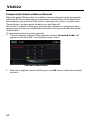
Phonebook Synch / Importing Contacts / Call History
1. Select BT function (Handset icon) from the BT Home Menu.
2. Press "Option". Go to > "Phone Synch". Press "Synch" to import the mobile
phone contacts. If you have many contacts, this may take up to 4-5 minutes
initially. Up to 2000 contacts can be imported.
Direct Dialing:
1.
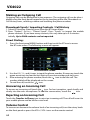
Press the front panel MENU button and then touch the BT icon to access
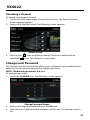
the BT main menu. The following screen will appear:
BT Direct Dial Screen
2. U
se the 0-9, */+, and # icons to input the phone number. If necessary touch the
green arrow icon to clear the last digit or the entire number and start over.
icon to dial the call. The
3. After entering the phone number, touch the
number dialed will be displayed on the screen.
4. To end the call, touch the
icon.
Answering an Incoming Call
To answer an incoming call touch the icon. For best reception, speak loudly and
icon.
clearly into the units microphone. To end the conversation, touch the
Rejecting an Incoming Call
Touch the Transfer to Phone icon to reject an incoming call. The call will revert to
your mobile phone and be left for voice mail.
Volume Control
To increase or decrease the volume level of an incoming call, turn the rotary knob
on the front panel or press the VOL+/ VOL- icons on the remote control.
62
31