1
7. Do not operate the camera beyond the
specified temperature, humidity or power
source ratings.
Use the camera under conditions where temperature is between –10°C - +50°C (14°F 122°F), and humidity is below 90 %. The
input power source is 120 V AC 60 Hz for
WV-BP140, 12 V DC for WV-BP142, and 24 V
AC 60 Hz for WV-BP144.
Caution:
To prevent fire or electric shock hazard, use
a UL listed cable (VW-1, style 1007) for the
DC 12 V or AC 24 V Input Terminal.
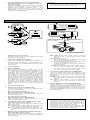
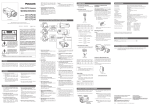
MAJOR OPERATING CONTROLS AND THEIR FUNCTIONS
<WV-BP140>
BLC ON
(ELC)(ALC)
ALC
VIDEO
LOCK
VIDEO OUT
ELC
DC
OFF
<WV-BP144>
BLC ON
AC 24V IN
GND
1
2
BLC ON
(ELC)(ALC)
VIDEO
ALC
WV–
BP144
(ELC)(ALC)
VIDEO
ALC
VIDEO OUT
ELC
DC
OFF
ELC
DC
OFF
<WV-BP142>
DC 12V IN
Fixing Screws
Camera Mounting
Screw Holes
BLC ON
(ELC)(ALC)
VIDEO
ALC
VIDEO OUT
Mount Adapter
ELC
DC
OFF
c
cs
q Auto Iris Lens Connector
Supplies power and control signals to an auto
iris lens (not supplied).
w Flange-back Adjusting Ring
This ring adjusts the back-focal distance or
picture focus. Rotate this ring clockwise for a
C-mount lens or counterclockwise for a CSmount lens.
e Lens (option)
r Mount Adapter
The camera mounting screw hole is for
mounting the camera onto a mounting bracket. The camera is originally designed to be
mounted from the bottom, however, a topmounting type is also available. To mount
from the top, remove the mount adapter from
the bottom of the camera by removing two
fixing screws. Attach the mount adapter to
the top as shown in the diagram, then mount
the camera on the mounting bracket. Make
sure that two original screws are used when
mounting the mount adapter; longer type
screws may damage inner components, too
shorter type screws may cause the camera
drop.
t Focus Fixing Screw
y Power Cord (only for WV-BP140)
Connect this power cord to an electrical outlet of 120 V AC 60 Hz.
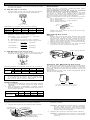
BLC ON: Select this mode when a strong
light such as a spot light is in the back
ground.
OFF: Normal picture.
1. Confirm the position of the lens type and
the lens drive signal selector.
2. If you have selected ALC, use the selector (ALC) to select the mode.
If ELC is selected, select the mode by
selector (ELC).
Caution: To use in ALC mode, make sure to
set the selector (ELC) to OFF position.
To use in ELC mode, make sure to set
the selector (ALC) to OFF position.
!1 Lens Drive Signal Selector (VIDEO, DC)
Lets you select the mode according to the
type of auto iris lens drive signal to be
supplied to the lens from the auto iris lens
connector.
VIDEO: Select this mode if you are using the
auto iris lens that requires a video drive
signal.
DC: Select this mode if you are using the
auto iris lens that requires a DC drive
signal.
!2 Video Output Connector (VIDEO OUT)
This connector is for connecting with the
VIDEO IN connector of the video monitor.
Whenever the multiplexed vertical drive (VD2)
signal is supplied to this connector, the camera synchronization mode is automatically set
to Vertical Drive.
u DC 12 V Input Terminal
[DC 12V IN (only for WV-BP142)]
This terminal is for connecting the 12 V DC
power supply cord.
i AC 24 V Input Terminal
[AC 24V IN (only for WV-BP144)]
This terminal is for connecting the 24 V AC
60Hz power supply cord.
o Automatic Light Control/Electronic Light
Control Selector (ALC, ELC)
Lets you select the mode according to the
lens type used.
ALC: Select this mode when an auto iris lens
(ALC lens) is used with this camera.
ELC: Select this mode when a fixed iris lens
or manual iris lens is used with this camera.
!0 Back Light Compensation Mode Selector
[BLC ON, OFF (ALC, ELC)]
Lets you select BLC ON or OFF according to
the position of the object and light conditions
on the screen.
Cautions:
• Connect to 12 V DC (10.5 V-16 V) or 24 V
AC (19.5 V-28 V) class 2 power supply only.
Make sure to connect the grounding lead to
the GND terminal when the power is supplied from a 24 V AC power source.
• To prevent fire or electric shock hazard, use
a UL listed cable (VW-1, style 1007) for the
DC 12 V or AC 24 V Input Terminal.