1
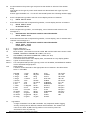
UAB
Universal Amplifier/Digitiser
User Manual
mantracourt.com
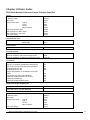
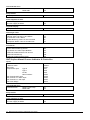
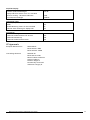
Chapter 1 Introduction To The Universal Process Amplifier System ......................................................... 4
Chapter 2 Installation ................................................................................................................... 5
Environmental Requirements ........................................................................................................... 5
Terminal Connections .................................................................................................................... 6
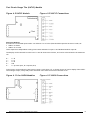
Section 1 -The Rack (RUA) Variant .................................................................................................... 7
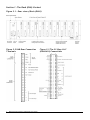
Figure 2.1 - Rear view of Rack (RUA2) ................................................................................................ 7
Figure 2.2 UAB Rear Connection Terminals ......................................................................................... 7
Figure 2.3 The 32 Way A & C (DIN41612) Connections ............................................................................. 7
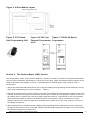
Figure 2.4 Rack Module Layout ......................................................................................................... 8
Figure 2.5 LP2 Hand Held Programming Unit ........................................................................................ 8
Figure 2.6 RUA1 for External Programmer (LP2) .................................................................................. 8
Figure 2.7 RUA2 On-Board Programmer .............................................................................................. 8
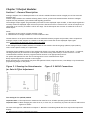
Section 2 - The Surface Mount (SMP) Variant ........................................................................................ 8
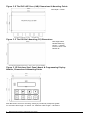
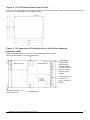
Figure 2.8 The IP65-ABS Case (LAB) Dimensions & Mounting Points ............................................................. 9
Figure 2.9 The DIN Rail Mounting (D2) Dimensions ................................................................................. 9
Figure 2.10 Stainless Steel Panel Mount & Programming Display Module, Dimensions & Mounting Points ................ 9
Figure 2.11 LCS Stainless Steel Panel Cut Out ...................................................................................... 10
Figure 2.12 Connection & Fitting Details for the Surface Mounted Amplifier (UAB) ......................................... 10
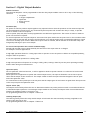
Programmers for Surface Mount Variants ........................................................................................... 11
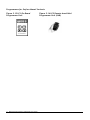
Figure 2.13 LP1 On-Board Programmer Unit ........................................................................................ 11
Figure 2.14 LP2 Remote hand Held Programmer Unit (UAB) ..................................................................... 11
Chapter 3 Power Supplies ............................................................................................................ 12
Section 1 - The Rack Version (RS1) ................................................................................................... 12
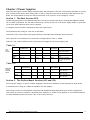
Table 3.1 .................................................................................................................................. 12
Table 3.2 .................................................................................................................................. 12
Section 2 - The Surface Mount Versions (LS1 and LS3) ............................................................................ 12
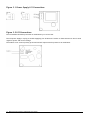
Figure 3.1 Power Supply LS1 Connections ........................................................................................... 13
Figure 3.2 LS3 Connections ............................................................................................................ 13
Chapter 4 Input Modules .............................................................................................................. 14
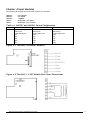
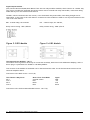
Table 4.1 UADCV1 and UADCA1 Switch Configuration............................................................................. 14
Figure 4.1 The UADC1 & UADCA1 Modules .......................................................................................... 14
Figure 4.2 The UALV1 - LVDT Module Rear Panel Connections .................................................................. 14
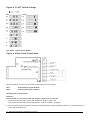
Figure 4.3 LVDT Switch Settings ...................................................................................................... 15
Figure 4.4 Rear Panel Connections ................................................................................................... 15
Figure 4.5 UAT1 & 2 ..................................................................................................................... 16
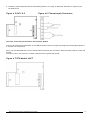
Figure 4.6 Thermocouple Connectors ................................................................................................ 16
Figure 4.7 RTD Module UAPT .......................................................................................................... 16
Figure 4.8 RTD Connections............................................................................................................ 17
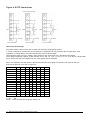
Fast Strain Gauge The (UAFLC) Module .............................................................................................. 18
Figure 4.9 UAFLC Module ............................................................................................................... 18
Figure 4.10 UAFLC Connections ....................................................................................................... 18
Figure 4.11 the UADIA Modules ........................................................................................................ 18
Figure 4.12 UADIA Connections ....................................................................................................... 18
Chapter 5 Output Modules ............................................................................................................ 19
Section 1 - General Description ....................................................................................................... 19
Figure 5.1 Showing the Potentiometer for Gain & Offset Adjustment ......................................................... 19
Figure 5.2 UAFAO Connections ........................................................................................................ 19
Section 2 - Digital Output Modules ................................................................................................... 20
Figure 5.3 RR1 Module .................................................................................................................. 21
Figure 5.4 LR1 Module .................................................................................................................. 21
Figure 5.5 Installation of LR1 .......................................................................................................... 22
Figure 5.6 Connection to the Surface Mount/DIN Rail Version UAI²C (S) ...................................................... 22
Section 3 - The Communications Port Modules ..................................................................................... 22
Figure 5.7 LC1 Current Loop ........................................................................................................... 23
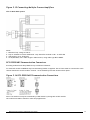
Figure 5.8 IF25 Connecting Multiple Process Amplifiers .......................................................................... 23
LC3 Isolated RS232/485 Communications Module.................................................................................. 23
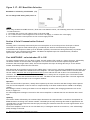
Figure 5.9 LC3 Isolated RS232/485~Mode Connections ........................................................................... 23
1
Mantracourt Electronics Limited UAB User Manual
Figure 5.10 Connecting Multiple Units on RS485 ................................................................................... 24
Figure 5.11 LC3 RS232 Mode Connection to PC ..................................................................................... 24
Figure 5.12 LC3 RS232 Mode Connection to Printer ............................................................................... 24
RC1 Communications Current Loop Module Connections ......................................................................... 25
Figure 5.13 RC1 Communication Connections ...................................................................................... 25
Figure 5.14 RC1 Baud Rate Selection................................................................................................. 25
Figure 5.15 Connecting Multiple Process Amplifiers ............................................................................... 26
RC3 RS232/485 Communication Connectors ........................................................................................ 26
Figure 5.16 RC3 RS232/485 Communication Connections ........................................................................ 26
Figure 5.17 - RC3 Baud Rate Selection ............................................................................................... 27
Section 4 Serial Communication Protocol ........................................................................................... 27
Fast MANTRABUS - selected when CP is 128 ........................................................................................ 27
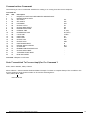
Communications Commands ........................................................................................................... 28
Data Transmitted To Process Amplifier For Command 1 ......................................................................... 28
Table 5.1 .................................................................................................................................. 33
Process Amplifier Printer Format ..................................................................................................... 33
Chapter 6 The Amplifier Displays ................................................................................................... 35
Figure 6.1 Programmer Unit Panel Layout (RUA2) ................................................................................ 35
Figure 6.2 LP2 Remote Hand Held Programmer Unit ............................................................................. 35
Figure 6.3 Programmer Unit Panel Layout (LP1) ................................................................................... 35
Control Panel Guide ..................................................................................................................... 36
Figure 6.4 Programmer Unit Panel Layout .......................................................................................... 36
Figure 6.5 Display Module Connections and Switch Settings ..................................................................... 37
Table 6.1 .................................................................................................................................. 37
Chapter 7 Programming The Amplifiers ........................................................................................... 38
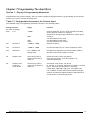
Section 1 - Display & Programming Mnemonics .................................................................................... 38
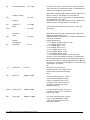
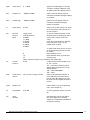
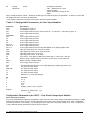
Table 7.1 Configurable Parameters for Process Input ............................................................................. 38
Table 7.2 Configurable Parameters for Dual Input Modules ...................................................................... 41
Configurable Parameters for UAFLC - Fast Strain Gauge Input Module ........................................................ 41
Table 7.3 Configurable Parameters .................................................................................................. 42
Section 2 - Setting the Conditions for Linear Inputs ............................................................................... 42
Figure 7.1 Linear Input Scaling ........................................................................................................ 42
Method of Calculating IPL and IPH from any known input values ............................................................... 42
Input Calibration Routine .............................................................................................................. 43
Section 3 - The Temperature Input Modules (UAT1 & UAT2)..................................................................... 43
Table 7.4 - Thermocouple Input Codes ............................................................................................. 44
Table 7.5 .................................................................................................................................. 44
Section 4 - The Rate/Totaliser Input Module (UARTL)............................................................................ 45
Setting up the Input ..................................................................................................................... 45
Table 7.6 .................................................................................................................................. 45
Table 7.7 Input Configuration ......................................................................................................... 45
Setting the Prescaler .................................................................................................................... 45
Table 7.8 .................................................................................................................................. 46
Rate Measurement ....................................................................................................................... 46
Period (Time measurement between pulses) ...................................................................................... 46
Input Code ................................................................................................................................ 46
Table 7.9 .................................................................................................................................. 46
(i) Period in mSeconds ................................................................................................................. 46
Table 7.10 Period mS Fixed Scale .................................................................................................... 46
(ii) Period in µSeconds .................................................................................................................. 46
Table 7.11 Period µS Unity Scale (IPSF 1.0000) .................................................................................... 46
Frequency ................................................................................................................................. 46
Table 7.12................................................................................................................................. 47
Figure 7.2 Frequency Unity Scale Inputs ............................................................................................ 47
RPM......................................................................................................................................... 47
Table 7.13 RPM Unity Scale ............................................................................................................ 47
Figure 7.3 RPM Unity Scale Range .................................................................................................... 48
Count/Rate Scaling & Scaling/Rate .................................................................................................. 48
Mantracourt Electronics Limited UAB User Manual
2
Scaling Example: - ....................................................................................................................... 48
RTL Module Inputs ....................................................................................................................... 49
Figure 7.4 RTL Module Inputs .......................................................................................................... 49
Section 5 - Programming the Output Functions .................................................................................... 49
Hysteresis (HYS) .......................................................................................................................... 49
Latching Outputs (OL) .................................................................................................................. 50
Table 7.14 Output Latch Codes (OL) ................................................................................................. 50
Output Action (OA) ...................................................................................................................... 50
Table 7.15 Output Action Codes (OA) ................................................................................................ 50
Delay Timers .............................................................................................................................. 50
Delay On Timer........................................................................................................................... 50
Delay Off Timer .......................................................................................................................... 50
PID Functions ............................................................................................................................. 50
PID Empirical Tuning .................................................................................................................... 51
Section 6 - Scaling the Analogue Outputs ........................................................................................... 51
Output Scaling............................................................................................................................ 51
Figure 7.5 Analogue Output ............................................................................................................ 51
Method of Calculating OPL & OPH from any known Output & Display Values ................................................. 52
Calibration ................................................................................................................................ 52
Figure 7.6 Showing the Potentiometers for Gain and Offset Adjustment ..................................................... 52
Figure 7.7 Showing the Potentiometers for Gain & Offset Adjustment ........................................................ 53
Chapter 8 Order Codes ................................................................................................................ 54
RUA Rack Mounted Universal Input Process Amplifier ............................................................................. 54
UAB Universal Amplifier ................................................................................................................ 54
SMP Surface Mount Process Indicator & Controller ................................................................................ 55
CE Approvals .............................................................................................................................. 56
Instrument Setup Record Sheet ....................................................................................................... 57
W A R R A N T Y .......................................................................................................................... 57
3
Mantracourt Electronics Limited UAB User Manual
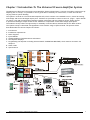
Chapter 1 Introduction To The Universal Process Amplifier System
The Mantracourt Electronics Universal Process Amplifier System is based upon a concept of modular construction. By
adopting such a concept, it is possible to offer a great deal of flexibility of construction, to meet the wide and
varying needs of system building.
The system is centred on a Eurocard sized amplifier PCB, which consists in its standard form of, Central Processing,
and voltage and current Analogue output ports. Facilities are provided to connect a series of ‘plug in ’ option boards
for inputs, relay and communications outputs together with mains and low voltage DC power supply options.
A special Fast Analogue output module is also available to complement a Fast Strain Gauge input option.
The modular concept offers the opportunity for assembly in Surface Mount, DIN Rail and 19-inch Rack variants.
The system concept is described in diagrammatic form with the range of options listed. The options will be
described under the various Chapters as follows:
1.
2.
3.
4.
5.
6.
7.
Introduction
Installation requirements
Power Supplies
Input Modules
Output Modules & Communications Information
The Amplifier Displays
Programming the Amplifier including essential INPUT CALIBRATION ROUTINES, which must be actioned. See
Chapter 7
8. Order Codes
9. Specifications
Mantracourt Electronics Limited UAB User Manual
4
Chapter 2 Installation
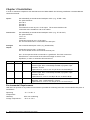
In order to maintain compliance with the EMC Directive 2004/108/EC the following installation recommendations
should be followed.
Inputs:
Use individually screened twisted multipair cable. (e.g. FE 585 - 646)
The pairs should be :
pins 1 & 6
pins 2 & 5
pins 3 & 4
Terminate all screens at pin 1 of the input. The screens should not be
connected at the transducer end of the cables.
Comms Port:
Use individually screened twisted multipair cable. (e.g. FE 118-2117)
The pairs should be:
-Tx & +Tx
-Rx & +Rx
Terminate screens at pin 1 of the input .
The screens should not be connected at the host port.
Analogue
Output:
Use screened twisted pair cable. (e.g. RS 626-4761)
Terminate screen at pin 1 of the input.
The screen should not be connected at the host port.
Pin 1 of the input should be connected to a good Earth. The Earth connection
should have a cross-sectional area sufficient enough to ensure a low
impedance, in order to attenuate RF interference.
Country
UK
Supplier
Farnell
Part No
118-2117
UK
Farnell
585-646
UK
RS
626-4761
Description
Individually shielded twisted multipair cable (7/0.25mm)- 2 pair
Tinned copper drain. Individually shielded in polyester tape.
Diameter: 4.1mm
Capacitance/m: core to core 115 pF & core to shield 203 pF
Individually shielded twisted multipair cable (7/0.25mm)- 3 pair
Tinned copper drain. Individually shielded in polyester tape.
Diameter: 8.1mm
Capacitance/m: core to core 98 pF & core to shield 180 pF
Braided shielded twisted multipair cable (7/0.2mm)- 1 pair
Miniature- twin -round Diameter: 5.2 mm
Capacitance/m: core to core 230 pF & core to shield 215 pF
Environmental Requirements
UAB units can operate in any industrial environment provided the following limits are not exceeded at the point of
installation:
Operating
Temperature:
Humidity:
Storage Temperature:
5
-10 ºC to 50 ºC
95 % non condensing
-20ºC to +70ºC
Mantracourt Electronics Limited UAB User Manual
Units can operate from any one of the following:
220/240V AC, 50/60Hz
or
110V AC, 50/60Hz
or
9-30V DC, 50/60Hz (Not RUA)
Terminal Connections
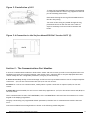
Connection between the UAB modules and input/output signals, are made via screw connections to the rear of the
rack, or edge of the UAB in Surface Mount Versions.
(See Figure 2.1)
Mantracourt Electronics Limited UAB User Manual
6
Section 1 -The Rack (RUA) Variant
Figure 2.1 - Rear view of Rack (RUA2)
Figure 2.2 UAB Rear Connection
Terminals
7
Mantracourt Electronics Limited UAB User Manual
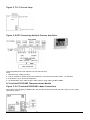
Figure 2.3 The 32 Way A & C
(DIN41612) Connections
Figure 2.4 Rack Module Layout
Figure 2.5 LP2 Hand
Held Programming Unit
Figure 2.6 RUA1 for
Figure 2.7 RUA2 On-Board
External Programmer Programmer
(LP2)
Section 2 - The Surface Mount (SMP) Variant
The surface mount variant of the Universal Amplifier is offered in a number of different configurations dependant
upon the system installation requirements, to which any of the input, output and communications modules can be
fitted as described in the diagram in Section 1. Each description is followed by the order coding for ease of
identification.
1.The surface mount IP65 ABS cased version with a large LCD display and programming module mounted in the lid,
where local programming and control is required. - (SMP/C).
2.The DIN rail mounted version with a remotely connected large LCD display and programming module fitted with a
stainless steel panel mounting fixture which will operate up to 2 metres from the amplifier. (SMP/D) A version of
the (SMP/D) above is offered with a driver package (LCDR) where there is a requirement for the remote display
and programming module to operate over distances greater than 2 metres, and up to 100 metres from the
amplifier. Where order codes are required for individual items, please refer to the order code list in the rear of
the manual at Chapter 8.
3.ABS Cased Versions are available without a display and programming module mounted on the lid. Programmed
through the internal FCC socket on the UAB, (using an LP2 Hand Held Programmer see Figure 2.13) or the remote
LP1 On Board Programmer see Figure 2.14
Mantracourt Electronics Limited UAB User Manual
8
Figure 2.8 The IP65-ABS Case (LAB) Dimensions & Mounting Points
Case Depth = 75mm
Figure 2.9 The DIN Rail Mounting (D2) Dimensions
Max height above
DIN Rail Mounting
surface = 100mm.
Fits ALL carrier rails
DIN/EN 35
Figure 2.10 Stainless Steel Panel Mount & Programming Display
Module, Dimensions & Mounting Points
4mm M4 studs x 12mm for mounting. Sealing is provided by a Neoprene gasket
For LCD max cable length = 2 meters. For LCDR max cable length = 100 meters
9
Mantracourt Electronics Limited UAB User Manual
Figure 2.11 LCS Stainless Steel Panel Cut Out
Where there is a requirement for the stainless steel fixture to be mounted in a panel please note the details of the
‘Cut Out’ are as described in the following drawing.
Figure 2.12 Connection & Fitting Details for the Surface Mounted
Amplifier (UAB)
Display & Keypad FCC68 Connector (For Surface Mounted Display or Hand
Held Programmer LP2 for Non Display Versions.)
The standard
(100mS) strain
gauge input is
contained within
the LCB module &
therefore has no
separate input
module
15 Way field screw
connection for
input, contacts &
AN-OP
For DIN mounting cut off
PCB on white line
WATCHDOG LED
Mantracourt Electronics Limited UAB User Manual
10
Programmers for Surface Mount Variants
Figure 2.13 LP1 On-Board
Programmer Unit
11
Mantracourt Electronics Limited UAB User Manual
Figure 2.14 LP2 Remote hand Held
Programmer Unit (UAB)
Chapter 3 Power Supplies
There are three types of power supply available within the UAB system. The rack versions RUA1 and RUA2 are served
by a common power supply, which offers power to the 12 channels in the case of the RUA1 and 8 channels for the
RUA2. The Surface Mount versions are offered with mains an AC version or a low voltage DC version.
Section 1 - The Rack Version (RS1)
The RS1 supplies power to the channels within the rack via the common back plane, offering 220/240VAC at 50/60
Hz or 110VAC at 50/60 Hz. The 110/240 is selected by a switch on the rear of the power supply module. A green LED
on the front panel indicates when power is applied
A 5-Ampere protection fuse is fitted within the power input socket.
The maximum power rating for a full rack is 100 Watts.
Connection to the rack is made via a flying lead with a shrouded and earthed IEC mains connector
Note: Inputs are not intended to be connected to voltages above 50 VAC or 120Vdc
Tables 3.1 and 3.2 show details of the connections and voltages for the various supply rails.
Table 3.1
SUPPLY
PROCESSOR
SUPPLIES
MIN V
MAX V
MAX ac V
0V
CONNECTION
TO DIN 41612
15a, 15c
-
-
-
CURRENT
per channel
-
-5V
17a, 17c
-4.80
-5.2
1mV
110Ma
-14V
UNREG
-9V8
19a, 19c
-11
-18V
150mV
2mA
20a, 20c
-9.1
-10.2
1mA
200mA
COMMENTS
Common for
processor supplies
Power supply
Used to detect power
fail
Provides excitation
for stain gauges and
relays
Table 3.2
SUPPLY
ANALOGUE
OUTPUT
ISOLATED
SUPPLY
MIN V
MAX V
MAX ac V
+24V ISO
CONNECTION
TO DIN 41612
25a
+20
+32
240mV
CURRENT
per channel
32mA
-5V ISO
26a
-4.75
-5.25
1mV
5mA
0V ISO
27a
-
-
-
-
COMMENTS
Only required if ANOP to be used
Only required if ANOP to be used
Only required if ANOP to be used
Section 2 - The Surface Mount Versions (LS1 and LS3)
The LS1 power supply is a ‘plug in’ module supplying 110 Volts AC at 50/60 Hz or 220/240 Volts AC at 50/60 Hz.
A maximum power rating of 10 Watts is available, with this module.
The running current for each amplifier is between 250 and 480 milliamps dependant upon module configuration,
with a start up current of 3 Amps for 20 milliseconds. Earthing (or shield)- If the amplifier is not earthed elsewhere,
an earth should be made to the screen (SC) of the 15 way connector.
Mantracourt Electronics Limited UAB User Manual
12
Figure 3.1 Power Supply LS1 Connections
Figure 3.2 LS3 Connections
The LS3 module should be protected on installation by an in line fuse.
The LS3 power supply is a 'plug in' module supplying 9 to 30 Volts DC. Similar in characteristics to the LS1 with
regard to power and current ratings.
The module is not reverse polarity protected and will require similar protection at installation.
13
Mantracourt Electronics Limited UAB User Manual
Chapter 4 Input Modules
The following DC Voltage & Current input modules are available:
UADCV1 0 to 10 Volts
UADCA1 0 to 20mA
UADCV2 ± 200mV
Dual Input - 4 to 20mA
UADIA UADIV Dual Input - 0 to 10 Volts
Table 4.1 UADCV1 and UADCA1 Switch Configuration
SW1
1
2
3
4
5
6
7
8
±200mV
10V Excite
24V Excite
5-25V VAR Excite
ON
OFF
OFF
OFF
OFF
0-10V
10V Excite
24V Excite
5-25V VAR Excite
OFF
ON
ON
OFF
ON
0-20mA
10V Excite
24V Excite
5-25V VAR Excite
OFF
ON
ON
ON
OFF
Figure 4.1 The UADC1 & UADCA1 Modules
Figure 4.2 The UALV1 - LVDT Module Rear Panel Connections
Mantracourt Electronics Limited UAB User Manual
14
Figure 4.3 LVDT Switch Settings
The UARTL - Rate/Totaliser Module
Figure 4.4 Rear Panel Connections
Note: See Chapter 7 Section 4 for details of input and pre scaler settings.
UAT1 UAT2 -
Thermocouple Type K Modules
Thermocouple Type J Modules
Connecting the Thermocouple
WARNING:
ENSURE POWER IS SWITCHED OFF BEFORE MAKING CONNECTION TO THE UAB
1. Connect the thermocouple to the UAB terminal as shown in Figure 4.6
Note: If the thermocouple has a floating input, connect terminal 1 to ground.
2. The external cold junction sensor is always connected between input terminals 4 and 6. If no external sensor is
used, link terminals 4 & 6.
15
Mantracourt Electronics Limited UAB User Manual
3. Normally, thermocouple burnout is indicated by upscale over range. If downscale indication is required, link
terminals 2 & 3.
Figure 4.5 UAT1 & 2
Figure 4.6 Thermocouple Connectors
The UAPT Connecting the Resistance Thermometer Module
Connect the resistance thermometer to the UAB terminals as shown in Figure 4.8 using the terminals appropriate to
2, 3 and 4 wire connections.
Note: It is recommended that 4 core-screened cable be used for this connection with terminal 6 used for screen and
ground.
If however, this is not practical, terminal 2 may be used for guard and ground.
Figure 4.7 RTD Module UAPT
Mantracourt Electronics Limited UAB User Manual
16
Figure 4.8 RTD Connections
UAFLC Fast Strain Gauge
The UAFLC offers a direct connection to most low level (foil) strain gauge sensors.
A 10-volt excitation is provided and it is monitored to compensate for any variation due to supply drift, load
regulation or voltage drop in the cable between the sensor and the UAFLC.
The maximum supply current is 150mA, which allows for the connection of 4 x 350 Ohm strain gauges.
Strain gauge sensitivity is preset via DIL switches to 0.5, 0.8, 1.0, 1.25, 1.5, 2.0, 2.5, 3.5, 5, 10, 20, 50, 100 and 200
mV/V. Select the next value higher than the strain gauge output maximum.
Note: It is important that the UAFLC is powered up with the strain gauge connected to the input as the A/D
performs an Autocal of its own on power up.
SW1 mV/V
0.5
0.8
1.0
1.25
1.5
2.0
2.5
3.5
5.0
10.0
20.0
50.0
100.0
200.0
1
x
-
2
x
x
x
-
3
x
x
x
x
-
4
x
x
x
x
x
-
5
x
x
x
x
-
6
x
x
x
-
x = ON - = OFF
mV/V = ±mV/V nominal full range gain within ±3%
17
Mantracourt Electronics Limited UAB User Manual
7
x
x
x
x
-
8
x
x
x
x
x
x
x
x
x
-
Fast Strain Gauge The (UAFLC) Module
Figure 4.9 UAFLC Module
Figure 4.10 UAFLC Connections
Dual Input Modules
Provide two non-isolated inputs either 4 to 20mA or 0 to 10 volts (This should be specified at time of order) as:
• UADIA = 4/20mA
• UADIV = 0/10 volts
These inputs have independent scaling factors IPLA and IPHA for input 'A' and IPLB and IPHB for input 'B'.
The display can be selected from the list of 'A' and 'B' functions as follows, and can be selected under the mnemonic
'Ab'
0
1
2
3
4
=
=
=
=
=
A+B
A-B
AxB
A/B
A = process input, B = setpoint (SP1)
Scale factors can be applied to this function using a scale factor 'SF', a division factor 'DF' and a display offset 'OFFS'.
The analogue output, relays and printer take their value from the function selected at 'Ab’.
Figure 4.11 the UADIA Modules
Mantracourt Electronics Limited UAB User Manual
Figure 4.12 UADIA Connections
18
Chapter 5 Output Modules
Section 1 - General Description
Analogue outputs of 4 to 20mAmps and 0 to 10 volts are standard features and an integral part of the Universal
Amplifier pcb.
Further output modules are available offering alarm/control, printer and communications facilities. Analogue
outputs are fully scaleable, opto-isolated and digitally generated.
The analogue output signals are generated by the CPU from the displayed input variable, so that output signals are
normally related to displayed input values except where the PID function is selected. The 4 to 20 mA output is pre
calibrated to an accuracy of within 0.15% of the range. The 0-10V outputs are accurate to within 2% of the 4 to
20mA output.
Notes:
1. Maximum current load on voltage modules is 2mA
2. Maximum drive voltage available in current modules is 20V
The PID function is an option selectable within the standard software program and provides, where required an
analogue output so that outputs are related to the PID power levels and not the displayed input signal.
Note: In this mode the analogue output cannot be scaled.
A fast analogue output module (UAFAO) is available for use with the fast strain gauge (10msec) input (UAFLC),
where a fast capture facility is a requirement.
The digital output modules consist of two single pole change over relays with ON/OFF or PID control. If required,
latching outputs may be selected via the keypad, reset action being achieved by a contact closure or via the
communications module, where a program has been written via an appropriate protocol.
Set points and hysterisis are also set via the keypad or from a communications input.
Relay outputs may also be inverted via the keypad.
Relay operations are controlled by set point and hysterisis values, output inversion, time delays or by the PID time
proportioning output on set point 1.
Figure 5.1 Showing the Potentiometer
for Gain & Offset Adjustment
Figure 5.2 UAFAO Connections
Fast Analogue The (UAFAO) Module
Important Note 1: The output action mnemonic OA must be set to 32 when operating with this module.
Important Note 2: When changing the value of OA to, or from ’32; it is necessary to power the unit off and back on
again as a restart.
See Note with regard to calibrations on Chapter 7 ‘Method of Calculating OPL & OPH from any known output and
Display’
19
Mantracourt Electronics Limited UAB User Manual
Section 2 - Digital Output Modules
Module Functions
The Universal Amplifier can be programmed so that the relay output module reacts to all or any of the following
functions:
• Set points
• In Flight compensation
• Hysteresis
• Relay inversion
• Latching
Set Points (SP)
Set points are used to produce output signals at any required value so that the operation of the monitored process
can be maintained to preset levels. Any excursion beyond set points will activate the relay or relays, to provide
alarm or initiate control as required.
Two set points (SP1) and (SP2) can be programmed to suit different applications. The actions of either or both set
points can inverted if required.
For normal operation the set point output is active until the input reaches the set point level. In this condition when
the input value is less than the set point, the SP indicator is on and the output relay is energised producing a closed
circuit on a normally open contact. When the set point value is reached, the SP indicator is off and the relay is deenergised producing an open circuit output.
For an inverted operation the reverse conditions apply.
Normal and inverted action is determined by the direction of the input value as it changes.
For example: In alarm applications.
A High-High operation allows for a rising input value to operate on two set points to define an acceptable quantity,
weight or band of operation.
A Low-Low operation operates on a falling value.
A High-Low operation will operate on a rising or falling value, setting a 'band' by one set point operating normally
and the other being an inverted action.
Hysteresis (HYS)
Once a Hysteresis value has been set, it will be applied to both set points entered. It is effective for both normal
and inverted action.
When Hysteresis is applied to set points with normal output action, the input is allowed to rise to the set point
value and the output is then turned off. The output is held off until the input value has dropped to the set point
minus the Hysteresis value.
For inverted action the input drops to the set point and the output goes off and comes on again when the input rises
to the set point plus the Hysteresis value.
Output Action (OA)
The Output Action facility allows the user to determine whether set points produce normal or inverted and latched
or unlatched output operation. If an analogue output module is also fitted, the Output Action function determines
whether the module's output is inverted or not.
For programming details refer to Chapter 7 Table 7.15
Latching Output (OL)
The latching facility allows the relay module output to held until the reset externally Latching is applied to the
status of the relay SP1 or SP2.
For programming details refer to Chapter 7 Table 7.14
Mantracourt Electronics Limited UAB User Manual
20
Digital Output Modules (LR1) Surface Mount and (RR1) Rack Mount There are two relay modules available, which function in a similar way.
The ‘plug in’ module LR1 used with the surface mount version is fitted with relay status LEDs, connections being
made directly on to the module terminal block
The RR1, which is used with the rack version, is not fitted with relay status LEDs, these being brought out for
observation, to the front of the rack channel. Connections to the module are made to a 4 way field terminal at the
rear of the rack channel.
RR1 - 2 SPCO relays, SP1 and SP2
LR1 - 2 SPCO relays, SP1 and SP2,
Relay contact rating - 50V @ 500mA
Relay contact rating - 240V @ 5A AC
Figure 5.3 RR1 Module
Figure 5.4 LR1 Module
The Remote Driver Modules - UAI ²C
The module offers a general I/O facility for connection to Relays, Real Time Clock and Remote Displays, and is a
direct 'plug in' replacement for the RR1 or LR1 Relay Module.
Two versions of the module are available one for the Rack and the other for the Surface Mount versions of the
Universal Amplifier Board.
Connection to the Rack version - UA1²C (R)
The Channel 4 Way Screw
NO 1
Com 1
NO 2
Com 2
Wire Colour from REMC1
Violet & Yellow
Red
Black
Blue
Connection to the Surface Mount/DIN Rail version - UAI ²C(S)
21
Mantracourt Electronics Limited UAB User Manual
Signal
GND
+5V
CLK
DATA
Figure 5.5 Installation of LR1
To meet the Specified EMC Fast transient requirements
it is important that the ferrite ring supplied is fitted as
per the following instructions.
Illustration showing ferrite ring FEC 323-4940 fitted to
the LR1 relay wiring.
Two turns of the wiring are passed through the ring
positioned 12cm from the LR1 end of the cable to
improve immunity to electrical fast transients and
bursts.
Figure 5.6 Connection to the Surface Mount/DIN Rail Version UAI²C (S)
Section 3 - The Communications Port Modules
A series of communications modules in both surface mount and rack versions, provide for two way data links to an
intelligent host such as a Personal Computer, Main frame or PLC, which are able to acquire displayed values and
read or modify the user configurable parameters, using any of the following: A 20mA current loop usually connected through an IF25 current loop to RS232 interface unit for multiple amplifier
connection. - (LC1) for the surface mount and (RC1) for the rack version.
An RS232 for a one to one communication, usually where a printer connection is required. (RC2) for the rack
version.
A RS232/485 (link selectable) for one to one or multi-drop applications - (LC3) for the surface mount and (RC3) for
the rack version.
Three communication formats, FAST MANTRABUS, ASC11 and PRINTER are selected from the mnemonic CP via the
keypad of the display/programmer.
Integrity is ensured by pre-programmed default parameters, should a loss of communications with the host unit
occur.
Connection and Baud rate setting details are shown in the following module diagrams: -
Mantracourt Electronics Limited UAB User Manual
22
Figure 5.7 LC1 Current Loop
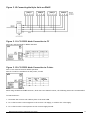
Figure 5.8 IF25 Connecting Multiple Process Amplifiers
Connecting Multiple Process Amplifiers to the IF25 Interface
Notes
1. Maximum loop voltage is 50V dc.
2. Loop is isolated from host and Process Amplifiers. Loop should be earthed via Rx - on IF25/254
3. IF25 used for up to 25 Process Amplifiers.
4. At 19,200 Baud, max. cable length is 100m metres, using cable type BICC H8085.
LC3 Isolated RS232/485 Communications Module
Figure 5.9 LC3 Isolated RS232/485~Mode Connections
Note: When multi dropping in RS485 mode, the last device should be fitted with LK2, which acts as a 120Rterminating resistor.
23
Mantracourt Electronics Limited UAB User Manual
Figure 5.10 Connecting Multiple Units on RS485
Figure 5.11 LC3 RS232 Mode Connection to PC
Note: LK1 must be fitted for RS232 operation
Figure 5.12 LC3 RS232 Mode Connection to Printer
Note 1: LK1 must be fitted for RS232 operation
Note 2: If no RTS is available from the printer, fit LK2
NOTE:
When using an RS232 to RS485 converter, which has a non-biased receiver, the following actions are recommended:
To bias the device:
1. Terminate the receiver with 140R in place of the usual 120R
2. Fit a 1.5K from the receive negative to the receiver +5V supply, or a 3K3 to the +12V supply.
3. Fit a 1.5K from the receive positive to the receiver supply Ground.
Mantracourt Electronics Limited UAB User Manual
24
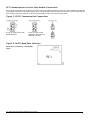
RC1 Communications Current Loop Module Connections
RC1 used in connection with an IF25 to provide a high noise immunity 20mA current loop. RC1 modules are supplied
with a BLUE 9 way bus-terminating header. One of these headers must be connected to each channel fitted with an
RC1 module, apart from Channel 1, which is terminated by links, LK1 & LK2 on back plane.
Figure 5.13 RC1 Communication Connections
9 way ‘D’ type socket with
(RED) identifier
9 way ‘D’ type socket
(BLUE) for channels 2-12
supplied with RC1
Figure 5.14 RC1 Baud Rate Selection
Baud rate is selected by a link header
(SW1)
25
Mantracourt Electronics Limited UAB User Manual
Figure 5.15 Connecting Multiple Process Amplifiers
IF25 To Multi Rack System
Notes:
1. Maximum loop voltage is 50V dc.
2. Loop is isolated from host and RCA15s. Loop should be earthed via Rx - on IF25/254
3. IF25 used for up to 25 RCA15s.
4. At 19,200 Baud, max. cable length is 100m meters, using cable type BICC H8085.
RC3 RS232/485 Communication Connectors
Providing isolated multi-drop RS485 for up to 25 RCA15 Channels.
For each RC3 module a GREEN 9 way bus terminating header is supplied. One of these must be connected to each
channel fitted with an RC3 module. Channel 1 is terminated by links LK1 & LK2 on back plane.
Figure 5.16 RC3 RS232/485 Communication Connections
Note: The last device may be terminated by 120R resistor by fitting LK2 on RC3 module.
LK1 on RC3 must not be fitted for multi-drop applications.
Mantracourt Electronics Limited UAB User Manual
26
Figure 5.17 - RC3 Baud Rate Selection
Baud Rate is selected by a link header (J3)
Do not change baud setting with power on
NOTE:
When using an RS232 to RS485 converter, which has a non-biased receiver, the following actions are recommended:
- To bias the device:
1. Terminate the receiver with 140R in place of the usual 120R
2. Fit a 1.5K from the receive negative to the receiver +5V supply, or a 3K3 to the +12V supply.
3. Fit a 1.5K from the receive positive to the receiver supply Ground.
Section 4 Serial Communication Protocol
General
Incoming data is continually monitored by the Process Amplifier on its serial input line. Each byte of data is
formatted as an eight bit word without parity, proceded by one start bit and followed by one stop bit.
Transmission and reception of data up to 19.2K Baud is possible, the actual rate being selected by six position
header links on the communications module. The Baud rate depends upon the communications, hardware
specification, distance and cable type.
Fast MANTRABUS - selected when CP is 128
To signify commencement of a new 'block' of data, the HEX number FFH is used as a 'frame' character, followed by
the station number of the unit under interrogation. This is entered via the Process Amplifier keypad under
mnemonic SDSt and ranges from 0-254). The Process Amplifier acts upon incoming data only if its own station
number immediately follows the FFH character.
New data must be received as a string of four nibbles (bits 7-4 set to zero), which are assembled into two bytes, and
written into the variables store within the Process Amplifier. The most significant nibble must be received first and
the last nibble must have the most significant bit (bit 7) set to indicate the end of data. This is followed by the
checksum. The data transmitted from the Process Amplifier is always sent as complete bytes. The station number
precedes the data and the checksum follows the data. The data format used is signed 15 Bit. The most significant
Bit of the most significant Byte is set for negative numbers.
Operation
There are two modes of operation, namely data requests by the host controller and data changes. Data requests
from the Process Amplifier consist of either a complete dump of the data variables stores in RAM or the display
reading.
Data changes consist of writing new data to Process Amplifier variables, thus changing parameters such as Set
Points, in flights etc.
An acknowledgement message is returned to the Process Amplifier to indicate that the new data has been acted
upon.
Updating
The station number followed by the command byte determines the required mode or variable to be updated. An
EXOR checksum consisting of the station number command byte and any following data must be appended to the
received data. It is most important that the byte preceding the checksum must have its most significant bit set to
signify the end of data.
The Process Amplifier works out its own checksum and, if it disagrees with the received one, a not acknowledge
(NAK) message is returned.
27
Mantracourt Electronics Limited UAB User Manual
Communications Commands
The following is a list of commands available for reading to or writing from the Process Amplifier.
Command No.
DEC
HEX
1
1
2
2
3
03
4
04
5
05
6
06
7
07
8
08
9
09
10
0A
11
0B
12
0C
13
0D
14
0E
15
0F
16
10
17
11
18
12
19
13
20
14
21
15
22
16
Description
REQUEST ALL DATA INCLUDES PROCESS VARIABLE INPUT
REQUEST DISPLAY DATA
SET POINT 1
SET POINT 2
HYSTERESIS
OUTPUT LATCH
OUTPUT MODE SELECT
PROPORTIONAL BAND
INTEGRAL TIME
DIFFERENTIAL TIME
CYCLE TIME
INPUT LOW
INPUT HIGH
OUTPUT LOW
OUTPUT HIGH
INPUT RANGE SELECT
DECIMAL POINT POSITION
STATION NO.
EEPROM ENABLE/DISABLE FLAG
OUTPUT RELAY RESET
TOTALISER COUNT RESET
PEAK HOLD RESET
SP1
SP2
HYS
OL
OA
PB
IT (ont)
DT (oFFt)
CT(da)
IPL
IPH
OPL
OPH
IP
DP-r
SDSt
-
Command 1 Request for All Data:
Data Transmitted To Process Amplifier For Command 1
0FFH, Station Number, 081H, Chksum
Where Chksum = Station number EXOR with 081H. Example: To obtain a complete dump of the variables in the
Process Amplifier whose Station number is 47 send the following Data:0FFH, 02FH, 081H, 0AEH
Note MS Bit Set
Mantracourt Electronics Limited UAB User Manual
28
Response to Command 1 From Process Amplifier
Byte
1
STATION NUMBER
2,3
DISPLAY
4,5
SET POINT 1
6,7
IN FLIGHT 1
8,9
SET POINT 2
10,11
IN FLIGHT 2
12,13
HYSTERESIS
14,15
OUTPUT ACTION
16,17
A/D COUNTS FOR LOW CALIBRATION POINT
18,19
A/D COUNTS FOR HIGH CALIBRATION POINT
20,21
DISPLAY LOW CALIBRATION VALUE
22,23
DISPLAY HIGH CALIBRATION VALUE
24,25
AUTO TARE
26,27
DISPLAY AVERAGING
28,29
OUTPUT LOW
30,31
OUTPUT HIGH
32,33
DECIMAL POINT POSITION
34,35
STATION NUMBER
36
EEPROM ENABLE/DISABLE FLAG
37
RELAY STATUS
38
EXOR CHECKSUM OF THE ABOVE DATA
NOTE: Most significant byte precedes least significant byte for data sent by Process Amplifier
Command 2 Request Display Data
DATA transmitted to Process Amplifier for Command 2.
0FFH, Station number, 082H, Chksum
Where Chksum = Station number EXOR with 082H Example: To obtain the display reading of an Process Amplifier
whose station number is 47 send the following Data:
0FFH, 02FH, 082H, 0ADH
Note MS Bit Set
Response to Command 2 from Process Amplifier
Byte
1. Station No.
2. Display reading M.S. Byte.
3. Display reading L.S. Byte.
4. EXOR checksum of above data and Station No.
If, when using commands 1 or 2, an error is detected by the Process Amplifier then the Not Acknowledgement string
is transmitted by the Process Amplifier.
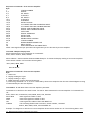
Commands 3 To 18: Write data to Process Amplifier parameter
Commands 3 to 18 all have the same format. Format for data transmitted to Process Amplifier for Commands 3 to
18: 0FFH, Station No, Command No, MSN, NMSN, NLSN, LSN, CHKSUM
Where MSN
= Most significant nibble of data
NMSN
= Next most significant nibble of data
NLSN
= Next least significant nibble of data
LSN
= Least significant nibble of data with MSBIT set
CHKSUM
= The following EXOR’d with each other, Station number, command
number, MSN, NMSN, NLSN, LSN with MSBIT set
Example: To change SP1 to 200.0 on a Process Amplifier whose station number are 47. The following data is sent.
29
Mantracourt Electronics Limited UAB User Manual
Please note the following points apply: 1. The decimal point is ignored i.e. 200.0 equals 2000 digits
2. The data is sent in Hex nibbles so 2000 = 00H, 07H, 0DH, 00H
0FFH, 02FH, 03H, 00H, 07H, 0DH, 80H, 0A6H
Note MS BIT SET
Response to Command 3 to 22
If the data has been accepted by the Process Amplifier then the following acknowledgement string is transmitted by
the Process Amplifier.
Station number, 015H (NAK)
If there are any errors with the data received by the Process Amplifier then the following Not Acknowledgement
(NAK) string is transmitted by the Process Amplifier: Station number, 06H (ACK)
Command 19: EEPROM ENABLE / DISABLE
The EEPROM disable facility can be used for any of the following:
I. To limit the number of write cycles to EEPROM reducing degradations.
II. Change data in the Process Amplifier RAM only, allowing EEPROM to hold power up values.
III. Leave base constants in the EEPROM for later update to RAM, which allows manipulation of the RAM before
writing to the EEPROM.
Writing new data from the RAM to the EEPROM.
EEPROM disable is achieved by writing 0100H to the Process Amplifier via command 19. In this state all writing to, or
reading from the EEPROM is inhibited.
The EEPROM can be re-enabled in 2 ways:
By writing 0200H via command 19. This writes the current contents of the variables store in the Process Amplifier
into the EEPROM
By writing 0400H via command 19. This updates the variables store from the current contents of the EEPROM.
Examples
To disable the EEPROM on an Process Amplifier whose Station number is set to 47
0FFH 02FH 013H 00H 01H 00H 080H 0BDH
To re-enable the EEPROM and update the RAM with the old EEPROM constants:
0FFH 02FH 013H 00H 04H 00H 080H 0B8H
To re-enable the EEPROM and update it with the new RAM data:
0FFH 02FH 013H 00H 02H 00H 080H 0BEH
For response see 'Response to Command 3 to 22'.
Command 20: Output Relay Reset
DATA transmitted to Process Amplifier for Command 20
OFFH, Station number, 094H, CHKSUM
Where CHKSUM = Station Number EXOR with 094H Example: To output a relay reset to an Process Amplifier whose
Station Number is set to 47
0FFH, 02FH, 094H, 0BBH
Note MS BIT SET
For response by Process Amplifier see 'Response to Commands 3 to 22'
Mantracourt Electronics Limited UAB User Manual
30
Command 21: Auto Tare
DATA transmitted to Process Amplifier for Command 21
OFFH, Station number, 095H, CHKSUM
Where CHKSUM = Station Number EXOR with 095H Example: To output an Auto Tare command to an Process
Amplifier whose Station Number is set to 47
0FFH, 02FH, 095H, 0BAH
Note MS BIT SET
For response by Process Amplifier see 'Response to Commands 3 to 22'
Command 22: Peak Hold Reset
DATA transmitted to Process Amplifier for Command 22
OFFH, Station number, 096H, CHKSUM
Where CHKSUM = Station Number EXOR with 096H Example: To output a Peak Hold reset to an Process Amplifier
whose Station Number is set to 47
0FFH, 02FH, 096H, 0B9H
Note MS BIT SET
For response by Process Amplifier see 'Response to Commands 3 to 22'
Example of a Basic Code to Communicate with MANTRABUS
open the serial port with no handshaking
OPEN"COM2:4800,N,8,1,RS,DS,BIN" FOR RANDOM AS#1
request display from device 1
Frame FF
Station No
1
Command 2
And add 80 hex
to this byte as it
is the last before
as the checksum
Checksum of
all bytes except frame
talk$=CHR$(&HFF)+CHR$(&H1)+CHR$(&H82)+CHR$(&H1 XOR&H82)
print the string to the port
PRINT#1,talk$;
(must add semicolon after string to stop transmitting a carriage return)
wait for a while (this depends on how many bytes you are expecting and the baud rate!)
input all the bytes in the serial buffer
input.from.uab$=INPUT$(LOC(1),#1)
ASCII Format - selected when CP is 129
The serial data to and from the Process Amplifier is formatted as eight bit words with no parity preceded by one
start bit and followed by one stop bit. The baud rate (up to 9.6k Baud) is selected on the COMMS module. All
communications are carried out using the standard ASCII character set. Incoming line feeds and spaces are ignored;
upper and lower case letters are permitted. The incoming data is continually monitored for Carriage Return
characters (Chr$13D). If one is received the next three characters (000 - 999) are compared with the Process
Amplifier station number (SDST) previously entered via the keypad. N.B. leading zeros must be included. If no match
is found the data that follows is ignored.
The next characters received (up to 4 max) are decoded as the 'label', i.e. which variable in the Process Amplifier is
to be acted upon. If the label is received incorrectly and cannot be decoded the Process Amplifier will return a '?'
followed by a C.R. character. If the received label is followed by a C.R. the Process Amplifier will return the current
value of the variable in question. Because there is no hardware handshaking, all transmission from the Process
Amplifier is performed one character at a time upon receiving a Null character (Chr$0) prompt from the Host
system. Thus for every character transmitted by the Process Amplifier a prompt character is required from
the host. The output from the Process Amplifier is an ASCII string of sixteen characters the last one being C.R. The
first four characters are the Station No. (with leading zeros if necessary) followed by a space. The label then follows
31
Mantracourt Electronics Limited UAB User Manual
with spaces added if required to make a total of four characters. The next seven characters is the numerical value
of the required variable with polarity, spaces, d.p. and leading zeros added as required.If the received label is
followed by an '=' character the Process Amplifier accepts the following numerical data (which must be terminated
by a C.R.) and updates the variable in question and returns a C.R. character to the host when prompted. Data input
is reasonably flexible. If all five digits are entered, no decimal point need be included. If less than five digits are
entered with no decimal point then the last digit is assumed to be the units.
Under normal circumstances the EEPROM in the Process Amplifier continually refreshes the working RAM. However,
it can be disabled via the serial input, by sending the instruction 'DROM = 256' after the Station No. In this condition
all read/write operations to or from the EEPROM are inhibited. There are two instructions which will re-enable the
EEPROM:
1. 'ERRD' - this performs a read from the EEPROM and updates the working RAM with the contents of the EEPROM.
2. 'ERWR' - this instruction writes the new RAM values into the EEPROM.
In both cases the EEPROM continues to refresh the RAM.
Instruction Set for ASCII Serial Communications
Request for data:
DATA sent to Process Amplifier
CR xxx
DISP
CR
xxx 'SPACE'
Data returned from Process Amplifier
DISP
YYYYYY CR
Station No.
label
Station No.
label
numerical value
CR xxx
DOSP
xxx 'SPACE'
DOSP
'SPACE' ? CR
Station No.
incorrect label
Station No.
incorrect
label
CR
DATA sent to Process Amplifier
CR xxx
SP1 = 100.0
Station No..label
numerical value
CR xxx
Station No.,
SP3 = 100.0
incorrect label
numerical value
Data returned from Process Amplifier
CR
?CR
Mantracourt Electronics Limited UAB User Manual
32
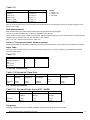
Table 5.1
Labels
DISP
SP1
IF1
SP2
IF2
HYS
OA
At
DA
OPL
OPH
DP
SDST
DROM
ERRD
ERWR
RLYS
RES
TARE
PKR
Description
REQUEST DISPLAY READING
SET POINT 1
(SP1)
IN-FLIGHT 1
(IF1)
SET POINT 2
(SP2)
IN-FLIGHT 2
(IF2)
HYSTERESIS
(HYS)
OUTPUT ACTION (OA)
AUTO TARE
(At)
DISPLAY AVERAGES (dA)
OUTPUT LOW (OPL)
OUTPUT HIGH (OPH)
DECIMAL POINT (dP r)
CAN NOT BE WRITTEN TO (SDST/CP)
DISABLE EEPROM (DROM = 256)
ENABLE EEPROM AND READ FROM IT
ENABLE EEPROM AND WRITE TO IT
OUTPUT RELAY STATUS ( 0 = BOTH OFF, 1 = RELAY 1 ON, 2 = RELAY 2 ON, 3 = BOTH RELAYS ON)
OUTPUT RELAY RESET
AUTO TARE
PEAK HOLD RESET
Process Amplifier Printer Format
(CP must be set between 0 - 127)
Printer selection enables the Process Amplifier to print its current display value to a printer via its communications
port. This display value can either be assigned a date and time stamp and/or a log number depending on the user
set options entered under mnemonic 'CP'. The log number can be reset or preset using the mnemonic 'Ln'. This value
is not saved on power fail. A label can be suffixed to the printed display value using the mnemonic 'LAb'. A large
range of labels are available to the user.
The time and date are set in the TDP printer itself using its own menu. The printer allows the entry of an additional
custom text message.
Three connections are required between the Process Amplifier communications port and the printer with a
maximum cable length of 100 meters. (See Chapter 5 Figure 5.11 for Details)
All standard Process Amplifier options are available with the exception of the communications modules, which
cannot be connected when the printer option is used.
Additional Mnemonics for the Printer Operation:
When the printer option is fitted further mnemonics are included in the normal range. After the dP r mnemonic are
the following: -
33
Mantracourt Electronics Limited UAB User Manual
CP
At this mnemonic the printer type and print format number is selected. This number
being
appropriate to the type of printer used. Details are advised with each type of printer
selected.
Present types available are: - For the ITT IPP-144-40E printer the following numbers apply
0
Prints a sequential log number with the current display and unit of measure
e.g.
00014 0011.3 tonne
1
Prints date and time with a sequential log number, current display and unit of measure
e.g.
00015 0001.7 tonne
05.03.2007 05:06
2
Prints a sequential log number, current display, unit of measure with customer text
message No 1
e.g.
MANTRACOURT ELECTRONICS PROCESS AMPLIFIER PRINTER
00012 00023. tonne
Prints date and time with a sequential log number, current display, unit of measure and a
customer text message No.1
e.g.
MANTRACOURT ELECTRONICS PROCESS AMPLIFIER PRINTER
00013 0023. tonne
05.03.2007 12:03:04
4-7
Digitec 6700 series
8,9
Amplicon AP24 and AP40
10
Eltron LP2142 - (The label file must be called 'MEL' and the label must contain a LOG
NUMBER, THE DISPLAY VARIABLE & a LABEL (not zero).
12
LOG NUMBER, THE DISPLAY VARIABLE & a LABEL (not zero)
127
ASCII string on print command
Continuous ASCII stream of the display data, transmitted on every display update
Note: 1 9 gives an inverted print out
Note: 2 It is anticipated that further types of printer will be added, and additional numbers
will be allocated as appropriate
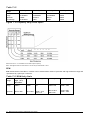
Lab
Label Number
A number can be selected for the appropriate unit of measure. See table below:
Note: 0 = NO LABEL
3
0 BLANK
1 Deg R
2 Deg C
3 Deg F
4 Kelvin
5 Ib/in 2
6 bar
7 mbar
8 kPa
9 atm
10 mmHg
11 inHg
12 inH2O
13 cmHg
Ln
14
15
16
17
18
19
20
21
22
23
24
25
26
27
mm
Wh
Db
tonne
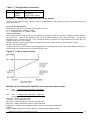
m
in
ft
degrees
L/s
L/min
L/h
gals/s
gal/min
gal/h
28
29
30
31
32
33
34
35
36
37
38
39
40
41
%RH
gram
kg
lb
kWh
mile/h
%
ton
%Dev
W
kW
MW
pH
ppm
42
43
44
45
46
47
48
49
50
51
52
53
54
55
uS
Ohms
m/s
ft/min
RPM
RPMx10
RPMx100
cos @
km/h
ms
RPM1000
Hz
kHz
V DC
56
57
58
59
60
61
62
63
64
65
66
67
68
mV DC
A DC
mA DC
V AC
mV AC
A AC
N
spare
spare
spare
spare
knots
s
Log Number
A range of numbers 0 to 19,999 is available. Any sequential number logging
activity can be preset as desired, between these numbers. The number will
reset to zero after 19,999. The log number is not saved on power fail
and resets to zero on power up.
Mantracourt Electronics Limited UAB User Manual
34
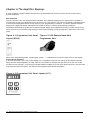
Chapter 6 The Amplifier Displays
A range of display /keypad variants are offered to accommodate both surface mount and rack versions of the
Process Amplifiers.
Rack Amplifiers
The two versions of the rack amplifier RUA1 and RUA2, have different display fixture requirements. The RUA1 is
provided with an FCC type shuttered socket on the front of each channel, into which a hand held programmer (LP2)
is inserted and latched and which can be removed, once programming is complete. In common with all amplifier
displays a 4.5 digit LCD display and keypad is provided to allow for common programming procedures.
The RUA2 is fitted with an On-Board front panel mounted display and programming facility of similar layout to the
(LP2). However in this case the programming is achieved by inserting a probe through the 2.2mm holes in the front
panel.
Figure 6.1 Programmer Unit Panel Figure 6.2 LP2 Remote Hand Held
Layout (RUA2)
Programmer Unit
When in the programming mode, a Flashing bar symbol ‘-’ is indicated in the top left hand corner of the display.
Surface Mount Amplifiers
A security link option on the rear of the display pcb, is available to prevent the change of data where required.
Where surface mount amplifiers are used, options are available to program with the (LP2), from the FCC socket
mounted on the main pcb, or by fitting an On-Board display module (LP1) with nylon stand off pillars, onto the main
pcb, using the same FCC socket. The layout of the keypad remains similar throughout.
Figure 6.3 Programmer Unit Panel Layout (LP1)
35
Mantracourt Electronics Limited UAB User Manual
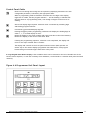
Control Panel Guide
d
Used to scroll through and change the set up data by displaying mnemonics for each
configurable parameter, followed by the appropriate data.
When in programming mode it should be noted that the first digit in the display
might not be visible, but the program indicator --- will be flashing to indicate that
the instrument is in programming mode, even though no digits can be seen to be
flashing.
b
Selects the display digit required. Selection value is indicated by a flashing digit
and flashing program indicator.
c
Increments each selected display digit 0-9.
Pressing the c key under programming conditions will display the leading digit as
either 1, -1, or a blank display for zero.
Resets the display to the input variable and enters new data in the LCA15 memory.
Returns the display to the current value after Hold.
a
If during the programming sequence, selection is not completed, the display will
revert to the input variable after 2 minutes.
The display and controls on the front panel mounted version (RL2) operate in a
similar way to the remote display/programmer described above, with program
buttons being accessed through 2.2mm holes in the panel.
A Large Keypad Panel Mount Display is also available which can be mounted to the lid of the ABS case of the
surface mount amplifier, or with the necessary driver hardware, can be fitted to a stainless steel panel and used
remotely.
Figure 6.4 Programmer Unit Panel Layout
Mantracourt Electronics Limited UAB User Manual
36
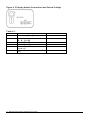
Figure 6.5 Display Module Connections and Switch Settings
Table 6.1
Position ON
1
Function
2
Enables all Program Keys
d b c & a
ON
3
Enables e and f Function Keys
Enables g and h Function Keys
Forces display to always be GROSS
VALUE only
Forces display to always be NET VALUE
only
ON
4
5
6
37
Enables Keys b and c
Mantracourt Electronics Limited UAB User Manual
Factory Settings
ON
ON
OFF
OFF
Chapter 7 Programming The Amplifiers
Section 1 - Display & Programming Mnemonics
As described in the previous chapter, there is common symbol and keypad layout for programming all the variants
whether it be rack or surface mounting units.
Table 7.1 Configurable Parameters for Process Input
The standard range of programming mnemonics is show in the following table: Display Function
(In order of Display)
PASS
1111
Range
Function
±19999
Security Password. Correct value required proceeding
further (special numbers on request).
Password for Analogue Input Calibration routine giving
access to:
A to D Calibration Low value
A to D Calibration High value
Sets first output trip or control
(Chapter 5 refers)
2000
SP1
Set Point 1
ADCL
ADCH
-19999 to +19999
SP2
Set Point 2
-19999 to +19999
Sets second output trip or control (Chapter 5 refers)
HYS
Hysteresis
0 to +19999 in real
display units
Sets hysteresis applied to SP1 and SP2 when used for
ON/OFF control units (Chapter 5 refers)
OL
Output Latch
Latch set by code in
range 0-3 as shown in
Table 5.1
Allows SP1 and/or SP2 to be latched
until reset externally, from the keypad or via
communications port.
OA
Output Action
(Inversion)
of SP1 & SP2
Action set by code in
range 0-15 as shown in
Table 5.2
Sets output relay action. Can be set
to ‘normal’ or ‘inverted’ operation for either or both set
points. Gives fail safe operation of any alarm
combination, High-High, High-Low, Low-High & LowLow. (Chapter 5 refers) Also selects whether analogue
outputs controlled by display module or PID element in
CPU Inversion of the analogue output.
Mantracourt Electronics Limited UAB User Manual
38
Proportional Band
Pb
0 to 1024
Output on delay
0 to 255
Ont
Integral
Output off
delay
(It)
Derivative
Time
0 to 255
(dt)
Display
Averaging &
Peak Hold
dA
(ct)
IPL
When PID is not used, (PB=0) the mnemonic (Ont) sets a
delay on time for SP1 & SP2. Set in seconds. Or
Selects integral value for PID control in seconds/repeat.
0= Proportional only control.
When PID is not used, (PB=0) the mnemonic (Offt) sets a
delay off time for SP1 & SP2 set in seconds. Or
0 to 6000
0 to 255
OFFt
'O' Selects 'Ont'.'Offt' or 'da' function 1-1023 Selects PID
mode and value of proportional band, in displayed units.
1024 Selects Integral 'It' only control
0 to 15
Cycle time
1 to 255
Input Low
-19999 to 19999
Selects derivative value for PID control. 0 = OFF (no
derivative)
When PID is not used, (PB=0) the mnemonic (dA) sets a
display averaging update rate.
Readings may be averaged over a number of updates and
can be set as follows:
Display update time
0 = 1 readings (standard) approx. 0.4S
1 = 2 readings approx. 0.8S
2 = 4 readings approx. 1.6S
3 = 8 readings approx. 3.2S
4 = 16 readings approx. 6.4S
5 = 32 readings approx. 12.8S
6 = 64 readings approx. 25.6S
7 = Fast update mode approx. 0.1S A peak hold
function, which will display the highest recorded value
of the measured input, can be set by adding 8 to any of
the above settings. To reset Peak Hold press the b key,
then within 1 second, press the c key. Can also be reset
externally or via comms.
Or
Set time in seconds for one
complete power cycle output of PID
power (time proportioned through
SP1).
For linear analogue inputs, used to
set the required display reading
when an analogue input is at its
minimum value. Also provides an
OFFSET for value for non linear
analogue Inputs.Or
(IpOf)
Offset Factor
-19999 to 19999
For rate/totaliser inputs, the value
provides an offset or for totaliser, a
count reset value.
IPH
Input High
-19999 to +19999
For linear analogue inputs, used to
set the required display reading
when an analogue input is at its
maximum value.Or
39
Mantracourt Electronics Limited UAB User Manual
(IpSf)
Scale Factor
0 - 1.9999
Applies a variable gain to the rate
/totaliser reading 1.0000 for unity
(0.5000 to halve the display value.)
OPL
Output Low
-19999 to+19999
Used to set the display value at
which the minimum analogue output
is required.
OPH
Output High
-19999 to+19999
Used to set the display value at
which the maximum analogue
output is required.
IP
Input Select
0 to 65
Used to set up the UAB for the input
to be monitored. (See Sections 2-4
of this Chapter)
dP-r
Decimal
Point &
Reset
range 0 to 61
Code dP Position
0 19999
1 1.9999
2 19.999
3 199.99
4 1999.9
5 19999.
To set the required position of the
decimal point on the display and to
set the rear contact actions for
count
reset &/or peak hold &/or latched
relay reset &/or print. Or any
combination of these.
To make reset input active on any or
all of the following add to dP-r No.
as follows:
8
Reset totaliser count
16
Reset latched relays or peak hold
32
Activate print
(Note: Latched relays are not available with peak hold)
cP
Comms
Protocol
0-129
SdSt
Serial Device
Station
Set by code in range 0 to 254
(Lab)
Option 0-75
Ln
Log Number
Inp
Input
Variable
Comms Protocol (see Chapter 5) (0
to 127 = Printer
127 = Continuous ASCII stream of
display data transmitted on every
display update.
128 = 'Fast' MANTRABUS
129 = 'ASCII'
Used to set individual address of
each UAB when communications
port is used. NB: changes can only
be made via the keypad (Chapter 5
refers).
Label number to print engineering
units. (See Chapter 5)
0-19,999
Mantracourt Electronics Limited UAB User Manual
To set Log number. Reset on power
up.
Automatically returns the UAB to
the input again after scrolling
sequence is completed and updates
permanent memory.
40
RS
Display
Resolution
0-255
Sets display resolution
0 & 1 = Resolution of 1 least
significant digit.
2-255 = Resolution setting of last
digits.
Note: Invalid parameter values - Should an invalid figure be entered against any parameter, it will be rejected and
the display will return to show the parameter.
* This number range will increase as new printer options become available.
Table 7.2 Configurable Parameters for Dual Input Modules
Mnemonic
InPA
InPb
SP1
SP2
PASSWORD
HYS
OL
OA
Pb
Ont or It
OFFt or dt
dA or ct
IPLA
IPHA
IPLb
IPHb
SF
DF
OFFS
OPL
Descriptions
Live display of input 'A'
Live display of input 'B'
As for single channel inputs, except when Ab = 4, when SP1 = value set by input 'b'
As for single channel inputs
1111
As for single channel inputs
As for single channel inputs
As for single channel inputs
As for single channel inputs
As for single channel inputs
As for single channel inputs
As for single channel inputs except add 400mS to all display update time
Input low scale factor for 'A' input (no IPOF)
Input high scale factor for 'A' input (no IPSF)
Input low scale factor for 'B' input
Input high scale factor for 'B' input
Scale factor, unity being 1.0000 except when AB = 3, then unity = 001.00
Division factor, divides result of function x scale factor, by the value set
Offset provides a display offset
As for single channel inputs
dPB
Cp
SdSt/Lab
Ln
rS
dis
Sets decimal point position for 'B' input display (for display purposes only)
For single channel inputs
For single channel inputs
For single channel inputs
For single channel inputs
Returns to A, B, function display
Ab
0
1
2
3
4
Function
A+B
A-B
AxB
A/B
Display = Input A, SP1 = Input B
Display =
(Result of A, B Function) x SF
DF
Configurable Parameters for UAFLC - Fast Strain Gauge Input Module
Note: Password Protection
To prevent unauthorised changes to parameters, other than Set Points and In-Flight compensation settings, a 4 digit
password number must be entered. Scrolling through the Set Points and In Flight settings until ‘PASS’ is displayed
accesses the number. At this point, it is necessary to enter either the factory set number 1111 in D2 - D5 positions,
or the password number specifically ordered by the customer.
41
Mantracourt Electronics Limited UAB User Manual
Table 7.3 Configurable Parameters
CODE
Inp
P
t
VALUE
±19999
±19999
±19999
FUNCTION
Live input reading
Peak reading
Trough (valley) reading
Section 2 - Setting the Conditions for Linear Inputs
To monitor the analogue input, the unit must be programmed for the appropriate input module and select the
required resolution.
Linear Input Code Selection
The two input code (IP) options offer scaling of the input for:
IP = 0. Scaling between -19999 to +19999
IP = 1. Scaling divide by 10, -1999 to +1999
Linear Input Scaling
Input scaling factors are set by the user and determine the display range over which the analogue module operates.
(IPL) Input Low - This sets the displayed value at the modules minimum input. (IPH) Input High - This sets the
displayed value at maximum input. If the calculated display is outside the range defined by IPL and IPH, the
analogue input will be over-ranged.
Example: Assume a 4-20mA input module is required to provide an input of 4mA at 100 and 20mA at 1500.
Set IPL at 100 and IPH at 1500
It will be necessary to determine IPL and IPH by graphical or mathematical means if the known display values do not
coincide with the minimum and/or maximum analogue input.
Figure 7.1 Linear Input Scaling
Method of Calculating IPL and IPH from any known input values
IPL=
Low
- (Display span) (Low input - Min input)
Display
(High input - Low input)
IPH=
High
+ (Display Span) (Max input - High input)
Display
(High input - Low input)
High input = Known high input value
Low input = Known low input value
Min input = Lowest measurable value of input PCB fitted
Max input = Highest measurable value of input PCB fitted
Display span = Highest required display value -minus lowest required display value.
Example:
Using a 4.20mA input PCB requiring a display of 200 at 6mA and 8000 at 12mA
Mantracourt Electronics Limited UAB User Manual
42
Display Value
Input Value
IPL=
200
IPL=
IPL =
200 - 2600
-2400
IPH =
8000
Min
IPL
0mA
Known Low
200
6mA
-((7800) (6 - 4))
(12 -6)
+ (7800) (20 - 12)
(12 - 6)
Known High
8000
12mA
Max
IPH
20mA
= 200-(7800 x 2)
(6)
= 8000+ (7800 x 8)
(6)
IPH = 8000 + 10400
IPH = 18400
Note 1: If IPL or IPH are greater than ±19999 then divide both IPL and IPLH by 10, this will give less resolution.
Note 2: Decimal point can be placed anywhere to suit reading.
Input Calibration Routine
Note: It is of the utmost importance that this routine is followed carefully when setting up the instrument with
Analogue Inputs.
Most analogue inputs have predetermined calibration constants, which have been written into the software at the
time of manufacture; the details of these calibration values are written on a pre-printed white label on each input
board against ADCL and ADCH.
The values shown on the labels are to be entered in the following manner: Scroll to the PASSWORD mnemonic and enter the number - 2000. Press the scroll key, the display will then show the
mnemonic ‘ADCL’ (A to D Calibration Low value), this prompts the entry of the value written on the label. Once this
value has been entered, scroll to the mnemonic ‘ADCH’ (A to D Calibration High value), which again prompts the
entry of the value written on the label.
Note: It is important that the c key is used during this procedure; otherwise the software will attempt to calculate
new values for ADCL and ADCH.
Section 3 - The Temperature Input Modules (UAT1 & UAT2)
The UAB provides very accurate temperature measurement from thermocouple or resistance thermometer inputs.
The microprocessor line arises the input signal with accuracy ensured by the application of a polynomial expression.
This arrangement provides a high-resolution digital readout in units of Centigrade, Fahrenheit or Kelvin, as required.
Resolution of either 0.1 or 1.0 degrees can be selected from the keypad.
The input type must be selected on ordering as detailed in the ordering codes shown above (also see Chapter 8).
Setting Up Codes for Thermocouples
To monitor temperature inputs from a thermocouple, set the (IP) code to select the precalibrated analogue input
module, together with the required display value and resolution (See Table 7.2).
43
Mantracourt Electronics Limited UAB User Manual
Thermocouple Cold Junction Compensation
The UATx modules are supplied with a cold junction sensor. For maximum accuracy the cold junction sensor should
be placed as close as possible to the junction of copper or non-thermocouple connector cables. This sensor requires
to be matched to the UATx otherwise a maximum offset error or ± 2.5% at room temperature may be incurred. To
calibrate this offset follow the procedure below: 1.
2.
3.
4.
Short the thermocouple input connection 1 & 2
Connect the cold junction sensor across connections 3 & 4
Ensure that IPL is at zero
Using a reference thermometer, placed so that it is measuring the cold junction sensor temperature, allow the
sensor & thermometer to reach thermal equilibrium. Note this temperature.
5. Note the temperature that the UAB display is reading, the difference between the two noted values should be
entered into IPL.
6. After entering this value the reading of the reference thermometer & UAB should be similar.
Any further changes to IPL for introducing a system offset to compensate for minor temperature discrepancies
between cold junction and the thermocouple cable for example should be added to the value.
Should a display be required in degrees Kelvin, it will be necessary to select the (IP) on 0ºC and set the (IPL) to
+273ºC.
Table 7.4 - Thermocouple Input Codes
Thermocouple Type
J
Range
-170ºC to
+760ºC
Readout
Centigrade
Fahrenheit
-230ºC to
+1300ºC
K
Centigrade
Fahrenheit
Resolution
0.1
1.0
0.1
1.0
Code Module
30
31
46
47
0.1
1.0
0.1
1.0
32
33
48
49
Inputs
UAT2
UAT1
Resistance Thermometers
This is normally a PT100 type of RTD.
Resistance thermometer connections to the UAB depend upon the lead configuration, which is itself determined by
the required level of accuracy.
For applications where a high accuracy measurement is not required a 2 or 3 wire installation is adequate. For high
accuracy, a 4-wire connection should be used to compensate for lead resistance and connector losses.
Setting up Codes for Resistance Thermometers
To monitor temperature inputs from an RTD, set the IP code to select the pre calibrated analogue input module,
together with the required display value and resolution as summarised below.
Table 7.5
Display Units
Centigrade
Centigrade
Fahrenheit
Fahrenheit
Resolution
0.1
1.0
0.1
1.0
Code
60
61
58
59
IPL must be set to zero for any of these display options, however, if any offset factor is required e.g. to compensate for minor temperature
discrepancies between cold junction and thermocouple cable, set the (IPL) to the required offset value.
Should a display be required in degrees Kelvin, it will be necessary to select the (IP) on 0ºC and set the (IPL)
to+273ºC.
Mantracourt Electronics Limited UAB User Manual
44
Section 4 - The Rate/Totaliser Input Module (UARTL)
General Description
The module allows the monitoring of frequency, RPM, period or pulse totalising from a wide range of transducers,
the details of which are shown in Table 7.5
The module can be configured for any of the functions referred to in Table 7.5 and transducer types, by DIL
switches keypad set parameters and connections. See Table 7.6
Setting up the Input
The types of input chosen will depend upon the sensor requirements and can be determined from the table below:
Table 7.6
Type
Threshold
Hysteresis
Input Impedance
Excitation
DCV
High Pulse
Level
5-30V
2.5V
1.0V
100K min or 5K6
5V, 50mA
ACV1
±30mV to 35V
*20mV-2V
*5mV to 180mV
5K min
5V, 50mA
ACV2
±3V to 35V
*2.5V-35V
*120mV- 2.0V
5K min
5V, 50mA
AC/DCmV
±15mV - 5V
8mV
2mV
10M
5V, 50mA
NAMUR
2.5 to 17mA
1.6mA
90µA
680R
8.3V, 50mA
*Adjustable by potentiometer.
When selecting the type of input required by the sensor, from Table 7.3, set the
DIL switches on SW1, as shown in Table 7.4 (The RTL layout diagram Chapter 4 Figure 4.4 refers).
Table 7.7 Input Configuration
Type
SW1) Switch Settings
Legend
* *
ACV1
ACV2
AC/DC mV
NAMUR
DCV (pull up for volt free or contact
type inputs)
DCV (pull down for voltage fed
inputs up to 30V)
DCV (Standard CMOS type input)
12345678
10101x01
11001x01
00101x01
11001x01
10010x01
10001x01
10000x01
1 - Switch
‘on’
0 - Switch
‘off’
x - See Note 1
∗ - See Note 2
Note 1: Switch 6 selects a low pass filter with a 10uS time constant on DCV Input only
Note 2: For totalising, set switch 7 'on' and 8 'off' on all ranges
Setting the Prescaler
Depending upon the rate of the frequency, RPM or period to be measured or the maximum desired count of the
totaliser, it will be necessary to select the prescaler by setting the DIL switches on SW2 as shown in the Table 7.7
below. (See the UARTL layout Figure 4.4)
45
Mantracourt Electronics Limited UAB User Manual
Table 7.8
Prescaler
(SW2) Switch Settings
Legend
123456
1 - Switch ‘on’
Divide x 1
0 - Switch ‘off’
x10000
Divide x 10
x - Not used
x01000
Divide x 100
x00100
Divide x 1,000
x00010
Divide x 10,000
x00001
Note 1: Select only one switch to the ‘on’ position
Note 2: It will be necessary to increase the prescale divide factor by setting the switch to a higher position if the
input is over range.
Rate Measurement
Rate measurements are achieved by measuring the period between input signals.
From this, period measurements, frequency and RPM can be derived.
These measurements can be scaled to any desired display range by setting scale and offset factors from the keypad
together with a prescaler set from DIL switches on the module.
SW1 7 off, 8 on, and IP set by keypad to Table 7.8
Period (Time measurement between pulses)
Period measurements from 20µS to 1999.9mS can be monitored by means of prescaler and is divided into 2 ranges:
Input Code
The input code (IP) sets the type of rate measurement required i.e. Period, Frequency, and RPM and is selected
from the table below: -
Table 7.9
Type
Code
Divide by 10
Frequency
RPM High Resolution
RPM
Period in mS
Period in µS
12
14
16
2
6
13
15
17
3
7
(i) Period in mSeconds
Table 7.10 Period mS Fixed Scale
Prescale
Divide by 1
Divide by 10
Divide by 100
Divide by 1000
Divide by 10000
Input
0.2mS to
1999.9mS
0.02mS
to199.99mS
0.02mS
to19.999mS
20µS to1999.9µS
20µS
to 199.99µS
Resolution
Noise
0.1mS
0.1mS
0.01mS
0.01mS
0.001mS
0.001mS
0.1µS
0.1µS
0.01µS
0.01µS
(ii) Period in µSeconds
Table 7.11 Period µS Unity Scale (IPSF 1.0000)
Prescale
Divide by 1
Divide by 10
Divide by 100
Input
150µS to
19999µS
20µS to
999.9µS
20µS to
199.99µS
Resolution
Noise
1.0µS
3.0µS
0.1µS
0.3µS
0.01µS
0.03µS
NB: These tables only apply when the scale factor is set to unity and the offset is zero.
Frequency
Frequency measurements from 0.48Hz to 50KHz can be monitored be means of prescaler.
Mantracourt Electronics Limited UAB User Manual
46
Table 7.12
Prescale
Range
Full input
Range
Optimum
Input Range
Divide by 1
Divide by 10
Divide by 100
Divide by 1000
0.48Hz
to199.99Hz
0.48Hz
to100.00Hz
4.8Hz
to1999.9Hz
4.8Hz to
1KHz
48Hz
to19.999KHz
48Hz to
10KHz
480Hz
50KHz
480Hz
50KHz
Figure 7.2 Frequency Unity Scale Inputs
Worst noise level = 3 x resolution for the same input frequency
Note: This applies when the scale factor is set to unity and the offset is zero.
RPM
RPM measurements from 28.8 to 3 million can be monitored be means of prescaler and high-resolution range and
represented by 1 pulse per revolution.
Table 7.13 RPM Unity Scale
Prescale
Range
Divide by 1
Divide by 10
Divide by 100
Divide by 1000
Full Input
Range
Divide by 1
High (0.1)
Resolution
28.8 to
1999.9
29 to
19999
28.8 to 19999 x
10
28.8 100
19999 x100
28.8 x 1000
3000 x 1000
Optimum
28.8 to 500
29 to 7000
28.8 x 10 to
700 x 10
28.8 x100 to
7000 x100
28.8 x 1000
3000 x 1000
47
Mantracourt Electronics Limited UAB User Manual
Figure 7.3 RPM Unity Scale Range
Worst Noise Level = 3 x resolution for the same input
Input RPM
Count/Rate Scaling & Scaling/Rate
The count/rate input can be represented over any display range by applying keypad set parameters known as scale
and offset factors.
The actual count/rate would be displayed when the scale factor is unity (1.0000) and offset factor is zero.
The scale factor applies a variable gain to the count/rate and is set by the mnemonic (IPSF)
IPSF is calculated as follows:
IPSF = Required change in display digits
Change in count/rate value
IPSF has a range of 0.0001 to 1.9999
The offset factor is added to or subtracted from zero offset displayed value and is set by the mnemonic (IPOF).
IPOF is calculated as follows:
IPOF = required display digits - (IPSF x required count/rate value)
IPOF has a range from -12767 to +19999
Scaling Example: For a low frequency input of 139Hz, a display of 46 litres per minute is required for a high frequency input of 710Hz;
a display of 250 litres per minute is required.
Scale Factor - IPSF =
Therefore
250 - 46
710 - 139 =
IPSF = 0.3573
204
571
=
0.3573
Offset Factor - IPOF = 250 - (0.3573 x 710) = -3.683
Therefore
IPOF = - 3.683
Mantracourt Electronics Limited UAB User Manual
48
RTL Module Inputs
Figure 7.4 RTL Module Inputs
The RTL module can accept four types of input as follows: -
Notes: Minimum period equals 20µS
: For ACV2 inputs over 6V with greater than 50% 'Mark' use ACV1.
Section 5 - Programming the Output Functions
Set Points (SP)
Set points are used to produce output signals at any required value so that the operation of the monitored process
can be maintained to preset levels. Any excursion beyond set points will activate the relay or relays, to provide
alarm or initiate control as required.
Two set points (SP1) and (SP2) can be programmed to suit different applications. The actions of either or both set
points can inverted if required.
For normal operation the set point output is active until the input reaches the set point level. In this condition when
the input value is less than the set point, the SP indicator is on and the output relay is energised producing a closed
circuit on a normally open contact. When the set point value is reached, the SP indicator is off and the relay is deenergised producing an open circuit output.
For an inverted operation the reverse conditions apply.
Normal and inverted action is determined by the direction of the input value as it changes.
For example: In alarm applications.
A High-High operation allows for a rising input value to operate on two set points to define an acceptable quantity,
weight or band of operation.
A Low-Low operation operates on a falling value.
A High-Low operation will operate on a rising or falling value, setting a 'band' by one set point operating normally
and the other being an inverted action.
Hysteresis (HYS)
Once a Hysteresis value has been set, it will be applied to both set points entered. It is effective for both normal
and inverted action.
49
Mantracourt Electronics Limited UAB User Manual
When Hysteresis is applied to set points with normal output action, the input is allowed to rise to the set point
value and the output is then turned off. The output is held off until the input value has dropped to the set point
minus the Hysteresis value.
Latching Outputs (OL)
The latching facility allows the relay module output to be held until reset either by keypad, external remote or via
the communications port.
Latching is applied to the off status of the relay SP1 or SP2.
Table 7.14 Output Latch Codes (OL)
SP1
SP2
Code
Unlatched
Unlatched
0
Latched
Unlatched
1
Unlatched
Latched
2
Latched
Latched
3
Display OL and enter required code using the keypad as detailed in Chapter 3.
Output Action (OA)
The output action facility allows the user to determine whether set points produce normal or inverted output
operation. If an analogue output module is also fitted, the output action function determine whether the modules
output is inverted or not and if PID power level is also directed to the analogue output. The output action (OA) is
entered by a code to suit the requirements of the user.
Output Action options are available.
The value of the OA to be entered in the algebraic sum of the following components:
Table 7.15 Output Action Codes (OA)
SP1 Inverted
=1
SP2 Inverted
=2
PID on Analogue Output
=4
AN-OP Inverted
=8
Example 1: If SP1 requires to be inverted and PID on the analogue output, enter 4 + 1 = 5.
Example 2: To invert the analogue output and invert SP2, enter 8 + 2 = 10
Delay Timers
For applications where PID is not used (PB=0) and time delayed outputs are specified, 'ON' and delay 'OFF' times can
be set via the keypad.
Delay On Timer
The delay on timer applies to SP1 and SP2 and initiates a delay before either set point can turn on. The delay timer
will be reset if the off state is called for during the delay time. This is set by ‘ont’ code in seconds ranging from 0 to
255.
Delay Off Timer
The delay off timer applies to SP1 and SP2 and initiates a delay before either set point can turn off. The delay timer
will be reset is the on state is called for during the delay time. This is set by ‘oFFt’ code in seconds ranging from 0
to 255.
PID Functions
The four components of a PID function are proportional band (Pb), integral time (It) and derivative time (dt). The
cycle time is set by input code (ct).
To set the proportional band, display (Pb) and enter the required operating band in terms of the displayed units as
described in Chapter 3.
When PB is selected, the Relay 1 (SP1) is used by the PID as a time proportional output.
Mantracourt Electronics Limited UAB User Manual
50
PID Empirical Tuning
1. Set Pb to the max 1023 and ct to a low value consistent with the mechanical constraints and system
requirements.
2. Vary the input or the set point and note the system response, reduce the Pb by half and repeat, continue to
reduce Pb until the process starts to oscillate, then increase Pb until it is stable.
3. Set the integral time to max (6000) and reduce it in stages until the proportional offset is eliminated. There
should be a slow oscillation around set point.
4. Set a low value of dt and gradually increase this until the slow oscillation ceases.
5. Lower the value of Pb and increase the value of dt after each change, disturb the process and check that control
is maintained. The final setting will be that which gives satisfactory control in the presence of these small
disturbances.
6. The following equation must be applied to ensure that the system operates correctly
ct
Pb x it
must be greater than the constant .00012255 where Pb is expressed in whole numbers, ignoring any decimal point
setting.
i.e. 100.0 will be taken as 1000
Section 6 - Scaling the Analogue Outputs
Output Scaling
Output scaling factors are set by the user and determine the display range over which the analogue module
operates.
(OPL) Output Low - This sets the displayed value at the modules minimum output.
(OPH) Output High - This sets the displayed value at maximum output. If the display is outside the range defined by
OPL and OPH, the analogue output will remain constant at its minimum or maximum output value.
Example: Assume a 4-20mA output module is required to provide an output of 4mA for 1000Kg and 20mA for 6500Kg.
Set OPL to 1000 and OPH to 6500
It will be necessary to determine OPL and OPH by graphical or mathematical means if the known display values do
not coincide with the minimum and/or maximum analogue output.
Figure 7.5 Analogue Output
51
Mantracourt Electronics Limited UAB User Manual
Method of Calculating OPL & OPH from any known Output & Display Values
OPL =
Low
-(Display span) (Low output - Min output)
Display
(High output - Low output)
OPH = High
+ (Display Span) (Max output - High output)
Display
(High output - Low output)
Low output = Known low output
High output = Known high output
Min output = Lowest measurable value of output module
Max output = Highest measurable value of output module
Display span = Highest required display value minus lowest required display value.
Example:
Using a 4.20mA output module where it is required to produce 6mA at a display value of 400 and 18mA at a display
value of 1100.
OPL =
OPL =
OPL =
400
-( (700) (6 - 4) )
(18 -6)
400 - 116.66
283.34
OPH = 1100
+700) (20 - 18)
(18 - 6)
= 400-(1400)
12
=1100+(700 x 2)
12
OPH =1100 +116.66
OPH =1216.66
Note 1: OPH must be greater than OPL
Note 2: If OPL or OPH are greater than ±19999 then divide both OPL and OPH by 10, this will give less resolution.
Decimal point can be placed anywhere to suit reading.
Decimal point can be placed anywhere to suit reading.
Calibration
Re calibration can be made by adjusting the gain and offset potentiometers, or by adjusting the values of OP LO and
OP Hi.
An offset can be achieved by increasing the values of both OP LO and OP Hi, and the gain by increasing the range
between OP LO and OP Hi.
Figure 7.6 Showing the Potentiometers for Gain and Offset Adjustment
As described in Chapter 5 the Fast Analogue Output module is specifically designed to be used when the fast strain
gauge input module, (UAFLC) is fitted. (However due to physical constraints the module can be used with the
Universal Amplifier in its surface mount configuration only.) Although output scaling follows a similar procedure
to that of the standard analogue outputs, the re calibration adjustments required to the fast analogue output
module are shown in the following diagram:
Mantracourt Electronics Limited UAB User Manual
52
Calibration
Re calibration can be made by adjusting the gain and offset potentiometers, or by adjusting the values of OPL and
OPH.
An offset can be achieved by increasing the values of both OPL and OPH, and the gain by increasing the range
between OPL and OPH.
Figure 7.7 Showing the Potentiometers for Gain & Offset Adjustment
53
Mantracourt Electronics Limited UAB User Manual
Chapter 8 Order Codes
RUA Rack Mounted Universal Input Process Amplifier
Inputs
0 to 10Volts
0-20mA DC Volts
LDVT Input
Temperature Input
Type K
Type J
PT100
Rate/Totaliser
Dual Channel LVDT Input
Dual Channel 4 to 20mA Input
Dual Channel 0 to 10V Input
Fast Strain Gauge
Comms/Printer Port
Communications
UADCV1
UADCA1
UALV1
UAT1
UAT2
UAPT
UARTL
UALV2
UADIA
UADIV
UAFLC
20mA Current Loop
RS232/485
RC1
RC3
Relay Module
Relay Output Module (2 x SPCO 500mA50V)
RR1
Amplifier/Display
Universal Amplifier for Remote Programmer (LP2)
Universal Amplifier with internal Programmer
Universal Amplifier for Remote Programmer (LP3)
RUA1
RUA2
RUA1-EX
Accessories
Rack PSU for RF1 & RF2
Rack for 12 Channels with Remote Programmer
Rack for 8 Channels with Internal Programmer
Blanking Panels for RF1
Blanking Panels for RF2
Remote Programmer for Standard & Fast Input
Module
Programmer for Hi Res Input Modules
VisualLink SCADA Software Full Version
VisualLink Runtime Key
VisualLink SCADA Software Demo
RS1
RF1
RF2
RB1
RB2
LP2
LP3
VLA
VLR
VDL
UAB Universal Amplifier
Description
Universal Amplifier with 4-20mA/0-10V Analogue for
either ABS Case or DIN Rail Mounting
Inputs
0 to 10Volts
0-20mA DC Volts
LDVT Input
Temperature Input
Type K
Type J
PT100
Rate/Totaliser
Fast Strain Gauge
Mantracourt Electronics Limited UAB User Manual
Order Code
UAB
UADCV1
UADCA1
UALV1
UAT1
UAT2
UAPT
UARTL
UAFLC
54
Comms/Printer Port
Communications
20mA Current Loop
RS232/485
LC1
LC3
Relay Module
Relay Output Module (2 x SPCO 500mA50V)
LR1
Power Supplies AC & DC
AC Power Supply 110/120V or 220/240V AC
DC Power Supply 9-32V DC
LS1
LS3
Amplifier/Display
Display PCB for fitting to LAC ABS Case
LP1
Mounting & Cases
ABS Case with plain ABS Lid
Stainless Steel Case 220 x 160 x 85mm
Die Case 220 x 160 x 85mm
DIN Rail Mounting fixture for the LCB/UAB
Transparent Plastic Case Lid for ABS Case
LAB
LSS
LDC
D2
LTL
Accessories
Conformal Coating of PCBs
Remote Hand Held Programmer
Programmer for Hi Res Input Modules
VisualLink SCADA Software Full Version
VisualLink Runtime Key
VisualLink SCADA Software Demo
LCC
LP2
LP3
VLA
VLR
VDL
SMP Surface Mount Process Indicator & Controller
Inputs
0 to 10Volts
0-20mA DC Volts
LDVT Input
Temperature Input
Type K
Type J
PT100
Rate/Totaliser
Dual Channel LVDT Input
Dual Channel 4 to 20mA Input
Dual Channel 0 to 10V Input
Fast Strain Gauge
Comms/Printer Port
Communications
UADCV1
UADCA1
UALV1
UAT1
UAT2
UAPT
UARTL
UALV2
UADIA
UADIV
UAFLC
20mA Current Loop
RS232/485
LC1
LC3
Relay Module
Relay Output Module (2 x SPCO 500mA50V)
LR1
Power Supplies AC & DC
AC Power Supply 110/120V or 220/240V AC
DC Power Supply 9-32V DC
LS1
LS3
55
Mantracourt Electronics Limited UAB User Manual
Amplifier/Display
Display PCB for fitting to LAC, ABS Case
As above (LCD) with backlight
Display PCB fitted with a driver for extended
distance working - 100 metres ABS Case
As (LCDR) with backlight
LCD
LCD/BL
LCDR
LCDR/BL
Mounting & Cases
ABS Case prepared for PCB with front label (no PCB
fitted)
DIN Rail Mounting fixture for the LCB/UAB
Stainless Steel mounting for display PCB
LAC
D2
LCS
Accessories
Conformal Coating of PCBs
VisualLink SCADA Software Full Version
VisualLink Runtime Key
VisualLink SCADA Software Demo
LCC
VLA
VLR
VDL
CE Approvals
European EMC Directive
2004/108/EC
BS EN 61326-1:2006
BS EN 61326-2-3:2006
Low Voltage Directive
2006/95/EC
BS EN 61010-1:2001
Rated for Basic Insulation
Normal Condition
Pollution Degree 2
Permanently Connected
Insulation Category lll
Mantracourt Electronics Limited UAB User Manual
56
Instrument Setup Record Sheet
Product
Product Code
Serial No
Tag No
Date
Location
Measurement type, range & engineering units
Communication / Baud Rate
UAB/RUA/SMP
PASS
SP1
SP2
HYS
OL
OA
Pb
Ont (It)
OFFt (dt)
dA (Ct)
IPL (IPOF)
IPH (IPSF)
OPL
OPH
IP
dP r
CP
SdSt or LAb
Ln (for printer)
rS
Value
WARRANTY
All UAB products from Mantracourt Electronics Ltd. ('Mantracourt') are warranted against defective material and workmanship for a period of (3)
three years from the date of dispatch.
If the 'Mantracourt' product you purchase appears to have a defect in material or workmanship or fails during normal use within the period,
please contact your Distributor, who will assist you in resolving the problem. If it is necessary to return the product to 'Mantracourt' please
include a note stating name, company, address, phone number and a detailed description of the problem. Also, please indicate if it is a
warranty repair.
The sender is responsible for shipping charges, freight insurance and proper packaging to prevent breakage in transit.
'Mantracourt' warranty does not apply to defects resulting from action of the buyer such as mishandling, improper interfacing, operation outside
of design limits, improper repair or unauthorised modification.
No other warranties are expressed or implied. 'Mantracourt' specifically disclaims any implied warranties of merchantability or fitness for a
specific purpose. The remedies outlined above are the buyer’s only remedies. 'Mantracourt' will not be liable for direct, indirect, special,
incidental or consequential damages whether based on the contract, tort or other legal theory.
Any corrective maintenance required after the warranty period should be performed by 'Mantracourt' approved personnel only.
In the interests of continued product development, Mantracourt Electronics Limited reserves the right to alter product specifications
without prior notice.
Code No. 517-098
Issue 2.5
11.04.14
57
Mantracourt Electronics Limited UAB User Manual