1
9400TP Termination Panel Manual
3.4.6
ECOTECH Pty Ltd
Digital Inputs
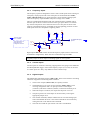
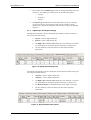
To setup the Digital inputs in AQMS, use the following parameters in the Physical
Bit Allocation window:
Figure 13: AQMS Physical bit Allocation for the 9400TPIM digital inputs
•
Logical bit number 16 to 23 correspond to digital inputs IP0 to IP7
respectively.
•
Set Type to "I"
•
Set Physical Bit Address to 0.00 to 0.07 for digital inputs IP0 to IP7.
3.4.7
Digital Outputs
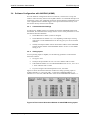
To setup the Digital outputs in AQMS, use the following parameters in the Physical
Bit Allocation window:
Figure 14: AQMS Physical bit Allocation for the 9400TPIM digital outputs
•
Logical bit number 0 to 7 correspond to logical outputs OP0 to OP7
respectively.
•
Set Type to "O"
•
Set Physical Bit Address to 0.00 to 0.07 for digital outputs OP0 to OP7.
You can test the digital outputs using the Operate Solenoids menu.
Input / Output Configuration
21