1
How to Perform a Cable Test
Network Cable Test
Coax Cable Test
Telephone Cable Test
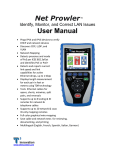
• Power on the Net Prowler. Connect a network, coax, or telephone cable to the appropriate connector on the top of the Net Prowler.
Warning! Do not plug an RJ11 cable directly into the Net Prowler! A standard RJ11
cable will damage the Net Prowler’s RJ45 jack. Use the included RJ adapter patch
cable that is included with the Net Prowler.
• Press the enter button to display the cable test menu. The Cable Prowler will
automatically perform a test upon entering the cable test menu.
• To test coax or telephone cable, press the coax or telephone soft key .
• If a remote is NOT being used (one ended test), the Net Prowler will test the length of each pair, opens, shorts, or split pairs. Performing a one ended test will not verify connectivity on the opposite end of the cable.
• If a remote is being used, connect the remote to the opposite end of the cable.
• To calibrate the VOP, connect a known length of cable to the Net Prowler and press the up/down/left/right buttons to increase or decrease the VOP. Press the left and right buttons to select and change the VOP one digit at a time.
• While adjusting the VOP, press the test button every so often until the length of the cable is displayed.
• Press the green test button
or the loop mode soft key
to perform additional tests.
• To save a cable test, press the save icon
.
• Use the arrow buttons and the enter button to name the cable test file.
• Press the save icon to save the cable test file
www.platinumtools.com
.
5