1
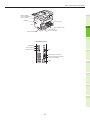
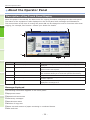
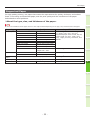
Name and Function of Each Part
Operator Panel
1
2
4
3
5
6
7
8
9
10
1
11
12
2
22
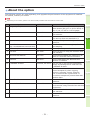
Number
3
4
5
6
21
20
19 18
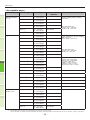
Name
17 16
15 14
13
Function
1
[SCAN] button
Use this button to access the scanning function.
2
[COPY] button
Use this button to access the copying function.
3
[MENU] button
Use this button to display frequently used templates.
4
[USER FUNCTIONS] button
Use this button for paper size or media type setting of drawer,
and registration of the copy, scan and fax settings including a
default setting change.
5
[INTERRUPT] button
Use this button to interrupt print processing and perform a
copy job. The interrupted job is resumed through your pressing
this button again.
6
[COUNTER] button
Use this button to display the counter.
7
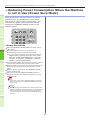
[ENERGY SAVER] button
Use this button for the equipment to enter the energy saving
mode.
8
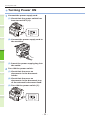
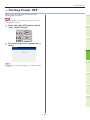
[POWER] button
Use this button to turn the power of the equipment ON or OFF
(shutdown).
9
Digital keys
Use these keys to enter any numbers such as the number of
copies, telephone numbers or passwords.
10
[FUNCTION CLEAR] button
When this button is pressed, all selected functions are cleared
and returned to the default settings. If the default setting is
changed on the control panel, and then copying, scanning,
faxing or similar is performed, the lamp of this button (orange)
blinks.
11
[STOP] button
Use this button to stop any scanning and copying operations in
progress.
12
[START] button
Use this button to start copying, scanning and faxing
operations.
13
MAIN POWER lamp
This green lamp lights when the main power switch is ON.
14
[CLEAR] button
Use this button to correct the numbers keyed in, such as the
number of copy sets.
15
Alarm lamp
This orange lamp lights when an error occurs and some action
needs to be taken.
16
PRINT DATA lamp
This blue lamp lights during reception of data such as print
data.
17
[ACCESS] button
Use this button when the department code or user information
has been set. If this button is pressed after copying, etc.,
the next user needs to enter the department code or user
information.
- 18 -

















![4 Click [OK] - Toshiba America Business Solutions](http://vs1.manualzilla.com/store/data/005818130_1-6da0751aebf4d6c87686321c2c4e7e3a-150x150.png)