1
Double-click the OmniPage icon in the program’s installation folder or on
the Windows desktop if placed there.
•
Double-click an OmniPage Document (OPD) icon or file name; the clicked
document is loaded into the program. See “OmniPage Documents” in the next
chapter.
•
Right-click one or more image file icons or file names for a shortcut menu.
Select Open With... OmniPage application. The images are loaded into the
program.
On opening, OmniPage’s title screen is displayed and then a view selection panel. OmniPage
has three basic view types. For details, see The OmniPage Desktop and Views in the next
chapter. It provides an introduction to the program’s main working areas.
There are several ways of running the program with a limited interface:
•
Use the Batch Manager program. Click Start in the Windows taskbar and choose All
Programs > Nuance > OmniPage 18 > OmniPage Batch Manager. See the Workflows
chapter.
•
Click Acquire Text from the File menu of an application registered with the Direct
OCR™ facility. See “How to set up Direct OCR” in the Processing Documents chapter.
•
Right-click on one or more image file icons or file names in Wndows Explorer for a
shortcut menu. Select OmniPage 18 and choose a target format, or the Convert Now
Wizard or a workflow from its sub-menu. The files will be processed according to the
workflow instructions. See the Workflows chapter.
•
•
•
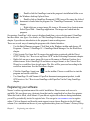
Click the OmniPage Agent icon
on the taskbar. Choose a workflow to start the
program and run the workflow.
Use OmniPage 18 with Nuance’s PaperPort document management product, to add
OCR services. See “How to use OmniPage with PaperPort” in the Using OmniPage
chapter.
Registering your software
Nuance’s online registration runs at the end of installation. Please ensure web access is
available. We provide an easy electronic form that can be completed in less than five minutes.
When the form is filled, click Submit. If you did not register the software during installation,
you will be periodically invited to register later. You can go to www.nuance.com to register
online. Click on Support and from the main support screen choose Register in the left-hand
column. For a statement on the use of your registration data, please see Nuance’s Privacy Policy.
Chapter 1
Registering your software
15