1
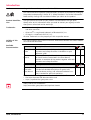
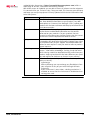
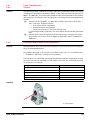
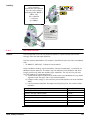
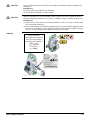
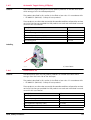
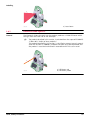
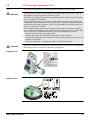
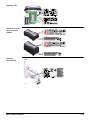
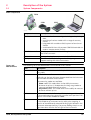
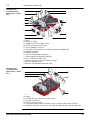
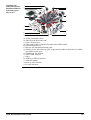
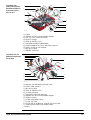
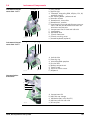
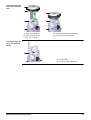
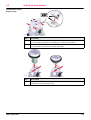
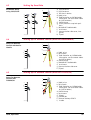
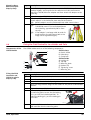
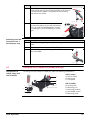
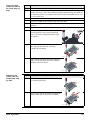
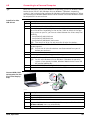
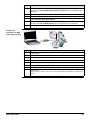
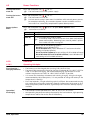
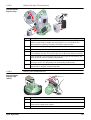
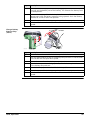
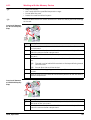
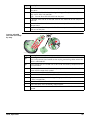
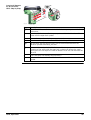
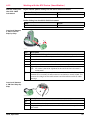
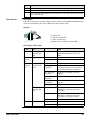
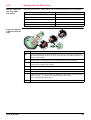
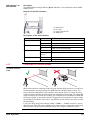
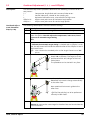
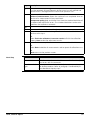
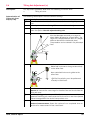
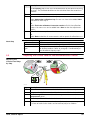
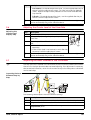
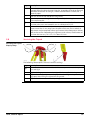
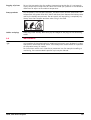
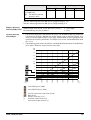
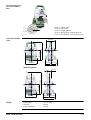
4.10.2 Battery for the TS Instrument Change Battery Step-by-Step 1 4 7 5 2 3 6 008647_001 4.10.3 Step Description 1. Face the instrument so that the vertical drive screw is on the left. The battery compartment is below the vertical drive. Turn the knob to the vertical position, opening the lid of the battery compartment. 2. Pull out the battery housing. 3. Pull the battery out of the battery housing. 4. At the top of the battery is a notch which corresponds to the inner surface of the battery housing. This notch helps you to place the battery correctly. 5. Place the battery into the battery housing, ensuring that the contacts are facing outward. Click the battery into position. 6. Place the battery housing into the battery compartment. Push the battery housing in until it fits completely into the battery compartment. 7. Turn the knob to lock the battery compartment. Ensure that the knob is returned to its original horizontal position. Battery for SmartAntenna Change Battery Step-by-step (GS14) 3a 1 3b 4b 4c 5 4a 008648_001 Step 1. 2. TS16, Operation Description The battery is inserted in the bottom part of the instrument. Push the slide fastener of the battery compartment in the direction of the arrow with the open-lock symbol. Remove the cover from the battery compartment. 42