Download Chapter 2.6 Pre-installed Windows CE

Transcript
FriendlyARM English User Manual
Rev.01 (20090909)
2.6 Pre-installed Windows CE Resources Function and the External Test
Wince system used to test players mp3, network, and the use of USB, SD cards use a
variety of common services procedures.
Please follow the chapter "program to install and update the system" to download you
need programmer wince image file (this example burning wrote NK_N35.bin).
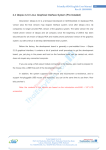
WINCE system restart after a Windows XP style interface, as shown below.
Venus Supply Co., Ltd.
196/1, Soi Thedsaban-Nimit-Nau 8, Thedsaban-Nimit-Nau Road,
Ladyao, Chatuchak, Bangkok, 10900, Thailand
Tel. +(66)2954-2408 , Fax. +(66)2953-8443, Website: www.thaieasyelec.com
163
FriendlyARM English User Manual
Rev.01 (20090909)
2.6.1 Button Test
Driver Position: Driver button is located in the BSP (SMDK2440 folder) in the.:
SMDK2440\DRIVERS\Userkey
Description: Development board of six key USB keyboard can simulate the upper and
lower, left, right, enter and shift the focus of key "TAB", the system is activated, do not need to
launch any program to open it, their relationship is as follows:
K1 8 TAB
K2 - UP
K3 - ENTER
K4 - DOWN
K5 - LEFT
K6 8 RIGHT
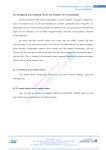
On the desktop, press K1 key, the focus shifted to the desktop icon, the icon will appear
around the empty box, figure.
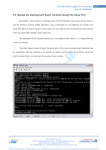
The "Recycle Bin", this time around by the upper and lower key, the focus shifted to
other icons, such as "my device", figure:
Venus Supply Co., Ltd.
196/1, Soi Thedsaban-Nimit-Nau 8, Thedsaban-Nimit-Nau Road,
Ladyao, Chatuchak, Bangkok, 10900, Thailand
Tel. +(66)2954-2408 , Fax. +(66)2953-8443, Website: www.thaieasyelec.com
164
FriendlyARM English User Manual
Rev.01 (20090909)
Press the "Enter" key, or K3, can open a window:
2.6.2 LED Test
System Startup, click on the desktop to run the "QQ2440 test" Open LED test procedure,
in Figure:
Click the process button, can control the development of the four on-board LED's light
and out.
Venus Supply Co., Ltd.
196/1, Soi Thedsaban-Nimit-Nau 8, Thedsaban-Nimit-Nau Road,
Ladyao, Chatuchak, Bangkok, 10900, Thailand
Tel. +(66)2954-2408 , Fax. +(66)2953-8443, Website: www.thaieasyelec.com
165
FriendlyARM English User Manual
Rev.01 (20090909)
2.6.3 Screen Rotation Test
Description: screen rotation driver has been shifting in the LCD driver, it does not
require special hardware support pure software implementation, so no need to separate the
other driver.
LCD driver location: SMDK2440\DRIVERS\DISPLAY
System Startup, click to run the desktop "screen rotation", run the interface, like the left
figure below, click on the "spin" button, the screen will, counter-clockwise 90 degrees, such as
the bottom right.
Venus Supply Co., Ltd.
196/1, Soi Thedsaban-Nimit-Nau 8, Thedsaban-Nimit-Nau Road,
Ladyao, Chatuchak, Bangkok, 10900, Thailand
Tel. +(66)2954-2408 , Fax. +(66)2953-8443, Website: www.thaieasyelec.com
166
FriendlyARM English User Manual
Rev.01 (20090909)
2.6.4 Serial Communication Test
Description: The development board provides the BSP contains three standard serial
drivers, serial 2, 3 to test the need for the use of string extend the small plate.
System Startup, click on the desktop is running the "serial debugging assistant", run
interface, like the left figure below:
Point of the "Settings" button, open the settings window, set the serial number is COM2,
baud rate to 115200, and other established home figure (upper right), determined to return to
the main window.
At the same time, the expansion board connected to the PC end of the COM2 and PC
client to the appropriate settings for the same serial port.
The mid-point in the main window, "Open Port" button, the button will now become "offport" in the "Send zone" Enter some characters, point "send" button, like the left figure below,
when in the PC side of the serial port the terminal receives from the development board to send
to the characters, such as the bottom right:
Venus Supply Co., Ltd.
196/1, Soi Thedsaban-Nimit-Nau 8, Thedsaban-Nimit-Nau Road,
Ladyao, Chatuchak, Bangkok, 10900, Thailand
Tel. +(66)2954-2408 , Fax. +(66)2953-8443, Website: www.thaieasyelec.com
167
FriendlyARM English User Manual
Rev.01 (20090909)
Then, in the serial port of the main window debug aides point "receive" button (the
button will change to "not to receive"), in PC-side input terminal of the serial number of
characters (via HyperTerminal cannot be seen), the import of the same time, we see the
importation of character development board in the reception serial debugging assistant district
showed that figure:
We can also use the same method to test COM3; this is not explained in detail.
Venus Supply Co., Ltd.
196/1, Soi Thedsaban-Nimit-Nau 8, Thedsaban-Nimit-Nau Road,
Ladyao, Chatuchak, Bangkok, 10900, Thailand
Tel. +(66)2954-2408 , Fax. +(66)2953-8443, Website: www.thaieasyelec.com
168
FriendlyARM English User Manual
Rev.01 (20090909)
2.6.5 How to use the USB
Used in wince using the standard USB and USB windows use similar systems, when
activated after WINCE, insert the USB Host USB interface, this board to the USB power supply,
USB light flashes, wait a few seconds the system since USB dynamic load, and then doubleclick the desktop to the "My Computer" icon, open the Resource Manager, you can see the USB
Letter: the hard disk, as shown in fig.
Double-click the hard disk can read and write access to the USB data.
Venus Supply Co., Ltd.
196/1, Soi Thedsaban-Nimit-Nau 8, Thedsaban-Nimit-Nau Road,
Ladyao, Chatuchak, Bangkok, 10900, Thailand
Tel. +(66)2954-2408 , Fax. +(66)2953-8443, Website: www.thaieasyelec.com
169
FriendlyARM English User Manual
Rev.01 (20090909)
2.6.6 How to use SD/MMC Card
Description: The development board using the SD card driver from the SamsungGs
public boards, only the driver dll files, not source code.
The SD/MMC card inserted into the SD slot on the board, the resource manager can be
seen on the SD card drive letter: Storage Card, double-click to open access to the directory;
you can on the SD/MMC card read and write.
Venus Supply Co., Ltd.
196/1, Soi Thedsaban-Nimit-Nau 8, Thedsaban-Nimit-Nau Road,
Ladyao, Chatuchak, Bangkok, 10900, Thailand
Tel. +(66)2954-2408 , Fax. +(66)2953-8443, Website: www.thaieasyelec.com
170
FriendlyARM English User Manual
Rev.01 (20090909)
2.6.7 Use Windows Media Player to play mp3
Double-click the desktop to open the Media Player icon Windows Media Player
emerging players, the following chart, Point File-> Open the basis of tips to find the mp3 player
you want to file so that you can like in the PC Windows in the same broadcast put mp3 files, and
another player, Media Player can play WMV video file format, your own testing.
Venus Supply Co., Ltd.
196/1, Soi Thedsaban-Nimit-Nau 8, Thedsaban-Nimit-Nau Road,
Ladyao, Chatuchak, Bangkok, 10900, Thailand
Tel. +(66)2954-2408 , Fax. +(66)2953-8443, Website: www.thaieasyelec.com
171
FriendlyARM English User Manual
Rev.01 (20090909)
2.6.8 Use Super Player, SD card playback mpeg4 movie
Super player in Windows Mobile is frequently used for a media player, which is similar to
our regular the use of the computer's "audio-visual Storm" player, we are now integrated into it,
you can use it in the 3.5-inch screen fluent in a variety of formats of media player software, such
as mpeg2, mov, avi and other formats.
Double-click to run on the desktop to open a "super player", as in the figure below, at
"File > Open File ...J the election optional you need to play the movie file, the next plan is to play
the video shots.
Venus Supply Co., Ltd.
196/1, Soi Thedsaban-Nimit-Nau 8, Thedsaban-Nimit-Nau Road,
Ladyao, Chatuchak, Bangkok, 10900, Thailand
Tel. +(66)2954-2408 , Fax. +(66)2953-8443, Website: www.thaieasyelec.com
172
FriendlyARM English User Manual
Rev.01 (20090909)
2.6.9 Ethernet
Point "Start > Settings > Network and Dial-up Connections", open interface is as follows.
Double-click DM9CE1, open the settings interface, under the plan is the default
configuration, you can install the actual network environment settings.
In the PC client, use the ping command to test network connectivity situation.
Venus Supply Co., Ltd.
196/1, Soi Thedsaban-Nimit-Nau 8, Thedsaban-Nimit-Nau Road,
Ladyao, Chatuchak, Bangkok, 10900, Thailand
Tel. +(66)2954-2408 , Fax. +(66)2953-8443, Website: www.thaieasyelec.com
173
FriendlyARM English User Manual
Rev.01 (20090909)
2.6.10 Login to the Target Board through Telnet
We configured the system to boot WINCE will start the telnet service, then access the
Internet line, you can use telnet command registry development board, as shown in figure.
Tip: Telnet are customized WINCE kernel, one of the components, we only select
custom kernel plus into it in more detail their use, such as: how to create other accounts,
passwords and other settings are not familiar with, please user study.
Note: in WINCE system, the default IP address is 192.168.1.217, when the registry does
not require any password.
Venus Supply Co., Ltd.
196/1, Soi Thedsaban-Nimit-Nau 8, Thedsaban-Nimit-Nau Road,
Ladyao, Chatuchak, Bangkok, 10900, Thailand
Tel. +(66)2954-2408 , Fax. +(66)2953-8443, Website: www.thaieasyelec.com
174
FriendlyARM English User Manual
Rev.01 (20090909)
2.6.11 Use FTP to Send Files
Tip: ftp services are customized WINCE kernel, one of the components, we only select
custom kernel acceded to it, its use of more detailed, such as: how to create other accounts,
passwords and other settings are not familiar with the user-requested line study.
We configured the system to boot WINCE will start the ftp service, then access the
Internet line, you can use ftp log in order to develop an anonymous board, as shown below.
Note: in WINCE system, the default IP address is 192.168.1.217; user name and
password are ftp.
Venus Supply Co., Ltd.
196/1, Soi Thedsaban-Nimit-Nau 8, Thedsaban-Nimit-Nau Road,
Ladyao, Chatuchak, Bangkok, 10900, Thailand
Tel. +(66)2954-2408 , Fax. +(66)2953-8443, Website: www.thaieasyelec.com
175
FriendlyARM English User Manual
Rev.01 (20090909)
2.6.12 Web Server Testing
We configured the system to boot WINCE will start the http service, known as web
server, this when Internet access lines, the PC in your browser development board, enter the IP
address, the server can see the target board to provide a simple page, which shows that the
services have been launched.
Venus Supply Co., Ltd.
196/1, Soi Thedsaban-Nimit-Nau 8, Thedsaban-Nimit-Nau Road,
Ladyao, Chatuchak, Bangkok, 10900, Thailand
Tel. +(66)2954-2408 , Fax. +(66)2953-8443, Website: www.thaieasyelec.com
176
FriendlyARM English User Manual
Rev.01 (20090909)
2.6.13 Touchscreen Calibration
WINCE system you are using a touchscreen may be not very accurate, when you
connect USB mouse, point to Start > Settings > Control Panel, find "stylus" icon, double-click to
open "Stylus Properties" window, point "calibration" tab of the "re-calibration" button to begin recalibration.
Venus Supply Co., Ltd.
196/1, Soi Thedsaban-Nimit-Nau 8, Thedsaban-Nimit-Nau Road,
Ladyao, Chatuchak, Bangkok, 10900, Thailand
Tel. +(66)2954-2408 , Fax. +(66)2953-8443, Website: www.thaieasyelec.com
177
FriendlyARM English User Manual
Rev.01 (20090909)
According to the system prompt, use the five-point calibration method to start using
touch pen calibration, calibration has finished, it will jump out the window as follows,
At this time the location of any point to return to a "Stylus Properties" window, point of "OK" to
save.
If you want to save the calibration parameters, please point "Start -> hang", and then
restart it.
Venus Supply Co., Ltd.
196/1, Soi Thedsaban-Nimit-Nau 8, Thedsaban-Nimit-Nau Road,
Ladyao, Chatuchak, Bangkok, 10900, Thailand
Tel. +(66)2954-2408 , Fax. +(66)2953-8443, Website: www.thaieasyelec.com
178
FriendlyARM English User Manual
Rev.01 (20090909)
2.6.14 Use the ActiveSync Synchronization to USB Communications
Note: the installation of sync when connected to USB drive, use the CD-ROM in the
"\windows platform tools\CE USB driverJ using the same step we assume that you have 9.3
installed in accordance with the driver and ActiveSync synchronization software.
By default, when activated after WINCE system, USB Device connectivity and settings
have been doing a good job, and this can be directly connected with USB development board
and PC, you can see a successful connection is as follows:
Venus Supply Co., Ltd.
196/1, Soi Thedsaban-Nimit-Nau 8, Thedsaban-Nimit-Nau Road,
Ladyao, Chatuchak, Bangkok, 10900, Thailand
Tel. +(66)2954-2408 , Fax. +(66)2953-8443, Website: www.thaieasyelec.com
179
FriendlyARM English User Manual
Rev.01 (20090909)
2.6.15 Wireless Card Test
WINCE our system has been pre-installed integrated wireless card driver (model:
VNUWLC41), you can direct then insert the wireless card module board on the USB Host
interface, the following window will jump out at the same time the list will be attached to your
able to provide a wireless network near the server group name.
Double-click to open your wireless network to connect service providers to set up group,
this choice is "FriendlyARM", enter the network key of the group (if no security settings do not
need to enter a), where the password is clearly shown f. Point of "OK" is set up, return to the
previous window.
Venus Supply Co., Ltd.
196/1, Soi Thedsaban-Nimit-Nau 8, Thedsaban-Nimit-Nau Road,
Ladyao, Chatuchak, Bangkok, 10900, Thailand
Tel. +(66)2954-2408 , Fax. +(66)2953-8443, Website: www.thaieasyelec.com
180
FriendlyARM English User Manual
Rev.01 (20090909)
Can see that the system is trying to connect, you will see the moment with the group of
wireless network connections FriendlyARM on.
Then choose to click on "IP Info" tab, you can view the wireless network has been the
distribution of information, point "more new "button to update the information below.
Venus Supply Co., Ltd.
196/1, Soi Thedsaban-Nimit-Nau 8, Thedsaban-Nimit-Nau Road,
Ladyao, Chatuchak, Bangkok, 10900, Thailand
Tel. +(66)2954-2408 , Fax. +(66)2953-8443, Website: www.thaieasyelec.com
181
FriendlyARM English User Manual
Rev.01 (20090909)
2.6.16 How to set up and save Real-Time Clock
Point of time the lower right corner of the taskbar, set a time window, according to
prompts can be set up, and is set up, point of "OK" from the set point of time do not need to
save.
Venus Supply Co., Ltd.
196/1, Soi Thedsaban-Nimit-Nau 8, Thedsaban-Nimit-Nau Road,
Ladyao, Chatuchak, Bangkok, 10900, Thailand
Tel. +(66)2954-2408 , Fax. +(66)2953-8443, Website: www.thaieasyelec.com
182