1
BCS-150 User Manual V1.2
CONTENT
1. INTRODUCTION ................................................................ 1
1.1 Perface ........................................................................... 1
1.2 Notice ............................................................................. 1
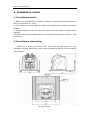
2. Installation notice ............................................................ 2
2.1 Installation notice............................................................. 2
2.2 Installation place notice .................................................... 2
3. Specification ..................................................................... 3
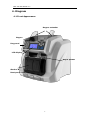
4. DIAGRAM.......................................................................... 4
4.1 Front Appearance ............................................................. 4
4.2 Back appearance .............................................................. 5
5. Key Function..................................................................... 6
5.1 Appearance ..................................................................... 6
5.2 Key function explanation ................................................... 6
6. USER SETTING .................................................................11
6.1 Enter setting interface .................................................... 11
6.2 User setting introduction ................................................. 11
6.3 Notice of placing the banknotes ....................................... 18
6.4 Left and right note guide adjustment ................................ 18
6.5 Feed gap adjustment ...................................................... 19
7. OPERATION MODES .........................................................20
7.1 MIX mode(mixed denomination counting) ...................... 20
7.2 SDC mode(single denomination counting mode) ................ 23
7.3 CNT mode(counting)....................................................... 23
7.4 Use of external port ........................................................ 24
8. TROUBLESHOOTING ........................................................25
8.1 Error code ..................................................................... 25
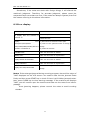
8.2 Error display .................................................................. 26
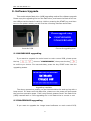
9. SOFTWARE UPGRADE ......................................................27
9.1 MAINBOARD upgrading ................................................... 27
9.2 IMAGEBOARD upgrading ................................................. 27
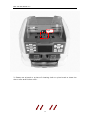
10. DAILY MAINTENANCE ....................................................29
ACCESSORIES ......................................................................37