1
6.0 TROUBLESHOOTING
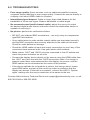
• Poor image quality: Some sources, such as cable and satellite receivers,
compress output resulting in poor image quality. Connect the source directly to
a display via a short HDMI® cable to compare.
• Intermittent signal dropout: Cable is longer than rated distance for the
bandwidth of the source signal. Reduce bandwidth or cable length.
• No surround sound (multi-channel audio): adjust the source to output
the desired digital audio format, and make certain the destination device is
capable of receiving it.
• No picture: perform the verifications below.
• DO NOT use soldered BNC terminations – use only crimp or compression
type BNC terminations.
• Use a cable tester to make certain coaxial cables are terminated correctly
and the BNC connectors are securely attached to the cable at both ends.
Check for cable defects or damage.
• Check the HDMI cables at input and output connections to see if any of the
connectors have become loose. Use good strain relief methods.
• Make certain 1341T and 1341R units are connected to live AC outlets and
check the power indicators on all units.
• Connect the display device directly to the source using the HDMI cable from
the 1341T end, then test with the 1341R connection cable. If an image is
present under those circumstances then the display, the source, and the
HDMI cables can be eliminated as the cause of the problem.
• If the above methods do not produce a picture, test using a short, known
good HDMI cable, and set up the source to output a resolution that the
display can accept. If this test is successful, connect the HXE-11 System
again, making sure the source resolution is the same as the test.
Contact Audio Authority Technical Service at [email protected], or call
800-322-8346 or 859‑233-4599. 8