1
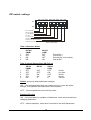
DIP switch settings
SW1 SW2 SW3 SW4 SW5 SW6 SW7 SW8
ON
1
2
3
4
5
6
7
8
OFF
Ref Sel (MSB)
Ref Sel (LSB)
S R Sel (MSB)
S R Sel
S R Sel (LSB)
Reserved
Default (dip switch/memory)
Dashboard enable
Figure 4. DIP Switch
Table 1 Reference Select
1
2
3
4
Ref Sel
(MSB)
OFF
OFF
ON
ON
Ref Sel
(LSB)
OFF
ON
OFF
ON
Frame Ref 1
Frame Ref 2
External Ref (rear module)
Internal Ref
Table 2 Internal Sample Rate (SR) Ref set
1
2
3
4
5
SR Sel
(MSB)
OFF
OFF
OFF
OFF
ON
SR Sel
SR Sel
(LSB)
OFF
ON
OFF
ON
X
OFF
OFF
ON
ON
X
32 kHz
44.1 kHz
48 kHz
96 kHz
192 kHz
Default (power up default parameter settings)
‘ON’ – Get card parameters from non volatile memory, ignore dip switch
settings. (Configurable with Dashboard Control system)
‘OFF’ – Get card parameters from the Dip switch.
Dashboard Enable
‘ON’ – Only card status is available on Dashboard, users are prevented from
changing parameters.
‘OFF’ – Normal operation, users have full access to the cards parameters.
15