1
ISA 430 Manual (multilanguage)
E
N
G
L
I
S
H
20/1/2000
9:06 am
Page 2
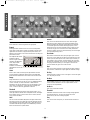
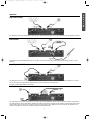
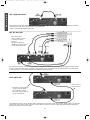
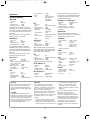
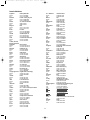
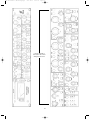
Signal Connections
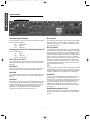
Optional A/D Card shown
XLR (Audio) Inputs and Outputs
INT A/D Direct
All 3-pin XLR audio connectors (Outputs, Mic/Line Inputs, Insert Send
& Return) are wired as follows:
The ‘Internal A/D Direct’ input is used to route an external signal
directly to the A/D card via the Limiter. It replaces the ‘Internal’
signal feed to the A/D card (i.e. whatever is connected to the mic,
line or instrument input.)
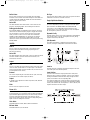
Pin 1
Screen/Chassis
Pin 2
Audio 0°
Pin 3
Audio 180°
EXT IP A/D Direct
The External A/D Direct input is used to route an external signal
to the optional A/D card via the Limiter. The signal is normally fed
to the “spare” side of the A/D card not being used by the internal
signal, and so does not replace it. However it is possible to also
sum the External A/D Direct input together with the main internal
signal, (i.e. whatever is connected to the mic, line or instrument
input,) using the ‘sum’ button on the front panel. This will result in
whatever is connected to the External A/D Direct input being
routed to both sides of the A/D converter. For example, a reverb
signal could be processed externally and then be summed with a
dry snare drum signal in this way.
Instrument Input, Key IPS, Int A/D Direct and Dynamic Link
1/4” Jack wired as follows:
Tip
Audio 0°
Ring
Audio 180°
Sleeve
Screen/Chassis
Mic IP/Line IP/Inst. Hi Z IP
Any one of these inputs may be used as the main input to the ISA430.
Signals routed to these inputs are referred to as the ‘internal’ or ‘Int’
signal path.
OP1
Insert Return
This output is used as the main analogue internal signal output, and
is fed by whatever is connected to the mic IP, Line IP or Inst. Hi Z
IP, aftyer this signal has been routed through the EQ and dynamics
modules (in ‘single’mode) or through EQ only (in ‘split’ mode.)
This is used as the insert input point, or as the input to the dynamics
modules in ‘split mode’ (see ‘Dynamics Split’ diagram on page 7.)
Insert Send
Dynamic Link
This is used as the insert output point, or as the analogue output from
the dynamics module in ‘split mode’ (see ‘Dynamics Split’ diagram on
page 7.)
You can connect two ISA430 units (using a standard stereo jack to
jack lead between the DYNAMIC LINK sockets) to allow the
dynamics sections to behave as a stereo pair of processors. When
connected in this way the dynamics processors behave as if both
units were receiving the same level of signal, with both units
responding to the higher level of the two signal paths. The EQ
channels can be matched visually or aurally to be used as a stereo
pair if required.
Post Mic OP
This is used as an output from the point immediately after the mic pre
(i.e. before EQ and dynamics modules.) It is used as a direct-to-tape
ultra-short signal path output. Taking a signal from this ‘post mic OP’
does NOT interrupt the signal flow from the mic pre to the EQ,
dynamics etc., so a direct feed to tape can be achieved, whilst
simultaneously allowing processing of the same source.
Retrofitting the Optional A/D Card
The optional A/D card can be retrofitted to a standard ISA430 at
any time. Full fitting instructions for this option are included with
the Card.
2