1
<Toc>
4-4
<4. Troubleshooting and Maintenance>
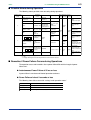
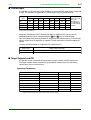
● Power Failure of more than about 2 seconds
The following show effects caused in “settings” and “operation status.”
Alarm action
Continues. Alarm with standby function will enter standby status.
Setting parameter Set contents of each parameter are retained.
Auto-tuning
Cancelled.
Control action
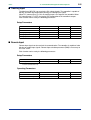
Differs with setting of setup parameter “R.MD”(restart mode).
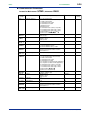
R.MD setting Control action after recovery from power failure
CONT
Action before power failure continues. (factory-shipped setting)
MAN
Outputs preset output value (PO) (NOTE) as control output and continues action set before power failure in MAN mode.
AUTO
Outputs preset output value (PO) (NOTE) as control output and continues action set before power failure in AUTO mode.
(NOTE) For heating/cooling control, preset output value is 50% of PID computation.
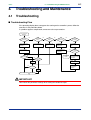
■ Troubleshooting when the Controller Fails to Operate Correctly
If your control tasks are not successful, check the preset parameters and controller wiring
before concluding the controller to be defective. The following show some examples of
troubleshooting you should refer to in order to avoid the possibility of other problems.
● The Controller does not Show the Correct Process Variable (PV).
• The UT750 controllers have a universal input.
The type of PV input can be set/changed using the parameter “IN1”. At this point, the
controller must be wired correctly according to the selected type of PV input. Check
the wiring first if the controller fails to show the correct PV value. To do this, refer to “2.
Initial Settings.”
With the parameters “RH1”, “RL1”, “SDP1”, “SH1” and “SL1”, it is possible to scale the
input signal and change its number of decimal places. Also check that these parameters are configured correctly.
● The Controller does not Provide any Control Output or the Control Output
does not Change at all.
• The UT750 controllers have a universal output.
The type of control output can be set/changed using the parameter “OT1”.
At this point, the controller must be wired correctly according to the selected type of
control output. Check the wiring first if the controller provides no control output. To do
this, refer to “1.5 Terminal Wiring Diagrams.”
With the parameters “OH” and “OL”, it is possible to set/change the high and low limits
of control output. The control output may not change at all, however, because of
restrictions on these parameters. Also check the restrictions on these parameters.
• The control output can only be changed when the controller is in the MAN mode.
If the MAN1 lamp is off (i.e., the controller is in the AUTO mode), you cannot change
the control output using key operation.
● The Control Output does not Change soon after the Target Setpoint SP has
been Changed.
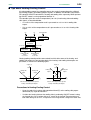
• If this happens, check the setpoint of the parameter “MOD”. In cases where fixed-point
control is selected as the PID control mode (MOD = 1), tracking based on the I-term
works to prevent the control output from changing suddenly even if the target setpoint
SP is varied.
The control output therefore may appear to be working incorrectly at first; however it
gradually adapts itself to the new target setpoint. Be especially careful when the
controller is in the fixed-point control mode; the control output may fail to change and
therefore result in a loss of control if you change the target setpoint SP too frequently.
IM 05D01B02-45E
1st Edition : May 31,2000-00