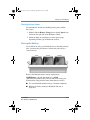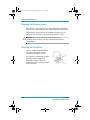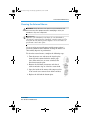
1
255103-002.book Page i Wednesday, September 26, 2001 1:47 PM
b
User Guide
Evo Notebook N160 Series
Document Part Number: 255103-002
November 2001
255103-002.book Page ii Wednesday, September 26, 2001 1:47 PM
© 2001 Compaq Computer Corporation
Compaq, the Compaq logo, and Evo are trademarks of Compaq Information
Technologies Group, L.P.
Microsoft and Windows are trademarks of Microsoft Corporation.
All other product names mentioned herein may be trademarks of their respective
companies.
Compaq shall not be liable for technical or editorial errors or omissions
contained herein. The information in this document is provided “as is” without
warranty of any kind and is subject to change without notice. The warranties for
Compaq products are set forth in the express limited warranty statements
accompanying such products. Nothing herein should be construed as
constituting an additional warranty.
User Guide
Evo Notebook N160 Series
Second Edition: November 2001
Document Part Number: 255103-002
255103-002.book Page iii Wednesday, September 26, 2001 1:47 PM
Contents
1 Introduction
Where Can I Find Information? . . . . . . . . . . . . . . . . . . . .
Printed Documents . . . . . . . . . . . . . . . . . . . . . . . . . .
Documents on the Documentation Suite CD. . . . . . .
Symbols and Graphics . . . . . . . . . . . . . . . . . . . . . . . . . . .
Symbols . . . . . . . . . . . . . . . . . . . . . . . . . . . . . . . . . . .
Graphics. . . . . . . . . . . . . . . . . . . . . . . . . . . . . . . . . . .
Safety . . . . . . . . . . . . . . . . . . . . . . . . . . . . . . . . . . . . . . . .
Disconnecting Your Notebook
from the Power Source . . . . . . . . . . . . . . . . . . . . . . .
Protecting Your Notebook During
an Electrical Storm . . . . . . . . . . . . . . . . . . . . . . . . . .
1–2
1–2
1–3
1–6
1–6
1–6
1–7
1–7
1–8
2 Your Notebook at a Glance
Front of Your Notebook. . . . . . . . . . . . . . . . . . . . . . . . . .
Common Features . . . . . . . . . . . . . . . . . . . . . . . . . . .
Lower Front Panel . . . . . . . . . . . . . . . . . . . . . . . . . . .
Easy Access Buttons and Lights . . . . . . . . . . . . . . . .
Function Keys . . . . . . . . . . . . . . . . . . . . . . . . . . . . . .
Left Panel . . . . . . . . . . . . . . . . . . . . . . . . . . . . . . . . . . . . .
Components on Left Side . . . . . . . . . . . . . . . . . . . . .
Right Panel . . . . . . . . . . . . . . . . . . . . . . . . . . . . . . . . . . . .
Components on Right Side with CD, DVD,
CD-RW, or DVD/CD-RW Drive Installed . . . . . . . .
Components on Right Side with
Diskette Drive Installed . . . . . . . . . . . . . . . . . . . . . . .
User Guide
Evo Notebook N160 Series
2–2
2–2
2–3
2–3
2–5
2–6
2–6
2–7
2–7
2–8
iii
255103-002.book Page iv Wednesday, September 26, 2001 1:47 PM
Contents
Back Panel . . . . . . . . . . . . . . . . . . . . . . . . . . . . . . . . . . . . 2–9
Components on Back. . . . . . . . . . . . . . . . . . . . . . . . . 2–9
Underside . . . . . . . . . . . . . . . . . . . . . . . . . . . . . . . . . . . . 2–10
Components on Underside. . . . . . . . . . . . . . . . . . . . 2–10
QuikDock . . . . . . . . . . . . . . . . . . . . . . . . . . . . . . . . . . . . 2–11
QuikDock Features . . . . . . . . . . . . . . . . . . . . . . . . . 2–11
3 Using Your Notebook
Power On! . . . . . . . . . . . . . . . . . . . . . . . . . . . . . . . . . . . . 3–2
Plugging and Unplugging AC Power . . . . . . . . . . . . 3–3
Turning Your Notebook On and Off . . . . . . . . . . . . . 3–4
Using Battery Power . . . . . . . . . . . . . . . . . . . . . . . . . 3–6
Optimizing Processor Speed . . . . . . . . . . . . . . . . . . . 3–8
TouchPad . . . . . . . . . . . . . . . . . . . . . . . . . . . . . . . . . . . . . 3–9
Using the TouchPad Instead of a Mouse . . . . . . . . . . 3–9
Tapping and Double-Tapping . . . . . . . . . . . . . . . . . 3–10
Edge Motion . . . . . . . . . . . . . . . . . . . . . . . . . . . . . . 3–12
Display Options . . . . . . . . . . . . . . . . . . . . . . . . . . . . . . . 3–13
Changing Resolution . . . . . . . . . . . . . . . . . . . . . . . . 3–13
Adjusting Brightness . . . . . . . . . . . . . . . . . . . . . . . . 3–15
Easy Access Buttons . . . . . . . . . . . . . . . . . . . . . . . . . . . 3–17
Reprogramming the Easy Access Buttons. . . . . . . . 3–17
Storage Drives . . . . . . . . . . . . . . . . . . . . . . . . . . . . . . . . 3–18
Identifying Your Storage Drives . . . . . . . . . . . . . . . 3–19
Using the Diskette Drive . . . . . . . . . . . . . . . . . . . . . 3–20
Security . . . . . . . . . . . . . . . . . . . . . . . . . . . . . . . . . . . . . 3–20
Using the Security Slot . . . . . . . . . . . . . . . . . . . . . . 3–20
Power-On Password . . . . . . . . . . . . . . . . . . . . . . . . 3–21
4 Common Tasks
S-Video Connection . . . . . . . . . . . . . . . . . . . . . . . . . . . . .
Connecting and Enabling S-Video . . . . . . . . . . . . . .
Setting Up Your Television Format . . . . . . . . . . . . .
Adjusting the Television Screen . . . . . . . . . . . . . . . .
Switching Between Displays . . . . . . . . . . . . . . . . . . .
iv
4–2
4–2
4–4
4–5
4–5
User Guide
Evo Notebook N160 Series
255103-002.book Page v Wednesday, September 26, 2001 1:47 PM
Contents
Anti-Virus Software . . . . . . . . . . . . . . . . . . . . . . . . . . . . . 4–6
Using Anti-Virus Software . . . . . . . . . . . . . . . . . . . . 4–6
Recognizing a Computer Virus . . . . . . . . . . . . . . . . . 4–7
Removing a Computer Virus. . . . . . . . . . . . . . . . . . . 4–7
Software and Hardware . . . . . . . . . . . . . . . . . . . . . . . . . . 4–8
Adding and Removing Software . . . . . . . . . . . . . . . . 4–8
Installing Hardware Devices . . . . . . . . . . . . . . . . . . 4–10
5 Using the CD or DVD Drive
CD or DVD Drive . . . . . . . . . . . . . . . . . . . . . . . . . . . . . . 5–2
Inserting a Disc . . . . . . . . . . . . . . . . . . . . . . . . . . . . . 5–2
Removing a Disc . . . . . . . . . . . . . . . . . . . . . . . . . . . . 5–3
Manually Ejecting a Disc . . . . . . . . . . . . . . . . . . . . . 5–4
Modular Media Bay . . . . . . . . . . . . . . . . . . . . . . . . . . . . . 5–5
Using the Modular Bay . . . . . . . . . . . . . . . . . . . . . . . 5–5
Audio CDs and Video Discs . . . . . . . . . . . . . . . . . . . 5–7
Playing Audio CDs . . . . . . . . . . . . . . . . . . . . . . . . . . 5–7
Playing Non-DVD Video Discs . . . . . . . . . . . . . . . . 5–9
DVDs . . . . . . . . . . . . . . . . . . . . . . . . . . . . . . . . . . . . . . . 5–10
Using the DVD Player. . . . . . . . . . . . . . . . . . . . . . . 5–10
On-Screen Controls . . . . . . . . . . . . . . . . . . . . . . . . . 5–11
Setting the Play Features . . . . . . . . . . . . . . . . . . . . . 5–16
Playing a DVD Movie on a TV . . . . . . . . . . . . . . . 5–17
Identifying Your DVD Region Setting . . . . . . . . . . 5–18
Video Display Options. . . . . . . . . . . . . . . . . . . . . . . . . . 5–20
Showing and Hiding the DVD Panel. . . . . . . . . . . . 5–20
Zooming the View . . . . . . . . . . . . . . . . . . . . . . . . . . 5–20
CD-RW Basics . . . . . . . . . . . . . . . . . . . . . . . . . . . . . . . . 5–21
Installing Roxio Easy CD Creator 5
and DirectCD. . . . . . . . . . . . . . . . . . . . . . . . . . . . . . 5–21
Using Roxio Easy CD Creator 5 . . . . . . . . . . . . . . . 5–22
Preventing Buffer Underrun Errors . . . . . . . . . . . . . 5–28
Accessing Roxio Easy CD Creator 5
User Information . . . . . . . . . . . . . . . . . . . . . . . . . . . 5–29
User Guide
Evo Notebook N160 Series
v
255103-002.book Page vi Wednesday, September 26, 2001 1:47 PM
Contents
6 Caring for Your Battery
Battery Care . . . . . . . . . . . . . . . . . . . . . . . . . . . . . . . . . . . 6–2
Using the Battery . . . . . . . . . . . . . . . . . . . . . . . . . . . . 6–2
Storing the Battery. . . . . . . . . . . . . . . . . . . . . . . . . . . 6–3
Recycling the Battery . . . . . . . . . . . . . . . . . . . . . . . . 6–4
Battery Calibration . . . . . . . . . . . . . . . . . . . . . . . . . . . . . . 6–5
Calibrating the Battery. . . . . . . . . . . . . . . . . . . . . . . . 6–5
Maximizing Battery Operating Time . . . . . . . . . . . . 6–8
Fixing a Low-Battery Condition . . . . . . . . . . . . . . . . 6–9
Power Management . . . . . . . . . . . . . . . . . . . . . . . . . . . . 6–11
Saving Energy . . . . . . . . . . . . . . . . . . . . . . . . . . . . . 6–11
What is Power Management? . . . . . . . . . . . . . . . . . 6–12
7 Service
Preventive Maintenance . . . . . . . . . . . . . . . . . . . . . . . . . . 7–2
Cleaning Your Notebook’s Exterior . . . . . . . . . . . . . 7–2
Cleaning the Keyboard . . . . . . . . . . . . . . . . . . . . . . . 7–3
Cleaning the Display Screen . . . . . . . . . . . . . . . . . . . 7–4
Cleaning the TouchPad . . . . . . . . . . . . . . . . . . . . . . . 7–4
Cleaning the External Mouse . . . . . . . . . . . . . . . . . . 7–5
Caring for Your Notebook. . . . . . . . . . . . . . . . . . . . . 7–6
Backup Utilities . . . . . . . . . . . . . . . . . . . . . . . . . . . . . . . . 7–7
Using Backup Devices. . . . . . . . . . . . . . . . . . . . . . . . 7–7
Hard Disk Errors . . . . . . . . . . . . . . . . . . . . . . . . . . . . . . . 7–8
Using ScanDisk . . . . . . . . . . . . . . . . . . . . . . . . . . . . . 7–8
Using Disk Cleanup. . . . . . . . . . . . . . . . . . . . . . . . . . 7–9
Deleting Stored Files . . . . . . . . . . . . . . . . . . . . . . . . 7–10
Defragmenting Your Hard Drive. . . . . . . . . . . . . . . 7–10
Hard Disk Space Management. . . . . . . . . . . . . . . . . . . . 7–11
Checking the Hard Disk Space . . . . . . . . . . . . . . . . 7–11
Deleting Unnecessary Files . . . . . . . . . . . . . . . . . . . 7–12
Using the Recycle Bin . . . . . . . . . . . . . . . . . . . . . . . 7–12
Regulatory Information . . . . . . . . . . . . . . . . . . . . . . . . . 7–13
vi
User Guide
Evo Notebook N160 Series
255103-002.book Page vii Wednesday, September 26, 2001 1:47 PM
Contents
8 Solutions
Basic Solutions. . . . . . . . . . . . . . . . . . . . . . . . . . . . . . . . . 8–2
Helpful Hints . . . . . . . . . . . . . . . . . . . . . . . . . . . . . . . 8–2
Finding Solutions Quickly. . . . . . . . . . . . . . . . . . . . . 8–3
Frequently Asked Questions . . . . . . . . . . . . . . . . . . . . . . 8–4
General Questions . . . . . . . . . . . . . . . . . . . . . . . . . . . 8–4
Display Questions . . . . . . . . . . . . . . . . . . . . . . . . . . . 8–7
Questions About Sound . . . . . . . . . . . . . . . . . . . . . . . 8–8
Questions About Movies . . . . . . . . . . . . . . . . . . . . . . 8–8
Questions About Peripherals . . . . . . . . . . . . . . . . . . . 8–9
Questions About Upgrades . . . . . . . . . . . . . . . . . . . . 8–9
Error Messages . . . . . . . . . . . . . . . . . . . . . . . . . . . . 8–10
Solution Tables. . . . . . . . . . . . . . . . . . . . . . . . . . . . . . . . 8–12
Audio and Video . . . . . . . . . . . . . . . . . . . . . . . . . . . 8–12
Battery and Power . . . . . . . . . . . . . . . . . . . . . . . . . . 8–16
Mass-Storage . . . . . . . . . . . . . . . . . . . . . . . . . . . . . . 8–22
Internet. . . . . . . . . . . . . . . . . . . . . . . . . . . . . . . . . . . 8–28
Keyboard and TouchPad . . . . . . . . . . . . . . . . . . . . . 8–29
Memory and PC Cards . . . . . . . . . . . . . . . . . . . . . . 8–33
Glossary
Index
User Guide
Evo Notebook N160 Series
vii
255103-002.book Page 1 Wednesday, September 26, 2001 1:47 PM
1
Introduction
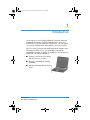
As the owner of a new Compaq Notebook, you have joined the
worldwide community of mobile computer users. Once your
Notebook is set up and connected to the Internet, you can explore
vast regions of information, entertainment, and services online.
The User Guide is designed for both experienced computer users
and beginners. This easy-to-scan guide helps you find the
information you want as quickly as possible. It’s also designed to
familiarize you with the following:
■
Features you’ll want to try during
the first few days or weeks.
■
Keeping your Notebook running
smoothly.
■
Solving common problems as they
occur.
User Guide
Evo Notebook N160 Series
1–1
255103-002.book Page 2 Wednesday, September 26, 2001 1:47 PM
Introduction
Where Can I Find Information?
All the information you’ll need to use the basic features of your
new Notebook is available in the documents included with your
Notebook. Some of these documents are printed and some are
provided on the Documentation Suite CD.
These documents and others you may find useful are also
available on the Internet. If you have access to the Internet, you
can view these documents by visiting the Compaq Web site at:
www.compaq.com/support
Note The illustrations shown and the features described in your
Notebook documentation may differ slightly from your Notebook.
See also The Compaq Web site is available worldwide. As you
☞ explore
the Internet, stop at the following address for information
about products, services, and special offers: www.compaq.com.
Printed Documents
In addition to the poster and manual listed below, your Notebook
packing box may also include additional printed reference
information specific to your Notebook model or geographic
region.
Getting Started Poster
This poster shows you how to set up your Notebook. When you
finish, fold the poster and store it with your documents for future
use. For more information about the hardware that came with
your new Notebook, refer to “Your Notebook at a Glance” later in
this guide.
1–2
User Guide
Evo Notebook N160 Series
255103-002.book Page 3 Wednesday, September 26, 2001 1:47 PM
Introduction
Operating System Manual
This manual explains how to set up, troubleshoot, and learn more
about your new Notebook’s operating system. In addition, it
provides instructions for:
■
Setting up accessibility options
■
Using keyboard shortcuts
■
Accessing the Windows Help and Support Center
Warranty Certificate
The warranty details the Compaq commitment to service during
the warranty period. Keep the warranty certificate in a safe place
for future reference.
Documents on the Documentation Suite CD
This section describes the guides available on the Documentation
Suite CD, then explains how to view and print them.
User Guide
This easy-to-scan guide explains how to set up your Notebook
and get acquainted with its features. It also introduces:
■
Common computer tasks
■
Notebook maintenance
■
Solutions for computer problems
■
Compaq service tools
User Guide
Evo Notebook N160 Series
1–3
255103-002.book Page 4 Wednesday, September 26, 2001 1:47 PM
Introduction
Safety and Comfort Guide
This document explains how to protect your equipment from
damage, protect yourself from injury, and ensure your comfort
while using your Notebook.
Did you know... The User Guide and the Safety and Comfort
S Guide
are also available on the Compaq Web site at:
www.compaq.com.
Regulatory and Safety Notices
This guide provides the regulatory and safety notices required by
governmental agencies. These agencies worldwide use agency
series numbers to identify products. The agency series numbers
for your new Notebook are provided in the “Service” chapter of
this guide.
In addition, the Regulatory and Safety Notices guide provides
simple instructions for discharging static electricity from your
fingers or other electrostatic conductors. Handling drives and
some other electrostatic-sensitive components without first
discharging static electricity could damage these components.
1–4
User Guide
Evo Notebook N160 Series
255103-002.book Page 5 Wednesday, September 26, 2001 1:47 PM
Introduction
Viewing or Printing a Guide on the CD
For information about using the CD drive, including instructions
for inserting or removing a CD, refer to Chapter 5, “Using the CD
or DVD Drive.”
To view or print a document on the Documentation Suite CD:
1. Insert the Documentation Suite CD into the CD drive.
2. Select a guide from the Documentation Suite menu.
3. If Adobe Acrobat Reader information is displayed and you
are asked to respond, follow the instructions on the screen to
accept the Adobe Acrobat Reader license agreement or to
install Acrobat Reader.
4. For information about closing Acrobat Reader or using it to
view or print a document on the Documentation Suite CD,
click the Help button near the top of the Adobe Acrobat
Reader window.
Did you know... Acrobat Reader is a software application that
S enables
you to view and print the documents on the
Documentation Suite CD. You may also need Acrobat Reader to
view and print some documents available on the Internet.
User Guide
Evo Notebook N160 Series
1–5
255103-002.book Page 6 Wednesday, September 26, 2001 1:47 PM
Introduction
Symbols and Graphics
Symbols
The following words and symbols have special meaning in this
guide and in the electronic documentation:
you know... Text set off in this way provides important
S Did
information that may help you solve a problem.
Text set off in this way provides helpful hints that make using
J Tip
your Notebook easier and faster.
also Text set off in this manner refers to another document
☞ See
or another page in this document that has related information.
Å
WARNING: Text set off in this manner indicates that failure to follow
directions in the warning could result in bodily harm or loss of life.
Ä
CAUTION: Text set off in this manner indicates that failure to follow
directions could result in damage to equipment or loss of
information.
Graphics
The illustrations shown and features described in this document
may differ slightly from your Notebook.
1–6
User Guide
Evo Notebook N160 Series
255103-002.book Page 7 Wednesday, September 26, 2001 1:47 PM
Introduction
Safety
Å
WARNING: To reduce the risk of electric shock and damage to the
equipment, read the Safety and Comfort document.
Did you know... To protect your equipment from power surges,
S plug
all power cords into a high-quality surge protector. If you
have a dedicated telephone line for the modem, buy a surge
protector with a telephone jack.
Disconnecting Your Notebook
from the Power Source
Windows 98 and Windows 2000—To shut down your Notebook
properly, complete the following steps:
1. Close all open programs.
2. On the Windows taskbar, click Start, then click Shut
Down… The Shut Down Windows dialog box is displayed.
3. Select the Shut down option and click OK.
If the Notebook does not turn off automatically, then press
✎ Note
and hold the Power ª button until the Notebook shuts down.
4. Unplug the power cord from the wall outlet and unplug the
modem line from the wall jack.
Windows XP Home—To shut down your Notebook properly,
complete the following steps:
1. Close all open programs.
2. Click the Start button on the Windows taskbar. The Windows
Start menu is displayed.
User Guide
Evo Notebook N160 Series
1–7
255103-002.book Page 8 Wednesday, September 26, 2001 1:47 PM
Introduction
3. Click the Turn Off Computer button. The Turn off
computer dialog box is displayed.
4. Select the Turn Off button.
If the Notebook does not turn off automatically, then press
✎ Note
and hold the Power ª button until the Notebook shuts down.
5. Unplug the power cord from the wall outlet and unplug the
modem line from the wall jack.
Protecting Your Notebook During
an Electrical Storm
During an electrical storm, you should take the following
precautions to protect your Notebook from damage. You should
immediately disconnect your Notebook from the power source.
After your Notebook is safely disconnected from AC power
J Tip
and the phone line, you can run your Notebook on battery power
1–8
■
If you are not using a surge protector, unplug all power cords
from the wall outlets.
■
Disconnect your Notebook from the wall outlets.
■
Turn off the power button on all surge protectors.
■
If a telephone line from your Notebook is plugged directly
into the wall jack (without going through a surge protector),
unplug the line from the wall jack.
User Guide
Evo Notebook N160 Series
255103-002.book Page 1 Wednesday, September 26, 2001 1:47 PM
2
Your Notebook at a Glance
Before you begin using your new Notebook, you’ll want to look
at some of the basic components.
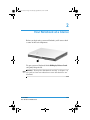
To open your new Notebook, lift the 1 Display Release Latch
and gently lift up the lid.
See also “Turning Your Notebook On and Off” in Chapter 3 of
☞ this
guide to learn more about how to start and shut down your
Notebook.
User Guide
Evo Notebook N160 Series
2–1
255103-002.book Page 2 Wednesday, September 26, 2001 1:47 PM
Your Notebook at a Glance
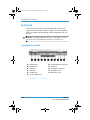
Front of Your Notebook
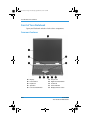
Open your Notebook and take a look at these components.
Common Features
1
2
3
4
5
2–2
Display
Power Button
Keyboard
Speakers
Left TouchPad Button
6
7
8
9
-
Easy Scroll
Right TouchPad Button
TouchPad
Series Number
Display Release Latch
User Guide
Evo Notebook N160 Series
255103-002.book Page 3 Wednesday, September 26, 2001 1:47 PM
Your Notebook at a Glance
also “TouchPad” in Chapter 3 of this guide for more
☞ See
information on using the TouchPad.
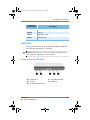
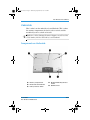
Lower Front Panel
1
Power Light
User Guide
Evo Notebook N160 Series
2
Battery Charge Light
2–3
255103-002.book Page 4 Wednesday, September 26, 2001 1:47 PM
Your Notebook at a Glance
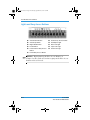
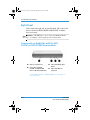
Lights and Easy Access Buttons
1
2
3
4
5
6
Volume Down Button
Volume Up Button
Digital Audio Button
Power Button
Instant Internet Easy Access
Button
E-mail Easy Access Button
7
8
9
;
Search Easy Access Button
AC Adapter Light
Num Lock Light
Caps Lock Light
Scroll Lock Light
also “Reprogramming the Easy Access Buttons” in
☞ See
Chapter 3 of this guide to learn how to program the Easy Access
buttons to suit your needs.
2–4
User Guide
Evo Notebook N160 Series
255103-002.book Page 5 Wednesday, September 26, 2001 1:47 PM
Your Notebook at a Glance
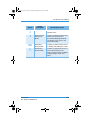
Button
Button
Description
Default Button Action
M
Digital Audio
Launches Windows Media Player to
play MP3 music.
∆
Instant Internet
Easy Access
Button
Provides your daily start point to the
Internet. It connects you to a
personalized Web page filled with
local weather, news, sports, and
financial information.
ƒ
E-mail Easy
Access Button
Provides you with one-touch access
for sending and reading your e-mail.
a
Search Easy
Access Button
Provides you with instant access to
news and information on the
Internet. Search for topics including
shopping, images, music, and
videos.
User Guide
Evo Notebook N160 Series
2–5
255103-002.book Page 6 Wednesday, September 26, 2001 1:47 PM
Your Notebook at a Glance
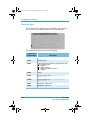
Function Keys
Preset function key combinations use the Fn key and a function
key to access or execute frequently used system functions.
The following keys have already been assigned:
Function Key
Combinations
Fn+F1
Compaq Web site launch key
Fn+F2
Windows Help
Fn+F3
Switches between the display and external monitor
in the following order:
■ Display
■ External monitor
■ Display and external monitor
■ S-Video
Fn+F4
Sleep
Fn+F5
2–6
Description
Contrast control down (Not functional with all
display types.)
Fn+F6*
Contrast control up (* Not functional with all
display types.)
Fn+F7
Brightness control down
Fn+F8
Brightness control up
User Guide
Evo Notebook N160 Series
255103-002.book Page 7 Wednesday, September 26, 2001 1:47 PM
Your Notebook at a Glance
Function Key
Combinations
Description
Fn+F9
CD play/pause
Fn+F10
CD stop
Fn+F11
CD previous track
Fn+F12
CD next track
Left Panel
Take a look at the left side of your Notebook. This is where the
PC Card slot and hard drive are located.
also PC Cards are credit card—sized removable options
☞ See
that expand the capability of your Notebook.
Components on Left Side
1
Security Slot
4
PC Card Eject Button
2
Air Vent
5
Hard Drive
3
PC Card Slot (Type I or II)
User Guide
Evo Notebook N160 Series
2–7
255103-002.book Page 8 Wednesday, September 26, 2001 1:47 PM
Your Notebook at a Glance
Right Panel
Take a look at the right side of your Notebook. This is where the
battery and the CD,DVD,CD-RW, DVD/CD-RW, or diskette
drive are located.
also “CD-RW Basics” and “Using the Modular Media
☞ See
Bay” in Chapter 5 of this guide for more information.
Components on Right Side with CD, DVD,
CD-RW, or DVD/CD-RW Drive Installed
1
Battery Compartment
3
2
Removable CD, DVD,
CD-RW, or DVD/CD-RW
Drive* in Modular Media Bay
CD or DVD Media Eject
Button
4
CD or DVD Manual
Eject Hole
* A CD, DVD, CD-RW, or DVD/CD-RW drive is available on
selected models.
2–8
User Guide
Evo Notebook N160 Series
255103-002.book Page 9 Wednesday, September 26, 2001 1:47 PM
Your Notebook at a Glance
Components on Right Side with
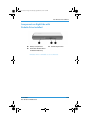
Diskette Drive Installed
1
Battery Compartment
2
Removable Diskette Drive*
in Modular Media Bay
3
Diskette Eject Button
* A diskette drive is available on selected models.
User Guide
Evo Notebook N160 Series
2–9
255103-002.book Page 10 Wednesday, September 26, 2001 1:47 PM
Your Notebook at a Glance
Back Panel
Take a look at the back of your Notebook. This is where you
connect external hardware such as a printer or external monitor.
This is also where the microphone and the headphone jacks are
located.
also “Installing Hardware Devices” in Chapter 4 of this
☞ See
guide for more information on attaching external devices.
Components on Back
1
2
3
4
5
6
Ethernet Port*
Modem Port
USB Port
USB Port
S-Video Port
Printer/Parallel Port
7
8
9
q
External Monitor (VGA) Port
1394 Port
AC Adapter Connector
Headphone Jack
Microphone Jack
* Available on selected models.
2–10
User Guide
Evo Notebook N160 Series
255103-002.book Page 11 Wednesday, September 26, 2001 1:47 PM
Your Notebook at a Glance
Underside
Here’s what is on the underside of your Notebook. This is where
the memory compartment, the battery release switch, and the
modular bay release switch are located.
Before calling Compaq Customer Support you will need the
J Tip
serial number from the underside of your Notebook.
Components on Underside
1
Memory Compartment
2
Model and Serial Number
3
Battery Release Switch
User Guide
Evo Notebook N160 Series
4
Modular Media Bay Release
Switch
5
QuikDock Port
2–11
255103-002.book Page 12 Wednesday, September 26, 2001 1:47 PM
Your Notebook at a Glance
also “Using Battery Power” in Chapter 3 of this guide for
☞ See
more information about the Battery Release Switch.
QuikDock
With the QuikDock you can create a permanent work space or
“dock” for your Notebook, complete with external monitor,
keyboard, mouse, and printer.
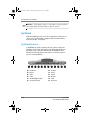
QuikDock Features
A QuikDock provides external ports for various connectors,
allowing you to dock and remove your Notebook while your
hardware devices remain connected to the QuikDock. The
illustration and table below show where to connect external
devices to the QuikDock.
1
2
3
4
5
6
2–12
Keyboard
Mouse
USB
USB
SPDIF (Digital Audio)
Composite-Video
7
8
9
q
w
S-Video
Serial
Printer
Monitor
1394
AC Power
User Guide
Evo Notebook N160 Series
255103-002.book Page 1 Wednesday, September 26, 2001 1:47 PM
3
Using Your Notebook
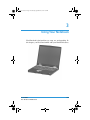
Your Notebook is designed for easy setup, use, and upgrading. In
this chapter, you’ll become familiar with your Notebook features.
User Guide
Evo Notebook N160 Series
3–1
255103-002.book Page 2 Wednesday, September 26, 2001 1:47 PM
Using Your Notebook
Power On
This section helps you get your Notebook set up and running.
■
Plugging and Unplugging AC Power
■
Turning Your Notebook On and Off
■
Using Battery Power
■
Optimizing Processor Speed
Å
WARNING: To reduce the risk of electrical shock, fire, or damage to
the equipment, do not use converter kits sold for appliances to
power your Notebook. Use only the Compaq adapter that came
with your Notebook or a Compaq replacement part.
Ä
CAUTION: High voltages can enter your Notebook through the
phone line connected to the modem. To protect your Notebook
during electrical storms, use a telephone line surge protector.
also The Getting Started Poster and the Regulatory and
☞ See
Safety Notices guide for worldwide power cord information.
3–2
User Guide
Evo Notebook N160 Series
255103-002.book Page 3 Wednesday, September 26, 2001 1:47 PM
Using Your Notebook
Plugging and Unplugging AC Power
Do’s
■
Ensure that you can reach the
electrical outlet easily.
■
Unplug the AC adapter from the
electrical outlet when you want to
disconnect AC power from your
Notebook.
■
When unplugging from the
electrical outlet, grasp the cord by the plug.
■
Do not leave the AC adapter plugged into the electrical outlet
when it is not connected to your Notebook.
■
Do not place anything on power cords or cables. Arrange
them so that no one accidentally steps on or trips over them.
Don’ts
Surge Protectors
Using surge protectors and line conditioners can substantially
reduce the risk of electrical shock and aid in protecting your
Notebook from power-source problems.
During a power surge, the voltage level of electricity coming into
your Notebook can increase and cause data loss or system
damage. Protect your Notebook and peripherals by connecting
them to a surge suppressor, which absorbs voltage surges and
prevents them from reaching your Notebook.
User Guide
Evo Notebook N160 Series
3–3
255103-002.book Page 4 Wednesday, September 26, 2001 1:47 PM
Using Your Notebook
Why Use AC Power When I’ve Got a Battery?
When you’re not on the go, you’ll want to use your Notebook’s
AC adapter as your power source. This ensures that the battery is
always charged.
When your Notebook does not have a charged battery, you should
save your work and turn off your Notebook before unplugging it
from the AC power supply.
Did you know... When a charged battery is in your Notebook,
S you
can simply unplug it from AC power. Your Notebook
automatically switches to battery power.
Turning Your Notebook On and Off
To turn on your Notebook, press
the Power ª button, which is
located at the top of the keyboard.
Windows 98 and Windows 2000
To turn off your Notebook
properly, complete the following
steps:
1. Save your work and exit all
open programs.
2. Click the Start button, then click Shut Down, and select the
Shut down option.
3. Click the OK button. After a few seconds, your Notebook
will turn off.
If your Notebook is not responding, press and hold down
✎ Note
the Power ª button until your Notebook shuts down.
3–4
User Guide
Evo Notebook N160 Series
255103-002.book Page 5 Wednesday, September 26, 2001 1:47 PM
Using Your Notebook
Windows XP Home—To turn off your Notebook properly,
complete the following steps:
1. Save your work and exit all open programs.
2. Click the Start button on the Windows taskbar. The Windows
Start menu is displayed.
3. Click the Turn Off Computer button. The Turn off
computer dialog box is displayed.
4. Click the Turn Off button. The operating system closes and
your Notebook turns off.
If your Notebook is not responding, press and hold down
✎ Note
the Power ª button until your Notebook shuts down.
Power Button Functionality
When your Notebook is on, pressing the Power ª button places
your Notebook in Hibernation mode.
you know... Hibernation is a state of no power consumption.
S Did
When your Notebook enters this mode, the contents of the
memory are saved to the hard disk and your Notebook powers off.
The settings for the Power ª button are as follows:
■
Press and release the Power ª button once to enter
Hibernation mode.
■
Press and hold down the Power ª button to shut down your
Notebook.
User Guide
Evo Notebook N160 Series
3–5
255103-002.book Page 6 Wednesday, September 26, 2001 1:47 PM
Using Your Notebook
Note You should only press and hold down the Power ª button to
✎ shut
down your Notebook if it is locked up or not responding.
Compaq does not recommend that you turn off your Notebook
using this method under normal circumstances. To turn off your
Notebook properly, refer to the procedure in the “Turning Your
Notebook On and Off” section.
Using Battery Power
Å
WARNING: Your Notebook contains a lithium-ion battery pack.
Improper handling of the battery pack can result in fire and
chemical burns. Do not disassemble, crush, puncture, short
external contacts, dispose of in water or fire, or expose it to
temperatures higher than 140° F (60° C). Replace only with the
Compaq battery pack specified for your Notebook.
also “Components on Underside” in Chapter 2 of this guide
☞ See
for help in locating the Battery Release Switch.
The battery charges whether your Notebook is
S onDidoryouoff.know...
It continues charging until the battery is fully charged
or the AC power is disconnected.
also The battery will lose its charge if not used for a long
☞ See
time.
Inserting and Removing the Battery
To insert the battery into the battery compartment, position the
battery so that the side with the label is turned up and slide the
battery into the compartment until it snaps into place.
☞ See also “Battery Care” in Chapter 6 of this guide.
3–6
User Guide
Evo Notebook N160 Series
255103-002.book Page 7 Wednesday, September 26, 2001 1:47 PM
Using Your Notebook
To remove the battery, complete the following steps:
1. Save your files.
2. If the AC adapter is not connected, turn off your Notebook.
3. Slide and hold the Battery Release Switch on the underside
of your Notebook toward the back.
4. Use the Finger Slot on the battery to pull the battery out.
5. Release the Battery Release Switch.
Charging the Battery
To charge the battery, insert the battery in the
battery compartment and connect your
Notebook to AC power. Leave your Notebook
plugged into the electrical outlet until the
Battery Charging 7 icon is no longer
displayed. This ensures that the battery is fully
charged.
If you will not be using your Notebook for an extended
✎ Note
period of time, Compaq recommends that you unplug the
electrical cord from the outlet and remove the battery while your
Notebook is not in use.
User Guide
Evo Notebook N160 Series
3–7
255103-002.book Page 8 Wednesday, September 26, 2001 1:47 PM
Using Your Notebook
Optimizing Processor Speed
✎ Note This feature is only available on selected models.
Some Notebook models use the Pentium III Processor featuring
Intel SpeedStep technology. This technology gives you the
capability to optimize your Notebook’s processor speeds based
on the power source in use.
The default SpeedStep icons for each power source are as
follows:
The checkered flag icon in the system tray on the
Windows taskbar indicates the Notebook is powered
by external AC power. The default setting for
Notebooks powered by AC power is Maximum
Performance mode.
The non-checkered flag icon in the system tray on the
Windows taskbar indicates the Notebook is powered by
battery power. The default setting for Notebooks
powered by battery power is Battery Optimized
Performance mode.
you know... When Maximum Performance mode is
S Did
selected, the processor operates at full (100 percent) speed. When
Battery Optimized Performance mode is selected, the processor
operates at approximately 80 percent of Maximum Performance
mode.
To change the setting for either
power source, AC power or battery,
right-click the SpeedStep icon in
the system tray and select your
desired settings.
3–8
User Guide
Evo Notebook N160 Series
255103-002.book Page 9 Wednesday, September 26, 2001 1:47 PM
Using Your Notebook
The SpeedStep Automatic mode allows the system to
✎ Note
monitor the percentage of CPU usage and changes the speed
based on that percentage. To use this feature, change the AC
power and battery power to Automatic.
TouchPad
In this section you’ll learn how to select, click, and double-click
with the TouchPad:
■
Using the TouchPad Instead of a Mouse
■
Tapping and Double-Tapping
■
Edge Motion
also “Preventive Maintenance” in Chapter 7 of this guide
☞ See
for tips on keeping your TouchPad clean.
also “Installing Hardware Devices” in Chapter 4 of this
☞ See
guide to learn how to attach an external mouse.
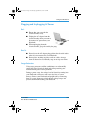
Using the TouchPad Instead of a Mouse
Just like the mouse, the TouchPad
lets you draw lines or point to items
on the Windows desktop. Try
dragging the pointer across the
screen by gently dragging your finger
across the TouchPad.
User Guide
Evo Notebook N160 Series
3–9
255103-002.book Page 10 Wednesday, September 26, 2001 1:47 PM
Using Your Notebook
Left-Click
To left-click, press the Left TouchPad button. It is located directly
below the TouchPad. The Left TouchPad button works as the
select or drag button. To double-click an item, move the pointer
over the item and press the Left TouchPad button twice in rapid
succession.
Right-Click
The Right TouchPad button works as the context menu or
special drag button. Press the Right TouchPad button to get
context-sensitive options.
Scroll Button
The Scroll button is the equivalent of the right, left, up, and down
buttons of the scroll bars on the side and bottom of your screen.
To view other areas of a document or browser window, press the
Scroll button in the desired direction.
The Scroll button is only functional with some software
✎ Note
applications.
Tapping and Double-Tapping
Your TouchPad has a tapping feature that works like the left
mouse button. If enabled, you can tap once on the TouchPad to
select an object and tap twice to double-click.
Tip To get additional help for setting advanced TouchPad
J features,
click the π button or select Help from the Mouse
Properties dialog box.
3–10
User Guide
Evo Notebook N160 Series
255103-002.book Page 11 Wednesday, September 26, 2001 1:47 PM
Using Your Notebook
Windows 98 and Windows 2000—To turn on the tapping
feature, complete the following steps:
1. From the Windows desktop, click Start, point to Settings,
and then click Control Panel.
2. Double-click the Mouse z icon to open the Mouse
Properties dialog box.
3. Select the Touch tab and click the Tap to Click check box to
turn on the tapping feature.
4. Click OK to accept the changes and close the dialog box.
you know... To help prevent accidental pointing while
S Did
typing, drag the PalmCheck slider toward maximum.
Windows XP Home—To turn on the tapping feature, complete
the following steps:
1. Click the Start button on the Windows taskbar, then click
Control Panel.
2. Click the Printers and Other Hardware icon. The Printers
and Other Hardware window is displayed.
3. Click the Mouse icon. The Mouse Properties dialog box is
displayed.
4. Select the Touch tab and click the Tap to Click check box to
turn on the tapping feature.
5. Click OK to accept the changes and close the dialog box.
6. Close the Control Panel window.
User Guide
Evo Notebook N160 Series
3–11
255103-002.book Page 12 Wednesday, September 26, 2001 1:47 PM
Using Your Notebook
Edge Motion
Edge Motion allows you to continue to scroll when your finger
reaches the edge of the TouchPad. When this feature is turned on,
the window continues to scroll until you lift your finger.
Windows 98 and Windows 2000—To turn on Edge Motion,
complete the following steps:
1. From the Windows desktop, click Start, point to Settings, and
then click Control Panel.
2. Double-click the Mouse z icon.
3. Click the Edge Motion tab.
4. Select When Dragging, Always, and When Scrolling to turn
on Edge Motion.
5. Click OK to accept the changes and close the dialog box.
Windows XP Home—To turn on Edge Motion, complete the
following steps:
1. Click the Start button on the Windows taskbar, then click
Control Panel.
2. Click the Printers and Other Hardware icon. The Printers
and Other Hardware window is displayed.
3. Click the Mouse icon. The Mouse Properties dialog box is
displayed.
4. Click the Edge Motion tab.
5. On the Edge Motion tab, select When Dragging, Always,
and When Scrolling to turn on Edge Motion.
6. Click OK to accept the changes and close the dialog box.
7. Close the Appearance and Themes window.
3–12
User Guide
Evo Notebook N160 Series
255103-002.book Page 13 Wednesday, September 26, 2001 1:47 PM
Using Your Notebook
Display Options
In this section, you will learn about:
■
Changing Resolution
■
Adjusting Brightness
Did you know... Your Notebook’s display is already set to its
S optimal
resolution. Compaq recommends changing the resolution
setting only if you encounter problems.
Changing Resolution
If the display only fills part of the screen or the default resolution
does not suit your needs, you may want to adjust the display
resolution.
Windows 98 and Windows 2000—To change the display
resolution, complete these steps:
1. On the taskbar, click the Start button, point to Settings, and
then click Control Panel.
2. Double-click Display & to open the Display Properties
dialog box, and then click the Settings tab.
3. Under Screen area, click the resolution slider and drag it to
the desired resolution.
4. Click OK to accept the new settings, then close the
Control Panel window.
User Guide
Evo Notebook N160 Series
3–13
255103-002.book Page 14 Wednesday, September 26, 2001 1:47 PM
Using Your Notebook
you know... At lower resolutions items on your screen, such
S asDidicons,
appear larger. At higher resolutions more items can be
displayed on your screen, but each item will appear smaller
Windows XP Home—To change the display resolution,
complete these steps:
1. Click the Start button on the Windows taskbar, then click
Control Panel.
2. Click the Appearance and Themes icon. The Appearance
and Themes dialog box is displayed.
3. Click the Change the screen resolution task. The Display
Properties dialog box is displayed.
4. Click the Settings tab.
5. On the Settings tab, press and hold down the left mouse
button as you drag the Screen resolution slider to the left to
decrease resolution or to the right to increase resolution.
You can also click on the left side of the slider to decrease
J Tip
resolution or on the right side of the slider to increase resolution.
6. Click OK to accept the new settings. The Monitor Settings
confirmation dialog box is displayed.
7. Select Yes to save your new settings or No to return to your
former settings.
8. Close the Appearance and Themes window.
3–14
User Guide
Evo Notebook N160 Series
255103-002.book Page 15 Wednesday, September 26, 2001 1:47 PM
Using Your Notebook
Adjusting Brightness
You can also adjust the display brightness by pressing Fn+F7
J Tip
to decrease the brightness or Fn+F8 to increase the brightness.
you know... Key combinations such as the example Fn+F7
S Did
used above mean that you should press and hold down the Fn key,
press the F7 key, and then release both keys simultaneously.
Windows 98 and Windows 2000—If your display is too faint or
too bright, the brightness controls may not be set properly. To
correct this condition, complete the following steps:
1. On the taskbar, click Start, point to Settings, and then click
Control Panel.
2. Double-click Display & and click the Settings tab.
3. Click the Advanced button to open the ATI Radeon
Mobility Properties dialog box.
4. Click the Color tab. Under Brightness, click and drag the
Desktop slider to the desired brightness.
5. Click OK to close the dialog box and click OK again to close
the ATI Radeon Mobility Properties dialog box, then close
the Control Panel window.
Windows XP Home—To adjust the brightness, complete the
following steps:
1. Click the Start button on the Windows taskbar, then click
Control Panel.
2. Click the Appearance and Themes icon. The Appearance
and Themes dialog box is displayed.
3. Click the Display icon. The Display Properties dialog box is
displayed.
User Guide
Evo Notebook N160 Series
3–15
255103-002.book Page 16 Wednesday, September 26, 2001 1:47 PM
Using Your Notebook
4. Click the Settings tab.
5. On the Settings tab, click the Advanced button. The
(Multiple Monitors) and Radeon Mobility-P AGP 4x
Properties dialog box is displayed.
6. Click the Color tab.
7. On the Color tab, press and hold down the left mouse button
as you drag the Desktop brightness slider to the left to
decrease brightness or to the right to increase brightness.
You can also click on the left side of the slider to decrease
J Tip
resolution or on the right side of the slider to increase resolution.
8. Click OK. Your settings in the (Multiple Monitors) and
Radeon Mobility-P AGP 4x Properties dialog box are
saved and the dialog box closes.
9. Click OK. The settings in the Display Properties dialog box
are saved and the dialog box closes.
3–16
User Guide
Evo Notebook N160 Series
255103-002.book Page 17 Wednesday, September 26, 2001 1:47 PM
Using Your Notebook
Easy Access Buttons
The Easy Access buttons, located above your Notebook’s
keyboard, automatically connect you to the Internet. These
buttons give you one-touch access to your most frequently used
Internet activities.
Reprogramming the Easy Access Buttons
also “Front of Your Notebook” in Chapter 2 of this guide
☞ See
for descriptions of each button and its default action.
You can reprogram the Easy Access buttons to reflect your
personal preferences.
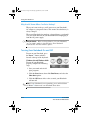
Windows 98 and Windows 2000—To reprogram your Easy
Access buttons, complete the following steps:
1. On the taskbar, click Start, point to Settings, and then click
Control Panel.
2. Double-click Easy Access Buttons ÿ and follow the
instructions provided.
Windows XP Home—To reprogram your Easy Access buttons,
complete the following steps:
1. Click the Start button on the Windows taskbar, then click
Control Panel.
2. Click the Printers and Other Hardware icon. The Printers
and Other Hardware window is displayed.
3. Click the Easy Access Buttons ÿ icon and follow the
instructions provided.
User Guide
Evo Notebook N160 Series
3–17
255103-002.book Page 18 Wednesday, September 26, 2001 1:47 PM
Using Your Notebook
Storage Drives
This section covers:
■
Identifying Your Storage Drives
■
Using the Diskette Drive
Did you know... On select models, Compaq provides a backup
S utility
(or system save) that allows you to save your data and
applications to a partitioned drive located on your hard disk.
To determine the total hard disk size, add the size of both the
C and D drives together.
damage to the diskette and the information stored
J onTipit,Towaitprevent
until diskette drive activity is complete before removing
the diskette.
3–18
User Guide
Evo Notebook N160 Series
255103-002.book Page 19 Wednesday, September 26, 2001 1:47 PM
Using Your Notebook
Identifying Your Storage Drives
Your diskette drive, hard drive, and CD,
DVD, CD-RW, or DVD/CD-RW drive
are designated with letters of the
alphabet, as well as with icons.
Windows 98 and Windows 2000—To
determine your drive letters, complete
the following steps:
1. From the Windows desktop,
double-click the My Computer g
icon. The icons for each drive and
corresponding drive letters are
displayed in the My Computer g
window.
2. Use the icons to the right to identify
your drives.
h
____
Standard 3 1/2-inch
Diskette Drive
q
____
Local Hard Drive
æ
____
CD, DVD, CD-RW, or
DVD/CD-RW Drive
Windows XP Home—To determine the
drive designations that your Notebook uses to identify your
drives, complete the following steps:
1. Click the Start button on the Windows taskbar. The Windows
Start menu is displayed.
2. Click My Computer. The My Computer dialog box is
displayed.
3. The drive designation for each drive in your computer is
displayed in the right pane of the My Computer dialog box.
For example, if your hard drive is displayed under Hard Disk
Drives as Local Disk (C:), then “C” is the drive designation
of your hard drive.
4. Close the My Computer window.
User Guide
Evo Notebook N160 Series
3–19
255103-002.book Page 20 Wednesday, September 26, 2001 1:47 PM
Using Your Notebook
Your Notebook is equipped with a modular media bay that
✎ Note
allows you to swap storage drives (CD, DVD, CD-RW,
DVD/CD-RW, or diskette drive) in your Notebook. CD, DVD,
CD-RW, DVD/CD-RW, or diskette drives are available only on
selected models. Refer to “Modular Media Bay” in Chapter 5 of
this guide for information on swapping the drive.
Using the Diskette Drive
To insert a diskette into the
diskette drive, hold the
diskette with the label facing
up and the arrow on the
diskette pointing toward the
drive, and gently slide the
diskette into the drive.
To remove a diskette, press the Eject button on the diskette drive.
Security
This section will cover:
■
Using the Security Slot
■
Power-On Password
Using the Security Slot
To use the security slot found on the back of your Notebook,
complete the following steps:
3–20
User Guide
Evo Notebook N160 Series
255103-002.book Page 21 Wednesday, September 26, 2001 1:47 PM
Using Your Notebook
1. Insert a locking device
(such as a Kensington
lock) into the security slot.
2. Turn the locking device
clockwise 90 degrees.
To remove the locking device,
turn the locking device
counter-clockwise 90 degrees
and remove the device from
the slot.
Power-On Password
You can set a power-on password that will
secure the information you store on the
hard disk. When turning on your
Notebook, this password must be entered
before you can access your files.
Setting the Password
To set the power-on password, complete the following steps:
1. Press the Power ª button to turn on your Notebook.
2. After the Compaq logo is displayed, a cursor is shown in the
upper right corner of the screen for a few seconds. While the
cursor is visible, press the F10 key.
User Guide
Evo Notebook N160 Series
3–21
255103-002.book Page 22 Wednesday, September 26, 2001 1:47 PM
Using Your Notebook
Ä
CAUTION: F10 Setup is for experienced users only. Changing
settings may affect the functionality of your Notebook.
Ä
CAUTION: Write down your password and store it in a secure
location. If you forget or lose your password, a Compaq service
technician must reset your Notebook for you to be able to access
your files.
3. From the Main option on the menu bar, use the arrow keys to
move to Set Supervisor Password and press the Enter key.
Pressing the F9 key at any point within the setup returns your
J Tip
Notebook to the default settings.
4. Set your personal password, and press the Enter key. You must
confirm the password and press the Enter key again.
5. Using the arrow keys, move to Password on boot and use the
the + or – keys to select Enabled.
6. Using the arrow keys, select Exit from the menu bar.
7. Make sure that Exit Saving Changes is selected. Press the
Enter key.
8. Select Yes to save your changes and exit.
Your power-on password is now set. Every time you turn on your
Notebook, resume working from hibernation mode, or access F10
Setup, you must enter this password.
Removing the Password
To remove a power-on password, complete the following steps:
1. Access F10 Setup as above, enter your current password, and
press the Enter key.
3–22
User Guide
Evo Notebook N160 Series
255103-002.book Page 23 Wednesday, September 26, 2001 1:47 PM
Using Your Notebook
2. From the Main option on the menu bar, use the arrow keys to
move to Set Supervisor Password and press the Enter key.
3. Enter the current power-on password and press the Enter key.
4. In the spaces to enter your new password and confirm new
password, press the Enter key.
5. At the notice advising that changes have been saved, press the
Enter key to continue.
6. Using the arrow keys, move to Password on boot and use the
the + or – keys to select Disabled.
7. Using your arrow keys, select Exit from the menu bar.
8. Make sure that Exit Saving Changes is selected. Press the
Enter key.
9. Select Yes to save your changes and exit.
User Guide
Evo Notebook N160 Series
3–23
255103-002.book Page 1 Wednesday, September 26, 2001 1:47 PM
4
Common Tasks
Now that your Notebook is set up and running, you may want to
explore and learn about some of the common tasks performed by
your Notebook.
Evo Notebook N160 Series
1700 Series
4–1
255103-002.book Page 2 Wednesday, September 26, 2001 1:47 PM
Common Tasks
S-Video Connection
With an S-Video connection, you can play games on a bigger
screen or watch DVD movies on TV instead of on a Notebook
display.
This section helps you complete the following tasks:
■
Connecting and Enabling S-Video
■
Setting Up Your Television Format
■
Adjusting the Television Screen
■
Switching Between Displays
Connecting and Enabling S-Video
you know... Your TV may not have an S-Video connector.
S Did
See your local electronics store dealer for an S-Video adapter.
also “Playing a DVD Movie on a TV” in Chapter 5 of this
☞ See
guide.
To connect your Notebook and your television, you need an
S-Video cable to plug into your TV, VCR, or other device. These
cables can be purchased from a retail TV store or a computer
store.
Windows 98 and Windows 2000—To connect and enable
S-Video, complete the following steps:
1. Connect your Notebook and your television with an S-Video
cable.
2. From the Windows taskbar, click Start, point to Settings,
then click Control Panel.
3. Double-click the Display & icon to open the Display
Properties dialog box and then click the Settings tab.
4–2
Evo Notebook N160 Series
1700 Series
255103-002.book Page 3 Wednesday, September 26, 2001 1:47 PM
Common Tasks
4. Click the Advanced button to open the ATI Radeon
Mobility Properties dialog box and then click the
Displays tab.
5. Click the top left corner of the TV button to enable S-Video.
S-Video is enabled if the button next to Primary is blue.
6. Click Apply to accept the changes and then click OK to exit
both dialog boxes.
7. If your Notebook asks you to restart Windows, click OK for
the new settings to take effect.
Windows XP Home—To connect and enable S-Video, complete
the following steps:
1. Click the Start button on the Windows taskbar, then click
Control Panel.
2. Click the Appearance and Themes icon. The Appearance
and Themes dialog box is displayed.
3. Click the Display icon. The Display Properties dialog box is
displayed.
4. Click the Settings tab.
5. On the Settings tab, click the Advanced button. The
(Multiple Monitors) and Radeon Mobility-P AGP 4x
Properties dialog box is displayed.
6. Click the Displays tab.
7. On the Displays tab, click the top left corner of the TV button
to enable S-Video. S-Video is enabled if the button next to
Primary is blue.
8. Click Apply to accept the changes and then click OK to exit
both dialog boxes.
Evo Notebook N160 Series
1700 Series
4–3
255103-002.book Page 4 Wednesday, September 26, 2001 1:47 PM
Common Tasks
9. If your Notebook asks you to restart Windows, click OK for
the new settings to take effect.
At this time, the display may be rolling. To correct this problem,
use the following procedure to set your TV format.
Setting Up Your Television Format
To view images properly, you must set your Notebook to your
country’s standard for television transmission.
Windows 98 and Windows 2000—To set your television format,
complete the following steps:
1. From the Windows taskbar, click Start, point to Settings,
then click Control Panel.
2. Double-click the Display & icon to open the Display
Properties dialog box and then click the Settings tab.
3. Click the Advanced button to open the ATI Radeon
Mobility Properties dialog box, then click the Displays tab.
4. Click the right corner of the TV button.
5. Click the Format tab.
6. Make sure Select by country is selected.
7. Scroll to find your country, then select it.
8. Click OK to exit both dialog boxes.
9. If your Notebook asks you to restart Windows, click OK for
the new settings to take effect.
Windows XP Home—To set your television format, complete
the following steps:
1. Click the Start button on the Windows taskbar, then click
Control Panel.
4–4
Evo Notebook N160 Series
1700 Series
255103-002.book Page 5 Wednesday, September 26, 2001 1:47 PM
Common Tasks
2. Click the Appearance and Themes icon. The Appearance
and Themes dialog box is displayed.
3. Click the Display icon. The Display Properties dialog box is
displayed.
4. Click the Settings tab.
5. On the Settings tab, click the Advanced button. The
(Multiple Monitors) and Radeon Mobility-P AGP 4x
Properties dialog box is displayed.
6. Click the Displays tab.
7. On the Displays tab, click the right corner of the TV button.
8. Click the Format tab.
9. On the Format tab, make sure Select by country is selected.
10. Scroll to find your country, then select it.
11. Click OK to exit both dialog boxes.
12. If your Notebook asks you to restart Windows, click OK for
the new settings to take effect.
Your television format is now set and the television image should
be stable.
Did you know... The resolution of your Notebook display is
S much
greater than the resolution of your TV. Image quality on the
TV varies from application to application.
Evo Notebook N160 Series
1700 Series
4–5
255103-002.book Page 6 Wednesday, September 26, 2001 1:47 PM
Common Tasks
Adjusting the Television Screen
After you have enabled your television, you may need to adjust
the size or location of the image on your screen.
Windows 98 and Windows 2000—To make adjustments to your
display, complete the following steps:
1. From the Windows taskbar, click Start, point to Settings,
then click Control Panel.
2. Double-click the Display & icon to open the Display
Properties dialog box and then click the Settings tab.
3. Click the Advanced button to open the ATI Radeon
Mobility Properties dialog box, and then click the Displays
tab.
4. Click the right corner of the TV button.
❏
To change the brightness, contrast or color saturation,
click the Attributes tab and then click and drag the
sliders to the desired settings.
❏
To change the position and screen size, click the
Adjustments tab and click the appropriate buttons to
adjust as necessary.
5. Click OK to exit both dialog boxes.
Windows XP Home—To make adjustments to your display,
complete the following steps:
1. Click the Start button on the Windows taskbar, then click
Control Panel.
2. Click the Appearance and Themes icon. The Appearance
and Themes dialog box is displayed.
3. Click the Display icon. The Display Properties dialog box is
displayed.
4. Click the Settings tab.
4–6
Evo Notebook N160 Series
1700 Series
255103-002.book Page 7 Wednesday, September 26, 2001 1:47 PM
Common Tasks
5. On the Settings tab, click the Advanced button. The
(Multiple Monitors) and Radeon Mobility-P AGP 4x
Properties dialog box is displayed.
6. Click the Displays tab.
7. On the Displays tab, click the right corner of the TV button.
❏
To change the brightness, contrast or color saturation,
click the Attributes tab and then click and drag the
sliders to the desired settings.
❏
To change the position and screen size, click the
Adjustments tab and click the appropriate buttons to
adjust as necessary.
8. Click OK to exit both dialog boxes.
Switching Between Displays
You can switch between your television and your display or
external monitor by pressing Fn+F3. The order in which they
change is:
■
Display
■
External Monitor
■
Display and External Monitor
■
S-Video
Anti-Virus Software
you know... Compaq provides anti-virus scanning and free
S Did
software updates for one year through an Internet connection.
Evo Notebook N160 Series
1700 Series
4–7
255103-002.book Page 8 Wednesday, September 26, 2001 1:47 PM
Common Tasks
Using Anti-Virus Software
A virus is a program that attaches itself to
a file on your Notebook and then spreads
from one file to another. Viruses can
damage data, cause computers to
malfunction, and display annoying or
offensive messages. Some viruses may go
unnoticed for long periods of time because
they are activated on a certain date or time.
Protect your Notebook from a virus by:
4–8
■
Using an anti-virus scanning program to scan for viruses on
your drives or diskettes. This scanning program is located in
the Start menu. If you need help using the program, select
Help in the menu bar.
■
Backing up your files periodically to diskettes, a separate
hard drive, or a high-capacity storage drive.
■
Write-protecting diskettes. A virus cannot infect a
write-protected diskette.
■
Obtaining all software from reputable sources and checking
the software for viruses before installing it.
■
Using your anti-virus program to check files and programs
that are on diskettes, attached to e-mail messages, or
downloaded from the Internet.
Evo Notebook N160 Series
1700 Series
255103-002.book Page 9 Wednesday, September 26, 2001 1:47 PM
Common Tasks
■
Disabling macros on suspicious Microsoft Word and Excel
files. These programs warn you if a document that you are
opening contains a macro that might have a virus.
■
Updating your anti-virus program periodically to keep up
with new viruses.
Recognizing a Computer Virus
A computer virus is a program that damages or erases files or
programs. Your Notebook can become “infected” with a virus
when you open a contaminated program or file. Some signs
indicating that your Notebook may be infected include:
■
Strange characters or crude statements suddenly appearing on
your screen.
■
Hard drive, memory, or software error messages.
■
Damage to files or directories for no apparent reason.
■
Strange responses to commands.
■
Sharp decrease in performance or program speed.
Removing a Computer Virus
If you suspect your Notebook has been
infected with a virus, find and remove
the virus immediately using an
anti-virus program.
After you have followed the instructions
provided by the anti-virus program,
complete the following steps:
1. Turn off your Notebook and leave it
off for at least 30 seconds.
2. Turn on your Notebook and rescan for the virus.
Evo Notebook N160 Series
1700 Series
4–9
255103-002.book Page 10 Wednesday, September 26, 2001 1:47 PM
Common Tasks
Software and Hardware
Discover how easy it is to add and
remove software, attach new hardware
devices, or reinstall deleted hardware
drivers. With easy-to-follow
instructions, you can completely and safely install or remove
software programs and hardware devices with no worries.
This section covers:
■
Adding and Removing Software
■
Installing Hardware Devices
Adding and Removing Software
Software can be installed from a CD, a diskette, or downloaded
from a Web site. Many software CDs automatically begin the
installation process when placed in the CD drive. If you have
software that does not automatically begin the installation
process, you can install the software by using the Microsoft
Windows Add/Remove Programs utility.
Installing Software from a CD or Diskette
Windows 98 and Windows 2000—To install software from a
diskette, or from a CD that does not automatically install,
complete the following steps:
1. Close all programs.
2. From the Windows taskbar, click the Start button, point to
Settings, and then click Control Panel.
3. Double-click the Add/Remove Programs ¤ icon.
4. The Add/Remove Program dialog box is displayed.
5. Click Add New Programs.
4–10
Evo Notebook N160 Series
1700 Series
255103-002.book Page 11 Wednesday, September 26, 2001 1:47 PM
Common Tasks
6. Click the CD or Floppy button.
7. Insert the CD or diskette into the proper drive when prompted
by Windows and click the Next button.
Microsoft Windows finds the CD or diskette and begins the
installation process.
Windows XP Home—To install software from a diskette, or
from a CD that does not automatically install, complete the
following steps:
1. Make sure the drive you will need is inserted into the
Modular Media Bay. (For information about inserting or
removing a drive, refer to the “Modular Media Bay” section
of Chapter 5.)
2. Close all programs.
3. Click the Start button on the Windows taskbar, then click
Control Panel.
4. Click the Add or Remove Programs icon. The Add or
Remove Programs dialog box is displayed with the
Currently installed programs panel.
5. Click the Add New Programs icon. The Add or Remove
Programs dialog box is displayed with a pane you can use to
install a program from your hard drive, a CD, a diskette or the
Microsoft Web site.
6. To install a program from a CD or diskette, click the CD or
Floppy button. The Install Program from Floppy Disk or
CD-ROM dialog box is displayed.
7. Insert the CD or diskette containing the software you want to
install into the drive.
8. Click Next, then follow the instructions on the screen.
Microsoft Windows finds the CD or diskette and begins the
installation process.
Evo Notebook N160 Series
1700 Series
4–11
255103-002.book Page 12 Wednesday, September 26, 2001 1:47 PM
Common Tasks
Installing a Downloaded Program File
Check the downloaded program file for viruses before
J Tip
installation.
Windows 98 and Windows 2000—To install a program file that
you have downloaded from the Internet to your hard drive,
complete the following steps:
1. Terminate your Internet connection.
2. Close all programs.
3. From the Windows taskbar, click the Start button, point to
Settings, and then click Control Panel.
4. Double-click the Add/Remove Programs ¤ icon to open
the Add/Remove Program dialog box.
5. Click Add New Programs.
6. Click the CD or Floppy button to open the Install Program
from Floppy Disk or CD-ROM window.
7. Click Next to open the Run Installation Program window.
8. Click Browse to locate and select the SETUP.EXE or
INSTALL.EXE file for the downloaded software.
9. Click Open to begin the installation process.
4–12
Evo Notebook N160 Series
1700 Series
255103-002.book Page 13 Wednesday, September 26, 2001 1:47 PM
Common Tasks
Windows XP Home—To install a program file that you have
downloaded from the Internet to your hard drive, complete the
following steps:
1. Terminate your Internet connection.
2. Close all programs.
3. Click the Start button on the Windows taskbar, then click
Control Panel.
4. Click the Add or Remove Programs icon. The Add or
Remove Programs dialog box is displayed with the
Currently installed programs pane.
5. Click the Add New Programs icon. The Add or Remove
Programs dialog box is displayed with a pane you can use to
install a program from your hard drive, a CD, a diskette or the
Microsoft Web site.
6. To install a program from your hard drive, click the CD or
Floppy button. The Install Program from Floppy Disk or
CD-ROM dialog box is displayed.
7. Click Next. The Run Installation Program dialog box is
displayed.
8. Click the Browse button to locate and select the SETUP.EXE
or INSTALL.EXE file for the downloaded software.
9. Click the Finish button, then follow the instructions on the
screen.
Evo Notebook N160 Series
1700 Series
4–13
255103-002.book Page 14 Wednesday, September 26, 2001 1:47 PM
Common Tasks
Installing Hardware Devices
To install a new hardware device such as a printer or gamepad to
your Notebook, complete the following steps:
1. Turn off your Notebook.
2. Connect the device to your Notebook according to the
instructions that come with it.
3. Turn on your Notebook.
Most hardware devices are plug and play compliant. Windows
will locate the proper device driver or prompt you to insert the
media provided by your hardware manufacturer. Follow the
on-screen instructions and use any diskette or CD that has been
provided by your hardware manufacturer.
If no diskette or CD has been provided, refer to the operating
system manual for information about the location of drivers on
your Notebook’s hard drive.
You may need to restart your Notebook for the new hardware to
be recognized.
4–14
Evo Notebook N160 Series
1700 Series
255103-002.book Page 1 Wednesday, September 26, 2001 1:47 PM
5
Using the CD or DVD Drive
Your Notebook supports the
entertainment as well as the data
storage functions of CD and DVD
drives.
To help you use the many features of
CD and DVD drives, this chapter
provides information about:
■
Inserting and removing CD or
DVD discs
■
Playing audio CDs
■
Playing both DVD and non-DVD videos
■
Adjusting the display options with the DVD Control Panel
■
Creating audio, data, and backup CDs
User Guide
Evo Notebook N160 Series
5–1
255103-002.book Page 2 Wednesday, September 26, 2001 1:47 PM
Using the CD or DVD Drive
CD or DVD Drive
This section covers:
■
Inserting a Disc
■
Removing a Disc
■
Manually Ejecting a Disc
Inserting a Disc
To load a disc into the disc drive, complete the following steps:
Ä
CAUTION: Improper handling of a CD or DVD can damage the disc
and could potentially damage the drive.
Ä
CAUTION: Before closing the disc tray, ensure that the disc snaps
onto the spindle in the center of the tray. You can damage the disc
and your Notebook if the disc is not seated properly.
1. Press the Eject button located on the front of the drive.
2. Remove a disc from its protective case, holding the disc by its
center hole and outer edge to avoid touching the surface.
5–2
User Guide
Evo Notebook N160 Series
255103-002.book Page 3 Wednesday, September 26, 2001 1:47 PM
Using the CD or DVD Drive
3. Place the disc, label side up (unless it is a double-sided
DVD), into the round area of the tray. Gently press the disc
down onto the center spindle of the tray until the disc snaps
into place.
.
4. Push the tray back into the drive until the drive locks into
place.
Removing a Disc
To remove a disc from the drive,
complete the following steps:
1. Press the Eject button on the
drive.
2. Remove a disc from the tray, gently pushing down on the
center spindle while pulling up on the outer edges. Avoid
touching the surface of the disc.
3. Push the tray back into the drive until it locks into place.
User Guide
Evo Notebook N160 Series
5–3
255103-002.book Page 4 Wednesday, September 26, 2001 1:47 PM
Using the CD or DVD Drive
Manually Ejecting a Disc
Did you know... If your Notebook power is off, you will not be
S able
to eject a disc from the CD or DVD drive. To remove a disc
without powering up your Notebook, you must eject the disc from
the drive manually.
If you need to eject a disc when the power is off, complete the
following steps to eject the disc manually:
1. Make sure the power is off and any external power sources
are disconnected.
2. Insert a small rod or pin, such as a paper clip (approximately
1/16 inch in diameter and at least 3/8 inch in length) into the
Manual Eject Hole and push firmly as shown in the figure
above.
3. Remove the disc from the tray.
4. Gently push the tray back into the drive until it locks into
place.
5–4
User Guide
Evo Notebook N160 Series
255103-002.book Page 5 Wednesday, September 26, 2001 1:47 PM
Using the CD or DVD Drive
Modular Media Bay
Your new Notebook provides you with the ability to interchange
drives (CD, DVD, CD-RW, DVD/CD-RW, or diskette drive)
using a drive-swapping design called a modular media bay.
Using the Modular Media Bay
also “Components on Underside” in Chapter 2 of this guide
☞ See
to locate the modular media bay release switch.
To change the drive in the modular media bay, follow the
instructions provided for your operating system.
Windows XP Home
To switch from one drive to another, complete the following
steps:
1. Click the Safely Remove Hardware icon in the Windows
system tray. The devices that are installed display.
2. Select the device to be removed.
3. A message appears telling you that the device can be safely
removed from the system.
4. Slide and hold the modular media bay release switch toward
the back, then pull out the device.
5. After you remove the device, insert another device.
6. Your notebook automatically detects that the modular media
bay device has been swapped.
or
1. Right click the Safely Remove Hardware icon in the
Windows system tray. Select Safely Remove Hardware.
The Safely Remove Hardware Dialog box appears.
User Guide
Evo Notebook N160 Series
5–5
255103-002.book Page 6 Wednesday, September 26, 2001 1:47 PM
Using the CD or DVD Drive
2. Select the device to remove and click Stop.
3. The Stop a hardware device dialog box prompts you to
confirm the device to be stopped. Click OK.
4. A message appears telling you that it is safe to remove the
hardware.
5. Slide and hold the modular media bay release switch toward
the back, then pull out the device.
6. After you remove the device, insert another device.
7. Close the Safely Remove Hardware dialog box. Your
notebook automatically detects that the modular media bay
device has been swapped.
Windows 2000 Professional
To switch from one drive to another, complete the following
steps:
1. Click the Unplug or Eject Hardware icon in the Windows
system tray. The Unplug or Eject Hardware dialog box is
displayed.
2. Select the device to unplug and click the Stop button.
3. Confirm the device to stop and click the OK button.
4. When Windows notifies you that it is safe to unplug the
device, click the OK button.
5. Slide and hold the modular media bay release switch toward
the back, and pull out the drive.
6. After you remove the drive, insert the other drive.
7. Close the Unplug or Eject Hardware dialog box. Your
Notebook will automatically detect that the drive in the
modular media bay has been swapped.
5–6
User Guide
Evo Notebook N160 Series
255103-002.book Page 7 Wednesday, September 26, 2001 1:47 PM
Using the CD or DVD Drive
Windows 98
Ä
CAUTION: To prevent system lockup and loss of information, shut
down your Notebook before inserting or removing a drive from the
modular media bay. Do not insert or remove a drive while the
Notebook is on, in Sleep mode, or in Hibernation mode.
To switch from one drive to another, complete the following
steps:
1. Shut down your Notebook.
If you are not sure whether your Notebook is shut down or in
J Tip
Hibernation mode, turn your Notebook on by pressing the power
button, then shut down the Notebook by using the Windows 98
shut down procedure.
2. Slide and hold the modular media bay release switch toward
the back, and pull out the drive.
3. After you remove the drive, insert the other drive.
4. Turn on your Notebook.
Audio CDs and Video Discs
In this section you’ll learn how to play audio and video discs with
your Notebook. This section covers:
■
Playing Audio CDs
■
Playing Non-DVD Video Discs
User Guide
Evo Notebook N160 Series
5–7
255103-002.book Page 8 Wednesday, September 26, 2001 1:47 PM
Using the CD or DVD Drive
Playing Audio CDs
Did you know... You can also use the function keys to play an
S audio
CD. These keys are shown in “Function Keys” in
Chapter 2 of this guide.
To play an audio CD, insert the disc
into the CD or DVD drive. After a
few seconds the Windows Media
Player opens and the disc
automatically starts playing.
Windows 98 and Windows 2000—If disc play does not start
automatically, complete the following steps:
1. On the Windows taskbar, click Start, point to Programs,
Accessories, Entertainment, and then click Windows
Media Player.
2. After the Windows Media Player opens, click the Play
button to begin playing the CD.
3. Click the Stop button to stop playing the CD.
To remove the disc from the drive, click the Eject button on the
CD or DVD drive.
Windows XP Home—If disc play does not start automatically,
complete the following steps:
1. Click the Start button on the Windows taskbar. The Windows
Start menu is displayed.
2. Click the Windows Media Player icon. The Windows
Media Player dialog box is displayed.
3. Click Copy from CD.
4. Insert the audio CD you want to play into the CD drive.
5–8
User Guide
Evo Notebook N160 Series
255103-002.book Page 9 Wednesday, September 26, 2001 1:47 PM
Using the CD or DVD Drive
5. Click the Play button to begin playing the CD.
6. Click the Stop button to stop playing the CD.
To identify a button on the bottom of the Windows Media
J Tip
Player dialog box, rest the cursor over the button. Text that
identifies the button is displayed.
To remove the disc from the drive, click the Eject button on the
CD or DVD drive.
Disabling the Self-Starting Feature
This feature is only available on selected operating
✎ Note
systems.
To disable the self-starting feature, complete the following steps:
1. On the Windows taskbar, click Start, point to Settings, and
then click Control Panel.
2. Double-click the System m icon to open the System
Properties dialog box.
3. Click the Device Manager tab, and then double-click
CD-ROM from the list of devices.
4. Select your CD/DVD drive from this list. Click Properties to
open the CD/DVD System Properties dialog box.
5. Click the Settings tab, and ensure that the check box next to
Auto Insert Notification is clear.
6. Click OK to close the dialog box.
User Guide
Evo Notebook N160 Series
5–9
255103-002.book Page 10 Wednesday, September 26, 2001 1:47 PM
Using the CD or DVD Drive
Playing Non-DVD Video Discs
To play a video disc, insert the disc into the
CD or DVD drive. After a few seconds, the
disc automatically starts playing.
Windows 98 and Windows 2000—If disc
play does not start automatically, complete
the following steps:
1. On the Windows taskbar, click the Start button, point to
Programs, Accessories, Entertainment, and then click
Windows Media Player.
2. Once the player opens, select File, and then Open from
the menu.
3. Click the Browse button.
4. Locate and double-click the CD Drive æ icon. You should
see a list of files and file folders.
5. Double-click the folder that contains the CD movie files.
6. Select a movie file and click the Open button. A viewing
window for the movie is displayed.
7. Click the Play button on the window to begin playing the
movie.
Windows XP Home—If disc play does not start automatically,
complete the following steps:
1. Click the Start button on the Windows taskbar.
2. Click the Windows Media Player icon. The Windows
Media Player dialog box is displayed.
3. Click the down arrow button beside the Playlist field in the
upper-right corner of the Windows Media Player dialog
box. A drop-down list displays the contents of the disc.
5–10
User Guide
Evo Notebook N160 Series
255103-002.book Page 11 Wednesday, September 26, 2001 1:47 PM
Using the CD or DVD Drive
4. Click the title or chapter name of the selection you want to
play.
5. Click the Play button to begin playing the CD.
6. Click the Stop button to stop playing the CD.
To identify a button on the bottom of the Windows Media
J Tip
Player dialog box, rest the cursor over the button. Text that
identifies the button is displayed.
DVDs
In this section you’ll learn how to play DVD discs with your
Notebook. This section covers:
■
Using the DVD Player
■
Setting the Play Features
■
Playing a DVD Movie on a TV
■
Identifying Your DVD Region Setting
Using the DVD Player
✎ Note The DVD player is available only on selected models.
Did you know... Digital Versatile Discs (DVDs) look like CDs,
S but
they store movies. DVDs store about 28 times more
information than video CDs.
Did you know... The DVD drive will take a few seconds to start
S playback
because it must first determine the type of media being
played.
User Guide
Evo Notebook N160 Series
5–11
255103-002.book Page 12 Wednesday, September 26, 2001 1:47 PM
Using the CD or DVD Drive
For the best playback quality, close all open applications
J Tip
while playing a DVD.
Your Notebook’s DVD drive reserves the best seat in the house
for you, so you can watch all your favorite movies anytime,
anywhere. The DVD Player is simple and fun to use.
You have several options for starting the DVD Player:
■
Insert a DVD disc into the DVD drive. After a few seconds,
the DVD Player control panel opens and playback begins.
■
If a DVD disc is already inserted in the drive, you can open
the DVD Player control panel and begin playback by using
either of the following methods.
❏
Double-click the InterVideo WinDVD icon on the
Desktop.
or
❏
5–12
Select Start from the Windows taskbar, point to
Programs, then point to InterVideo WinDVD.
User Guide
Evo Notebook N160 Series
255103-002.book Page 13 Wednesday, September 26, 2001 1:47 PM
Using the CD or DVD Drive
On-Screen Controls
The on-screen controls allow you to quickly and easily access the
features of the DVD Player.
After WinDVD is launched and active, use the controls shown
on the WinDVD panel to navigate through the DVD titles.
The WinDVD controls are designed to look like controls on a
stand alone DVD player, so the controls may seem familiar.
Keep in mind that not all options are available with all DVD
titles. Only the author of a title can include features. If a feature is
not available with a particular title, it will be grayed out and
inaccessible.
User Guide
Evo Notebook N160 Series
5–13
255103-002.book Page 14 Wednesday, September 26, 2001 1:47 PM
Using the CD or DVD Drive
The following table identifies the buttons that help you operate
the WinDVD player.
Button
Description
Opens the Playlist window, letting you select a
specific order and group of files. Select from
.vob, .dat, .mpg, and .ac3 files. You cannot
select a file while a movie is playing.
Opens the Properties window.
In order, minimizes, maximizes, and closes the
WinDVD video window.
Ejects the disc.
Stops playback.
Starts playback.
Pauses the current playback.
Advances frame by frame while in Pause
mode.
Loops current title or chapter.
5–14
User Guide
Evo Notebook N160 Series
255103-002.book Page 15 Wednesday, September 26, 2001 1:47 PM
Using the CD or DVD Drive
Button
Description
Jumps to the previous chapter.
Jumps to the next chapter.
Plays the disc in fast reverse mode.
Plays the disc in fast forward mode.
Expands the view for additional controls.
Resumes playback of video from a menu
screen.
Opens the audio and video adjustment
window.
Opens the online help system.
Increases or decreases audio output.
User Guide
Evo Notebook N160 Series
5–15
255103-002.book Page 16 Wednesday, September 26, 2001 1:47 PM
Using the CD or DVD Drive
Button
Description
Allows smooth rewind and smooth fast
forward.
Mutes the audio if it is checked.
Allows you to use the directional buttons just
as you would the mouse button or Tab key.
The arrows represent (clockwise from top):
Navigate right, Navigate down, Navigate left.
Center: Select or Enter.
The numeric keypad provides you with a
method of selecting numbers. This is more
likely to be used while playing a video CD than
a DVD disc. Any time that you enter a numeric
value, click the corresponding key on the
numeric keypad and then click the check mark
to accept that number.
Displays all of the menus available (Root,
Audio Language, Subtitles, and so on) on the
DVD disc currently being played and allows
you to select a menu to navigate.
Opens a submenu showing you all of the titles
available on the DVD disc currently being
played and allows you to select a new title to
play back.
Opens a submenu showing you the chapter
currently being played. You can select another
chapter from this menu.
5–16
User Guide
Evo Notebook N160 Series
255103-002.book Page 17 Wednesday, September 26, 2001 1:47 PM
Using the CD or DVD Drive
Button
Description
Displays the subtitle menu. If multiple
language subtitles are available, use this menu
to select your choice.
When available, selects the angle to view from
a list of optional angles.
If Zoom is already active, returns to normal
view.
Pan the view around the screen to change the
view.
WinDVD automatically remembers the last
viewed location of a DVD.
Links to the Internet Web site.
Launch application of WinCinema family.
User Guide
Evo Notebook N160 Series
5–17
255103-002.book Page 18 Wednesday, September 26, 2001 1:47 PM
Using the CD or DVD Drive
Setting the Play Features
The DVD Player has two modes or play settings: the DVD mode
and the File mode. Use the DVD mode to play a standard DVD.
Use the File mode to play movie or MPEG files.
To play content from the File mode, complete the following
steps:
1. Click the Open
icon on the DVD Player control panel.
The list of files is displayed.
2. Select the file you want to view.
3. Click OK and return to the DVD player.
Not all of the following features are available on all DVDs:
■
If the DVD Player is in the File mode, the Subtitle d
button is disabled.
■
If the DVD Player is in the DVD mode and your disc does
not have Subtitle language options, the Subtitle d button is
disabled.
■
If the DVD Player is in the DVD mode and your DVD has
Subtitle language options, the Subtitle d button is enabled.
When a DVD is inserted into the CD or DVD drive, the features
available on the DVD player are displayed. When a particular
feature is not available, the respective button does not respond
when clicked.
5–18
User Guide
Evo Notebook N160 Series
255103-002.book Page 19 Wednesday, September 26, 2001 1:47 PM
Using the CD or DVD Drive
Playing a DVD Movie on a TV
you know... DVD movies can only be viewed on one display
S Did
at a time. If two or more displays are active (Notebook display
plus TV, for example), the movie will show as a black box or blank
screen on one of the displays. This is normal.
Press and hold the Fn key, and then press the F3 key to switch
J Tip
the display from your Notebook to the TV.
Set up your S-Video connection following the procedures in
Chapter 4, “Common Tasks,” of this guide.
1. After your S-Video connection is properly set up, start the
DVD player using one of the following methods:
❏
Insert a DVD disc into the drive. After a few seconds, the
DVD Player control panel opens and playback begins.
❏
If the disc is already inserted in the DVD drive, you can
open the DVD Player control panel and begin playback
by using either of these methods:
◆
Double-click the InterVideo WinDVD icon on the
Desktop.
or
◆
Select Start from the Windows taskbar, point to
Programs, then point to InterVideo WinDVD.
2. Press the Fn+F3 keys to switch the display from your
Notebook to the attached TV.
You may need to press Fn+F3 more than once to transfer the
✎ Note
image to the TV. Refer to “Switching Between Displays” in
Chapter 4 of this guide for more information.
User Guide
Evo Notebook N160 Series
5–19
255103-002.book Page 20 Wednesday, September 26, 2001 1:47 PM
Using the CD or DVD Drive
3. You can switch the display from the TV back to your
Notebook at any time by pressing Fn+F3 again.
Identifying Your DVD Region Setting
Did you know... When attempting to play a DVD that does not
S match
the drive’s region setting, you will see the message
“Playback of content from this region is not permitted.”
To close the player without changing the drive’s region setting,
click Cancel.
To change the region setting and play the DVD disc, select the
current region and click OK.
Most DVD discs have a “region” setting that
limits the playback of the disc to specific
geographical regions. The region code on
the DVD drive must match the region code
on the DVD disc.
To change the DVD drive region, complete
the following steps:
1. With a DVD disc in the drive, open the DVD Player.
2. Click the DVD Options
icon on the lower left corner of
the player. The DVD Options dialog box opens.
5–20
User Guide
Evo Notebook N160 Series
255103-002.book Page 21 Wednesday, September 26, 2001 1:47 PM
Using the CD or DVD Drive
3. Click the General tab.
4. Select the desired region in the Current regions section.
5. Click OK to return to the DVD Player.
Did you know... You can only change the region code for the
S DVD
drive five times. The fifth setting change you make becomes
the permanent region on the player. Each time you make a change
to the drive’s region setting, the remaining number of changes
allowed on the DVD drive is displayed.
User Guide
Evo Notebook N160 Series
5–21
255103-002.book Page 22 Wednesday, September 26, 2001 1:47 PM
Using the CD or DVD Drive
Video Display Options
You already know how to play DVDs and video CDs. This
section shows you how to adjust the display options while
watching videos on your Notebook.
For more information about your DVD player, click on the
J Tip
Help
button.
Showing and Hiding the DVD Panel
You can show or hide the DVD Player panel when the DVD
Content Picture window is set to full size.
■
To view the DVD Player panel, right-click anywhere on the
DVD Content Picture and select View, then Player.
■
To hide the DVD Player panel, right-click anywhere on the
DVD Content Picture and select View, then Player.
Zooming the View
To enlarge the DVD Player picture window to full-window size,
double-click anywhere on the picture.
To return to a smaller window, double-click anywhere on the
picture.
5–22
User Guide
Evo Notebook N160 Series
255103-002.book Page 23 Wednesday, September 26, 2001 1:47 PM
Using the CD or DVD Drive
CD-RW Basics
If your Notebook has a CD-RW drive, you can create your own
audio and data CDs. This section covers:
■
Installing Roxio Easy CD Creator 5 and DirectCD
■
Using Roxio Easy CD Creator 5
■
Preventing Buffer Underrun Errors
■
Accessing Roxio Easy CD Creator 5 User Information
Installing Roxio Easy CD Creator 5
and DirectCD
The Roxio Easy CD Creator 5 is only available on selected
✎ Note
models.
you know... The compact disc (CD) is the most common way
S toDidstore
information to use on your Notebook. CD-RW refers to
Compact Discs (or Drives) that are Readable and Writable.
CD-RW discs can hold more than 450 times the information that
can be stored on a floppy disk.
you know... You must close all other Windows programs
S Did
before installing Easy CD Creator 5.
User Guide
Evo Notebook N160 Series
5–23
255103-002.book Page 24 Wednesday, September 26, 2001 1:47 PM
Using the CD or DVD Drive
To install Roxio Easy CD Creator and DirectCD, complete the
following steps:
1. After the CD is inserted, the Easy CD Creator 5 Basic
installation dialog box displays. Click the Next button to
begin the installation process.
2. Select the Complete option to install both Easy CD Creator
and DirectCD. Click the Next button to continue the
installation process.
you know... You can tailor the installation of Roxio Easy CD
S Did
Creator 5 software by selecting the Customize option.
3. At the screen advising you that installation is about to start,
click the Install button to begin copying files to your system.
4. When the installation is complete, click Finish.
Using Roxio Easy CD Creator 5
Did you know... After installation of Roxio Easy CD Creator 5,
S you
will be prompted to restart your Notebook. You must restart
your Notebook before you can begin using Easy CD Creator 5.
Did you know... When you start or restart your Notebook,
S Roxio
Easy CD Creator 5 prompts you with a Web-CheckUP
option. Web-CheckUP connects to the Roxio Web site on the
Internet and searches for Roxio software programs that can be
updated on your Notebook.
5–24
User Guide
Evo Notebook N160 Series
255103-002.book Page 25 Wednesday, September 26, 2001 1:47 PM
Using the CD or DVD Drive
To access the main menu of Roxio Easy CD Creator 5, from the
Windows taskbar click Start, point to Programs, then to
Roxio Easy CD Creator 5, and then click Project Selector.
The Easy CD Creator 5 main menu is displayed.
Creating Audio CDs
An audio CD is used only for playing music, not for data storage.
The Easy CD Creator 5 allows you to record CDs and audio files.
You can even create your own “greatest hits” audio CD that
contains tracks from multiple artists.
Tip If you are using the Basic edition of Roxio Easy CD
J Creator
5 and would like to upgrade to the Platinum edition,
contact your nearest software retailer or run Web-CheckUP.
User Guide
Evo Notebook N160 Series
5–25
255103-002.book Page 26 Wednesday, September 26, 2001 1:47 PM
Using the CD or DVD Drive
To create an audio CD, complete the following steps:
1. On the Windows taskbar, click Start, point to Programs,
Roxio Easy CD Creator 5, and then click Project Selector.
2. On the Welcome screen, click make a music CD. When the
music CD options display, click music CD project. The
Easy CD Creator window opens.
3. If you are recording tracks from an existing music CD, insert
the music CD into your CD drive and continue with the next
step. To begin recording WAV or MP3 files, continue with the
next step.
you know... You can record any combination of tracks, WAV,
S Did
or MP3 files to an Audio CD.
4. Under Select source files, select the CD-ROM drive
containing the music CD; a list of the tracks on the CD
displays under the Select source files heading. If you are
recording WAV or MP3 files, select the folder where your
files are located.
Did you know... If information about the music CD is located on
S your
hard disk, the CD title, artist name, and the name of each
track are displayed. If this information does not appear and you
have access to the Internet, click the CDDB Internet button on
the toolbar to download the information from the online CDDB
Music Service.
5. Select the track, WAV, or MP3 file you want to record and
then click Add on the toolbar. Repeat until the Audio CD
Layout contains all of the tracks and files that you want to
record.
5–26
User Guide
Evo Notebook N160 Series
255103-002.book Page 27 Wednesday, September 26, 2001 1:47 PM
Using the CD or DVD Drive
6. Click the record button. The CD Creation Process dialog
box opens.
7. When prompted, remove your audio CD and insert a blank
CD into your CD-Recorder and click OK to start recording.
8. When the CD Creation Process is complete, click OK.
If you have tracks on other music CDs that you want to
✎ Note
record, repeat steps 3-5 for each music CD from which you want
to record. During the actual recording process, Easy CD Creator
prompts you to reinsert the appropriate music CD for the track
being recorded.
Did you know... To test the drive performance, Compaq
S recommends
using the Emulate Only option (located in the
Options window) when recording a new CD-R or using your
Notebook for the first time. This allows you to perform a test run
before actually recording.
Creating Data CDs
A data CD is ideal for backing up important files such as personal
documents and files on your hard disk. The data CD is designed
for data storage only, and cannot be played on your home stereo
like an audio CD.
you know... When you have finalized a CD-R disc, no
S Did
additional tracks can be added to the disc.
User Guide
Evo Notebook N160 Series
5–27
255103-002.book Page 28 Wednesday, September 26, 2001 1:47 PM
Using the CD or DVD Drive
To create a data CD, complete the following steps:
1. On the Windows taskbar, click Start, point to Programs,
Roxio Easy Creator 5, and then click Project Selector.
2. On the Welcome screen, click make a data CD. When the
data CD options display, click data CD project. The
Easy CD Creator window opens.
3. Insert a blank CD into your CD-Recorder.
4. Under Select source files, select the data file or folder you
want to record, and then click Add on the toolbar. Repeat
until the Data CD Layout contains all the files and folders
you want to record.
5. Click the record button. The CD Creation Process dialog
box opens.
6. Click OK to start recording.
DirectCD
DirectCD allows you to write files directly onto CD-Recordable
or CD-ReWritable CDs.
To begin using DirectCD, complete the following steps:
1. On the Windows taskbar, click Start, point to Programs,
Roxio Easy CD Creator 5, and then click Project Selector.
2. On the Welcome screen, click make a data CD. When the
data CD options display, click DirectCD. The Easy CD
Creator window opens.
3. The DirectCD Wizard! dialog box opens.
4. Follow the on-screen instructions to begin writing the CD.
5–28
User Guide
Evo Notebook N160 Series
255103-002.book Page 29 Wednesday, September 26, 2001 1:47 PM
Using the CD or DVD Drive
CD Copier
Did you know... Roxio Easy CD Creator is designed to assist
S you
in reproducing material for which you own the copyright or
have obtained permission to copy from the copyright owner.
Unless you own the copyright or have permission to copy from
the copyright owner, you may be violating copyright law and be
subject to payment of damages and other remedies. If you are
uncertain about your rights, contact your legal advisor.
The CD Copier is used to back up almost any kind of CD.
To make a backup copy of a CD, complete the following steps:
1. On the Windows taskbar click Start, point to Programs,
Roxio Easy CD Creator 5, Applications.
2. Click CD Copier. The CD Copier window opens.
3. Click the Source and Destination tab.
4. Under Copy from, select the drive containing the
original CD.
5. Under Record to, select the drive containing the blank CD.
This is the CD-recordable drive.
6. Click Copy to begin recording a copy of your CD.
User Guide
Evo Notebook N160 Series
5–29
255103-002.book Page 30 Wednesday, September 26, 2001 1:47 PM
Using the CD or DVD Drive
Preventing Buffer Underrun Errors
Did you know... In extreme cases, some errors may render your
S disc
unusable. If this occurs, it may be necessary to start over
with a new disc and then properly dispose of the old disc.
A buffer underrun is an error that occurs when the flow of data to
the CD-Recorder is interrupted. When a buffer underrun occurs,
the CD creation process is halted.
The following suggestions may help prevent buffer underruns:
■
Close other programs and disable tasks or applications
running in the background such as screen savers and virus
software.
■
Ensure that the temporary files created during CD recording
are created on the local hard disk, not in a directory on a
network drive.
To change the location where the temporary files are
✎ Note
stored, click Tools, select Options from the menu, and then follow
the on-screen instructions.
■
Do not attempt to record CDs from files on a network. If the
desired files are on a network, copy them to your local hard
disk before recording the CD.
A buffer underrun error can occur on single or dual optical
✎ Note
drive systems (CD-ROM, CD-RW, or DVD-ROM drive).
5–30
User Guide
Evo Notebook N160 Series
255103-002.book Page 31 Wednesday, September 26, 2001 1:47 PM
Using the CD or DVD Drive
Accessing Roxio Easy CD Creator 5
User Information
The Roxio Easy CD Creator 5 software included with your
Notebook comes with step-by-step instructions and a complete
user’s manual called Online Help to answer any questions you
might have about the functionality of the software with your
CD-RW Drive.
To access Online Help while using the Easy CD Creator, click
Help from the toolbar, then select Contents and Index from the
drop-down l
User Guide
Evo Notebook N160 Series
5–31
255103-002.book Page 1 Wednesday, September 26, 2001 1:47 PM
6
Caring for Your Battery
When you’re on the go, AC wall outlets are not always available
and sometimes you’ll want to use battery power. This chapter
shows you how to maintain and recharge your battery properly so
that your Notebook has the power necessary to continue running.
After you have read this chapter, you will be able to complete the
following tasks:
■
Increase the length of battery operating time
■
Correct a low-battery condition
■
Store your battery
■
Recycle your battery
User Guide
Evo Notebook N160 Series
6–1
255103-002.book Page 2 Wednesday, September 26, 2001 1:47 PM
Caring for Your Battery
Battery Care
When AC wall outlets are not available or convenient, the battery
becomes the “lifeline” of your Notebook. In this section you will
become familiar with the following:
Å
■
Using the Battery
■
Storing the Battery
■
Recycling the Battery
WARNING: If your Notebook contains a lithium battery pack,
improper handling of the battery pack may result in fire and
chemical burns. Do not disassemble, crush, puncture, short
external contacts, dispose of in water or fire, or expose it to
temperatures higher than 140° F (60° C). Replace only with the
Compaq battery pack specified for your Notebook.
also “Using Battery Power” in Chapter 3 of this guide for
☞ See
inserting, removing, and charging your battery.
Using the Battery
Your Notebook allows you to use either AC power or battery
power. If an AC wall outlet is not available, you will want to use
battery power. This section will help you:
6–2
■
Determine the amount of remaining battery power.
■
Determine what affects the length of battery operating time.
User Guide
Evo Notebook N160 Series
255103-002.book Page 3 Wednesday, September 26, 2001 1:47 PM
Caring for Your Battery
Checking Battery Power
To determine the amount of remaining battery power, follow
these steps:
1. Double-click the Battery Charge icon or the AC power icon
located on the right side of the Windows taskbar.
2. Check the lights on your battery or status panel gauge,
depending on what type of Notebook you have.
Storing the Battery
If you will not be using your Notebook for an extended period of
time, you must take precautions to ensure that your battery is
stored correctly.
Refer to the following battery storage requirements:
NiMH Battery—If your Notebook uses a NiMH
(nickel-metal-hydride) battery and you will not be using your
Notebook for a long period of time (more than two weeks):
■
Use your Notebook until the battery is drained completely.
■
Remove the battery from your Notebook and store it
separately.
User Guide
Evo Notebook N160 Series
6–3
255103-002.book Page 4 Wednesday, September 26, 2001 1:47 PM
Caring for Your Battery
Li-Ion Battery—If your Notebook uses a Li-Ion (lithium-ion)
battery and you will not be using your Notebook for a long period
of time (more than two weeks):
■
Use your Notebook until the battery is drained to 50 percent.
■
Remove the battery and store it separately.
Tip For safety reasons, when operating under AC Power,
J Compaq
recommends that you keep a battery installed. This
ensures that you have a charged battery when you need it.
Tip Temperature plays an important role in recharging your
J battery.
To gain maximum capacity, allow both the battery and
your Notebook to cool to 68° F (20° C), which is room
temperature, before recharging the battery.
Recycling the Battery
Tip You may store your battery within the following temperature
J range:
32° F to 113° F (0°C to 45°C). To extend its operating life,
store the battery in a cool dry place
In North America, dispose of
nickel-metal-hydride (NiMH) or
lithium-ion (Li-Ion) batteries by taking
advantage of the Compaq battery
recycling program. You will be
provided with a postage-paid battery
pack mailer pre-addressed to a
reclamation facility where the metals
are recycled.
6–4
User Guide
Evo Notebook N160 Series
255103-002.book Page 5 Wednesday, September 26, 2001 1:47 PM
Caring for Your Battery
Do not dispose of batteries with general household waste.
Dispose of or recycle them by using a public collection system or
returning them to Compaq, your authorized Compaq partners, or
their agents.
also “Government Approvals” section of the Safety and
☞ See
Comfort Guide for more information on recycling.
Battery Calibration
All batteries lose their charge if they have not been used for a
long period of time. In this section you will become familiar with
the following:
■
Calibrating the Battery
■
Maximizing Battery Operating Time
■
Fixing a Low-Battery Condition
Calibrating the Battery
You may notice that the battery gauge
does not correctly display the battery
charge level when you first receive your
Notebook or if you have not used your
Notebook for a long period of time. If
the battery gauge becomes inaccurate,
you must recalibrate your battery.
Recalibrating the battery simply means
recharging the battery to its maximum
capacity and resetting the battery gauge
to display the level of charge accurately.
User Guide
Evo Notebook N160 Series
6–5
255103-002.book Page 6 Wednesday, September 26, 2001 1:47 PM
Caring for Your Battery
Windows 98 and Windows 2000—To recalibrate the battery,
complete the following steps:
1. Plug in the AC adapter.
2. Allow the battery to charge until the Battery Charge 7 icon
turns off, showing that the battery is fully charged.
3. After the battery charge light or the icon turns off, unplug the
AC adapter.
4. Turn on or restart your Notebook.
Do not plug in the AC adapter during the process or you will
J Tip
have to start over with Step 1.
Steps 5 through 8 prevent your Notebook from entering Sleep
mode. These steps also allow the battery to drain faster.
5. On the Windows taskbar, click Start, point to Settings, and
then click Control Panel.
6. Double-click the Power Options A icon on the Control
Panel. The Power Options Properties dialog box opens.
You can use your Notebook while the battery is draining or
J Tip
charging.
7. Click the Power Schemes tab.
8. From the Running on batteries column:
a. In the Turn off monitor drop-down list, select Never.
b. In the Turn off hard disks drop-down list, select Never.
c. In the System standby drop-down list, select Never.
9. Let the battery drain until your Notebook reaches Hibernation
and turns off.
6–6
User Guide
Evo Notebook N160 Series
255103-002.book Page 7 Wednesday, September 26, 2001 1:47 PM
Caring for Your Battery
10. Plug in the AC adapter and restart your Notebook.
11. Return to the Power Options Properties dialog box under
Control Panel and re-enter your power savings settings to
the desired level.
Windows XP Home—To recalibrate the battery, complete the
following steps:
1. Plug in the AC adapter.
2. Allow the battery to charge until the battery charge light
turns off.
3. After the battery charge light turns off, unplug the
AC adapter.
4. Turn on or restart your Notebook.
Do not plug in the AC adapter during the process or you will
J Tip
have to start over with Step 1.
Steps 5 through 8 prevent your Notebook from entering Sleep
mode. These steps also allow the battery to drain faster.
5. Click the Start button on the Windows taskbar, then click
Control Panel.
6. Click the Performance and Maintenance icon. The
Performance and Maintenance dialog box is displayed.
7. Click the Power Options icon. The Power Options
Properties dialog box is displayed.
You can use your Notebook while the battery is draining or
J Tip
charging.
8. Click the Power Schemes tab.
User Guide
Evo Notebook N160 Series
6–7
255103-002.book Page 8 Wednesday, September 26, 2001 1:47 PM
Caring for Your Battery
9. On the Power Schemes tab, select the following options in
the Running on batteries column:
a. In the Turn off monitor drop-down list, select Never.
b. In the Turn off hard disks drop-down list, select Never.
c. In the System standby drop-down list, select Never.
10. Let the battery drain until your Notebook reaches Hibernation
and turns off.
11. Plug in the AC adapter and restart your Notebook.
12. Follow steps 5 through 8 to return to the Power Options
Properties dialog box, then replace your settings.
Battery Charging Time
Battery charging time will vary based on the initial battery
charge, the type of battery, and the activity of your Notebook
while charging.
Purchasing Spare or Extra Batteries
Over time, all batteries lose the ability to operate at full capacity
and the battery will have to be replaced. To purchase a new
battery, contact your Compaq authorized dealer or access the
Compaq Web site at:
www.directplus.compaq.com
Maximizing Battery Operating Time
The battery operating time depends on your power management
settings. Your Notebook components, the options, and the
applications that you use also affect the operating time. This
section shows you how to increase the length of time you are able
to operate under battery power.
6–8
User Guide
Evo Notebook N160 Series
255103-002.book Page 9 Wednesday, September 26, 2001 1:47 PM
Caring for Your Battery
The display, processor, CD/DVD drive, and hard drive use the
most battery power. To maximize the battery operating time,
perform one or more of the following actions:
■
Reduce display brightness and select a short wait for your
screen saver.
■
Select a screen saver that does not generate a lot of graphics
or motion.
■
Reduce audio volume or use headphones.
■
Exit modem programs when you are not using them.
■
Remove PC Cards when you are not using them.
■
Remove CDs or DVDs when you are not using them.
■
Use Sleep or Hibernation mode to turn off your Notebook
when you are not using it.
Fixing a Low-Battery Condition
Tip If you will not be using your Notebook for an extended
J period
of time, Compaq recommends that you unplug the
electrical cord from the outlet and remove the battery while your
Notebook is not in use.
A low-battery condition exists
when the battery has less than
10 percent of its power
remaining. This section will
show you how to correct a
low-battery condition and
what to do if your Notebook
loses all battery power.
User Guide
Evo Notebook N160 Series
6–9
255103-002.book Page 10 Wednesday, September 26, 2001 1:47 PM
Caring for Your Battery
When your Notebook loses all battery power, it begins
Hibernation, a process that cannot be interrupted. If Hibernation
has begun, you must allow your Notebook to finish saving your
information and shut off automatically before trying to correct the
low-battery condition.
The availability of an AC wall outlet will determine which
solution you should use to correct a low-battery condition.
Use one of the following options:
■
Connect the AC Adapter
■
Replace the Drained Battery with a Charged One
■
Suspend Your Work
Connect the AC Adapter
This solution allows you to continue working without being
interrupted and simultaneously charges the drained battery.
You don’t have to turn off your Notebook before connecting the
AC adapter. Your Notebook automatically switches to AC power
when you connect the AC adapter.
know... The battery will charge whether your Notebook
S isDidonyou
or off and will continue to charge until the battery is fully
charged or AC power is disconnected.
6–10
User Guide
Evo Notebook N160 Series
255103-002.book Page 11 Wednesday, September 26, 2001 1:47 PM
Caring for Your Battery
Replace the Drained Battery with a Charged One
If you cannot connect the AC adapter
but you have a charged battery, you
can change to battery power and
continue working. To replace the
drained battery with a charged one,
complete the following steps:
1. Save your work.
2. Turn off your Notebook (or
initiate Hibernation).
3. Replace the drained battery with
the charged one.
4. Press the Power ª button to turn on your Notebook.
5. Resume your work.
When AC power becomes available, simply plug in the
AC adapter and replace your Notebook’s battery with the drained
battery to recharge it.
User Guide
Evo Notebook N160 Series
6–11
255103-002.book Page 12 Wednesday, September 26, 2001 1:47 PM
Caring for Your Battery
Suspend Your Work
If you cannot plug in the AC adapter and you do not have a
charged replacement battery, start Hibernation by pressing the
Power ª button. When a power source (AC or battery) becomes
available, press the Power ª button to turn your Notebook on and
resume your work.
Did you know... After your Notebook has entered Hibernation
S mode,
it will not turn on until it is plugged into an AC adapter or
the drained battery is replaced with a charged one.
Power Management
you know... The Notebook has power-saving features that
S Did
protect your data and conserve battery and monitor life.
Saving Energy
Congratulations! You are no longer a “new user.” Now you know
how to use some of the fun, basic functions of your new
Notebook, like surfing the Web. It’s time to learn more about
some advanced features, such as power management,
Hibernation, and Sleep modes.
What is Power Management?
This section explains the following:
6–12
■
Understanding Power Management
■
Starting and Ending Power Modes
User Guide
Evo Notebook N160 Series
255103-002.book Page 13 Wednesday, September 26, 2001 1:47 PM
Caring for Your Battery
Understanding Power Management
Power management lets you reduce your Notebook power
consumption. Your Notebook has two power management modes:
Ä
■
Hibernation is an energy-saving feature and safeguard that
saves information to the hard drive, then turns off your
Notebook. When you resume from Hibernation, your
information returns to the screen where you left off. Your
Notebook hibernates when the Power button is pressed, when
the battery has little power left, or when your Notebook
(operating on battery power) is in Sleep mode for more than
one hour.
■
Sleep, also called Standby, is an energy-saving feature that
reduces power to system components that are not being used.
When Sleep is initiated, your information is saved in Random
Access Memory (RAM) and the screen is cleared. Your
Notebook is still on, but the display is blank. When you
resume from Suspend, your information returns to the screen
where you left off.
CAUTION: Although Sleep mode maintains system information
and open files, you will lose any unsaved information if you turn off
your Notebook before you end the Sleep mode.
Did you know... Returning to information saved in Hibernation
S takes
longer than returning to information saved in Sleep, but is
faster than returning to your information manually after
restarting your Notebook.
User Guide
Evo Notebook N160 Series
6–13
255103-002.book Page 14 Wednesday, September 26, 2001 1:47 PM
Caring for Your Battery
Starting and Ending Power Modes
The following table shows you how to start and end the various
power modes of your Notebook.
Did you know... Your Notebook automatically goes into
S Hibernation
if your battery is low or after one hour of Sleep.
When it is on AC power, it does not go into Hibernation.
also Operating system manual for more information on
☞ See
changing Power Management settings.
If you want to...
Then...
Result/Indicators
Put your Notebook to
sleep manually.
Windows 98 and
Windows 2000—Press
the Fn+F4 keys. Or click
the Start button on the
Windows taskbar,
Shutdown, then
Standby.
Windows XP
Home—Press the Fn+F4
keys. Or click the Start
button on the Windows
taskbar, Turn Off
Computer, then Stand
By.
Power ª light blinks.
Wake your Notebook
from Sleep manually.
Press any key.
Power ª light
stays on.
6–14
User Guide
Evo Notebook N160 Series
255103-002.book Page 15 Wednesday, September 26, 2001 1:47 PM
Caring for Your Battery
If you want to...
Then...
Put your Notebook into
Hibernation manually.
Windows 98 and
Windows 2000—Press
the Power ª button
once. Or click the Start
button, Shutdown, then
Hibernate.
Windows XP Home—
Press the Power ª
button once. Or click the
Start button, Turn Off
Computer, then hold
down the Shift key as
you click on Hibernate.
Power ª light is off.
Wake your Notebook
from Hibernation
manually.
Press the Power ª
button once.
Power ª light
stays on.
User Guide
Evo Notebook N160 Series
Result/Indicators
6–15
255103-002.book Page 1 Wednesday, September 26, 2001 1:47 PM
7
Preventative Maintenance
Maintaining your Notebook by keeping it clean and keeping the
vents free from dust promotes longevity and higher performance.
If Notebook components are not cleaned periodically, the
probability of system failure increases.
The information in this chapter provides helpful instructions for
the maintenance and care of your Notebook.
User Guide
Evo Notebook N160 Series
7–1
255103-002.book Page 2 Wednesday, September 26, 2001 1:47 PM
Preventative Maintenance
Preventive Maintenance
This section covers:
■
Cleaning Your Notebook’s Exterior
■
Cleaning the Keyboard
■
Cleaning the Display Screen
■
Cleaning the TouchPad
■
Cleaning the External Mouse
■
Caring for Your Notebook
Cleaning Your Notebook’s Exterior
Ä
CAUTION: When you shut down your Notebook, the power turns
off. However, some electrical currents may still be flowing through
the Notebook. To completely disconnect power from the Notebook,
unplug the power and modem cables from the wall outlets and
remove the battery.
Using a damp, lint-free cloth, clean the keyboard, the Notebook’s
exterior, and other external parts on your Notebook.
Ä
7–2
CAUTION: Do not use household cleaning solvents because they
will damage the finish on your Notebook.
User Guide
Evo Notebook N160 Series
255103-002.book Page 3 Wednesday, September 26, 2001 1:47 PM
Preventative Maintenance
Cleaning the Keyboard
You should clean the
keyboard periodically to rid
it of dust, lint, and any other
foreign particles that may
become trapped beneath the
keys. Use a can of
compressed air with a straw
extension attached to blow
air in and around the keys.
Cleaning the keyboard
prevents keys from sticking and jamming. It also makes typing a
more pleasant experience.
Ä
CAUTION: Do not use liquids of any kind on the keyboard, because
they may permanently damage your keyboard.
Ä
CAUTION: Do not use a regular vacuum cleaner for cleaning the
keyboard because you may deposit normal household debris on
the surfaces rather than remove it.
Foam swabs or cosmetic applicators are preferred to cotton
J Tip
swabs because cotton can add rather than remove lint.
User Guide
Evo Notebook N160 Series
7–3
255103-002.book Page 4 Wednesday, September 26, 2001 1:47 PM
Preventative Maintenance
Cleaning the Display Screen
The surface of your display screen may look fuzzy or smudged.
You can use a soft, damp, lint-free cloth to wipe the screen clean.
If the display screen requires any additional cleaning, use an
antistatic screen cleaner or pre-moistened antistatic wipes.
Ä
CAUTION: Never spray water or any other cleaning fluids or
chemicals directly on the screen. You may permanently damage
your Notebook.
Cleaning the TouchPad
Grease and dirt on the TouchPad
can cause your cursor to jump
around on the display screen.
To avoid this, periodically clean the
TouchPad with a damp cloth.
Remember, before using your
Notebook, always wash your hands
if they are dirty.
7–4
User Guide
Evo Notebook N160 Series
255103-002.book Page 5 Wednesday, September 26, 2001 1:47 PM
Preventative Maintenance
Cleaning the External Mouse
Å
WARNING: Always disconnect the power from your Notebook and
disconnect any other peripherals before attempting to clean your
Notebook or any of its components.
Tip Give your Notebook a safe home. If your Notebook is
J consistently
exposed to direct sunlight, consider moving it. The
heat from the sun shining on the display screen can reduce its
performance and cause glare.
If you are using an external mouse and the mouse pointer’s
precision control becomes difficult, cleaning the mouse can
substantially improve its performance.
To clean the external mouse, complete the following steps:
1. Turn the mouse over and rotate the circular plate
about 1/4-inch counter-clockwise until it pops
loose. Most mice have an arrow to indicate the
direction to turn the plate.
2. Remove the ball from your mouse and clean it
with an antistatic wipe or a lint-free cotton cloth.
3. Spray the inside of the mouse with compressed air
in an aerosol can to remove loose debris and dust.
4. Replace the ball and the bottom plate.
User Guide
Evo Notebook N160 Series
7–5
255103-002.book Page 6 Wednesday, September 26, 2001 1:47 PM
Preventative Maintenance
Caring for Your Notebook
Did you know... Your Notebook is cooled by air that is drawn in
S through
the vents on the chassis and blown out through the
exhaust fan. It is important to keep the vents on the chassis free of
dust and debris. Brush any dust away from the vents with a damp
cloth but do not attempt to dismantle the Notebook to clean dust
from the inside of the Notebook. If you dismantle your Notebook,
you may permanently damage the components on your Notebook.
Your Notebook is designed as a durable product. However, when
you transport it, Compaq recommends that you put it in a portable
notebook carrying case. To enhance the life of your system,
follow these Do’s and Don’ts.
Do’s
7–6
■
Carry and store your Notebook in a portable notebook
carrying case.
■
Keep diskettes and modular disk drives away from magnetic
fields. Magnetic fields can erase data on your diskettes and
your hard drives.
■
Keep your Notebook away from extreme temperatures (for
example, in parked cars, near heaters, or near open windows).
Extreme temperatures can damage your Notebook or cause it
to perform poorly.
■
Use your Notebook only on a solid flat surface, and make
sure no walls or objects are close enough to the vents to
reduce airflow.
User Guide
Evo Notebook N160 Series
255103-002.book Page 7 Wednesday, September 26, 2001 1:47 PM
Preventative Maintenance
Don’ts
■
Bump or drop your Notebook.
■
Put objects on top of it. Even if your Notebook is stored in a
durable carrying case, it is not made to support extra weight.
■
Leave the CD/DVD drive door open when it is not in use.
It can get damaged.
■
Handle liquids around your Notebook. Exposure to almost
any liquid can result in expensive repairs that are not covered
under your warranty.
■
Expose your Notebook to dusty or dirty environments. Dust
and dirt can clog internal components and mechanisms.
■
Place the Notebook on surfaces that may block the vents on
the side or bottom of the unit, such as towels, carpeting, etc.
Backup Utilities
Using Backup Devices
To retrieve files that may have been lost or damaged, you should
back up your files regularly to diskettes or other backup media.
You can back up all the files on your Notebook or you can select
specific files and folders. Use diskettes to do a partial backup of
selected files or folders.
Use backup devices such as tape drives or other high-capacity
backup devices to do a complete hard drive backup.
User Guide
Evo Notebook N160 Series
7–7
255103-002.book Page 8 Wednesday, September 26, 2001 1:47 PM
Preventative Maintenance
Hard Disk Errors
This section covers:
■
Using ScanDisk
■
Using Disk Cleanup
■
Deleting Stored Files
■
Defragmenting Your Hard Drive
Using ScanDisk
In the ScanDisk dialog box, you can select the option
J Tip
“Automatically fix errors.”
Did you know... You can also optimize your disk space with
S other
options. For detailed information, refer to the Operating
System Guide included with your new Notebook.
Tip Compaq recommends using ScanDisk, using Disk Cleanup,
J and
defragmenting your hard drive at least once a week to
optimize the performance of your Notebook.
The ScanDisk utility examines the hard drive for surface errors
and file and folder problems. ScanDisk corrects these problems
so that Windows and other programs run efficiently.
7–8
User Guide
Evo Notebook N160 Series
255103-002.book Page 9 Wednesday, September 26, 2001 1:47 PM
Preventative Maintenance
Use ScanDisk from once a week to once a month, depending on
how often you use your Notebook. Also use ScanDisk if you
encounter hard drive problems.
To run ScanDisk, complete the following steps:
1. Click Start, Programs, and then Accessories.
2. Click System Tools, and then ScanDisk.
3. Select the drive you want to check for errors.
4. Select the type of test you want to run.
5. Click Start to begin scanning your hard drive for errors.
6. Click Close when finished.
Using Disk Cleanup
Optimize your system by using the Disk Cleanup maintenance
feature offered in Microsoft Windows. When you use the Disk
Cleanup tool, you can free hard disk space on your Notebook by:
■
Deleting temporary Internet files
■
Deleting downloaded program files
■
Emptying the Recycle Bin
■
Deleting files from your temporary folder
■
Deleting files created by other Windows tools
■
Removing optional Windows components not in use
■
Removing installed programs that you do not use
■
Converting your hard disk to the FAT32 file system
User Guide
Evo Notebook N160 Series
7–9
255103-002.book Page 10 Wednesday, September 26, 2001 1:47 PM
Preventative Maintenance
Deleting Stored Files
To free hard disk space, remove unused files stored on your hard
disk by completing these steps:
1. Double-click the My Computer g icon on your Windows
desktop.
2. Right-click the disk that you want to free space on.
3. Click Properties, then click Disk Cleanup on the
General tab.
4. Select the files you want to remove by clicking the adjacent
check boxes.
5. Click OK to confirm your request, and then click OK to start
the deletion process.
7–10
User Guide
Evo Notebook N160 Series
255103-002.book Page 11 Wednesday, September 26, 2001 1:47 PM
Preventative Maintenance
Defragmenting Your Hard Drive
The Disk Defragmenter utility rearranges files and unused space
on your hard disk so that programs can run faster.
Ä
CAUTION: Plug your Notebook into AC Power before
defragmenting the hard drive.
Ä
CAUTION: Do not turn off the Notebook during the
defragmentation process.
you know... Defragmenting your Notebook on a regular
S Did
basis optimizes the speed of your Notebook.
To defragment your hard drive, complete the following steps:
1. Click Start, Programs, and then Accessories.
2. Click System Tools, then Disk Defragmenter. A dialog box
prompting you to select the drive you want to defragment is
displayed.
3. Select the drive you want to defragment.
4. Click OK to begin defragmenting your selected hard drive.
User Guide
Evo Notebook N160 Series
7–11
255103-002.book Page 12 Wednesday, September 26, 2001 1:47 PM
Preventative Maintenance
Hard Disk Space Management
This section covers:
■
Checking the Hard Disk Space
■
Deleting Unnecessary Files
■
Using the Recycle Bin
Checking the Hard Disk Space
In Windows, you can see a chart of the available hard drive space.
Windows 98 and Windows 2000—To check your hard drive
space, complete the following steps:
1. Double-click the My Computer g icon. The My Computer
window is displayed.
2. Right-click the hard drive where you want to check available
file space, then select Properties. The System Properties
dialog box is displayed, which shows the free and used space
on the drive.
Windows XP Home—To check your hard drive space, complete
the following steps:
1. Click the Start button on the Windows taskbar.
2. Click the My Computer icon. The My Computer dialog
box is displayed.
3. Right-click the hard drive where you want to check available
file space.
4. On the drop-down list, click Properties. Information about
the used and free space on your hard drive is displayed.
7–12
User Guide
Evo Notebook N160 Series
255103-002.book Page 13 Wednesday, September 26, 2001 1:47 PM
Preventative Maintenance
Deleting Unnecessary Files
By deleting unnecessary files from the hard drive, you free drive
space and help improve your Notebook’s performance. Use the
Windows Disk Cleanup utility to delete temporary Windows files
and temporary Internet files, empty the Recycle Bin, and delete
unneeded electronic mail files.
Ä
CAUTION: If you do not intend to delete files that are selected for
deletion, cancel the request by clicking No when prompted.
To use Windows Disk Cleanup, complete the following steps:
1. Click Start, then select Programs, Accessories, System
Tools, then Disk Cleanup. The Select Drive dialog box is
displayed.
2. Select the drive you want to clean up and click OK. The Disk
Cleanup dialog box is displayed.
3. Click the check box beside each file type you want to delete.
4. For more information about each file type you can delete,
read the descriptions in the Disk Cleanup dialog box.
5. Click OK, then click Yes to confirm. The selected files are
deleted.
User Guide
Evo Notebook N160 Series
7–13
255103-002.book Page 14 Wednesday, September 26, 2001 1:47 PM
Preventative Maintenance
Using the Recycle Bin
Did you know... You can also double-click on the
S Recycle
Bin K icon and open the folder to select items that
you want to keep.
When you delete files from your Notebook, they are not
completely eliminated from your hard drive. They are temporarily
stored in a system folder referred to as the Recycle Bin. You can
recover these files if necessary.
To delete files that are in the Recycle Bin, follow this process:
1. On your desktop, right-click the Recycle Bin K icon.
2. Click the Empty Recycle Bin option and the Confirm File
Delete dialog box is displayed.
3. Click Yes to confirm the deletion.
If program files are stored in the Recycle Bin folder, your
Notebook identifies them and prompts you to verify your
intention to delete these files.
7–14
User Guide
Evo Notebook N160 Series
255103-002.book Page 15 Wednesday, September 26, 2001 1:47 PM
Preventative Maintenance
Regulatory Information
Regulatory agencies worldwide use agency series numbers for
product identification. Each approved product displays the
assigned agency series number. To ensure continued safe and
reliable operation, use the computer only with the products listed
below:
Product
Agency Series Number
Computer
CM2080
Battery pack
CM2081
AC Adapters
ADP-60DB
ADP-60DB Rev. B
PA-1600-01
PA-1600-02
LE-9702A-01+
LE-9702B-01+
Docking base
CM2085
User Guide
Evo Notebook N160 Series
7–15
255103-002.book Page 1 Wednesday, September 26, 2001 1:47 PM
8
Solutions
In this chapter you’ll learn easy ways to
increase computer performance and
solve some basic computer problems:
■
In “Frequently Asked Questions”
(FAQs), you’ll find answers to
questions such as: Where can I find
the specifications for my Compaq
Notebook? How do I change my
Notebook display resolution? What types of upgrades are
available for my Notebook?
■
In “Solution Tables,” you’ll find common problems described
in detail and several solutions to try and fix the problems.
If you can’t solve a problem yourself, you can contact Compaq
support for all the help you’ll need.
Basic Solutions
Before you consult our extensive list of common solutions, try
these helpful hints. If you still need help, this section tells you
how to quickly find the solution.
In this section:
■
Helpful Hints
■
Finding Solutions Quickly
User Guide
Evo Notebook N160 Series
8–1
255103-002.book Page 2 Wednesday, September 26, 2001 1:47 PM
Solutions
Helpful Hints
If you encounter minor problems with your Notebook, display, or
software, refer to the following list of general suggestions before
taking further action:
■
Ensure that your Notebook is plugged into the AC adapter
and that the adapter is plugged into a working electrical
outlet.
■
Ensure that your Notebook is turned on and the
Power ª light or icon is lit.
■
Adjust the brightness and contrast controls of the display.
■
Remove any diskettes from the diskette drive before turning
on your Notebook.
■
Check the vents to be sure they are clear of obstructions, dust,
or debris.
■
Be sure the location and position of your Notebook is not
causing the Notebook to overheat. Use your Notebook only
on a solid, flat surface, not on your lap.
Finding Solutions Quickly
To help you find a solution quickly, see the “Solution Tables”
section. The information in the tables is divided into three
columns:
1. Symptom—Describes the symptom or warning that indicates
a problem.
2. Problem—Identifies one or more reasons why the symptom
occurred.
3. Solution—Describes how you should try to fix the problem.
If the listed solution does not fix your problem, try another
solution for the symptom or try the solution a second time.
8–2
User Guide
Evo Notebook N160 Series
255103-002.book Page 3 Wednesday, September 26, 2001 1:47 PM
Solutions
If a problem persists and you can’t resolve it, contact a
Compaq authorized service provider. Refer to your
Warranty Statement for details.
Frequently Asked Questions
■
General Questions
■
Questions about Displays
■
Questions About Sound
■
Questions About Movies
■
Questions About Peripherals
■
Questions About Upgrades
■
Error Messages
General Questions
also Microsoft Windows operating system manual for more
☞ See
information.
also Other documentation that comes with your Notebook
☞ orSeeperipheral
devices. Examples include Microsoft Windows
manuals, third-party software manuals, and hardware
documentation such as printer manuals.
Q. Where can I find more information about my Notebook?
A. In the printed documentation that came with your Notebook.
Also visit the Compaq support Web site at:
www.compaq.com/support
User Guide
Evo Notebook N160 Series
8–3
255103-002.book Page 4 Wednesday, September 26, 2001 1:47 PM
Solutions
Q. What is a computer virus and how can I remove it?
A. A computer virus is a program that can cause damage to your
Notebook. Your Notebook usually comes with pre installed
third-party virus scan software to remove computer viruses.
However, because new viruses constantly emerge, you should
check with your software vendor about software upgrades. These
upgrades are usually available on the Internet.
also “Anti-Virus Software” in Chapter 4 of this guide for
☞ See
more information about anti-virus software.
Q. I can’t connect to the Internet. What’s the problem?
A. First, you must have an account with an Internet Service
Provider (ISP) or access to the Internet through a Local Area
Network (LAN). Your modem must also be configured correctly,
and you must have a cable connecting the modem port to the
phone jack. Also, ensure that you have an Internet browser
installed, such as Microsoft Internet Explorer or Netscape
Navigator.
Q. The keyboard does not respond when I press the keys. What
should I do?
A. Press and hold the Power ª button to power off your
Notebook, then restart or call Compaq customer support for
assistance.
8–4
User Guide
Evo Notebook N160 Series
255103-002.book Page 5 Wednesday, September 26, 2001 1:47 PM
Solutions
Q. Why is my Notebook slow when not on the network or when
coming out of Hibernation mode?
A. If the internal Ethernet hardware (network card) is set up to
connect to a network, Windows tries to access the network
through the Ethernet hardware. If a connection does not exist,
then startup is delayed or loss of functionality can occur. One way
to overcome these problems is to use the Hardware Profile feature
of Windows. This feature allows you to create two different
Hardware Profiles that are selectable upon start-up: one with the
internal Ethernet hardware enabled, and one with the internal
Ethernet hardware disabled.
also Notebook operating system manual for information on
☞ See
how to create additional hardware profiles.
User Guide
Evo Notebook N160 Series
8–5
255103-002.book Page 6 Wednesday, September 26, 2001 1:47 PM
Solutions
Questions about Displays
Q. How can I change the display settings on my Notebook?
Windows 98 and Windows 2000—A. Right-click the Windows
desktop and select Properties. The Display Properties dialog
box is displayed.
Select the Settings tab and make changes as necessary. Click OK
when you finish to apply the settings.
Windows XP Home—A. Display settings can be changed on the
Settings tab of the Display Properties dialog box. To access this
tab, complete the following steps:
1. Click the Start button on the Windows taskbar, then click
Control Panel.
2. Click the Appearance and Themes icon, then click the
Display icon.
3. Click the Settings tab.
Make changes as necessary. Click OK when you finish to apply
the settings.
Q. My display (monitor) is blank. What should I do?
A. Your Notebook might be in either Sleep (Standby) or
Hibernation mode. Try pressing any key to wake your
Notebook from Sleep (Standby) mode. If this does not correct
the problem, press the Power ª button once to resume from
Hibernation mode.
8–6
User Guide
Evo Notebook N160 Series
255103-002.book Page 7 Wednesday, September 26, 2001 1:47 PM
Solutions
Questions About Sound
Q. There is no sound coming from my Notebook. What’s wrong?
A. You can control the sound coming from your Notebook
speakers by pressing the volume up and volume down buttons.
Windows 98 and Windows 2000—If sound has been muted on
your Notebook, you can turn the sound back on by following
these steps:
1. Double-click the Volume ÷ icon in the taskbar. The Volume
Control window is displayed.
2. Make sure the Mute all box is not checked in the Volume
Control Balance section.
Windows XP Home—If sound has been muted on your
Notebook, you can turn the sound back on by following these
steps:
1. Select the Start button on the Windows taskbar, then click
Control Panel.
2. Click Sounds, Speech, and Audio Devices, then click the
Sounds and Audio Devices icon.
3. On the Volume tab, clear Mute check box.
4. Click the OK button.
User Guide
Evo Notebook N160 Series
8–7
255103-002.book Page 8 Wednesday, September 26, 2001 1:47 PM
Solutions
Questions About Movies
Q. When I play a DVD movie on S-Video, the movie shows only
on the display panel. What should I do?
A. You may need to press the Fn+F3 keys more than once to
transfer the image to the TV.
Q. The DVD movie is too dim or too bright. What should I do?
A. Adjust the brightness setting and the Advanced Display
properties.
☞ See also “Adjusting Brightness” in Chapter 3 of this guide.
Questions About Peripherals
Q. My Notebook is connected to a printer, but I am unable to
print. What’s wrong?
A. If the printer is attached directly to your Notebook, make sure
that the power cable is plugged into the wall and that the printer is
turned on. Check to make sure that the connector cable between
your Notebook and the printer is properly attached. Also, ensure
that you have the correct driver for your printer installed on your
Notebook. If you still have trouble printing, refer to the
instructions that came with your specific printer model.
Q. How do I know how much battery power I have?
A. See the Battery Status icon in the System tray on the
Windows taskbar.
also “Battery Care” in Chapter 6 of this guide for more
☞ See
information on charging the battery.
8–8
User Guide
Evo Notebook N160 Series
255103-002.book Page 9 Wednesday, September 26, 2001 1:47 PM
Solutions
Questions About Upgrades
Q. Can I download upgrades from the Compaq Internet site?
A. Yes. You can download Compaq upgrades, called Softpaqs™,
such as video drivers, diagnostics, and flash ROM at:
www.compaq.com/support/files/
You must know your Notebook model and serial numbers
✎ Note
(located on the underside of your Notebook).
Q. Where do I get information about memory upgrades?
A. See the following Web site:
www.directplus.compaq.com
Error Messages
Error messages are displayed on the screen to alert you when
problems occur and when your input is required to resolve a
problem.
Q. I receive an Out of Memory message while a program is
running. What’s wrong?
A. Your Notebook operating system resources are low. Close one
or more programs to recover resources.
You may have to restart your Notebook to completely
✎ Note
recover Windows memory.
Q. I receive hard disk error messages. What is wrong?
A. A hard disk error message is displayed when part of the hard
disk has failed. The hard drive can be restored by using the
ScanDisk utility.
User Guide
Evo Notebook N160 Series
8–9
255103-002.book Page 10 Wednesday, September 26, 2001 1:47 PM
Solutions
also “Hard Disk Errors” in Chapter 7 of this guide for
☞ See
information about hard disk errors.
To repair the hard disk using the ScanDisk Utility, complete the
following steps:
1. Click the Start button, point to Programs, Accessories,
System Tools.
2. Click ScanDisk to open the ScanDisk dialog box.
Q. I receive a non-system disk or disk error message. What is
wrong?
A. If you have a non-system disk or disk error message, check the
following:
8–10
■
Check the diskette drive to see if you have a diskette in the
drive. When drive activity stops, remove the diskette and
press the Spacebar to continue the startup process.
■
If a diskette is not in the drive, the system files may have been
damaged. Refer to the operating system manual for
information about restoring your system.
User Guide
Evo Notebook N160 Series
255103-002.book Page 11 Wednesday, September 26, 2001 1:47 PM
Solutions
Solution Tables
In this section:
■
Audio and Video
■
Battery and Power
■
Mass-Storage
■
Internet
■
Keyboard and TouchPad
■
Memory and PC Cards
Audio and Video
Audio
Symptom
No sound.
Problem
Volume has been
muted.
Solution
Windows 98 and
Windows 2000
On the taskbar, click
the Volume ÷ icon
and clear the Mute
check box.
Windows XP Home
1. On the taskbar,
click the Start
button.
2. Click Control
Panel.
3. Click Sounds,
Speech, and
Audio Devices.
4. Click Adjust the
System Volume.
5. Clear the Mute
check box.
User Guide
Evo Notebook N160 Series
8–11
255103-002.book Page 12 Wednesday, September 26, 2001 1:47 PM
Solutions
Audio (Continued)
Symptom
Problem
Solution
No sound.
Your Notebook is in
Sleep mode. This is
identified when the
Power ª light is
flashing.
Press any key.
Sound is too low.
Volume is set too low.
Click the Volume ÷
icon on the taskbar,
and click the Volume
slider and drag it up,
or press the Volume
Up button.
Sound is distorted.
Volume is set
too high.
Click the Volume ÷
icon on the taskbar,
and click the Volume
slider and drag it
down, or press the
Volume Down
button.
Audio CD or DVD
does not play.
See CD or DVD in
“Mass-Storage” later
in this chapter.
Volume ÷ icon is
missing from the
Windows taskbar.
The Show volume
control on the
taskbar option has
not been selected.
1. On the taskbar,
click the Start
button, and point
to Settings.
2. Click Control
Panel.
3. Double-click
Sounds and
Multimedia.
4. Select Show
volume control
on the taskbar
and click OK.
8–12
User Guide
Evo Notebook N160 Series
255103-002.book Page 13 Wednesday, September 26, 2001 1:47 PM
Solutions
S Did you know... Video is also referred to as the display.
Tip Key combinations, such as the example Fn+F8 used in these
J solutions,
mean that you should press and hold down the Fn key,
press the F8 key, and then release both keys simultaneously.
Video or Display
Symptom
Problem
Screen is blank.
Screen saver is
enabled.
Press the Spacebar
or click with the
TouchPad.
Your Notebook is in
Sleep mode. This is
identified when the
Power ª light is
flashing.
Press any key.
The external monitor
display is selected.
Press the Fn+F3
keys to switch
between the LCD
display, external
monitor, TV-Out
(available on
selected models),
and simultaneous
display.
User Guide
Evo Notebook N160 Series
Solution
8–13
255103-002.book Page 14 Wednesday, September 26, 2001 1:47 PM
Solutions
Video or Display (Continued)
Symptom
Display only fills part
of the screen.
Problem
Your resolution
settings are not set
properly.
Solution
Windows 98 and
Windows 2000
1. On the taskbar,
click the Start
button and point
to Settings.
2. Click Control
Panel.
3. Double-click
Display.
4. Click the
Settings tab.
5. In the Screen
area, click the
slider and drag it
to the desired
resolution.
6. Click OK to
accept the new
settings, then
close the
Control Panel
window.
8–14
User Guide
Evo Notebook N160 Series
255103-002.book Page 15 Wednesday, September 26, 2001 1:47 PM
Solutions
Video or Display (Continued)
Symptom
Display only fills part
of the screen.
Problem
Your resolution
settings are not set
properly.
Solution
Windows XP Home
1. On the taskbar,
click the Start
button.
2. Click Control
Panel.
3. Click
Appearances
and Themes.
4. Click Change
the screen
resolution.
5. Click the
Settings tab.
6. Press and hold
down the left
mouse button as
you drag the
Screen
resolution slider
to the desired
resolution.
7. Click OK to
accept the new
settings.
Characters are
garbled or the
display flashes when
your Notebook is
connected to an
external monitor.
User Guide
Evo Notebook N160 Series
The external
monitor’s resolution
is set too high for
your Notebook.
Restart your
Notebook and reset
the Display settings
for a lower
resolution. See the
solution for “Display
only fills part of the
screen” for more
details.
8–15
255103-002.book Page 16 Wednesday, September 26, 2001 1:47 PM
Solutions
Battery and Power
Battery
Symptom
Problem
Solution
Battery gauge is not
accurate.
Battery charging
indicator does not
display and battery
does not charge.
Battery charge does
not last as long as
expected.
8–16
Calibrate the battery.
See “Calibrating the
Battery” in this guide
for details.
Battery needs
calibrating.
Allow time for the
battery to return to
room temperature.
Battery is at the end
of its life.
Replace the battery.
See “Recycling the
Battery” in this guide
for battery recycling
information.
Battery was exposed
to temperature
extremes.
Keep the battery
within the
recommended
temperature ranges.
See “Battery Care” in
this guide.
Battery is not fully
drained.
Calibrate the battery.
See “Calibrating the
Battery” in this guide.
Battery was exposed
to extreme
temperatures.
Keep the battery
within the
recommended
temperature ranges.
See “Battery Care” in
this guide.
Battery has partially
self-discharged.
Recharge the
battery.
User Guide
Evo Notebook N160 Series
255103-002.book Page 17 Wednesday, September 26, 2001 1:47 PM
Solutions
Battery (Continued)
Symptom
Problem
Solution
Battery charge does
not last as long as
expected.
Power Management
is disabled.
Reset the power
management
options. See
“Calibrating the
Battery” in this guide.
Battery is at the end
of its life.
Replace the battery.
See “Recycling the
Battery” in this guide
for battery recycling
information.
Volume is set too low
to hear the warning
beep, or a CD is
playing and the
alarm does not
interrupt play to
issue a warning
beep.
Adjust volume if
necessary.
Your Notebook has
entered the Low
Battery state, but it
did not beep.
User Guide
Evo Notebook N160 Series
8–17
255103-002.book Page 18 Wednesday, September 26, 2001 1:47 PM
Solutions
Battery (Continued)
Symptom
Your Notebook is
beeping and the Low
Battery warning
displays or the
battery gauge is
below 10 percent.
Problem
Solution
If possible,
immediately connect
your Notebook to AC
power. If connecting
to AC power is not
possible, you have
the following
choices:
Your Notebook has
entered a Low
Battery stage.
■
Save your files
and perform a
normal Windows
shut down.
■
Initiate
Hibernation by
pressing the
Power ª button.
■
Let your
Notebook go into
Hibernation
automatically
(if enabled).
Power
8–18
Symptom
Problem
Solution
You forgot your
power-on password.
Your Notebook will
not start without
entering the
power-on password.
Take your Notebook
to your local Compaq
authorized service
provider. See the
Warranty Statement
for details.
Your Notebook will
not turn on.
Power ª button on
your Notebook has
not been pressed.
Press the Power ª
button on your
Notebook.
User Guide
Evo Notebook N160 Series
255103-002.book Page 19 Wednesday, September 26, 2001 1:47 PM
Solutions
Power (Continued)
Symptom
Your Notebook will
not turn on.
Problem
Solution
Power plug is not
properly connected
to AC adapter or wall
outlet.
Reconnect the
power cord to AC
adapter and wall
outlet.
AC adapter is not
properly connected
to back of your
Notebook.
Reconnect the AC
adapter to the back
of your Notebook.
Battery is fully
discharged or not
installed.
Connect AC adapter
to your Notebook
and a wall outlet or
insert a charged
battery.
Keyboard controller
needs to be reset.
1. Unplug the AC
adapter from the
back of your
Notebook.
2. Remove the
battery and wait
30 seconds.
3. Re-install AC
adapter and
battery.
Your Notebook will
not turn on.
User Guide
Evo Notebook N160 Series
Wall outlet is bad.
Test the outlet by
connecting a
different electrical
device to the outlet.
8–19
255103-002.book Page 20 Wednesday, September 26, 2001 1:47 PM
Solutions
Power (Continued)
Symptom
Your Notebook is not
responding to
keyboard or
TouchPad.
One of the following
messages is
displayed:
“Operating System
Not Found,” or
“Non-system disk or
disk error.”
8–20
Problem
Solution
Wrong memory
modules were used
in upgrade, or
memory modules
were installed in the
wrong location.
Contact your
Compaq authorized
service provider to
verify the type of
memory modules to
use and where to
install them. See the
Warranty Statement
for details.
Your Notebook has
locked up.
Restart your
Notebook by
pressing
CTRL+ALT+DEL keys
simultaneously or
hold down the
Power ª button until
your Notebook
turns off.
A program you are
using is not certified
for Windows by
Microsoft.
Verify that the
program is certified
by Microsoft (refer to
program packaging
for this information).
If program is
Microsoft certified
then see the next
problem.
A diskette that does
not contain system
files needed to start
your Notebook is in
the diskette drive.
When drive activity
stops, remove the
diskette and press
the Spacebar to
continue the startup
process.
User Guide
Evo Notebook N160 Series
255103-002.book Page 21 Wednesday, September 26, 2001 1:47 PM
Solutions
Power (Continued)
Symptom
Problem
Solution
System files may
have been damaged.
Insert a boot diskette
or Windows Startup
diskette to restart
your Notebook.
Insert an emergency
diskette that has
been created for
your operating
system in the
diskette drive.
1. Restart your
Notebook. This
task rebuilds the
system files on
your hard drive.
2. Restart your
Notebook.
“Illegal Operation
has Occurred” error
message is
displayed.
User Guide
Evo Notebook N160 Series
Configuration file
may be corrupted.
If possible, save all
data, close all
programs, and
restart your
Notebook.
8–21
255103-002.book Page 22 Wednesday, September 26, 2001 1:47 PM
Solutions
Mass-Storage
you know... Mass-Storage media include CDs, CD-RWs,
S Did
DVDs, DVD/CD-RWs, diskettes, and the hard disk.
CD or DVD Drive
Symptom
CD/DVD drive
cannot read a disc
or takes too long to
start.
DVD Player
performance is poor
when running other
programs
simultaneously.
8–22
Problem
Solution
The disc is inserted
improperly.
Reinsert the CD with
the label facing up
and verify that the
disc is securely
snapped down on
the spindle.
The DVD drive takes
longer to start
because it must
determine the type of
media being played
before it can start.
Wait at least
30 seconds to let the
DVD drive determine
the type of media
being played. If disc
still does not start,
refer to the solution
for related problems.
The disc is dirty.
Clean the disc with a
CD cleaning kit
available in most
computer stores.
DVD playback
requires large
amounts of
processing power;
therefore, the system
cannot process other
tasks simultaneously
at maximum
performance.
To provide maximum
performance, close
all other programs
while playing DVD
media. It may also
be necessary to
restart Windows to
free all resources.
User Guide
Evo Notebook N160 Series
255103-002.book Page 23 Wednesday, September 26, 2001 1:47 PM
Solutions
CD or DVD Drive (Continued)
Symptom
Problem
Solution
Cannot eject CD
or DVD.
Power is not on.
Manually eject the
disc (see “Using the
CD or DVD Drive” in
this guide) or turn on
your Notebook.
Display is corrupted
when playing some
DVD movies.
Copyright material at
beginning of movie
causes momentary
corruption.
Wait a few seconds
for video corruption
to clear up. If it does
not clear up, then
stop and restart the
DVD movie.
Diskette Drive
Symptom
Not reading drive:
“Abort, Retry, Fail?”
message is
displayed.
Problem
A non-formatted
diskette is inserted.
Solution
Windows 98 and
Windows 2000
Format the diskette
using the following
steps:
1. Double-click the
My Computer g
icon on the
desktop.
2. Select the 3 1/2
Floppy (A:)
drive.
3. Click File and
point to Format.
4. Select the
desired options
and click Start to
begin formatting
the diskette.
User Guide
Evo Notebook N160 Series
8–23
255103-002.book Page 24 Wednesday, September 26, 2001 1:47 PM
Solutions
Diskette Drive (Continued)
Symptom
Not reading drive:
“Abort, Retry, Fail?”
message is
displayed.
Problem
Solution
Windows XP Home
Format the diskette
using the following
steps:
A non-formatted
diskette is inserted.
1. Insert diskette
into the diskette
drive.
1. Click the Start
button.
2. Click My
Computer.
3. Click the diskette
you want to
format.
4. Click File.
5. Click Format.
6. Select the
desired options
and click Start to
begin formatting
the diskette.
Diskette is damaged.
8–24
Replace the diskette
with a new one.
User Guide
Evo Notebook N160 Series
255103-002.book Page 25 Wednesday, September 26, 2001 1:47 PM
Solutions
Diskette Drive (Continued)
Symptom
Diskette drive is
continually active.
Problem
Solution
The diskette is
improperly inserted.
Remove the diskette
and reinsert it as
follows:
1. Insert the edge
with the sliding
cover into the
drive facing up.
2. Push the diskette
all the way into
the drive until it
stops.
Diskette drive cannot
read a diskette.
Diskette is damaged.
Replace the diskette
with a new one.
Diskette is not
formatted.
Windows 98 and
Windows 2000
Format the diskette
by following these
steps:
1. From the
desktop,
double-click the
My Computer g
icon.
2. Select the 3 1/2
Floppy (A:)
drive.
3. Click File and
point to Format.
4. Select the
desired options
and click Start to
begin formatting
the diskette.
User Guide
Evo Notebook N160 Series
8–25
255103-002.book Page 26 Wednesday, September 26, 2001 1:47 PM
Solutions
Diskette Drive (Continued)
Symptom
Diskette drive cannot
read a diskette.
Problem
Diskette is not
formatted.
Solution
Windows XP Home
Format the diskette
by following these
steps:
1. Insert diskette
into the diskette
drive.
1. Click the Start
button.
2. Click My
Computer.
3. Click the diskette
you want to
format.
4. Click File.
5. Click Format.
6. Select the
desired options
and click Start to
begin formatting
the diskette.
The wrong type of
diskette is being
used.
8–26
Check the type of
drive you have and
use the correct
diskette type.
User Guide
Evo Notebook N160 Series
255103-002.book Page 27 Wednesday, September 26, 2001 1:47 PM
Solutions
Diskette Drive (Continued)
Symptom
Diskette drive cannot
save information to
diskette.
Problem
Diskette is not
formatted.
Solution
Windows 98 and
Windows 2000
Format the diskette
by following these
steps:
1. From the
desktop,
double-click the
My Computer g
icon.
2. Select the 3 1/2
Floppy (A:)
drive.
3. Click File and
point to Format.
4. Select the
desired options
and click Start to
begin formatting
the diskette.
5. After the format
is complete, you
should be able to
save your
information.
User Guide
Evo Notebook N160 Series
8–27
255103-002.book Page 28 Wednesday, September 26, 2001 1:47 PM
Solutions
Diskette Drive (Continued)
Symptom
Diskette drive cannot
save information to
diskette.
Problem
Diskette is not
formatted.
Solution
Windows XP Home
Format the diskette
by following these
steps:
1. Insert diskette
into the diskette
drive.
1. Click the Start
button.
2. Click My
Computer.
3. Click the diskette
you want to
format.
4. Click File.
5. Click Format.
6. Select the
desired options
and click Start to
begin formatting
the diskette.
After the format is
complete, you
should be able to
save your
information.
8–28
User Guide
Evo Notebook N160 Series
255103-002.book Page 29 Wednesday, September 26, 2001 1:47 PM
Solutions
Diskette Drive (Continued)
Symptom
Diskette drive cannot
save information to
diskette.
User Guide
Evo Notebook N160 Series
Problem
Solution
Diskette is write
protected.
Slide the
write-protection tab
on the diskette to the
unlocked position.
Diskette is full or file
is too big.
Use another
diskette or compress
the file to reduce the
file size.
File save command
was not properly
executed.
When saving
information to the
diskette drive, verify
that you are using
the correct drive.
Diskette is damaged.
Replace the
damaged diskette.
8–29
255103-002.book Page 30 Wednesday, September 26, 2001 1:47 PM
Solutions
Hard Drive
Symptom
Hard drive error
message is
displayed.
Problem
Solution
Part of the hard drive
failed.
Insert an emergency
diskette that has
been created for your
operating system in
the diskette drive.
1. Restart your
Notebook. This
operation
rebuilds the
system files on
your hard disk.
2. When the
operation is
complete, restart
your Notebook.
For further
assistance call the
Compaq customer
support number for
your region.
“Non-system disk or
disk error” message
is displayed.
8–30
A diskette that does
not contain system
files needed to start
your Notebook is in
the diskette drive.
When drive activity
stops, remove the
diskette and press
the Spacebar to
continue the startup
process.
System files are
damaged.
Refer to the
operating system
manual for
information about
restoring your
system.
User Guide
Evo Notebook N160 Series
255103-002.book Page 31 Wednesday, September 26, 2001 1:47 PM
Solutions
Internet
Internet
Symptom
Cannot connect to
the Internet.
Cannot connect to
the Internet.
Easy Access buttons
do not respond.
User Guide
Evo Notebook N160 Series
Problem
Solution
Internet service
provider (ISP)
account or network
connection is not set
up properly.
Verify Internet or
network connection
settings are correct
or contact your ISP
for assistance.
Modem is not set up
properly.
Reconnect the
modem, verifying the
telephone line to wall
jack connection.
Refer to the Compaq
Getting Started
poster.
Web browser is not
set up properly.
Verify that your Web
browser is installed
and set up to work
with your ISP.
If no dial tone is
found, another
telephone handset
on the same line is
not on the receiver.
Verify that all
telephone handsets
on the same line are
on the receiver.
Messages are not
cleared from
answering service.
If you use an
answering service
that modifies your
telephone’s dial tone
to inform you of
messages, clear all
messages and try
your call again.
ISP or network
connection is not
established.
Connect to your ISP
or network and retry
the Easy Access
buttons.
8–31
255103-002.book Page 32 Wednesday, September 26, 2001 1:47 PM
Solutions
Keyboard and TouchPad
you know... The TouchPad is your Notebook’s mouse. Use
S Did
your finger on the touchpad to direct the cursor across the screen.
Keyboard and TouchPad
Symptom
Keyboard
commands or
keystrokes are not
recognized by your
Notebook.
Problem
Solution
Program in use has
stopped responding
to commands.
Windows 98 and
Windows 2000
Turn off your
Notebook using the
TouchPad.
1. On the taskbar,
click the Start
button.
2. Click Shut
Down.
3. Select the Shut
down option and
click OK.
4. After the
shutdown is
complete, restart
your Notebook.
If your Notebook
does not shut down,
press and hold down
the Power ª button
until your Notebook
turns off.
8–32
User Guide
Evo Notebook N160 Series
255103-002.book Page 33 Wednesday, September 26, 2001 1:47 PM
Solutions
Keyboard and TouchPad (Continued)
Symptom
Keyboard
commands or
keystrokes are not
recognized by your
Notebook.
Problem
Solution
Program in use has
stopped responding
to commands.
Windows XP Home
Turn off your
Notebook using the
TouchPad.
1. On the taskbar,
click the Start
button.
2. Click Turn Off
Computer.
3. Click Turn Off.
4. After the
shutdown is
complete, restart
your Notebook.
If your Notebook
does not shut down,
press and hold down
the Power ª button
until your Notebook
turns off.
Fn+Num Lk or
Shift+Num Lk does
The internal
keyboard NumLock
is disabled when an
external PS/2
keyboard or keypad
is present.
Use keypad on the
external keyboard or
unplug the external
keyboard to use
internal keypad
feature.
When typing, some
of the letter keys
return numbers to
the screen.
The NumLock
feature is turned on.
Press the Fn or Shift
key while pressing
the Num Lk key to
turn Num Lock off.
Cursor jumps to a
different location
while typing.
TouchPad needs to
be cleaned.
Wipe the TouchPad
with a damp cloth
and wipe it dry.
not turn the internal
NumLock on.
User Guide
Evo Notebook N160 Series
8–33
255103-002.book Page 34 Wednesday, September 26, 2001 1:47 PM
Solutions
Keyboard and TouchPad (Continued)
Symptom
Cursor does not
respond.
Problem
Solution
TouchPad needs to
be cleaned.
Wipe the TouchPad
with a damp cloth
and wipe it dry.
The TouchPad
sensitivity settings
may need
adjustment.
Windows 98 and
Windows 2000
Restore default
TouchPad settings.
1. On the taskbar,
click the Start
button and point
to Settings.
2. Click Control
Panel and
double-click
Mouse.
3. Click the Touch
tab and then the
Defaults button.
4. Click OK, and
close the
Control Panel
window.
8–34
User Guide
Evo Notebook N160 Series
255103-002.book Page 35 Wednesday, September 26, 2001 1:47 PM
Solutions
Keyboard and TouchPad (Continued)
Symptom
Cursor does not
respond.
Problem
The TouchPad
sensitivity settings
may need
adjustment.
Solution
Windows XP Home
Restore default
TouchPad settings.
1. On the taskbar,
click the Start
button.
2. Click Control
Panel.
3. Click Printers
and Other
Hardware.
4. Click Mouse.
5. Click the
Touch tab.
6. Click the
Defaults button.
7. Click OK.
User Guide
Evo Notebook N160 Series
8–35
255103-002.book Page 36 Wednesday, September 26, 2001 1:47 PM
Solutions
Keyboard and TouchPad (Continued)
Symptom
Cursor does not
respond.
Problem
Solution
Program in use has
stopped responding
to commands.
Windows 98 and
Windows 2000
Turn off your
Notebook using your
keyboard.
1. Press the Ctrl
and Esc keys
simultaneously.
2. From the
Windows Start
menu, use the
arrow keys to
select Shut
Down and press
the Enter key.
3. Select the Shut
down option
(you may need to
use the arrow
keys to select it),
and press the
Enter key. After
the shutdown is
complete, restart
your Notebook.
4. If your Notebook
does not shut
down, press and
hold down the
Power ª button
until your
Notebook
turns off.
8–36
User Guide
Evo Notebook N160 Series
255103-002.book Page 37 Wednesday, September 26, 2001 1:47 PM
Solutions
Keyboard and TouchPad (Continued)
Symptom
Cursor does not
respond.
Problem
Solution
Program in use has
stopped responding
to commands.
Windows XP Home
Turn off your
Notebook using your
keyboard.
1. Press the Ctrl
and Esc keys
simultaneously.
2. Press Alt+S.
3. Press U.
4. Press U again.
5. If your Notebook
does not shut
down, press and
hold down the
Power ª button
until your
Notebook
turns off.
User Guide
Evo Notebook N160 Series
8–37
255103-002.book Page 38 Wednesday, September 26, 2001 1:47 PM
Solutions
Keyboard and TouchPad (Continued)
Symptom
Cursor does not
respond.
Problem
Solution
TouchPad has been
set up to interpret
TouchPad taps as
clicks, and this
setting may need
adjustment.
Windows 98 and
Windows 2000
Adjust the TouchPad
settings.
1. On the taskbar,
click the Start
button and point
to Settings.
2. Click Control
Panel, and
double-click
Mouse.
3. Click the Touch
tab, and clear the
Tap to click
option.
4. To adjust the
PalmCheck
Settings, click
the slider and
drag it to the right
until the
Maximum
setting is
reached.
5. Click OK and
close the Control
Panel window.
8–38
User Guide
Evo Notebook N160 Series
255103-002.book Page 39 Wednesday, September 26, 2001 1:47 PM
Solutions
Keyboard and TouchPad (Continued)
Symptom
Cursor does not
respond.
Problem
Solution
TouchPad has been
set up to interpret
TouchPad taps as
clicks, and this
setting may need
adjustment.
Windows XP Home
Adjust the TouchPad
settings.
1. On the taskbar,
click the Start
button.
2. Click Control
Panel.
3. Click Printers
and Other
Hardware.
4. Click Mouse.
5. Click the
Touch tab.
6. Clear the Tap to
click check box.
7. To adjust the
PalmCheck
Settings, press
and hold down
the left TouchPad
button as you
drag the Palm
Check slider and
drag to the
Maximum
setting.
8. Click OK.
User Guide
Evo Notebook N160 Series
8–39
255103-002.book Page 40 Wednesday, September 26, 2001 1:47 PM
Solutions
Memory and PC Cards
Memory
Symptom
Insufficient memory
message is
displayed.
Problem
Solution
All available memory
is used by open
programs and
memory is needed
for the desired task.
Close one or more
programs and retry.
If this does not solve
the problem, restart
Windows to recover
additional memory.
PC Cards
8–40
Symptom
Problem
Solution
Your Notebook does
not recognize the
PC Card.
PC Card is not fully
inserted in the slot or
is upside down.
Remove the card
and gently reinsert it.
Refer to the
manufacturer’s
documentation for
details.
The PC Card device
driver is not installed.
Install the device
driver. Refer to the
documentation that
came with your
PC Card or contact
the PC Card
manufacturer.
PC Card may not be
supported by
Windows.
Review the PC Card
packaging to verify
that the PC Card is
compatible or
contact the
manufacturer
directly.
User Guide
Evo Notebook N160 Series
255103-002.book Page 1 Wednesday, September 26, 2001 1:47 PM
Glossary
This Glossary defines commonly used terms to help new users understand
computer concepts. Some of these terms are used in this guide.
1394 port A type of connector
for plugging in peripherals, such
as video cameras, with
extremely fast data-transfer
rates. The 1394 standard
synchronizes audio and video
files by delivering data at a
guaranteed rate—in real time.
See also peripheral.
anti-virus software A
program that detects and, in
many cases, repairs the damage
caused by a computer virus.
application Software installed
on a computer.
See also program.
B
A
Acrobat Reader Software
created by Adobe Systems that
allows you to view an electronic
document with the exact layout
intended by the author. The
Acrobat Reader can be
downloaded free of charge from
the Adobe Web site.
See also software.
User Guide
Evo Notebook N160 Series
backup Copy of a file that is
kept in case the original is lost or
damaged. Backups can be kept
on the hard disk, a diskette, an
LS Compaq drive, or even a CD.
bit The smallest possible piece
of computer information—a
single digit. See also digital.
1
255103-002.book Page 2 Wednesday, September 26, 2001 1:47 PM
Glossary
boot To start or restart the
computer. During the startup
process, information necessary
for the computer to operate is
loaded into memory.
See also main memory.
browser Software that searches
for, displays, and downloads
text, graphics, sound, and video
from the Internet. Microsoft
Internet Explorer and Netscape
Navigator are two popular
browsers.
bug A mistake in the design of
computer software or hardware.
Because of their complexity,
many have minor bugs. As soon
as the manufacturer becomes
aware of the problem,
modifications are made
to correct it.
byte Eight bits of data (eight
individual electronic on/off
signals, strung together to make
a message that the computer can
interpret). Most information is
organized into bytes. One byte
of data is usually required to
represent a single character that
you can see on the screen (a
letter, number, punctuation
mark, or other symbol). For
example, the byte 01001000
represents the capital letter H.
See also bit.
C
cable modem A modem that
allows you to access the Internet
via your cable television
provider. Continuously
connected to the Internet, it
allows high-speed, high-capacity
data transfer.
CD Compact Disc. Media used
in a CD-ROM drive. The disc is
a circular piece of plastic that
stores digital data on one side,
using laser technology.
2
User Guide
Evo Notebook N160 Series
255103-002.book Page 3 Wednesday, September 26, 2001 1:47 PM
Glossary
D
CD-ROM A compact disc with
read-only data. You cannot erase
or record over the data.
CD-RW A compact disc with
rewritable data. You can write to
the disc using a rewritable or
recordable CD drive.
click To push down and quickly
release either the left or right
mouse button.
Ctrl+Alt+Delete
Pressing and
holding down the Ctrl key, then
the Alt key, and then the Delete
key, simultaneously, to close a
program that is locked (not
responding). Use Ctrl+Alt+Delete
a second time to shut down a
computer that is locked.
Unsaved data is erased from
memory. When the computer
restarts, it displays an error
message that Windows was not
properly shut down, and it scans
the hard disk for errors.
cursor The blinking vertical
line on the screen that indicates
where the next character appears
when you type.
data Information that can be
processed by a computer.
See also digital.
database A collection of
similar data that is designed for
easy retrieval of information.
dedicated line A telephone
line that is always connected to
the modem (inside the
computer) to provide constant
access to the Internet. A separate
telephone line is used for phone
calls. See also modem.
default The option that the
software automatically chooses
for you when you don’t indicate
a choice yourself. For example,
when you print a document, the
Print dialog box asks which
pages to print (the default is All)
and how many copies to print
(the default is 1). You can
change the settings, and you can
designate the new settings as the
default.
defragmenting The
rearrangement of files and
unused space on your hard disk
so programs can run faster.
desktop
User Guide
Evo Notebook N160 Series
See Windows desktop.
3
255103-002.book Page 4 Wednesday, September 26, 2001 1:47 PM
Glossary
dialog box A small window
that requests information from
the user before a command can
be carried out.
diskette drive The drive that
reads and writes to a diskette.
double-click To push down
and quickly release the left
mouse button two times in rapid
succession to open an item.
download To receive files from
another computer on the
Internet.
digital A system that uses
electronic signals to transfer data
in the form of bits. A bit is
represented by a single digit.
Computers use only two
digits—either a 0 or a 1—in
various combinations.
See also bit and byte.
directory
See folder.
disk High-capacity storage
media, such as the hard disk
inside the computer and the
removable media used in a Zip
drive or Jaz drive.
diskette Low-capacity,
removable storage media made
of flexible plastic film encased
in a hard plastic shell. Since the
plastic film is flexible, the
3.5-inch diskette is sometimes
referred to as a floppy disk.
4
drive A device that reads and
sometimes writes to storage
media. Examples are the CD
drive, DVD drive, LS Compaq
drive, diskette drive, and hard
drive.
driver Software that enables the
operating system to recognize
and operate devices installed in
or attached to the computer, such
as a printer. All drives that use
removable media and all
peripheral devices have drivers.
You can download updated
drivers from the manufacturer’s
Web site. See also peripheral.
drop-down menu A list of
options that drops down when
you click a menu on the menu
bar or the down arrow on a
dialog box.
User Guide
Evo Notebook N160 Series
255103-002.book Page 5 Wednesday, September 26, 2001 1:47 PM
Glossary
DSL Digital Subscriber Line.
A telephone line that carries
both voice and data signals; it
allows you to talk on the phone
and surf the Internet at the same
time. The data part of the line,
which is continuously connected
to the Internet, allows
high-speed, high-capacity data
transfer. Your local telephone
company provides the necessary
equipment—a DSL modem, a
network interface card, and a
splitter.
DSL modem A modem that
connects to the Internet using
digital subscriber line service
through an existing copper
telephone line.
DVD Digital Versatile Disc.
A CD-sized disc that stores
full-length movies, music
videos, and multimedia
computer games with
three-dimensional graphics.
Both single-sided and
double-sided discs are available.
User Guide
Evo Notebook N160 Series
E
encrypt To translate data into a
secret code. You must have
access to a secret key or
password to read an
encrypted file.
Ethernet The most
widely-installed local area
network technology. An
Ethernet LAN (local area
network) typically uses coaxial
cable or special upgrades of
twisted pair wires. The most
commonly installed Ethernet
systems provide transmission
speeds up to 10Mbps are called
10BASE-T. Devices are
connected to the cable and
compete for access using a
Carrier Sense Multiple Access
with Collision Detection
protocol.
Explorer See Microsoft
Internet Explorer and Windows
Explorer.
5
255103-002.book Page 6 Wednesday, September 26, 2001 1:47 PM
Glossary
F
G
fax modem A modem that
allows your computer to
transmit and receive faxes. The
fax modem can transmit
documents to fax machines and
other computers with fax
modems. It can broadcast a fax
to several sites at once. A
dual-purpose modem functions
as both a regular modem that
transmits files as attachments,
and a fax modem that transmits
printed documents.
GIF Pronounced giff. A file
format for graphics displayed on
the Internet. They are easily
identified by the file extension
.gif. See also JPEG.
file extension A dot and two
or three letters after a file name
that indicate the program in
which the file was created. For
example, .doc indicates that the
file was created in
Microsoft Word.
floppy disk See diskette.
folder Represented by an icon
that looks like a yellow manila
folder, a folder contains other
folders (subfolders) and files.
Both MS-DOS and early
versions of Microsoft Windows
used the term directory (and
subdirectories) for folder (and
subfolders).
6
graphical interface
Communication between a
person and a computer by means
of images. With a pointing
device, such as a mouse, you
click an icon to tell the computer
what you want. See also icon.
graphics Pictures or
illustrations, including drawings,
pie charts, bar graphs, street
maps, architectural and
engineering designs, fashion
designs, musical scores,
cartoons, animated images, and
photographs. A graphics card
enables the monitor to display
these items on the screen.
See also XGA and SXGA+.
User Guide
Evo Notebook N160 Series
255103-002.book Page 7 Wednesday, September 26, 2001 1:47 PM
Glossary
H
hard disk Internal storage
media for permanent storage of
system files, software, and data
files. The hard disk consists of
flat, round platters. Each side of
each platter has a head that floats
on a thin cushion of air over the
surface of the rapidly spinning
disk and picks up (reads)
magnetically stored data or
records (writes) data onto
the disk.
hard drive The drive that reads
and writes to the hard disk. If
you have a large hard drive, it
may be divided into several
partitions. Each partition is
designated by a different icon
and a drive letter, beginning,
with the letter C. Partition C:
contains the files the computer
uses to start up. The other
partitions contain no preinstalled
files.
hardware The physical
components of a computer—the
parts you can physically touch.
See also software.
User Guide
Evo Notebook N160 Series
HTML The standard language
for documents designed for
viewing on the Internet with a
browser. Tags, embedded in the
documents, mark the location of
other electronic files—including
text, graphics, audio, and video
files. Click on the links
to jump from one document to
another. Documents formatted
for a browser can be identified
by the file extension .htm or
.html. See also hyperlink.
http:// This protocol commands
the Web server to locate the Web
site you requested and transmit
the Web site to your computer.
hyperlink The embedded link
to another document. When you
pass the cursor over a link
(usually highlighted text or an
image), a small hand with a
pointed index finger is
displayed. When you click the
link, the document to which it
points is automatically
transferred to your
computer—no matter where on
the Internet the file is stored.
See also HTML.
7
255103-002.book Page 8 Wednesday, September 26, 2001 1:47 PM
Glossary
I
icon A small picture that
represents a menu command,
file, program, tool, or peripheral.
interactive A computer
program that responds to you as
if you were having a
conversation. You give
instructions; the computer
performs an action or requests
additional information.
Computer games, multimedia,
and tutorials are interactive
programs.
interface A means of
communication between two
entities. A person and a
computer interface through a
monitor, keyboard, and mouse.
Two computers interface
through a network or Internet
connection.
Internet A worldwide
collection of computer networks
that are interconnected so that
users can share electronic
information.
Internet Explorer See
Microsoft Internet Explorer.
8
Internet keyboard A
keyboard that resembles a
typewriter keyboard, but is
equipped with special buttons
programmed to connect to the
Internet.
Internet phone A video
telephone that allows you to
make long-distance calls over
the Internet.
ISP Internet Service Provider.
A company that provides access
to the Internet. To use the
service, you need the service
provider’s software, a user
name, a password, and access
phone numbers. Through a
modem, you can log on to the
ISP, surf the World Wide Web,
and send and receive e-mail.
J
JPEG Pronounced J-peg. A file
format for graphics, especially
photographs, displayed on the
Internet. It is easily identified by
the file extension .jpg.
JPEG files, which store more
information per pixel than
GIF files, are used for complex,
high-resolution images.
See also GIF and pixel.
User Guide
Evo Notebook N160 Series
255103-002.book Page 9 Wednesday, September 26, 2001 1:47 PM
Glossary
L
LAN Local Area Network.
Two or more computer that are
connected locally to share
resources. See also network.
left click To push down and
quickly release the left mouse
button to select an item.
link
See hyperlink.
log on To gain access to a
computer network or the Internet
by entering a user name and
password. See also network.
M
main memory Physical
memory chips (RAM) inside the
computer. Every program you
launch and every file you open
must be copied from a storage
disk, disc, or diskette into main
memory. The amount of main
memory in your computer
determines how many programs
you can run and how much data
you can process at one time.
Memory is measured in
megabytes (1 million bytes or
User Guide
Evo Notebook N160 Series
characters) of information. Most
personal computers come with a
minimum of 32 megabytes of
main memory—the minimum
recommendation for Windows
programs. You can insert extra
memory (visit the following
Web site for more information:
www.compaq.com/). See also RAM
and byte.
microprocessor A silicon
chip inside your computer that
processes the instructions and
data from input devices (such as
the keyboard and mouse) and
communicates them to output
devices (such as the monitor,
speakers, and printer).
Microsoft Internet Explorer
A Web browser developed by
the Microsoft Corporation.
See also browser.
Microsoft Windows The most
popular computer operating
system in the world. It is
characterized by the use of
windows and icons. Each
running program and open file
has its own window. Instead of
memorizing commands, you
click icons to communicate with
the computer. Clicking the
minimize button shrinks a
program to an icon on the
9
255103-002.book Page 10 Wednesday, September 26, 2001 1:47 PM
Glossary
taskbar. Clicking the icon
redisplays the program as a
window. You can have several
windows open at the same time
and toggle from one to another
by using Alt+Tab. (Press and hold
down the Alt key, press the Tab
key, and then release both keys.
A palette with an icon for each
program is displayed. Click the
icon for the program you want.)
See also Windows desktop,
Windows Explorer, and Windows
taskbar.
MIDI Pronounced middy.
Musical Instrument Digital
Interface. An interface that
allows the computer to record
sounds created by a synthesizer
and then manipulate the data to
produce new sounds, such as
changing the key of a
composition. See also interface
and digital.
MIDI connector A connector
on the back of the computer for
plugging in a synthesizer
keyboard.
10
MIDI format A file format used
to store electronic music sounds.
It can be identified by the file
extension .mid. A sound card
that supports MIDI files allows
the computer to generate the
synthesized musical sounds
found in games, CD-ROMs, and
presentation packages.
minimize To shrink a running
program window into an icon on
the Windows taskbar. Click the
icon to restore the program
window. See also Microsoft
Windows.
modem A device in the
computer that converts data from
digital format to analog format
so that it can be transferred
through a standard telephone
line to another computer. The
modem in the receiving
computer converts the data back
to digital format.
See also digital.
mouse A device that you move
across the top of your desk (or a
mousepad) to move the pointer
or cursor on the screen. Click to
select an item, double-click to
launch a program, and
right-click to see a shortcut
menu.
User Guide
Evo Notebook N160 Series
255103-002.book Page 11 Wednesday, September 26, 2001 1:47 PM
Glossary
mouse pointer The arrow on
the screen that moves with the
mouse.
N
MP3 The file extension for
MPEG, audio layer 3, sound
files. This format compresses
sound data from a stereo music
CD to one-half of its original
size without sacrificing sound
quality. Because of their small
size, MP3 files can easily be
transferred over the Internet.
You can download individual
songs or entire CDs in MP3
format to your computer. The
format is easily identified by the
file extension .mp3.
navigate To move through a
Web site or online document by
clicking the hyperlinks
embedded in the text or images.
See also hyperlink.
multimedia Two or more
media formats used together,
such as text, graphics,
animation, audio, or video.
Netscape Navigator A Web
browser developed by the
Netscape Communications
Corporation. See also browser.
network Two or more
computers linked together to
share resources, such as
programs, files, and printers.
See also NIC.
NIC Network Interface Card. An
expansion card or other device
used to connect a computer to a
local area network.
See also network.
music software Programs for
composing and editing music.
When you play a tune on a
synthesizer keyboard connected
to a computer, the music
program translates what you
play into a written score.
User Guide
Evo Notebook N160 Series
11
255103-002.book Page 12 Wednesday, September 26, 2001 1:47 PM
Glossary
O
OS Operating System. The
interface that permits a person
and a computer to “talk” to one
another. Microsoft Windows, the
most popular operating system,
displays icons, menus, and
dialog boxes to find out what
you want. You use a mouse and
keyboard to reply.
See also Microsoft Windows and
interface.
P
parallel port A connector on
the back of the computer for
plugging in a parallel cable
attached to a parallel device,
such as a printer. Data is
transferred, one byte at a time,
through eight data wires (one for
each bit in the byte). All eight
bits travel side by side and arrive
at the same time. A parallel port
is faster than a serial port, which
lets data through one bit at a
time. See also digital.
12
path A sequence of information
that directs the operating system
to a file. For example,
C:\Windows\Clouds.bmp is the
path to a bitmap file named
Clouds. It is located in a folder
named Windows, which is
located on the C drive.
PC card A removable device
that is designed to plug into a
PCMCIA slot to accommodate
devices such as a modem, fax,
and rotating storage media.
peripheral An external device
connected to a computer.
Examples are a monitor,
keyboard, mouse, printer,
scanner, joystick, and digital
camera.
pixel One of the individual dots,
or picture elements, that
compose a graphical image.
See also graphics.
playlist Tracks chosen to play
from a CD or DVD.
User Guide
Evo Notebook N160 Series
255103-002.book Page 13 Wednesday, September 26, 2001 1:47 PM
Glossary
plug-and-play A feature,
introduced with Windows 95, to
simplify the use of some
peripheral devices. Once the
device has been installed (in
accordance with the
manufacturer’s instructions),
you can plug it into the computer
while the computer is running.
The operating system
automatically recognizes the
new device. (In order to connect
a non-plug-and-play device, you
must first shut down the
computer.) See also peripheral.
pop-up menu A list of options
that pops up when you
right-click an icon on the
desktop or taskbar, the vacant
part of the desktop, a selection in
a document, or a file in Windows
Explorer. See also right-click.
processor Short for
microprocessor. The brains of
the computer.
See also microprocessor.
User Guide
Evo Notebook N160 Series
product key A unique series of
letters and numbers that are
assigned to each software
package you buy. You are asked
to enter the product key when
you install the software. When
you register the software, you
transmit the product key to the
manufacturer to enter in a
customer database. Later, when
you call for technical support,
you are asked for the product
key. The technician matches it
against the database to
determine whether you qualify
for support. You should keep a
record of all product keys to
protect your investment. They
are comparable to the serial
numbers on hardware.
See also software.
program Software that you
install on a computer for word
processing, drawing,
manipulating photos,
reconciling your bank statement,
calculating your taxes,
composing music, or playing
games. It is occasionally
referred to as an application.
See also software.
13
255103-002.book Page 14 Wednesday, September 26, 2001 1:47 PM
Glossary
Q
QuikDock A device that
provides ports for external
devices, allowing you to “dock”
and remove your Notebook
while your hardware remains
connected to the QuikDock.
R
RAM Random Access Memory.
The main memory of the
computer. It holds a copy of the
operating system, any programs
that are running on the
computer, and any data that is
being processed. RAM is
temporary memory; turning off
the computer clears RAM. The
more RAM your computer
has, the faster the programs
respond. See also main memory
and ROM.
right-click To push down and
quickly release the right mouse
button to display a shortcut
menu of the most commonly
used commands for the item you
clicked. See also pop-up menu.
14
ROM Read-Only Memory.
Memory that contains the basic
instructions for the
microprocessor. ROM is
permanent memory; turning off
the computer does not erase it.
Since you cannot change or
write to ROM, it is referred to as
read only.
See also microprocessor.
S
scanner A device that creates
digital images of printed
documents and photographs.
Software allows you to save and
edit the images on the computer.
See also digital and software.
screen saver A moving
picture or pattern that appears on
the screen when you stop using
your computer for a specified
period of time. Originally
designed to protect the monitor,
screen savers are now used for
amusement.
User Guide
Evo Notebook N160 Series
255103-002.book Page 15 Wednesday, September 26, 2001 1:47 PM
Glossary
scroll To gradually move
information across the screen
when a document or Web page is
too long or too wide to view all
at once. Scroll bars are located
along the right side and across
the bottom of a window. When
scroll arrows are present at the
ends of the bars, you know that
some information is off the
screen. Click on one of the
arrows to scroll the information
into view.
scroll mouse A mouse with a
scroll wheel (between the two
mouse buttons) for automatic
scrolling through long
documents or Web pages.
search engine A program,
accessed on the Internet, that
allows you to search large
databases for information, using
keywords or phrases.
See also database.
shareware Software you can
try before you buy. After a trial
period, usually 30 days, the
program uninstalls unless you
pay for it. You can download
shareware from the Internet.
See also software.
User Guide
Evo Notebook N160 Series
shortcut An icon on the
Windows desktop that you
double-click to launch a
program.
shortcut menu A menu that
pops up when you right-click an
icon on the Windows desktop or
taskbar, the vacant part of the
desktop, a selection in a
document, or a file in Windows
Explorer. The options on the
pop-up menu are the most
commonly used commands that
relate to the item you
right-clicked.
See also right-click.
sleep mode A low-power state
that saves electricity when the
computer is not in use.
software The invisible code
stored in digital bits and bytes. It
consists of a set of instructions
that tell the hardware what tasks
to perform. See also digital and
program.
15
255103-002.book Page 16 Wednesday, September 26, 2001 1:47 PM
Glossary
surge protector A device that
protects a computer from
fluctuations in power. A surge
protector regulates the flow of
electricity to the computer and
prevents high-voltage surges
from damaging the equipment.
SXGA+ Super Extended
Graphics Array. A video display
standard that provides a screen
resolution of 1400 x 1050 pixels.
See also pixel.
USB port Universal Serial Bus
port. A connector for plugging
in multiple, ultra-high-speed
peripherals. USB ports are
gradually replacing serial ports
and parallel ports and
eliminating the need for so many
connectors and cables. (Multiple
USB peripherals can be linked
together in a chain to share the
same port.) See also shareware,
parallel port, and peripheral.
T
V
taskbar See also Windows
taskbar.
U
upload To send information to
another computer on the
Internet.
V.90 standard A standard
adopted in 1998 to resolve two
competing technologies for
56Kbps modems. (If your
modem does not conform to the
V.90 standard, you can visit the
manufacturer’s Web site and
download a software upgrade.)
video phone
phone.
See Internet
UPS Uninterruptible Power
Supply. A device that provides a
short-term backup power supply,
as well as surge protection.
URL Uniform Resource
Locator. The address of a Web
site, such as www.compaq.com.
16
User Guide
Evo Notebook N160 Series
255103-002.book Page 17 Wednesday, September 26, 2001 1:47 PM
Glossary
virus A set of software
instructions written to harm
computers. A virus can cause
unusual messages to display on
the screen, destroy information
on the hard disk, or cause your
hard disk to crash. Some viruses
affect your computer
immediately; others are set to
activate on a certain date.
See also anti-virus software.
W
WAV A file format used to store
sounds. WAV sound files can be
identified by the file extension
.wav. Microsoft and IBM
developed the format for
Windows programs that support
sound.
Web
See World Wide Web.
Web browser
See browser.
window A framed area that
displays on the Windows
desktop after you select an item
or open a program.
User Guide
Evo Notebook N160 Series
Windows desktop The main
screen you see when your
computer completes startup. The
desktop displays icons (small
pictures) that represent items in
the operating system (such as
My Computer and Recycle Bin),
shortcuts to programs installed
on your computer, and shortcuts
to folders or files.
See also shortcut.
Windows Explorer A file
management program that lets
you see the hierarchy of folders
on your computer and all the
files and subfolders in each
folder. Visualizing the hierarchy
is useful for copying and moving
files. You can open the folder
that contains the file you want to
move or copy, click and drag the
file to a new folder, and then
drop it in. To find Windows
Explorer, click the Start button,
and point to Programs. You can
create a shortcut to Windows
Explorer.
17
255103-002.book Page 18 Wednesday, September 26, 2001 1:47 PM
Glossary
Windows taskbar The gray
bar running along the bottom of
the screen when your computer
completes startup. The Start
button is on the left side of the
taskbar, and the systray (a tray
with icons and the computer
clock) is on the right. Programs
that are running, but minimized
into icons, are displayed in the
middle of the taskbar.
wizard Part of a program that
guides you through a complex
process, such as signing up with
an Internet service provider or
posting a Web site to a server.
Most programs on CD-ROMs
have wizards to guide you
through the installation process.
World Wide Web A system of
Internet servers that support
documents formatted in HTML.
See also HTML.
Z
zipped file A file that has been
squeezed to a smaller size by
compression software, such as
WinZip. An archive (group of
related files that are zipped
together) can be transmitted as
an e-mail attachment much
faster than individual files. An
archive takes up less storage
space on your disk. It can be
identified by the file extension
.zip. An archive contains a
self-extracting program with the
file extension .exe (for
executable). Double-click the
executable file, and a wizard
guides you through the process
of unzipping the files.
See also wizard.
X
XGA EXtended Graphics Array.
A video standard that provides a
screen resolution of 1024 x 768
pixels. See also pixel.
18
User Guide
Evo Notebook N160 Series
255103-002.book Page 1 Wednesday, September 26, 2001 1:47 PM
Index
1394 2–9, 2–11
A
AC adapter
connecting 6–6
connector 2–9
light 2–3
plugging 3–3
troubleshooting 8–19
unplugging 3–3
AC power
QuikDock 2–11
Accessing
Easy CD Creator 5 User
Information 5–29
Adobe Acrobat Reader 1–4
Agency series numbers 7–13
Air vent 2–6
Anti-virus software
recognizing a virus 4–7
removing a virus 4–7
using 4–6
Audio CDs 5–23
Audio features
digital audio 2–3
questions about 8–8
troubleshooting 8–12
B
Back panel components 2–9
User Guide
Evo Notebook N160 Series
Backup procedure
CDs 5–25
using backup devices 7–7
Battery
calibrating 6–5
care of 6–2
charge light 2–3
charging 3–7, 6–8
checking 6–3
compartment 2–8
connecting AC adapter 6–10
draining 6–6
finger slot 3–7
improper handling 6–2
inserting 3–6
Li-Ion 6–4
location 2–7
low condition 6–9
NiMH 6–4
operating time 6–8
optimizing speed 3–8
power management 6–11
power usage 3–4
purchasing spare batteries 6–8
recycling 6–4
release switch 2–10, 3–7
removing 3–7
replacing 6–10
saving energy 6–11
1
255103-002.book Page 2 Wednesday, September 26, 2001 1:47 PM
Index
storing 6–3
suspending work 6–11
troubleshooting 8–16
Brightness
adjusting 3–15
control buttons 2–5
Buffer underrun 5–28
Burning CDs 5–21
Buttons
AC adapter 2–3
caps lock 2–3
CD 2–5
Compaq Web site 2–4
contrast control 2–5
digital audio 2–3, 2–4
display and external monitor
2–5
Easy Access 2–3, 2–4, 3–17
instant e-mail 2–3
instant Internet access 2–3
PC card eject 2–6
power button 2–3
scroll 2–3, 3–10
search 2–3, 2–4
sleep 2–5
TouchPad 2–2
volume 2–3
Windows Help 2–4
C
Calibrating battery 6–6
Caps lock light 2–3
CD
basics 5–1
Documentation Suite 1–4
2
inserting 5–2
CD Copier
using 5–27
CD drive 2–7
eject button 2–7
function key 2–5
CD or DVD drive
See also DVD drive
audio CDs 5–7
CD-RW 5–21
identifying DVD region 5–18
inserting disc 5–2
location 2–7
manually ejecting disc 5–4
modular media bay 5–5
playing audio CDs 5–7
removing disc 5–3
troubleshooting 8–23
video discs 5–7, 5–9
CD-RW drive
buffer underrun errors 5–28
eject button 2–7
installed 2–7
Roxio Easy CD Creator 5–21,
5–29
Cleaning procedures
display screen 7–4
exterior 7–2
external mouse 7–5
keyboard 7–3
TouchPad 7–4
Compaq Web site launch key 2–5
Components
backpanel 2–6, 2–9
display release latch 2–1
User Guide
Evo Notebook N160 Series
255103-002.book Page 3 Wednesday, September 26, 2001 1:47 PM
Index
Easy Access buttons and lights
2–3
front 2–2
function keys 2–5
lower front panel 2–3
QuikDock 2–11
release latch 2–2
right panel 2–7, 2–8
Contrast controls 2–5
D
Data CDs 5–25
Defragmenting of hard drive 7–10
Deleting files 7–12
Digital audio 2–3
DirectCD 5–26
Disconnecting Notebook from
power source 1–7
Disk Cleanup 7–9
Diskette drive
location 2–8
using 3–20
Display
brightness 3–15
cleaning 7–4
external monitor 2–5
hibernation 3–5
QuikDock 2–11
release latch 2–1, 2–2
resolution 3–13
settings 3–13
switching between 4–5, 5–17
troubleshooting 8–14
video display options 5–20
Documentation 1–2
User Guide
Evo Notebook N160 Series
Documentation Suite CD 1–4
Drives
location 2–7
storage 3–18
DVD drive
display options 5–20
eject button 2–7
location 2–7
on-screen controls 5–11
playing 5–10
playing on TV screen 5–17
region settings 5–18
setting play features 5–16
troubleshooting 8–22
working with discs 5–1
E
Easy Access buttons
reprogramming 3–17
Easy CD Creator 5
application 5–21
installing 5–21
user information 5–29
using 5–22
Easy scroll 2–2
Edge Motion 3–12
Ejecting
CD or DVD 5–3
Electrical safety 1–7
Electrical storm 1–7
Error messages 8–10
Ethernet
port 2–9
External device connectors 2–9,
2–11
3
255103-002.book Page 4 Wednesday, September 26, 2001 1:47 PM
Index
External monitor port 2–9
External mouse
cleaning 7–5
F
F10 Setup 3–21, 3–22
Files
deleting 7–10
Fixing a low-battery condition 6–9
Frequently asked questions
display questions 8–7
error messages 8–10
general questions 8–4
movie questions 8–8
peripheral questions 8–9
sound questions 8–8
upgrade questions 8–9
Front panel components 2–2
Function keys 2–5
G
Getting Started Poster 1–2
H
Hard drive
defragmenting 7–10
deleting files 7–10, 7–12
errors 7–8
hard drive space 7–11
location 2–6
recycle bin 7–12
ScanDisk 7–8
space management 7–11
Headphone jack 2–9
Help
accessing online 1–3
Help, accessing online 1–3
4
Hibernation mode 6–13
I
Installing
DirectCD 5–21
downloaded program file 4–9
Easy CD Creator 5 5–21
hardware devices 4–10
software 4–8
Instant e-mail 2–3
Instant Internet access 2–3
Internet
Easy Access buttons 3–17
K
Keyboard
cleaning 7–2, 7–3
components 2–2
function keys 2–5
port 2–11
QuikDock 2–11
Keys
function 2–5
L
Left panel components 2–6
Lights
keyboard 2–3
Li-Ion battery storage 6–4
Low battery condition 6–9
Low power mode 6–12
Lower front panel 2–3
M
Maintenance guidelines 7–1
Manual ejection 5–4
Mass-storage
User Guide
Evo Notebook N160 Series
255103-002.book Page 5 Wednesday, September 26, 2001 1:47 PM
Index
sources 3–18
Media eject button 2–7
Memory
location 2–10
troubleshooting 8–33
Microphone jack 2–9
Microsoft Windows
using online Help 1–3
Model and serial number 2–10
Modem
port 2–9
Modes
power 6–13
Modular media bay
location 2–7
release switch 2–10
Monitor
See also Display
standby 8–7
Mouse
cleaning 7–5
QuikDock 2–11
Movies
playing 5–10
questions 8–8
MPEG files
playing 5–16
N
NiMH battery storage 6–3
Non-DVD video discs 5–9
Notebook
back panel 2–9
caring for 7–6
cleaning 7–2
User Guide
Evo Notebook N160 Series
disconnecting 1–7
front 2–2
left side 2–6
maintenance 7–2
plugging and unplugging AC
power 3–3
powering on 3–2
protecting from electrical storm
1–8
QuikDock 2–11
right side 2–7
safety 1–7
set up 3–2
surge protectors 3–3
Notebook components
back side 2–9
front side 2–2
left side 2–6
QuikDock 2–11
underside 2–10
Num lock light 2–3
Numbers
model and serial 2–10
O
1394 2–9, 2–11
Online help
accessing 1–3
Operating system
manual 1–3, 8–4
Operating system manual 1–3
P
Parallel port 2–9
Password
setting and removing 3–21
5
255103-002.book Page 6 Wednesday, September 26, 2001 1:47 PM
Index
troubleshooting 8–19
passwords 3–21
PC card
eject button 2–6
slot 2–6
troublshooting 8–33
PC card slot 2–6
Peripheral questions 8–9
Playing
audio CDs 5–7
DVDs 5–10
video discs 5–9
Ports
1394 2–9
Enternet 2–9
external monitor 2–9
modem 2–9
QuikDock 2–11
S-Video 2–9
USB 2–9
Power
See also AC adapter; Battery
button 3–5
electrical safety 1–7, 1–8
indicator 2–2
management 6–12
power button 2–3
shutting down 1–7
surge protectors 3–3
troubleshooting 8–16
turning on and off 3–4
using battey power 3–6
Power modes 6–13
Power source
disconnecting from 1–7
6
Power surge 1–8, 3–3
Power-on password 3–21
Printer
port 2–9
QuikDock 2–11
troubleshooting 8–9
Processor speed 3–8
Q
QuikDock 2–10, 2–11
R
Recording
audio CDs 5–23
buffer underruns 5–28
Recycle bin
using 7–12
Recycling batteries 6–4
Regulatory and Safety Notices
guide 1–4
Regulatory information
agency series numbers 7–13
on Documentation Suite CD
1–4
Release latch
display 2–1, 2–2
Removable drives
location 2–7
Right panel components 2–7
Roxio Easy CD Creator 5
using 5–23
S
Safety and Comfort Guide 1–4
Safety issues 1–7
Saving energy 6–11
ScanDisk 7–8
User Guide
Evo Notebook N160 Series
255103-002.book Page 7 Wednesday, September 26, 2001 1:47 PM
Index
Scroll button 3–10
Scroll lock light 2–3
Search button 2–3
Security
power-on password 3–21
removing the password 3–22
setting the password 3–21
using the security slot 3–20
Security slot
location 2–6
using 3–20
Self-starting feature
disabling 5–8
Serial number
location 2–10
Serial ports 2–11
Series number 2–2
Setup poster 1–2
Sleep mode
entering 6–13
function key 2–5
Software
adding and removing 4–8
installing 4–9
Solution tables
audio and video 8–12
battery and power 8–16
keyboard and TouchPad 8–29
mass-storage 8–22
memory and PC cards 8–33
Sound features. See Audio features
SPDIF 2–11
Speakers 2–2
Standby 6–13
Storage drives
User Guide
Evo Notebook N160 Series
diskette drive 3–20
identifying 3–19
Storing batteries 6–4
Surge protectors 3–3
Suspending work 6–11
S-Video
adjusting TV screen 4–4
connecting 4–2
enabling 4–2
port 2–9
QuikDock 2–11
Switches
battery release 2–10
modular media bay release
2–10
Symbols and graphics
graphics 1–6
symbols 1–6
T
Television format 4–4
1394 2–9, 2–11
TouchPad
button location 2–2
cleaning 7–4
Edge Motion 3–12
tapping 3–10
using 3–9
Troubleshooting
audio 8–12
battery 8–16
CD drive 8–22
diskette 8–23
DVD 8–22
memory 8–33
7
255103-002.book Page 8 Wednesday, September 26, 2001 1:47 PM
Index
power 8–16
video 8–12
U
Underside components 2–10
Upgrades
questions 8–9
troubleshooting 8–20
USB port 2–9, 2–11
User Guide 1–3
Using
DVD player 5–10
V
Video discs
playing 5–7
Video display options 5–20
8
Virus
defined 4–6
recognizing 4–7
removing 4–7
Volume
buttons 2–3
controlling 8–8
troubleshooting 8–12
W
warranty certificate 1–3
Welcome 1–1
Windows Help key 2–5
Writing files
to CD-R/CD-RW 5–22
User Guide
Evo Notebook N160 Series