1
6.
NOTE
6.1
Modbus Registers
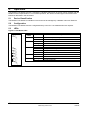
All references to registers mean the registers within the module unless otherwise stated.
Compatibility
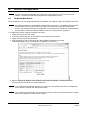
The Modbus TCP Module supports two modes of operation.
In Standard Mode, the module uses registers defined in the Modbus Protocol Specification.
In Legacy Mode, the module uses the same registers as LEROY-SOMER's Modbus Module. Some
registers differ from those specified in the Modbus Protocol Specification.
The mode of operation is determined by the values of bit 15 in register 40001.
•
•
•
•
Standard Mode: set Bit 15 = 1. Bits 0 to 7 of register 40001 are used for command.
Legacy Mode: set Bit 15 = 0. The remaining bits of register 40001 are reserved.
Examples
10000000 00000001 = start the motor (Standard Mode).
10000000 00000000 = stop the motor (Standard Mode).
00000000 xxxxxxxx = switch to Legacy Mode. The module will ignore the remaining bits in register 40001
and will check the value in register 40002.
6.2
Ensuring Safe and Successful Control
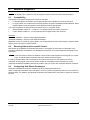
Data written to the Modbus TCP Module will remain in its registers until the data is overwritten or the
module is reinitialised. The Modbus TCP Module will not transfer successive duplicate commands to the
soft starter.
NOTE
If the soft starter is started via fieldbus communications but stopped via the keypad or a remote
input, an identical start command cannot be used to restart the starter.
In order to operate safely and successfully in an environment where the soft starter may also be
controlled via the keypad or the remote inputs (as well as via fieldbus communications), a control
command should be immediately followed by a status query to confirm the command has been actioned.
6.3
Configuring Soft Starter Parameters
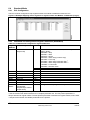
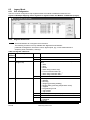
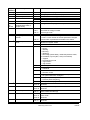
Parameter management is always multiple write of the entire parameter block.
When configuring parameters in the soft starter, the PLC must be programmed with the correct values for
all parameters. The Modbus TCP Module will update every parameter in the starter to match the values in
the PLC.
Modbus TCP Module User Guide
Issue B
www.leroy-somer.com
11