1
BEIMS Web Remote Request System
5.7 User Manual
BEIMS Web Welcome Page
Description of Screen
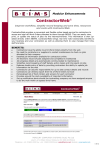
The BEIMS Web Remote Request welcome page provides access to the facility management and
maintenance information stored in BEIMS. This screen has links to do perform certain functions in
BEIMS which are:
•
•
•
View, add or modify Maintenance Requests
Web site info
Log out
Notice your name and department appears near the top left of the page. (Eg: Brian Smith, Human
Resources).
If you want to add a new request or review requests already entered for your department, click on
the View, add or modify Remote Requests link.
BEIMSWeb Remote Request List
How to Enter a Request?
Click your mouse once on the Add a new request link and the new request screen will open as
shown below opening with requestor’s default information.
© Mercury Computer Systems (Aust) Pty Ltd
CL05052009
Page 4