1
Honeywell 301C User Manual
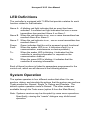
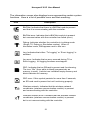
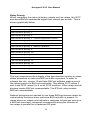
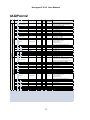
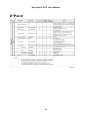
The information screen also displays icons representing certain system
functions. Here is a list of possible icons and their meaning:
Icon
Description
BACNet: Indicates that there is a BACNet module present
and that it is communicating with the controller.
BACNet error: Indicates that a BACNet module is present
but communication with the controller has failed (error)
Debug: Indicates whether the controller is in debug mode
(Single TX, Debug or Simulation modes). When in
simulation mode, SIM appears next to this icon.
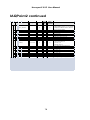
Log: Indicates that either “Tx Logging” or “Event logging” is
enabled.
Log error: Indicates that an error occured during TX or
Event logging. All logging functions are stopped.
SDC: Indicates that an SDcard is present and functionning.
The icon “fills” (from white to black) progressively as
memory is used. A white icon indicates empty memory and
black indicates full memory.
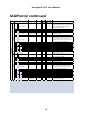
SDC error: If this symbol persists for more than 5 seconds,
an SD card card is present but not functioning properly.
Wireless network: Indicates that the wireless network
coordinator (wireless communication module) is present
and communicating with the controller.
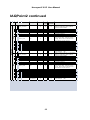
Wireless network error: Indicates that the wireless network
coordinator (wireless communication module) is present
but is not communicating with the controller.
21