1
Psytechnics
A.4.7
PESQ User Guide — Release 2.1
Results option: Sensation surfaces
(User Guide, section 3.2.7)
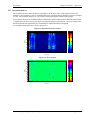
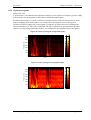
You are encouraged to show the sensation surfaces and error surface (see section A.4.8). It is often
useful to present either one or both of the sensation surfaces, or the reference signal waveform,
alongside the error surface so that the location of error events may be easily seen. The format that you
use (for example, an image, where colour is related to loudness, or as a 3-D surface) is left to you.
You may also wish to include in your documentation some sample sensation and error surfaces so that
users can learn how to interpret the images. Examples of different types of distortion are listed in the
User Guide, section 3.2.8.
A.4.8
Results option: Error surface
(User Guide, section 3.2.8)
The error surface is not provided explicitly by PESQ, but is simply calculated as the degraded surface
minus the reference surface. You are encouraged to show the error surface along side the sensation
surfaces. See section A.4.7 for further information.
A.4.9
Results option: Frame-by-frame delay statistics
(User Guide, section 3.2.9; PESQ Tools only)
If PESQ Tools is available, you may wish to provide the frame-by-frame delay statistics for profile 1 in
addition to profiles 2 and 3.
A.4.10
Results option: Utterance-by-utterance delay
(User Guide, section 3.2.10; PESQ Tools only)
You may wish to offer a view of the utterance-by-utterance delay using the utterance delay, start, end
and confidence information.
A.4.11
Results option: Utterance-by-utterance level
(User Guide, section 3.2.11; PESQ Tools only)
You may wish to offer a view of the utterance-by-utterance level using the utterance level, start, end
and confidence information. This can be useful in diagnosing some advanced network processes such
as adaptive level control.
Issue 2.1(PRO_PESQ00_210_ED0155_0.1)
Page 69 of 73