1
Symptom
Possible Cause
Corrective Action
Heat, Cool or
Fan
Runs
Constantly
1. Fan switch set to FAN ON
2. Possible short in wiring
3. Possible short in thermostat
4. Possible short in Heat/Cool/Fan
system
Check each wire connection to verify they are not
shorted or touching together. No bare wire should stick
out from under terminal screws. Try resetting the
thermostat as described below. If the condition persists,
the manufacturer of your system or service person can
instruct you on how to test the Heat/Cool system for
correct operation. If the system operates correctly,
replace the thermostat.
Furnace
Cycles
fast or
slow
too
too
1. The location of the thermostat
and/or the size of the heating system
may be influencing the cycle rate.
Item 2 in the Configuration Menu is the adjustment that
controls the heating cycle rate. If an acceptable cycle
rate is not achieved using the FA or SL adjustment,
contact a local service person for additional
suggestions.
Cooling
cycles
fast or
slow
too
too
1. The location of the thermostat
and/or the size of the heating system
may be influencing the cycle rate.
Item 1 in the Configuration Menu is the adjustment that
controls the cooling cycle rate. If an acceptable cycle
rate is not achieved using the FA or SL adjustment,
contact a local service person for additional
suggestions.
Thermostat
Setting and
Thermometer
disagree
1. Thermostat thermometer setting
requires adjustment.
The thermostat temperature calibration can be adjusted
+\- 3 degrees as listed in item 7 of the Configuration
menu. No other adjustment is possible.
Clock looses
or gains time
1. Loss of power to thermostat and
low batteries
The thermostat will maintain its program in memory
even with no power and no batteries, but the clock time
will be incorrect when power is restored. See No
Heat/No Cool/No Fan above for items to check in the
system.
Thermostat
does
not
follow
program
1. AM or PM set incorrectly in
program
2. AM or PM set incorrectly on the
clock
3. Voltage spike or static discharge
Check current clock and program setting including the
AM or PM designation for each time period.
If a voltage spike or static discharge occurs, use the
Reset Operation listed above.
1. Loss of power and dead batteries.
2. Voltage spike or static discharge
Replace batteries and check heat/cool system for
proper operation. If a voltage spike or static discharge
occurs, use the Reset Operation listed above.
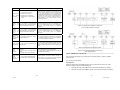
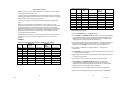
Figure 4, Typical wiring diagram for heat/cool,
4 wire, single transformer system
Note* Jumper required in heat pump mode.
Figure 5, Typical wiring diagram for heat pump
with reversing valve
CHECK THERMOSTAT OPERATION-----------------------------------------------------------------------
Blank display
and/or
keypad not
responding
If at any time during testing your system does not operate properly, contact a qualified
service person.
Turn on power to the system.
Fan Operation
Move the system switch to the OFF position. If your system does not have a “G” (Fan)
terminal connection, skip to the Heating System.
1.
2.
-1642-159
Move the fan switch to the ON position. The blower should begin to operate.
Move the fan switch to the AUTO position. The blower should stop immediately.
-5Aug-10-2011