1
Basic Functions
Flash Signal
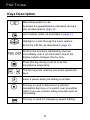
When the line is engaged, pressing the R key sends the flash
signal. This key is used in conjunction with special services (e.g.
call waiting) which can be available in your phone network. For
further details please contact your network telephone company.
To use the said special services, just press the R key while the
line is engaged.
Note:
y This key only operates when your telephone has been installed
for Tone mode (Dialing Mode menu must be set to Tone option).
Caller ID
This telephone automatically displays an incoming caller's number
/ name along with the date and time of the call. It will record up to
30 calls of up to 15 digits and store the data into memory.
IMPORTANT: You must subscribe to Caller ID Service from your
local telephone company to utilize this feature.
Viewing the Caller List
Use
or
key to scroll through entries.
Records will be listed in the order they were received.
Dialing a Number from the Caller List
Use
or
key to scroll to the desired number.
Then pick up the handset or press the
key to dial it out.
20