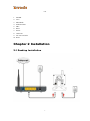
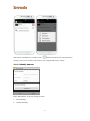
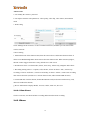
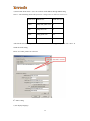
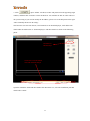
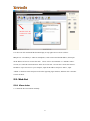
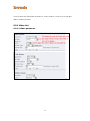
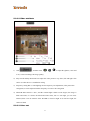
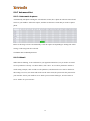
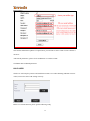
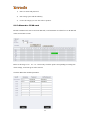
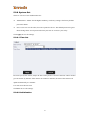
1
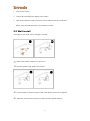
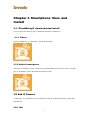
i is the registered trademark of Shenzhen Tenda Technology Co., Ltd. All the products and product names mentioned herein are the trademarks or registered trademarks of their respective holders. Copyright of the whole product as integration, including its accessories and software, belongs to Shenzhen Tenda Technology Co., Ltd. Without prior expressed written permission from Shenzhen Tenda Technology Co., Ltd, any individual or party is not allowed to copy, plagiarize, reproduce, or translate it into other languages. All photos and product specifications mentioned in this manual are for references only. Upgrades of software and hardware may occur; Tenda reserves the right to revise this publication and to make changes in the content hereof without obligation to notify any person or organization of such revisions or changes. If you would like to know more about our product information, please visit our website at http://www.tendacn.com ii Contents Contents .......................................................................................................................................... iii Chapter 1 Product overview .............................................................................................................. 5 1.1 Package list ......................................................................................................................... 5 1.3 Introduction ......................................................................................................................... 5 1.4 Features ............................................................................................................................... 5 1.5 Hardware overview ............................................................................................................. 6 Chapter 2 Installation ........................................................................................................................ 7 2.1 Desktop Installation ............................................................................................................ 7 2.2 Wall install .......................................................................................................................... 8 Chapter 3 Smartphone View and Install ........................................................................................... 9 3.1 “CloudNeteye” download and install .................................................................................. 9 3.1.1 iPhone....................................................................................................................... 9 3.1.2 Android smartphone ................................................................................................. 9 3.2 Add IP Camera .................................................................................................................... 9 3.2.1 IOS ........................................................................................................................... 9 3.2.2 Android .................................................................................................................. 11 3.3 CloudNeteye Live View .................................................................................................... 12 3.4 IP Camera setting and management .................................................................................. 12 3.4.1 Android smartphone ............................................................................................... 12 3.4.2 IPhone .................................................................................................................... 14 Chapter 4 PC View and Install ........................................................................................................ 17 4.1 Software function specification......................................................................................... 17 4.1.1 Add/Delete IP Camera ................................................................................................... 17 4.1.2 Video display ......................................................................................................... 18 4.1.3 Main Functions ...................................................................................................... 18 4.1.4 Windows switching area ........................................................................................ 22 iii 4.1.5 Device setting ......................................................................................................... 22 Chapter 5 Web View and Setting .................................................................................................... 25 5.1 How to login Web ............................................................................................................. 25 5.2. Web Set ............................................................................................................................ 27 5.2.1 View video ............................................................................................................. 27 5.2.2 Running .................................................................................................................. 29 5.2.3 Video Set ................................................................................................................ 30 5.2.4 Network Set............................................................................................................ 32 5.2.5 WIFI ....................................................................................................................... 35 5.2.6 Alarm Set ............................................................................................................... 35 5.2.7 Advanced Set ......................................................................................................... 38 5.2.8 System Set .............................................................................................................. 41 FAQ ................................................................................................................................................ 44 iv Chapter 1 Product overview 1.1 Package list Please check carefully if all listed items are included in the package as below: 1. IP-Camera 2. Quick Installation Guide 3. Mounting Bracket set 4. RJ45 Cable 5. Power Adapter Please strictly follow the input voltage power of the adapter required, or it will damage the device and this situation does not belong to the range of warranty. After purchase, if any accessories mentioned above is missing or damaged, contact the place of purchase immediately. 1.2 System Requirement 1. CPU: 2.0GHz or above (recommend 3.0GHz) 2. RAM: 256MB or above (recommend 1.0GB) 3. Graphic card: 64MHz or above 4. OS: Windows 7, Vista, XP, Mac OS, Windows 8 5. Internet Explorer6.0 or above, or compatible browser, Firefox etc. 6. Android 2.3 or above 7. IOS 4.3 or above 1.3 Introduction Tenda super easy IP Camera provides a professional home or small business surveillance Solution. Through our mobile phone APPS “CloudNeteye” and PC software “CloudNeteyeForPC” users can remote view directly, without DDNS domain name or setting any Port mapping on Router. 1.4 Features 1. HD plus IRCUT(HD series):720p HD Video Quality, you can get rich detail and crisp image quality. With IRCUT to ensure that the images are real color. 5 2. Plug and Play: Based on P2P cloud Technology, no need to configure the wireless Router and DDNS, then you can view immediately, so easy. 3. Remote Viewing:User P2P APP you can remote view through the iPhone, Android phone, PC. 4. H.264 Video Compression:H.264 video compression technology, need the minimum bandwidth network traffic while high image quality, more suitable for smartphone viewing. 5. Night Vision: This device can work well during the day, with infrared LED, it can also work at the night, round-the-clock surveillance. 6. Wi-Fi Connect: Use WiFi, camera easily connect to a wireless Router. You can easily get rid of the trouble of deployment the Ethernet cable. 7. Micro SD/TF storage:You can store image and video on your Micro SD/TF card. 8. Motion detection and alarm:If you need to monitor a certain area, when an exception occurs in the region, trigger an alarm automatically, send alarm information by e-mail, FTP.(Note: communication need to connect external audio. 9. Two-way audio:Not just screen monitor, you can also voice intercom. When you find the abnormal situation, you can be reminded by voice intercom, to ensure safety. (The speak function need additional audio to support) 10.Wide angle lens:1080P HD lens,120 degree, f=2.8mm,F=2.0,support IRCUT 11. Support ONVIF 1.5 Hardware overview 6 7 1 8 9 2 10 3 4 5 6 C5s 1. 2. 3. 4. 5. 6. 7. 8. 9. 10. IR LED Lens Photodiode Indicator LED MIC RJ45 Power Audio out T/F: TF Card Slot Reset Chapter 2 Installation 2.1 Desktop Installation 7 1. Take out the camera. 2. Connect the included power adapter to the camera. 3. Then connect Ethernet cable between the camera and LAN port on your Router. Please ensure the DHCP function of your Router is enable. 2.2 Wall install According to your needs, refer to the figure to install. ② ① 1 : Take out the bracket, and fix it by the screws. ○ 2 :Turn the spindle on the bracket to be loosen. ○ ③ ④ 3 : Camera connect to bracket, turn the collar on the bracket clockwise to tighten it ○ 4 : Adjust the camera to the location you needed, turn the spindle and fix it. ○ 8 Chapter 3 Smartphone View and Install 3.1 “CloudNeteye” download and install You can choose the following way to download and install "CloudNeteye". 3.1.1 iPhone Serach “CloudNeteye” in “APP Store”, download and install. 3.1.2 Android smartphone Search the " CloudNeteye" from “Google play”,download and install. If you do not have “Google play” in smartphone, please downloand and install it at first. 3.2 Add IP Camera As following, we will introduce how to add IP camera based on different operating systems IOS and Android. 3.2.1 IOS 9 1. Run “CloudNeteye” APP on your IPhone. 2. You can choose one of following way A. B. C, to add camera. A: If your iPhone and IP camera is connected to the same Router, “CloudNeteye” will search the IP Camera automatically, and appear in the following screen. You just need to click the camera UID Number , input password"admin "; then click "Save" to finish add camera. For some reason if your IPhone can't find camera automatically, pls click “Add” or “QRCode” as the following screen. B: Recommend to scan QR code to add camera. Click “QRCode”, and scan the UID QR code at the bottom of the camera; input password “admin”; click “Save” to finish add camera. C: Also, you can click “Add” to input camera UID number manually. (UID number is 20 alphanumeric below the UID QR code). Then input password “admin”, click “Save” to finish add 10 camera Note: Because the UID number is case sensitive, please input the correct font format. 3.2.2 Android 1. Run “CloudNeteye” on your smartphone. 2. Touch “Click here to add camera” in the following screen. 3. You can choose one of following way A. B. C, to add camera. A: If your smartphone and IP Camera is connected to the same Router, click “Search” to add camera, as show in the following screen. Touch the UID number, then input password “admin”, click “OK” to finish add camera. For some reason if your smartphone can't find camera automatically, pls click “Scan” to add. B: Scan the UID QR code at the bottom of the camera, input password “admin” , Click “OK” to finish add camera. C: Input UID number manually as show in the following picture; then input password" admin ", 11 click “OK” to finish add camera. (UID number is 20 alphanumeric below the UID QR code) Note: Because the UID number is case sensitive, please input the correct font format. 3.3 CloudNeteye Live View After finish add IP camera(camera shows on line), you can view video, snapshot, mute,listen and speak etc. 3.4 IP Camera setting and management 3.4.1 Android smartphone 12 Select device and hold on 3 seconds or click “ ” button near the device to do parameters settings. User can set reconnect, edit camera, view snapshot and remove camera. 3.4.1.1 Modify Camera Enter “Edit Camera” to do two settings as below: 1. Device Setting 2. Advanced Setting 13 Advanced Set a. Can modify the camera’s password b. Can adjust common video parameters: video quality, video flip, video mirror, Environment mode c. WiFi setting Click “Manage Wi-Fi networks” to enter searched wireless list, and then you can select usable wireless network. d. Even Setting 1. Motion detection: If this function OFF, then the camera don’t send motion detction alarm. If choose Low\Medium\High\Max means motion detection function ON. When sensitivity higher, then the camera trigger alarm more easily; default area is full screen. 2. Notification: There is 4 alarm modes, Silent, Tones only, Vibrate only, Ringtone and Vibrate. e. Recording Setting: There is 3 options, Off, Full time, Alarm. If choose “Off”, camera stop recording; if choose “Full time”, camera record all day; if choose “Alarm”, camera start recording after motion detection (need device’s motion detection ON, and insert MicroSD/TF card). f. Format SDCard: click this button, format MicroSD/TF card (need camera with memory card, otherwise without this button) g. Device Information: Display Model, Version, Vender, Total size, Free size. 3.4.2.1 View Event Click View Event, can check full time recording and motion detection recording. 3.4.2 IPhone 14 Click “ ” button beside the camera list, can do parameter settings and reconnect camera. User can view event, add camera, view info. 3.4.2.1 Modify camera a. Security Code: can change the camera password b. Video setting: can adjust common video parameters: Video quality, video flip, video mirror, Environment mode 15 c. WiFi: Click WiFi to enter searched wireless list, and then you can select usable wireless network. d. Motion Detection: If this funtion OFF, camera can’t send motion detection alarm. If choose Low\Medium\High\Max means motion detection function ON. When sensitivity higher, then the camera trigger alarm more easily; default area is full screen. e. Recording Mode: With 3 options Off/Full Time/Alarm. If choose “Off”, camera stop recording; “Full time”, camera will record all the time; recommended “Alarm”, camera record after trigger motion detection alarm (need motion detection function ON and device with MicroSD/TF card) f. Format SDCard: click this button, then format the memory card (need camera with card, otherwise, without this option g. About Device: dispaly camera model, version, vender, total size and free size of memory card. 3.4.2.2 Event It can view the full time recording or alarm recording of camera. 16 Chapter 4 PC View and Install Visit Tenda official website www.tendacn.com, search your model on the top right corner, click and enter the product you found. Click the Downloads and get the "PC P2P remote Software", install "CloudNeteyeForPC" after decompressed. 4.1 Software function specification Below pictures are the screenshot of “CloudNeteyeForPC”, we will explain detailed based on the below 4 functions: 4.1.1 Add/Delete IP Camera Add/Delete IP camera can search or manually add IP camera, can support max 16 cameras view at the same time. (When the button is in blue color, then you can add or delete). Click the blank of camera list, then click button , click and search the connected camera in the popup menu, double click the camera you found, the UID bar that is the UID bar of the camera. Input the camera name you set (Letter and number), then input the default password “admin” or modify the password and click save to finish adding camera. Then you can see the camera in the camera list. You can also input the camera name, UID bar and password and click save, but you need to ensure the camera and computer in the same LAN. 17 Select the camera in the camera list, click delete camera button , then delete camera. 4.1.2 Video display A. Show IP cam info, include name, connection way (LAN、P2P、RLY), resolutions and FPS. B. Record manually. Click this button, when it shows in red, recording start; click again, recording stop. This function is available when full time or schedule recording closed. C. Control the IP Cam rotation manually. (C5s do not support this function). D. Two-way audio function, include listen and speak (Need additional audio to support speak function). E. Snapshot function. F. Disconnect IP Cam function by manual. G. When IP Cam connect as Relay, connection will close automatically after 1 minute. Users need re-connect the camera manually. When disconnect, recording and alarm function is not available. 4.1.3 Main Functions 4.1.3.1 System setting 18 Click the setting button on the top right corner “CloudNeteyeForPC” and enter the system setting, as shown in the following photo: A B C A: Snap shot and video recording path setting. Users click “ ” to choose the disk and file in your computer to save snapshot and video recording. Users can set the length of single recording. Users can set the camera stop recording when how many free space left in your disk. Users can set to remove old video recording file when the free space is lower than setting. B: Alarm settings This function is available in condition of motion detection. When users closed motion detection in smartphone APP setting, camera can’t alarm triggered. Alarm can set as following: 1) Event recording, please see 5.4 for reference. 2) Alarm sound effect, users can set the sound all wav format file in your computer. 19 3) Send email when alarm,users can set their email address through Mail Setting. Note 1:The following form is the parameter configuration of different email server: Email server SMTP host SMTP host port Yahoo smtp.mail.yahoo.com 25 Sohu smtp.sohu.com 25 Gmail smtp.gmail.com 465 Tom smtp.tom.com 25 After fill the information, please click “Test”, choose “Allow” in appear tips, and click “Save” to finish all email setting. Please see below picture for reference: C: Misc setting 1) Set display language 20 2) Set if close the status bar 3) Confirm when application close 4) Can choose if enable the login form 5) Set all device will be connected when program is started. 6) You can modify the password of the camera here. 4.1.3.2 Playback, Browse snapshots and Event list Click the button on the top rigth corner of “CloudNeteyeForPC”. Do the following operations. 1) Playback Search function, users can search all recording files of one or more camera in a certain time. Delete function, can delete unnecessary files. Users can view the payback of the recording, include play, pause, stop, drag watch and full screen view. Snapshot function, check snapshot pictures. Event list 21 Search function, users can search all even list of one or more camera in a certain time. 4.1.3.3 Software Click the button on the top right corner of “CloudNeteyeForPC”, you can get the version information of software. 4.1.4 Windows switching area Display split, include 4, 6, 9, 16 split pane, double click to full screen view. When several camera work together, you can select the suitable window to view, double click the camera can view in full screen. You can also select to move the camera and the frame of camera. 4.1.5 Device setting 4.1.5.1 Edit Camera 22 Choose some one IP camera in device list, click “ ”, can do “Schedule Recording”, “Remote Setting” and “Remote Device Info” 4.1.5.1.1 Schedule Recording 1) Full-time recording. When open this function, manual recording function will stop. 2) According to the schedule. When this function start, manual recording function will stop. 3) Event recording. This function is available in condition of motion detection. When users closed motion detection in smartphone APP setting, camera can’t alarm triggered. 4.1.5.1.2 Remote setting Include Device password setting, WIFI setting, Camera Video Quality, Video Flip, Environment Mode and Motion Detection settings. WiFi setting: click “Manager WiFi Network” click “WIFI SSID”, choose one available network in the following list; input password, then click “Save”. 23 4.1.5.1.3 Remote device information: check the camera info 4.1.5.2 Play/Stop all camera “Play/Stop” all camera connected button , can support max 16 camera connect or stop at the same time. 4.1.5.3 Export/Import device Click export or import the button , camera’s data will be import or export in form of text. 24 Chapter 5 Web View and Setting 5.1 How to login Web You can log in the Web through the following two ways: Way 1: Run “C5s Setup Wizard” to enter Web. Visit Tenda official website www.tendacn.com, search your model on the top right corner, click and enter the product you found. Click the Downloads and get the "Setup Wizard" and "User Manual". Double click “C5s Setup.exe”, run this software, click “next” according guide info, until to following page. 1. As shown on the picture, click “ ”, (please close the firewall and antivirus software in your computer and make the DHCP server is ON in your Router); select camera in “Device list”. 2. Select the camera from the “device list”. 25 3. Click “ ”, input “admin” in both user name and password on the appearing login window, and then click “LOGIN” to enter the Web UI. You will then be able to watch videos or do system setting. If you need to modify the IP address, please refer to the help item on the right “How to Modify the Device IP config”. The first time user enter into the UI, it will remind user to download player, click add in item which under the address bar or “download player” and then install. As shown in the following photo: Click here to add the Playr Click here to run the add in item and install the Player Open the loaded the folder and then double-click IPCamera.exe, select the installation path and install video control. 26 Double click “IP Camera.exe” and install User also can click and install the download play on top right corner web UI as below: Way 2: Use “CloudNeteye” APPs in smartphone, search camera and find IP address, then input the IP address in browser to enter the Web. Please refer to User Manual “3.2 Add IP Camera” section, use search IP camera function. In the device list info “192.168.X.X” means the camera’s IP address. Open a browser in your computer, input the IP address and press “Enter”, input “admin” in both user name and password on the appearing login window, and then click “LOGIN” to enter the Web. 5.2. Web Set 5.2.1 View video C. Control the IP Cam rotation manually. 27 2 3 4 1 1) Status bar a. Monitor function button :Click the button,turn it like this from camera, click it again b. Communication button ,you can hear the voice , it close and you can not hear the voice. . Click the button, turn it like this sent to the camera, click it again , the voice will be ,it close and the voice can not be sent to camera. (Note: The speak function need additonal audio to support) 2) Multi-language mode selection You can select simplified Chinese/Chinese Traditional/English/multi-language.You can select 720P (Image quality is best), VGA (Image quality is good) to view video, for example, using 720P under local area network, using VGA when the video is not smooth 3) Snap/ record/TF/SD card/ replay Click” snap”, it will have a small window to show the photo snapped, click save to save the photo. Click” record”, start record. Click again the “record”, and then stop recording. You can chose where you want to save the record. 28 Click “TF/SD”, the contents of TF/SD card will be shown in the pop-up page (if have install TF/SD card. You can select the contents in the card and download. Click reply, it will pop-up a media player which can play video. ① The device supports max 32G MicroSD card. Please format the MicroSD card to FAT32 before use the card on camera. Please check if the TF/SD Card matches the camera or not before purchasing the TF/SD Card. ② Please insert the TF/SD card when the device power off, otherwise it will damage the TF/SD card or the device can’t read the card. 4) Click “SYSTEM”, enter device configuration UI, you can configure your camera. 5.2.2 Running 29 You can check some information of the device, such as software version, web version, Mac address, TF/SD card status. 5.2.3 Video Set 5.2.3.1 Video parameter 30 5.2.3.2 Video attribute 1) Click , and then click to adjust the ightness, color and so on, so that can change the image quality. 2) Flip vertical and flip horizontal can adjust the video picture to up, down, left and right. This can be use when device is installed in ceiling. 3) Frequency setting that is video lighting electric frequency rate adjustment, if the picture has corrugation, it can be adjusted another frequency to remove the corrugation 4) When IR LED control is” auto”, and the external light is dark to some degree, the image is black and white, if it shows the black and white status, but it is not night, you can close infrared, then it can be normal. If the IR LED is closed at night or do not have light, the camera is blind 5.2.3.3 Voice set 31 It can adjust the voice of monitor and communication, the bigger the value, the bigger the voice. Please click Apply after modified parameter. 5.2.3.4 OSD It can change the name of camera while chose to turn on or turn off the video time and name. Please click Apply after modified parameter. 5.2.4 Network Set 5.2.4.1 Network Parameter There are both two way to obtain IP address and DNS setting. One is the fixed IP address, one is dynamic IP address configuration. The camera defaults to obtain IP Address Automatically”. User can chose dynamic IP address and DHCP service, then the Router which connect with your camera will assign an IP address to your camera automatically, setting the interface configuration 32 as default. Input the website in wan test bar for testing, such as input www.tendacn.com.cn, click it. If it works, then your camera connecting is success. If the Router do not connect to the internet, the camera also can connect with computer via Router (LAN), but it will not success if you do the WAN test. If you want to modify the IP address, select the “fixed IP address”, modify the last section of IP address, click the “SET”. The following picture is only for reference, please modify the IP address according to your network environment. The default HTTP port is 80, if you do not modify the port, you can directly enter the camera IP in the web address field; if you change the port, you need to add ":" and port number behind the IP address. For example: If you modify the port is 8081, the camera IP address is 192.168.0.10. You must enter 192.168.0.10:8081 to access camera. 33 Camera support RTSP, if enable RTSP for verifying, you need to input the user name and password when use RTSP to call the video. When you modify the parameters, you need to click Save to save your settings. 5.2.4.2 Remote Access Setting (DDNS) User can use third party DDNS, such as www.dynddns.org, just need to log in to the website to apply for a free domain name, fill in the Settings box, and save the settings. Do the port mapping, then you can remote access your IP camera. IP camera default to obtain the IP address automatically, if you need to remote access via DDNS, the IP address should be manually to be fixed IP address, or it can’t port mapping. When use third party domain name, if the port number is not 80, you need to add a colon behind the domain name and plus the port number, such as: http://chen.dynddns.org:8081. 1. Problem of setting remote access, please refer to Addendum1 2. Please click Apply after modified parameter. 34 5.2.5 WIFI Select “Enable” and click “Scanning”, and then select wireless Router in WiFi List, enter its password, click Save to save the wireless settings. After setting successfully, please pull out network cable, then you can use the wireless function. When you modify the parameters, you need to click Save to save your settings. 5.2.6 Alarm Set If users set to monitor certain area, when there is exception occurs in this area, it will trigger alarm, then can select motion detection. In the item of sensitivity, the higher the sensitivity value, the easier to trigger alarm. When the motion detection area is selected and applied, set the alarm mode (such as starting an e-mail alert settings Email success) as well as selected arming time, when an exception occurs within the selected area arming time will trigger an alarm, send pictures to corresponding mailbox. 35 1) Area Enable the "Motion Detection function" , that is you need to set the motion detection area. Meanwhile you can choose high sensitivity ,medium or low in the monitor area. 2) Alarm 36 a)Alarm Setting: It can select several alarm way after triggered alarm. b)Time Setting:Arming time is the time in the selected Arming, if exception occurs, alarm will be triggered. Arming time defaults for all time. The Arming time corresponds to motion detection alarm and audible alarm. The device will be trigged only in the period of arming time which have detected alarm, you can select the arming time according to your needing. Below picture is setting arming in 8:30-9:30 Monday. Click the square corresponding to arming time when setting, it will turn green after selected. When setting time section, please adjust the system time at first. Please refer to 5.2.9.2 and set up system time. Click Apply after modified parameter. 37 5.2.7 Advanced Set 5.2.7.1 Automatic Capture Automatically take photo: During the selected time section, take a photo in each time interval and send it to your mailbox. Select the capture, and then set the time section that you want to capture photo. Below is the image of 8:30-10:30 Saturday. Click the square corresponding to Arming time when setting, it will turn green after selected. Click Save after modified parameter. 5.2.7.2 Email When detects alarming, it can send email to your appointed email box, but you need to set email service parameters correctly. As shown below, click “Save” to save these parameters. Below is email setting example, click set and save the parameter, and then click test. It can be checked if this setting is success (user name and sender use the same email, the password is the password of your mail box. Select your mailbox server which your user name belong to, to be the name of server. Below for your reference. 38 The contents filled in this photos is required item, you will fail to set the email if some contents is incorrect. After fill all parameters, please click “Send Email” to send test email. Click Save after modified parameter. 5.2.7.3 FTP The device will snap live pictures and send them to FTP server when alarming and FTP can store video, but need to set the FTP setting correctly. Before to use FTP function, please get the following ready. 39 1) FTP user name and password 2) FTP storage space and the authority 3) Create sub-category to store the video or pictures. 5.2.7.4Record to TF/SD card Record to TF/SD card: start record to TF/SD card, it will automatic record and save to TF/SD card in the selected time section. Below is the image of 13:30—16:30 Tuesday. Click the square corresponding to Arming time when settings, it will turn green after selected. Click the Save after modified parameter. 40 5.2.8 System Set There are 2 levels of user authorization in it. Administrator: “admin” has the highest authority, can do any settings. The factory default password: admin. Guest: User can view the video, but can’t operate the device. The default password is guest. Please change these 2 level passwords when your first use to ensure your safety. Click Apply to save the settings. 5.2.8.1 Time Set First time you use the camera, maybe the time on the picture is incorrect. Because camera need to get current time by Internet. If the camera can connect to Internet, the time of the camera will update automatically in a moment. User can select the time zone Click Save to save the settings. 5.2.8.2 Initialization 41 Reboot: When upgrade camera firmware, it will automatic restart camera. ”Audio format” will automatic restart camera. Factory Default: Enable the camera back to factory setting. Backup Data: If the back set up to date, the camera generate a file that you can save in your computer, and you can directly import the file when needing. Your computer can back to the parameter as you set before. This function is to facilitate the user to manage camera and do not need to set the parameter any more. Upgrade: Upgrade firmware is to upgrade camera system firmware and web, recovery and restore your saved settings parameters. 5.2.8.3 System log 42 System log is to record the user operation and alarm event, it shows the operation and the time of event. 43 FAQ 1. After I connect the camera according to guide of Setup Wizard, and add camera by smartphone scanning UID QR code, it shows Unknown device. Why? When you run CloudNeteye for the first time, make sure your smartphone and camera connect to the same Wi-Fi Router. (1) Check the camera’s power connection is normal or not. Check the camera’s LED is on or not, if not bright, then check the camera’s power connection. (2) Check the camera connect to Internet correctly or not. Camera must connect to the Router’s LAN port, and check the Router’s LAN port LED is on or not. If no light, replace the Ethernet cable and try again. The camera is unable to connect to the port of DSL MODEM, Cable MODEM, PON MODEM that cascade to the Router. (3) If still can’t view camera, enter Router configuration page to check if the DHCP function is ON. Verify that DHCP function is ON. Because IP Camera’ IP default to obtain from DHCP server. 2. When view with smartphone, camera shows On Line, but the picture is black screen, and need wait for a moment, then the image display correctly. Why? Because the video quality level is setted up too high, and the network is not good enough, so the camera response delayed. Change setting according to the next steps: Click “ ” or “ ” Click Edit Camera or Advanced Setting Video Quality, reduce a level (quality levels are Max/High/Medium/Low/Min). 3. Run CloudNeteye APP on smartphones, why can't search camera? Before running CloudNeteye APP, please according to the quick installation guide instruction, run setup wizard, complete the camera configuration. Before running CloudNeteye APP, please ensure that your smartphone and the camera is connected to the same Router. Smartphone can via WI-FI to connect to the Router. 4. Why I fail to recording. When click Record to TF/SD Card, then click Apply to save setting, But after I refresh the page, the status still “Off”. Reset browser first: Tool Internet 44 OptionAdvancedReset. Close browser, and enter again. If the problem is still not solved, then because that browser is not compatible with. Change another browser, like IE6, IE8 and so on. 5. Why videos on camera are not true in color? Cameras with CMOS chips are sensitive to light. Videos may not look good in color with dark light or equipped infrared lens. To avoid this problem, please use CMOS cameras with dual filter or a color lens. 6. Why smartphone viewing image is not clear? Because the CloudNeteye default value of video quality is low, so the resolution is limited, you can set by yourself. Run CloudNeteye, find the small triangle in device list, touch it enter into Edit camera >Advanced Settings >Advanced >Video setting>Video Quality page, change video quality to “Medium”, “High” or “Max”. Note: The video quality is higher, the greater consumption of mobile broadband traffic. To save your smartphone broadband traffic, select the appropriate video quality. 7. Why my camera cannot connect to the existing wireless Router? Before you connect to the existing wireless router, you must first connect your PC to the camera via an Ethernet cable and then enter WEB UI to configure some basic settings, or use “CloudNeteye” or “CloudNeteyeForPC” to set WiFi. 8. My camera cannot be reset. What should I do? Press the Reset button for about ten seconds when your camera is connected to power source. 9. Why do I have to reconfigure the camera to wirelessly connect to my wireless Router every time when the Router restarts? Sometimes I cannot even search the wireless network of my Router. A. Manually set your wireless Router’s channel to any number between 1and 11. Do NOT use channel 12 or channel 13. B. Make sure your Router’s SSID is a combination of letters and numbers and does not include any special characters, Chinese characters or symbols! C. Manually specify your wireless Router’s security settings, say, WPA2-PSK, AES. Do NOT use the Auto option. D. After you configured your Router as required above, connect your PC to the camera via an 45 Ethernet cable. E. Open camera’s web page, search and select the Router’s SSID. F. Enter the Router’s security key. G. First disconnect the Ethernet cable and power supply from the camera and then reconnect the camera to a power source. H. Restart the camera and the problem will be resolved. 10. Why it is too slow when watched from my phone? Please watch it via a 3G or WIFI connection. 2G connection may not be good enough for the service. But sometimes the 3G network is not nice either. Try lowering the resolution on your mobile phone if you use a H.264 format camera. 11. Is the camera’s wireless connection secured? Can others connect to my camera? The camera’s wireless connection is well secured with WEP/WPA/WPA2 wireless encryptions. 12. What wireless protocols does the camera support? It supports 802.11b/g/n and wireless transmission rate up to 150Mbps. 46