1
ColorSpan Legacy System Control
User Guide
Part Number 0706090 Rev C
1
Legal notices
© Copyright 2008 Hewlett-Packard Development Company, L.P.
Confidential computer software. Valid license from HP required for possession, use or copying.
Consistent with FAR 12.211 and 12.212, Commercial Computer Software, Computer Software
Documentation, and Technical Data for Commercial Items are licensed to the U.S. Government
under vendor’s standard commercial license.
The information contained herein is subject to change without notice. The only warranties for HP
products and services are set forth in the express warranty statements accompanying such
products and services. Nothing herein should be construed as constituting an additional
warranty. HP shall not be liable for technical or editorial errors or omissions contained herein.
Printed in the US
For additional technical support and user documentation please refer to:
www.hp.com/go/graphicarts
2
Revision Log
Revision Log
Date
Description
Sep 1999
Initial release, moves printer-specific chapters
into separate Print Server & Driver Setup Guides.
Dec 2000
Manual updated for version 8.7 of the Print
Server Software.
iii
About This Manual
The ColorSpan family of ColorMark® Pro and RIPStationTM print
servers runs the ColorMark Print Server Software. This manual
shows you how to use the ColorMark Print Server Software,
which consists of three main components:
◆
System Control, the software that enables you to control
printing and manage print jobs
◆
ColorMark Color Management System software, the software
that ensures color accuracy and consistency between output
devices
◆
ColorMark+ Advanced Color Management System, enables
post-RIP adjustments and creation of custom color profiles
(may be included with server or purchased separately)
This manual consists of the following chapters:
iv
◆
Chapter 1 introduces System Control and explains common
procedures.
◆
Chapter 2 explains how to route print jobs and use queues in
System Control.
◆
Chapter 3 explains how to manage infrequent operations of
System Control, including how to handle Attention Queue
dispositions.
◆
Appendix A gives you troubleshooting tips for identifying
and correcting problems.
◆
Appendix B explains how to connect the ColorSpan server to
a client computer running the Unix operating system.
About This Manual
Related Documentation
About This Manual
◆
Quick Start Guide - START HERE to set up and install a brand
new ColorSpan server and/or output device(s).
◆
Printing Tools User Guide - shows you how to install and use
the Downloader Utility and the printer description software
for Microsoft Windows and the Macintosh OS.
◆
Print Server & Driver Setup Guide - shows how to configure the
print server and driver software. Information for each
ColorSpan printer appears in its own Setup Guide.
◆
ColorMark+ User Guide - shows you how to use the
ColorMark+ Advanced Color Management System, which
may be included with your server or purchased separately.
◆
Release Notes and Update Notes - late-breaking information,
update descriptions, and update instructions.
◆
Online Documentation - most of the content of the softwarerelated manuals is also available in Windows Help and Apple
Guide formats.
◆
Tips & Tricks - application-specific tips on getting the best output from ColorSpan devices.
v
Conventions
This manual uses the following informational conventions:
Note
Caution
A special technique or information that may help you
perform a task or understand a process.
Alerts you to something that has the potential to
cause damage to hardware, software, or data.
WARNING Alerts you to something that has the potential to
cause physical harm to you or others around you.
vi
Conventions
TABLE OF CONTENTS
Revision Log...........................................................................................1-iii
About This Manual ................................................................................1-iv
Conventions...........................................................................................1-vi
1
Table of Contents
Using System Control
System Control Overview ...................................................................... 1-2
Printing to the Server ......................................................................... 1-2
Input Ports ......................................................................................... 1-4
Input Queues..................................................................................... 1-4
Process (RIP) ...................................................................................... 1-5
Output Queues .................................................................................. 1-5
Printers ............................................................................................... 1-7
About the ColorMark CMS .................................................................... 1-8
About ColorMark+ ................................................................................. 1-9
Restarting and Shutting Down ............................................................ 1-10
To Restart the Server ........................................................................ 1-10
To Shut Down the Server................................................................. 1-11
Naming the Server ............................................................................... 1-12
Adding and Configuring Printers ........................................................ 1-13
To Add a Printer ............................................................................... 1-14
Installing ColorMark CMS Software ................................................ 1-15
Previous Calibration Data Not Deleted ....................................... 1-17
If You Have Trouble ..................................................................... 1-17
To Configure a Printer...................................................................... 1-18
To View Printer Status ...................................................................... 1-18
To Remove a Printer......................................................................... 1-18
Adding and Configuring Ports............................................................. 1-20
To Add Ports to System Control....................................................... 1-21
To Re-Route a Port ........................................................................... 1-23
To Configure a Port.......................................................................... 1-27
To Set Timeouts (NetWare port only) ............................................. 1-28
Default AppleTalk Zone (AppleTalk Port Only) ............................... 1-29
WinLink Port Settings....................................................................... 1-30
TCP/IP Port Settings (TCP/IP Port Only) .......................................... 1-32
Novell Port Settings (Novell Port Only)........................................... 1-34
To Remove Ports From System Control ........................................... 1-35
To Pause Ports.................................................................................. 1-35
vii
RIP Options .......................................................................................... 1-36
To Pause the RIP............................................................................... 1-36
To View a Processing File ................................................................. 1-36
To Delete a Processing File .............................................................. 1-36
To Configure the RIP ........................................................................ 1-37
Managing Profiles ................................................................................ 1-39
2
viii
Using Queues
Viewing Jobs in Queues......................................................................... 2-2
Text and Thumbnail Views................................................................. 2-3
Selecting Jobs..................................................................................... 2-3
Hiding Queues................................................................................... 2-4
Managing Jobs in Queues ..................................................................... 2-5
Pausing Jobs....................................................................................... 2-6
Resuming Jobs ................................................................................... 2-6
Deleting Jobs...................................................................................... 2-6
Routing Jobs....................................................................................... 2-6
Direct Printing (Macintosh Only) .................................................. 2-8
Direct Printing Tips ........................................................................ 2-8
Previewing Jobs................................................................................ 2-10
Preview Tips ................................................................................. 2-10
Moving Jobs Between Queues ........................................................ 2-11
To Copy Jobs Between Queues ....................................................... 2-12
Prioritizing Jobs ............................................................................... 2-12
MediaSaver .......................................................................................... 2-13
EPS/TIFF Printing .................................................................................. 2-18
Selecting an EPS/TIFF Option........................................................... 2-19
Setting Document Details .................................................................... 2-24
RIP Saver .............................................................................................. 2-26
RIP Saver Temporary vs. Permanent ................................................ 2-26
Saving a RIP File ............................................................................... 2-27
Printing a RIP Saver File ................................................................... 2-27
Archiving RIP Saver Files .................................................................. 2-27
External Disk Drives ............................................................................. 2-28
DiskDirect......................................................................................... 2-28
RIP Saver .......................................................................................... 2-28
To Initialize an Existing External Disk .............................................. 2-29
To Initialize a New External Disk ..................................................... 2-30
To Configure an External Disk ......................................................... 2-31
Using Removable Disks.................................................................... 2-32
Table of Contents
3
A
Table of Contents
Managing the Print Server
Setting System Preferences .................................................................... 3-2
Setting Preferences ............................................................................ 3-2
General Preferences ........................................................................... 3-2
Confirm .......................................................................................... 3-3
Show .............................................................................................. 3-4
Full Screen Preview ........................................................................ 3-4
Check Disk ..................................................................................... 3-5
Other System Preferences .................................................................. 3-6
Media Usage .......................................................................................... 3-7
Viewing and Deleting Fonts .................................................................. 3-8
To View Fonts..................................................................................... 3-8
To Delete Fonts .................................................................................. 3-9
To Add Fonts...................................................................................... 3-9
Tracking Log ........................................................................................ 3-10
To View the Job Log......................................................................... 3-10
To Export the Job Log ...................................................................... 3-10
DiskDirect Printing............................................................................... 3-11
Attention Queues................................................................................. 3-13
Input Attention Queue .................................................................... 3-13
Output Attention Queue ................................................................. 3-14
Media Mismatches....................................................................... 3-14
Media Size Mismatch Override ................................................... 3-15
The Help Menu .................................................................................... 3-16
Troubleshooting
Diagnostics ............................................................................................ A-2
Problems and Solutions ......................................................................... A-4
Job Dispositions ................................................................................. A-4
Starting Up......................................................................................... A-7
General Printing................................................................................. A-7
Document Can’t Be Sent from Your Computer (or Won’t Show Up in
an Input Queue). ..................................................................... A-7
Long RIP Times .............................................................................. A-7
Excessive Ink On Media ................................................................. A-8
The Document Is Not Printing Completely ................................... A-8
Error Messages................................................................................... A-9
INSERT COLORMARK DISK ............................................................ A-9
DOCKING STATION NOT FOUND (DisplayMaker Pro only) ........ A-9
CALIBRATOR NOT ATTACHED....................................................... A-9
TOO MANY LOG FILES .................................................................. A-9
INSUFFICIENT MEMORY ............................................................... A-9
ix
Configuration Error Messages............................................................ A-9
UPDATE PROCESS INTERRUPTED................................................... A-9
SYSTEM CONFIGURATION ERROR ................................................ A-9
Macintosh Networking .................................................................... A-10
Print Server Not Appearing In Chooser On Ethernet................... A-10
Reinstalling the Server Software .......................................................... A-11
ColorSpan Technical Support............................................................... A-15
Help From Your Organization.......................................................... A-15
Help From ColorSpan ...................................................................... A-15
If All Else Fails................................................................................... A-15
B
Unix Client Support
Unix and VAX Based Computers............................................................ B-2
BSD Unix ............................................................................................ B-2
If You Have Trouble ........................................................................... B-7
System V Release 4.0 Unix Network .................................................. B-9
If You Have Trouble ......................................................................... B-13
DNS and NIS Systems ...................................................................... B-15
Unix Notes............................................................................................ B-16
Index
x
Table of Contents
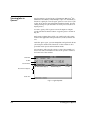
Context-sensitive Online Help is
always available, no matter which
part of System Control you are
viewing.
Simply click the Help button.
If no button is visible,
◆
Press F1
◆
Or select the Help menu
CHAPTER 1
Using System Control
This chapter explains basic features of System Control, the graphical
user interface that you use to manage print jobs through the ColorSpan
print server.
This chapter describes:
Using System Control
◆
System Control Overview (page 1-2)
◆
About the ColorMark CMS (page 1-8)
◆
About ColorMark+ (page 1-9)
◆
Restarting and Shutting Down (page 1-10)
◆
Naming the Server (page 1-12)
◆
Adding and Configuring Printers (page 1-13)
◆
Adding and Configuring Ports (page 1-20)
◆
RIP Options (page 1-36)
◆
Managing Profiles (page 1-39)
1-1
System Control
Overview
Printing to the Server
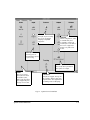
System Control links you to the ColorSpan print server and all
connected printers through the graphical user interface shown
in Fig. 1-1. This interface displays icons that represent different
aspects of System Control functions. The icons are grouped
according to these functions:
◆
Input ports
◆
Input queues
◆
The RIP (Raster Image Processor)
◆
Output queues (including RIP Saver)
◆
Printers
◆
Tracking
When you print to the server (or use the ColorSpan Downloader
Utility to download supported file types) from your computer,
the print file is spooled to the server’s hard disk.
“Spooling” means that print jobs are not processed immediately,
but are instead stored on the server’s hard disk for later processing. Spooling provides two major advantages:
1-2
◆
Your computer is free to do other work, so you save time.
◆
You can manage spooled print jobs using System Control.
You can change document settings, reprioritize jobs, copy
jobs, get information about jobs, and perform other job
management functions.
System Control Overview
PROCESS
Print jobs are processed by
the server’s PostScriptlanguage compatible
interpreter.
PRINTERS
Printer configuration, status,
ColorMark CMS, and
ColorMark+ software (if
installed) are controlled at
these icons. Supported
printers vary with server
model.
INPUT QUEUES
Incoming jobs are
prioritized into queues
for processing.
OUTPUT QUEUES
Processed jobs are prioritized
into queues for output.
PORTS
The server receives
print jobs from client
workstations (PCs,
Macs, Unix) through a
port. Supported ports
vary by server model.
TRACKING
All jobs are logged. The log can
be copied to diskette and easily
imported into other applications
for billing and recordkeeping.
Fig. 1-1. System Control Interface
System Control Overview
1-3
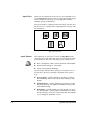
Input Ports
When you send a print job to the server, it enters through one of
several Input Ports. The port icons are shown in the Ports group
and are identified by the type of port: AppleTalk, NetWare,
WinLink, TCP/IP, or DiskDirect.
These ports must be configured and routed when you first start
up the server. See “Adding and Configuring Ports” on page 1-20
for instructions.
AppleTalk
WinLink
DiskDirect
NetWare
TCP/IP
Fig. 1-2. Port Icons
Input Queues
After a print job is spooled, it is sent to an Input Queue. The
queue lists jobs in the order they were received and sends them
to the RIP in the same order. The input queues enable you to:
◆
View or change the order in which documents will be RIPed.
◆
Alter the print settings for a document.
◆
Cancel a document by deleting it.
System Control indicates when a print job is waiting in one of
the first three queues by showing a document in the queue’s
icon.
1-4
◆
Priority Queue — Use this queue for jobs that you want to
RIP immediately, before other jobs that are waiting in other
queues.
◆
Standard Queue — Use this queue for jobs that are of a regular priority that do not require immediate processing. This
is the default setting.
◆
Hold Queue — Use this queue to hold a job until you move
it to the Standard or Priority Queue. This queue can hold several spooled jobs, which you can prioritize later. This enables
you to change the attributes of a job.
System Control Overview
◆
Direct (Macintosh only) — Use this queue to bypass the
spooler and send a job directly to the RIP. The job is processed and sent to an Output queue. The Direct queue has
the highest printing priority of any queue. Its icon appears
only when it is in use.
You can use Direct only when no other job is currently processing and only for jobs routed from AppleTalk ports.
Because direct jobs are not spooled, you should send jobs to
Direct only when your application software requires it.
See “Direct Printing (Macintosh Only)” on page 2-8 for
detailed information about Direct printing.
◆
Input Attention Queue — The Input Attention queue
appears in the Input queue group if a job is routed to a
printer or an external device that does not exist. You can correct problems with jobs routed to this queue and move them
to an input queue. See “Attention Queues” on page 3-13 for
more information about Attention queues.
Print jobs set with “EPS Manual” mode are also routed to the
Input Attention queue. From there, you can select special
EPS/TIFF manual options such as tiling, scaling, and
rotation (see page 2-18)
Process (RIP)
After the print job is spooled to an input queue, the RIP processes the PostScript commands and translates them into images
for printing using its Level 2 PostScript language-compatible
interpreter.
The RIP can process a job while other jobs are spooling to the
server and while processed jobs are printing.
Output Queues
After the RIP processes the job, the job moves to an Output
queue.
When a job is in an output queue, you can:
System Control Overview
◆
Alter the print settings, including N-UP and Step-and-Repeat
◆
Cancel (delete) it
◆
Save a RIPed version of the job to print later
◆
Preview it
◆
Use the Media Saver feature to group it with other jobs (see
page 2-13)
◆
Use the ColorMark+ software’s post-RIP manipulation tool to
adjust the job’s appearance (see page 1-9)
1-5
There are seven types of Output queues:
1-6
◆
Priority Queue — Use this queue for jobs that you want
printed immediately. All jobs listed in this queue print before
jobs in any other queue.
◆
Standard Queue — Use this queue for jobs that are of a regular priority that do not require immediate printing. This is
the default queue.
◆
Hold Queue — Use this queue to postpone printing of a job.
You can route jobs to the Hold Queue to preview them
before printing. At your convenience, and if the job RIPed as
expected, you can move or copy it into the Standard or Priority queue, from which it will be sent to the printer.
◆
RIP Saver Temporary Queue — Use this queue to save processed jobs to the server’s internal hard disk so the file can
be printed on demand. You can route jobs here before or
after printing them. Jobs that reside in the RIP Saver Temporary queue are automatically deleted when hard disk space is
needed by the server software. (See “RIP Saver” on page 226 for more information about RIP Saver.)
◆
RIP Saver Permanent — Use this queue to save processed
jobs to the server’s internal hard disk so the file can be
printed on demand. You can route jobs here before or after
printing them. These files permanently reside on disk until
you intentionally delete them. (See “RIP Saver” on page 2-26
for more information about RIP Saver.)
◆
External Drive — Use this queue to save processed files to an
external disk drive so the files can be printed on demand.
The external device must be initialized and configured as
described in “External Disk Drives” on page 2-28 before you
can save files to it. Any files stored to an external disk will
remain there until you delete them.
◆
Attention Queue — This queue holds processed jobs that
cannot spool or print because of errors detected by System
Control, including mismatches between the ColorMark
media type or size installed in the printer and that specified
for the job. This queue icon appears only when an error
occurs. After you correct the problem and move the job to
an output queue, the Attention queue disappears. See
“Attention Queues” on page 3-13 for more information
about managing the Attention queue.
System Control Overview
Printers
From the output queue, the file is sent to the designated printer.
It is printed based on the priority of the queue to which it is
assigned and its position within the queue. The background of
the icon changes to different colors to reflect the status of the
printer:
◆
Green - the printer is online and a job is printing.
◆
Yellow - the printer is paused.
◆
Red - the printer is offline due to a printer error, a disconnected cable, it was taken offline at the control panel, it was
powered off, or other reason.
A job RIPed for one output device cannot be printed on a different output device. For example, a job RIPed for a Giclée
PrintMakerFA cannot be printed on a DisplayMaker Series XII.
Jobs can, however, be routed to any printer within its “family:”
System Control Overview
◆
DisplayMaker Series XII Family: DisplayMaker Series XII,
DisplayMaker FabriJet XII, DisplayMaker Esprit
◆
DisplayMaker HiRes Family: DisplayMaker HiRes 8-Color
Series, DisplayMaker Pro/DisplayMaker XL60
◆
All other devices are in their own family. Jobs RIPed for these
devices cannot be printed on any other device.
1-7
About the
ColorMark CMS
The ColorMark Color Management System (CMS) is
ColorSpan’s proprietary technology for matching colors specified in your documents to the printed output. This unique color
management system consists of media, inks, and profilers that
have known characteristics, which are monitored by the software in order to create printed colors that are consistent, accurate, and true to the original image.
The profilers also track the amount of ink remaining in each Big
Ink Pack, allowing the print server to warn you when an individual ink supply is running low, even when you switch between
partially-used ink packs.
You must install the ColorMark CMS software for accurate color
reproduction. Depending on your output device, you will use a
combination of the following:
◆
ColorMark Profilers and Profiling Software
◆
Specially formulated or approved media
◆
Specially formulated ColorMark inks
◆
ColorMark Docking Station
ColorMark media and inks have been carefully developed and
tested to maintain the highest level of quality. They have known
colorimetric properties that are optimized by the ColorMark
CMS to produce the highest quality output each time.
If you accept the ColorMark License Agreement, you can install
ColorSpan’s ColorMark Color Management System (CMS) software. The agreement is printed on the package that holds the
software.
Note
1-8
If you do not install ColorMark, color matching is not
enabled.
About the ColorMark CMS
About ColorMark+
ColorMark+ is a suite of software applications that enhances the
standard ColorMark Color Management System and ColorSpan
Print Server Software. It may be included with, or may be purchased separately from, your ColorSpan Print Server.
ColorMark+ enables you to:
◆
Create and edit custom color profiles - these profiles measure, or characterize, the color properties of a specific printer,
media, and ink combination. The ColorMark Color Management System and ICC (International Color Consortium)
workflows use profiles (in different formats) to ensure accurate and consistent color matching. You can create custom
ColorSpan profiles for third-party (non-ColorSpan) media,
edit ColorSpan profiles to your requirements, or create ICC
profiles to integrate them into an ICC workflow.
◆
Print using an ICC workflow - the ICC profiles created by
the ColorMark+ software are ICC-compliant and can be integrated into an ICC workflow.
◆
Manipulate RIP Saver files - the Post-RIP Manipulation Tool
enables you to interactively adjust the cropping, color, and
placement properties of a document and print it again without re-RIPing the file. (Color adjustments cannot be made to
ICC workflow jobs.)
Use the version of ColorMark+ suited to your requirements:
◆
Use Version 1.5 to create profiles with up to six process colors (may include multidensity inks for a total of ten inks) for
the DisplayMaker HiRes 8-Color Series and Giclée
PrintMakerFA.
◆
Use Version 2.0 to create profiles with up to eight process
colors (may include multidensity inks for a total of twelve
inks) for the DisplayMaker Series XII, DisplayMaker FabriJet
XII, and DisplayMaker Esprit printers
Refer to the ColorMark+ User Guide for complete system requirements and instructions.
About ColorMark+
1-9
Restarting and
Shutting Down
System Control must be shut down in an orderly manner before
the ColorSpan print server main Power switch is turned off.
Always use the Shutdown command before you turn power off.
If you plan to restart immediately, avoid power shutdown and
use the Restart command instead.
— EXTREMELY IMPORTANT —
Caution
To Restart the Server
Turning off power to restart System Control can
cause loss of data or corrupt the system. Instead,
use the Restart command to stop the print server
and immediately restart it.
You can use the Restart selection in the System menu when you
want to stop the system and immediately restart it.
When you restart, any jobs that are currently spooling, processing or printing are deleted.
To restart the server:
1. Select Restart from the System menu.
The system will ask you to confirm that you want to restart.
2. Click OK to continue.
If there are any jobs currently spooling, processing, or printing, a dialog box appears to inform you of this, since they
will be lost during the restart. You can choose Do Not
Restart at this time.
3. Click Restart to continue.
The system restarts.
1-10
Restarting and Shutting Down
— EXTREMELY IMPORTANT —
Caution
To Shut Down the Server
Turning off power alone to shut down System
Control can cause loss of data or corrupt the system. Use the Shutdown command before you turn
off power.
When you power down the print server, any jobs that are not in
a RIP Saver queue or the tracking log are deleted. To shut down
the server, follow these steps:
1. Check the queue lists.
2. Print any jobs you need before shutdown.
Only jobs in RIP Saver queues are not deleted by Shutdown.
3. Select Shutdown from the System menu.
The system asks you to confirm that you want to shut down.
4. Click OK to continue.
A dialog box appears if there are jobs in any of the following
locations:
◆
Spooling (entering via a port)
◆
Processing (in the RIP)
◆
Printing
◆
Pending (residing in an Input or Output queue)
◆
Held (residing in an Input or Output Hold queue)
◆
Attention (residing in the Attention Queue)
You can choose Do Not Shutdown at this time.
5. Click Shutdown to continue.
The system displays the message “Shutdown in Progress.”
Then the message “It is now safe to shut down your computer” appears.
6. Turn off the print server, or click the Restart button now to
restart System Control.
Restarting and Shutting Down
1-11
Naming the Server
This option enables you to specify a name for the ColorSpan
print server. The Server Name appears:
◆
Preceding each AppleTalk port in the Macintosh Chooser.
Changes take effect only when the port is idle, so to avoid
confusion over different server names appearing in the
Chooser, change the name only when all AppleTalk ports are
idle.
◆
As the print queue name in the Microsoft Windows Network
when you configure WinLink ports.
To name the print server:
1. Select Server Name... from the System menu.
The following dialog box appears:
Fig. 1-3. Naming the print server
2. Type in the name for the server.
The server name cannot end with a space.
3. Click OK.
It takes about one minute for a new AppleTalk port name to
appear in the Chooser.
A new WinLink port name will appear on the Windows Network after you restart the server.
1-12
Naming the Server
Adding and
Configuring Printers
You must add and configure each printer connected to the
ColorSpan print server before it will show up in the Printers
group on System Control. Configuring a printer identifies the
printer by its characteristics, including printer name, media
width, ink dry time, ink pause and warning level, and cutting
options.
When you start up your server for the first time, you will be
asked if you want to add your printer to System Control. Follow
the procedures given in this section to do so.
If you connect a printer to your server after one printer has
already been added and configured, you will not see the new
printer in the Printers group until you add it using System
Control.
This section explains:
Adding and Configuring Printers
◆
How to add a printer (page 1-14)
◆
How to install the ColorMark CMS software (page 1-15)
◆
How to configure a printer (page 1-18)
◆
How to view printer status information (page 1-18)
◆
How to remove a printer (page 1-18)
1-13
To Add a Printer
When you first start up your server, you will be prompted to add
any printers that are connected to and detected by the print
server. You must add at least one printer in order to begin sending print jobs to the server. You can also add printers as your system grows (if permitted by your server and the printer’s
requirements).
To add a printer, follow these steps:
1. From the System menu, select the Add - Printer option.
The following dialog box appears:
Fig. 1-4. Add Printer dialog box
2. Select a printer to add.
Double-click on the printer you wish to add, or highlight it
and click Add. System Control displays a dialog box that
enables you to route the input ports to printers.
3. Route all of the ports.
If you are installing only one printer, route all of the ports
to it. You cannot proceed until all of the ports are routed to
a printer.
4. Click OK.
The system asks you whether you want to install the
ColorMark software for the new printer.
5. Install ColorMark.
See the next page for instructions.
1-14
Adding and Configuring Printers
Installing ColorMark CMS
Software
Install ColorMark CMS separately for each printer on the system
when:
◆
You install a new printer. The software prompts you to install
the ColorMark CMS software that supports the new printer.
◆
You receive a ColorMark CMS update disk that is independent from a ColorSpan Print Server software release.
◆
You install or update the ColorSpan Print Server software.
You can accept the ColorMark License Agreement and install
a new release of ColorMark Color Management System software. The terms of the agreement are included with the software.
Additionally, when System Control detects a printer without
ColorMark CMS installed, or when a new version is available, it
will prompt you to install or update the software.
Note
Adding and Configuring Printers
The ColorMark Color Management System handles all
color matching for each printer that appears on System
Control. Before you install ColorMark, remove all EFIColor (Electronics for Imaging) color matching software
from your computer. If you use a Macintosh, turning off
EFIColor is not enough — you must remove the EFIColor
extension from the System Folder. If you do not remove
EFIColor, your colors will be inaccurate.
1-15
1. Insert the ColorMark CMS CD-ROM in the ColorSpan print
server’s CD-ROM drive.
2. Click and hold the cursor on the printer icon to view the
printer menu.
Press and hold either mouse button on the
printer icon to display the printer menu.
Fig. 1-5. installing the ColorMark CMS software
3. Select ColorMark CMS.
A confirmation message appears asking if you want to install
ColorMark CMS.
1-16
Adding and Configuring Printers
4. Click Yes.
5. Follow the on-screen prompts to finish the software
update.
The server will prompt you to update the ColorMark software for each printer installed on the server.
6. Remove the ColorMark CMS disk and store it in a safe
location.
If the color accuracy of printed output is not acceptable, perform a ColorMark CMS calibration. Load the media onto the
printer, then from the printer icon menu, select Calibrate... and
follow the on-screen prompts.
For further information about calibration, refer to the Print
Ser ver & Driver Setup Guide for your printer.
Previous Calibration Data Not Deleted
When you update the ColorMark CMS software for a printer
after performing calibrations for one or more ink and media
combinations, existing calibration data is not automatically
deleted. The installer gives you the option of resetting or retaining this data. From the Printer Calibration dialog box, you can
choose to reset this calibration data all at once, or for selected
ink and media combinations only.
If You Have Trouble
If you have trouble installing the ColorMark CMS software, follow these steps:
Adding and Configuring Printers
◆
If the server was previously up and running, wait for any
jobs to finish spooling, RIPing, or printing.
◆
Make sure that the ColorMark Profilers are installed (except
for color copiers and PressMate-FS).
◆
If any external disk drives connected to the print server are
powered off, perform a shutdown procedure and power
down the server. Power up all external SCSI drives and then
power up the print server.
◆
Make sure that the DisplayMaker Pro Docking Station is connected to the server (for DisplayMaker Pro only).
1-17
To Configure a Printer
Before you configure the printer, make sure it is connected to
the server, plugged in, turned on, and added to System Control.
To configure a printer, click and hold either mouse button on
the printer icon, and then select Configure…from the menu.
A printer configuration dialog box appears. The contents of the
dialog box varies, depending on which printer you are
configuring. Refer to the Print Server & Driver Setup Guide for
details.
To View Printer Status
To view a printer’s status, click and hold either mouse button on
the printer icon, and then select Status…from the menu.
A printer status dialog box appears. The contents of the dialog
box varies, depending on which printer you are configuring.
Refer to the Print Server & Driver Setup Guide for details.
To Remove a Printer
To remove a printer:
1. From the System menu, select Remove - Printer.
The following dialog box appears:
Fig. 1-6. Remove Printer dialog box
1-18
Adding and Configuring Printers
2. Select a printer to remove.
Either double-click on the printer you wish to remove or
highlight it and click the Remove button.
The system asks you confirm that you want to remove the
printer.
3. Click OK.
The printer is removed.
4. Reroute any ports that were routed by default to the
printer you just removed.
If the printer you just removed was the default printer for
one or more ports, you must route the port(s) to another
printer at this time. If there are no other printers, rerouting
is not necessary.
Adding and Configuring Printers
1-19
Adding and
Configuring Ports
When you first start up your ColorSpan print server, System
Control creates an initial configuration that includes a number
of ports. The ports created by default vary by server model.
A print server port is not the same as a physical connection to the
server from a computer or network. Instead, it is a communications channel that can be configured for a specific set of
attributes. Each channel is broadcast on your network and
appears in the Macintosh Chooser or Windows or NetWare print
queue with its own name.
The Port configuration identifies each port connection to the
server by type and by port settings (e.g. addresses, timeouts,
etc.) Once a port is added, its icon is shown in the Ports group in
System Control.
The Port configuration can also identify printer attributes such
as Image Quality or Routing. For example:
◆
You could name one port “SmoothTone Priority” and use it
to print SmoothTone Full Page quality through the Priority
queues
◆
You could name another port “Canvas Hold” and use it to
route jobs to the Input Hold Queue for print later when a
canvas media is loaded.
See “DiskDirect Printing” on page 3-11 for detailed information
about the DiskDirect port.
AppleTalk
WinLink
DiskDirect
NetWare
TCP/IP
Fig. 1-7. Port Icons
1-20
Adding and Configuring Ports
To Add Ports to System
Control
1. From the System menu, select Add - Port.
The following dialog box appears:
Fig. 1-8. Add Port dialog box
2. Click on the type of port you want to add.
3. Click Add.
Adding and Configuring Ports
1-21
When you add a port to the server System Control, you
must also designate a default printer for that port. The following menu appears:
Fig. 1-9. Port Routing dialog box
4. Select the printer to which print jobs on this port should
be routed.
5. Click Route.
6. Configure the port as described on page 1-27.
1-22
Adding and Configuring Ports
To Re-Route a Port
To route a port after its initial setup, follow these steps:
1. Position the cursor over the port icon.
2. Click and hold either mouse button to display the port
menu.
3. Select Route...
System Control displays the current routing path for the
selected port. The route is also described in the dialog box at
the bottom of the screen as shown in Fig. 1-10.
Note
By default, all ports are initially routed through the
Standard input queue, RIP, the Standard output queue,
Printer, and RIP Saver Temporary.
4. Choose a new routing path.
While the current routing path is displayed, click the left
mouse button on the icons for the input queue, output
queue, and printer you want to use. (Routing through the
RIP is automatic.) The new path appears as a green line
through the queues and printer you select. Your choices are
also reflected in text form in the routing dialog box. The
new path is effective for subsequent print jobs, but any jobs
currently spooling will use the former routing.
If you route a job to a RIP Saver or Output Hold queue
instead of the printer, RIPed files are saved or held but not
printed. In this case, a yellow dashed routing line extends to
the printer to indicate that it has not yet been printed.
To print the job and then save it, route it to the Priority or
Standard output queue, then to the printer, and then to a
RIP Saver queue.
5. Click on Save in the port's routing dialog box.
The routing for the selected port is saved.
Adding and Configuring Ports
1-23
A green line indicates the job route.
This box displays the route in
text form and allows you to save
or cancel any changes.
Fig. 1-10. Typical port routing display
1-24
Adding and Configuring Ports
If you add or remove a printer or remove an external disk drive,
System Control displays the dialog box shown in Fig. 1-11. Any
input ports that were routed to the removed device now need to
be re-routed to a new device. All of the ports displayed in this
dialog box must be routed before you can close this dialog box.
Fig. 1-11. Port routing dialog box
To reroute a port:
1. In the Port Routing dialog box, click on one or more ports.
2. Click on a printer or queue for the port's new routing.
3. Click on the Route button.
4. Repeat until you have routed all ports, queues, and
printers.
5. Click Save to save the changes you made or click Cancel to
return to System Control without saving your changes.
Adding and Configuring Ports
1-25
Port Routing Notes
1-26
◆
If you will be installing only one printer, all of the ports must
be routed to it.
◆
If you will be installing more than one printer, the ports may
be split between the printers, or they may all be routed to
one printer.
◆
If you are removing a printer, any ports formerly routed to
the printer must be rerouted to a remaining printer.
◆
If you are removing an external disk, any ports formerly
routed to the drive may be rerouted to another RIP Saver
queue. Alternatively, you may choose to not route a port to a
RIP Saver queue.
◆
Routing changes made while a file is entering a port are not
effective until the next job is sent.
Adding and Configuring Ports
To Configure a Port
Each input port can be configured with settings that are applied
to all jobs entering the server through that port. It is possible to
add multiple ports that are routed to a single printer, each port
with different settings. The settings specified in the print job
override the port settings, when they differ.
1. Position the cursor over the port icon.
2. Click and hold either mouse button to view the port menu.
3. Select Configure.
A port configuration dialog box appears as shown in
Fig. 1-12. The options provided will vary, depending on the
type of port and printer.
Fig. 1-12. Configure Port dialog box
4. Set the options for the port.
Refer to the Print Server & Driver Setup Guide for a description of specific port options.
Note
Adding and Configuring Ports
Print job settings assigned from the driver during printing override these port options. See the Print Server &
Driver Guides for more information about driver options.
1-27
To Set Timeouts
(NetWare port only)
Timeout refers to the number of seconds the server waits for
more data to be sent before it cancels the print job. If you have a
slow network, set a longer timeout to avoid having jobs canceled
before they reach the print server.
To set a port timeout, follow these steps:
1. In the Configure Port dialog box, click Timeout…
The following dialog box appears:
Fig. 1-13. Timeout dialog box
2. Set the desired timeout value.
You can use values from 2 seconds to 10 minutes.
3. Click OK to save any changes.
1-28
Adding and Configuring Ports
Default AppleTalk Zone
(AppleTalk Port Only)
If you use EtherTalk, the server is located in the default AppleTalk zone of its connecting cable and appears there in the
Chooser. You can display the zone in the AppleTalk Zone dialog
box, as shown in Fig. 1-14.
Each port created in System Control is broadcast on your AppleTalk network and appears in the Chooser with its own name.
To view the default AppleTalk zone, follow these steps:
1. From the Configure Port dialog box, Click Zone…
The following dialog box appears:
Fig. 1-14. AppleTalk Zone dialog box
2. Click OK.
Adding and Configuring Ports
1-29
WinLink Port Settings
A WinLink port is visible to client PCs on a Microsoft Windows
Network, which is included with Windows operating systems.
PCs can connect to a WinLink port using the Windows Connect
Network Printer function, by finding the Server Name assigned
to the print server and the Port Name assigned to the WinLink
port (for example: server\WinLink-DM).
Refer to the PC Printing Tools User Guide for information about
setting up a WinLink port on the client PC.
To set the WinLink port settings:
1. From the Configure Port dialog box, click Settings.
The following dialog box appears:
Fig. 1-15. WinLink Settings dialog box
2. Enter a Description for the port (optional).
For example: “DisplayMaker 7000”. This is the comment that
will appear next to the shared printer listing on the client
(user) computer.
3. Enter a Location for the port (optional).
For example: “Marketing Department”. The Location will
appear on Windows NT client systems.
1-30
Adding and Configuring Ports
4. For Windows NT and Windows 98 clients, select a language version for the automatically downloaded PPDs.
When a user runs the Add Printer wizard from a Microsoft
Windows 95/98 or Windows NT 4 personal computer connected to a ColorMark Pro 4000 or later, or newer
RIPStation print server via WinLink, printer description
(PPD) files stored on the server are automatically copied to
your computer. These servers appear on your network in the
COLORSPAN domain.
Windows users who create custom printer description files
with the ColorSpan Custom Page Size Utility will want to
prevent the automatic downloading of printer description
files from the server. Refer to the Printing Tools User Guide
for detailed instructions.
Advanced Color Server, ColorMark Pro 1000, ColorMark Pro
1600, ColorMark Pro 2000, ColorMark Pro 3000, and most
RIPStations do not copy PPD files to client workstations. If
your printer appears in the LASERMASTER domain, the Add
Printer Wizard always copies the printer description files
from the hard disk or Printing Tools CD-ROM, instead of
accepting them over WinLink from the server.
5. Click OK.
Adding and Configuring Ports
1-31
TCP/IP Port Settings
(TCP/IP Port Only)
For detailed information about connecting the print server to a
TCP/IP Ethernet network, refer to the Quick Start Guide that
accompanies your ColorSpan print server.
Set the IP Address, Subnet Mask and Default Gateway. If your
network has a DHCP server, you can enable DHCP configuration, which automatically assigns all three of these values. You
can also override the DHCP-assigned Default Gateway by typing
it in, or assign the values by typing them in. Ask your system
administrator whether you should enable DHCP configuration.
Automatic DHCP Configuration is not available for the
Advanced Color Server.
Note
IP address values are not arbitrary numbers. Obtain these
addresses from your network administrator. All settings
must match the client workstations to enable them to
print to the TCP/IP port.
To access the TCP/IP address screen:
1. From the Configure Port dialog box, click Settings…
The following dialog box appears:
If this box is checked, the
DHCP server will assign the IP
Address and Subnet Mask
values, and the address boxes
will be grayed out.
Fig. 1-16. TCP/IP Settings dialog box
1-32
Adding and Configuring Ports
2. Set the TCP/IP address in one of two ways:
◆
Check the Automatic DHCP Configuration box. When
this is checked, the IP address and Subnet Mask are
grayed because they are determined by the system at
startup.
◆
Type in the addresses.
3. Click OK.
4. Restart the ColorSpan print server for these changes to
take effect.
Note
Adding and Configuring Ports
The ColorSpan print server communicates with Unix systems using a line printer daemon (LPD). Refer to Appendix B for details.
1-33
Novell Port Settings
(Novell Port Only)
Become familiar with your network and its configuration before
attempting to connect and configure the print server as a
PostScript device. Consult your system administrator for
assistance.
To set up the server as a NetWare print queue, follow these steps:
1. Use the NetWare utility software to create a new print
server and a print queue name for the ColorSpan print
server.
2. Configure the port on System Control. From the Configure
Port dialog box, click Settings…
The following dialog box appears:
Fig. 1-17. Novell NetWare Settings Dialog Box
3. Type in the File Server name, or click Browse to display the
valid NetWare file server names.
4. Type in the Print Server name assigned to the server or
click Browse to display valid Print Server Names.
To browse the Print Server names, you must supply a valid
NetWare login user name and password.
5. Type in the password for the selected Print Server (if any).
6. Type in the Print Queue name or click Browse to display
the valid NetWare print queues.
7. Enable NetWare 4.11 compatibility if printing over a NetWare 4.11 network.
8. Click the Frame Type button to specify a Frame Type if necessary.
9. Click OK.
1-34
Adding and Configuring Ports
To Remove Ports From
System Control
You can remove an existing port from the Ports group when it is
no longer needed.
1. From the System menu, select Remove - Port.
The following dialog box appears:
Fig. 1-18. Remove Port dialog box
2. Click on the port name so that it is highlighted.
3. Click Remove.
The port is removed from the Ports group.
To Pause Ports
If you need to disable access to a port, you can Pause the port.
You can only pause between jobs. If you pause while spooling,
the port will not pause until it finishes spooling the job. The
WinLink port cannot be paused.
To pause a port:
1. Click and hold either mouse button on the desired port,
and then select Pause from the menu.
The port icon turns Yellow to let you know it is paused.
2. Select Resume from the menu to restart spooling.
Note
Adding and Configuring Ports
The WinLink port cannot be paused.
1-35
RIP Options
To Pause the RIP
The RIP does not require any initial setup, but you can manage
jobs in the RIP using the RIP menu.
To stop the RIP from accepting a new job,
1. Position the cursor over the RIP icon.
2. Click and hold either mouse button to view the RIP menu.
3. Select Pause.
Any job currently processing will finish, and then the RIP
icon will turn yellow
No jobs will be accepted while the RIP is paused.
4. Select Resume from the RIP menu to start accepting jobs.
To View a Processing File
To view information about a currently processing file, either
1. Click on the RIP icon or
2. Select View Job…from the icon menu.
The Document Details dialog box appears.
(See “Setting Document Details” on page 2-24 for more
information about viewing a document’s settings in the document details dialog box.)
To Delete a Processing File
To delete a file in the RIP:
1. View the job as described above.
2. In the Document Details dialog box, select Delete Job.
The job process status will quickly go to 100%, at which
time the job is fully deleted.
This method may not delete the job before it leaves the RIP.
You can restart the RIP to delete the file immediately (see
“To Configure the RIP” on page 1-37 for instructions on
restarting the RIP).
1-36
RIP Options
To Configure the RIP
The initial settings configured for the RIP should be appropriate
for most jobs; however, there are two optional settings you can
configure:
◆
The amount of Virtual Memory
◆
The level of detail in the error messages displayed
To set these RIP options, follow these steps:
1. Position the cursor over the RIP icon.
2. Click and hold either mouse button to view the RIP menu.
3. Select Configure.
The following dialog box appears:
Fig. 1-19. RIP Configuration Dialog Box
4. Set the amount of Virtual Memory.
The Virtual Memory (VM) Size option sets the amount of
working memory reserved for PostScript jobs. More VM is
required for complex jobs; less is required for simpler jobs.
Increasing the amount of virtual memory may be necessary
to successfully print complex documents, but be aware that
the printing process may slow down since less RAM is available. The default setting of 8 megabytes is adequate for most
PostScript documents. Use a higher setting, up to 10 Mb,
only if you get VM errors with complex PostScript jobs.
5. Select an Error Handler option.
If either Expert or Novice is checked, the RIP uses a
PostScript error handler each time a job is processed. If a
PostScript error occurs, the error handler prints a page
describing the error.
RIP Options
1-37
Note
Any error handler embedded in a file may conflict with
Expert and Novice settings.
◆
Novice gives basic error information.
◆
Expert gives detailed error information.
◆
None turns the Error Handler off.
6. Click OK or Restart.
1-38
◆
OK puts the new settings into effect at the next server
restart.
◆
Restart puts the new settings into effect immediately by
restarting the RIP. Restarting the RIP does not restart the
server, but it will flush any job currently processing in
the RIP.
RIP Options
Managing Profiles
In the Port Configuration, Document Details, and Manage Profiles dialog boxes, you can view a list of the color profiles used
by the ColorMark Color Management System.
Fig. 1-20. Manage Profiles dialog box
Each profile listing includes the following information:
Managing Profiles
◆
Ink IDs - the ID number of each ink, which is shown on the
Big Ink pack and profiler for each color. When loading inks,
keep like numbers together, and begin with the lowest number (always black ink) in the leftmost position on the print
head carriage. See the printer’s User Manual for detailed ink
loading instructions.
◆
Media Name
◆
Ink Name
◆
When Last Calibrated - for best possible color matching, a
ColorMark color calibration should be performed before
using a profile, when switching profiles, and whenever there
is a noticeable change in color consistency from print to
print.
◆
Color Profile File Name
1-39
Density-linearized profiles, which can be optionally calibrated
using the X-Rite DTP41 autoscanning spectrophotometer, are
identified with the following icon:
To change sort criterion for the list, click the Sorted By: dropdown box, and select a different criterion.
From the printer icon menu, you can select Manage Profiles...
From this dialog box (see Fig. 1-20), you can perform the following operations on color profiles, by clicking a profile and then
clicking the corresponding button:
1-40
◆
Reset - resets the calibration data collected by the printer’s
onboard CCD camera or ColorMark calibrator to their
default values
◆
Delete - deletes the profile from the server
◆
Export - exports the profile to an external disk drive for
transfer to another server (ColorMark profile) or workstation
(ICC profile)
◆
Import - imports a ColorMark profile from an external disk
drive
◆
Edit - if ColorMark+ is installed, enables you to edit a profile
and save the changes.
◆
Default - designates the profile as the default profile for all
ports routed to this printer.
Managing Profiles
Context-sensitive Online Help is
always available, no matter which
part of System Control you are
viewing.
Simply click the Help button.
If no button is visible,
◆
Press F1
◆
Or select the Help menu
CHAPTER 2
Using Queues
This chapter explains how to use System Control to manage print jobs
using Input and Output queues, including how to:
Using Queues
◆
Viewing Jobs in Queues (page 2-2)
◆
Managing Jobs in Queues (page 2-5) - pause and resume a queue,
and delete, route, preview, move, copy, and prioritize jobs
◆
MediaSaver (page 2-13) - conserve media use
◆
EPS/TIFF Printing (page 2-18) - crop, tile, scale, rotate, and flip bitmap files in supported formats
◆
Setting Document Details (page 2-24)
◆
RIP Saver (page 2-26) - save processed files
◆
External Disk Drives (page 2-28) - save and transfer RIP Saver files,
RIP larger files
2-1
Viewing Jobs in
Queues
Any document or special group of documents (RIP Saver® file,
MediaSaver document, N-UP, multiple copies of a document) is
known as a print job. You can open queues to view a list of jobs
in the queue and to view individual document details. You can
change settings for jobs that have not been processed (those in
Input queues).
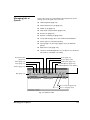
To view a queue, click a queue icon in the Input or Output
group with the left mouse button. A typical queue is shown in
Fig. 2-1.
Each queue contains three fields, one each for the job’s name,
name of the application that generated it (Creator) and the file
size.
With the queue open, you can manipulate and get details about
jobs using the Toolbar. The functions on the toolbar are also
provided in the Queue and Document menus.
You can move and resize the queue to view a large number of
files at one time. The number of files in the queue is shown at
the lower left of the window.
Menu bar
Toolbar
Column Titles
Documents in Queue
Status line
Fig. 2-1. Typical queue
2-2
Viewing Jobs in Queues
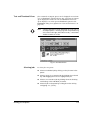
Text and Thumbnail Views
Jobs contained in Output queues can be displayed in text form
or as a “thumbnail” sketch with text. Fig. 2-2 shows an Output
queue displayed in both text view and thumbnail view. The
queue display is set in the Queue Thumbnails option in the
Preferences dialog box (explained in “General Preferences” on
page 3-2).
Note
A Queue Thumbnail can be displayed only if the job is in
an Output queue or Tracking Log and was printed using
SmoothTone Full Page, either Mural mode, or PressMate
Traditional Halftone mode.
Fig. 2-2. Thumbnail View
Selecting Jobs
Viewing Jobs in Queues
To select jobs in a queue:
◆
Select an individual job by clicking on the job name in the
queue.
◆
Select a group of consecutive jobs by holding down the Alt
key and dragging the mouse to highlight the jobs.
◆
Select non-consecutive jobs by holding down the Shift key
and clicking on the individual job names.
◆
Select all jobs in the queue by holding down the Ctrl key
and typing A or / (slash).
2-3
Hiding Queues
2-4
To close a print queue dialog box:
◆
Click the Hide button on the Toolbar, or
◆
Pull down the Queue menu and select Hide from the menu,
or
◆
Click on the queue icon in System Control.
Viewing Jobs in Queues
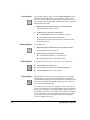
Managing Jobs in
Queues
You use the queue to get information about print jobs and to
manage jobs in the print server. You can:
◆
Hide the queue (page 2-4)
◆
Pause and resume a job (page 2-6)
◆
Delete a job (page 2-6)
◆
View the Document Details (page 2-24)
◆
Route a job (page 2-6)
◆
Preview of a RIPed job (page 2-10)
◆
Group and arrange jobs to save media with MediaSaver
◆
Select options for EPS/TIFF printing
◆
Move (page 2-11) and copy (page 2-12) a job between
queues
◆
Reprioritize a job (page 2-12)
◆
Use the Post-RIP Manipulation Tool to adjust colors in RIPed
jobs (refer to ColorMark+ User Guide)
Route (page 2-6)
Preview (page 2-10)
Media Saver (page 2-13)
Document Details
(page 2-24)
Delete (page 2-6)
EPS/TIFF Options (page 2-18)
Pause (page 2-6)
Post-RIP Manipulation (ColorMark+)
Resume (page 2-6)
Hide (page 2-4)
Move to Bottom (page 2-12)
Move to Top (page 2-12)
Fig. 2-3. Queue Toolbar
Managing Jobs in Queues
2-5
Pausing Jobs
You can pause any job unless it is in a Hold or RIP Saver queue.
The Pause and Resume buttons only appear in queues where
they can be used. When you pause a job, it will not move on to
the next step in its routing path. A paused job will not enter the
RIP and it will not print.
1. Open the queue contains the job you want to pause.
The Pause button will be yellow.
2. Select the job you want to pause, then:
◆
Click the Pause button on the queue’s Toolbar, or
◆
Select Pause from the Document menu
When paused, the Pause button turns off and the Resume
button turns green.
Resuming Jobs
To resume a job:
1. Open the queue contains the job you want to resume.
The Resume button will be green.
2. Select the job you want to resume, then:
Deleting Jobs
Routing Jobs
◆
Click the Resume button on the Toolbar, or
◆
Select Resume from the Document menu
To delete a job from a queue, select one or more jobs, then:
◆
Press Delete on the keyboard, or
◆
Pull down the Document menu and select Delete, or
◆
Click the Delete button on the Toolbar.
Each print job processed by the ColorSpan print server enters
through the port you specify and then follows a path called a
route through the print server to the printer. You select the route
that your file will take through the printing process either by
port or by individual print job.
You send a print job from your computer to the server. Fig. 2-4
shows how a typical job is routed through the system. Inside the
print server, the job passes through an Input queue and then to
the RIP where it is processed. It then travels through an Output
queue and finally to an output device connected to the print
server. You can also store a completed job back to the print
server (in a RIP Saver queue).
2-6
Managing Jobs in Queues
Input
Queue
Macintosh
RIP
Output
Queue
Ports
Output Device
PC
ColorSpan print server
Fig. 2-4. Typical print job route
Job routing support varies by queue. For example, you cannot
change the routing for a job in the Job Log queue, since the job
has already completed its path. Or, once a job is spooled to an
input port, you cannot route it to a different type of printer.
If you have more than one queue open when you route a job,
only the queue containing the job you are routing remains visible. All other queues are automatically hidden.
Managing Jobs in Queues
2-7
Direct Printing (Macintosh Only)
In Direct printing, jobs bypass the spooler and go directly to the
RIP. The job is processed and sent to an Output queue. You can
route jobs to the Direct queue only from AppleTalk ports.
A job sent to Direct has a higher priority than any other print
job waiting in any other queue. Use Direct only for applications
that require a bidirectional channel to the print server’s processor in order to print correctly.
To use the Direct printing feature:
1. Wait for the RIP to finish processing any spooled jobs.
2. Route an AppleTalk port to the Direct input queue.
It takes about 10 seconds for the icon to indicate that the connection is made.
The port is now configured for Direct printing. To reconfigure
for spooled printing, reroute the port to another Input queue.
Macintosh
NO
SPOOLING
RIP
Output
Queue
Output Device
ColorSpan print server
Fig. 2-5. Route of a Direct print job
Direct Printing Tips
Here are some things you should be aware of when you use
Direct printing.
2-8
◆
Only AppleTalk ports can be routed for Direct printing.
◆
During Direct connection, the software application on your
computer from which you are printing is not free for other
work.
◆
While a Direct job is being processed in the RIP, any jobs you
send are spooled but do not appear in any Input queue.
Managing Jobs in Queues
When the Direct job is done RIPing, the next job enters the
RIP and all other jobs appear in the Input queues to which
they were routed.
Managing Jobs in Queues
◆
No other jobs can be processed on the server when a Direct
job is being processed by the RIP.
◆
When you send a job to print through the Direct input
queue, the Port icon from which the job was sent will remain
green until the job is completely processed by the RIP, its
Preview created (if applicable), and it reaches the Output
queue.
◆
Although a Direct job takes priority over any other jobs waiting in a queue, a Direct connection from your computer to
the server is not continuous. A queued job will print before
you can reconnect your computer to the port and send a second Direct job. Be sure to wait for the RIP to finish processing any job before sending another Direct job. If you want to
print several Direct jobs in a row, move or route all lower priority jobs to a Hold Queue or pause the Input queue.
◆
When a print job is sent through the Direct input queue, the
RIP displays the amount of data it has processed, in kilobytes (KB) and then megabytes (MB), beneath the RIP icon.
2-9
Previewing Jobs
A job preview image is created by the RIP. It allows you to verify
that fonts, colors, and positioning are accurate before you print.
You can preview SmoothTone mode jobs that are in Output
queues or RIP Saver queues.
The media is shown as white paper on a black background. The
black area surrounding the preview image does not print.
A job preview image is a color-corrected image of a job as RIPed
by the print server. The image is color corrected by ColorMark
for the monitor as well as the printer, so the colors are accurate
within the monitor's ability to reproduce them.
To Preview a print job, select the job in a queue and then either:
◆
Click the Preview button in the queue’s Toolbar, or
◆
Select Preview from the Document menu.
To exit the Preview screen, click the mouse, or press the space
bar.
Preview Tips
2-10
◆
To preview a job before it starts printing, route the job to the
Hold queue first. If you preview jobs frequently before printing, set up an Input port routed to the Output Hold queue
specifically for this purpose.
◆
A preview can take up to 10 minutes to create on a heavily
loaded system, particularly if you are printing to multiple
devices. If you routinely view previews, you can save time by
setting a General Preference to automatically create a preview for every job after the job is RIPed. See “Full Screen Preview” on page 3-4 for instructions.
◆
You cannot zoom in, zoom out, or scroll the preview image.
◆
You can use Page Up or Page Down to view a multipage job.
The server beeps when you press the Page Up or Down key
and you have reached either the first or last page the job.
◆
When an application creates separations and sends individual color planes to the server, the preview shows each plane
in gray tones. This is how jobs are sent in an ICC workflow
(ColorMark+ users only).
Managing Jobs in Queues
Moving Jobs Between
Queues
Any job can be moved to another queue within the same group,
regardless of its position in the queue. You can move jobs:
◆
From one Input queue to another Input queue (such as from
Standard to Priority).
◆
From one Output queue to another Output queue (such as
from Hold to Standard).
◆
From one RIP Saver queue to another RIP Saver or Output
queue (to print a RIP Saved job).
◆
From the Attention queue to an Input queue or Output
queue (you must correct the Attention condition first).
Note
You cannot manipulate multipage jobs in an Output
queue until all pages are completely processed by the
RIP. A multipage job has only one entry in an Output or
RIP Saver queue.
To move jobs from one queue to another, select the job(s) you
want to move and either:
◆
Hold down the mouse button and drag the file into the new
queue window or on top of the queue icon, or
◆
Select Move to Queue from the Document menu, then select
the applicable queue from the menu.
Fig. 2-6. Moving a document to a different queue
Managing Jobs in Queues
2-11
To Copy Jobs Between
Queues
You can copy jobs:
◆
From one RIP Saver queue to another RIP Saver queue
◆
From a RIP Saver queue to an Output queue
◆
Between two Output queues (for example, from Hold to
Standard)
◆
Between two Input Queues
To copy a job, open a queue and select one or more jobs, then
either:
Prioritizing Jobs
◆
Press and hold the Ctrl key, and drag the job to another
queue.
◆
Select Copy to Queue from the Document menu.
Unless you change the priority of a job by moving it to another
queue, the server sends the job listed at the top of a Priority or
Standard queue first.
When several jobs are in a queue, you can prioritize them by
selecting one and changing its position inside the queue.
To change a job’s priority within a queue, click on it to select it,
then:
2-12
◆
Click the Move to Top or Move to Bottom button icons on
the Toolbar, or
◆
Pull down the Document menu and select either Top or
Bottom.
Managing Jobs in Queues
MediaSaver
MediaSaver enables you to combine and position documents to
use as much printable area of the media as possible.
With MediaSaver, you can group small jobs together to conserve
media, or package a set of documents to print as a single job. You
can combine multiple copies of a single job and even other
MediaSaver jobs for a total print job of up to 1000 pages.
You can create MediaSaver jobs only in RIP Saver queues, but
you can view or edit MediaSaver jobs in any Output queue.
MediaSaver is not available in the Tracking Log or Input queues.
MediaSaver is designed for groups of different documents. If
you print multiple copies of a single document across the page,
you can use the N-UP function, found in the Document Details
dialog box.
(MediaSaver is not available for color copier or PressMate-FS
output.)
Printing a MediaSaver job consists of four parts:
◆
RIP each document and route it to a RIP Saver queue.
◆
Package two or more documents together.
◆
Arrange the documents to conserve media or meet other
requirements.
◆
Print the MediaSaver job.
To create a MediaSaver job:
1. RIP each job using the TRUMATCH Color Space option and
route it to a RIP Saver queue.
You can combine jobs RIPed with different image quality
modes to create a new MediaSaver job. You can mix and
match any of the SmoothTone or Mural Modes. However, all
DisplayMaker Express jobs must be RIPed in the same print
mode: all High Quality or all Standard (High Speed).
2. After all of the documents have been RIPed, open the RIP
Saver queue that contains the documents to be packaged.
3. Select the documents to be packaged.
Hold down the Shift key and click each job you want to
include in the package.
MediaSaver
2-13
4. Click the MediaSaver button to package the selected documents into a MediaSaver job.
The MediaSaver dialog box appears as shown in Fig. 2-7. The
documents you packaged appear in a default output
arrangement on an image of the media.
Fig. 2-7. MediaSaver dialog box
2-14
MediaSaver
5. Arrange the documents as desired.
Click and drag the image of each document to a new location as shown in Fig. 2-8. You can enlarge the MediaSaver
window to reveal a scrap area, which you can use to hold
images indefinitely. The length of the media image automatically resizes to accommodate your new arrangement.
Documents cannot be overlapped or rotated in the media
image area.
Use these controls to help you position the images:
MediaSaver
◆
Gutter width - Select this option from the Layout menu
to specify the minimum space you want between documents when using Guided positioning. The default gutter is 0.5 inch (12.7 mm). The margin used on the right
and left sides of the media will vary with the printer
model used, but is displayed near the top of the
MediaSaver dialog box.
◆
Adjustable width - you can adjust the width of the
MediaSaver job by dragging its individual images to the
right or left. The area that will be printed is shown with
a white background ➊.
◆
Maximum width - the Layout menu has a Maximum
Width option, which allows you to set a maximum
media width. This width is shown in black ➋.
◆
Guided positioning - When you arrange documents in
this mode, blue lines are shown to indicate gutter
boundaries. Documents are not “snapped” to a grid pattern (as in a page layout application), but when you
drag a document image close to another document, it is
“pulled” precisely to the gutter width. This provides a
consistent space between documents for trimming.
◆
Page scrolling - To scroll the image up or down, hold
down the left mouse button over any blank area of the
image, and drag it up or down.
◆
Delete sub pages - you can delete any component page
from the MediaSaver job by holding the mouse cursor
over it and clicking the right mouse button. This displays a context menu with a Delete option. To delete the
page, click the Delete option.
◆
Auto Arrange - select this option from the Layout menu
to reposition the pages in a default arrangement.
2-15
When the arrangement meets your needs (or if the default
arrangement is satisfactory) proceed to Step 6.
➊
➋
Fig. 2-8. Arranging a MediaSaver job
6. Type a name for the MediaSaver job.
The default name is “MediaSaver”. You can change the name
to any other name if you wish. This name will be displayed
in the Document Details dialog box and in the queue.
7. To save your new arrangement, select Save & Exit from the
File menu.
The queue dialog box reappears, with the MediaSaver job
selected. MediaSaver jobs are identified in queues by the
MediaSaver icon, rather than a thumbnail image.
To exit the MediaSaver dialog box without saving your
changes, select Exit.
2-16
MediaSaver
8. Print the MediaSaver job.
Click and hold the left mouse button on the MediaSaver job
listing in the queue, and drag it to the Output Standard or
Output Priority queue.
To reopen a MediaSaver job for viewing or editing:
1. Highlight the MediaSaver job in an Output queue.
2. Click the MediaSaver button.
You can manipulate a MediaSaver job as you would an individual document. You can:
MediaSaver
◆
Copy it to a different Output queue for printing
◆
Save it to an external disk drive
◆
Package it together with another MediaSaver job
Note
Moving a MediaSaver job to a removable disk copies the
MediaSaver job and all associated files to the disk. You
cannot use System Control while the copy is in progress.
A MediaSaver job can be hundreds of megabytes in size.
Note
MediaSaver jobs are not compatible with the Color
Adjustment Tool component of ColorMark+. Specifically,
documents that are packaged into a MediaSaver job lose
any color adjustments that were made using the Color
Adjustment Tool. The Color Adjustment Tool has no effect
on MediaSaver jobs.
2-17
EPS/TIFF Printing
When you download Encapsulated PostScript (EPS) and supported bitmap files (TIFF and JPEG formats) using the ColorSpan
Downloader Utility, or from the server using the DiskDirect
port, you can specify how you want the image to be resized or
scaled.
You can choose an EPS/TIFF print mode in the Port Configuration dialog box (for all jobs entering the port) and the Document Details dialog box (for a specific print job).
The following modes are available:
◆
Automatic
◆
Manual
Original / Printed
Sample Images
Mode
Automatic Modes:
Best Fit - scales the image to fit as much of the
selected media size as possible. The image is
automatically rotated if necessary for the best fit.
Horizontal Fit - scales the image to fit the width
of the selected media size. Any image area
scaled beyond the vertical dimension of the
media size is clipped.
Vertical Fit - scales the image to fit the height of
the selected media size. Any image area scaled
beyond the horizontal dimension of the media
size is clipped.
Stretch Fit - scales the image in the horizontal
and vertical dimensions to fit the entire area of
the selected media size, without regard to aspect
ratio.
No Change - prints the image at its original size
and orientation, and snaps the page size to the
image size (without regard to the default media
size selected).
Manual Mode:
Manual Mode allows you to interactively crop,
tile, scale, flip, and rotate the file before it
reaches the RIP.
All automatic modes except Stretch Fit preserve the original
aspect ratio of the image. You can see how the image will look
before printing by checking its Preview in the Output queue.
2-18
EPS/TIFF Printing
Selecting an EPS/TIFF
Option
To select an EPS/TIFF printing option:
1. Select an EPS/TIFF printing option in a Port Configuration
dialog box or Document Details dialog box of a print job in
an Input queue.
To apply the option to all EPS and bitmap jobs received by
the server at a port, select the option in the Port Configuration dialog box.
To apply the option to an individual job, route the job to the
Input Hold queue or paused Input queue, and select option
in the job’s Document Details dialog box.
2. Send an EPS or bitmap file to the print server.
Download an EPS or supported bitmap file from a client
Macintosh or Windows PC using the ColorSpan Downloader
Utility, or use the DiskDirect port to enqueue a supported
file from an external disk drive (or CD-ROM drive).
◆
If the Input port is set to an Automatic EPS mode, the
EPS file proceeds to the RIP and is printed according to
its route.
◆
If the Input port is set to Manual EPS mode, the EPS file
proceeds to the Attention queue. Go to the following
steps to manually specify the print options.
3. Open the Attention queue.
4. Select the EPS or bitmap job in the Attention queue.
5. Click the EPS/TIFF Manual button.
This opens the EPS/TIFF Manual options dialog box and displays the Cropping tab.
If the EPS button is not visible, click the job information
button to display the Document Details dialog box. Then
select Manual from the list of EPS options.
EPS/TIFF Printing
2-19
Fig. 2-9. Cropping tab
6. Specify cropping settings.
2-20
◆
Bounding Box - this is the original size of the image as
specified in the EPS file. Files printed with the “No
Change” setting are output at this size.
◆
Crop Box - to resize the crop area, use the mouse to drag
the handles of the crop box, shown in dotted lines. To
reposition the crop area, use the mouse to drag the
entire box. You can also enter the numeric left and bottom origins, and height and width of the crop area.
EPS/TIFF Printing
Fig. 2-10. Tiling & Scaling tab
7. Click the Tiling & Scaling tab to specify tiling and scaling
settings.
EPS/TIFF Printing
◆
Tiles - The number of rows and columns is automatically
updated when you resize (scale) the image.
◆
Composite Box (scaling) - to resize the image, use the
mouse to drag the handles of the image. When you
resize the image past the edge of the current paper size,
the image is automatically positioned on a field of tiles.
You can also reposition the image relative to the tiles by
dragging it with the mouse. Alternatively, you can specify numeric left and bottom origins, and height and
width.
◆
Flip - to flip (mirror) the image, check the Horizontal or
Vertical checkbox. This is convenient when printing on
reverse-print backlit media.
◆
Rotation - select the number of degrees to rotate: 0, 90,
180, or 270.
2-21
2-22
◆
Overlapping Area - specify the amount of overlap for
each tile, numerically or with the slider control.
◆
Keep Aspect Ratio - enable (check) to resize without
changing the aspect ratio, disable (uncheck) to resize
height or width without regard to aspect ratio.
◆
Snap Page to Image - automatically sets the page size to
the same size as the image, as defined in the Composite
Box field and shown in the preview image.
EPS/TIFF Printing
Fig. 2-11. Options tab
8. Click the Options tab to specify options.
◆
Measurement Units - select dots (pixels), inches, or millimeters.
◆
Paper Size - select a paper size for the print or, if tiled,
size for each tile.
9. To save your changes if you typed in numerical values in
the Paper Size field, press the Enter key on the print server
keyboard. Otherwise, click the Save button.
The changes you make on the Options tab are applied
immediately. The changes you make on the other tabs are
applied only when you click the Save button (or press the
Enter key). To discard your changes to the Cropping or Tiling & Scaling tab, click Cancel.
EPS/TIFF Printing
2-23
Setting Document
Details
Document Details such as image quality or media type are
assigned to a document when you:
◆
Print it to the server from your computer.
◆
Download a supported file type using the ColorSpan Downloader Utility.
You can specify these settings from the application at print time,
at the Input port, or for an individual job.
Document Details assigned from the application by a printer
driver and embedded in a print job always take precedence and
override default port settings. Refer to the Printing Tools User
Guide for further information about printing files from the
Macintosh or Windows PC.
The server automatically assigns the default Document Details
for the port where it entered the print server if you download
files or print to the server using a PostScript printer driver other
than the ones supplied by ColorSpan, or download a print file
that does not include Document Details. See “Adding and Configuring Ports” on page 1-20 for further information about
ports.
You can view a job’s settings from the queue list in the Document Details dialog box. With the queue open:
2-24
◆
Double-click the job in the queue, or
◆
Select the job and then click the Information button on the
Toolbar, or
◆
Select the job and then select Information from the Document menu within the queue
Setting Document Details
When you select Information, the Document Details dialog box
appears (see Fig. 2-12).
Fig. 2-12. Document Details dialog box
See your printer’s Print Server & Driver Setup Guide for a detailed
description of the options in this dialog box.
You can change some of the settings in the Document Details
dialog box, depending on which queue the job is in. Not all of
the options shown in Fig. 2-12 are available for every job. The
options displayed depend on the type of printer, where in the
process you look at this information, and whether or not any
problems were encountered during processing.
You can change any setting for a job in an Input queue, since it
has not yet been processed. For jobs residing in any post-RIP
queue (Output, printer, RIP Saver) you can change only the
number of Copies, Comments, and Media settings.
Setting Document Details
2-25
RIP Saver
RIP Saver Temporary vs.
Permanent
The ColorSpan RIP Saver® feature allows you to save processed
files for later printing. This saves a significant amount of time,
since you can reprint the file without RIPing it. You can save
RIPed files to both internal and external hard disks. To increase
the size and number of RIPed files you can save, add more hard
disk space by connecting external disk drives (see page 2-28 for
more information about external devices).
When you print to a port that is routed to a RIP Saver queue, the
server saves the file to its internal hard disk, or the first available
external disk with sufficient space.
System Control deletes files in the RIP Saver Temporary queue
(beginning with the oldest file first) when:
◆
There is insufficient hard disk space to save the file, or
◆
More hard disk space is needed for spooling or processing.
System Control does not notify you when it deletes files from the
RIP Saver Temporary queue, but deleted files are noted in the
Tracking Log as “Removed RIP Saver.”
If enough files are saved to the RIP Saver Permanent queue that
there is insufficient hard disk space to save a currently printing
file, the system will try one of three approaches:
◆
First it will attempt to delete the files in the RIP Saver Temporary queue.
◆
If there is still insufficient space, the system will wait until
after printing is completed to attempt to save the file.
◆
After printing is completed, if there is still not enough room,
a dialog box appears advising you that there is insufficient
space to save the file and gives you the option to Retry the
save or Cancel. You can delete and move files from the RIP
Saver queues before selecting Retry or Cancel to make room
for the current one.
To avoid the inconvenience of reRIPing jobs, keep an eye on the
disk free space bar on the bottom of the System Control screen.
It is there to warn you of low disk space situations. If you continually run out of disk space, consider adding an external SCSI
disk drive.
Note
2-26
A minimum of 150 MB of internal hard disk space is
needed to RIP any job. However, some jobs might
require more hard disk space.
RIP Saver
Saving a RIP File
Use one of the following methods to save a job to a RIP Saver
queue:
◆
Route a port to send all files that come through it to a RIP
Saver queue.
◆
Route a document so that it goes to a RIP Saver queue.
◆
Drag the file from an Output queue to a RIP Saver queue.
For more information about routing, see “Routing Jobs” on page
2-6.
Note
When a document resides in a RIP Saver queue, you can
only change comments and number of copies, or change
the media (if the file was RIPed in SmoothTone Full Page
or Mural modes).
Printing a RIP Saver File
To print a document from a RIP Saver queue, select and drag it
to the desired Output queue. Remember that you can only print
the document on the type of printer for which it was processed.
Archiving RIP Saver Files
To archive a document from a RIP Saver queue, select and drag it
to an external device. For more information about external disk
drives, see the section “External Disk Drives” on page 2-28.
RIP Saver
2-27
External Disk Drives
The ColorSpan print servers support an optional SCSI interface
port for fixed disk, Iomega Jaz, Iomega Zip, and magneto-optical
drives. These drives may be used for DiskDirect, RIP Saver, or
both as described below. (CD-ROM drives can also support
DiskDirect, but not RIP Saver.) Consult ColorSpan Technical
Support for specific manufacturers and models that are
supported.
For installation details, refer to the Quick Start Guide that
accompanies your ColorSpan print server.
DiskDirect
When the print server software detects any external disk drive, it
makes the drive available when you click the DiskDirect port
icon in the System Control interface. Any supported file type
stored on this drive can be enqueued via DiskDirect. See “DiskDirect Printing” on page 3-11 for further information.
RIP Saver
When the print server software detects an external disk that has
been properly initialized as a RIP Saver drive, it appears in the
System Control interface as a RIP Saver Output queue icon,
identified with its SCSI ID number. The disk is also available
when you click the DiskDirect port icon in the System Control
interface. Any supported file type stored on this drive can be
enqueued via DiskDirect, and the disk may be included in a
print job route as a RIP Saver queue.
Storing many RIP Saver files or fonts can quickly fill the print
server’s internal hard disk. To maintain free space on the print
server for processing jobs, it is a good idea to store RIP Saver files
to an external disk drive. Free space on a external fixed disk
drive is also used by the server as additional PostScript processing memory.
Once installed, an initialized external disk drive appears in System Control as a new RIP Saver output queue. A removable drive
appears as an empty output queue until you insert an initialized
disk into the drive.
You can route jobs to the disks, where they are saved as RIP Saver
files. Fixed and removable disks initialized by the server can be
exchanged on a single server or moved between multiple server
units.
2-28
External Disk Drives
To Initialize an Existing
External Disk
Initializing a disk deletes all existing data on the disk, formats it
to work with the ColorSpan print server, and writes a ColorSpan
ID number so it will be recognized by any ColorSpan print
server.
To initialize a new SCSI disk, see page 2-30.
Caution
Initializing an existing disk (fixed or removable)
removes all data from the disk. Make sure you do not
have any important information stored on the disk
before you initialize it.
To initialize an existing external disk:
1. If you are initializing a removable disk, insert the disk into
the drive. Make sure the disk appears in System Control.
2. Click and hold either mouse button to display the disk icon
menu for the disk you wish to initialize.
3. Select Initialize.
A dialog box appears asking you to confirm that you want to
initialize the drive. Initializing the drive will delete all data
on the drive. You will not be able to recover (or “undelete”)
this data after the drive is initialized.
4. If you are sure that you want to initialize the drive, type
the drive name exactly as it appears in the dialog box.
5. Click OK.
System Control formats the disk and writes a special server
identifier on the disk. This enables the server to recognize
the disk if it is ever reconnected to the same (or a different)
server.
After initialization is complete, the Configure Rip Saver
Drive dialog appears.
6. Type in the name you want to assign to the disk.
7. Click OK.
8. Follow the instructions on the screen to restart the print
server using the System Menu.
After formatting is complete, the drive appears in the System
Control display as a new output queue.
External Disk Drives
2-29
To Initialize a New
External Disk
Make sure the disk drive is connected, the ID number is set, and
the server is turned on. After the system boots and detects the
new device, it displays a message asking whether you want the
new device configuration to be updated.
If you are initializing a removable disk, insert the disk into the
drive. The system will detect that it is a new disk.
Caution
Initializing a disk drive removes all data from the
disk. Make sure you do not have any important information stored on the disk before you initialize it.
1. Click OK in the message dialog box.
The system displays a message informing you that the disk
(fixed or removable) located at SCSI ID x is not recognized
as a server disk. (“x” is the ID number you assigned when
you installed the disk). It asks whether you want to initialize
the disk, and informs you that all data on the disk will be
lost.
2. Click OK.
The system asks you to confirm that you want to initialize
the disk, since any data on the drive will be lost. Make sure
that the disk does not contain any important data. Once the
disk is initialized, any data that existed cannot be recovered.
3. Click OK.
The system asks you to wait while the system reboots.
4. Click OK.
After the system boots, it formats the new disk and writes a
special server identifier on the disk. This enables the print
server to recognize the disk if it is ever installed in or on
another server. After formatting is complete, the new disk
appears in the System Control display as a new output
queue.
◆
A fixed disk will be identified with a default name of
“SCSI x” (where x is the ID number assigned).
◆
A removable disk will be identified with the name you
gave it during initialization.
5. Restart the server, using the Restart option on the System
menu.
This updates the Working Space bar graph at the bottom of
the System Control display to include space from any new
external disks.
2-30
External Disk Drives
To Configure an External
Disk
To configure an external disk drive:
1. Click and hold either mouse button on the drive icon.
2. Select Configure from the icon menu.
The following dialog box is displayed:
Fig. 2-13. SCSI Configuration Dialog Box
3. Type a name for the drive.
The default is “SCSI ID x”, where x is the device's SCSI ID
number assigned when you connected the drive. You can
change the name to any other name if you wish, System
Control will append the name you give the drive to the
name RIP Saver.
4. Click OK.
External Disk Drives
2-31
Using Removable Disks
The ColorSpan print server supports magneto-optical, Iomega
Zip (SCSI interface), and Iomega Jaz removable disk drives as RIP
Saver queues.
To store files on a removable disk, you will need to load a RIP
Saver-formatted disk into the drive. System Control will detect
unformatted disks and format (or initialize) them if you choose.
You can remove formatted disks and load them again later when
you want to reprint existing files or store more files to the disk.
Empty
Removable
Drive
When a formatted disk is loaded into the removable drive the
icon in System Control appears as a normal RIP Saver queue.
The disk name is appended to RIP Saver. Numbers under the
icon indicate how many RIP Saver files are stored on the disk.
To use a removable disk for saving RIP files:
1. Insert the disk into the drive.
Removable
Drive with
formatted disk
loaded
2. Select Load from the drive icon menu, or click on the icon.
If the disk is not formatted for saving RIP files, System
Control displays a message asking if you would like to initialize the disk.
Note
It will take several minutes to initialize the disk, depending on disk size, during which time you cannot use System Control.
After initialization, the Configure RIP Saver Drive dialog
box appears. If you are initializing the disk, type in a name
for the disk and click OK.
When a formatted disk is loaded, the icon changes to a typical output queue with the disk name appended to RIP Saver.
3. To eject a removable disk from the drive, select Unload
from the drive icon menu.
When a disk is loaded, the manual eject button on the drive
is inoperable. You must use the Unload command in System
Control to eject the disk.
2-32
External Disk Drives
When using removable disks, keep in mind the following:
External Disk Drives
◆
The removable disk drive must be a SCSI device.
◆
The parallel port version of the Iomega Zip drive is not supported by the server.
◆
If you insert a write-protected disk, System Control will eject
the disk and display a message asking you to set the writeprotect switch to the other position.
◆
If you insert an unformatted or a non-RIP Saver-formatted
disk, System Control will ask if you want it initialized and will
initialize it if you select Yes. If you choose not to initialize a
disk, System Control will eject it from the drive.
◆
Once a disk is initialized for RIP Saver use, you can continue
to save files to it, even after unloading and loading it back
into the drive (as long as enough disk space remains).
◆
To check the amount of memory left on the disk, load the
disk into the drive and open the RIP Saver queue by clicking
on the icon. A bar graph appears at the bottom of the queue
indicating the amount of disk space used and the amount
remaining.
◆
When a removable disk is in use, the drive is locked. You cannot unload the disk mechanically or through System Control
until the disk is no longer in use.
2-33
2-34
External Disk Drives
Context-sensitive Online Help is
always available, no matter which
part of System Control you are
viewing.
Simply click the Help button.
If no button is visible,
◆
Press F1
◆
Or select the Help menu
CHAPTER 3
Managing the Print Server
This chapter explains additional functions of System Control:
Managing the Print Server
◆
Setting System Preferences (page 3-2)
◆
Media Usage (page 3-7)
◆
Viewing and Deleting Fonts (page 3-8)
◆
Tracking Log (page 3-10)
◆
DiskDirect Printing (page 3-11)
◆
Attention Queues (page 3-13)
◆
The Help Menu (page 3-16)
3-1
Setting System
Preferences
Setting Preferences
You can control the appearance of the System Control interface,
and whether previews are created automatically at RIP time or
on-demand after RIPing.
To set System Control Preferences:
1. Display the Preferences menu.
2. Select one of the following options:
◆
General (see page 3-2)
◆
Color (see page 3-6)
◆
Screen Saver (see page 3-6)
◆
Keyboard (see page 3-6)
◆
Date/Time (see page 3-6)
◆
Export System Log (see page 3-6)
3. Change one or more Preferences settings.
4. Click OK to save your changes.
5. Click Cancel to keep the Preferences as they are.
General Preferences
3-2
To set the System Control Preferences, select General from the
Preferences menu.
Setting System Preferences
The following dialog box appears:
Fig. 3-1. System Control Preferences
You can set the options described below. When the box next to
an option is checked, that option is enabled. When the box is
empty, it is disabled.
Confirm
System Control displays messages that ask you to confirm some
actions before they are executed by the print server. These
actions include:
Setting System Preferences
◆
Deletions — deleting files with the Document menu or the
Toolbar.
◆
Moves and Copies — dragging and dropping a job from one
queue to another with the mouse (but not using the Document menu).
3-3
When a confirmation message appears, you can either execute
the command, or cancel it. If you do not want to see these messages, uncheck the Deletions and Moves and Copies boxes.
Show
By default, System Control enables all items in this category.
◆
Drive Usage — When enabled, the amount of disk space
available on all hard disks (internal drive plus any external
drives) is indicated by a bar graph at the bottom of the System Control screen. The red portion represents the amount
of disk space in use. The green portion represents the
amount of free space and is also shown as a percentage of
the total disk space.
◆
Queue Menu Bar — When enabled, the menu bar is
displayed at the top of the queue dialog box. All menu
options are also available in the toolbar, so you may prefer to
disable (hide) the menu bar.
◆
Queue Column Titles — You can set this so that a queue in
text view will display the column titles: Document Name,
Creator, and Size.
◆
Queue Status Lines — You can turn on the status line at the
bottom of the queue dialog box that indicates the total number of files and the number of files selected in the queue.
◆
Queue Thumbnails — When enabled, a Thumbnail image
appears in output queues and the job log for Mural Bigger,
Mural Better, and SmoothTone Full Page jobs, and
PressMate-FS halftone mode jobs. The Queue Thumbnail
image is generated during the RIP process.
Full Screen Preview
The System Control default setting is to create previews only
when Preview is selected in the output queue document details
box. This is referred to as Create on Demand. The RIP time
required to create a preview depends on the page size and the
extent of current system activity. If you only occasionally need a
preview, keep this default setting. It will require several minutes
to create the Preview image on demand, but it will take less time
to RIP all jobs.
3-4
Setting System Preferences
You can set the default so that System Control automatically creates previews for all jobs during processing. You will notice a slow
down in performance if the RIP is creating previews for all jobs.
Check Disk
Check Disk normally runs whenever you boot the print server.
You can disable this function here.
Setting System Preferences
3-5
Other System Preferences
You can further customize your desktop using these options in
the Preferences menu:
◆
Color - allows you to set the color scheme for the System
Control interface.
◆
Screen Saver - allows you to enable or disable the System
Control screen saver. (When the screen saver is enabled,
print jobs may take longer to RIP.)
◆
Keyboard - allows you to select a language mapping layout
for the keyboard.
◆
Mouse - allows you to select mouse settings.
◆
Date/Time - allows you to set the system date and time.
◆
Language - allows you to select the language for the System
Control interface.
◆
Operating System Settings - provides access to operating
system settings, for troubleshooting purposes. Consult
ColorSpan Technical Support before altering these settings.
◆
3-6
◆
Display
◆
Network
◆
Devices
◆
Services
Export System Log - writes a log of system activity to a
floppy disk in the print server's disk drive. ColorSpan Technical Support can use this log to help diagnose system problems. Simply click this option and insert a DOS-formatted,
writable diskette into the server diskette drive. System Control automatically copies the log to the diskette.
Setting System Preferences
Media Usage
Media Usage displays the total amount of media used by a
printer since it shipped from the factory.
To display media usage:
1. Select Media Usage... from the System menu.
2. Click on the printer for which you want to display the
amount of media used.
The amount of media for each paper size appears in the list
in the lower part of the dialog box, shown in Fig. 3-2. Use
the scroll bar to scroll the list up and down if necessary.
If you have more that one printer of the same type, the
printer’s Ethernet ID is displayed.
3. Click OK to exit the dialog box.
Fig. 3-2. Media Usage dialog box
Media Usage
3-7
Viewing and Deleting
Fonts
You may want to delete fonts from the print server’s internal
hard disk to make more disk space available for other fonts or
RIP Saver files.
You cannot delete the Permanent fonts, which consist of
ColorSpan’s 100 fonts in DTC MasterWorks Volume 1, or the
standard PostScript 35 fonts. You can delete MasterWorks Volume III fonts and any User Defined fonts that you do not use.
To View Fonts
To view fonts that are available on the print server’s hard disk:
1.
Select Installed Fonts…from the System menu.
The following dialog box appears:
Fig. 3-3. Installed Fonts dialog box
2. Select which fonts to show:
3-8
◆
Permanent fonts (indicated by a padlock icon) are permanently stored on the print server’s hard disk. You can
click on Permanent to view the list of these fonts, but
you cannot delete them.
◆
User Defined fonts are stored either on the print server’s
internal hard disk or on external SCSI devices. Click on
User Defined to view a list of these fonts. These fonts can
be deleted.
◆
Click on Both to show both types of fonts. Each font is
identified as either Permanent or User Defined.
Viewing and Deleting Fonts
To Delete Fonts
To delete User Defined fonts:
1. Select Installed Fonts... from the System menu.
2. Click User Defined.
Note
Only User Defined fonts can be deleted; you cannot
delete fonts when either Permanent or Both is selected.
3. Select the font(s) you wish to delete.
◆
Select one or more fonts, or
◆
Click on Select All to delete all User Defined fonts.
4. Click Remove.
The selected fonts are deleted from the print server’s hard
disk. Repeat this procedure to delete other fonts.
To Add Fonts
Viewing and Deleting Fonts
To add fonts to the print server, use the ColorSpan Downloader
Utility included with your Printing Tools. Refer to your Printing
Tools User Guide for more information about downloading fonts.
3-9
Tracking Log
To View the Job Log
The Tracking Log queue keeps track of all jobs that have been
processed. You can use this information to assist with customer
billing and to determine what happened to jobs during their
route to the printer. You can also save the file onto a separate
disk for future reference.
To view the Job Log:
1. In the Tracking group, click on the Log icon.
A queue appears that contains a list of all jobs that have
been processed, with the most recent listed at the top. The
job disposition (whether it was printed, deleted, etc.) is
included in the queue.
This list may appear in text only format or it may include
queue thumbnail images, depending on the format specified
in the General Preferences dialog box.
2. Click on the name of the job you wish to view.
3. Click the information button or select information from
the Document menu.
The Document Details dialog box for the selected job
appears. See the Print Server & Driver Setup Guide for a
description of the options in this dialog box.
If the print server cannot process a job due to a PostScript
error, an entry is made in the Tracking Log with the disposition of PostScript error. Clicking the PS Output button in
the Document Details dialog box will display the PostScript
error.
To Export the Job Log
In addition to the standard queue functions, you can select one
or more documents, and export them (in ASCII format) to diskette for future reference or use with other application programs. You can use this information to assist with customer
billing and as your record of system activity. To export the Job
Log:
1. Insert a writable DOS (FAT) formatted disk into the print
server’s diskette drive.
2. In the Tracking group, click on the Log icon.
3. Select the logs that you want to export.
4. Select Export... from the Document menu.
5. After the system is finished copying the selected files,
remove the diskette from the drive.
3-10
Tracking Log
DiskDirect Printing
With ColorSpan’s DiskDirect feature, you can print a PostScript
or EPS, TIFF, or JPEG file from:
◆
The print server hard disk
◆
A removable disk formatted in a Windows-compatible format, in any of the following drives:
◆
An external disk drive (fixed or removable) attached to
the server
◆
The print server’s CD-ROM drive
◆
The print server’s diskette drive
The files you print must have a standard file name extension
that specifies the file’s format (.PS, .EPS, .TIF, or .JPG).
ColorSpan provides PostScript files on the print server’s internal
hard disk so that you can try DiskDirect printing to any of your
printers. The available files will vary, depending on which
printer the port is routed to. Some of the available files include:
◆
TRUMATCH Swatch Sheets - The print server supports TRUMATCH color matching, providing a predictable 4-color
matching system with more than 2,000 colors designed for a
set of Specification for Web Offset Publications (SWOP) inks.
◆
Calibration Steps - The file contains a flow chart of the calibration process. You can print this flowchart and refer to it
during calibration.
◆
Pre-Print Checklist - You can print and hang this poster near
the print server or remote workstation as a handy checklist
to ensure that you have completed all of the steps necessary
to print high quality output.
To print any of these files:
1. Make sure you have media loaded in the printer.
2. Click on the DiskDirect port icon in System Control.
DiskDirect Printing
3-11
The following dialog appears:
Fig. 3-4. DiskDirect Dialog Box
3. Click on Select Disk Drive or Internal Disk Drive.
A dialog box appears that lists the files available for the
printer designated by the DiskDirect port routing.
Note
If you plan to match TRUMATCH colors to DisplayMaker
Pro SmoothTone output, configure DiskDirect for Mural
Better to ensure accurate color matching. If you plan to
match the colors to halftone output, configure with Traditional Halftone.
4. Select the name of the file or files you want to print from
the list.
5. Click OK.
Note
3-12
For detailed information about EPS printing options, see
“EPS/TIFF Printing” on page 2-18.
DiskDirect Printing
Attention Queues
If a job encounters a problem, System Control moves it from its
routing path to an Attention queue. An Attention queue can
appear in either an Input or Output queue. The types of problems that result in a job being sent to an Attention queue can be
easily fixed and the job rerouted to the Input or Output queue.
If there are no jobs requiring attention, the Attention queue
icon is not displayed.
Input Attention Queue
An Attention queue will appear in the Input queue group under
these circumstances:
◆
A job is routed to a printer that does not exist.
◆
A job is routed to an external SCSI device that does not exist.
◆
A job is routed to a removable disk drive, but a disk is not
loaded or else it is busy.
◆
A job is an EPS/TIFF file with Manual mode selected.
To correct and print a job in the Input Attention queue:
1. Click on the Input Attention queue icon to display the
queue.
2. Note the disposition of the job.
See the online help or Appendix A for a description of the
job dispositions.
3. Correct the situation that caused the Attention.
If the job is an EPS/TIFF file sent in Manual mode, select the
job, then click the EPS/TIFF Manual button. See “EPS/TIFF
Printing” on page 2-18 for instructions.
4. Move the job to the Standard or Priority input queue.
Attention Queues
3-13
Output Attention Queue
An Attention queue will appear in the Output queue group
when a job can not be printed. Some common causes of jobs
routing to the output Attention queue are:
◆
Media Size Mismatch (the job was RIPed for a different size
media than is installed in the printer.)
◆
Media Mismatch
◆
No Media Installed
◆
External Disk Full
Other causes are listed in Appendix A and in the online help. To
correct and print a job in the Output Attention queue follow
these steps:
1. Click on the Attention queue icon to display the queue.
2. Note the disposition of the job.
3. Correct the situation that caused the Attention.
Suggestions for correcting media mismatches are given
below.
4. Move the job to the Standard or Priority output queue.
Media Mismatches
To correct media mismatches, first check to see how the job was
processed, and then follow these suggestions:
If the job was configured for SmoothTone Full Page or either
Mural mode, you can:
◆
Change the media type in the Document Details box to
match what is loaded in the printer, or
◆
Load a different media type or size in the printer and change
the printer configuration to agree with the media listed in
the Document Details box.
After making changes, move the job to the Standard or Priority
output queue.
If the job was configured for SmoothTone Image Only or Traditional Halftone, either delete the job and print it again with the
correct media settings, or:
◆
3-14
Load the same media type or size in the printer as that specified in the Document Details dialog box.
Attention Queues
◆
Change the printer configuration to agree.
In these modes, you cannot change the media selection or size
in the Document Details dialog box after the job is RIPed.
After making changes, move the job to another Standard or Priority output queue.
Media Size Mismatch Override
You can override the Media Mismatch error for jobs sent to the
DisplayMaker Series XII, DisplayMaker Esprit, DisplayMaker
FabriJet XII, and DisplayMaker HiRes 8-Color Series printers.
When you override the error, the excess image width is clipped
(not printed) from the right edge of the image. This allows you
to print a file with a custom page size slightly over the maximum print width, without revising and reprinting the application file or loading wider media in the printer.
For further information, see the Print Server & Driver Setup Guide
for these two printers.
Attention Queues
3-15
The Help Menu
The Help menu provides access to useful information about the
on-line help system and about the print server.
◆
Contents — Displays the main Contents page of System
Control’s Online Help.
◆
How To Use Help — Shows you how to find, display, and
print Help topics.
◆
Configuration — Displays help topics related to configuring
System Control.
◆
Preferences — Displays a Help topic that explains how to
configure Preferences for System Control.
◆
Print Queues — Displays help topics related to using System
Control’s print queues.
◆
Tip of the Day — Displays a series of short tips that can
make using System Control easier and more efficient. The
Tip of the Day is usually set to display automatically once a
day. You can optionally disable this automatic display, or display them as desired by selecting this menu option.
◆
About print server — Shows you the version number of and
copyright information for the System Control, ColorMark
CMS, ColorMark+, and embedded printer software (see Fig.
3-5. on page 3-17).
In addition to this Help Menu, context-sensitive online Help is
always available, no matter which part of System Control you are
viewing. Simply click the Help button in the dialog box.
If no button is visible,
3-16
◆
Press F1
◆
Or select the Help menu
The Help Menu
Print Server Software version
ColorMark+ version
ColorMark CMS version
Ethernet address
Embedded software version
Fig. 3-5. About box
The Help Menu
3-17
3-18
The Help Menu
APPENDIX A
Troubleshooting
This appendix explains some conditions that may cause the ColorSpan
print server to work incorrectly and provides information about how to
correct problems.
See the Macintosh Printing Tools User Guide, PC Printing Tools User Guide,
or the specific output device documentation for other troubleshooting
procedures.
Troubleshooting
A-1
Diagnostics
Before seeking solutions to specific problems, run the server
Diagnostics application that ships on diskette with the print
server.
The server Diagnostics enable you to communicate detailed
troubleshooting information about the print server to
ColorSpan Technical Support. You can relay this information
verbally over the phone, or via a saved diagnostic report on diskette.
This application can detect problems with hardware, such as
serial port problems, memory problems, video card problems,
hard disk problems, and incorrect configurations.
If the server does not pass all of these tests, call ColorSpan Technical Support.
To run the diagnostics tests:
1. Select Shutdown from the System Control System menu.
2. When the software shut down is complete, turn off the
print server power switch.
3. Insert the server Diagnostics disk into the print server’s
diskette drive.
Make sure the disk is not write protected.
4. Turn on the print server’s power switch.
The system boots and displays the diagnostics menu.
5. Select the test or test mode using the up and down arrow
keys on the keyboard.
◆
Run One Test
◆
Run All Tests
◆
Run Selected Tests
◆
Exit
If you are running the Diagnostics only to prepare to update
the System Control software, remove the Diagnostics Disk
now and restart the system by switching off, then switching
on the power.
A-2
Diagnostics
6. When you are finished running the Diagnostics, select Exit.
The Diagnostics program asks whether you want to save the
test results to diskette.
To save the results to diskette, insert a blank, standard DOSformatted (File Allocation Table format) diskette into the
server diskette drive and type Y. Reinsert the Diagnostics
disk after the file is written to the blank disk.
If you do not want to save the results, type N.
7. Remove the Diagnostics disk from the drive.
8. Turn off the print server’s power switch.
9. Restart the print server.
Diagnostics
A-3
Problems and
Solutions
The following types of server-related problems are explained in
this section:
◆
Job Dispositions
◆
Starting Up
◆
General Printing
◆
Error Messages
◆
Configuration Error Messages
◆
Macintosh Networking
Note
Job Dispositions
If you need information about a specific output device
problem, see the documentation for that device.
Job dispositions are listed in the Attention queues for jobs that
are not processed or printed because of an error, and in the
Tracking Log where all jobs are logged for reference. The following table describes different job dispositions and how to correct
them if necessary.
Job Disposition
What Happened
What to do
Cancelled
Job was cancelled from the RIP by the user
before processing was complete.
Send the job again.
ColorMark
Mismatch
The ColorMark Media name specified for
the job does not match the media loaded in
the printer.
Change the media in the printer
to match that specified for the
job.
Deleted
Job was deleted from the queue by the
user.
Send the job again.
External Disk
Full
The job was routed to an external drive
which was full.
Delete files from the drive and
send the job again.
Ink Mismatch
The color profile selected does not match
the type of ink that the printer is configured
for, or the ink currently loaded in the printer
is not recognized by the ColorMark Color
Management System. In accordance with
the terms of your ColorMark software
license agreement, you may use the
ColorMark software only with ColorMarkapproved supplies.
Cancel the print job. Replace ink
with ColorMark Big Ink Packs
and valid profilers and send the
job again.
Insufficient
Memory
The Halon32 Interface Board did not have
enough memory to process the image.
Add memory to the Halon32
Interface Board.
A-4
Problems and Solutions
Job Disposition
What Happened
What to do
Internal Disk
Full
Insufficient disk space on the print server’s
internal hard disk.
Delete unneeded files from the
RIP Saver queues or add an
external disk drive.
Lost Job
The print server was restarted while the job
was spooling to an input port.
Send the job again.
Manual Feed
Manual feed option is enabled on the color
copier, but not in the print job.
Turn off the manual feed option
on the color copier, or configure
the print job for manual feed
and RIP it again.
Media Size
Mismatch
Media size specified for the job does not
match the media loaded in the printer.
Load correct size media in the
printer and move the job back to
an output queue, or change the
media in the Configure Printer
dialog box.
DisplayMaker HiRes 8-Color
Series and DisplayMaker Series
XII: you can override this error;
refer to the Print Server & Driver
Setup Guides for these printers.
Missing Drive
Job was routed to an external drive which
was removed before the job was saved.
Re-route the port to an existing
drive and send the job again.
Missing Printer
Job was routed to a printer which was
removed before the job was printed.
Re-route the port to an existing
printer and send the job again.
Out of Media
Printer ran out of media before entire job
could be printed.
Supply the printer with media
and reprint the job.
Out of Ink
Printer ran out of ink before the entire job
could be printed.
Supply the printer with ink and
reprint the job.
Page Too Big
The document was created for a custom
page size not supported by the printer, or
the job was RIPed for an image mode that
resulted in a file that is too large to be
printed.
In the application, reduce the
image size to one that is supported by the printer, or RIP the
job in Mural Mode.
Paper Mismatch
Media type specified for the job does not
match the media loaded in the printer.
Load the specified media into
the printer and move the job to
an output queue.
Port Error
Job type or format is not supported by the
input port configuration (i.e., HPGL file
sent to a color copier port).
Delete the job an send it to a
port configured for its type.
Problems and Solutions
A-5
Job Disposition
What Happened
What to do
PostScript Error
The interpreter detected an error in the
PostScript code and processing could not
continue. Sometimes caused by overly
complex graphics.
Simplify the image and send it
again. Check the PS Output log
for exact text of the error message.
PostScript VM
Error
Insufficient PostScript Virtual Memory
(VM).
Delete unneeded files from the
RIP Saver queue or add an external disk drive.
Print Cancelled
Job was cancelled by the user before printing was complete.
If available, move the RIP Saver
job back to the standard or priority output queue, or send the
job again.
Printed
Job was RIPed, printed, and saved as a RIP
Saver file.
You can print this to the same
printer type by moving it to the
standard or priority output
queue.
Printer
Interrupted
Printer turned off or disconnected during
printing.
If available, move the RIP Saver
job back to the standard or priority output queue, or send the
job again.
Printer Manual
Feed
Manual feed was selected in the port or job
configuration but the color copier is not
configured for manual feed.
Configure the color copier for
manual feed.
Removed RIP
Saver
File was removed from the temporary RIP
Saver queue to make room for processing
or storing newer files.
Send the job again.
RIP Error
May be a problem with the file sent.
Send the job again. If error
recurs, call Technical Support.
RIP Restarted
RIP was restarted by the user before the job
was finished processing.
Send the file again.
Uncalibrated
Printer
AutoSet was unable to run successfully in
unattended mode.
Run AutoSet, note and correct
error, and move the job to any
Output queue.
Unsupported
Printer
The job was RIPed for a printer that is not
supported by this print server.
Create the job for a printer supported by the server and send it
again.
A-6
Problems and Solutions
Starting Up
General Printing
Some things to be aware of when starting the server:
◆
Maker sure that there is not a diskette installed in the floppy
disk drive.
◆
The system could pause at any percentage while verifying
files. No intervention is required; allow it to complete its
operation.
◆
The print server occasionally requires up to several minutes
to correct file placement on system hard drives. Do not
power off or attempt any corrective action during the process so that the print server software can perform its normal
diagnostics. Be sure that the startup process is complete
before proceeding with operation.
Document Can’t Be Sent from Your Computer (or
Won’t Show Up in an Input Queue).
◆
Make sure you are using the correct computer cable or network connection cable and that the cable is secured to the
correct port on the server.
◆
Check the port configuration settings for your computer and
the application software you are using to ensure that they
match.
◆
Your computer may not be functioning properly. Run an
application that you know works correctly and send a document to an alternate output device to verify that the computer is working.
◆
Your computer’s printer port may not be functioning properly. Connect another peripheral that you know works correctly to verify that the port connection is working.
Long RIP Times
Here are some things to be aware of to reduce RIP times.
Problems and Solutions
◆
Instead of a single large blend in an illustration or image,
create several smaller blends.
◆
Operate the System Control RIP with the default virtual
memory. Increasing it extends RIP times.
◆
Use the Direct TIFF Printing feature of ColorSpan Downloader.
◆
Make sure you have sufficient disk space. This is the main
cause of poor performance large files. A single large complex job can create very large RIP files.
A-7
◆
When you send multiple page documents to a color copier,
set the Preview option in General Preferences to “Create on
Demand.”
Excessive Ink On Media
◆
ColorMark CMS may not be installed or may be disabled.
◆
The media installed does not match the media loaded in the
printer.
◆
Printing on the wrong side of media causes ink to run. Only
one side is coated.
The Document Is Not Printing Completely
A-8
◆
The cable between the server and printer may be loose.
Check the cables and tighten the connectors.
◆
The emulation mode may be set incorrectly (e.g. HP-GL/2
Only and you are trying to print PostScript). Use System
Control to set the correct emulation.
◆
Be sure your application is transmitting the complete image
to the server. Run an application that you know works correctly and send a document to an alternate output device to
verify that the computer is working.
◆
Make sure that the scaling factor used by your application
does not cause the output to exceed the width of the media
loaded in the printer.
◆
Be sure the image you want to print is smaller than the printable image area for the size of paper you’ve selected. If the
paper size isn’t large enough, the image will be clipped.
◆
Check to see if it has been sent to the Attention queue. The
Attention queue only appears if there is a problem with a
print job.
◆
Check to see if the port is routed to Hold or RIP Save only.
◆
Any job that is canceled before being sent completely will
probably flush when RIPing. Select a small file and send it to
verify that it has been completely transmitted. If spooling is
not working, make sure you are not routed direct.
Problems and Solutions
Error Messages
INSERT COLORMARK DISK
If the server continually asks for the ColorMark CD-ROM, even
though it is loaded in the drive, check to see if it is the current
version. Also, make sure the drive LED lights up during the
attempt to access the disk.
DOCKING STATION NOT FOUND
(DisplayMaker Pro only)
Make sure the Docking Station is attached to the proper port
and that the ColorMark Calibrator is not attached to the other
end of the Docking Station.
CALIBRATOR NOT ATTACHED
Make sure the ColorMark Calibrator is properly connected.
TOO MANY LOG FILES
When server tries to write more than 512 log files, the log queue
displays the warning: Too many log files. Queue will only show
512. Delete old or unneeded log files from the queue.
INSUFFICIENT MEMORY
If complex or large jobs sent to a color copier cannot print due
to insufficient memory, you need to increase the memory on the
Halon32 Interface Card. Additional memory is also recommended if complex or tabloid-size jobs print slowly. Refer to
your Halon Interface User Guide for more information about adding memory.
Configuration Error
Messages
UPDATE PROCESS INTERRUPTED
If the monitor displays this message, insert the Diagnostics disk
into the diskette drive and restart the print server. The software
will reset the system parameters
SYSTEM CONFIGURATION ERROR
If the monitor displays this message, insert the Diagnostics disk
into the diskette drive and press Enter. If the message is displayed repeatedly, even after booting from the Diagnostics disk,
call ColorSpan Technical Support.
Problems and Solutions
A-9
Macintosh Networking
Print Server Not Appearing In Chooser On Ethernet
Make sure that:
◆
EtherTalk, not LocalTalk, is chosen using the Network Control
Panel.
◆
The Macintosh is configured for EtherPhase2 protocol (not
Phase1) in the Extensions folder.
◆
You have not changed the cabling without restarting the
server.
◆
If you use 10BASE-2, make sure the coax cable is connected
to a terminated T-Connection, which is then connected to
the print server port.
If this still does not work, follow these steps:
1. Toggle the AppleTalk Active/Inactive selection in the
Chooser.
2. Turn off voice recognition if you use a Quadra 660/AV or
840/AV.
3. Reload the networking software from Apple's System software installation disks.
4. If you use 10BASE2, try a longer cable (longer than 12
feet).
5. Press Command-Option-R-P when rebooting to clear the
parameter RAM and force the Macintosh to retrieve the
AppleTalk zone names from the network.
6. Try connecting a cable to the server that works with
another device on the network. This will isolate any cable
problems.
A-10
Problems and Solutions
Reinstalling the Server
Software
This procedure shows you how to completely reinstall the server
software. Follow these instructions to:
◆
Replace a version prior to 4.0. Older versions of the server
software cannot be updated using the Update process
described earlier.
◆
Replace any version when a “clean install” is desired.
◆
Reinstall the server software after all other troubleshooting
measures have failed to resolve a problem.
Caution
The reinstallation process will reset the Port and
Printer configuration settings to their default values
and delete the Job Log files and any spooled or RIP
Saver files stored on the internal disk. Save to external disk or diskette any of these files you wish to
keep.
To reinstall the software, you will need:
◆
ColorSpan Print Server Software Installation Diskette
◆
ColorSpan Print Server Software CD-ROM
◆
ColorMark Color Management System Software CD-ROM
This process takes up to one hour to complete, depending on
the size of the server’s internal fixed disk drive.
1. If the ColorSpan server is not running, power on the
server.
After the startup sequence, the System Control interface
appears on the screen.
2. Wait until all jobs are done spooling, RIPing, and printing.
3. Load the ColorSpan Print Server Software Installation Disk
into the diskette drive.
4. Load the ColorSpan Print Server CD-ROM into the server
CD-ROM drive.
5. Perform a Shutdown and power off the server.
6. If there are any external disk drives connected to the
server, turn off their power switches.
Reinstalling the Server Software
A-11
Note
All external drives must be powered off during the
following steps.
7. Power on the server.
The system reads the diskette and starts the installation process. A message appears on the screen asking you which language version of the software you want to install.
8. Select a language version to install.
A message appears on the screen asking you to confirm that
you want to install the software.
9. Type Y on the server keyboard to continue.
This starts the installation process. Follow the onscreen
prompts to install the software. During this process, the
internal fixed disk drive is reconfigured, files are copied
from the CD-ROM to the internal drive, and the system is
restarted multiple times. The system will pause several times
for you to confirm that it should continue with the installation process.
◆ RIPStation model 266: The message “Decompressing
System Software Components...” also appears during
this step, and the system automatically restarts.
10. When prompted after the installation process is complete,
remove the ColorSpan Print Server CD-ROM from its drive.
You removed the diskette when prompted earlier in the
process. Do not power on any external disk drives at this
time. Next, the operating system restarts and System Control starts, displaying its main screen.
A-12
Reinstalling the Server Software
Note
If the following error message appears after the
server restarts, and if the Ethernet 100Base-TX
Upgrade was previously installed, you will need to
reinstall the driver software for the Ethernet
Upgrade:
“At least one service or driver failed during system
startup. Use Event Viewer to examine the event log
for details.”
In the Ethernet 100Base-TX Upgrade Kit Upgrade Notes,
perform steps 9 through the end of the procedure.
Then continue with the next step below. You will
need the Ethernet driver software disk to complete
the procedure. Contact ColorSpan Technical Support
if you need a replacement copy of the Upgrade Notes
or the software disk.
11. Install the printer(s) to the System Control interface.
Use the Add Printers function (on the System menu) to
install a printer.
12. Install the latest ColorMark Color Management System
(CMS) software for each output device connected to the
server.
Load the ColorMark CMS CD-ROM into the CD-ROM drive
on the ColorSpan server, then select ColorMark from a
printer icon menu in the System Control interface. If you
have more than one printer installed, the updater software
will ask whether you want to update the ColorMark software
for each printer.
After the ColorMark installation is complete, specify a
default media type for each input port by clicking on a port
icon and selecting Configure from the icon menu.
Note
Reinstalling the Server Software
The DisplayMaker Pro and DisplayMaker XL60, and
their docking stations, must be powered on and connected to the server before either will appear in the
Add Printers dialog box. Refer to the Quick Start
Guide for your ColorSpan server for connection
instructions.
A-13
Note
RIPStation users: After this re-installation process is
complete, you must re-install the SCSI adapter driver
for any optional external disk drives you may have
previously installed. Follow the procedure in the
RIPStation Quick Start Guide or online Help.
13. If you have any external drives connected to the server:
◆ Perform a Shutdown operation and power down the
server, then
◆ Power on all external disk drives, then
◆ Power on the server.
A-14
Reinstalling the Server Software
A-16
ColorSpan Technical Support
APPENDIX B
Unix Client Support
This chapter describes how to set up connections, and how to remotely
configure specific printing features from Unix clients. It includes the following topics:
Unix Client Support
◆
BSD Unix (page B-2)
◆
System V Release 4.0 Unix Network (page B-9)
◆
DNS and NIS Systems (page B-15)
B-1
Unix and VAX Based
Computers
The ColorSpan print server communicates with Unix systems
using a Line Printer Daemon / Line PRint (LPD/LPR) protocol,
and supports Dynamic Host Configuration Protocol (DHCP). To
work with the server, your Unix system must support LPD/LPR
protocol, but does not require DHCP.
The server will appear to your Unix system as a remote host, and
each TCP/IP input port in the System Control will appear to be a
different printer attached to that remote host. This way, you can
add different input ports for different printers or add multiple
ports for an individual printer, each with different media and
imaging options.
BSD Unix
Perform the following steps to configure the printer:
1. Add TCP/IP input ports to System Control.
From System Control, select Add...Port. See “Adding and
Configuring Ports” on page 1-20 for more details about adding ports to System Control. You can configure up to eight
ports on the print server for TCP/IP communication.
2. Configure each new port.
In the port configuration window, type in a unique port
name. This name will be used in configuring your Unix system, so the characters must follow your Unix system’s naming conventions.
See page 1-32 for more information about configuring the
input port.
3. Acquire superuser privileges.
Configuring a printer requires making changes to contents
of protected files and issuing reserved commands. You must
have superuser privileges (be logged on as ROOT) to do this.
4. Edit the /etc/hosts file.
Add an entry for the server. This name does not have to
match the server name assigned in System Control.
For example: 107.202.65.1 CMPRO. If the TCP/IP system
is running NIS, your network administrator must add the
printer information to the /etc/hosts file on the master
server. See page B-15 for more information about DNS and
NIS systems.
B-2
Unix and VAX Based Computers
5. Edit the /etc/printcap file.
Open the /etc/printcap file and edit it to add an entry
for the server. The pathnames for your system may not
match those shown in the following examples:
more /etc/printcap [Return] (view the printcap file)
vi /etc/printcap [Return] (edit the printcap file)
6. Add an entry for the server in the
/etc/printcap file.
This example describes how to configure two input ports on the
server:
# LaserMaster server on Ethernet TCP/IP
DM1:\
:lp=:\
:rm=CMPRO:\
:rp=DisplayMaker:\
:sd=/usr/spool/DM1:\
:lf=/usr/spool/DM1/lp-log:\
:sh=:\
:sf=:\
:mx=0
CLC1:\
:lp=:\
:rm=CMPRO:\
:rp=CLC:\
:sd=/usr/spool/CLC1:\
:lf=/usr/spool/CLC1/lp-log:\
:sh=:\
:sf=:\
:mx=0
Unix and VAX Based Computers
B-3
In the previous example, these terms are used:
CMPRO
server system name as configured in
/etc/hosts
DisplayMaker the first port name as configured by the
System Control.
CLC
the second port name as configured by System
Control.
DM1
the name assigned to the first printer on the Unix
system
CLC1
the name assigned to the second printer on the
Unix system.
And:
(Printer Name settings)
lp
is the printer’s default name.
|
is the pipe symbol, used to separate alternate names.
(Printer parameters)
B-4
:
(colon) separates each field of the printcap file entry.
\
(backslash) indicates continuation to the next line; new
lines begin with a colon.
lp
is the device to which the print data is sent. Null implies
that the filter will process the output file.
rm
machine name for the remote printer.
rp
remote printer name argument.
sd
is the spool directory for the printer. Create this as an
empty directory.
lf
is the log file for storing printer errors. Create this as an
empty file.
sh
suppresses the burst header.
sf
suppresses form feeds (if you don’t add this, extra pages
may print).
mx
(optional) sets the maximum file size that can be
spooled. 0 = infinite.
Unix and VAX Based Computers
7. For remote installations, add a section to the /etc/
printcap file that describes the ColorSpan print server
as a remote printer.
For example, if the preceding script is installed for a printer
connected to Host A, a remote user can print to the server by
installing the following script for Host B:
# LaserMaster server Remote
RemoteDM:\
:lp=:\
:rm=Host-A:\
:rp=DM1:\
:sd=/usr/spool/RemoteDM:\
:lf=/usr/spool/RemoteDM/lp-log:\
:sf:
8. Edit the /etc/ttys and /etc/rc files.
If the ColorSpan print server is the first printer added to the
system, make sure that the lines in /etc/rc (or
/etc/rc.local for some systems) to start the lpd (line
print daemon) are active (not commented out with a #).
9. Create the spool directory and logfile.
Create an empty spool directory and log file using the same
pathnames you specified when you edited the /etc/
printcap file. For example, to create the spool directory
for the DisplayMaker named in the previous examples, type:
mkdir /usr/spool/DM1 [Return] (creates spool directory)
chown daemon /usr/spool/DM1 [Return] (changes
owner)
chgrp daemon /usr/spool/DM1 [Return] (changes
group)
chmod 755 /usr/spool/DM1 [Return] (changes rights)
To create an empty log file, type:
touch /dev/null /usr/log/DM1/lp-log [Return]
Unix and VAX Based Computers
B-5
10. Create the printer’s account file.
You only need to create an account file if your system uses
accounting. (Most smaller systems do not.) To create the
account file, type:
touch /usr/adm/lp_acct/lp0 [Return](creates account
file)
chown daemon /usr/adm/lp_acct/lp0 [Return]
(changes owner)
chgrp daemon /usr/adm/lp_acct/lp0 [Return]
(changes group)
chmod 755 /usr/adm/lp_acct/lp0[Return](changes
rights)
11. Start the printer and its print queue.
For example:
lpc up DM1 [Return]
lpc up CLC1 [Return]
12. Test the printer.
a.
Create a small print file such as:
%!
75 75 moveto
75 150 lineto
150 150 lineto
150 75 lineto
closepath
stroke
80 80 moveto
(Test) show
showpage
b. Save the file as “test.ps” and send it to either the
DisplayMaker or to a color copier:
lpr -PDM1 /files/test.ps [Return]
lpr -PCLC1 /files/test.ps [Return]
B-6
Unix and VAX Based Computers
If You Have Trouble
If you spool a file to the server and it enters a different input
port that you expected, make sure that an input queue is configured on System Control. Any job designated for an unconfigured port will be rerouted to the first available TCP/IP port. This
type of rerouting is noted in the System Log.
Your Unix system may serialize jobs sent to a remote printer
even though they are sent to different print queues. Jobs may
not spool to the designated port until a current job finishes
spooling.
If you spool a file to the ColorSpan print server and it fails to
print, try these suggestions:
1. Ping the server, using its IP address, to see if is responding.
For example:
ping 147.202.65.1 [Return] (your address will be different)
This verifies that the server is on, attached to ethernet and correctly
configured for TCP/IP.
2. Ping the server using its name. For example:
ping CMPRO [Return]
This tests whether the server is correctly configured in the Unix system's /etc/hosts file.
3. Check the print queue for activity. For example:
lpq -P DM1 [Return] (lists the print queue for the DM1 port)
This will retrieve a list of all print jobs in the input, RIP, output and print queues of the server. If there are no jobs available, the server should return
server:no entries
If there are jobs in process, the server should return a list of
those jobs and their status. For example:
Owner Status
Jobname
Size
PagesQueue
----------------------------------------------------
Unix and VAX Based Computers
JoeA
Processing Justice
6 Mb
1
RIP
JoeA
Paused
Frank.TIFF415 Kb 1
Output Std
JoeA
Waiting
NCC101.ps 289 Kb 1
Input Std
B-7
Note
Any system may have multiple copies of lpd running.
Some give them all the name lpd. Others may call one
lpd, while the remaining processes get the name of the
printer (e.g., DM1). Be sure to kill all the print processes.
Next, clean up the spool directory and log file:
ls /usr/spool/DM1 [Return]
(lists files in spool/DM1 directory)
rm /usr/spool/DM1/* [Return]
(deletes spool files)
cp /dev/null /usr/spool/DM1/lp-log [Return]
(clears log)
Finally, restart the printer daemon and printers.
lpd [Return]
(starts printer daemon)
lpc up all [Return]
(restarts printers)
Run lmstatus again to ensure that the ColorSpan print server
is communicating with the network. If so, spool your print file.
Run lmstatus again to see if the printer received the file.
If you still have trouble, double-check the files you modified to
ensure that you entered the correct commands, pathnames, and
arguments.
B-8
Unix and VAX Based Computers
System V Release 4.0 Unix
Network
Perform the following steps to configure the printer:
1. Add TCP/IP input ports to System Control.
From System Control, select Add...Port. See “Adding and
Configuring Ports” on page 1-20 for more details about adding ports to System Control. You can configure up to eight
ports on the print server for TCP/IP communication.
2. Configure each new port.
In the port configuration window, type in a unique port
name. This name will be used in configuring your Unix system, so the characters must follow your Unix system’s naming conventions.
See “TCP/IP Port Settings” beginning on page 1-32 for more
information about configuring the input port.
3. Acquire superuser privileges.
Configuring a printer requires making changes to contents
of protected files and issuing reserved commands. You must
have superuser privileges (be logged on as ROOT) to do this.
4. Edit the /etc/hosts file.
Add an entry for the LaserMaster print server. This name
does not have to match the server name assigned in System
Control.
For example: 107.202.65.1 CMPRO
This links the IP address 147.202.65.1 with the print server.
Note
If the TCP/IP system is running DNS, your network
administrator must add the printer information to the
DNS lookup table. See page B-15 for more information
about DNS and NIS systems.
5. If this is the first printer to be installed on this host follow
these steps, otherwise skip this step and go to step 6.
a.
Modify the /etc/rc and /etc/shutdown files.
Refer to the user guides that came with your system to
modify these files to enable the lp scheduler.
b. Make sure there are links from /etc/init.d/lp to
an S and K file in the boot subdirectories.
If the links do not exist, you must create them. (The
pathnames for your system may not match the pathnames in the following examples.)
Unix and VAX Based Computers
B-9
ln /etc/init.d/lp /etc/rc0.d/K251p
ln /etc/init.d/lp /etc/rc2.d/K851p
ln /etc/init.d/lp /etc/rc2.d/S851p
c.
Edit the /etc/ttys and /etc/rc files.
If the server is the first printer added to the system,
ensure that the lines in /etc/rc (or
/etc/rc.local for some systems) to start the lpd
(line print daemon) are active (not commented out with
a #).
6. Ping the printer.
Make sure the printer and network are communicating, For
example:
ping CMPRO [Return]
7. Shut down printing services.
It is recommended that you do this before defining your
printer using lpadmin. Your pathname may be different
than this example:
/usr/lib/lpshut
8. Inform the printing system that the print server uses LPD/
LPR printing protocol.
/usr/lib/system -t bsd CMPRO
B-10
Unix and VAX Based Computers
9. Define the printer using lpadmin.
The sequence given on the next page defines and enables
two printers. The example given on the following page
describes how to configure two input ports on the server. In
this example, these terms are used:
CMPRO
server system name as configured in
/etc/hosts
DisplayMaker the first port name as configured by the server
System Control.
CLC
the second port name as configured by System
Control.
DM1
the name assigned to the first printer on the Unix
system
CLC1
the name assigned to the second printer on the
Unix system.
(informs the printing system about the remote printer, and tells it to use
LPD/LPR protocol)
/usr/lib/lpadmin -p DM1 -s CMPRO!DisplayMaker
[Return]
/usr/lib/lpadmin -p CLC -s CMPRO!CLC [Return]
Note
(Note: for some Unix shells (csh), the exclamation mark
(!) has special significance. If problems occur with this
command, “escape” the exclamation mark by preceding
it with a backslash [\!])
10. Restart the print scheduler to accept and enable the
printers.
/usr/lib/lpsched [Return](restarts scheduler)
/usr/lib/accept DM1 CLC1 [Return]
(directs all queues to accept jobs)
enable DM1 CLC1 [Return](directs scheduler to process queued
jobs)
Unix and VAX Based Computers
B-11
11. Test the printer.
a.
Create a small print file such as:
%!
75 75 moveto
75 150 lineto
150 150 lineto
150 75 lineto
closepath
stroke
80 80 moveto
(Test) show
showpage
b. Save the file as “test.ps” and send it to either the
DisplayMaker or to a color copier:
lp -dDM1 /files/test.ps [Return]
lp -dCLC1 /files/test.ps [Return]
(tests printers by spooling file)
12. Verify that the file is printing:
lpstat -p DM1 [Return] (checks status)
B-12
Unix and VAX Based Computers
If You Have Trouble
If you spool a file to the server and it enters a different input
port that you expected, make sure that an input queue is configured on System Control. Any job designated for an unconfigured port will be rerouted to the first available TCP/IP port. This
type of rerouting is noted in the System Log.
Your Unix system may serialize jobs sent to a remote printer
even though they are sent to different print queues. Jobs may
not spool to the designated port until a current job finishes
spooling.
If you spool a file to the server and it fails to print, try these suggestions:
1. Ping the server, using its IP address, to see if is responding.
For example:
ping 147.202.65.1 [Return]
(your address will be different)
This verifies that the server is on, attached to ethernet and correctly
configured for TCP/IP.
2. Ping the server using its name. For example:
ping CMPRO [Return]
(This tests whether the server is correctly configured in the Unix system's /etc/hosts file.)
3. Check the print queue for activity. For example:
lpstat -p CLC1[Return]
(lists the print queue for the server)
This will retrieve a list of all print jobs in the input, RIP, output and print queues of the server. If there are no jobs available, the server should return
server:no entries
Unix and VAX Based Computers
B-13
If there are jobs in process, the server should return a list of
those jobs and their status. For example:
Owner Status
Jobname
Size
PagesQueue
---------------------------------------------------JoeA
Processing Justice
JoeA
Paused
Frank.TIFF415 Kb 1
Output Std
JoeA
Waiting
NCC101.ps 289 Kb 1
Input Std
Note
B-14
6 Mb
1
RIP
Any system may have multiple copies of lpsched running. Some give them all the name lpsched. Others
may call one process lpdsched, while the remaining
processes get the name of the printer (e.g., DM1). Be sure
to kill all the print processes.
Unix and VAX Based Computers
DNS and NIS Systems
Domain Name Services (DNS) and Network Information
Services (NIS – Sun Microsystems’ version of DNS, also called
“Yellow Pages”) are distributed database systems that replace
copies of commonly replicated configuration files with a central
management facility. These services prevent users from having
to maintain separate copies of password, group, and host configuration files.
To determine if NIS is running on a BSD Unix system, type:
ps -ax | grep ypbind [Return]
ps -ax | grep ypserv [Return]
To determine if NIS is running on System V Unix system, type:
ps -al (or ps -c)| grep ypbind [Return]
ps -al (or ps -c)| grep ypserv [Return]
On either system, if NIS is not available, you will not see a process called ybind or yserv. If NIS is running, add the
printer’s unique IP address and printer name to the /etc/
hosts file on the master NIS server only, then remake the NIS
database.
If you are running DNS, configure the printer name in the DNS
lookup table instead of adding it to your local /etc/hosts
file. Do the same if you are running both DNS and NIS. (NIS is
used only as an interface to DNS. You do not have to change the
local /etc/hosts file.)
Note
Unix and VAX Based Computers
Due to the different permutations of Unix, it may be necessary to modify both the master server /etc/hosts
file and the local /etc/hosts file. Normally, adding
the printer information to your local /etc/hosts file
in a system running DNS and/or NIS will have no effect,
but this is not always the case.
B-15
Unix Notes
The Unix Printing Tools disk includes a PostScript file
(CMPRO.PS) that enables you to specify printing parameters.
Edit this file to select the configuration you want, then prepend
it to the PostScript file you wish to send to the ColorSpan print
server.
To set a feature, you need to change both the DSC Begin Feature
comment and the PostScript which actually sets the correct
value. This method enables you to set the following features:
◆
Media type
◆
Resolution
◆
PostScript Interpolation
◆
Image Sharpening
To return to the default for any of these features, simply remove
the PostScript code to set that feature. Refer to the file
CMPRO.PS on the Unix Printing Tools disk for detailed instructions.
B-16
Unix Notes
Index
Index-1
A
D
Adding Ports 1-20, 1-21
Adding Printers 1-13
AppleTalk
default zone 1-29
Attention Queue 1-5, 1-6, 3-13
dispositions A-4
Date/Time 3-6
Default route 1-23
Delete
documents from queues 2-6
Delete Button 2-6
Diagnostics A-2
Direct Printing 2-8
Issues 2-8
Direct Queue 1-5
DiskDirect 3-11
Dispositions
Attention Queue A-4
DNS and NIS Systems B-15
Document Details 2-24
Document Menu
delete 2-6
information 2-24
pause 2-6
preview 2-10
resume 2-6
Documents
changing settings 2-24
copy from queues 2-12
deleting 2-6
details 2-24
move between queues 2-11
pausing 2-6
prioritize in queues 2-12
resume 2-6
settings 2-24
B
BSD UNIX
configuring B-2
C
CALSTEPS poster 3-11
Cautions 1-vi
Chooser
server name in 1-12
Color Preferences 3-6
Color Separations 2-10
ColorMark
If You Have Trouble 1-17
Profilers 1-8
ColorMark CMS 1-8, 1-15
ColorMark+ 1-9
ColorSpan Technical Support A-15
Configuring
BSD UNIX B-2
Printers 1-18
UNIX System V B-9
Configuring Ports 1-20, 1-27
Configuring Printers 1-13
Conventions 1-vi
Index-2
E
EFIColor 1-15
Error Handler 1-37
Error Messages A-9
configuration A-9
System Configuration Error A-9
Update Process Interrupted A-9
Export Job Log 3-10
Export System Log 3-6
External Disk
Changing name 2-31
configuring 2-31
initializing 2-29
initializing new disk 2-30
External Disk Drive 1-6
overview 2-28
F
Fonts 3-8
H
Help
Contents 3-16
Menu 3-16
Hiding Queues 2-4
Hold Queue 1-4, 1-6
I
Information Button 2-24
Initializing
new external disk 2-30
Input Attention Queue 1-5, 3-13
Input Ports 1-4
Input Queues 1-4
Internal Disk
printing from 3-12
IP Address 1-32
J
Job Dispositions A-4
Job Log
export 3-10
viewing 3-10
K
Keyboard
preferences 3-6
M
Macintosh
networking problems A-10
Managing
queues 2-5
the print server 3-1
Media
Mismatches 3-14
Media Usage 3-7
MediaSaver
arranging documents 2-15
viewing job 2-17
MediaSaver Button 2-14
Microsoft Windows Network 1-30
server name 1-12
Monitor
color preferences 3-6
Move to Bottom 2-12
Move to Top 2-12
N
Naming the Server 1-12
Index-3
NetWare
Port Settings 1-34
Networks
Macintosh problems A-10
Notes 1-vi
O
Output Attention Queue 3-14
Output Queues 1-5
P
Pause Button 2-6
Pausing
documents 2-6
ports 1-35
Port Settings
AppleTalk 1-29
NetWare 1-34
TCP/IP 1-32
WinLink 1-30
Ports 1-4
Add 1-21
configuring 1-27
pausing 1-35
removing 1-35
resuming 1-35
routing 1-23
timeout 1-28
Power off
Caution 1-10
Caution about 1-11
Preferences
confirm 3-3
general 3-2
preview 3-4
queues 3-4
setting 3-2
Preprint poster 3-11
Index-4
Preview
setting preferences 3-4
Preview Button 2-10
Print Server
diagnostics A-2
error messages A-9
managing 3-1
Startup A-7
Print spooling 1-2
Printer
Adding 1-13
adding 1-14
configure 1-18
configuring 1-13
removing 1-18
Status 1-18
Printers Group 1-7
Printing
problems A-7
Priority
input queue 1-4
output queue 1-6
Profilers 1-8
PS Output 3-10
Q
Queues
attention 3-13
copy documents from 2-12
deleting documents 2-6
direct 1-5
hiding 2-4
hold 1-4, 1-6
input 1-4
input attention 1-5, 3-13
managing 2-5
move documents between 2-11
output 1-5
output attention 1-6, 3-14
preferences 3-4
prioritize documents in 2-12
priority input 1-4
priority output 1-6
RIP Saver Permanent 1-6
RIP Saver Temporary 1-6
standard input 1-4
standard output 1-6
R
Related documentation 1-v
Removable Disks 2-32
loading disks 2-32
tips about using 2-33
Removing
ports 1-35
Printer 1-18
Restart command 1-10
Resume Button 2-6
Resuming
documents 2-6
ports 1-35
Revision Log 1-iii
RIP 1-5
configuring 1-37
Options 1-36
RIP Saver
Archiving files 2-27
external drives 2-28
Printing files 2-27
saving files 2-26
Temporary vs. Permanent 2-26
RIP Saver Permanent
Queue 1-6
RIP Saver Temporary
Queue 1-6
Route
default 1-23
new path 1-23
ports 1-23
typical 2-7
Routing 2-1
S
Saving a RIP File 2-27
Saving Processed Files 2-26
Screen Saver 3-6
Server Name 1-12
Setting Preferences 3-2
Shut Down
procedures 1-11
Shutdown command 1-10
Spooling 1-2
Standard
input queue 1-4
output queue 1-6
Startup Problems A-7
System Control
overview 1-2
software version 3-16
using 1-1
System Menu
add port 1-21
add printer 1-14
media usage 3-7
preferences 3-2
remove ports 1-35
remove printer 1-18
Restart 1-10
server name 1-12
Shutdown 1-11
System Preferences 3-2, 3-6
System V Release 4.0 UNIX
configuring for B-9
T
TCP/IP
Port Settings 1-32
setting address 1-33
Technical support A-15
Timeouts 1-28
Tip of the Day 3-16
Index-5
Toolbar Buttons
delete 2-6
information 2-24
MediaSaver 2-14
move to bottom 2-12
move to top 2-12
pause 2-6
preview 2-10
resume 2-6
Tracking Log 3-10
Troubleshooting A-1
TRUMATCH 3-11
Turning off power
Caution 1-10
U
UNIX
notes B-16
Unix B-1
Using Queues 2-1
V
View
Job Log 3-10
Viewing printer status 1-18
Virtual Memory 1-37
W
Warnings 1-vi
Windows for Workgroups 1-30
WinLink
connecting to 1-30
port settings 1-30
Index-6