1
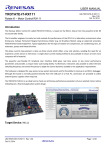
Quick Start Guide: YROTATE-IT-RX111
3.0
Initial Board Configuration
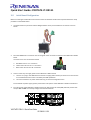
Before connecting the USB cable to the host PC and to the YROTATE-IT-RX111 board please follow the setup
procedure as described below.
1.
The demonstration 3-phase Permanent Magnet Motor comes pre-wired with its connector as shown
below.
2.
Place the PMSM motor connector into the assigned motor connector socket J7 on the YROTATE-IT-RX111
board.
The motor wires are connected as follows
a.
b.
c.
3.
Red Motor wire to “U” connection
Yellow motor wire to the “V” connection
Black motor wire to the “W” connection
There are two ways to supply power to the YROTATE-IT-RX111 board.
a. The first is to plug in the USB cable from the PC to supply power directly to the board. In this case the
current delivered to the motor is limited by the USB capabilities.
b. The second method is to power the board using an external voltage DC source.
For full details of power supply options please refer to Chapter 3 of the YROTATE-IT-RX111 User Manual.
4.
For initial setup of the YROTATE-IT-RX111 kit the first method must be used (USB powered). Ensure that
Jumpers JP1 and JP2 are correctly configured as described below.
YROTATE-IT-RX111 Quick Start Guide
2
D013602-11-S01