1
2. The TensioMed Arteriograph device
This section will give an introduction on the device along with installation information and operation
instructions. For detailed specification please see Section 7.
2.1 The device at a glance
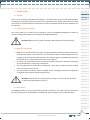
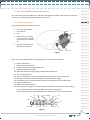
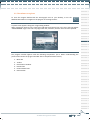
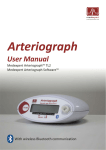
Figure 1 shows the front view of the device:
1. The name of the Device
2. Air connector
3. LCD
1
2
4. Push button for entering
two commands to control
the Device, as per Section
2.4
3
5. Symbols standing for the
above two commands
4
5
Figure 1
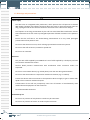
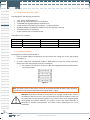
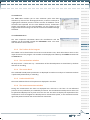
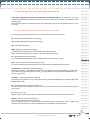
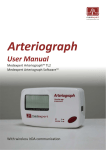
Figure 2 shows the device label. The meanings of the symbols are the following:
6.
7.
8.
9.
10.
11.
12.
13.
14.
15.
16.
17.
Name of the Device
Name of the Manufacturer
Range of ambient operating temperature
Manufacturing serial number
Applicable nominal range of supply voltage with the batteries
Year of manufacturing
Safety classification of electric shock protection (Classification: Patient side: BF)
Warning on the importance of reading this User Manual thoroughly
Certification mark as a guarantee of the Device’s conformity with EU requirements
Type ID of the Device
Head office of Manufacturer
Level of protection against any liquid or grainy material filtering into the device (IP N1N2)
N1=2: Protected against solid foreign objects of 12,5mm and greater
N2=2: Protection against vertically falling water drops when enclosure tilted up to 15°
6
9
8
10
17
7
15
11
14
12
13
16
0
1
1.1
1.2
1.3
1.4
1.5
2
2.1
2.2
2.3
2.4
2.5
3
3.1
3.1.1
3.1.2
3.1.3
3.1.4
3.2
3.2.1
3.2.2
3.2.3
3.2.4
3.2.5
3.2.6
3.3
4
4.1
4.2
4.3
5
5.1
5.2
5.3
5.4
5.4.1
5.4.2
5.4.2.1
5.4.2.1.1
5.4.2.1.2
5.4.2.2
5.4.3
5.4.4
5.4.4.1
5.4.4.2
5.4.5
5.4.5.1
5.4.5.2
5.4.5.3
5.4.6
5.4.6.1
5.4.6.2
5.4.6.3
5.4.7
5.4.8
5.4.8.1
5.4.8.2
5.4.8.3
6
7
7.1
Figure 2
7
TensioMed® Arteriograph-5-02 v2.00.05