1
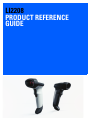
LI2208
PRODUCT REFERENCE
GUIDE
LI2208
PRODUCT REFERENCE GUIDE
72E-170534-05
Revision B
March 2015
ii
LI2208 PRODUCT REFERENCE GUIDE
No part of this publication may be reproduced or used in any form, or by any electrical or mechanical means,
without permission in writing from Zebra. This includes electronic or mechanical means, such as photocopying,
recording, or information storage and retrieval systems. The material in this manual is subject to change
without notice.
The software is provided strictly on an “as is” basis. All software, including firmware, furnished to the user is on
a licensed basis. Zebra grants to the user a non-transferable and non-exclusive license to use each software
or firmware program delivered hereunder (licensed program). Except as noted below, such license may not be
assigned, sublicensed, or otherwise transferred by the user without prior written consent of Zebra. No right to
copy a licensed program in whole or in part is granted, except as permitted under copyright law. The user shall
not modify, merge, or incorporate any form or portion of a licensed program with other program material, create
a derivative work from a licensed program, or use a licensed program in a network without written permission
from Zebra. The user agrees to maintain Zebra’s copyright notice on the licensed programs delivered
hereunder, and to include the same on any authorized copies it makes, in whole or in part. The user agrees not
to decompile, disassemble, decode, or reverse engineer any licensed program delivered to the user or any
portion thereof.
Zebra reserves the right to make changes to any software or product to improve reliability, function, or design.
Zebra does not assume any product liability arising out of, or in connection with, the application or use of any
product, circuit, or application described herein.
No license is granted, either expressly or by implication, estoppel, or otherwise under any Zebra Technologies
Corporation, intellectual property rights. An implied license only exists for equipment, circuits, and subsystems
contained in Zebra products.
Warranty
For the complete Zebra hardware product warranty statement, go to:
http://www.zebra.com/warranty.
iii
Revision History
Changes to the original guide are listed below:
Change
Date
Description
-01 Rev. A
6/2013
Initial Release
-02 Rev A
9/2013
Updates:
- Updated parameter numbers (decimals).
- Updated Length With Range default values for Code 39, Code 93, D 2 of 5, and
Code 128.
- Belgian French changed to French International (Belgian French).
- Updated Picklist description.
- Updated monthly deep cleaning.
Adds:
- Added note to Troubleshooting section about scanning techniques.
-03 Rev A
1/2014
Updated USB Quick Keypad Emulation.
-04 Rev A
8/2014
- Added USB CDC host note to the USB Interface chapter.
- Added non-parameter attribute numbers (Appendix E).
- Added Communication Protocol Capabilities (Appendix I).
- Updated "notes" for:
- Set Length(s) for Interleaved 2 of 5
- Set Length(s) for Discrete 2 of 5
- Set Length(s) for MSI.
-05 Rev A
12/2014
Zebra Rebranding
-05 Rev B
3/2015
Zebra Rebranding
iv
LI2208 PRODUCT REFERENCE GUIDE
TABLE OF CONTENTS
Warranty ......................................................................................................................................... ii
Revision History .............................................................................................................................. iii
About This Guide
Introduction .....................................................................................................................................
Scanner Configurations ..................................................................................................................
Related Product Line Configurations ..............................................................................................
Chapter Descriptions ......................................................................................................................
Notational Conventions...................................................................................................................
Related Documents ........................................................................................................................
Service Information .........................................................................................................................
xv
xv
xvi
xviii
xix
xix
xix
Chapter 1: GETTING STARTED
Introduction ....................................................................................................................................
Unpacking ................................................................................................................................
Scanner Parts ..........................................................................................................................
Configuring the Linear Imager .................................................................................................
1-1
1-1
1-2
1-2
Chapter 2: SCANNING
Introduction ....................................................................................................................................
Beeper and LED Definitions ...........................................................................................................
Scanning .......................................................................................................................................
Hands-Free Scanning ..............................................................................................................
Decode Ranges .............................................................................................................................
2-1
2-1
2-4
2-5
2-6
Chapter 3: USB INTERFACE
Introduction ....................................................................................................................................
Connecting a USB Interface ..........................................................................................................
USB Parameter Defaults ................................................................................................................
USB Host Parameters ....................................................................................................................
USB Device Type .....................................................................................................................
3-1
3-2
3-4
3-6
3-6
vi
LI2208 PRODUCT REFERENCE GUIDE
Symbol Native API (SNAPI) Status Handshaking ....................................................................
USB Keystroke Delay ..............................................................................................................
USB CAPS Lock Override .......................................................................................................
USB Ignore Unknown Characters ............................................................................................
USB Convert Unknown to Code 39 .........................................................................................
Emulate Keypad .......................................................................................................................
Emulate Keypad with Leading Zero .........................................................................................
Quick Keypad Emulation ..........................................................................................................
USB Keyboard FN1 Substitution ..............................................................................................
Function Key Mapping .............................................................................................................
Simulated Caps Lock ...............................................................................................................
Convert Case ...........................................................................................................................
USB Static CDC .......................................................................................................................
Optional USB Parameters .............................................................................................................
Ignore Beep .............................................................................................................................
Ignore Bar Code Configuration ................................................................................................
USB Polling Interval .................................................................................................................
Fast HID Keyboard ..................................................................................................................
Toshiba TEC Host Parameters ......................................................................................................
Toshiba TEC Code Type Table Usage ....................................................................................
Toshiba TEC Include Symbol Type .........................................................................................
Toshiba TEC Include Character Counts ..................................................................................
Toshiba TEC Include Header ...................................................................................................
Toshiba TEC Include Terminator .............................................................................................
Toshiba TEC Header Character ..............................................................................................
Toshiba TEC Terminator Character .........................................................................................
Toshiba TEC Light LED on Good Decode ...............................................................................
Toshiba TEC Good Decode Beeper Timing ............................................................................
ASCII Character Set for USB .........................................................................................................
3-7
3-8
3-8
3-9
3-9
3-10
3-10
3-11
3-11
3-12
3-12
3-13
3-13
3-14
3-14
3-14
3-15
3-16
3-17
3-17
3-18
3-18
3-18
3-19
3-19
3-20
3-20
3-21
3-22
Chapter 4: RS-232 INTERFACE
Introduction ....................................................................................................................................
Connecting an RS-232 Interface ...................................................................................................
RS-232 Parameter Defaults ...........................................................................................................
RS-232 Host Parameters ...............................................................................................................
RS-232 Host Types ..................................................................................................................
Baud Rate ................................................................................................................................
Stop Bit Select .........................................................................................................................
Check Receive Errors ..............................................................................................................
Data Bits (ASCII Format) .........................................................................................................
Parity ........................................................................................................................................
Hardware Handshaking ...........................................................................................................
Software Handshaking .............................................................................................................
Host Serial Response Time-out ...............................................................................................
RTS Line State .........................................................................................................................
Beep on <BEL> ........................................................................................................................
Intercharacter Delay .................................................................................................................
Nixdorf Beep/LED Options .......................................................................................................
Ignore Unknown Characters ....................................................................................................
ASCII Character Set for RS-232 ....................................................................................................
4-1
4-2
4-3
4-4
4-6
4-8
4-9
4-9
4-10
4-10
4-11
4-13
4-15
4-16
4-16
4-17
4-18
4-18
4-19
Table of Contents
Chapter 5: IBM INTERFACE
Introduction ....................................................................................................................................
Connecting to an IBM 468X/469X Host .........................................................................................
IBM Parameter Defaults .................................................................................................................
IBM 468X/469X Host Parameters ..................................................................................................
Port Address ............................................................................................................................
Convert Unknown to Code 39 ..................................................................................................
Optional IBM Parameters ...............................................................................................................
Ignore Beep .............................................................................................................................
Ignore Bar Code Configuration ................................................................................................
5-1
5-2
5-3
5-4
5-4
5-5
5-5
5-5
5-6
Chapter 6: KEYBOARD WEDGE INTERFACE
Introduction ....................................................................................................................................
Connecting a Keyboard Wedge Interface ......................................................................................
Keyboard Wedge Parameter Defaults ...........................................................................................
Keyboard Wedge Host Parameters ...............................................................................................
Keyboard Wedge Host Types ..................................................................................................
Ignore Unknown Characters ....................................................................................................
Keystroke Delay .......................................................................................................................
Intra-Keystroke Delay ..............................................................................................................
Alternate Numeric Keypad Emulation ......................................................................................
Quick Keypad Emulation ..........................................................................................................
Caps Lock On ..........................................................................................................................
Caps Lock Override .................................................................................................................
Convert Wedge Data ...............................................................................................................
Function Key Mapping .............................................................................................................
FN1 Substitution ......................................................................................................................
Send Make and Break .............................................................................................................
Keyboard Map ................................................................................................................................
ASCII Character Set for Keyboard Wedge ....................................................................................
6-1
6-2
6-3
6-4
6-4
6-5
6-5
6-6
6-6
6-7
6-7
6-8
6-8
6-9
6-9
6-10
6-11
6-12
Chapter 7: USER PREFERENCES & MISCELLANEOUS SCANNER OPTIONS
Introduction ....................................................................................................................................
Scanning Sequence Examples ......................................................................................................
Errors While Scanning ...................................................................................................................
User Preferences/Miscellaneous Option Parameter Defaults ........................................................
User Preferences ...........................................................................................................................
Default Parameters ..................................................................................................................
Report Version .........................................................................................................................
Parameter Bar Code Scanning ................................................................................................
Beep After Good Decode .........................................................................................................
Decode Illumination Indicator ...................................................................................................
Beeper Tone ............................................................................................................................
Beeper Volume ........................................................................................................................
Beeper Duration .......................................................................................................................
Suppress Power Up Beeps ......................................................................................................
Hand-Held Trigger Mode .........................................................................................................
Hands-Free (Presentation) Trigger Mode ................................................................................
Linear Imager Picklist Mode .....................................................................................................
7-1
7-2
7-2
7-2
7-4
7-4
7-5
7-5
7-6
7-6
7-7
7-8
7-8
7-9
7-9
7-10
7-11
vii
viii
LI2208 PRODUCT REFERENCE GUIDE
Aiming Illumination ...................................................................................................................
Low Power Mode .....................................................................................................................
Time Delay to Low Power Mode ..............................................................................................
Time Delay to Presentation Sleep Mode .................................................................................
Continuous Bar Code Read .....................................................................................................
Unique Bar Code Reporting .....................................................................................................
Decode Session Timeout .........................................................................................................
Timeout Between Decodes, Same Symbol .............................................................................
Timeout Between Decodes, Different Symbols .......................................................................
Decoding Illumination ...............................................................................................................
Miscellaneous Scanner Parameters ..............................................................................................
Transmit Code ID Character ....................................................................................................
Prefix/Suffix Values ..................................................................................................................
Scan Data Transmission Format .............................................................................................
FN1 Substitution Values ..........................................................................................................
Transmit “No Read” Message ..................................................................................................
Unsolicited Heartbeat Interval ..................................................................................................
Enter Key (Carriage Return/Line Feed) ...................................................................................
Tab Key ....................................................................................................................................
7-12
7-12
7-13
7-15
7-17
7-17
7-18
7-18
7-18
7-19
7-20
7-20
7-21
7-22
7-24
7-25
7-26
7-27
7-27
Chapter 8: SYMBOLOGIES
Introduction ....................................................................................................................................
Scanning Sequence Examples ......................................................................................................
Errors While Scanning ...................................................................................................................
Symbology Parameter Defaults .....................................................................................................
Disable All Code Types .................................................................................................................
UPC/EAN .......................................................................................................................................
Enable/Disable UPC-A .............................................................................................................
Enable/Disable UPC-E .............................................................................................................
Enable/Disable UPC-E1 ...........................................................................................................
Enable/Disable EAN-8/JAN-8 ..................................................................................................
Enable/Disable EAN-13/JAN-13 ..............................................................................................
Enable/Disable Bookland EAN ................................................................................................
Decode UPC/EAN/JAN Supplementals ...................................................................................
User-Programmable Supplementals ........................................................................................
UPC/EAN/JAN Supplemental Redundancy .............................................................................
UPC/EAN/JAN Supplemental AIM ID Format ..........................................................................
Transmit UPC-A Check Digit ...................................................................................................
Transmit UPC-E Check Digit ...................................................................................................
Transmit UPC-E1 Check Digit .................................................................................................
UPC-A Preamble .....................................................................................................................
UPC-E Preamble .....................................................................................................................
UPC-E1 Preamble ...................................................................................................................
Convert UPC-E to UPC-A ........................................................................................................
Convert UPC-E1 to UPC-A ......................................................................................................
EAN-8/JAN-8 Extend ...............................................................................................................
Bookland ISBN Format ............................................................................................................
UCC Coupon Extended Code ..................................................................................................
Coupon Report .........................................................................................................................
ISSN EAN ................................................................................................................................
8-1
8-1
8-2
8-2
8-6
8-7
8-7
8-7
8-8
8-8
8-9
8-9
8-10
8-13
8-13
8-14
8-15
8-15
8-16
8-16
8-17
8-18
8-19
8-19
8-20
8-20
8-21
8-21
8-22
Table of Contents
Code 128 .......................................................................................................................................
Enable/Disable Code 128 ........................................................................................................
Set Length(s) for Code 128 ......................................................................................................
Enable/Disable GS1-128 (formerly UCC/EAN-128) .................................................................
Enable/Disable ISBT 128 .........................................................................................................
ISBT Concatenation .................................................................................................................
Check ISBT Table ....................................................................................................................
ISBT Concatenation Redundancy ............................................................................................
Code 128 Security Level ..........................................................................................................
Code 39 .........................................................................................................................................
Enable/Disable Code 39 ..........................................................................................................
Enable/Disable Trioptic Code 39 .............................................................................................
Convert Code 39 to Code 32 ...................................................................................................
Code 32 Prefix .........................................................................................................................
Set Length(s) for Code 39 ........................................................................................................
Code 39 Check Digit Verification .............................................................................................
Transmit Code 39 Check Digit .................................................................................................
Code 39 Full ASCII Conversion ...............................................................................................
Code 39 Buffering - Scan & Store ............................................................................................
Buffer Data .........................................................................................................................
Clear Transmission Buffer ..................................................................................................
Transmit Buffer ...................................................................................................................
Overfilling Transmission Buffer ..........................................................................................
Attempt to Transmit an Empty Buffer .................................................................................
Code 39 Security Level ..................................................................................................................
Code 93 .........................................................................................................................................
Enable/Disable Code 93 ..........................................................................................................
Set Length(s) for Code 93 ........................................................................................................
Code 11 .........................................................................................................................................
Code 11 ...................................................................................................................................
Set Length(s) for Code 11 ........................................................................................................
Code 11 Check Digit Verification .............................................................................................
Transmit Code 11 Check Digits ...............................................................................................
Interleaved 2 of 5 (ITF) ..................................................................................................................
Enable/Disable Interleaved 2 of 5 ............................................................................................
Set Length(s) for Interleaved 2 of 5 .........................................................................................
I 2 of 5 Check Digit Verification ................................................................................................
Transmit I 2 of 5 Check Digit ....................................................................................................
Convert I 2 of 5 to EAN-13 .......................................................................................................
I 2 of 5 Security Level ..............................................................................................................
Discrete 2 of 5 (DTF) .....................................................................................................................
Enable/Disable Discrete 2 of 5 .................................................................................................
Set Length(s) for Discrete 2 of 5 ..............................................................................................
Codabar (NW - 7) ...........................................................................................................................
Enable/Disable Codabar ..........................................................................................................
Set Length(s) for Codabar .......................................................................................................
CLSI Editing .............................................................................................................................
NOTIS Editing ..........................................................................................................................
Codabar Upper or Lower Case Start/Stop Characters Detection ............................................
MSI .................................................................................................................................................
Enable/Disable MSI .................................................................................................................
8-23
8-23
8-23
8-25
8-25
8-26
8-27
8-27
8-28
8-29
8-29
8-29
8-30
8-30
8-31
8-32
8-32
8-33
8-33
8-34
8-34
8-35
8-35
8-35
8-36
8-37
8-37
8-37
8-39
8-39
8-39
8-41
8-42
8-43
8-43
8-43
8-45
8-45
8-46
8-47
8-48
8-48
8-48
8-50
8-50
8-50
8-52
8-52
8-53
8-54
8-54
ix
x
LI2208 PRODUCT REFERENCE GUIDE
Set Length(s) for MSI ...............................................................................................................
MSI Check Digits .....................................................................................................................
Transmit MSI Check Digit(s) ....................................................................................................
MSI Check Digit Algorithm .......................................................................................................
Chinese 2 of 5 ................................................................................................................................
Enable/Disable Chinese 2 of 5 .................................................................................................
Matrix 2 of 5 ...................................................................................................................................
Enable/Disable Matrix 2 of 5 ....................................................................................................
Set Length(s) for Matrix 2 of 5 .................................................................................................
Matrix 2 of 5 Check Digit ..........................................................................................................
Transmit Matrix 2 of 5 Check Digit ...........................................................................................
Korean 3 of 5 .................................................................................................................................
Enable/Disable Korean 3 of 5 ..................................................................................................
Inverse 1D .....................................................................................................................................
GS1 DataBar .................................................................................................................................
GS1 DataBar-14 ......................................................................................................................
GS1 DataBar Limited ...............................................................................................................
GS1 DataBar Expanded ..........................................................................................................
GS1 DataBar Limited Security Level .......................................................................................
Convert GS1 DataBar to UPC/EAN .........................................................................................
Symbology-Specific Security Levels ..............................................................................................
Redundancy Level ...................................................................................................................
Redundancy Level 1 ..........................................................................................................
Redundancy Level 2 ..........................................................................................................
Redundancy Level 3 ..........................................................................................................
Redundancy Level 4 ..........................................................................................................
UPC/EAN/Code 93 Security Level ...........................................................................................
Intercharacter Gap Size ...........................................................................................................
8-54
8-56
8-56
8-57
8-58
8-58
8-59
8-59
8-59
8-61
8-61
8-62
8-62
8-63
8-64
8-64
8-64
8-65
8-65
8-67
8-68
8-68
8-68
8-68
8-68
8-68
8-70
8-71
Chapter 9: 123SCAN2
Introduction ....................................................................................................................................
Communication with 123Scan2 .....................................................................................................
123Scan2 Requirements ...............................................................................................................
Scanner SDK, Other Software Tools, and Videos .........................................................................
9-1
9-1
9-2
9-2
Chapter 10: ADVANCED DATA FORMATTING
Introduction ....................................................................................................................................
Rules: Criteria Linked to Actions ....................................................................................................
Using ADF Bar Codes ...................................................................................................................
ADF Bar Code Menu Example ......................................................................................................
Rule 1: The Code 128 Scanning Rule .....................................................................................
Rule 2: The UPC Scanning Rule .............................................................................................
Alternate Rule Sets ..................................................................................................................
Rules Hierarchy (in Bar Codes) ...............................................................................................
Default Rules ...........................................................................................................................
ADF Bar Codes ..............................................................................................................................
Special Commands ........................................................................................................................
Pause Duration ........................................................................................................................
Begin New Rule .......................................................................................................................
10-1
10-1
10-2
10-2
10-3
10-3
10-3
10-4
10-5
10-6
10-8
10-8
10-8
Table of Contents
Save Rule ................................................................................................................................
Erase ........................................................................................................................................
Quit Entering Rules ..................................................................................................................
Disable Rule Set ......................................................................................................................
Criteria ...........................................................................................................................................
Code Types ..............................................................................................................................
Code Lengths ...........................................................................................................................
Message Containing A Specific Data String ............................................................................
Specific String at Start ........................................................................................................
Specific String, Any Location .............................................................................................
Specific String Search ........................................................................................................
Any Message OK ...............................................................................................................
Numeric Keypad .................................................................................................................
Rule Belongs To Set ..........................................................................................................
Actions ...........................................................................................................................................
Send Data ................................................................................................................................
Setup Field(s) ...........................................................................................................................
Move Cursor .......................................................................................................................
Send Pause ........................................................................................................................
Skip Ahead .........................................................................................................................
Skip Back ..........................................................................................................................
Send Preset Value .............................................................................................................
Modify Data ..............................................................................................................................
Remove All Spaces ............................................................................................................
Crunch All Spaces ..............................................................................................................
Stop Space Removal .........................................................................................................
Remove Leading Zeros ......................................................................................................
Stop Zero Removal ............................................................................................................
Pad Data with Spaces ..............................................................................................................
Pad Data with Zeros ................................................................................................................
Beeps .......................................................................................................................................
Send Keystroke (Control Characters and Keyboard Characters) ............................................
Control Characters .............................................................................................................
Keyboard Characters .........................................................................................................
Send ALT Characters .........................................................................................................
Send Keypad Characters ...................................................................................................
Send Function Key .............................................................................................................
Send Right Control Key ...........................................................................................................
Send Graphic User Interface (GUI) Characters .......................................................................
Turn On/Off Rule Sets .............................................................................................................
Alphanumeric Keyboard .................................................................................................................
Chapter 11: MAINTENANCE, TROUBLESHOOTING & TECHNICAL SPECIFICATIONS
Introduction ....................................................................................................................................
Maintenance ..................................................................................................................................
Standard Linear Imagers .........................................................................................................
Known Harmful Ingredients ................................................................................................
Approved Cleaning Agents ................................................................................................
Cleaning the Linear Imager ................................................................................................
Health Care Linear Imagers .....................................................................................................
xi
10-8
10-9
10-9
10-10
10-11
10-11
10-15
10-19
10-19
10-20
10-20
10-20
10-21
10-23
10-24
10-24
10-28
10-29
10-30
10-31
10-32
10-34
10-34
10-34
10-34
10-34
10-35
10-35
10-36
10-40
10-45
10-45
10-45
10-50
10-64
10-69
10-74
10-81
10-82
10-87
10-89
11-1
11-1
11-1
11-1
11-2
11-2
11-3
xii
LI2208 PRODUCT REFERENCE GUIDE
Cleaning the Health Care Linear Imager ...........................................................................
Daily Cleaning and Disinfecting .........................................................................................
Monthly 'Deep Cleaning' Maintenance ...............................................................................
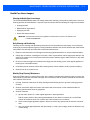
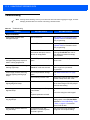
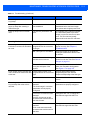
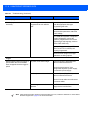
Troubleshooting .............................................................................................................................
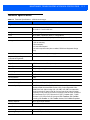
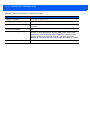
Technical Specifications ................................................................................................................
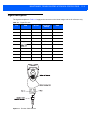
Signal Descriptions ........................................................................................................................
11-3
11-3
11-3
11-4
11-7
11-9
Appendix A: STANDARD DEFAULT PARAMETERS
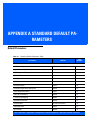
Default Parameters ........................................................................................................................ A-1
Appendix B: COUNTRY CODES
Introduction .................................................................................................................................... B-1
USB and Keyboard Wedge Country Keyboard Types (Country Codes) ....................................... B-2
Appendix C: PROGRAMMING REFERENCE
Symbol Code Identifiers ................................................................................................................. C-1
AIM Code Identifiers ...................................................................................................................... C-3
Appendix D: ASCII CHARACTER SETS
Appendix E: NON-PARAMETER ATTRIBUTES
Introduction ....................................................................................................................................
Attributes ........................................................................................................................................
Model Number .........................................................................................................................
Serial Number ..........................................................................................................................
Date of Manufacture ................................................................................................................
Date of First Programming .......................................................................................................
Configuration Filename ............................................................................................................
Beeper/LED .............................................................................................................................
Parameter Defaults ..................................................................................................................
Beep on Next Bootup ...............................................................................................................
Reboot .....................................................................................................................................
Host Trigger Session ...............................................................................................................
Firmware Version .....................................................................................................................
Scankit Version ........................................................................................................................
E-1
E-1
E-1
E-1
E-2
E-2
E-2
E-3
E-4
E-4
E-4
E-4
E-5
E-5
Appendix F: SAMPLE BAR CODES
Code 39 .........................................................................................................................................
UPC/EAN .......................................................................................................................................
UPC-A, 100% ...........................................................................................................................
EAN-13, 100% .........................................................................................................................
Code 128 .......................................................................................................................................
Interleaved 2 of 5 ...........................................................................................................................
GS1 DataBar .................................................................................................................................
GS1 DataBar-14 ......................................................................................................................
F-1
F-1
F-1
F-2
F-2
F-2
F-3
F-3
Table of Contents
Appendix G: ALPHANUMERIC BAR CODES
Alphanumeric Keyboard ................................................................................................................. G-1
Appendix H: NUMERIC BAR CODES
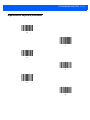
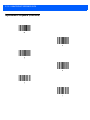
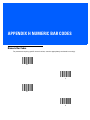
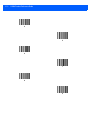
Numeric Bar Codes ........................................................................................................................ H-1
Cancel ............................................................................................................................................ H-3
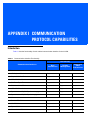
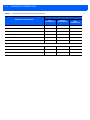
Appendix I: COMMUNICATION PROTOCOL CAPABILITIES
Introduction .................................................................................................................................... I-1
Index
Glossary
xiii
xiv
LI2208 PRODUCT REFERENCE GUIDE
ABOUT THIS GUIDE
Introduction
The LI2208 Product Reference Guide provides general instructions for setting up, operating, maintaining, and
troubleshooting the LI2208 linear imager.
Scanner Configurations
• LI2208-SR00006ZZWW - Nova White
• LI2208-SR00007ZZWW - Twilight Black
• LI2208-HC0000BZZWW - Healthcare White
NOTE
Check Solution Builder for the latest available model configurations.
xvi
LI2208 PRODUCT REFERENCE GUIDE
Related Product Line Configurations
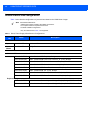
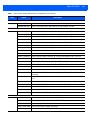
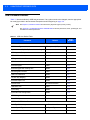
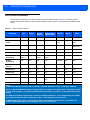
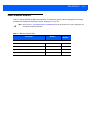
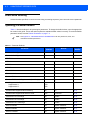
Table 1 below lists the configurations of product lines related to the LI2208 linear imager.
NOTE
Check Solution Builder for:
- additional information regarding all available accessories.
- the complete selection of optional accessories.
- the latest available configurations.
- Only the cables listed in Table 1 are supported.
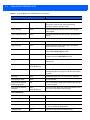
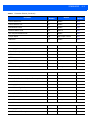
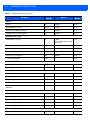
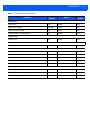
Table 1. Stand, Power Supply, Miscellaneous Configurations
Product
Line
Part #
Description
Accessories
Cup
21-61022-0BR
Healthcare White
Goosenec
k Stand
20-61022-07R
Twilight Black
Universal Cables
Shielded USB
CBA-U21-S07ZAR
Cable - Shielded USB: 7ft. (2.8m), Straight
CBA-U23-S07ZAR
Cable - Shielded USB: Power Plus Connector, 7ft. (2.8m), Straight
CBA-U29-C15ZAR
Cable - Shielded USB: Series A Connector, 15ft. (4.6m), Coiled
CBA-U32-C09ZAR
Cable - Shielded USB: Series A Connector, 9ft. (2.8m), Coiled
CBA-U28-C15ZAR
Cable - Shielded USB: Power Plus Connector, 15ft. (4.6m), Coiled
CBA-U30-S15ZAR
Cable - Shielded USB: 15ft. (4.6m), Straight
CBA-U34-C09ZAR
Cable - Shielded USB: Power Plus Connector, 9ft. (2.8m), Coiled
CBA-U35-S15ZAR
Cable - Shielded USB: Power Plus Connector, 15ft. (4.6m), Straight
Keyboard Wedge
CBA-K61-S07PAR
Cable - Auto-Host Detect - Keyboard Wedge: 7 ft. (2m) Straight, PS/2 Power Port
CBA-K62-C09PAR
Cable - Auto-Host Detect - Keyboard Wedge: 9 ft. (2.8m) Coiled, PS/2 Power Port
About This Guide
xvii
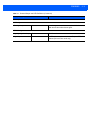
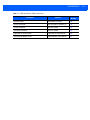
Table 1. Stand, Power Supply, Miscellaneous Configurations (Continued)
Product
Line
Part #
Description
IBM
CBA-M61-S07ZAR
Cable - Auto-Host Detect - IBM: 468x/9x, 7ft (2m) Straight, Port 9B
CBA-M64-S07ZAR
Cable - Auto-Host Detect - IBM: 468x/9x, 7ft (2m) Straight, Port 5B
CBA-R01-S07PAR
Cable - RS-232: DB9 Female Connector, 7 ft. (2m) Straight, TxD on 2
CBA-R02-C09PAR
Cable - RS-232: DB9 Female Connector, 9 ft. (2.8m) Coiled, TxD on 2
CBA-R03-C12PAR
Cable - RS-232: DB9 Female Connector, 12 ft. (3.6m) Coiled, TxD on 2
CBA-R06-C20PAR
Cable - RS-232: DB9 Female Connector, 20 ft. (6m) Coiled, TxD on 2
CBA-R08-S07ZAR
Cable - RS-232: 7 ft. (2m) Straight, Nixdorf Beetle - 5V Direct Power
CBA-R09-C09ZAR
Cable - RS-232: 9 ft. (2.8m) Coiled, Nixdorf Beetle - 5V Direct Power
CBA-R10-S07ZAR
Cable - RS-232: 7 ft. (2m) Straight, Nixdorf Beetle - Direct Power
CBA-R11-C09ZAR
Cable - RS-232: 9 ft. (2.8m) Coiled, Nixdorf Beetle - Direct Power
CBA-R12-C12ZAR
Cable - RS-232: 12ft. (3.7m) Coiled, Nixdorf Beetle- Direct Power
CBA-R17-C09ZAR
Cable - RS-232: DB15 Connector, 9ft. (2.8m) Coiled, IBM Sure One, TxD on 2
CBA-R22-C09ZAR
Cable - RS-232: 9 ft. (2.8m) Coiled, Fujitsu T POS 500 ICL
CBA-R23-S07ZAR
Cable - RS-232: 7 ft. (2m) Straight, Fujitsu T POS 500 ICL
CBA-R24-C20ZAR
Cable - RS-232: 20 ft. (6m) Coiled, Fujitsu T POS 500 ICL
CBA-R28-C09ZAR
Cable - RS-232: 9 ft. (2.8m) Coiled, Verifone Ruby
CBA-R31-C09ZAR
Cable - RS-232: 9 ft. (2.8m) Coiled, NCR 7448
CBA-R32-S07PAR
Cable - RS-232: DB9 Female Connector, 7 ft. (2m) Straight, TxD on 2, True
Converter
CBA-R33-C09PAR
Cable - RS-232: DB9 Female Connector, 9ft. (2.8m) Coiled, True Converter, TxD
on 2
CBA-R36-C09ZAR
Cable - RS-232: DB9 Female Connector, 9 ft. (2.8m) Coiled, Power Pin 9
CBA-R38-C09ZAR
Cable - RS-232: DB25 Female Connector, 9ft (2.8m)Coiled, Power Pin 12
CBA-R39-C20ZAR
Cable - RS-232: DB25 Female Connector, 20ft (6m) Coiled, Power Pin 12
CBA-R40-C09SAR
Cable - RS-232: Split DB9 Female Connector & Power Line, 9ft (2.8m) Coiled
CBA-R41-S12ZAR
Cable - RS-232: 12ft. (3.7m) Straight, Nixdorf Beetle- Direct Power
RS-232
Power Supplies
PWRS-14000-253R
Power Supply: 5VDC, 850MA, US-CA-MX-JP-TW
PWRS-14000-256R
Power Supply: 5VDC, 850MA, EU-UK-EMEA-RU-ZA
PWRS-14000-257R
Power Supply: 5VDC, 850MA, CHINA
PWRS-14000-258R
Power Supply:5VDC, 850MA, AU-HK-NZ
PWRS-14000-259R
Power Supply, 5VDC, 850MA, ARGENTINA-UY
xviii
LI2208 PRODUCT REFERENCE GUIDE
Chapter Descriptions
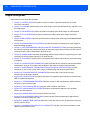
Topics covered in this guide are as follows:
• Chapter 1, GETTING STARTED provides a product overview, unpacking instructions, and cable
connection information.
• Chapter 2, SCANNING describes parts of the linear imager, beeper and LED definitions, and how to use
the linear imager.
• Chapter 3, USB INTERFACE provides information for setting up the linear imager for USB operation.
• Chapter 4, RS-232 INTERFACE provides information for setting up the linear imager for RS-232
operation.
• Chapter 5, IBM INTERFACE provides all information for setting up the linear imager with IBM 468X/469X
POS systems.
• Chapter 6, KEYBOARD WEDGE INTERFACE provides information for setting up the linear imager for
Keyboard Wedge operation.
• Chapter 7, USER PREFERENCES & MISCELLANEOUS SCANNER OPTIONS provides programming
bar codes for selecting user preference features for the linear imager and commonly used bar codes to
customize how the data is transmitted to the host device.
• Chapter 8, SYMBOLOGIES describes all symbology features and provides the programming bar codes
necessary for selecting these features for the linear imager.
• Chapter 9, 123SCAN2 (PC based scanner configuration tool) enables rapid and easy customized setup
of scanners.
• Chapter 10, ADVANCED DATA FORMATTING (ADF) describes how to customize scanned data before
transmitting to the host. This chapter also contains the bar codes for advanced data formatting.
• Chapter 11, MAINTENANCE, TROUBLESHOOTING & TECHNICAL SPECIFICATIONS provides
information on how to care for the linear imager, troubleshooting, and technical specifications.
• Appendix A, STANDARD DEFAULT PARAMETERS provides a table of all host devices and
miscellaneous linear imager defaults.
• Appendix B, COUNTRY CODES provides instructions for programming the keyboard to interface with a
USB or Keyboard Wedge host.
• Appendix C, PROGRAMMING REFERENCE provides a table of AIM code identifiers, ASCII character
conversions, and keyboard maps.
• Appendix D, ASCII CHARACTER SETS provides ASCII character value tables.
• Appendix E, NON-PARAMETER ATTRIBUTES defines non-parameter attributes, such as Model
Number and Serial Number.
• Appendix F, SAMPLE BAR CODES includes sample bar codes.
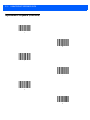
• Appendix G, ALPHANUMERIC BAR CODES includes the bar codes representing the alphanumeric
keyboard, used when setting ADF rules.
• Appendix H, NUMERIC BAR CODES includes the numeric bar codes to scan for parameters requiring
specific numeric values.
• Appendix I, COMMUNICATION PROTOCOL CAPABILITIES includes a list of the functionality of each
cabled communication interface.
About This Guide
xix
Notational Conventions
The following conventions are used in this document:
• Italics are used to highlight chapters and sections in this and related documents.
• Bold text is used to highlight parameter names and options.
• bullets (•) indicate:
• Action items
• Lists of alternatives
• Lists of required steps that are not necessarily sequential
• Sequential lists (e.g., those that describe step-by-step procedures) appear as numbered lists.
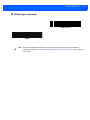
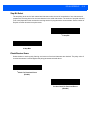
• Throughout the programming bar code menus, asterisks (*) are used to denote default parameter
settings.
*Indicates Default
NOTE
*Baud Rate 9600
Feature/Option
This symbol indicates something of special interest or importance to the reader. Failure to read the note
will not result in physical harm to the reader, equipment or data.
CAUTION
This symbol indicates that if this information is ignored, the possibility of data or material damage may
occur.
WARNING!
This symbol indicates that if this information is ignored the possibility that serious personal
injury may occur.
Related Documents
• The LI2208 Quick Start Guide (p/n 72-170536-xx) provides general information to help the user get
started with the linear imager. It includes basic operation instructions and start up bar codes.
The latest version of this guide and all guides, are available at: www.zebra.com/support.
Service Information
If you have a problem using the equipment, contact your facility's technical or systems support. If there is a
problem with the equipment, they will contact the Zebra Global Customer Support Center at:
http://www.zebra.com/support.
xx
LI2208 PRODUCT REFERENCE GUIDE
When contacting Zebra support, please have the following information available:
• Serial number of the unit
• Model number or product name
• Software type and version number
Zebra responds to calls by e-mail, telephone or fax within the time limits set forth in service agreements.
If your problem cannot be solved by Zebra support, you may need to return your equipment for servicing and
will be given specific directions. Zebra is not responsible for any damages incurred during shipment if the
approved shipping container is not used. Shipping the units improperly can possibly void the warranty.
If you purchased your business product from a Zebra business partner, please contact that business partner
for support.
CHAPTER 1 GETTING STARTED
Introduction
The LI2208 represents the next generation in 1D scanning and builds on our most popular scanner ever, the
LS2208. You get the same reliability and ergonomics of the LS2208, combined with enhanced features such as
extended range and support for mobile bar codes. With our best-in-class linear imager, you can count on
unparalleled scanning performance on every bar code, every time.
Unpacking
Remove the scanner from their respective packing and inspect for damage. If the scanner was damaged in
transit, contact Zebra Global Customer Support Center. See page xix for contact information. KEEP THE
PACKING. It is the approved shipping container and should be used if the equipment ever needs to be
returned for servicing.
1-2
LI2208 PRODUCT REFERENCE GUIDE
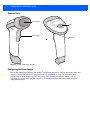
Scanner Parts
Scan Window
LED
Scan Trigger
Beeper
Figure 1-1 Parts of the Linear Imager
Configuring the Linear Imager
Use the bar codes in this manual or the 123Scan2 configuration program to configure the linear imager. See
Chapter 7, USER PREFERENCES & MISCELLANEOUS SCANNER OPTIONS for information about
programming the linear imager using bar code menus. Also see each host-specific chapter to set up
connection to a specific host type. See Chapter 9, 123SCAN2 to configure the linear imager using this
configuration program.
CHAPTER 2 SCANNING
Introduction
This chapter provides beeper and LED definitions, scanning techniques, general instructions and tips about
scanning, and decode ranges.
Beeper and LED Definitions
The linear imager issues different beep sequences/patterns and an LED display to indicate status. Table 2-1
defines beep sequences/patterns and LED displays which occur during both normal scanning and while
programming the linear imager.
Table 2-1 Scanner Beeper and LED Definitions
Beeper Sequence
LED Indication
Indication
Standard Use
Low/medium/high beeps
None
Power up.
None
Green Solid
Presentation Mode on.
None
No LED; green LED is
turned off
Presentation Mode off.
Medium beep
(or as configured)
Green Flash
A bar code was successfully decoded. (See Chapter
7-1, User Preferences Parameter Defaults for
programming beeper sounds.)
Low/low/low/extra low
beeps
Red
Parity error.
Four long low beeps
Red
A transmission error was detected in a scanned symbol.
The data is ignored. This occurs if a unit is not properly
configured. Check option setting.
Five long low beeps
Red
Conversion or format error.
Scanning
2-2
LI2208 PRODUCT REFERENCE GUIDE
Table 2-1 Scanner Beeper and LED Definitions (Continued)
Beeper Sequence
LED Indication
Indication
Parameter Programming
Long low/long high beeps
Red
Input error, incorrect bar code or Cancel scanned,
wrong entry, incorrect bar code programming
sequence; remain in program mode.
High/low beeps
Green
Keyboard parameter selected. Enter value using bar
code keypad.
High/low/high/low beeps
Green
Successful program exit with change in the parameter
setting.
Low/high/low beeps
None
ADF transmit error.
High/low beeps
Green
Number expected. Enter another digit. Add leading
zeros to the front if necessary.
Low/low beeps
Green
Alpha expected. Enter another alphabetic character or
scan the End of Message bar code.
High/high beeps
Green Blinking
ADF criteria or action is expected. Enter another criteria
or action or scan the Save Rule bar code.
High/low/low beeps
Green
All criteria or actions cleared for current rule, continue
entering rule.
High/low/high/low beeps
Green
(turns off blinking)
Rule saved. Rule entry mode exited.
Long low/long high beeps
Red
Rule error. Entry error, wrong bar code scanned, or
criteria/action list is too long for a rule. Re-enter criteria
or action.
Low beep
Green
Deleted last saved rule. The current rule is left intact.
Low/high/high beeps
Green
All rules deleted.
Long low/long high/long
low/long high beeps
Red
Out of rule memory. Erase some existing rules, then try
to save rule again.
Long low/long high/long
low beeps
Green
(turns off blinking)
Cancel rule entry. Rule entry mode exited because of an
error or the user asked to exit rule entry.
High/low beeps
None
New Code 39 data was entered into the buffer.
Three long high beeps
None
Code 39 buffer is full.
High/low/high beeps
None
The Code 39 buffer was erased/cleared.
Low/high/low beeps
None
The Code 39 buffer was erased or there was an attempt
to clear or transmit an empty buffer.
Low/high beeps
None
A successful transmission of buffered data.
ADF Programming
Code 39 Buffering
SCANNING
2-3
Table 2-1 Scanner Beeper and LED Definitions (Continued)
Beeper Sequence
LED Indication
Indication
Host Specific
USB only
Four high beeps
None
Linear imager scanner has not completed initialization.
Wait several seconds and scan again.
High/high/high/low beeps
Red
RS-232 receive error.
High beep
None
A <BEL> character is received when Beep on <BEL> is
enabled (Point-to-Point mode only).
RS-232 only
2-4
LI2208 PRODUCT REFERENCE GUIDE
Scanning
To program the linear imager, see the appropriate host chapter, and Chapter 8, SYMBOLOGIES. (In addition to
the parameters included in the chapters mentioned, user preference and miscellaneous linear imager option
parameters are also available in this guide.)Aiming
When scanning, the linear imager projects a red illumination line which allows positioning the bar code within
its field of view. See Decode Ranges on page 2-6 for the proper distance to achieve between the linear imager
and a bar code. (See Aiming Illumination on page 7-12 to set the type of pattern when aiming.)
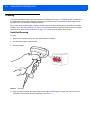
Hand-Held Scanning
To scan:
1.
Ensure all connections are secure (see appropriate host chapter).
2.
Aim the linear imager at the bar code.
3.
Press the trigger.
Figure 2-1 Scanning
4.
Upon successful decode, the linear imager beeps and the LED displays a single green flash. (For more
information about beeper and LED definitions, see Table 2-1.)
SCANNING
2-5
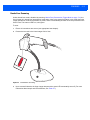
Hands-Free Scanning
Unless hands-free mode is disabled by scanning Hands-Free (Presentation) Trigger Mode on page 7-10, the
linear imager is in hands-free (presentation) mode when it sits in the gooseneck stand. In this mode the linear
imager operates in continuous (constant-on) mode, where it automatically decodes a bar code presented in the
field of view. The scanner LED is on, solid green.
To scan:
1.
Ensure all connections are secure (see appropriate host chapter).
2.
Present the bar code in the linear imager field of view.
Figure 2-2 Presentation Scanning
3.
Upon successful decode, the linear imager beeps and the green LED momentarily turns off. (For more
information about beeper and LED definitions, see Table 2-1.)
2-6
LI2208 PRODUCT REFERENCE GUIDE
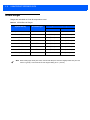
Decode Ranges
Ranges are calculated on Code 39 except where noted.
Table 2-2 LI2208 Decode Ranges
Typical Working Ranges
Symbol Density
Bar Code Type
Near
Far
3 mil (minimum resolution)
4 mil
Code 39
4 in. (10.2 cm)
10.0 in. (25.4 cm)
5 mil
Code 39
3.0 in. (7.6 cm)
13.0 in. (33.0 cm)
7.5 mil
Code 39
1.5 in. (3.8 cm)
19.0 in. (48.3 cm)
13 mil
100% UPC-A
1.0 in. (2.5 cm)
31.0 in. (78.7 cm)
20 mil
Code 39
1.0 in. (2.5 cm)
42.0 in. (106.7 cm)
26 mil
200% UPC-A
3.0 in. (7.6 cm)
55.0 in. (140.0 cm)
100 mil (reflective)
NOTE
> 20 ft. (> 6 m)
When reading high density bar codes, users should attempt to read them slightly farther away from the
scanner. Typically a 3 mil Code 39 bar code begins reading at 5 in. (12.8cm).
CHAPTER 3 USB INTERFACE
Introduction
This chapter provides instructions for programming the linear imager to interface with a USB host. The linear
imager connects directly to a USB host, or a powered USB hub. The USB host can power the linear imager.
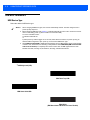
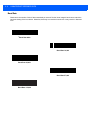
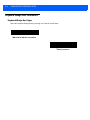
Throughout the programming bar code menus, default values are indicated with asterisks (*).
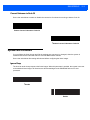
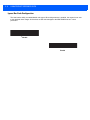
*Indicates Default
*No Delay
Feature/Option
3-2
LI2208 PRODUCT REFERENCE GUIDE
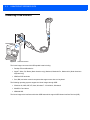
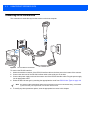
Connecting a USB Interface
Figure 3-1 USB Connection
The linear imager connects with USB capable hosts including:
• Desktop PCs and Notebooks
• Apple™ iMac, G4, iBooks (North America only), Macbook, Macbook Pro, Macbook Air (North American
keyboard only)
• IBM SurePOS terminals
• Sun, IBM, and other network computers that support more than one keyboard.
The following operating systems support the linear imager through USB:
• Windows 98, 2000, ME, XP, Vista, Windows 7 - 32-bit/64-bit, Windows 8
• MacOS 8.5 and above
• IBM 4690 OS.
The linear imager also interfaces with other USB hosts which support USB Human Interface Devices (HID).
USB INTERFACE
3-3
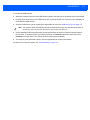
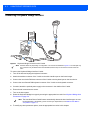
To connect the USB interface:
1.
Attach the modular connector of the USB interface cable to the host port on the bottom of the linear imager.
2.
Plug the series A connector in the USB host or hub, or plug the Power Plus connector in an available port
of the IBM SurePOS terminal.
3.
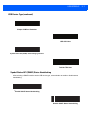
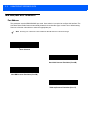
Select the USB device type by scanning the appropriate bar code from USB Device Type on page 3-6.
NOTE
The interface cable automatically detects the host interface type and uses the default setting. If
the default (*) does not meet your requirements, scan another host bar code.
4.
On first installation when using Windows, the software prompts to select or install the Human Interface
Device driver. To install this driver, provided by Windows, click Next through all the choices and click
Finished on the last choice. The scanner powers up during this installation.
5.
To modify any other parameter options, scan the appropriate bar codes in this chapter.
If problems occur with the system, see Troubleshooting on page 11-4.
3-4
LI2208 PRODUCT REFERENCE GUIDE
USB Parameter Defaults
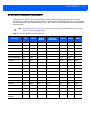
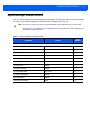
Table 3-1 lists the defaults for USB host parameters. If any option needs to be changed, scan the appropriate
bar code(s) provided in the Parameter Descriptions section beginning on page 3-6.
NOTE
SeeChapter B, COUNTRY CODES for USB Country Keyboard Types (Country Codes).
See Appendix A, STANDARD DEFAULT PARAMETERS for all user preferences, hosts, symbologies, and
miscellaneous default parameters.
Table 3-1 USB Host Default Table
Parameter
Default
Page
Number
USB Host Parameters
USB Device Type
USB Keyboard (HID)
3-6
Symbol Native API (SNAPI) Status Handshaking
Enable
3-7
USB Keystroke Delay
No Delay
3-8
USB CAPS Lock Override
Disable
3-8
USB Ignore Unknown Characters
Send
3-9
USB Convert Unknown to Code 39
Disable
3-9
Emulate Keypad
Enable
3-10
Emulate Keypad with Leading Zero
Disable
3-10
Quick Keypad Emulation
Enable
3-11
USB FN1 Substitution
Disable
3-11
Function Key Mapping
Disable
3-12
Simulated Caps Lock
Disable
3-12
Convert Case
No Case Conversion
3-13
USB Static CDC
Enable
3-13
Ignore Beep
Disable
3-14
Ignore Bar Code Configuration
Disable
3-14
USB Polling Interval
3 msec
3-15
Fast HID Keyboard
Disable
3-16
Code Type Table Usage
Use Table 0 Identifier
3-17
Include Symbol Types
Add Symbol Types
3-18
Include Character Counts
Add Character Counts
3-18
USB Toshiba TEC Host Parameters
USB INTERFACE
Table 3-1 USB Host Default Table (Continued)
Parameter
Default
Page
Number
Include Header
Add Header Character
3-18
Include Terminator
Add Terminator Character (s)
3-19
Header Character
Add STX (0x02)
3-19
Terminator Character
Add ETX (0x03)
3-20
Light LED on Good Decode
Light LED on Good Decode
3-20
Good Decode Beeper Timer
Indicate Before Transmission
3-21
3-5
3-6
LI2208 PRODUCT REFERENCE GUIDE
USB Host Parameters
USB Device Type
Select the desired USB device type.
NOTES 1.
2.
3.
When changing USB device types, the scanner automatically restarts. The linear imager issues a
power-up beep sequence.
Before selecting USB CDC Host (page 3-7), install the CDC INF file on the host to ensure the scanner
does not stall during power up (due to a failure to enumerate USB).
To recover a stalled scanner:
a) Install the CDC INF file
or
b) After power-up, hold the trigger for 10 seconds, which allows the scanner to power up using an
alternate USB configuration. Upon power-up, scan another USB Device Type.
Select IBM Hand-Held USB to disable data transmission when an IBM register issues a Scan Disable
command. Aim, illumination, and decoding is still permitted. Select IBM OPOS (IBM Hand-held USB
with Full Scan Disable) to completely shut off the scanner when an IBM register issues a Scan
Disable command, including aim, illumination, decoding, and data transmission.
*USB Keyboard (HID)
IBM Table Top USB
IBM Hand-Held USB
IBM OPOS
(IBM Hand-held USB with Full Scan Disable)
USB INTERFACE
USB Device Type (continued)
Simple COM Port Emulation
USB CDC Host
Symbol Native API (SNAPI) without Imaging Interface
Toshiba TEC Host
Symbol Native API (SNAPI) Status Handshaking
After selecting a SNAPI interface as the USB device type, select whether to enable or disable status
handshaking.
*Enable SNAPI Status Handshaking
Disable SNAPI Status Handshaking
3-7
3-8
LI2208 PRODUCT REFERENCE GUIDE
USB Keystroke Delay
This parameter sets the delay, in milliseconds, between emulated keystrokes. Scan a bar code below to
increase the delay when hosts require a slower transmission of data.
*No Delay
Medium Delay (20 msec)
Long Delay (40 msec)
USB CAPS Lock Override
This option applies only to the USB Keyboard (HID) device. When enabled, the case of the data is preserved
regardless of the state of the caps lock key. This setting is always enabled for the “Japanese, Windows
(ASCII)” keyboard type and can not be disabled.
Override Caps Lock Key
(Enable)
*Do Not Override Caps Lock Key
(Disable)
USB INTERFACE
3-9
USB Ignore Unknown Characters
This option applies only to the USB Keyboard (HID) device and IBM device. Unknown characters are
characters the host does not recognize. When Send Bar Codes With Unknown Characters is selected, all
bar code data is sent except for unknown characters, and no error beeps sound. When Do Not Send Bar
Codes With Unknown Characters is selected, bar code data is sent up to the first unknown character, then
the linear imager issues an error beep.
*Send Bar Codes with Unknown Characters
Do Not Send Bar Codes with Unknown Characters
USB Convert Unknown to Code 39
This option applies only to the IBM Handheld, IBM Tabletop, and OPOS devices. Scan a bar code below to
enable or disable converting unknown bar code type data to Code 39.
*Disable Convert Unknown to Code 39
Enable Convert Unknown to Code 39
3 - 10 LI2208 PRODUCT REFERENCE GUIDE
Emulate Keypad
When enabled, all characters are sent as ASCII sequences over the numeric keypad. For example ASCII A
would be sent as “ALT make” 0 6 5 “ALT Break.”
NOTE
If your keyboard type is not listed in the country code list (see Appendix B, COUNTRY CODES), disable
Quick Keypad Emulation on page 3-11 and ensure Emulate Keypad is enabled.
Disable Keypad Emulation
* Enable Keypad Emulation
Emulate Keypad with Leading Zero
Enable this to send character sequences sent over the numeric keypad as ISO characters which have a
leading zero. For example ASCII A transmits as “ALT MAKE” 0 0 6 5 “ALT BREAK”.
*Disable Keypad Emulation with Leading Zero
Enable Keypad Emulation with Leading Zero
USB INTERFACE 3 - 11
Quick Keypad Emulation
This option applies only to the HID Keyboard Emulation Device and if Emulate Keypad is enabled. This
parameter enables a quicker method of keypad emulation where ASCII sequences are only sent for ASCII
characters not found on the keyboard. The default value is Enable.
*Enable
Disable
USB Keyboard FN1 Substitution
This option applies only to the USB USB Keyboard (HID) device. When enabled, this allows replacement of
any FN1 characters in an EAN 128 bar code with a Key Category and value chosen by the user (see FN1
Substitution Values on page 7-24 to set the Key Category and Key Value).
Enable FN1 Substitution
*Disable FN1 Substitution
3 - 12 LI2208 PRODUCT REFERENCE GUIDE
Function Key Mapping
ASCII values under 32 are normally sent as a control-key sequences (see Table 3-3 on page 3-22). When this
parameter is enabled, the keys in bold are sent in place of the standard key mapping. Table entries that do not
have a bold entry remain the same whether or not this parameter is enabled.
*Disable Function Key Mapping
Enable Function Key Mapping
Simulated Caps Lock
When enabled, the linear imager inverts upper and lower case characters on the linear imager bar code as if
the Caps Lock state is enabled on the keyboard. This inversion is done regardless of the current state of the
keyboard’s Caps Lock state.
*Disable Simulated Caps Lock
Enable Simulated Caps Lock
USB INTERFACE 3 - 13
Convert Case
When enabled, the linear imager converts all bar code data to the selected case.
*No Case Conversion
Convert All to Upper Case
Convert All to Lower Case
USB Static CDC
When disabled, each device connected consumes another COM port (first device = COM1,
second device = COM2, third device = COM3, etc.)
When enabled, each device connects to the same COM port.
*Enable USB Static CDC
Disable USB Static CDC
3 - 14 LI2208 PRODUCT REFERENCE GUIDE
Optional USB Parameters
If you configure the linear imager and find the settings were not saved, or changed, when the system is
restarted scan the bar codes that follow to override USB interface defaults.
Scan a bar code below after setting defaults and before configuring the linear imager.
Ignore Beep
The host can send a beep request to the linear imager. When this parameter is enabled, the request is not sent
to the attached linear imager. All directives are still acknowledged to the USB host as if it were processed.
*Disable
Enable
Ignore Bar Code Configuration
The host has the ability to enable/disable code types. When this parameter is enabled, the request is not sent
to the attached linear imager. All directives are still acknowledged to the USB host as if it were processed.
*Disable
Enable
USB INTERFACE 3 - 15
USB Polling Interval
Scan a bar code below to set the polling interval. The polling interval determines the rate at which data can be
sent between the scanner and host computer. A lower number indicates a faster data rate.
NOTE
When changing the USB polling interval, the linear imager automatically restarts and issues a power-up
beep sequence.
IMPORTANT Ensure your host machine can handle the selected data rate.
1 msec
2 msec
* 3 msec
4 msec
5 msec
3 - 16 LI2208 PRODUCT REFERENCE GUIDE
USB Polling Interval (continued)
6 msec
7 msec
8 msec
9 msec
Fast HID Keyboard
This option transmits USB HID keyboard data at a faster rate.
NOTE
Quick Keypad Emulation (on page 3-11) overrides Fast HID Keyboard.
Enable
* Disable
USB INTERFACE 3 - 17
Toshiba TEC Host Parameters
This section only applies when the USB device type is set as Toshiba TEC Host on page 3-7, and the scanner
is connected to a Toshiba TEC register.
Toshiba TEC Code Type Table Usage
This single bit option chooses which Toshiba TEC specific Symbol Table is used for identifying bar code types.
Table 3-2 Toshiba TEC Symbol Type Table
Code Type
Table 0 Identifier
Table 1 Identifier
UPC-A
A
A
UPC-E
E
C
EAN-8
FF
B
EAN-13
F
A
Codabar (NW-7)
N
N
Code 39
M
M
I25
I
I
D25 (Standard 2 of 5)
H
H
Code 93
L
L
Code 128
K
K
RSS
R
R
All Others
X
X
* Use Table 0 Identifier
Use Table 1 Identifier
3 - 18 LI2208 PRODUCT REFERENCE GUIDE
Toshiba TEC Include Symbol Type
This single bit option chooses whether or not the Toshiba TEC Symbol Table is used for identifying bar code
types.
* Add Symbol Types
Do Not Add Symbol Types
Toshiba TEC Include Character Counts
This single bit option chooses whether or not the count of characters in the bar code is prefixed onto the
decoded data before transmission. This applies to all the code types except the UPC and EAN families.
* Add Character Counts
Do Not Add Character Counts
Toshiba TEC Include Header
This single bit option chooses whether or not the header character is prefixed onto the decoded data before
transmission. The default header character is the STX (0x02) character. That can be changed with the Toshiba
TEC Header Character parameters listed below.
* Add Header Character
Do Not Add Header Character
USB INTERFACE 3 - 19
Toshiba TEC Include Terminator
This single bit option chooses whether or not the terminator character(s) are appended onto the decoded data
before transmission. The default terminator character is the ETX (0x03) character. That can be changed with
the Toshiba TEC Terminator Character parameters listed below. Additionally, there is an ability to specify one
or two terminator characters. The default is no second terminator.
* Add Terminator Character (s)
Do Not Add Terminator Character (s)
Toshiba TEC Header Character
This single byte option specifies the header character prefixed onto the decoded data before transmission. The
default header character is the STX (0x02) character. Note that it is NOT POSSIBLE to use the NULL
character (0x00) as the prefix as this is the default value and indicates that an STX must be used. To program
a header character, scan the bar code below followed by two numeric bar codes in Appendix H, NUMERIC
BAR CODES.
Values:0 = Add STX (0x02),
All others specify the hex value to be prefixed.
Toshiba TEC Header Character
3 - 20 LI2208 PRODUCT REFERENCE GUIDE
Toshiba TEC Terminator Character
This two byte option specifies the terminator character(s) appended onto the decoded data before
transmission. The default terminator character is the ETX (0x03) character. Note that it is NOT POSSIBLE to
use the NULL character (0x00) as either of the terminators as this is the default value and indicates that an
ETX must be used. If the first character is a NULL, then only the ETX is appended even if there is a second
character defined. If the desired terminator is ETX followed by another character, then BOTH characters must
be specified. To program a terminator character, scan the bar code below followed by two numeric bar codes in
Appendix H, NUMERIC BAR CODES.
Values: 0 = Add ETX (0x03),
All others specify the value to be appended in decimal format.
Terminator Character 1
Terminator Character 2
Toshiba TEC Light LED on Good Decode
This option specifies whether or not to light the Good Decode LED on a good decode.
* Light LED on Good Decode
Do Not Light LED on Good Decode
USB INTERFACE 3 - 21
Toshiba TEC Good Decode Beeper Timing
This option specifies when a good decode indication takes place. The options are to indicate the good decode
either before or after the bar code was transmitted to the host.
* Indicate Before Transmission
Indicate After Transmission
3 - 22 LI2208 PRODUCT REFERENCE GUIDE
ASCII Character Set for USB
Table 3-3 ASCII Character Set for USB
Full ASCII
Code 39 Encode
Character
ASCII Value
Keystroke
1000
%U
CTRL 2
1001
$A
CTRL A
1002
$B
CTRL B
1003
$C
CTRL C
1004
$D
CTRL D
1005
$E
CTRL E
1006
$F
CTRL F
1007
$G
CTRL G
1008
$H
CTRL H/BACKSPACE1
1009
$I
CTRL I/HORIZONTAL TAB1
1010
$J
CTRL J
1011
$K
CTRL K
1012
$L
CTRL L
1013
$M
CTRL M/ENTER1
1014
$N
CTRL N
1015
$O
CTRL O
1016
$P
CTRL P
1017
$Q
CTRL Q
1018
$R
CTRL R
1019
$S
CTRL S
1020
$T
CTRL T
1021
$U
CTRL U
1022
$V
CTRL V
1023
$W
CTRL W
1024
$X
CTRL X
1The keystroke in bold is sent only if the “Function Key Mapping” is enabled.
Otherwise, the non-bold keystroke is sent.
USB INTERFACE 3 - 23
Table 3-3 ASCII Character Set for USB (Continued)
Full ASCII
Code 39 Encode
Character
ASCII Value
Keystroke
1025
$Y
CTRL Y
1026
$Z
CTRL Z
1027
%A
CTRL [/ESC1
1028
%B
CTRL \
1029
%C
CTRL ]
1030
%D
CTRL 6
1031
%E
CTRL -
1032
Space
Space
1033
/A
!
1034
/B
“
1035
/C
#
1036
/D
$
1037
/E
%
1038
/F
&
1039
/G
‘
1040
/H
(
1041
/I
)
1042
/J
*
1043
/K
+
1044
/L
,
1045
-
-
1046
.
.
1047
/O
/
1048
0
0
1049
1
1
1050
2
2
1051
3
3
1052
4
4
1The keystroke in bold is sent only if the “Function Key Mapping” is enabled.
Otherwise, the non-bold keystroke is sent.
3 - 24 LI2208 PRODUCT REFERENCE GUIDE
Table 3-3 ASCII Character Set for USB (Continued)
Full ASCII
Code 39 Encode
Character
ASCII Value
Keystroke
1053
5
5
1054
6
6
1055
7
7
1056
8
8
1057
9
9
1058
/Z
:
1059
%F
;
1060
%G
<
1061
%H
=
1062
%I
>
1063
%J
?
1064
%V
@
1065
A
A
1066
B
B
1067
C
C
1068
D
D
1069
E
E
1070
F
F
1071
G
G
1072
H
H
1073
I
I
1074
J
J
1075
K
K
1076
L
L
1077
M
M
1078
N
N
1079
O
O
1080
P
P
1081
Q
Q
1The keystroke in bold is sent only if the “Function Key Mapping” is enabled.
Otherwise, the non-bold keystroke is sent.
USB INTERFACE 3 - 25
Table 3-3 ASCII Character Set for USB (Continued)
Full ASCII
Code 39 Encode
Character
ASCII Value
Keystroke
1082
R
R
1083
S
S
1084
T
T
1085
U
U
1086
V
V
1087
W
W
1088
X
X
1089
Y
Y
1090
Z
Z
1091
%K
[
1092
%L
\
1093
%M
]
1094
%N
^
1095
%O
_
1096
%W
`
1097
+A
a
1098
+B
b
1099
+C
c
1100
+D
d
1101
+E
e
1102
+F
f
1103
+G
g
1104
+H
h
1105
+I
i
1106
+J
j
1107
+K
k
1108
+L
l
1109
+M
m
1110
+N
n
1The keystroke in bold is sent only if the “Function Key Mapping” is enabled.
Otherwise, the non-bold keystroke is sent.
3 - 26 LI2208 PRODUCT REFERENCE GUIDE
Table 3-3 ASCII Character Set for USB (Continued)
Full ASCII
Code 39 Encode
Character
ASCII Value
Keystroke
1111
+O
o
1112
+P
p
1113
+Q
q
1114
+R
r
1115
+S
s
1116
+T
t
1117
+U
u
1118
+V
v
1119
+W
w
1120
+X
x
1121
+Y
y
1122
+Z
z
1123
%P
{
1124
%Q
|
1125
%R
}
1126
%S
~
1
The keystroke in bold is sent only if the “Function Key Mapping” is enabled.
Otherwise, the non-bold keystroke is sent.
USB INTERFACE 3 - 27
Table 3-4 USB ALT Key Character Set
ALT Keys
Keystroke
2064
ALT 2
2065
ALT A
2066
ALT B
2067
ALT C
2068
ALT D
2069
ALT E
2070
ALT F
2071
ALT G
2072
ALT H
2073
ALT I
2074
ALT J
2075
ALT K
2076
ALT L
2077
ALT M
2078
ALT N
2079
ALT O
2080
ALT P
2081
ALT Q
2082
ALT R
2083
ALT S
2084
ALT T
2085
ALT U
2086
ALT V
2087
ALT W
2088
ALT X
2089
ALT Y
2090
ALT Z
3 - 28 LI2208 PRODUCT REFERENCE GUIDE
Table 3-5 USB GUI Key Character Set
GUI Key
Keystroke
3000
Right Control Key
3048
GUI 0
3049
GUI 1
3050
GUI 2
3051
GUI 3
3052
GUI 4
3053
GUI 5
3054
GUI 6
3055
GUI 7
3056
GUI 8
3057
GUI 9
3065
GUI A
3066
GUI B
3067
GUI C
3068
GUI D
3069
GUI E
3070
GUI F
3071
GUI G
3072
GUI H
3073
GUI I
3074
GUI J
3075
GUI K
3076
GUI L
3077
GUI M
3078
GUI N
3079
GUI O
3080
GUI P
3081
GUI Q
Note: GUI Shift Keys - The Apple™ iMac keyboard has an apple key on either side of the
space bar. Windows-based systems have a GUI key to the left of the left ALT key, and to the
right of the right ALT key.
USB INTERFACE 3 - 29
Table 3-5 USB GUI Key Character Set (Continued)
GUI Key
Keystroke
3082
GUI R
3083
GUI S
3084
GUI T
3085
GUI U
3086
GUI V
3087
GUI W
3088
GUI X
3089
GUI Y
3090
GUI Z
Note: GUI Shift Keys - The Apple™ iMac keyboard has an apple key on either side of the
space bar. Windows-based systems have a GUI key to the left of the left ALT key, and to the
right of the right ALT key.
Table 3-6 USB F Key Character Set
F Keys
Keystroke
5001
F1
5002
F2
5003
F3
5004
F4
5005
F5
5006
F6
5007
F7
5008
F8
5009
F9
5010
F10
5011
F11
5012
F12
5013
F13
5014
F14
5015
F15
5016
F16
5017
F17
3 - 30 LI2208 PRODUCT REFERENCE GUIDE
Table 3-6 USB F Key Character Set (Continued)
F Keys
Keystroke
5018
F18
5019
F19
5020
F20
5021
F21
5022
F22
5023
F23
5024
F24
Table 3-7 USB Numeric Keypad Character Set
Numeric Keypad
Keystroke
6042
*
6043
+
6044
undefined
6045
-
6046
.
6047
/
6048
0
6049
1
6050
2
6051
3
6052
4
6053
5
6054
6
6055
7
6056
8
6057
9
6058
Enter
6059
Num Lock
USB INTERFACE 3 - 31
Table 3-8 USB Extended Keypad Character Set
Extended Keypad
Keystroke
7001
Break
7002
Delete
7003
Pg Up
7004
End
7005
Pg Dn
7006
Pause
7007
Scroll Lock
7008
Backspace
7009
Tab
7010
Print Screen
7011
Insert
7012
Home
7013
Enter
7014
Escape
7015
Up Arrow
7016
Down Arrow
7017
Left Arrow
7018
Right Arrow
3 - 32 LI2208 PRODUCT REFERENCE GUIDE
CHAPTER 4 RS-232 INTERFACE
Introduction
This chapter provides instructions for programming the linear imager to interface with an RS-232 host
interface. The RS-232 interface is used to attach the scanner to point-of-sale devices, host computers, or other
devices with an available RS-232 port (i.e., COM port).
If the particular host is not listed in Table 4-2, set the communication parameters to match the host device.
Refer to the documentation for the host device.
NOTE
This linear imager uses TTL RS-232 signal levels, which interface with most system architectures. For
system architectures requiring RS-232C signal levels, Zebra offers different cables providing the TTL to
RS-232C conversion. Contact Zebra Support for more information.
Throughout the programming bar code menus, default values are indicated with asterisks (*).
*Indicates Default
*Baud Rate 9600
Feature/Option
4-2
LI2208 PRODUCT REFERENCE GUIDE
Connecting an RS-232 Interface
This connection is made directly from the scanner to the host computer.
Figure 4-1 RS-232 Direct Connection
To connect the RS-232 interface:
1.
2.
3.
4.
Attach the modular connector of the RS-232 interface cable to the host port on the bottom of the scanner.
Connect the other end of the RS-232 interface cable to the serial port on the host.
Connect the power supply to the serial connector end of the RS-232 interface cable. Plug the power supply
into an appropriate outlet.
Select the RS-232 host type by scanning the appropriate bar code from RS-232 Host Types on page 4-6.
NOTE
5.
The interface cable automatically detects the host interface type and uses the default setting. If the default
(*) does not meet your requirements, scan another host bar code.
To modify any other parameter options, scan the appropriate bar codes in this chapter.
RS-232 INTERFACE
4-3
RS-232 Parameter Defaults
Table 4-1 lists the defaults for RS-232 host parameters. If any option needs to be changed, scan the
appropriate bar code(s) provided in the Parameter Descriptions section beginning on page 4-4.
NOTE
See Appendix A, STANDARD DEFAULT PARAMETERS for all user preferences, hosts, symbologies, and
miscellaneous default parameters.
Table 4-1 RS-232 Host Default Table
Parameter
Default
Page
Number
RS-232 Host Parameters
RS-232 Host Types
Standard
4-6
Baud Rate
9600
4-8
Stop Bit Select
1 Stop Bit
4-9
Check Receive Errors
Enable
4-9
Parity Type
None
4-10
Data Bits (ASCII Format)
8-bit
4-10
Hardware Handshaking
None
4-12
Software Handshaking
None
4-14
Host Serial Response Time-out
2 sec
4-15
RTS Line State
Low RTS
4-16
Beep on <BEL>
Disable
4-16
Intercharacter Delay
0 msec
4-17
Nixdorf Beep/LED Options
Normal Operation
4-18
Ignore Unknown Characters
Send Bar Code
4-18
4-4
LI2208 PRODUCT REFERENCE GUIDE
RS-232 Host Parameters
Various RS-232 hosts are set up with their own parameter default settings (Table 4-2). Selecting the ICL,
Fujitsu, Wincor-Nixdorf Mode A, Wincor-Nixdorf Mode B, Olivetti, Omron, or terminal sets the defaults listed
below.
Table 4-2
Terminal Specific RS-232
Parameter
ICL
Fujitsu
WincorNixdorf
Mode A
WincorNixdorf Mode
B/OPOS/JPOS
Olivetti
Omron
CUTE
Transmit Code ID
Yes
Yes
Yes
Yes
Yes
Yes
Yes
Data Transmission
Format
Data/Suffix
Data/Suffix
Data/Suffix
Data/Suffix
Prefix/Data/
Suffix
Data/Suffix
Prefix/Data/
Suffix
Suffix
CR (1013)
CR (1013)
CR (1013)
CR (1013)
ETX (1002)
CR (1013)
CR (1013)
ETX (1003)
Baud Rate
9600
9600
9600
9600
9600
9600
9600
Parity
Even
None
Odd
Odd
Even
None
Even
Hardware
Handshaking
RTS/CTS
Option 3
None
RTS/CTS
Option 3
RTS/CTS
Option 3
None
None
None
Software
Handshaking
None
None
None
None
ACK/NAK
None
None
Serial Response
Time-out
9.9 Sec.
2 Sec.
9.9 Sec.
9.9 Sec.
9.9 Sec.
9.9 Sec.
9.9 Sec.
Stop Bit Select
One
One
One
One
One
One
One
ASCII Format
8-bit
8-bit
8-bit
8-bit
7-bit
8-bit
7-bit
Beep On <BEL>
Disable
Disable
Disable
Disable
Disable
Disable
Disable
RTS Line State
High
Low
Low
Low = No data to
send
Low
High
High
Prefix
None
None
None
None
STX (1003)
None
STX (1002)
Notes:
In the Nixdorf Mode B, if CTS is low, scanning is disabled. When CTS is high, scanning is enabled.
If you scan Nixdorf Mode B without connecting the linear imager to the proper host, it may appear unable
to scan. If this happens, scan a different RS-232 host type within 5 seconds of cycling power to the linear
imager.
The CUTE host disables all parameter scanning, including Set Defaults. If you inadvertently select CUTE,
scan *Enable Parameter Bar Code Scanning (01h) on page 7-5, then change the host selection.
In ASCII format, when 7-bit is selected, Parity must be set to Odd or Even. If Parity is set to None, the
scanner automatically operates in 8-bit mode, even if 7-bit is scanned.
RS-232 INTERFACE
4-5
RS-232 Host Parameters (continued)
Selecting the ICL, Fujitsu, Wincor-Nixdorf Mode A, Wincor-Nixdorf Mode B, OPOS terminal enables the
transmission of code ID characters listed in Table 4-3 below. These code ID characters are not programmable
and are separate from the Transmit Code ID feature. The Transmit Code ID feature should not be enabled for
these terminals.
NOTE
The code types in Table 4-3 may not be automatically enabled. Check the defaults for each code type in
Table 8-1, Chapter 8, SYMBOLOGIES.
Table 4-3 Terminal Specific Code ID Characters
Code Type
ICL
WincorNixdorf
Mode A
Fujitsu
Wincor-Nixdorf
Mode B/
OPOS/JPOS
Olivetti
Omron
CUTE
UPC-A
A
A
A
A
A
A
A
UPC-E
E
E
C
C
C
E
None
EAN-8/JAN-8
FF
FF
B
B
B
FF
None
EAN-13/JAN-13
F
F
A
A
A
F
A
Code 39
C <len>
None
M
M
M <len>
C <len>
3
Code 39 Full ASCII
None
None
M
M
None
None
3
Codabar
N <len>
None
N
N
N <len>
N <len>
None
Code 128
L <len>
None
K
K
K <len>
L <len>
5
I 2 of 5
I <len>
None
I
I
I <len>
I <len>
1
Code 93
None
None
L
L
L <len>
None
None
D 2 of 5
H <len>
None
H
H
H <len>
H <len>
2
GS1-128
L <len>
None
P
P
P <len>
L <len>
5
MSI
None
None
O
O
O <len>
None
None
Bookland EAN
F
F
A
A
A
F
None
Trioptic
None
None
None
None
None
None
None
Code 11
None
None
None
None
None
None
None
IATA
H<len>
None
H
H
H <len>
H <len>
2
Code 32
None
None
None
None
None
None
None
GS1 DataBar
Variants
None
None
E
E
None
None
None
4-6
LI2208 PRODUCT REFERENCE GUIDE
RS-232 Host Types
To select an RS-232 host interface, scan one of the following bar codes.
*Standard RS-232
ICL RS-232
Wincor-Nixdorf RS-232 Mode A
Wincor-Nixdorf RS-232 Mode B
Olivetti ORS4500
Omron
OPOS/JPOS
RS-232 INTERFACE
4-7
RS-232 Host Types (continued)
Fujitsu RS-232
CUTE
NOTE
The CUTE host disables all parameter scanning, including set defaults. If the CUTE parameter is
inadvertently selected, scan *Enable Parameter Bar Code Scanning (01h) on page 7-5, then change the
host selection.
4-8
LI2208 PRODUCT REFERENCE GUIDE
Baud Rate
Baud rate is the number of bits of data transmitted per second. Set the linear imager's baud rate to match the
baud rate setting of the host device. Otherwise, data may not reach the host device or may reach it in distorted
form.
*Baud Rate 9600
Baud Rate 19,200
Baud Rate 38,400
Baud Rate 57,600
Baud Rate 115,200
RS-232 INTERFACE
4-9
Stop Bit Select
The stop bit(s) at the end of each transmitted character marks the end of transmission of one character and
prepares the receiving device for the next character in the serial data stream. The number of stop bits selected
(one or two) depends on the number the receiving terminal is programmed to accommodate. Set the number of
stop bits to match host device requirements.
*1 Stop Bit
2 Stop Bits
Check Receive Errors
Select whether or not the parity, framing, and overrun of received characters are checked. The parity value of
received characters is verified against the parity parameter selected above.
*Check For Received Errors
(Enable)
Do Not Check For Received Errors
(Disable)
4 - 10 LI2208 PRODUCT REFERENCE GUIDE
Data Bits (ASCII Format)
This parameter allows the linear imager to interface with devices requiring a 7-bit or 8-bit ASCII protocol.
NOTE
When 7-bit is selected, Parity must be set to Odd or Even. If Parity is set to None, the scanner
automatically operates in 8-bit mode, even if 7-bit is scanned.
7-bit
*8-bit
Parity
NOTE
Parity of None is not valid when Data Bits is set to 7-bit.
A parity check bit is the most significant bit of each ASCII coded character. Select the parity type according to
host device requirements.
• Select Odd parity and the parity bit value is set to 0 or 1, based on data, to ensure that an odd number of
1 bits are contained in the coded character.
• Select Even parity and the parity bit value is set to 0 or 1, based on data, to ensure that an even number
of 1 bits are contained in the coded character.
• Select None when no parity bit is required.
Odd
Even
*None
RS-232 INTERFACE 4 - 11
Hardware Handshaking
The data interface consists of an RS-232 port designed to operate either with or without the hardware
handshaking lines, Request to Send (RTS), and Clear to Send (CTS).
If Standard RTS/CTS handshaking is not selected, scan data is transmitted as it becomes available. If
Standard RTS/CTS handshaking is selected, scan data is transmitted according to the following sequence:
• The linear imager reads the CTS line for activity. If CTS is asserted, the linear imager waits up to Host
Serial Response Time-out for the host to de-assert the CTS line. If, after Host Serial Response Time-out,
the CTS line is still asserted, the linear imager sounds a transmit error, and any scanned data is lost.
• When the CTS line is de-asserted, the linear imager asserts the RTS line and waits up to Host Serial
Response Time-out for the host to assert CTS. When the host asserts CTS, data is transmitted. If, after
Host Serial Response Time-out, the CTS line is not asserted, the linear imager sounds a transmit error,
and discards the data.
• When data transmission is complete, the linear imager de-asserts RTS 10 msec after sending the last
character.
• The host should respond by negating CTS. The linear imager checks for a de-asserted CTS upon the
next transmission of data.
During the transmission of data, the CTS line should be asserted. If CTS is de-asserted for more than 50 ms
between characters, the transmission is aborted, the linear imager sounds a transmission error, and the data is
discarded.
If the above communication sequence fails, the linear imager issues an error indication. In this case, the data is
lost and must be rescanned.
If Hardware Handshaking and Software Handshaking are both enabled, Hardware Handshaking takes
precedence.
NOTE
The DTR signal is jumpered to the active state.
4 - 12 LI2208 PRODUCT REFERENCE GUIDE
Hardware Handshaking (continued)
• None: Scan the bar code below if no Hardware Handshaking is desired.
• Standard RTS/CTS: Scan the bar code below to select Standard RTS/CTS Hardware Handshaking.
• RTS/CTS Option 1: When RTS/CTS Option 1 is selected, the linear imager asserts RTS before
transmitting and ignores the state of CTS. The linear imager de-asserts RTS when the transmission is
complete.
• RTS/CTS Option 2: When Option 2 is selected, RTS is always high or low (user-programmed logic
level). However, the linear imager waits for CTS to be asserted before transmitting data. If CTS is not
asserted within Host Serial Response Time-out, the linear imager issues an error indication and discards
the data.
• RTS/CTS Option 3: When Option 3 is selected, the linear imager asserts RTS prior to any data
transmission, regardless of the state of CTS. The linear imager waits up to Host Serial Response
Time-out for CTS to be asserted. If CTS is not asserted during this time, the linear imager issues an error
indication and discards the data. The linear imager de-asserts RTS when transmission is complete.
*None
Standard RTS/CTS
RTS/CTS Option 1
RTS/CTS Option 2
RTS/CTS Option 3
RS-232 INTERFACE 4 - 13
Software Handshaking
This parameter offers control of the data transmission process in addition to, or instead of, that offered by
hardware handshaking. There are five options.
If Software Handshaking and Hardware Handshaking are both enabled, Hardware Handshaking takes
precedence.
• None: When this option is selected, data is transmitted immediately. No response is expected from host.
• ACK/NAK: When this option is selected, after transmitting data, the linear imager expects either an ACK
or NAK response from the host. When a NAK is received, the linear imager transmits the same data
again and waits for either an ACK or NAK. After three unsuccessful attempts to send data when NAKs
are received, the linear imager issues an error indication and discards the data.
The linear imager waits up to the programmable Host Serial Response Time-out to receive an ACK or
NAK. If the linear imager does not get a response in this time, it issues an error indication and discards
the data. There are no retries when a time-out occurs.
• ENQ: When this option is selected, the linear imager waits for an ENQ character from the host before
transmitting data. If an ENQ is not received within the Host Serial Response Time-out, the linear imager
issues an error indication and discards the data. The host must transmit an ENQ character at least every
Host Serial Response Time-out to prevent transmission errors.
• ACK/NAK with ENQ: This combines the two previous options. For re-transmissions of data, due to a
NAK from the host, an additional ENQ is not required.
• XON/XOFF: An XOFF character turns the linear imager transmission off until the linear imager receives
an XON character. There are two situations for XON/XOFF:
• XOFF is received before the linear imager has data to send. When the linear imager has data to send,
it waits up to Host Serial Response Time-out for an XON character before transmission. If the XON is
not received within this time, the linear imager issues an error indication and discards the data.
• XOFF is received during a transmission. Data transmission then stops after sending the current byte.
When the linear imager receives an XON character, it sends the rest of the data message. The linear
imager waits up to 30 seconds for the XON.
4 - 14 LI2208 PRODUCT REFERENCE GUIDE
Software Handshaking (continued)
*None
ACK/NAK
ENQ
ACK/NAK with ENQ
XON/XOFF
RS-232 INTERFACE 4 - 15
Host Serial Response Time-out
This parameter specifies how long the linear imager waits for an ACK, NAK, ENQ, XON, or CTS before
determining that a transmission error occurred.
*Minimum: 2 sec
Low: 2.5 sec
Medium: 5 sec
High: 7.5 sec
Maximum: 9.9 sec
4 - 16 LI2208 PRODUCT REFERENCE GUIDE
RTS Line State
This parameter sets the idle state of the Serial Host RTS line. Scan a bar code below to select Low RTS or
High RTS line state.
*Host: Low RTS
Host: High RTS
Beep on <BEL>
When this parameter is enabled, the linear imager issues a beep when a <BEL> character is detected on the
RS-232 serial line. <BEL> is issued to gain a user's attention to an illegal entry or other important event.
Beep On <BEL> Character
(Enable)
*Do Not Beep On <BEL> Character
(Disable)
RS-232 INTERFACE 4 - 17
Intercharacter Delay
This parameter specifies the intercharacter delay inserted between character transmissions.
*Minimum: 0 msec
Low: 25 msec
Medium: 50 msec
High: 75 msec
Maximum: 99 msec
4 - 18 LI2208 PRODUCT REFERENCE GUIDE
Nixdorf Beep/LED Options
When Nixdorf Mode B is selected, this indicates when the linear imager should beep and turn on its LED after
a decode.
*Normal Operation
(Beep/LED immediately after decode)
Beep/LED After Transmission
Beep/LED After CTS Pulse
Ignore Unknown Characters
Unknown characters are characters the host does not recognize. When Send Bar Codes with Unknown
Characters is selected, all bar code data is sent except for unknown characters, and no error beeps sound on
the linear imager. When Do Not Send Bar Codes With Unknown Characters is selected, bar code data is
sent up to the first unknown character and then an error beep sounds on the linear imager.
*Send Bar Code with Unknown Characters
Do Not Send Bar Codes with Unknown Characters
RS-232 INTERFACE 4 - 19
ASCII Character Set for RS-232
The values in Table 4-4 can be assigned as prefixes or suffixes for ASCII character data transmission.
Table 4-4 ASCII Character Set for RS-232
ASCII Value
Full ASCII
Code 39 Encode Character
ASCII Character
1000
%U
NUL
1001
$A
SOH
1002
$B
STX
1003
$C
ETX
1004
$D
EOT
1005
$E
ENQ
1006
$F
ACK
1007
$G
BELL
1008
$H
BCKSPC
1009
$I
HORIZ TAB
1010
$J
LF/NW LN
1011
$K
VT
1012
$L
FF
1013
$M
CR/ENTER
1014
$N
SO
1015
$O
SI
1016
$P
DLE
1017
$Q
DC1/XON
1018
$R
DC2
1019
$S
DC3/XOFF
1020
$T
DC4
1021
$U
NAK
1022
$V
SYN
1023
$W
ETB
1024
$X
CAN
1025
$Y
EM
1026
$Z
SUB
1027
%A
ESC
4 - 20 LI2208 PRODUCT REFERENCE GUIDE
Table 4-4 ASCII Character Set for RS-232 (Continued)
Full ASCII
Code 39 Encode Character
ASCII Value
ASCII Character
1028
%B
FS
1029
%C
GS
1030
%D
RS
1031
%E
US
1032
Space
Space
1033
/A
!
1034
/B
"
1035
/C
#
1036
/D
$
1037
/E
%
1038
/F
&
1039
/G
‘
1040
/H
(
1041
/I
)
1042
/J
*
1043
/K
+
1044
/L
,
1045
-
-
1046
.
.
1047
/O
/
1048
0
0
1049
1
1
1050
2
2
1051
3
3
1052
4
4
1053
5
5
1054
6
6
1057
7
7
1056
8
8
1057
9
9
1058
/Z
:
RS-232 INTERFACE 4 - 21
Table 4-4 ASCII Character Set for RS-232 (Continued)
Full ASCII
Code 39 Encode Character
ASCII Value
ASCII Character
1059
%F
;
1060
%G
<
1061
%H
=
1062
%I
>
1063
%J
?
1064
%V
@
1065
A
A
1066
B
B
1067
C
C
1068
D
D
1069
E
E
1070
F
F
1071
G
G
1072
H
H
1073
I
I
1074
J
J
1075
K
K
1076
L
L
1077
M
M
1078
N
N
1079
O
O
1080
P
P
1081
Q
Q
1082
R
R
1083
S
S
1084
T
T
1085
U
U
1086
V
V
1087
W
W
1088
X
X
1089
Y
Y
4 - 22 LI2208 PRODUCT REFERENCE GUIDE
Table 4-4 ASCII Character Set for RS-232 (Continued)
Full ASCII
Code 39 Encode Character
ASCII Value
ASCII Character
1090
Z
Z
1091
%K
[
1092
%L
\
1093
%M
]
1094
%N
^
1095
%O
_
1096
%W
`
1097
+A
a
1098
+B
b
1099
+C
c
1100
+D
d
1101
+E
e
1102
+F
f
1103
+G
g
1104
+H
h
1105
+I
i
1106
+J
j
1107
+K
k
1108
+L
l
1109
+M
m
1110
+N
n
1111
+O
o
1112
+P
p
1113
+Q
q
1114
+R
r
1115
+S
s
1116
+T
t
1117
+U
u
1118
+V
v
1119
+W
w
1120
+X
x
RS-232 INTERFACE 4 - 23
Table 4-4 ASCII Character Set for RS-232 (Continued)
ASCII Value
Full ASCII
Code 39 Encode Character
ASCII Character
1121
+Y
y
1122
+Z
z
1123
%P
{
1124
%Q
|
1125
%R
}
1126
%S
~
1127
Undefined
7013
ENTER
4 - 24 LI2208 PRODUCT REFERENCE GUIDE
CHAPTER 5 IBM INTERFACE
Introduction
This chapter provides instructions for programming the linear imager to interface with an IBM 468X/469X host
computer.
Throughout the programming bar code menus, default values are indicated with asterisks (*).
*Indicates Default *Disable Convert Unknown to Code 39
Feature/Option
5-2
LI2208 PRODUCT REFERENCE GUIDE
Connecting to an IBM 468X/469X Host
This connection is made directly from the linear imager to the host interface.
Figure 5-1 IBM Direct Connection
To connect the IBM 46XX interface:
1.
Attach the modular connector of the IBM 46XX interface cable to the host port on the bottom of the linear
imager.
2.
Connect the other end of the IBM 46XX interface cable to the appropriate port on the host.
3.
Select the port address by scanning the appropriate bar code from Port Address on page 5-4.
IMPORTANT The Auto-Host Detect Cable feature automatically detects the host interface type, but
there is no default setting. Scan one of the bar codes below to select the appropriate
port.
4.
To modify any other parameter options, scan the appropriate bar codes in this chapter.
NOTE
The only required configuration is the port number. Other linear imager parameters are typically
controlled by the IBM system.
IBM INTERFACE
5-3
IBM Parameter Defaults
Table 5-1 lists the defaults for IBM host parameters. To change any option, scan the appropriate bar code(s)
provided in the Parameter Descriptions section beginning on page 5-4.
NOTE
See Appendix A, STANDARD DEFAULT PARAMETERS for all user preferences, hosts, symbologies, and
miscellaneous default parameters.
Table 5-1 IBM Host Default Table
Parameter
Default
Page
Number
IBM 468X/469X Host Parameters
Port Address
None Selected
5-4
Convert Unknown to Code 39
Disable
5-5
Ignore Beep
Disable
5-5
Ignore Bar Code Configuration
Disable
5-6
5-4
LI2208 PRODUCT REFERENCE GUIDE
IBM 468X/469X Host Parameters
Port Address
This parameter sets the IBM 468X/469X port used. User selection is required to configure this interface The
Auto-Host Detect Cable feature automatically detects the host interface type, but there is no default setting.
Scan one of the bar codes below to select the appropriate port.
NOTE
Scanning one of these bar codes enables the RS-485 interface on the linear imager.
*None Selected
Hand-held Scanner Emulation (Port 9B)
Non-IBM Scanner Emulation (Port 5B)
Table-top Scanner Emulation (Port 17)
IBM INTERFACE
5-5
Convert Unknown to Code 39
Scan a bar code below to enable or disable the conversion of unknown bar code type data to Code 39.
Enable Convert Unknown to Code 39
*Disable Convert Unknown to Code 39
Optional IBM Parameters
If you configure the linear imager and find the settings were not saved, or changed, when the system is
restarted scan the bar codes that follow to override IBM interface defaults.
Scan a bar code below after setting defaults and before configuring the linear imager.
Ignore Beep
The host can send a beep request to the linear imager. When this parameter is enabled, the request is not sent
to the attached linear imager. All directives are still acknowledged to the IBM RS485 host as if it were
processed.
*Disable
Enable
5-6
LI2208 PRODUCT REFERENCE GUIDE
Ignore Bar Code Configuration
The host has the ability to enable/disable code types. When this parameter is enabled, the request is not sent
to the attached linear imager. All directives are still acknowledged to the IBM RS485 host as if it were
processed.
*Disable
Enable
CHAPTER 6 KEYBOARD WEDGE
INTERFACE
Introduction
This chapter provides instructions for programming the linear imager for keyboard wedge host interface, used
to connect the scanner between the keyboard and host computer. The linear imager translates the bar code
data into keystrokes, and transmits the information to the host computer. The host computer accepts the
keystrokes as if they originated from the keyboard.
This interface adds bar code reading functionality to a system designed for manual keyboard input. In this
mode the keyboard keystrokes are simply passed through.
Throughout the programming bar code menus, default values are indicated with asterisks (*).
*Indicates Default
*Send Bar Codes with Unknown Characters
Feature/Option
6-2
LI2208 PRODUCT REFERENCE GUIDE
Connecting a Keyboard Wedge Interface
Figure 6-1 Keyboard Wedge Connection with Y-cable
NOTE
Interface cables vary depending on configuration. The connectors illustrated in Figure 6-1 are examples only.
The connectors may be different than those illustrated, but the steps to connect the scanner remain the
same.
To connect the Keyboard Wedge interface Y-cable:
1.
Turn off the host and unplug the keyboard connector.
2.
Attach the modular connector of the Y-cable to the cable interface port on the linear imager.
3.
Connect the round male DIN host connector of the Y-cable to the keyboard port on the host device.
4.
Connect the round female DIN keyboard connector of the Y-cable to the keyboard connector.
5.
If needed, attach the optional power supply to the connector in the middle of the Y-cable.
6.
Ensure that all connections are secure.
7.
Turn on the host system.
8.
Select the Keyboard Wedge host type by scanning the appropriate bar code from Keyboard Wedge Host
Parameters on page 6-4.
NOTE
9.
The Auto-Host Detect Cable feature automatically detects the host interface type and uses
the default setting. If the default (*) does not meet your requirements, scan IBM PC/AT & IBM PC
Compatibles on page 6-4.
To modify any other parameter options, scan the appropriate bar codes in this chapter.
KEYBOARD WEDGE INTERFACE
6-3
Keyboard Wedge Parameter Defaults
Table 6-1 lists the defaults for Keyboard Wedge host parameters. To change any option, scan the appropriate
bar code(s) in the Keyboard Wedge Host Parameters section beginning on page 6-4.
NOTE
See Chapter B, COUNTRY CODES for Keyboard Wedge Country Keyboard Types (Country Codes).
See Appendix A, STANDARD DEFAULT PARAMETERS for all user preferences, hosts, symbologies, and
miscellaneous default parameters.
Table 6-1 Keyboard Wedge Host Default Table
Parameter
Default
Page
Number
Keyboard Wedge Host Parameters
Keyboard Wedge Host Type
IBM AT Notebook
6-4
Ignore Unknown Characters
Send
6-5
Keystroke Delay
No Delay
6-5
Intra-Keystroke Delay
Disable
6-6
Alternate Numeric Keypad Emulation
Enable
6-6
Quick Keyboard Emulation
Enable
6-7
Caps Lock On
Disable
6-7
Caps Lock Override
Disable
6-8
Convert Wedge Data
No Convert
6-8
Function Key Mapping
Disable
6-9
FN1 Substitution
Disable
6-9
Send and Make Break
Send
6-10
6-4
LI2208 PRODUCT REFERENCE GUIDE
Keyboard Wedge Host Parameters
Keyboard Wedge Host Types
Select the Keyboard Wedge host by scanning one of the bar codes below.
IBM PC/AT & IBM PC Compatibles
*IBM AT Notebook
KEYBOARD WEDGE INTERFACE
6-5
Ignore Unknown Characters
Unknown characters are characters the host does not recognize. When Send Bar Codes With Unknown
Characters is selected, all bar code data is sent except for unknown characters, and no error beeps sound on
the linear imager. When Do Not Send Bar Codes With Unknown Characters is selected, bar code data is
sent up to the first unknown character, then the linear imager issues an error beep.
*Send Bar Codes with Unknown Characters
Do Not Send Bar Codes with Unknown Characters
Keystroke Delay
This is the delay in milliseconds between emulated keystrokes. Scan a bar code below to increase the delay
when hosts require a slower transmission of data.
*No Delay
Medium Delay (20 msec)
Long Delay (40 msec)
6-6
LI2208 PRODUCT REFERENCE GUIDE
Intra-Keystroke Delay
When enabled, an additional delay is inserted between each emulated key depression and release. This sets
the Keystroke Delay parameter to a minimum of 5 msec as well.
Enable Intra-Keystroke Delay
*Disable Intra-Keystroke Delay
Alternate Numeric Keypad Emulation
In a Microsoft® operating system environment, this allows emulation of most other country keyboard types not
listed in Appendix B, COUNTRY CODES.
NOTE
If your keyboard type is not listed in the country code list (see Appendix B, COUNTRY CODES), disable
Quick Keypad Emulation on page 6-7 and ensure Alternate Numeric Keypad Emulation on page 6-6 is
enabled.
*Enable Alternate Numeric Keypad
Disable Alternate Numeric Keypad
KEYBOARD WEDGE INTERFACE
6-7
Quick Keypad Emulation
This parameter enables a method of quicker keypad emulation where character value sequences are only sent
for characters not found on the keyboard.
NOTE
This option applies only when Alternate Numeric Keypad Emulation is enabled.
*Enable Quick Keypad Emulation
Disable Quick Keypad Emulation
Caps Lock On
When enabled, the linear imager emulates keystrokes as if the Caps Lock key is always pressed. Note that if
both Caps Lock On and Caps Lock Override are enabled, Caps Lock Override takes precedence
Enable Caps Lock On
*Disable Caps Lock On
6-8
LI2208 PRODUCT REFERENCE GUIDE
Caps Lock Override
When enabled, on AT or AT Notebook hosts, the keyboard ignores the state of the Caps Lock key. Therefore,
an ‘A’ in the bar code is sent as an ‘A’ no matter what the state of the keyboard’s Caps Lock key.
Note that if both Caps Lock On and Caps Lock Override are enabled, Caps Lock Override takes
precedence.
Enable Caps Lock Override
*Disable Caps Lock Override
Convert Wedge Data
When enabled, the linear imager converts all bar code data to the selected case.
Convert to Upper Case
Convert to Lower Case
*No Convert
KEYBOARD WEDGE INTERFACE
6-9
Function Key Mapping
ASCII values under 32 are normally sent as control key sequences (see Table 6-2 on page 6-12). When this
parameter is enabled, the keys in bold are sent in place of the standard key mapping. Table entries that do not
have a bold entry remain the same whether or not this parameter is enabled.
Enable Function Key Mapping
*Disable Function Key Mapping
FN1 Substitution
When enabled, the linear imager replaces FN1 characters in an EAN128 bar code with a keystroke chosen by
the user (see FN1 Substitution Values on page 7-24).
Enable FN1 Substitution
*Disable FN1 Substitution
6 - 10 LI2208 PRODUCT REFERENCE GUIDE
Send Make and Break
When enabled, the scan codes for releasing a key are not sent.
*Send Make and Break Scan Codes
Send Make Scan Code Only
KEYBOARD WEDGE INTERFACE 6 - 11
Keyboard Map
Refer to the following keyboard map for prefix/suffix keystroke parameters. To program the prefix/suffix values,
see the bar codes on page 7-21.
5001
5002
5003
5004
7008
7009
7014
7012
7003
7013
5005
5006
5007
5008
5009
5010
Figure 6-2 IBM PC/AT
7004
7011
7002
6 - 12 LI2208 PRODUCT REFERENCE GUIDE
ASCII Character Set for Keyboard Wedge
NOTE
Code 39 Full ASCII interprets the bar code special character ($ + % /) preceding a Code 39 character and
assigns an ASCII character value to the pair. For example, when Code 39 Full ASCII is enabled and a +B
is scanned, it is interpreted as b, %J as ?, and %V as @. Scanning ABC%I outputs the keystroke
equivalent of ABC >.
Table 6-2 Keyboard Wedge ASCII Character Set
ASCII Value
Full ASCII
Code 39 Encode Character
Keystroke
1001
$A
CTRL A
1002
$B
CTRL B
1003
$C
CTRL C
1004
$D
CTRL D
1005
$E
CTRL E
1006
$F
CTRL F
1007
$G
CTRL G
1008
$H
CTRL H/BACKSPACE1
1009
$I
CTRL I/HORIZONTAL TAB1
1010
$J
CTRL J
1011
$K
CTRL K
1012
$L
CTRL L
1013
$M
CTRL M/ENTER1
1014
$N
CTRL N
1015
$O
CTRL O
1016
$P
CTRL P
1017
$Q
CTRL Q
1018
$R
CTRL R
1019
$S
CTRL S
1020
$T
CTRL T
1021
$U
CTRL U
1022
$V
CTRL V
1
The keystroke in bold is sent only if the “Function Key Mapping” is enabled.
Otherwise, the non-bold keystroke is sent.
KEYBOARD WEDGE INTERFACE 6 - 13
Table 6-2 Keyboard Wedge ASCII Character Set (Continued)
ASCII Value
Full ASCII
Code 39 Encode Character
Keystroke
1023
$W
CTRL W
1024
$X
CTRL X
1025
$Y
CTRL Y
1026
$Z
CTRL Z
1027
%A
CTRL [ /ESC1
1028
%B
CTRL \
1029
%C
CTRL ]
1030
%D
CTRL 6
1031
%E
CTRL -
1032
Space
Space
1033
/A
!
1034
/B
“
1035
/C
#
1036
/D
$
1037
/E
%
1038
/F
&
1039
/G
‘
1040
/H
(
1041
/I
)
1042
/J
*
1043
/K
+
1044
/L
,
1045
-
-
1046
.
.
1047
/O
/
1048
0
0
1049
1
1
1050
2
2
1051
3
3
1
The keystroke in bold is sent only if the “Function Key Mapping” is enabled.
Otherwise, the non-bold keystroke is sent.
6 - 14 LI2208 PRODUCT REFERENCE GUIDE
Table 6-2 Keyboard Wedge ASCII Character Set (Continued)
ASCII Value
Full ASCII
Code 39 Encode Character
Keystroke
1052
4
4
1053
5
5
1054
6
6
1055
7
7
1056
8
8
1057
9
9
1058
/Z
:
1059
%F
;
1060
%G
<
1061
%H
=
1062
%I
>
1063
%J
?
1064
%V
@
1065
A
A
1066
B
B
1067
C
C
1068
D
D
1069
E
E
1070
F
F
1071
G
G
1072
H
H
1073
I
I
1074
J
J
1075
K
K
1076
L
L
1077
M
M
1078
N
N
1079
O
O
1080
P
P
1
The keystroke in bold is sent only if the “Function Key Mapping” is enabled.
Otherwise, the non-bold keystroke is sent.
KEYBOARD WEDGE INTERFACE 6 - 15
Table 6-2 Keyboard Wedge ASCII Character Set (Continued)
ASCII Value
Full ASCII
Code 39 Encode Character
Keystroke
1081
Q
Q
1082
R
R
1083
S
S
1084
T
T
1085
U
U
1086
V
V
1087
W
W
1088
X
X
1089
Y
Y
1090
Z
Z
1091
%K
[
1092
%L
\
1093
%M
]
1094
%N
^
1095
%O
_
1096
%W
‘
1097
+A
a
1098
+B
b
1099
+C
c
1100
+D
d
1101
+E
e
1102
+F
f
1103
+G
g
1104
+H
h
1105
+I
i
1106
+J
j
1107
+K
k
1108
+L
l
1109
+M
m
1
The keystroke in bold is sent only if the “Function Key Mapping” is enabled.
Otherwise, the non-bold keystroke is sent.
6 - 16 LI2208 PRODUCT REFERENCE GUIDE
Table 6-2 Keyboard Wedge ASCII Character Set (Continued)
ASCII Value
Full ASCII
Code 39 Encode Character
Keystroke
1110
+N
n
1111
+O
o
1112
+P
p
1113
+Q
q
1114
+R
r
1115
+S
s
1116
+T
t
1117
+U
u
1118
+V
v
1119
+W
w
1120
+X
x
1121
+Y
y
1122
+Z
z
1123
%P
{
1124
%Q
|
1125
%R
}
1126
%S
~
1The
keystroke in bold is sent only if the “Function Key Mapping” is enabled.
Otherwise, the non-bold keystroke is sent.
Table 6-3 Keyboard Wedge ALT Key Character Set
ALT Keys
Keystroke
2065
ALT A
2066
ALT B
2067
ALT C
2068
ALT D
2069
ALT E
2070
ALT F
2071
ALT G
2072
ALT H
2073
ALT I
2074
ALT J
KEYBOARD WEDGE INTERFACE 6 - 17
Table 6-3 Keyboard Wedge ALT Key Character Set (Continued)
ALT Keys
Keystroke
2075
ALT K
2076
ALT L
2077
ALT M
2078
ALT N
2079
ALT O
2080
ALT P
2081
ALT Q
2082
ALT R
2083
ALT S
2084
ALT T
2085
ALT U
2086
ALT V
2087
ALT W
2088
ALT X
2089
ALT Y
2090
ALT Z
Table 6-4 Keyboard Wedge GIU Key Character Set
GUI Keys
Keystrokes
3000
Right Control Key
3048
GUI 0
3049
GUI 1
3050
GUI 2
3051
GUI 3
3052
GUI 4
3053
GUI 5
3054
GUI 6
3055
GUI 7
3056
GUI 8
3057
GUI 9
3065
GUI A
3066
GUI B
6 - 18 LI2208 PRODUCT REFERENCE GUIDE
Table 6-4 Keyboard Wedge GIU Key Character Set (Continued)
GUI Keys
Keystrokes
3067
GUI C
3068
GUI D
3069
GUI E
3070
GUI F
3071
GUI G
3072
GUI H
3073
GUI I
3074
GUI J
3075
GUI K
3076
GUI L
3077
GUI M
3078
GUI N
3079
GUI O
3080
GUI P
3081
GUI Q
3082
GUI R
3083
GUI S
3084
GUI T
3085
GUI U
3086
GUI V
3087
GUI W
3088
GUI X
3089
GUI Y
3090
GUI Z
Table 6-5 Keyboard Wedge F Key Character Set
F Keys
Keystroke
5001
F1
5002
F2
5003
F3
5004
F4
KEYBOARD WEDGE INTERFACE 6 - 19
Table 6-5 Keyboard Wedge F Key Character Set (Continued)
F Keys
Keystroke
5005
F5
5006
F6
5007
F7
5008
F8
5009
F9
5010
F10
5011
F11
5012
F12
5013
F13
5014
F14
5015
F15
5016
F16
5017
F17
5018
F18
5019
F19
5020
F20
5021
F21
5022
F22
5023
F23
5024
F24
Table 6-6 Keyboard Wedge Numeric Keypad Character Set
Numeric Keypad
Keystroke
6042
*
6043
+
6044
undefined
6045
-
6046
.
6047
/
6048
0
6049
1
6 - 20 LI2208 PRODUCT REFERENCE GUIDE
Table 6-6 Keyboard Wedge Numeric Keypad Character Set (Continued)
Numeric Keypad
Keystroke
6050
2
6051
3
6052
4
6053
5
6054
6
6055
7
6056
8
6057
9
6058
Enter
6059
Num Lock
KEYBOARD WEDGE INTERFACE 6 - 21
Table 6-7 Keyboard Wedge Extended Keypad Character Set
Extended Keypad
Keystroke
7001
Break
7002
Delete
7003
Pg Up
7004
End
7005
Pg Dn
7006
Pause
7007
Scroll Lock
7008
Backspace
7009
Tab
7010
Print Screen
7011
Insert
7012
Home
7013
Enter
7014
Escape
7015
Up Arrow
7016
Dn Arrow
7017
Left Arrow
7018
Right Arrow
6 - 22 LI2208 PRODUCT REFERENCE GUIDE
CHAPTER 7 USER PREFERENCES &
MISCELLANEOUS SCANNER
OPTIONS
Introduction
If desired, configure the linear imager to perform various functions, or activate different features. This chapter
describes imaging preference features and provides programming bar codes for selecting these features.
The linear imager ships with the settings in User Preferences Parameter Defaults on page 7-2 (also see
Appendix A, STANDARD DEFAULT PARAMETERS for all host device and miscellaneous defaults). If the default
values suit requirements, programming is not necessary.
To set feature values, scan a single bar code or a short bar code sequence. The settings are stored in
non-volatile memory and are preserved even when you power down the linear imager.
NOTE
Most computer monitors allow scanning the bar codes directly on the screen. When scanning from the
screen, be sure to set the document magnification to a level where you can see the bar code clearly, and
bars and/or spaces are not merging.
If not using a USB cable, select a host type (see each host chapter for specific host information) after the
power-up beeps sound. This is only necessary upon the first power-up when connecting to a new host.
To return all features to default values, scan the Default Parameters on page 7-4. Throughout the programming
bar code menus, asterisks (*) indicate default values.
*Indicates Default
*Do Not Suppress Power Up Beeps
Feature/Option
7-2
LI2208 PRODUCT REFERENCE GUIDE
Scanning Sequence Examples
In most cases scanning one bar code sets the parameter value. For example, to set the beeper tone to high,
scan the High Frequency (beeper tone) bar code listed under Beeper Tone on page 7-7. The linear imager
issues a fast warble beep and the LED turns green, signifying a successful parameter entry.
Other parameters require scanning several bar codes. See these parameter descriptions for this procedure.
Errors While Scanning
Unless otherwise specified, to correct an error during a scanning sequence, just re-scan the correct parameter.
User Preferences/Miscellaneous Option Parameter Defaults
Table 7-1 lists the defaults for preferences parameters. To change the default values:
• Scan the appropriate bar codes in this guide. These new values replace the standard default values in
memory. To recall the default parameter values, scan the Default Parameters on page 7-4.
• Configure the linear imager using the 123Scan2 configuration program (see 123SCAN2 on page 9-1).
NOTE
See Appendix A, STANDARD DEFAULT PARAMETERS for all user preferences, hosts, symbologies, and
miscellaneous default parameters.
Table 7-1 User Preferences Parameter Defaults
Parameter
Parameter
Number
Default
Page
Number
User Preferences
Set Default Parameter
n/a
Set Factory Defaults
7-4
Report Version
n/a
n/a
7-5
Parameter Bar Code Scanning
236
Enable
7-5
Beep After Good Decode
56
Enable
7-6
Decode Illumination Indicator
859
Disable
7-6
Beeper Tone
145
Medium
7-7
Beeper Volume
140
High
7-8
Beeper Duration
628
Medium
7-8
Suppress Power Up Beeps
721
Do Not Suppress (Disable)
7-9
Hand-Held Trigger Mode
138
Level
7-9
Hands-Free (Presentation) Trigger Mode
630
Enable
7-10
Linear Imager Picklist Mode
1211
Auto-discriminate
7-11
Aiming Illumination
1187
Pulsing Pattern
7-12
USER PREFERENCES & MISCELLANEOUS SCANNER OPTIONS
Parameter
Parameter
Number
Default
Page
Number
Low Power Mode
128
Enable
7-12
Time Delay to Low Power Mode
146
1 Hour
7-14
Time Delay to Presentation Sleep Mode
662
5 Min
7-15
Continuous Bar Code Read
649
Disable
7-17
Unique Bar Code Reporting
723
Enable
7-17
Decode Session Timeout
136
9.9 sec
7-18
Timeout Between Decodes, Same Symbol
137
0.5 sec
7-18
Timeout Between Decodes, Different Symbols
144
0.1 sec
7-18
Decoding Illumination
298
Enable
7-19
Transmit Code ID Character
45
None
7-20
Prefix Value
99, 105
7013 <CR><LF>
7-21
Suffix 1 Value
Suffix 2 Value
98, 104
100, 106
7013 <CR><LF>
7-21
Scan Data Transmission Format
235
Data as is
7-23
FN1 Substitution Values
103, 109
7013 <CR><LF>
7-24
Transmit “No Read” Message
94
Disable
7-25
Unsolicited Heartbeat Interval
1118
Disable
7-26
Enter Key (Carriage Return/Line Feed)
n/a
n/a
7-27
Tab Key
n/a
n/a
7-27
Miscellaneous Options
7-3
7-4
LI2208 PRODUCT REFERENCE GUIDE
User Preferences
Default Parameters
The scanner can be reset to two types of defaults: factory defaults or custom defaults. Scan the appropriate
bar code below to reset the scanner to its default settings and/or set the scanner’s current settings as the
custom default.
• Restore Defaults - Resets all default parameters as follows:
• If custom default values were configured (see Write to Custom Defaults), the custom default values
are set for all parameters each time the Restore Defaults bar code below is scanned.
• If no custom default values were configured, the factory default values are set for all parameters each
time the Restore Defaults bar code below is scanned. (For factory default values, see Appendix A,
STANDARD DEFAULT PARAMETERS beginning on page A-1.)
• Set Factory Defaults - Scan the Set Factory Defaults bar code below to eliminate all custom default
values and set the scanner to factory default values. (For factory default values, see Appendix A,
STANDARD DEFAULT PARAMETERS beginning on page A-1.)
• Write to Custom Defaults - Custom default parameters can be configured to set unique default values
for all parameters. After changing all parameters to the desired default values, scan the Write to Custom
Defaults bar code below to configure custom defaults.
Restore Defaults
*Set Factory Defaults
Write to Custom Defaults
USER PREFERENCES & MISCELLANEOUS SCANNER OPTIONS
7-5
Report Version
Scan the bar code below to report the version of software installed in the linear imager.
Report Software Version
Parameter Bar Code Scanning
Parameter # 236
To disable the decoding of parameter bar codes, including the Set Defaults parameter bar codes, scan the
Disable Parameter Scanning bar code below. To enable decoding of parameter bar codes, scan Enable
Parameter Scanning.
*Enable Parameter Bar Code Scanning
(01h)
Disable Parameter Bar Code Scanning
(00h)
7-6
LI2208 PRODUCT REFERENCE GUIDE
Beep After Good Decode
Parameter # 56
Scan a bar code below to select whether or not the linear imager beeps after a good decode. If selecting Do
Not Beep After Good Decode, the beeper still operates during parameter menu scanning and to indicate
error conditions.
*Beep After Good Decode
(Enable)
(01h)
Do Not Beep After Good Decode
(Disable)
(00h)
Decode Illumination Indicator
Parameter # 859
Scan a bar code below to select optional blinking of the illumination on a successful decode.
NOTE
This parameter only applies when the scanner is in Level or Auto-aim Trigger Mode.
*Disable Decode Illumination Indicator
(00h)
1 Blink
(01h)
2 Blinks
(02h)
USER PREFERENCES & MISCELLANEOUS SCANNER OPTIONS
Beeper Tone
Parameter # 145
To select a decode beep frequency (tone), scan one of the following bar codes.
Off
(03h)
Low Tone
(02h)
*Medium Tone
(01h)
High Tone
(00h)
Medium to High Tone (2-tone)
(04h)
7-7
7-8
LI2208 PRODUCT REFERENCE GUIDE
Beeper Volume
Parameter # 140
To select a beeper volume, scan the Low Volume, Medium Volume, or High Volume bar code.
Low Volume
(02h)
Medium Volume
(01h)
*High Volume
(00h)
Beeper Duration
Parameter # 628
To select the duration for the beeper, scan one of the following bar codes.
Short
(00h)
*Medium
(01h)
Long
(02h)
USER PREFERENCES & MISCELLANEOUS SCANNER OPTIONS
7-9
Suppress Power Up Beeps
Parameter # 721
Scan a bar code below to select whether or not to suppress linear imager beeps upon power up.
*Do Not Suppress Power Up Beeps
(00h)
Suppress Power Up Beeps
(01h)
Hand-Held Trigger Mode
Parameter # 138
Select one of the following trigger modes for the linear imager:
• Standard (Level) - A trigger pull activates decode processing. Decode processing continues until the bar
code decodes, you release the trigger, or the Decode Session Timeout occurs.
• Presentation (Blink) - The scanner activates decode processing when it detects a bar code in its field of
view. After a period of non-use, the scanner enters a low power mode, in which the LEDs turn off until the
scanner senses motion.
• Auto Aim - This trigger mode projects the red illumination when you lift the linear imager. A trigger pull
activates decode processing. After 2 seconds of inactivity the aiming pattern shuts off. (See Aiming
Illumination on page 7-12 to set the type of pattern when aiming.)
*Standard (Level)
(00h)
Presentation (Blink)
(07h)
Auto Aim
(09h)
7 - 10 LI2208 PRODUCT REFERENCE GUIDE
Hands-Free (Presentation) Trigger Mode
Parameter # 630
When the linear imager is seated in the gooseneck Intellistand, hands-free (presentation) trigger mode is
automatically enabled. When removed from the Intellistand, the linear imager reverts to the hand-held trigger
mode configurations previously set (see Hand-Held Trigger Mode on page 7-9).
In hands-free (presentation) mode, the linear imager automatically triggers when presented with a bar code.
NOTE
The linear imager can be configured to be hand-held presentation mode, without Intellistand.
If you select Disable Hands-Free Mode, the linear imager behaves according to the setting of the Hand-Held
Trigger Mode regardless of whether it is hand-held or in an Intellistand.
*Enable Hands-Free Mode
(01h)
Disable Hands-Free Mode
(00h)
USER PREFERENCES & MISCELLANEOUS SCANNER OPTIONS 7 - 11
Linear Imager Picklist Mode
Parameter # 1211
Picklist Mode allows a user to pick and decode a bar code from multiple bar codes printed close together side
by side, when the scan illumination intersects more than one bar code. The out-of-box default for this mode is
Auto-discriminate.
There are three settings for this mode:
• Always Enabled - When multiple bar codes are close together in a row, the bar code decoded is always
the one in the center of aiming beam.
• Always Disabled - When multiple bar codes are close together in a row, the bar code decoded is the
first bar code that comes into scanner field of view.
• Auto-discriminate (default) - When there is only one bar code in the scanner field of view, decode is
always attempted; when multiple bar codes are close together in a row, the bar code decoded is always
the one in the center of the aiming beam.
Correct Scanning
Horizontal Row of Bar Codes
Bar Code 1
Bar Code 2
Bar Code 3
Scan Illumination
Figure 7-1 Bar Code Scanning Samples
*Auto-discriminate
(02h)
Disable Picklist Mode
(00h)
Enable Picklist Mode
(01h)
7 - 12 LI2208 PRODUCT REFERENCE GUIDE
Aiming Illumination
Parameter # 1187
Scan a bar code below to select a preferred aiming pattern. When solid aiming pattern is selected, the scanner
LED is on steadily when aiming. When pulsing pattern is selected, a pulsing LED pattern displays when
aiming.
NOTE
Pulsing Pattern or Solid Pattern is only applicable in hands-free mode.
.
*Pulsing Pattern
(01h)
Solid Pattern
(00h)
Low Power Mode
Parameter # 128
If enabled, the linear imager enters a low power consumption mode after Time Delay to Low Power Mode has
expired, in which the LEDs turn off in order to conserve energy and prolong the life of the scanner. The linear
imager wakes when it senses a trigger pull or when the host attempts to communicate.
If disabled, power remains on after each decode attempt.
NOTE
If hands-free trigger mode is enabled, see Hands-Free (Presentation) Trigger Mode on page
7-10, the linear imager does not go into lower power mode when it is seated in the stand.
Disable Low Power Mode
(00h)
* Enable Low Power Mode
(01h)
USER PREFERENCES & MISCELLANEOUS SCANNER OPTIONS 7 - 13
Time Delay to Low Power Mode
Parameter # 146
This parameter sets the time it takes the linear imager to enter low power mode after any scanning activity.
Scan the appropriate bar code below to set the time.
1 Second
(11h)
10 Seconds
(1Ah)
1 Minute
(21h)
5 Minutes
(25h)
15 Minutes
(2Bh)
7 - 14 LI2208 PRODUCT REFERENCE GUIDE
Time Delay to Low Power Mode (continued)
30 Minutes
(2Dh)
45 Minutes
(2Eh)
* 1 Hour
(31h)
3 Hours
(33h)
6 Hours
(36h)
9 Hours
(39h)
USER PREFERENCES & MISCELLANEOUS SCANNER OPTIONS 7 - 15
Time Delay to Presentation Sleep Mode
Parameter # 662
In Presentation Mode, this parameter sets the time the linear imager remains active before entering sleep
mode with no illumination. The linear imager wakes when it senses motion, upon presentation of a bar code, or
a trigger pull.
NOTE
Linear imager scanner performance is not guaranteed in dim conditions.
Disable
(00h)
1 Second
(01h)
10 Seconds
(0Ah)
1 Minute
(11h)
*5 Minutes
(15h)
7 - 16 LI2208 PRODUCT REFERENCE GUIDE
Time Delay to Presentation Sleep Mode (continued)
15 Minutes
(1Bh)
30 Minutes
(1Dh)
45 Minutes
(1Eh)
1 Hour
(21h)
3 Hours
(23h)
6 Hours
(26h)
9 Hours
(29h)
USER PREFERENCES & MISCELLANEOUS SCANNER OPTIONS 7 - 17
Continuous Bar Code Read
Parameter # 649
Enable Continuous Bar Code Read to report every bar code while the trigger is pressed.
*Disable Continuous Bar Code Read
(0h)
Enable Continuous Bar Code Read
(1h)
Unique Bar Code Reporting
Parameter # 723
Enable Continuous Bar Code Read Uniqueness to report only unique bar codes while the trigger is pressed.
This option only applies when Continuous Bar Code Read is enabled.
Disable Continuous Bar Code Read Uniqueness
(00h)
*Enable Continuous Bar Code Read Uniqueness
(01h)
7 - 18 LI2208 PRODUCT REFERENCE GUIDE
Decode Session Timeout
Parameter # 136
This parameter sets the maximum time decode processing continues during a scan attempt. It is
programmable in 0.1 second increments from 0.5 to 9.9 seconds. The default timeout is 9.9 seconds.
To set a Decode Session Timeout, scan the bar code below. Next, scan two numeric bar codes from Appendix
H, NUMERIC BAR CODES that correspond to the desired on time. Enter a leading zero for single digit
numbers. For example, to set a Decode Session Timeout of 0.5 seconds, scan the bar code below, then scan
the 0 and 5 bar codes. To correct an error or change the selection, scan Cancel on page H-3.
Decode Session Timeout
Timeout Between Decodes, Same Symbol
Parameter # 137
Use this option in presentation mode and Continuous Bar Code Read mode to prevent the beeper from
continuously beeping when a symbol is left in the linear imager's field of view. The bar code must be out of the
field of view for the timeout period before the scanner reads the same consecutive symbol. It is programmable
in 0.1 second increments from 0.0 to 9.9 seconds. The default interval is 0.5 seconds.
To select the timeout between decodes for the same symbol, scan the bar code below, then scan two numeric
bar codes from Appendix H, NUMERIC BAR CODES that correspond to the desired interval, in 0.1 second
increments.
Timeout Between Decodes, Same Symbol
Timeout Between Decodes, Different Symbols
Parameter # 144
Use this option in presentation mode or Continuous Bar Code Read to control the time the scanner is inactive
between decoding different symbols. It is programmable in 0.1 second increments from 0.1 to 9.9 seconds.
The default is 0.1 second.
To select the timeout between decodes for different symbols, scan the bar code below, then scan two numeric
bar codes from Appendix H, NUMERIC BAR CODES that correspond to the desired interval, in 0.1 second
increments.
NOTE
Timeout Between Decodes, Different Symbols cannot be greater than or equal to the Decode Session
Timeout.
Timeout Between Decodes, Different Symbols
USER PREFERENCES & MISCELLANEOUS SCANNER OPTIONS 7 - 19
Decoding Illumination
Parameter # 144
Scanning Enable Decoding Illumination enables LED Illumination and usually results in superior images and
reading ranges. Scanning Disable Decoding Illumination disables LED illumination.
NOTE
If the decode illumination LED is disabled, decoding bar codes can become difficult.
*Enable Decoding Illumination
(01h)
Disable Decoding Illumination
(00h)
7 - 20 LI2208 PRODUCT REFERENCE GUIDE
Miscellaneous Scanner Parameters
Transmit Code ID Character
Parameter # 45
A Code ID character identifies the code type of a scanned bar code. This is useful when decoding more than
one code type. In addition to any single character prefix already selected, the Code ID character is inserted
between the prefix and the decoded symbol.
Select no Code ID character, a Symbol Code ID character, or an AIM Code ID character. For Code ID
Characters, see Symbol Code Characters on page C-1 and Aim Code Characters on page C-3.
NOTE
If you enable Symbol Code ID Character or AIM Code ID Character, and enable Transmit “No Read”
Message on page 7-25, the linear imager appends the code ID for Code 39 to the NR message.
Symbol Code ID Character
(02h)
AIM Code ID Character
(01h)
*None
(00h)
USER PREFERENCES & MISCELLANEOUS SCANNER OPTIONS 7 - 21
Prefix/Suffix Values
Key Category Parameter # P = 99, S1 = 98, S2 = 100
Decimal Value Parameter # P = 105, S1 = 104, S2 = 106
You can append a prefix and/or one or two suffixes to scan data for use in data editing.
NOTE
To use prefix/suffix values, first set the Scan Data Transmission Format on page 7-22.
To set a value for a prefix or suffix, scan a four-digit number (i.e., four bar codes from Appendix H, NUMERIC
BAR CODES) that corresponds to that value. See Table D-1 on page D-1 for the four-digit codes.
When using host commands to set the prefix or suffix, set the key category parameter to 1, then set the 3-digit
decimal value. See Table D-1 on page D-1 for the four-digit codes.
To correct an error or change a selection, scan Cancel on page H-3.
Scan Prefix
(07h)
Scan Suffix 1
(06h)
Scan Suffix 2
(08h)
Data Format Cancel
7 - 22 LI2208 PRODUCT REFERENCE GUIDE
Scan Data Transmission Format
Parameter # 235
To change the scan data format, scan one of the eight bar codes corresponding to the desired format (bar
codes begin on page 7-23). To set the values for a prefix or suffix follow the instructions in Prefix/Suffix Values
on page 7-21.
NOTE
If using this parameter do not use ADF rules to set the prefix/suffix.
Table 7-2 Scan Data Format Descriptions
Scan Data Format
Description
Data As Is
Sends data to the host as is (with no format changes).
<DATA> <SUFFIX 1>
Sends scanned data to the host with one suffix value appended to the
end of the scanned data. The suffix 1 value is set in Prefix/Suffix
Values on page 7-21.
<DATA> <SUFFIX 2>
Sends scanned data to the host with one suffix value appended to the
end of the scanned data. The suffix 2 value is set in Prefix/Suffix
Values on page 7-21.
Note: Suffix 1 (above) and Suffix 2, used individually as single
appendages to the end of the scanned data, are virtually performing
the same function - appending one suffix to the end of scanned data
transmitted to the host.
<DATA> <SUFFIX 1> <SUFFIX 2>
Sends scanned data to the host with two suffix values appended to
the end of the scanned data. The values for each suffix are set in
Prefix/Suffix Values on page 7-21.
<PREFIX> <DATA >
Sends scanned data to the host with one prefix value appended to
the front of the scanned data. The prefix value is set in Prefix/Suffix
Values on page 7-21.
<PREFIX> <DATA> <SUFFIX 1>
Sends scanned data to the host with one prefix value appended to
the front of the scanned data, and one suffix value appended to the
end of the scanned data. Both prefix and suffix values are set in
Prefix/Suffix Values on page 7-21.
<PREFIX> <DATA> <SUFFIX 2>
Sends scanned data to the host with one prefix value appended to
the front of the scanned data, and one suffix value appended to the
end of the scanned data. Both prefix and suffix values are set in
Prefix/Suffix Values on page 7-21.
Note: Suffix 1 and Suffix 2, used individually as single appendages to
the end of the scanned data, are virtually performing the same
function - appending one suffix to the end of scanned data
transmitted to the host.
<PREFIX> <DATA> <SUFFIX 1> <SUFFIX 2>
Sends scanned data to the host with one prefix value appended to
the front of the scanned data, and two suffix values appended to the
end of the scanned data, in the order shown: suffix 1 followed by
suffix 2. Both prefix and suffix values are set in Prefix/Suffix Values
on page 7-21.
USER PREFERENCES & MISCELLANEOUS SCANNER OPTIONS 7 - 23
Scan Data Transmission Format (continued)
To set values for the prefix and/or suffix, see Prefix/Suffix Values on page 7-21.
*Data As Is
(00h)
<DATA> <SUFFIX 1>
(01h)
<DATA> <SUFFIX 2>
(02h)
<DATA> <SUFFIX 1> <SUFFIX 2>
(03h)
<PREFIX> <DATA >
(04h)
<PREFIX> <DATA> <SUFFIX 1>
(05h)
7 - 24 LI2208 PRODUCT REFERENCE GUIDE
Scan Data Transmission Format (continued)
<PREFIX> <DATA> <SUFFIX 2>
(06h)
<PREFIX> <DATA> <SUFFIX 1> <SUFFIX 2>
(07h)
FN1 Substitution Values
Key Category Parameter # 103
Decimal Value Parameter # 109
The Wedge and USB HID Keyboard hosts support a FN1 Substitution feature. Enabling this substitutes any
FN1 character (0x1b) in an EAN128 bar code with a value. This value defaults to 7013 (Enter key).
When using host commands to set the FN1 substitution value, set the key category parameter to 1, then set
the 3-digit keystroke value. See the ASCII Character Set table for the current host interface for the desired
value.
To select a FN1 substitution value via bar code menus:
1.
Scan the bar code below.
Set FN1 Substitution Value
2.
Locate the keystroke desired for FN1 Substitution in the ASCII Character Set table for the current host
interface. Enter the 4-digit ASCII Value by scanning each digit in Appendix H, NUMERIC BAR CODES.
To correct an error or change the selection, scan Cancel.
To enable FN1 substitution for USB HID keyboard, scan the Enable FN1 Substitution bar code on page 3-11.
USER PREFERENCES & MISCELLANEOUS SCANNER OPTIONS 7 - 25
Transmit “No Read” Message
Parameter # 94
Scan a bar code below to select whether or not to transmit a No Read message. Enable this to transmit the
characters NR when a successful decode does not occur before trigger release or the Decode Session Timeout
expires. See Decode Session Timeout on page 7-18. Disable this to send nothing to the host if a symbol does
not decode.
NOTE
If you enable Transmit No Read, and also enable Symbol Code ID Character or AIM Code ID Character
for Transmit Code ID Character on page 7-20, the linear imager appends the code ID for Code 39 to the
NR message.
Enable No Read
(01h)
*Disable No Read
(00h)
7 - 26 LI2208 PRODUCT REFERENCE GUIDE
Unsolicited Heartbeat Interval
Parameter # 1118
The linear imager supports sending Unsolicited Heartbeat Messages to assist in diagnostics. To enable this
feature and set the desired unsolicited heartbeat interval, scan one of the time interval bar codes below, or
scan Set Another Interval followed by four numeric bar codes from Appendix H, NUMERIC BAR CODES
(scan sequential numbers that correspond to the desired number of seconds).
Scan Disable Unsolicited Heartbeat Interval to turn off the feature.
The heartbeat event is sent as decode data (with no decode beep) in the form of:
MOTEVTHB:nnn
where nnn is a three digit sequence number starting at 001 and wrapping after 100.
NOTE
For correct operation, you must disable Low Power Mode (see Low Power Mode on page 7-12).
10 seconds
1 minute
Set Another Interval
*Disable Unsolicited Heartbeat Interval
USER PREFERENCES & MISCELLANEOUS SCANNER OPTIONS 7 - 27
Enter Key (Carriage Return/Line Feed)
Scan the bar code below to add an Enter key after scanned data.
Enter Key
(Carriage Return/Line Feed)
Tab Key
Scan the bar code below to add a Tab key after scanned data.
Tab Key
7 - 28 LI2208 PRODUCT REFERENCE GUIDE
CHAPTER 8 SYMBOLOGIES
Introduction
This chapter describes symbology features and provides programming bar codes for selecting these features.
Before programming, follow the instructions in Chapter 1, GETTING STARTED.
To set feature values, scan a single bar code or a short bar code sequence. The settings are stored in
non-volatile memory and are preserved even when the linear imager powers down.
NOTE
Most computer monitors allow scanning the bar codes directly on the screen. When scanning from the
screen, be sure to set the document magnification to a level where you can see the bar code clearly, and
bars and/or spaces do not merge.
Select a host type (see each host chapter for specific host information) after the power-up beeps sound. This is
only necessary upon the first power-up when connected to a new host.
To return all features to default values, scan the Default Parameters on page 7-4. Throughout the programming
bar code menus, asterisks (*) indicate default values.
*Indicates Default
*Enable UPC-A
(01h)
Feature/Option
Option Hex Value
Scanning Sequence Examples
In most cases, scanning one bar code sets the parameter value. For example, to transmit bar code data
without the UPC-A check digit, simply scan the Do Not Transmit UPC-A Check Digit bar code under Transmit
UPC-A Check Digit on page 8-15. The linear imager issues a fast warble beep and the LED turns green,
signifying a successful parameter entry.
Other parameters, such as Set Length(s) for D 2 of 5 require scanning several bar codes. See the individual
parameter, such as Set Length(s) for D 2 of 5, for this procedure.
8-2
LI2208 PRODUCT REFERENCE GUIDE
Errors While Scanning
Unless otherwise specified, to correct an error during a scanning sequence, just re-scan the correct parameter.
Symbology Parameter Defaults
Table 8-1 lists the defaults for all symbologies parameters. To change the default values, scan the appropriate
bar codes in this guide. These new values replace the standard default values in memory. To recall the default
parameter values, scan the Default Parameters on page 7-4.
NOTE
See Appendix A, STANDARD DEFAULT PARAMETERS for all user preferences, hosts, and
miscellaneous default parameters.
Table 8-1 Parameter Defaults
Parameter
Parameter
Number
Default
Page
Number
Disable All Code Types
n/a
n/a
8-6
Enable All Code Types
n/a
n/a
8-6
UPC-A
1
Enable
8-7
UPC-E
2
Enable
8-7
UPC-E1
12
Disable
8-8
EAN-8/JAN 8
4
Enable
8-8
EAN-13/JAN 13
3
Enable
8-9
Bookland EAN
83
Disable
8-9
Decode UPC/EAN/JAN Supplementals (2 and 5 digits)
16
Ignore
8-11
User-Programmable Supplementals
Supplemental 1:
Supplemental 2:
000
8-13
579
580
UPC/EAN/JAN Supplemental Redundancy
80
10
8-13
UPC/EAN/JAN Supplemental AIM ID Format
672
Combined
8-14
Transmit UPC-A Check Digit
40
Enable
8-15
Transmit UPC-E Check Digit
41
Enable
8-15
Transmit UPC-E1 Check Digit
42
Enable
8-16
UPC-A Preamble
34
System Character
8-16
UPC-E Preamble
35
System Character
8-17
UPC-E1 Preamble
36
System Character
8-18
UPC/EAN
SYMBOLOGIES
8-3
Table 8-1 Parameter Defaults (Continued)
Parameter
Parameter
Number
Default
Page
Number
Convert UPC-E to A
37
Disable
8-19
Convert UPC-E1 to A
38
Disable
8-19
EAN-8/JAN-8 Extend
39
Disable
8-20
Bookland ISBN Format
576
ISBN-10
8-20
UCC Coupon Extended Code
85
Disable
8-21
Coupon Report
730
New Coupon Format
8-21
ISSN EAN
617
Disable
8-22
Code 128
8
Enable
8-23
Set Length(s) for Code 128
209, 210
1 to 80
8-24
GS1-128 (formerly UCC/EAN-128)
14
Enable
8-25
ISBT 128
84
Enable
8-25
ISBT Concatenation
577
Autodiscriminate
8-26
Check ISBT Table
578
Enable
8-27
ISBT Concatenation Redundancy
223
10
8-27
Code 128 Security Level
751
Security Level 1
8-28
Code 39
0
Enable
8-29
Trioptic Code 39
13
Disable
8-29
Convert Code 39 to Code 32 (Italian Pharmacy Code)
86
Disable
8-30
Code 32 Prefix
231
Disable
8-30
Set Length(s) for Code 39
18, 19
1 to 80
8-31
Code 39 Check Digit Verification
48
Disable
8-32
Transmit Code 39 Check Digit
43
Disable
8-32
Code 39 Full ASCII Conversion
17
Disable
8-33
Buffer Code 39
113
Disable
8-34
Code 39 Security Level
750
Security Level 1
8-36
Code 93
9
Enable
8-37
Set Length(s) for Code 93
26, 27
1 to 80
8-38
UPC/EAN/Code 93 Security Level
77
1
8-70
Code 128
Code 39
Code 93
8-4
LI2208 PRODUCT REFERENCE GUIDE
Table 8-1 Parameter Defaults (Continued)
Parameter
Parameter
Number
Default
Page
Number
Code 11
Code 11
10
Disable
8-39
Set Length(s) for Code 11
28, 29
4 to 80
8-40
Code 11 Check Digit Verification
52
Disable
8-41
Transmit Code 11 Check Digit(s)
47
Disable
8-42
Interleaved 2 of 5 (ITF)
6
Enable
(I 2 of 5 Security Level must
be set to 1)
8-43
Set Length(s) for I 2 of 5
22, 23
6 to 80
8-44
I 2 of 5 Check Digit Verification
49
Disable
8-45
Transmit I 2 of 5 Check Digit
44
Disable
8-45
Convert I 2 of 5 to EAN 13
82
Disable
8-46
I 2 of 5 Security Level
1121
1
8-47
Discrete 2 of 5
5
Disable
8-48
Set Length(s) for D 2 of 5
20, 21
1 to 55
8-49
Codabar
7
Enable
8-50
Set Length(s) for Codabar
24, 25
4 to 60
8-51
CLSI Editing
54
Disable
8-52
NOTIS Editing
55
Disable
8-52
Codabar Upper or Lower Case Start/Stop Characters
Detection
855
Upper Case
8-53
MSI
11
Disable
8-54
Set Length(s) for MSI
30, 31
4 to 55
8-55
MSI Check Digits
50
1
8-56
Transmit MSI Check Digit
46
Disable
8-56
MSI Check Digit Algorithm
51
Mod 10/Mod 10
8-57
408
Disable
8-58
Interleaved 2 of 5 (ITF)
Discrete 2 of 5 (DTF)
Codabar (NW - 7)
MSI
Chinese 2 of 5
Chinese 2 of 5
SYMBOLOGIES
8-5
Table 8-1 Parameter Defaults (Continued)
Parameter
Parameter
Number
Default
Page
Number
Matrix 2 of 5
Matrix 2 of 5
618
Disable
8-59
Matrix 2 of 5 Lengths
619, 620
4 to 80
8-60
Matrix 2 of 5 Check Digit
622
Disable
8-61
Transmit Matrix 2 of 5 Check Digit
623
Disable
8-61
581
Disable
8-62
586
Regular
8-63
GS1 DataBar-14
338
Enable
8-64
GS1 DataBar Limited
339
Enable
8-64
GS1 DataBar Expanded
340
Enable
8-65
GS1 DataBar Limited Security Level
728
Level 3
8-66
Convert GS1 DataBar to UPC/EAN
397
Disable
8-67
Redundancy Level
78
1
8-69
UPC/EAN/Code 93 Security Level
77
1
8-70
Intercharacter Gap Size
381
Normal
8-71
Korean 3 of 5
Korean 3 of 5
Inverse 1D
Inverse 1D
GS1 DataBar
Symbology-Specific Security Levels
8-6
LI2208 PRODUCT REFERENCE GUIDE
Disable All Code Types
To disable all symbologies, scan Disable All Code Types below. This is useful when enabling only a few code
types.
Scan Enable All Code Types turn on (enable) all code types. This is useful when you want to read all codes,
or when you want to disable only a few select codes.
Disable All Code Types
Enable All Code Types
SYMBOLOGIES
UPC/EAN
Enable/Disable UPC-A
Parameter # 1
To enable or disable UPC-A, scan the appropriate bar code below.
*Enable UPC-A
(01h)
Disable UPC-A
(00h)
Enable/Disable UPC-E
Parameter # 2
To enable or disable UPC-E, scan the appropriate bar code below.
*Enable UPC-E
(01h)
Disable UPC-E
(00h)
8-7
8-8
LI2208 PRODUCT REFERENCE GUIDE
Enable/Disable UPC-E1
Parameter # 12
UPC-E1 is disabled by default.
To enable or disable UPC-E1, scan the appropriate bar code below.
NOTE
UPC-E1 is not a UCC (Uniform Code Council) approved symbology.
Enable UPC-E1
(01h)
*Disable UPC-E1
(00h)
Enable/Disable EAN-8/JAN-8
Parameter # 4
To enable or disable EAN-8/JAN-8, scan the appropriate bar code below.
*Enable EAN-8/JAN-8
(01h)
Disable EAN-8/JAN-8
(00h)
SYMBOLOGIES
8-9
Enable/Disable EAN-13/JAN-13
Parameter # 3
To enable or disable EAN-13/JAN-13, scan the appropriate bar code below.
*Enable EAN-13/JAN-13
(01h)
Disable EAN-13/JAN-13
(00h)
Enable/Disable Bookland EAN
Parameter # 83
To enable or disable Bookland EAN, scan the appropriate bar code below.
Enable Bookland EAN
(01h)
*Disable Bookland EAN
(00h)
NOTE
If you enable Bookland EAN, select a Bookland ISBN Format on page 8-20. Also select either Decode
UPC/EAN Supplementals, Autodiscriminate UPC/EAN Supplementals, or Enable 978/979 Supplemental
Mode in Decode UPC/EAN/JAN Supplementals on page 8-10.
8 - 10 LI2208 PRODUCT REFERENCE GUIDE
Decode UPC/EAN/JAN Supplementals
Parameter # 16
Supplementals are bar codes appended according to specific format conventions (e.g., UPC A+2, UPC E+2,
EAN 13+2). The following options are available:
• If you select Ignore UPC/EAN with Supplementals, and the linear imager is presented with a
UPC/EAN plus supplemental symbol, the linear imager decodes UPC/EAN and ignores the
supplemental characters.
• If you select Decode UPC/EAN with Supplementals, the linear imager only decodes UPC/EAN
symbols with supplemental characters, and ignores symbols without supplementals.
• If you select Autodiscriminate UPC/EAN Supplementals, the linear imager decodes UPC/EAN
symbols with supplemental characters immediately. If the symbol does not have a supplemental, the
linear imager must decode the bar code the number of times set via UPC/EAN/JAN Supplemental
Redundancy on page 8-13 before transmitting its data to confirm that there is no supplemental.
• If you select one of the following Supplemental Mode options, the linear imager immediately transmits
EAN-13 bar codes starting with that prefix that have supplemental characters. If the symbol does not
have a supplemental, the linear imager must decode the bar code the number of times set via
UPC/EAN/JAN Supplemental Redundancy on page 8-13 before transmitting its data to confirm that there
is no supplemental. The linear imager transmits UPC/EAN bar codes that do not have that prefix
immediately.
• Enable 378/379 Supplemental Mode
• Enable 978/979 Supplemental Mode
NOTE
If you select 978/979 Supplemental Mode and are scanning Bookland EAN bar codes, see
Enable/Disable Bookland EAN on page 8-9 to enable Bookland EAN, and select a format using Bookland
ISBN Format on page 8-20.
• Enable 977 Supplemental Mode
• Enable 414/419/434/439 Supplemental Mode
• Enable 491 Supplemental Mode
• Enable Smart Supplemental Mode - applies to EAN-13 bar codes starting with any prefix listed
previously.
• Supplemental User-Programmable Type 1 - applies to EAN-13 bar codes starting with a 3-digit
user-defined prefix. Set this 3-digit prefix using User-Programmable Supplementals on page 8-13.
• Supplemental User-Programmable Type 1 and 2 - applies to EAN-13 bar codes starting with either
of two 3-digit user-defined prefixes. Set the 3-digit prefixes using User-Programmable Supplementals
on page 8-13.
• Smart Supplemental Plus User-Programmable 1 - applies to EAN-13 bar codes starting with any
prefix listed previously or the user-defined prefix set using User-Programmable Supplementals on
page 8-13.
• Smart Supplemental Plus User-Programmable 1 and 2 - applies to EAN-13 bar codes starting with
any prefix listed previously or one of the two user-defined prefixes set using User-Programmable
Supplementals on page 8-13.
NOTE
To minimize the risk of invalid data transmission, select either to decode or ignore supplemental
characters.
SYMBOLOGIES 8 - 11
Decode UPC/EAN/JAN Supplementals (continued)
Decode UPC/EAN/JAN Only With Supplementals
(01h)
*Ignore Supplementals
(00h)
Autodiscriminate UPC/EAN/JAN Supplementals
(02h)
Enable 378/379 Supplemental Mode
(04h)
Enable 978/979 Supplemental Mode
(05h)
Enable 977 Supplemental Mode
(07h)
8 - 12 LI2208 PRODUCT REFERENCE GUIDE
Decode UPC/EAN/JAN Supplementals (continued)
Enable 414/419/434/439 Supplemental Mode
(06h)
Enable 491 Supplemental Mode
(08h)
Enable Smart Supplemental Mode
(03h)
Supplemental User-Programmable Type 1
(09h)
Supplemental User-Programmable Type 1 and 2
(0Ah)
Smart Supplemental Plus User-Programmable 1
(0Bh)
Smart Supplemental Plus User-Programmable 1 and 2
(0Ch)
SYMBOLOGIES 8 - 13
User-Programmable Supplementals
Supplemental 1: Parameter # 579
Supplemental 2: Parameter # 580
If you selected a Supplemental User-Programmable option from Decode UPC/EAN/JAN Supplementals on
page 8-10, select User-Programmable Supplemental 1 to set the 3-digit prefix. Then select the 3 digits using
the numeric bar codes beginning on page H-1. Select User-Programmable Supplemental 2 to set a second
3-digit prefix. Then select the 3 digits using the numeric bar codes beginning on page H-1. The default is 000
(zeroes).
User-Programmable Supplemental 1
User-Programmable Supplemental 2
UPC/EAN/JAN Supplemental Redundancy
Parameter # 80
If you selected Autodiscriminate UPC/EAN/JAN Supplementals, this option adjusts the number of times to
decode a symbol without supplementals before transmission. The range is from two to thirty times. Five or
above is recommended when decoding a mix of UPC/EAN/JAN symbols with and without supplementals. The
default is 10.
Scan the bar code below to set a decode redundancy value. Next, scan two numeric bar codes in Appendix H,
NUMERIC BAR CODES. Enter a leading zero for single digit numbers. To correct an error or change a
selection, scan Cancel on page H-3.
UPC/EAN/JAN Supplemental Redundancy
8 - 14 LI2208 PRODUCT REFERENCE GUIDE
UPC/EAN/JAN Supplemental AIM ID Format
Parameter # 672
Select an output format when reporting UPC/EAN/JAN bar codes with Supplementals with Transmit Code ID
Character on page 7-20 set to AIM Code ID Character:
• Separate - transmit UPC/EAN with supplementals with separate AIM IDs but one transmission, i.e.:
]E<0 or 4><data>]E<1 or 2>[supplemental data]
• Combined – transmit UPC/EAN with supplementals with one AIM ID and one transmission, i.e.:
]E3<data+supplemental data>
• Separate Transmissions - transmit UPC/EAN with supplementals with separate AIM IDs and separate
transmissions, i.e.:
]E<0 or 4><data>
]E<1 or 2>[supplemental data]
Separate
(00h)
*Combined
(01h)
Separate Transmissions
(02h)
SYMBOLOGIES 8 - 15
Transmit UPC-A Check Digit
Parameter # 40
The check digit is the last character of the symbol used to verify the integrity of the data. Scan the appropriate
bar code below to transmit the bar code data with or without the UPC-A check digit. It is always verified to
guarantee the integrity of the data.
*Transmit UPC-A Check Digit
(01h)
Do Not Transmit UPC-A Check Digit
(00h)
Transmit UPC-E Check Digit
Parameter # 41
The check digit is the last character of the symbol used to verify the integrity of the data. Scan the appropriate
bar code below to transmit the bar code data with or without the UPC-E check digit. It is always verified to
guarantee the integrity of the data.
*Transmit UPC-E Check Digit
(01h)
Do Not Transmit UPC-E Check Digit
(00h)
8 - 16 LI2208 PRODUCT REFERENCE GUIDE
Transmit UPC-E1 Check Digit
Parameter # 42
The check digit is the last character of the symbol used to verify the integrity of the data. Scan the appropriate
bar code below to transmit the bar code data with or without the UPC-E1 check digit. It is always verified to
guarantee the integrity of the data.
*Transmit UPC-E1 Check Digit
(01h)
Do Not Transmit UPC-E1 Check Digit
(00h)
UPC-A Preamble
Parameter # 34
Preamble characters are part of the UPC symbol, and include Country Code and System Character. There are
three options for transmitting a UPC-A preamble to the host device: transmit System Character only, transmit
System Character and Country Code (“0” for USA), and transmit no preamble. Select the appropriate option to
match the host system.
No Preamble (<DATA>)
(00h)
*System Character (<SYSTEM CHARACTER>
<DATA>)
(01h)
System Character & Country Code
(< COUNTRY CODE> <SYSTEM CHARACTER>
<DATA>)
(02h)
SYMBOLOGIES 8 - 17
UPC-E Preamble
Parameter # 35
Preamble characters are part of the UPC symbol, and include Country Code and System Character. There are
three options for transmitting a UPC-E preamble to the host device: transmit System Character only, transmit
System Character and Country Code (“0” for USA), and transmit no preamble. Select the appropriate option to
match the host system.
No Preamble (<DATA>)
(00h)
*System Character (<SYSTEM CHARACTER>
<DATA>)
(01h)
System Character & Country Code
(< COUNTRY CODE> <SYSTEM CHARACTER>
<DATA>)
(02h)
8 - 18 LI2208 PRODUCT REFERENCE GUIDE
UPC-E1 Preamble
Parameter # 36
Preamble characters are part of the UPC symbol, and include Country Code and System Character. There are
three options for transmitting a UPC-E1 preamble to the host device: transmit System Character only, transmit
System Character and Country Code (“0” for USA), and transmit no preamble. Select the appropriate option to
match the host system.
No Preamble (<DATA>)
(00h)
*System Character (<SYSTEM CHARACTER> <DATA>)
(01h)
System Character & Country Code
(< COUNTRY CODE> <SYSTEM CHARACTER> <DATA>)
(02h)
SYMBOLOGIES 8 - 19
Convert UPC-E to UPC-A
Parameter # 37
Enable this to convert UPC-E (zero suppressed) decoded data to UPC-A format before transmission. After
conversion, the data follows UPC-A format and is affected by UPC-A programming selections (e.g., Preamble,
Check Digit).
Disable this to transmit UPC-E decoded data as UPC-E data, without conversion.
Convert UPC-E to UPC-A (Enable)
(01h)
*Do Not Convert UPC-E to UPC-A (Disable)
(00h)
Convert UPC-E1 to UPC-A
Parameter # 38
Enable this to convert UPC-E1 decoded data to UPC-A format before transmission. After conversion, the data
follows UPC-A format and is affected by UPC-A programming selections (e.g., Preamble, Check Digit).
Disable this to transmit UPC-E1 decoded data as UPC-E1 data, without conversion.
Convert UPC-E1 to UPC-A (Enable)
(01h)
*Do Not Convert UPC-E1 to UPC-A (Disable)
(00h)
8 - 20 LI2208 PRODUCT REFERENCE GUIDE
EAN-8/JAN-8 Extend
Parameter # 39
Enable this parameter to add five leading zeros to decoded EAN-8 symbols to make them compatible in format
to EAN-13 symbols.
Disable this to transmit EAN-8 symbols as is.
Enable EAN/JAN Zero Extend
(01h)
*Disable EAN/JAN Zero Extend
(00h)
Bookland ISBN Format
Parameter # 576
If you enabled Bookland EAN using Enable/Disable Bookland EAN on page 8-9, select one of the following
formats for Bookland data:
• Bookland ISBN-10 - The linear imager reports Bookland data starting with 978 in traditional 10-digit
format with the special Bookland check digit for backward-compatibility. Data starting with 979 is not
considered Bookland in this mode.
• Bookland ISBN-13 - The linear imager reports Bookland data (starting with either 978 or 979) as
EAN-13 in 13-digit format to meet the 2007 ISBN-13 protocol.
*Bookland ISBN-10
(00h)
Bookland ISBN-13
(01h)
NOTE
For Bookland EAN to function properly, first enable Bookland EAN using Enable/Disable Bookland EAN
on page 8-9, then select either Decode UPC/EAN Supplementals, Autodiscriminate UPC/EAN
Supplementals, or Enable 978/979 Supplemental Mode in Decode UPC/EAN/JAN Supplementals on
page 8-10.
SYMBOLOGIES 8 - 21
UCC Coupon Extended Code
Parameter # 85
Enable this parameter to decode UPC-A bar codes starting with digit ‘5’, EAN-13 bar codes starting with digit
‘99’, and UPC-A/GS1-128 Coupon Codes. UPCA, EAN-13, and GS1-128 must be enabled to scan all
types of Coupon Codes.
Enable UCC Coupon Extended Code
(01h)
*Disable UCC Coupon Extended Code
(00h)
NOTE
See UPC/EAN/JAN Supplemental Redundancy on page 8-13 to control autodiscrimination of the GS1-128
(right half) of a coupon code.
Coupon Report
Parameter # 730
Select an option to determine which type of coupon format to support.
• Select Old Coupon Format to support UPC-A/GS1-128 and EAN-13/GS1-128.
• Select New Coupon Format as an interim format to support UPC-A/GS1-DataBar and
EAN-13/GS1-DataBar.
• If you select Autodiscriminate Format, the linear imager supports both Old Coupon Format and New
Coupon Format.
Old Coupon Format
(00h)
*New Coupon Format
(01h)
Autodiscriminate Coupon Format
(02h)
8 - 22 LI2208 PRODUCT REFERENCE GUIDE
ISSN EAN
Parameter # 617
To enable or disable ISSN EAN, scan the appropriate bar code below.
Enable ISSN EAN
(01h)
*Disable ISSN EAN
(00h)
SYMBOLOGIES 8 - 23
Code 128
Enable/Disable Code 128
Parameter # 8
To enable or disable Code 128, scan the appropriate bar code below.
*Enable Code 128
(01h)
Disable Code 128
(00h)
Set Length(s) for Code 128
Parameter # L1 = 209, L2 = 210
The length of a code refers to the number of characters (i.e., human readable characters), including check
digit(s) the code contains. Set length(s) for Code 128 to any length, one or two discrete lengths, or lengths
within a specific range. The default option is Length Within Range. The range is 1 to 80.
NOTE
When setting lengths for different bar code types, enter a leading zero for single digit numbers.
• One Discrete Length - Select this option to decode only Code 128 symbols containing a selected
length. Select the length using the numeric bar codes in Appendix H, NUMERIC BAR CODES. For
example, to decode only Code 128 symbols with 14 characters, scan Code 128 - One Discrete Length,
then scan 1 followed by 4. To correct an error or change the selection, scan Cancel on page H-3.
• Two Discrete Lengths - Select this option to decode only Code 128 symbols containing either of
two selected lengths. Select lengths using the numeric bar codes in Appendix H, NUMERIC BAR
CODES. For example, to decode only Code 128 symbols containing either 2 or 14 characters, select
Code 128 - Two Discrete Lengths, then scan 0, 2, 1, and then 4. To correct an error or change
the selection, scan Cancel on page H-3.
• Length Within Range - Select this option to decode a Code 128 symbol with a specific length
range. Select lengths using numeric bar codes in Appendix H, NUMERIC BAR CODES. For example,
to decode Code 128 symbols containing between 4 and 12 characters, first scan Code 128 - Length
Within Range. Then scan 0, 4, 1, and 2 (enter a leading zero for single digit numbers). To correct an
error or change the selection, scan Cancel on page H-3. This is the default option.
• Any Length - Select this option to decode Code 128 symbols containing any number of characters
within the linear imager’s capability.
8 - 24 LI2208 PRODUCT REFERENCE GUIDE
Set Length(s) for Code 128 (continued)
Code 128 - One Discrete Length
Code 128 - Two Discrete Lengths
*Code 128 - Length Within Range
(1 to 80)
Code 128 - Any Length
SYMBOLOGIES 8 - 25
Enable/Disable GS1-128 (formerly UCC/EAN-128)
Parameter # 14
To enable or disable GS1-128, scan the appropriate bar code below.
*Enable GS1-128
(01h)
Disable GS1-128
(00h)
Enable/Disable ISBT 128
Parameter # 84
ISBT 128 is a variant of Code 128 used in the blood bank industry. Scan a bar code below to enable or disable
ISBT 128. If necessary, the host must perform concatenation of the ISBT data.
*Enable ISBT 128
(01h)
Disable ISBT 128
(00h)
8 - 26 LI2208 PRODUCT REFERENCE GUIDE
ISBT Concatenation
Parameter # 577
Select an option for concatenating pairs of ISBT code types:
• If you select Disable ISBT Concatenation, the linear imager does not concatenate pairs of ISBT
codes it encounters.
• If you select Enable ISBT Concatenation, there must be two ISBT codes in order for the linear imager
to decode and perform concatenation. The linear imager does not decode single ISBT symbols.
• If you select Auto-discriminate ISBT Concatenation, the linear imager decodes and concatenates
pairs of ISBT codes immediately. If only a single ISBT symbol is present, the linear imager must decode
the symbol the number of times set via ISBT Concatenation Redundancy on page 8-27 before
transmitting its data to confirm that there is no additional ISBT symbol.
Disable ISBT Concatenation
(00h)
Enable ISBT Concatenation
(01h)
* Auto-discriminate ISBT Concatenation
(02h)
SYMBOLOGIES 8 - 27
Check ISBT Table
Parameter # 578
The ISBT specification includes a table that lists several types of ISBT bar codes that are commonly used in
pairs. If you set ISBT Concatenation to Enable, enable Check ISBT Table to concatenate only those pairs
found in this table. Other types of ISBT codes are not concatenated.
*Enable Check ISBT Table
(01h)
Disable Check ISBT Table
(00h)
ISBT Concatenation Redundancy
Parameter # 223
If you set ISBT Concatenation to Autodiscriminate, use this parameter to set the number of times the linear
imager must decode an ISBT symbol before determining that there is no additional symbol.
Scan the bar code below, then scan two numeric bar codes in Appendix H, NUMERIC BAR CODES to set a
value between 2 and 20. Enter a leading zero for single digit numbers. To correct an error or change a
selection, scan Cancel on page H-3. The default is 10.
ISBT Concatenation Redundancy
8 - 28 LI2208 PRODUCT REFERENCE GUIDE
Code 128 Security Level
Parameter # 751
Code 128 bar codes are vulnerable to misdecodes by the nature of the symbol, especially when Any Length is
set for Code 128 bar codes. The linear imager offers four levels of decode security for Code 128 bar codes.
There is an inverse relationship between security and linear imager aggressiveness. Increasing the level of
security may result in reduced aggressiveness in scanning, so select only the level of security necessary.
• Code 128 Security Level 0: This setting allows the linear imager to operate in its most aggressive state,
while providing sufficient security in decoding the most in-spec bar codes.
• Code 128 Security Level 1: A bar code must be successfully read twice, and satisfy certain safety
requirements before being decoded. This default setting eliminates most misdecodes.
• Code 128 Security Level 2: Select this option with higher safety requirements to the bar codes if
Security Level 1 fails to eliminate misdecodes.
• Code 128Security Level 3: If you selected Security Level 2, and misdecodes still occur, select this
security level. The highest safety requirements are applied. A bar code must be successfully read three
times before being decoded.
NOTE
Selecting this option is an extreme measure against mis-decoding severely out-of-spec bar codes.
Selecting this level of security significantly impairs the decoding ability of the linear imager. If this level of
security is required, it is recommended that you try to improve the quality of the bar codes.
Code 128Security Level 0
(00h)
*Code 128 Security Level 1
(01h)
Code 128 Security Level 2
(02h)
Code 128 Security Level 3
(03h)
SYMBOLOGIES 8 - 29
Code 39
Enable/Disable Code 39
Parameter # 0
To enable or disable Code 39, scan the appropriate bar code below.
*Enable Code 39
(01h)
Disable Code 39
(00h)
Enable/Disable Trioptic Code 39
Parameter # 13
Trioptic Code 39 is a variant of Code 39 used in the marking of computer tape cartridges. Trioptic Code 39
symbols always contain six characters. To enable or disable Trioptic Code 39, scan the appropriate bar code
below.
Enable Trioptic Code 39
(01h)
*Disable Trioptic Code 39
(00h)
NOTE
You cannot enable Trioptic Code 39 and Code 39 Full ASCII simultaneously.
8 - 30 LI2208 PRODUCT REFERENCE GUIDE
Convert Code 39 to Code 32
Parameter # 86
Code 32 is a variant of Code 39 used by the Italian pharmaceutical industry. Scan the appropriate bar code
below to enable or disable converting Code 39 to Code 32.
NOTE
Code 39 must be enabled for this parameter to function.
Enable Convert Code 39 to Code 32
(01h)
*Disable Convert Code 39 to Code 32
(00h)
Code 32 Prefix
Parameter # 231
Scan the appropriate bar code below to enable or disable adding the prefix character “A” to all Code 32 bar
codes.
NOTE
Convert Code 39 to Code 32 must be enabled for this parameter to function.
Enable Code 32 Prefix
(01h)
*Disable Code 32 Prefix
(00h)
SYMBOLOGIES 8 - 31
Set Length(s) for Code 39
Parameter # L1 = 18, L2 = 19
The length of a code refers to the number of characters (i.e., human readable characters), including check
digit(s) the code contains. Set lengths for Code 39 to any length, one or two discrete lengths, or lengths within
a specific range. If Code 39 Full ASCII is enabled, Length Within a Range or Any Length are the preferred
options. The default option is Length Within Range. The range is 1 to 80.
NOTE
When setting lengths for different bar code types, enter a leading zero for single digit numbers.
• One Discrete Length - Select this option to decode only Code 39 symbols containing a selected length.
Select the length using the numeric bar codes in Appendix H, NUMERIC BAR CODES. For example, to
decode only Code 39 symbols with 14 characters, scan Code 39 - One Discrete Length, then scan 1
followed by 4. To correct an error or change the selection, scan Cancel on page H-3.
• Two Discrete Lengths - Select this option to decode only Code 39 symbols containing either of two
selected lengths. Select lengths using the numeric bar codes in Appendix H, NUMERIC BAR CODES.
For example, to decode only Code 39 symbols containing either 2 or 14 characters, select Code 39 Two Discrete Lengths, then scan 0, 2, 1, and then 4. To correct an error or change the selection,
scan Cancel on page H-3.
• Length Within Range - Select this option to decode a Code 39 symbol with a specific length
range. Select lengths using numeric bar codes in Appendix H, NUMERIC BAR CODES. For example,
to decode Code 39 symbols containing between 4 and 12 characters, first scan Code 39 - Length
Within Range. Then scan 0, 4, 1, and 2 (enter a leading zero for single digit numbers). To correct an
error or change the selection, scan Cancel on page H-3. This is the default option.
• Any Length - Select this option to decode Code 39 symbols containing any number of characters within
the linear imager’s capability.
Code 39 - One Discrete Length
Code 39 - Two Discrete Lengths
*Code 39 - Length Within Range
(1 to 80)
Code 39 - Any Length
8 - 32 LI2208 PRODUCT REFERENCE GUIDE
Code 39 Check Digit Verification
Parameter # 48
Enable this feature to check the integrity of all Code 39 symbols to verify that the data complies with specified
check digit algorithm. Only Code 39 symbols which include a modulo 43 check digit are decoded. Enable this
feature if the Code 39 symbols contain a Modulo 43 check digit.
Enable Code 39 Check Digit
(01h)
*Disable Code 39 Check Digit
(00h)
Transmit Code 39 Check Digit
Parameter # 43
Scan a bar code below to transmit Code 39 data with or without the check digit.
Transmit Code 39 Check Digit (Enable)
(01h)
*Do Not Transmit Code 39 Check Digit (Disable)
(00h)
NOTE
Code 39 Check Digit Verification must be enabled for this parameter to function.
SYMBOLOGIES 8 - 33
Code 39 Full ASCII Conversion
Parameter # 17
Code 39 Full ASCII is a variant of Code 39 which pairs characters to encode the full ASCII character set. To
enable or disable Code 39 Full ASCII, scan the appropriate bar code below.
Enable Code 39 Full ASCII
(01h)
*Disable Code 39 Full ASCII
(00h)
NOTE
You cannot enable Trioptic Code 39 and Code 39 Full ASCII simultaneously.
Code 39 Full ASCII to Full ASCII Correlation is host-dependent, and is therefore described in the ASCII
Character Set Table for the appropriate interface. See the ASCII Character Set for RS-232 on page 4-19
or the ASCII Character Set for USB on page 3-22.
Code 39 Buffering - Scan & Store
Parameter # 113
This feature allows the linear imager to accumulate data from multiple Code 39 symbols.
Selecting the Scan and Store option (Buffer Code 39) temporarily buffers all Code 39 symbols having a leading
space as a first character for later transmission. The leading space is not buffered.
Decoding a Code 39 symbol with no leading space transmits in sequence all buffered data in a first-in first-out
format, plus the “triggering” symbol. See the following pages for further details.
Select Do Not Buffer Code 39 to transmit all decoded Code 39 symbols immediately without storing them in
the buffer.
8 - 34 LI2208 PRODUCT REFERENCE GUIDE
Code 39 Buffering - Scan & Store (continued)
This feature affects Code 39 only. If selecting Buffer Code 39, we recommend configuring the linear imager to
decode Code 39 symbology only.
Buffer Code 39 (Enable)
(01h)
*Do Not Buffer Code 39 (Disable)
(00h)
While there is data in the transmission buffer, you cannot select Do Not Buffer Code 39. The buffer holds
200 bytes of information.
To disable Code 39 buffering when there is data in the transmission buffer, first force the buffer transmission
(see Transmit Buffer on page 8-35) or clear the buffer.
Buffer Data
To buffer data, enable Code 39 buffering and scan a Code 39 symbol with a space immediately following the
start pattern.
• Unless the data overflows the transmission buffer, the linear imager issues a low/high beep to indicate
successful decode and buffering. (For overflow conditions, see Overfilling Transmission Buffer on page
8-35.)
• The linear imager adds the decoded data excluding the leading space to the transmission buffer.
• No transmission occurs.
Clear Transmission Buffer
To clear the transmission buffer, scan the Clear Buffer bar code below, which contains only a start character, a
dash (minus), and a stop character.
• The linear imager issues a short high/low/high beep.
• The linear imager erases the transmission buffer.
• No transmission occurs.
Clear Buffer
NOTE
The Clear Buffer contains only the dash (minus) character. In order to scan this command, set Code 39
lengths to include length 1.
SYMBOLOGIES 8 - 35
Transmit Buffer
There are two methods to transmit the Code 39 buffer.
1.
Scan the Transmit Buffer bar code below, which includes only a start character, a plus (+), and a stop
character.
2.
The linear imager transmits and clears the buffer.
• The linear imager issues a low/high beep.
Transmit Buffer
3.
Scan a Code 39 bar code with a leading character other than a space.
• The linear imager appends new decode data to buffered data.
• The linear imager transmits and clears the buffer.
• The linear imager signals that it transmitted the buffer with a low/high beep.
• The linear imager transmits and clears the buffer.
NOTE
The Transmit Buffer contains only a plus (+) character. In order to scan this command, set Code 39
lengths to include length 1.
Overfilling Transmission Buffer
The Code 39 buffer holds 200 characters. If the symbol just read overflows the transmission buffer:
• The linear imager indicates that it rejected the symbol by issuing three long, high beeps.
• No transmission occurs. The data in the buffer is not affected.
Attempt to Transmit an Empty Buffer
If you scan the Transmit Buffer symbol and the Code 39 buffer is empty:
• A short low/high/low beep signals that the buffer is empty.
• No transmission occurs.
• The buffer remains empty.
8 - 36 LI2208 PRODUCT REFERENCE GUIDE
Code 39 Security Level
Parameter # 750
The linear imager offers four levels of decode security for Code 39. Select increasing levels of security for
decreasing levels of bar code quality. There is an inverse relationship between security and linear imager
aggressiveness, so choose only that level of security necessary for any given application.
• Code 39 Security Level 0: This setting allows the linear imager to operate in its most aggressive state,
while providing sufficient security in decoding most “in-spec” bar codes.
• Code 39 Security Level 1: This default setting eliminates most misdecodes.
• Code 39 Security Level 2: Select this option if Security level 1 fails to eliminate misdecodes.
• Code 39 Security Level 3: If you selected Security Level 2 and misdecodes still occur, select this
security level. Be advised, selecting this option is an extreme measure against mis-decoding severely
out of spec bar codes. Selecting this level of security significantly impairs the decoding ability of the
linear imager. If you need this level of security, try to improve the quality of the bar codes.
Code 39 Security Level 0
(00h)
*Code 39 Security Level 1
(01h)
Code 39 Security Level 2
(02h)
Code 39 Security Level 3
(03h)
SYMBOLOGIES 8 - 37
Code 93
Enable/Disable Code 93
Parameter # 9
To enable or disable Code 93, scan the appropriate bar code below.
* Enable Code 93
(01h)
Disable Code 93
(00h)
Set Length(s) for Code 93
Parameter # L1 = 26, L2 = 27
The length of a code refers to the number of characters (i.e., human readable characters), including check
digit(s) the code contains. Set lengths for Code 93 to any length, one or two discrete lengths, or lengths within
a specific range. The default option is Length Within Range. The range is 1 to 80.
• One Discrete Length - Select this option to decode only Code 93 symbols containing a selected length.
Select the length using the numeric bar codes in Appendix H, NUMERIC BAR CODES. For example, to
decode only Code 93 symbols with 14 characters, scan Code 93 - One Discrete Length, then scan 1
followed by 4. To correct an error or to change the selection, scan Cancel on page H-3.
• Two Discrete Lengths - Select this option to decode only Code 93 symbols containing either of two
selected lengths. Select lengths using the numeric bar codes in Appendix H, NUMERIC BAR CODES.
For example, to decode only Code 93 symbols containing either 2 or 14 characters, select Code 93 Two Discrete Lengths, then scan 0, 2, 1, and then 4. To correct an error or to change the
selection, scan Cancel on page H-3.
• Length Within Range - Select this option to decode a Code 93 symbol with a specific length
range. Select lengths using the numeric bar codes in Appendix H, NUMERIC BAR CODES. For
example, to decode Code 93 symbols containing between 4 and 12 characters, first scan Code 93 Length Within Range. Then scan 0, 4, 1, and 2 (enter a leading zero for single digit numbers). To
correct an error or change the selection, scan Cancel on page H-3. This is the default option.
• Any Length - Scan this option to decode Code 93 symbols containing any number of characters within
the linear imager’s capability.
8 - 38 LI2208 PRODUCT REFERENCE GUIDE
Set Length(s) for Code 93 (continued)
Code 93 - One Discrete Length
Code 93 - Two Discrete Lengths
* Code 93 - Length Within Range
(1 to 80)
Code 93 - Any Length
SYMBOLOGIES 8 - 39
Code 11
Code 11
Parameter # 10
To enable or disable Code 11, scan the appropriate bar code below.
Enable Code 11
(01h)
*Disable Code 11
(00h)
Set Length(s) for Code 11
Parameter # L1 = 28, L2 = 29
The length of a code refers to the number of characters (i.e., human readable characters), including check
digit(s) the code contains. Set lengths for Code 11 to any length, one or two discrete lengths, or lengths within
a specific range. The default option is Length Within Range. The range is 4 to 80.
• One Discrete Length - Select this option to decode only Code 11 symbols containing a selected length.
Select the length using the numeric bar codes in Appendix H, NUMERIC BAR CODES. For example, to
decode only Code 11 symbols with 14 characters, scan Code 11 - One Discrete Length, then scan 1
followed by 4. To correct an error or to change the selection, scan Cancel on page H-3.
• Two Discrete Lengths - Select this option to decode only Code 11 symbols containing either of two
selected lengths. Select lengths using the numeric bar codes in Appendix H, NUMERIC BAR CODES.
For example, to decode only Code 11 symbols containing either 2 or 14 characters, select Code 11 Two Discrete Lengths, then scan 0, 2, 1, and then 4. To correct an error or to change the
selection, scan Cancel on page H-3.
• Length Within Range - Select this option to decode a Code 11 symbol with a specific length
range. Select lengths using numeric bar codes in Appendix H, NUMERIC BAR CODES. For example,
to decode Code 11 symbols containing between 4 and 12 characters, first scan Code 11 - Length
Within Range. Then scan 0, 4, 1, and 2 (enter a leading zero for single digit numbers). To correct an
error or change the selection, scan Cancel on page H-3. This is the default option.
• Any Length - Scan this option to decode Code 11 symbols containing any number of characters within
the linear imager’s capability.
8 - 40 LI2208 PRODUCT REFERENCE GUIDE
Set Length(s) for Code 11 (continued)
Code 11 - One Discrete Length
Code 11 - Two Discrete Lengths
* Code 11 - Length Within Range
(4 to 80)
Code 11 - Any Length
SYMBOLOGIES 8 - 41
Code 11 Check Digit Verification
Parameter # 52
This feature allows the linear imager to check the integrity of all Code 11 symbols to verify that the data
complies with the specified check digit algorithm. This selects the check digit mechanism for the decoded Code
11 bar code. The options are to check for one check digit, check for two check digits, or disable the feature.
To enable this feature, scan the bar code below corresponding to the number of check digits encoded in the
Code 11 symbols.
*Disable
(00h)
One Check Digit
(01h)
Two Check Digits
(02h)
8 - 42 LI2208 PRODUCT REFERENCE GUIDE
Transmit Code 11 Check Digits
Parameter # 47
This feature selects whether or not to transmit the Code 11 check digit(s).
Transmit Code 11 Check Digit(s) (Enable)
(01h)
*Do Not Transmit Code 11 Check Digit(s) (Disable)
(00h)
NOTE
Code 11 Check Digit Verification must be enabled for this parameter to function.
SYMBOLOGIES 8 - 43
Interleaved 2 of 5 (ITF)
Enable/Disable Interleaved 2 of 5
Parameter # 6
To enable or disable Interleaved 2 of 5, scan the appropriate bar code below, and select an Interleaved 2 of 5
length from the following pages.
*Enable Interleaved 2 of 5
(01h)
Disable Interleaved 2 of 5
(00h)
Set Length(s) for Interleaved 2 of 5
Parameter # L1 = 22, L2 = 23
The length of a code refers to the number of characters (i.e., human readable characters), including check
digit(s) the code contains. Set lengths for I 2 of 5 to any length, one or two discrete lengths, or lengths within a
specific range. The default option is Length Within Range.The range is 6 to 80.
• One Discrete Length - Select this option to decode only I 2 of 5 symbols containing a selected length.
Select the length using the numeric bar codes in Appendix H, NUMERIC BAR CODES. For example, to
decode only I 2 of 5 symbols with 14 characters, scan I 2 of 5 - One Discrete Length, then scan 1
followed by 4. To correct an error or to change the selection, scan Cancel on page H-3.
• Two Discrete Lengths - Select this option to decode only I 2 of 5 symbols containing either of two
selected lengths. Select lengths using the numeric bar codes in Appendix H, NUMERIC BAR CODES.
For example, to decode only I 2 of 5 symbols containing either 2 or 14 characters, select I 2 of 5 - Two
Discrete Lengths, then scan 0, 2, 1, and then 4. To correct an error or to change the selection,
scan Cancel on page H-3.
• Length Within Range - Select this option to decode an I 2 of 5 symbol with a specific length
range. Select lengths using numeric bar codes in Appendix H, NUMERIC BAR CODES. For example,
to decode I 2 of 5 symbols containing between 4 and 12 characters, first scan I 2 of 5 - Length Within
Range. Then scan 0, 4, 1, and 2 (enter a leading zero for single digit numbers). To correct an error or
change the selection, scan Cancel on page H-3. This is the default option.
• Any Length - Scan this option to decode I 2 of 5 symbols containing any number of characters within the
linear imager’s capability.
NOTE
Due to the construction of the I 2 of 5 symbology, it is possible for a scan line covering only a portion of
the code to transmit as a complete scan, yielding less data than is encoded in the bar code. To prevent
this, select the smallest range (I 2 of 5 - Length Within Range) that meets your requirements for I 2 of 5
applications.
8 - 44 LI2208 PRODUCT REFERENCE GUIDE
Set Length(s) for Interleaved 2 of 5 (continued)
I 2 of 5 - One Discrete Length
I 2 of 5 - Two Discrete Lengths
* I 2 of 5 - Length Within Range
(6 to 80)
I 2 of 5 - Any Length
SYMBOLOGIES 8 - 45
I 2 of 5 Check Digit Verification
Parameter # 49
Enable this feature to check the integrity of all I 2 of 5 symbols to verify the data complies with either the
specified Uniform Symbology Specification (USS), or the Optical Product Code Council (OPCC) check digit
algorithm.
*Disable
(00h)
USS Check Digit
(01h)
OPCC Check Digit
(02h)
Transmit I 2 of 5 Check Digit
Parameter # 44
Scan the appropriate bar code below to transmit I 2 of 5 data with or without the check digit.
Transmit I 2 of 5 Check Digit (Enable)
(01h)
*Do Not Transmit I 2 of 5 Check Digit (Disable)
(00h)
8 - 46 LI2208 PRODUCT REFERENCE GUIDE
Convert I 2 of 5 to EAN-13
Parameter # 82
Enable this parameter to convert 14-character I 2 of 5 codes to EAN-13, and transmit to the host as EAN-13.
To accomplish this, the I 2 of 5 code must be enabled, and the code must have a leading zero and a valid
EAN-13 check digit.
Convert I 2 of 5 to EAN-13 (Enable)
(01h)
*Do Not Convert I 2 of 5 to EAN-13 (Disable)
(00h)
SYMBOLOGIES 8 - 47
I 2 of 5 Security Level
Parameter # 1121
Interleaved 2 of 5 bar codes are vulnerable to misdecodes by the nature of the symbol, especially when Any
Length is set for Interleaved 2 of 5 bar codes. The linear imager offers four levels of decode security for
Interleaved 2 of 5 bar codes. There is an inverse relationship between security and linear imager
aggressiveness. Increasing the level of security may result in reduced aggressiveness in scanning, so select
only the level of security necessary.
• I 2 of 5 Security Level 0: This setting allows the linear imager to operate in its most aggressive state,
while providing sufficient security in decoding the most in-spec bar codes.
• I 2 of 5 Security Level 1: A bar code must be successfully read twice, and satisfy certain safety
requirements before being decoded. This default setting eliminates most misdecodes.
• I 2 of 5 Security Level 2: Select this option with higher safety requirements to the bar codes if Security
Level 1 fails to eliminate misdecodes.
• I 2 of 5 Security Level 3: If you selected Security Level 2, and misdecodes still occur, select this
security level. The highest safety requirements are applied. A bar code must be successfully read three
times before being decoded.
NOTE
Selecting this option is an extreme measure against mis-decoding severely out-of-spec bar codes.
Selecting this level of security significantly impairs the decoding ability of the linear imager. If this
level of security is required, it is recommended that you try to improve the quality of the bar codes.
I 2 of 5 Security Level 0
(00h)
*I 2 of 5 Security Level 1
(01h)
I 2 of 5 Security Level 2
(02h)
I 2 of 5 Security Level 3
(03h)
8 - 48 LI2208 PRODUCT REFERENCE GUIDE
Discrete 2 of 5 (DTF)
Enable/Disable Discrete 2 of 5
Parameter # 5
To enable or disable Discrete 2 of 5, scan the appropriate bar code below.
Enable Discrete 2 of 5
(01h)
*Disable Discrete 2 of 5
(00h)
Set Length(s) for Discrete 2 of 5
Parameter # L1 = 20, L2 = 21
The length of a code refers to the number of characters (i.e., human readable characters), including check
digit(s) the code contains. Set lengths for D 2 of 5 to any length, one or two discrete lengths, or lengths within a
specific range. The default option is Length Within Range. The range is 1 to 55.
• One Discrete Length - Select this option to decode only D 2 of 5 symbols containing a selected length.
Select the length using the numeric bar codes in Appendix H, NUMERIC BAR CODES. For example, to
decode only D 2 of 5 symbols with 14 characters, scan D 2 of 5 - One Discrete Length, then scan 1
followed by 4. To correct an error or to change the selection, scan Cancel on page H-3.
• Two Discrete Lengths - Select this option to decode only D 2 of 5 symbols containing either of two
selected lengths. Select lengths using the numeric bar codes in Appendix H, NUMERIC BAR CODES.
For example, to decode only D 2 of 5 symbols containing either 2 or 14 characters, select D 2 of 5 - Two
Discrete Lengths, then scan 0, 2, 1, and then 4. To correct an error or to change the selection,
scan Cancel on page H-3.
• Length Within Range - Select this option to decode a D 2 of 5 symbol with a specific length
range. Select lengths using numeric bar codes in Appendix H, NUMERIC BAR CODES. For example,
to decode D 2 of 5 symbols containing between 4 and 12 characters, first scan D 2 of 5 - Length
Within Range. Then scan 0, 4, 1, and 2 (enter a leading zero for single digit numbers). To correct an
error or change the selection, scan Cancel on page H-3. This is the default option.
• Any Length - Scan this option to decode D 2 of 5 symbols containing any number of characters within
the linear imager’s capability.
NOTE
Due to the construction of the D 2 of 5 symbology, it is possible for a scan line covering only a portion of
the code to transmit as a complete scan, yielding less data than is encoded in the bar code. To prevent
this, select the smallest range (D 2 of 5 - Length Within Range) that meets your requirements for D 2 of
5 applications.
SYMBOLOGIES 8 - 49
Set Length(s) for Discrete 2 of 5 (continued)
D 2 of 5 - One Discrete Length
D 2 of 5 - Two Discrete Lengths
*D 2 of 5 - Length Within Range
(1 to 55)
D 2 of 5 - Any Length
8 - 50 LI2208 PRODUCT REFERENCE GUIDE
Codabar (NW - 7)
Enable/Disable Codabar
Parameter # 7
To enable or disable Codabar, scan the appropriate bar code below.
* Enable Codabar
(01h)
Disable Codabar
(00h)
Set Length(s) for Codabar
Parameter # L1 = 24, L2 = 25
The length of a code refers to the number of characters (i.e., human readable characters), including check
digit(s) the code contains. Set lengths for Codabar to any length, one or two discrete lengths, or lengths within
a specific range. The default option is Length Within Range. The range is 4 to 60.
• One Discrete Length - Select this option to decode only Codabar symbols containing a selected length.
Select the length using the numeric bar codes in Appendix H, NUMERIC BAR CODES. For example, to
decode only Codabar symbols with 14 characters, scan Codabar - One Discrete Length, then scan 1
followed by 4. To correct an error or to change the selection, scan Cancel on page H-3.
• Two Discrete Lengths - Select this option to decode only Codabar symbols containing either of two
selected lengths. Select lengths using the numeric bar codes in Appendix H, NUMERIC BAR CODES.
For example, to decode only Codabar symbols containing either 2 or 14 characters, select Codabar Two Discrete Lengths, then scan 0, 2, 1, and then 4. To correct an error or to change the
selection, scan Cancel on page H-3.
• Length Within Range - Select this option to decode a Codabar symbol with a specific length
range. Select lengths using numeric bar codes in Appendix H, NUMERIC BAR CODES. For example,
to decode Codabar symbols containing between 4 and 12 characters, first scan Codabar - Length
Within Range. Then scan 0, 4, 1, and 2 (enter a leading zero for single digit numbers). To correct an
error or change the selection, scan Cancel on page H-3. This is the default option.
• Any Length - Scan this option to decode Codabar symbols containing any number of characters within
the linear imager’s capability.
SYMBOLOGIES 8 - 51
Set Length(s) for Codabar (continued)
Codabar - One Discrete Length
Codabar - Two Discrete Lengths
* Codabar - Length Within Range
(4 to 60)
Codabar - Any Length
8 - 52 LI2208 PRODUCT REFERENCE GUIDE
CLSI Editing
Parameter # 54
Enable this parameter to strip the start and stop characters and insert a space after the first, fifth, and tenth
characters of a 14-character Codabar symbol. Enable this feature if the host system requires this data format.
NOTE
Symbol length does not include start and stop characters.
Enable CLSI Editing
(01h)
*Disable CLSI Editing
(00h)
NOTIS Editing
Parameter # 55
Enable this parameter to strip the start and stop characters from a decoded Codabar symbol. Enable this
feature if the host system requires this data format.
Enable NOTIS Editing
(01h)
*Disable NOTIS Editing
(00h)
SYMBOLOGIES 8 - 53
Codabar Upper or Lower Case Start/Stop Characters Detection
Parameter # 855
Select whether to detect upper case or lower case Codabar start/stop characters.
Lower Case
(01h)
*Upper Case
(00h)
8 - 54 LI2208 PRODUCT REFERENCE GUIDE
MSI
Enable/Disable MSI
Parameter # 11
To enable or disable MSI, scan the appropriate bar code below.
Enable MSI
(01h)
*Disable MSI
(00h)
Set Length(s) for MSI
Parameter # L1 = 30, L2 = 31
The length of a code refers to the number of characters (i.e., human readable characters), including check
digit(s) the code contains. Set lengths for MSI to any length, one or two discrete lengths, or lengths within a
specific range.The default option is Length Within Range. The range is 4 to 55.
• One Discrete Length - Select this option to decode only MSI symbols containing a selected length.
Select the length using the numeric bar codes in Appendix H, NUMERIC BAR CODES. For example, to
decode only MSI symbols with 14 characters, scan MSI - One Discrete Length, then scan 1 followed by
4. To correct an error or to change the selection, scan Cancel on page H-3.
• Two Discrete Lengths - Select this option to decode only MSI symbols containing either of two
selected lengths. Select lengths using the numeric bar codes in Appendix H, NUMERIC BAR CODES.
For example, to decode only MSI symbols containing either 2 or 14 characters, select MSI - Two
Discrete Lengths, then scan 0, 2, 1, and then 4. To correct an error or to change the selection,
scan Cancel on page H-3.
• Length Within Range - Select this option to decode a MSI symbol with a specific length range.
Select lengths using numeric bar codes in Appendix H, NUMERIC BAR CODES. For example, to
decode MSI symbols containing between 4 and 12 characters, first scan MSI - Length Within Range.
Then scan 0, 4, 1, and 2 (enter a leading zero for single digit numbers). To correct an error or change
the selection, scan Cancel on page H-3. This is the default option.
• Any Length - Scan this option to decode MSI symbols containing any number of characters within the
linear imager’s capability.
NOTE
Due to the construction of the MSI symbology, it is possible for a scan line covering only a portion of the
code to transmit as a complete scan, yielding less data than is encoded in the bar code. To prevent this,
select the smallest range (MSI - Length Within Range) that meets your requirements for MSI
applications.
SYMBOLOGIES 8 - 55
Set Length(s) for MSI (continued)
MSI - One Discrete Length
MSI - Two Discrete Lengths
* MSI - Length Within Range
(4 to 55)
MSI - Any Length
8 - 56 LI2208 PRODUCT REFERENCE GUIDE
MSI Check Digits
Parameter # 50
With MSI symbols, one check digit is mandatory and always verified by the reader. The second check digit is
optional. If the MSI codes include two check digits, scan the Two MSI Check Digits bar code to enable
verification of the second check digit.
See MSI Check Digit Algorithm on page 8-57 for the selection of second digit algorithms.
*One MSI Check Digit
(00h)
Two MSI Check Digits
(01h)
Transmit MSI Check Digit(s)
Parameter # 46
Scan a bar code below to transmit MSI data with or without the check digit.
Transmit MSI Check Digit(s) (Enable)
(01h
*Do Not Transmit MSI Check Digit(s) (Disable)
(00h)
SYMBOLOGIES 8 - 57
MSI Check Digit Algorithm
Parameter # 51
Two algorithms are possible for the verification of the second MSI check digit. Select the bar code below
corresponding to the algorithm used to encode the check digit.
MOD 10/MOD 11
(00h)
*MOD 10/MOD 10
(01h)
8 - 58 LI2208 PRODUCT REFERENCE GUIDE
Chinese 2 of 5
Enable/Disable Chinese 2 of 5
Parameter # 408
To enable or disable Chinese 2 of 5, scan the appropriate bar code below.
Enable Chinese 2 of 5
(01h)
*Disable Chinese 2 of 5
(00h)
SYMBOLOGIES 8 - 59
Matrix 2 of 5
Enable/Disable Matrix 2 of 5
Parameter # 618
To enable or disable Matrix 2 of 5, scan the appropriate bar code below.
Enable Matrix 2 of 5
(01h)
*Disable Matrix 2 of 5
(00h)
Set Length(s) for Matrix 2 of 5
Parameter # L1 = 619, L2 = 620
The length of a code refers to the number of characters (i.e., human readable characters), including check
digit(s) the code contains. Set lengths for Matrix 2 of 5 to any length, one or two discrete lengths, or lengths
within a specific range. The default option is Length Within Range. The range is 4 to 80.
• One Discrete Length - Select this option to decode only Matrix 2 of 5 symbols containing a selected
length. Select the length using the numeric bar codes in Appendix H, NUMERIC BAR CODES. For
example, to decode only Matrix 2 of 5 symbols with 14 characters, scan Matrix 2 of 5 - One Discrete
Length, then scan 1 followed by 4. To correct an error or to change the selection, scan Cancel on
page H-3.
• Two Discrete Lengths - Select this option to decode only Matrix 2 of 5 symbols containing either of
two selected lengths. Select lengths using the numeric bar codes in Appendix H, NUMERIC BAR
CODES. For example, to decode only Matrix 2 of 5 symbols containing either 2 or 14 characters, select
Matrix 2 of 5 - Two Discrete Lengths, then scan 0, 2, 1, and then 4. To correct an error or to
change the selection, scan Cancel on page H-3.
• Length Within Range - Select this option to decode a Matrix 2 of 5 symbol with a specific length
range. Select lengths using the numeric bar codes in Appendix H, NUMERIC BAR CODES. For
example, to decode Matrix 2 of 5 symbols containing between 4 and 12 characters, first scan Matrix 2
of 5 - Length Within Range. Then scan 0, 4, 1, and 2 (enter a leading zero for single digit numbers). To
correct an error or change the selection, scan Cancel on page H-3. This is the default option.
• Any Length - Scan this option to decode Matrix 2 of 5 symbols containing any number of characters
within the linear imager’s capability.
8 - 60 LI2208 PRODUCT REFERENCE GUIDE
Set Length(s) for Matrix 2 of 5 (continued)
Matrix 2 of 5 - One Discrete Length
Matrix 2 of 5 - Two Discrete Lengths
* Matrix 2 of 5 - Length Within Range
(4 to 80)
Matrix 2 of 5 - Any Length
SYMBOLOGIES 8 - 61
Matrix 2 of 5 Check Digit
Parameter # 622
The check digit is the last character of the symbol used to verify the integrity of the data. Scan the appropriate
bar code below to transmit the bar code data with or without the Matrix 2 of 5 check digit.
Enable Matrix 2 of 5 Check Digit
(01h)
*Disable Matrix 2 of 5 Check Digit
(00h)
Transmit Matrix 2 of 5 Check Digit
Parameter # 623
Scan a bar code below to transmit Matrix 2 of 5 data with or without the check digit.
Transmit Matrix 2 of 5 Check Digit
(01h)
*Do Not Transmit Matrix 2 of 5 Check Digit
(00h)
8 - 62 LI2208 PRODUCT REFERENCE GUIDE
Korean 3 of 5
Enable/Disable Korean 3 of 5
Parameter # 581
To enable or disable Korean 3 of 5, scan the appropriate bar code below.
NOTE
The length for Korean 3 of 5 is fixed at 6.
Enable Korean 3 of 5
(01h)
*Disable Korean 3 of 5
(00h)
SYMBOLOGIES 8 - 63
Inverse 1D
Parameter # 586
This parameter sets the 1D inverse decoder setting. Options are:
• Regular Only - the linear imager decodes regular 1D bar codes only.
• Inverse Only - the linear imager decodes inverse 1D bar codes only.
• Inverse Autodetect - the linear imager decodes both regular and inverse 1D bar codes.
*Regular
(00h)
Inverse Only
(01h)
Inverse Autodetect
(02h)
8 - 64 LI2208 PRODUCT REFERENCE GUIDE
GS1 DataBar
The variants of GS1 DataBar are DataBar-14, DataBar Expanded, and DataBar Limited. The limited and
expanded versions have stacked variants. Scan the appropriate bar codes to enable or disable each variant of
GS1 DataBar.
GS1 DataBar-14
Parameter # 338
*Enable GS1 DataBar-14
(01h)
Disable GS1 DataBar-14
(00h)
GS1 DataBar Limited
Parameter # 339
* Enable GS1 DataBar Limited
(01h)
Disable GS1 DataBar Limited
(00h)
SYMBOLOGIES 8 - 65
GS1 DataBar Expanded
Parameter # 340
*Enable GS1 DataBar Expanded
(01h)
Disable GS1 DataBar Expanded
(00h)
GS1 DataBar Limited Security Level
Parameter # 728
The linear imager offers four levels of decode security for GS1 DataBar Limited bar codes. There is an inverse
relationship between security and linear imager aggressiveness. Increasing the level of security may result in
reduced aggressiveness in scanning, so choose only that level of security necessary.
• GS1 DataBar Limited Security Level 1: No clear margin required. This complies with the original GS1
standard, yet might result in erroneous decoding of the DataBar Limited bar code when scanning some
UPC symbols that start with digits “9” and “7”
• GS1 DataBar Limited Security Level 2: Automatic risk detection. This level of security may result in
erroneous decoding of DataBar Limited bar codes when scanning some UPC symbols. The scanner
defaults to Level 3, otherwise to Level 1.
• GS1 DataBar Limited Security Level 3: Security level reflects newly proposed GS1 standard that
requires a 5 times trailing clear margin.
• GS1 DataBar Limited Security Level 4: Security level extends beyond the standard required by GS1.
This level of security requires a 5 times leading and trailing clear margin.
8 - 66 LI2208 PRODUCT REFERENCE GUIDE
GS1 DataBar Limited Security Level (continued)
GS1 DataBar Limited Security Level 1
(01h)
GS1 DataBar Limited Security Level 2
(02h)
*GS1 DataBar Limited Security Level 3
(03h)
GS1 DataBar Limited Security Level 4
(04h)
SYMBOLOGIES 8 - 67
Convert GS1 DataBar to UPC/EAN
Parameter # 397
This parameter only applies to GS1 DataBar-14 and GS1 DataBar Limited symbols not decoded as part of a
Composite symbol. Enable this to strip the leading '010' from DataBar-14 and DataBar Limited symbols
encoding a single zero as the first digit, and report the bar code as EAN-13.
For bar codes beginning with two or more zeros but not six zeros, this parameter strips the leading '0100' and
reports the bar code as UPC-A. The UPC-A Preamble parameter that transmits the system character and
country code applies to converted bar codes. Note that neither the system character nor the check digit can be
stripped.
Enable Convert GS1 DataBar to UPC/EAN
(01h)
*Disable Convert GS1 DataBar to UPC/EAN
(00h)
8 - 68 LI2208 PRODUCT REFERENCE GUIDE
Symbology-Specific Security Levels
Redundancy Level
Parameter # 78
The linear imager offers four levels of decode redundancy. Select higher redundancy levels for decreasing
levels of bar code quality. As redundancy levels increase, the linear imager’s aggressiveness decreases.
Select the redundancy level appropriate for the bar code quality.
Redundancy Level 1
The following code types must be successfully read twice before being decoded:
Table 8-2 Redundancy Level 1 Codes
Code Type
Code Length
Codabar
8 characters or less
MSI
4 characters or less
D 2 of 5
8 characters or less
Redundancy Level 2
The following code types must be successfully read twice before being decoded:
Table 8-3 Redundancy Level 2 Codes
Code Type
All
Code Length
All
Redundancy Level 3
Code types other than the following must be successfully read twice before being decoded. The following
codes must be read three times:
Table 8-4 Redundancy Level 3 Codes
Code Type
Code Length
MSI
4 characters or less
D 2 of 5
8 characters or less
Codabar
8 characters or less
Redundancy Level 4
The following code types must be successfully read three times before being decoded:
Table 8-5 Redundancy Level 4 Codes
Code Type
All
Code Length
All
SYMBOLOGIES 8 - 69
Redundancy Level (continued)
*Redundancy Level 1
(01h)
Redundancy Level 2
(02h)
Redundancy Level 3
(03h)
Redundancy Level 4
(04h)
8 - 70 LI2208 PRODUCT REFERENCE GUIDE
UPC/EAN/Code 93 Security Level
Parameter # 77
The linear imager offers four levels of decode security for UPC/EAN, and Code 93. Select increasing levels of
security for decreasing levels of bar code quality. There is an inverse relationship between security and linear
imager aggressiveness, so choose only that level of security necessary for any given application.
• UPC/EAN Security Level 0: This setting allows the linear imager to operate in its most aggressive state,
while providing sufficient security in decoding most “in-spec” bar codes.
• UPC/EAN Security Level 1: This default setting eliminates most misdecodes.
• UPC/EAN Security Level 2: Select this option if Security level 1 fails to eliminate misdecodes.
• UPC/EAN Security Level 3: If you selected Security Level 2 and misdecodes still occur, select this
security level. Be advised, selecting this option is an extreme measure against mis-decoding severely
out of spec bar codes. Selecting this level of security significantly impairs the decoding ability of the
linear imager. If you need this level of security, try to improve the quality of the bar codes.
UPC/EAN/Code 93 Security Level 0
(00h)
*UPC/EAN/Code 93 Security Level 1
(01h)
UPC/EAN/Code 93 Security Level 2
(02h)
UPC/EAN/Code 93 Security Level 3
(03h)
SYMBOLOGIES 8 - 71
Intercharacter Gap Size
Parameter # 381
The Code 39 and Codabar symbologies have an intercharacter gap that is typically quite small. Due to various
bar code-printing technologies, this gap can grow larger than the maximum size allowed, preventing the linear
imager from decoding the symbol. If this problem occurs, scan the Large Intercharacter Gaps parameter to
tolerate these out-of-specification bar codes.
*Normal Intercharacter Gaps
(06h)
Large Intercharacter Gaps
(0Ah)
8 - 72 LI2208 PRODUCT REFERENCE GUIDE
CHAPTER 9 123SCAN2
Introduction
123Scan² is an easy-to-use, PC-based software tool that enables rapid and easy customized setup of Zebra
scanners.
123Scan² uses a wizard tool to guide users through a streamlined set up process. Settings are saved in a
configuration file that can be distributed via e-mail, electronically downloaded via a USB cable, or used to
generate a sheet of scannable programming bar codes.
Additionally 123Scan² can upgrade scanner firmware, check online to enable support for newly released
products, generate a collection of multi-setting bar codes if the number of settings is very large, stage large
number of scanners simultaneously, generate reports with asset tracking information and create custom
products.
Communication with 123Scan2
To communicate with the 123Scan² program which runs on a host computer running a Windows XP SP2,
Windows 7 or Windows 8 operating system, use a USB cable to connect the scanner to the host computer (see
Connecting a USB Interface on page 3-2).
9-2
LI2208 PRODUCT REFERENCE GUIDE
123Scan2 Requirements
• Host computer with Windows XP SP2, or Windows 7
• Scanner
• USB cable.
For more information on123Scan², go to:
http://www.zebra.com/123scan2
For a 1 minute video tour of 123Scan, go to:
http://www.zebra.com/scannersoftwarevideos.
To download 123Scan² software and access the Help file integrated in the utility, go to:
http://www.zebra.com/123scan2
Scanner SDK, Other Software Tools, and Videos
Tackle all your scanner programming needs with our diversified set of software tools. Whether you need to
simply stage a device, or develop a fully featured application with image and data capture as well as asset
management, these tools help you every step of the way. To download any of the free tools listed below, go to:
http://www.zebra.com/scannersoftwarevideos.
• 123Scan2 Configuration Utility (described in this chapter)
• Scanner SDK for Windows
• How-to-Videos
• Virtual Com Port Driver
• OPOS Driver
• JPOS Driver
• Scanner User Documentation
• Archive of Older Drivers.
See Appendix E, NON-PARAMETER ATTRIBUTES for definitions and attribute numbers of non-parameter
attributes. This appendix includes attributes electronically loaded to the scanner either by 123Scan or via SMS.
CHAPTER 10 ADVANCED DATA
FORMATTING
Introduction
Advanced Data Formatting (ADF) is a means of customizing data before transmission to the host device. Scan
data can be edited to suit particular requirements.
To implement ADF, scan a related series of bar codes, which begin onpage 10-8, which allows programming
the linear imager with Advanced Data Formatting (ADF) Rules.
Avoid using ADF formatting with bar codes containing more than 60 characters. To add a prefix or suffix value
for such bar codes, use Prefix/Suffix Values on page 7-21. Using ADF with longer bar codes transmits the bar
code in segments of length 252 or less (depending on the host selected), and applies the rule to each segment
Rules: Criteria Linked to Actions
ADF uses rules to customize data. These rules perform detailed actions when the data meets certain criteria.
One rule may consist of single or multiple criteria applied to single or multiple actions.
For instance, a data formatting rule could be:
Criteria:
When scan data is Code 39, length 12, and data at the start position is the string “129”,
Actions:
pad all sends with zeros to length 8,
send all data up to X,
send a space.
Scanning a Code 39 bar code of 1299X1559828 transmits the following: 00001299<space>. If you scan a
Code 39 bar code of 1299X15598, this rule is ignored because the bar code did not meet the length criteria.
The rule specifies the editing conditions and requirements before data transmission occurs.
10 - 2 LI2208 PRODUCT REFERENCE GUIDE
Using ADF Bar Codes
When programming a rule, make sure the rule is logically correct. Plan ahead before scanning.
To program each data formatting rule:
• Start the Rule. Scan Begin New Rule on page 10-8.
• Specify Criteria. Scan the bar codes for all pertinent criteria. Criteria can include code type (e.g., Code
128), code length, or data that contains a specific character string (e.g., the digits “129”). See Criteria on
page 10-11.
• Select Actions. Scan all actions related to, or affecting, these criteria. The actions of a rule specify how
to format the data for transmission. See Actions on page 10-24.
• Save the Rule. Scan Save Rule on page 10-8. This places the rule in the “top” position in the rule buffer.
• To correct any errors, see Erase on page 10-9 to erase criteria, actions, and entire rules.
ADF Bar Code Menu Example
This section provides an example of how to enter and use ADF rules for scan data.
An auto parts distribution center wants to encode manufacturer ID, part number, and destination code into their
own Code 128 bar codes. The distribution center also has products that carry UPC bar codes, placed there by
the manufacturer. The Code 128 bar codes have the following format:
MMMMMPPPPPDD
Where:
M = Manufacturer ID
P = Part Number
D = Destination Code
The distribution center uses a PC with dedicated control characters for manufacturer ID <CTRL M>, part
number <CTRL P>, and destination code <CTRL D>. At this center the UPC data is treated as manufacturer ID
code.
The following rules need to be entered:
When scanning data of code type Code 128, send the next 5 characters, send the manufacturer ID key
<CTRL M>, send the next 5 characters, send the part number key <CTRL P>, send the next 2 characters,
send the destination code key <CTRL D>.
When scanning data of code type UPC/EAN, send all data, send the manufacturer ID key <CTRL M>.
To enter these rules, see the following steps.
ADVANCED DATA FORMATTING 10 - 3
Rule 1: The Code 128 Scanning Rule
Step
Bar Code
On Page
Beep Indication
1
Begin New Rule
10-8
High High
2
Code 128
10-11
High High
3
Send next 5 characters
10-25
High High
4
Send <CTRL M>
10-47
High High
5
Send next 5 characters
10-25
High High
6
Send <CTRL P>
10-47
High High
7
Send next 2 characters
10-24
High High
8
Send <CTRL D>
10-46
High High
9
Save Rule
10-8
High Low High Low
On Page
Beep Indication
Rule 2: The UPC Scanning Rule
Step
Bar Code
1
Begin New Rule
10-8
High High
2
UPC/EAN
10-13
High High
3
Send all remaining data
10-24
High High
4
Send <CTRL M>
10-47
High High
5
Save Rule
10-8
High Low High Low
To correct any errors made while entering this rule, scan Quit Entering Rules on page 10-9. If you already
saved the rule, scan Erase Previously Saved Rule on page 10-9.
Alternate Rule Sets
You can group ADF rules into one of four alternate sets which you can turn on and off when needed. This is
useful to format the same message in different ways. For example, a Code 128 bar code contains the following
information:
Class (2 digits), Stock Number (8) digits, Price (5 digits)
The bar code might look like this:
245671243701500
where:
Class = 24
Stock Number = 56712437
Price = 01500
Ordinarily, data is sent as follows:
24 (Class key)
56712437 (Stock key)
01500 (Enter key)
But, when there is a sale, send only the following:
24 (Class key)
56712437 (Stock key)
and the cashier keys the price manually.
10 - 4 LI2208 PRODUCT REFERENCE GUIDE
To implement this, first enter an ADF rule that applies to the normal situation, such as:
Scan Rule Belongs to Set 1. When scanning a bar code of length 15, send the next 2 characters, send the
class key, send the next 8 characters, send the stock key, send the data that remains, send the Enter key.
The “sale” rule may look like this:
Scan Rule Belongs to Set 2. When scanning a bar code of length 15, send the next 2 characters, send the
class key, send the next 8 characters, send the stock key.
To switch between the two sets of rules, program a “switching rule” that specifies what type of bar code to scan
to switch between the rule sets. For example, in the case of the “sale” rule above, the rule programmer wants
the cashier to scan the bar code “M” before a sale. To do this, a rule can be entered as follows:
When scanning a bar code of length 1 that begins with “M”, select rule set number 1.
Program another rule to switch back.
When scanning a bar code of length 1 that begins with “N”, turn off rule set number 1.
Or include the switching back to normal rules in the “sale” rule:
When scanning a bar code of length 15, send the next 2 characters, send the class key, send the next 8
characters, send the stock key, turn off rule set 1.
For optimal results, scan Disable All Rule Sets on page 10-10 after programming a rule belonging to an
alternate rule set.
In addition to enabling and disabling rule sets within the rules, enable or disable them by scanning the
appropriate bar codes on page 10-10.
Rules Hierarchy (in Bar Codes)
The order of programming individual rules is important.Program the most general rule first.
All programmed rules are stored in a buffer. As they are programmed, they are stored at the “top” of a rules list.
If you create three rules, the list is configured as follows:
Third Rule
Second Rule
First Rule
When you scan data, the rules list is checked from top to bottom to determine if the criteria matches (and
therefore, if the actions occur). Input is modified into the data format specified by the first matching set of
criteria it finds. Be sure to program the most general rule first.
For example, if the THIRD rule states:
When scanning a bar code of any length, send all data, then send the Enter key.
And the SECOND rule states:
When scanning a Code 128 bar code of length 12, send the first four characters, then send the Enter key,
then send all remaining data.
and you scan a Code 128 bar code of length 12, the THIRD rule applies, and the SECOND rule appears to not
function.
Note that using the standard data editing functions also creates ADF rules. Scan options are entered as ADF
rules, and the hierarchy mentioned above also applies to them. For the linear imager, this applies to
prefix/suffix programming in the parameter Scan Data Transmission Format on page 7-22.
These rules reside in the same “rule list” as ADF Rules, so the order you create them is also important.
ADVANCED DATA FORMATTING 10 - 5
Default Rules
Every unit has a default rule to send all scan data. Units with custom software may have one or more default
rules burned in. The rules hierarchy checks user programmable rules first, then the default rules. Disable
default rules by entering the following general rule in the user programmable buffer:
When receiving scan data, send all data.
Since this rule always applies, ADF never applies the default rules.
10 - 6 LI2208 PRODUCT REFERENCE GUIDE
ADF Bar Codes
Table 10-1 lists the bar codes available through ADF.
Table 10-1 ADF Bar Codes
Parameter
Special Commands
Page
Number
10-8
Pause Duration
10-8
Begin New Rule
10-8
Save Rule
10-8
Erase
10-9
Quit Entering Rules
10-9
Disable Rule Set
10-10
Criteria
10-11
Code Types
10-11
Code Lengths
10-15
1 Character - 6 Characters
10-15
7 Characters - 13 Characters
10-16
14 Characters - 20 Characters
10-17
21 Characters - 27 Characters
10-18
28 Characters - 30 Characters
10-19
Specific String at Start
10-19
Specific String, Any Location
10-20
Specific String Search
10-20
Any Message OK
10-20
Numeric Keypad
10-21
Rule Belongs To Set
10-23
Actions
Send Data
10-24
10-24
Send Data Up To Character
10-24
Send Next Character
10-24
Send All Data That Remains
10-24
Send Next 2 Characters - Send Next 20 Characters
10-24
Move Cursor
10-29
Send Pause
10-30
Skip Ahead
10-31
Skip Back
10-32
ADVANCED DATA FORMATTING 10 - 7
Table 10-1 ADF Bar Codes (Continued)
Parameter
Page
Number
Send Preset Value
10-34
Remove All Spaces
10-34
Crunch All Spaces
10-34
Stop Space Removal
10-34
Remove Leading Zeros
10-35
Stop Zero Removal
10-35
Pad Data with Spaces
10-36
Pad Data with Zeros
10-40
Beeps
10-45
Control Characters
10-45
Keyboard Characters
10-50
Send ALT Characters
10-64
Send Keypad Characters
10-69
Send Function Key
10-74
Send F1 Key - Send F24 Key
10-74
Send PF1 Key - Send PF30 Key
10-77
Send Right Control Key
10-81
Send Graphic User Interface (GUI) Characters
10-82
Send GUI 0 - Send GUI 9
10-82
Send GUI A - Send GUI Z
10-83
Turn On/Off Rule Sets
10-87
Alphanumeric Keyboard
10-89
Space - `
10-89
0-9
10-93
A-Z
10-94
Cancel
10-98
End of Message
10-98
a-z
10-98
{-~
10-102
10 - 8 LI2208 PRODUCT REFERENCE GUIDE
Special Commands
Pause Duration
Use this parameter, along with Send Pause on page 10-30, to insert a pause in the data transmission. Set the
pause by scanning a two-digit number (i.e., two bar codes) from Appendix H, NUMERIC BAR CODES in 0.1
second intervals. For example, scanning bar codes 0 and 1 inserts a 0.1 second pause; 0 and 5 inserts a 0.5
second delay. To correct an error or change a selection, scan Cancel on page H-3.
Pause Duration
Begin New Rule
Scan the bar code below to start entering a new rule
.
Begin New Rule
Save Rule
Scan the bar code below to save the rule.
Save Rule
ADVANCED DATA FORMATTING 10 - 9
Erase
Use these bar codes to erase criteria, actions, or rules.
Erase Criteria And Start Again
Erase Actions And Start Again
Erase Previously Saved Rule
Erase All Rules
Quit Entering Rules
Scan the bar code below to quit entering rules.
Quit Entering Rules
10 - 10 LI2208 PRODUCT REFERENCE GUIDE
Disable Rule Set
Use these bar codes to disable rule sets.
Disable Rule Set 1
Disable Rule Set 2
Disable Rule Set 3
Disable Rule Set 4
Disable All Rule Sets
ADVANCED DATA FORMATTING 10 - 11
Criteria
Code Types
Scan the bar codes for all codes to be affected by the rule. Scan the codes prior to selecting other criteria. To
select all code types, do not scan any code type.
Code 39
Codabar
GS1 DataBar-14
GS1 DataBar Limited
GS1 DataBar Expanded
Code 128
D 2 OF 5
10 - 12 LI2208 PRODUCT REFERENCE GUIDE
Code Types (continued)
IATA 2 OF 5
I 2 OF 5
Code 93
UPC-A
UPC-E
EAN-8
EAN-13
ADVANCED DATA FORMATTING 10 - 13
Code Types (continued)
MSI
GS1-128
UPC-E1
Bookland EAN
Trioptic Code 39
Code 11
Code 32
10 - 14 LI2208 PRODUCT REFERENCE GUIDE
Code Types (continued)
ISBT 128
Coupon Code
Chinese 2 of 5
Matrix 2 of 5
ISSN EAN
ADVANCED DATA FORMATTING 10 - 15
Code Lengths
Scan these bar codes to define the number of characters the selected code type must contain. Select one
length per rule only. Do not select any code length to select code types of any length.
1 Character
2 Characters
3 Characters
4 Characters
5 Characters
6 Characters
10 - 16 LI2208 PRODUCT REFERENCE GUIDE
Code Lengths (continued)
7 Characters
8 Characters
9 Characters
10 Characters
11 Characters
12 Characters
13 Characters
ADVANCED DATA FORMATTING 10 - 17
Code Lengths (continued)
14 Characters
15 Characters
16 Characters
17 Characters
18 Characters
19 Characters
20 Characters
10 - 18 LI2208 PRODUCT REFERENCE GUIDE
Code Lengths (continued)
21 Characters
22 Characters
23 Characters
24 Characters
25 Characters
26 Characters
27 Characters
ADVANCED DATA FORMATTING 10 - 19
Code Lengths (continued)
28 Characters
29 Characters
30 Characters
Message Containing A Specific Data String
Use this feature to select whether the formatting affects data that begins with a specific character or data
string, or contains a specific character or data string.
There are 4 features:
• Specific String at Start
• Specific String, Any Location
• Any Message OK
• Rule Belongs to Set
Specific String at Start
1.
Scan the following bar code.
2.
Scan the bar codes representing the desired character or characters (up to a total of 8) using the
Alphanumeric Keyboard on page 10-89.
3.
Scan End of Message on page 10-98.
Specific String At Start
10 - 20 LI2208 PRODUCT REFERENCE GUIDE
Specific String, Any Location
1.
Scan the following bar code.
2.
Enter a location by scanning a two-digit number representing the position (use a leading “zero” if
necessary) using the Numeric Keypad on page 10-21.
3.
Scan the bar codes representing the desired character or characters (up to a total of 8) using the
Alphanumeric Keyboard on page 10-89.
4.
Scan End of Message on page 10-98.
Specific String Any Location
Specific String Search
1.
Scan the following bar code.
2.
Enter an alphanumeric string representing the desired character or characters (up to a total of 10) using
the Alphanumeric Keyboard on page 10-89.
3.
Scan End of Message on page 10-98.
Specific String Search
Any Message OK
Do not scan any bar code to format all selected code types, regardless of information contained.
ADVANCED DATA FORMATTING 10 - 21
Numeric Keypad
Do not confuse bar codes on this page with those on the alphanumeric keyboard.
0
1
2
3
4
5
6
10 - 22 LI2208 PRODUCT REFERENCE GUIDE
Numeric Keypad (continued)
7
8
9
Cancel
ADVANCED DATA FORMATTING 10 - 23
Rule Belongs To Set
Select the set to which a rule belongs. There are four possible rule sets. See Alternate Rule Sets on page 10-3
for more information about rule sets.
Rule Belongs To Set 1
Rule Belongs To Set 2
Rule Belongs To Set 3
Rule Belongs To Set 4
10 - 24 LI2208 PRODUCT REFERENCE GUIDE
Actions
Select how to format the data for transmission.
Send Data
Send all data that remains, send all data up to a specific character selected from the Alphanumeric Keyboard
on page 10-89, or send the next X characters. Note that only bar codes for Send Next 1 to 20 appear here,
and can be scanned multiple times to send values greater then 20. For instance, to send the next 28
characters, scan Send Next 20 Characters, then Send Next 8 Characters.
Send Data Up To Character
Send All Data That Remains
Send Next Character
Send Next 2 Characters
Send Next 3 Characters
Send Next 4 Characters
ADVANCED DATA FORMATTING 10 - 25
Send Data (continued)
Send Next 5 Characters
Send Next 6 Characters
Send Next 7 Characters
Send Next 8 Characters
Send Next 9 Characters
Send Next 10 Characters
Send Next 11 Characters
10 - 26 LI2208 PRODUCT REFERENCE GUIDE
Send Data (continued)
Send Next 12 Characters
Send Next 13 Characters
Send Next 14 Characters
Send Next 15 Characters
Send Next 16 Characters
Send Next 17 Characters
Send Next 18 Characters
ADVANCED DATA FORMATTING 10 - 27
Send Data (continued)
Send Next 19 Characters
Send Next 20 Characters
10 - 28 LI2208 PRODUCT REFERENCE GUIDE
Setup Field(s)
Table 10-2 Setup Field(s) Definitions
Parameter
Description
Page
Move Cursor
Move Cursor To a Character
Scan the Move Cursor To Character on page 10-29, then any printable
ASCII character from the Alphanumeric Keyboard on page 10-89. This
moves the cursor to the position after the matching character. If the
character is not there, the rule fails and ADF tries the next rule.
10-29
Move Cursor to Start of Data
Scan this bar code to move the cursor to the beginning of the data.
10-29
Move Cursor Past a Character
This action moves the cursor past all sequential occurrences of a
selected character. For example, if the selected character is ‘A’, then the
cursor moves past ‘A’, ‘AA’, ‘AAA’, etc. Scan the Move Cursor Past
Character on page 10-29, then select a character from the Alphanumeric
Keyboard on page 10-89. If the character is not there, the cursor does
not move (i.e., has no effect).
10-29
Move Cursor Past Specific String
This action moves the cursor past the first occurrence of a selected string.
10-29
Move Cursor to Specific String and
Replace
This action moves the cursor to the start of the first occurrence of a
selected string and replaces that string with another user-defined string.
10-29
Move Cursor to Last Occurrence
of String and Replace All
This action replaces all occurrences of a specific string with a
user-defined string and moves the cursor to the beginning of the last such
occurrence.
10-29
Skip to End
This action moves the cursor to the end of the bar code.
10-29
Send Pause
This actions inserts a pause in the transmission of data.
10-30
Skip Ahead “N” Characters
Scan one of these bar codes to select the number of positions ahead to
move the cursor.
10-31
Skip Back “N” Characters
Scan one of these bar codes to select the number of positions back to
move the cursor.
10-32
Send Preset Value
Send Values 1 through 6 by scanning the appropriate bar code. Set these
values using the prefix/suffix values in Table 4-4 on page 4-19 or Table
3-3 on page 3-22.
Value 1 = Scan Suffix
Value 2 = Scan Prefix
Values 3-6 are not applicable
10-32
ADVANCED DATA FORMATTING 10 - 29
Move Cursor
Scan a bar code below to move the cursor in relation to a specified character. Then enter a character by
scanning a bar code from the Alphanumeric Keyboard on page 10-89.
NOTE
If there is no match and the rule fails, the next rule is checked.
Move Cursor To Character
Move Cursor To Start
Move Cursor Past Character
Move Cursor Past Specific String
Move Cursor to Specific String and Replace
10 - 30 LI2208 PRODUCT REFERENCE GUIDE
Move Cursor (continued)
Move Cursor to Last Occurrence of String and Replace All
Skip to End
Send Pause
Scan the bar code below to insert a pause in the transmission of data. See Pause Duration on page 10-8 to set
the length of this pause.
Send Pause
ADVANCED DATA FORMATTING 10 - 31
Skip Ahead
Use the following bar codes to skip ahead characters.
Skip Ahead 1 Character
Skip Ahead 2 Characters
Skip Ahead 3 Characters
Skip Ahead 4 Characters
Skip Ahead 5 Characters
Skip Ahead 6 Characters
Skip Ahead 7 Characters
10 - 32 LI2208 PRODUCT REFERENCE GUIDE
Skip Ahead (continued)
Skip Ahead 8 Characters
Skip Ahead 9 Characters
Skip Ahead 10 Characters
Skip Back
Use the following bar codes to skip back characters.
Skip Back 1 Character
Skip Back 2 Characters
Skip Back 3 Characters
ADVANCED DATA FORMATTING 10 - 33
Skip Back (continued)
Skip Back 4 Characters
Skip Back 5 Characters
Skip Back 6 Characters
Skip Back 7 Characters
Skip Back 8 Characters
Skip Back 9 Characters
Skip Back 10 Characters
10 - 34 LI2208 PRODUCT REFERENCE GUIDE
Send Preset Value
Use these bar codes to send preset values. See Prefix/Suffix Values on page 7-21 to set these values.
Send Prefix
Send Suffix
Modify Data
Modify data as described below. The following actions work for all send commands that follow it within a rule.
Programming pad zeros to length 6, send next 3 characters, stop padding, send next 5 characters, adds three
zeros to the first send, and the next send is unaffected by the padding. These options do not apply to the Send
Keystroke or Send Preset Value options.
Remove All Spaces
To remove all spaces in the send commands that follow, scan the bar code below.
Remove All Spaces
Crunch All Spaces
To leave one space between words, scan the bar code below. This also removes all leading and trailing
spaces.
Crunch All Spaces
Stop Space Removal
Scan the bar code below to disable space removal.
Stop Space Removal
ADVANCED DATA FORMATTING 10 - 35
Remove Leading Zeros
Scan the bar code below to remove all leading zeros.
Remove Leading Zeros
Stop Zero Removal
Scan the bar code below to disable the removal of zeros.
Stop Zero Removal
10 - 36 LI2208 PRODUCT REFERENCE GUIDE
Pad Data with Spaces
To pad data to the left, scan the bar code containing the desired number of spaces. Use Send commands to
activate this parameter.
Pad Spaces To Length 1
Pad Spaces To Length 2
Pad Spaces To Length 3
Pad Spaces To Length 4
Pad Spaces To Length 5
Pad Spaces To Length 6
Pad Spaces To Length 7
ADVANCED DATA FORMATTING 10 - 37
Pad Data with Spaces (continued)
Pad Spaces To Length 8
Pad Spaces To Length 9
Pad Spaces To Length 10
Pad Spaces To Length 11
Pad Spaces To Length 12
Pad Spaces To Length 13
Pad Spaces To Length 14
10 - 38 LI2208 PRODUCT REFERENCE GUIDE
Pad Data with Spaces (continued)
Pad Spaces To Length 15
Pad Spaces To Length 16
Pad Spaces To Length 17
Pad Spaces To Length 18
Pad Spaces To Length 19
Pad Spaces To Length 20
Pad Spaces To Length 21
ADVANCED DATA FORMATTING 10 - 39
Pad Data with Spaces (continued)
Pad Spaces To Length 22
Pad Spaces To Length 23
Pad Spaces To Length 24
Pad Spaces To Length 25
Pad Spaces To Length 26
Pad Spaces To Length 27
Pad Spaces To Length 28
10 - 40 LI2208 PRODUCT REFERENCE GUIDE
Pad Data with Spaces (continued)
Pad Spaces To Length 29
Pad Spaces To Length 30
Stop Pad Spaces
Pad Data with Zeros
To pad data to the left, scan the bar code containing the desired number of zeros. Use Send commands to
activate this parameter.
Pad Zeros To Length 1
Pad Zeros To Length 2
Pad Zeros To Length 3
ADVANCED DATA FORMATTING 10 - 41
Pad Data with Zeros (continued)
Pad Zeros To Length 4
Pad Zeros To Length 5
Pad Zeros To Length 6
Pad Zeros To Length 7
Pad Zeros To Length 8
Pad Zeros To Length 9
Pad Zeros To Length 10
10 - 42 LI2208 PRODUCT REFERENCE GUIDE
Pad Data with Zeros (continued)
Pad Zeros To Length 11
Pad Zeros To Length 12
Pad Zeros To Length 13
Pad Zeros To Length 14
Pad Zeros To Length 15
Pad Zeros To Length 16
Pad Zeros To Length 17
ADVANCED DATA FORMATTING 10 - 43
Pad Data with Zeros (continued)
Pad Zeros To Length 18
Pad Zeros To Length 19
Pad Zeros To Length 20
Pad Zeros To Length 21
Pad Zeros To Length 22
Pad Zeros To Length 23
Pad Zeros To Length 24
10 - 44 LI2208 PRODUCT REFERENCE GUIDE
Pad Data with Zeros (continued)
Pad Zeros To Length 25
Pad Zeros To Length 26
Pad Zeros To Length 27
Pad Zeros To Length 28
Pad Zeros To Length 29
Pad Zeros To Length 30
Stop Pad Zeros
ADVANCED DATA FORMATTING 10 - 45
Beeps
Select a beep sequence for each ADF rule.
Beep Once
Beep Twice
Beep Three Times
Send Keystroke (Control Characters and Keyboard Characters)
Control Characters
Scan a Send bar code for the keystroke to send.
Send Control 2
Send Control A
Send Control B
10 - 46 LI2208 PRODUCT REFERENCE GUIDE
Control Characters (continued)
Send Control C
Send Control D
Send Control E
Send Control F
Send Control G
Send Control H
Send Control I
ADVANCED DATA FORMATTING 10 - 47
Control Characters (continued)
Send Control J
Send Control K
Send Control L
Send Control M
Send Control N
Send Control O
Send Control P
10 - 48 LI2208 PRODUCT REFERENCE GUIDE
Control Characters (continued)
Send Control Q
Send Control R
Send Control S
Send Control T
Send Control U
Send Control V
Send Control W
ADVANCED DATA FORMATTING 10 - 49
Control Characters (continued)
Send Control X
Send Control Y
Send Control Z
Send Control [
Send Control \
Send Control ]
10 - 50 LI2208 PRODUCT REFERENCE GUIDE
Control Characters (continued)
Send Control 6
Send Control -
Keyboard Characters
Scan a Send bar code for the keyboard characters to send.
Send Space
Send !
Send “
Send #
ADVANCED DATA FORMATTING 10 - 51
Keyboard Characters (continued)
Send $
Send %
Send &
Send ‘
Send (
Send )
Send *
10 - 52 LI2208 PRODUCT REFERENCE GUIDE
Keyboard Characters (continued)
Send +
Send ,
Send -
Send .
Send /
Send 0
Send 1
ADVANCED DATA FORMATTING 10 - 53
Keyboard Characters (continued)
Send 2
Send 3
Send 4
Send 5
Send 6
Send 7
Send 8
10 - 54 LI2208 PRODUCT REFERENCE GUIDE
Keyboard Characters (continued)
Send 9
Send :
Send ;
Send <
Send =
Send >
Send ?
ADVANCED DATA FORMATTING 10 - 55
Keyboard Characters (continued)
Send @
Send A
Send B
Send C
Send D
Send E
Send F
10 - 56 LI2208 PRODUCT REFERENCE GUIDE
Keyboard Characters (continued)
Send G
Send H
Send I
Send J
Send K
Send L
Send M
ADVANCED DATA FORMATTING 10 - 57
Keyboard Characters (continued)
Send N
Send O
Send P
Send Q
Send R
Send S
Send T
10 - 58 LI2208 PRODUCT REFERENCE GUIDE
Keyboard Characters (continued)
Send U
Send V
Send W
Send X
Send Y
Send Z
Send [
ADVANCED DATA FORMATTING 10 - 59
Keyboard Characters (continued)
Send \
Send ]
Send ^
Send _
Send `
Send a
Send b
10 - 60 LI2208 PRODUCT REFERENCE GUIDE
Keyboard Characters (continued)
Send c
Send d
Send e
Send f
Send g
Send h
Send i
ADVANCED DATA FORMATTING 10 - 61
Keyboard Characters (continued)
Send j
Send k
Send l
Send m
Send n
Send o
Send p
10 - 62 LI2208 PRODUCT REFERENCE GUIDE
Keyboard Characters (continued)
Send q
Send r
Send s
Send t
Send u
Send v
Send w
ADVANCED DATA FORMATTING 10 - 63
Keyboard Characters (continued)
Send x
Send y
Send z
Send {
Send |
Send }
Send ~
10 - 64 LI2208 PRODUCT REFERENCE GUIDE
Send ALT Characters
Send Alt 2
Send Alt 6
Send Alt A
Send Alt B
Send Alt C
Send Alt D
Send Alt E
ADVANCED DATA FORMATTING 10 - 65
Send ALT Characters (continued)
Send Alt F
Send Alt G
Send Alt H
Send Alt I
Send Alt J
Send Alt K
Send Alt L
10 - 66 LI2208 PRODUCT REFERENCE GUIDE
Send ALT Characters (continued)
Send Alt M
Send Alt N
Send Alt O
Send Alt P
Send Alt Q
Send Alt R
Send Alt S
ADVANCED DATA FORMATTING 10 - 67
Send ALT Characters (continued)
Send Alt T
Send Alt U
Send Alt V
Send Alt W
Send Alt X
Send Alt Y
Send Alt Z
10 - 68 LI2208 PRODUCT REFERENCE GUIDE
Send ALT Characters (continued)
Send Alt [
Send Alt \
Send Alt ]
Send Alt @
Send Alt -
ADVANCED DATA FORMATTING 10 - 69
Send Keypad Characters
Send Keypad *
Send Keypad +
Send Keypad -
Send Keypad .
Send Keypad /
Send Keypad 0
Send Keypad 1
10 - 70 LI2208 PRODUCT REFERENCE GUIDE
Send Keypad Characters (continued)
Send Keypad 2
Send Keypad 3
Send Keypad 4
Send Keypad 5
Send Keypad 6
Send Keypad 7
Send Keypad 8
ADVANCED DATA FORMATTING 10 - 71
Send Keypad Characters (continued)
Send Keypad 9
Send Keypad Enter
Send Keypad Numlock
Send Break Key
Send Delete Key
Send Page Up Key
Send End Key
10 - 72 LI2208 PRODUCT REFERENCE GUIDE
Send Keypad Characters (continued)
Send Page Down Key
Send Pause Key
Send Scroll Lock Key
Send Backspace Key
Send Tab Key
Send Print Screen Key
Send Insert Key
ADVANCED DATA FORMATTING 10 - 73
Send Keypad Characters (continued)
Send Home Key
Send Enter Key
Send Escape Key
Send Up Arrow Key
Send Down Arrow Key
Send Left Arrow Key
Send Right Arrow Key
10 - 74 LI2208 PRODUCT REFERENCE GUIDE
Send Function Key
Send F1 Key
Send F2 Key
Send F3 Key
Send F4 Key
Send F5 Key
Send F6 Key
Send F7 Key
ADVANCED DATA FORMATTING 10 - 75
Send Function Key (continued)
Send F8 Key
Send F9 Key
Send F10 Key
Send F11 Key
Send F12 Key
Send F13 Key
Send F14 Key
10 - 76 LI2208 PRODUCT REFERENCE GUIDE
Send Function Key (continued)
Send F15 Key
Send F16 Key
Send F17 Key
Send F18 Key
Send F19 Key
Send F20 Key
Send F21 Key
ADVANCED DATA FORMATTING 10 - 77
Send Function Key (continued)
Send F22 Key
Send F23 Key
Send F24 Key
Send PF1 Key
Send PF2 Key
Send PF3 Key
Send PF4 Key
10 - 78 LI2208 PRODUCT REFERENCE GUIDE
Send Function Key (continued)
Send PF5 Key
Send PF6 Key
Send PF7 Key
Send PF8 Key
Send PF9 Key
Send PF10 Key
Send PF11 Key
ADVANCED DATA FORMATTING 10 - 79
Send Function Key (continued)
Send PF12 Key
Send PF13 Key
Send PF14 Key
Send PF15 Key
Send PF16 Key
Send PF17 Key
Send PF18 Key
10 - 80 LI2208 PRODUCT REFERENCE GUIDE
Send Function Key (continued)
Send PF19 Key
Send PF20 Key
Send PF21 Key
Send PF22 Key
Send PF23 Key
Send PF24 Key
Send PF25 Key
ADVANCED DATA FORMATTING 10 - 81
Send Function Key (continued)
Send PF26 Key
Send PF27 Key
Send PF28 Key
Send PF29 Key
Send PF30 Key
Send Right Control Key
The “Send Right Control Key” action will send a tap (press and release) of the Right Control Key.
Send Right Control Key
10 - 82 LI2208 PRODUCT REFERENCE GUIDE
Send Graphic User Interface (GUI) Characters
The Send Graphic User Interface Character actions taps the specified key while holding the System
Dependent Graphic User Interface (GUI) Key. The definition of the Graphic User Interface key depends on the
attached system.
Send GUI 0
Send GUI 1
Send GUI 2
Send GUI 3
Send GUI 4
Send GUI 5
ADVANCED DATA FORMATTING 10 - 83
Send Graphic User Interface (GUI) Characters (continued)
Send GUI 6
Send GUI 7
Send GUI 8
Send GUI 9
Send GUI A
Send GUI B
Send GUI C
10 - 84 LI2208 PRODUCT REFERENCE GUIDE
Send Graphic User Interface (GUI) Characters (continued)
Send GUI D
Send GUI E
Send GUI F
Send GUI G
Send GUI H
Send GUI I
Send GUI J
ADVANCED DATA FORMATTING 10 - 85
Send Graphic User Interface (GUI) Characters (continued)
Send GUI K
Send GUI L
Send GUI M
Send GUI N
Send GUI O
Send GUI P
Send GUI Q
10 - 86 LI2208 PRODUCT REFERENCE GUIDE
Send Graphic User Interface (GUI) Characters (continued)
Send GUI R
Send GUI S
Send GUI T
Send GUI U
Send GUI V
Send GUI W
Send GUI X
ADVANCED DATA FORMATTING 10 - 87
Send Graphic User Interface (GUI) Characters (continued)
Send GUI Y
Send GUI Z
Turn On/Off Rule Sets
Use these bar codes to turn rule sets on and off.
Turn On Rule Set 1
Turn On Rule Set 2
Turn On Rule Set 3
Turn On Rule Set 4
10 - 88 LI2208 PRODUCT REFERENCE GUIDE
Turn On/Off Rule Sets (continued)
Use these bar codes to turn rule sets on and off.
Turn Off Rule Set 1
Turn Off Rule Set 2
Turn Off Rule Set 3
Turn Off Rule Set 4
ADVANCED DATA FORMATTING 10 - 89
Alphanumeric Keyboard
Space
#
$
%
*
(Single Quote)
+
(Dash)
10 - 90 LI2208 PRODUCT REFERENCE GUIDE
Alphanumeric Keyboard (continued)
.
,
(Comma)
/
!
“
&
‘
(
ADVANCED DATA FORMATTING 10 - 91
Alphanumeric Keyboard (continued)
)
:
;
<
=
>
?
10 - 92 LI2208 PRODUCT REFERENCE GUIDE
Alphanumeric Keyboard (continued)
@
[
\
]
^
_
(Underscore)
`
ADVANCED DATA FORMATTING 10 - 93
Alphanumeric Keyboard (continued)
NOTEDo not confuse the numeric bar codes below with those on the numeric keypad.
0
1
2
3
4
5
10 - 94 LI2208 PRODUCT REFERENCE GUIDE
Alphanumeric Keyboard (continued)
6
7
8
9
A
B
C
ADVANCED DATA FORMATTING 10 - 95
Alphanumeric Keyboard (continued)
D
E
F
G
H
I
J
10 - 96 LI2208 PRODUCT REFERENCE GUIDE
Alphanumeric Keyboard (continued)
K
L
M
N
O
P
Q
ADVANCED DATA FORMATTING 10 - 97
Alphanumeric Keyboard (continued)
R
S
T
U
V
W
X
10 - 98 LI2208 PRODUCT REFERENCE GUIDE
Alphanumeric Keyboard (continued)
Y
Z
Cancel
End of Message
a
b
c
ADVANCED DATA FORMATTING 10 - 99
Alphanumeric Keyboard (continued)
d
e
f
g
h
i
j
10 - 100LI2208 PRODUCT REFERENCE GUIDE
Alphanumeric Keyboard (continued)
k
l
m
n
o
p
q
ADVANCED DATA FORMATTING10 - 101
Alphanumeric Keyboard (continued)
r
s
t
u
v
w
x
10 - 102LI2208 PRODUCT REFERENCE GUIDE
Alphanumeric Keyboard (continued)
y
z
{
|
}
~
CHAPTER 11 MAINTENANCE,
TROUBLESHOOTING &
TECHNICAL SPECIFICATIONS
Introduction
This chapter provides suggested linear imager maintenance, troubleshooting, technical specifications, and
signal descriptions (pinouts).
Maintenance
Standard Linear Imagers
NOTE
See Health Care Linear Imagers on page 11-3 for the proper cleaning techniques for the
LI2208-HC0000BZZWW health care model.
Known Harmful Ingredients
The following chemicals are known to damage the plastics on Zebra scanners and should not come in contact
with the device:
•
•
•
•
•
•
•
•
•
•
•
•
•
•
Acetone
Ammonia solutions
Aqueous or alcoholic alkaline solutions
Aromatic and chlorinated hydrocarbons
Benzene
Bleach
Carbolic acid
Compounds of amines or ammonia
Ethanolamine
Ethers
Ketones
TB-lysoform
Toluene
Trichloroethylene.
11 - 2 LI2208 PRODUCT REFERENCE GUIDE
Approved Cleaning Agents
The following cleaning agents are approved for cleaning the plastics on Zebra scanners:
• Pre-moistened wipes
• Isopropyl alcohol 70%
Cleaning the Linear Imager
Routinely cleaning the exit window is required. A dirty window may affect scanning accuracy. Do not allow any
abrasive material to touch the window.
To clean the scanner:
1.
Dampen a soft cloth with one of the approved cleaning agents listed above or use pre-moistened wipes.
2.
Gently wipe all surfaces, including the front, back, sides, top and bottom. Never apply liquid directly to the
scanner. Be careful not to let liquid pool around the scanner window, trigger, cable connector or any other
area on the device.
3.
Be sure to clean the trigger and in between the trigger and the housing (use a cotton-tipped applicator to
reach tight or inaccessible areas).
4.
Do not spray water or other cleaning liquids directly into the exit window.
5.
Wipe the scanner exit window with a lens tissue or other material suitable for cleaning optical material such
as eyeglasses.
6.
Immediately dry the scanner window after cleaning with a soft non-abrasive cloth to prevent streaking.
7.
Allow the unit to air dry before use.
8.
Scanner connectors:
a.
Dip the cotton portion of a cotton-tipped applicator in isopropyl alcohol.
Rub the cotton portion of the cotton-tipped applicator in-line with the connector pins on the Zebra
scanner at least three times. Do not leave any cotton residue on the connector.
b.
Use the cotton-tipped applicator dipped in alcohol to remove any grease and dirt near the connector
area.
c.
Use a dry cotton tipped applicator and rub the cotton portion of the cotton-tipped applicator in-line with
the connectors at least three times. Do not leave any cotton residue on the connectors.
MAINTENANCE, TROUBLESHOOTING & TECHNICAL SPECIFICATIONS 11 - 3
Health Care Linear Imagers
Cleaning the Health Care Linear Imager
The LI2208-HC0000BZZWW health care design allows safe cleansing of the product plastics with a variety of
cleaning products and disinfectants. If required, wipe the scanner with the following list of approved cleansers:
• Isopropyl alcohol
• Bleach/sodium hypochlorite
• Hydrogen peroxide
• Gentle dish soap and water
IMPORTANT Cleansers that contain active ingredients not listed above should not be utilized on the
LI2208-HC0000BZZWW.
Daily Cleaning and Disinfecting
Following are the cleaning and disinfecting instructions for environments that require daily or more frequent
cleaning to prevent the spread of germs, including healthcare workers who need to disinfect their scanner after
each patient visit and retail and other shift workers who share devices.
1.
Dampen a soft cloth with one of the approved cleaning agents listed above or use pre-moistened wipes.
2.
Gently wipe all surfaces, including the front, back, sides, top and bottom. Never apply liquid directly to the
scanner. Be careful not to let liquid pool around the scanner window, trigger, cable connector or any other
area on the device.
3.
Be sure to clean the trigger and in between the trigger and the housing (use a cotton-tipped applicator to
reach tight or inaccessible areas).
4.
Immediately dry the scanner window after cleaning with a soft non-abrasive cloth to prevent streaking.
5.
Allow the unit to air dry before use.
Monthly 'Deep Cleaning' Maintenance
Keep your Zebra scanner in good working order with a regular comprehensive cleaning routine to remove the
natural build-up of dirt that occurs with everyday use on connectors and the scanner exit window as well as the
main surfaces of the device.
1.
Housing: Follow the instructions for daily cleaning and disinfecting above to give the housing a general
cleaning.
2.
Scanner exit window: Wipe the scanner exit window with a lens tissue or other material suitable for
cleaning optical material such as eyeglasses.
3.
Scanner connector:
a.
Dip the cotton portion of a cotton-tipped applicator in isopropyl alcohol.
Rub the cotton portion of the cotton-tipped applicator in-line with the connector pins on the Zebra
scanner at least three times. Do not leave any cotton residue on the connector.
b.
Use the cotton-tipped applicator dipped in alcohol to remove any grease and dirt near the connector
area.
c.
Use a dry cotton tipped applicator and repeat steps c, d and e (do not apply alcohol as directed in any
of these steps).
11 - 4 LI2208 PRODUCT REFERENCE GUIDE
Troubleshooting
NOTE
If having issues decoding, ensure you are above the bar code before engaging the trigger, and NOT
sweeping the illumination over the bar code during a decode session.
Table 11-1 Troubleshooting
Problem
Possible Causes
Possible Solutions
Beeper Indications
Linear imager scanner emits
low/high/low beeps.
ADF transmit error.
See Chapter 10, ADVANCED DATA
FORMATTING for information about
ADF programming.
Invalid ADF rule is detected.
See Chapter 10, ADVANCED DATA
FORMATTING for information about
ADF programming.
The Code 39 buffer was erased or
there was an attempt to clear or
transmit an empty buffer.
Normal when scanning the Code 39
Buffering Clear Buffer bar code or
upon attempt to transmit an empty
Code 39 buffer.
Linear imager scanner emits a
low/high/low/high beep sequence
while it is being programmed.
Out of ADF parameter storage
space.
Erase all rules and re-program with
shorter rules.
Linear imager scanner emits long
low/long high beeps.
Input error, incorrect bar code or
Cancel bar code was scanned.
Scan the correct numeric bar codes
within range for the parameter
programmed.
Linear imager scanner emits long
low/long high/long low/long high
beeps.
Out of host parameter storage
space.
Scan Default Parameters on page
7-4.
Out of memory for ADF rules.
Reduce the number of ADF rules or the
number of steps in the ADF rules.
Linear imager scanner emits
high/high/high/low beeps.
RS-232 receive error.
Normal during host reset. Otherwise,
set the linear imager's RS-232 parity to
match the host setting.
Linear imager scanner emits
high/low beeps.
The linear imager is buffering
Code 39 data.
Or
Keyboard parameter selected.
Normal.
Or
Enter value using bar code keypad.
Linear imager scanner emits three
long high beeps.
Code 39 buffer is full.
Scan the Code 39 bar code without a
leading space or scan Do Not Buffer
Code 39 on Code 39 Buffering - Scan
& Store on page 8-33 to transmit
stored Code 29 data.
Linear imager scanner emits four
long low beeps.
A transmission error was
detected in a scanned symbol.
The data is ignored.
This occurs if a unit is not properly
configured. Check option setting.
MAINTENANCE, TROUBLESHOOTING & TECHNICAL SPECIFICATIONS 11 - 5
Table 11-1 Troubleshooting (Continued)
Problem
Possible Causes
Possible Solutions
Linear imager scanner emits five low
long beeps.
Conversion or format error.
Check ADF rules for the host.
Linear imager scanner emits a
power-up beep after scanning a
USB device type.
Communication with the bus was
not established.
Communication with the bus must be
established before the linear imager
can operate at the highest power level.
Power-up beep occurs more than
once.
The host PC performed a cold
boot.
The USB bus may put the linear imager
in a state where power to the linear
imager is cycled on and off more than
once. This is normal and usually
happens when the host PC cold boots.
Linear imager scanner is not
programmed for the correct bar
code type.
Program the linear imager to read that
type of bar code. See Chapter 8,
SYMBOLOGIES.
Bar code symbol is unreadable.
Scan test symbols of the same bar
code type to determine if the bar code
is defaced.
Distance between linear imager
and bar code is incorrect.
Move the linear imager closer to or
further from the bar code. See Decode
Ranges on page 2-6.
The scan line is not crossing
every bar and space of the
symbol.
Move the symbol until the scan line is
within the acceptable aiming pattern.
See Figure 2-1 on page 2-4.
Linear imager scanner is not
programmed for the correct host
type.
Scan the appropriate host type
programming bar code. See the
chapter corresponding to the host type.
Interface cable is loose.
Ensure all cable connections are
secure.
Conversion or format error was
detected.
The linear imager’s conversion
parameters are not properly
configured.
Ensure the linear imager’s conversion
parameters are properly configured.
Conversion or format error was
detected.
An ADF rule was set up with
characters that can't be sent for
the host selected.
Change the ADF rule, or change to a
host that can support the ADF rule.
Conversion or format error was
detected.
A bar code was scanned with
characters that can't be sent for
that host.
Change the bar code, or change to a
host that can support the bar code.
Decoding Bar Codes
Linear imager scanner projects red
illumination, but does not decode the
bar code.
Linear imager scanner decodes bar
code, but does not transmit the data
to the host.
Linear imager scanner emits five
long low beep after a bar code is
decoded.
11 - 6 LI2208 PRODUCT REFERENCE GUIDE
Table 11-1 Troubleshooting (Continued)
Problem
Possible Causes
Possible Solutions
Host Displays
Host displays scanned data
incorrectly.
Linear imager scanner is not
programmed to work with the
host.
Ensure the proper host is selected.
Scan the appropriate host type
programming bar code.
For RS-232, ensure the linear imager’s
communication parameters match the
host’s settings.
For a USB HID keyboard or Keyboard
Wedge configuration, ensure the
system is programmed for the correct
keyboard type and language, and turn
off the CAPS LOCK key.
Ensure editing options (e.g., ADF,
UPC-E to UPC-A Conversion) are
properly programmed.
Check the linear imager’s host type
parameters or editing options.
Trigger
Nothing happens when the trigger is
pulled, and/or the red illumination
does not appear when the trigger is
pulled.
No power to the linear imager.
Ensure all power (if applicable) and
cable connections are secure.
Check the system power. If the
configuration requires a power supply,
re-connect the power supply.
Interface/power cables are loose.
Ensure all power (if applicable) and
cable connections are secure.
Check for loose cable connections and
re-connect cables.
Linear imager scanner is
disabled.
NOTE
For IBM-468x mode, enable the linear
imager via the host interface.
If after performing these checks the symbol still does not scan, contact the distributor or contact Zebra
Solutions Support. See page xix for contact information.
MAINTENANCE, TROUBLESHOOTING & TECHNICAL SPECIFICATIONS 11 - 7
Technical Specifications
Table 11-2 Technical Specifications - LI2208 Linear Imager
Item
Description
Physical Characteristics
Dimensions
6.30 in. H x 2.64 in. W x 3.90 in. L
16 cm H x 6.7 cm W x 9.9 cm L
Weight
4.95 oz./140 grams
Color
Nova White, Healthcare White, or Twilight Black
Host Interface
USB, RS-232, RS-485 (IBM), Keyboard Wedge (also see Table 11-3)
Voltage and Current
5VDC ± 10%
<165 mA scanning
<40 mA standby
<2.5 mA USB suspend
<4.0 mA low power mode (when enabled, RS232 and Keyboard Wedge
only)
Power Source
Host power or external power supply
Keyboard Support Supports over 90
international keyboards
Performance Characteristics
Light Source
LED Class 1 device 617nm (amber)
Scan Speed
547 scans per second
Scan Pattern
Single bright aiming line
Scan Angle
Horizontal 35°
Roll Tolerance
± 45°
Pitch Tolerance
± 65°
Skew Tolerance
± 65°
Nominal Working Distance
(See Decode Ranges on page 2-6)
Decode Capability
UPC/EAN: UPC-A, UPC-E, UPC-E1, EAN-8/JAN 8, EAN-13/JAN 13,
Bookland EAN, Bookland ISBN Format, UCC Coupon Extended Code,
ISSN EAN Code 128 Including GS1-128, ISBT 128, ISBT Concatenation,
Code 39 including Trioptic Code 39, Convert Code 39 to Code 32 (Italian
Pharmacy Code), Code 39 Full ASCII Conversion Code 93 Code 11 Matrix 2
of 5 Interleaved 2 of 5 (ITF) Discrete 2 of 5 (DTF) Codabar (NW - 7) MSI
Chinese 2 of 5 IATA Inverse 1D (except all GS1 DataBars) GS1 DataBar
including GS1 DataBar-14, GS1 DataBar Limited, GS1 DataBar Expanded
Motion Tolerance
25 in./ 63.5 cm per second
Min. Print Contrast
15% MRD
User Environment
Ambient Light Immunity
Max 108,000 lux
Operating Temperature
32° to 122° F (0° to 50° C)
11 - 8 LI2208 PRODUCT REFERENCE GUIDE
Table 11-2 Technical Specifications - LI2208 Linear Imager
Item
Description
Storage Temperature
-40° to 158° F (-40° to 70° C)
Humidity
5% to 95% RH, non-condensing
Drop Specifications
Over 100 drops at 5 ft./1.5 m at room temperature; survives 6 ft./1.8 m drops
to concrete
Environmental Sealing
IP42
Utilities and Management
123Scan2, Scanner Management Services (SMS), Zebra Scanner SDK
See Appendix E, NON-PARAMETER ATTRIBUTES for definitions and
attribute numbers of non-parameter attributes. This appendix includes
attributes electronically loaded to the scanner either by 123Scan or via SMS.
Accessories
Hands-free (gooseneck) Intellistand; auto-host detect cables
MAINTENANCE, TROUBLESHOOTING & TECHNICAL SPECIFICATIONS 11 - 9
Signal Descriptions
The signal descriptions in Table 11-3 apply to the connector on the linear imager and are for reference only.
Table 11-3 Signal Pin-outs
Pin
IBM
RS-232
Keyboard
Wedge
USB
1
Cable ID
Cable ID
Cable ID
Cable ID
2
Power
Power
Power
Power
3
Ground
Ground
Ground
Ground
4
IBM_OUT
TxD
KeyClock
Reserved
5
IBM_IN
RxD
TermData
D+
RTS
KeyData
Reserved
6
7
Reserved
CTS
TermClock
D-
8
Reserved
Reserved
Reserved
Reserved
9
N/A
N/A
N/A
N/A
10
N/A
N/A
N/A
N/A
Figure 11-1 Scanner Cable Pinouts
11 - 10 LI2208 PRODUCT REFERENCE GUIDE
APPENDIX A STANDARD DEFAULT PARAMETERS
Default Parameters
Table A-1
Standard Default Parameters Table
Parameter
Default
Page
Number
USB Host Parameters
USB Device Type
USB Keyboard (HID)
3-6
Symbol Native API (SNAPI) Status Handshaking
Enable
3-7
USB Keystroke Delay
No Delay
3-8
USB CAPS Lock Override
Disable
3-8
USB Ignore Unknown Characters
Send
3-9
USB Convert Unknown to Code 39
Disable
3-9
Emulate Keypad
Enable
3-10
Emulate Keypad with Leading Zero
Disable
3-10
Quick Keypad Emulation
Enable
3-11
USB FN1 Substitution
Disable
3-11
Function Key Mapping
Disable
3-12
Simulated Caps Lock
Disable
3-12
Convert Case
No Case Conversion
3-13
USB Static CDC
Enable
3-13
Ignore Beep
Disable
3-14
1User
selection is required to configure this interface and this is the most common selection.
A-2
LI2208 PRODUCT REFERENCE GUIDE
Table A-1
Standard Default Parameters Table (Continued)
Parameter
Default
Page
Number
Ignore Bar Code Configuration
Disable
3-14
USB Polling Interval
3 msec
3-15
Fast HID Keyboard
Disable
3-16
RS-232 Host Types
Standard
4-6
Baud Rate
9600
4-8
Parity Type
None
4-10
Stop Bit Select
1 Stop Bit
4-9
Data Bits (ASCII Format)
8-bit
4-10
Check Receive Errors
Enable
4-9
Hardware Handshaking
None
4-12
Software Handshaking
None
4-14
Host Serial Response Time-out
2 sec
4-15
RTS Line State
Low RTS
4-16
Beep on <BEL>
Disable
4-16
Intercharacter Delay
0 msec
4-17
Nixdorf Beep/LED Options
Normal Operation
4-18
Ignore Unknown Characters
Send Bar Code
4-18
Port Address
None Selected
5-4
Convert Unknown to Code 39
Disable
5-5
Ignore Beep
Disable
5-5
Ignore Bar Code Configuration
Disable
5-6
Keyboard Wedge Host Type
IBM AT Notebook
6-4
Ignore Unknown Characters
Send
6-5
Keystroke Delay
No Delay
6-5
Intra-Keystroke Delay
Disable
6-6
Alternate Numeric Keypad Emulation
Enable
6-6
Quick Keyboard Emulation
Enable
6-7
RS-232 Host Parameters
IBM 468X/469X Host Parameters
Keyboard Wedge Host Parameters
1User
selection is required to configure this interface and this is the most common selection.
STANDARD DEFAULT PARAMETERS
Table A-1
Standard Default Parameters Table (Continued)
Parameter
Default
Page
Number
Caps Lock On
Disable
6-7
Convert Wedge Data
No Convert
6-8
Caps Lock Override
Disable
6-8
Function Key Mapping
Disable
6-9
FN1 Substitution
Disable
6-9
Send and Make Break
Send
6-10
Set Default Parameter
Set Factory Defaults
7-4
Report Software Version
N/A
7-5
Parameter Bar Code Scanning
Enable
7-5
Beep After Good Decode
Enable
7-6
Decode Illumination Indicator
Disable
7-6
Beeper Tone
Medium
7-7
Suppress Power Up Beeps
Do Not Suppress
7-9
Beeper Volume
High
7-8
Beeper Duration
Medium
7-8
Hand-Held Trigger Mode
Level
7-9
Hands-Free Mode
Enable
7-10
Linear Imager Picklist Mode
Auto-discriminate
7-11
Aiming Illumination
Pulsing Pattern
7-12
Low Power Mode
Enabled
7-12
Time Delay to Low Power Mode
1 Hour
7-14
Time Delay to Presentation Sleep Mode
5 Min
7-15
Continuous Bar Code Read
Disable
7-17
Unique Bar Code Reporting
Enable
7-17
Decode Session Timeout
9.9 Sec
7-17
Timeout Between Decodes, Same Symbol
0.5 Sec
7-18
Timeout Between Decodes, Different Symbols
0.1 Sec
7-18
Decoding Illumination
Enable
7-19
User Preferences
1
A-3
User selection is required to configure this interface and this is the most common selection.
A-4
LI2208 PRODUCT REFERENCE GUIDE
Table A-1
Standard Default Parameters Table (Continued)
Parameter
Default
Page
Number
Miscellaneous Options
Transmit Code ID Character
None
7-20
Prefix Value
7013 <CR><LF>
7-21
Suffix 1 Value
Suffix 2 Value
7013 <CR><LF>
7-21
Scan Data Transmission Format
Data as is
7-23
FN1 Substitution Values
7013 <CR><LF>
7-24
Transmit “No Read” Message
Disable
7-25
Unsolicited Heartbeat Interval
Disable
7-26
Enter Key (Carriage Return/Line Feed)
7-27
Tab Key
7-27
Symbologies
Disable All Code Types
N/A
8-6
Enable All Code Types
N/A
8-6
UPC-A
Enable
8-7
UPC-E
Enable
8-7
UPC-E1
Disable
8-8
EAN-8/JAN 8
Enable
8-8
EAN-13/JAN 13
Enable
8-9
Bookland EAN
Disable
8-9
Decode UPC/EAN/JAN Supplementals (2 and 5 digits)
Ignore
8-11
User-Programmable Supplementals
None
8-13
UPC/EAN/JAN Supplemental Redundancy
10
8-13
UPC/EAN/JAN Supplemental AIM ID Format
Combined
8-13
Transmit UPC-A Check Digit
Enable
8-15
Transmit UPC-E Check Digit
Enable
8-15
Transmit UPC-E1 Check Digit
Enable
8-16
UPC-A Preamble
System Character
8-16
UPC-E Preamble
System Character
8-17
UPC/EAN
1User
selection is required to configure this interface and this is the most common selection.
STANDARD DEFAULT PARAMETERS
Table A-1
Standard Default Parameters Table (Continued)
Parameter
Default
Page
Number
UPC-E1 Preamble
System Character
8-18
Convert UPC-E to A
Disable
8-19
Convert UPC-E1 to A
Disable
8-19
EAN-8/JAN-8 Extend
Disable
8-20
Bookland ISBN Format
ISBN-10
8-20
UCC Coupon Extended Code
Disable
8-21
Coupon Report
New Coupon Format
8-21
ISSN EAN
Disable
8-22
Code 128
Enable
8-23
Set Length(s) for Code 128
1 to 80
8-24
GS1-128 (formerly UCC/EAN-128)
Enable
8-25
ISBT 128
Enable
8-25
ISBT Concatenation
Autodiscriminate
8-26
Check ISBT Table
Enable
8-27
ISBT Concatenation Redundancy
10
8-27
Code 128 Security Level
Security Level 1
8-28
Code 39
Enable
8-29
Trioptic Code 39
Disable
8-29
Convert Code 39 to Code 32 (Italian Pharmacy Code)
Disable
8-30
Code 32 Prefix
Disable
8-30
Set Length(s) for Code 39
1 to 80
8-31
Code 39 Check Digit Verification
Disable
8-32
Transmit Code 39 Check Digit
Disable
8-32
Code 39 Full ASCII Conversion
Disable
8-33
Buffer Code 39
Disable
8-34
Code 39 Security Level
Security Level 1
8-36
Enable
8-37
Code 128
Code 39
Code 93
Code 93
1
A-5
User selection is required to configure this interface and this is the most common selection.
A-6
LI2208 PRODUCT REFERENCE GUIDE
Table A-1
Standard Default Parameters Table (Continued)
Parameter
Default
Page
Number
Set Length(s) for Code 93
1 to 80
8-38
UPC/EAN/Code 93 Security Level
1
8-70
Code 11
Disable
8-39
Set Length(s) for Code 11
4 to 80
8-39
Code 11 Check Digit Verification
Disable
8-41
Transmit Code 11 Check Digit(s)
Disable
8-42
Interleaved 2 of 5 (ITF)
Enable
(I 2 of 5 Security Level must be
set to 1)
8-43
Set Length(s) for I 2 of 5
6 to 80
8-43
I 2 of 5 Check Digit Verification
Disable
8-45
Transmit I 2 of 5 Check Digit
Disable
8-45
Convert I 2 of 5 to EAN 13
Disable
8-46
I 2 of 5 Security Level
1
8-47
Discrete 2 of 5
Disable
8-48
Set Length(s) for D 2 of 5
1 to 55
8-48
Codabar
Enable
8-50
Set Length(s) for Codabar
4 to 60
8-50
CLSI Editing
Disable
8-52
NOTIS Editing
Disable
8-52
Codabar Upper or Lower Case Start/Stop Characters
Detection
Upper Case
8-53
MSI
Disable
8-54
Set Length(s) for MSI
4 to 55
8-54
MSI Check Digits
1
8-56
Transmit MSI Check Digit
Disable
8-56
Code 11
Interleaved 2 of 5 (ITF)
Discrete 2 of 5 (DTF)
Codabar (NW - 7)
MSI
1
User selection is required to configure this interface and this is the most common selection.
STANDARD DEFAULT PARAMETERS
Table A-1
Standard Default Parameters Table (Continued)
Parameter
MSI Check Digit Algorithm
Default
Page
Number
Mod 10/Mod 10
8-57
Disable
8-58
Enable/Disable Matrix 2 of 5
Disable
8-59
Matrix 2 of 5 Lengths
4 to 80
8-60
Matrix 2 of 5 Check Digit
Disable
8-61
Transmit Matrix 2 of 5 Check Digit
Disable
8-61
Disable
8-62
Regular
8-63
GS1 DataBar-14
Enable
8-64
GS1 DataBar Limited
Enable
8-64
GS1 DataBar Expanded
Enable
8-65
GS1 DataBar Limited Security Level
Level 3
8-66
Convert GS1 DataBar to UPC/EAN
Disable
8-67
Redundancy Level
1
8-69
UPC/EAN/Code 93 Security Level
1
8-70
Intercharacter Gap Size
Normal
8-71
North American Standard
Keyboard
B-1
Chinese 2 of 5
Enable/Disable Chinese 2 of 5
Matrix 2 of 5
Korean 3 of 5
Korean 3 of 5
Inverse 1D
Inverse 1D
GS1 DataBar
Symbology-Specific Security Levels
USB & Keyboard Wedge Country Codes
Country Keyboard Types (Country Codes)
1
A-7
User selection is required to configure this interface and this is the most common selection.
A-8
LI2208 PRODUCT REFERENCE GUIDE
APPENDIX B COUNTRY CODES
Introduction
This chapter provides instructions for programming the keyboard to interface with a USB, or Keyboard Wedge
host. The host can power the scanner. For host setup information, see Chapter 3, USB INTERFACE and
Chapter 6, KEYBOARD WEDGE INTERFACE.
Throughout the programming bar code menus, default values are indicated with asterisks (*).
*Indicates Default
*US English (North American) Keyboard
Feature/Option
B-2
LI2208 PRODUCT REFERENCE GUIDE
USB and Keyboard Wedge Country Keyboard Types (Country Codes)
Scan the bar code corresponding to the keyboard type. For a USB host, this setting applies only to the USB
Keyboard (HID) device. If the keyboard type is not listed, see Emulate Keypad on page 3-10 for the USB HID
host. For a Keyboard Wedge host, see Alternate Numeric Keypad Emulation on page 6-6.
NOTE
When changing USB country keyboard types the linear imager automatically resets. The linear imager
issues the standard startup beep sequences.
IMPORTANT 1. Some country keyboard bar code types are specific to certain Windows Operating Systems (i.e.,
XP, and Win 7, or higher). Bar codes requiring a specific Windows OS are noted so in their bar
code captions.
2. Use the French International bar code for Belgian French keyboards.
*US English (North American)
Albanian
Arabic (101)
Arabic (102)
Arabic (102) AZERTY
COUNTRY CODES
Country Codes (Continued)
Azeri (Latin)
Azeri (Cyrillic)
Belarusian
Bosnian (Latin)
Bosnian (Cyrillic)
Bulgarian (Latin)
B-3
B-4
LI2208 PRODUCT REFERENCE GUIDE
Country Codes (Continued)
Bulgarian Cyrillic (Typewriter)
(Bulgarian -Windows XP
Typewriter - Win 7, or higher)
Canadian French Win7
Canadian French (Legacy)
Canadian Multilingual Standard
Chinese (ASCII)
COUNTRY CODES
Country Codes (Continued)
Croatian
Czech
Czech (Programmer)
Czech (QWERTY)
Danish
Dutch (Netherlands)
B-5
B-6
LI2208 PRODUCT REFERENCE GUIDE
Country Codes (Continued)
Estonian
Faeroese
Finnish
French (France)
French International
(Belgian French)
French (Canada) 95/98
COUNTRY CODES
Country Codes (Continued)
French (Canada) 2000/XP
Galician
German
Greek Latin
Greek (220) Latin
Greek (319) Latin
Greek
B-7
B-8
LI2208 PRODUCT REFERENCE GUIDE
Country Codes (Continued)
Greek (220)
Greek (319)
Greek Polytonic
Hebrew Israel
Hungarian
Hungarian_101KEY
Icelandic
COUNTRY CODES
Country Codes (Continued)
Irish
Italian
Italian (142)
Japanese (ASCII)
Kazakh
Korean (ASCII)
Kyrgyz
B-9
B - 10 LI2208 PRODUCT REFERENCE GUIDE
Country Codes (Continued)
Latin American
Latvian
Latvian (QWERTY)
Lithuanian
Lithuanian (IBM)
Macedonian (FYROM)
Maltese_47KEY
COUNTRY CODES B - 11
Country Codes (Continued)
Mongolian
Norwegian
Polish (214)
Polish (Programmer)
Portuguese (Brazil)
Portuguese (Brazilian ABNT)
Portuguese (Brazilian ABNT2)
B - 12 LI2208 PRODUCT REFERENCE GUIDE
Country Codes (Continued)
Portuguese (Portugal)
Romanian
Romanian (Legacy)
(Win 7, or higher)
Romanian (Standard)
(Win 7, or higher)
Romanian (Programmer)
(Win 7, or higher)
Russian
COUNTRY CODES B - 13
Country Codes (Continued)
Russian (Typewriter)
Serbian (Latin)
Serbian (Cyrillic)
Slovak
Slovak (QWERTY)
Slovenian
Spanish
B - 14 LI2208 PRODUCT REFERENCE GUIDE
Country Codes (Continued)
Spanish (Variation)
Swedish
Swiss French
Swiss German
Tatar
Thai (Kedmanee)
Turkish F
COUNTRY CODES B - 15
Country Codes (Continued)
Turkish Q
UK English
Ukrainian
US Dvorak
US Dvorak Left
US Dvorak Right
B - 16 LI2208 PRODUCT REFERENCE GUIDE
Country Codes (Continued)
US International
Uzbek
Vietnamese
APPENDIX C PROGRAMMING REFERENCE
Symbol Code Identifiers
Table C-1
Symbol Code Characters
Code Character
Code Type
A
UPC-A, UPC-E, UPC-E1, EAN-8, EAN-13
B
Code 39, Code 32
C
Codabar
D
Code 128, ISBT 128, ISBT 128 Concatenated
E
Code 93
F
Interleaved 2 of 5
G
Discrete 2 of 5, or Discrete 2 of 5 IATA
H
Code 11
J
MSI
K
GS1-128
L
Bookland EAN
M
Trioptic Code 39
N
Coupon Code
R
GS1 DataBar Family
S
Matrix 2 of 5
C-2
LI2208 PRODUCT REFERENCE GUIDE
Table C-1
Symbol Code Characters (Continued)
Code Character
Code Type
U
Chinese 2 of 5
V
Korean 3 of 5
X
ISSN EAN
PROGRAMMING REFERENCE
AIM Code Identifiers
Each AIM Code Identifier contains the three-character string ]cm where:
] = Flag Character (ASCII 93)
c = Code Character (see Table C-2)
m = Modifier Character (see Table C-3)
Table C-2
Aim Code Characters
Code Character
Code Type
A
Code 39, Code 39 Full ASCII, Code 32
C
Code 128, ISBT 128, ISBT 128 Concatenated, GS1-128,
Coupon (Code 128 portion)
E
UPC/EAN, Coupon (UPC portion)
e
GS1 DataBar Family
F
Codabar
G
Code 93
H
Code 11
I
Interleaved 2 of 5
M
MSI
S
Discrete 2 of 5, IATA 2 of 5
X
Bookland EAN, ISSN EAN, Trioptic Code 39, Chinese 2 of 5,
Matrix 2 of 5, Korean 3 of 5
C-3
C-4
LI2208 PRODUCT REFERENCE GUIDE
The modifier character is the sum of the applicable option values based on Table C-3
Table C-3 Modifier Characters
Code Type
Code 39
Option Value
Option
0
No check character or Full ASCII processing.
1
Reader has checked one check character.
3
Reader has checked and stripped check character.
4
Reader has performed Full ASCII character conversion.
5
Reader has performed Full ASCII character conversion and
checked one check character.
7
Reader has performed Full ASCII character conversion and
checked and stripped check character.
Example: A Full ASCII bar code with check character W, A+I+MI+DW, is transmitted as
]A7AIMID where 7 = (3+4).
Trioptic Code 39
0
No option specified at this time. Always transmit 0.
Example: A Trioptic bar code 412356 is transmitted as ]X0412356
Code 128
0
Standard data packet, no Function code 1 in first symbol position.
1
Function code 1 in first symbol character position.
2
Function code 1 in second symbol character position.
Example: A Code (EAN) 128 bar code with Function 1 character FNC1 in the first
position, AIMID is transmitted as ]C1AIMID
I 2 of 5
0
No check digit processing.
1
Reader has validated check digit.
3
Reader has validated and stripped check digit.
Example: An I 2 of 5 bar code without check digit, 4123, is transmitted as ]I04123
Codabar
0
No check digit processing.
1
Reader has checked check digit.
3
Reader has stripped check digit before transmission.
Example: A Codabar bar code without check digit, 4123, is transmitted as ]F04123
Code 93
0
No options specified at this time. Always transmit 0.
Example: A Code 93 bar code 012345678905 is transmitted as ]G0012345678905
MSI
0
Check digits are sent.
1
No check digit is sent.
Example: An MSI bar code 4123, with a single check digit checked, is transmitted as
]M14123
PROGRAMMING REFERENCE
C-5
Table C-3 Modifier Characters (Continued)
Code Type
D 2 of 5
Option Value
0
Option
No options specified at this time. Always transmit 0.
Example: A D 2 of 5 bar code 4123, is transmitted as ]S04123
UPC/EAN
0
Standard data packet in full EAN format, i.e. 13 digits for UPC-A,
UPC-E, and EAN-13 (not including supplemental data).
1
Two digit supplemental data only.
2
Five digit supplemental data only.
3
Combined data packet comprising 13 digits from EAN-13, UPC-A
or UPC-E symbol and 2 or 5 digits from supplemental symbol.
4
EAN-8 data packet.
Example: A UPC-A bar code 012345678905 is transmitted as ]E00012345678905
Bookland EAN
0
No options specified at this time. Always transmit 0.
Example: A Bookland EAN bar code 123456789X is transmitted as ]X0123456789X
ISSN EAN
0
No options specified at this time. Always transmit 0.
Example: An ISSN EAN bar code 123456789X is transmitted as ]X0123456789X
Code 11
GS1 DataBar
Family
0
Single check digit
1
Two check digits
3
Check characters validated but not transmitted.
No option specified at this time. Always transmit 0. GS1 DataBar-14
and GS1 DataBar Limited transmit with an Application Identifier
“01”.
Note: In GS1-128 emulation mode, GS1 DataBar is transmitted
using Code 128 rules (i.e., ]C1).
Example: A GS1 DataBar-14 bar code 0110012345678902 is transmitted as
]e00110012345678902.
C-6
LI2208 PRODUCT REFERENCE GUIDE
APPENDIX D ASCII CHARACTER SETS
Table D-1
ASCII Value Table
ASCII Value
Full ASCII
Code 39 Encode Character
Keystroke
1000
%U
CTRL 2
1001
$A
CTRL A
1002
$B
CTRL B
1003
$C
CTRL C
1004
$D
CTRL D
1005
$E
CTRL E
1006
$F
CTRL F
1007
$G
CTRL G
1008
$H
CTRL H/BACKSPACE1
1009
$I
CTRL I/HORIZONTAL TAB1
1010
$J
CTRL J
1011
$K
CTRL K
1012
$L
CTRL L
1013
$M
CTRL M/ENTER1
1014
$N
CTRL N
1015
$O
CTRL O
The keystroke in bold is sent only if the “Function Key Mapping” is enabled.
Otherwise, the non-bold keystroke is sent.
D-2
LI2208 PRODUCT REFERENCE GUIDE
Table D-1
ASCII Value Table (Continued)
ASCII Value
Full ASCII
Code 39 Encode Character
Keystroke
1016
$P
CTRL P
1017
$Q
CTRL Q
1018
$R
CTRL R
1019
$S
CTRL S
1020
$T
CTRL T
1021
$U
CTRL U
1022
$V
CTRL V
1023
$W
CTRL W
1024
$X
CTRL X
1025
$Y
CTRL Y
1026
$Z
CTRL Z
1027
%A
CTRL [
1028
%B
CTRL \
1029
%C
CTRL ]
1030
%D
CTRL 6
1031
%E
CTRL -
1032
Space
Space
1033
/A
!
1034
/B
“
1035
/C
#
1036
/D
?
1037
/E
%
1038
/F
&
1039
/G
‘
1040
/H
(
1041
/I
)
1042
/J
*
1043
/K
+
1044
/L
,
The keystroke in bold is sent only if the “Function Key Mapping” is enabled.
Otherwise, the non-bold keystroke is sent.
ASCII CHARACTER SETS
Table D-1
ASCII Value Table (Continued)
Full ASCII
Code 39 Encode Character
ASCII Value
Keystroke
1045
-
-
1046
.
.
1047
/o
/
1048
0
0
1049
1
1
1050
2
2
1051
3
3
1052
4
4
1053
5
5
1054
6
6
1055
7
7
1056
8
8
1057
9
9
1058
/Z
:
1059
%F
;
1060
%G
<
1061
%H
=
1062
%I
>
1063
%J
?
1064
%V
@
1065
A
A
1066
B
B
1067
C
C
1068
D
D
1069
E
E
1070
F
F
1071
G
G
1072
H
H
1073
I
I
The keystroke in bold is sent only if the “Function Key Mapping” is enabled.
Otherwise, the non-bold keystroke is sent.
D-3
D-4
LI2208 PRODUCT REFERENCE GUIDE
Table D-1
ASCII Value Table (Continued)
ASCII Value
Full ASCII
Code 39 Encode Character
Keystroke
1074
J
J
1075
K
K
1076
L
L
1077
M
M
1078
N
N
1079
O
O
1080
P
P
1081
Q
Q
1082
R
R
1083
S
S
1084
T
T
1085
U
U
1086
V
V
1087
W
W
1088
X
X
1089
Y
Y
1090
Z
Z
1091
%K
[
1092
%L
\
1093
%M
]
1094
%N
^
1095
%O
_
1096
%W
‘
1097
+A
a
1098
+B
b
1099
+C
c
1100
+D
d
1101
+E
e
1102
+F
f
The keystroke in bold is sent only if the “Function Key Mapping” is enabled.
Otherwise, the non-bold keystroke is sent.
ASCII CHARACTER SETS
Table D-1
ASCII Value Table (Continued)
ASCII Value
Full ASCII
Code 39 Encode Character
Keystroke
1103
+G
g
1104
+H
h
1105
+I
i
1106
+J
j
1107
+K
k
1108
+L
l
1109
+M
m
1110
+N
n
1111
+O
o
1112
+P
p
1113
+Q
q
1114
+R
r
1115
+S
s
1116
+T
t
1117
+U
u
1118
+V
v
1119
+W
w
1120
+X
x
1121
+Y
y
1122
+Z
z
1123
%P
{
1124
%Q
I
1125
%R
}
1126
%S
~
The keystroke in bold is sent only if the “Function Key Mapping” is enabled.
Otherwise, the non-bold keystroke is sent.
D-5
D-6
LI2208 PRODUCT REFERENCE GUIDE
Table D-2 ALT Key Standard Default Tables
ALT Keys
Keystroke
2064
ALT 2
2065
ALT A
2066
ALT B
2067
ALT C
2068
ALT D
2069
ALT E
2070
ALT F
2071
ALT G
2072
ALT H
2073
ALT I
2074
ALT J
2075
ALT K
2076
ALT L
2077
ALT M
2078
ALT N
2079
ALT O
2080
ALT P
2081
ALT Q
2082
ALT R
2083
ALT S
2084
ALT T
2085
ALT U
2086
ALT V
2087
ALT W
2088
ALT X
2089
ALT Y
2090
ALT Z
ASCII CHARACTER SETS
Table D-3 Misc. Key Standard Default Table
Misc. Key
Keystroke
3001
PA 1
3002
PA 2
3003
CMD 1
3004
CMD 2
3005
CMD 3
3006
CMD 4
3007
CMD 5
3008
CMD 6
3009
CMD 7
3010
CMD 8
3011
CMD 9
3012
CMD 10
3013
CMD 11
3014
CMD 12
3015
CMD 13
3016
CMD 14
Table D-4 GUI Shift Keys
Other Value
Keystroke
3048
GUI 0
3049
GUI 1
3050
GUI 2
3051
GUI 3
3052
GUI 4
3053
GUI 5
3054
GUI 6
3055
GUI 7
3056
GUI 8
3057
GUI 9
The Apple™ iMac keyboard has an apple key on either side of the space bar. Windows-based
systems have a GUI key to the left of the left ALT key, and to the right of the right ALT key.
D-7
D-8
LI2208 PRODUCT REFERENCE GUIDE
Table D-4 GUI Shift Keys (Continued)
Other Value
Keystroke
3065
GUI A
3066
GUI B
3067
GUI C
3068
GUI D
3069
GUI E
3070
GUI F
3071
GUI G
3072
GUI H
3073
GUI I
3074
GUI J
3075
GUI K
3076
GUI L
3077
GUI M
3078
GUI N
3079
GUI O
3080
GUI P
3081
GUI Q
3082
GUI R
3083
GUI S
3084
GUI T
3085
GUI U
3086
GUI V
3087
GUI W
3088
GUI X
3089
GUI Y
3090
GUI Z
The Apple™ iMac keyboard has an apple key on either side of the space bar. Windows-based
systems have a GUI key to the left of the left ALT key, and to the right of the right ALT key.
ASCII CHARACTER SETS
Table D-5 PF Key Standard Default Table
PF Keys
Keystroke
4001
PF 1
4002
PF 2
4003
PF 3
4004
PF 4
4005
PF 5
4006
PF 6
4007
PF 7
4008
PF 8
4009
PF 9
4010
PF 10
4011
PF 11
4012
PF 12
4013
PF 13
4014
PF 14
4015
PF 15
4016
PF 16
Table D-6 F key Standard Default Table
F Keys
Keystroke
5001
F1
5002
F2
5003
F3
5004
F4
5005
F5
5006
F6
5007
F7
5008
F8
5009
F9
5010
F 10
5011
F 11
D-9
D - 10 LI2208 PRODUCT REFERENCE GUIDE
Table D-6 F key Standard Default Table (Continued)
F Keys
Keystroke
5012
F 12
5013
F 13
5014
F 14
5015
F 15
5016
F 16
5017
F 17
5018
F 18
5019
F 19
5020
F 20
5021
F 21
5022
F 22
5023
F 23
5024
F 24
Table D-7 Numeric Key Standard Default Table
Numeric Keypad
Keystroke
6042
*
6043
+
6044
Undefined
6045
-
6046
.
6047
/
6048
0
6049
1
6050
2
6051
3
6052
4
6053
5
6054
6
6055
7
6056
8
ASCII CHARACTER SETS D - 11
Table D-7 Numeric Key Standard Default Table (Continued)
Numeric Keypad
Keystroke
6057
9
6058
Enter
6059
Num Lock
Table D-8 Extended Keypad Standard Default Table
Extended Keypad
Keystroke
7001
Break
7002
Delete
7003
Pg Up
7004
End
7005
Pg Dn
7006
Pause
7007
Scroll Lock
7008
Backspace
7009
Tab
7010
Print Screen
7011
Insert
7012
Home
7013
Enter
7014
Escape
7015
Up Arrow
7016
Dn Arrow
7017
Left Arrow
7018
Right Arrow
D - 12 LI2208 PRODUCT REFERENCE GUIDE
APPENDIX E NON-PARAMETER
ATTRIBUTES
Introduction
This appendix defines non-parameter attributes.
Attributes
Model Number
Attribute #533
Model number of the scanner. This electronic output matches the printout on the physical device label, for
example LI2208-SR00006ZZWW.
Type
S
Size (Bytes)
18
User Mode Access
R
Values
Variable
Serial Number
Attribute #534
Unique serial number assigned in the manufacturing facility. This electronic output matches the printout on the
physical device label, for example M1J26F45V.
Type
S
Size (Bytes)
16
User Mode Access
R
Values
Variable
E-2
LI2208 PRODUCT REFERENCE GUIDE
Date of Manufacture
Attribute #535
Date of device manufacture assigned in the manufacturing facility. This electronic output matches the printout
on the physical device label, for example 30APR14 (which reads the 30th of April 2014).
Type
S
Size (Bytes)
7
User Mode Access
R
Values
Variable
Date of First Programming
Attribute #614
Date of first electronic programming represents the first time settings where electronically loaded to the
scanner either by 123Scan or via SMS, for example 18MAY14 (which reads the 18th of May 2014).
Type
S
Size (Bytes)
7
User Mode Access
R
Values
Variable
Configuration Filename
Attribute #616
The name assigned to the configuration settings loaded electronically to the device either by 123Scan or via
SMS.
NOTE
Scanning the Set Defaults bar code automatically changes the configuration filename to factory defaults.
To indicate the configuration settings loaded to the device were changed, the configuration filename changes
to Modified upon scanning any parameter bar code.
Type
S
Size (Bytes)
17
User Mode Access
RW
Values
Variable
NON-PARAMETER ATTRIBUTES
Beeper/LED
Attribute #6000
Activates the beeper and/or LED.
Type
X
Size (Bytes)
N/A
User Mode Access
W
Values:
Beep / LED Action
Value
1 high short beep
0
2 high short beeps
1
3 high short beeps
2
4 high short beeps
3
5 high short beeps
4
1 low short beep
5
2 low short beeps
6
3 low short beeps
7
4 low short beeps
8
5 low short beeps
9
1 high long beep
10
2 high long beeps
11
3 high long beeps
12
4 high long beeps
13
5 high long beeps
14
1 low long beep
15
2 low long beeps
16
3 low long beeps
17
4 low long beeps
18
5 low long beeps
19
Fast warble beep
20
Slow warble beep
21
High-low beep
22
Low-high beep
23
High-low-high beep
24
Low-high-low beep
25
High-high-low-low beep
26
Green LED off
42
Green LED on
43
Red LED on
47
Red LED off
48
E-3
E-4
LI2208 PRODUCT REFERENCE GUIDE
Parameter Defaults
Attribute #6001
This attribute restores all parameters to their factory defaults.
Type
X
Size (Bytes)
N/A
User Mode Access
W
Values
0 = Restore Defaults
1 = Restore Factory Defaults
2 = Write Custom Defaults
Beep on Next Bootup
Attribute #6003
This attribute configures (enables or disables) beep on next boot up of scanner.
Type
X
Size (Bytes)
N/A
User Mode Access
W
Values
0 = Disable beep on next bootup
1 = Enable beep on next bootup
Reboot
Attribute #6004
This attribute initiates a device reboot.
Type
X
Size (Bytes)
N/A
User Mode Access
W
Values
N/A
Host Trigger Session
Attribute #6005
This attribute triggers a decode session similar to manually depressing the scanner trigger button.
Type
X
Size (Bytes)
N/A
User Mode Access
W
Values
1 = Start Host Trigger Session
0 = Stop Host Trigger Session
NON-PARAMETER ATTRIBUTES
Firmware Version
Attribute #20004
The scanner's operating system version. For example, NBRFMAAC or PAAAABS00-007-R03D0.
Type
S
Size (Bytes)
Variable
User Mode Access
R
Values
Variable
Scankit Version
Attribute #20008
Identifies the 1D decode algorithms resident on the device, for example SKIT4.33T02.
Type
S
Size (Bytes)
Variable
User Mode Access
R
Values
Variable
E-5
E-6
LI2208 PRODUCT REFERENCE GUIDE
APPENDIX F SAMPLE BAR CODES
Code 39
123ABC
UPC/EAN
UPC-A, 100%
0
12345 67890
5
F-2
LI2208 PRODUCT REFERENCE GUIDE
EAN-13, 100%
3 4 5 67 8 9 0 1 2 3 4 0
Code 128
12345678901234567890123456789012345678901234
Interleaved 2 of 5
12345678901231
SAMPLE BAR CODES
F-3
GS1 DataBar
NOTE
GS1 DataBar variants must be enabled to read the bar codes below (see GS1 DataBar on page 8-64).
10293847560192837465019283746029478450366523
(GS1 DataBar Expanded Stacked)
1234890hjio9900mnb
(GS1 DataBar Expanded)
08672345650916
(GS1 DataBar Limited)
GS1 DataBar-14
55432198673467
(GS1 DataBar-14 Truncated)
90876523412674
(GS1 DataBar-14 Stacked)
F-4
LI2208 PRODUCT REFERENCE GUIDE
APPENDIX G ALPHANUMERIC BAR CODES
Alphanumeric Keyboard
Space
#
$
%
G-2
LI2208 PRODUCT REFERENCE GUIDE
Alphanumeric Keyboard (continued)
*
+
-
.
/
!
ALPHANUMERIC BAR CODES
Alphanumeric Keyboard (continued)
“
&
‘
(
)
:
G-3
G-4
LI2208 PRODUCT REFERENCE GUIDE
Alphanumeric Keyboard (continued)
;
<
=
>
?
@
ALPHANUMERIC BAR CODES
Alphanumeric Keyboard (continued)
[
\
]
^
_
`
G-5
G-6
LI2208 PRODUCT REFERENCE GUIDE
Alphanumeric Keyboard (continued)
NOTE
The bar codes that follow should not be confused with those on the numeric keypad.
0
1
2
3
4
5
ALPHANUMERIC BAR CODES
Alphanumeric Keyboard (continued)
6
7
8
9
End of Message
Cancel
G-7
G-8
LI2208 PRODUCT REFERENCE GUIDE
Alphanumeric Keyboard (continued)
A
B
C
D
E
F
ALPHANUMERIC BAR CODES
Alphanumeric Keyboard (continued)
G
H
I
J
K
L
G-9
G - 10 LI2208 PRODUCT REFERENCE GUIDE
Alphanumeric Keyboard (continued)
M
N
O
P
Q
R
ALPHANUMERIC BAR CODES G - 11
Alphanumeric Keyboard (continued)
S
T
U
V
W
X
G - 12 LI2208 PRODUCT REFERENCE GUIDE
Alphanumeric Keyboard (continued)
Y
Z
a
b
c
d
ALPHANUMERIC BAR CODES G - 13
Alphanumeric Keyboard (continued)
e
f
g
h
i
j
G - 14 LI2208 PRODUCT REFERENCE GUIDE
Alphanumeric Keyboard (continued)
k
l
m
n
o
p
ALPHANUMERIC BAR CODES G - 15
Alphanumeric Keyboard (continued)
q
r
s
t
u
v
G - 16 LI2208 PRODUCT REFERENCE GUIDE
Alphanumeric Keyboard (continued)
w
x
y
z
{
|
ALPHANUMERIC BAR CODES G - 17
Alphanumeric Keyboard (continued)
}
~
G - 18 LI2208 PRODUCT REFERENCE GUIDE
APPENDIX H NUMERIC BAR CODES
Numeric Bar Codes
For parameters requiring specific numeric values, scan the appropriately numbered bar code(s).
0
1
2
3
H-2
LI2208 Product Reference Guide
4
5
6
7
8
9
NUMERIC BAR CODES
Cancel
To correct an error or change a selection, scan the bar code below.
Cancel
H-3
H-4
LI2208 Product Reference Guide
APPENDIX I COMMUNICATION
PROTOCOL CAPABILITIES
Introduction
Table I-1 lists the functionality of each cabled communication interface for the LI2208.
Table I-1 Communication Interface Functionality
Functionality
Communication Interfaces
Data
Transmission
Remote
Management
Image and
Video
Transmission
USB
HID Keyboard Emulation
Supported
n/a
n/a
Simple COM Port Emulation
Supported
n/a
n/a
CDC COM Port Emulation
Supported
n/a
n/a
IBM Table Top USB
Supported
Supported
n/a
IBM Hand-Held USB
Supported
Supported
n/a
USB OPOS Handheld
Supported
Supported
n/a
Symbol Native API (SNAPI) without Imaging Interface
Supported
Supported
n/a
Symbol Native API (SNAPI) with Imaging Interface
n/a
n/a
n/a
Standard RS-2321
Supported
n/a
n/a
ICL RS-232
Supported
n/a
n/a
Fujitsu RS-232
Supported
n/a
n/a
Wincor-Nixdorf RS-232 Mode A
Supported
n/a
n/a
RS-232
I-2
LI2208 PRODUCT REFERENCE GUIDE
Table I-1 Communication Interface Functionality (Continued)
Functionality
Communication Interfaces
Data
Transmission
Remote
Management
Image and
Video
Transmission
Wincor-Nixdorf RS-232 Mode B
Supported
n/a
n/a
Olivetti ORS4500
Supported
n/a
n/a
Omron
Supported
n/a
n/a
CUTE
Supported
n/a
n/a
OPOS/JPOS
Supported
Supported
n/a
SSI
Supported
Supported
n/a
Hand-held Scanner Emulation (Port 9B)
Supported
n/a
n/a
Table-top Scanner Emulation (Port 17)
Supported
n/a
n/a
Non-IBM Scanner Emulation (Port 5B)
Supported
Supported
n/a
IBM 4690
INDEX
Numerics
123Scan2 . . . . . . . . . . . . . . . . . . . . . . . . . . . . . . . . . 9-1
A
accessory configurations . . . . . . . . . . . . . . . . . . . . . . xvi
actions . . . . . . . . . . . . . . . . . . . . . . . . . . . . . . . . . . . 10-2
ADF . . . . . . . . . . . . . . . . . . . . . . . . . . . . . . . . . . . . . 10-1
actions . . . . . . . . . . . . . . . . . . . . . . . . . . 10-1, 10-24
move cursor . . . . . . . . . . . . . . . . . . . . . . . 10-29
send data . . . . . . . . . . . . . . . . . . . . . . . . . 10-24
send pause . . . . . . . . . . . . . . . . . . . . . . . . 10-30
setup fields . . . . . . . . . . . . . . . . . . . . . . . . 10-28
alphanumeric keyboard . . . . . . . . . . . . . . . . . 10-89
alternate rule sets . . . . . . . . . . . . . . . . . . . . . . . 10-3
bar code list . . . . . . . . . . . . . . . . . . . . . . . . . . . 10-6
bar code menu example . . . . . . . . . . . . . . . . . . 10-2
beep . . . . . . . . . . . . . . . . . . . . . . . . . . . . . . . . 10-45
code lengths . . . . . . . . . . . . . . . . . . . . . . . . . . 10-15
code types . . . . . . . . . . . . . . . . . . . . . . . . . . . 10-11
criteria . . . . . . . . . . . . . . . . . . . . . . . . . . . 10-1, 10-11
default rules . . . . . . . . . . . . . . . . . . . . . . . . . . . 10-5
invalid rule . . . . . . . . . . . . . . . . . . . . . . . . . . . . 11-4
move cursor past a character . . . . . . . . . . . . . 10-28
move cursor to a character . . . . . . . . . . . . . . . 10-28
move cursor to start of data . . . . . . . . . . . . . . 10-28
numeric keypad . . . . . . . . . . . . . . . . . . 10-21, 10-22
pad spaces . . . . . . . . . . . . . . . . . . . . . . . . . . . 10-36
pad zeros . . . . . . . . . . . . . . . . . . . . . . . . . . . . 10-40
rules . . . . . . . . . . . . . . . . . . . . . . . . . . . . . . . . . 10-1
rules hierarchy . . . . . . . . . . . . . . . . . . . . . . . . . 10-4
send control characters . . . . . . . . . . . . . . . . . 10-45
send function key . . . . . . . . . . . . . . . . . . . . . . 10-74
send keyboard characters . . . . . . . . . . . . . . . 10-50
send keypad characters . . . . . . . . . . . . . . . . . 10-69
send preset value . . . . . . . . . . . . . . . . . . . . . . 10-28
send value . . . . . . . . . . . . . . . . . . . . . . . . . . . 10-34
skip ahead "n" characters . . . . . . . . . . . . . . . . 10-28
skip ahead characters . . . . . . . . . . . . . . . . . . . 10-31
skip back "n" characters . . . . . . . . . . . . . . . . . 10-28
skip back characters . . . . . . . . . . . . . . . . . . . . 10-32
space removal . . . . . . . . . . . . . . . . . . . . . . . . . 10-34
special commands . . . . . . . . . . . . . . . . . . . . . . . 10-8
specific data string . . . . . . . . . . . . . . . . . . . . . . 10-19
specific string
any location . . . . . . . . . . . . . . . . . . . . . . . . 10-20
any message ok . . . . . . . . . . . . . . . . . . . . 10-20
at start . . . . . . . . . . . . . . . . . . . . . . . . . . . . 10-19
rule belongs to set . . . . . . . . . . . . . . . . . . . 10-23
transmit error . . . . . . . . . . . . . . . . . . . . . . . . . . . 11-4
turn off rule sets . . . . . . . . . . . . . . . . . . 10-87, 10-88
zero removal . . . . . . . . . . . . . . . . . . . . . . . . . . 10-34
advanced data formatting . . . . . . . . . . . . . . . 10-1, 11-4
actions . . . . . . . . . . . . . . . . . . . . . . . . . . 10-1, 10-24
alphanumeric keyboard . . . . . . . . . . . . . . . . . . 10-89
alternate rule sets . . . . . . . . . . . . . . . . . . . . . . . 10-3
bar code menu example . . . . . . . . . . . . . . . . . . 10-2
beep . . . . . . . . . . . . . . . . . . . . . . . . . . . . . . . . 10-45
code lengths . . . . . . . . . . . . . . . . . . . . . . . . . . 10-15
code types . . . . . . . . . . . . . . . . . . . . . . . . . . . . 10-11
criteria . . . . . . . . . . . . . . . . . . . . . . . . . . 10-1, 10-11
default rules . . . . . . . . . . . . . . . . . . . . . . . . . . . . 10-5
numeric keypad . . . . . . . . . . . . . . . . . . 10-21, 10-22
pad spaces . . . . . . . . . . . . . . . . . . . . . . . . . . . 10-36
pad zeros . . . . . . . . . . . . . . . . . . . . . . . . . . . . . 10-40
rules . . . . . . . . . . . . . . . . . . . . . . . . . . . . . . . . . . 10-1
rules hierarchy . . . . . . . . . . . . . . . . . . . . . . . . . . 10-4
send control characters . . . . . . . . . . . . . . . . . . 10-45
send function key . . . . . . . . . . . . . . . . . . . . . . 10-74
send keyboard characters . . . . . . . . . . . . . . . . 10-50
send keypad characters . . . . . . . . . . . . . . . . . 10-69
send preset value . . . . . . . . . . . . . . . . . . . . . . 10-34
setup fields . . . . . . . . . . . . . . . . . . . . . . . . . . . 10-28
skip ahead characters . . . . . . . . . . . . . . . . . . . 10-31
Index - 2
LI2208 PRODUCT REFERENCE GUIDE
skip back characters . . . . . . . . . . . . . . . . . . . . 10-32
space removal . . . . . . . . . . . . . . . . . . . . . . . . . 10-34
special commands . . . . . . . . . . . . . . . . . . . . . . 10-8
specific data string . . . . . . . . . . . . . . . . . . . . . 10-19
turn off rule sets . . . . . . . . . . . . . . . . . .10-87, 10-88
zero removal . . . . . . . . . . . . . . . . . . . . . . . . . . 10-34
aiming illumination bar codes . . . . . . . . . . . . . . . . . 7-12
ASCII values
full ASCII Code 39 Encode Character . . . . . . . . D-1
keyboard wedge . . . . . . . . . . . . . . . . . . . . . . . . 6-12
keystroke . . . . . . . . . . . . . . . . . . . . . . . . . . . . . . . D-1
RS-232 . . . . . . . . . . . . . . . . . . . . . . . . . . . . . . . 4-19
USB . . . . . . . . . . . . . . . . . . . . . . . . . . . . . . . . . . 3-22
attributes
non-parameter . . . . . . . . . . . . . . . . . . . . . . . E-1, I-1
attributes, non-parameter
beep on next bootup . . . . . . . . . . . . . . . . . . . . . . E-4
configuration filename . . . . . . . . . . . . . . . . . . . . . E-2
date of first programming . . . . . . . . . . . . . . . . . . E-2
date of manufacture . . . . . . . . . . . . . . . . . . . . . . E-2
firmware version . . . . . . . . . . . . . . . . . . . . . . . . . E-5
host trigger session . . . . . . . . . . . . . . . . . . . . . . . E-4
model number . . . . . . . . . . . . . . . . . . . . . . . . . . . E-1
parameter defaults . . . . . . . . . . . . . . . . . . . . . . . E-4
reboot . . . . . . . . . . . . . . . . . . . . . . . . . . . . . . . . . E-4
scankit version . . . . . . . . . . . . . . . . . . . . . . . . . . E-5
serial number . . . . . . . . . . . . . . . . . . . . . . . . . . . E-1
B
bar code defaults
all . . . . . . . . . . . . . . . . . . . . . . . . . . . . . . . . . . . . A-1
IBM . . . . . . . . . . . . . . . . . . . . . . . . . . . . . . . . . . . 5-3
keyboard wedge . . . . . . . . . . . . . . . . . . . . . . . . . 6-3
misc options . . . . . . . . . . . . . . . . . . . . . . . . . . . . 7-3
RS-232 . . . . . . . . . . . . . . . . . . . . . . . . . . . . . . . . 4-3
USB . . . . . . . . . . . . . . . . . . . . . . . . . . . . . . . . . . . 3-4
user preferences . . . . . . . . . . . . . . . . . . . . . . . . . 7-2
bar codes
ADF list . . . . . . . . . . . . . . . . . . . . . . . . . . . . . . . 10-6
aiming/illumination . . . . . . . . . . . . . . . . . . . . . . 7-12
beep after good decode . . . . . . . . . . . . . . . . . . . 7-6
beeper tone . . . . . . . . . . . . . . . . . . . . . . . . . . . . . 7-7
beeper volume . . . . . . . . . . . . . . . . . . . . . . . . . . 7-8
bookland EAN . . . . . . . . . . . . . . . . . . . . . . . . . . . 8-9
bookland ISBN . . . . . . . . . . . . . . . . . . . . . . . . . 8-20
buffering . . . . . . . . . . . . . . . . . . . . . . . . . .8-33, 8-34
cancel . . . . . . . . . . . . . . . . . . . . . . . . . . . . . . . . . H-3
Chinese 2 of 5 . . . . . . . . . . . . . . . . . . . . . . . . . . 8-58
codabar . . . . . . . . . . . . . . . . . . . . . . . . . . . . . . . 8-50
codabar CLSI editing . . . . . . . . . . . . . . . . . . . . 8-52
codabar lengths . . . . . . . . . . . . . . . . . . . . . . . . 8-50
codabar NOTIS editing . . . . . . . . . . . . . . . . . . . 8-52
codabar start and stop characters . . . . . . . . . . 8-53
code 11 . . . . . . . . . . . . . . . . . . . . . . . . . . . . . . . 8-39
code 11 lengths . . . . . . . . . . . . . . . . . . . . . . . . . 8-39
code 128 . . . . . . . . . . . . . . . . . . . . . . . . . . . . . . 8-23
code 128 lengths . . . . . . . . . . . . . . . . . . . . . . . . 8-23
code 128 security level . . . . . . . . . . . . . . . . . . . 8-28
code 39 . . . . . . . . . . . . . . . . . . . . . . . . . . . . . . . 8-29
transmit buffer . . . . . . . . . . . . . . . . . . . . . . . 8-35
code 39 check digit verification . . . . . . . . . . . . . 8-32
code 39 full ASCII . . . . . . . . . . . . . . . . . . . . . . . 8-33
code 39 lengths . . . . . . . . . . . . . . . . . . . . . . . . . 8-31
code 39 transmit check digit . . . . . . . . . . . . . . . 8-32
code 93 . . . . . . . . . . . . . . . . . . . . . . . . . . . . . . . 8-37
code 93 lengths . . . . . . . . . . . . . . . . . . . . . . . . . 8-37
code39 security level . . . . . . . . . . . . . . . . . . . . . 8-36
continuous bar code read . . . . . . . . . . . . . . . . . 7-17
convert GS1 databar to UPC/EAN . . . . . . . . . . . 8-67
convert UPC-E to UPC-A . . . . . . . . . . . . . . . . . . 8-19
convert UPC-E1 to UPC-A . . . . . . . . . . . . . . . . . 8-19
data options
pause duration . . . . . . . . . . . . . . . . . . . . . . . 10-8
decode illumination indicator . . . . . . . . . . . . . . . . 7-6
decode session timeout . . . . . . . . . . . . . . . . . . . 7-18
disable all code types . . . . . . . . . . . . . . . . . . . . . . 8-6
discrete 2 of 5 . . . . . . . . . . . . . . . . . . . . . . . . . . 8-48
lengths . . . . . . . . . . . . . . . . . . . . . . . . . . . . . 8-49
EAN zero extend . . . . . . . . . . . . . . . . . . . . . . . . 8-20
EAN-13/JAN-13 . . . . . . . . . . . . . . . . . . . . . . . . . . 8-9
EAN-8/JAN-8 . . . . . . . . . . . . . . . . . . . . . . . . . . . . 8-8
enter key . . . . . . . . . . . . . . . . . . . . . . . . . . . . . . 7-27
FN1 substitution values . . . . . . . . . . . . . . . . . . . 7-24
GS1 databar . . . . . . . . . . . . . . . . . . . . . . . . . . . 8-64
GS1 databar expanded . . . . . . . . . . . . . . . . . . . 8-65
GS1 databar limited . . . . . . . . . . . . . . . . . . . . . . 8-64
GS1 databar-14 . . . . . . . . . . . . . . . . . . . . . . . . . 8-64
GS1-128 . . . . . . . . . . . . . . . . . . . . . . . . . . . . . . 8-25
hand-held mode . . . . . . . . . . . . . . . . . . . . . . . . . . 7-9
hands-free mode . . . . . . . . . . . . . . . . . . . . . . . . 7-10
I 2 of 5 check digit verification . . . . . . . . . . . . . . 8-45
I 2 of 5 convert to EAN-13 . . . . . . . . . . . . . . . . . 8-46
I 2 of 5 security level . . . . . . . . . . . . . . . . . . . . . 8-47
I 2 of 5 transmit check digit . . . . . . . . . . . . . . . . 8-45
IBM 468X/469X
convert unknown to code 39 . . . . . . . . . . . . . 5-5
ignore bar code configuration . . . . . . . . . . . . 5-6
ignore beep . . . . . . . . . . . . . . . . . . . . . . . . . . 5-5
port address . . . . . . . . . . . . . . . . . . . . . . . . . 5-4
illumination . . . . . . . . . . . . . . . . . . . . . . . . . . . . . 7-19
interleaved 2 of 5 . . . . . . . . . . . . . . . . . . . . . . . . 8-43
convert to EAN-13 . . . . . . . . . . .8-28, 8-46, 8-47
lengths . . . . . . . . . . . . . . . . . . . . . . . . . . . . . 8-43
inverse 1D . . . . . . . . . . . . . . . . . . . . . . . . . . . . . 8-63
ISBT 128 . . . . . . . . . . . . . . . . . . . . . . . . . . . . . . 8-25
ISBT concatenation . . . . . . . . . . . . . . . . . 8-26, 8-27
ISBT concatenation redundancy . . . . . . . . . . . . 8-27
Index - 3
ISSN EAN . . . . . . . . . . . . . . . . . . . . . . . . . . . . . 8-22
keyboard wedge
alternate numeric keypad emulation . . . . . . 6-6
caps lock on . . . . . . . . . . . . . . . . . . . . . . . . . 6-7
caps lock override . . . . . . . . . . . . . . . . . . . . 6-8
host types . . . . . . . . . . . . . . . . . . . . . . . . . . . 6-4
ignore unknown characters . . . . . . . . . . . . . 6-5
intra-keystroke delay . . . . . . . . . . . . . . . . . . 6-6
keystroke delay . . . . . . . . . . . . . . . . . . . . . . 6-5
quick keypad emulation . . . . . . . . . . . . . . . . 6-7
Korean 3 of 5 . . . . . . . . . . . . . . . . . . . . . . . . . . 8-62
linear imager picklist mode . . . . . . . . . . . . . . . . 7-11
low power mode . . . . . . . . . . . . . . . . . . . . . . . . 7-12
matrix 2 of 5 . . . . . . . . . . . . . . . . . . . . . . . . . . . 8-59
matrix 2 of 5 check digit . . . . . . . . . . . . . . . . . . 8-61
matrix 2 of 5 lengths . . . . . . . . . . . . . . . . . 8-59, 8-60
MSI . . . . . . . . . . . . . . . . . . . . . . . . . . . . . . . . . . 8-54
MSI check digit algorithm . . . . . . . . . . . . . . . . . 8-57
MSI check digits . . . . . . . . . . . . . . . . . . . . . . . . 8-56
MSI lengths . . . . . . . . . . . . . . . . . . . . . . . . . . . . 8-54
MSI transmit check digit . . . . . . . . . . . . . . . . . . 8-56
numeric bar codes . . . . . . . . . . . . . . . . . . . . . . . H-3
parameter scanning . . . . . . . . . . . . . . . . . . . . . . 7-5
picklist mode . . . . . . . . . . . . . . . . . . . . . . . . . . . 7-11
prefix/suffix values . . . . . . . . . . . . . . . . . . . . . . 7-21
RS-232
baud rate . . . . . . . . . . . . . . . . . . . . . . . . . . . 4-8
beep on . . . . . . . . . . . . . . . . . . . . . . . . . . . 4-16
check receive errors . . . . . . . . . . . . . . . . . . . 4-9
data bits . . . . . . . . . . . . . . . . . . . . . . . . . . . 4-10
hardware handshaking . . . . . . . . . . . . 4-11, 4-12
host serial response time-out . . . . . . . . . . . 4-15
host types . . . . . . . . . . . . . . . . . . . . . . . . 4-6, 4-7
ignore unknown characters . . . . . . . . . . . . 4-18
intercharacter delay . . . . . . . . . . . . . . . . . . 4-17
Nixdorf Beep/LED options . . . . . . . . . . . . . 4-18
RTS line state . . . . . . . . . . . . . . . . . . . . . . . 4-16
stop bit select . . . . . . . . . . . . . . . . . . . . . . . . 4-9
RS-232 parameters
parity . . . . . . . . . . . . . . . . . . . . . . . . . . . . . 4-10
scan data options . . . . . . . . . . . . . . . . . . . . . . . 7-22
set defaults . . . . . . . . . . . . . . . . . . . . . . . . . . . . . 7-4
supplementals . . . . . . . . . . . . . . . . . . . . . . . . . 8-10
symbologies
default table . . . . . . . . . . . . . . . . . . . . . . . . . 8-2
GS1 DataBar limited . . . . . . . . . . . . . 8-65, 8-66
tab key . . . . . . . . . . . . . . . . . . . . . . . . . . . . . . . 7-27
time delay to low power mode . . . . . . . . . . . . . 7-13
time delay to presentation
sleep mode . . . . . . . . . . . . . . . . . 7-15, 7-16
timeout between decodes,
different symbols . . . . . . . . . . . . . . . . . 7-18
timeout between decodes,
same symbol . . . . . . . . . . . . . . . . . . . . 7-18
transmit code ID character . . . . . . . . . . . . . . . . 7-20
transmit matrix 2 of 5 check digit . . . . . . . . . . . . 8-61
transmit no read message . . . . . . . . . . . . . . . . . 7-25
trigger modes . . . . . . . . . . . . . . . . . . . . . . 7-9, 7-10
UCC coupon extended code . . . . . . . . . . . . . . . 8-21
unique bar code reporting . . . . . . . . . . . . . . . . . 7-17
unsolicited heartbeat interval . . . . . . . . . . . . . . . 7-26
UPC/EAN
coupon code . . . . . . . . . . . . . . . . . . . . . . . . 8-21
supp redundancy . . . . . . . . . . . . . . . 8-13, 8-14
UPC/EAN/code 93 security level . . . . . . . . . . . . 8-70
UPC/EAN/JAN
supplemental AIM ID format . . . . . . . . . . . . 8-14
supplemental redundancy . . . . . . . . . . . . . . 8-13
UPC-A . . . . . . . . . . . . . . . . . . . . . . . . . . . . . . . . . 8-7
UPC-A preamble . . . . . . . . . . . . . . . . . . . . . . . . 8-16
UPC-A/E/E1 check digit . . . . . . . . . . . . . 8-15, 8-16
UPC-E . . . . . . . . . . . . . . . . . . . . . . . . . . . . . . . . . 8-7
UPC-E preamble . . . . . . . . . . . . . . . . . . . . . . . . 8-17
UPC-E1 . . . . . . . . . . . . . . . . . . . . . . . . . . . . . . . . 8-8
USB
caps lock override . . . . . . . . . . . . . . . . . . . . . 3-8
convert case . . . . . . . . . . . . . . . . . . . . . . . . 3-13
device type . . . . . . . . . . . . . . . . . . . . . . 3-6, 3-7
emulate keypad . . . . . . . . . . . . . . . . . . . . . . 3-10
emulate keypad with leading zero . . . . . . . . 3-10
fast HID keyboard . . . . . . . . . . . . . . . . . . . . 3-16
function key mapping . . . . . . . . . . . . . . . . . 3-12
keyboard FN 1 sub . . . . . . . . . . . . . . . . . . . 3-11
keystroke delay . . . . . . . . . . . . . . . . . . . . . . . 3-8
optional parameters . . . . . . . . . . . . . . . . . . 3-14
polling interval . . . . . . . . . . . . . . . . . . 3-15, 3-16
quick keyboard emulation . . . . . . . . . . . . . . 3-11
simulated caps lock . . . . . . . . . . . . . . . . . . . 3-12
SNAPI handshaking . . . . . . . . . . . . . . . . . . . 3-7
static CDC . . . . . . . . . . . . . . . . . . . . . . . . . . 3-13
unknown characters . . . . . . . . . . . . . . . . . . . 3-9
bar codes RS-232
software handshaking . . . . . . . . . . . . . . . . . . . . 4-13
beeper definitions
ADF programming . . . . . . . . . . . . . . . . . . . . . . . . 2-2
code 39 buffering . . . . . . . . . . . . . . . . . . . . . . . . . 2-2
host specific . . . . . . . . . . . . . . . . . . . . . . . . . . . . . 2-3
parameter programming . . . . . . . . . . . . . . . . . . . 2-2
scanning . . . . . . . . . . . . . . . . . . . . . . . . . . . . . . . 2-1
standard . . . . . . . . . . . . . . . . . . . . . . . . . . . . . . . 2-1
bullets . . . . . . . . . . . . . . . . . . . . . . . . . . . . . . . . . . . . xix
C
cable configurations . . . . . . . . . . . . . . . . . . . . . . . . . . xvi
character set . . . . . . . . . . . . . . . . . . . . . 3-22, 4-19, 6-12
cleaning the linear imager . . . . . . . . . . . . . . . . . . . . 11-2
cleaning the linear imager scanner . . . . . . . . . . . . . 11-3
Index - 4
LI2208 PRODUCT REFERENCE GUIDE
codabar bar codes
CLSI editing . . . . . . . . . . . . . . . . . . . . . . . . . . . 8-52
codabar . . . . . . . . . . . . . . . . . . . . . . . . . . . . . . . 8-50
lengths . . . . . . . . . . . . . . . . . . . . . . . . . . . . . . . 8-50
NOTIS editing . . . . . . . . . . . . . . . . . . . . . . . . . . 8-52
start and stop characters . . . . . . . . . . . . . . . . . 8-53
code 11 bar codes
code 11 . . . . . . . . . . . . . . . . . . . . . . . . . . . . . . . 8-39
lengths . . . . . . . . . . . . . . . . . . . . . . . . . . . . . . . 8-39
code 128 bar codes
code 128 . . . . . . . . . . . . . . . . . . . . . . . . . . . . . . 8-23
GS1-128 . . . . . . . . . . . . . . . . . . . . . . . . . . . . . . 8-25
ISBT 128 . . . . . . . . . . . . . . . . . . . . . . . . . . . . . . 8-25
ISBT concatenation . . . . . . . . . . . . . . . . . .8-26, 8-27
ISBT concatenation redundancy . . . . . . . . . . . . 8-27
lengths . . . . . . . . . . . . . . . . . . . . . . . . . . . . . . . 8-23
security level . . . . . . . . . . . . . . . . . . . . . . . . . . . 8-28
code 39 bar codes
buffering . . . . . . . . . . . . . . . . . . . . . . . . . .8-33, 8-34
check digit verification . . . . . . . . . . . . . . . . . . . . 8-32
code 39 . . . . . . . . . . . . . . . . . . . . . . . . . . . . . . . 8-29
full ASCII . . . . . . . . . . . . . . . . . . . . . . . . . . . . . . 8-33
lengths . . . . . . . . . . . . . . . . . . . . . . . . . . . . . . . 8-31
security level . . . . . . . . . . . . . . . . . . . . . . . . . . . 8-36
transmit check digit . . . . . . . . . . . . . . . . . . . . . . 8-32
code 93 bar codes
code 93 . . . . . . . . . . . . . . . . . . . . . . . . . . . . . . . 8-37
lengths . . . . . . . . . . . . . . . . . . . . . . . . . . . . . . . 8-37
UPC/EAN/code 93 security level . . . . . . . . . . . 8-70
code ID character . . . . . . . . . . . . . . . . . . . . . . . . . . 7-20
code identifiers
AIM code IDs . . . . . . . . . . . . . . . . . . . . . . . . . . . C-3
modifier characters . . . . . . . . . . . . . . . . . . . . . . . C-4
Symbol . . . . . . . . . . . . . . . . . . . . . . . . . . . . . . . . C-1
code types
ADF . . . . . . . . . . . . . . . . . . . . . . . . . . . . . . . . . 10-11
configurations
accessories . . . . . . . . . . . . . . . . . . . . . . . . . . . . . .xvi
cables . . . . . . . . . . . . . . . . . . . . . . . . . . . . . . . . . .xvi
power supplies . . . . . . . . . . . . . . . . . . . . . . . . . . .xvi
scanner . . . . . . . . . . . . . . . . . . . . . . . . . . . . . . . . . xv
conventions
notational . . . . . . . . . . . . . . . . . . . . . . . . . . . . . . .xix
D
default parameters
all . . . . . . . . . . . . . . . . . . . . . . . . . . . . . . . . . . . . A-1
IBM . . . . . . . . . . . . . . . . . . . . . . . . . . . . . . . . . . . 5-3
keyboard wedge . . . . . . . . . . . . . . . . . . . . . . . . . 6-3
misc options . . . . . . . . . . . . . . . . . . . . . . . . . . . . 7-3
RS-232 . . . . . . . . . . . . . . . . . . . . . . . . . . . . . . . . 4-3
standard default table . . . . . . . . . . . . . . . . . . . . . D-1
symbologies . . . . . . . . . . . . . . . . . . . . . . . . . . . . 8-2
USB . . . . . . . . . . . . . . . . . . . . . . . . . . . . . . . . . . . 3-4
user preferences . . . . . . . . . . . . . . . . . . . . . . . . . 7-2
discrete 2 of 5 bar codes
discrete 2 of 5 . . . . . . . . . . . . . . . . . . . . . . . . . . 8-48
E
error indications
ack/nak . . . . . . . . . . . . . . . . . . . . . . . . . . . . . . . 4-13
ADF . . . . . . . . . . . . . . . . . . . . . . . . . . . . . . . . . . 11-4
enq . . . . . . . . . . . . . . . . . . . . . . . . . . . . . . . . . . . 4-13
format . . . . . . . . . . . . . . . . . . . . . . . . . . . . . . . . . 11-5
input . . . . . . . . . . . . . . . . . . . . . . . . . . . . . . . . . . 11-4
RS-232 . . . . . . . . . . . . . . . . . . . . . . . . . . . . . . . . 11-4
RS-232 transmission . . . . . . . . . . . . . . . . . . . . . 4-11
transmission . . . . . . . . . . . . . . . . . . . . . . . 4-15, 11-4
unknown characters . . . . . . . . . . . . . . .3-9, 4-18, 6-5
xon/xoff . . . . . . . . . . . . . . . . . . . . . . . . . . . . . . . 4-13
exposure options
illumination . . . . . . . . . . . . . . . . . . . . . . . . . . . . . 7-19
G
GS1 DataBar . . . . . . . . . . . . . . . . . . . . . . . . . . . . . . 8-64
GS1 databar
convert GS1 databar to UPC/EAN . . . . . . . . . . . 8-67
H
host types
IBM (port address) . . . . . . . . . . . . . . . . . . . . . . . . 5-4
keyboard wedge . . . . . . . . . . . . . . . . . . . . . . . . . 6-4
RS-232 . . . . . . . . . . . . . . . . . . . . . . . . . . . . . 4-6, 4-7
USB . . . . . . . . . . . . . . . . . . . . . . . . . . . . . . . 3-6, 3-7
I
IBM 468X/469X connection . . . . . . . . . . . . . . . . . . . . 5-2
IBM 468X/469X parameters . . . . . . . . . . . . . . . . . . . . 5-4
IBM defaults . . . . . . . . . . . . . . . . . . . . . . . . . . . . . . . . 5-3
illumination . . . . . . . . . . . . . . . . . . . . . . . . . . . . . . . . 7-19
information, service . . . . . . . . . . . . . . . . . . . . . . . . . . xix
interleaved 2 of 5 bar codes
check digit verification . . . . . . . . . . . . . . . . . . . . 8-45
convert to EAN-13 . . . . . . . . . . . . . . . . . . . . . . . 8-46
security level . . . . . . . . . . . . . . . . . . . . . . . . . . . 8-47
transmit check digit . . . . . . . . . . . . . . . . . . . . . . 8-45
K
keyboard types (country codes)
Albanian . . . . . . . . . . . . . . . . . . . . . . . . . . . . . . . .B-2
Arabic (101) . . . . . . . . . . . . . . . . . . . . . . . . . . . . .B-2
Arabic (102) . . . . . . . . . . . . . . . . . . . . . . . . . . . . .B-2
Arabic (102) Azerty . . . . . . . . . . . . . . . . . . . . . . .B-2
Index - 5
Azeri (Cyrillic) . . . . . . . . . . . . . . . . . . . . . . . . . . . B-3
Azeri (Latin) . . . . . . . . . . . . . . . . . . . . . . . . . . . . B-3
Belarusian . . . . . . . . . . . . . . . . . . . . . . . . . . . . . . B-3
Bosnian (Cyrillic) . . . . . . . . . . . . . . . . . . . . . . . . . B-3
Bosnian (Latin) . . . . . . . . . . . . . . . . . . . . . . . . . . B-3
Bulgarian (Latin) . . . . . . . . . . . . . . . . . . . . . . . . . B-3
Bulgarian Cyrillic (Typewriter) . . . . . . . . . . . . . . . B-4
Canadian French (Legacy) . . . . . . . . . . . . . . . . . B-4
Canadian French Win7 . . . . . . . . . . . . . . . . . . . . B-4
Canadian Multilingual Standard . . . . . . . . . . . . . B-4
Chinese (ASCII) . . . . . . . . . . . . . . . . . . . . . . . . . B-4
Croatian . . . . . . . . . . . . . . . . . . . . . . . . . . . . . . . B-5
Czech . . . . . . . . . . . . . . . . . . . . . . . . . . . . . . . . . B-5
Czech (Programmer) . . . . . . . . . . . . . . . . . . . . . B-5
Czech (QWERTY) . . . . . . . . . . . . . . . . . . . . . . . B-5
Danish . . . . . . . . . . . . . . . . . . . . . . . . . . . . . . . . B-5
Dutch (Netherlands) . . . . . . . . . . . . . . . . . . . . . . B-5
Estonian . . . . . . . . . . . . . . . . . . . . . . . . . . . . . . . B-6
Faeroese . . . . . . . . . . . . . . . . . . . . . . . . . . . . . . B-6
Finnish . . . . . . . . . . . . . . . . . . . . . . . . . . . . . . . . B-6
French (Canada) 2000/XP . . . . . . . . . . . . . . . . . B-7
French (Canada) 95/98 . . . . . . . . . . . . . . . . . . . B-6
French (France) . . . . . . . . . . . . . . . . . . . . . . . . . B-6
French International . . . . . . . . . . . . . . . . . . . . . . B-6
Galician . . . . . . . . . . . . . . . . . . . . . . . . . . . . . . . . B-7
German . . . . . . . . . . . . . . . . . . . . . . . . . . . . . . . . B-7
Greek . . . . . . . . . . . . . . . . . . . . . . . . . . . . . . . . . B-7
Greek (220) Latin . . . . . . . . . . . . . . . . . . . . . . . . B-7
Greek (319) Latin . . . . . . . . . . . . . . . . . . . . . . . . B-7
Greek 220 . . . . . . . . . . . . . . . . . . . . . . . . . . . . . . B-8
Greek 319 . . . . . . . . . . . . . . . . . . . . . . . . . . . . . . B-8
Greek Latin . . . . . . . . . . . . . . . . . . . . . . . . . . . . . B-7
Greek Polytonic . . . . . . . . . . . . . . . . . . . . . . . . . B-8
Hebrew Israel . . . . . . . . . . . . . . . . . . . . . . . . . . . B-8
Hungarian . . . . . . . . . . . . . . . . . . . . . . . . . . . . . . B-8
Hungarian_101KEY . . . . . . . . . . . . . . . . . . . . . . B-8
Icelandic . . . . . . . . . . . . . . . . . . . . . . . . . . . . . . . B-8
Irish . . . . . . . . . . . . . . . . . . . . . . . . . . . . . . . . . . . B-9
Italian . . . . . . . . . . . . . . . . . . . . . . . . . . . . . . . . . B-9
Italian (142) . . . . . . . . . . . . . . . . . . . . . . . . . . . . . B-9
Japanese (ASCII) . . . . . . . . . . . . . . . . . . . . . . . . B-9
Kazakh . . . . . . . . . . . . . . . . . . . . . . . . . . . . . . . . B-9
Korean (ASCII) . . . . . . . . . . . . . . . . . . . . . . . . . . B-9
Kyrgyz . . . . . . . . . . . . . . . . . . . . . . . . . . . . . . . . . B-9
Latin American . . . . . . . . . . . . . . . . . . . . . . . . . B-10
Latvian . . . . . . . . . . . . . . . . . . . . . . . . . . . . . . . B-10
Latvian (QWERTY) . . . . . . . . . . . . . . . . . . . . . . B-10
Lithuanian . . . . . . . . . . . . . . . . . . . . . . . . . . . . . B-10
Lithuanian (IBM) . . . . . . . . . . . . . . . . . . . . . . . . B-10
Macedonian (FYROM) . . . . . . . . . . . . . . . . . . . B-10
Maltese_47KEY . . . . . . . . . . . . . . . . . . . . . . . . B-10
Mongolian . . . . . . . . . . . . . . . . . . . . . . . . . . . . . B-11
Norwegian . . . . . . . . . . . . . . . . . . . . . . . . . . . . B-11
Polish (214) . . . . . . . . . . . . . . . . . . . . . . . . . . . B-11
Polish (Programmer) . . . . . . . . . . . . . . . . . . . . . B-11
Portuguese (Brazil) . . . . . . . . . . . . . . . . . . . . . . B-11
Portuguese (Brazilian ABNT) . . . . . . . . . . . . . . B-11
Portuguese (Brazilian ABNT2) . . . . . . . . . . . . . B-11
Portuguese (Portugal) . . . . . . . . . . . . . . . . . . . . B-12
Romanian . . . . . . . . . . . . . . . . . . . . . . . . . . . . . B-12
Romanian (Legacy) . . . . . . . . . . . . . . . . . . . . . . B-12
Romanian (Programmer) . . . . . . . . . . . . . . . . . . B-12
Romanian (Standard) . . . . . . . . . . . . . . . . . . . . B-12
Russian . . . . . . . . . . . . . . . . . . . . . . . . . . . . . . . B-12
Russian (Typewriter) . . . . . . . . . . . . . . . . . . . . . B-13
Serbian (Cyrillic) . . . . . . . . . . . . . . . . . . . . . . . . B-13
Serbian (Latin) . . . . . . . . . . . . . . . . . . . . . . . . . . B-13
Slovak . . . . . . . . . . . . . . . . . . . . . . . . . . . . . . . . B-13
Slovak (QWERTY) . . . . . . . . . . . . . . . . . . . . . . B-13
Slovenian . . . . . . . . . . . . . . . . . . . . . . . . . . . . . . B-13
Spanish . . . . . . . . . . . . . . . . . . . . . . . . . . . . . . . B-13
Spanish (Variation) . . . . . . . . . . . . . . . . . . . . . . B-14
Swedish . . . . . . . . . . . . . . . . . . . . . . . . . . . . . . . B-14
Swiss French . . . . . . . . . . . . . . . . . . . . . . . . . . . B-14
Swiss German . . . . . . . . . . . . . . . . . . . . . . . . . . B-14
Tatar . . . . . . . . . . . . . . . . . . . . . . . . . . . . . . . . . B-14
Thai (Kedmanee) . . . . . . . . . . . . . . . . . . . . . . . . B-14
Turkish F . . . . . . . . . . . . . . . . . . . . . . . . . . . . . . B-14
Turkish Q . . . . . . . . . . . . . . . . . . . . . . . . . . . . . . B-15
UK English . . . . . . . . . . . . . . . . . . . . . . . . . . . . . B-15
Ukrainian . . . . . . . . . . . . . . . . . . . . . . . . . . . . . . B-15
US Dvorak . . . . . . . . . . . . . . . . . . . . . . . . . . . . . B-15
US Dvorak Left . . . . . . . . . . . . . . . . . . . . . . . . . B-15
US Dvorak Right . . . . . . . . . . . . . . . . . . . . . . . . B-15
US English . . . . . . . . . . . . . . . . . . . . . . . . . . . . . . B-2
US International . . . . . . . . . . . . . . . . . . . . . . . . . B-16
Uzbek . . . . . . . . . . . . . . . . . . . . . . . . . . . . . . . . B-16
Vietnamese . . . . . . . . . . . . . . . . . . . . . . . . . . . . B-16
keyboard wedge connection . . . . . . . . . . . . . . . . . . . 6-2
keyboard wedge defaults . . . . . . . . . . . . . . . . . . . . . . 6-3
keyboard wedge parameters . . . . . . . . . . . . . . . . . . . 6-4
Korean 3 of 5 bar codes . . . . . . . . . . . . . . . . . . . . . 8-62
M
maintenance . . . . . . . . . . . . . . . . . . . . . . . . . . . . . . 11-1
linear imager . . . . . . . . . . . . . . . . . . . . . . . . . . . 11-2
linear imager scanner . . . . . . . . . . . . . . . . . . . . 11-3
matrix 2 of 5 bar codes . . . . . . . . . . . . . . . . . . . . . . 8-59
check digit . . . . . . . . . . . . . . . . . . . . . . . . . . . . . 8-61
lengths . . . . . . . . . . . . . . . . . . . . . . . . . . . 8-59, 8-60
transmit check digit . . . . . . . . . . . . . . . . . . . . . . 8-61
misc options defaults . . . . . . . . . . . . . . . . . . . . . . . . . 7-3
MSI bar codes
check digit algorithm . . . . . . . . . . . . . . . . . . . . . 8-57
check digits . . . . . . . . . . . . . . . . . . . . . . . . . . . . 8-56
lengths . . . . . . . . . . . . . . . . . . . . . . . . . . . . . . . . 8-54
MSI . . . . . . . . . . . . . . . . . . . . . . . . . . . . . . . . . . 8-54
Index - 6
LI2208 PRODUCT REFERENCE GUIDE
transmit check digit . . . . . . . . . . . . . . . . . . . . . . 8-56
N
non-parameter attributes . . . . . . . . . . . . . . . . . . . E-1, I-1
beep on next bootup . . . . . . . . . . . . . . . . . . . . . . E-4
configuration filename . . . . . . . . . . . . . . . . . . . . . E-2
date of first programming . . . . . . . . . . . . . . . . . . E-2
date of manufacture . . . . . . . . . . . . . . . . . . . . . . E-2
firmware version . . . . . . . . . . . . . . . . . . . . . . . . . E-5
host trigger session . . . . . . . . . . . . . . . . . . . . . . . E-4
model number . . . . . . . . . . . . . . . . . . . . . . . . . . . E-1
parameter defaults . . . . . . . . . . . . . . . . . . . . . . . E-4
reboot . . . . . . . . . . . . . . . . . . . . . . . . . . . . . . . . . E-4
scankit version . . . . . . . . . . . . . . . . . . . . . . . . . . E-5
serial number . . . . . . . . . . . . . . . . . . . . . . . . . . . E-1
notational conventions . . . . . . . . . . . . . . . . . . . . . . . . .xix
UPC/EAN . . . . . . . . . . . . . . . . . . . . . . . . . . . . . . . F-1
scanner configurations . . . . . . . . . . . . . . . . . . . . . . . . .xv
scanner parts . . . . . . . . . . . . . . . . . . . . . . . . . . . . . . . 1-2
scanning . . . . . . . . . . . . . . . . . . . . . . . . . . . . . . . . . . . 2-4
best practice . . . . . . . . . . . . . . . . . . . . . . . . . . . 11-4
decoding issues . . . . . . . . . . . . . . . . . . . . . . . . . 11-4
errors . . . . . . . . . . . . . . . . . . . . . . . 3-9, 6-5, 7-2, 8-2
sequence example . . . . . . . . . . . . . . . . . . . . 7-2, 8-1
service information . . . . . . . . . . . . . . . . . . . . . . . . . . . xix
setup
connecting a USB interface . . . . . . . . . . . . . . . . . 3-2
connecting an RS-232 interface . . . . . . . . . . . . . . 4-2
connecting keyboard wedge interface . . . . . . . . . 6-2
connecting to an IBM 468X/469X host . . . . . . . . . 5-2
signal descriptions . . . . . . . . . . . . . . . . . . . . . . . . . . 11-9
specifications . . . . . . . . . . . . . . . . . . . . . . . . . . . . . . 11-7
standard default parameters . . . . . . . . . . . . . . . . . . .D-1
symbology default parameters . . . . . . . . . . . . . . . . . . 8-2
P
parameter defaults
all . . . . . . . . . . . . . . . . . . . . . . . . . . . . . . . . . . . . A-1
IBM . . . . . . . . . . . . . . . . . . . . . . . . . . . . . . . . . . . 5-3
keyboard wedge . . . . . . . . . . . . . . . . . . . . . . . . . 6-3
misc options . . . . . . . . . . . . . . . . . . . . . . . . . . . . 7-3
RS-232 . . . . . . . . . . . . . . . . . . . . . . . . . . . . . . . . 4-3
USB . . . . . . . . . . . . . . . . . . . . . . . . . . . . . . . . . . . 3-4
user preferences . . . . . . . . . . . . . . . . . . . . . . . . . 7-2
parameters
IBM 468X/469X . . . . . . . . . . . . . . . . . . . . . . . . . . 5-4
keyboard wedge . . . . . . . . . . . . . . . . . . . . . . . . . 6-4
RS-232 . . . . . . . . . . . . . . . . . . . . . . . . . . . . . . . . 4-4
set defaults . . . . . . . . . . . . . . . . . . . . . . . . . . . . . 7-4
time delay to low power mode . . . . . . . . . . . . . 7-13
USB . . . . . . . . . . . . . . . . . . . . . . . . . . . . . . . . . . . 3-6
parts
scanner . . . . . . . . . . . . . . . . . . . . . . . . . . . . . . . . 1-2
pinouts
cradle signal descriptions . . . . . . . . . . . . . . . . . 11-9
power supply configurations . . . . . . . . . . . . . . . . . . . .xvi
product line configurations . . . . . . . . . . . . . . . . . . . . . .xvi
R
RS-232 connection . . . . . . . . . . . . . . . . . . . . . . . . . . 4-2
RS-232 defaults . . . . . . . . . . . . . . . . . . . . . . . . . . . . . 4-3
RS-232 parameters . . . . . . . . . . . . . . . . . . . . . . . . . . 4-4
S
sample bar codes
code 128 . . . . . . . . . . . . . . . . . . . . . . . . . . . . . . .
code 39 . . . . . . . . . . . . . . . . . . . . . . . . . . . . . . . .
GS1 DataBar . . . . . . . . . . . . . . . . . . . . . . . . . . . .
interleaved 2 of 5 . . . . . . . . . . . . . . . . . . . . . . . .
F-2
F-1
F-3
F-2
T
technical specifications . . . . . . . . . . . . . . . . . . . . . . . 11-7
Toshiba TEC host parameters . . . . . . . . . . . . . . . . . 3-17
troubleshooting . . . . . . . . . . . . . . . . . . . . . . . . . . . . . 11-4
U
UPC/EAN bar codes
bookland EAN . . . . . . . . . . . . . . . . . . . . . . . . . . . 8-9
bookland ISBN . . . . . . . . . . . . . . . . . . . . . . . . . . 8-20
check digit . . . . . . . . . . . . . . . . . . . . . . . . 8-15, 8-16
convert UPC-E to UPC-A . . . . . . . . . . . . . . . . . . 8-19
convert UPC-E1 to UPC-A . . . . . . . . . . . . . . . . . 8-19
EAN zero extend . . . . . . . . . . . . . . . . . . . . . . . . 8-20
EAN-13/JAN-13 . . . . . . . . . . . . . . . . . . . . . . . . . . 8-9
EAN-8/JAN-8 . . . . . . . . . . . . . . . . . . . . . . . . . . . . 8-8
ISSN EAN . . . . . . . . . . . . . . . . . . . . . . . . . . . . . 8-22
supplementals . . . . . . . . . . . . . . . . . . . . . . . . . . 8-10
UCC coupon extended code . . . . . . . . . . . . . . . 8-21
UPC/EAN/code 93 security level . . . . . . . . . . . . 8-70
UPC-A . . . . . . . . . . . . . . . . . . . . . . . . . . . . . . . . . 8-7
UPC-A preamble . . . . . . . . . . . . . . . . . . . . . . . . 8-16
UPC-E . . . . . . . . . . . . . . . . . . . . . . . . . . . . . . . . . 8-7
UPC-E preamble . . . . . . . . . . . . . . . . . . . . . . . . 8-17
UPC-E1 . . . . . . . . . . . . . . . . . . . . . . . . . . . . . . . . 8-8
USB connection . . . . . . . . . . . . . . . . . . . . . . . . . . . . . 3-2
USB defaults . . . . . . . . . . . . . . . . . . . . . . . . . . . . . . . 3-4
USB parameters . . . . . . . . . . . . . . . . . . . . . . . . . . . . . 3-6
user preferences bar codes
set defaults . . . . . . . . . . . . . . . . . . . . . . . . . . . . . 7-4
time delay to low power mode . . . . . . . . . . . . . . 7-13
user preferences defaults . . . . . . . . . . . . . . . . . . . . . . 7-2
GLOSSARY
A
Aperture. The opening in an optical system defined by a lens or baffle that establishes the field of view.
API. An interface by means of which one software component communicates with or controls another. Usually used to refer
to services provided by one software component to another, usually via software interrupts or function calls
Application Programming Interface. See API.
ASCII. American Standard Code for Information Interchange. A 7 bit-plus-parity code representing 128 letters, numerals,
punctuation marks and control characters. It is a standard data transmission code in the U.S.
Autodiscrimination. The ability of an interface controller to determine the code type of a scanned bar code. After this
determination is made, the information content is decoded.
B
Bar. The dark element in a printed bar code symbol.
Bar Code. A pattern of variable-width bars and spaces which represents numeric or alphanumeric data in machine-readable
form. The general format of a bar code symbol consists of a leading margin, start character, data or message character,
check character (if any), stop character, and trailing margin. Within this framework, each recognizable symbology uses
its own unique format. See Symbology.
Bar Code Density. The number of characters represented per unit of measurement (e.g., characters per inch).
Bar Height. The dimension of a bar measured perpendicular to the bar width.
Bar Width. Thickness of a bar measured from the edge closest to the symbol start character to the trailing edge of the same
bar.
BIOS. Basic Input Output System. A collection of ROM-based code with a standard API used to interface with standard PC
hardware.
Glossary - 2
LI2208 PRODUCT REFERENCE GUIDE
Bit. Binary digit. One bit is the basic unit of binary information. Generally, eight consecutive bits compose one byte of
data. The pattern of 0 and 1 values within the byte determines its meaning.
Bits per Second (bps). Bits transmitted or received.
Boot or Boot-up. The process a computer goes through when it starts. During boot-up, the computer can run
self-diagnostic tests and configure hardware and software.
BOOTP. A protocol for remote booting of diskless devices. Assigns an IP address to a machine and may specify a boot
file. The client sends a bootp request as a broadcast to the bootp server port (67) and the bootp server responds
using the bootp client port (68). The bootp server must have a table of all devices, associated MAC addresses and
IP addresses.
bps. See Bits Per Second.
Byte. On an addressable boundary, eight adjacent binary digits (0 and 1) combined in a pattern to represent a specific
character or numeric value. Bits are numbered from the right, 0 through 7, with bit 0 the low-order bit. One byte in
memory is used to store one ASCII character.
C
CDRH. Center for Devices and Radiological Health. A federal agency responsible for regulating laser product safety.
This agency specifies various laser operation classes based on power output during operation.
CDRH Class 1. This is the lowest power CDRH laser classification. This class is considered intrinsically safe, even if all
laser output were directed into the eye's pupil. There are no special operating procedures for this class.
CDRH Class 2. No additional software mechanisms are needed to conform to this limit. Laser operation in this class
poses no danger for unintentional direct human exposure.
Character. A pattern of bars and spaces which either directly represents data or indicates a control function, such as a
number, letter, punctuation mark, or communications control contained in a message.
Character Set. Those characters available for encoding in a particular bar code symbology.
Check Digit. A digit used to verify a correct symbol decode. The scanner inserts the decoded data into an arithmetic
formula and checks that the resulting number matches the encoded check digit. Check digits are required for UPC
but are optional for other symbologies. Using check digits decreases the chance of substitution errors when a
symbol is decoded.
Codabar. A discrete self-checking code with a character set consisting of digits 0 to 9 and six additional characters: ( $ : / , +).
Code 128. A high density symbology which allows the controller to encode all 128 ASCII characters without adding extra
symbol elements.
Code 3 of 9 (Code 39). A versatile and widely used alphanumeric bar code symbology with a set of 43 character types,
including all uppercase letters, numerals from 0 to 9 and 7 special characters (- . / + % $ and space). The code name
is derived from the fact that 3 of 9 elements representing a character are wide, while the remaining 6 are narrow.
Code 93. An industrial symbology compatible with Code 39 but offering a full character ASCII set and a higher coding
density than Code 39.
Glossary - 3
Code Length. Number of data characters in a bar code between the start and stop characters, not including those
characters.
Cold Boot. A cold boot restarts the mobile computer and erases all user stored records and entries.
COM port. Communication port; ports are identified by number, e.g., COM1, COM2.
Continuous Code. A bar code or symbol in which all spaces within the symbol are parts of characters. There are no
intercharacter gaps in a continuous code. The absence of gaps allows for greater information density.
Cradle. A cradle is used for charging the battery and for communicating with a host computer, and provides a storage
place for the terminal when not in use.
D
Dead Zone. An area within a scanner's field of view, in which specular reflection may prevent a successful decode.
Decode. To recognize a bar code symbology (e.g., UPC/EAN) and then analyze the content of the specific bar code
scanned.
Decode Algorithm. A decoding scheme that converts pulse widths into data representation of the letters or numbers
encoded within a bar code symbol.
Decryption. Decryption is the decoding and unscrambling of received encrypted data. Also see, Encryption and Key.
Depth of Field. The range between minimum and maximum distances at which a scanner can read a symbol with a
certain minimum element width.
Discrete 2 of 5. A binary bar code symbology representing each character by a group of five bars, two of which are
wide. The location of wide bars in the group determines which character is encoded; spaces are insignificant. Only
numeric characters (0 to 9) and START/STOP characters may be encoded.
Discrete Code. A bar code or symbol in which the spaces between characters (intercharacter gaps) are not part of the
code.
DRAM. Dynamic random access memory.
E
EAN. European Article Number. This European/International version of the UPC provides its own coding format and
symbology standards. Element dimensions are specified metrically. EAN is used primarily in retail.
Element. Generic term for a bar or space.
Encoded Area. Total linear dimension occupied by all characters of a code pattern, including start/stop characters and
data.
ENQ (RS-232). ENQ software handshaking is also supported for the data sent to the host.
ESD. Electro-Static Discharge
Glossary - 4
LI2208 PRODUCT REFERENCE GUIDE
F
Flash Disk. An additional megabyte of non-volatile memory for storing application and configuration files.
Flash Memory. Flash memory is responsible for storing the system firmware and is non-volatile. If the system power is
interrupted the data is not be lost.
FTP. See File Transfer Protocol.
H
Hard Reset. See Cold Boot.
Host Computer. A computer that serves other terminals in a network, providing such services as computation,
database access, supervisory programs and network control.
Hz. Hertz; A unit of frequency equal to one cycle per second.
I
IDE. Intelligent drive electronics. Refers to the solid-state hard drive type.
IEC. International Electrotechnical Commission. This international agency regulates laser safety by specifying various
laser operation classes based on power output during operation.
IEC60825-1 Class 1. This is the lowest power IEC laser classification. Conformity is ensured through a software
restriction of 120 seconds of laser operation within any 1000 second window and an automatic laser shutdown if the
scanner's oscillating mirror fails.
IEEE Address. See MAC Address.
Input/Output Ports. I/O ports are primarily dedicated to passing information into or out of the terminal’s memory. Series
9000 mobile computers include Serial and USB ports.
Intellistand. The Intellistand holds a scanner to use in hands-free mode. When a scanner is seated correctly in the stand
“cup,” the scanner’s built-in sensor places the scanner in hands-free mode to automatically decode bar codes
moved into the scan area. When you remove the scanner from the stand it operates in its normal hand-held mode.
Intercharacter Gap. The space between two adjacent bar code characters in a discrete code.
Interleaved 2 of 5. A binary bar code symbology representing character pairs in groups of five bars and five
interleaved spaces. Interleaving provides for greater information density. The location of wide elements
(bar/spaces) within each group determines which characters are encoded. This continuous code type uses no
intercharacter spaces. Only numeric (0 to 9) and START/STOP characters may be encoded.
Interleaved Bar Code. A bar code in which characters are paired together, using bars to represent the first character
and the intervening spaces to represent the second.
Interleaved 2 of 5. A binary bar code symbology representing character pairs in groups of five bars and five interleaved
spaces. Interleaving provides for greater information density. The location of wide elements (bar/spaces) within
Glossary - 5
each group determines which characters are encoded. This continuous code type uses no intercharacter spaces.
Only numeric (0 to 9) and START/STOP characters may be encoded.
I/O Ports. interface The connection between two devices, defined by common physical characteristics, signal
characteristics, and signal meanings. Types of interfaces include RS-232 and PCMCIA.
IOCTL. Input/Output Control.
IP Address. (Internet Protocol address) The address of a computer attached to an IP network. Every client and server
station must have a unique IP address. A 32-bit address used by a computer on a IP network. Client workstations
have either a permanent address or one that is dynamically assigned to them each session. IP addresses are written
as four sets of numbers separated by periods; for example, 204.171.64.2.
IPX/SPX. Internet Package Exchange/Sequential Packet Exchange. A communications protocol for Novell. IPX is
Novell’s Layer 3 protocol, similar to XNS and IP, and used in NetWare networks. SPX is Novell's version of the Xerox
SPP protocol.
IS-95. Interim Standard 95. The EIA/TIA standard that governs the operation of CDMA cellular service. Versions include
IS-95A and IS-95B. See CDMA.
K
Key. A key is the specific code used by the algorithm to encrypt or decrypt the data. Also see, Encryption and
Decrypting.
L
LASER. Light Amplification by Stimulated Emission of Radiation.The laser is an intense light source. Light from a laser
is all the same frequency, unlike the output of an incandescent bulb. Laser light is typically coherent and has a high
energy density.
Laser Diode. A gallium-arsenide semiconductor type of laser connected to a power source to generate a laser beam.
This laser type is a compact source of coherent light.
Laser Scanner. A type of bar code reader that uses a beam of laser light.
LCD. See Liquid Crystal Display.
LED Indicator. A semiconductor diode (LED - Light Emitting Diode) used as an indicator, often in displays. The
semiconductor uses applied voltage to produce light of a certain frequency determined by the semiconductor's
particular chemical composition.
Light Emitting Diode. See LED.
Liquid Crystal Display (LCD). A display that uses liquid crystal sealed between two glass plates. The crystals are
excited by precise electrical charges, causing them to reflect light outside according to their bias. They use little
electricity and react relatively quickly. They require external light to reflect their information to the user.
Glossary - 6
LI2208 PRODUCT REFERENCE GUIDE
M
MIL. 1 1 mil = 1 thousandth of an inch.
Misread (Misdecode). A condition which occurs when the data output of a reader or interface controller does not agree
with the data encoded within a bar code symbol.
N
Nominal. The exact (or ideal) intended value for a specified parameter. Tolerances are specified as positive and
negative deviations from this value.
Nominal Size. Standard size for a bar code symbol. Most UPC/EAN codes are used over a range of magnifications
(e.g., from 0.80 to 2.00 of nominal).
NVM. Non-Volatile Memory.
O
ODI. See Open Data-Link Interface.
Open Data-Link Interface (ODI). Novell’s driver specification for an interface between network hardware and
higher-level protocols. It supports multiple protocols on a single NIC (Network Interface Controller). It is capable of
understanding and translating any network information or request sent by any other ODI-compatible protocol into
something a NetWare client can understand and process.
Open System Authentication. Open System authentication is a null authentication algorithm.
P
Parameter. A variable that can have different values assigned to it.
PC Card. A plug-in expansion card for laptop computers and other devices, also called a PCMCIA card. PC Cards are
85.6mm long x 54 mm wide, and have a 68 pin connector. There are several different kinds:
•
Type I; 3.3 mm high; use - RAM or Flash RAM
•
Type II; 5 mm high; use - modems, LAN adaptors
•
Type III; 10.5 high; use - Hard Disks
PCMCIA. Personal Computer Memory Card Interface Association. See PC Card.
Percent Decode. The average probability that a single scan of a bar code would result in a successful decode. In a
well-designed bar code scanning system, that probability should approach near 100%.
PING. (Packet Internet Groper) An Internet utility used to determine whether a particular IP address is online. It is used
to test and debug a network by sending out a packet and waiting for a response.
Glossary - 7
Presentation Mode. Typically used when the scanner sits on a counter top, Intellistand or is mounted on a wall, in this
mode, the scanner operates in continuous (constant-on) mode, where it automatically decodes a bar code
presented in its field of view.
Print Contrast Signal (PCS). Measurement of the contrast (brightness difference) between the bars and spaces of a
symbol. A minimum PCS value is needed for a bar code symbol to be scannable. PCS = (RL - RD) / RL, where RL
is the reflectance factor of the background and RD the reflectance factor of the dark bars.
Programming Mode. The state in which a scanner is configured for parameter values. See Scanning Mode.
Glossary - 8
LI2208 PRODUCT REFERENCE GUIDE
Q
Quiet Zone. A clear space, containing no dark marks, which precedes the start character of a bar code symbol and
follows the stop character.
QWERTY. A standard keyboard commonly used on North American and some European PC keyboards. “QWERTY”
refers to the arrangement of keys on the left side of the third row of keys.
R
RAM. Random Access Memory. Data in RAM can be accessed in random order, and quickly written and read.
Reflectance. Amount of light returned from an illuminated surface.
Resolution. The narrowest element dimension which is distinguished by a particular reading device or printed with a
particular device or method.
RF. Radio Frequency.
ROM. Read-Only Memory. Data stored in ROM cannot be changed or removed.
Router. A device that connects networks and supports the required protocols for packet filtering. Routers are typically
used to extend the range of cabling and to organize the topology of a network into subnets. See Subnet.
RS-232. An Electronic Industries Association (EIA) standard that defines the connector, connector pins, and signals
used to transfer data serially from one device to another.
S
Scan Area. Area intended to contain a symbol.
Scanner. An electronic device used to scan bar code symbols and produce a digitized pattern that corresponds to the
bars and spaces of the symbol. Its three main components are: 1) Light source (laser or photoelectric cell) illuminates a bar code,; 2) Photodetector - registers the difference in reflected light (more light reflected from
spaces); 3) Signal conditioning circuit - transforms optical detector output into a digitized bar pattern.
Scanning Mode. The scanner is energized, programmed and ready to read a bar code.
Scanning Sequence. A method of programming or configuring parameters for a bar code reading system by scanning
bar code menus.
SDK. Software Development Kit
Self-Checking Code. A symbology that uses a checking algorithm to detect encoding errors within the characters of a
bar code symbol.
Shared Key. Shared Key authentication is an algorithm where both the AP and the MU share an authentication key.
SHIP. Symbol Host Interface Program.
Glossary - 9
SID. System Identification code. An identifier issued by the FCC for each market. It is also broadcast by the cellular
carriers to allow cellular devices to distinguish between the home and roaming service.
Soft Reset. See Warm Boot.
Space. The lighter element of a bar code formed by the background between bars.
Specular Reflection. The mirror-like direct reflection of light from a surface, which can cause difficulty decoding a bar
code.
Standard Trigger Mode. The scanner uses this mode when lifted off the counter or removed from the wall mount. In
this mode, aim the scanner at a bar code and pull the trigger to decode.
Start/Stop Character. A pattern of bars and spaces that provides the scanner with start and stop reading instructions
and scanning direction. The start and stop characters are normally to the left and right margins of a horizontal code.
STEP. Symbol Terminal Enabler Program.
Subnet. A subset of nodes on a network that are serviced by the same router. See Router.
Subnet Mask. A 32-bit number used to separate the network and host sections of an IP address. A custom subnet mask
subdivides an IP network into smaller subsections. The mask is a binary pattern that is matched up with the IP
address to turn part of the host ID address field into a field for subnets. Default is often 255.255.255.0.
Substrate. A foundation material on which a substance or image is placed.
SVTP. Symbol Virtual Terminal Program.
Symbol. A scannable unit that encodes data within the conventions of a certain symbology, usually including start/stop
characters, quiet zones, data characters and check characters.
Symbol Aspect Ratio. The ratio of symbol height to symbol width.
Symbol Height. The distance between the outside edges of the quiet zones of the first row and the last row.
Symbol Length. Length of symbol measured from the beginning of the quiet zone (margin) adjacent to the start
character to the end of the quiet zone (margin) adjacent to a stop character.
Symbology. The structural rules and conventions for representing data within a particular bar code type (e.g. UPC/EAN,
Code 39, PDF417, etc.).
T
TCP/IP. (Transmission Control Protocol/Internet Protocol) A communications protocol used to internetwork dissimilar
systems. This standard is the protocol of the Internet and has become the global standard for communications. TCP
provides transport functions, which ensures that the total amount of bytes sent is received correctly at the other end.
UDP is an alternate transport that does not guarantee delivery. It is widely used for real-time voice and video
transmissions where erroneous packets are not retransmitted. IP provides the routing mechanism. TCP/IP is a
routable protocol, which means that all messages contain not only the address of the destination station, but the
address of a destination network. This allows TCP/IP messages to be sent to multiple networks within an
organization or around the world, hence its use in the worldwide Internet. Every client and server in a TCP/IP
network requires an IP address, which is either permanently assigned or dynamically assigned at startup.
Glossary - 10
LI2208 PRODUCT REFERENCE GUIDE
Telnet. A terminal emulation protocol commonly used on the Internet and TCP/IP-based networks. It allows a user at a
terminal or computer to log onto a remote device and run a program.
Terminal Emulation. A “terminal emulation” emulates a character-based mainframe session on a remote
non-mainframe terminal, including all display features, commands and function keys. The VC5000 Series supports
Terminal Emulations in 3270, 5250 and VT220.
Terminate and Stay Resident (TSR). A program under DOS that ends its foreground execution to remain resident in
memory to service hardware/software interrupts, providing background operation. It remains in memory and may
provide services on behalf of other DOS programs.
TFTP. (Trivial File Transfer Protocol) A version of the TCP/IP FTP (File Transfer Protocol) protocol that has no directory
or password capability. It is the protocol used for upgrading firmware, downloading software and remote booting of
diskless devices.
Tolerance. Allowable deviation from the nominal bar or space width.
Transmission Control Protocol/Internet Protocol. See TCP/IP.
Trivial File Transfer Protocol. See TFTP.
TSR. See Terminate and Stay Resident.
U
UDP. User Datagram Protocol. A protocol within the IP protocol suite that is used in place of TCP when a reliable
delivery is not required. For example, UDP is used for real-time audio and video traffic where lost packets are simply
ignored, because there is no time to retransmit. If UDP is used and a reliable delivery is required, packet sequence
checking and error notification must be written into the applications.
UPC. Universal Product Code. A relatively complex numeric symbology. Each character consists of two bars and two
spaces, each of which is any of four widths. The standard symbology for retail food packages in the United States.
V
Visible Laser Diode (VLD). A solid state device which produces visible laser light.
W
Warm Boot. A warm boot restarts the mobile computer by closing all running programs. All data that is not saved to
flash memory is lost.
Zebra Technologies Corporation
Lincolnshire, IL U.S.A.
http://www.zebra.com
Zebra and the Zebra head graphic are registered trademarks of ZIH Corp. The Symbol logo is a
registered trademark of Symbol Technologies, Inc., a Zebra Technologies company.
© 2015 Symbol Technologies, Inc.
72E-170534-05 Revision B March 2015