1
PWS6600 Installation
– The supplier neither guarantees that the HMI is suitable for your particular application, nor assumes responsibility for your product design, installation or operation.
Power Source
– The HMI is equipped with a 24 V DC input. Supply power other than 24 V DC
± 15% will severely damage the HMI. Thus, check the power supply supporting
the DC power regularly.
– To avoid electric shock, be sure the power cable is unplugged from the power outlet when connecting the cable to the HMI.
Installation
– Communication cables must be separated from the power cables for operational
circuits. Use shielded cables or it may cause unpredictable problems.
During Use
– Emergency stop and other safety functions may not be controlled from the HMI.
– Do not use force or sharp objects when touching the keys, display etc.
Service and Maintenance
– Only qualified personnel should carry out repairs.
– Before carrying out any cleaning or maintenance operations, disconnect the
equipment from the electrical supply.
– Clean the display and surrounding front cover with a soft cloth and mild detergent.
– Replacing the battery incorrectly may result in explosion. Only use batteries recommended by the supplier.
Dismantling and Scrapping
– The HMI or parts thereof shall be recycled according to local regulations.
– The following components contain substances that might be hazardous to health
and the environment: lithium battery, electrolytic capacitor and display..
!
Note:
Indicated loss of life, severe personal injury, or substantial property damage
will result if proper precautions are not taken.
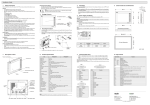
1.3 Package Contents
4 x Installation Fasteners
1 x HMI
1 x Power Connector
(wired to the power supply )
1 x Cable
(only for PWS6600C-P(N), PWS6600S-P(N)
or AP1600C-P(N),AP1600S-P(N))
3
Beijer Electronics, MAEN849