1
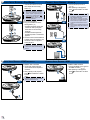
PRODUCT OVERVIEW 1 1. Lens 2. iPod/iPhone Docking Station 3. Source Button 4. Rewind Button 5. Play/Pause Button 6. Fast Forward Button 7. Enter Button 8. Down Button 9. Up Button 10. Menu Button 11. Power Button 12. VGA Input Connector 13. HDMI Input Connector 14. AV Input Connector 15. DC Input 16. IR Receiver 2 3 VGA 11 12 AV in 13 14 5 5 6 7 8 15 3 Source Menu 10 16 POWER ON 7b 1 2 2 9 DC in PACKAGE OVERVIEW 1 4 6 8 7a 9 3 Info. i.Menu 1. Connect the power cord to the power adapter. () 2. Plug the power cord into an electrical outlet. () 3. Connect the power adapter to the DC Input of the projector. () 4. During standby mode, the projector can be powered on by pressing the power button on the projector or the remote control. Connecting an iPod/ iPhone to the dock will automatically power on the projector. () Enter Repeat Shuffle 4 4 Standard Accessories 1. Power adaptor 2. Power cord 3. Remote control 4. AV composite cable 5. iPod Universal dock <Note> The standard accessories may vary in each region due to different applications. Optional Accessories 6. VGA to VGA cable 7. iPad Connection Kit a. iPad Cable b. iPad Connector 8. VGA to component adapter 9. HDMI to HDMI cable 3