1
Table of Contents
Before You Use This Product......................................................................2
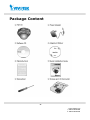
Package Content .....................................................................................6
Installation .............................................................................................7
Hardware installation..........................................................................7
Software installation...........................................................................8
Initial Access to the Network Camera ....................................................8
Check Network Settings ................................................................8
Add Password to prevent Unauthorized Access..................................9
How to Use .......................................................................................9
Authentication............................................................................ 10
Installing plug-in.............................................................................. 11
Primary user’s capability ................................................................... 12
Main Screen with Camera View ..................................................... 12
Digital Zoom .............................................................................. 16
MP4 Recording ........................................................................... 17
Snapshot................................................................................... 17
Language .................................................................................. 17
Client settings ............................................................................ 19
Digital output............................................................................. 21
Audio communication .................................................................. 23
Administrator’s capability .................................................................. 24
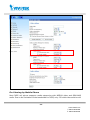
Fine-tuning for Best Performance .................................................. 24
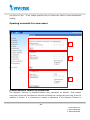
Opening accounts for new users ................................................... 27
Build a security application .......................................................... 29
Software revision upgrade ........................................................... 30
Definitions in Configuration ..................................................................... 31
System parameters .......................................................................... 32
Security settings .............................................................................. 33
HTTPS settings ................................................................................ 35
Enable HTTPS ............................................................................ 35
Create and Install Certificate ........................................................ 35
-3www.vivotek.com
T: 886-2-82455282
F: 886-2-82455532