1
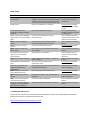
Made Simple mSecure Feature Professional look and feel for each platform Password hint Benefit Each platform user interface is carefully crafted to be consistent with platform usability standard as well as the mSecure look and feel so you can move between platforms with ease. Helps you remember your password Competitive Advantage Many multi-‐platform products retain platform peculiarities Exclusive feature amongst majors suppliers in Android market 17 Pre-‐defined personal Fast entry of standard information Some competitors have information templates editable templates that can be edited on device on desktop only Ability to add custom templates Create custom templates for special Some competitors limit the with colorful icons and unlimited information sets number of fields or use cards fields that don’t scale very well NEW -‐ Groups to categorize Group records into Personal, Business or Some competitors have this records custom-‐defined group for fast access feature NEW -‐ Mark any record as a Fast access to most used records Exclusive feature amongst Favorite major competitors NEW -‐ Toolbar on Main and Quick way to get to the most used functions, Some competitors have this Details panels including Sync feature Integrated search and sort by Quickly find your information Some competitors do not type and name, collapsible support sort due to folder section headers tree idiom NEW -‐ Record counts indicators Know number of items in groups, records by Some competitors have this alpha and types feature Notification Bar access (Android Get to your records quickly via the Exclusive feature amongst Only) notifications menu Android competitors Auto-‐copy of username and Saves typing of username and passwords when Exclusive feature amongst password at URL Launch using standard browsing major competitors (iOS/Android) NEW -‐ Duplicate records and Quick way to generate similar records Exclusive feature amongst Types (iOS/Android Only) major competitors NEW -‐ Improved sync results Understand changes to your data during sync Exclusive feature amongst reports operations major competitors NEW -‐ Themes (iOS only) and Customize look and readability Some competitors have this Fonts (iOS and Android) feature Import from popular password Move from competitive products to mSecure Some competitors have this managers or CSV spreadsheet feature (Mac, Windows, mBackup) 5.0 Getting Started Tutorial A series of user tutorials that overview the basic operation of mSecure on mobile platforms, desktop platforms and how to sync data between the two. http://msevensoftware.com/msecure-‐tutorials