1
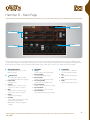
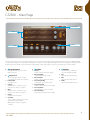
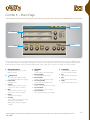
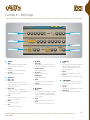
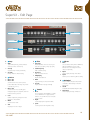
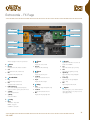
Retrocorda - Main Page
Timbre
2
Volume
3
1
Page Navigation
4
Equalizer
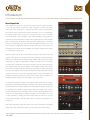
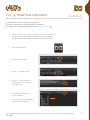
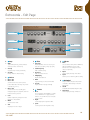
The UI is divided into two sections; the upper-half provides control over timbre. The UI’s bottom-half provides detailed control of the timbre (broken out
by sustain, click, and percussion samples) and a 3-band equalizer.
1
Page Navigation
Navigate between 3 pages of controls:
Main, Edit and FX
2
Timbre
Choose the desired timbre; selections
are exclusive; organized between Normal
[raw] and REV/VIB [with reverb and
vibrato] sounds
3
Volume
»Sustain
Volume control of the sustain sample
» Release [On/Off]
Turn the release sample on/off
» Release Volume
Volume control of the release sample
» Percussion [On/Off]
Turn the percussion sample on/off
» Percussion Volume
Volume control of the percussion sample
» Percussion Mode
Select between 4”, 2”2/3, or 4”+2”2/3
» Percussion Decay
Decay control for the percussion sample
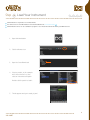
4
Equalizer
3-band shelf EQ, +/-12dB with
crossovers at 180Hz and 3kHz
»Bass
Adjust the EQ’s bass frequency
»Mid
Adjust the EQ’s mid frequency
»Treble
Adjust the EQ’s treble frequency
29