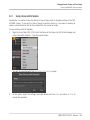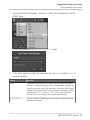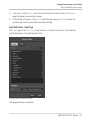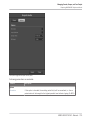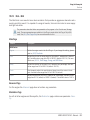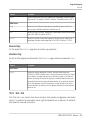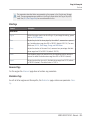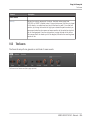
1
Manual
Disclaimer
The information in this document is subject to change without notice and does not represent a
commitment on the part of Native Instruments GmbH. The software described by this document is subject to a License Agreement and may not be copied to other media. No part of this
publication may be copied, reproduced or otherwise transmitted or recorded, for any purpose,
without prior written permission by Native Instruments GmbH, hereinafter referred to as Native
Instruments.
“Native Instruments”, “NI” and associated logos are (registered) trademarks of Native Instruments GmbH.
Mac, Mac OS, GarageBand, Logic, iTunes and iPod are registered trademarks of Apple Inc.,
registered in the U.S. and other countries.
Windows, Windows Vista and DirectSound are registered trademarks of Microsoft Corporation
in the United States and/or other countries.
All other trade marks are the property of their respective owners and use of them does not imply any affiliation with or endorsement by them.
Document authored by: Nicolas Sidi, David Gover, Gustav Santo Tomas
Software version: 2.0 (09/2013)
Hardware version: MASCHINE STUDIO
Special thanks to the Beta Test Team, who were invaluable not just in tracking down bugs, but
in making this a better product.
Contact
Germany
Native Instruments GmbH
Schlesische Str. 29-30
D-10997 Berlin
Germany
www.native-instruments.de
USA
Native Instruments North America, Inc.
6725 Sunset Boulevard
5th Floor
Los Angeles, CA 90028
USA
www.native-instruments.com
Japan
Native Instruments KK
YO Building 3F
Jingumae 6-7-15, Shibuya-ku,
Tokyo 150-0001
Japan
www.native-instruments.co.jp
© Native Instruments GmbH, 2013. All rights reserved.
Table of Contents
Table of Contents
1
Welcome to MASCHINE! ............................................................................................ 18
1.1
1.2
1.3
2
Where to Start? ........................................................................................................................... 19
What’s New in MASCHINE 2.0? ................................................................................................... 21
Manual Conventions ................................................................................................................... 25
Basic Concepts ......................................................................................................... 28
2.1
2.2
2.3
2.4
2.5
Names and Concepts You Should Know ...................................................................................... 28
Adjusting the MASCHINE User Interface ..................................................................................... 30
2.2.1
Adjusting the Size of the Interface ............................................................................. 30
2.2.2
Showing/Hiding the Browser ...................................................................................... 31
2.2.3
Switching between Arrange View and Mix View ......................................................... 32
2.2.4
Minimizing the Mixer ................................................................................................. 33
2.2.5
Showing/Hiding the Control Lane .............................................................................. 33
Common Operations ................................................................................................................... 34
2.3.1
Setting the Focus on a Group or a Sound ................................................................... 34
2.3.2
Switching Between the Master, Group, and Sound Level ........................................... 39
2.3.3
Navigating Channel Properties, Plug-ins, and Parameter Pages in the Control Area . 40
2.3.4
Undo/Redo ................................................................................................................. 46
2.3.5
Pinning a Mode on Your Controller ............................................................................. 48
2.3.6
Using Two or More Hardware Controllers ................................................................... 49
Stand-Alone and Plug-in Mode ................................................................................................... 51
2.4.1
Differences between Stand-Alone and Plug-in Mode ................................................. 51
2.4.2
Switching Instances .................................................................................................. 53
2.4.3
Controlling Various Instances with Different Controllers ........................................... 53
2.4.4
Controlling your Host’s Transport Functions in Plug-in Mode .................................... 54
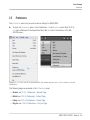
Preferences ................................................................................................................................. 55
2.5.1
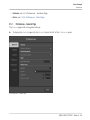
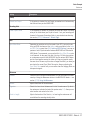
Preferences – General Page ....................................................................................... 56
MASCHINE STUDIO - Manual - 4
Table of Contents
2.6
2.7
2.8
3
2.5.2
Preferences – Default Page ....................................................................................... 58
2.5.3
Preferences – Library Page ........................................................................................ 59
2.5.4
Preferences – Plug-ins Page ..................................................................................... 64
2.5.5
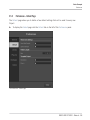
Preferences – Hardware Page .................................................................................... 69
2.5.6
Preferences – Colors Page ......................................................................................... 71
Audio and MIDI Settings ............................................................................................................. 73
2.6.1
Audio and MIDI Settings – Audio Page ...................................................................... 74
2.6.2
Audio and MIDI Settings – Routing Page ................................................................... 75
2.6.3
Audio and MIDI Settings – MIDI Page ........................................................................ 76
Integrating MASCHINE into Your MIDI Setup ............................................................................... 78
2.7.1
Connecting External MIDI Equipment ........................................................................ 78
2.7.2
Sync to External MIDI Clock ....................................................................................... 79
2.7.3
Send MIDI Clock ......................................................................................................... 80
Using Footswitches with Your MASCHINE STUDIO Controller ....................................................... 81
Browser .................................................................................................................... 83
3.1
3.2
3.3
Browser Basics ........................................................................................................................... 83
3.1.1
The MASCHINE Library ............................................................................................... 83
3.1.2
Browsing the Library vs. Browsing Your Hard Disks ................................................... 84
Searching and Loading Files from the Library ............................................................................ 85
3.2.1
Overview of the LIBRARY Pane ................................................................................... 85
3.2.2
Selecting a File Type .................................................................................................. 90
3.2.3
Choosing Between Factory and User Content ............................................................. 91
3.2.4
Selecting a Product Category, a Product, a Bank, and a Sub-Bank ........................... 92
3.2.5
Selecting Type and Mode Tags ................................................................................... 97
3.2.6
Performing a Text Search ........................................................................................... 101
3.2.7
Using the Result List ................................................................................................. 102
Additional Browsing Tools .......................................................................................................... 108
3.3.1
Loading the Selected Files Automatically .................................................................. 108
MASCHINE STUDIO - Manual - 5
Table of Contents
3.4
3.5
3.6
3.7
4
3.3.2
Pre-Listening to Your Samples .................................................................................. 109
3.3.3
Loading Groups with their Patterns ........................................................................... 110
3.3.4
Displaying File Information ........................................................................................ 111
Editing the Files’ Tags and Properties ........................................................................................ 112
3.4.1
Attribute Editor Basics .............................................................................................. 112
3.4.2
The BANK Page .......................................................................................................... 114
3.4.3
The TYPES and MODES Pages .................................................................................... 114
3.4.4
The PROPERTIES Page ............................................................................................... 117
Loading and Importing Files from Your File System .................................................................... 118
3.5.1
Overview of the FILES Pane ........................................................................................ 118
3.5.2
Using Favorites .......................................................................................................... 120
3.5.3
Using the Location Bar .............................................................................................. 121
3.5.4
Navigating to Recent Locations ................................................................................. 122
3.5.5
Using the Result List ................................................................................................. 123
3.5.6
Importing Files to the MASCHINE Library ................................................................... 126
Locating Missing Samples .......................................................................................................... 127
Using Quick Browse .................................................................................................................... 129
Managing Sounds, Groups, and Your Project ............................................................... 135
4.1
4.2
Overview of the Sounds, Groups, and Master .............................................................................. 135
4.1.1
The Sound, Group, and Master Channels ................................................................... 136
4.1.2
Similarities and Differences in Handling Sounds and Groups ................................... 137
4.1.3
Selecting Multiple Sounds or Groups ......................................................................... 138
Managing Sounds ....................................................................................................................... 143
4.2.1
Loading Sounds ......................................................................................................... 144
4.2.2
Pre-listening to Sounds ............................................................................................. 145
4.2.3
Renaming Sound Slots .............................................................................................. 146
4.2.4
Changing the Sound’s Color ...................................................................................... 147
4.2.5
Saving Sounds ........................................................................................................... 148
MASCHINE STUDIO - Manual - 6
Table of Contents
4.3
4.4
4.5
5
4.2.6
Copying and Pasting Sounds ..................................................................................... 150
4.2.7
Moving Sounds .......................................................................................................... 151
4.2.8
Resetting Sound Slots ............................................................................................... 152
Managing Groups ....................................................................................................................... 153
4.3.1
Creating Groups ........................................................................................................ 155
4.3.2
Loading Groups ......................................................................................................... 156
4.3.3
Renaming Groups ...................................................................................................... 157
4.3.4
Changing the Group’s Color ....................................................................................... 158
4.3.5
Saving Groups ........................................................................................................... 160
4.3.6
Copying and Pasting Groups ..................................................................................... 162
4.3.7
Moving Groups ........................................................................................................... 164
4.3.8
Deleting Groups ......................................................................................................... 165
Exporting MASCHINE Objects and Audio ..................................................................................... 166
4.4.1
Saving a Group with its Samples ............................................................................... 167
4.4.2
Saving a Project with its Samples ............................................................................. 168
4.4.3
Exporting Audio ......................................................................................................... 170
Importing Third-Party File Formats ............................................................................................. 175
4.5.1
Loading REX Files into Sound Slots ........................................................................... 175
4.5.2
Importing MPC Programs to Groups ........................................................................... 176
Playing on Your Controller ......................................................................................... 179
5.1
5.2
Adjusting Your Pads ................................................................................................................... 179
5.1.1
The Pad View ............................................................................................................. 179
5.1.2
Choosing a Pad Mode ................................................................................................ 181
5.1.3
Adjusting the Base Key .............................................................................................. 184
5.1.4
Using Choke Groups .................................................................................................. 185
5.1.5
Using Link Groups ..................................................................................................... 186
Playing Tools .............................................................................................................................. 188
5.2.1
Note Repeat ............................................................................................................... 188
MASCHINE STUDIO - Manual - 7
Table of Contents
5.2.2
5.2.3
5.2.4
5.2.5
6
Mute and Solo ............................................................................................................ 190
Choke All Notes .......................................................................................................... 195
Groove ....................................................................................................................... 196
Level, Tempo, Tune, and Groove Shortcuts on Your Controller .................................... 198
Working with Plug-ins ............................................................................................... 203
6.1
6.2
6.3
Plug-in Overview ........................................................................................................................ 203
6.1.1
Plug-in Basics ........................................................................................................... 203
6.1.2
First Plug-in Slot of Sounds: Choosing the Sound’s Role ........................................... 206
6.1.3
Loading, Removing, and Replacing a Plug-in ............................................................ 207
6.1.4
Adjusting the Plug-in Parameters ............................................................................. 214
6.1.5
Bypassing Plug-in Slots ............................................................................................ 214
6.1.6
Using Side-Chain ...................................................................................................... 216
6.1.7
Moving Plug-ins ........................................................................................................ 217
6.1.8
Alternative: the Plug-in Strip ..................................................................................... 218
6.1.9
Saving and Recalling Plug-in Presets ....................................................................... 218
The Sampler Plug-in ................................................................................................................... 220
6.2.1
Page 1: Voice Settings / Engine ................................................................................. 222
6.2.2
Page 2: Pitch / Envelope ............................................................................................ 223
6.2.3
Page 3: FX / Filter ...................................................................................................... 226
6.2.4
Page 4: Modulation .................................................................................................... 228
6.2.5
Page 5: LFO ............................................................................................................... 229
6.2.6
Page 6: Velocity / Modwheel ...................................................................................... 231
Using Native Instruments and External Plug-ins ........................................................................ 233
6.3.1
Opening/Closing Plug-in Windows ............................................................................. 233
6.3.2
Using the VST/AU Plug-in Parameters ....................................................................... 236
6.3.3
Setting Up Your Own Parameter Pages ...................................................................... 237
6.3.4
Using VST/AU Plug-in Presets .................................................................................... 240
6.3.5
Multiple-Output Plug-ins and Multitimbral Plug-ins ................................................. 242
MASCHINE STUDIO - Manual - 8
Table of Contents
7
Working with Patterns ............................................................................................... 244
7.1
7.2
7.3
7.4
Pattern Basics ............................................................................................................................ 244
7.1.1
Pattern Editor Overview ............................................................................................. 245
7.1.2
Navigating the Event Area ......................................................................................... 251
7.1.3
Following the Playback Position in the Pattern .......................................................... 253
7.1.4
Jumping to Another Playback Position in the Pattern ................................................. 254
7.1.5
Group View and Keyboard View .................................................................................. 256
7.1.6
Adjusting the Pattern Grid and the Pattern Length .................................................... 259
7.1.7
Adjusting the Step Grid and the Nudge Grid .............................................................. 262
Recording Patterns in Real Time ................................................................................................ 267
7.2.1
Recording Your Patterns Live ..................................................................................... 267
7.2.2
The Record Prepare Mode .......................................................................................... 270
7.2.3
Using the Metronome ................................................................................................. 271
7.2.4
Recording with Count-in ............................................................................................ 272
7.2.5
Quantizing while Recording ....................................................................................... 274
Recording Patterns with the Step Sequencer .............................................................................. 275
7.3.1
Step Mode Basics ...................................................................................................... 275
7.3.2
Editing Events in Step Mode ...................................................................................... 280
7.3.3
Recording Modulation in Step Mode .......................................................................... 283
Editing Events ............................................................................................................................ 284
7.4.1
Editing Events with the Mouse: an Overview ............................................................. 284
7.4.2
Creating Events/Notes ............................................................................................... 287
7.4.3
Selecting Events/Notes .............................................................................................. 288
7.4.4
Editing Selected Events/Notes ................................................................................... 293
7.4.5
Deleting Events/Notes ............................................................................................... 299
7.4.6
Cut, Copy, and Paste Events/Notes ............................................................................ 302
7.4.7
Quantizing Events/Notes ........................................................................................... 305
7.4.8
Doubling a Pattern .................................................................................................... 306
MASCHINE STUDIO - Manual - 9
Table of Contents
7.5
7.6
7.7
7.8
8
Recording and Editing Modulation ............................................................................................. 306
7.5.1
Which Parameters can be Modulated? ....................................................................... 308
7.5.2
Recording Modulation ................................................................................................ 309
7.5.3
Creating and Editing Modulation in the Control Lane ................................................ 311
Creating MIDI Tracks from Scratch in MASCHINE ....................................................................... 316
Managing Patterns ..................................................................................................................... 318
7.7.1
The Pattern Manager and Pattern Mode .................................................................... 319
7.7.2
Selecting Patterns and Pattern Banks ....................................................................... 321
7.7.3
Creating Patterns ...................................................................................................... 323
7.7.4
Deleting Patterns ....................................................................................................... 325
7.7.5
Creating and Deleting Pattern Banks ........................................................................ 327
7.7.6
Naming Patterns ....................................................................................................... 329
7.7.7
Changing the Pattern’s Color .................................................................................... 331
7.7.8
Duplicating, Copying, and Pasting Patterns .............................................................. 332
7.7.9
Moving Patterns ........................................................................................................ 335
Importing/Exporting Audio and MIDI to/from Patterns ................................................................ 336
7.8.1
Exporting Audio from Patterns ................................................................................... 336
7.8.2
Exporting MIDI from Patterns ..................................................................................... 338
7.8.3
Importing MIDI to Patterns ........................................................................................ 340
Audio Routing, Remote Control, and Macro Controls .................................................... 349
8.1
8.2
Audio Routing in MASCHINE ....................................................................................................... 349
8.1.1
Sending External Audio to Sounds ............................................................................. 351
8.1.2
Configuring the Main Output of Sounds and Groups ................................................. 355
8.1.3
Setting Up Auxiliary Outputs for Sounds and Groups ................................................. 361
8.1.4
Configuring the Master and Cue Outputs of MASCHINE ............................................. 365
Using MIDI Control and Host Automation .................................................................................... 370
8.2.1
Triggering Sounds via MIDI Notes .............................................................................. 371
8.2.2
Controlling Parameters via MIDI and Host Automation .............................................. 376
MASCHINE STUDIO - Manual - 10
Table of Contents
8.3
9
8.2.3
Selecting VST/AU Plug-in Presets via MIDI Program Change ..................................... 384
8.2.4
Sending MIDI from Sounds ........................................................................................ 385
Creating Custom Sets of Parameters with the Macro Controls ................................................... 389
8.3.1
Macro Control Overview ............................................................................................. 390
8.3.2
Assigning Macro Controls .......................................................................................... 391
Controlling Your Mix .................................................................................................. 396
9.1
9.2
9.3
9.4
9.5
Mix View Basics .......................................................................................................................... 396
9.1.1
Switching between Arrange View and Mix View ......................................................... 396
9.1.2
Mix View Elements ..................................................................................................... 397
The Mixer .................................................................................................................................... 399
9.2.1
Displaying Groups vs. Displaying Sounds .................................................................. 400
9.2.2
Adjusting the Mixer Layout ........................................................................................ 402
9.2.3
Selecting Channel Strips ........................................................................................... 403
9.2.4
Managing Your Channels in the Mixer ....................................................................... 404
9.2.5
Adjusting Settings in the Channel Strips ................................................................... 406
9.2.6
Using the Cue Bus ..................................................................................................... 410
The Plug-in Chain ....................................................................................................................... 412
The Plug-in Strip ........................................................................................................................ 413
9.4.1
The Plug-in Header .................................................................................................... 416
9.4.2
Panels for Drumsynths and Internal Effects .............................................................. 417
9.4.3
Panel for the Sampler ................................................................................................ 419
9.4.4
Custom Panels for Native Instruments Plug-ins ........................................................ 423
9.4.5
Generic Panel for External Plug-ins ........................................................................... 427
9.4.6
Undocking a Plug-in Panel (Native Instruments and External Plug-ins only) ............ 428
Controlling Your Mix from Your Controller ................................................................................... 431
9.5.1
Navigating Your Channels in Mix Mode ..................................................................... 431
9.5.2
Adjusting the Level and Pan in Mix Mode .................................................................. 434
9.5.3
Mute and Solo in Mix Mode ........................................................................................ 434
MASCHINE STUDIO - Manual - 11
Table of Contents
9.5.4
Plug-in Icons in Mix Mode .......................................................................................... 435
10 Using the Drumsynths ................................................................................................ 436
10.1
10.2
10.3
10.4
Drumsynths – General Handling ................................................................................................. 437
10.1.1 Engines: Many Different Drums per Drumsynth ......................................................... 437
10.1.2 Common Parameter Organization .............................................................................. 437
10.1.3 Shared Parameters .................................................................................................... 440
10.1.4 Various Velocity Responses ....................................................................................... 440
10.1.5 Pitch Range, Tuning, and MIDI Notes ........................................................................ 440
The Kicks .................................................................................................................................... 441
10.2.1 Kick – Sub ................................................................................................................. 443
10.2.2 Kick – Tronic .............................................................................................................. 445
10.2.3 Kick – Dusty .............................................................................................................. 447
10.2.4 Kick – Rasper ............................................................................................................ 448
10.2.5 Kick – Snappy ............................................................................................................ 450
10.2.6 Kick – Bold ................................................................................................................ 452
10.2.7 Kick – Maple .............................................................................................................. 453
10.2.8 Kick – Push ............................................................................................................... 454
The Snares .................................................................................................................................. 456
10.3.1 Snare – Volt ............................................................................................................... 458
10.3.2 Snare – Bit ................................................................................................................ 460
10.3.3 Snare – Pow .............................................................................................................. 461
10.3.4 Snare – Sharp ........................................................................................................... 462
10.3.5 Snare – Airy ............................................................................................................... 464
10.3.6 Snare – Vintage ......................................................................................................... 466
10.3.7 Snare – Chrome ......................................................................................................... 468
10.3.8 Snare – Iron ............................................................................................................... 470
10.3.9 Snare – Clap ............................................................................................................. 471
The Hi-hats ................................................................................................................................. 473
MASCHINE STUDIO - Manual - 12
Table of Contents
10.5
10.6
10.4.1 Hi-hat – Silver ........................................................................................................... 475
10.4.2 Hi-hat – Circuit ......................................................................................................... 477
10.4.3 Hi-hat – Memory ........................................................................................................ 478
10.4.4 Creating a Pattern with Closed and Open Hi-hats ..................................................... 480
The Toms .................................................................................................................................... 480
10.5.1 Tom – Tronic .............................................................................................................. 482
10.5.2 Tom – Fractal ............................................................................................................ 484
10.5.3 Tom – Floor ................................................................................................................ 487
The Percussions .......................................................................................................................... 488
10.6.1 Percussion – Fractal .................................................................................................. 490
10.6.2 Percussion – Kettle .................................................................................................... 492
10.6.3 Percussion – Shaker .................................................................................................. 494
11 Using Effects ............................................................................................................. 496
11.1
11.2
11.3
11.4
Applying Effects to a Sound, a Group or the Master .................................................................... 496
11.1.1 Adding an Effect ........................................................................................................ 496
11.1.2 Other Operations on Effects ....................................................................................... 505
11.1.3 Using the Side-Chain Input ....................................................................................... 507
Applying Effects to External Audio .............................................................................................. 509
11.2.1 Step 1: Configure MASCHINE Audio Inputs ................................................................ 510
11.2.2 Step 2: Set Up a Sound to Receive the External Input ................................................ 512
11.2.3 Step 3: Load an Effect to Process an Input ................................................................ 514
Creating a Send Effect ............................................................................................................... 515
11.3.1 Step 1: Set Up a Sound or Group as Send Effect ........................................................ 516
11.3.2 Step 2: Route Audio to the Send Effect ...................................................................... 520
11.3.3 A Few Notes on Send Effects ...................................................................................... 522
Creating Multieffects .................................................................................................................. 523
12 Effect Reference ........................................................................................................ 526
12.1
Dynamics .................................................................................................................................... 527
MASCHINE STUDIO - Manual - 13
Table of Contents
12.2
12.3
12.4
12.5
12.6
12.1.1 Compressor ............................................................................................................... 527
12.1.2 Gate ........................................................................................................................... 531
12.1.3 Transient Master ....................................................................................................... 534
12.1.4 Limiter ....................................................................................................................... 536
12.1.5 Maximizer .................................................................................................................. 539
Filtering Effects .......................................................................................................................... 543
12.2.1 EQ .............................................................................................................................. 543
12.2.2 Filter .......................................................................................................................... 546
Modulation Effects ..................................................................................................................... 550
12.3.1 Chorus ....................................................................................................................... 550
12.3.2 Flanger ...................................................................................................................... 551
12.3.3 FM ............................................................................................................................. 553
12.3.4 Freq Shifter ................................................................................................................ 554
12.3.5 Phaser ....................................................................................................................... 556
Spatial and Reverb Effects ......................................................................................................... 558
12.4.1 Ice ............................................................................................................................. 558
12.4.2 Metaverb ................................................................................................................... 559
12.4.3 Reflex ........................................................................................................................ 561
12.4.4 Reverb ....................................................................................................................... 562
12.4.5 Plate Reverb .............................................................................................................. 564
Delays ......................................................................................................................................... 566
12.5.1 Beat Delay ................................................................................................................. 566
12.5.2 Grain Delay ................................................................................................................ 568
12.5.3 Grain Stretch ............................................................................................................. 571
12.5.4 Resochord .................................................................................................................. 572
Distortion Effects ........................................................................................................................ 574
12.6.1 Distortion ................................................................................................................... 574
12.6.2 Lofi ............................................................................................................................ 576
MASCHINE STUDIO - Manual - 14
Table of Contents
12.6.3
Saturator ................................................................................................................... 578
13 Creating a Song Using Scenes ................................................................................... 582
13.1
13.2
13.3
13.4
Arranger Basics .......................................................................................................................... 582
13.1.1 Arranger Overview ..................................................................................................... 584
13.1.2 Navigating the Arranger ............................................................................................ 586
13.1.3 Following the Playback Position in Your Project ......................................................... 588
13.1.4 Jumping to Another Playback Position in Your Project ............................................... 590
13.1.5 Creating and Removing Clips .................................................................................... 592
Managing Scenes ....................................................................................................................... 596
13.2.1 Scene Management Overview .................................................................................... 596
13.2.2 Selecting Scenes and Scene Banks ........................................................................... 601
13.2.3 Creating Scenes ........................................................................................................ 606
13.2.4 Deleting Scenes ......................................................................................................... 610
13.2.5 Creating and Deleting Scene Banks .......................................................................... 612
13.2.6 Naming Scenes .......................................................................................................... 614
13.2.7 Changing the Scene’s Color ....................................................................................... 616
13.2.8 Moving Scenes ........................................................................................................... 617
13.2.9 Clearing Scenes ......................................................................................................... 618
13.2.10 Duplicating, Copying, and Pasting Scenes ................................................................ 618
Playing with Scenes .................................................................................................................... 620
13.3.1 Selecting a Loop Range ............................................................................................. 621
13.3.2 Jumping to Other Scenes ........................................................................................... 626
Triggering Scenes via MIDI (MASCHINE Plug-in Only) ................................................................. 629
14 Sampling and Sample Mapping .................................................................................. 631
14.1
14.2
Opening the Sample Editor ......................................................................................................... 631
Recording a Sample ................................................................................................................... 633
14.2.1 Opening the Record Page .......................................................................................... 633
14.2.2 Selecting the Source and the Recording Mode ........................................................... 635
MASCHINE STUDIO - Manual - 15
Table of Contents
14.3
14.4
14.5
14.2.3 Arming, Starting, and Stopping the Recording .......................................................... 641
14.2.4 Checking Your Recordings ......................................................................................... 644
14.2.5 Location and Name of Your Recorded Samples .......................................................... 648
Editing a Sample ........................................................................................................................ 649
14.3.1 Using the Edit Page ................................................................................................... 649
14.3.2 Audio Editing Functions ............................................................................................. 655
Slicing a Sample ........................................................................................................................ 662
14.4.1 Opening the Slice Page .............................................................................................. 663
14.4.2 Adjusting the Slicing Settings ................................................................................... 665
14.4.3 Manually Adjusting Your Slices ................................................................................. 668
14.4.4 Applying the Slicing ................................................................................................... 673
Mapping Samples to Zones ........................................................................................................ 679
14.5.1 Opening the Zone Page .............................................................................................. 679
14.5.2 Zone Page Overview ................................................................................................... 681
14.5.3 Adding Samples to the Sample Map .......................................................................... 682
14.5.4 Selecting and Managing Zones in the Zone List ........................................................ 684
14.5.5 Selecting and Editing Zones in the Map View ............................................................ 689
14.5.6 Editing Zones in the Sample View ............................................................................. 693
14.5.7 Adjusting the Zone Settings ...................................................................................... 695
15 Troubleshooting – Getting Help .................................................................................. 703
15.1
15.2
Troubleshooting .......................................................................................................................... 703
15.1.1 The MASCHINE Software Won’t Start .......................................................................... 703
15.1.2 Latency Issues ........................................................................................................... 703
15.1.3 The MASCHINE Software Crashes .............................................................................. 704
15.1.4 Updates ..................................................................................................................... 704
Getting Help ............................................................................................................................... 705
15.2.1 Knowledge Base ........................................................................................................ 705
15.2.2 Technical Support ...................................................................................................... 705
MASCHINE STUDIO - Manual - 16
Table of Contents
15.2.3
15.2.4
Registration Support ................................................................................................. 706
User Forum ................................................................................................................ 706
16 Appendix: Tips for Playing Live .................................................................................. 707
16.1
16.2
16.3
Preparations ............................................................................................................................... 707
16.1.1 Focus on the Hardware .............................................................................................. 707
16.1.2 Customize the Pads of the Hardware ......................................................................... 707
16.1.3 Check Your CPU Power Before Playing ....................................................................... 707
16.1.4 Consider Using a Limiter on Your Master ................................................................... 708
16.1.5 Improvise ................................................................................................................... 708
Basic Techniques ....................................................................................................................... 708
16.2.1 Use Mute and Solo ..................................................................................................... 708
16.2.2 Use Scene Mode and Tweak the Loop Range .............................................................. 708
16.2.3 Create Variations of Your Drum Patterns in the Step Sequencer ................................ 709
16.2.4 Use Note Repeat ........................................................................................................ 709
16.2.5 Set Up Your Own Multi-effect Groups and Automate Them ........................................ 709
Special Tricks ............................................................................................................................. 709
16.3.1 Changing Pattern Length for Variation ...................................................................... 709
16.3.2 Using Loops to Cycle Through Samples ..................................................................... 710
16.3.3 Load Long Audio Files and Play with the Start Point .................................................. 710
17 Glossary ................................................................................................................... 711
Index ........................................................................................................................ 722
MASCHINE STUDIO - Manual - 17
Welcome to MASCHINE!
1
Welcome to MASCHINE!
Thank you for buying MASCHINE!
MASCHINE is a groove production studio that implements the familiar working style of classical groove boxes along with the advantages of a computer based system. MASCHINE is ideal
for making music live, as well as in the studio. It’s the hands-on aspect of a dedicated instrument, the MASCHINE hardware controller, united with the advanced editing features of the
MASCHINE software.
Creating beats is often not very intuitive with a computer, but using the MASCHINE hardware
controller to do it makes it easy and fun. You can tap in freely with the pads or use Note Repeat to jam along. Alternatively, build your beats using the step sequencer just as in classic
drum machines.
Patterns can be intuitively combined and rearranged on the fly to form larger ideas. You can try
out several different versions of a song without ever having to stop the music.
Since you can integrate it into any sequencer that supports VST, AU, or AAX plug-ins, you can
reap the benefits in almost any software setup, or use it as a stand-alone application. You can
sample your own material, slice loops and rearrange them easily.
However, MASCHINE is a lot more than an ordinary groovebox or sampler: it comes with an
inspiring 7-gigabyte library, and a sophisticated, yet easy to use tag-based Browser to give you
instant access to the sounds you are looking for.
What’s more, MASCHINE provides lots of options for manipulating your sounds via internal effects and other sound-shaping possibilities. You can also control external MIDI hardware and
3rd-party software with the MASCHINE hardware controller, while customizing the functions of
the pads, knobs and buttons according to your needs utilizing the included Controller Editor
application. We hope you enjoy this fantastic instrument as much as we do. Now let’s get going!
—The MASCHINE team at Native Instruments.
MASCHINE STUDIO - Manual - 18
Welcome to MASCHINE!
Where to Start?
1.1
Where to Start?
MASCHINE provides you with many information sources. The main documents are meant to be
read in the following sequence:
1.
2.
3.
MASCHINE Setup Guide
MASCHINE Getting Started and online video tutorials
MASCHINE Manual (this document)
The whole documentation set is available in PDF format and located within the MASCHINE
installation folder on your hard disk. You can also access these documents from the Help
menu in the Application Menu Bar or from the Help submenu in the MASCHINE menu.
Please check the Service Center or the Native Instruments website regularly for up-to-date
and localized versions of these documents. You can start the Service Center by selecting
Launch Service Center from the Help menu in the Application Menu Bar or from the Help
submenu in the MASCHINE menu.
Please check the Service Center or the Native Instruments website regularly for up-to-date
and localized versions of these documents. You can start the Service Center by selecting
Launch Service Center from the Help menu in the Application Menu Bar or from the Help
submenu in the MASCHINE menu.
Additional documentation sources provide you with details on more specific topics:
▪ MASCHINE Hardware Control Reference
▪ Controller Editor Manual
Hereafter is a quick description of each of these documentation sources.
Your First Stop: the Setup Guide
The Setup Guide will guide you through the software and hardware installation of MASCHINE,
from the very beginning to the first sound coming through your speakers.
First read the Setup Guide. Then proceed with this MASCHINE Getting Started to get more familiar with MASCHINE.
MASCHINE STUDIO - Manual - 19
Welcome to MASCHINE!
Where to Start?
MASCHINE Getting Started
After reading the Setup Guide and following its instructions, your MASCHINE should be up
and running. The next step is to read the MASCHINE Getting Started. This gives you a practical approach to MASCHINE via a set of tutorials covering easy and more advanced tasks in order to help you familiarize yourself with MASCHINE.
Video Tutorials
The Native Instruments website provides you with a lot of video tutorials that give you a handson approach to many sides of the MASCHINE workflow. To see them, point your favorite browser to following URL: http://native-instruments.com/maschinemedia.
MASCHINE Manual
This MASCHINE Manual provides you with a comprehensive description of all MASCHINE software and hardware features.
MASCHINE Hardware Control Reference
The MASCHINE Hardware Control Reference provides an overview of a MASCHINE Project, the
quick access options performed using the MASCHINE hardware controller, and lots of keyboard shortcuts.
Controller Editor Manual
Besides using your MASCHINE hardware controller together with its dedicated MASCHINE
software, you can also use it as a powerful and highly versatile MIDI controller to pilot any other MIDI-capable application or device. This is made possible by the Controller Editor software,
a little application that allows you to precisely define all MIDI assignments for your MASCHINE
controller. The Controller Editor should have been installed during the MASCHINE installation
procedure. For more information on this, please refer to the Controller Editor Manual available
as a PDF file in the Documentation subfolder of the Controller Editor installation folder on your
hard disk.
Other Online Resources
If you are experiencing problems related to your Native Instruments product that the supplied
documentation does not cover, there are several ways of getting help:
MASCHINE STUDIO - Manual - 20
Welcome to MASCHINE!
What’s New in MASCHINE 2.0?
▪ Knowledge Base
▪ User Forum
▪ Technical Support
▪ Registration Support
You will find more information on these in chapter ↑15, Troubleshooting – Getting Help.
1.2
What’s New in MASCHINE 2.0?
Here is a short overview of the new or improved software and hardware features in MASCHINE 2.0.
New Features
▪ MASCHINE STUDIO controller support: MASCHINE 2.0 supports the new groundbreaking
MASCHINE STUDIO controller.
▪ New audio engine with multi-core support: MASCHINE’s audio engine has been completely
re-written. Now providing full multi-core support, it reaches a new milestone in audio
quality while using less CPU power than its predecessor.
▪ Completely re-designed GUI: The user interface of the MASCHINE software has been re-designed to improve workflow efficiency while retaining the MASCHINE feel.
▪ Mix view: The MASCHINE window now provides two switchable, complementary views:
Whereas the Arrange view contains the Arranger, the Control area, and the Pattern Editor
already present in previous versions of MASCHINE, the new Mix view offers two important
new tools: the Mixer and the Plug-in Strip (see below).
▪ Mixer: Located in the top part of the new Mix view, the Mixer is now at your disposal to
control each of your channels (Sounds, Group, and Master). Whereas the Arranger and the
Pattern Editor put emphasis on the arrangement of your song, the Mixer focuses on the
routing — in particular it makes controlling your various audio levels or setting up complex audio routing a breeze! See chapter ↑9.2, The Mixer.
▪ Dedicated Cue bus: You can now send any Sound or Group channel to the new dedicated
Cue bus for pre-listening. Cued channels are temporarily removed from their normal target
and routed to the Cue bus instead. You can send the Cue bus to a separate output of your
MASCHINE STUDIO - Manual - 21
Welcome to MASCHINE!
What’s New in MASCHINE 2.0?
audio interface (e.g., the headphone output) and pre-listen to the cued channels without
affecting the main output of MASCHINE — great during a live performance! The Prehear
feature of the Browser, the metronome signal, as well as your recordings and the Slice
previews in the Sample Editor are also sent to the Cue bus. Of course, the Cue channel
can be controlled via the new Mixer like any other channel of MASCHINE. See section
↑9.2.6, Using the Cue Bus.
▪ Plug-in Strip: Located in the bottom part of the new Mix view, the Plug-in Strip allows you
to visually control each of the Plug-ins (effects or instruments) you have loaded in the focused channel (Sound, Group or Master). Each Plug-in included in MASCHINE has its
own visual representation for an intuitive control of all its parameters. Furthermore, any
Native Instruments product installed on your computer provides one or two custom views
in the Plug-in Strip with various sets of parameters. VST/AU plug-ins from third-party
manufacturers are represented by a generic panel. In addition, you can undock any Plugin and open it in its own floating window in order to access its original user interface. See
section ↑9.4, The Plug-in Strip.
▪ Unlimited Groups: Your Projects can now have as many Groups as required. This greatly expands the organization facilities in bigger Projects. See section ↑4.3, Managing Groups.
▪ Unlimited effects: Each channel (Sounds, Groups, and Master) can now host any number
of Effect Plug-ins. See chapter ↑6, Working with Plug-ins.
▪ Drumsynths: In addition to the Sampler Plug-in, MASCHINE now includes additional
sound generators: the Drumsynths — an impressive set of highly flexible and finely tailored drum synthesizers allowing you to create your own custom drum sounds without using any sampled material! See chapter ↑10, Using the Drumsynths.
▪ Side-chain input: Various MASCHINE Plug-ins now include a side-chain input that you can
feed with other signals of your Project. Similarly, you can now use side-chaining in VST/
AU plug-ins as well (AU plug-ins with side-chain input, VST plug-ins with multiple inputs). See section ↑11.1.3, Using the Side-Chain Input.
▪ Multiple Sound and Group selection: You can now select multiple Sounds or Groups and edit them at once. See section ↑4.1.3, Selecting Multiple Sounds or Groups.
▪ New visual Browser: The Browser has been entirely re-designed. It is now organized in a
more efficient and logical way. It also provides custom pictures for all installed NI products, making your searches even more intuitive. See chapter ↑3, Browser.
MASCHINE STUDIO - Manual - 22
Welcome to MASCHINE!
What’s New in MASCHINE 2.0?
▪ Extended MIDI/host automation and parameter mapping: You can now assign MIDI controls
and host automation directly to MASCHINE parameters independently of the Macro Controls. This is done via the new Assignment area under the Control area. See section ↑8.2,
Using MIDI Control and Host Automation.
▪ MIDI tracks in Patterns: You can now create and edit MIDI tracks at the Sound level for the
desired MIDI messages within your Patterns. These tracks will be sent in real time to the
MIDI output of the respective Sounds. They will also be exported together with the Pattern
via MIDI drag-and-drop export. See section ↑7.6, Creating MIDI Tracks from Scratch in
MASCHINE.
▪ MIDI file import: You can now import your MIDI files to Patterns in MASCHINE. See section ↑7.8.3, Importing MIDI to Patterns.
▪ MIDI Program Change for VST/AU plug-in presets: You can now use MIDI Program Change
messages to change the presets in the VST/AU plug-ins loaded in MASCHINE. See section ↑8.2.3, Selecting VST/AU Plug-in Presets via MIDI Program Change.
▪ Macro Controls available at all levels: Macro Controls are now available in every Sound, every Group, and in the Master, allowing you to build your own sets of parameters as you see
fit — this comes in very handy when playing live! See section ↑8.3, Creating Custom Sets
of Parameters with the Macro Controls.
▪ Improved sampling facilities: The Sample Editor includes various improvements, among
other things: Slices can now overlap or have gaps in between; sample mapping has been
re-organized for more efficiency; etc. See chapter ↑12, Effect Reference.
▪ Pad view: MASCHINE now provides a dedicated Pad view that allows you to focus on the
way pads trigger the various Sounds of the Group. In particular, the Pad view hosts the redesigned Link groups and Choke groups. See section ↑4.2, Managing Sounds.
▪ New effects: MASCHINE 2.0 includes a new Plate Reverb effect, and the Compressor provides a new Feedback mode. See section ↑12.4.5, Plate Reverb and ↑12.1.1, Compressor, respectively.
▪ Improved looping: You can now loop any part of your song, not only Scenes. See section
↑13.3.1, Selecting a Loop Range.
MASCHINE STUDIO - Manual - 23
Welcome to MASCHINE!
What’s New in MASCHINE 2.0?
▪ Follow mode for Patterns and Scenes: The Arranger and the Pattern Editor now provide a
Follow option that automatically synchronizes the display to the current playback position.
See section ↑7.1.3, Following the Playback Position in the Pattern and ↑13.1.3, Following the Playback Position in Your Project.
▪ Advanced Undo: You now have two different Undo commands at your disposal: Step Undo
cancels the last action you did (classic undo), while Take Undo cancels the last group of
actions at once. In particular, this comes in handy when recording notes or modulation!
See section ↑2.3.4, Undo/Redo.
▪ Customizable metronome: You can now choose any audio sample for the downbeat and upbeat sounds of the metronome. See section ↑2.5.1, Preferences – General Page.
Hardware New Features and Workflow Improvements
Most of the workflows on the hardware controller have been refined for more efficiency and
flexibility. Many of the new features in the MASCHINE software are also available from the
controller. We cannot list here all the hardware improvements but only mention the most visible changes:
▪ MASCHINE STUDIO controller: The new MASCHINE STUDIO controller includes numerous
unique features: big color displays, Mix mode, Scene Arrange mode, Pattern Arrange
mode, Master section for quick level adjustment, dedicated EDIT section for event editing
— to mention a few…
▪ Re-designed controller modes: All modes on all controllers have been improved to support
the new features of the MASCHINE software: unlimited number of Plug-ins, unlimited
number of Groups, multiple selection of Sounds and Groups, etc.
▪ New Record Settings mode: Press SHIFT + GRID to access the metronome, Count-in, and
Input Quantize settings from your controller. See section ↑7.2.3, Using the Metronome,
↑7.2.4, Recording with Count-in, and ↑7.2.5, Quantizing while Recording.
▪ New Record Prepare mode: Instead of pressing REC to start recording in real time, you can
hold REC a bit longer to show the Record Prepare mode. This mode allows you to adjust a
few essential parameters for your next recording (Pattern Length, Pattern Grid, metronome). You can then release REC and directly start your recording! See section ↑7.2.2,
The Record Prepare Mode.
▪ Gate function for Note Repeat: You can now cut the repeated notes before the next ones or
let them overlap. See section ↑5.2.1, Note Repeat.
MASCHINE STUDIO - Manual - 24
Welcome to MASCHINE!
Manual Conventions
▪ Adjustable Count-in: You can now adjust various settings of the Count-in. See section
↑7.2.4, Recording with Count-in.
▪ Re-designed Choke groups and Link groups: Choke groups and Link groups are now both
available in Pad Mode. All Link groups, Choke groups also feature Master and Slave
mode. See section ↑5.1.4, Using Choke Groups and ↑5.1.5, Using Link Groups.
1.3
Manual Conventions
This section introduces you to the signage and text highlighting used in this manual. This manual uses particular formatting to point out special facts and to warn you of potential issues.
The icons introducing these notes let you see what kind of information is to be expected:
Whenever this exclamation mark icon appears, you should read the corresponding note
carefully and follow the instructions and hints given there if applicable.
This light bulb icon indicates that a note contains useful extra information. This information may often help you to solve a task more efficiently, but does not necessarily apply to
the setup or operating system you are using; however, it’s always worth a look.
Furthermore, the following formatting is used:
▪ Text appearing in (drop-down) menus (such as Open…, Save as… etc.) and paths to locations on your hard disk or other storage devices is printed in italics.
▪ Text appearing elsewhere (labels of buttons, controls, text next to checkboxes etc.) is
printed in blue. Whenever you see this formatting applied, you will find the same text appearing somewhere on the screen.
▪ Text appearing on displays of the MASCHINE controller is printed in light grey. Whenever
you see this formatting applied, you will find the same text on a controller display.
▪ Text appearing on labels of the hardware controller is printed in orange. Whenever you see
this formatting applied, you will find the same text on the controller.
▪ Important names and concepts are printed in bold.
▪ References to keys on your computer’s keyboard you’ll find put in square brackets (e.g.,
“Press [Shift] + [Enter]”).
MASCHINE STUDIO - Manual - 25
Welcome to MASCHINE!
Manual Conventions
►
Single instructions are introduced by this play button type arrow.
→
Results of actions are introduced by this smaller arrow.
Naming Convention
Throughout the documentation we will refer to MASCHINE controller (or just controller) as the
hardware controller and MASCHINE software as the software installed on your computer.
The term “effect” will sometimes be abbreviated as “FX” when referring to elements in the MASCHINE software and hardware. These terms have the same meaning.
Button Combinations and Shortcuts on Your Controller
Most instructions will use the “+” sign to indicate buttons (or buttons and pads) that must be
pressed simultaneously, starting with the button indicated first. E.g., an instruction such as:
“Press SHIFT + PLAY”
means:
1.
2.
3.
Press and hold SHIFT.
While holding SHIFT, press PLAY and release it.
Release SHIFT.
1.3.1
Unlabeled Buttons and Knobs on the MASCHINE STUDIO Controller
The buttons and knobs above and below the displays on your MASCHINE controller do not
have labels.
MASCHINE STUDIO - Manual - 26
Welcome to MASCHINE!
Manual Conventions
The unlabeled buttons and knobs on the MASCHINE STUDIO controller.
For better reference, we applied a special formatting here: throughout the document, the elements are capitalized and numbered, so the buttons above the displays are written Button 1 to
Button 8, while the knobs under the displays are written Knob 1 to Knob 8. E.g., whenever you
see an instruction such as “Press Button 2 to open the EDIT page,” you’ll know it’s the second
button from the left above the displays.
MASCHINE STUDIO - Manual - 27
Basic Concepts
Names and Concepts You Should Know
2
Basic Concepts
This chapter will reintroduce you to MASCHINE’s main elements and terminology and explain
how they relate to one another. You will also learn how to set up your audio interface and how
to connect MIDI devices.
Before reading this chapter it is strongly recommended that you read the MASCHINE Getting Started first.
2.1
Names and Concepts You Should Know
We will start with a list defining the most important concepts and names.
Browser
The Browser is the front end for accessing all the elements of your MASCHINE Projects:
Projects, Groups, Sounds, instruments and effect presets, and Samples. Each of these can be
stored and tagged in a way that allows you easy access to all of them. MASCHINE’s factory
library is already completely tagged, as well as factory libraries of any Native Instruments products installed on your computer. You can also import your own files to the Library and tag them
as well. To learn more about the Browser, please read chapter ↑3, Browser.
Project
A Project contains all data needed for a song: Groups with their Patterns, all Scenes and all
settings, modulation, effects, routings, Sounds and Samples. It’s like a snapshot of the entire
state of MASCHINE. Please read the MASCHINE Getting Started for a complete overview of
the MASCHINE Project structure.
Sound
Sounds are the building blocks of all sound content in MASCHINE. A Sound is made up of any
number of Plug-ins. Each Sound of the selected Group is mapped to one of the 16 pads on the
hardware controller, so you can play the Sounds by pressing the pads. Refer to chapter 1 for
more information on Sounds.
MASCHINE STUDIO - Manual - 28
Basic Concepts
Names and Concepts You Should Know
Group
A Group contains 16 Sound slots. In addition to the Effect Plug-ins applied to each individual
Sound, a Group can have its own insert effect. These affect all the Sounds in the Group. A
Group can also contain any number of Patterns (grouped into banks of 16 Patterns each). Refer to chapter ↑4, Managing Sounds, Groups, and Your Project for more information on Groups.
Master
This is where all audio signals from each of the Groups and Sounds come together and get
mixed. The Master channel can also host any number of insert effects of its own, these effects
are applied to all Groups and the Sounds within them. More information on the Master can be
found in chapter ↑4, Managing Sounds, Groups, and Your Project.
Pattern
A Pattern is a sequence that plays Sounds from a Group. It belongs to that Group and will be
saved together with the Group. In every Scene you can choose for each Group which of its Patterns has to be played. More information on Patterns can be found in chapter ↑7, Working with
Patterns.
Scene
A Scene is a combination of Clips for your different Groups. Each Clip references a specific
Pattern of a Group. In a Scene you can create one Clip for each Group. Scenes are located in
the Arranger. They can be used to build up a finished arrangement or to trigger different parts
of a song during a live performance. Refer to chapter ↑12.6.3, Saturator for more information
on Scenes.
Event
Events are the individual drum hits or notes that make up a Pattern. In the Pattern Editor,
events are visually represented by rectangles in the Event area. Depending on the current view
in the Pattern Editor, you can see events for all Sounds slots (Group view) or for the selected
Sound slot only (Keyboard view). Events are described in more detail in chapter ↑7, Working
with Patterns.
MASCHINE STUDIO - Manual - 29
Basic Concepts
Adjusting the MASCHINE User Interface
Plug-in
Each Sound, each Group, and the Master can hold any number of Plug-ins. Plug-ins can be
instruments or effects, and they can be internal (included with MASCHINE), from other Native
Instruments products (instruments or effects), or external (third-party VST/AU plug-ins). Instrument and Effect Plug-ins can be loaded in the first Plug-in slot of Sounds. The other Plug-in
slots of Sounds, as well as the Plug-in slots of Groups and of the Master can hold Effect Plugins only. At each level (Sound, Group, and Master), Plug-ins process the audio in series, according to the order in which they are stacked up. Refer to chapter ↑6, Working with Plug-ins.
Effect
MASCHINE comes with many different effects in the form of Internal Plug-ins. You may also
use Native Instruments or third-party VST/AU effect plug-ins. Each Sound, each Group, and
the Master can hold any number of effects that will be applied as insert effects. The flexible
routing system also allows you to create send effects, multi-effects, and side-chains. For more
details on using effects in MASCHINE, refer to chapter ↑10.6.3, Percussion – Shaker. You will
find an exhaustive description of all internal effects included in MASCHINE in chapter ↑12,
Effect Reference.
Please refer to chapter ↑17, Glossary at the end of this Manual for more definitions!
2.2
Adjusting the MASCHINE User Interface
The MASCHINE software user interface is very flexible. You can choose what to display and
what not, allowing you to focus on your workflow. This section shows you how to adjust the MASCHINE GUI to suit your needs.
2.2.1
Adjusting the Size of the Interface
From the View menu in the Application Menu Bar and from the View submenu in the MASCHINE menu you can select one of four different sizes to display MASCHINE’s software GUI:
MASCHINE STUDIO - Manual - 30
Basic Concepts
Adjusting the MASCHINE User Interface
The View menu in the Application Menu Bar (Windows depicted).
The View submenu in the MASCHINE menu.
Full screen view is also available from your computer keyboard via [Ctrl]+[F] (Mac OS X:
[Cmd]+[F]).
2.2.2
►
Showing/Hiding the Browser
Click the Browser button (with the magnifier symbol) in the Header to show and hide the
Browser. You can also select Browser from the View menu in the Application Menu Bar or
from the View submenu in the MASCHINE menu.
MASCHINE STUDIO - Manual - 31
Basic Concepts
Adjusting the MASCHINE User Interface
The Browser button in the Header.
You can also show/hide the Browser from your computer keyboard via the [F4] function key.
2.2.3
►
Switching between Arrange View and Mix View
Click the Mix View button at the top left of the Arranger to switch between the Arrange
view and the Mix view. You can also select Arranger or Mixer from the View menu in the
Application Menu Bar or from the View submenu in the MASCHINE menu.
The Mix View button.
You can also switch between Arrange view and Mix view from your computer keyboard via
the [Tab] key.
2.2.3.1
►
Switching between Arrange View and Mix View on Your Controller
Press SHIFT + NAVIGATE to switch between the Arrange view and the Mix view.
MASCHINE STUDIO - Manual - 32
Basic Concepts
Adjusting the MASCHINE User Interface
2.2.4
Minimizing the Mixer
When MASCHINE is in Mix view, you can minimize/maximize the Mixer in the top part of the
MASCHINE window:
►
Click the arrow button at the bottom left of the Mixer to show and hide the channel details in the Mixer.
Minimizing/maximizing the Mixer.
2.2.5
Showing/Hiding the Control Lane
When MASCHINE is in Arrange view, you can show/hide the Control Lane under the Pattern
Editor:
►
Click the arrow button on the bottom left of the Pattern Editor to show and hide the Control Lane.
MASCHINE STUDIO - Manual - 33
Basic Concepts
Common Operations
Click the arrow button at the bottom left of the Pattern Editor to show/hide the Control Lane.
2.3
Common Operations
This sections introduces a few very common operations in MASCHINE you will encounter in
numerous situations.
2.3.1
Setting the Focus on a Group or a Sound
To display the content and parameters of a particular Sound or Group, you first need to put it
in focus.
Setting the focus on a Sound or Group is slightly different than selecting it: The focus defines
what will be displayed, whereas the selection defines what will be affected by your edits. Note
that a focused Sound/Group is always selected. The distinction is of importance because you
can select multiple Sounds or Groups to apply your edits to all of them at once! See section
↑4.1.3, Selecting Multiple Sounds or Groups for more on this.
We show here how to put Sounds and Groups in focus when the MASCHINE software is in
Arrange view (default view). For instructions on putting Sounds and Groups in focus in Mix
view, please refer to chapter ↑9.2.3, Selecting Channel Strips.
MASCHINE STUDIO - Manual - 34
Basic Concepts
Common Operations
Setting the Focus on a Group
►
To put a Group in focus, click this Group in the Group List of the Arranger:
→
The focused Group is highlighted. The Pattern Editor displays the Sounds and Patterns of
that Group.
MASCHINE STUDIO - Manual - 35
Basic Concepts
Common Operations
The focused Group is highlighted and the Pattern Editor show its content.
If the desired Group does not appear in the Group List, use the scroll bar at the right end of
the Arranger or turn your mouse wheel while hovering the Arranger to display any hidden
Groups. You can also extend the Arranger by dragging its lower right corner vertically with
the mouse.
You can also select multiple Groups at once to apply changes to all of them. See section
↑4.1.3, Selecting Multiple Sounds or Groups for more information.
Setting the Focus on a Sound
To put a Sound in focus:
MASCHINE STUDIO - Manual - 36
Basic Concepts
Common Operations
1.
Set the focus to the Group containing the desired Sound by clicking it in the Group List
on the left of the Arranger (see above).
2.
The focused Group is highlighted. The Pattern Editor displays the Sounds and Patterns of
that Group.
Click the desired Sound slot in the Sound List of the Pattern Editor:
→
The focused Sound slot is highlighted.
MASCHINE STUDIO - Manual - 37
Basic Concepts
Common Operations
The focused Sound slot is highlighted.
If the desired Sound does not appear in the Sound List, use the scroll bar at the right end
of the Pattern Editor or turn your mouse wheel while hovering the Pattern Editor to display
any hidden Sounds.
You can also select multiple Sounds at once to apply changes to all of them. See section
↑4.1.3, Selecting Multiple Sounds or Groups for more information.
2.3.1.1
Setting the Focus on a Group or a Sound on the MASCHINE STUDIO Controller
Setting the Focus on a Group
1.
2.
If necessary, press SHIFT + the desired Group button A–H to switch to the Group bank
containing the desired Group.
Press the desired Group button A–H.
→
The corresponding Group is now in focus.
Once the Group is focused you can use Button 1–3 above the left display to quickly switch
between the Master, the focused Group and the last focused Sound in that Group! See section ↑2.3.2, Switching Between the Master, Group, and Sound Level for more information.
Setting the Focus on a Sound
1.
2.
If you want to set the focus on a Sound located in another Group, first set the focus on its
Group as described above.
Press SELECT + the pad of the desired Sound (or simply press its pad if pads are in
Group mode).
MASCHINE STUDIO - Manual - 38
Basic Concepts
Common Operations
→
The corresponding Sound is now in focus.
Once the Sound is focused you can use Button 1–3 above the left display to quickly switch
between the Master, the containing Group and the focused Sound! See section ↑2.3.2, Switching Between the Master, Group, and Sound Level for more information.
You can also select multiple Sounds at once to apply changes to all of them. See section
↑4.1.3, Selecting Multiple Sounds or Groups for more information.
2.3.2
Switching Between the Master, Group, and Sound Level
At any time you can quickly switch the Control area between the parameters of the Master, the
focused Group, and the focused Sound.
Click the desired tab to switch the display of the Control area.
►
Click the MASTER, GROUP or SOUND tab in the top left corner of the Control area to
display the Plug-in parameters or Channel properties of the Master, the focused Group or
the focused Sound, respectively.
→
The selected tab lights up. The name of your Project, the focused Group or the focused
Sound appears under the MASTER, GROUP, and SOUND tabs (the Muddy Matt Sound in
the picture above), and the rest of the Control area displays the Plug-in parameters and
Channel properties of the Master, the focused Group or the focused Sound, respectively.
2.3.2.1
Switching Between the Master, Group, and Sound Level on your MASCHINE STUDIO
Controller
On your controller:
1.
2.
Press the CHANNEL or PLUG-IN button to enter Control mode.
Press Button 1 (MASTER), Button 2 (GROUP) or Button 3 (SOUND) above the left display to
show the Plug-in parameters and Channel properties of the Master, the focused Group or
the focused Sound, respectively.
MASCHINE STUDIO - Manual - 39
Basic Concepts
Common Operations
→
The selected tab lights up. The name of your Project, the focused Group or the focused
Sound appears on the left display (under the MASTER, GROUP, and SOUND tabs), and the displays show the Plug-in parameters and Channel properties of the Master, the focused
Group or the focused Sound, respectively.
2.3.3
Navigating Channel Properties, Plug-ins, and Parameter Pages in the Control Area
We describe here how to display/edit any Plug-in parameters or Channel properties located in
any Sound, Group or the Master.
To select a particular Plug-in or a particular set of Channel properties, you first need to display
the parameters of the Master, the desired Group or the desired Sound:
1.
2.
→
To display the parameters of a particular Group or Sound, put it in focus by clicking it in
the Group List or Sound List, respectively (see section ↑2.3.1, Setting the Focus on a
Group or a Sound above).
In the top left corner of the Control area, click the MASTER, GROUP or SOUND tab to
display the parameters of the Master, the focused Group or the focused Sound, respectively.
The Control area now displays the Plug-in parameters and Channel properties of the desired Sound, desired Group or the Master.
Selecting Channel Properties
1.
At the far left of the Control area, click the Channel icon (showing a little knob) to display
the Channel properties:
The button lights up. The Channel Property selector appears in the left part of the Control
MASCHINE STUDIO - Manual - 40
Basic Concepts
Common Operations
area, showing a square of four buttons representing the various sets of Channel properties
available for the selected Sound, Group or the Master:
2.
Click the desired button (Input, Output, Groove, or Macro) in the Channel Property selector to select that set of Channel properties.
→
The selected button is highlighted and the parameters of the selected Channel properties
appear in the Parameter area (the right and biggest part of the Control area).
Selecting a Plug-in
1.
At the far left of the Control area, click the little Plug-in icon to display the Plug-ins:
The icon lights up. The Plug-in List appears in the left part of the Control area, showing a
stack of all Plug-ins loaded in the selected Sound, Group or the Master:
2.
Click the desired Plug-in slot in the Plug-in List to select that Plug-in.
→
The parameters of the selected Plug-in appear in the Parameter area (the right and biggest part of the Control area).
If the Plug-in List only shows a “+” sign, it means that there are no Plug-ins loaded in this
Sound, Group or the Master. Clicking the “+” sign allows you to load a new Plug-in: see
section ↑6.1.3, Loading, Removing, and Replacing a Plug-in for more on this.
MASCHINE STUDIO - Manual - 41
Basic Concepts
Common Operations
Navigating Parameter Pages
In some situations, the selected Plug-in or Channel properties provide more parameters than
the display(s) of your controller and the Parameter area in the software can show at once. Examples of this are the parameters for the Groups’ or Sounds’ Output properties and those for
the Sampler Plug-in. In these cases, the parameters are divided into several Parameter pages
that you can easily navigate with the hardware and software.
In the software the names of the available pages are displayed at the top of the Parameter
area. The name of the page currently displayed is highlighted.
►
Click the desired page name at the top of the Parameter area to show the corresponding
Parameter page.
The Parameter pages of the Sound’s Output properties: Audio (currently displayed), Aux, and MIDI.
If all page names cannot be displayed at once at the top of the Parameter area, two small arrows are displayed on the left to click through the pages:
►
Click the left or right arrow to access additional pages.
Adjusting the Parameters
In the Parameter area, each parameter includes a control element and a label. Following types
of control elements are available:
MASCHINE STUDIO - Manual - 42
Basic Concepts
Common Operations
Element
Action
Knob: Click the knob and drag your mouse vertically to change the parameter
value. Hold [Shift] on your computer keyboard and drag your mouse to adjust the value in finer increments.
Button: Click the button to switch its state. When the button is enabled, it
shows a small colored LED.
Selector: Click the displayed value to open the drop-down list, and click another value in the list to select it.
2.3.3.1
Navigating Channel Properties, Plug-ins, and Parameter Pages on the MASCHINE STUDIO
Controller
On the MASCHINE STUDIO controller, do the following:
1.
Set the focus on the desired Sound, Group or the Master (see section ↑2.3.1, Setting the
Focus on a Group or a Sound).
MASCHINE STUDIO - Manual - 43
Basic Concepts
Common Operations
2.
At the top left of your controller, press the CHANNEL button to display the Channel properties or the PLUG-IN button to display the Plug-in slots of the selected Sound, Group or
the Master.
3.
Press Button 1 (MASTER), Button 2 (GROUP) or Button 3 (SOUND) to display the Plug-ins and
Channel properties of the Master, the focused Group or the focused Sound, respectively.
Press Button 5/6 to navigate the Channel properties or Plug-ins (the name of the selected
Channel properties or Plug-in appears between the left and right arrows under Button 5
and 6).
Upon your selection the parameters of the selected Channel properties or Plug-in are
shown on the displays of your controller.
4.
MASCHINE STUDIO - Manual - 44
Basic Concepts
Common Operations
5.
6.
Use the Page buttons left of the displays to navigate through the Parameter pages of the
selected Channel properties or Plug-in:
Moreover, if there is another page available to the left or to the right of the current page,
the corresponding Page button will be half lit on your controller.
Use Knobs 1–8 under the displays to adjust the value of the parameters available on the
selected page. For continuous parameters, hold SHIFT while turning the Knobs to adjust
the values in finer increments.
The displays showing the Audio page from the Group’s OUTPUT properties.
Using the Navigate Mode
Alternatively, you can also navigate Channel properties and Plug-ins along with their Parameter
pages via the Navigate mode of your controller:
MASCHINE STUDIO - Manual - 45
Basic Concepts
Common Operations
1.
2.
3.
4.
5.
6.
→
Hold NAVIGATE to enter Navigate mode (or pin it by pressing NAVIGATE + Button 1).
Press the CHANNEL button to display the Channel properties or the PLUG-IN button to
display the Plug-in slots of the selected Sound, Group or the Master.
Press Button 5/6 to navigate the Channel properties or Plug-ins.
The name of the selected Channel properties or Plug-in appears between the left and right
arrows under Button 5 and 6. Furthermore this Plug-in or set of Channel properties is
highlighted on the left display.
Press the dimmed pads to select the desired Parameter pages. The names of the available
Parameter pages are shown on the right display along with the corresponding pads.
Upon your selection the corresponding pad turns fully lit and the page name is highlighted on the right display.
If there are more than 16 Parameter pages, press Button 7/8 to switch to the previous/
next 16 pages, respectively.
Release NAVIGATE to get back to Control mode (or press NAVIGATE a second time if you
pinned the Navigate mode).
The selected Parameter page now appears on the displays. Use Knobs 1–8 under the displays to adjust its parameters.
2.3.4
Undo/Redo
Undoing and re-doing your last actions can be useful to cancel operations you have performed
or to compare two versions before and after a change. You can undo nearly everything you did
after loading or creating your Project.
Note: If you save your Project, you will no longer be able to undo or redo any actions performed before saving!
MASCHINE STUDIO - Manual - 46
Basic Concepts
Common Operations
MASCHINE 2.0 provides two different undo/redo features, each of them being suited for specific situations:
▪ Step Undo allows you to cancel your last single action.
▪ Take Undo allows you to cancel your last group of actions.
Step Undo
Step Undo/Redo is the classic undo/redo found in most applications. It cancels or re-executes
each single action you have performed.
In the software use the following keyboard shortcuts for the Step Undo and Step Redo functions:
►
To cancel your last action (Step Undo), press [Ctrl]+[Shift]+[Z] ([Cmd]+ [Shift]+ [Z] on
Mac OS X). To re-execute your last action (Step Redo), press [Ctrl]+ [Shift]+ [Y] ([Cmd]+
[Shift]+ [Y] on Mac OS X). You can also select Undo Step and Redo Step from the Edit
menu in the Application Menu Bar or from the Edit submenu in the MASCHINE menu.
The commands in the Edit menu additionally shows which action will be undone/redone!
Take Undo
Suppose you have just recorded a 16th-note hi-hat beat over four bars, but then decide to cancel it. Normally you would have to cancel the 64 notes one at a time, repeatedly calling the
undo function 64 times in a row. This is what Take Undo has been made for!
Take Undo/Redo is an extended undo/redo available while recording that allows you to cancel
or re-execute a whole group of actions at once.
Take Undo/Redo is the default undo/redo in MASCHINE. In the software use the common keyboard shortcuts for the Undo and Redo functions:
►
To cancel your last group of actions, press [Ctrl]+[Z] ([Cmd]+[Z] on Mac OS X). To re-execute your last group of actions, press [Ctrl]+[Y] ([Cmd]+[Y] on Mac OS X). You can also
select Undo and Redo from the Edit menu in the Application Menu Bar or from the Edit
submenu in the MASCHINE menu.
MASCHINE STUDIO - Manual - 47
Basic Concepts
Common Operations
The commands in the Edit menu additionally shows which action will be undone/redone!
Take Undo is available in following situations:
▪ Recording in Control mode
▪ Recording in Step mode
▪ Recording modulation
Outside of these three situations, Take Undo has the same effect as Step Undo (see
above).
2.3.4.1
Undo/Redo on the MASCHINE STUDIO Controller
Both Step Undo and Take Undo are also available on your controller:
►
On your controller, perform the Take Undo operation by pressing UNDO. To perform the
Take Redo operation, press REDO.
►
On your controller, perform the Step Undo operation by pressing SHIFT + UNDO. To perform the Step Redo operation, press SHIFT + REDO.
2.3.5
Pinning a Mode on Your Controller
Besides the default Control mode, your controller has various other modes of operation, which
you can enter by pressing their dedicated buttons. Depending on their purpose and workflow,
these controller modes are of two types:
▪ Temporary modes only stay active as long as you hold down their button on the controller.
When you release the button, your controller returns to Control mode. This is for example
the case with the MUTE button.
▪ Permanent modes stay active even if you release their button. To deactivate them, you
must press their button a second time. This is for example the case with the BROWSE
button.
MASCHINE STUDIO - Manual - 48
Basic Concepts
Common Operations
But in some situations you might want to release the mode button of a temporary mode without leaving that mode, e.g., to free your hand and tweak other controls more easily. For this
purpose, MASCHINE lets you pin (or “lock”) temporary modes so that they behave like permanent modes.
2.3.5.1
Pinning a Mode on the MASCHINE STUDIO Controller
►
To pin a mode on your controller, press the relevant mode button (SCENE, PATTERN,
etc.) + Button 1 above the left display.
→
Now the mode is always pinned when you select it.
►
To unpin a mode (i.e. make it a temporary mode again), press its mode button + Button
1 again.
→
Now the mode will only be active as long as you hold the mode button.
Here is a list of all buttons on your controller that you can pin by pressing Button 1 simultaneously:
▪ All buttons in the column at the left of the pads (SCENE, PATTERN, …, SOLO, MUTE)
▪ GRID button
▪ NOTE REPEAT button
▪ AUTO button: Instead of using Button 1, press SHIFT + AUTO to pin the AUTO mode.
Moreover, when you leave this mode it is automatically unpinned — it will be temporary
again next time you press AUTO.
2.3.6
Using Two or More Hardware Controllers
If two or more MASCHINE controllers of different types (MASCHINE STUDIO, MASCHINE
MK2, MASCHINE MIKRO MK2, MASCHINE, and MASCHINE MIKRO) are connected to your
computer, only one controller can be used to control the MASCHINE software at a time.
If you have more than one instance of the MASCHINE software running on your computer,
you can control each instance with a different controller. See ↑2.4.3, Controlling Various
Instances with Different Controllers for more information.
MASCHINE STUDIO - Manual - 49
Basic Concepts
Common Operations
A controller not connected to any MASCHINE software instance can be used in MIDI mode
(i.e. as a MIDI controller) at the same time as the other controller(s). See the Controller Editor Manual for more information on MIDI mode.
You can choose which controller you want to use with the MASCHINE software. This can be
done both from your controller and in the software.
You can select the desired controller from the Controller menu in the Application Menu Bar or
from the Controller submenu in the MASCHINE menu:
Click the Controller menu (left) or the Controller submenu in the MASCHINE menu (right) and select the controller you want
to use (Windows depicted).
Hardware
On the controller you want to use with the MASCHINE software, do the following:
▪ MASCHINE STUDIO controller: Press SHIFT + PLUG-IN, turn the jog wheel to select the
desired instance, and press the jog wheel or Button 8 to load it.
▪ MASCHINE (MK2) controller: Press SHIFT + STEP, turn Knob 5 (or press Button 5/6) to
select the desired instance, and press Button 8 to load it.
▪ MASCHINE MIKRO (MK2) controller: Press SHIFT + F2, turn the Control encoder to select the desired instance, and press the Control encoder to load it.
MASCHINE STUDIO - Manual - 50
Basic Concepts
Stand-Alone and Plug-in Mode
2.4
Stand-Alone and Plug-in Mode
You can run the MASCHINE software as a stand-alone application or integrate it into your favorite Digital Audio Workstation (or DAW, in short) by loading it as a plug-in. The MASCHINE
software is available in the VST, Audio Unit, and AAX plug-in formats. For further information
on plug-in compatibility and for a detailed description of how to use plug-ins in your host,
please refer to the documentation included with your host software. If you did not install the
plug-ins when installing the MASCHINE software, please refer to the Setup Guide available
from the documentation folder in the MASCHINE software installation folder.
2.4.1
Differences between Stand-Alone and Plug-in Mode
Transport Functions
The most noticeable difference between the stand-alone and plug-in mode of MASCHINE relates to the interaction with MASCHINE’s sequencer. Indeed, when MASCHINE is used as a
plug-in within a host sequencer software (e.g., Cubase or Pro Tools), MASCHINE’s sequencer
is exclusively controlled by the host application: you cannot, e.g., manually start, stop or restart the playback in MASCHINE, nor modify the tempo or the time signature of your Project
within the MASCHINE plug-in itself — these are synchonized to your host’s own transport
functions and tempo settings. As a direct consequence, when MASCHINE is used as a plug-in
the Restart and Play buttons as well as the Tempo and Time Signature fields are grayed out
and inactive in the MASCHINE Header. Obviously you cannot control MASCHINE’s playback
and tempo settings from your MASCHINE controller either.
However from your controller you can directly control the transport functions of your host
application instead. See section ↑2.4.4, Controlling your Host’s Transport Functions in
Plug-in Mode for more information.
MASCHINE STUDIO - Manual - 51
Basic Concepts
Stand-Alone and Plug-in Mode
Audio and MIDI Handling
When MASCHINE is used in stand-alone mode, it directly communicates with your audio and
MIDI interface. You can select which physical audio/MIDI ports have to be used on your interface, and configure crucial audio settings like the sample rate. All this is done via the Audio
and MIDI Settings panel (for more information on this, please refer to ↑2.6, Audio and MIDI
Settings).
On the contrary, When MASCHINE is used as a plug-in within a host application, the communication with your audio and MIDI interfaces is managed by the host — the MASCHINE plugin only communicates with the host. Native Instruments’ Online Knowledge Base provides
how-tos that will help you route the MASCHINE plug-in to multiple tracks/outputs in the major
hosts:
▪ How to route MASCHINE to multiple outputs in Ableton Live:
http://www.native-instruments.com/knowledge/questions/1705
▪ How to route MASCHINE to multiple outputs in Cubase:
http://www.native-instruments.com/knowledge/questions/1707
▪ How to route MASCHINE to multiple outputs in Pro Tools:
http://www.native-instruments.com/knowledge/questions/1709
▪ How to route MASCHINE to multiple outputs in Logic Pro:
http://www.native-instruments.com/knowledge/questions/1711
For all details on the audio and MIDI configuration of your host application, please refer to
its documentation.
Multiple Plug-in Instances
When you are using MASCHINE as a plug-in within a host application, you can open multiple
MASCHINE instances. Actually, you can load as many instances of MASCHINE as your computer and your host application can handle CPU-wise. In contrast to the stand-alone application, they are always synced to the host. In plug-in mode you can also send MIDI Program
Change messages from your host to switch between MASCHINE’s Scenes or between patches
of other plug-ins loaded into MASCHINE, or record automation for MASCHINE parameters. To
learn more about these, have a look at chapter ↑13.4, Triggering Scenes via MIDI (MASCHINE
Plug-in Only) and ↑8.2, Using MIDI Control and Host Automation.
MASCHINE STUDIO - Manual - 52
Basic Concepts
Stand-Alone and Plug-in Mode
2.4.2
Switching Instances
When two or more instances of the MASCHINE software are running (e.g., as plug-ins on different tracks of your DAW), you must choose which instance you want to control from your
hardware controller. You can do this both from your controller and in the software.
Click the Connect button to connect the controller to that instance.
►
To select your controller from a particular MASCHINE instance, click the Connect button
in the MASCHINE Header of that instance.
2.4.2.1
Switching Instances from the MASCHINE STUDIO Controller
To switch from one MASCHINE instance to another:
1.
2.
3.
Press SHIFT + PLUG-IN.
Turn the jog wheel to select the desired instance.
Press Button 4 to load that instance.
You can also use Knob 5 or Button 5 and 6 to select the desired instance, and Button 8 to
load it.
2.4.3
Controlling Various Instances with Different Controllers
You can use two or more MASCHINE controllers of different types (MASCHINE STUDIO, MASCHINE MK2, MASCHINE MIKRO MK2, MASCHINE, and MASCHINE MIKRO) simultaneously
with different instances of the MASCHINE software (possibly with one instance in stand-alone
mode). In doing so, the following applies:
▪ Only one MASCHINE controller of any type can be connected to an instance at a time.
You can choose which instance you want to control from each controller as described in
↑2.4.2, Switching Instances.
▪ When you start a new instance of the MASCHINE software, it connects to one of the MASCHINE controllers according to following precedence rules:
MASCHINE STUDIO - Manual - 53
Basic Concepts
Stand-Alone and Plug-in Mode
◦ Rule 1: The MASCHINE STUDIO controller focus has priority over the MK2 controllers
(MASCHINE MK2 and MASCHINE MIKRO MK2), which themselves take priority over
legacy controllers (MASCHINE and MASCHINE MIKRO).
◦ Rule 2: The MASCHINE controllers (legacy and MK2) have priority focus over MASCHINE MIKRO controllers (legacy and MK2).
◦ Rule 1 has priority over rule 2.
2.4.4
Controlling your Host’s Transport Functions in Plug-in Mode
When you are using MASCHINE as a plug-in within a host application, the Host Transport Control feature allows you to split the control elements of your controller into two groups:
▪ All buttons in the TRANSPORT section except REC, SHIFT, and GRID control your host
application via MIDI.
▪ All other elements control the MASCHINE plug-in instance.
This allows you to simultaneously control the transport functions of your host and the various
elements of your MASCHINE Project!
The Host Transport Control can be activated in the MIDI Template loaded in the Controller Editor. When MASCHINE is loaded as a plug-in in your host application, do the following:
1.
2.
3.
4.
→
Start the Controller Editor.
In the Device menu in the top left corner of the Controller Editor window, select the entry
corresponding to your controller in order to edit its MIDI assignments of your MASCHINE
STUDIO Controller.
In the Templates page on the right, click the desired MIDI Template to load it.
Click the Host Transport Control option under the Template List to enable/disable it.
From now on the buttons in the TRANSPORT section (except REC, SHIFT, and GRID) will
send MIDI data as specified in the Template loaded in the Controller Editor, while all other elements will control the MASCHINE plug-in instance.
For more information on the MIDI mode, please refer to the Controller Editor Manual.
MASCHINE STUDIO - Manual - 54
Basic Concepts
Preferences
2.5
Preferences
The Preferences panel lets you specify various settings for MASCHINE.
►
To open the Preferences panel, click Preferences… in the Maschine menu (Mac OS X) or
File menu (Windows) of the Application Menu Bar, or in the File submenu of the MASCHINE menu:
Preferences… in the File menu of the Application Menu Bar (Windows depicted), and in the File submenu of the MASCHINE menu.
The following pages are available in the Preferences panel:
▪ General: see ↑2.5.1, Preferences – General Page.
▪ Default: see ↑2.5.2, Preferences – Default Page.
▪ Library: see ↑2.5.3, Preferences – Library Page.
▪ Plug-ins: see ↑2.5.4, Preferences – Plug-ins Page.
MASCHINE STUDIO - Manual - 55
Basic Concepts
Preferences
▪ Hardware: see 2.5.5 Preferences – Hardware Page.
▪ Colors: see ↑2.5.6, Preferences – Colors Page.
2.5.1
Preferences – General Page
The General page holds a few global settings.
►
To display the General page click the General tab on the left of the Preferences panel.
The Preferences – General page.
MASCHINE STUDIO - Manual - 56
Basic Concepts
Preferences
Setting
Description
Startup
Reload Last Project
If this option is checked, the last Project you worked on will automatically
load the next time you start MASCHINE.
Recording Audio
Prefer Project Folder
If this checkbox is marked, the Samples you record will be put in a subdirectory of the folder where your Project is saved. If not, your recordings will
be saved in the generic Recordings folder in your standard user directory
(see section ↑2.5.2, Preferences – Default Page).
MIDI
Sync Offset Slave
Depending on variables such as the speed of your CPU, your audio interface, your MIDI interface and the Latency value you selected in the Audio
and MIDI Settings panel (see ↑2.6, Audio and MIDI Settings), you may experience a lack of synchronization between MASCHINE and the external
MIDI Master. To compensate, you can adjust this Sync Offset Slave value
in milliseconds. An easy way to do that is to play a 4/4 kick drum pattern
or a metronome sound on both MASCHINE and the external MIDI Master
and mix them together moving the slider until they are played at exactly
the same time. As soon as you can hear a flanger-like effect, you know you
are close to the correct Sync Offset Slave value. Keep on adjusting the
Sync Offset Slave control until you can neither hear the flanging effect nor
two separate signals.
Metronome
Enabled
Check this box to activate the metronome. You can also enable the metronome by clicking the Metronome button in the MASCHINE Header — see
section ↑7.2.3, Using the Metronome.
Volume
Adjusts the volume of the metronome.
Signature
Selects the time interval between each tick of the metronome. By default
the metronome indicates the beats (the quarter notes, 1/4). Here you can
select another note value for the ticks.
Count-in Length
Adjusts the duration of the Count-in, i.e. how long the metronome will
sound before the recording actually starts.
MASCHINE STUDIO - Manual - 57
Basic Concepts
Preferences
2.5.2
Preferences – Default Page
The Default page allows you to define a few default settings that will be used for every new
Project.
►
To display the Default page click the Default tab on the left of the Preferences panel.
The Preferences – Default page.
MASCHINE STUDIO - Manual - 58
Basic Concepts
Preferences
Setting
Description
Metronome Settings
Down Beat Sample and Up Beat Here you can select audio files to be used as up and down beat of the metSample
ronome, respectively. The fields display the locations of the audio files selected for use. Click the fields to select other files. Click the little crosses
on the right of the fields to remove the custom audio files and use the default metronome sounds instead.
Pattern Length
Bars
Here you can define the default length of new Patterns. The length is
measured in bars:beats:16ths. To adjust the value, click the desired number (bars, beats or 16ths) and drag your mouse vertically. See ↑7.1.6, Adjusting the Pattern Grid and the Pattern Length for more information on
the Pattern Length.
Template Project
Standalone
Here you can select a Project to load automatically when you start a new
Project in MASCHINE used as a stand-alone application. The field displays
the location of the Template Project selected for use. Click the folder icon
to select another Template Project. Any Project file can be used as a template, this can be from the MASCHINE Library or you could create a file,
for example with your preferred instruments and effects already loaded into
the Plug-in slots. If you have already set a Template Project, click the
cross icon to unset it and start new Projects from scratch instead.
Plug-in
Here you can select a Project to load automatically when MASCHINE is
used as a plug-in within a Digital Audio Workstation. The field displays the
location of the Template Project selected for use. Click the folder icon to
select another Template Project. Any Project file can be used as a template, this can be from the MASCHINE Library or you can create a file, for
example with your preferred instruments and effects loaded into the Plugin slots. If you have already set a Template Project, click the cross icon to
unset it and start new Projects from scratch instead.
2.5.3
Preferences – Library Page
The Library page allows you to edit the locations of all MASCHINE library files (both factory
and user) that appear in the LIBRARY pane of the Browser.
MASCHINE STUDIO - Manual - 59
Basic Concepts
Preferences
The LIBRARY pane of the Browser is described in section ↑3.2, Searching and Loading
Files from the Library.
►
To display the Library page click the Library tab on the left of the Preferences panel.
At the top of the page, the Factory and User buttons allow you to switch between the Factory
pane and the User pane.
Factory Pane
►
To display the Factory pane, click the Factory button at the top of the Library page.
The Preferences panel – the Library page’s Factory pane.
The Factory pane shows all factory libraries available. These includes the MASCHINE Factory
Library, libraries imported from other NI products, as well as installed MASCHINE EXPANSIONS.
These libraries will appear in the Factory view of the Browser’s Library pane.
MASCHINE STUDIO - Manual - 60
Basic Concepts
Preferences
Element
Description
Location column
Shows the path of each library. If you have moved any library to another location
on your computer, click the folder icon on the left of that library and select its
new path.
Product column
Shows the name of each product. These names cannot be edited.
Rescan button
If you have made any change to a library (e.g., changed its location), select it in
the list and click the Rescan button to rescan that library.
User Pane
►
To display the User pane, click the User button at the top of the Library page.
The Preferences panel – the Library page’s User pane.
MASCHINE STUDIO - Manual - 61
Basic Concepts
Preferences
The User pane shows all user libraries currently used. These include MASCHINE’s standard
user directory as well as any other user directory you might have defined. These libraries will
appear in the User view of the Browser’s Library pane.
Element
Description
Location column
Shows the path of each library. If you have moved any library to another location
on your computer, click the folder icon on the left of that library and select its
new path.
Alias column
Shows the alias stored for each library. Click an alias to edit it. Defining aliases
for your user folders is not mandatory, but it can be of great help when working
on different computers (see description below). After adding a location (see Add
below), click the field in the new row and in the Alias column to set the alias for
that new location. The alias of the default user folder, Standard User Directory,
cannot be edited — this is the location where all your user files will be stored by
default.
Add button
Click Add to manually add directories to the user library. See below for more details.
Remove button
Click Remove to remove the selected user library. Files will only be removed
from the MASCHINE Browser, not from your hard disk.
Rescan button
If you have made any change to a library (e.g., added/removed files), select it in
the list and click the Rescan button to rescan that library.
You can resize the Preferences panel at your convenience using the usual method on your
operating system. You can also resize each column by clicking and dragging the limit between both column headers.
Using Aliases
The aliases available in the Alias column act as references to the paths shown in the Location
column. When you save a Project, the saved data includes both the path and the alias for each
file used in the Project. This will allow you to use a Project on different computers even if the
files used in the Project (e.g., Samples) are stored in different locations on each computer:
Simply define the same alias for these locations on each computer, and MASCHINE will replace the path saved on the first computer with the path set to the same alias on the second
computer in order to retrieve the files on this second computer, therefore avoiding the possibility of missing Samples.
MASCHINE STUDIO - Manual - 62
Basic Concepts
Preferences
Adding Folders to the User Library
In the User pane of the Library page, you can add other folders to the user content of your MASCHINE Library. To do this:
1.
2.
→
Click Add at the bottom of the pane.
A folder selection dialog opens up.
In the dialog, navigate to the desired folder on your computer and click OK (Choose on
Mac OS X).
All MASCHINE-compatible files found in the selected folder are added to your user content in MASCHINE.
Furthermore, the imported files will have their attributes (product/bank/sub-bank, Type/SubType/Mode tags, as well as properties) set as follows:
▪ For all file types, any attributes already in the files will be retained.
▪ For Samples, if the product/bank/sub-bank attributes are empty, they will be set to the
folders in which the Samples are located:
◦ The product will be set to the name of the folder you have selected.
◦ If Samples reside in a subfolder of this folder, the subfolder name will be used as
bank.
◦ If Samples reside in a subfolder of this subfolder, the name of the lower subfolder will
be used as sub-bank.
By adding a folder to the user content of your MASCHINE Library, you make their files available in the Browser’s LIBRARY pane for quick searching and loading! For more information on
how to use the LIBRARY pane of the Browser, please refer to section ↑3.2, Searching and
Loading Files from the Library.
Paths to folders added via the IMPORT button in the Browser’s FILES pane will also show
up here. The only difference between adding folders via the Add button in Preferences panel, described here, and via the IMPORT button in the FILES pane of the Browser is that the
latter allows you to directly tag the files as they are imported. See section ↑3.5.5, Using
the Result List for more information on how to import folders via the FILES pane.
MASCHINE STUDIO - Manual - 63
Basic Concepts
Preferences
Please note that the selected folder cannot contain, or be contained within, a folder already
listed in the User or Factory pane. If MASCHINE detects such a folder as you press OK
(Choose on Mac OS X) in the folder selection dialog, a Duplicate Location message appears:
Click OK to return to the folder selection dialog and select another folder on your computer.
Removing Folders from the User Library
You can also remove any user folder from your Library — except the default user
2.5.4
Preferences – Plug-ins Page
The Plug-ins page allows you to manage the Native Instruments and External Plug-ins you want
to use in MASCHINE.
►
To display the Plug-ins page click the Plug-ins tab on the left of the Preferences panel.
At the top of the page, the Manager and Locations buttons allow you to switch between the
Manager pane and the Locations pane.
Manager Pane
►
To display the Manager pane, click the Manager button at the top of the Plug-ins page.
In the Manager pane of the Plug-ins page, you can enable/disable VST/AU plug-ins, rescan
their directories, and set default presets for your Native Instruments and External Plug-ins.
When a Native Instruments or External Plug-in is disabled, it will not be available for loading
(from the various Plug-in menus in the software and from the Plug-in Browser on your controller). If, for example, you do not use certain VST plug-ins in MASCHINE, it could be useful to
disable them so that they do not overload the list of available Plug-ins.
For more information on Native Instruments Plug-ins, External Plug-ins, and other Plug-ins
in MASCHINE, please refer to chapter ↑6, Working with Plug-ins.
MASCHINE STUDIO - Manual - 64
Basic Concepts
Preferences
The Preferences panel – the Plug-ins page’s Manager pane.
MASCHINE STUDIO - Manual - 65
Basic Concepts
Preferences
Element
Description
Plug-in column
Lists all available VST/AU plug-ins from the directories specified in the Locations
pane (see below). This includes all enabled or disabled 32-bit VST/AU plug-ins,
when MASCHINE is running in 32-bit mode or otherwise all enabled or disabled
VST/AU 64-bit plug-ins, when MASCHINE is running in 64-bit mode.
On the left of each plug-in in the list, a checkbox allows you to enable/disable
this plug-in in MASCHINE. When a plug-in is disabled, it will not be available for
loading in MASCHINE.
Default Config column
For each plug-in you can set a default preset that will be loaded with this plug-in
when you load it. Click the folder icon on the left to choose a default plug-in preset. You can also save a preset as default for the Plug-in via the Save As Default… entry in the Plug-in menu. If no default is set here, the parameters of this
plug-in will be auto-mapped when loading it into a plug-in slot.
To remove a default plug-in preset, click the little cross on the right.
Rescan button
If you have changed the content of any directory specified in the Locations pane
(see below), you should rescan your plug-in directories in order to keep the list of
available external plug-ins up to date. Clicking Rescan will check the integrity of
your plug-ins and allow you to automatically detect plug-ins that were added or
removed, or deselect any plug-ins that are not working correctly for any reason.
Note that the scan will ignore the plug-ins that are disabled in the list above.
Manager Pane: Use NI Audio Units Checkbox (Mac OS X Only)
On Mac OS X, the Manager pane contains an additional Use NI Audio Units checkbox. Check
this box to include the Audio Units (AU) versions of your Native Instruments plug-ins in the
software’s Plug-in menus and in the controller’s Plug-in Browser:
▪ If this checkbox is disabled (default setting), the AU versions of your Native Instruments
plug-ins are still listed in the list above but they are disabled (checkbox unchecked):
These Plug-ins won’t appear in the Native Instruments submenu of the Plug-in menus
(software) or in the Plug-in Browser (controller). Additionally, the remaining entries for
Native Instruments Plug-ins (all of them VST) won’t display the (VST) mention next to
their name.
MASCHINE STUDIO - Manual - 66
Basic Concepts
Preferences
▪ If you enable the Use NI Audio Units checkbox, all Native Instruments’ AU plug-ins are
enabled in the list above and are available for loading in MASCHINE. In order to distinguish them from the VST versions, Plug-in entries in the Native Instruments submenu of
the Plug-in menus and in the Plug-in Browser will display either (VST) or (AU) after their
name.
You can also enable or disable Native Instruments’ AU plug-ins individually in the list via the
checkboxes described above — as soon as you enable one of them, the Use NI Audio Units
checkbox is automatically activated.
The Use NI Audio Units checkbox relates only to AU plug-ins from Native Instruments. AU
plug-ins from third-party manufacturers are not affected by this setting.
When the Use NI Audio Units checkbox is disabled or the AU version of a Native Instruments plug-in is disabled, you can still load Projects that uses this AU plug-in.
Location Pane
►
To display the Location pane, click the Location button at the top of the Plug-ins page.
In the Locations section of the Plug-ins page, you can manage the various plug-in directories
you want to use in MASCHINE.
MASCHINE STUDIO - Manual - 67
Basic Concepts
Preferences
The Preferences panel – the Plug-ins page’s Locations pane.
The Locations pane also contains the following controls:
Element
Description
Plug-in column
Lists all plug-in directories used in MASCHINE. Click the folder icon on the left
of an entry to change the path of that plug-in directory.
Add button
Click Add to add plug-in directories.
MASCHINE STUDIO - Manual - 68
Basic Concepts
Preferences
Element
Description
Remove button
Click Remove to remove the selected directory.
Rescan button
If you have changed the content of a directory (such as installed or removed plugins), you should rescan your plug-in directories in order to keep the list of available plug-ins up to date. Clicking Rescan will check the integrity of your plug-ins
and allow you to automatically detect plug-ins that are added or removed, or disable any plug-ins that are not working correctly for any reason.
2.5.5
Preferences – Hardware Page
The Hardware page enables you to customize how the pads react to your playing and to adjust
the brightness of the displays.
►
To display the Hardware page click the Hardware tab on the left of the Preferences panel.
MASCHINE STUDIO - Manual - 69
Basic Concepts
Preferences
The Preferences panel – Hardware page.
Setting
Description
Pads
Sensitivity
Use the Sensitivity slider to adjust how sensitive the pads respond to your
touch. This sets the minimum threshold at which the MASCHINE STUDIO
controller will register a “hit.”
Velocity Scaling
Velocity Scaling determines how your playing is translated into velocity values: starting from Soft 3 (a soft touch is enough to get a big velocity value)
through Linear to Hard 3 (you really have to hit the pad hard to get a big
velocity value).
MASCHINE STUDIO - Manual - 70
Basic Concepts
Preferences
Setting
Description
Display
Brightness
The Brightness slider allows you to adjust the brightness of both left and
right displays of the MASCHINE STUDIO controller.
Adjusting the Settings from the Hardware
You also have access to the Sensitivity and Brightness settings from your controller. To do this,
you first have to enter MIDI mode:
1.
2.
3.
4.
5.
6.
Press SHIFT + CHANNEL (MIDI) to switch your controller to MIDI mode.
Press SHIFT + Button 3 (SETTINGS) to show the Settings Display mode.
Turn Knob 1 (PADSENS) to adjust the Pad Sensitivity described above.
Press SHIFT + Button 4 (CALIBRATION) to show the Calibration Display mode.
Turn Knob 4 to adjust the Brightness described above.
When you’re done, press SHIFT + CHANNEL (MIDI) again to quit the MIDI mode and get
back to MASCHINE mode.
For more information on the MIDI mode, please refer to the Controller Editor Manual.
2.5.6
Preferences – Colors Page
The Colors page enables you to choose default colors for your Scenes, Groups, and Sounds.
►
To display the Colors page click the Colors tab on the left of the Preferences panel.
MASCHINE STUDIO - Manual - 71
Basic Concepts
Preferences
The Preferences panel – Colors page.
Setting
Description
Scene Default
Selects a default color for your Scenes. In the menu you can choose the
desired color from the 16-color palette or White (default setting). The color
selected as default is highlighted in the menu. If you select Auto each
Scene will have a different default color.
Group Default
Selects a default color for your Groups. In the menu you can choose the
desired color from the 16-color palette. The color selected as default is
highlighted in the menu. If you select Auto (default setting) each Group
will have a different default color.
MASCHINE STUDIO - Manual - 72
Basic Concepts
Audio and MIDI Settings
Setting
Description
Sound Default
Selects a default color for your Sounds. In the menu you can choose the
desired color from the 16-color palette. The color selected as default is
highlighted in the menu. If you select Auto each Sound will have a different default color. If you select Use Group Color (default setting) Sounds
will by default mirror the color of the Group they belong to.
Load with Colors
Color settings are saved with your MASCHINE files (Projects, Groups,
Sounds, etc.). If you uncheck Load with Colors (checked by default), the
saved colors won’t be used next time you load the files — the loaded files
will use the default colors set in this Colors page instead.
Please note that the settings in this Colors page define default colors: These colors will only
be used when creating a new Project, resetting a Group/Sound, or when Load with Colors is
unchecked (see above). To change the color of particular objects (Sounds, Groups, Patterns, Scenes) in your Project, use the Color submenu in the object’s context menu in the
software. See ↑4.2.4, Changing the Sound’s Color, ↑4.3.4, Changing the Group’s Color,
↑7.7.7, Changing the Pattern’s Color, and ↑13.2.7, Changing the Scene’s Color for more
information, respectively.
As long as an object (Scene, Sound, Group or Pattern) has the default color, this color is
not attached to the object but instead to its “position” in the respective list: In particular,
if you move the object to another position the default color will not follow the object — the
object will instead take the default color of its new position.
2.6
Audio and MIDI Settings
When MASCHINE is running as a stand-alone application, the Audio and MIDI Settings panel
allows you to configure the audio and MIDI hardware device(s) to use with MASCHINE along
with the audio routing between your audio device and MASCHINE.
►
To open the Audio and MIDI Settings panel, select the Audio and MIDI Settings… entry
from the File menu in the Application Menu Bar (or from the File submenu in the MASCHINE menu).
MASCHINE STUDIO - Manual - 73
Basic Concepts
Audio and MIDI Settings
When MASCHINE is running as a plug-in in a host application, its audio and MIDI configuration is managed by the host, and the Audio and MIDI Settings panel is not available. See
section ↑2.4, Stand-Alone and Plug-in Mode for more information on using MASCHINE in a
host environment.
The Audio and MIDI Settings panel contains three pages: Audio, Routing, and MIDI. Each
page can be displayed by clicking the corresponding tab at the top.
2.6.1
Audio and MIDI Settings – Audio Page
The Audio page holds settings related to your audio interface.
The Audio page of the Audio and MIDI Settings panel.
Setting
Description
Driver
Select your audio driver here.
Device
This allows you to choose from the available devices if you have connected
more than one audio interface.
MASCHINE STUDIO - Manual - 74
Basic Concepts
Audio and MIDI Settings
Setting
Description
Status
This shows you whether your audio interface is currently running.
Sample Rate
This displays the selected sample rate of your audio interface. Please restart MASCHINE after changing the sample rate.
Latency
Mac OS X: This slider allows you to adjust the latency of your audio interface in samples. Lower values result in a more immediate playing response
but are heavier on both the CPU and the audio driver, and may result in
audible clicks and pops. Larger values are easier on the CPU, but introduce a larger latency (i.e., there may be a very small delay between when
you hit a pad and when you actually hear it). You should therefore experiment with this setting so that it is as low as possible without overloading
your CPU or introducing any audio artifacts.
Windows: When using an ASIO driver, the Audio and MIDI Settings panel
shows an ASIO Config button instead of the Latency slider. Click this button to open the settings window of the selected ASIO driver.
2.6.2
Audio and MIDI Settings – Routing Page
The Routing page allows you to configure the connections between the virtual inputs/outputs of
MASCHINE and the physical inputs/outputs of your audio interface.
MASCHINE STUDIO - Manual - 75
Basic Concepts
Audio and MIDI Settings
The Routing page of the Audio and MIDI Settings panel (entries may vary on your computer).
Element
Description
Inputs
By clicking Inputs, you can define which inputs on your audio interface
should be used for the four stereo inputs of MASCHINE. Select the inputs
of your audio interface on the right column by clicking the fields: you will
be presented with a drop-down menu with all the available Inputs. The
choices made here will determine which inputs can be used when sampling external sources, for example.
Outputs
By clicking Outputs, you will be presented with a list of the 16 stereo outputs from MASCHINE: In the right column, you can assign them to the
outputs of your audio interface. Click the fields in the right column to select the desired outputs via a drop-down menu.
2.6.3
Audio and MIDI Settings – MIDI Page
The MIDI page allows you to set up the MIDI input and output ports that you want to use with
MASCHINE.
MASCHINE STUDIO - Manual - 76
Basic Concepts
Audio and MIDI Settings
The MIDI page of the Audio and MIDI Settings panel (entries may vary on your computer).
Element
Description
Inputs
Clicking Inputs displays a list of all the available MIDI inputs of your system. You can activate/deactivate each input by clicking the fields in the
Status column, which displays the current status of the corresponding
port.
Outputs
Clicking Outputs displays a list of all the available MIDI outputs of your
system. You can activate/deactivate each output by clicking the fields in
the Status column, which displays the current status of the corresponding
port.
Clock Offset (only if Outputs is
selected)
Use the Clock Offset control to compensate delay that may occur during
MIDI data transmission. Delayed MIDI Clock data will cause external devices to respond too late, thus making your track sound out of sync.
By adjusting the Clock Offset value you can set an amount of latency to be
compensated (in milliseconds). MASCHINE will then send MIDI Clock
events ahead of time as defined.
MASCHINE STUDIO - Manual - 77
Basic Concepts
Integrating MASCHINE into Your MIDI Setup
2.7
Integrating MASCHINE into Your MIDI Setup
You can quickly integrate MASCHINE into your MIDI setup.
You can use MIDI in MASCHINE in various ways. Notably:
▪ You can synchronize a MIDI Clock signal between MASCHINE and other MIDI devices:
↑2.7.2, Sync to External MIDI Clock and ↑2.7.3, Send MIDI Clock.
▪ If you connect a MIDI keyboard to the MIDI IN, you can directly play the focused Sound
with it without having to set anything up.
▪ You can let particular Sounds and Groups react to incoming MIDI data and send MIDI data to the desired port. More on these in section ↑8.2, Using MIDI Control and Host Automation.
▪ You can also switch Scenes remotely by sending MIDI Note or MIDI Program Change messages to MASCHINE. More on this in section ↑13.4, Triggering Scenes via MIDI (MASCHINE Plug-in Only).
2.7.1
Connecting External MIDI Equipment
The MIDI sockets on the rear panel of the MASCHINE STUDIO controller.
To connect your external MIDI equipment:
1.
2.
Hook it up to the MASCHINE STUDIO controller’s MIDI IN or MIDI OUT 1–3 socket on
the rear panel.
If MASCHINE is running as a stand-alone application, activate the corresponding MIDI input and/or output(s) of your MASCHINE STUDIO controller in the MIDI page of the Audio
and MIDI Settings panel (see ↑2.6.2, Audio and MIDI Settings – Routing Page).
MASCHINE STUDIO - Manual - 78
Basic Concepts
Integrating MASCHINE into Your MIDI Setup
3.
If MASCHINE is running as a plug-in in a host application, the MIDI configuration is managed by the host (see section ↑2.4, Stand-Alone and Plug-in Mode). Please refer to your
host documentation to know how to configure MIDI in your host.
MIDI Indicators
On the top panel of your controller you will find four MIDI indicators in the top right corner
showing you at anytime the MIDI activity of the controller.
The MIDI indicators on the top panel of your controller.
▪ The IN indicator lights up when MIDI data is received on the MIDI IN socket of your controller.
▪ The OUT1–3 indicators light up when MIDI data is sent on the MIDI OUT 1–3 socket, respectively.
2.7.2
Sync to External MIDI Clock
If MASCHINE is running as a stand-alone application, it can be controlled externally via MIDI
Clock by any device that is capable of sending MIDI Clock. This could be hardware such as a
drum machine, another groovebox or sequencer, or even another software sequencer.
If you use MASCHINE as a plug-in, it is automatically synced to the host application so you
don’t have to activate external MIDI sync! See section ↑2.4, Stand-Alone and Plug-in Mode
for more information on using MASCHINE as a plug-in.
To enable this, select the Sync to External MIDI Clock entry from the File menu:
MASCHINE STUDIO - Manual - 79
Basic Concepts
Integrating MASCHINE into Your MIDI Setup
Sync to External MIDI Clock activated.
You have to define at least one input in the Audio and MIDI Settings panel’ MIDI page to
enable Sync to External MIDI Clock.
When Sync to External MIDI Clock is checked, the Play button in the MASCHINE Header and
the PLAY button on your controller are deactivated.
If you want to configure MASCHINE to react to other MIDI messages than MIDI Clock, in
particular if you want to control MASCHINE notes and parameters via MIDI, please refer to
section ↑8.2, Using MIDI Control and Host Automation, where this is described in detail.
2.7.3
Send MIDI Clock
If MASCHINE is running as a stand-alone application, it can also send a MIDI Clock signal to
any device that is capable of receiving MIDI Clock. This could be hardware such as a drum
machine, another groovebox, or even another software sequencer.
If you use MASCHINE as a plug-in, it cannot send any MIDI Clock signal. See section ↑2.4,
Stand-Alone and Plug-in Mode for more information on using MASCHINE as a plug-in.
MASCHINE STUDIO - Manual - 80
Basic Concepts
Using Footswitches with Your MASCHINE STUDIO Controller
To enable it, select Send MIDI Clock from the File menu:
Send MIDI Clock activated.
You can adjust the MIDI Clock offset in the MIDI page of the Audio and MIDI Settings panel. See ↑2.6.2, Audio and MIDI Settings – Routing Page for more information.
If you want MASCHINE to send other MIDI messages than MIDI Clock, in particular if you
want to control other MIDI-capable devices via the notes played in MASCHINE, please refer
to section ↑8.2.4, Sending MIDI from Sounds.
2.8
Using Footswitches with Your MASCHINE STUDIO Controller
Your MASCHINE STUDIO Controller provides two footswitch inputs in the form of 1/4" sockets
on its rear panel.
MASCHINE STUDIO - Manual - 81
Basic Concepts
Using Footswitches with Your MASCHINE STUDIO Controller
The footswitch inputs on the rear panel of your controller.
These sockets allow you to control the transport in MASCHINE via footswitches:
▪ FOOTSWITCH 1: Starts/stop the playback in MASCHINE. This is equivalent to the PLAY
button on your controller and the Play button in the software’s Header.
▪ FOOTSWITCH 2: Engage/disengage recording in MASCHINE. This is equivalent to the
REC button on your controller and the Record button in the software’s Header.
You can use “toggle” switches (press it once to turn it on, press it again to turn it off) or
“gate” switches (hold it to turn it on, release to turn it off) for either footswitch inputs as
you see fit. For example, we recommend you to plug a toggle switch into the FOOTSWITCH 1 socket to control the playback, and a gate switch into the FOOTSWITCH 2 socket to momentarily engage recording as long as you hold the switch depressed!
MASCHINE STUDIO - Manual - 82
Browser
Browser Basics
3
Browser
The Browser is the place where you can organize and categorize all of your Projects, Groups,
Sounds, Plug-in presets, and Samples. This is done by tagging them, which means categorizing them by using keywords. Given that the MASCHINE software has some advantages over the
hardware in this case, such as a very big screen and a QWERTY-keyboard, we will start with the
software first.
3.1
Browser Basics
This section describes some general concepts about the Browser.
3.1.1
The MASCHINE Library
To organize, find, keep track of, and provide you thousands of files at any time ready for loading, MASCHINE makes use of a Library. The MASCHINE Library not only contains the factory
content included with MASCHINE, but also any other factory content (e.g., from MASCHINE
EXPANSIONS or other Native Instruments products) as well as your own user content.
To help you find the right file quickly and efficiently, the Library implements various techniques that go far beyond the classic folder structure of your operating system. For example,
each file included in the Library can be described according to following aspects:
▪ The file type: Project, Group, Sound, etc.
▪ The content type of the file, i.e. whether it originates from a product’s factory library or if it
was created by a user.
▪ The product which the files comes from — this can include, e.g., a hierarchical structure
with a product category, a particular product, and possibly a bank and sub-bank of this
product.
▪ A variable amount of tags used to describe various characteristics of the file, for example,
the type of effect, the sonic character, the context in which it is used — in a word, anything that might help you find the file.
MASCHINE STUDIO - Manual - 83
Browser
Browser Basics
Note that the Library is the only other way to display and access your files: You could also
navigate to the same files in your file system. The (substantial) difference lies in the fact
that the Library organizes your files in a musically relevant way.
Which Files are Included in the MASCHINE Library?
The files included in the MASCHINE Library are all MASCHINE-relevant files found in the folders whose paths are listed in the Library page of the Preferences panel. For more information
on how to manage these library folders, please refer to ↑2.5.2, Preferences – Default Page.
3.1.2
Browsing the Library vs. Browsing Your Hard Disks
The Browser is your interface to the MASCHINE Library. It provides all necessary tools to
search for the files you require — and suggest other files you might not have thought of. Beside this, the Browser also allows you to navigate your file system in a classic way. Both are
described in the next section.
The Browser provides two operation modes, each of them providing its own tools:
▪ The LIBRARY pane allows you to browse the MASCHINE Library. This is the preferred way
to search for files meeting particular musical requirements. This pane also allows you to
tag your own files to your liking.
▪ The FILES pane allows you to browse your hard disks by using the hierarchical folder
structure of your operating system. For example you can use it to navigate files that have
not been imported into the MASCHINE Library — and you can import them from there!
In contrast to the software, the Browser on your controller can only load files that have already been added to the Library. You cannot directly access specific directories on your
hard disks with the Browser using the controller. This is why you should always import all
your files to the Library and tag them using the software beforehand.
Switching Between LIBRARY and FILES Pane
►
To show the LIBRARY pane or the FILES pane of the Browser, click the corresponding
tab at the top of the Browser.
MASCHINE STUDIO - Manual - 84
Browser
Searching and Loading Files from the Library
Click the desired tab to show the corresponding pane of the Browser.
The LIBRARY pane is described in section ↑3.2, Searching and Loading Files from the Library,
and the FILES tab is described in section ↑3.5, Loading and Importing Files from Your File
System.
3.2
Searching and Loading Files from the Library
The Browser’s LIBRARY pane allows you to search for any file in the MASCHINE Library.
►
To display the LIBRARY pane, click the LIBRARY tab in the top left corner of the Browser.
3.2.1
Overview of the LIBRARY Pane
The LIBRARY pane contains following elements:
MASCHINE STUDIO - Manual - 85
Browser
Searching and Loading Files from the Library
The elements of the LIBRARY pane.
(1) LIBRARY tab: Click the LIBRARY tab to open the LIBRARY pane described here.
(2) File Type selector: This contains six icons, each representing the different files types of MASCHINE. From the left to right the file types are Project, Group, Sound, Instrument preset, Effect preset, and Sample. By clicking one of them it causes only the files of the selected type to
be displayed in the Result list (8). See section ↑3.2.2, Selecting a File Type.
MASCHINE STUDIO - Manual - 86
Browser
Searching and Loading Files from the Library
(3) Content selector: Click the NI icon (on the left) to select factory content or the User icon (on
the right) to select user content instead. Only the files of the content selected here will be displayed in the Result list (8). See section ↑3.2.3, Choosing Between Factory and User Content.
(4) Product selector: Click to open a drop-down menu where you can select a particular product, product category, and sometimes the bank and sub-bank of the selected product. Again,
only the files matching your selection will be displayed in the Result list (8). See section
↑3.2.4, Selecting a Product Category, a Product, a Bank, and a Sub-Bank.
(5) TYPES filter: allows you to search for files based on Type and Sub-Type tags that have been
applied to them. See section ↑3.2.5, Selecting Type and Mode Tags.
(6) MODES filter (Instrument/Effect presets only): allows you to search for files based on Mode
tags that have been applied to them. See section ↑3.2.5, Selecting Type and Mode Tags.
(7) Search field: Enter any character string into the Search field to limit the search results to
the files containing this string. See section ↑3.2.6, Performing a Text Search.
(8) Result list: The Result list displays all files that match your query, as specified via the various tools above. See section ↑3.2.7, Using the Result List.
(9) Control bar: At the bottom of the Browser, the Control bar provides a few useful tools when
browsing the MASCHINE Library, some of them depending on your selection in the File Type
selector (2):
▪ For all file types except Project, click the Autoload button at the far left of the Control bar
to automatically load the selected file in order to hear it in context with the rest of your
Project while it is playing. See section ↑3.3.1, Loading the Selected Files Automatically.
▪ For Samples, enable the Prehear button and adjust the volume fader next to it in order to
pre-listen to the selected Samples directly from the Browser in order to make a quick selection. See section ↑3.3.2, Pre-Listening to Your Samples.
▪ For Groups, enable the Load Patterns checkbox to load the Group’s Patterns together with
the Group. See section ↑3.3.3, Loading Groups with their Patterns.
▪ For all files, click the Information button (showing a little “i”) near the EDIT button to display more information on the selected file(s). See section ↑3.3.4, Displaying File Information.
MASCHINE STUDIO - Manual - 87
Browser
Searching and Loading Files from the Library
▪ For all files, click the EDIT button at the far right of the bar to open the Attribute Editor
and modify the tags and properties assigned to the selected file(s). See section ↑3.4, Editing the Files’ Tags and Properties.
Overview of the Search Workflow in the LIBRARY Pane
When searching for files via the LIBRARY pane, you can progressively refine your search by following this typical top-to-bottom workflow.
The first two steps are mandatory:
1. Choose a file type in the File Type selector (2).
2. Select between factory content and user content in the Content selector (3).
The next steps are optional. They can be useful to further refine your search and limit the
number of search results to a reasonable amount:
1.
Choose a product category or a product in the Product selector (4). If you have selected a
product you can further choose a particular bank and sub-bank of this product, if any.
2. Select tags in the TYPES filter (5) — and the MODES filter (6) for Instrument and Effect
presets — describing what you are looking for.
At any time in the procedure described above, you can use the Search field (7) to quickly perform a text search among the entries in the Result list (8).
The above steps are described in detail in the following sections.
3.2.1.1
►
Browsing the Library on the MASCHINE STUDIO Controller
Press BROWSE to enter or leave the Browser.
The Browser on your controller.
MASCHINE STUDIO - Manual - 88
Browser
Searching and Loading Files from the Library
On the displays of your controller, the Browser is organized as follows:
▪ The left display allows you to narrow your search by selecting the file type, the content
type (factory or user files), as well as a product category, a product, a bank, and a subbank.
▪ The right display allows to further refine your search by selecting the desired Type (and
possibly Mode) tags. It also shows you the corresponding result list. Turn the jog wheel or
Knob 8 to select any entry from the list, and press the jog wheel or Button 8 (LOAD) to load
it.
The above steps are described in detail in the following sections. In addition, on your controller
you will find most of the browsing aids available in the software, as described in section ↑3.3,
Additional Browsing Tools.
If you want to use your hardware a lot make sure you tag all the files you want to use extensively! This makes it a much easier to access them using the hardware.
Browsing Your Library Using the Jog Wheel and the FUNCTION Buttons
As usual on your controller, each parameter visible at the bottom of either display can be adjusted by the Knob directly underneath. This is also true in Browse mode, as you will see in the
next sections.
However the Browse mode additionally provides an alternate, unified method for adjusting any
field appearing at the bottom of the displays: using the jog wheel and the two FUNCTION buttons below.
MASCHINE STUDIO - Manual - 89
Browser
Searching and Loading Files from the Library
The jog wheel and the FUNCTION buttons in Browse mode.
1.
Press the Left/Right FUNCTION buttons to select the field you want to control from the
jog wheel.
The selected field is indicated by thin brackets:
2.
Turn the jog wheel to change the value in the selected field.
→
This way you can control the product selection (left display), the tag filter (right display),
as well as the result list with the scrolling comfort of the jog wheel.
By default the jog wheel controls the result list — the rightmost parameter at the bottom of the
right display.
3.2.2
Selecting a File Type
The File Type selector shows six icons representing the different file types of MASCHINE:
MASCHINE STUDIO - Manual - 90
Browser
Searching and Loading Files from the Library
The File Type selector.
(1) Project: (.mxprj)
(2) Groups: (.mxgrp)
(3) Sounds: (.mxsnd)
(4) Instrument Plug-in presets: (.mxinst)
(5) Effect Plug-in presets: (.mxfx)
(6) Samples: (.wav, .aiff)
►
Click the desired icon in the File Type selector to display only the files of that type in the
Result list.
→
The selected icon is highlighted and the files are filtered accordingly.
3.2.2.1
Selecting a File Type on the MASCHINE STUDIO Controller
On your controller in Browse mode:
►
At the top left of the left display, press Button 1 or 2 to select the desired file type:
PROJECTS, GROUPS, SOUNDS, INSTRUMENTS, EFFECTS, or SAMPLES.
3.2.3
Choosing Between Factory and User Content
The Content selector shows 2 icons representing the factory content on the left, and the user
content on the right:
The Content selector.
MASCHINE STUDIO - Manual - 91
Browser
Searching and Loading Files from the Library
►
Click the NI icon to search the factory content, or click the User icon to search the user
content.
3.2.3.1
Choosing the Factory or User Content on the MASCHINE STUDIO Controller
On your controller in Browse mode:
►
At the top right of the left display, press Button 4 (USER) to browse the user content (button lit and USER label highlighted) or the factory content (button off and USER label not
highlighted).
3.2.4
Selecting a Product Category, a Product, a Bank, and a Sub-Bank
The Product selector allows you to limit your search to a certain product category, a particular
product, a specific bank of the product, or even a sub-bank in this bank.
By default there is no particular selection in the Product selector: It reads All Projects, All
Groups, All Sounds, All Instruments, All Effects or All Samples according to the type of file
selected in the File Type selector above (see section ↑3.2.2, Selecting a File Type):
The closed Product selector without any Instrument selected.
Selecting a Product or a Product Category
►
Click the Product selector to open it.
→
The Product selector opens up and shows you the following:
MASCHINE STUDIO - Manual - 92
Browser
Searching and Loading Files from the Library
The opened Product selector (for Instrument presets).
(1) Product selector header: The header shows the product or the selected product category —
if there is no selection it shows a generic label (All Instruments in the picture above) corresponding to the type of file selected in the File Type selector above. Click the header to close
the Product selector.
(2) Product Category filter: Shows the categories of the products that have files available in the
MASCHINE Library. Click a category of a product to select/deselect it. Selecting a category
limits the number of products shown in the Product list below (3). Only one category can be
selected at a time. You can also select a category and close the Product selector by clicking its
header (1) again: The header (1) will display the category that you have just selected, and the
TYPES filter (and MODES filter, if present) along with the Result list will be filtered by that
category.
MASCHINE STUDIO - Manual - 93
Browser
Searching and Loading Files from the Library
(3) Product list: Shows the products for which files are available in the MASCHINE Library.
Click the desired product in the list. Upon your selection the Product selector automatically
closes, the product name and icon appear in the header, and the tag filter and Result list below will be filtered accordingly.
The closed Product selector with an Instrument selected.
Product categories and products are shown in the Product selector only if the MASCHINE
Library contains files for them. For example, if a Native Instruments effect from the KOMPLETE family is installed on your computer but you haven’t saved any user presets for it in
MASCHINE yet, its product icon will not be available in the Product selector when the user
content is selected in the Content selector. Similarly, if you haven’t updated a particular
Native Instruments effect/instrument, the icon for that product might not be available in
the Product selector when the factory content is selected in the Content selector — to prevent this, make sure that all your Native Instruments products are up to date.
Resetting the Product Selection
►
To reset the selection made in the Product selector, click the little cross at the right of
the product name:
→
The product selection is cancelled. The Product selector displays the generic label corresponding to the selected file type (Project, Group, Sound, Instrument preset, Effect preset or Sample). The tag filter and the Result list under the Product selector now include
files for all products.
Selecting a Bank and a Sub-Bank
When you select specific products in the Product list (see description above), an additional
Bank menu appears under the closed Product selector:
MASCHINE STUDIO - Manual - 94
Browser
Searching and Loading Files from the Library
The Bank menu showing All Banks for REAKTOR Effects.
This Bank menu allows you to select a particular bank of files for the selected product (MASCHINE in the picture above).
►
To select a particular bank for the selected product, click the Bank menu under the product icon and choose a bank from the available entries.
→
Upon your selection the Bank menu closes and displays the selected bank. The tag filter
and Result list underneath further narrow their content accordingly.
Banks can be, e.g., additional libraries (e.g., MASSIVE EXPANSIONS), different versions of
the original Factory Library (e.g., FM7 Legacy and FM8 Factory Library), or any other content categorization specific to a particular product.
Similarly, some banks are split into several sub-banks. In that case a Sub-Bank menu appears
under the Bank menu and allows you to select a particular sub-bank. For example, in the picture below the Grain Delay sub-bank of the Maschine 2.0 Library bank is selected for the MASCHINE Effect presets:
MASCHINE STUDIO - Manual - 95
Browser
Searching and Loading Files from the Library
The Grain Delay sub-bank in the Maschine 2.0 Library bank.
As with the product above, you can remove the selected bank and sub-bank by clicking the little cross at the right of the bank or sub-bank name in the closed menu.
Products and Banks for User Content
When you save your own MASCHINE files, they are automatically assigned to products, banks,
and sub-banks as follows:
▪ When you save Projects, Groups or Sounds, they are automatically set to the Maschine
product.
▪ When you save Instrument or Effect presets:
◦ Presets for Internal Plug-ins: The product is set to Maschine, while the bank is set to
the particular Internal Plug-in for which the preset has been saved (e.g., Sampler,
Kick, Flanger, etc.).
◦ Presets for Native Instruments Plug-ins: The product is set to the particular Native Instruments effect or instrument. The bank and sub-bank will vary with each Native Instruments product.
◦ Presets for External Plug-ins: The product is set to the manufacturer of the VST/AU
plug-in, and the bank is set to the particular VST/AU plug-in for which the preset has
been saved. The sub-bank is left empty. In addition, the preset is assigned to the External Plug-ins product category.
3.2.4.1
Selecting a Product Category, a Product, a Bank, and a Sub-Bank on the MASCHINE
STUDIO Controller
On your controller in Browse mode:
MASCHINE STUDIO - Manual - 96
Browser
Searching and Loading Files from the Library
►
Turn Knob 1–4 under the left display to select a product category (if any), a particular
product, a bank of that product (if any), and a sub-bank in that bank (if any), respectively. Turn a Knob at full left to remove any particular selection at this level (i.e. to select all
items at this level).
Selecting a product category, a product, a bank, and a sub-bank on your controller.
Additionally the left display shows you the name and icon of all products corresponding to the
selected product category (Knob 1). The selected product (Knob 2) is highlighted.
If there are more than six products available, a scroll bar appears on the right of the left display. The display automatically scrolls to show the selected product. You can also use the Page
buttons to just see the other products available:
►
Press the Page buttons to scroll the products in the left display without changing the selection.
3.2.5
Selecting Type and Mode Tags
The tag filter that appears under the Product selector allows you to search for files according to
particular characteristics, effect type, sonic character, etc.
MASCHINE STUDIO - Manual - 97
Browser
Searching and Loading Files from the Library
TYPES and MODES filters for the Massive Threat bank of the MASSIVE Plug-in.
►
Click the desired tags in the tag filter to select them and limit the search to the files
marked with them. Click the selected tags again to deselect them and broaden the
search.
Tags for Projects, Groups, Sounds, and Samples: 3 Type Levels
For Projects, Groups, Sounds, and Samples, tags are structured into three hierarchical levels
globally called Types. You can select them via the TYPES filter:
▪ At first the TYPES filter displays the available top-level tags only.
▪ As soon as you select a tag at the top level, the second level appears underneath with
sub-tags of the selected tag.
▪ The hierarchical structure means that the sets of sub-tags are specific to each tag of the
level above.
Example: Imagine that you are looking for a shaker Sample from the MASCHINE factory library:
MASCHINE STUDIO - Manual - 98
Browser
Searching and Loading Files from the Library
▪ You have already selected the Maschine product in the Product selector, and the Maschine 2.0 Library bank of this product (for more information on this, see section ↑3.2.4,
Selecting a Product Category, a Product, a Bank, and a Sub-Bank). For now the TYPES
filter shows only top-level tags:
▪ In order to find a shaker, you first select the Drums Type from the TYPES filter.
Upon your selection the second level of tags appears underneath:
In this second level, you select the Shaker Sub-Type.
Now the third level appears with Sub-Types like Acoustic, Analog, etc.
By selecting any of these tags, say, Acoustic, you will narrow your search to this particular
Sub-Type of shakers:
MASCHINE STUDIO - Manual - 99
Browser
Searching and Loading Files from the Library
▪ Now imagine that you have loaded an acoustic shaker Sample and want to find a Sample
for another drum instrument, e.g., a tom: You leave the Drums tag selected at the top level of the TYPES filter and directly go to the second level, where you select Tom instead of
Shaker. As you select Tom, the whole set of Sub-Types underneath (third level) will be replaced with the Sub-Types of the Tom tag. However, insofar as possible your previous selection will be retained: In our example, both the Shaker and Tom tags have an Acoustic
tag below them; since you had selected the Acoustic tag below the Shaker tag, the Acoustic tag below the Tom tag will be automatically selected as well.
This allows you to quickly find various Samples (even for different instruments) with similar characteristics — here, an acoustic sound.
Tags for Instrument and Effect Presets: 2 Type Levels and 1 Mode Level
For Instrument and Effect presets, tags can be of two kinds: Type or Mode. You can select
them via the TYPES and MODES filter, respectively:
▪ The TYPES filter works as described above for all other file types, except that only two
hierarchical levels are available. See above for a detailed description.
▪ The MODES filter provides an additional level that is independent from the Type levels:
◦ In general, Mode tags will rather refer to technical terms (e.g., Arpeggiated, Percussive, Synthetic, etc.).
◦ The MODES filter is always displayed. You can start your search with the MODES filter
before (or even without) using the TYPES filter.
◦ However, the list of tags available in the MODES filter will vary depending on the tags
selected in the TYPES filter. If no file contains both the Type and Mode tags that you
have selected, the Type tags will prevail and the Mode tags will be deselected.
If you don’t select any tag in the TYPES or the MODES filter, the Result list will include all
files satisfying any of their tags.
MASCHINE STUDIO - Manual - 100
Browser
Searching and Loading Files from the Library
Selecting Multiple Tags from the Same Level
In both TYPES and MODES filter you can select multiple tags from the same level:
►
Hold [Shift] on your computer keyboard and click two tags at a particular level to select
these tags and all tags in-between.
►
Hold [Ctrl] ([Cmd] on Mac OS X) on your computer keyboard and click any number of
tags at a particular level to select these particular tags.
→
The Result list will include all files satisfying at least one of the selected tags.
3.2.5.1
Selecting Type and Mode Tags on the MASCHINE STUDIO Controller
On your controller in Browse mode:
►
Turn Knob 5–7 under the right display to select tags at the three levels of the tag filter.
Turn a Knob at full left to remove any particular selection at this level (i.e. to select all
items at this level).
Selecting Type and Mode tags on your controller (here for Instrument presets).
▪ When browsing Projects, Groups, Sounds or Samples, Knob 5–7 allow you to select Type
tags in the three hierarchical levels.
▪ When browsing Instrument or Effect presets (as in the picture above), Knob 5 and 6 allow
you to select a Type and a Sub-Type, respectively; Knob 7 allows you to select a Mode.
3.2.6
Performing a Text Search
In the Search field you can enter your search query.
MASCHINE STUDIO - Manual - 101
Browser
Searching and Loading Files from the Library
The Search field.
►
Click in the Search field and type the desired text to limit the results to files containing
this text.
The search will be performed on the file paths, the file names, the products/banks/sub-banks,
the tags, and the properties directly as you type. If you want to search for a combination of two
words (e.g. “bass” and “analog”) just enter both words in the Search field with a space in between. As you start typing, the list of matches will start narrowing in the Result list below.
On the right of the Search field, click the Reset button (showing a little cross) to reset both text
search and tag search. The Product selection is not affected.
3.2.7
Using the Result List
The Result list shows all the files that match your query:
The Result list showing kicks from the MASCHINE Library.
MASCHINE STUDIO - Manual - 102
Browser
Searching and Loading Files from the Library
If the list is too long to fit in the display, use your mouse wheel or drag the scroll bar on the
right to show the remaining items.
The Result list allows you to:
▪ Select the desired file(s).
▪ Load the selected file(s) into your Project (or load another Project).
▪ Delete the selected file(s) from your hard disk and from the Library.
▪ Navigate to the selected file(s) in your operating system.
▪ See, and possibly edit, the attributes of the selected file(s) by clicking the EDIT button at
the bottom right of the Browser. For more information on this, please refer to section
↑3.4, Editing the Files’ Tags and Properties.
Selecting Files in the Result List
►
To select a single file in the Result list, click its entry.
You can also select multiple files in the Result list in order to process them all at once.
To select adjacent files in the list, do the following:
►
Hold [Shift] on your computer keyboard and click two files in the Result list to select
these files and all files in-between.
To select distant files in the list, do the following:
►
Hold [Ctrl] ([Cmd] on Mac OS X) and click all the files you want to select.
Loading Files via Double-Click
Double-clicking one of the matches will load the respective file. Depending on what file type
you have selected, the file will be loaded to different locations within MASCHINE:
▪ If it is a Project it will load all associated files replacing all files currently in memory. If
your current Project contains unsaved changes a dialog will appear asking you if you want
to save them. This is to prevent you from losing changes by accidentally loading a new
Project without saving the old one.
▪ If it is a Group, it will be loaded into the Group currently in focus.
MASCHINE STUDIO - Manual - 103
Browser
Searching and Loading Files from the Library
▪ If it is a Sound, it will be loaded into the Sound slot currently in focus.
▪ If it is an Instrument preset, it will be loaded into the first Plug-in slot of the Sound slot
currently in focus.
▪ If it is an Effect preset, it will be loaded into the selected Plug-in slot.
▪ If it is a Sample, it will be loaded into the Sound slot currently in focus. The Sampler
Plug-in will be automatically loaded in the first Plug-in slot in order to play the Sample.
The Sample will spread over the entire velocity and note range.
The file loaded will replace the object previously at that position or in this slot, if any! If
needed, you can undo/redo your action via the shortcuts [Ctrl] + [Z]/[Y] (Windows) or [Cmd]
+ [Z]/[Y] (Mac OS X).
Loading Files via Drag and Drop
Except for Projects, you can also load files from the Result list into the desired location via
drag and drop. This notably has the following benefits:
▪ You can load the file into a Group or a Sound slot that is not currently focused, or into a
Plug-in slot that is not selected.
▪ You can load a Sample into its own Zone in the Zone page of the Sample Editor: A new
Zone will be created for that Sample. See section ↑14.5.3, Adding Samples to the Sample Map for more information.
Drag and drop of Groups and Sounds is possible only in Arrange view.
Loading Multiple Files at Once via Drag and Drop
Once you have selected multiple files from the Result list (see description above), you can drag
and drop them to the relevant locations in MASCHINE. By doing this, please keep in mind the
following:
▪ When dragging several Groups onto the Group List, you have following options:
◦ If you drop the Groups between two existing Groups (where the insertion line appears),
the dropped Groups will be inserted between these two Groups.
◦ If you drop the Groups onto an existing Group, the dropped Groups will replace that
Group and the following ones.
MASCHINE STUDIO - Manual - 104
Browser
Searching and Loading Files from the Library
◦ If you drop the Groups onto the “+” at the end of the Group List, the Groups will be
appended to the existing Groups in the Group List.
▪ When dragging several Sounds, you have following options:
◦ If you drop the Sounds onto an existing Group, the Sounds will be loaded in the empty
Sound slots of that Group — if there are not enough empty Sound slots, the Sounds
will be loaded in the first Sound slots of the Group, replacing the Sounds previously
loaded in these slots.
◦ If you drop the Sounds onto the “+” at the end of the Group List, the Sounds will be
loaded in a new Group appended to the existing Groups.
◦ If you drop the Sounds onto the Sound List, the Sounds will be loaded in adjacent
Sound slots, starting from the slot onto which you dropped them.
▪ When dragging several Instrument presets, you have the same options as when dragging
several Sounds (see above). Each Instrument preset will be loaded into in its own Sound,
and the Sound will take the name of the preset.
▪ When dragging several Effect presets, you have following options:
◦ If you drop the Effect presets onto a Group in the Group List or onto a Sound in the
Sound List, they will be appended to the existing Plug-ins in the Plug-in List of that
Group or Sound.
◦ If you drop the Effect presets between two existing Plug-ins in the Plug-in List of any
channel, they will be inserted between these two Plug-ins.
◦ If you drop the Effect presets onto an existing Plug-in in the Plug-in List of any channel, they will replace that Plug-in and the following ones.
▪ When dragging several Samples, you have following options:
◦ If you drop the Samples onto an existing Group, onto the “+” at the end of the Group
List, or onto the Sound List, you have the same options as when dragging several
Sounds (see above). Each Sample will be loaded in its own Sound with a Sampler
Plug-in in the first Plug-in slot in order to play the Sample. The Sample will spread
over the entire velocity and note range.
◦ You can also drop the Samples onto the Zone page of the Sample Editor. In that case
all Samples will be loaded in the focused Sound and a Zone will be created for each
Sample. For more details, see section ↑14.5.3, Adding Samples to the Sample Map.
MASCHINE STUDIO - Manual - 105
Browser
Searching and Loading Files from the Library
You cannot load multiple Projects at once.
Drag and drop of Groups and Sounds is possible only in Arrange view.
Deleting Files in the Result List
You can delete user files directly from the Result list:
1.
2.
Right-click ([Ctrl]-click on Mac OS X) the desired user file and select Delete from the context menu. If you want to delete several files at once, first select them as described
above, and right-click ([Ctrl]-click on Mac OS X) ([Ctrl]-click on Mac OS X) any of them.
A warning dialog opens to inform you that the file will be not only removed from the MASCHINE Library but also deleted from your hard disk.
Click OK to confirm the deletion (or Cancel to keep the file).
→
The file is deleted from the MASCHINE Library and from your hard disk.
When browsing factory content, the Delete entry is not available in the context menu.
Navigating to the Files in Your Operating System
If you want to find out the location of a particular file shown in the Result list, do the following:
►
Right-click ([Ctrl]-click on Mac OS X) any file shown in the Result list and select Find in
Explorer (Find in Finder on Mac OS X) from the context menu to open an Explorer/Finder
window pointing to the folder containing that file on your operating system.
3.2.7.1
Loading a File from the Result List on the MASCHINE STUDIO Controller
In Browse mode the right display of your controller shows you the result list that corresponds to
your query. It allows you to select and load the desired file. Additionally the number of results
in the current list is indicated in the lower right corner of the right display.
MASCHINE STUDIO - Manual - 106
Browser
Searching and Loading Files from the Library
The right display showing a result list with the Markadellic Sound selected.
Check that the desired Group or Sound slot is focused and/or the desired Plug-in slot is selected before loading the file from the Browser to avoid loading it at the wrong place! To
set the focus to a Group or a Sound slot, you can use Group buttons A–H and the pads
without leaving Browse mode (see section ↑2.3.1, Setting the Focus on a Group or a Sound
to know how to do it). To select a particular Plug-in slot, you will need to temporarily leave
Browse mode and select the right slot (see section ↑2.3.2, Switching Between the Master,
Group, and Sound Level and ↑2.3.3, Navigating Channel Properties, Plug-ins, and Parameter Pages in the Control Area for more information). In any case, don’t hesitate to press
UNDO/REDO to undo/redo your actions.
→
The file is loaded in the focused Group, the focused Sound, or the selected Plug-in slot
(if it’s an Instrument Plug-in, it will be loaded in the first Plug-in slot of the focused
Sound).
If you are loading a Project, it will replace the Project currently opened. If the current Project
contains unsaved changes, a message appears in the displays asking you if you wish to save
them. Press Button 8 (SAVE) to confirm, Button 7 (DISCARD) to close the current Project without
saving the changes, or Button 5 (CANCEL) to cancel the operation and return to the current
Project.
In Browse mode, the jog wheel can control any of the parameters at the bottom of the left
or right display. The parameter currently controlled is indicated by thin brackets. By default
the jog wheel scrolls the result list (frame on the number of results at the far right). To
switch the jog wheel to any other parameter, press the FUNCTION buttons under the jog
wheel!
MASCHINE STUDIO - Manual - 107
Browser
Additional Browsing Tools
3.3
Additional Browsing Tools
At the bottom of the Browser, the Control bar provides various useful tools that will help you
quickly find and check the files you need.
The Control bar at the bottom of the Browser.
Some of the tools are available only for specific file types. The next sections describe each of
these tools.
The EDIT button (LIBRARY pane) or IMPORT button (FILES pane) at the far right of the
Control bar allows you to edit the attributes of the files selected in the Result list above (in
the FILES pane, these are the files being imported to the Library, whereas in the LIBRARY
pane these are files already in the Library). Please refer to section ↑3.4, Editing the Files’
Tags and Properties for more information!
3.3.1
►
Loading the Selected Files Automatically
Click the Autoload button to enable/disable Autoload.
The Autoload button.
When Autoload is enabled, any item that you select in the Result list of the LIBRARY pane or
FILES pane is automatically loaded into the focused Group or Sound slot or into the selected
Plug-in slot, replacing any content currently in that location. This allows you to listen to this
item in context with the rest of your Project while it is playing.
Autoload is not available when browsing Projects.
Autoload is not available when browsing Samples with Prehear enabled — see section
↑3.3.2, Pre-Listening to Your Samples.
MASCHINE STUDIO - Manual - 108
Browser
Additional Browsing Tools
Autoload is not only useful to look for an appropriate Sound, Group, Plug-in preset or Sample, but can also be very inspiring: With a Pattern playing, browse through your Library with
Autoload activated and listen to Sounds and Samples you normally would not use in that
context.
3.3.1.1
Autoload on the MASCHINE STUDIO Controller
On your controller in Browse mode:
►
Press Buttons 5 (PREV) and 6 (NEXT) above the right display to directly load the next or the
previous file from the result list.
Autoload is not available when browsing Projects.
Autoload is not available when browsing Samples with Prehear enabled — see section
↑3.3.2, Pre-Listening to Your Samples. When Prehear is enabled, Button 5 and 6 select
the previous/next Sample in the result list without loading it automatically.
3.3.2
Pre-Listening to Your Samples
When you are browsing Samples, a Prehear button and Prehear Volume slider appear next to
the Autoload button.
The Prehear controls.
►
Click the Prehear button (showing a little speaker icon) to enable/disable Prehear.
When Prehear is enabled, you can directly hear Samples as you select them in the Result list
of the LIBRARY pane or FILES pane.
►
Drag the Prehear Volume slider next to the Prehear button to adjust the volume of the
Samples you are pre-listening to.
The Prehear signal is sent to the Cue bus of MASCHINE. This allows you to pre-listen to Samples on a distinct output pair (e.g., in your headphones) without affecting MASCHINE’s main
output! For more information on the Cue bus, see section ↑9.2.6, Using the Cue Bus.
MASCHINE STUDIO - Manual - 109
Browser
Additional Browsing Tools
Prehear is particularly useful on your controller! See below for more details.
Prehear and Autoload are mutually exclusive: Only one of them can be active at a time. For
more information on the Autoload feature, see section ↑3.3.1, Loading the Selected Files
Automatically.
3.3.2.1
Pre-Listening to Your Samples on the MASCHINE STUDIO Controller
When browsing Samples on your controller:
►
Press Button 7 (PREHEAR) to enable/disable the Prehear function.
When Prehear is enabled:
▪ The Sample selected in the result list can be triggered from the pad of the focused Sound
or from any pad without being loaded into that Sound.
▪ Pressing any other pad triggers its Sound without changing the focus. To set the focus to
another Sound you have to press SELECT + its pad or to disable Prehear.
▪ Turn the jog wheel or Knob 8 to select the previous or next Sample in the result list. Upon
selection this Sample is played back and the previous Sample stops playing.
▪ Button 5 (PREV) and 6 (NEXT) do not automatically load the Sample they select as they
usually do (see section ↑3.3.1, Loading the Selected Files Automatically), but instead
they play it back as well.
▪ To load the Sample, press the jog wheel or Button 8 (LOAD).
When you disable Prehear, the playback of any Sample still being pre-listened is stopped.
The Prehear signal is sent to the Cue bus of MASCHINE. For more information on the Cue
bus, see section ↑9.2.6, Using the Cue Bus.
3.3.3
Loading Groups with their Patterns
Every Group from the factory library includes a set of Patterns that illustrate possible uses of
that Group. Similarly, when you save a Group of your own to the Library for later use, all Patterns you have created for that Group will be saved with the Group.
MASCHINE STUDIO - Manual - 110
Browser
Additional Browsing Tools
When browsing Groups, you can choose to load each Group with or without its Patterns. This is
done by clicking the Load Patterns button at the bottom of the Browser:
The Load Patterns button.
▪ Load Patterns button enabled: Groups will be loaded together with their Patterns. This allows you to use the Patterns you have saved with the Groups. Upon loading, all Patterns
of the focused Group will be replaced, and a Clip referencing the first Pattern will be created in the selected Scene.
▪ Load Patterns button disabled: Groups will be loaded without their Patterns. This allows
you to load another set of Sounds while keeping your current Patterns. Notably, this can
be very useful to try another drum kit with your current Patterns!
The Load Patterns checkbox is available only when browsing Groups.
3.3.3.1
Loading Groups with their Patterns on the MASCHINE STUDIO Controller
When browsing Groups on your controller:
►
Press Button 7 (+ PATTERNS) to include or exclude Patterns when Groups are loaded.
→
When the option is enabled (Button 7 lit and + PATTERNS label highlighted), Groups are
loaded together with their Patterns.
3.3.4
Displaying File Information
The Information button.
►
Click the Information button (showing a little “i”) next to the EDIT button in the right
part of the Control bar to display information on the file(s) selected in the Result list.
→
A box appears above with various information on the selected file(s): File Format, Date
modified, File Size, Type, as well as the Author and Vendor properties, if any (see section
↑3.4, Editing the Files’ Tags and Properties).
MASCHINE STUDIO - Manual - 111
Browser
Editing the Files’ Tags and Properties
The Information box provides various information on the selected file(s).
If the selected files have different characteristics, the corresponding fields in the Information
box will read multi.
3.4
Editing the Files’ Tags and Properties
The Attribute Editor allows you to assign or edit tags and properties to your MASCHINE files to
make it easier to find them later when browsing the MASCHINE Library in the LIBRARY pane
(see section ↑3.2, Searching and Loading Files from the Library).
3.4.1
Attribute Editor Basics
The Attribute Editor is used in the following situations:
▪ At any time you can edit the tags and properties of user files already in the Library by selecting them in the Result list of the LIBRARY pane and clicking the EDIT button at the
bottom right of the Browser. After you have finished editing click APPLY to apply your
changes to the selected files, or click the lit EDIT button again to cancel you changes and
close the Attribute Editor. See section ↑3.2, Searching and Loading Files from the Library
for more information on the LIBRARY pane.
▪ When importing folders to the MASCHINE Library from the Browser’s FILES pane, clicking IMPORT at the bottom right of the Browser automatically opens the Attribute Editor so
you can tag the files being imported. After you have finished tagging click OK to import
the files to the Library and apply the selected tags, or click CANCEL to cancel the import.
See section ↑3.5, Loading and Importing Files from Your File System for more information
on the FILES pane.
MASCHINE STUDIO - Manual - 112
Browser
Editing the Files’ Tags and Properties
The Attribute Editor (here showing the TYPES page).
The Attribute Editor affects the files selected in the Result list of the LIBRARY pane (see section ↑3.2.7, Using the Result List) or the files within the folders selected for import in the
FILES pane (see section ↑3.5.5, Using the Result List).
The Attribute Editor is organized into various pages:
▪ In the LIBRARY pane of the Browser, all pages are available: BANK, TYPES, MODES (Instrument/Effect presets only), and PROPERTIES.
▪ In the FILES pane of the Browser, only the TYPES and MODES pages are available.
►
Click the desired tab at the top right of the Attribute Editor to show the corresponding
page.
You can adjust the overall height of the Attribute Editor by dragging its upper border.
The number of items selected appears in yellow in the upper left corner of the Attribute Editor.
Displaying Attributes of Factory Files
When browsing in the LIBRARY pane, if the files selected in the Result list are factory files
(i.e. files from any factory content) this will be indicated by a yellow read only item label next
to the EDIT button at the bottom of the Browser:
MASCHINE STUDIO - Manual - 113
Browser
Editing the Files’ Tags and Properties
Factory files are loaded in the Attribute Editor.
The Attribute Editor will display the various attributes for these files, but you won’t be able to
modify them.
3.4.2
The BANK Page
The BANK page is only available when opening the Attribute Editor from the LIBRARY pane.
The BANK page of the Attribute Editor.
The BANK page shows you (from top to bottom) the product, bank, and sub-bank(s) of the selected file(s). If any of these attributes are not set the corresponding fields read empty….
You cannot modify the attributes shown in the BANK page — they are automatically assigned
by MASCHINE.
3.4.3
The TYPES and MODES Pages
The TYPES and MODES pages display and let you modify the tags assigned to the file(s) selected in the Result list above.
▪ The TYPES page is available for all file types when opening the Attribute Editor both from
the LIBRARY pane and the FILES pane. It shows three columns (for Projects, Groups,
Sounds, and Samples) or two columns (for Instrument and Effect presets) according to
MASCHINE STUDIO - Manual - 114
Browser
Editing the Files’ Tags and Properties
the hierarchical levels of the Type tags (see section ↑3.2.5, Selecting Type and Mode
Tags):
▪ The MODES page is available when opening the Attribute Editor from the LIBRARY pane
to edit the tags of Instrument and Effect presets. When opening the Attribute Editor from
the FILES pane to import new files, the MODES page is always available, however it will
be taken into account only if Instrument or Effect presets are imported. The MODES page
shows only one column:
Displaying Tags
▪ In both TYPES and MODES pages, tags assigned to the selected files are marked with a
check mark right of their name:
MASCHINE STUDIO - Manual - 115
Browser
Editing the Files’ Tags and Properties
▪ In the TYPES page, click the name of a tag to select it and display its Sub-Types in the
next column to the right. In each column only one tag can be selected. The selected tag is
highlighted:
Assigning Tags
►
Click the empty check box right of the desired tag name to assign this tag to the selected
files.
→
A check mark appears in the check box.
Additionally, when you check a tag on the TYPES page:
▪ If another column is available on the right the tag you check is automatically selected and
its Sub-Types appear in the next column (if any), allowing you to directly refine your description by checking the desired Sub-Types in this next column.
▪ If you check a Sub-Type tag whose parent tag was not checked in the previous column on
the left, this parent tag will be automatically checked as well.
Be as precise as possible when tagging your files in order to be able to find what you are
looking for later.
Unassigning Tags
►
Click the check mark right of the desired tag to unassign this tag from the selected files.
→
The check mark disappears.
In the TYPES page, if you uncheck a tag for which some Sub-Type tags were selected in
the columns on the right, these will automatically unassigned as you unassign their parent
tag.
Creating New Tags
You can also create your own tags both in the TYPES and MODES pages:
MASCHINE STUDIO - Manual - 116
Browser
Editing the Files’ Tags and Properties
►
To create a new tag in any column, click the “+” symbol at the bottom of the column,
enter the desired tag name with your computer keyboard and press [Enter] to confirm.
Adding a new Sub-Type for the Loops Type.
Deleting Tags
Tags in the TYPES and MODES pages cannot be deleted manually. However, if a tag is not assigned to any file anymore, it will be automatically removed from its column.
3.4.4
The PROPERTIES Page
The PROPERTIES page is only available when opening the Attribute Editor from the LIBRARY
pane.
The PROPERTIES page of the Attribute Editor.
The PROPERTIES page displays three additional attributes of the selected files:
▪ Vendor: Use this field to indicate the manufacturer of the selected files. Click the downpointing arrow on the right to quickly select any Vendor attribute already in use in other
files of the Library.
▪ Author: Use this field to indicate the author of the selected files. Click the down-pointing
arrow on the right to quickly select any Author attribute already in use in other files of the
Library.
▪ Comment: Use this field to add any other information about the selected files.
MASCHINE STUDIO - Manual - 117
Browser
Loading and Importing Files from Your File System
As with the other pages of the Attribute Editor, the fields in the PROPERTIES page can be
modified only if you have selected user files in the Result list. The attributes of factory files
cannot be edited.
3.5
Loading and Importing Files from Your File System
The Browser’s FILES pane allows you to browse your file system and import the desired folders
to your MASCHINE Library.
►
To display the FILES pane, click the FILES tab in the top left corner of the Browser.
3.5.1
Overview of the FILES Pane
The FILES pane contains following elements:
MASCHINE STUDIO - Manual - 118
Browser
Loading and Importing Files from Your File System
The elements of the FILES pane.
(1) FILES tab: Click the FILES tab to open the FILES pane described here.
(2) Favorite bar: Displays all your Favorites. Click any Favorite to directly jump to that particular
path and display its content in the Result list (5). See section ↑3.5.2, Using Favorites.
(3) Location bar: Displays the selected path. The Location bar provides various tools to quickly
navigate your file system. See section ↑3.5.3, Using the Location Bar.
MASCHINE STUDIO - Manual - 119
Browser
Loading and Importing Files from Your File System
(4) Recent Locations button: Click this button to see a list of the last visited locations and quickly jump any of them. See section ↑3.5.4, Navigating to Recent Locations.
(5) Result list: The Result list displays the content (files and folders) of the folder loaded in the
Location bar (3). Only MASCHINE-compatible files are displayed. See section ↑3.5.5, Using
the Result List.
(6) Control bar: At the bottom of the Browser, the Control bar provides a few useful tools when
browsing your file system, some of them depending on the type of the files selected in the Result list:
▪ For all file types except Project, click the Autoload button at the far left of the Control bar
to automatically load the selected file in order to hear it in context with the rest of your
Project while it is playing. See section ↑3.3.1, Loading the Selected Files Automatically.
▪ For Samples, enable the Prehear button and adjust the volume fader next to it in order to
pre-listen to the selected Samples directly from the Browser in order to make a quick selection. See section ↑3.3.2, Pre-Listening to Your Samples.
▪ For Groups, enable the Load Patterns checkbox to load the Group’s Patterns together with
the Group. See section ↑3.3.3, Loading Groups with their Patterns.
▪ For all files, click the Information button (showing a little “i”) near the EDIT button to display more information on the selected file(s). See section ►.
▪ When a folder is selected, click the IMPORT button at the far right of the bar to import
the selected folder to the MASCHINE Library. Clicking the IMPORT button will open the
Attribute Editor so you can assign tags to the selected files about to be imported. See section ↑3.4, Editing the Files’ Tags and Properties.
3.5.2
Using Favorites
Located at the top of the FILES pane, the Favorite bar displays all your Favorites.
The Favorite bar, at the top of the FILES pane.
Favorites are shortcuts to specific locations in your file system.
►
Click any Favorite in the Favorite bar to jump to that location.
MASCHINE STUDIO - Manual - 120
Browser
Loading and Importing Files from Your File System
→
The selected location is loaded in the Location bar and its content appears in the Result
list.
Favorites can be useful if you often return to the same location while browsing your file system
in the FILES pane: Save this location as a Favorite, and at any time you will be only one click
away from that location!
The default Favorites are the roots of each of your hard disks, your desktop folder, and your
user folder.
Adding and Removing Favorites
You can add your own Favorites to the Favorite bar. This is done in the Result list:
1.
2.
Navigate to the parent folder containing the folder you want to use as Favorite, so that
this folder appears in the Result list.
In the Result list, right-click ([Ctrl]-click on Mac OS X) the desired folder and select Add
to Favorites from the context menu.
You can also remove any Favorite from the Favorite bar:
►
To remove a Favorite, right-click it ([Ctrl]-click it on Mac OS X) in the Favorite bar and
select Remove from Favorites.
3.5.3
Using the Location Bar
The Location bar shows and lets you modify the selected path. At any time the Result list will
display the content of the path shown here.
The Location bar.
The Location bar provides following tools:
MASCHINE STUDIO - Manual - 121
Browser
Loading and Importing Files from Your File System
▪ Up arrow: Click the Up arrow on the left to go one level up in your file system.
▪ Selected path: Within the path displayed, you can:
◦ Click any folder name to jump to that folder:
◦ Click any right-pointing arrow after a folder name to open a list of its subfolders, and
select any entry in the list to jump to that folder:
◦ If all the levels cannot be displayed in the path, click the double left-pointing arrow
left of the path to display the remaining upper levels (up to the Workspace, representing the highest level in your file system), and select any entry in the list to jump to
that location:
3.5.4
Navigating to Recent Locations
The Recent Locations button shows a clock icon at the right of the Location bar:
The Recent Location button.
The last 10 locations you have visited are stored by MASCHINE and available here:
MASCHINE STUDIO - Manual - 122
Browser
Loading and Importing Files from Your File System
►
Click the Recent Location button and select any recently visited location from the list.
→
This location is loaded in the Location bar and its content displayed in the Result list.
3.5.5
Using the Result List
The Result list of the FILES pane shows the files and folders found in the path loaded in the
Location bar above (see section ↑3.5.3, Using the Location Bar).
Only MASCHINE-compatible files are shown in the Result list.
The Result list of the FILES pane.
If the list is too long to fit in the display, use your mouse wheel or drag the scroll bar on the
right to show the remaining items.
In front of each file, an icon indicates the type of the file:
MASCHINE STUDIO - Manual - 123
Browser
Loading and Importing Files from Your File System
Icons for various file types.
Navigating Your File System in the Result List
You can further browse your file system in the Result list by opening any of the displayed folder:
►
Double-click a folder to display its content.
To return to the previous folder or to select any folder outside the folder currently displayed,
use the various tools located above the Result list:
▪ Favorites: ↑3.5.2, Using Favorites.
▪ Location bar: ↑3.5.3, Using the Location Bar.
▪ Recent Locations button: ↑3.5.4, Navigating to Recent Locations.
Selecting Files and Folders in the Result List
►
To select a single file or folder in the Result list, click its entry.
You can also select multiple files and folders in the Result list in order to process them all at
once.
To select adjacent files in the list, do the following:
►
Hold [Shift] on your computer keyboard and click two files in the Result list to select
these files and all files in-between.
To select distant files in the list, do the following:
►
Hold [Ctrl] ([Cmd] on Mac OS X) and click all the files you want to select.
MASCHINE STUDIO - Manual - 124
Browser
Loading and Importing Files from Your File System
Loading Files from the Result List
You can load files from the Result list using the same methods as in the Result list of the
LIBRARY pane: via double-click or via drag-and-drop. For all details, please refer to section
↑3.2.7, Using the Result List.
Additional Features in the Result List
►
Right-click ([Ctrl]-click on Mac OS X) any entry in the Result list to open a context menu
with additional commands.
The context menu in the Result list of the FILES pane (Windows depicted).
Following commands are available:
Command
Description
Add to Favorites (folders only)
Adds the selected folder to your Favorites. See section ↑3.5.2, Using
Favorites for more information.
Import to Library (folders only)
Imports the selected folder(s) into the Library. See section ↑3.5.5,
Using the Result List for more information.
Refresh
Refreshes the display of the list, in case items have been modified in
that folder.
Find in Explorer / Find in Finder
Opens an Explorer/Finder window pointing to the selected folder.
Sort by Name
Sorts the Result list according to the item names.
Sort by Date
Sorts the Result list according to the item dates.
MASCHINE STUDIO - Manual - 125
Browser
Loading and Importing Files from Your File System
3.5.6
Importing Files to the MASCHINE Library
Apart from the huge MASCHINE factory library, you might want to use your own samples or any
MASCHINE files you received from other users. As described previously, you can load them directly from the FILES pane. If this can come in handy, e.g., to quickly check received files in a
MASCHINE context, it can get tedious when using the files on a regular basis. Furthermore,
you won’t be able to find and load them from your controller nor from the LIBRARY pane (see
section ↑3.2, Searching and Loading Files from the Library).
For this you will have to import the files into the Library first. Importing files does not mean
they will be moved from the directory they currently reside in, they will only be referenced by
the Browser. That’s why whenever you move files, make sure to update the paths to their respective directories in the Library page of the Preferences panel, as described in section
↑2.5.2, Preferences – Default Page.
This section describes how to import files into the MASCHINE Library. When working on a
Project, you can also save individual objects (Project, Groups, Sounds, Plug-in presets, or
Samples) of the Project to the Library for later use. This will be described in each objectspecific section, later in this manual.
MASCHINE supports WAVE (.wav) and AIFF (.aiff) sample formats at a sample rate of
44.1 kHz or greater and a bit depth of 16 bits, 24 bits or 32 bits float.
The FILES pane allows you to import whole folders. All MASCHINE-compatible files found in
the selected folder(s) will be imported.
To import a folder, do the following:
1.
2.
3.
4.
5.
6.
Click the FILES tab at the top of the Browser to open the FILES pane.
In the FILES pane, navigate to the folder containing the folder you want to import. To do
this, use the various tools described in the previous sections.
Select the desired folder as described above.
Click the IMPORT button at the bottom right of the Browser.
You will be presented with the Attribute Editor.
In the Attribute Editor, tag the files you are about to import to the Library as described in
section ↑3.4, Editing the Files’ Tags and Properties.
When you are done, click OK at the bottom right of the Browser to import the files to the
Library.
MASCHINE STUDIO - Manual - 126
Browser
Locating Missing Samples
→
All MASCHINE-compatible files found in the selected folder(s) are imported to your Library. They are added as user content (User icon selected in the Content selector of the
LIBRARY pane, see section ↑3.2.3, Choosing Between Factory and User Content). Furthermore, the paths of the imported folders are added to the list of user libraries in the
User pane of the Library page in the Preferences panel — see section ↑2.5.2, Preferences – Default Page for more information on this.
If the folder(s) you are importing contain different types of files (e.g., Samples, Sounds,
and Groups), the various imported files will be available by selecting the corresponding
types in the File Type selector (see section ↑3.2.2, Selecting a File Type).
You can also apply/remove tags at any time after they are imported. However, it may be
best to tag files on import, since it will make it easier to find them later.
Other Attributes Set During Import
In addition to the Type (and possibly) Mode tags that you can manually assign to the files being imported (see above), other attributes are automatically set as follows:
▪ For all file types, any attributes already assigned to the files will be retained.
▪ For Samples, if the product/bank/sub-bank attributes are empty, they will be set to the
folders in which the Samples are located:
◦ The product will be set to the name of the folder you have selected.
◦ If Samples reside in a subfolder of this folder, the subfolder name will be used as
bank.
◦ If Samples reside in a subfolder of this subfolder, the name of the lower subfolder will
be used as sub-bank.
3.6
Locating Missing Samples
If you are loading a MASCHINE Project and one or more referenced Sample(s) cannot be found
for any reason, a dialog in which you can locate the missing Samples will appear.
MASCHINE STUDIO - Manual - 127
Browser
Locating Missing Samples
The Missing Sample dialog allows you to locate missing Samples.
Sounds referencing missing Samples are marked with an exclamation mark. Additionally, their
Groups are also marked with an exclamation mark when selected.
The Missing Sample dialog shows you which Sample cannot be found. Three buttons at the
bottom of the dialog let you choose between following actions:
▪ IGNORE: Click this button to continue loading your Project without locating the missing
Sample. You will be able to locate it at a later time (see below).
▪ IGNORE ALL: Click this button to ignore the missing Sample as well as all other missing
Samples, if any. You will be able to locate them at a later time (see below).
▪ LOCATE: Clicking this button opens a Locate selection dialog in which you can manually
locate the missing Sample. Navigate to the desired Sample in your file system and click
Open. Consequently, your Project uses the newly selected Sample in place of the missing
one. If other Samples are missing, MASCHINE tries to trace their path starting from the
path you just indicated.
Locating or Purging Missing Samples at a Later Time
When Sample references cannot be resolved, two additional Purge Missing Samples and Find
Missing Samples appear in the context menu of the affected Sound(s) in the Sound List.
MASCHINE STUDIO - Manual - 128
Browser
Using Quick Browse
The Purge Missing Samples and the Find Missing Samples entries in the context menu of a Sound whose Sample is missing.
►
Select Purge Missing Samples from the Sound slot’s context menu to remove the missing
Sample(s) from that Sound.
►
Select Find Missing Samples from the Sound slot’s context menu to open the Missing
Sample dialog again and locate missing Samples for that Sound.
The same commands also appear in the context menu of the parent Group in the Group List,
as well as in the in the File submenu of the MASCHINE menu (in the MASCHINE Header):
▪ In the context menu of the parent Group, these commands will affect all Sounds with
missing Samples in that Group.
▪ In the File submenu of the MASCHINE menu, these commands will affect all Sounds with
missing Samples in your Project.
3.7
Using Quick Browse
Quick Browse is a feature that allows you to quickly recall a search query you performed to get
to a given file. Let’s say you have loaded a kick Sample after browsing the Library, then loaded
a snare Sample to another Sound slot and now you realize you are not satisfied with that kick
Sample, but you heard a nice kick Sample just before you chose the current one. Normally you
MASCHINE STUDIO - Manual - 129
Browser
Using Quick Browse
would now have to try to remember the name or the tags you used to find it, or browse all kick
Samples (given that the MASCHINE Library already has several hundreds of kick Samples, this
may take a considerable amount of time). With Quick Browse you can restore the query with
just one click.
Quick Browse is available for Samples, Plug-ins presets (Instruments and Effects), Sounds,
Groups. Depending on the type of file you are looking for, the Quick Browse function is activated by clicking the magnifying glass in either of the following locations:
▪ Quick Browse for Projects, Groups and Sounds: Click the magnifying glass right of the colored file name appearing in the upper left part of the Control area to recall the search
query that was used for that file. That file will be:
◦ The focused Group if the GROUP tab is selected above:
◦ The focused Sound if the SOUND tab is selected above:
▪ Quick Browse for Instrument/Effect presets and for Samples: Click the magnifying glass in the
upper right corner of the Control area to recall the search query that was used for the
Plug-in in the selected slot:
MASCHINE STUDIO - Manual - 130
Browser
Using Quick Browse
◦ If a Sampler Plug-in is selected, it will recall the search query used for the Sample
loaded in that Sampler. If several Samples are loaded in the Sampler, it will recall the
search query for the Sample in the selected Zone in the Zone List.
◦ If any other Instrument or Effect Plug-in is selected, it will recall the search query
used for the Plug-in preset loaded in that Plug-in (the preset name appears next to the
magnifying glass):
Upon your click on the magnifying glass, the search query for the corresponding file will be
restored in the LIBRARY or FILES pane of the Browser (depending on which of both panes was
used to find the file). The file will be shown in the Result list — if necessary, the list will be
scrolled to display the file. You can then choose other results for that query from the Result
list.
The Quick Browse function is also available from your controller! See below for more information.
If No Search Query Was Used for a File…
If a file of your Project wasn’t loaded via a search in the Browser, obviously there is no search
query to be retrieved! Nevertheless, Quick Browse will try various techniques to find out where
the file “comes from.” For example, if you have loaded a file via drag and drop from your desktop or any other location on your computer, Quick Browse will display the FILES pane pointing
to that location.
MASCHINE STUDIO - Manual - 131
Browser
Using Quick Browse
3.7.1
Using Quick Browse on the MASCHINE STUDIO Controller
Quick Browse from Control Mode
From your controller you can easily access Quick Browse for Samples and Plug-in presets directly from Control mode:
1.
2.
3.
4.
Press PLUG-IN to enter Control mode and access your Plug-ins.
Navigate to the channel (Master, Group or Sound) hosting the Plug-in for which you want
to recall the search query — see section ↑2.3.1, Setting the Focus on a Group or a Sound
and ↑2.3.2, Switching Between the Master, Group, and Sound Level.
In this channel, select the desired Plug-in (for a Sample, select the Sampler Plug-in in
which it is loaded) — see section ↑2.3.3, Navigating Channel Properties, Plug-ins, and
Parameter Pages in the Control Area.
Press Button 8 (showing a magnifying glass).
Button 8 and the magnifying glass light on. The result list that was used to find this file
directly appears in the right part of the right display:
MASCHINE STUDIO - Manual - 132
Browser
Using Quick Browse
5.
→
Furthermore, at the bottom right of your controller the jog wheel’s ring and the BROWSE
indicator light on as well, indicating that the jog wheel is ready for browsing!
Turn the jog wheel to select the desired Plug-in preset or Sample from the list, and press
the jog wheel to load it.
The selected file replaces the previous file in your Project.
Quick Browse from Browse Mode
You can also access Quick Browse from the Browser on your controller. This notably allows you
to perform Quick Browse on Sounds and Groups as well:
1.
2.
Press PLUG-IN to enter Control mode.
If you want to trigger Quick Browse for a Group or a Sound, set the focus to this Group or
Sound — see section ↑2.3.1, Setting the Focus on a Group or a Sound.
3. If you want to trigger Quick Browse for a Sample or a Plug-in preset, additionally select
the desired Plug-in (for a Sample, select the Sampler Plug-in in which it is loaded) — see
section ↑2.3.2, Switching Between the Master, Group, and Sound Level and ↑2.3.3, Navigating Channel Properties, Plug-ins, and Parameter Pages in the Control Area.
Once you have focused/selected the desired file, switch your controller to Browse mode to continue:
1.
2.
3.
Press BROWSE to enter the Browser.
Press Button 1 and 2 to select the file type corresponding to the file you have focused/
selected above.
Press Button 3 (showing a magnifying glass) to trigger the Quick Browse function.
The Browser automatically recalls the search query used when you loaded that file.
MASCHINE STUDIO - Manual - 133
Browser
Using Quick Browse
4.
Turn the jog wheel or Knob 8 to select the desired Plug-in preset or Sample from the list,
and press the jog wheel or Button 8 (LOAD) to load it.
→
The selected file replaces the previous file in your Project.
MASCHINE STUDIO - Manual - 134
Managing Sounds, Groups, and Your Project
Overview of the Sounds, Groups, and Master
4
Managing Sounds, Groups, and Your Project
This chapter explains how to handle the various objects that structure any MASCHINE Project:
Sounds, Groups, and the Master.
4.1
Overview of the Sounds, Groups, and Master
In a MASCHINE Project, objects are organized into three hierarchic levels, from the lowest to
the highest:
▪ Sounds are played by the pads. They are loaded into Sound slots. In the software, in Arrange view Sound slots are displayed in the column at the left of the Pattern Editor: the
Sound List (1). Each Sound of the selected Group is by default mapped to one of the 16
pads on the MASCHINE hardware controller, so you can play all Sounds of a Group by
pressing the pads. Sounds are made up of any number of Plug-ins that process the audio
in series. Sounds are the only objects in MASCHINE that can accept Instrument Plug-ins
— these go in the Sounds’ first Plug-in slot. The type of the Plug-in (Instrument or Effect)
loaded in this first Plug-in slot will define the Sound’s role (audio source or bussing point,
respectively). For more information on Plug-ins and how they define the Sound’s role,
please refer to section ↑6.1, Plug-in Overview.
▪ Groups contain 16 Sound slots each with all their parameters. The 16 pads on your controller can play one entire Group at a time. In the software, in Arrange view Group are displayed in the column at the left of the Arranger: the Group List (2). A MASCHINE Project
can have any number of Groups, which are organized in banks of eight Groups each. Each
Group can have any number of insert effects, which will globally apply to all Sounds contained in that Group, as well as any number of Patterns organized in banks of 16 Patterns
each. More on Patterns in chapter ↑7, Working with Patterns.
▪ The Master is the place where all signals from the Groups are being mixed together. Just
like the Groups and Sounds, the Master can host any number of insert effects.
MASCHINE STUDIO - Manual - 135
Managing Sounds, Groups, and Your Project
Overview of the Sounds, Groups, and Master
The Sound List (1) and the Group List (2) in the Arrange view of the software.
4.1.1
The Sound, Group, and Master Channels
From a routing point of view, each Sound, each Group, and the Master represents a distinct
channel in MASCHINE. The channels of the 16 Sounds in a Group are mixed together and sent
to the Group channel, where their sum will be processed by the Group’s Plug-ins, if any. Similarly, the channels of all Groups in your Project are mixed together and sent to the Master
channel, where their sum will be processed by the Master’s Plug-ins, if any. The resulting signal is sent to MASCHINE’s outputs.
Each channel provides various set of Channel properties that adjust the input, output, groove,
and Macro Control settings for that particular Sound, Group, or for the Master, independently
of the Plug-ins it contains. Please refer to chapter ↑8, Audio Routing, Remote Control, and
Macro Controls and section ↑5.2.4, Groove for more details on these.
MASCHINE STUDIO - Manual - 136
Managing Sounds, Groups, and Your Project
Overview of the Sounds, Groups, and Master
When the software is in Mix view, Sounds, Groups, and the Master are represented by channel
strips in the Mixer. This view provides you with an intuitive control on both the audio and MIDI
routings of any Sound, Group, and the Master. Please refer to section ↑9.2, The Mixer for more
information.
The Mixer displaying the channel strips for all Sounds in a Group.
4.1.2
Similarities and Differences in Handling Sounds and Groups
Sounds and Groups are handled in very similar ways — see section ↑4.2, Managing Sounds
and ↑4.3, Managing Groups below for all details. We list here the main differences between
both:
▪ In each Group you always have a fixed number of Sound slots — namely 16. Some of these
Sound slots might be empty, and you can have gaps in your slots (i.e. some empty Sound
slots between other slots containing Sounds), depending on how you prefer to play your
Sounds from your pads. You cannot create Sound slots, but instead you can load/unload
Sounds to/from the 16 existing Sound slots in each Group.
MASCHINE STUDIO - Manual - 137
Managing Sounds, Groups, and Your Project
Overview of the Sounds, Groups, and Master
▪ In your Project you can have any number of Groups. You can create, fill up, and delete
Groups as you see fit. If you delete a Group, all following Groups are shifted up in the
Group List to fill the gap. If you use more than eight Groups, another Group bank is automatically created.
4.1.3
Selecting Multiple Sounds or Groups
In MASCHINE you can select multiple Sounds or multiple Groups at once. This notably allows you
to change a parameter value for all selected Sounds/Groups at a time!
To achieve this, MASCHINE distinguishes the “focus” from the “selection”:
▪ The focus determines what is displayed in the Control area and on your controller. For example, by clicking a Sound in the Sound List you are putting the focus on that Sound,
and the Control area and your controller will display its parameters (Channel properties,
Plug-ins, etc.). For the focus, the following rule applies:
At each level (Sound and Group) there is always one object, and only one, in focus.
The focused object is highlighted in the Sound/Group List, and the background of its
leading letter and/or number has the color of the object itself.
The Sound Vocal AhHa is focused (and selected).
▪ The selection, on the other hand, determines what will be affected by your actions (e.g.,
adjusting a parameter). For example, the focused Sound (i.e. the one you clicked in the
Sound List) is implicitly selected — nothing special here: This just means that the Sound
whose parameters are currently displayed will be indeed affected by the changes you do
MASCHINE STUDIO - Manual - 138
Managing Sounds, Groups, and Your Project
Overview of the Sounds, Groups, and Master
on these parameters. But you can select additional objects on top of the focused object,
thereby extending your selection. Selected objects are highlighted in the Sound/Group
List but their leading letter and/or number stays gray.
Other Sounds were added to the selection (but they are not focused).
More precisely, if a Group or a Sound is currently focused, you can additionally select other
Groups or Sounds, respectively. These will be also affected by your edits on the focused Group
or Sound.
You cannot select Sounds and Groups simultaneously.
Each Group remembers its own Sound selection and focus.
When setting the focus to a new Sound or Group, following rules apply:
▪ If you set the focus to a Sound or Group which is not selected, both the focus and the
selection are moved to this new Sound or Group.
▪ If you set the focus to a Sound or Group which is already included in the current selection, the focus is moved to this new Sound or Group but the selection is preserved. This
notably allows you to check the parameters of any selected Sound or Group while keeping
the ability to modify parameters for the entire selection.
What Is Affected by the Multiple Selection, and How?
When multiple Sounds or multiple Groups are selected, any change in the following settings of
the focused Sound/Group will be mirrored in the other selected Sounds/Groups, respectively:
MASCHINE STUDIO - Manual - 139
Managing Sounds, Groups, and Your Project
Overview of the Sounds, Groups, and Master
▪ Channel properties: Parameter adjustments apply to all selected Sounds/Groups for any parameter in any set of Channel properties. See chapter ↑8, Audio Routing, Remote Control,
and Macro Controls for more information on the Channel properties.
▪ Plug-ins: Parameter adjustments apply to all selected Sounds/Groups that have the same
Plug-in loaded in the same Plug-in slot. See chapter ↑6, Working with Plug-ins for more
information on Plug-ins.
▪ Pad view: Base key, Choke group, and Link group settings apply to all selected Sounds.
See section ↑5.1, Adjusting Your Pads for more information on these settings.
▪ You can move multiple Sound slots or multiple Groups at once. See section ↑4.2.7, Moving Sounds and ↑4.3.7, Moving Groups for more information.
▪ You can reset multiple Sound slots and delete multiple Groups at once. See section
↑4.2.8, Resetting Sound Slots and ↑4.3.8, Deleting Groups for more information.
The adjustments made in the Assignment area are never mirrored in any other selected
Sound/Group.
Furthermore, the exact influence on the equivalent parameter in the affected Sounds/Groups
depends on the type of parameter:
▪ Continuous parameters (knob): the values in all selected Sounds/Groups are incremented/
decremented by the same amount as the value in the focused Sound/Group. Values are
clipped when they reach their range limit.
▪ Discrete parameter (button or selector): the values in all selected Sounds/Groups are set
to the value of the focused Sound/Group.
Selecting Multiple Sounds/Groups in the Software
To select multiple Sounds or multiple Groups in the MASCHINE software, simply use the common keyboard shortcuts of your operating system: in the Sound List or the Pad view for
Sounds, and in the Group List for Groups. Following actions are available:
Action
Function
Selecting Objects (Sounds or Groups)
Click unselected object
Selects the object and sets the focus to it.
MASCHINE STUDIO - Manual - 140
Managing Sounds, Groups, and Your Project
Overview of the Sounds, Groups, and Master
Action
Function
Click selected object
Sets the focus to this object while retaining the selection.
[Ctrl]-click ([Cmd]-click on Mac OS X) unselected ob- Adds the object to the selection.
ject
[Ctrl]-click ([Cmd]-click on Mac OS X) selected object Deselects the object — except for the focused object,
which cannot be deselected.
[Shift]-click object
Selects all objects between the focused one and the
[Shift]-clicked one.
[Ctrl] + [A] ([Cmd] + [A] on Mac OS X) if some objects are not selected
Selects all objects in the list.
[Ctrl] + [A] ([Cmd] + [A] on Mac OS X) if all objects
are selected in the list
Deselect all objects except the focused one, which
cannot be deselected.
The shortcuts mentioned in the table above are valid in following areas of the MASCHINE window:
▪ To select multiple Groups, use these shortcuts in the Group List.
▪ To select multiple Sounds, use these shortcuts in the Sound List or in the Pad view (see
section ↑5.1.1, The Pad View).
4.1.3.1
Selecting Multiple Sounds/Groups on the MASCHINE STUDIO Controller
On your controller, you can select multiple Sounds or Groups via the Select mode:
►
Press and hold SELECT to enter Select mode. You can also press SELECT + Button 1 to
pin this mode and make it permanent.
→
You are ready to select more than one Sound or Group.
MASCHINE STUDIO - Manual - 141
Managing Sounds, Groups, and Your Project
Overview of the Sounds, Groups, and Master
Selecting Sounds and Groups via the Select mode.
You have following selection tools at your disposal:
Selection Tool
Description
Pads
Press any pad to set the focus to that particular Sound slot. The pad lights up to
indicate that the Sound slot is focused (and selected). Unlit pads indicate unselected, empty Sound slots, and half-lit pads indicate unselected Sounds. The selection behavior depends on the state of the MULTI option (Button 8, see below).
Group buttons A–H
Press any Group button to set the focus to that particular Group in the current
Group bank. The button lights up to indicate that the Group is focused (and selected). Unlit Group buttons cannot be pressed (they don’t correspond to any existing
Group), and half-lit Group buttons indicate unselected Groups. The selection behavior depends on the state of the MULTI option (Button 8, see below).
Button 3/4 (PREV/NEXT)
Selects the previous/next Group bank, respectively.
Button 5 (ALL)
Selects all Sounds in the current Group without changing the focus.
Button 6 (NONE)
Deselects all Sounds in the current Group except the focused Sound.
Button 8 (MULTI)
Enables/disables the multiple selection mode. Toggling this option does nothing to
the current focus nor selection but changes the behavior of the selection process
— see below.
The MULTI option (Button 8) switches between single and multiple selection:
▪ When MULTI is disabled (Button 8 off):
◦ Pressing the Group button / pad of an unselected Group/Sound sets the focus to that
Group/Sound and clears the current Group/Sound selection (only the focused Group/
Sound is then selected). The Group button / pad lights up.
MASCHINE STUDIO - Manual - 142
Managing Sounds, Groups, and Your Project
Managing Sounds
◦ Pressing the Group button / pad of a selected Group/Sound only sets the focus to that
Group/Sound without changing the current Group/Sound selection. The Group button /
pad stays fully lit.
▪ When MULTI is enabled (Button 8 on):
◦ Pressing the Group button / pad of an unselected Group/Sound adds it to the current
Group/Sound selection without changing the current focus. The Group button / pad
lights up.
◦ Pressing the Group button / pad of a selected Group/Sound unselects it unless it is the
focused Group/Sound. The Group button turns half lit; the pad turns half lit (if it contains a Sound) or off (if it is empty).
4.2
Managing Sounds
This section describes the global editing functions available for Sounds and Sound slots.
Sounds: Sound List or Pad View
With the exception of naming Sound slots, all procedures described in the following sections
are available both in the Sound List and in the Pad view. The Pad view is an alternative representation of your Sound slots that puts emphasis on their relationship with the pads on your
controller.
The Pad view.
The Pad view can be shown by activating the Pad View button above the Sound List:
MASCHINE STUDIO - Manual - 143
Managing Sounds, Groups, and Your Project
Managing Sounds
The Pad View button.
►
Click the Pad View button to show or hide the Pad view.
→
The Pad view replaces the Sound List on the left of the Pattern Editor.
In the Pad view, each cell represents a pad on your controller and corresponds to a Sound slot
in the current Group. You can select Sound slots in either the Sound List or the Pad view as
you see fit, both selections are strictly equivalent.
In addition to the Sound management features described in the following sections, the Pad
view provides extra settings affecting the behavior of your pads. See section ↑5.1, Adjusting Your Pads for more information.
4.2.1
Loading Sounds
You can load a readymade Sound from the Browser or from your operating system. The Sound
can be included in the MASCHINE Library or any EXPANSION PACK but it can also be a
Sound you have created yourself and saved for later use.
You have many methods at your disposal to load a Sound:
▪ Drag and drop: Select the desired Sound in the Browser or in your operating system and
drag it onto the desired Sound slot in the Sound List (or the corresponding cell of the pad
grid in Pad view, see above) to load it in that Sound slot. Any Sound previously loaded in
that slot will be replaced.
▪ Double-click: Double-click the Sound in the Browser or the Sound file in your operating
system to replace the focused Sound in the Sound List.
▪ Context menu: Right-click ([Ctrl]-click on Mac OS X) the desired Sound slot in the Sound
List or the corresponding cell of the pad grid in Pad view, and select Open… in the context menu. In the Load Sound dialog that opens, navigate to the desired Sound file on
your computer and click Open to load it. The loaded Sound will replace the current Sound
loaded in that slot.
MASCHINE STUDIO - Manual - 144
Managing Sounds, Groups, and Your Project
Managing Sounds
You can also recall the search query that was used to find the Sound currently loaded in
the focused Sound slot. See section ↑3.7, Using Quick Browse for more information.
In your operating system, Sound files have the extension “.mxsnd” (MASCHINE 2) or
“.msnd” (MASCHINE 1.x).
Please refer to chapter ↑3, Browser for more information on the Browser.
4.2.1.1
Loading Sounds on Your Controller
On your controller, use the Browser to load Sounds:
▪ You can browse your MASCHINE Library for the desired Sound. For more information on
how to do this, please refer to section ↑3.2, Searching and Loading Files from the Library.
▪ Alternatively you can recall the search query that was used to find the Sound currently
loaded in the focused Sound slot. See section ↑3.7, Using Quick Browse for more information.
4.2.2
Pre-listening to Sounds
You can pre-listen to the Sounds of the focused Group as you set the focus on them in the
software. To do this:
►
Click the speaker button above the Sound List (or the Pad view) to enable/disable Sound
pre-listening in the focused Group:
→
When the speaker button is enabled, each time you set the focus on a Sound by clicking
it in the Sound List or in Pad view, this Sound will be played back. This is useful as
quick reminder of the various Sounds loaded in the Group.
MASCHINE STUDIO - Manual - 145
Managing Sounds, Groups, and Your Project
Managing Sounds
4.2.2.1
Pre-listening to Sounds on the MASCHINE STUDIO Controller
On your controller, pre-listening to Sounds actually is the default behavior: In Control mode,
when you press a pad you both trigger its Sound and bring it into focus at once. Hence, you
don’t need to enable anything, pre-listening to Sounds in the focused Group is working out of
the box.
Setting the Focus on Sounds Without Triggering Them
You can also set the focus on any Sound in the current Group without triggering it. This comes
in handy if you are in a live situation and don’t want to trigger every single Sound you select.
To do this, use the Select mode:
1.
Press SELECT + the pad containing the desired Sound.
→
The Sound is focused without being triggered.
4.2.3
Renaming Sound Slots
By default, Sound slots are named Sound 1–16. If you load a Sound, a Plug-in preset or a
Sample (e.g., from the Browser) into the Sound slot, the Sound slot takes the Sound’s, preset’s
or Sample’s name.
You can also rename Sound slots manually. Naming is only available from within the software,
but any changes will also show up on your controller.
To rename a Sound slot:
1.
Double-click the name of the desired Sound slot or right-click ([Ctrl]-click on Mac OS X)
the Sound slot and select Rename from the context menu.
The Sound slot’s name is now highlighted and editable.
MASCHINE STUDIO - Manual - 146
Managing Sounds, Groups, and Your Project
Managing Sounds
2.
Modify the name of the Sound slot via your computer keyboard. Press [Enter] on your
computer keyboard to confirm.
If you use MASCHINE as a plug-in, some hosts will utilize the [Enter] key, as it is mapped
to some function of the host software. In this case, click anywhere else in the MASCHINE
plug-in window to confirm the name you have entered.
4.2.4
Changing the Sound’s Color
You can change the color of each individual Sound in the software. To do this:
1.
Right-click ([Ctrl]-click on Mac OS X) the desired Sound slot in the Sound List or in the
Pad view and select Color from the context menu.
A Color Palette appears. In the Palette, the current color of the Sound is highlighted.
2.
Select the desired color in the Palette. You can also choose to set the Sound back to the
default color corresponding to its position in the list by selecting Default in the Color Palette.
→
The pads of the MASCHINE STUDIO, MASCHINE MK2, and MASCHINE MIKRO MK2
controllers mirror the Sound colors you have selected.
By default Sounds inherit the color of their Group. But you can choose another default color for Sounds in Preferences > Colors > Sound Default. See section ↑2.5.6, Preferences –
Colors Page for more information.
MASCHINE STUDIO - Manual - 147
Managing Sounds, Groups, and Your Project
Managing Sounds
Once you have set a custom color for a Sound as described above, the Sound will retain its
color when you move it in the Sound List, and the color will be stored with the Sound when
you save the Sound for later use. Note that you can select the same color as the one used
by default: In that case the color (even unchanged) will be considered as a custom color
and will follow the Sound as you move it.
4.2.5
Saving Sounds
You can save your Sounds as individual files (extension “.mxsnd”). This can be only done in
the software.
Saving Your Modifications into the Original Sound File
If you have made changes to a Sound loaded in your Project, you can save your modifications
as follows:
►
Right-click (on Mac OS X: [Ctrl]-click) the Sound slot in the Sound List or in the Pad view
and select Save from the context menu:
→
Your modifications are saved to the Sound file.
Even if you don’t save a Sound individually, its current settings will still be saved with your
Project. But once a Sound is saved and tagged, it is available in the Browser for use in other Groups and Projects.
MASCHINE STUDIO - Manual - 148
Managing Sounds, Groups, and Your Project
Managing Sounds
You cannot save changes to factory files — these files are read-only. If you run the Save command on a factory file, it automatically turns into the Save As… command: a Save Sound dialog opens and lets you save your modified Sound to your user library. See next paragraph for
more details. The same happens with Sounds you have built from scratch.
Saving Your Modified Sound as a New Sound
If you want to save modifications you have made on a Sound originating from a factory library,
or if you don’t want to overwrite the original Sound with your modified version, or if there is no
original version of your Sound (i.e. you built it from scratch), you can save it as a new Sound
file:
1.
Right-click (on Mac OS X: [Ctrl]-click) the Sound slot in the Sound List or in the Pad view
and select Save As… from the context menu:
2.
3.
A Save Sound dialog appears. By default, the Sound file inherits the name of its Sound
slot and it will be saved in your Standard User Directory (as defined in Preferences > Library > User, see section ↑2.5.2, Preferences – Default Page for more information).
If you wish, choose another path and/or type another name with your computer keyboard.
Press [Enter] to confirm and close the Save Sound dialog.
→
Your Sound is now saved.
The Sound will be added to the user library and is ready to be tagged in the Browser — see
section ↑3.4, Editing the Files’ Tags and Properties for more information on this.
MASCHINE STUDIO - Manual - 149
Managing Sounds, Groups, and Your Project
Managing Sounds
Even if you don’t save a Sound individually, its current settings will still be saved with your
Project. But once a Sound is saved and tagged, it is available in the Browser for use in other Groups and Projects.
4.2.6
Copying and Pasting Sounds
You can copy and paste Sounds across Sound slots (and thereby across pads) and Groups in
your Project.
In the software, Sounds are copied without their note content in the Pattern. To include the
note content in the copying operation, use DUPLICATE on your controller (see below)!
To copy and paste Sounds in the software:
1.
2.
Right-click (on Mac OS X: [Ctrl]-click) the Sound slot (in the Sound List or in the Pad
view) containing the Sound you want to copy.
In the context menu, choose Copy to copy the Sound.
3.
To paste the Sound, right-click (Mac OS X: [Ctrl]-click) another Sound slot (this can also
be in another Group, in this case first click the desired Group in the Group List of the Arranger) and select Paste from the context menu.
→
All parameters of the Sound will be copied except for the source’s Pattern content. The
Sound previously loaded in that Sound slot will be replaced.
MASCHINE STUDIO - Manual - 150
Managing Sounds, Groups, and Your Project
Managing Sounds
If you want to copy a Sound more than once, just keep on choosing Paste from the context
menu on other Sound slots: the source Sound stays in the clipboard, ready for the next use!
4.2.6.1
Duplicating Sounds on Your Controller
On your controller in Control mode, do the following to copy a Sound from one pad to another:
1.
2.
3.
4.
→
Press and hold DUPLICATE.
If you want to duplicate a Sound including its Pattern content, enable the + EVNT option
(Button 2).
Press the pad of the Sound you want to copy.
The pad of the Sound starts blinking.
Press the pad of the target Sound slot (this can also be in another Group, in this case first
press the desired Group button).
All parameters of the Sound will be copied (including the Pattern content for that Sound
if you have enabled the + EVNT option). The copied Sound will replace any Sound previously loaded in the target slot.
You will notice that once you have pasted the Sound, the target pad starts blinking itself, indicating that it is ready to be pasted again to additional Sound slots: Therefore, to duplicate a
Sound more than once, once you have pressed the source pad you just have to press all the
desired target pads in a row.
Instead of holding DUPLICATE, you can also pin the Duplicate mode by pressing DUPLICATE + Button 1. You can then release DUPLICATE: Your controller will stay in Duplicate
mode until you press DUPLICATE again. See section ↑2.3.5, Pinning a Mode on Your Controller for more information.
4.2.7
Moving Sounds
You can reorder Sounds via drag-and-drop in the software. It can be helpful to organize your
Sounds more conveniently. Notably, this allows you to move your Sounds to other pads, and
create a Group that is easier to play from the pads.
You can select multiple Sounds to move them all at once! See ↑4.1.3, Selecting Multiple
Sounds or Groups for more information.
To move one or more Sounds:
MASCHINE STUDIO - Manual - 151
Managing Sounds, Groups, and Your Project
Managing Sounds
1.
2.
Click and hold the desired Sound slot(s) in the Sound List or in the Pad view.
While holding the mouse button, drag your mouse toward the desired location in the
Sound List or in the Pad view.
As the mouse cursor moves an insertion line appears at the potential places where you
can drop the Sound slot(s).
3.
When the insertion line appears at the desired location in the Sound List or in the Pad
view, release the mouse button.
→
Each Sound takes its new place in the Group. On your controller, the Sounds will be triggered by the pads whose numbers appear left of the Sound slots in the Sound List or on
the cells in the Pad view.
You can also drag Sounds to another Group in the Group List of the Arranger: The Sounds will
be inserted in the first empty Sound slots of that Group, and that Group will automatically get
the focus. However, in that case the Pattern content of the Sounds won’t be moved.
If you drag the Sound(s) to the “+” at the end of the Group List, a new Group is automatically created and your Sound(s) will be moved to the first Sound slot(s) of that Group.
4.2.8
Resetting Sound Slots
Resetting a Sound slot will remove the Sound it contains and put all its settings (Channel
properties, name, color…) back to their default values.
You can select multiple Sound slots to reset them all at once! See ↑4.1.3, Selecting Multiple Sounds or Groups for more information.
MASCHINE STUDIO - Manual - 152
Managing Sounds, Groups, and Your Project
Managing Sounds
►
To reset a Sound slot, select it in the Sound List or in the Pad view and press [Del] on
your computer keyboard, or right-click (on Mac OS X: [Ctrl]-click) the Sound slot and
choose Reset from the context menu.
→
The content of the Sound slot is removed and the Sound slot is reset to its default settings and name.
Resetting a Sound slot.
4.2.8.1
Resetting a Sound Slot on Your Controller
►
To reset a Sound slot, hold SHIFT + ERASE and then touch the pad corresponding to the
Sound slot to be reset.
→
The Sound is removed from the pad and the pad turns off.
4.3
Managing Groups
This section describes the global editing functions available for Groups.
MASCHINE STUDIO - Manual - 153
Managing Sounds, Groups, and Your Project
Managing Groups
Group Menu
Many of the functions described in the following sections are available in the following two
context menus:
▪ The context menu of the Groups in the Group List, opened via a right-click ([Ctrl]-click on
Mac OS X) on the desired Group:
▪ The context menu of the focused Group in the Pattern Editor, opened via a right-click
([Ctrl]-click on Mac OS X) on the Group name in the top left corner of the Pattern Editor:
Both context menus are equivalent: Use either menu as you see fit.
MASCHINE STUDIO - Manual - 154
Managing Sounds, Groups, and Your Project
Managing Groups
4.3.1
Creating Groups
Creating a Group will add a new empty Group at the end of the Group List. You can then fill
this Group with the Sounds of your choice.
►
To create a Group, click the “+” at the end of the Group List.
→
A new empty Group is created at the end of the Group List with the default name and
color.
Automatic Group Bank Management
In MASCHINE Group banks are managed automatically, so that you don’t have to create or delete them manually. Group are always adjacent in the Group List: you cannot have any gap in
the Group List — nor in any Group bank. When you create a new Group, the following happens:
▪ As long as the last Group bank contains less than eight Groups, the new Group is created
in that bank.
▪ If the last bank already contains eight Groups, a new Group bank is automatically created
after the existing bank(s) and the new Group is created in that new bank.
4.3.1.1
Creating Groups on Your Controller
On your controller, existing Groups are indicated by the lit Group buttons A–H:
▪ The focused Group is indicated by the fully lit Group button.
▪ The other Groups of your Project are indicated by half-lit Group buttons, each Group button showing the color of the corresponding Group.
▪ In the last Group bank the last half-lit Group button is white: It doesn’t correspond to any
existing Group, but instead allows you to create another Group in your Project.
MASCHINE STUDIO - Manual - 155
Managing Sounds, Groups, and Your Project
Managing Groups
To create a new Group:
1.
2.
3.
Hold SHIFT and press the last lit Group button to select the last Group bank.
Release SHIFT.
Press the dimmed white Group button after all other lit Group buttons.
→
A new empty Group is created after the existing Groups with the default name and color.
If the last Group bank already contains eight Groups, pressing SHIFT + the last lit Group
button at the first step will directly create a new empty Group in a new Group bank!
Creating Groups via the Select Mode
You can also use the Select mode to create Groups from your controller:
1.
2.
3.
4.
Press and hold SELECT to enter Select mode. You can also pin the Select mode by pressing SELECT + Button 1: You can then release SELECT: Your controller will stay in Select
mode until you press SELECT again. See section ↑2.3.5, Pinning a Mode on Your Controller for more information.
Check that Button 2 (EVENTS) is disabled. If necessary, press it to disable it.
Press Button 4 (NEXT) repeatedly to navigate to the last Group bank.
Press the Group button corresponding to the “+” label on the left display to create a new
empty Group.
Using the Select mode allows you to access more than eight Group banks!
4.3.2
Loading Groups
You can load a readymade Group from the Browser or from your operating system. The Group
can be included in the MASCHINE Library or any EXPANSION PACK but it can also be a
Group you have created yourself and saved for later use.
You have many methods at your disposal to load a Group:
▪ Drag and drop: Select the desired Group in the Browser or Group file in your operating system and drag it onto the Group List:
◦ Drag it onto an existing Group to replace this Group in the Group List.
MASCHINE STUDIO - Manual - 156
Managing Sounds, Groups, and Your Project
Managing Groups
◦ Drag it between two Groups to insert it between both.
◦ Drag onto the “+” at the end of the Group List to append it to the existing Groups.
▪ Double-click: Double-click the Group in the Browser or the Group file in your operating
system to replace the focused Group in the Group List.
▪ Context menu: Right-click ([Ctrl]-click on Mac OS X) the desired Group in the Group List or
the Group name in the top left corner of the Pattern Editor and select Open… in the context menu. In the Load Group dialog that opens, navigate to the desired Group file on your
computer and click Open to load it. The loaded Group will replace the current Group in
the Group List.
You can also recall the search query that was used to find the Group currently loaded in the
focused Group slot. See section ↑3.7, Using Quick Browse for more information.
In your operating system, Group files have the extension “.mxgrp” (MASCHINE 2) or
“.mgrp” (MASCHINE 1.x).
Please refer to chapter ↑3, Browser for more information on the Browser.
4.3.2.1
Loading Groups on Your Controller
On your controller, use the Browser to load Groups:
▪ You can browse your MASCHINE Library for the desired Group. For more information on
how to do this, please refer to section ↑3.2, Searching and Loading Files from the Library.
▪ Alternatively you can recall the search query that was used to find the Group currently loaded in the focused Sound slot. See section ↑3.7, Using Quick Browse for more information.
4.3.3
Renaming Groups
By default, new Groups are named Group Ax–Hx, “x” indicating the bank number (Group A1–
H1, Group A2–H2, etc.).
You can rename Groups as you see fit. Naming is only available from within the software, but
any changes will also show up on your controller.
MASCHINE STUDIO - Manual - 157
Managing Sounds, Groups, and Your Project
Managing Groups
Group renaming is performed like Sound renaming:
1.
Double-click the name of the desired Group in the Group List or right-click ([Ctrl]-click on
Mac OS X) the Group and select Rename from the context menu.
The Group name is now highlighted and editable.
2.
Modify the name of the Group. Press [Enter] on your computer keyboard to confirm.
If you use MASCHINE as a plug-in, some hosts will utilize the [Enter] key, as it is mapped
to some function of the host software. In this case, click anywhere else in the MASCHINE
plug-in window to confirm the name you have entered.
4.3.4
Changing the Group’s Color
You can change the color of each individual Group in the software. To do this:
MASCHINE STUDIO - Manual - 158
Managing Sounds, Groups, and Your Project
Managing Groups
1.
Right-click ([Ctrl]-click on Mac OS X) the desired Group in the Group List or the Group
name in the top left corner of the Pattern Editor and select Color from the context menu.
A Color Palette appears. In the Palette, the current color of the Group is highlighted.
2.
Select the desired color in the Palette. You can also choose to set the Group back to the
default color corresponding to its position in the list by selecting Default in the Color Palette.
→
The Group buttons of the MASCHINE STUDIO and MASCHINE MK2 controllers, and the
pads of the MASCHINE MIKRO MK2 controller (when you hold the GROUP button) mirror
the Group colors you have selected.
By default each Group has a different color. But you can choose a common default color
for Groups in Preferences > Colors > Group Default. See section ↑2.5.6, Preferences – Colors Page for more information.
Once you have set a custom color for a Group as described above, the Group will retain its
color when you move it in the Group List, and the color will be stored with the Group when
you save the Group for later use. Note that you can select the same color as the one used
by default: In that case the color (even unchanged) will be considered as a custom color
and will follow the Group as you move it.
MASCHINE STUDIO - Manual - 159
Managing Sounds, Groups, and Your Project
Managing Groups
4.3.5
Saving Groups
You can save your Groups as individual files (extension “.mxgrp”). This can be only done in the
software.
Saving Your Modifications into the Original Group File
If you have made changes to a Group loaded in your Project, you can save your modifications
as follows:
►
Right-click (on Mac OS X: [Ctrl]-click) the Group in the Group List or the Group name in
the top left corner of the Pattern Editor and select Save from the context menu:
→
Your modifications are saved to the Sound file.
Even if you don’t save a Group individually, its current settings will still be saved with your
Project. But once a Group is saved and tagged, it is available in the Browser for use in other Projects.
You cannot save changes to factory files — these files are read-only. If you run the Save command on a factory file, it automatically turns into the Save As… command: a Save Group dialog opens and lets you save your modified Group to your user library. See next paragraph for
more details. The same happens with Groups you have built from scratch.
MASCHINE STUDIO - Manual - 160
Managing Sounds, Groups, and Your Project
Managing Groups
Saving Your Modified Group as a New Group
If you want to save modifications you have made on a Group originating from a factory library,
or if you don’t want to overwrite the original Group with your modified version, or if there is no
original version of your Group (i.e. you built it from scratch), you can save it as a new Group
file:
1.
Right-click (on Mac OS X: [Ctrl]-click) the Group in the Group List or the Group name in
the top left corner of the Pattern Editor and select Save As… from the context menu:
2.
3.
A Save Group dialog appears. By default, the Group file will be saved in your Standard
User Directory (as defined in Preferences > Library > User, see section ↑2.5.2, Preferences – Default Page for more information).
If you wish, choose another path and/or type another name with your computer keyboard.
Press [Enter] to confirm and close the Save Group dialog.
→
Your Group is now saved.
The Group will be added to the Library and is ready to be tagged in the Browser — see section
↑3.4, Editing the Files’ Tags and Properties for more information on this.
You can also save a Group together with all the Samples used in this Group. This can be
useful to use a drum kit on another computer or share it with other users. See section
↑4.4.1, Saving a Group with its Samples for more information.
MASCHINE STUDIO - Manual - 161
Managing Sounds, Groups, and Your Project
Managing Groups
4.3.6
Copying and Pasting Groups
You can copy and paste Groups in your Project.
In the software, Groups are copied without their Clips in the Arranger. To include the Clips
in the copying operation, use DUPLICATE on your controller (see below)!
To copy and paste Groups in the software:
1.
2.
Right-click (on Mac OS X: [Ctrl]-click) the Group you want to copy in the Group List or the
Group name in the top left corner of the Pattern Editor.
In the context menu, choose Copy to copy the Group.
MASCHINE STUDIO - Manual - 162
Managing Sounds, Groups, and Your Project
Managing Groups
3.
Right-click (Mac OS X: [Ctrl]-click) any Group in the Group List and select Paste from the
context menu to replace that Group with the copied one. If you want to paste the Group
without affecting the existing Groups, first click the “+” under the last Group to create a
new empty Group and paste the Group there.
→
All parameters of the Group will be copied except for its Clips (its Patterns, though, will
be copied as well). The Group previously in that position in the Group List will be replaced.
If you want to duplicate a Group more than once, just keep on choosing Paste from the
context menu on other Groups: the source Group stays in the clipboard, ready for the next
use!
4.3.6.1
Duplicating Groups on Your Controller
On your controller in Control mode, do the following to copy a Group from one Group button to
another:
1.
2.
3.
Press and hold DUPLICATE.
If you want to duplicate a Group including its Patterns and Clips, enable the + EVNT option
(Button 2).
Press the Group button of the Group you want to copy.
The Group button starts blinking.
MASCHINE STUDIO - Manual - 163
Managing Sounds, Groups, and Your Project
Managing Groups
4.
Press the Group button of your target Group (this can also be in another Group bank, in
this case first press Button 3/4 to select the Group bank). If you want to paste the Group
without affecting the existing Groups, press the dim white Group button after the last colored Group button to create the new Group and automatically paste the copied Group
there.
→
All parameters of the Group (all included Sounds, Group effects, Group’s Channel properties) will be copied (including its Patterns and Clips in the Arranger if you have enabled
the + EVNT option). The copied Group will replace the Group previously at that position in
the Group List.
You will notice that once you have pasted the Group, the target Group button starts blinking
itself, indicating that it is ready to be pasted again: Therefore, to duplicate a Group more than
once, once you have pressed the source Group button you just have to press all the desired
target Group buttons in a row.
Instead of holding DUPLICATE, you can also pin the Duplicate mode by pressing DUPLICATE + Button 1. You can then release DUPLICATE: Your controller will stay in Duplicate
mode until you press DUPLICATE again. See section ↑2.3.5, Pinning a Mode on Your Controller for more information.
4.3.7
Moving Groups
You can reorder Groups via drag-and-drop in the software. It can be helpful to organize your
Groups more conveniently.
You can select multiple Groups to move them all at once! See ↑4.1.3, Selecting Multiple
Sounds or Groups for more information.
Moving Groups is performed like moving Sounds:
1.
Click and hold the Group.
MASCHINE STUDIO - Manual - 164
Managing Sounds, Groups, and Your Project
Managing Groups
2.
While holding the mouse button, drag your mouse vertically toward the desired location in
the Group List.
As the mouse cursor moves, an insertion line appears at the potential places where you
can drop the Group.
3.
When the insertion line appears at the desired location, release the mouse button.
→
The Group takes its new place in the Group List. Of course, this new place is also mirrored on your controller.
4.3.8
Deleting Groups
Deleting a Group will remove it from the Group List.
You can select multiple Groups to delete them all at once! See ↑4.1.3, Selecting Multiple
Sounds or Groups for more information.
►
To delete a Group, select it in the Group List and press [Del] on your computer keyboard.
You can also right-click (on Mac OS X: [Ctrl]-click) the Group in the Group List or the
Group name in the top left corner of the Pattern Editor and choose Delete from the context menu.
→
The Group is removed. All following Group are shifted up in the Group List to fill the gap.
If the last Group bank is empty after the Groups have been shifted, the bank is deleted.
MASCHINE STUDIO - Manual - 165
Managing Sounds, Groups, and Your Project
Managing Groups
Deleting a Group.
4.3.8.1
Deleting a Group on Your Controller
On your controller in Control mode, do the following to delete a Group:
►
To delete a Group, hold SHIFT + ERASE and press the Group button of the Group you
want to delete.
→
The Group is removed. All following Groups are shifted left to fill the gap.
4.4
Exporting MASCHINE Objects and Audio
This section describes how to save single Groups or whole Projects for use in another MASCHINE installation, and how to export audio from various sources in your Project.
You can also export your Patterns as audio or MIDI files via drag and drop. This is described in section ↑7.8.1, Exporting Audio from Patterns and ↑7.8.2, Exporting MIDI from Patterns, respectively.
MASCHINE STUDIO - Manual - 166
Managing Sounds, Groups, and Your Project
Exporting MASCHINE Objects and Audio
4.4.1
Saving a Group with its Samples
Sometimes it is useful to have the ability to save a Group with its Samples outside of the MASCHINE Library. If you want to take a Group to another studio or if you want to backup or
share a custom drum kit with all the related files, this comes in handy.
To save a Group with its Samples:
1.
Right-click (on Mac OS X: [Ctrl]-click) the Group in the Group List left of the Arranger and
select Save with Samples… from the context menu:
You will be presented with the Save Group with Samples panel:
2.
In this panel, adjust the settings (see table below) and click Save to confirm or Close to
cancel the operation.
MASCHINE STUDIO - Manual - 167
Managing Sounds, Groups, and Your Project
Exporting MASCHINE Objects and Audio
Controls
Description
Group
Displays the name and location of the Group file to be created. The Samples will be put in a folder with the same name in the same location. By
default, the Group file inherits the name of the Group in the Project and it
will be saved in the “Groups” subfolder of your Standard User Directory (as
defined in Preferences > Library > User, see section ↑2.5.2, Preferences –
Default Page for more information). Click the folder icon on the right to
choose another name and/or path.
Delete Unused Files
Enable this checkbox to delete unused files, thereby minimizing the
amount of audio data to be exported.
This command is also available from the Group menu opened by right-clicking ([Ctrl]-clicking on Mac OS X)) the Group name above the Sound List, in the top left corner of the Pattern Editor.
You can also save your whole Project with its Samples. See section ↑4.4.2, Saving a
Project with its Samples.
4.4.2
Saving a Project with its Samples
Sometimes it is useful to have the ability to save all Samples used in your Project outside of
the MASCHINE Library. If you want to take a Project to another studio or if you want to backup
a production with all the related files, this comes in handy.
MASCHINE STUDIO - Manual - 168
Managing Sounds, Groups, and Your Project
Exporting MASCHINE Objects and Audio
1.
Choose Save Project with Samples… from the File menu or the File submenu in the MASCHINE menu:
You will be presented with the Save Project with Samples panel:
2.
In this panel, adjust the settings (see table below) and click Save to confirm or Close to
cancel the operation.
Element
Description
Project
Displays the name and location of the Project file to be created. The Samples
will be put in a folder with the same name in the same location. By default, the
Project file inherits the name of the Project and it will be saved in the “Projects”
subfolder of your Standard User Directory (as defined in Preferences > Library >
User, see section ↑2.5.2, Preferences – Default Page for more information).
Click the folder icon on the right to select another name and/or path.
Delete Unused Files
Enable this checkbox to delete unused files, thereby minimizing the amount of
audio data to be exported.
MASCHINE STUDIO - Manual - 169
Managing Sounds, Groups, and Your Project
Exporting MASCHINE Objects and Audio
You can also save single Groups with their Samples. See ↑4.4.1, Saving a Group with its
Samples.
4.4.3
Exporting Audio
In some cases you might want to render your Groups, Sounds or your complete Project as audio
files in order to edit them further in other applications or burn a CD. The format of the exported audio files is WAV. This function is only available in the software.
You can also export the audio of particular Patterns via drag and drop. The audio will be
exported according to the settings described here, except for the exported region, the particular Sound/Group exported, and the name of the exported audio file. See section ↑7.8.1,
Exporting Audio from Patterns for more information.
The exported region is based on the current Loop Range. The exact length of the exported audio file depends on the Loop Optimize setting in the Options page of the Export Audio panel
(see description below).
1.
2.
3.
Set the Loop Range to the region that you want to export — see section ↑13.3.1, Selecting a Loop Range to know how to do this.
Choose Export Audio… from the File menu or from the File submenu in the MASCHINE
menu.
You will be presented with the Export Audio panel (see picture below).
In the Export page of the Export Audio panel, select the source(s) and the destination (see
description below).
MASCHINE STUDIO - Manual - 170
Managing Sounds, Groups, and Your Project
Exporting MASCHINE Objects and Audio
4.
5.
If you wish, click the Options tab at the top and adjust the export options in the Options
page that appears (see description below).
At the bottom of the panel, click Export to start the export process, or Close to cancel the
operation and close the panel without exporting anything.
Export Audio Panel – Export Page
The Export page of the Export Audio panel allows you to choose the source(s) to be exported
and the destination of the exported audio file(s).
The Export page of the Export Audio panel.
Following parameters are available:
MASCHINE STUDIO - Manual - 171
Managing Sounds, Groups, and Your Project
Exporting MASCHINE Objects and Audio
Element
Description
Source
Output menu and Output list underneath
Selects what will be exported. The content of the Output list under the menu depends on your selection in the menu:
Master Output: Select this to export the Master output signal (including all Groups
and Sounds and their effects) to one audio file. The Output list underneath contains
only one entry: Master Output. This entry is checked and grayed out (you cannot uncheck it).
Group Outputs: Select this to export the output signals of specific Groups to individual audio files. The Output list underneath shows all Groups available for exporting.
Empty Groups (i.e. Groups containing only empty Sound slots) are not listed. Click
the check boxes of the desired entries in the list to include/exclude the corresponding Groups. Only Groups with a check mark will be exported.
Sound Outputs: Select this to export the output signals of specific Sounds to individual audio files. When this entry is selected, the Output list underneath shows all
Sounds available for exporting. Empty Sound slots are not listed. The entries are organized as a tree with Groups at the root and Sounds within each Group. By default
all Groups are collapsed and all Groups and Sounds are checked. Click the little arrow left of a Group to show/hide its Sounds. Click the check boxes of the desired
entries in the list to include/exclude the corresponding Sounds. Only Sounds with a
check mark will be exported. The check box of Group entries allow to check/uncheck
all Sounds of the Group at once. If some of the Sounds only are checked in a Group,
the Group is “dimmed checked.”
Destination
Folder
Displays the folder on your hard disk where the exported audio file(s) will be saved.
To change the destination folder, click the field and select the desired folder in the
navigation dialog that opens.
Export Audio Panel – Options Page
The Options page of the Export Audio panel allows you to adjust various settings for the export
process.
MASCHINE STUDIO - Manual - 172
Managing Sounds, Groups, and Your Project
Exporting MASCHINE Objects and Audio
The Options page of the Export Audio panel.
Following parameters are available:
Element
Description
Options
Normalize
If this option is checked, the resulting audio file(s) will be normalized, i.e. the exported audio will be brought to the highest possible level without clipping (0 dBFS).
MASCHINE STUDIO - Manual - 173
Managing Sounds, Groups, and Your Project
Exporting MASCHINE Objects and Audio
Element
Description
Loop Optimize
Optimizes the exported audio file for use as a loop:
If Loop Optimize is disabled, the exported audio file will be prolonged to keep, e.g.,
the tail of a reverb. The end of the exported audio will always correspond to a bar
division.
If Loop Optimize is enabled, the exported audio file will have the exact range of the
Loop Range. Any effect tail will be rendered into the beginning of the audio file. Additionally the file metadata will include the loop’s tempo (in BPM) and length (in
bars).
Sample Rate
Selects from five different sample rates for the exported audio file(s): 44100 Hz
(this is the sample rate of the audio CD format), 48000 Hz, 88200 Hz, 96000 Hz,
and 192000 Hz.
Bit Depth
Selects from three different bit depths (or bit resolutions) for the exported audio
file(s):
16 Bit is the bit depth of the audio CD format.
24 Bit is well suited for mastering.
32 Bit float is the bit depth used internally by MASCHINE’s audio processing engine. Choose this setting if you plan to further process the exported audio using other high-end digital audio devices or applications that support this bit depth — using
this setting will allow greater headroom. However note that the exported files will be
significantly larger.
Names of the Exported Audio Files
The exported audio files are named according to following rules:
▪ If Master Output is selected in the Output menu the audio file will be named as follows:
[Project name] - [BPM].wav
▪ If Group Outputs is selected in the Output menu the audio files will be named as follows:
[Project name] - [Group order number] [Group index (letter + number)] [Group name] [BPM].wav
The Group order number is a two-digit number indicating the “order of appearance” of the
Group in the Group List. This ensures that an alphabetical listing of the exported files will
reflect the structure of your Project.
MASCHINE STUDIO - Manual - 174
Managing Sounds, Groups, and Your Project
Importing Third-Party File Formats
▪ If Sound Outputs is selected in the Output menu the audio files will be named as follows:
[Project name] - [Sound name] - [BPM].wav
In addition, if the name of the file about to be exported is already used in the destination
folder, a hyphen followed by an index number is added to the name (e.g., “ - 1,” “ - 2,” “ 3,”) to avoid any file being overwritten.
4.5
Importing Third-Party File Formats
4.5.1
Loading REX Files into Sound Slots
MASCHINE supports REX (ReCycle) files to be loaded. REX files are loops that are already
sliced and mapped to MIDI notes.
Only REX2 files are currently supported.
→
The Samples are loaded into the Sound slot. A new Pattern is created in that Group and
directly loaded in the Pattern Editor (switch the Pattern Editor to Keyboard view to better
see the Pattern — see section ↑7.1.5, Group View and Keyboard View). This Pattern contains the sequence data of the REX file. For each REX file you import a Pattern will be
created and added.
A REX file loaded in the first Sound slot.
MASCHINE STUDIO - Manual - 175
Managing Sounds, Groups, and Your Project
Importing Third-Party File Formats
4.5.2
Importing MPC Programs to Groups
MASCHINE allows you to import Drum program files (.PGM and .AKP) from the Akai MPC series to Groups. Supported models include the MPC4000, MPC3000, MPC2000, MPC500,
MPC1000 and the MPC2500.
Supported Parameters from MPC Programs
Since MASCHINE has a different approach to handling and naming parameters, please refer to
this list to find out how MPC Program settings are being translated into MASCHINE settings.
MPC Parameter
MPC500,
1000, 2500
MPC4000 MPC2000
(XL)
MPC3000 MASCHINE Parameter
Sample Name
x
x
x
x
Sample Name
Play Mode
x
x
−
−
Playback Type (ADSR,
One-shot, AHD)
Sample Level
x
x
−
−
Zone Level
Sample Pan
−
x
−
−
Zone Pan
Range Lower/Higher
x
x
−
−
High/Low Key
Tuning
x
x
x
x
Tune
Attack
x
x
x
x
Attack
Decay
x
x
x
x
Decay
Voice Overlap
x
−
x
x
Polyphony
Filter1 Type
x
−
−
−
Filter Type
Filter1 Frequency
x
−
x
x
Filter Cutoff
Filter1 Resonance
x
−
x
x
Filter Resonance
Filter1 Velocity to Frequency
x
−
−
−
Velocity Cutoff
Mixer Level
x
x
x
x
Track Level
Mixer Pan
x
−
x
x
Track Pan
MASCHINE STUDIO - Manual - 176
Managing Sounds, Groups, and Your Project
Importing Third-Party File Formats
MPC Parameter
MPC500,
1000, 2500
MPC4000 MPC2000
(XL)
MPC3000 MASCHINE Parameter
Velocity to Level
x
−
−
−
Velocity to Volume
Mute Group
x
−
−
−
Choke Group
Importing MPC Program Files
1.
2.
3.
To import an MPC Program file, open the Browser in the MASCHINE software and click
the FILES tab.
Navigate to the MPC Program file you want to import and double-click it.
You will be prompted with the MPC Import panel:
In the Input section of the panel, select one of the import options (see table below).
MASCHINE STUDIO - Manual - 177
Managing Sounds, Groups, and Your Project
Importing Third-Party File Formats
4.
Click OK to start the import procedure (or Cancel to close the panel without importing
anything).
Control
Description
Import All Banks
Select this to import all Banks of the MPC Program file. Each Bank will be
loaded into a separate Group.
Import One Bank
Select this if you only want to import a single Bank. Use the drop-down
menu to the right to select which Bank you want to import. The list below
shows you a preview of the sounds in the selected MPC Bank.
MASCHINE STUDIO - Manual - 178
Playing on Your Controller
Adjusting Your Pads
5
Playing on Your Controller
This chapter describes the numerous features available in MASCHINE to adjust and enhance
your playing, both during live performances and when recording Patterns.
5.1
Adjusting Your Pads
MASCHINE provides you with numerous features to finely tailor the way the pads of your controller react to your playing:
▪ Choose a pad mode that best fit your playing needs: ↑5.1.1, The Pad View.
▪ Adjust the base key to set the pitch of the notes played by your pads: ↑5.1.3, Adjusting
the Base Key.
▪ Set Choke groups to selectively cancel Sounds when other Sounds are triggered: ↑5.1.4,
Using Choke Groups.
▪ Create Link groups to trigger several Sounds by pressing only one pad: ↑5.1.5, Using Link
Groups.
Most of the settings for your pads are available both in the software via the Pad view (see
↑5.1.1, The Pad View), and on your controller via the Pad Mode (see section ↑5.1.1, The Pad
View).
5.1.1
The Pad View
In the software the settings for your pads are available in the Pad view, which is enabled via
the Pad View button above the Sound List in the Pattern Editor:
The Pad View button.
MASCHINE STUDIO - Manual - 179
Playing on Your Controller
Adjusting Your Pads
►
Click the Pad View button to show or hide the Pad view.
When the Pad View button is enabled, the Pad view replaces the Sound List below:
The Pad view replaces the Sound List.
At the top of the Pad view, the grid of pads gives you access to all Sound slots of the current
Group. The focused pad is fully lit; other pads containing a Sound are dim lit; pads without
any Sound are off. The following actions are available in the grid:
▪ Click any pad to select the corresponding Sound slot. Upon selection the parameters underneath as well as the Control area above are updated accordingly.
▪ Drag and drop a pad to move it to another location in the grid. This is strictly equivalent
to moving Sound slots in the Sound List (see section ↑4.2.7, Moving Sounds).
▪ Right-click ([Ctrl]-click on Mac OS X) any pad to open the same context menu as in the
Sound List — the management commands available in this menu are described in section
↑4.2, Managing Sounds.
You can select multiple pads in the grid of pads as you can in the Sound List, and adjust
parameters in the Pad view and in the Control area for all of them simultaneously. For more
information on multiple selection, see section ↑4.1.3, Selecting Multiple Sounds or
Groups.
Under the grid of pads, you find following parameters:
MASCHINE STUDIO - Manual - 180
Playing on Your Controller
Adjusting Your Pads
Parameter
Description
Key
Adjusts the base key for the selected pad. See section ↑5.1.3, Adjusting the
Base Key below.
Choke
Configures the Choke Group for the selected pad. See section ↑5.1.4, Using
Choke Groups below.
Link
Configures Pad Link for the selected pad. See section ↑5.1.5, Using Link Groups
below.
5.1.2
Choosing a Pad Mode
By default, your pads play all Sounds of the selected Group — we call this Group mode. Furthermore they are velocity sensitive, meaning they will play louder if you hit them harder. You
can change this behavior and choose another pad mode in order to adapt your pads to various
situations.
5.1.2.1
Choosing a Pad Mode on the MASCHINE STUDIO Controller
Changing the behavior of the pads using Pad Mode:
►
To enter Pad Mode, press and hold PAD MODE. You can also press PAD MODE + Button 1 to pin this mode and make it permanent.
The Pad Mode on the controller.
If your controller is in Group mode (default mode) the right display shows the name and color
of the Sound played by each pad.
The Pad Mode provides two Parameter pages for Knob 1–4 under the left display. As usual,
use the Page buttons at the left of the displays to select a Parameter page.
MASCHINE STUDIO - Manual - 181
Playing on Your Controller
Adjusting Your Pads
Parameter
Description
KEYBOARD (Button 2)
Activates/deactivates Keyboard mode. In this mode your pads play notes of the focused Sound at 16 different pitches. This is well suited for melodic instruments.
The right display indicates the pitches played by each pad (all are shown in the
color of the focused Sound). See the next paragraph for a detailed description of
this mode. Please note that Keyboard mode is not compatible with 16 Velocities
mode (see below).
16 VELOCITIES (Button 3)
Activates/deactivates 16 Velocities mode. In this mode your pads play the same
note of the focused Sound but with 16 different velocity values. This can be useful to play or program complex drum fills. The right display indicates the velocity
values for each pad (all are shown in the color of the focused Sound). The pitch
of the played note is defined by the base key (see section ↑5.1.3, Adjusting the
Base Key). Please note that 16 Velocities mode is not compatible with Keyboard
mode (see above) nor the Fixed Velocity option (see below).
FIXED VEL (Button 4)
Activates/deactivates the Fixed Velocity option. This option is available when your
pads are in Group mode (default mode) or Keyboard mode. With this option enabled, your pads play at the same volume no matter how hard you hit the pads.
Obviously, this option is not compatible with the 16 Velocities mode described
above: hence, their buttons are mutually exclusive.
OCT-, OCT+, SEMI-, and SEMI
+ (Button 5–8)
Adjust the base key for the selected pad. See section ↑5.1.3, Adjusting the Base
Key below.
Page 1
CHOKE section (Knob 1 and Configures the Choke group for the selected pad. See section ↑5.1.4, Using
Choke Groups for more information.
2)
LINK section (Knob 3 and
4)
Configures the Link group for the selected pad. See section ↑5.1.5, Using Link
Groups for more information.
Page 2
FIX VEL (Knob 1)
Here you can adjust the exact velocity value used in the Fixed Velocity mode
(see above).
Using the Keyboard Mode
1.
2.
3.
Select a Sound by pressing the pad it is assigned to.
Now enter Pad Mode by holding PAD MODE and lock it by pressing Button 1 (you can
then release PAD MODE).
Press Button 2 to enter Keyboard mode.
MASCHINE STUDIO - Manual - 182
Playing on Your Controller
Adjusting Your Pads
→
If you hit the pads now, you will hear that they all play the same Sound, but each with a
different pitch. When you leave Pad Mode, the PAD MODE button stays dim lit to indicate that Keyboard mode is active.
Alternatively, you can use the following shortcut:
►
In any mode, press SHIFT + PAD MODE to quickly switch your pads between Keyboard
mode and Group mode.
The pitch scale is divided in semitones, starting with pad 1 as the lowest pitch going up to pad
16 as the highest pitch. The current scale is indicated on the right display:
Keyboard mode selected on the controller displays in Pad Mode.
Activating Keyboard mode on your controller automatically switches the Pattern Editor to
Keyboard view in the software, and inversely.
To shift the scale in octaves use Button 5 (octave down) or Button 6 (octave up). You can also
shift the scale in semitones: use Button 7 (semitone down) and Button 8 (semitone up). Of
course all these settings stay active when you press PAD MODE again to leave Pad Mode.
Try to experiment with all kinds of Samples in the Keyboard mode; some rather boring
sounding Samples can be really interesting if you play them very low or very high!
If you prefer to play your melodies with a MIDI keyboard, you can connect one to the MIDI IN
socket on the back of your controller. You can also use any USB-MIDI keyboard selected in the
Audio and MIDI Settings panel (see section ↑2.6.2, Audio and MIDI Settings – Routing Page
to get to know how to set these up). By default the connected MIDI input device will always
play the selected Sound without the need to enter Keyboard mode.
MASCHINE STUDIO - Manual - 183
Playing on Your Controller
Adjusting Your Pads
The rear side of the MASCHINE hardware with the MIDI IN and OUT sockets.
5.1.3
Adjusting the Base Key
In Group mode, the base key defines the key (or pitch) at which the selected Sound will be
played when its pad is pressed. In Keyboard mode, it defines the key played by pad 1 on your
controller; pads 2–16 will then play keys from [base key + 1 semitone] up to [base key + 15
semitones].
The base key also affects the pitch of events created via the step sequencer. See section
↑7.3.1, Step Mode Basics for more information on this.
Adjusting the base key only affects the notes played by the pads of your controller. It does
not affect the notes recorded in your Patterns! To adjust the key of notes in Patterns,
please refer to section ↑7.4, Editing Events.
You can select multiple pads and quickly change the base key for all of them at once! See
section ↑4.1.3, Selecting Multiple Sounds or Groups to know how to do this.
By default the base key of every Sound slot is C3 (i.e. middle C in the MASCHINE convention).
To change the base key of the selected pad(s) / Sound slot(s) in the software:
1.
2.
Click the Pad View button above the Sound List in the Pattern Editor to show the Pad
view for the focused Group.
Click the Key value and drag your mouse vertically, or double-click it, enter a new value
on your computer keyboard, and press [Enter] to confirm.
5.1.3.1
Adjusting the Base Key on Your Controller
To change the base key of the selected pad(s) / Sound slot(s) on your controller:
MASCHINE STUDIO - Manual - 184
Playing on Your Controller
Adjusting Your Pads
1.
2.
3.
Hold the PAD MODE button to enter Pad Mode (or press PAD MODE + Button 1 to pin it).
On the right display, the key indicated for pad 1 (in the bottom left corner) is the current
base key.
Press Button 5 (OCT-) / 6 (OCT+) to adjust the base key by octaves, or Button 7 (SEMI-) / 8
(SEMI+) to adjust the base key by semitones.
The new values are indicated for all pads on the right display.
Release PAD MODE (or press it again if you pinned the mode).
5.1.4
Using Choke Groups
When your pads are in Group mode, Choke groups allow you to build sets of “mutually exclusive” pads: A Choke group lets you force each newly triggered Sound to cancel out all other
Sounds still playing — in other terms, these Sounds would never play together, the newer
Sound automatically “killing” the audio of the older one. This is a behavior you can find in vintage drum machines (typically used to “choke” the open hi-hat with the closed one), but also
in monophonic synthesizers that are only capable of playing one note at a time.
Within a Group, each pad can be assigned to one of eight Choke groups. When you assign a
pad to a Choke group, the pad may be set as a Master or Slave in the Choke group:
▪ If the pad is set to Master (default setting) it will kill the Sounds of other pads in the
same Choke group.
▪ If the pad is set to Slave it won’t kill any other pad of the Choke group — but be killed by
pads set to Master within the same group.
You may set more than one pad as Master or Slave within the same group.
Choke groups affect not only the notes you play on the pads and the notes triggered by the
Patterns, but also the MIDI notes controlling your Sounds.
You can select multiple Sounds and quickly assign them all to a particular Choke group at
once!
To assign the selected Sound slot(s) to a Choke group and set its/their Choke mode (Master or
Slave), do the following:
1.
Click the Pad View button above the Sound List in the Pattern Editor to show the Pad
view for the focused Group.
MASCHINE STUDIO - Manual - 185
Playing on Your Controller
Adjusting Your Pads
2.
3.
4.
In the Choke section click the Group value and select the desired group 1–8 from the list
or choose None (default setting) to remove the Sound from its current Choke group.
In the same Choke section click the Mode value (Master or Slave) to switch the Sound
between Master (default setting) and Slave mode.
Repeat the steps above to assign other pads to the same Choke group.
The Hi-hat is an ideal candidate for making use of Choke groups! See ↑10.4.3, Hi-hat –
Memory for more details!
5.1.4.1
Using Choke Groups on Your Controller
To assign the selected pad(s) / Sound slot(s) to a Choke group and set its/their Choke mode on
your controller:
1.
2.
3.
4.
5.
Hold the PAD MODE button to enter Pad Mode (or press PAD MODE + Button 1 to pin it).
If necessary, press the Page Left button to switch to the first Parameter page of the Pad
Mode.
Turn Knob 1 (CHOKE GROUP) to select the desired Choke group 1–8 for that pad or choose
NONE (default setting) to remove the pad from its current Choke group.
Turn Knob 2 (CHOKE MODE) to select the Choke mode from MASTER (default setting) or SLAVE
for that pad.
Release PAD MODE (or press it again if you pinned the mode).
5.1.5
Using Link Groups
When your pads are in Group mode, Link groups allow you to link pads with each other: this
can be used to trigger multiple Sounds when pressing only one pad. Each pad of a Group can
be assigned to one of eight Link groups. A pad may be set as a Master or Slave in the Link
group:
▪ If the pad is set to Master (default setting) it will trigger other pads in the same Link
group.
▪ If the pad is set to Slave it will only trigger its own Sound, even if it is part of a Link group
— but be triggered by pads set to Master within the same group.
You may set more than one pad as Master or Slave within the same group.
MASCHINE STUDIO - Manual - 186
Playing on Your Controller
Adjusting Your Pads
Link groups affect not only the notes you play on the pads and the notes triggered by the
Patterns, but also the MIDI notes controlling your Sounds.
Link groups are a “live” feature: They only affect the note triggers. In Record mode, Link
groups don’t affect the notes recorded in your Patterns — in other terms notes won’t be
recorded for the linked pads! Notably, this allow you to modify your Link group assignments
after recording. If you want to copy the notes from a Sound to another Sound in Patterns,
please refer to section ↑7.4, Editing Events.
You can select multiple Sound slots and quickly assign them all to a particular Link group
at once!
To assign the selected Sound(s) to a Link group and set its/their Link mode (Master or Slave),
do the following:
1.
2.
3.
Click the Pad View button above the Sound List in the Pattern Editor to show the Pad
view for the focused Group.
In the Link section click the Group value and select the desired group 1–8 from the list or
choose None (default setting) to remove the Sound from its current Link group.
In the same Link section click the Mode value (Master or Slave) to switch the Sound between Master (default setting) and Slave mode.
A Link group makes sense only if more than one pad/Sound are assigned to it!
5.1.5.1
Using Link Groups on Your Controller
To assign the selected pad(s) / Sound slot(s) to a Link group and set its/their Link mode on
your controller:
1.
2.
3.
4.
5.
Hold the PAD MODE button to enter Pad Mode (or press PAD MODE + Button 1 to pin it).
If necessary, press the Page Left button to switch to the first Parameter page of the Pad
Mode.
Turn Knob 3 (LINK GROUP) to select the desired Link group 1–8 for that pad or choose NONE
(default setting) to remove the pad from its current Link group.
Turn Knob 4 (LINK MODE) to select the Link mode from MASTER (default setting) or SLAVE for
that pad.
Release PAD MODE (or press it again if you pinned the mode).
MASCHINE STUDIO - Manual - 187
Playing on Your Controller
Playing Tools
5.2
Playing Tools
On top of the various pad settings described in the previous section (see ↑5.1, Adjusting Your
Pads), MASCHINE also offers you a series of intuitive playing tools particularly useful when
playing live:
▪ Note Repeat allows you to automatically repeat a Sound by holding its pad: ↑5.2.1, Note
Repeat.
▪ Mute and Solo allow you to selectively mute and solo Sounds and Groups: ↑5.2.2, Mute
and Solo.
▪ Choke All Notes allow you to cut all playing audio: ↑5.2.3, Choke All Notes.
▪ Groove allows you to give a shuffling flair to individual Sounds/Groups or to your entire
Project: ↑5.2.4, Groove.
▪ Hardware Shortcuts give you a quick access to the most important parameters of each
channel (Sound, Group, and Master): ↑5.2.5, Level, Tempo, Tune, and Groove Shortcuts
on Your Controller.
5.2.1
Note Repeat
Note Repeat is a really handy way to play and program beats: it plays the selected Sound or
note repeatedly at a given rate. You just need to hold a pad and its Sound/note will be steadily
repeated until you release the pad.
▪ When using Note Repeat all pads will be both velocity and pressure sensitive, allowing for
expressive drum rolls or dynamic basslines.
▪ Note Repeat is a really funky way to play percussion and drums live creating build-ups
and breaks.
▪ Note Repeat can also come in handy to quickly record a regular beat when creating Patterns.
▪ Note Repeat is also interesting to use with tonal Sounds and you can access it from Keyboard mode to create synthesizer-like arpeggios.
MASCHINE STUDIO - Manual - 188
Playing on Your Controller
Playing Tools
5.2.1.1
Using Note Repeat on the MASCHINE STUDIO Controller
Note Repeat is a hardware-only feature.
►
Press and hold NOTE REPEAT to enter Note Repeat mode. You can also press NOTE REPEAT + Button 1 to pin this mode and make it permanent.
The Note Repeat mode on the controller.
In Note Repeat mode you can customize the way your Sounds/notes will be repeated by adjusting following settings:
Element
Description
Button 5–8
Select between four different presets — also while playing. The rate currently assigned to each button is indicated below on the display. The selected rate is
highlighted. You can change the rate and rhythm assigned to each button by selecting it and using Knob 2 and 3, respectively (see below).
RATE (Knob 2)
Adjusts the rate assigned to the selected Button 5–8. Available values are 1 BAR
and a series of note values going from 1/2 (half note) until 1/128 (a hundred twenty-eighth note).
TYPE (Knob 3)
Selects from three variations of the original note length defined by the RATE parameter: NORMAL plays the original note length (default setting), TRIPLET plays triplets of the original note length (faster, three notes in the duration of two original
notes), and DOTTED plays dotted versions of the original note length (slower, two
notes in the duration of three original notes). Under Button 5–8, triplet values
are indicated by a “T” and dotted values by a “D” next to the note value.
MASCHINE STUDIO - Manual - 189
Playing on Your Controller
Playing Tools
Element
Description
GATE (Knob 4)
Adjusts the ratio between the duration of the notes and the duration of the silences between them, measured as a percentage of the note value set by RATE (see
above). Available values range from 0 % to 200 %: At low values the notes are very
short. At 50 % notes and silences are equal. At 100 % (midcourse) each note lasts
exactly until the next note is triggered. At higher values notes overlap (provided
that the selected Sound is polyphonic). This setting applies globally to all rate
presets.
GATE RESET (Button 4)
Press this button at any time to reset the GATE parameter to its default value
100 %.
Furthermore, in Note Repeat mode the displays show you the content of the current Pattern,
which allows you to directly check where the notes you record using Note Repeat are created.
►
Turn Knob 5 to zoom in/out and Knob 6 to scroll through the Pattern on the right display.
5.2.2
Mute and Solo
Muting is used to silence a Sound or a Group, whereas Solo is pretty much the opposite: Soloing a Sound or a Group mutes all other Sounds in that Group or all other Groups, respectively,
so that you can listen to the selected Sound or Group alone. The combination of both is a useful means to play live and to test different sequences together.
When used on Sounds, the Solo only applies to the current Group: The Sounds in other Groups
won’t be affected.
We describe here how to mute/solo Groups and Sounds in the Arrange view of the software,
but you can also do this from Mix view via the Mute button available in each channel strip
of the Mixer! See section ↑9.2.5, Adjusting Settings in the Channel Strips for more information.
Audio Mute vs. Event Mute
At the Group level, the Mute function is an audio mute: The whole audio output of the muted
Group will be bypassed. At the Sound level, the Mute function is by default a trigger mute: the
Pattern content (the events) for the muted Sound will not be triggered — but any audio remaining from past events for this Sound will still be audible until it fades away. You can
change this behavior by enabling the Audio Mute button in the Audio page of the Sound’s Out-
MASCHINE STUDIO - Manual - 190
Playing on Your Controller
Playing Tools
put properties (see section ↑8.1.2, Configuring the Main Output of Sounds and Groups) as well
as in Solo and Mute mode on your controller: Activating the audio mute for Sounds will ensure
that not only the events are muted, but any remaining audio as well.
To momentarily mute all audio from all Sounds and Groups at once, please refer to section
↑5.2.3, Choke All Notes.
Soloing a Sound
►
To solo a Sound, right-click (on Mac OS X: [Ctrl]-click) the number on the left side of the
Sound slot in the Pattern Editor.
Soloing the first kick Sound.
►
To unsolo a Sound, right-click (on Mac OS X: [Ctrl]-click) the number again.
Soloing a Group
►
To solo a Group, right-click (on Mac OS X: [Ctrl]-click) the Group index (letter + number)
on the left side of the Group in the Arranger:
Soloing a Group.
MASCHINE STUDIO - Manual - 191
Playing on Your Controller
Playing Tools
►
To unsolo a Group, right-click (on Mac OS X: [Ctrl]-click) the Group index again.
Muting a Sound
►
To mute a Sound, click the number on the left side of the Sound slot in the Pattern Editor.
Muting a Sound.
►
To unmute the Sound, click the number again.
By default, the Mute on Sounds is an event mute: events for muted Sounds are not triggered, but the audio coming from previous events might still be audible (reverb tail, etc.).
You can also activate audio mute for Sounds to mute both events and audio — see the beginning of this section for more information.
Muting a Group
►
To mute a Group, click the Group index (letter + number) on the left side of the Group in
the Arranger:
MASCHINE STUDIO - Manual - 192
Playing on Your Controller
Playing Tools
Muting a Group.
►
To unmute the Group, click the Group index again.
5.2.2.1
Mute and Solo on Your Controller
To enter solo mode on your controller:
The Solo mode on the controller.
1.
Press and hold SOLO to enter Solo mode. You can also press SOLO + Button 1 to pin this
mode and make it permanent.
2. Solo Sounds by pressing their pads, and solo Groups of the current Group bank by pressing their Group buttons. Press Button 3 and 4 to switch to the previous/next Group bank,
respectively.
To enter mute mode on your controller:
MASCHINE STUDIO - Manual - 193
Playing on Your Controller
Playing Tools
The Mute mode on the controller.
1.
Press and hold MUTE to enter Mute mode. You can also press MUTE + Button 1 to pin
this mode and make it permanent.
2. Mute Sounds by pressing their pads, and mute Groups of the current Group bank by
pressing their Group buttons. Press Button 3 and 4 to switch to the previous/next Group
bank, respectively.
In both Solo and Mute modes you will note the following:
▪ On your controller, the unmuted pads and Group buttons are fully lit, while the muted
ones are dim lit (and the empty ones are off).
▪ On the displays, the unmuted Sounds and Groups are highlighted while the muted ones
are not (and the empty ones are… empty).
In both modes the displays provide a few more functions:
▪ ALL ON (Button 5) turns all Sounds on in the selected Group.
▪ NONE (Button 6) turns all Sounds off in the selected Group.
▪ When holding Button 8 (AUDIO) you can see on the pads which Sounds have audio mute
enabled (see above): Sounds with audio mute enabled have fully lit pads, while Sounds
with only event mute have dim lit pads. This is also indicated on the right display (Sounds
with audio mute are highlighted). While holding Button 8 (AUDIO), press any pad to switch
the audio mute for this Sound on or off.
Enabling/disabling audio mute for a Sound does not mute/unmute it! It only sets this
Sound to get both its events and its audio muted when you will mute it via the usual way
(pressing MUTE + its pad).
MASCHINE STUDIO - Manual - 194
Playing on Your Controller
Playing Tools
Since soloing a Sound mutes all Sounds except one, the MUTE button can then be used to
“release” Sounds that have been muted. You can use this technique to create a breakdown: Solo a given Sound such as a kick drum, then build the track up again by bringing
the muted Sounds back in one at a time while holding the MUTE button.
5.2.2.2
Solo Shortcut on the MASCHINE STUDIO Controller
Your MASCHINE STUDIO controller provides an additional shortcut for the Solo function directly available in Control mode:
►
In Control mode, press Button 4 (SOLO) to solo the focused Sound or Group.
Pressing Button 4 (SOLO) again will unsolo the Sound/Group.
This shortcut can be useful to quickly isolate the audio of the channel you are currently
working on without switching to another mode on your controller.
5.2.3
Choke All Notes
The Choke All Notes feature allows you to kill any note or event currently playing in your
Project. This affects the audio coming from all Plug-ins (Internal, Native Instruments, and External).
Choke All Notes is only available on your controller:
►
Press SHIFT + MUTE to choke all playing notes.
Choke All Notes can be useful in various situations:
▪ as a creative tool in a live performance, e.g. to create stutter beaks,
▪ as a workflow aid, to stop long one-shot Samples that still continue playing after you have
stopped the sequencer,
▪ as a first panic button, if you are not sure where in your Project a particular sound is coming from, and you want to get rid of it.
Contrary to the Mute function, Choke All Notes is not turning any Group/Sound into another
state. Instead, all audio voices currently playing are instantaneously killed. The killed voices cannot be reactivated and are freed up for subsequent notes according to the polyphony setting. Voices triggered by subsequent notes will play normally.
MASCHINE STUDIO - Manual - 195
Playing on Your Controller
Playing Tools
5.2.4
Groove
The groove controls the rhythmic relationship between events in the selected channel (Sound,
Group or Master). By shifting some of the events, you can e.g. give a shuffling, ternary touch to
your Patterns.
The groove can be adjusted for each channel individually via its Groove properties.
A groove configured for a channel affects all its contained channels:
▪ At the Sound level, the Groove properties settings of a Sound affect that single Sound.
▪ At the Group level, the Groove properties settings of a Group affect all Sounds of the
Group. The Group’s swing is added to the groove set for each individual Sound via its own
Groove properties.
▪ At the Master level, the Groove properties affect all Sounds of all Groups. The Master’s
swing is added to the groove set for each individual Group and Sound via their own Groove
properties.
The Groove properties have a single Parameter page: Swing.
Please refer to section ↑2.3.3, Navigating Channel Properties, Plug-ins, and Parameter Pages in the Control Area to know how to display and navigate sets of Channel properties.
The Groove properties for a Sound in the software.
MASCHINE STUDIO - Manual - 196
Playing on Your Controller
Playing Tools
The Groove properties for a Sound on the controller.
Controls
Description
SWING Section
Amount
Adjusts the amount of swing, i.e. the amount by which some events are
shifted. At 0 % events are not shifted. Raise the Amount value to increase
the strength of the swing.
Cycle
Determines on what musical resolution the groove is applied. This directly
affects which events will be shifted. Values are measured in fractions of a
whole note.
Invert
Allows you to invert the groove so that instead of being delayed in the Pattern events will be triggered ahead of time.
How Groove Affects the Rhythm: An Example
Take a simple, regular one-bar rhythm with a hit on each eighth note. We set the Cycle parameter to 1/2, which is one half note, that is two beats.
The following picture shows you how this rhythm would sound with the following settings:
▪ Top: Amount at 0.0 % (no groove).
▪ Middle: Amount at 100.0 % and Invert off.
▪ Bottom: Amount at 100.0 % and Invert enabled.
MASCHINE STUDIO - Manual - 197
Playing on Your Controller
Playing Tools
This is how the same regular rhythm would be heard with various groove settings.
The picture above only illustrates how the groove function affects the sound — adjusting
the Groove properties will not effectively move events in the Patterns displayed in the Pattern Editor!
5.2.5
Level, Tempo, Tune, and Groove Shortcuts on Your Controller
Your controller provides extra shortcuts for various important parameters. Most of these parameters are already available in the Channel properties of the Sounds, Groups, and Master. The
shortcuts detailed here give you an additional quick access to them — especially useful during
live performance.
5.2.5.1
Shortcuts on the MASCHINE STUDIO Controller
Your MASCHINE STUDIO controller provides various sets of shortcuts:
▪ You can quickly alter the output level of the Master (for both the main and cue outputs) or
any Sound/Group via the Master section of the controller.
▪ You can also quickly alter the output level, the tune, and the groove of any Group or
Sound via the Quick Edit functions available in the EDIT section of the controller.
▪ Finally you can quickly adjust the tempo of your Project via the TAP button.
MASCHINE STUDIO - Manual - 198
Playing on Your Controller
Playing Tools
Level Shortcuts in the Master Section
The Master section of your controller allows you to quickly adjust various level values in your
Project.
The Master section of your controller, here with the GRP button active.
1.
2.
3.
4.
→
To change the output level of the Master (i.e. the overall output level of MASCHINE),
press MST and turn the Level knob.
To change the output level of the Cue bus, press CUE and turn the Level knob.
To change the output level of a Group, press its Group button (first navigate to its Group
bank if necessary), press GRP in the Master section, and turn the Level knob.
To change the output level of an individual Sound, press its pad (or press SELECT + its
pad if pads are in Keyboard mode), press SND in the Master section, and turn the Level
knob.
The adjusted value shortly appears on the left display. The level meter in the Master section always displays the level corresponding to the selected button on the right.
Hold SHIFT while turning the Master encoder to adjust the value in finer increments.
MASCHINE STUDIO - Manual - 199
Playing on Your Controller
Playing Tools
These shortcuts control the LEVEL parameter of the Audio and Cue section in the Audio page of
the Master’s Output properties as well as the LEVEL parameter of the Audio section in the
Audio page of the Group’s and Sound’s Output properties, respectively. See section ↑8.1.4,
Configuring the Master and Cue Outputs of MASCHINE and ↑8.1.2, Configuring the Main
Output of Sounds and Groups for a detailed description of these properties.
In the software you can also adjust the output level of the Master via the Master Volume slider
in the right part of the Header:
The Master Volume slider in the software’s Header.
To reset the output level of the Master to 0 dB, double-click the Master Volume slider.
Level, Tune, and Groove Shortcuts via the Quick Edit functions
In the EDIT section of your controller you can use Quick Edit functions to quickly adjust the output level, the tune, and the groove of your individual Groups and Sounds.
The EDIT section of your controller, here with the TUNE function active.
MASCHINE STUDIO - Manual - 200
Playing on Your Controller
Playing Tools
1.
2.
3.
If you want to adjust the level, tune and/or swing values for a Sound, hold its pad (or hold
SELECT + its pad if the pads are in Keyboard mode). In Keyboard mode you can also
press SELECT + the pad of the desired Sound, then hold any pad (i.e. any pitch of that
Sound).
If you want to adjust the level, tune and/or swing values for a Group, hold its Group button
(first navigate to its Group bank if necessary).
While holding the pad or Group button, use the Left/Right FUNCTION buttons at the bottom of the EDIT section to select the desired function (TUNE, SWING or VOLUME lit under the jog wheel), and turn the jog wheel to adjust the corresponding value.
Press and turn the jog wheel (or hold SHIFT while you turn it) to adjust the value in finer
increments.
The following parameters are affected:
▪ When VOLUME is selected (lit), the shortcut controls the LEVEL parameter in the Audio page
of the Output properties for the selected Group or Sound. See section ↑8.1.2, Configuring
the Main Output of Sounds and Groups for a detailed description of these Channel properties.
▪ When SWING is selected (lit), the shortcut controls the AMOUNT parameter in the Swing
page of the Groove properties for the selected Group or Sound. See section ↑5.2.4,
Groove for a detailed description of these Channel properties.
▪ When TUNE is selected (lit), the shortcut works only with Sounds containing a Sampler or
a Drumsynth Plug-in. The shortcut controls the TUNE parameter of the Pitch / Gate section in
the Pitch / Envelope page of the Sampler, and the TUNE parameter of the Main section in the
Main page of any Drumsynth. If you hold a Group button, the shortcut will affect all
Sounds of the Group that contain a Sampler or Drumsynth Plug-in. For more details on
the TUNE parameter, please refer to section ↑6.2.1, Page 1: Voice Settings / Engine for the
Sampler and section ↑10.1.5, Pitch Range, Tuning, and MIDI Notes for the Drumsynths.
Tempo Shortcut
You can quickly define the tempo of your Project via the TAP button in the PERFORMANCE
section of the controller:
►
Repeatedly tap the TAP button to set the desired tempo.
MASCHINE STUDIO - Manual - 201
Playing on Your Controller
Playing Tools
You can also use the TAP button to adjust the current tempo:
►
Hold TAP and turn the jog wheel to quickly adjust the tempo of your Project.
Press and turn the jog wheel (or hold SHIFT while you turn it) to adjust the value in finer
increments.
These shortcuts control the Tempo parameter of MASCHINE. In the software this parameter is
available in the Header:
The Tempo parameter in the software’s Header.
MASCHINE STUDIO - Manual - 202
Working with Plug-ins
Plug-in Overview
6
Working with Plug-ins
Plug-ins are the building blocks of all sound in MASCHINE. They can be used at all three levels of the MASCHINE audio routing system: in Sounds, in Groups, and in the Master.
In MASCHINE versions prior to 2.0, Internal Plug-ins were called Modules.
This chapter includes various general or specific Plug-in topics:
▪ An overview of Plug-ins and how to handle them (↑6.1, Plug-in Overview).
▪ An exhaustive description of an essential Internal Instrument Plug-in in charge of playing
back all sample content in MASCHINE: the Sampler (↑6.2, The Sampler Plug-in).
▪ Specific information on Native Instruments and External Plug-ins (↑6.2.6, Page 6: Velocity / Modwheel).
6.1
Plug-in Overview
This section describes Plug-ins in general: where you can find them, how you can adjust their
settings, and how you can manage them.
6.1.1
Plug-in Basics
In Arrange view, the content and settings of the focused Sound/Group or the Master are displayed in the Control area (in the middle of the software window):
MASCHINE STUDIO - Manual - 203
Working with Plug-ins
Plug-in Overview
The Control area displaying the content of the Sound ClosedHH Ektl A of the selected Sound slot 2.
Sounds, Groups, and the Master can each hold any number of Plug-ins. These are stacked up
in the Plug-in List, on the left of the Control area.
►
To show the Plug-in List, click the little Plug-in icon at the far left of the Control area:
MASCHINE STUDIO - Manual - 204
Working with Plug-ins
Plug-in Overview
In the Plug-in List, the processing order is always from top to bottom.
In addition to Plug-ins, each Sound, each Group, and the Master also provide a set of global settings called Channel properties. These are described in section ↑5.2.4, Groove and in
chapter ↑8, Audio Routing, Remote Control, and Macro Controls.
Different Types of Plug-ins
Plug-ins can be of different types:
Internal Plug-ins
Instrument Plug-ins
Effect Plug-ins
Sampler, Drumsynths
MASCHINE internal effects
Native Instruments Plug- VST/AU instrument plug-ins from Native VST/AU effect plug-ins from Native Inins
Instruments’ range of products
struments’ range of products
External Plug-ins
Third-party VST/AU instrument plug-ins
Third-party VST/AU effect plug-ins
▪ Instruments: These Plug-ins generate sound. Instrument Plug-ins can only be loaded in the
first Plug-in slot of Sounds. Following Plug-ins are available:
◦ Sampler: Included with MASCHINE, the Sampler Plug-in allows the selected Sound to
play back Samples. This is the most common sound source, as adding a Sample to
the Sound slot will automatically load the Sampler in the first Plug-in slot of the
Sound. See ↑6.2, The Sampler Plug-in for more details.
◦ Drumsynths: Included with MASCHINE, these Plug-ins are mini-synths specialized in
generating drum sounds. See chapter ↑10, Using the Drumsynths for more details.
◦ Native Instruments: You can use all Native Instruments KOMPLETE instruments installed on your computer as VST/AU plug-ins (e.g., MASSIVE, which is included with MASCHINE). Products from Native Instruments are tightly integrated in MASCHINE.
◦ External: You can also use VST/AU instrument plug-ins from any third-party manufacturers.
MASCHINE STUDIO - Manual - 205
Working with Plug-ins
Plug-in Overview
▪ Effects: These Plug-ins modify the audio coming from the previous Plug-in slot (or from
the incoming audio if the Effect is loaded in the first Plug-in slot of a Sound). Effect
Plug-ins can be loaded in any Plug-in slot. Following Plug-ins are available:
◦ Internal Effects: These are the Effect Plug-ins included with MASCHINE. To read every
details about each of the MASCHINE internal effects, and how to use them, please
refer to chapter ↑8, Audio Routing, Remote Control, and Macro Controls and ↑12, Effect Reference.
◦ Native Instruments: You can use all Native Instruments KOMPLETE effects installed on
your computer as VST/AU plug-ins. Products from Native Instruments are tightly integrated in MASCHINE.
◦ External: You can also use VST/AU effect plug-ins from any third-party manufacturers.
What to Load, and Where
The type of Plug-in that you can load depends on the selected level (Sound, Group or Master)
and slot:
▪ Effect Plug-ins (both internal and external) can be loaded in all Plug-in slots at all levels
(Sound, Group, Master).
▪ Instrument Plug-ins (both internal and external) can only be loaded in the first Plug-in
slot of Sounds.
6.1.2
First Plug-in Slot of Sounds: Choosing the Sound’s Role
The Plug-in loaded in the first Plug-in slot of a Sound will determine the general role of this
Sound:
▪ If the first Plug-in slot holds an Instrument Plug-in (Sampler, Drumsynth, Native Instruments or External Instrument, see above), the Sound will generate its own audio.
▪ If the first Plug-in slot holds an Effect Plug-in (Internal, Native Instruments or External),
the Sound will be available as bussing point for other signals (from within MASCHINE,
and possibly from the outside world). This notably allows you to build up send effects or
to apply effects to external audio. See section ↑11.3.1, Step 1: Set Up a Sound or Group
as Send Effect for more information.
MASCHINE STUDIO - Manual - 206
Working with Plug-ins
Plug-in Overview
You can also sample directly to a Sound slot. This will automatically load a Sampler in its
first Plug-in slot. Read chapter ↑12, Effect Reference for more details on this.
6.1.3
Loading, Removing, and Replacing a Plug-in
The procedure to load a Plug-in with its default settings is common to all levels (Sound, Group,
and Master) and all Plug-in types (Internal, Native Instruments, and External, as well as Instrument and Effect):
1.
2.
Set the focus to the Sound, Group or the Master where you want to load the Plug-in (see
section ↑2.3.1, Setting the Focus on a Group or a Sound). In the picture below we click
an empty Sound slot in the Sound List of the Pattern Editor and click the SOUND tab in
the Control area above.
The Control area will now show the content (Channel properties or Plug-ins) of the Sound
we have just selected.
At the far left of the Control area, click the little plug icon to display the Plug-ins.
This displays the Plug-in List on the left of the Control area:
MASCHINE STUDIO - Manual - 207
Working with Plug-ins
Plug-in Overview
3.
→
The Plug-in List is still empty, because we selected an empty Sound slot. The only visible
element in the list is a “+” icon at the top left.
Click the slot with the “+” icon at the top of the Plug-in List.
This opens the Plug-in menu where you can select the desired Plug-in for loading (see below for a detailed description of the entries contained in the Plug-in menu).
Upon your selection the selected Plug-in sits at the top of the Plug-in List, in the first
Plug-in slot of the Sound (in our example). In addition, some Native Instruments and External Plug-ins will automatically open in a floating window (see section ↑6.3.1, Opening/
Closing Plug-in Windows for more on this).
You will notice that the “+” sign has moved to the next slot. Clicking it would allow you to load
a Plug-in into the next Plug-in slot of that Sound, and so on.
Instead of using the Plug-in menu to load a Plug-in with its default settings, you can also
use the Browser to load a particular preset for a Plug-in. In particular, this can come in
handy to insert a new Plug-in between two existing Plug-ins of the Plug-in List. Please refer
to chapter ↑3.2, Searching and Loading Files from the Library for more information.
MASCHINE STUDIO - Manual - 208
Working with Plug-ins
Plug-in Overview
Removing and Replacing a Plug-in
Once you have loaded a Plug-in into a Plug-in slot, the slot shows the name of the loaded
Plug-in, preceded by an icon describing the type of Plug-in (Instrument or Effect), and followed by a down-pointing arrow:
A few Plug-ins loaded.
This down-pointing arrow lets you open the Plug-in menu for slots already hosting a Plug-in.
►
In the Plug-in List, click the down-pointing arrow at the right of a Plug-in name to open
the Plug-in menu for that slot. You can also right-click ([Ctrl]-click on Mac OS X) the
Plug-in name in the slot.
This will notably allow you to remove the loaded Plug-in from the slot:
►
To remove the Plug-in currently loaded in a slot, open its Plug-in menu and select None
at the top of the menu.
MASCHINE STUDIO - Manual - 209
Working with Plug-ins
Plug-in Overview
→
The Plug-in is unloaded from the slot. All following Plug-ins are shifted one slot upwards
to fill the gap.
Furthermore, the Plug-in menu also allows you to replace the loaded Plug-in with another one:
►
To replace the Plug-in currently loaded in a slot, open its Plug-in menu and select another Plug-in in the menu.
→
The original Plug-in is replaced with the newly selected one. The rest of the Plug-in List
stays untouched.
You can also recall the search query that was used to find the Plug-in preset currently loaded in the Plug-in slot (see section ↑3.7, Using Quick Browse for more information).
Content of the Plug-in Menu
The entries in the Plug-in menu differ according to the Plug-in slot from which you are calling
the menu:
▪ The first Plug-in slots of Sounds accepts both Instrument and Effect Plug-ins. The entries
available in their Plug-in menu are listed in the following table.
▪ All other Plug-in slots at the Sound, Group, and Master level only accept Effect Plug-ins.
Therefore, their Plug-in menus and submenus provide the same entries except all entries
for Instrument Plug-ins.
The Plug-in menus can have following entries, from top to bottom:
Plug-in Menu Entry
Description
Plug-ins
Presets submenu (only when a
Native Instruments or External
Plug-in is loaded)
Lists all VST/AU presets made available to MASCHINE by the VST/AU plugin. This allows you to use your favorite presets of the VST/AU plug-in directly inside MASCHINE. See section ↑6.3.4, Using VST/AU Plug-in Presets for
more information.
None
Select None to remove the Plug-in currently loaded (see previous paragraph).
MASCHINE STUDIO - Manual - 210
Working with Plug-ins
Plug-in Overview
Plug-in Menu Entry
Description
Native Instruments submenu
Lists available Native Instruments’ Instruments (first Plug-in slot of Sounds
only) and Effects. For products working both as Instrument and Effect, the
Effect Plug-in name is followed by the mention FX. If necessary each entry
is followed by the plug-in type between brackets: (VST) or (AU). See section
↑6.2.6, Page 6: Velocity / Modwheel for more information.
External submenu
Lists the available External Plug-ins, i.e. the available VST/AU instrument
(first Plug-in slot of Sounds only) and effect plug-ins from third-party manufacturers. Each entry is followed by the plug-in type between brackets:
(VST) or (AU). See section ↑6.2.6, Page 6: Velocity / Modwheel for more information.
Sampler (first Plug-in slot of
Sounds only)
The Sampler is the Internal Instrument Plug-in used to play back all Samples in MASCHINE — this essential Plug-in will be described in details in
section ↑6.2, The Sampler Plug-in.
Drumsynth submenu (first
Plug-in slot of Sounds only)
Lists the available Drumsynths: Kick, Snare, Hi-hat, Tom, and Percussion.
Included with MASCHINE, these Instrument Plug-ins are synths specialized
in generating drum sounds — for all details please refer to chapter ↑10, Using the Drumsynths.
All MASCHINE Internal Effects Effect Plug-ins included with MASCHINE. Their entries are split into various categories (dynamics, filtering, modulation, reverb, etc.). See chapter
↑10.6.3, Percussion – Shaker for more details on their usage, and chapter
↑12, Effect Reference for an exhaustive description of each MASCHINE Internal Effect Plug-in.
Edit Commands
Cut
Removes the Plug-in from its current slot and stores the Plug-in and all its
settings to the clipboard for later use.
Copy
Copies the Plug-in and all its settings to the clipboard for later use.
Paste
Loads into the current slot the Plug-in and all its settings that were cut or
copied from another slot. This notably allows you to use a Plug-in in different locations (Sounds, Groups, Master) with the same settings.
Preset Management
Open…
Allows you to open a Plug-in preset you have previously saved.
MASCHINE STUDIO - Manual - 211
Working with Plug-ins
Plug-in Overview
Plug-in Menu Entry
Description
Save As…
Allows you to save the current Plug-in settings as a preset for later use. This
preset will appear in the Browser.
Save As Default… (only when a Allows you to save the current Plug-in settings as a default preset. This deNative Instruments or External fault preset will be recalled each time you load the Plug-in from the Plug-in
Plug-in is loaded)
menu.
Note that the first two submenus Native Instruments and External only show the Plug-ins
that are enabled in the Plug-ins page of the Preferences panel. For more on this, see section ↑2.5.4, Preferences – Plug-ins Page.
The edit commands (Cut, Copy, and Paste) and preset management commands (Open,
Save As…, and Save As Default…) available at the bottom of the Plug-in menu will be covered in section ↑6.1.7, Moving Plug-ins and ↑6.1.9, Saving and Recalling Plug-in Presets,
respectively.
6.1.3.1
Loading, Removing, and Replacing a Plug-in on the MASCHINE STUDIO Controller
On the MASCHINE STUDIO controller, do the following:
1.
2.
3.
→
At the top left of your controller, press the PLUG-IN button to enter Control mode and display the Plug-in slots of the selected Sound, Group or the Master.
Select the Sound, Group or the Master where the Plug-in is located (see section ↑2.3.1,
Setting the Focus on a Group or a Sound).
Press Button 5/6 to navigate to the desired Plug-in.
The name of the selected Plug-in appears in the field between the left and right arrows
under Button 5 and 6. If there are no Plug-ins in the channel this will read EMPTY.
You are now ready to load, insert, remove or replace a Plug-in as described in the following paragraphs.
Loading a Plug-in in Place
To load a Plug-in into the selected Plug-in slot, do the following:
1.
2.
Press SHIFT + BROWSE to open the Plug-in Browser and browse the available Plug-ins.
On the left display, turn Knob 1 to select the TYPE from INTERNAL, NI or EXTERNAL.
The right display shows the list of available Internal, Native Instruments or External Plugins, respectively.
MASCHINE STUDIO - Manual - 212
Working with Plug-ins
Plug-in Overview
3.
4.
5.
If you have selected the first Plug-in slot of a Sound, turn Knob 2 to select the SUBTYPE
from Instr. (Instrument) or Effect.
If you have selected any other Plug-in slot the SUBTYPE field is not available — only Effect
Plug-ins will be listed in the right display.
Turn the jog wheel or Knob 5 to browse the Plug-ins corresponding to your TYPE (and possibly SUBTYPE) selection.
When you have found the Plug-in you want to use, press the jog wheel or Button 8 (LOAD)
to load it. You can also use Buttons 5 and 6 to step through the list and load each effect
directly.
If the selected Plug-in slot was not empty, the previous Plug-in will be replaced with the
new Plug-in!
Instead of using the Plug-in Browser, you can also use the common Browser to load a particular preset for a Plug-in (see section ↑3.2, Searching and Loading Files from the Library).
Inserting a Plug-in
To insert a Plug-in directly after the selected Plug-in slot, do the following:
1.
2.
→
Press SHIFT + Button 4 (INSERT).
This automatically opens the Browser on your controller and locks the File Type to EFFECT
(Button 1 and 2, normally used in the Browser to select the desired File Type, are here
disabled).
Choose and load the desired Plug-in preset via the usual workflow in the Browser (see section ↑3.2, Searching and Loading Files from the Library).
When you finally press the jog wheel or Button 8 (LOAD), your controller automatically
switches back to Control mode and the new Plug-in is loaded in the next Plug-in slot. All
following Plug-ins are shifted one slot downwards to make room for the new Plug-in.
Removing a Plug-in
To remove a Plug-in from its slot, do the following:
►
Press SHIFT + Button 8 (REMOVE).
MASCHINE STUDIO - Manual - 213
Working with Plug-ins
Plug-in Overview
→
The Plug-in is unloaded from the slot. All following Plug-ins are shifted one slot upwards
to fill the gap.
Alternatively, you can press SHIFT + BROWSE, turn the jog wheel (or Knob 5) to select
(NONE) at the top of the list in the right display, and press the jog wheel or Button 8 (LOAD).
Replacing a Plug-in
►
To replace a Plug-in, simply select its slot and load a new Plug-in as described above.
You can also recall the search query that was used to find the Plug-in preset currently loaded in the Plug-in slot (see section ↑3.7, Using Quick Browse for more information).
6.1.4
Adjusting the Plug-in Parameters
The procedure for adjusting the Plug-in parameters is common to all types of Plug-ins and all
sets of Channel properties. It is described in section ↑2.3.3, Navigating Channel Properties,
Plug-ins, and Parameter Pages in the Control Area.
Native Instruments and External Plug-ins only: You can also adjust the Plug-in parameters
via the own user interface of the VST/AU plug-in. More on this in ↑6.2.6, Page 6: Velocity /
Modwheel.
6.1.5
Bypassing Plug-in Slots
You can bypass (or “mute”) any Plug-in slot. When a Plug-in slot is bypassed, the Plug-in it
contains is temporarily removed from the signal flow and does not process the audio passing
through the slot. Instead, the incoming audio is directly sent to the next Plug-in slot for further
processing (or to the channel’s output if you bypass its last Plug-in slot).
Bypassing Plug-in slots can be very useful in various situations, for example:
▪ Bypassing and re-enabling an effect during a live performance.
▪ Comparing the sound with and without an effect.
▪ Troubleshooting complex effect chains and routings (“Where does this strange reverb tail
come from?”).
MASCHINE STUDIO - Manual - 214
Working with Plug-ins
Plug-in Overview
To bypass a Plug-in, do the following:
1.
2.
3.
4.
If you want to bypass a Plug-in of the Master, click the MASTER tab in the top left corner
of the Control area.
If you want to bypass a Plug-in of a Group, click the desired Group on the left of the Arranger, and click the GROUP tab in the top left corner of the Control area.
If you want to bypass a Plug-in of a Sound, click the Group of its parent Group in the Arranger, click the desired Sound slot on the left of the Pattern Editor, and click the
SOUND tab in the top left corner of the Control area.
In the Plug-in List, click the icon left to the Plug-in name (keys for an Instrument Plug-in,
FX for an Effect Plug-in) to bypass this Plug-in.
The Plug-in does not affect the sound anymore. The icon is grayed out to indicate that
this slot is now bypassed.
Use the same method to unmute the Plug-in:
►
To activate the bypassed slot again, click its grayed out icon.
In most cases the first Plug-in slot contains an Instrument Plug-in (e.g., a Sampler). Be
careful: bypassing the slot will mute the whole Sound!
6.1.5.1
1.
2.
3.
Bypassing a Plug-in Slot on the MASCHINE STUDIO Controller
Press the PLUG-IN button to enter Control mode and display Plug-in slots.
If you want to bypass a Plug-in of the Master, press Button 1 to select the MASTER tab.
If you want to bypass a Plug-in of a Group, press Button 2 to select the GROUP tab and
press the Group button A–H corresponding to the desired Group. If necessary, first press
SHIFT + the desired Group button A–H to switch to the Group bank containing that
Group.
MASCHINE STUDIO - Manual - 215
Working with Plug-ins
Plug-in Overview
4.
5.
6.
→
If you want to bypass a Plug-in of a Sound, press Button 3 to select the SOUND tab, select
its parent Group as described in the previous step, and press SELECT + the pad of that
Sound (or simply hit its pad if pads are in Group mode).
Press Button 5/6 to select the desired Plug-in slot.
The name of the selected Plug-in appears in the field between the left and right arrows
under Button 5 and 6. If there are no Plug-ins in the channel this will read EMPTY.
Press SHIFT + Button 7 (BYPASS) above the right display to bypass the selected Plug-in
slot.
The Plug-in is bypassed and does not affect the sound anymore. In the left display the
Plug-in icon and name are grayed out. When you hold SHIFT, Button 7 is fully lit and the
BYPASS label on the right display is highlighted to indicate that this Plug-in slot is now bypassed:
Use the same method to unmute the effect:
►
To unmute the effect, press SHIFT + the lit Button 7 (BYPASS).
In most cases the first Plug-in slot contains an Instrument Plug-in (e.g., a Sampler). Be
careful: bypassing the slot will mute the whole Sound!
6.1.6
Using Side-Chain
Some Plug-ins provide side-chaining. This allows you to control their influence on the audio via
another audio signal sent to their secondary, side-chain input. This extra routing feature is described in details in section ↑11.1.3, Using the Side-Chain Input.
MASCHINE STUDIO - Manual - 216
Working with Plug-ins
Plug-in Overview
6.1.7
Moving Plug-ins
MASCHINE allows you to move Plug-ins across the Plug-in List and across Sounds and Groups.
Moving Plug-ins Within the Plug-in List
►
To move a Plug-in in the Plug-in List, click its name and drag your mouse vertically.
While you are holding the mouse button, an insertion line appears at the place in the
Plug-in List where the Plug-in would land if dropped. Drag your mouse until the insertion
line is at the desired location, then release the mouse button to drop the Plug-in onto this
new location.
→
The Plug-in takes its new place between the existing Plug-ins while keeping the exact
same settings. All other Plug-ins sitting between its old and new location are shifted one
slot upwards/downwards to fill the gap.
Dragging Plug-ins can be very useful if you want to quickly change the effects’ processing
order in the channel.
Moving Plug-ins Across Sounds and Groups
Moving Plug-ins is not only possible within the same Sound but also across Sounds, across
Groups, across levels (e.g., from a Sound to a Group) or across Sounds in different Groups!
To move a Plug-in to another Sound, Group or the Master, do the following:
1.
2.
3.
4.
5.
Click the down-pointing arrow of the slot containing the Plug-in that you want to move.
In the Plug-in menu that opens, select Cut.
Select the Sound, Group or the Master where you want to move the Plug-in (see section
↑2.3.1, Setting the Focus on a Group or a Sound).
Click the down-pointing arrow of the target slot (the slot where you want to move the Plugin to).
In the Plug-in menu that opens, select Paste.
MASCHINE STUDIO - Manual - 217
Working with Plug-ins
Plug-in Overview
→
The Plug-in with all its parameters has now been moved from its original location to its
target location.
Duplicating Plug-ins Across Sounds and Groups
Instead of selecting Cut in the Plug-in menu of the original slot (see above), select Copy to duplicate the Plug-in to another slot!
6.1.7.1
Moving a Plug-in on the MASCHINE STUDIO Controller
On your controller in Control mode, you can move a Plug-in to another slot of the same Sound,
Group or the Master. To do this:
1.
2.
→
Select the desired Plug-in (see section ↑2.3.3, Navigating Channel Properties, Plug-ins,
and Parameter Pages in the Control Area).
Press SHIFT + Button 5/6 to move this Plug-in to the previous/next slot, respectively.
The Plug-in takes its new place between the existing Plug-ins while keeping the exact
same settings. All other Plug-ins sitting between its old and new location are shifted one
slot upwards/downwards to fill the gap.
6.1.8
Alternative: the Plug-in Strip
You can also manipulate your Plug-ins via the Plug-in Strip in the Mix view of MASCHINE. You
will find all details on this feature in section ↑9.4, The Plug-in Strip.
6.1.9
Saving and Recalling Plug-in Presets
All settings and assignments of a Plug-in can be saved as Plug-in presets. Once saved, Plug-in
presets can be accessed from the Browser, both in the software and from your controller (see
section ↑3.2, Searching and Loading Files from the Library). This is a very quick and convenient way to recall Plug-ins with their parameters already set to specific values.
Saving Plug-in Presets
Saving Plug-in presets can only be done in the software via the Plug-in menu. To access the
Plug-in menu, click the drop-down arrow on the right-hand side of the Plug-in slot in the Plugin List:
MASCHINE STUDIO - Manual - 218
Working with Plug-ins
Plug-in Overview
Opening the Plug-in menu.
The commands for saving Plug-in presets are found at the bottom of the Plug-in menu.
The commands for saving and recalling Plug-in presets in the Plug-in menu.
Plug-in Menu Entry
Description
Save
Saves your changes to the preset currently loaded.
Save As…
Saves the current Plug-in settings as a new preset on your hard disk.
Save As Default… (Native In- Only available if a VST/AU plug-in (Native Instruments or External) is loaded
struments and External Plug- in this Plug-in slot. This command saves the current settings and assignments
ins only)
as the default preset for the Plug-in. This default preset will be loaded with
this Plug-in when you load it from the Plug-in Browser on the controller or the
Plug-in menu in the software. See also ↑2.5.4, Preferences – Plug-ins Page
for more information on managing plug-ins and their default presets.
The Save As… and Save As Default… commands notably allow you to import into the MASCHINE library your user presets for Native Instruments instruments/effects as well as both
factory and user presets for third-party instruments/effects! See ↑6.3.4, Using VST/AU
Plug-in Presets section for more on this.
MASCHINE STUDIO - Manual - 219
Working with Plug-ins
The Sampler Plug-in
Recalling Plug-in Presets
All Plug-in presets you saved as described above are available in the Browser, both in the software and from your controller! You will find each Plug-in preset automatically placed in the
corresponding “Instrument” or “Effect” category in the File Type selector of the Browser’s LIBRARY pane. Furthermore, user presets will be available when selecting the User content in
the Content selector of the Browser’s LIBRARY pane.
For more information on how to load Plug-in presets in the Browser, please refer to chapter ↑3,
Browser.
You can assign tags to the Plug-in presets that you saved. This is done in the Browser in
the MASCHINE software. For more information, please refer to section ↑3.4, Editing the
Files’ Tags and Properties.
In addition, the MASCHINE library already provides a collection of Plug-in presets for MASCHINE Internal Plug-ins. Furthermore, any Native Instruments product installed on your computer will have its own factory library already imported into the MASCHINE Browser so that you
can browse and load its presets directly from MASCHINE, ready for loading.
KOMPLETE products and MASCHINE EXPANSIONS have to be updated to ensure their full
integration into the MASCHINE Library. To update any Native Instruments product installed on your computer, please start the Service Center.
You can also load a Plug-in preset from the Plug-in menu by selecting the Open… command,
then navigating your file system and selecting the desired preset file (extension “.mxinst” for
Instrument Plug-in presets, “.mxfx” for Effect Plug-in presets, or “.mfxp” for MASCHINE 1.x
Module presets).
6.2
The Sampler Plug-in
The Sampler Plug-in allows you to play back any Sample in MASCHINE — including all
Groups, Sounds and Samples of the factory library. The Sampler comes with an extensive set
of parameters that offer various ways to further shape each of your Sounds individually. You
can tune, change basic dynamics and apply effects as well as different modulation options.
MASCHINE STUDIO - Manual - 220
Working with Plug-ins
The Sampler Plug-in
Many of these parameters can be modulated and automated! For more information, see
section ↑7.5, Recording and Editing Modulation and ↑8.2.2, Controlling Parameters via
MIDI and Host Automation, respectively.
In case MASCHINE cannot find the Sample(s) loaded in a Sampler Plug-in, a Missing Sample dialog will appear and help you locate the missing Sample(s) again. Please refer to section↑3.6, Locating Missing Samples for more information.
This section describes the specific parameters found in the Sampler. For a general description
of the features and characteristics of Plug-ins (including the Sampler), please refer to section
↑6.1, Plug-in Overview.
We show here the Sampler parameters as they appear in the Control area of the Arrange
view. The Sampler also provides a custom panel in the Plug-in Strip of the Mix view. This
panel is described in section ↑9.4.3, Panel for the Sampler.
The Sampler parameters are organized in 6 pages:
▪ Page 1: Voice Settings / Engine: ↑6.2.1, Page 1: Voice Settings / Engine.
▪ Page 2: Pitch / Envelope: ↑6.2.2, Page 2: Pitch / Envelope.
▪ Page 3: FX / Filter: ↑6.2.3, Page 3: FX / Filter.
▪ Page 4: Modulation: ↑6.2.4, Page 4: Modulation.
▪ Page 5: LFO: ↑6.2.5, Page 5: LFO.
▪ Page 6: Velocity / Modwheel: ↑6.2.6, Page 6: Velocity / Modwheel.
These Parameter pages can be selected for displaying/editing via the usual way as described in
section ↑2.3.3, Navigating Channel Properties, Plug-ins, and Parameter Pages in the Control
Area. For example:
►
To display a particular Parameter page in the software, click its label at the top of the
Control area.
MASCHINE STUDIO - Manual - 221
Working with Plug-ins
The Sampler Plug-in
6.2.1
Page 1: Voice Settings / Engine
Sampler parameters – page 1 of 6: VOICE SETTINGS and ENGINE on the controller.
Sampler parameters – page 1 of 6: VOICE SETTINGS and ENGINE in the software.
Parameter
Description
VOICE SETTINGS
Polyphony
Here you can define a voice limit for the Sound, that is the maximum number of
voices (notes) the Sampler can play simultaneously. Once this polyphony has
been reached, triggering any additional note will kill the “oldest” note still playing (i.e. the note that was triggered first). The available values are 1, 2, 4, 8 (default), 16, 32, and 64. You can also set this to Legato — in that case the polyphony is set to 1 and the Sampler performs a continuous pitch transition between consecutive notes.
Glide
If Legato is selected for the Polyphony parameter, this allows to adjust the duration of the transition between consecutive notes.
MASCHINE STUDIO - Manual - 222
Working with Plug-ins
The Sampler Plug-in
Parameter
Description
Pitchbend
Here you can adjust how the Sound reacts on incoming MIDI Pitchbend messages from an external MIDI controller or your host application. For more information on how to setup your Sounds to receive MIDI, refer to section ↑8.2.1, Triggering Sounds via MIDI Notes.
ENGINE
Mode
6.2.2
This allows you to select between different models for the sampling engine. Besides the default Standard setting, the other options MP60 and S1200 emulate
the sound of two legendary Samplers that are often used in Hip-Hop and similar
genres of music. The latter comes in various flavors offering different filtering:
S1200 (no filtering), S1200 L (for Low, i.e. low-pass filtering), S1200 LM (for
Low-Mid, i.e. low-mid-pass filtering), S1200 HM (for High-Mid, i.e. mid-highpass filtering), and S1200 High (for High, i.e. high-pass filtering).
Page 2: Pitch / Envelope
Sampler parameters – page 2 of 6: PITCH / GATE and AMPLITUDE ENVELOPE on the controller.
Sampler parameters – page 2 of 6: PITCH / GATE and AMPLITUDE ENVELOPE on the controller.
Sampler parameters – page 2 of 6: PITCH / GATE and AMPLITUDE ENVELOPE in the software.
MASCHINE STUDIO - Manual - 223
Working with Plug-ins
The Sampler Plug-in
Parameter
Description
PITCH / GATE
Tune
Defines the basic pitch of your Sample: turn the knob to the right for a higher
pitch and to the left for a lower pitch.
Start
Determines the start point of the Sample. This parameter can also be modulated
by the Velocity control, see ↑6.2.5, Page 5: LFO.
Reverse
If Reverse is activated, the Sample will be played backwards.
Type
Selects from three different types of amplitude envelopes. See below for more
information.
AMPLITUDE ENVELOPE
The AMPLITUDE ENVELOPE section allows you to tailor your Sample in terms of its loudness
over time.
The Type selector.
The Type selector allows you to choose from three different types of amplitude envelopes. Depending on the selected type, the available parameters in the AMPLITUDE ENVELOPE section
will differ (see table below):
▪ One-shot: This is typical vintage drum machine behavior: the sample is played in its entirety from beginning to end with no envelope. If One-shot is selected, the AMPLITUDE
ENVELOPE section doesn’t display any parameters.
MASCHINE STUDIO - Manual - 224
Working with Plug-ins
The Sampler Plug-in
▪ AHD: AHD mode disables the Sustain and Release controls of the ADSR envelope (see below), and replaces them with the Hold parameter. AHD mode is ideal for “fire and forget”
behavior, whereby you would like to have the sound trigger for a certain amount of time
regardless of how long you hold the pad down.
▪ ADSR: Typically, the ADSR envelope is used for longer, sustained Samples that require
complex dynamic control.
Unlike many other hardware devices, the pads on MASCHINE are sensitive not only to being hit, but also to being held — so using the ADSR envelope, you can make the pads behave like a MIDI keyboard and sustain a note only for as long as it is held down.
Parameter
Description
AMPLITUDE ENVELOPE
Attack (AHD and ADSR)
Attack determines how quickly the Sound reaches full volume after being triggered.
Hold (AHD only)
Hold determines how long the envelope will stay at its maximum level.
Decay (AHD and ADSR)
Decay determines how fast the envelope drops to the Sustain level in ADSR
mode; in AHD mode, it is used to adjust how fast the Sound dies down. This parameter can also be modulated by the Velocity control, see ↑6.2.5, Page 5: LFO.
MASCHINE STUDIO - Manual - 225
Working with Plug-ins
The Sampler Plug-in
Parameter
Description
Sustain (ADSR only)
Sustain determines the constant level being kept after Decay until the note
ends. This can also be controlled by an external MIDI controller or keyboard using the MIDI Control Change 64.
Release (ADSR only)
Release determines how long the sound takes to fade out after the note has
ended.
6.2.3
Page 3: FX / Filter
Sampler parameters – page 3 of 6: FX and FILTER on the controller.
Sampler parameters – page 3 of 6: FX and FILTER in the software.
FX
This is a small selection of basic effects, not to be mixed up with the collection of Effect Plugins covered in depth in chapter 12.
MASCHINE STUDIO - Manual - 226
Working with Plug-ins
The Sampler Plug-in
Parameter
Description
FX
Comp
Basic compressor allowing you to give a Sound more density.
Drive
Defines the amount of saturation applied to a Sound.
SR
SR stands for “sample rate”: you can use it to lower the original sample rate in
order to make the Sound more lo-fi.
Bits
Allows you to lower the original bit depth of the Sound, resulting in a more
rough, digital sounding lo-fi effect.
FILTER
The Filter selector in the FILTER section gives you access to a set of different filters. Using the
arrows or clicking the type currently displayed, you can choose from different filter type settings: Off, LP2, BP2, HP2, and EQ. Each type results in different parameters to the right of it:
Filter Modes
Description
Off
No filter.
LP2
LP2 is a low-pass filter with Cutoff and Resonance parameters. Cutoff can be
modulated by Velocity, the Modulation Envelope, the LFO or the MIDI Modulation Wheel.
BP2
BP2 is a band-pass filter with a Cutoff parameter. Cutoff can be modulated by
Velocity, the Modulation Envelope, the LFO or the MIDI Modulation Wheel.
HP2
HP2 is a high-pass filter with Cutoff and Resonance parameters. Cutoff can be
modulated by Velocity, the Modulation Envelope, the LFO or the MIDI Modulation Wheel.
EQ
The EQ is an equalizer with Frequency, Bandwidth and Gain parameters.
MASCHINE STUDIO - Manual - 227
Working with Plug-ins
The Sampler Plug-in
6.2.4
Page 4: Modulation
Sampler parameters – page 4 of 6: MODULATION ENVELOPE and DESTINATION on the controller.
Sampler parameters – page 4 of 6: MODULATION ENVELOPE and DESTINATION on the controller.
Sampler parameters – page 4 of 6: MODULATION ENVELOPE and DESTINATION in the software.
MODULATION ENVELOPE
The MODULATION ENVELOPE section offers an additional envelope allowing further modification (or “modulation”) of specific Sampler parameters according to the way you play on the
pads. Its parameters are matched to those of the AMPLITUDE ENVELOPE section on page 2
(see ↑6.2.1, Page 1: Voice Settings / Engine), so that you have either an ADSR (Attack, Decay,
Sustain, Release) envelope or an AHD (Attack, Hold, Decay) envelope to modulate your parameters. If you choose One-shot mode, only the AHD envelope (pictured) will be available for
modulation.
Envelope Controls
Description
Attack
The time it takes for the envelope to reach its maximum level.
Hold
How long the envelope will stay at its maximum level.
MASCHINE STUDIO - Manual - 228
Working with Plug-ins
The Sampler Plug-in
Envelope Controls
Description
Decay
With Decay you adjust how fast the envelope drops to the sustain level in ADSR
mode; in AHD mode it is used to adjust how fast the envelope fades out.
Sustain
The envelope level that will be maintained as long as the note is played.
Release
The time for the sustain level to return to zero after the note has ended.
DESTINATION
This is where you define modulation targets for the modulation envelope, i.e. the parameters
you want this envelope to control. The knobs adjust the amount of modulation for the following
targets:
Parameter
Modulation Destination
Pitch
Tune parameter of the PITCH / GATE section on the Pitch / Envelope page (page
2).
Cutoff
Cutoff parameter of the FILTER section (with filter types LP2, HP2, BP2 only)
on the FX / Filter page (page 3).
Drive
Drive parameter of the FX section on the FX / Filter page (page 3).
Pan
Pan parameter on the Audio page of the Sound’s Output properties (see ↑8.1.2,
Configuring the Main Output of Sounds and Groups for more information).
6.2.5
Page 5: LFO
Sampler parameters – page 5 of 6: LFO and DESTINATION on the controller.
MASCHINE STUDIO - Manual - 229
Working with Plug-ins
The Sampler Plug-in
Sampler parameters – page 5 of 6: LFO and DESTINATION in the software.
LFO
The LFO (Low Frequency Oscillator) is another modulation source based on waveforms with
different shapes.
LFO Controls
Description
Type
Here you can choose the shape of the LFO waveform. Available shapes are Sine,
Tri (Triangle), Rect (Rectangle), Saw, and Random.
Speed
Controls the rate of the LFO measured in hertz (Hz). If you choose to synchronize
the Speed by activating Sync, it will show note values instead of hertz.
Phase
Defines the initial phase of the LFO waveform, from -0.50 to 0.50.
Sync
The Sync selector is used to synchronize the LFO with the tempo of your Project.
If Free is selected, the LFO rate is independent of the Project tempo. If Retrig or
Lock is enabled, the values of the Speed parameter will change into note values
ranging from 16/1 (= one modulation cycle in 16 bars) to 1/32 (one cycle in
1/32nd note) and be synced with the Project tempo. While Retrig restarts the
LFO at each new note (each note has another LFO phase), Lock keeps the LFO
phase synchronized to the song position for all notes.
DESTINATION
This is where you define modulation targets for the LFO, i.e. the parameters you want this LFO
to control. The knobs adjust the amount of modulation for the following targets:
Parameter
Modulation Destination
Pitch
Tune parameter of the PITCH / GATE section on the Pitch / Envelope page (page
2).
Cutoff
Cutoff parameter of the FILTER section (with filter types LP2, HP2, BP2 only)
on the FX / Filter page (page 3).
MASCHINE STUDIO - Manual - 230
Working with Plug-ins
The Sampler Plug-in
Parameter
Modulation Destination
Drive
Drive parameter of the FX section on the FX / Filter page (page 3).
Pan
Pan parameter on the Audio page of the Sound’s Output properties (see ↑8.1.2,
Configuring the Main Output of Sounds and Groups for more information).
6.2.6
Page 6: Velocity / Modwheel
Sampler parameters – page 6 of 6: VELOCITY DESTINATION and MODWHEEL DESTINATION on the controller.
Sampler parameters – page 6 of 6: VELOCITY DESTINATION and MODWHEEL DESTINATION in the software.
VELOCITY DESTINATION
This section allows you to use the input velocity in order to modulate various parameters.
MASCHINE STUDIO - Manual - 231
Working with Plug-ins
The Sampler Plug-in
Parameter
Modulation Destination
Start
Start parameter of the PITCH / GATE section on the Pitch / Envelope page (page
2). Positive values shift the Sample start position later in time as you play harder, negative values shift it closer to the beginning of the Sample as you play
harder.
Tip: a typical example for this parameter is setting it so that the initial attack
transient of a snare drum is heard only at high velocity values. This makes it
sound “snappier” when you play hard, and “muffled” or muted when you play
softly.
Decay
Decay parameter of the AMPLITUDE ENVELOPE section on the Pitch / Envelope
page (page 2).
Cutoff
Cutoff parameter of the FILTER section (with filter types LP2, HP2, BP2 only)
on the FX / Filter page (page 3).
Volume
This allows you to modulate the volume, which is what velocity normally is used
for.
MODWHEEL DESTINATION
Here you can determine how incoming MIDI data sent by the Modulation Wheel affects various
parameters.
Parameter
Modulation Destination
Start
Start parameter of the PITCH / GATE section on the Pitch / Envelope page (page
2).
Cutoff
Cutoff parameter of the FILTER section (with filter types LP2, HP2, BP2 only)
on the FX / Filter page (page 3).
LFO Depth
Use this knob to adjust how much the Modulation Wheel affects the depth of the
LFO modulation (for all targets) defined on the LFO page (page 5).
Pan
Pan parameter on the Audio page of the Sound’s Output properties (see ↑8.1.2,
Configuring the Main Output of Sounds and Groups for more information).
MASCHINE STUDIO - Manual - 232
Working with Plug-ins
Using Native Instruments and External Plug-ins
6.3
Using Native Instruments and External Plug-ins
MASCHINE allows you to load VST/AU plug-ins from Native Instruments (Native Instruments
Plug-ins) or any third-party manufacturer (External Plug-ins) and to use them like the MASCHINE Internal Plug-ins.
As with Internal Plug-ins, the following rules apply for loading Native Instruments and External
Plug-ins:
▪ An Instrument Plug-in can be loaded only in the first Plug-in slot of a Sound.
▪ An Effect Plug-in can be loaded in any Plug-in slot of any Sound, any Group, or of the
Master.
The following sections describe additional features and tasks specific to Native Instruments
and/or External Plug-ins compared to Internal Plug-ins. For all other tasks (e.g., loading, adjusting Plug-in parameters, etc.), please refer to section ↑6.1, Plug-in Overview.
6.3.1
Opening/Closing Plug-in Windows
When you load a Native Instruments or External Plug-in into a Plug-in slot, you can open a
floating window containing the user interface of that Native Instruments or third-party instrument/effect.
Plug-ins of Native Instruments platform products (REAKTOR, KONTAKT, GUITAR RIG) are
automatically opened in floating windows when loaded from the Plug-in menu. All other
Native Instruments Plug-ins as well as all External Plug-ins won’t be opened in floating
windows by default — however they will recall their last state: If such a Plug-in has previously been opened in its floating window, when you load a new instance of the same Plugin it will also open in a floating window.
MASCHINE STUDIO - Manual - 233
Working with Plug-ins
Using Native Instruments and External Plug-ins
MASCHINE showing the user interfaces of a few Native Instruments Plug-ins (MONARK, PASSIVE EQ, GUITAR RIG, and
FM8).
When a Native Instruments or External Plug-in has been loaded into a Plug-in slot, a little diagonal arrow appears left of the Parameter pages’ tabs, at the top of the Control area:
The little diagonal arrow next to the Parameter pages’ tabs.
►
To open or close the floating window of a Native Instruments or External Plug-in, select
this Plug-in and click the little diagonal arrow at the left of the Parameter pages’ tabs (at
the top of the Control area). You can also double-click the Plug-in name in the list.
MASCHINE STUDIO - Manual - 234
Working with Plug-ins
Using Native Instruments and External Plug-ins
You can also close any floating window via the common button provided by your operating
system at the top left or right corner of the window.
MASCHINE will always show the open floating windows of the focused Sound, Group or Master
when selected. When you set the focus to another Sound, Group or the Master, all open floating windows disappear, possibly replaced by those for Native Instruments and/or External Plugins loaded in the newly focused Sound/Group/Master.
Plug-in selection is described in section ↑2.3.3, Navigating Channel Properties, Plug-ins,
and Parameter Pages in the Control Area.
Native Instruments Plug-ins: Default, Additional, and Edit View
Native Instruments Plug-ins provide the following extra features in the floating window:
▪ Plug-in Header: This is the same as in the Plug-in’s panel in the Plug-in Strip (software in
Mix view), with an additional Edit button described below. For more information, please
refer to section ↑9.4.4, Custom Panels for Native Instruments Plug-ins.
▪ Default view and Additional view: Each Native Instruments Plug-in can provide one or two
custom views including reduced sets of controls. The Default view is available for every
Native Instruments Plug-in, while the Additional view is available for specific Native Instruments Plug-ins only. If a Native Instruments Plug-in provides an Additional view, you
can switch between Default and Additional view by clicking the “+” button in the Plug-in
Header:
These views are also available in the Plug-in’s panel in the Plug-in Strip (Mix view in the
software). For more information, please refer to section ↑9.4.4, Custom Panels for Native
Instruments Plug-ins.
MASCHINE STUDIO - Manual - 235
Working with Plug-ins
Using Native Instruments and External Plug-ins
▪ Edit view: The Edit view shows the full user interface of the original Native Instruments
product. You can show/hide the Edit view by clicking the Edit button (showing a pencil
icon) in the Plug-in Header:
6.3.1.1
Opening/Closing Plug-in Windows on the MASCHINE STUDIO Controller
On the MASCHINE STUDIO controller, to open/close a floating window for a Native Instruments or External Plug-in do the following:
1.
2.
Select the desired Native Instruments or External Plug-in (see section ↑2.3.3, Navigating
Channel Properties, Plug-ins, and Parameter Pages in the Control Area).
Press SHIFT + Button 3 (EDIT) to open the Plug-in’s user interface in a separate floating
window. Press SHIFT + Button 3 again to close the floating window.
6.3.2
Using the VST/AU Plug-in Parameters
The parameters of Native Instruments and External Plug-ins offer various ways to shape each
instrument/effect individually. Of course, you can adjust these parameters using the Plug-in’s
own user interface (see section ↑6.3.1, Opening/Closing Plug-in Windows above). But MASCHINE also allows quick and convenient access to the parameters of any Native Instruments
or External Plug-in: upon loading these parameters are auto-mapped and organized into Parameter pages that will appear both in the software’s Control area and on your controller in Control
mode — exactly like Internal Plug-ins.
Having the Plug-in parameters on Parameter pages in MASCHINE has the following benefits:
▪ You can step through the Parameter pages and tweak each parameter on your controller
via the usual workflow directly after loading the Native Instruments or External Plug-in
(see section ↑2.3.3, Navigating Channel Properties, Plug-ins, and Parameter Pages in the
Control Area).
▪ The Plug-in parameters can be automated the same way as any other parameters (see section ↑7.5, Recording and Editing Modulation).
MASCHINE STUDIO - Manual - 236
Working with Plug-ins
Using Native Instruments and External Plug-ins
▪ The current state of the Plug-in parameters can be saved to the Browser as a preset for
total recall of the Plug-in (see section ↑6.1.9, Saving and Recalling Plug-in Presets for
more on this).
An auto-mapped Parameter page of the Massive Plug-in in the software.
An auto-mapped Parameter page of the MASSIVE Plug-in on the controller.
Furthermore, for Native Instruments Plug-ins these Parameter pages group the Plug-in parameters in an intelligent way that fits the particular workflows of each Plug-in. For example in the
MASSIVE Plug-in, the eight Macro Controls of MASSIVE will be grouped into a single Parameter page, the main parameters for Oscillator 1 will be grouped into another Parameter page,
etc.
6.3.3
Setting Up Your Own Parameter Pages
As with any Plug-in, the parameters of a Native Instruments or External Plug-in are organized
into pages. Each Plug-in can have any number of pages, each containing 8 knobs, which can
be assigned to the parameters of the VST/AU instrument or effect.
MASCHINE STUDIO - Manual - 237
Working with Plug-ins
Using Native Instruments and External Plug-ins
Parameter pages may be assigned automatically using auto-mapping (see section ↑6.3.2, Using
the VST/AU Plug-in Parameters above) or created individually via Learn mode. With Learn
mode, you can create custom pages containing only the desired parameters arranged to fit your
personal workflow. Moreover, you can create sections of parameters within each custom Parameter page, and define custom labels for parameters, sections, and entire Parameter pages.
Note that parameters of Native Instruments and External Plug-ins are systematically assigned to knobs (not to switches nor selectors) in MASCHINE — this is also true in the MASCHINE software.
A parameter of a Native Instruments or External Plug-in can be assigned to one knob only!
To begin assigning parameters, do the following:
1.
2.
Select the Plug-in for which you want to customize parameter assignments.
Click the down-pointing arrow in the bottom left corner of the Control area to reveal the
Assignment area underneath:
3.
Click the Pages tab in the left part of the Assignment area:
MASCHINE STUDIO - Manual - 238
Working with Plug-ins
Using Native Instruments and External Plug-ins
→
The Pages tab lights up and the Pages pane appears on its right. You are now ready to
assign parameters to the Parameter pages.
The Pages tab can be clicked only for Native Instruments or External Plug-ins and for the
Macro properties. For all other Plug-ins and Channel properties, parameters and Parameter
pages are not editable, and the Pages tab is grayed out and inactive. For more information
on the Macro properties and defining Macro Controls, please refer to ↑8.3, Creating Custom
Sets of Parameters with the Macro Controls.
When the Pages pane of the Assignment area is open, you also notice a few changes in the
Control area above:
The Control area with the Pages pane active in the Assignment area underneath.
(1) Delete Page button (“x” symbol): Click the little “x” after a page name to delete this Parameter page.
(2) Add Page button (“+” symbol): Click the little “+” after the last page label to append a new
page. By default, pages are labeled “Page 1,” “Page 2,” etc. You can change page labels by
defining sections within your pages via the Section Label fields (3) — see below.
(3) Section Label fields: These fields allow you to define sections of parameters within the displayed page. Double-click the field above the first parameter you want to include in the section, type the desired name for the section, and press [Enter] to confirm. The new section will
include all following parameters until the next section starts (this can be seen only after you
MASCHINE STUDIO - Manual - 239
Working with Plug-ins
Using Native Instruments and External Plug-ins
have closed the Assignment area). Moreover, the Parameter page will mirror the label(s) of its
section(s) — if there is more than one section, the page label will mirror all of them, separated
by slashes.
(4) Focus frame: Indicates the knob being assigned. Click any knob to edit its assignment.
(5) Parameter Label fields: Double-click these fields to enter custom labels for your parameters
(press [Enter] to confirm). These labels will be mirrored everywhere in MASCHINE for the corresponding parameters.
(6) Reset button: Click Reset to remove the assignment for the selected knob.
(7) Learn button: Click Learn to enter Learn mode. Learn mode is an intuitive learn process that
allows you to quickly assign the desired Plug-in parameters to all eight knobs of the current
Parameter page at once. When Learn mode is launched, each knob of the page is successively
focused starting with the knob selected for editing — indicated by the Focus frame (4). The
next parameter you touch in the plug-in’s user interface (see section ↑6.3.1, Opening/Closing
Plug-in Windows) will be assigned to the focused knob. Once a knob is assigned, the next knob
to the right will become the focal point, and so on until the last knob is assigned. Once complete, Learn mode is automatically deactivated. Alternatively, at any time you can click Learn
again if you want to stop assigning parameters. When Learn mode is active, you can manually
change the focus of the knobs by clicking the desired knob in the Parameter area.
Once you have organized plug-in parameters into Parameter pages, you can also use MASCHINE Macro Controls to pick the most commonly used parameters, e.g., for live performances. For more information about Macro Controls, please refer to section ↑8.3, Creating
Custom Sets of Parameters with the Macro Controls.
6.3.4
Using VST/AU Plug-in Presets
For some of your Native Instruments or third-party VST/AU plug-ins, you might already have a
set of factory or user presets (or patches, programs, etc.) that you like to use. MASCHINE lets
you directly load these presets and save them as Plug-in presets within MASCHINE. Saving
your VST/AU presets as Plug-in presets within MASCHINE will notably allow you to access
them from the MASCHINE Browser, in the software as well as from your controller!
Saving presets can be done in the MASCHINE software only.
MASCHINE STUDIO - Manual - 240
Working with Plug-ins
Using Native Instruments and External Plug-ins
Accessing Factory Presets of Native Instruments’ Instruments/Effects
Accessing factory presets of your Native Instruments instruments and effects is straightforward: factory presets of all Native Instruments instruments/effects installed on your computer
are already integrated into the MASCHINE library! You will find them directly in the Browser by
selecting the corresponding file type (Instruments or Effects) in the File Type selector, then selecting the factory content by clicking the NI logo on the right, then choosing the desired NI
product in the drop-down list underneath — and of course, you will find all these presets in
the same locations in the Browser on your controller.
You can also add to the MASCHINE library the user presets you might have created for any
Native Instruments product installed on your computer. To do this, simply add the corresponding path(s) to the list found on the User pane of the Library page in the Preferences
panel. See section ↑2.5.2, Preferences – Default Page for more details.
Accessing Other VST/AU Presets
To access user presets of your Native Instruments instruments/effects as well as both factory
and user presets of your third-party VST/AU plug-ins, you first need to load the corresponding
Native Instruments or External Plug-in into a Plug-in slot.
1.
2.
Load the desired Native Instruments or External Plug-in into a Plug-in slot (see section
↑6.1.3, Loading, Removing, and Replacing a Plug-in).
Open the Plug-in menu by clicking the little arrow at the right of the Plug-in slot.
The Plug-in menu now contains an additional Presets submenu located under the Native
Instruments and External submenus:
This submenu provides the list of all presets that your VST/AU plug-in has made available
to the host — MASCHINE in this case.
MASCHINE STUDIO - Manual - 241
Working with Plug-ins
Using Native Instruments and External Plug-ins
3.
Select the desired preset in this submenu.
→
The preset is loaded into the Plug-in.
Each VST/AU instrument or effect might handle its presets (or patches, programs…) differently. Please refer to the plug-in documentation to find out how to reveal its presets (or a particular set of presets) to the host.
For example, in MASSIVE, ABSYNTH 5, and FM8, you need to enable the Program List
and fill it up with the desired patches in order to expose these and see them appear in the
Presets submenu of the Plug-in menus in MASCHINE.
Some VST/AU plug-ins can run both as instrument and effect plug-ins. When loading a preset for such a plug-in, check that the preset can be effectively loaded in the current Plug-in
slot — in particular, take care to load presets for instruments in the first Plug-in slot of
Sounds only! To avoid any mistake, one solution is to name your VST/AU presets explicitly
(e.g., by adding a suffix “[FX]” to the effect presets).
MASCHINE allows you also to change the preset in your Native Instruments or third-party VST/
AU plug-in via MIDI Program Change messages. For more information, see section ↑8.2.2,
Controlling Parameters via MIDI and Host Automation.
Saving VST/AU Presets as MASCHINE Plug-in Presets
Once you have loaded a VST/AU preset (user preset of a Native Instruments instrument/effect
or any preset of a third-party VST/AU instrument or effect) using the method described above,
you can save it as a Plug-in preset in MASCHINE via the Save As… or Save As Default… commands of the Plug-in menu (see section ↑6.1.9, Saving and Recalling Plug-in Presets). Once
this is done, your preset will be available as a user preset in the Instrument or Effect category
of the MASCHINE Browser.
6.3.5
Multiple-Output Plug-ins and Multitimbral Plug-ins
MASCHINE allows an extended use of multiple-output Plug-ins as well as multitimbral Plugins.
Multiple-Output Plug-ins
Multiple-output Plug-ins are Plug-ins with more than one audio stereo output.
MASCHINE STUDIO - Manual - 242
Working with Plug-ins
Using Native Instruments and External Plug-ins
When a multiple-output Plug-in is loaded into a Sound, MASCHINE uses its available outputs
as follows:
▪ The Plug-in’s first output pair is inserted in the usual Plug-in signal chain: This output
pair is fed into the input of the next Plug-in slot (or sent to the channel output if the Plugin is in the last Plug-in slot).
▪ The Plug-in’s additional outputs are made available as audio sources for other Sounds of
the same Group (they appear in the Source menu in the Audio page of the Input properties for these Sounds). This can be used to build advanced routings in MASCHINE. For
more information on configuring audio inputs for Sounds, please refer to section ↑8.1.1,
Sending External Audio to Sounds.
Multitimbral Plug-ins
Multitimbral Plug-ins are Plug-ins that can receive MIDI on top of the host control.
When a multitimbral Plug-in is loaded into a Sound, the other Sounds of the same Group can
send MIDI data to this Plug-in: The Plug-in will appear as additional port in the Dest. menu on
the MIDI page of the Output properties for these Sounds. For more information on configuring
MIDI output for Sounds, please refer to section ↑8.2.4, Sending MIDI from Sounds.
MASCHINE STUDIO - Manual - 243
Working with Patterns
Pattern Basics
7
Working with Patterns
Creating a Pattern is where the fun starts, because the sequencer really is the core of MASCHINE. Both your controller and the software provide you with many powerful tools to create
and edit your own beats.
This chapter is organized as follows:
▪ General points on Patterns and the Pattern Editor: ↑7.1, Pattern Basics.
▪ How to record Patterns in real time from your controller: ↑7.2, Recording Patterns in Real
Time.
▪ How to record Patterns with the step sequencer of your controller: ↑7.3, Recording Patterns with the Step Sequencer.
▪ How to create and modify events/notes in your Patterns: ↑7.4, Editing Events.
▪ How to create and modify modulation in your Patterns: ↑7.5, Recording and Editing Modulation.
▪ How to create MIDI tracks in your Patterns: ↑7.6, Creating MIDI Tracks from Scratch in
MASCHINE.
▪ How to organize your Patterns in your Project: ↑7.7, Managing Patterns.
▪ How to import/export MIDI to/from Patterns, and how to export audio from Patterns: ↑7.8,
Importing/Exporting Audio and MIDI to/from Patterns.
7.1
Pattern Basics
A Pattern contains the events (also called “notes”) that make up a groove or a musical phrase
using the Sounds of the selected Group. It also contains the modulation data (if any) modifying
the value of parameters in that Group or any of its Sounds. The Pattern belongs to that Group
and is saved together with the Group. In each Group you can have an unlimited number of Patterns. Patterns are grouped into Pattern banks containing up to 16 Patterns each.
MASCHINE STUDIO - Manual - 244
Working with Patterns
Pattern Basics
In every Scene of your Project you can choose for each Group which of its Patterns has to
be played. In each Scene the Pattern you have chosen will be referenced by a Clip (more
on this in chapter ↑12.6.3, Saturator).
7.1.1
Pattern Editor Overview
The Pattern Editor is the all-in-one Pattern editing tool of the MASCHINE software.
This overview of the Pattern Editor introduces you its main parts and control elements.
The Pattern Editor (Group view depicted).
(1) Group View button: Click this button to switch to Group view. See section ↑7.1.5, Group
View and Keyboard View.
(2) Keyboard View button: Click this button to switch to Keyboard view. See section ↑7.1.5,
Group View and Keyboard View.
(3) Sample Editor button: Click this button to switch between the Pattern Editor and the Sample
Editor. The Sample Editor is covered in chapter ↑12, Effect Reference.
MASCHINE STUDIO - Manual - 245
Working with Patterns
Pattern Basics
(4) Sound List: Sound slots 1–16 of the selected Group are listed here. In Keyboard view (2),
click a Sound slot to display its events in the Event area (7).
(5) Pad View button: Click this button to switch between the Sound List (4) and the Pad view.
The Pad view is an alternate representation of your Sound slots that focuses on the pads of
your controller. In Pad view you can adjust how the Sounds should be triggered by your pads.
See section ↑5.1.1, The Pad View.
(6) Pattern Manager button: Opens/closes the Pattern Manager. The Pattern Manager gives you
access to various management commands for your Patterns. Notably, it allows you to select the
Pattern you want to edit in the Pattern Editor and use in the current Scene of the Arranger. It
also provides various Pattern management commands (see section ↑7.7.1, The Pattern Manager and Pattern Mode).
(7) Event area: Displays the content of the selected Pattern. Here you can see your recorded
events as rectangular blocks. In Group view (1) these represent the Sounds of your Group. In
Keyboard view (2) they represent musical notes of the selected Sound. The length of each rectangular block represents the duration of the event, and its transparency indicates the event
velocity (the softer the hit, the more transparent the event). You can edit events using your
mouse; you can drag them to a new position, elongate/shorten them, create and delete them
using various Edit modes (13). The Event area also displays the Step Grid divisions, a set of
regularly spaced vertical lines defining the resolution of your edits. You can make all your edits
snap to the desired Step Grid via the Step Grid settings (14).
(8) Pattern timeline: The timeline at the top of the Event area (7) displays musical time units,
including bars and beats. Click anywhere in the timeline to move the playhead to that position
(see section ↑7.1.4, Jumping to Another Playback Position in the Pattern). Drag the white Pattern Length marker horizontally to adjust the Pattern Length (this can also be done via the Pattern Length controls (9), see section ↑7.1.6, Adjusting the Pattern Grid and the Pattern
Length).
(9) Pattern Length controls: The Pattern Length controls allow you to choose the increment by
which the length of the Pattern can be adjusted, and to adjust the length of the displayed Pattern according to that increment. See section ↑7.1.6, Adjusting the Pattern Grid and the Pattern Length.
(10) MIDI and Audio Dragger: The MIDI Dragger and the Audio Dragger allow you to conveniently
drag and drop MIDI or audio from your Patterns to your desktop or host software, respectively.
See section ↑7.8.1, Exporting Audio from Patterns and ↑7.8.2, Exporting MIDI from Patterns
for more information.
MASCHINE STUDIO - Manual - 246
Working with Patterns
Pattern Basics
(11) Control Lane: The Control Lane provides a visual overview and editing tools for the modulation and the MIDI/host automation of each parameter. See section ↑7.5, Recording and Editing
Modulation and ↑8.2, Using MIDI Control and Host Automation for more information.
(12) Horizontal zooming scroll bar: Click the main part of the scroll bar and drag your mouse
horizontally to scroll through the Event area on the horizontal axis (time), or drag it vertically to
zoom in/out on this time axis. You can also click the left or right handle of the scroll bar and
drag it horizontally to zoom in/out while keeping the opposite border of the display at a fixed
position in the Pattern. Double-click the main part of the bar to reset the zoom and display the
entire Pattern. In Keyboard view (2) you will find a vertical zooming scroll bar with similar functionality at the right of the Pattern Editor. See section ↑7.1.2, Navigating the Event Area for
more information.
(13) Edit Mode selector: The Edit Mode selector lets you choose from three different modes
when editing the content of the Pattern: Select, Paint, and Erase mode. See ↑7.4.1, Editing
Events with the Mouse: an Overview for more information.
(14) Step Grid settings: Use the Step Grid button to enable/disable the Step Grid, and the Step
Size menu to change the Step Grid resolution. See section ↑7.1.7, Adjusting the Step Grid and
the Nudge Grid for more information.
(15) Control Lane button: Click the Control Lane button to show/hide the Control Lane (11).
7.1.1.1
Patterns on the MASCHINE STUDIO Controller
Your controller provides numerous modes to work on your Patterns:
▪ The Pattern Arrange mode allows you to quickly visualize the content of your Patterns and
gives you access to various edit commands (see below).
▪ The Pattern mode allows you to select and manage your Patterns: ↑7.7, Managing Patterns.
▪ The Control mode (default mode of your controller) allows you to record Patterns in real
time using various recording modes: ↑7.2, Recording Patterns in Real Time. It also allows
you to record modulation for your Pattern: ↑7.5, Recording and Editing Modulation.
▪ The Step mode allows you to record Patterns (including modulation) in the step sequencer: ↑7.3, Recording Patterns with the Step Sequencer.
▪ The Event Select mode allows you to select the desired events: ↑7.4.3, Selecting Events/
Notes.
MASCHINE STUDIO - Manual - 247
Working with Patterns
Pattern Basics
▪ The Event Edit mode lets you edit the selected events: ↑7.4.4, Editing Selected Events/
Notes.
▪ The Grid mode lets you adjust the Step Grid: ↑7.1.7, Adjusting the Step Grid and the
Nudge Grid.
The Pattern Arrange Mode
The Pattern Arrange mode is a powerful tool that allows you to visually control the content of
your Patterns while providing important Pattern management features.
To enter Pattern Arrange mode on your controller:
1.
2.
→
Press ARRANGE to enter Arrange mode.
The ARRANGE lights up to indicate that Arrange mode is enabled.
Press Button 2 (PATTERN) to enter Pattern Arrange mode. You can also press ENTER under
the jog wheel.
Button 2 lights up and the PATTERN label underneath is highlighted to indicate that the
controller is in Pattern Arrange mode.
MASCHINE STUDIO - Manual - 248
Working with Patterns
Pattern Basics
The Pattern Arrange mode in the controller displays: Keyboard view (top) and Group view (bottom).
In Pattern Arrange mode, the displays of your controller show the following:
▪ The left display provides an overview of the whole Pattern:
◦ The display follows the Group or Keyboard view of the Pattern Editor in the software
and the mode of your pads: if your pads are in Group mode the display shows all
events for all Sounds in the Group; if your pads are in Keyboard mode the display
shows all notes at all pitches for the focused Sound. See section ↑7.1.5, Group View
and Keyboard View for more information.
◦ The velocity of each event/note is indicated by its transparency. Selected events/notes
are highlighted. You can also select individual events using the Page buttons (left of
the displays).
◦ The overview includes a timeline (1). A white vertical line indicates the current playback position (2). In addition, a frame (3) shows you which part of your arrangement
is currently shown in the right display (see below).
MASCHINE STUDIO - Manual - 249
Working with Patterns
Pattern Basics
◦ Above the arrangement overview, you see the name of the Project, the focused Group
or the focused Sound (depending on which of the MASTER, GROUP or SOUND tab is
selected in the software’s Control area) along with the current tempo and playback position.
▪ The right display provides a detailed view of a portion of your Pattern:
◦ The name of the selected Pattern is indicated at the top of the display (6).
◦ The velocity of each event/note is indicated by its transparency. If visible, selected
events/notes are highlighted.
◦ With the pads in Group mode, the display shows events for all Sounds in the Group.
The 16 Sound slots of the Group are represented in the leftmost column by their index number (5). The focused Sound is highlighted.
◦ With the pads in Keyboard mode, the display shows notes on two octaves for the focused Sound. On the left a piano roll (4) indicates the pitch of the various events. On
the piano roll, each C is indicated by its octave number and the middle C (C3 in the
MASCHINE convention) is colored. Additionally the pitch of any played note is highlighted. Turn Knob 7 to scroll on the pitch axis (vertical axis) from events at the lowest
pitch until events at the highest pitch. If all events are within two octaves, they all appear in the display and Knob 7 is inactive.
◦ Horizontally, the displayed time interval is variable: Turn Knob 5 and 6 to zoom and
scroll horizontally in the right display to your liking, respectively. You can also enable
Button 3 (FOLLOW) and let the right display follow the playhead as it travels through
your arrangement — see section ↑7.1.3, Following the Playback Position in the Pattern for more information.
◦ As in the left display, you can see a timeline (7) at the top and a vertical playhead
indicator (8) across the entire display.
In Pattern Arrange mode the pads behave as in Control mode. In particular, this allows you
to record Patterns while seeing them developing in the displays! See section ↑7.2, Recording Patterns in Real Time for more information on this.
Finally, the Pattern Arrange mode provides useful commands for the selected Pattern:
▪ Press Button 5 (EVENTS) to access Event Edit mode, which allows you to precisely adjust
the selected events (see section ↑7.4.4, Editing Selected Events/Notes).
MASCHINE STUDIO - Manual - 250
Working with Patterns
Pattern Basics
▪ Turn Knob 1 (LENGTH) and 2 (GRID) to adjust the Pattern Length and the Pattern Grid, respectively (see section ↑7.1.6, Adjusting the Pattern Grid and the Pattern Length).
▪ Press Button 4 (DUPLICATE) to duplicate the Pattern (see section ↑7.7.8, Duplicating, Copying, and Pasting Patterns).
▪ Press Button 8 (DOUBLE) to double the Pattern (see section ↑7.4.8, Doubling a Pattern).
7.1.2
Navigating the Event Area
The Event area in the Pattern Editor can be scrolled and zoomed in or out to fit your current
needs.
Navigating the Pattern Editor Horizontally (Time)
A zooming scroll bar is available at the bottom of the Pattern Editor. This tool allows you to
both scroll and zoom in/out horizontally in the Event area and the Control Lane on the time
axis:
The zooming scroll bar at the bottom of the Pattern Editor.
Use the horizontal zooming scroll bar as follows:
▪ Click the main part (1) of the scroll bar and hold the mouse button, then:
◦ Drag your mouse horizontally to scroll through the Event area on the time axis (common scroll bar behavior).
◦ Drag your mouse vertically to zoom in or out of the Event area on the time axis. The
center of the zoom operation will be exactly where you placed your mouse cursor when
you clicked.
MASCHINE STUDIO - Manual - 251
Working with Patterns
Pattern Basics
▪ Click the left handle (2) of the scroll bar, hold the mouse button, and drag your mouse
horizontally to zoom in or out of the Event area while keeping the right border of the display at a fix positioned in the Pattern.
▪ Similarly, click the right handle (3) of the scroll bar, hold the mouse button, and drag your
mouse horizontally to zoom in or out of the Event area while keeping the left border of the
display at a fixed position in the Pattern.
▪ Double-click the main part (1) to reset the zoom and display the entire Pattern.
The Event area and the Control Lane (if visible) always stay in sync on the time axis. See
section ↑7.5.3, Creating and Editing Modulation in the Control Lane for more information
on the Control Lane.
Navigating the Pattern Editor Vertically (Sounds or Pitches)
When the Pattern Editor is in Group view, a classic scroll bar is available right of the Pattern
Editor. It allows you to scroll to hidden Sound slots in case all of them don’t fit in the Pattern
Editor.
When the Pattern Editor is in Keyboard view, a vertical zooming scroll bar is available on the
right of the Pattern Editor allowing you to both scroll and zoom in/out vertically on the pitch
axis. It works in the same way as the horizontal bar described above.
For more information on the Group and Keyboard view, see section ↑7.1.5, Group View and
Keyboard View.
You can also adjust the height of the Pattern Editor in order to display more/less Sound slots at
once by resizing the Arranger above — see section ↑13.1.2, Navigating the Arranger.
7.1.2.1
Navigating the Event Area from the MASCHINE STUDIO Controller
You can also control the position and zoom factor in the Event area from your controller:
MASCHINE STUDIO - Manual - 252
Working with Patterns
Pattern Basics
1.
From Control mode, press and hold NAVIGATE to enter Navigate mode.
2.
3.
Turn Knob 3 (Pattern Zoom) to zoom in or out of the Edit area.
Turn Knob 4 (Pattern Scroll) to scroll through the Edit area.
7.1.3
Following the Playback Position in the Pattern
If the Event area doesn’t display the entire Loop Range selected, at some point the playhead
will go beyond the portion of the Pattern currently displayed and you might loose sight of the
playback position. To prevent this, you can force the Event area to follow the playhead:
Activate the Follow button to keep following the playhead in the Event area.
►
To follow the playhead position in the Event area during playback, click the Follow button
in the MASCHINE Header.
→
The Follow button lights up in the MASCHINE Header. The Event area will now switch to
the next Pattern portion (with the same zoom factor) as soon as the playhead reaches the
end of the portion currently displayed. This way, you always see the Pattern portion that
is being played.
The Follow function will be automatically disabled as soon as you manually scroll in the Arranger or the Pattern area (in the software or from your controller).
The Follow function affects both the Pattern Editor and the Arranger simultaneously (see section ↑13.1.3, Following the Playback Position in Your Project for more information on the Follow function in the Arranger).
MASCHINE STUDIO - Manual - 253
Working with Patterns
Pattern Basics
7.1.3.1
Following the Playback Position on the MASCHINE STUDIO Controller
To follow the playhead position in the Event area during playback:
1.
2.
Press ARRANGE to enter Arrange mode.
Press Button 3 (FOLLOW).
→
Both Button 3 and the FOLLOW label underneath light up. In the software the Event area
will now switch to the next Pattern portion (with the same zoom factor) as soon as the
playhead reaches the end of the portion currently displayed. This way, you always see the
Pattern portion that is currently played. You can press ARRANGE again to leave Arrange
mode and switch to another mode: the Follow function will stay active.
The Event area will stop following the playhead as soon as you manually scroll to another
portion of the Pattern.
The Follow function simultaneously affects various displays in the software and on your controller:
▪ In the software the Follow function affects both the Pattern Editor and the Arranger.
▪ On your controller the Follow function affects the displays in Arrange mode (for both SCENE
and PATTERN pages), Events mode, Step mode, and Note Repeat mode. Additionally, in
Step mode the Follow function affects the pads: With Follow enabled, when the playhead
has gone across all 16 steps shown by the pads on your controller, the pads switch to the
next 16 steps of the Pattern, if any. See section ↑7.3, Recording Patterns with the Step
Sequencer for more information on Step mode.
If the playback position is outside any Clip referencing the Pattern currently displayed, the
Event area will not follow the playhead, even if the Follow function is active. As soon as the
playhead enters any Clip referencing the selected Pattern, the Event area will follow the
playhead.
7.1.4
Jumping to Another Playback Position in the Pattern
You can use the timeline above the Event area to set the playback to the desired position. For
example, this can be useful to check a particular transition between events in your Pattern
without waiting for the whole Loop Range to be looped.
MASCHINE STUDIO - Manual - 254
Working with Patterns
Pattern Basics
In the timeline above the Event area, a playhead (the little white vertical line) indicates the
current play position in the Pattern.
The playhead in the timeline shows you the current play position.
At any time you can jump to another position in the Pattern:
►
Click anywhere in the timeline of the Event area to move the playhead to that position in
the Pattern.
Moving the playhead to another position in the timeline of the Pattern Editor automatically
moves it to the corresponding position in the Arranger. However, using the timeline of the
Pattern Editor you cannot jump outside the Pattern currently displayed. To do this, use the
timeline of the Arranger (see ↑13.1.4, Jumping to Another Playback Position in Your
Project) or use your controller (see below).
Depending on the playback state, the following will happen:
▪ If playback is off, the playhead jumps to the closest step before your mouse cursor, according to the current Step Grid settings. If the Step Grid is disabled, the playhead jumps
to the exact position you have clicked.
For more information on the Step Grid, see section ↑7.1.7, Adjusting the Step Grid and the
Nudge Grid.
▪ If playback is on, the playhead jumps to the closest position near your mouse cursor that
retains the current playhead position relative to the Pattern Grid division. This allows
seamless jumps that don’t break the rhythm of your music. If the Pattern Grid is set to Off
(i.e. disabled) or Quick, the playhead position is retained relative to the current bar.
For more information on the Pattern Grid, see section ↑7.1.6, Adjusting the Pattern Grid
and the Pattern Length.
MASCHINE STUDIO - Manual - 255
Working with Patterns
Pattern Basics
Example with playback on: Assuming that your Pattern is four bars long and the Pattern Grid
resolution is set to one bar, if you click around the 1.4 mark (4th beat of the 1st bar) in the
timeline when the playhead reaches the 3.3 mark (3rd beat of the 3rd bar), the playhead will
jump from the 3.3 to the 1.3 mark (3rd beat of the 1st bar) and continue from there.
7.1.4.1
Controlling the Playback Position in the Pattern on the MASCHINE STUDIO Controller
You can also control the playback position from your controller via the jog wheel or the FUNCTION buttons underneath as described in section ↑13.1.4, Jumping to Another Playback Position in Your Project. As a reminder:
►
Turn the jog wheel or press the FUNCTION buttons underneath to jump to the previous/
next Pattern Grid division. Hold SHIFT while turning the jog wheel (or pressing the
FUNCTION buttons) to jump to the previous/next step instead.
If playback is on, the jumps retain the playhead position relative to the grid resolution (Pattern
Grid without SHIFT, Step Grid with SHIFT).
Using your controller, you can jump outside the current Pattern. For more details, please
see section ↑13.1.4, Jumping to Another Playback Position in Your Project.
7.1.5
Group View and Keyboard View
The Pattern Editor allows you to edit the events for all 16 Sound slots of the selected Group:
this is called the Group view.
►
Click the Group View button (showing little rows) on the left of the Pattern Editor to
switch it to Group view:
In Group view each row of the Event area represents a different Sound slot.
MASCHINE STUDIO - Manual - 256
Working with Patterns
Pattern Basics
In Group view, the Pattern Editor shows the events for all Sounds in the Group.
This view is well suited for rhythmic instruments (e.g., a drum kit), since you can see and edit
the events for all Sounds at once, without worrying about the pitch of the events you create or
edit.
The Keyboard View
Alternatively, you can switch the Pattern Editor to Keyboard view:
►
Click the Keyboard View button (showing a little keyboard) on the left of the Pattern Editor to switch it to Keyboard view:
→
The Event area now only shows notes for the selected Sound. By adding or editing notes,
you can choose their pitch in semitones depending on where you place them on the vertical axis, the lowest note being the lowest row.
MASCHINE STUDIO - Manual - 257
Working with Patterns
Pattern Basics
In Keyboard view, the Pattern Editor shows all notes for a particular Sound.
If you select another Sound slot in the Sound List on the left, the whole Event area will switch
to the notes for that Sound.
On the left of the Event area, a vertical piano roll indicates the note corresponding to each row
in the Event area. Octaves are indicated by a number on each C key: e.g., the middle C, which
is noted C3 in the MASCHINE convention, will read “3.” Click any note on the piano roll to
trigger the selected Sound at that particular pitch.
This view is well suited for melodic instruments (e.g., a piano), since you can focus on a particular Sound, and edit notes at every pitch.
7.1.5.1
Switching Between Group and Keyboard View from Your Controller
The Group/Keyboard view in the software is always in sync with the Group/Keyboard mode of
the pads on your controller: Switching between Group and Keyboard view in the software will
automatically switch between Group mode and Keyboard mode on your controller (and inversely).
As a consequence, to switch the Pattern Editor between Group and Keyboard view, you simply
need to switch your pads between Group and Keyboard mode:
►
Press SHIFT + PAD MODE on your controller to switch the Pattern Editor between Group
and Keyboard view.
See ↑5.1.1, The Pad View for more details on the various pad modes available on your controller.
MASCHINE STUDIO - Manual - 258
Working with Patterns
Pattern Basics
7.1.6
Adjusting the Pattern Grid and the Pattern Length
The Pattern Grid defines regularly spaced-out timings notably used in following situations:
▪ Adjusting the Pattern Length (see below).
▪ Moving the playback position (see ↑7.1.4, Jumping to Another Playback Position in the
Pattern and ↑13.1.4, Jumping to Another Playback Position in Your Project).
▪ Adjusting and moving the Loop Range (see ↑13.3.1, Selecting a Loop Range).
Adjusting the Pattern Grid
To adjust the Pattern Grid:
1.
To adjust the Pattern Grid resolution, click the value near the Grid: label in the Pattern
Length controls and select the desired setting from the menu (see above for the available
settings).
→
The divisions of the Pattern Grid now have the size you have just selected.
The following Pattern Grid resolutions are available:
▪ 1 Bar, 1/2 note, …, 1/16th note: Each of these settings lets you adjust the Pattern Length
by the specified increment.
▪ Off: The Pattern Grid is disabled. Notably, you can freely set the Pattern Length to any
value or set the playback position to any location.
▪ Quick (default): With this setting, the available lengths for your Pattern are as follows: 1
bar, 2 bars, 4 bars, 8 bars, 12 bars, 16 bars, etc. (+ 4 bars each time starting from 4
bars). This handy mode allows you to quickly select from the most common Pattern
Lengths. For other uses of the Pattern Grid (adjusting the playback position and the Loop
Range), one-bar divisions are used instead.
MASCHINE STUDIO - Manual - 259
Working with Patterns
Pattern Basics
Adjusting the Pattern Length
You can adjust the length of your Patterns to fit your needs. The Pattern Length is measured in
bars and beats, and Patterns can be up to 256 bars long. When you create a new empty Pattern (see ↑7.7.3, Creating Patterns), the Pattern has the default length as defined in the Default page of the Preferences panel (see ↑2.5.1, Preferences – General Page).
You can adjust the Pattern Length in two ways:
►
To adjust the Pattern Length, click the Pattern Length: field and drag it up to make the
Pattern longer or drag it down to make it shorter. You can also double-click the displayed
value, enter a new value with your computer keyboard, and press [Enter] to confirm.
or
►
To adjust the Pattern Length, drag the end marker of the Pattern (white arrow) in the
timeline:
With either method, the available lengths will depend on the current Pattern Grid resolution
(see above).
Reducing the length of a Pattern might exclude the last events from the Pattern. However
these events are not deleted: They simply appear darker in the Event area and will be included
back into the Pattern next time you extend it.
Events beyond the Pattern’s end can be edited in the software. However, you cannot edit them
from the controller. See section ↑7.4, Editing Events for more information on editing events.
MASCHINE STUDIO - Manual - 260
Working with Patterns
Pattern Basics
7.1.6.1
Adjusting the Pattern Grid and Pattern Length on the MASCHINE STUDIO Controller
On your controller, the length of the selected Pattern, along with the Pattern Grid resolution
used to modify this length, can both be adjusted using various methods: via the Pattern mode,
the Pattern Arrange mode, the Grid mode or the Record Prepare mode. Choose the method that
best fits your current workflow.
Method 1: Using the Pattern mode
In Pattern mode you can adjust both the Pattern Length of the current Pattern and the Pattern
Grid resolution:
1.
2.
3.
Press and hold PATTERN to enter Pattern mode. You can also press PATTERN + Button 1
to pin Pattern mode so you can release PATTERN (see ↑2.3.5, Pinning a Mode on Your
Controller).
Turn Knob 1 (LENGTH) to adjust the Pattern Length according to the current resolution of
the Pattern Grid.
Turn Knob 2 (GRID) to adjust the resolution of the Pattern Grid.
Method 2: Using the Pattern Arrange mode
In Pattern mode you can adjust both the Pattern Length of the current Pattern and the Pattern
Grid resolution:
1.
2.
3.
Press ARRANGE then Button 2 (PATTERN) to enter Pattern Arrange mode.
Turn Knob 1 (LENGTH) to adjust the Pattern Length according to the current resolution of
the Pattern Grid.
Turn Knob 2 (GRID) to adjust the resolution of the Pattern Grid.
Method 3: Using the Grid mode
In Grid mode you can adjust the various grids used in MASCHINE, including the Pattern Grid
resolution:
1.
Press and hold GRID to enter Grid mode. You can also press Button 1 to pin Grid mode so
you can release GRID (see ↑2.3.5, Pinning a Mode on Your Controller).
MASCHINE STUDIO - Manual - 261
Working with Patterns
Pattern Basics
2.
Press Button 3 (PATTERN) to access the Pattern Grid settings.
The right display will show you which pad represents which resolution:
3.
Select a resolution by pressing the corresponding pad. Alternatively you can press Button 5, 6 or 8 to successively select each of the resolutions in the corresponding column.
→
The selected value is highlighted on the right display and the corresponding pad turns
fully lit.
To disable the Pattern Grid, simply select the OFF value in the top right corner:
►
To disable the Pattern Grid, hold GRID, press Button 3 (PATTERN), then press pad 16 (OFF).
You don’t need to explicitly enable the Pattern Grid on your controller: It is enabled as soon
as you select a resolution other than OFF (pad 16).
Method 4: Using the Record Prepare Mode
This extra method is very useful if you are about to start a new recording. Indeed, the Record
Prepare mode (accessed by pressing the unlit REC button and holding it) is tightly integrated
into the recording workflow of Control mode. For all details please refer to section ↑7.2.2, The
Record Prepare Mode.
7.1.7
Adjusting the Step Grid and the Nudge Grid
The Step Grid defines regularly spaced-out timings (the “steps”) at which your events/notes can
be created, moved, etc. The Step Grid resolution corresponds to the step size, which directly
affects the precision of all Pattern editing actions, including quantization (see ↑7.4.7, Quantizing Events/Notes section for more on quantization).
MASCHINE STUDIO - Manual - 262
Working with Patterns
Pattern Basics
The Step Grid also affects the step sequencer on your controller: Increasing the Step Grid
resolution (i.e. decreasing the step size) will make more steps available in your Pattern for
placing events. See ↑7.4.2, Creating Events/Notes for more information on the step sequencer.
In the Pattern Editor, the Step Grid is indicated by the gray vertical lines in the Event area:
The vertical lines represent the Step Grid in the Event area.
By default the Step Grid is active and the step size is 1/16th. However you may use another
step size or disable the Step Grid completely, as described below.
Depending on the current zoom factor and Step Grid resolution, if the vertical lines of the
Step Grid are too close to each other they will be hidden to avoid convoluting the display.
For example, this could be the case if you display 6 or 8 bars and choose a Step Grid resolution of 1/64th.
Regardless of the current Step Grid resolution, the gray lines on the beats (quarter notes)
and the black lines on the bars (notes) are always visible in the Event area.
Enabling or Disabling the Step Grid
►
To enable or disable the Step Grid, click the Step Grid button (showing a little grid icon)
in the bottom left corner of the Pattern Editor.
The Step Grid is enabled.
MASCHINE STUDIO - Manual - 263
Working with Patterns
Pattern Basics
Adjusting the Step Grid
The Step Grid resolution can be adjusted via the Step Size menu, showing a value next to the
grid icon at the bottom left of the Pattern Editor:
The Step Size menu lets you adjust the Step Grid resolution.
►
To select the step size that will apply to all your editing actions, click the value next to
the grid icon at the bottom left of the Pattern Editor and choose the desired step size
from the drop-down menu. Values range from 1 Bar to 1/128 and also include triplet values. The default value is 1/16th note.
The Nudge Grid
In addition to the Step Grid described above, a secondary grid specifically controls the timings
at which existing events/notes can be nudged in the Pattern: the Nudge Grid.
Nudging events means shifting them a small amount ahead or behind their current position. See ↑7.4.4, Editing Selected Events/Notes for more information.
The Nudge Grid is based on the Step Grid:
▪ The Nudge Grid is active, only when the Step Grid is active. If the Step Grid is disabled,
nudging events will shift them at the maximum resolution of the sequencer.
▪ By default, the Nudge Grid resolution is half a step, meaning that events will be nudged
by half a step at a time.
▪ If you set the Nudge Grid resolution to a full step, the Nudge Grid will mirror the Step
Grid and you can nudge events with the same resolution as when creating or quantizing
events.
▪ You can also set the Nudge Grid resolution to a smaller fraction of the Step Grid resolution. This allows you to nudge events with even finer increments.
The Nudge Grid resolution can be adjusted in the context menu of the Event area:
MASCHINE STUDIO - Manual - 264
Working with Patterns
Pattern Basics
►
To adjust the Nudge Grid, right-click ([Ctrl]-click on Mac OS X) on the background of the
Event area, select Nudge Grid in the menu, and choose a resolution from the values available in the submenu: Step, Step/2, Step/4, Step/8, and Step/16:
The Nudge Grid is not indicated in the Event area of the Pattern Editor.
7.1.7.1
Adjusting the Step Grid and the Nudge Grid on Your Controller
You can enable/disable the Step Grid and adjust the Step Grid and Nudge Grid resolution from
your controller.
Enabling/Disabling and Adjusting the Step Grid
To change the Step Grid resolution:
1.
Hold GRID to enter Grid mode.
MASCHINE STUDIO - Manual - 265
Working with Patterns
Pattern Basics
2.
Press Button 4 (STEP) to access the Step and Nudge Grid settings.
The right display will show you which pad represents a resolution:
3.
Select a step size by pressing the corresponding pad. Alternatively you can repeatedly
press Button 5–8 to successively select each of the resolutions in the corresponding column.
→
The selected value is highlighted on the right display and the corresponding pad turns
fully lit.
To disable the Step Grid, simply select the OFF value in the top right corner:
►
To disable the Step Grid, hold GRID, press Button 4 (STEP), then press pad 16 (OFF).
You don’t need to explicitly enable the Step Grid on your controller: It is enabled as soon as
you select a step size other than OFF (pad 16).
Adjusting the Nudge Grid
To change the Nudge Grid resolution:
1.
2.
3.
Hold GRID to enter Grid mode.
Press Button 4 (STEP) to access the Step and Nudge Grid settings.
Turn Knob 4 (NUDGE) to select the desired Nudge Grid resolution.
→
The new Nudge Grid resolution is directly in use — provided that the Step Grid is enabled (see above).
MASCHINE STUDIO - Manual - 266
Working with Patterns
Recording Patterns in Real Time
7.2
Recording Patterns in Real Time
This section describes the various ways, features, and aids available on your controller to record Patterns as you play them in real time:
▪ The most common method is called overdub recording. Alternatively you can use replace
recording. Both are described in section ↑7.2.1, Recording Your Patterns Live.
▪ Right before you record a new Pattern, you can quickly enter Record Prepare mode to adjust a few important settings for your Pattern: ↑7.2.2, The Record Prepare Mode.
▪ At any time you can enable and customize the metronome: ↑7.2.3, Using the Metronome.
▪ You can also start the recording with a count-in: ↑7.2.4, Recording with Count-in.
▪ While recording you can let MASCHINE automatically quantize what you play on the pads:
↑7.2.5, Quantizing while Recording.
7.2.1
Recording Your Patterns Live
In Control mode your controller provides many tools to live record Patterns for the focused
Group.
Take your time to set up the pad sensitivity and velocity scaling to your personal taste —
you will have even more fun playing and recording with your controller! These settings can
be found in Preferences > Hardware > Pads. See ↑2.5.4, Preferences – Plug-ins Page for
more information.
Overdub Mode
Overdub mode is the most usual recording mode. In this mode all pad hits are added as
events/notes, no matter if the Pattern already contains events.
MASCHINE STUDIO - Manual - 267
Working with Patterns
Recording Patterns in Real Time
Recording a Pattern: press PLAY then REC and hit some pads!
1.
2.
3.
4.
Press PLAY to start the sequencer.
The PLAY button lights up.
Press REC to begin recording.
The REC button lights up.
Now hit the pads you want to record and listen to what happens.
Each hit will create an event in the Pattern Editor, the event length depends on how long
you hold the pad. Your pad hits keep on being added to the existing events in the Pattern,
even as the Pattern cycles.
When you’re done, press REC again to stop recording the pads.
The REC button turns off. The sequencer keeps playing until you press PLAY again.
Replace Mode
When recording in Replace mode the events of the selected Sound(s) are replaced by what you
play.
1.
2.
3.
4.
Select the Sound(s) of which you want to replace events: In Group mode you can select
multiple Sounds (see section ↑4.1.3, Selecting Multiple Sounds or Groups); in Keyboard
mode only the focused Sound (the one played by your pads) will have its events replaced.
Press PLAY to start the sequencer.
The PLAY button lights up.
Press ERASE + REC to begin recording in Replace mode.
The ERASE and REC buttons light up.
Hit the pads you want to record.
Each hit will create an event in the Pattern Editor, the event length depends on how long
you hold the pad. Existing events for the selected Sound(s) are deleted as they are
reached by the playhead.
MASCHINE STUDIO - Manual - 268
Working with Patterns
Recording Patterns in Real Time
5.
When you’re done, press REC again to stop recording the pads.
The ERASE and REC buttons turn off. The sequencer keeps playing until you press PLAY
again.
In order to prevent you from erasing events accidentally, in following situations Replace mode
is automatically disengaged (ERASE turns off) and the recording continues in Overdub mode:
▪ When the playback loops (whether at the end of the Loop Range or at the end of your
Project).
▪ When you stop the sequencer (by pressing the lit PLAY button).
▪ When you jump to another location in the Project (see section ↑7.1.4, Jumping to Another
Playback Position in the Pattern).
▪ When you switch your controller to another mode (by pressing, e.g., SCENE, PATTERN,
etc.).
▪ When you set the focus to another Group.
You can also manually disengage Replace mode and switch to Overdub mode:
►
While recording in Replace mode, press the lit ERASE button to disengage Replace
mode.
→
The recording goes on in Overdub mode (see description above).
You can also erase events without engaging record: If you hold ERASE together with a pad
while playing (or recording), all events of that pad at the current play position are deleted
(see section ↑7.4.5, Deleting Events/Notes).
Where are the Events Recorded?
When you start recording the pads, the events are recorded as follows:
▪ If a Pattern is already selected (i.e. loaded in the Pattern Editor), the events are recorded
in that Pattern. This is also true if the playhead of the Arranger currently is within an automatic repetition of the original Clip (see section ↑13.1, Arranger Basics).
▪ If no Pattern is selected, engaging record (in Overdub or Replace mode) automatically
creates an empty Pattern with the default Pattern Length. The new Pattern is referenced
by a Clip placed at the beginning of the current Scene and repeated all along the Scene.
MASCHINE STUDIO - Manual - 269
Working with Patterns
Recording Patterns in Real Time
You can adjust the default Pattern Length in the Defaults page of the Preferences panel.
See section ↑2.5.1, Preferences – General Page for more information.
When you get ready to record, you can also use the Record Prepare mode on your controller to
quickly create a new Pattern with the desired length and directly start the recording! See section ↑7.2.2, The Record Prepare Mode for more on this.
7.2.2
The Record Prepare Mode
The Record Prepare mode is very useful when you are about to start a new recording. Indeed, it
allows you to adjust the Pattern Length and the resolution of the Pattern Grid right before
starting a recording. This way you can quickly create a new Pattern with the desired pattern
length and directly start recording events in it!
You can also use the Record Prepare mode to adjust the length of an existing Pattern.
7.2.2.1
The Record Prepare Mode on Your Controller
1.
With REC disabled, press and hold REC to enter Record Prepare mode.
After a second, the following displays appear:
2.
3.
While holding REC, turn Knob 2 (GRID) to adjust the Pattern Grid resolution.
While holding REC, to adjust the Pattern Length for the Pattern in which you are about to
record, you can turn Knob 1 (LENGTH) or press Button 5–8 to directly select from the four
length presets available: 2, 4, 8, or 16 bars.
Release REC.
4.
MASCHINE STUDIO - Manual - 270
Working with Patterns
Recording Patterns in Real Time
→
The Record mode is engaged (REC is lit) and the Pattern has the length you defined.
Press PLAY to start the sequencer (if it’s not done already) and play the pads to start recording! See section ↑7.2, Recording Patterns in Real Time for more information on recording Patterns.
In Record Prepare mode can also enable or disable the metronome via Button 2! See section ↑7.2.3, Using the Metronome for more information on the metronome.
You can also enter Record Prepare mode while starting a recording in Replace mode (see
↑7.2.1, Recording Your Patterns Live): Simply press ERASE + REC and hold REC until your
controller switch to Record Prepare mode. This is also true when using the Count-in (see
↑7.2.4, Recording with Count-in).
7.2.3
Using the Metronome
The metronome will help you to keep time when recording in real time.
►
Click the metronome icon in the MASCHINE Header to enable/disable the metronome:
The metronome can be heard only when the sequencer is playing!
The metronome signal is sent to the Cue bus. To know how to use the Cue bus, see section
↑9.2.6, Using the Cue Bus.
You can customize the metronome in various ways in the Preferences panel:
▪ You can adjust the metronome’s volume and time signature in the Preferences’ General
page (see section ↑2.5.1, Preferences – General Page for more details).
▪ You can select custom sounds for the metronome’s downbeats and upbeats in the Preferences’ Default page (see section ↑2.5.2, Preferences – Default Page for more details).
The time signature of the metronome can be set to differ from the time signature of your
Project! This can be useful to record unusual rhythms in a Pattern. Reminder: the time signature of your Project is defined in the MASCHINE Header (MASCHINE in stand-alone
mode) or by your host application (MASCHINE running as a plug-in).
MASCHINE STUDIO - Manual - 271
Working with Patterns
Recording Patterns in Real Time
7.2.3.1
Using the Metronome on the MASCHINE STUDIO Controller
On your controller:
►
Press METRO in the TRANSPORT section to activate or deactivate the metronome.
Adjusting the Metronome’s Volume and Time Signature
On your controller you can adjust the volume and time signature of the metronome in the recording settings:
1.
Press SHIFT + GRID to show the recording settings.
2.
3.
Turn Knob 1 (Metronome LEVEL) to adjust the metronome volume.
Turn Knob 2 (Metronome TIME) to select a time signature.
While adjusting the metronome settings you can enable/disable the metronome via Button 2 (METRO). This is strictly equivalent to pressing METRO as mentioned above.
7.2.4
Recording with Count-in
Count-in allows you to start the metronome before the sequencer and recording begins. This is
very handy if you want to start recording a Pattern exactly on the downbeat.
When start recording with a Count-in, the following happens:
▪ The playhead jumps to the beginning of the Loop Range.
▪ You hear the metronome alone during the count-in phase (1, 2 or 4 bars).
MASCHINE STUDIO - Manual - 272
Working with Patterns
Recording Patterns in Real Time
▪ After the count-in phase, the recording starts in Overdub mode (see ↑7.2.1, Recording
Your Patterns Live). The metronome turns off if it was off before the Count-in, otherwise it
stays on.
You can adjust the metronome’s volume, time signature, and downbeat/upbeat sounds. See
section ↑7.2.3, Using the Metronome for more information.
If the current Loop Range does not start at the beginning of a bar (i.e. on a downbeat), the
count-in phase will start with a downbeat, count the selected duration (1, 2 or 4 bars), and
then add the offset between the beginning of the bar in which the beginning of the Loop
Range is placed and the actual beginning of the Loop Range:
Count-in when the Loop Range starts at the beginning of a bar…
…and when the Loop Range doesn’t start at the beginning of a bar.
You can also use the Count-in to start a recording in Replace mode.
Adjusting the Count-in Duration
You can choose how long the metronome should be heard before the recording actually starts.
In the software this is done via the Count-in Length setting in the General page of the Preferences panel. Available values are 1 bar, 2 bars, and 4 bars. See section ↑2.5.1, Preferences –
General Page for more details on the Count-in and metronome settings available in the Preferences panel.
MASCHINE STUDIO - Manual - 273
Working with Patterns
Recording Patterns in Real Time
7.2.4.1
Using the Count-in on Your Controller
On your controller:
►
Press SHIFT + REC to start the Count-in and record in Overdub mode.
or
►
Press SHIFT + ERASE + REC to start the Count-in and record in Replace mode (see section ↑7.2.1, Recording Your Patterns Live for more information on the Replace mode).
Adjusting the Count-in Duration
You can adjust the duration of the Count-in in the recording settings:
1.
Press SHIFT + GRID to show the record settings.
2.
Turn Knob 3 (LENGTH) to select a duration for the Count-in.
7.2.5
Quantizing while Recording
You can choose to have notes automatically quantized as you record them on the pads. This is
called Input Quantization.
You can also quantize recorded notes at any time. See section ↑7.4.7, Quantizing Events/
Notes for more information.
MASCHINE STUDIO - Manual - 274
Working with Patterns
Recording Patterns in Real Time
7.2.5.1
Using Input Quantize on Your Controller
1.
Press SHIFT + GRID to show the record settings.
2.
Turn Knob 4 (QUANTIZE MODE) to enable (ON) or disable (OFF) Input Quantization.
→
With Input Quantization enabled, as you are recording the pads your notes will be quantized according to the step size (i.e. Step Grid resolution) selected. If you turn the Step
Grid off, no quantization will be applied. See section ↑7.1.7, Adjusting the Step Grid and
the Nudge Grid for more information on the Step Grid and the step size.
7.3
Recording Patterns with the Step Sequencer
If you are familiar with classic drum machines you may want to program your Pattern using the
step sequencer.
7.3.1
Step Mode Basics
On your controller the step sequencer is available via the Step mode. The Step mode allows you
to program the steps to be played by the focused Sound in the current Group.
7.3.1.1
►
Using Step Mode on Your MASCHINE STUDIO Controller
Press STEP MODE in the PERFORMANCE section (in the middle left part of your controller) to switch your controller to Step mode.
On the MASCHINE STUDIO controller, Step mode is a submode of Event Edit mode available
on the PATTERN page of Arrange mode (see section ↑7.4.4, Editing Selected Events/Notes for
more information on the Event Edit mode). Hence, it is very similar to the Event Edit mode.
MASCHINE STUDIO - Manual - 275
Working with Patterns
Recording Patterns with the Step Sequencer
The main difference with the Event Edit mode is that in Step mode each pad of your controller
represents one step of a 16-step sequence for the focused Sound. The size of the steps depends on the current Step Grid settings. Lit pads indicate events on the corresponding steps.
For more information on the Step Grid, see section ↑7.1.7, Adjusting the Step Grid and the
Nudge Grid.
The displays of your controller show the following:
The Step mode on the controller displays: the first bar of a four-bar Pattern.
The left display shows your entire Pattern, and the right display focuses on the portion of the
Pattern corresponding to the steps controlled by your pads. The details shown in the displays
depend on the current mode of your pads:
▪ If your pads are in Group mode:
◦ The left display shows events for all Sounds in the Group.
◦ The right display shows events for the focused Sound in one row at the top along with
their velocities underneath.
▪ If your pads are in Keyboard mode both displays show notes for the focused Sound across
the pitch scale. Depending on the pitches of the existing notes, turn Knob 7 to scroll
pitches in the right display (in the left display the vertical zoom factor is automatically adjusted so that all notes appear in the display).
MASCHINE STUDIO - Manual - 276
Working with Patterns
Recording Patterns with the Step Sequencer
Recording a Sequence
1.
Set the focus on the Sound you want to record by holding SELECT and pressing the pad
of the desired Sound (see section ↑2.3.1, Setting the Focus on a Group or a Sound). You
can also hold SHIFT and use Button 7 (UP) and Button 8 (DOWN) to select the previous or
next Sound in the Group, respectively.
2. Press PLAY.
You will see the playback position in the form of a light chasing through the pads, starting
from pad 1, going up all four rows from left to right and ending at pad 16. At any time
you can enable/disable PLAY as you see fit (e.g., to check how your actions affect the Pattern).
3. Press an unlit pad to create an event on that step.
The pad lights up to indicate that there is an event on that step. The new event is one
step long. The next time the playback position reaches that step the new event will be
played.
4. Press a lit pad to remove that step.
The pad turns off and the event on that step is deleted.
5. When you are done with the sequence of that Sound, repeat the previous steps to create
sequences for all desired Sounds.
This way it’s easy to quickly put some drums together.
MASCHINE STUDIO - Manual - 277
Working with Patterns
Recording Patterns with the Step Sequencer
A typical 4/4 line in Step mode.
In Step mode events are created with following settings:
▪ The event pitch is set to the Sound’s base key. To understand how to change the base key
of your Sounds, see section ↑5.1.3, Adjusting the Base Key.
▪ The event velocity is defined by how hard you hit the pads, unless you have enabled the
Fixed Velocity option (see below).
▪ The event length is set to one step (hence, it depends on the current Step Grid settings).
▪ Obviously, the event position is defined by the pad you hit.
Checking Your Sequence (Right Display)
The right display of your controller provides more information on the sequence:
MASCHINE STUDIO - Manual - 278
Working with Patterns
Recording Patterns with the Step Sequencer
▪ Individual events/notes are represented by rectangular blocks. These always mirror the
steps currently represented by your pads. In both Group and Keyboard mode, velocities
are indicated by the event transparency: the more transparent the event, the softer the velocity (in Group mode velocities are additionally indicated under each event in the display).
▪ The playback position in the Pattern is indicated by a playhead travelling from left to
right.
▪ The Step Grid is displayed in the background.
To switch the right display and your pads to another part of the sequence, you have two possibilities:
►
Press Button 3 (FOLLOW) to enable/disable the Follow function.
→
When Follow is enabled, the right display and your pads automatically switch to the next
16 steps as soon as the playback position reaches the end of the portion currently displayed.
This Follow function is always synchronized with the Follow function in the software. See
↑7.1.3, Following the Playback Position in the Pattern for more information.
When you hold a particular pad (to record some modulation for this step, see ↑7.3.3, Recording Modulation in Step Mode), the Follow function is temporarily disabled — it is automatically re-enabled when you release the pad. See below for more information on recording modulation in Step mode.
Otherwise you can manually switch to the previous/next steps:
►
Turn Knob 6 to manually switch to the previous/next 16 steps both on your pads and on
the right display.
If you manually switch to the previous/next 16 steps during the playback with FOLLOW enabled, FOLLOW is automatically disabled.
Unlike in Event Edit mode, Knob 5 does not adjust the zoom factor here: Indeed, since the
display always represents 16 steps of the Pattern, the zoom factor is directly defined by the
Step Grid resolution!
MASCHINE STUDIO - Manual - 279
Working with Patterns
Recording Patterns with the Step Sequencer
Preparing the Next Events
You can adjust the velocity of the next events that you will create by pressing the pads. The
velocity of the events you create depends on the state of the Fixed Velocity option:
►
Press Button 8 (FIXED VEL) to enable/disable the Fixed Velocity option.
▪ If Fixed Velocity is enabled, all events you create will have the velocity set by turning
Knob 4 (FIX VEL).
▪ If Fixed Velocity is disabled, the velocity of each event will depend on how hard you hit
the pad when creating the event.
The Fixed Velocity option only affects your next hits on the pads: It does not modify the
velocity of existing events. To adjust the velocity of existing events, use the various methods described in section ↑7.3.2, Editing Events in Step Mode.
7.3.2
Editing Events in Step Mode
In Step mode you can quickly adjust the parameters of events on particular steps.
7.3.2.1
Editing Events in Step Mode on the MASCHINE STUDIO Controller
You can adjust the various settings of your events via the left display:
1.
2.
Press and hold for a second the pad(s) of the step(s) you want to edit. If you want to adjust the last step you have created, you can skip this step: the last created event is automatically selected. You can also press the Page buttons left of the displays to quickly select individual steps.
Use Knobs 1–4 as described in the table below to edit the position, length, pitch, and
velocity of the selected events:
MASCHINE STUDIO - Manual - 280
Working with Patterns
Recording Patterns with the Step Sequencer
Editing Tool
Description
Knob 1 (POSITION)
Nudges selected events, i.e. shifts selected events on the timeline according to
the Nudge Grid (the events’ offsets relative to the Nudge Grid are preserved). Hold
SHIFT while you turn the knob to temporarily override the Nudge Grid quantization
and adjust the positions in extremely small increments. See section ↑7.1.7, Adjusting the Step Grid and the Nudge Grid for more information on the Nudge Grid.
If one event only is selected, its position is shown under POSITION. If several events
are selected, the field shows (MULTI).
Knob 2 (LENGTH)
Moves the end of the selected events according to the Step Grid (the offset of
each events' end relative to the Step Grid is preserved). Hold SHIFT while you turn
the knob to temporarily override the Step Grid quantization and adjust the lengths
in extremely small increments. If the events have different lengths, the length differences are retained as long as no event becomes shorter than one step.
When only one event is selected, its length is shown under LENGTH. If several
events are selected, the field shows (MULTI).
Knob 3 (PITCH)
Transposes the selected events by semitones.
When only one event is selected, its pitch is shown under PITCH. If several events
are selected, the field shows (MULTI).
Knob 4 (VELOCITY)
Adjusts the velocity of the selected events. If the events have different velocities,
the velocities differences are retained as long as the limits (0 and 127) are not
reached. When only one event is selected, its velocity is shown under VELOCITY. If
several events are selected, the field shows (MULTI).
These parameters are the same as in Event Edit mode. See section ↑7.4.4, Editing Selected Events/Notes for more information.
Quick Edit Shortcuts for the Selected Steps
You can also quickly adjust the velocity, pitch, and position of any events via the Quick Edit
shortcuts:
MASCHINE STUDIO - Manual - 281
Working with Patterns
Recording Patterns with the Step Sequencer
Use the jog wheel and the FUNCTION buttons underneath for the Quick Edit shortcuts.
1.
2.
3.
4.
5.
Press and hold the pad(s) of the step(s) you want to edit.
To adjust the events’ velocity, press the FUNCTION buttons until the VOLUME indicator
lights up under the jog wheel, and turn the jog wheel.
The adjusted value appears on the left display.
To adjust the events’ pitch, press the FUNCTION buttons until the TUNE indicator lights
up under the jog wheel, and turn the jog wheel.
The adjusted value appears on the left display.
To finely adjust the events’ position, press the FUNCTION buttons until the SWING indicator lights up under the jog wheel, and turn the jog wheel.
The adjusted value appears on the left display.
When you are done, release the pad(s).
The event position will be adjusted independently of the current Step Grid: It is designed
as a fine adjustment within the current step.
MASCHINE STUDIO - Manual - 282
Working with Patterns
Recording Patterns with the Step Sequencer
Alternatively you can use the controls in the EDIT section of your controller to edit the selected
events — see section ↑7.4.4, Editing Selected Events/Notes, ↑7.4.5, Deleting Events/Notes,
↑7.4.6, Cut, Copy, and Paste Events/Notes, and ↑7.4.7, Quantizing Events/Notes for more information on the available commands.
7.3.3
Recording Modulation in Step Mode
You can also record modulation in Step mode! This can be of great help to set value changes
at perfect timings.
For all details on modulation please refer to section ↑7.5, Recording and Editing Modulation.
7.3.3.1
1.
2.
3.
→
Recording Modulation in Step Mode on the MASCHINE STUDIO Controller
Press and hold the pad(s) representing the step(s) you want to modulate (you may need to
use Knob 6 to navigate beforehand to the desired part of the Pattern).
The displays will switch to a mode similar to Control mode displaying parameter values.
Like in Control mode, use Button 2 or 3 to select the Group or Sound level, respectively;
press PLUG-IN or CHANNEL to display the Plug-ins or Channel properties at this level;
use Button 5 and 6 to select the desired Plug-in slot or set of Channel properties; and use
the Page button (left of the displays) to select the Parameter page containing the parameter you want to record modulation for.
Only parameters that can be modulated will appear at the bottom of the displays.
While holding the pad(s), turn any of the Knobs 1–8 under the displays to edit the modulation value of the corresponding parameter for this step.
The modulation values are recorded for this step.
A modulation value that is set for a step is valid for this step only. If you want it to affect
several steps of the Pattern, hold all the corresponding pads while setting the modulation
value.
MASCHINE STUDIO - Manual - 283
Working with Patterns
Editing Events
7.4
Editing Events
Many creation and editing commands on events/notes are available directly via mouse actions
in the Event area of the Pattern Editor. They will be applied according to the selected Step
Grid resolution (see ↑7.1.7, Adjusting the Step Grid and the Nudge Grid). In Group view, the
Sound in focus will change according to the row you click in. Selected notes are highlighted.
Events vs. Notes
Basically events and notes are the same thing: a trigger for a Sound with a particular velocity,
pitch, length, etc. If the word “note” is used when dealing with melodic instruments and
“event” when dealing with drum kits, keep in mind that both words have the same meaning in
the MASCHINE context.
7.4.1
Editing Events with the Mouse: an Overview
In the software you can choose from three Mouse Edit modes. Each of them provide different
mouse actions in the Event area.
The Edit Mode selector.
MASCHINE STUDIO - Manual - 284
Working with Patterns
Editing Events
►
To choose a Mouse Edit mode, click the desired icon in the Edit Mode selector, at the
bottom left of the Pattern Editor. You can also right-click ([Ctrl]-click on Mac OS X) in the
background of the Event area and select the desired mode from the context menu.
(1) Select mode: Provides an exhaustive set of actions for creating, selecting, editing, and deleting events/notes.
(2) Paint mode: Provides quick actions for creating, resizing and deleting events/notes.
(3) Erase mode: Provides an easy way to bulk delete events/notes.
Listed here are all available mouse actions from the Mouse Edit modes. For more details on
specific actions, please refer to the next sections
Mouse in Select Mode
The following table is an overview of available mouse actions in Select mode (works in both
Group view and Keyboard view, see ↑7.1.5, Group View and Keyboard View). All these actions
are described in more details in the following sections.
Action
Function
Creating Notes
(see ↑7.4.2, Creating Events/Notes for details)
Double-click in Event area’s background
Creates note
Deleting Notes
(see ↑7.4.5, Deleting Events/Notes for details)
Double-click note
Delete selected notes
Right-click (Mac OS X: [Ctrl]-click)
Delete selected notes
MASCHINE STUDIO - Manual - 285
Working with Patterns
Editing Events
Action
Function
Selecting Notes
(see ↑7.4.3, Selecting Events/Notes for details)
Click unselected note
Select note
[Shift] + click unselected note
Add note to current selection
[Shift] + click selected note
Remove note from selection
Drag in Event area’s background
Multiple selection (selection frame)
Click in Event area’s background
Deselect all notes
Editing Selected Notes*
(see ↑7.4.4, Editing Selected Events/Notes for details)
Drag note horizontally
Moves selected notes in time according to the Step
Grid.
[Ctrl] + drag note horizontally
Freely moves selected notes in time (overrides the
Step Grid quantization).
(Mac OS X: [Cmd] + drag note)
[Alt] + drag note
Duplicates selected notes. When you drag horizontally, the copies are moved in time according to the
Step Grid.
Drag left/right note border
Moves the start/end of selected notes according to
the Step Grid, thereby resizing the notes.
[Ctrl] + drag left/right note border
Freely moves the start/end of selected notes (overrides the Step Grid quantization), thereby resizing the
notes.
(Mac OS X: [Cmd] + drag left/right border)
Drag note vertically
Group view: Moves selected notes to another Sound
of the Group.
Keyboard view: Transposes selected notes.
* When editing, mouse actions can be performed on any of the selected notes — they will apply to all selected notes.
Mouse in Paint Mode
With Paint mode enabled, the mouse works like a paint-brush tool:
MASCHINE STUDIO - Manual - 286
Working with Patterns
Editing Events
►
Click in the background of the Event area and drag the mouse with the button pressed to
set notes wherever you move the cursor. Notes are created only for the Sound in which
you started.
The other way round:
►
Click a note and move the mouse cursor with the button pressed to erase all notes under
the mouse cursor. Only Notes for the selected Sound are erased.
Additionally, you can resize notes like in Select mode:
►
Drag the left or right border of a note horizontally to move its start/end according to the
Step Grid. Hold [Ctrl] ([Cmd] on Mac OS X) while dragging to override the quantization.
Mouse in Erase Mode
With Erase mode enabled, the mouse works like an eraser:
►
Click and hold the left mouse button down to erase notes wherever you move the cursor.
Contrary to Paint mode, in Erase mode notes are always deleted, no matter if you first click
a note or in the background of the Event area. Furthermore, in Erase mode notes can be
deleted in several Sounds at once, independently of where you first clicked.
7.4.2
Creating Events/Notes
In the software you can create new events anywhere in the Event area using your mouse. The
procedure depends on the active Mouse Edit mode (Select, Paint or Erase).
Each event is created at the beginning of the step in which your mouse cursor is located, according to the Step Grid settings. If the Step Grid is disabled, the event is created at the exact
position of your mouse cursor.
In Group view you can create events at the base key for all Sounds in the Group, no matter
which Sound is focused. In Keyboard view you can create events at all keys (pitches) for the
focused Sound — you need to set the focus to another Sound in order to create events for that
Sound.
MASCHINE STUDIO - Manual - 287
Working with Patterns
Editing Events
Mouse in Select Mode
►
To create a new event in Select mode, double-click at the desired location in the background of the Event area.
Mouse in Paint Mode
►
To create a new event in Paint mode, simply click at the desired location. Click and hold
your mouse and move the cursor horizontally to quickly create a series of events.
You cannot create events with your mouse in Erase mode.
Creating Events Beyond the Pattern’s End
If you create an event beyond the end of the Pattern in the Event area, the Pattern is automatically extended to the next Pattern Grid division after the new event so that the Pattern includes
this new event.
For more information on the Pattern Length and the Pattern Grid, see section ↑7.1.6, Adjusting the Pattern Grid and the Pattern Length.
7.4.2.1
Creating Events/Notes on Your Controller
Your controller offers numerous ways to create events — on your controller this is referred to as
“recording Patterns.” For details on this please refer to section ↑7.2, Recording Patterns in Real Time and ↑7.3, Recording Patterns with the Step Sequencer.
7.4.3
Selecting Events/Notes
MASCHINE provides you many ways to select events/notes in your Pattern. This notably allows
you to precisely define which events your next edits will be applied to.
In the software you can select events with your mouse only if Select mode is selected in the
Edit Mode selector:
Click the cursor icon on the left to select events with your mouse.
MASCHINE STUDIO - Manual - 288
Working with Patterns
Editing Events
Action
Function
Selecting Events
Click unselected event
Select event
[Shift] + click unselected event
Add event to current selection
[Shift] + click selected event
Remove event from selection
Drag in Event area’s background
Multiple selection (selection frame)
Click in Event area’s background
Deselect all events
Selecting All Events
You can select all events displayed in the Event area via the usual keyboard shortcut on your
operating system:
►
Click anywhere in the Event area and press [Ctrl] + [A] ([Cmd] + [A] on Mac OS X) on
your computer keyboard to select all displayed events.
→
If the Pattern Editor is in Group view this will select all events for all Sounds in the Pattern. If the Pattern Editor is in Keyboard view this will select all events at all pitches for
the focused Sound.
7.4.3.1
Selecting Events/Notes on the MASCHINE STUDIO Controller
Using your controller, you can quickly select particular events from the current Pattern and in
order to edit them without affecting the other events.
To select events in your Pattern:
►
Hold EVENTS to enter Event Select mode — or press EVENTS + Button 1 to pin the
Event Select mode.
→
The EVENTS button lights up. You can now select notes and events using various tools:
the pads, Buttons 5–8, Knobs 1–4, and the Page buttons (left of the displays).
The Event Edit mode is well suited for use with the Event Select mode! For example, while
in Event Edit mode, you can quickly hold EVENTS (in the TRANSPORT section of your controller) to momentarily switch to Event Select mode, select particular events, and release
EVENTS to switch back to Event Edit mode and edit the events you have just selected!
MASCHINE STUDIO - Manual - 289
Working with Patterns
Editing Events
Depending on the current pad mode (Group mode or Keyboard mode, see ↑5.1.1, The Pad
View), these tools will select events differently, as described in the following paragraphs.
Event Select Mode: Selecting Events (Pads in Group mode)
In Group mode (the default mode of the pads) each pad represents a specific Sound of the
focused Group.
When your pads are in Group mode the Event Select mode looks as follows:
Selecting events on the controller with the pads in Group mode.
▪ The left display shows an overview of the events in your Pattern for all Sounds in the
Group.
▪ The right display shows a detailed view of a portion of your Pattern with events and their
velocities for the focused Sound.
You can adjust the right display as follows:
►
Turn Knob 5 and 6 to zoom in/out and scroll on the time axis (horizontal axis), respectively.
You have following selection tools at your disposal:
MASCHINE STUDIO - Manual - 290
Working with Patterns
Editing Events
Selection Tool
Description
Pads
Unlit pads indicate Sounds for which the Pattern has no events. Nothing happens
when you press them.
Dimmed pads indicate Sounds for which events can be selected: Press any dimmed
pad to add all events for that Sound to the selection. The pad turns fully lit to indicate that all its events are selected. You can press any additional dimmed pad to
add its events to the selection. Pressing a dimmed pad additionally switches the
focus to the corresponding Sound.
Fully lit pads indicate Sounds for which all events are selected: Press any lit pad to
remove all its events from the selection (the pad turns dim lit).
Button 7/8 (ALL/NONE)
Selects/deselects all events for all Sounds, i.e. all events in the Pattern.
Button 5/6 (UP/DOWN)
Switch the focus to the previous/next Sound in order to add or remove some of its
events to/from the selection (using Knob 1, 2, and 4, and the Page buttons, see
below). The name of the selected Sound is indicated under the EVENTS label in the
top left corner of the left display.
Page buttons
Drop the current selection and select the previous/next individual event for the focused Sound.
Knob 1/2 (START/END)
Define the selection’s start and end points in the timeline for the focused Sound.
All events within this time interval are included into the selection.
Knob 4 (EVENT)
Selects individual events for the focused Sound using the events’ index number
(their “order of appearance” in the Pattern). If the selection contains more than
one event, the EVENT field indicates (MULTI).
By combining these tools you can precisely define the selection of events you want to edit.
Event Select Mode: Selecting Notes (Pads in Keyboard mode)
In Keyboard mode each pad represents a specific pitch of the focused Sound.
When your pads are in Keyboard mode the Event Select mode looks as follows:
MASCHINE STUDIO - Manual - 291
Working with Patterns
Editing Events
Selecting events on the controller with the pads in Keyboard mode.
▪ The left display shows an overview of the events in your Pattern for all pitches of the focused Sound.
▪ The right display shows a detailed view of a portion of your Pattern containing events on
two octaves.
You can adjust the right display as follows:
►
Turn Knob 5 and 6 to zoom in/out and scroll on the time axis (horizontal axis), respectively.
►
Turn Knob 7 to scroll on the pitch axis (vertical axis) from events at the lowest pitch until
events at the highest pitch. If all events are within two octaves, they all appear in the display and Knob 7 is inactive.
You have following selection tools at your disposal:
Selection Tool
Description
Pads
Unlit pads indicate pitches at which the Pattern has no notes. Nothing happens
when you press them.
Dimmed pads indicate pitches at which notes can be selected: Press any dimmed
pad to add all notes at that pitch to the selection. The pad turns fully lit to indicate that all its notes are selected. You can press any additional dimmed pad to
add its notes to the selection.
Fully lit pads indicate pitches at which all notes are selected: Press any lit pad to
remove all its notes from the selection (the pad turns dim lit).
Button 7/8 (ALL/NONE)
Selects/deselects all notes for all pitches of the current Sound — in short all
events of that Sound.
MASCHINE STUDIO - Manual - 292
Working with Patterns
Editing Events
Selection Tool
Description
Button 5/6 (UP/DOWN)
Switch the focus to the previous/next Sound in order to add or remove some of its
notes to/from the selection. The name of the selected Sound is indicated under
the EVENTS label in the top left corner of the left display.
Knob 1/2 (START/END)
Define the selection’s start and end points in the timeline for the focused Sound.
All notes within this time interval and within the pitch interval defined by LOW and
HIGH (see below) are included into the selection.
Knob 3/4 (LOW/HIGH)
Define the selection’s lowest and highest pitch for the focused Sound. All notes
within this pitch interval and within the time interval defined by START and END (see
above) are included into the selection.
Page buttons
Drop the current selection and select the previous/next individual event for the focused Sound.
By combining these tools you can precisely define the selection of notes you want to edit.
7.4.4
Editing Selected Events/Notes
Once you have selected particular events, you can edit them in various ways.
In the software you can edit events with your mouse only if Select mode is selected in the Edit
Mode selector:
Click the cursor icon on the left to select events with your mouse.
Action
Function
Editing Selected Notes
Drag note horizontally
Moves selected notes in time according to the Step Grid (see quantizing rules below).
[Ctrl] + drag note horizontally
Freely moves selected notes in time (overrides the Step Grid quantization).
(Mac OS X: [Cmd] + drag note)
[Alt] + drag note
Duplicates selected notes. When you drag horizontally, the copies
are moved in time according to the Step Grid (see quantizing rules
below).
MASCHINE STUDIO - Manual - 293
Working with Patterns
Editing Events
Action
Function
Drag left/right note border
Moves the start/end of selected notes according to the Step Grid,
thereby resizing the notes (see quantizing rules below).
[Ctrl] + drag left/right note border
Freely moves the start/end of selected notes (overrides the Step Grid
quantization), thereby resizing the notes.
(Mac OS X: [Cmd] + drag left/right
border)
Drag note vertically
Group view: Moves selected notes to another Sound of the Group.
Keyboard view: Transposes selected notes.
Double-click note
Deletes selected notes.
Right-click (Mac OS X: [Ctrl]-click)
Deletes selected notes.
If multiple notes are selected, mouse actions can be performed on any of the selected notes —
they will apply to all selected notes.
If you perform any of the actions listed above on a note not included in the current selection,
the selection is dropped and the note you are editing will be the only note affected by your
edit.
MASCHINE also provides an exhaustive set of keyboard shortcuts to edit your events! For a
detailed list please refer to the Hardware Control Reference document available in the Help
menu of MASCHINE’s Application Menu Bar and in the Help submenu of the MASCHINE
menu.
Quantization when Editing a Single Event/Note
By default, all dragging actions on the time axis are quantized according to the Step Grid:
▪ When you drag a note (or its duplicate) horizontally, its original offset with the Step Grid
is preserved, unless you drag the note near a grid line — in that case it will snap to the
grid.
▪ When you resize a note by dragging its start/end border, the new start/end border will snap
to the Step Grid.
To override the quantization and freely adjust the note position or size, hold [Ctrl] ([Cmd]
on Mac OS X) while dragging!
MASCHINE STUDIO - Manual - 294
Working with Patterns
Editing Events
Quantization when Editing Multiple Events/Notes at Once
When you drag multiple notes (or their duplicates) on the time axis or resize them according to
the Step Grid, the various notes in the selection are affected as follows:
▪ The note you click is moved or resized according to the quantizing rule described above.
▪ All other notes in the selection are moved or resized by the same amount (regardless of
their own quantizing rules). When resizing, if the notes have different lengths the length
differences are retained as long as no event becomes shorter than one step.
For example, if you have a drum roll, a flam or any custom sequence happening right before a beat, this allows you to move the whole sequence to another beat with a perfect timing while keeping its feel untouched.
Dragging vs. Nudging
Dragging with the mouse is different from the Nudge command on your controller:
▪ Whereas dragging is based on the Step Grid, the Nudge command is based on the Nudge
Grid (see section ↑7.1.7, Adjusting the Step Grid and the Nudge Grid).
▪ Whereas you can drag notes beyond the end of the Pattern, nudged notes reaching the
end of the Pattern are automatically sent to the beginning of the Pattern.
▪ If a note is not on a Step Grid division, dragging it with Step Grid enabled will alternate
between snapping to Step Grid divisions and snapping to positions that preserve its original offset with the Step Grid (see quantization rule above).
In the software the Nudge command is not available with your mouse but via a keyboard shortcut:
►
Press [Alt] + the left/right cursor key on your computer keyboard to nudge the selected
notes by one Nudge Grid division. If no event is selected, all events in the Pattern will be
affected.
See the hardware section below for more information on the Nudge command.
7.4.4.1
Editing Selected Events/Notes on the MASCHINE STUDIO Controller
Your controller provides various features in order to edit the events you have selected.
MASCHINE STUDIO - Manual - 295
Working with Patterns
Editing Events
Editing Events and Notes via the Event Edit Mode
The Event Edit mode provides you with a few essential editing functions. These functions will
be applied to the current selection of events.
1.
Press ARRANGE to enter Arrange mode.
ARRANGE lights up.
2. Press Button 2 (PATTERN) to enter Pattern Arrange mode.
Button 2 lights up and PATTERN is highlighted in the left display.
3. Press Button 5 (EVENTS) to enter Event Edit mode.
Button 5 lights up and EVENTS is highlighted in the right display.
If your pads are in Group mode the Event Edit mode looks as follows:
The Event Edit mode on the controller with pads in Group mode.
▪ The left display shows an overview of the events in your Pattern for all Sounds in the
Group.
▪ The right display shows a detailed view of a portion of your Pattern with events and their
velocities for the focused Sound.
If your pads are in Keyboard mode the Event Edit mode looks as follows:
MASCHINE STUDIO - Manual - 296
Working with Patterns
Editing Events
The Event Edit mode on the controller with pads in Keyboard mode.
▪ The left display shows an overview of the events in your Pattern for all pitches of the focused Sound.
▪ The right display shows a detailed view of a portion of your Pattern containing events on
two octaves.
You can adjust the right display as follows:
►
Turn Knob 5 and 6 to zoom in/out and scroll on the time axis (horizontal axis), respectively.
►
If your pads are in Keyboard mode, turn Knob 7 to scroll on the pitch axis (vertical axis)
from events at the lowest pitch until events at the highest pitch.
The Event Edit mode is well suited for use with the Event Select mode! For example, while
in Event Edit mode, you can quickly hold EVENTS (in the TRANSPORT section of your controller) to momentarily switch to Event Select mode, select particular events, and release
EVENTS to switch back to Event Edit mode and edit the events you have just selected!
The Event Edit mode additionally provides a few selection shortcuts inspired from Event
Select mode: Hold SHIFT and use Button 5 and 6 to select/deselect all events displayed,
and Button 7 and 8 to switch the focus to the previous/next Sound in the Group, respectively.
Under the left display Knob 1–4 provide following editing functions:
MASCHINE STUDIO - Manual - 297
Working with Patterns
Editing Events
Editing Tool
Description
Knob 1 (POSITION)
Nudges selected events, i.e. shifts selected events on the timeline according to
the Nudge Grid (the events’ offsets relative to the Nudge Grid are preserved). Hold
SHIFT while you turn the knob to temporarily override the Nudge Grid quantization
and adjust the positions in extremely small increments. See section ↑7.1.7, Adjusting the Step Grid and the Nudge Grid for more information on the Nudge Grid.
If one event only is selected, its position is shown under POSITION. If several events
are selected, the field shows (MULTI).
See also the alternate method described below.
Knob 2 (LENGTH)
Moves the end of the selected events according to the Step Grid (the offset of
each event’s end relative to the Step Grid is preserved). Hold SHIFT while you turn
the knob to temporarily override the Step Grid quantization and adjust the lengths
in extremely small increments. If the events have different lengths, the length differences are retained as long as no event becomes shorter than one step.
If one event only is selected, its length is shown under LENGTH. If several events are
selected, the field shows (MULTI).
Knob 3 (PITCH)
Transposes the selected events by semitones.
If one event only is selected, its pitch is shown under PITCH. If several events are
selected, the field shows (MULTI).
See also the alternate method described below.
Knob 4 (VELOCITY)
Adjusts the velocity of the selected events. If the events have different velocities,
the velocities differences are retained as long as the limits (0 and 127) are not
reached. If one event only is selected, its velocity is shown under VELOCITY. If several events are selected, the field shows (MULTI).
You can also use these editing functions to quickly create variations of your Patterns during
a live performance!
The following paragraphs will show you alternate editing functions available in the EDIT section of your controller. These functions also work outside Select mode.
Nudge Events and Notes
Nudging allows you to shift selected events by the Nudge Grid resolution (the events’ offsets
relative to the Nudge Grid are preserved).
MASCHINE STUDIO - Manual - 298
Working with Patterns
Editing Events
The Nudge Grid is based on the Step Grid and allows you to define even smaller jumps
than the Step Grid divisions to move your events more precisely. See section ↑7.1.7, Adjusting the Step Grid and the Nudge Grid for more details.
►
Hold NUDGE (above the jog wheel) and turn the jog wheel to nudge the selected events
to the left or to the right. If nothing is selected, all event/notes in the Pattern will be affected.
Press and turn the jog wheel (or hold SHIFT while you turn it) to adjust the value in finer
increments.
Transpose Events and Notes
You can transpose selected events by semitones or octaves to match their pitch to your taste.
►
To transpose the selected events in semitones hold NOTE (above the jog wheel) and turn
the jog wheel. If nothing is selected, all event/notes in the Pattern will be affected.
►
To transpose the selected events in octaves hold NOTE (above the jog wheel) and press
and turn the jog wheel (or hold SHIFT + NOTE and turn the jog wheel). If nothing is selected, all events in the Pattern will be affected.
7.4.5
Deleting Events/Notes
In the software you can delete events in the Event area using your mouse. The procedure depends on the active Mouse Edit mode (Select, Paint or Erase).
Mouse in Select Mode
►
To delete events in a Pattern, double-click or right-click (Mac OS X: [Ctrl]-click) them.
This also works on any selection of events: double-click or right-click (Mac OS X: [Ctrl]-click)
any of the selected events to delete them all.
If some events are selected, you can also press [Del] or [Backspace] on your computer keyboard to delete them. See section ↑7.4.3, Selecting Events/Notes to know how to select
events.
MASCHINE STUDIO - Manual - 299
Working with Patterns
Editing Events
Mouse in Paint Mode
►
To delete an event, simply click it. Click and hold an event and move the cursor to quickly delete series of events.
Mouse in Erase Mode
►
To delete an event, simply click it. Click and hold the mouse anywhere in the Event area
and move the cursor to quickly delete series of events.
7.4.5.1
Deleting Events/Notes on the MASCHINE STUDIO Controller
Your controller provides you with several tools to delete events from the current Pattern.
Quick Deleting Events or Notes
The quickest and easiest way to delete events is the following:
►
Press EVENTS + ERASE + the desired pad to delete from the Pattern all events for that
Sound (if pads are in Group mode) or all notes at that pitch for the focused Sound (if
pads are in Keyboard mode).
For more information on Pad modes, please refer to section ↑5.1.1, The Pad View.
As soon as you hold EVENTS + ERASE, some pads light up to indicate where there is something to delete:
▪ If your pads are in Group mode, the lit pads show you the Sounds for which the Pattern
contains events.
▪ If your pads are in Keyboard mode, the lit pads show you the pitches (of the focused
Sound) for which the Pattern contains events.
In other terms you don’t need to press any unlit pad, since there are no events to delete there.
While holding EVENTS + ERASE you can press several pads to delete their events.
If you accidentally deleted events, press UNDO (in the EDIT section) to undo it!
MASCHINE STUDIO - Manual - 300
Working with Patterns
Editing Events
Deleting the Selected Events
Once you have selected particular events (see ↑7.4.3, Selecting Events/Notes for more on
this), you can delete them from the Pattern:
►
Press CLEAR (in the EDIT section) to erase the selected events. If nothing is selected, all
event/notes in the Pattern will be affected.
Deleting Events while Playing
If the sequencer is currently playing, you can selectively erase events at the play position:
►
While the Pattern is playing, hold ERASE + the desired pad to progressively delete the
events for that Sound (if pads are in Group mode) or the notes at that pitch for the focused Sound (if pads are in Keyboard mode) as they are reached by the playhead.
→
As long as you hold the pad, the corresponding events are deleted as the playhead moves
on.
You can use this to selectively erase notes at a particular place in the Pattern.
This might take some time getting used to, especially when the tempo is very fast, but you
can always press UNDO/REDO to get back to where you were before.
Deleting Events via the Transport Functions
If the sequencer is not playing, you can erase events on either side of the playhead by manually moving the playhead:
►
While playback is off, hold ERASE and turn the jog wheel or press the FUNCTION buttons (under the jog wheel) to jump to the previous/next step and delete all events found
on the way for the selected Sound(s).
Please note the following:
▪ If multiple Sounds are selected, all of them will be affected. See section ↑4.1.3, Selecting Multiple Sounds or Groups for more information.
▪ The jumps are based on the step size, that is on the Step Grid setting. See section
↑7.1.7, Adjusting the Step Grid and the Nudge Grid for more information.
MASCHINE STUDIO - Manual - 301
Working with Patterns
Editing Events
▪ The command has the same effect whether your pads are in Group mode or in Keyboard
mode.
7.4.6
Cut, Copy, and Paste Events/Notes
You can also cut, copy and paste selected events to another location in the same Pattern or to
a different pattern and for the same Sound or another one (possibly in another Group).
To cut, copy, and paste the selected events/notes in the software, do the following:
1.
2.
3.
4.
→
To cut or copy the selected events, press [Ctrl] + [X] or [Ctrl] + [C] ([Cmd] + [X] or [Cmd]
+ [C] on Mac OS X), respectively. You can also right-click ([Ctrl]-click on Mac OS X) in the
background of the Event area and select Cut or Copy from the context menu.
The selected events are placed in the clipboard, ready to be pasted. If you selected the
Cut command, they are additionally removed from their original location.
If you want to paste the events in another Pattern, open the Pattern Manager, doubleclick the Pattern in which you want to paste the events (see section ↑7.7.1, The Pattern
Manager and Pattern Mode for more information on the Pattern Manager).
Click anywhere in the Event area of the newly selected Pattern.
To paste the events, press [Ctrl] + [V] ([Cmd] + [V] on Mac OS X). You can also right-click
([Ctrl]-click on Mac OS X) the desired location in the background of the Event area and
select Paste from the context menu.
The events will be pasted according to the rules described hereinafter. If no event is selected, all displayed events will be affected: in Keyboard view these are all events of the
focused Sound; in Group view these are all events of all Sounds within the Group (see
section ↑7.1.5, Group View and Keyboard View for more information on Group view and
Keyboard view).
If you have copied events from multiple Sounds as the Pattern Editor was in Group view,
and then switch to Keyboard view before pasting the events, only the copied events from
the Sound previously focused will be pasted in the new focused Sound.
Pasting Rules
The location at which the cut or copied events will be pasted depends on the following:
▪ In any case the first pasted event will be quantized to the current Step Grid, and the following pasted events will retain their time offset to this first event.
MASCHINE STUDIO - Manual - 302
Working with Patterns
Editing Events
▪ If you paste the events via the Paste command from the context menu of the Event area’s
background:
◦ The first copied event is pasted at the closest step near the mouse cursor on the time
axis.
◦ In Group view the events copied from the topmost Sound in the Sound List are pasted
onto the focused Sound. In Keyboard view the events copied from the highest pitch
are pasted at the pitch of the row in which the mouse cursor is located.
◦ All copied events retain their position relative to each other, both on the time axis and
on the vertical axis (Sound List in Group view, pitches in Keyboard view).
◦ If some of the pasted events go beyond the Pattern’s end, the Pattern is extended to
the next Pattern Grid division after the last pasted event.
▪ If you paste the events via the shortcut on your computer keyboard while playback is on:
◦ If you haven’t changed the Sound focus, events are pasted one step after the original
events.
◦ If you have changed the Sound focus, events are pasted at the same timings as the
original events. In Group view the events copied from the topmost Sound in the Sound
List are pasted onto the focused Sound, and the other events will retain their vertical
position relative to these topmost events.
▪ If you paste the events via the shortcut on your computer keyboard while playback is off:
◦ If you haven’t changed the Sound focus or the playhead position, events are pasted
one step after the original events.
◦ If you haven’t changed the Sound focus but changed the playhead position, events are
inserted with the first event starting at the playhead position. All following events will
retain their position relative to the first event.
◦ If you have changed the Sound focus without changing the playhead position, events
are inserted at the same timings as the original events. In Group view the events copied from the topmost Sound in the Sound List are pasted onto the focused Sound, and
the other events will retain their vertical position relative to these topmost events.
◦ If you have changed both the Sound focus and the playhead position (e.g., by clicking
in the timeline above the Event area, see section↑7.1.4, Jumping to Another Playback
Position in the Pattern), events are inserted with the first event starting at the play-
MASCHINE STUDIO - Manual - 303
Working with Patterns
Editing Events
head position. In Group view the events copied from the topmost Sound in the Sound
List are pasted onto the focused Sound, and all copied events retain their position relative to each other, both on the time axis and on the vertical axis (Sound List in Group
view, pitches in Keyboard view).
7.4.6.1
Cut, Copy, and Paste Events/Notes on the MASCHINE STUDIO Controller
To copy and paste selected events from your controller, use the buttons of the EDIT section
above the jog wheel:
The COPY, PASTE, and CLEAR button in the EDIT section.
1.
2.
3.
→
To copy the selected events, press COPY.
If you want to cut the selected events before pasting them, CLEAR to delete the original
events.
To paste them, press PASTE.
The events will be pasted according to the same rules as when using the keyboard shortcuts in the software (see above). If no event is selected, all displayed events will be affected: in Keyboard view these are all events of the focused Sound; in Group view these are
all events of all Sounds within the Group (see section ↑7.1.5, Group View and Keyboard
View for more information on Group view and Keyboard view).
You can also copy events from one Pattern to another: to do this, copy the selected events,
select the Pattern you want to copy them to and then paste them.
MASCHINE STUDIO - Manual - 304
Working with Patterns
Editing Events
7.4.7
Quantizing Events/Notes
Quantization is the process of moving events to the closest steps. You can quantize your notes
at any time, no matter how you recorded them. They will be quantized according to the step
size (i.e. Step Grid resolution) selected. If you turn the Step Grid off, no quantization will be
applied. See section ↑7.1.7, Adjusting the Step Grid and the Nudge Grid above for more information on the Step Grid and the step size.
Quantization can be performed from your controller only.
There are two strengths of quantization:
▪ Full quantization: Moves each event directly onto the closest step of the current Step Grid.
This allows a perfectly regular rhythm.
▪ Half quantization: Moves each event half way toward the closest step of the current Step
Grid. This allows a tighter rhythm while retaining a human feel.
In addition, if you record notes from a MIDI keyboard or using the pads, and create unwanted
double notes where you don’t want them; MASCHINE automatically detects and removes these
double notes while quantizing.
7.4.7.1
Using Quantization on the MASCHINE STUDIO Controller
You can quantize your notes at any time, no matter how you recorded them. They will be quantized according to the step size (i.e. Step Grid resolution) selected. If you turn the Step Grid
off, no quantization will be applied. See section ↑7.1.7, Adjusting the Step Grid and the
Nudge Grid for more information on the Step Grid and the step size.
You can also choose to have notes automatically quantized as you record them on the pads!
See section ↑7.2.5, Quantizing while Recording for more information.
To apply full or half quantization:
1.
2.
3.
Select the events you wish to quantize. If nothing is selected, the whole Pattern content
will be quantized. See ↑7.4.3, Selecting Events/Notes to know how to select events.
To apply full quantization to the selected events, press QUANTIZE (in the EDIT section of
your controller).
To apply only a bit of quantization to keep the groove you created by playing your notes
live, press SHIFT + QUANTIZE.
MASCHINE STUDIO - Manual - 305
Working with Patterns
Editing Events
You can repeatedly apply half quantization until you are happy; you could for example apply it until the notes are close enough to the Step Grid to sound tight, but loose enough to
maintain their basic “feel.” If it is too quantized for you, just press UNDO to undo the last
change.
7.4.8
Doubling a Pattern
Your controller provides a useful shortcut to double the length and content of the current Pattern. In the software, you can do this for example by copying all events, putting the Playhead
indicator at the end of the Pattern, and pasting the events (the Pattern Length is automatically
doubled).
7.4.8.1
Doubling a Pattern on Your MASCHINE STUDIO Controller
To double the length and content of a Pattern:
1.
2.
3.
Hold PATTERN to enter Pattern mode.
Select the desired Pattern by pressing its pad.
Press Button 3 (DOUBLE).
→
The Pattern is doubled.
Keep in mind that doubling a Pattern twice results in a Pattern that is four times as long.
You can also double the selected Pattern in Pattern Arrange mode: press ARRANGE then
Button 2 (PATTERN) to enter Pattern Arrange mode, then press Button 8 (DOUBLE) to double
the selected Pattern.
7.5
Recording and Editing Modulation
One of the really cool features of MASCHINE is the ability to modulate nearly all MASCHINE
parameters both on the controller and in the software in a very easy way.
In MASCHINE, modulation means the automatic change of MASCHINE parameters from an internal source (e.g., manual changes recorded via Auto-write…). Value changes are:
MASCHINE STUDIO - Manual - 306
Working with Patterns
Recording and Editing Modulation
▪ Temporary: The modified value is valid only until the end of the Clip: When the Scene is
looped or when playback is restarted, the parameter value is reset to its non-modulated
value.
▪ Relative (knobs only): For continuous parameters (these parameters are controlled by a rotary knob in the software), the new parameter value is defined as deviation from the actual value. Note that for selectors and buttons, modulation defines instead absolute values.
Modulation vs. Automation
Although both deal with automatic change of MASCHINE parameters, modulation and automation have to be distinguished. The following table summarizes the main differences:
Modulation
Automation
Source of control
Internal (e.g., changes recorded via External (e.g., an external MIDI seAuto-write)
quencer or an automation track in
your host)
Duration of the change
Temporary (until the end of the
Clip)
Target parameters
At the Sound and Group levels only At all levels (Sound, Group, and
(see below)
Master)
Permanent
Nature of the change (continuous pa- Relative (defines a deviation to the Absolute (defines a new value rerameters only)
non-modulated value)
gardless of the non-automated value)
This section describes how to use modulation in MASCHINE — for more information on using automation, please refer to section ↑8.2.2, Controlling Parameters via MIDI and Host
Automation.
Please note that modulation and automation are not mutually exclusive: You can modulate a
parameter in MASCHINE and automate it (e.g., from your host) simultaneously! As a result,
the parameter value will deviate (according to the recorded modulation) from its moving value
defined by the automation.
MASCHINE STUDIO - Manual - 307
Working with Patterns
Recording and Editing Modulation
Example: Let’s assume that you have recorded some modulation for the Cutoff parameter of
a Filter Plug-in in order to create a filter sweep. Since modulation is defined relative to the
non-modulated value, by manually adjusting the Cutoff parameter you can shift the entire
sweep across frequencies. By assigning this Cutoff parameter to a MIDI control or an automation ID (see section ↑8.2.2, Controlling Parameters via MIDI and Host Automation to
know how to do this) you can create a filter sweep that automatically moves across frequencies!
7.5.1
Which Parameters can be Modulated?
All parameters that can be modulated are found in Plug-ins or Channel properties (e.g., you
cannot modulate the Pattern Length or the Step Grid resolution). This means that all parameters that can be modulated are found in a Parameter page of the Control area (when the software is in Arrange view).
In order to modulate, the parameters of Plug-ins and Channel properties have to meet following requirements:
▪ The parameter must be controlled by a knob or a button in the software. Most parameters
controlled by selectors (e.g., for selecting an operating mode or a filter type) cannot be
modulated — however there are a few exceptions.
▪ The parameter must be at the Group or Sound level. Parameters at the Master level cannot
be modulated.
This second rule is also true for Plug-ins: if a Plug-in is loaded at the Master level, its parameters can not be modulated — but the same Plug-in loaded at the Group or Sound level
can be modulated.
Almost all parameters meeting these requirements can be modulated, the only exceptions being:
▪ Plug-ins:
◦ Saturator: in Tube mode, the Bass Overload button (MAIN section) and Bypass button
(EQ section).
◦ Percussion (Drumsynth): in Fractal mode, the Tune Hold button in the Main page.
▪ Channel properties:
◦ Sound’s and Group’s Output properties: the Cue button in the Audio page.
MASCHINE STUDIO - Manual - 308
Working with Patterns
Recording and Editing Modulation
◦ Group’s Input properties: the Root Note knob in the MIDI page.
At the Sound and Group level the same parameters can be automated and modulated. For
more information on automation please refer to section ↑8.2.2, Controlling Parameters via
MIDI and Host Automation.
Also note that your Macro Controls can be modulated if, and only if, their target parameters
can be modulated themselves by design. For more information on Macro Controls please refer
to section ↑8.3, Creating Custom Sets of Parameters with the Macro Controls.
7.5.2
Recording Modulation
In the software in Arrange view, if you take a closer look at the knobs in the Parameter pages
of the Control area you will notice they have an outer ring that changes its color to light grey as
soon as you hover over it with the cursor.
Drag the outer ring of the knobs to record modulation.
►
To record modulation for a knob in real time, click its outer ring and then drag it up and
down during playback.
→
Your movement are recorded into the Pattern and will be recalled as the playback is looped.
As soon as you create modulation for a parameter, the following happens:
▪ On the outer ring of the knob, the colored section (usually indicating the current parameter value) is replaced by a little segment indicating the modulated value. During playback
this little segment follows the movement you have just recorded. The non-modulated value of the parameter is still indicated by the little white segment on the knob itself. Since
modulation is defined relative to this non-modulated value, you can turn the knob to define the reference value from which the recorded modulation will deviate.
MASCHINE STUDIO - Manual - 309
Working with Patterns
Recording and Editing Modulation
▪ A modulation track is created for this parameter in the Modulation pane of the Control
area (at the bottom of the Pattern Editor) containing the modulation points you have just
recorded. You can further edit the modulation track from there — see section ↑7.5.3, Creating and Editing Modulation in the Control Lane.
Removing Modulation
You can also use the outer ring to remove the entire modulation for the knob:
►
To remove the entire modulation for a knob, simply right-click (on Mac OS X: [Ctrl]+click)
its outer ring.
You can also create and edit modulation tracks directly in the Control Lane. See section
↑7.2.2, The Record Prepare Mode for more information.
7.5.2.1
Recording Modulation on the MASCHINE STUDIO Controller
To modulate a parameter with the controller:
1.
2.
3.
4.
→
First make sure the song is playing (PLAY must be lit) and your controller is in Control
mode (CHANNEL or PLUG-IN must be lit, if it’s not please press either of them).
Navigate to the parameter you want to modulate. To do this, put the focus on the desired
Group or Sound (see ↑2.3.1, Setting the Focus on a Group or a Sound), navigate to the
desired Plug-in or set of Channel properties, and finally to the Parameter page containing
that parameter (see ↑2.3.3, Navigating Channel Properties, Plug-ins, and Parameter Pages in the Control Area).
Hold AUTO to enter Auto-write mode.
At the bottom of the displays, parameters that can not be modulated will disappear.
Among the remaining parameters (that can be modulated), the value of each continuous
parameter is replaced by a percentage.
While holding AUTO, turn the desired Knob 1–8 under the displays to adjust the deviation
to the actual value as you see fit.
Your modulation gets recorded now. Each Knob movement is stored in your Pattern as an
modulation event. It will be automatically played with your Pattern upon its next cycle.
MASCHINE STUDIO - Manual - 310
Working with Patterns
Recording and Editing Modulation
You can pin Auto-write mode by pressing SHIFT + AUTO. This allows you to have both
hands free to tweak Knobs 1–8 and record modulation for several parameters simultaneously! When you’re done, press AUTO again to stop recording modulation.
If you want to discard the modulation you recorded and try again:
►
Hold ERASE and again turn the Knob you used to record modulation to delete all modulation events for this parameter.
You can also delete all modulation events for all parameters of the channel:
►
Press SHIFT + CLEAR (CLR AUTO) to delete all modulation for all parameters of the focused Sound or Group.
You can also record modulation from the step sequencer! See ↑7.3.3, Recording Modulation in Step Mode for more information.
7.5.3
Creating and Editing Modulation in the Control Lane
You can also create, select, and edit individual modulation points in the Modulation pane of the
Control Lane.
Displaying the Modulation Pane in the Control Lane
1.
2.
3.
To see and edit modulation for parameters of a Sound, click the desired Sound in the
Sound List (left of the Pattern Editor) and click the SOUND tab in the Control area.
To see and edit modulation for parameters of a Group, click the desired Group in the
Group List (left of the Arranger) and click the GROUP tab in the Control area.
If the Control Lane is not visible at the bottom of the Pattern Editor, click the up-pointing
arrow in the bottom left corner of the Pattern Editor to show it.
MASCHINE STUDIO - Manual - 311
Working with Patterns
Recording and Editing Modulation
4.
Click the little bar icon left of the Control Lane to display the Modulation pane.
→
The Modulation pane appears.
The Modulation pane showing the modulation track for the Decay parameter (see on the left).
The Modulation pane contains following elements:
▪ The left part shows the Modulator List showing all parameters currently modulated in the
focused Sound or Group. Click any entry to display the modulation track for that parameter on the right. Click the “+” symbol at the end of the list to add a modulation track for
another parameter (see below). If the list is too small to display all entries at once, a vertical scroll bar appears on the right to navigate the list.
▪ The right and biggest part shows the modulation track for the particular parameter selected
in the Modulator List on the left:
◦ Each modulation track contains a variable number of modulation points, each of them
defining a new value for the parameter.
◦ The zoom factor and scroll position of the modulation track is always synchronized to
those of the Event area above.
◦ Left of the modulation track, a vertical scale indicates the value range for that parameter. In the modulation track you can create, edit, and delete modulation points (see
below).
MASCHINE STUDIO - Manual - 312
Working with Patterns
Recording and Editing Modulation
The range of the vertical value scale left of the modulation track depends on the current,
non-modulated value of the selected parameter: Since modulation points set new values
relative to the non-modulated value of the parameter, this scale allows you to see at any
time the real values that will be set by the various modulation points in the track.
You can adjust the height of the Control Lane by dragging its upper border with the mouse.
As soon as some modulation is recorded for a parameter in a particular Pattern of the Group,
the corresponding Modulator and modulation track appear for all Patterns of the Group. The
track will be empty for Patterns in which you haven’t recorded any modulation for this parameter yet. Similarly, if you delete this Modulator in the Modulator List and its modulation track
(see below to know how) in a Pattern, it will be deleted in all other Patterns of the Group as well.
Editing Modulation Points
You can create, edit, and delete modulation points in the displayed modulation track with your
mouse. As for the Event area above, the mouse behavior in the Control Lane will depend on the
Mouse Edit mode selected in the Edit Mode selector, at the bottom left of the Pattern Editor:
The Edit Mode selector.
All actions in the Control Lane are quantized according to the Step Grid. For more information
on the Step Grid, please refer to section ↑7.1.7, Adjusting the Step Grid and the Nudge Grid.
MASCHINE STUDIO - Manual - 313
Working with Patterns
Recording and Editing Modulation
Mouse Edit Mode
Available Mouse Actions
(1) Select mode
To create modulation points, double-click in the Control Lane — other points on this
step will be replaced.
To delete a modulation point, right-click it ([Ctrl]-click it on Mac OS X).
To edit an existing modulation point, drag it vertically (you can also drag the horizontal segment following the point instead). When hovering the mouse over a modulation point or the following segment, the parameter value at this point appears. The
displayed value is updated as you drag your mouse vertically.
You can select several modulation points in the Control Lane together by clicking
and dragging a rectangle around them; now you can edit them together by dragging
them up or down — they will keep their relative offsets until any of them reaches
the minimum or maximum value.
(2) Paint mode
Click and drag to set modulation points wherever you move the cursor.
(3) Erase mode
Click and drag to delete modulation points wherever you move the cursor.
Adding a Modulation Track
As soon as you record modulation for a new parameter in the software or from your controller, a
new modulation track is automatically created and contains your recorded movements in form
of modulation points. But you can also create a new modulation track from scratch in the Control Lane. Here is how.
At the end of the Modulator List (in the left part of the Control Lane) you can use the “+” symbol to create a new modulation track.
Click the “+” symbol to add a new modulation track.
To create a new modulation track:
1.
To create a new modulation track for a parameter of a Sound, click the desired Sound in
the Sound List (left of the Pattern Editor) and click the SOUND tab in the Control area.
MASCHINE STUDIO - Manual - 314
Working with Patterns
Recording and Editing Modulation
2.
3.
4.
5.
To create a new modulation track for a parameter of a Group, click the desired Group in
the Group List (left of the Arranger) and click the GROUP tab in the Control area.
In the Modulation pane click the “+” symbol at the end of the Modulator List to create a
new empty modulation track.
A new Modulator X entry appears at the end of the list (X is an ordering number) and it is
automatically selected. The corresponding modulation track is still empty. Moreover you
cannot create any modulation point in the track yet, you first need to assign it to a parameter of your choice.
Right-click ([Ctrl]-click on Mac OS X) the Modulator X label to open a structured menu
containing all parameters that can be modulated in that channel.
Navigate the structure of the menu down to the desired parameter: For a parameter located in Channel properties select Sound > [set of Channel properties] > [Parameter page] >
[parameter]. For a parameter located in a Plug-in select [Plug-in name] > [Parameter
page] > [parameter].
Once you have selected a parameter in the menu the parameter name appears in place of
Modulator X in the Modulator List and the modulation track on the right is editable.
→
In the modulation track you can now add and edit modulation points for the selected parameter as described above. The modulation track is added to all Patterns of the Group
and you can directly create different modulation points in other Patterns for that track.
When you load a Plug-in in a channel (Sound or Group) parameters that can be modulated
will automatically show up in the menu of available parameters when this channel is focused.
MASCHINE STUDIO - Manual - 315
Working with Patterns
Creating MIDI Tracks from Scratch in MASCHINE
Resetting a Modulation Track
►
To reset the modulation track of a parameter, right-click ([Ctrl]-click on Mac OS X) the
desired entry in the Modulator List and select Reset Modulator at the top of the menu.
→
All modulation points are deleted in all Patterns of the Group and you can start designing
a new modulation for that parameter from scratch.
Re-Assigning a Modulation Track
►
To change the parameter assignment of a modulation track, right-click ([Ctrl]-click on
Mac OS X) the desired entry in the Modulator List and select another parameter from the
hierarchical menu as described above.
→
Upon your selection all modulation points are deleted and the track is assigned to the
new parameter. The previous parameter is not modulated anymore.
Removing a Modulation Track
►
To remove a modulation track, hover its entry in the Modulator List with the mouse and
click the little cross that appears on its right.
→
The modulation track and its entry in the Modulator List are removed from the Modulation pane for all Patterns. The parameter is not modulated anymore.
7.6
Creating MIDI Tracks from Scratch in MASCHINE
Within MASCHINE you can create MIDI tracks from scratch for any Sound of your Project. MASCHINE’s MIDI automation tracks can have two purposes:
MASCHINE STUDIO - Manual - 316
Working with Patterns
Creating MIDI Tracks from Scratch in MASCHINE
▪ When playback is on, the content of these tracks is sent in real time as MIDI data via the
MIDI output of the Sound (if enabled). Configuring the MIDI output of Sounds is done in
the MIDI page of the Sound’s Output properties — see section ↑8.2.4, Sending MIDI
from Sounds for more information.
▪ When exporting your Pattern as a MIDI file for use in another environment, MIDI automation tracks will be included in the exported MIDI file. See section ↑7.8.2, Exporting MIDI
from Patterns for more information.
You cannot create MIDI tracks for Groups nor for the Master.
Creating and editing MIDI tracks is done in the MIDI pane of the Control Lane:
Create MIDI tracks in the MIDI pane of the Control Lane.
1.
2.
Click the desired Sound in the Sound List on the left of the Pattern Editor.
If the Control Lane is not visible at the bottom of the Pattern Editor, click the up-pointing
arrow in the bottom left corner of the Pattern Editor to show it.
3.
Click the MIDI socket icon left of the Control Lane to display the MIDI pane.
MASCHINE STUDIO - Manual - 317
Working with Patterns
Managing Patterns
4.
5.
6.
→
At the end of the list of MIDI controls nearby, click the “+” to add a new MIDI track.
A new entry appears at the end of the list reading Not assigned.
Right-click ([Ctrl]-click on Mac OS X) this Not assigned entry and select the desired MIDI
control from the context menu.
Add and modify events in the new MIDI track via same editing tools as for modulation
tracks (see ↑7.5.3, Creating and Editing Modulation in the Control Lane).
You have just created a new MIDI track!
You will notice that one MIDI track is always present in the MIDI pane: the Velocity track.
This track holds the velocities for all the events for the focused Sound in the Pattern. You
cannot delete the Velocity track.
Removing a MIDI Track
►
To remove a MIDI track, hover its entry in the list of MIDI controls on the left with the
mouse and click the little cross that appears on its right.
→
The MIDI track and its entry in the list of MIDI controls are removed from the MIDI pane.
7.7
Managing Patterns
This section describes how to organize your Patterns, Pattern slots, and Pattern banks.
MASCHINE STUDIO - Manual - 318
Working with Patterns
Managing Patterns
7.7.1
The Pattern Manager and Pattern Mode
In the software, all Pattern management operations are done in the Pattern Manager:
►
To open the Pattern Manager, click the Pattern Manager button (a down-pointing arrow)
at the left of the name of the selected Pattern.
→
The Pattern Manager appears underneath.
Use the Pattern Manager to manage your Patterns.
MASCHINE STUDIO - Manual - 319
Working with Patterns
Managing Patterns
▪ On the left you can see the list of the 16 Pattern slots in the selected Pattern bank. Slots
containing a Pattern show a colored bar on the left along with the Pattern name. The other slots contain no Pattern. The selected Pattern is highlighted (the Basics - Return Pattern in the picture above).
▪ On the right you can see the various Pattern banks in form of pad grids — a pad grid is a
square of 4x4 cells representing the pads of your controller. In each Pattern bank the colored cells indicate Pattern slots containing a Pattern, while unlit cells indicate empty Pattern slots. The selected Pattern bank is surrounded by a white border (the first bank in the
picture above). If there are too many Pattern banks to fit into the Pattern Manager’s
height, use the scroll wheel of your mouse to display the other banks.
▪ The Pattern slots on the left and the cells in the selected pad grid on the right are strictly
equivalent: you can use either the slots or the corresponding cells to execute all the management commands described in the next sections.
Closing the Pattern Manager
►
To close the Pattern Manager, click anywhere outside it.
7.7.1.1
The Pattern Mode on Your Controller
The Pattern mode is where you select and manage your Patterns.
►
To enter Pattern mode on your controller, press PATTERN (you can pin it by pressing
Button 1 at the same time).
→
Your controller switches to Pattern mode. This is indicated by the lit PATTERN button.
The hardware displays in Pattern mode.
MASCHINE STUDIO - Manual - 320
Working with Patterns
Managing Patterns
On the right display, you will see all available Pattern slots in the selected Pattern bank represented as a square of 4x4 cells:
▪ The highlighted cell indicates the selected Pattern slot.
▪ Cells showing a name represent Pattern slots containing a Pattern.
▪ Empty cells represent empty Pattern slots.
This grid of cells corresponds to the pads on your controller:
▪ The fully lit pad indicates the selected Pattern slot.
▪ Dim lit pads indicate Pattern slots containing a Pattern.
▪ Unlit pads represent empty Pattern slots.
7.7.2
Selecting Patterns and Pattern Banks
In the topmost row of the Pattern Editor, you can see the name of the Pattern selected:
The selected Pattern is named Basics.
To select a Pattern:
1.
Open the Pattern Manager (see ↑7.7.1, The Pattern Manager and Pattern Mode).
MASCHINE STUDIO - Manual - 321
Working with Patterns
Managing Patterns
2.
3.
→
If it is not already selected, select the Pattern bank containing the desired Pattern by
clicking its pad grid on the right.
The selected Pattern bank is surrounded by a white border, and the left part of the Pattern Manager displays the Pattern slots in that bank.
Select the desired Pattern by clicking its name in the list on the left or by clicking its cell
in the selected pad grid on the right.
The selected Pattern is loaded in the Pattern Editor and its events appear in the Event
area. Furthermore, this Pattern is referenced by a Clip for the selected Group in the current Scene in the Arranger. This Clip replaces any previous Clip for the Group in that
Scene (see chapter ↑12.6.3, Saturator for more on this).
If you want to select a Pattern already referenced by one or more Clips in the Arranger, you
can click any of these Clips to select and load the referenced Pattern in the Pattern Editor.
This way your arrangement will not be modified.
7.7.2.1
Selecting a Pattern Bank on the MASCHINE STUDIO Controller
To select a Pattern located in another Pattern bank other than the selected one, you need to
select that other Pattern bank first:
►
Press PATTERN + Button 7 or 8 to select the previous or next Pattern bank, respectively.
If the last Pattern bank is selected and not empty, pressing Button 8 will create a new,
empty Pattern bank — see section ↑7.7.5, Creating and Deleting Pattern Banks for more
information.
MASCHINE STUDIO - Manual - 322
Working with Patterns
Managing Patterns
7.7.2.2
Selecting a Pattern on Your Controller
►
To select a Pattern in the current Pattern bank, press PATTERN + the dim lit pad corresponding to the cell of the desired Pattern on the right display.
→
Selecting a Pattern will:
▪ Display this Pattern in the software’s Pattern Editor. You can then modify it using your
controller or the software.
▪ Create a Clip referencing this Pattern for the selected Group in the current Scene. This
Clip replaces any previous Clip for the Group in that Scene (see chapter ↑12.6.3, Saturator for more on this).
If you only want to quickly select another Pattern without using any of the editing commands available, we recommend you to unpin the Pattern mode so you can quickly use the
shortcut PATTERN + pad to select the desired Pattern.
7.7.3
Creating Patterns
First of all, you don’t need to explicitly create a new empty Pattern before filling it with events:
▪ If no Pattern is selected, as soon as you create an event (in the empty Event area of the
software or by recording pads on your controller) a new Pattern will be created for it! See
section ↑7.4.2, Creating Events/Notes for more information on creating events.
▪ If you double-click in a cell of the Arranger, a Clip is created referencing a new empty
Pattern for the corresponding Group at that location in your arrangement (see section
↑13.1.5, Creating and Removing Clips).
You can still manually create a new empty Pattern in the software:
1.
Open the Pattern Manager (see ↑7.7.1, The Pattern Manager and Pattern Mode).
MASCHINE STUDIO - Manual - 323
Working with Patterns
Managing Patterns
2.
3.
→
If it is not already selected, click the desired pad grid on the right to select the Pattern
bank where you want to create a Pattern.
The selected Pattern bank is surrounded by a white border, and the left part of the Pattern Manager displays the Pattern slots in that bank.
Click any empty Pattern slot in the list on the left or click any dark cell in the selected
pad grid on the right to create a new empty Pattern there.
A new empty Pattern is created in the selected Pattern slot. The new Pattern is loaded in
the Pattern Editor with an empty Event area. Furthermore, this Pattern is referenced by a
Clip for the selected Group in the current Scene in the Arranger. This Clip replaces any
previous Clip for the Group in that Scene (see chapter ↑12.6.3, Saturator for more on
this).
7.7.3.1
Creating a New Pattern on Your Controller
►
To create a new empty Pattern in the current Pattern bank, press PATTERN + any unlit
pad.
→
A new empty Pattern is created at this position in the current Pattern bank. Additionally:
▪ The new Pattern is selected and displayed in the software’s Pattern Editor You can then
modify it using your controller or the software.
MASCHINE STUDIO - Manual - 324
Working with Patterns
Managing Patterns
▪ The new Pattern is referenced by a Clip for the selected Group in the current Scene. This
Clip replaces any previous Clip for the Group in that Scene (see chapter ↑12.6.3, Saturator for more on this).
You don’t need to explicitly create a new empty Pattern before filling it with events: If no
Pattern is selected, as soon as you record events a new Pattern will be created for them!
See section ↑7.4.2, Creating Events/Notes for more information on creating events.
7.7.3.2
Inserting a New Pattern after the Current Pattern on Your Controller
You can also insert a new Pattern right after a particular Pattern:
1.
2.
3.
4.
Press
Press
Press
Press
→
A new empty Pattern is inserted right after the selected Pattern. All following Patterns are
shifted to the next slot.
7.7.4
and hold PATTERN to enter Pattern mode.
Button 7 and 8 to select the desired Pattern bank.
the pad corresponding to the Pattern after which you want to insert a new Pattern.
Button 5 (INSERT).
Deleting Patterns
To delete a Pattern:
1.
2.
Open the Pattern Manager (see ↑7.7.1, The Pattern Manager and Pattern Mode).
If necessary, select the Pattern bank containing the desired Pattern by clicking its pad
grid on the right.
The selected Pattern bank is surrounded by a white border and its Patterns appear in the
list on the left.
MASCHINE STUDIO - Manual - 325
Working with Patterns
Managing Patterns
3.
On the right of the Pattern slot, click the little cross icon:
You can also right-click ([Ctrl]-click on Mac OS X) the Pattern slot or the corresponding
cell in the pad grid and select Delete from the context menu:
→
The Pattern is deleted.
If the Pattern was referenced by Clips in the Arranger, these Clips will be removed as well!
7.7.4.1
Deleting Patterns on Your Controller
To delete a Pattern on your controller:
1.
2.
3.
4.
Press
Press
Press
Press
and hold PATTERN to enter Pattern mode.
Button 7 and 8 to select the desired Pattern bank.
the pad corresponding to the Pattern you want to delete.
Button 6 (DELETE).
→
The Pattern is deleted.
Alternate Method
1.
2.
3.
Press and hold PATTERN to enter Pattern mode.
Press Button 7 and 8 to select the desired Pattern bank.
Press ERASE + the pad corresponding to the Pattern you want to delete.
→
The Pattern is deleted.
MASCHINE STUDIO - Manual - 326
Working with Patterns
Managing Patterns
If the desired Pattern bank is already selected (or if there is only one Pattern bank), this
alternate method can be simplified as follows: Press ERASE + PATTERN + pad to delete
the corresponding Pattern!
If the Pattern was referenced by Clips in the Arranger, these Clips will be removed as well!
7.7.5
Creating and Deleting Pattern Banks
You can create and delete Pattern banks in order to organize your Patterns to your liking.
Creating a Pattern Bank
If the last Pattern bank contains at least one Pattern (even empty), you can create an additional Pattern bank after that last bank. To do this:
1.
2.
Open the Pattern Manager (see ↑7.7.1, The Pattern Manager and Pattern Mode).
Click the “+” symbol under the last pad grid on the right to create another Pattern bank.
→
A new empty Pattern bank is created and its pad grid appears in place of the “+” symbol.
If the last Pattern bank is empty, there is no “+” symbol under its pad grid and you cannot
create any new Pattern bank.
Deleting a Pattern Bank
To delete a Pattern bank:
1.
Open the Pattern Manager (see ↑7.7.1, The Pattern Manager and Pattern Mode).
MASCHINE STUDIO - Manual - 327
Working with Patterns
Managing Patterns
2.
Hover the pad grid of the desired Pattern bank with your mouse.
A little cross appears at the top right of the pad grid.
3.
Click the little cross to delete that Pattern bank.
→
The Pattern bank is deleted including all its Patterns, if any. The following banks are
shifted upwards to fill the gap.
If the Patterns of the deleted Pattern bank were referenced by Clips in the Arranger, these
Clips will be removed as well!
7.7.5.1
Creating and Deleting Pattern Banks on Your Controller
Creating a Pattern Bank
If the last Pattern bank contains at least one Pattern (even empty), you can create an additional Pattern bank after that last bank. To do this:
1.
2.
3.
Press and hold PATTERN to enter Pattern mode.
Press Button 8 repeatedly to select the last Pattern bank.
If this last bank contains at least one Pattern, the label under Button 8 turns to a “+”
symbol.
Press Button 8 once more to create another Pattern bank.
→
A new empty Pattern bank is created and its content appears on the right display.
If the last Pattern bank is empty, there is no “+” symbol under Button 8 and you cannot
create any new Pattern bank.
MASCHINE STUDIO - Manual - 328
Working with Patterns
Managing Patterns
Deleting a Pattern Bank
To delete a Pattern bank:
1.
2.
3.
Press and hold PATTERN to enter Pattern mode.
Press Button 7 and 8 to select the desired Pattern bank.
Press SHIFT + Button 6 (DELETE) to delete the selected Pattern bank.
→
The Pattern bank is deleted including all its Patterns, if any. The following banks are
shifted upwards to fill the gap.
If the Patterns of the deleted Pattern bank were referenced by Clips in the Arranger, these
Clips will be removed as well!
7.7.6
Naming Patterns
You can replace the Patterns’ default names with custom names of your own. This can be done
in the Pattern Editor, in the Pattern Manager or in the Arranger.
Renaming Patterns in the Pattern Editor
To rename the selected Pattern in the Pattern Editor:
1.
Double-click the Pattern name at the top left of the Pattern Editor:
2.
Type a name and press [Enter] on your computer keyboard to confirm (or press [Esc] to
cancel you change).
→
The Pattern is renamed. In the Arranger, all Clips referencing this Pattern in the Arranger
will mirror the new Pattern name.
Renaming Patterns in the Pattern Manager
To rename any Pattern even if it is not selected:
1.
Open the Pattern Manager (see ↑7.7.1, The Pattern Manager and Pattern Mode).
MASCHINE STUDIO - Manual - 329
Working with Patterns
Managing Patterns
2.
3.
If necessary, select the Pattern bank containing the desired Pattern by clicking its pad
grid on the right.
The selected Pattern bank is surrounded by a white border and its Patterns appear in the
list on the left.
On the right of the Pattern slot, click the little pen icon:
You can also right-click ([Ctrl]-click on Mac OS X) the Pattern slot or the corresponding
cell in the pad grid and select Rename from the context menu:
4.
→
The Pattern name gets highlighted and editable.
Type a name and press [Enter] on your computer keyboard to confirm (or press [Esc] to
cancel you change).
The Pattern is renamed. In the Arranger, all Clips referencing this Pattern will mirror the
new Pattern name.
If you use MASCHINE as a plug-in, some hosts will utilize the [Enter] key, as it is mapped
to some function of the host software. In this case, click anywhere else in the MASCHINE
plug-in window to confirm the name you have entered.
Renaming Patterns in the Arranger
You can also rename a Pattern in the Arranger via any Clip referencing this Pattern:
MASCHINE STUDIO - Manual - 330
Working with Patterns
Managing Patterns
1.
Double-click any Clip referencing the Pattern you want to name.
The Clip turns to a text field and waits for your input.
2.
Type a name and press [Enter] on your computer keyboard to confirm.
→
The Pattern is renamed. All Clips referencing this Pattern will mirror the new Pattern
name.
If you use MASCHINE as a plug-in, some hosts will utilize the [Enter] key, as it is mapped
to some function of the host software. In this case, click anywhere else in the MASCHINE
plug-in window to confirm the name you have entered.
7.7.7
Changing the Pattern’s Color
By default, Patterns take the color of the Group they belong to. But you can adapt the color of
each individual Pattern to your needs. To do this:
1.
2.
Open the Pattern Manager (see ↑7.7.1, The Pattern Manager and Pattern Mode).
If necessary, select the Pattern bank containing the desired Pattern by clicking its pad
grid on the right.
The selected Pattern bank is surrounded by a white border and its Patterns appear in the
list on the left.
MASCHINE STUDIO - Manual - 331
Working with Patterns
Managing Patterns
3.
Right-click ([Ctrl]-click on Mac OS X) the desired Pattern slot or the corresponding cell in
the pad grid and select Color from the context menu.
A Color Palette appears. In the Palette, the current color of the Pattern is highlighted.
4.
Select the desired color in the Palette. You can also choose to set the Pattern back to its
default color by selecting Default at the bottom of the Color Palette.
→
The Pattern slot takes the new color you select. In the Arranger all Clips referencing this
Pattern will also mirror the selected color.
By default Patterns inherit the color of their Group.
7.7.8
Duplicating, Copying, and Pasting Patterns
MASCHINE provides different ways of copying/pasting Patterns.
Duplicating a Pattern
To duplicate a Pattern:
1.
Open the Pattern Manager (see ↑7.7.1, The Pattern Manager and Pattern Mode).
MASCHINE STUDIO - Manual - 332
Working with Patterns
Managing Patterns
2.
3.
→
If necessary, select the Pattern bank containing the desired Pattern by clicking its pad
grid on the right.
The selected Pattern bank is surrounded by a white border and its Patterns appear in the
list on the left.
Right-click ([Ctrl]-click on Mac OS X) the Pattern slot or the corresponding cell in the pad
grid and select Duplicate from the context menu:
A Pattern copy is inserted right after the original Pattern in the Pattern bank — all following Patterns are shifted to the next slot.
Copying and Pasting a Pattern
To cut or copy the content of a Pattern and paste it in another Pattern, do the following:
1.
2.
3.
Click the Event area’s background to deselect any selected events (your mouse must be in
Select mode).
Right-click (on Mac OS X: [Ctrl]+click) the Event area’s background and choose Copy
from the slot’s context menu:
Select the Group in which you want to paste the Pattern’s content.
MASCHINE STUDIO - Manual - 333
Working with Patterns
Managing Patterns
4.
5.
Open the Pattern Manager, select (or create) an empty Pattern, and close the Pattern
Manager again.
The selected (or created) Pattern appears in the Pattern Editor.
Right-click (on Mac OS X: [Ctrl]-click) the Event area’s background and choose Paste
from the context menu to paste the Pattern.
If events are selected in the Pattern, the copy/paste operation will apply to these events only! See ↑7.4.4, Editing Selected Events/Notes for more on this.
7.7.8.1
Duplicating Patterns on the MASCHINE STUDIO Controller
To duplicate a Pattern:
1.
2.
3.
4.
→
Press and hold PATTERN to enter Pattern mode.
If necessary, use Button 7 and 8 to select the Pattern bank containing the Pattern you
want to duplicate.
Press the pad of the Pattern you want to duplicate.
Press Button 4 (DUPLICATE).
A copy of the Pattern is inserted right after the original Pattern in the Pattern bank — all
following Patterns are shifted to the next slot.
You can also duplicate the selected Pattern in Pattern Arrange mode: press ARRANGE then
Button 2 (PATTERN) to enter Pattern Arrange mode, then press Button 4 (DUPLICATE) to duplicate the selected Pattern.
7.7.8.2
Duplicating, Copying, and Pasting Patterns on Your Controller
While the duplicating method described above is the quickest one, you can also copy a Pattern
to the Pattern slot of your choice via the DUPLICATE button of your controller:
1.
2.
3.
4.
Press and hold PATTERN to enter Pattern mode (you can pin it by pressing Button 1).
Press and hold DUPLICATE (you can also pin it by pressing Button 1).
Press the pad of the Pattern you want to copy.
The pad starts flashing.
Press the target pad for the Pattern copy.
MASCHINE STUDIO - Manual - 334
Working with Patterns
Managing Patterns
→
The Pattern is copied to the target pad. The target pad starts flashing and you can further
copy/paste it to other slots!
This procedure has following benefits:
▪ You can paste the copy into the Pattern slot of your choice — empty or not. If the target
Pattern slot already contains a Pattern, it will be replaced by the copied Pattern.
▪ You can select the target slot in another Pattern bank: After you have selected the source
Pattern, switch to the desired Pattern bank using Buttons 7 and 8 before you select the
target Pattern slot.
▪ Last but not least, this command is also available outside the Pattern mode: Simply press
and hold DUPLICATE + PATTERN (instead of DUPLICATE alone in Pattern mode) before
selecting the source and target slots!
Please note that the copy-paste described here affects the Pattern as a whole. You can also
copy-paste particular events within the Pattern or between Patterns. See ↑7.4.4, Editing
Selected Events/Notes for more on this.
7.7.9
Moving Patterns
You can reorder Patterns via drag and drop in the software. It can be helpful to organize your
Patterns more conveniently (e.g., to bring together variations of the same rhythm).
To move Patterns:
1.
2.
3.
Open the Pattern Manager (see ↑7.7.1, The Pattern Manager and Pattern Mode).
If necessary, select the Pattern bank containing the desired Pattern by clicking its pad
grid on the right.
The selected Pattern bank is surrounded by a white border and its Patterns appear in the
list on the left.
Click and hold the Pattern slot or the corresponding cell in the pad grid.
MASCHINE STUDIO - Manual - 335
Working with Patterns
Importing/Exporting Audio and MIDI to/from Patterns
4.
While holding the mouse button, drag your mouse toward the desired location.
As the mouse cursor moves, the potential target slots are highlighted or an insertion line
appears at the potential places between slots where you can drop the Pattern slot.
5.
When the desired slot is highlighted or when the insertion line appears at the desired location, release the mouse button.
→
The Pattern takes its new place. If you drop the Pattern onto a slot, the current Pattern in
that slot is replaced (if any). The Clips that were referencing this Pattern will reference
the moved Pattern instead.
Of course, all Clips referencing the moved Patterns still reference it after the move.
You can also drag a Pattern from the pad grid onto the Pad List, and inversely!
7.8
Importing/Exporting Audio and MIDI to/from Patterns
In the Pattern Editor you can quickly export MIDI and audio from Patterns and import MIDI to
Patterns via drag and drop.
7.8.1
Exporting Audio from Patterns
The Audio drag-and-drop function allows you to export audio from the selected Pattern onto
your desktop or into your host software by simply dragging it onto the target location or application. This function is only available in the software.
The audio will be exported as a WAV audio file and according to the current settings of the
Export Audio panel (see section ↑4.4.3, Exporting Audio for more information on these settings) with following exceptions:
MASCHINE STUDIO - Manual - 336
Working with Patterns
Importing/Exporting Audio and MIDI to/from Patterns
▪ The exported range will be based on the selected Pattern, regardless of the current Loop
Range. Note that the Loop Optimize setting will be respected.
▪ The exported audio will only include the focused Group (in Group view) or the focused
Sound (in Keyboard view) — in other words it will include what you see in the Event area.
▪ The audio file will be named as follows:
◦ Export in Group view: [Group name] - [Pattern name] - [BPM].wav
◦ Export in Keyboard view: [Group name] - [Pattern name] [Sound name] - [BPM].wav
To render Patterns to audio files:
1.
2.
3.
4.
Select the Pattern you want to export audio from (see section ↑7.7.2, Selecting Patterns
and Pattern Banks).
If you want to export multiple Sounds of the Group, switch the Pattern Editor to Group
view, mute the Sounds you want to exclude from the exported audio file (see section
↑5.2.2, Mute and Solo), and check that the Group itself is not muted — otherwise the
exported audio file will be silent!
If you want to export a single Sound in the Group, you can switch the Pattern Editor to
Keyboard view, put the focus on the desired Sound, and check that this Sound is not
muted (see section ↑5.2.2, Mute and Solo) — otherwise the exported audio file will be
silent! Alternatively you can let the Pattern Editor in Group view and solo this Sound.
In the top right corner of the Pattern Editor, click and hold the Audio Dragger icon:
MASCHINE STUDIO - Manual - 337
Working with Patterns
Importing/Exporting Audio and MIDI to/from Patterns
5.
While holding the mouse button, drag the icon to start the export.
A pop-up message will inform you about the rendering status:
As soon as rendering is finished, the mouse cursor displays the name of the Pattern you
are dragging.
→
You can now drag the exported audio file to your desktop, into an audio channel of your
host application, or even to another Sound or Group in MASCHINE!
If you drop the audio file onto a Group, it will be loaded into the first empty Sound slot of
this Group.
7.8.2
Exporting MIDI from Patterns
You can export MIDI files from selected Patterns. This is useful if you want to use or edit them
in another application. This function is only available in the software.
The MIDI file will be exported according to the Channel and Transpose parameters in the MIDI
page of the Output properties of each exported Sound — see section ↑8.2.4, Sending MIDI
from Sounds for more on these parameters.
You can export MIDI files using two methods: via drag-and-drop or via the Group/Sound context menu.
Exporting MIDI via Drag-and-Drop
You can render the selected Pattern to a MIDI file by simply dragging it onto the target location
on your operating system or directly into a MIDI channel of your host software:
1.
Select the Pattern you want to export MIDI from (see section ↑7.7.2, Selecting Patterns
and Pattern Banks).
MASCHINE STUDIO - Manual - 338
Working with Patterns
Importing/Exporting Audio and MIDI to/from Patterns
2.
3.
If you want to export MIDI from the entire Group, switch the Pattern Editor to Group view.
If you want instead to export MIDI from the focused Sound only, switch the Pattern Editor
to Keyboard view. See section ↑7.1.5, Group View and Keyboard View to know how to do
this.
In the top right corner of the Pattern Editor, click and hold the MIDI Dragger icon:
As you start dragging the icon the mouse cursor displays the name of the Pattern you are
about to export:
4.
Drag the icon to your desktop or onto a MIDI channel of your host application.
→
The MIDI file is exported to the selected location.
You can even drag the MIDI Dragger icon onto another Sound or Group in MASCHINE! In
this case the MIDI file will be directly imported into a Pattern of the selected Group according to the rules described in section ↑7.8.3, Importing MIDI to Patterns.
Exporting MIDI via the Context Menu
You can also render the selected Pattern to a MIDI file on your hard disk using the Export
MIDI… entry in the context menu of the Sound or Group:
1.
2.
Select the Pattern you want to export MIDI from (see section ↑7.7.2, Selecting Patterns
and Pattern Banks).
To export MIDI from the entire Group, switch the Pattern Editor to Group view and rightclick ([Ctrl]-click on Mac OS X) the desired Group in the Group List (left of the Arranger)
to open its context menu. You can also right-click ([Ctrl]-click on Mac OS X) the Group
name above the Sound List.
To export MIDI from a particular Sound only, right-click ([Ctrl]-click on Mac OS X) the desired Sound slot in the Sound List (left of the Pattern Editor) to open its context menu.
MASCHINE STUDIO - Manual - 339
Working with Patterns
Importing/Exporting Audio and MIDI to/from Patterns
3.
Select Export MIDI… in the context menu (the picture below shows the context menu for
a Sound).
4.
In the Export MIDI dialog that opens, navigate to the desired location on your computer,
type a name for the MIDI file and click Save to confirm.
→
The MIDI file is exported to the selected location.
7.8.3
Importing MIDI to Patterns
You can import MIDI files (extension “.mid”) to Patterns. This allows you to use in MASCHINE
MIDI files prepared with another application. This function is only available in the software.
Importing MIDI data into a Pattern that already contains data (note, modulation tracks, and
MIDI tracks) will replace that data. As always, this can be undone both in the software or
from your controller (see section ↑2.3.4, Undo/Redo).
You can import MIDI files into Groups or into individual Sounds. You can do this via three
methods: via the context menu of the Group/Sound, via drag-and-drop, or via the FILES pane
of the Browser. You can even import multiple MIDI files at once. The following paragraphs describe each of these situations.
Importing a MIDI File to a Group
You can import a MIDI file to a whole Group. In particular, this allows you to import a drum
beat for an entire drum kit. You can do this via the Group’s context menu or via drag-and-drop.
MASCHINE STUDIO - Manual - 340
Working with Patterns
Importing/Exporting Audio and MIDI to/from Patterns
Method 1: via the Group’s context menu
1.
2.
3.
4.
→
In the Group List (left of the Arranger), click the Group in which you want to import the
MIDI file.
This sets the focus to that Group and displays its Patterns in the Pattern Editor underneath.
Select the Pattern in which you want to import the MIDI file.
Right-click ([Ctrl]-click on Mac OS X) the Group in the Group List and select Import
MIDI… from the context menu.
You can alternatively right-click ([Ctrl]-click on Mac OS X) the Group name in the header
above the Sound List and select the same entry.
In the Import MIDI dialog that opens, navigate to the desired MIDI file on your computer
and click Open to confirm.
The MIDI file will be imported to the selected Pattern of the Group according to the import rules described below.
Method 2: via drag and drop
1.
2.
3.
In the Group List (left of the Arranger), click the Group in which you want to import the
MIDI file.
This sets the focus to that Group and displays its Patterns in the Pattern Editor underneath.
Select the Pattern in which you want to import the MIDI file.
Navigate to the desired MIDI file in the Explorer/Finder of your operating system or in the
FILES pane of the MASCHINE Browser.
MASCHINE STUDIO - Manual - 341
Working with Patterns
Importing/Exporting Audio and MIDI to/from Patterns
4.
Drag the MIDI file onto the desired Group in the Group List left of the Arranger.
→
The MIDI file will be imported to the selected Pattern of the Group according to the import rules described below.
If the Pattern Editor is in Group view, you can also drag the MIDI file directly onto the
Event area to import it to the Group!
MIDI to Group – import rules: When you import a MIDI file into a Group, MASCHINE assumes
that the MIDI file contains data for different instruments (e.g., a drum kit), and the import will
be performed accordingly. Your MIDI file will be imported as follows:
▪ The imported MIDI data will replace any existing data (notes, MIDI tracks, and modulation tracks) in the selected Pattern.
▪ If the MIDI file contains data on a single MIDI channel: MIDI notes will be imported to the
different Sounds of your Group according to their pitch:
◦ The MIDI note data will be allocated to the various Sounds in your Group according to
the Root Note parameter in the MIDI page of the Group’s Input properties — see section ↑8.2.1, Triggering Sounds via MIDI Notes. This parameter defines the lowest note
in the Group, which is tied to Sound slot 1.
Example: If Root Note is set to C1 (which corresponds to MIDI note number 36 in the
MASCHINE convention), all notes with MIDI note number 36 in the MIDI file will be
imported to the first Sound (in Sound slot 1); all notes with MIDI note number 37 will
be imported to the second Sound (in Sound slot 2); etc.
MASCHINE STUDIO - Manual - 342
Working with Patterns
Importing/Exporting Audio and MIDI to/from Patterns
◦ For each Sound, MIDI notes will be imported at the default root note C3 — this ensures that the imported MIDI data will correctly trigger all MASCHINE factory kits.
◦ The MIDI CC data will be copied to all Sounds for which MIDI notes have been imported.
▪ If the MIDI file contains data on multiple MIDI channels, the data from the individual channels will be imported to individual Sounds:
◦ If any channel from the MIDI file corresponds to the MIDI input channel of a particular Sound in your Group, the data on that channel will be imported to that Sound. The
MIDI input channel of each Sound is defined by the Channel parameter in the MIDI
page of the Sound’s Input properties — see section ↑8.2.1, Triggering Sounds via
MIDI Notes.
◦ For all other channels of the MIDI file (i.e. channels that doesn’t correspond to any
MIDI input channel of a Sound in your Group), the data from individual channels will
be imported to individual Sounds that have not received any data during the current
import yet: the channel with the lowest number will be imported to the Sound with the
lowest slot number, and so on.
Example: if the MIDI file contains data on channels 2, 3, and 5, and the MIDI input
channel isn’t defined in any Sound of your Group, Sound slot 1 will receive the data
from channel 2, Sound slot 2 from channel 3, and Sound slot 3 from channel 5.
Importing a MIDI File to a Sound
You can import a MIDI file to a single Sound. For example, this can be useful to import a melodic part for a single instrument. You can do this from the Sound’s context menu, via dragand-drop, or via the FILES pane of the Browser.
Method 1: via the Sound’s context menu
1.
2.
In the Group List (left of the Arranger), click the Group containing the Sound for which
you want to import the MIDI file.
This sets the focus to that Group and displays its Sounds and Patterns in the Pattern Editor underneath.
Select the Pattern in which you want to import the MIDI file.
MASCHINE STUDIO - Manual - 343
Working with Patterns
Importing/Exporting Audio and MIDI to/from Patterns
3.
Right-click ([Ctrl]-click on Mac OS X) the desired Sound in the Sound List and select Import MIDI… from the context menu.
4.
In the Import MIDI dialog that opens, navigate to the desired MIDI file on your computer
and click Open to confirm.
→
The MIDI file will be imported to the selected Pattern for that Sound according to the import rules described below.
Method 2: via drag and drop
1.
2.
3.
In the Group List (left of the Arranger), click the Group containing the Sound for which
you want to import the MIDI file.
This sets the focus to that Group and displays its Sounds and Patterns in the Pattern Editor underneath.
Select the Pattern in which you want to import the MIDI file.
Navigate to the desired MIDI file in the Explorer/Finder of your operating system or in the
FILES pane of the MASCHINE Browser.
MASCHINE STUDIO - Manual - 344
Working with Patterns
Importing/Exporting Audio and MIDI to/from Patterns
4.
Drag the MIDI file onto the desired Sound in the Sound List (left of the Pattern Editor).
→
The MIDI file will be imported to the selected Pattern for that Sound according to the import rules described below.
If the Pattern Editor is in Keyboard view, you can also drag the MIDI file directly onto the
Event area to import it into the focused Sound!
Method 3: using the FILES pane of the Browser
1.
2.
3.
In the Group List (left of the Arranger), click the Group containing the Sound for which
you want to import the MIDI file.
This sets the focus to that Group and displays its Sounds and Patterns in the Pattern Editor underneath.
Select the Pattern in which you want to import the MIDI file.
Set the focus to the desired Sound by clicking it in the Sound List (left of the Pattern
Editor).
MASCHINE STUDIO - Manual - 345
Working with Patterns
Importing/Exporting Audio and MIDI to/from Patterns
4.
5.
→
Open the FILES pane of the Browser and navigate to the desired MIDI file (see section
↑3.5, Loading and Importing Files from Your File System to know how to use the FILES
pane).
Double-click the MIDI file or click it and press [Enter] on your computer keyboard.
The MIDI file will be imported to the selected Pattern for the focused Sound according to
the import rules described below.
MIDI to Sound – import rules: When you import a MIDI file into a Sound via its context menu,
MASCHINE assumes that the MIDI file contains data for one single instrument (e.g., a bass or
a lead synthesizer), and the import will be performed accordingly. Your MIDI file will be imported as follows:
▪ The imported MIDI data will replace any existing data (notes, MIDI tracks, and modulation tracks) for that Sound in the selected Pattern. For the other Sounds the Pattern content won’t be affected.
▪ Any channel information in the MIDI file will be disregarded. All notes will appear in the
same Pattern for that particular Sound. If the same MIDI note number and MIDI CC number are used in different channels in the MIDI file, the note and automation data will be
merged. Conflicts will be resolved as follows:
◦ Note duplicates: only the longest note is kept.
◦ Modifiers (Mod Wheel, Pitch Bend, etc.), Velocity, and MIDI CCs: higher values are
kept.
Importing Multiple MIDI Files to a Sound or a Group
You can even select multiple MIDI files and import them all to a Sound or Group at once!
Contrary to the single-file import described above, importing multiple files doesn’t replace the
content of the selected Pattern — instead, for each MIDI file in the selection a new Pattern
will be created.
As a consequence, when importing multiple MIDI files you don’t need to select any particular Pattern beforehand.
To import multiple MIDI files to a Group:
1.
Select multiple MIDI files in your operating system or in the FILES pane of the Browser.
MASCHINE STUDIO - Manual - 346
Working with Patterns
Importing/Exporting Audio and MIDI to/from Patterns
2.
Drag and drop the multiple selection onto the desired Group in the Group List.
→
New Patterns will be created for that Group. Apart from this, each new Pattern receiving
the data from one of the MIDI files. Apart from this, each MIDI file will be imported as a
single MIDI file to that Group — see above for a detailed description.
To import multiple MIDI files to a Sound:
1.
Select multiple MIDI files in your operating system or in the FILES pane of the Browser.
MASCHINE STUDIO - Manual - 347
Working with Patterns
Importing/Exporting Audio and MIDI to/from Patterns
2.
Drag and drop the multiple selection onto the desired Sound in the Sound List.
→
New Patterns will be created for that Sound in the Group, each new Pattern receiving the
data from one of the MIDI files. Only this Sound will contain notes in these new Patterns.
Apart from this, each MIDI file will be imported as a single MIDI file to that Sound — see
above for a detailed description.
Alternatively, if you have selected the MIDI files in the FILES pane of the Browser, simply
press [Enter] on your computer keyboard to import the multiple selection to the focused
Sound!
MASCHINE STUDIO - Manual - 348
Audio Routing, Remote Control, and Macro Controls
Audio Routing in MASCHINE
8
Audio Routing, Remote Control, and Macro Controls
This chapter describes a few important topics and features of MASCHINE’s routing and assignment system. Understanding these will be of great help in numerous MASCHINE workflows:
▪ We will explain how MASCHINE’s audio routing works and how to take advantage of its
flexibility: ↑8.1, Audio Routing in MASCHINE.
▪ We will describe how to route MIDI signals to and from your Sounds and Groups, and how
to control MASCHINE parameters via MIDI and host automation: ↑8.2, Using MIDI Control and Host Automation.
▪ We will show how to use the powerful Macro Controls to greatly improve your live experience by putting the desired parameters at your fingertips: ↑8.3, Creating Custom Sets of
Parameters with the Macro Controls.
The Channel Properties
Most of the features described here can be accessed via the Channel properties. Channel properties are global settings that apply to a particular Sound, Group, or to the Master independently of which Plug-ins are loaded in its Plug-in slots.
Channel properties are organized into four sets. Similar sets of properties are available for all
channels (Sounds, Groups, and Master): Input properties (unavailable for the Master), Output
properties, Groove properties, and Macro properties.
You can access Channel properties and their parameters via the same procedure as for Plugins, both in the software and from your controller. Please refer to section ↑2.3.3, Navigating
Channel Properties, Plug-ins, and Parameter Pages in the Control Area for a detailed description.
The Input properties, Output properties, and Macro properties are covered in the following sections. For more information on the Groove properties, please refer to section ↑5.2.4, Groove.
8.1
Audio Routing in MASCHINE
MASCHINE offers a powerful audio routing system that you can finely customize to fit your
specific needs.
MASCHINE STUDIO - Manual - 349
Audio Routing, Remote Control, and Macro Controls
Audio Routing in MASCHINE
By default the various channels of MASCHINE are structured in a simple, hierarchical way:
▪ At the bottom level, each Sound has its own channel. The output of the Sound’s channel
is sent to its parent Group.
▪ At the mid-level, each Group has its own channel, which sums all channels of the included Sounds. The output of the Group’s channel is sent to the Master.
▪ At the top level, the Master has its own channel, which sums the channels of all Groups
and ends up at the main output of MASCHINE. The output of the Master’s channel is sent
to your amplification system (in stand-alone mode) or to your host application (in plug-in
mode).
This default basic configuration can be customized in numerous ways. Using the audio settings
available in the Input and Output properties at the Sound, Group, and Master level, you can
build complex routings that cover a wide range of situations, as you will see in the next sections:
▪ Feed external audio to the input of your Sounds: ↑8.1.1, Sending External Audio to
Sounds.
▪ Adjust the main output of your Sounds and Groups, and route it to various destinations:
↑8.1.2, Configuring the Main Output of Sounds and Groups.
▪ Send auxiliary outputs of your Sounds and Groups to other destinations: ↑8.1.3, Setting
Up Auxiliary Outputs for Sounds and Groups.
▪ Choose the destination and settings for the Master output (MASCHINE’s main output) as
well as for the Cue bus used for pre-listening: ↑8.1.4, Configuring the Master and Cue
Outputs of MASCHINE.
Mix View or Arrange View?
When it comes to adjusting audio and MIDI routings, the Mix view can sometimes be the most
efficient way to do: The familiar mixing desk layout allows you to quickly find the parameters
you are looking for and adjust the routing on the fly. Hence, in the following sections we describe the procedures in both Arrange view and Mix view. For more details on the Mix view,
please refer to chapter ↑9, Controlling Your Mix.
You will also find useful examples of the various routings described here in chapter ↑10.6.3,
Percussion – Shaker.
MASCHINE STUDIO - Manual - 350
Audio Routing, Remote Control, and Macro Controls
Audio Routing in MASCHINE
Configuring the Audio Routing from Your Controller
All the procedures described in the following sections make use of the Channel properties. The
Channel properties can also be accessed from your controller. To do this, switch your controller
to Control mode and navigate to the desired Channel properties as described in section ↑2.3.3,
Navigating Channel Properties, Plug-ins, and Parameter Pages in the Control Area.
8.1.1
Sending External Audio to Sounds
Each Sound can be configured to receive external audio signals. You may use audio signals
from the following sources:
▪ Outside MASCHINE (from your audio interface if MASCHINE is used in stand-alone
mode, or from your host if MASCHINE is used in plug-in mode).
▪ Additional outputs of multiple-output Plug-ins that might be loaded somewhere else in
your Project.
Each Sound can use one external stereo input. The same external signal can be fed into any
number of Sounds.
For example, this allows you to process any external audio signal using the Plug-ins loaded in a
Sound, and more generally, integrate external audio signals into the MASCHINE routing and
processing system. See also section ↑11.2, Applying Effects to External Audio for an example
of use and step-by-step instructions.
The configuration of external audio inputs for a Sound is done on the Audio page of the
Sound’s Input properties.
The Audio page of the Input properties is available for Sounds only.
MASCHINE 1.x owners: The Audio page of the Sound’s Input properties replaces and extends the features of the Input Module available in previous MASCHINE versions.
MASCHINE STUDIO - Manual - 351
Audio Routing, Remote Control, and Macro Controls
Audio Routing in MASCHINE
The Audio page of the Input properties for a Sound in the software.
The AUDIO page of the Input properties for a Sound on the controller.
Please refer to section ↑2.3.3, Navigating Channel Properties, Plug-ins, and Parameter Pages in the Control Area to know how to access the Audio page of the Input properties in the
software and from your controller.
Controls
Description
AUDIO Section
Source
Select an external audio input to be routed to the Sound. Available entries are
None (no external input) and the four external stereo inputs Ext. 1–4, as well
as any additional output(s) of multiple-output Plug-ins loaded in other Sounds
of the same Group. Check the Routing page of the Audio and MIDI Settings
panel to route the physical inputs of your audio interface to the virtual audio
inputs of MASCHINE (see section ↑2.6.1, Audio and MIDI Settings – Audio
Page).
Gain
Adjust the gain of the incoming signal.
MASCHINE STUDIO - Manual - 352
Audio Routing, Remote Control, and Macro Controls
Audio Routing in MASCHINE
If MASCHINE is running as a plug-in, the external stereo inputs Ext. 1–4 available in the
Source selector of the MAIN section will correspond to virtual inputs in your host. This allows you to send mixer channels from your DAW to individual Sounds within MASCHINE,
for example. Please refer to your host documentation to find out how to route signals to the
virtual audio inputs of your MASCHINE plug-in.
As any Parameter page of any Channel properties or Plug-in, this page is also available on
your controller. To access it and change its parameters, simply use the common workflow
described in ↑2.3.3, Navigating Channel Properties, Plug-ins, and Parameter Pages in the
Control Area. Furthermore, you will find a step-by-step use case in ↑11.2, Applying Effects
to External Audio.
Configuring External Inputs for Sounds in Mix View
You can also easily send external audio to Sounds in MASCHINE’s Mixer:
1.
Click the Mix View button on the left of the Arranger to switch from Arrange view to Mix
view:
2.
Open the extended view of the Mixer by clicking the down-pointing arrow on the left of the
Mixer:
MASCHINE STUDIO - Manual - 353
Audio Routing, Remote Control, and Macro Controls
Audio Routing in MASCHINE
3.
Check that the IO button is active on the left of the Mixer — if not, click it to enable it
and display the input/output settings of each channel strip.
4.
If the Mixer currently displays the Group channels, in the top row of the Mixer doubleclick the header of the Group containing the Sound you want to configure. If the Mixer
currently displays the Sound channels, single-click the header of the desired Group.
The Mixer displays the channel strips of all Sounds in the selected Group.
MASCHINE STUDIO - Manual - 354
Audio Routing, Remote Control, and Macro Controls
Audio Routing in MASCHINE
5.
6.
At the top of the channel strip of the Sound you want to configure, click the first field
under the Sound name and select the desired external input in the menu.
This is equivalent to setting the Source parameter described above.
Turn the little knob on its left to adjust the input gain.
This is equivalent to setting the Gain parameter described above.
8.1.2
Configuring the Main Output of Sounds and Groups
By default the outputs of all Sounds in a Group are sent to this Group, where they are mixed
together and processed by the Plug-ins loaded in the Group, if any. Similarly, by default the
outputs of all Groups are sent to the Master, where they are mixed together and processed by
the Plug-ins loaded in the Master, if any.
MASCHINE STUDIO - Manual - 355
Audio Routing, Remote Control, and Macro Controls
Audio Routing in MASCHINE
This default behavior can be customized to your liking: You can adjust the level and panoramic
position of the channel output, or send it to the Cue bus for pre-listening. Furthermore, you
could send individual Sounds or whole Groups to other pairs of outputs on your audio interface
in order to process them separately at a later stage. The output routing configuration is done
on the Audio page of the Output properties for Sounds and Groups.
Here we describe here the Audio page of the Output properties for Sounds and Groups only.
The equivalent page for the Master will be described in section ↑8.1.4, Configuring the
Master and Cue Outputs of MASCHINE.
The Audio page of the Output properties (here for a Sound) in the software.
The AUDIO page of the Output properties (here for a Sound) on the controller.
Please refer to section ↑2.3.3, Navigating Channel Properties, Plug-ins, and Parameter Pages in the Control Area to know how to access the Audio page of the Output properties in
the software and from your controller.
MASCHINE STUDIO - Manual - 356
Audio Routing, Remote Control, and Macro Controls
Audio Routing in MASCHINE
Controls
Description
AUDIO Section
Dest.
Select where you want to send the main audio output of your channel.
For Sounds, the available options are None (no output), Master, Group (parent
Group, default setting), any other Group or any other Sound acting as bussing
point (i.e. containing an Effect Plug-in in its first Plug-in slot), as well as the
16 external stereo outputs Ext. 1–16.
For Groups, the available options are None (no output), Master (default setting), any other Group acting as bussing point (i.e. containing an Effect Plug-in
in its first Plug-in slot), any Sound acting as bussing point in any other Group,
as well as the 16 external stereo outputs Ext. 1–16.
The available bussing points are labeled as described below.
Cue
When Cue is enabled, the main output of the channel is sent to the Cue bus
instead of its normal target (defined in Dest., see above). For example, this is
very useful when you want to pre-listen to a channel before you mix it in your
performance. See also section ↑9.2.6, Using the Cue Bus for more information.
Note that when Cue is enabled, the channel’s Aux 1 and Aux 2 outputs are
muted as well — but they are not sent to the Cue bus (see ↑8.1.3, Setting Up
Auxiliary Outputs for Sounds and Groups below).
Level
Adjust the overall volume level of the channel.
Pan
Define the pan position of the channel in the stereo field.
Audio Mute (Sounds only)
If you enable Audio Mute, muting this Sound will not only bypass its events
but also mute its audio output, thereby muting any audio tails from notes already played. See section ↑5.2.2, Mute and Solo for more information.
If MASCHINE is running as a plug-in, the external stereo outputs Ext. 1–16 available in the
Dest. selector of the MAIN section will correspond to virtual outputs in your host. This allows you to send individual Sounds or Groups from MASCHINE to their own mixer channels
within your DAW, for example.
Labels for Bussing Points in the Dest. Selector
The various bussing points available in the Dest. selector (described in the table above) are labeled differently in the drop-down menu and in the display of the selector:
▪ In the drop-down menu they are labeled as follows:
MASCHINE STUDIO - Manual - 357
Audio Routing, Remote Control, and Macro Controls
Audio Routing in MASCHINE
◦ For Groups: [Group name] (e.g., Drums).
◦ For Sounds: [Group name]: [Sound name]-[input number] (e.g., Drums: Kick-1).
▪ In the selector display they are labeled as follows:
◦ For Groups: [Group letter+number] (e.g., A2).
◦ For Sounds: [Group letter+number]:S[Sound number]-[input number] (e.g., A2:S4-1 for
the first input of the Sound 4 of Group A2).
On your controller the bussing points available in the DEST. parameter are labeled as in the
selector display described above.
Level and Pan Shortcuts for Sounds and Group
You can quickly access the Level and Pan parameters described above via the little knobs
available in the Sound List and in the Group List, at the left of the Pattern Editor and the Arranger, respectively: For each channel (Sound or Group) the left knob adjusts the level and the
right knob adjusts the panoramic position.
MASCHINE STUDIO - Manual - 358
Audio Routing, Remote Control, and Macro Controls
Audio Routing in MASCHINE
The pair of knobs for each Sound/Group allows you to quickly adjust the channel level and panoramic position.
For Sound slots, the knobs are visible only when the Pattern Editor is in Group mode. In
Keyboard mode, the knobs are not visible.
Configuring the Main Outputs of Sounds and Groups in Mix View
You can also easily configure the outputs of your Sounds and Groups in MASCHINE’s Mixer:
1.
Click the Mix View button on the left of the Arranger to switch from Arrange view to Mix
view:
MASCHINE STUDIO - Manual - 359
Audio Routing, Remote Control, and Macro Controls
Audio Routing in MASCHINE
2.
Open the extended view of the Mixer by clicking the down-pointing arrow on the left of the
Mixer:
3.
Navigate to the channel of which you want to configure the output: for a Sound click the
header of its parent Group (or double-click it if the Mixer currently displays the Group
channel strips), and for a Group simply ensure that its channel strip is visible (doubleclick the Group header if the Mixer currently displays the Sound channel strips).
To adjust the level, panoramic position or Cue state of a channel, use the channel’s fader,
balance control (above the fader) or headphone button (below the fader), respectively.
4.
This is equivalent to setting the Level, Pan, and Cue parameters described above, respectively.
MASCHINE STUDIO - Manual - 360
Audio Routing, Remote Control, and Macro Controls
Audio Routing in MASCHINE
5.
To select another destination for the channel’s output, click the first area under the level
meter, and select the desired destination in the menu.
This is equivalent to setting the Dest. parameter described above.
8.1.3
Setting Up Auxiliary Outputs for Sounds and Groups
Each Sound or Group of your Project provides two auxiliary outputs that you can route to additional targets. For example, you can send a definable amount of the channel’s audio output to
other channels for further processing. This is notably used in send effects — see section
↑11.3, Creating a Send Effect to learn how to set up a classic send effect.
The auxiliary outputs of a Sound/Group are configured on the Aux page of the Output properties.
There is no Aux page in the Output properties of the Master.
MASCHINE STUDIO - Manual - 361
Audio Routing, Remote Control, and Macro Controls
Audio Routing in MASCHINE
The Aux page of the Output properties (here for a Group) in the software.
The AUX page of the Output properties (here for a Group) on the controller.
Please refer to section ↑2.3.3, Navigating Channel Properties, Plug-ins, and Parameter Pages in the Control Area to know how to access the Aux page of the Output properties in the
software and from your controller.
Controls
Description
AUX 1 / AUX 2 Section
Dest.
Select where you want to send the Aux 1 or Aux 2 output of your channel.
Available options are the same as for the Dest. selector of the Audio page (see
↑8.1.2, Configuring the Main Output of Sounds and Groups), except that for
Aux 1 and Aux 2 the default destination is None — in other terms there are no
auxiliary sends defined by default.
Level
Adjust the level of the signal sent to the Aux 1 or Aux 2 output.
Order
If Order is set to Pre, the channel will be fed into Aux 1 or Aux 2 before the
Level and Pan settings of the MAIN section on the Audio page are applied. If
Order is set to Post (default setting), the Level and Pan settings of the main
output also affect the signals sent to the auxiliary outputs.
MASCHINE STUDIO - Manual - 362
Audio Routing, Remote Control, and Macro Controls
Audio Routing in MASCHINE
If MASCHINE is running as a plug-in, the external stereo outputs Ext. 1–16 available in the
Dest. selectors of the AUX 1 and AUX 2 section will correspond to virtual outputs in your
host. This allows you to send auxiliary outputs of individual Sounds or Groups from MASCHINE to their own mixer channels within your DAW, for example.
Setting Up the Auxiliary Outputs of Sounds and Groups in Mix View
You can also set up auxiliary outputs for your Sounds and Groups in MASCHINE’s Mixer:
1.
Click the Mix View button on the left of the Arranger to switch from Arrange view to Mix
view:
2.
Open the extended view of the Mixer by clicking the down-pointing arrow on the left of the
Mixer:
3.
Check that the AUX button is active on the left of the Mixer — if not, click it to enable it
and display the settings for the auxiliary outputs of each channel strip.
MASCHINE STUDIO - Manual - 363
Audio Routing, Remote Control, and Macro Controls
Audio Routing in MASCHINE
4.
5.
6.
Navigate to the channel where you want to configure an auxiliary output: for a Sound click
the header of its parent Group (or double-click it if the Mixer currently displays the Group
channel strips), and for a Group simply ensure that its channel strip is visible (doubleclick the Group header if the Mixer currently displays the Sound channel strips).
In the channel strip of the desired Sound or Group, click the AUX 1 or AUX 2 label (default labels) at the bottom of the strip and select the desired destination in the menu.
This is equivalent to setting the Dest. parameter described above.
Adjust the level for that auxiliary output via the little knob at the right of the menu.
This is equivalent to setting the Level parameter described above.
MASCHINE STUDIO - Manual - 364
Audio Routing, Remote Control, and Macro Controls
Audio Routing in MASCHINE
7.
Set the pre/post state of the auxiliary output by clicking the Post (or Pre) label right under
the menu.
This is equivalent to setting the Order parameter described above.
8.1.4
Configuring the Master and Cue Outputs of MASCHINE
All channels routed to the Master are mixed together and processed by the Plug-ins loaded in
the Master, if any. The result is then sent to the Master output (that is, MASCHINE’s main output).
Besides, all channels currently routed to the Cue bus for pre-listening are mixed together and
sent to the Cue output.
For more information on how to use the Cue bus, see section ↑9.2.6, Using the Cue Bus.
Using the Audio page of the Output properties for the Master you can select the outputs (on
your audio interface or in your host) for the Master and Cue outputs, and adjust their respective levels and panoramic positions.
The Audio page of the Output properties for the Master in the software.
MASCHINE STUDIO - Manual - 365
Audio Routing, Remote Control, and Macro Controls
Audio Routing in MASCHINE
The AUDIO page of the Output properties for the Master on the controller.
Please refer to section ↑2.3.3, Navigating Channel Properties, Plug-ins, and Parameter Pages in the Control Area to know how to access the Audio page of the Output properties in
the software and from your controller.
Controls
Description
AUDIO Section
Output
Select where you want to send the master output of your MASCHINE Project.
Available options are the 16 external stereo outputs Ext. 1–16.
Level
Adjust the overall volume level of the master output. This control is the same
as the Master Volume slider in the Header, at the top right corner of MASCHINE’s window.
Pan
Defines the panoramic position of the master output in the stereo field.
CUE Section
Output
Select where you want to send the Cue bus of your MASCHINE Project. Available options are the 16 external stereo outputs Ext. 1–16. By selecting a different output from the one used for the main stereo output, you can effectively
pre-listen on this additional output (e.g., on your headphones) any channel(s)
currently sent to the Cue bus. To send a channel to the Cue bus, enable the
Cue switch in the Audio page of its Output properties (see section ↑8.1.2, Configuring the Main Output of Sounds and Groups).
Level
Adjust the level of the Cue output.
Pan
Define the panoramic position of the Cue output in the stereo field.
MASCHINE STUDIO - Manual - 366
Audio Routing, Remote Control, and Macro Controls
Audio Routing in MASCHINE
If MASCHINE is running as a plug-in, the external stereo outputs Ext. 1–16 available in the
Output selector of the MAIN and CUE sections will correspond to virtual outputs in your
host.
Configuring the Master and Cue Outputs in Mix View
You can also easily configure the Master and Cue outputs of MASCHINE in the Mixer. Both
share the same channel strip at the far right of the Mixer.
To display the Master/Cue channel strip, do the following:
1.
Click the Mix View button on the left of the Arranger to switch from Arrange view to Mix
view:
2.
Open the extended view of the Mixer by clicking the down-pointing arrow on the left of the
Mixer:
3.
Click the background of the last header in the top right corner of the Mixer.
→
The Master/Cue channel strip appears underneath.
In this Master/Cue channel strip, do the following to configure the output of the Master channel:
1.
Click Master in the strip’s header to show the controls for the Master channel.
MASCHINE STUDIO - Manual - 367
Audio Routing, Remote Control, and Macro Controls
Audio Routing in MASCHINE
2.
3.
To adjust the level and panoramic position of the main output, use the channel’s fader
and balance control (above the fader), respectively.
This is equivalent to setting the Level or Pan parameters in the MAIN section, respectively
(see above).
To select another destination for the Master output, click the first area under the level
meter and select the desired destination in the menu.
This is equivalent to setting the Output parameter in the MAIN section (see above).
In this Master/Cue channel strip, do the following to configure the output of the Cue channel:
MASCHINE STUDIO - Manual - 368
Audio Routing, Remote Control, and Macro Controls
Audio Routing in MASCHINE
1.
Click the headphone icon in the strip’s header to show the controls for the Cue channel.
2.
To adjust the level and panoramic position of the Cue output, use the channel’s fader and
balance control (above the fader), respectively.
3.
This is equivalent to setting the Level or Pan parameters in the CUE section, respectively
(see above).
To select another destination for the Cue output, click the first area under the level meter
and select the desired destination in the menu.
This is equivalent to setting the Output parameter in the MAIN section (see above).
MASCHINE STUDIO - Manual - 369
Audio Routing, Remote Control, and Macro Controls
Using MIDI Control and Host Automation
8.2
Using MIDI Control and Host Automation
MASCHINE provides you with flexible MIDI remote control and host automation facilities that
can be used in many situations.
Incoming MIDI and Host Automation
MASCHINE’s Master, Groups and Sounds can be controlled via MIDI and the host (when MASCHINE is running as a plug-in), both globally and individually:
▪ By default, all MIDI data incoming on the enabled MIDI input port(s) will be received by
the focused Sound of the focused Group. See section ↑2.6.2, Audio and MIDI Settings –
Routing Page to know how to enable/disable MIDI input ports in MASCHINE.
▪ Triggering Sounds via MIDI notes: By default, incoming MIDI notes will trigger the focused
Sound. You can change this default behavior and map incoming MIDI notes differently in
order to adapt MASCHINE to your requirements. The appropriate MIDI settings can be
configured in the MIDI page of the Input properties, both for individual Sounds and for
entire Groups. These are described in section ↑8.2.1, Triggering Sounds via MIDI Notes.
▪ Controlling parameters via MIDI messages and host automation: You can control parameters
of Channel properties and Plug-ins in your channels (Sounds, Groups, and Master) via
MIDI messages and host automation (when MASCHINE is running as a plug-in). This is
described in section ↑8.2.2, Controlling Parameters via MIDI and Host Automation.
▪ Switching Plug-in Patches via MIDI Program Change messages: You can use MIDI Program
Change messages to recall particular patches (or programs, presets, etc.) for Native Instruments and External Plug-ins loaded at the Sound level. This is described in section
↑8.2.3, Selecting VST/AU Plug-in Presets via MIDI Program Change.
When MASCHINE is running as a plug-in in a host, you can also trigger your Scenes using
MIDI notes or MIDI Program Change messages. Please refer to section ↑13.4, Triggering
Scenes via MIDI (MASCHINE Plug-in Only) for more information on this.
MASCHINE STUDIO - Manual - 370
Audio Routing, Remote Control, and Macro Controls
Using MIDI Control and Host Automation
Outgoing MIDI
You can also sending MIDI data from Sounds. For example, when MASCHINE is running as a
plug-in in a host environment, this allows you to record your performance on the pads as a
MIDI pattern in your host application. This is described in section ↑8.2.4, Sending MIDI from
Sounds.
8.2.1
Triggering Sounds via MIDI Notes
MASCHINE lets you play your Sound(s) via MIDI notes (e.g., from a MIDI keyboard).
By default and without any configuration, incoming MIDI notes on any MIDI port and any MIDI
channel will trigger different pitches of the Sound slot currently focused — this can be useful
to quickly test a Sound via MIDI!
To play Sounds via MIDI independently of the focused Sound slot, you need to configure the
MIDI input settings of your Sound(s) or of their Group, i.e. define how the Sound(s) or the
Group should react to incoming MIDI notes. This is done in the MIDI page of the Sounds’ or
Group’s Input properties.
There is no MIDI page in the Input properties of the Master.
MASCHINE 1.x owners: The MIDI page of the Input properties for Sounds and Groups replaces and extends the features of the Sound MIDI Settings and Sound MIDI Batch Setup
available in previous MASCHINE versions, respectively.
When MIDI input settings, keep in mind the following:
▪ MIDI input settings for a Group affect all Sounds in the Group: Each Sound will be triggered
by a different MIDI note. Typically, this allows you to quickly set up a MIDI remote control
for an entire drum kit.
▪ MIDI input settings for a Sound affect this Sound only: Incoming MIDI notes will trigger different notes of this Sound. Typically, this allows you to control a melodic instrument via
MIDI. More precisely, the incoming MIDI notes will be routed to the first Plug-in slot of
the Sound.
If the Sound has no Plug-ins, the incoming MIDI notes will be forwarded to the Sound’s
MIDI output, if enabled (see section ↑8.2.4, Sending MIDI from Sounds).
MASCHINE STUDIO - Manual - 371
Audio Routing, Remote Control, and Macro Controls
Using MIDI Control and Host Automation
▪ MIDI input settings of a Sound and its parent Group are merged: For example, if you configure a Group to react to incoming notes on MIDI channel 1, and one of its Sound to react to incoming notes on MIDI channel 2, this Sound will react to one incoming note on
MIDI channel 1 and all incoming notes on channel 2 (according to the two rules described above).
▪ The MIDI input settings described here also affect other MASCHINE features:
◦ The preset selection via MIDI Program Change for Native Instruments and External
Plug-ins. See section ↑8.2.3, Selecting VST/AU Plug-in Presets via MIDI Program
Change for more information.
◦ The way MIDI files are imported to Sounds and Groups. See section ↑7.8.3, Importing
MIDI to Patterns for more information.
▪ MIDI automation (i.e. controlling MASCHINE parameters via MIDI) is not affected by the
settings described here. For more information on MIDI automation, please refer to section
↑8.2.2, Controlling Parameters via MIDI and Host Automation.
The MIDI page of the Input properties (here for a Group) in the software.
The MIDI page of the Input properties (here for a Group) on the controller.
MASCHINE STUDIO - Manual - 372
Audio Routing, Remote Control, and Macro Controls
Using MIDI Control and Host Automation
Please refer to section ↑2.3.3, Navigating Channel Properties, Plug-ins, and Parameter Pages in the Control Area to know how to access the MIDI page of the Input properties in the
software and from your controller.
The MIDI input settings for Sounds and Groups provide following parameters:
Controls
Description
MIDI Section
Active (plug-in mode only)
Enables the MIDI note input for the selected Sound/Group (disabled by default). Please refer to your host documentation to know how to route MIDI signals to your MASCHINE plug-in. Note that when Active is disabled for both a
Sound and its parent Group, if the Sound is focused it will receive MIDI notes
sent by the host (default behavior for Sounds).
Source (stand-alone mode
only)
Selects the MIDI port on which the Sound or Group will receive MIDI notes.
Available entries are None (MIDI note input disabled, default setting), All
(MIDI notes are received on all enabled input ports), and each enabled MIDI
input port. You can enable the desired MIDI input ports of your MIDI interfaces
in the MIDI page of the Audio and MIDI Settings panel (see section ↑2.6.2,
Audio and MIDI Settings – Routing Page). Note that when None is selected for
both a Sound and its parent Group, if the Sound is focused it will receive MIDI
notes from all MIDI ports and on all MIDI channels.
Channel
Selects the MIDI channel on which the Sound or Group will receive MIDI
notes. If you select All (default setting), the Sound or Group will receive MIDI
notes from all channels.
The Channel parameter of a Sound is also used when importing a multi-channel MIDI file to its Group — see section ↑7.8.3, Importing MIDI to Patterns for
more on this.
Root Note (Groups only)
Defines the MIDI root note for the selected Group (C1 by default). The MIDI
root note and the upper 15 MIDI notes (from [Root Note] until [Root Note +
15]) will trigger the root note of Sound slot 1–16, respectively. Incoming MIDI
notes outside this range will be ignored by the Group.
The Root Note parameter is also used when importing a single-channel MIDI
file to the Group — see section ↑7.8.3, Importing MIDI to Patterns for more on
this.
MASCHINE STUDIO - Manual - 373
Audio Routing, Remote Control, and Macro Controls
Using MIDI Control and Host Automation
Some of these parameters also affect MIDI file import: The Channel parameter of a Sound
will be used when importing a multi-channel MIDI file to its Group, while the Root Note
parameter will be used when importing a single-channel MIDI file to the Group. For more
information on MIDI file import please refer to section ↑7.8.3, Importing MIDI to Patterns.
If MASCHINE is running as a plug-in in a host and you have configured your Scenes to be
triggered via MIDI notes, the Scene trigger has priority over any Sound trigger set to the
same MIDI channel. To configure MIDI control for Scenes, please refer to section ↑13.4,
Triggering Scenes via MIDI (MASCHINE Plug-in Only).
Configuring MIDI Note Input for Sounds and Groups in Mix View
You can also easily configure the MIDI note input of your Sounds and Groups in MASCHINE’s
Mixer:
1.
Click the Mix View button on the left of the Arranger to switch from Arrange view to Mix
view:
2.
Open the extended view of the Mixer by clicking the down-pointing arrow on the left of the
Mixer:
MASCHINE STUDIO - Manual - 374
Audio Routing, Remote Control, and Macro Controls
Using MIDI Control and Host Automation
3.
Check that the IO button is active on the left of the Mixer — if not, click it to enable it
and display the input/output settings of each channel strip.
4.
Above the fader area in the channel strip of the Sound or Group you want to configure,
click the bigger field on the right (labeled MIDI IN by default) and select the desired MIDI
port in the menu.
This is equivalent to setting the Source parameter described above.
If MASCHINE is running as a plug-in you see a MIDI IN button instead. Click it to enable
MASCHINE STUDIO - Manual - 375
Audio Routing, Remote Control, and Macro Controls
Using MIDI Control and Host Automation
the MIDI input from the host.
5.
This is equivalent to enabling the Active button described above.
Click the little field on its left to select a MIDI channel.
This is equivalent to the Channel parameter described above.
For more information on how to trigger MASCHINE 2 sounds via MIDI Notes in a host Sequencer refer to this Knowledge Base Article: http://www.native-instruments.com/knowledge/questions/1780/
8.2.2
Controlling Parameters via MIDI and Host Automation
You can assign many parameters of the Channel properties and Plug-ins located in your various
channels (Sounds, Groups, and Master) of your Project to MIDI messages in order to control
and automate them via MIDI.
In addition, when MASCHINE is running as a plug-in, you can assign these parameters to automation IDs in order to control and automate them via host automation tracks in your host.
MASCHINE STUDIO - Manual - 376
Audio Routing, Remote Control, and Macro Controls
Using MIDI Control and Host Automation
Configuring MIDI and host automation is possible in the software only.
In MASCHINE, automation means the control of MASCHINE parameters from an external source
(MIDI or host application). Value changes are:
▪ Permanent: The new parameter value stays valid until a new value is defined (via MIDI/
host or manually), even when the playback is looped or restarted.
▪ Absolute: The new parameter value is defined regardless of its current value.
Automation vs. Modulation
Although both deal with automatic change of MASCHINE parameters, automation and modulation have to be distinguished. The following table summarizes the main differences:
Modulation
Automation
Source of control
Internal (e.g., changes recorded via External (e.g., an external MIDI seAuto-write)
quencer or an automation track in
your host)
Duration of the change
Temporary (until the end of the
Clip)
Target parameters
At the Sound and Group levels only At all levels (Sound, Group, and
Master)
Permanent
Nature of the change (continuous pa- Relative (defines a deviation to the Absolute (defines a new value rerameters only)
non-modulated value)
gardless of the non-automated value)
This section describes how to use automation in MASCHINE — for more information on using
modulation, please refer to section ↑7.5, Recording and Editing Modulation.
Please note that modulation and automation are not mutually exclusive: You can modulate a
parameter in MASCHINE and automate it (e.g., from your host) simultaneously! As a result,
the parameter value will deviate (according to the recorded modulation) from the value defined
by the automation.
Using the Automation Pane in the Assignment Area
MIDI and host control can be configured in the Automation pane of the Assignment area:
MASCHINE STUDIO - Manual - 377
Audio Routing, Remote Control, and Macro Controls
Using MIDI Control and Host Automation
The Automation pane of the Assignment area.
1.
Click the down-pointing arrow in the bottom left corner of the Control area to reveal the
Assignment area underneath:
2.
In the left part of the Assignment area, click the Automation tab:
→
The Automation tab lights up and the Automation pane appears on its right. You are now
ready to configure MIDI and host automation for the parameters in the current Parameter
page.
Once the Assignment area is open, when you switch to other Parameter pages the Assignment area follows your selection: it always shows the assignments for the page currently
displayed above.
MASCHINE 1.x owners: In previous MASCHINE versions MIDI/host automation was only
possible via the Macro Controls. Now MIDI/host automation and Macro Controls are unrelated: MIDI/host automation can be configured directly on parameters, independently of your
Macro Control assignments. Macro Controls now specifically serve as shortcuts (or “aliases”) for parameters — see section ↑8.3, Creating Custom Sets of Parameters with the
Macro Controls for more information.
The Automation pane holds two tabs:
▪ MIDI tab: Click the MIDI tab to assign MIDI messages to automatable parameters. You can
then remote control and automate MASCHINE parameters from any MIDI-capable device
or software. Possible MIDI messages are Pitch wheel, Program Change, and MIDI CC 0–
127.
MASCHINE STUDIO - Manual - 378
Audio Routing, Remote Control, and Macro Controls
Using MIDI Control and Host Automation
▪ Host tab: Click the Host tab to assign automation IDs to automatable parameters if MASCHINE is running as a plug-in. You can then remote control and automate MASCHINE
parameters from your host application.
Under each automatable parameter of the current Parameter page, the Automation pane shows
an Assignment field showing the current assignment for this parameter, if any. If the parameter
has no assignment yet, the Assignment field reads Learn (MIDI tab) or Enable (Host tab). If
the parameter cannot be automated, its Assignment field is grayed out and inactive (see below
to know which parameters can be automated).
A MIDI CC assignment for the current Parameter page.
A few host automation assignments for the current Parameter page.
The following paragraphs describe in more details how to assign MIDI controls and host automation IDs to MASCHINE parameters.
MASCHINE STUDIO - Manual - 379
Audio Routing, Remote Control, and Macro Controls
Using MIDI Control and Host Automation
Which MASCHINE Parameters Are Automatable?
All the automatable parameters are found in Plug-ins or Channel properties (e.g., you cannot
automate the Pattern Length or the color of a Scene). In the software in Mix view, this means
that all automatable parameters are found in some Parameter page of the Control area.
In order to be automatable, parameters of Plug-ins and Channel properties have to meet one
single requirement:
▪ In order to be automatable, a parameter must be controlled by a knob or a button in the
software — most parameters controlled by selectors (e.g., for selecting an operating mode
or a filter type) cannot be automated.
Almost all parameters meeting this requirement are automatable, the only exceptions being:
▪ Plug-ins:
◦ Saturator: in Tube mode, the Bass Overload button (MAIN section) and Bypass button
(EQ section).
◦ Percussion (Drumsynth): in Fractal mode, the Tune Hold button in the Main page.
▪ Channel properties:
◦ Sound’s and Group’s Output properties: the Cue button in the Audio page.
◦ Group’s Input properties: the Root Note knob in the MIDI page.
◦ Master’s Groove properties: the Amount knob and Invert toggle in the Swing page.
At the Sound and Group level the same parameters can be both automated and modulated.
For more information on modulation please refer to section ↑7.5, Recording and Editing
Modulation.
Also note that your Macro Controls will be automatable if, and only if, the parameters they are
controlling are themselves automatable. For more information on Macro Controls please refer to
section ↑8.3, Creating Custom Sets of Parameters with the Macro Controls.
MASCHINE STUDIO - Manual - 380
Audio Routing, Remote Control, and Macro Controls
Using MIDI Control and Host Automation
Assigning Host Automation IDs to Parameters (MASCHINE as Plug-in)
1.
Click the down-pointing arrow in the bottom left corner of the Control area to open the
Assignment area underneath.
2.
On the left of the Assignment area, click the Automation tab to show the Automation
pane, then in this pane click the Host tab.
3.
Click the Enable label in the Assignment field under any unassigned parameter to automatically assign that parameter to the next free automation ID.
MASCHINE STUDIO - Manual - 381
Audio Routing, Remote Control, and Macro Controls
Using MIDI Control and Host Automation
→
The Assignment field displays the automation ID for that parameter. The parameter is
ready to be controlled from your host.
Removing an automation ID is also straightforward:
►
Click the non-empty Assignment field under any assigned parameter to remove the automation ID currently assigned to that parameter.
→
The previous automation ID is removed from the Assignment field and the parameter is
not available anymore for host automation.
For more information on how to automate VST/AU plug-in parameters from your host,
please refer to your host documentation.
Assigning MIDI Controls to Parameters
Assigning a MIDI control to a parameter in MASCHINE is done via an intuitive Learn mode:
1.
Click the down-pointing arrow in the bottom left corner of the Control area to open the
Assignment area underneath.
MASCHINE STUDIO - Manual - 382
Audio Routing, Remote Control, and Macro Controls
Using MIDI Control and Host Automation
2.
3.
On the left of the area, click the Automation tab to show the Automation pane, then in
this pane click the MIDI tab.
In this tab, the Assignment fields for automatable parameters read Learn.
Click Learn in the Assignment field of a parameter to enter Learn mode for that parameter.
In the Assignment field Learning will blink.
4.
Move the desired control element (knob, button, etc.) on your MIDI controller.
→
The Assignment field automatically displays the MIDI message type received (CC number, PC for Program Change, or PW for Pitchbend). The parameter is ready to be controlled via MIDI.
Note that the assignments you create will receive MIDI messages on all channels of all enabled
MIDI ports.
For the Learn mode and the resulting MIDI control to work, MIDI must be correctly configured in MASCHINE. If MASCHINE is running as stand-alone application this is done in the
MIDI page of the Audio and MIDI Settings panel — for more details please refer to section
↑2.6.2, Audio and MIDI Settings – Routing Page. If MASCHINE is running as a plug-in in a
host application the MIDI configuration is done in the host — see section ↑2.4, StandAlone and Plug-in Mode.
MASCHINE STUDIO - Manual - 383
Audio Routing, Remote Control, and Macro Controls
Using MIDI Control and Host Automation
If there is already a MIDI assignment for the parameter, the new MIDI assignment will replace
the previous one. If you change your mind and don’t want to assign any new MIDI control,
while Learn is blinking click the Assignment field again or press [Esc] on your computer keyboard.
You cannot assign the same MIDI control to more than one parameter in MASCHINE: If a
MIDI control is already assigned to a parameter, when you assign it to another parameter
its first assignment is automatically deleted.
If you want to simply remove a MIDI assignment without recording a new one, do the following:
►
Right-click ([Ctrl]-click on Mac OS X) the non-empty Assignment field under a parameter
and select Unlearn in the menu to remove the MIDI assignment for that parameter.
→
The MIDI assignment is removed from the Assignment field and the parameter is not controllable via MIDI anymore.
Of course, this procedure also works for Native Instruments and External Plug-ins loaded in
MASCHINE.
8.2.3
Selecting VST/AU Plug-in Presets via MIDI Program Change
If you have a Native Instruments or third-party VST/AU plug-in loaded in a Sound, you can remotely switch presets (or patches, programs, etc.) in your plug-in via MIDI Program Change
messages.
For this to work, your plug-in must reveal its presets (or a particular set of presets) to the host.
Each VST/AU instrument or effect might handle its presets (or patches, programs…) differently. Please refer to the plug-in documentation to find out how to make its presets available to
the host.
MASCHINE STUDIO - Manual - 384
Audio Routing, Remote Control, and Macro Controls
Using MIDI Control and Host Automation
For example, in MASSIVE, ABSYNTH 5, and FM8, you need to enable the Program List
and fill it with the desired patches in order to make them available to MASCHINE and be
able to switch between them via MIDI Program Change messages.
The Native Instruments or third-party VST/AU plug-in will listen to Program Change messages
according to the Source and Channel settings you have defined on the MIDI page of the Input
properties for the respective Sound — this page is described in detail in section ↑8.2.1, Triggering Sounds via MIDI Notes above.
8.2.4
Sending MIDI from Sounds
Sounds can be set to output MIDI notes and automation data to the outside world, allowing
you to control any MIDI-capable application and/or external MIDI gear from MASCHINE’s sequencer.
With its MIDI output enabled, a Sound will send:
▪ MIDI notes corresponding to the notes played by that Sound in the current Pattern.
▪ MIDI notes corresponding to your hits on the pads.
▪ All events of the MIDI tracks you might have created in the MIDI Automation pane of the
Control Lane, at the bottom of the Pattern Editor. See section ↑7.6, Creating MIDI Tracks
from Scratch in MASCHINE for more on this.
A Sound without any Plug-in loaded can still send the MIDI data listed above! Furthermore,
if the Sound has no Plug-in it will forward any incoming MIDI notes to its MIDI output. To
know how to configure the MIDI note input of Sounds, please refer to section ↑8.2.1, Triggering Sounds via MIDI Notes.
The MIDI output of Sounds is configured on the MIDI page of the Output properties for
Sounds.
The MIDI page of the Output properties is available for Sounds only.
MASCHINE 1.x owners: The MIDI page of the Sound Output properties replaces and extends the features of the MIDI Out Module available in previous MASCHINE versions.
MASCHINE STUDIO - Manual - 385
Audio Routing, Remote Control, and Macro Controls
Using MIDI Control and Host Automation
The MIDI page of the Output properties for a Sound in the software.
The MIDI page of the Output properties for a Sound on the controller.
Please refer to section ↑2.3.3, Navigating Channel Properties, Plug-ins, and Parameter Pages in the Control Area to know how to access the MIDI page of the Output properties in
the software and from your controller.
MASCHINE STUDIO - Manual - 386
Audio Routing, Remote Control, and Macro Controls
Using MIDI Control and Host Automation
Control
Description
MIDI Section
Dest.
Select the MIDI port on which the Sound will send MIDI data.
If MASCHINE is running in stand-alone mode, available entries are None (MIDI
output disabled, default setting), every enabled MIDI output port, as well as
any Sound in the same Group containing a Plug-in that can receive MIDI (multitimbral Plug-in). Check the MIDI page of the Audio and MIDI Settings panel
to enable the desired MIDI output ports on your MIDI interfaces (see section
↑2.6.2, Audio and MIDI Settings – Routing Page).
If MASCHINE is running as a plug-in in a host application, the entries for the
enabled MIDI output ports are None (MIDI output disabled, default setting)
and Host. If Host is selected, MASCHINE will forward the MIDI data from the
Sound to the host application. This notably allows you to record what you play
on the pads as MIDI files in your host — e.g., for further editing, controlling
other instruments, etc.
Channel
Select the MIDI channel on which the Sound will send MIDI data. By default
Sound slot 1 will send MIDI data on channel 1, Sound slot 2 on channel 2,
etc.
Transpose
Apply an offset to the MIDI note numbers before the notes are sent. Values
range from -48 (downward transposition by 48 semitones, i.e. four octaves) to
+48 (upward transposition by 48 semitones, i.e. four octaves). The default value is 0.
Configuring MIDI Output for Sounds in Mix View
You can also easily configure the MIDI output of your Sounds in MASCHINE’s Mixer:
1.
Click the Mix View button on the left of the Arranger to switch from Arrange view to Mix
view:
MASCHINE STUDIO - Manual - 387
Audio Routing, Remote Control, and Macro Controls
Using MIDI Control and Host Automation
2.
Open the extended view of the Mixer by clicking the down-pointing arrow on the left of the
Mixer:
3.
Check that the IO button is active on the left of the Mixer — if not, click it to enable it
and display the input/output settings of each channel strip.
4.
If the Mixer currently displays the Group channels, in the top row of the Mixer doubleclick the header of the Group containing the Sound you want to configure. If the Mixer
currently displays the Sound channels, single-click the header of the desired Group.
The Mixer displays the channel strips of all Sounds in the selected Group.
MASCHINE STUDIO - Manual - 388
Audio Routing, Remote Control, and Macro Controls
Creating Custom Sets of Parameters with the Macro Controls
5.
6.
At the bottom of the channel strip of the Sound you want to configure, click the bigger
field left and select the desired MIDI port in the menu.
This is equivalent to setting the Dest. parameter described above.
Click the little field on its right to select a MIDI channel.
This is equivalent to the Channel parameter described above.
8.3
Creating Custom Sets of Parameters with the Macro Controls
Macro Controls enable you to control in one location a selection of parameters from different
sources. Available in every channel (Sounds, Groups, and Master), Macro Controls are very useful for playing live since you can choose a set of parameters from various sources to manipulate on one screen without having to switch screens.
MASCHINE STUDIO - Manual - 389
Audio Routing, Remote Control, and Macro Controls
Creating Custom Sets of Parameters with the Macro Controls
MASCHINE 1.x owners: In MASCHINE 1.x Macro Controls were additionally used to automate MASCHINE parameters via MIDI or host automation. This is not the case in MASCHINE 2.0 anymore: automation and Macro Controls now are totally independent. Now
MASCHINE parameters can be directly assigned to MIDI controls or host automation IDs
(as described in section ↑8.1.4, Configuring the Master and Cue Outputs of MASCHINE),
while Macro Controls are plain shortcuts of the desired parameters, at all levels of MASCHINE, and without any limitation in number.
The Macro Controls are available in the Macro properties.
The Macro properties (here for a Sound) in the software.
The Macro properties (here for a Sound) on the controller.
Please refer to section ↑2.3.3, Navigating Channel Properties, Plug-ins, and Parameter Pages in the Control Area to know how to access the Macro properties in the software and
from your controller.
8.3.1
Macro Control Overview
Each Macro Control can be assigned to one destination with the full range of the selected parameter. The same parameter can be the destination of more than one Macro Control.
To know which parameters you can assign to a Macro Control, consider this single rule:
MASCHINE STUDIO - Manual - 390
Audio Routing, Remote Control, and Macro Controls
Creating Custom Sets of Parameters with the Macro Controls
A Macro Control of a channel can control any parameter located in the properties or Plug-ins of that
channel or of any underlying channel.
In other words:
▪ For Sounds: You can assign the Macro Controls of a Sound to any parameters in its properties or Plug-ins.
▪ For Groups: You can assign the Macro Controls of a Group to any parameters in its properties or Plug-ins as well as any parameters in any Sound inside the Group.
▪ For the Master: You can assign the Macro Controls to any parameters found in the properties or Plug-ins of any channel in your Project.
The Macro properties (even of a different channel) are not available as targets for any Macro Control.
Linking the same parameter to more than one Macro Control can be useful in the following
example: If a parameter of a Sound is particularly important, you can link it to the same
knob in the Macro Controls of that Sound, of its parent Group, and of the Master. By doing
this, you ensure that the parameter is always available on the same knob when you switch
between the Master, Group, and Sound level (but not if you switch to another Sound or
Group, of course).
8.3.1.1
Macro Control Shortcut on the MASCHINE STUDIO Controller
On your controller, a dedicated button allows you to quickly access your Macro Controls at any
time:
►
Press MACRO in the PERFORMANCE section to directly switch to the Macro Controls of
the focused channel (Sound, Group or Master).
8.3.2
Assigning Macro Controls
You can assign Macro Controls in the Pages pane of the Assignment area when the Macro
properties are selected. The procedure is similar to the procedure used when assigning parameters of VST/AU plug-ins to Parameter pages in MASCHINE (see section ↑6.3.3, Setting Up
Your Own Parameter Pages).
Assigning the Macro Controls is possible in the software only.
MASCHINE STUDIO - Manual - 391
Audio Routing, Remote Control, and Macro Controls
Creating Custom Sets of Parameters with the Macro Controls
Opening the Pages Pane in the Assignment Area
First of all, you need to open the Pages pane of the Assignment area for Macro properties. To
do this:
1.
2.
Select the Macro properties of the desired channel (Sound, Group, or Master) as described in section ↑2.3.3, Navigating Channel Properties, Plug-ins, and Parameter Pages in
the Control Area.
Click the down-pointing arrow in the bottom left corner of the Control area to reveal the
Assignment area underneath:
3.
Click the Pages tab in the left part of the Assignment area:
→
The Pages tab lights up and the Pages pane appears on its right. You are now ready to
assign Macro Controls to parameters.
Once the Assignment area is open, when you switch to other Parameter pages the Assignment area follows your selection: it always shows the assignments for the page currently
displayed above.
The Pages tab can be clicked only for Native Instruments or External Plug-ins and for Macro properties. For all other Plug-ins and Channel properties, parameters and Parameter pages are not editable, and the Pages tab is grayed out and inactive. For more information on
how to assign parameters of Native Instruments or External Plug-ins to Parameter pages,
please refer to ↑6.3.3, Setting Up Your Own Parameter Pages.
When the Pages pane of the Assignment area is open, you will also notice a few changes in the
Control area above.
MASCHINE STUDIO - Manual - 392
Audio Routing, Remote Control, and Macro Controls
Creating Custom Sets of Parameters with the Macro Controls
The Control area with Macro Properties displayed and the Pages pane active in the Assignment area underneath.
(1) Delete Page button (“x” symbol): Click the little “x” after a page name to delete this Parameter page.
(2) Add Page button (“+” symbol): Click the little “+” after the last page label to append a new
page. By default, pages are labeled “Page 1,” “Page 2,” etc. You can change page labels by
defining sections within your pages via the Section Label fields (3).
(3) Section Label fields: These fields allow you to define sections of parameters within the displayed page. Double-click the field above the first parameter you want to include in the section, type the desired name for the section, and press [Enter] to confirm. The new section will
include all following parameters until the next section starts (this can be seen only after you
have closed the Assignment area). Moreover, the Parameter page will mirror the label(s) of its
section(s) — if there is more than one section, the page label will mirror all of them, separated
by slashes.
(4) Target selector: Displays and selects the target parameter of the selected Macro Control indicated by the Focus frame (5). This multilevel drop-down widget allows you to quickly navigate through the structure of the channel to the desired parameter. The detailed procedure is
explained in the next paragraph.
(5) Focus frame: Indicates the Macro Control being assigned. Click any Macro Control to display
and edit its assignment in the Target selector below (4).
MASCHINE STUDIO - Manual - 393
Audio Routing, Remote Control, and Macro Controls
Creating Custom Sets of Parameters with the Macro Controls
(6) Parameter Label fields: Double-click these fields to enter custom labels for your parameters
(press [Enter] to confirm). These labels will be mirrored everywhere in MASCHINE for the corresponding parameters.
(7) Reset button: Click Reset to remove the Macro Control assignment for the selected knob.
Selecting a Parameter in the Target Selector
The Target selector (see picture above) allows you to choose from all available parameters for
each Macro Control.
The Target selector allows you to quickly select the desired parameter.
This tool is similar to a menu containing several levels of submenus — with the notable difference that every intermediary selection stays visible for faster switching.
When assigning a new, unassigned Macro Control, do the following:
1.
2.
→
Click the Select menu (for now the only menu of the Target selector).
The menu is organized into subcategories: Settings (listing the properties of the current
channel), Slots (listing the Plug-ins loaded in the current channel), and possibly a third
category listing the channels included at the next level: if you’re editing the Macro properties of the Master you will see the Groups subcategory listing all Groups of your Project,
and if you are editing the Macros of a Group you will see the Sounds subcategory listing
all Sounds in that Group.
Upon your selection in the previous menu, the menu takes the name of your selection,
and another menu appears on its right which allows you to refine your search (e.g., by listing all Parameter pages of the selected Plug-in or Channel properties). This continues until a parameter is reached and you select it.
Upon the selection of a parameter, the Macro Control is assigned to this parameter.
Note that the whole path to this parameter stays visible in the Target selector: this lets you
modify a single selection without starting from the topmost channel and going through the entire selection process again:
MASCHINE STUDIO - Manual - 394
Audio Routing, Remote Control, and Macro Controls
Creating Custom Sets of Parameters with the Macro Controls
►
To modify a particular item in the selection displayed by the Target selector, click it and
select another item for that level.
→
Items to the left of the selected item (i.e. at a higher level) stay untouched, while items
on its right (i.e. at a lower level) are reset.
MASCHINE STUDIO - Manual - 395
Controlling Your Mix
Mix View Basics
9
Controlling Your Mix
The default view of the MASCHINE software is the Arrange view, which contains the Arranger
at the top, the Control area in the middle, and the Pattern Editor / Sampler Editor at the bottom. The Arrange view is best suited to organize your melodies and rhythms in the timeline:
With it you can for example fine-tailor your Patterns for each of your Groups in the Pattern Editor, and put them together as Clips in the Arranger to build a complete song.
The Mix view is the other main view of MASCHINE. Instead of focusing on the time-dependent
aspects of your Project, it gives you quick access to the level and routing settings of all your
Sounds, Groups, and the Master. In addition, it provides you with an intuitive interface for adjusting the parameters of all your Plug-ins.
The Mix view can come in handy at various stages of your work, e.g., when building custom
drum kits, setting up send effects, creating advanced routings, and during live performances.
9.1
Mix View Basics
This section describes the basic operation of the Mix view.
Mix View vs. Arrange View
It is important to note that the Mix view does not provide any additional settings that are not
available in Arrange view. In other words, every action done in Mix view can also be done in
Arrange view. The purpose of the Mix view is rather to organize the information and settings in
a different way that is better suited for particular workflows, notably those involving levels and
routings.
In the rest of the chapter, for each procedure in Mix view we will quickly mention the equivalent procedure in Arrange view or point to the corresponding description in this manual.
9.1.1
Switching between Arrange View and Mix View
You can switch the MASCHINE software between Arrange view and Mix view at any time:
MASCHINE STUDIO - Manual - 396
Controlling Your Mix
Mix View Basics
The Mix View button.
►
Click the Mix View button at the top left of the Arranger to switch between the Arrange
view and the Mix view.
9.1.1.1
►
Switching between Arrange View and Mix View on the MASCHINE STUDIO Controller
Press SHIFT + NAVIGATE to switch between the Arrange view and the Mix view in the
MASCHINE software.
9.1.2
Mix View Elements
When you switch the MASCHINE software to Mix view, the Arranger, the Control area, and the
Pattern Editor are replaced with the following three elements:
MASCHINE STUDIO - Manual - 397
Controlling Your Mix
Mix View Basics
The Mix view, with the Mixer (1) at the top, the Plug-in Chain (2) in the middle, and the Plug-in Strip (3) at the bottom.
(1) Mixer: At the top, the Mixer shows you at a glance the level and routing settings for all
Sounds of the focused Group, or all Groups in your Project. You can change these settings on
the fly, select or put focus on any channel, etc. At the far right you can control the settings for
the parent channel — the Group channel if the Mixer displays Sound channels, or the Master/
Cue channel if the Mixer displays Group channels. See section ↑9.2, The Mixer for a detailed
description.
(2) Plug-in Chain: In the middle, the Plug-in Chain lists all Plug-ins loaded in the focused
channel (Sound, Group, or Master). See section ↑9.3, The Plug-in Chain for a detailed description.
(3) Plug-in Strip: At the bottom, the Plug-in Strip displays the series of Plug-ins loaded in the
focused channel (Sound, Group, or Master). You can directly adjust the parameters of each
Plug-in in its own interface. See section ↑9.4, The Plug-in Strip for a detailed description.
MASCHINE STUDIO - Manual - 398
Controlling Your Mix
The Mixer
9.2
The Mixer
Sitting in the top part of the Mix view, the Mixer is ideal for quickly seeing and adjusting the
level and routing settings of different channels in one go.
The Mixer in the MASCHINE software.
The Mixer provides a classic mixing desk layout containing a certain number of channel strips.
The particular channel strips displayed along with their layout depend on the following:
▪ Which of the Sound or Group level is selected for display: ↑9.2.1, Displaying Groups vs.
Displaying Sounds.
▪ Whether the Mixer is minimized or not, and which sections are enabled for display:
↑9.2.2, Adjusting the Mixer Layout.
MASCHINE STUDIO - Manual - 399
Controlling Your Mix
The Mixer
9.2.1
Displaying Groups vs. Displaying Sounds
The Mixer provides two display modes, allowing you to focus on the current context:
▪ Group level: The Mixer shows channel strips for all Groups of your Project.
▪ Sound level: The Mixer shows channel strips for all Sound slots in the focused Group.
Both display modes are described in the following paragraphs.
If the MASCHINE window is too small to display all channel strips, a horizontal scroll bar appears at the bottom of the Mixer to navigate to the hidden channels.
If necessary, use the scroll bar to show hidden channels.
Whether the scroll bar appears or not, the output strip at the far right of the Mixer is always
visible.
Mixer Displaying the Group Level
The Mixer can display all Groups simultaneously:
MASCHINE STUDIO - Manual - 400
Controlling Your Mix
The Mixer
In this mode the desk’s input strips (1) represent all Groups of your Project, while the output
strip at the far right (2) represents the Master/Cue channel. At the top of the Mixer you see the
headers of all your Groups and of the Master/Cue channel (3). The focused channel is highlighted.
Mixer Displaying the Sound Level
The Mixer can alternatively display the Sounds slots of a particular Group:
In this mode the desk’s input strips (1) represent all Sounds of the focused Group, while the
output strip at the far right (2) represents that focused Group. At the top of the Mixer you see
two rows:
▪ The first row (3) contains the headers of all your Groups and of the Master/Cue channel.
The header of the focused Group (or of the Master/Cue at the far right) is highlighted.
▪ The second row (4) contains the headers of the Sound slots in the focused Group. The
header of the focused Sound slot (or of the parent Group at the far right) is highlighted.
Switching the Mixer between Group and Sound Level
At any time you can switch between the display modes:
MASCHINE STUDIO - Manual - 401
Controlling Your Mix
The Mixer
►
To switch the Mixer display between all Groups of your Project and all Sound slots in a
particular Group, double-click the background of any Group header at the top of the Mixer.
→
If the Mixer was displaying Sound strips beforehand, it will display all Group strips instead, and the Group you have double-clicked will be focused. If the Mixer was displaying
Group strips beforehand, it will instead display all Sound strips of the Group that you
have double-clicked. The last focused Sound slot in that Group will be focused again.
Make sure that you double-click in the header background and not on the number or letter
+number in the top left corner of the header — instead of switching the Mixer between
both views this would mute/unmute the Group channel in question!
9.2.2
Adjusting the Mixer Layout
No matter which of the Group or Sound level is currently displayed in the Mixer, you can adjust
its layout as described below in order to focus on your current task.
Maximizing/Minimizing the Mixer
You can minimize/maximize the Mixer so that it shows only the Group and Sound headers or
the entire channel strips:
►
Click the arrow button at the bottom left of the Mixer to show and hide the channel details in the Mixer.
Minimizing/maximizing the Mixer.
When the Mixer is minimized, the channel strips will shrink to their headers:
MASCHINE STUDIO - Manual - 402
Controlling Your Mix
The Mixer
A channel strip in the minimized Mixer.
Showing/Hiding Particular Sections of the Strips
When displaying all Group channels or all Sound channels of a particular Group, the Mixer allows you to select which sections you want to show or hide in the strips displayed. Use the
three buttons on the left of the Mixer, to do this:
Choosing what to display in the channels.
From top to bottom:
▪ IO button: Click it to show/hide the input and output settings (both MIDI and audio) in the
channel strips.
▪ Plug-in icon: Click it to show/hide the Plug-in Lists in the channel strips.
▪ AUX button: Click it to show/hide the auxiliary output settings in the channel strips.
The settings for the main audio output are always visible, even if the IO button is disabled.
For a detailed description of the settings available in the channel strips, see section ↑9.2.5,
Adjusting Settings in the Channel Strips below.
9.2.3
Selecting Channel Strips
Since the Mix view is just another way of displaying and accessing MASCHINE channels, selection and focus work similarly in the Mixer as in the Arrange view:
MASCHINE STUDIO - Manual - 403
Controlling Your Mix
The Mixer
▪ To set the focus to a particular channel (Sound or Group), click the background of its
header in the top two rows of the Mixer (upper row for Groups and the Master/Cue, lower
row for Sounds, if visible) or use the usual commands on your controller (see section
↑2.3.1, Setting the Focus on a Group or a Sound). The header of the focused channel is
highlighted.
▪ Setting the focus to a particular channel strip in the Mixer will automatically set the focus
to the corresponding Sound, Group, or the Master in Arrange view, and inversely.
▪ When the Mixer displays the Sound strips of a Group, clicking another Group header in
the top row will lead the Mixer to stay at the Sound level and directly display the Sound
strips of the selected Group.
▪ You can select more than one channel strip among the strips displayed. The focused strip
is always selected. The multiple selection follows the same rules as in Arrange view (see
section ↑4.1.3, Selecting Multiple Sounds or Groups).
Whichever channel strip is focused, the Plug-in Strip at the bottom of the Mix view shows
the Plug-ins loaded in that particular channel (see section ↑9.4, The Plug-in Strip).
9.2.4
Managing Your Channels in the Mixer
The Mixer provides the same Sound and Group management commands as the Arrange view,
with similar procedures. Most of them are available via the channel’s context menu:
MASCHINE STUDIO - Manual - 404
Controlling Your Mix
The Mixer
►
To open the channel’s context menu, right-click ([Ctrl]-click on Mac OS X) the background of the channel header:
Opening the context menu of a channel automatically sets the focus on that channel.
The channel’s context menu provides the exact same entries as in Arrange view.
Following management commands are available in the Mixer:
Management Command
Action
Renaming channels
Double-click the channel name in the header, type the desired name on
your computer keyboard, and press [Enter] to confirm (or [Esc] to cancel).
You can also open the channel’s context menu and select Rename.
See section ↑4.2.3, Renaming Sound Slots and ↑4.3.3, Renaming Groups.
Changing the channel’s color
Open the channel’s context menu and select Color.
See section ↑4.2.4, Changing the Sound’s Color and ↑4.3.4, Changing the
Group’s Color.
Copying/pasting channels
Open the channel’s context menu and select Copy or Paste.
See section ↑4.2.6, Copying and Pasting Sounds and ↑4.3.6, Copying and
Pasting Groups.
Resetting Sound channels
Open the Sound channel’s context menu and select Reset.
See section ↑4.2.8, Resetting Sound Slots.
MASCHINE STUDIO - Manual - 405
Controlling Your Mix
The Mixer
Management Command
Action
Deleting Group channels
Open the Group channel’s context menu and select Delete.
See section ↑4.3.8, Deleting Groups.
Saving channels
Open the channel’s context menu and select Save As….
See section ↑4.2.5, Saving Sounds and ↑4.3.5, Saving Groups.
You cannot move Sounds and Groups via drag and drop in the Mixer. This is only possible
in the Arrange view — see section ↑4.2.7, Moving Sounds and ↑4.3.7, Moving Groups for
details.
9.2.5
Adjusting Settings in the Channel Strips
The layout of Sound and Group strips is close to that of a classic mixing desk. The signal travels from top to bottom: from the input routing settings at the top, it passes through the various
Plug-ins loaded in the channel, then goes through the pan and level controls, and finally arrives to the output routing settings at the bottom.
The settings available in each channel strip mirror most of the parameters found in the Channel properties displayed in the Control area of the Arrange view, allowing you to adjust them in
a more intuitive and visual way (see the list of available parameters at the end of this section).
Adjusting Settings on the Fly
The Mixer provides an interesting feature not available in Arrange view: You can quickly
change the settings in any displayed channel strip without having to put the channel under focus beforehand: Simply click the desired setting in any of the displayed channel strips to modify it — the current selection/focus will stay untouched.
Tip: Use the Parent Channel Strip at the Far Right
In both display modes of the Mixer, the rightmost channel strip (the “output” strip of the mixing desk) represents the parent channel:
▪ If the Mixer currently shows all Groups, the rightmost strip represents the Master (or Cue)
channel.
▪ If the Mixer currently shows the Sounds of the focused Group, the rightmost strip represents that Group.
MASCHINE STUDIO - Manual - 406
Controlling Your Mix
The Mixer
In particular, at the Sound level this allows you to quickly check the level and adjust the settings of the parent Group without having to switch the Mixer display to the Group level.
For example, if a kick drum is too loud in a drum kit, while decreasing its level you can
check at the far right how your change affects the overall Group level — and you can quickly adjust this Group level if needed.
Available Settings in Sound/Group Channel Strips
We list here all the elements available in a fully displayed channel strip. For each element we
indicate the basic operation and the corresponding parameter in Arrange view.
If some of the settings are not visible, check that the Mixer is not minimized and that the
relevant button is enabled at the left of the Mixer — see section ↑9.2.2, Adjusting the Mixer Layout for more information.
A complete channel strip in the Mixer (Sound on the left, Group and Master on the right).
MASCHINE STUDIO - Manual - 407
Controlling Your Mix
The Mixer
(1) Header: Displays the name and index (letter + number) of the Group or number of the
Sound. Headers in the Mixer’s top row are for Groups, headers in the second row (Sound level
only) are for Sounds. If the rest of a channel strip currently isn't visible, its header additionally
shows a mini level indicator in its top right corner. Following actions are available:
▪ Switch the Mixer display between Sounds and Groups (see section ↑9.2.1, Displaying
Groups vs. Displaying Sounds).
▪ Focus/select particular channels (see section ↑9.2.3, Selecting Channel Strips).
▪ Rename the channel: Double-click its current name, type a new name on your computer
keyboard, and press [Enter] to confirm (or [Esc] to cancel). You can also use the Rename
entry in the channel’s context menu.
▪ Other management commands: Right-click ([Ctrl]-click on Mac OS X) the header background to open the channel’s context menu (see section ↑9.2.4, Managing Your Channels
in the Mixer).
(2) Audio input settings (Sound strips only): Allows you to adjust the audio input routing. Visible
only if the IO button is enabled on the left of the Mixer. Click the AUDIO IN label to select an
audio input, and adjust its level via the little knob on the left. These controls are equivalent to
the Source and Gain parameters on the Audio page of the Sound’s Input properties. See section ↑8.1.1, Sending External Audio to Sounds for more information.
(3) MIDI input settings: Allows you to adjust the MIDI input routing. Visible only if the IO button
is enabled on the left of the Mixer. Click the MIDI IN label to select a MIDI input port, then
select a channel via the little menu on its right. These controls are equivalent to the Source
and Channel selectors on the MIDI page of the Sound’s and Group’s Input properties, respectively. See section ↑8.2.1, Triggering Sounds via MIDI Notes for more information.
(4) Plug-in List: Shows the Plug-ins loaded in the channel. Visible only if the Plug-in icon is
enabled on the left of the Mixer. Following actions are available:
▪ Click the little “+” symbol to open the Plug-in menu and load a new Plug-in at the end of
the list.
▪ Right-click (Mac OS X: [Ctrl]-click) an existing Plug-in to replace it with another Plug-in or
to remove it (to do this, select None in the menu).
▪ Click a Plug-in name to select it. If this Plug-in is currently hidden in the Plug-in Strip
under the Mixer, it automatically scrolls to show the interface of that Plug-in (see section
↑9.4, The Plug-in Strip).
MASCHINE STUDIO - Manual - 408
Controlling Your Mix
The Mixer
▪ Click the little square left of a Plug-in to bypass it (the bypassed Plug-in is grayed out) or
to re-insert it in the signal chain.
▪ Drag and drop Plug-ins to move them across the list.
This Plug-in List is the exact equivalent of the Plug-in List in the Control area of the Arrange
view. For all details, see section ↑6.1, Plug-in Overview.
(5) Fader section: Allows you to adjust the channel’s level, panoramic position, Mute and Cue
state. Following actions are available:
▪ Drag the fader vertically to adjust the level of the channel. This is equivalent to the Level
parameter on the Audio page of the channel’s Output properties (see ↑8.1.2, Configuring
the Main Output of Sounds and Groups). Additionally, the level meter shows you at any
time the level of the channel. The peak level value appears in gray above the level meter
and fader. If this peak value exceeds zero, it turns white to indicate clipping; click the
value to reset it.
▪ Drag the little horizontal slider at the top to adjust the panoramic position of the channel
in the stereo field. This is equivalent to the Pan parameter on the Audio page of the channel’s Output properties (see ↑8.1.2, Configuring the Main Output of Sounds and Groups).
▪ Click the Mute button to mute the channel, or right-click ([Ctrl]-click on Mac OS X) it to
mute all other channels (Solo function). See section ↑5.2.2, Mute and Solo for more information.
▪ Click the little headphones button to send the channel to / remove it from the Cue bus.
This is equivalent to the Cue parameter on the Audio page of the channel’s Output properties. See section ↑9.2.6, Using the Cue Bus for more information.
(6) Main audio output menu: Selects the destination of the channel’s main audio output. By default Sound channels are output to their parent Group, Group channels are output to the Master, and the Master is output to the first stereo pair of outputs. Click the label to select another
destination. This control is equivalent to the Dest. selector on the Audio page of the Output
properties for the Sounds and Groups (see ↑8.1.2, Configuring the Main Output of Sounds and
Groups) and for the Master (see ↑8.1.4, Configuring the Master and Cue Outputs of MASCHINE).
(7) Aux routing settings: Allows you to adjust the routing for both auxiliary outputs. Visible only
if the AUX button is enabled on the left of the Mixer. Click the AUX 1 or AUX 2 label to select
a destination for this aux output, adjust its level via the little knob on the right, and select its
MASCHINE STUDIO - Manual - 409
Controlling Your Mix
The Mixer
pre/post tapping point by clicking the Post or Pre label. These controls are equivalent to the
Dest., Level, and Order parameters on the Aux page of the Sound’s and Group’s Output properties, respectively (see ↑8.1.3, Setting Up Auxiliary Outputs for Sounds and Groups).
(8) MIDI output settings (Sound strips only): Allows you to select a MIDI output. Visible only if
the IO button is enabled on the left of the Mixer. Click the MIDI OUT label to select a MIDI
output port, and then select a channel via the additional menu on the right. These controls are
equivalent to the Dest. and Channel selectors on the MIDI page of the Sound’s Output properties (see ↑8.2.4, Sending MIDI from Sounds).
Parameter modulation is not indicated in the Mixer. As a consequence, the value of modulated parameters might change even if their control elements stay at a fixed position in the
Mixer. For example, if the fader of a channel strip is fully down but the channel level is
being modulated, the channel’s actual level might temporarily exceed the fader position,
leading to an audible signal (and visible meter activity!) although the fader is fully down. In
Arrange view, on the other hand, the Control area indicates the modulation of continuous
parameters via the ring around their knob. See section ↑7.5, Recording and Editing Modulation for more on modulating parameters.
Available Settings in the Master and Cue Channel Strips
The Master and the Cue channel strips are similar to the Sound/Group channel strips described
above, except for the following elements (numbers refer to the picture in the previous paragraph):
▪ The Mute button in the Fader section (5) is not available.
▪ The audio input settings (2) and MIDI input settings (3) are not available.
▪ The aux routing settings (7) and MIDI output settings (8) are not available.
▪ There is no Plug-in List (4) in the Cue channel strip.
9.2.6
Using the Cue Bus
MASCHINE provides a dedicated Cue bus. This Cue bus allows you to route any channel
(Sound or Group) to a separate output while leaving the main MASCHINE output untouched.
For example, you can use it to prepare any Sound or Group in your headphones during a live
session: first send the empty channel to the Cue bus, then load the desired Sound or Group
MASCHINE STUDIO - Manual - 410
Controlling Your Mix
The Mixer
from the Browser (or create one from scratch), add any Plug-ins, adjust any parameters in that
channel, record Patterns for that Group as you see fit, and when you are ready, insert it back
into your performance!
The Cue bus is also used for following features:
▪ Pre-listening to Samples in the Browser (see section ↑3.3.2, Pre-Listening to Your Samples).
▪ Metronome (see section ↑7.2.3, Using the Metronome).
▪ Pre-listening functions in the Sample Editor when recording (see section ↑3.3.2, Pre-Listening to Your Samples) or slicing Samples (see section ↑14.4, Slicing a Sample).
Sending Sound and Group Channels to the Cue Bus
►
In any channel strip, click the little headphones button to send this channel to the Cue
bus.
→
The headphones button lights up. The channel is not sent to its defined destination anymore but instead to the Cue bus.
To remove the channel from the Cue bus and send it back to its normal destination defined in
its output settings, simply click again on the headphones button.
You can send any number of Sound and Group channels to the Cue bus simultaneously.
In Arrange view, the equivalent of the headphones button is the Cue switch found on the
Audio page of the Sound’s and Group’s Output properties (see section ↑8.1.2, Configuring
the Main Output of Sounds and Groups).
The mute and solo of channels don’t apply when these channels are sent to the Cue bus:
What is sent to the Cue bus is always played back via the Cue channel, regardless of the
original channel being muted or not.
Adjusting the Cue Channel in the Mixer
All signals on the Cue bus arrive on the Cue channel strip. You can display the Cue channel
strip in the Mixer as follows:
MASCHINE STUDIO - Manual - 411
Controlling Your Mix
The Plug-in Chain
1.
Click the header of the Master/Cue strip in the top right corner of the Mixer.
2.
If the Mixer was showing Sound channels, it switches to the Group level. The Master/Cue
channel strip appears and is put under focus.
Click the headphone icon in the Master header.
→
The Master channel strip switches to the Cue channel strip. Here you can adjust the Cue
channel’s level and panoramic position, along with the destination you want to send the
Cue channel to. As destination, choose for example another output pair, into which you
plug your headphones. These settings are described in section ↑8.1.4, Configuring the
Master and Cue Outputs of MASCHINE.
See also
2 Selecting the Source and the Recording Mode on Your Controller [➙ 637]
9.3
The Plug-in Chain
In the middle of the Mix view, right below the Mixer, you see a horizontal bar listing all Plugins loaded in the focused channel: the Plug-in Chain. In the Plug-in Chain, Plug-ins are arranged into a horizontal series, where the audio is travelling from left to right through each
Plug-in of that channel.
A Plug-in Chain with the Compressor selected and the EQ bypassed.
MASCHINE STUDIO - Manual - 412
Controlling Your Mix
The Plug-in Strip
Except for its horizontal layout, the Plug-in Chain has the same functionality as the Plug-in
List found in the channel strips of the Mixer above — namely to organize the Plug-ins of that
channel:
▪ Click a Plug-in name to select it. If this Plug-in is currently hidden in the Plug-in Strip
underneath, the Plug-in Strip automatically scrolls to show the interface of that Plug-in.
▪ Click the little “+” icon at the end of the chain and select a Plug-in in the Plug-in menu
to load it at the end of the chain, or right-click (Mac OS X: [Ctrl]-click) a Plug-in name to
replace this Plug-in with another one. See section ↑6.1.3, Loading, Removing, and Replacing a Plug-in for more information.
▪ Click the little square on the left of a Plug-in name to bypass this Plug-in slot (bypassed
slots are grayed out). Click the little square again to unmute the Plug-in slot and insert
the Plug-in back into the processing chain. See section ↑6.1.5, Bypassing Plug-in Slots
for more information.
▪ Right-click (Mac OS X: [Ctrl]-click) a Plug-in name and use the Open…, Save As…, and
Save As Default… (Native Instruments and External Plug-ins only) commands to manage
your Plug-in presets. See section ↑6.1.9, Saving and Recalling Plug-in Presets and
↑6.3.4, Using VST/AU Plug-in Presets for more information.
You cannot move Plug-ins within the Plug-in Chain. To do this, use for example the Plug-in
List in the channels of the Mixer above (see the Plug-in List description in section ↑9.2.5,
Adjusting Settings in the Channel Strips).
9.4
The Plug-in Strip
In the lower part of the MASCHINE window, the Mix view provides an intuitive representation
of all Plug-ins loaded in the channel (Sound, Group, or Master) currently under focus: the Plugin Strip. The Plug-in Strip shows the loaded Plug-ins as a series of Plug-in panels, each Plug-in
having its own panel.
As in the little Plug-in Chain above, the Plug-ins are arranged into an horizontal series, where
the audio is travelling from left to right through each Plug-in of that channel.
MASCHINE STUDIO - Manual - 413
Controlling Your Mix
The Plug-in Strip
The Plug-in Strip of a channel, with a distinct interface for each Plug-in.
In the Plug-in Strip the Plug-in panels vary with the type of Plug-in (Internal, Native Instruments, or External):
▪ For all types of Plug-ins, the panel shows a Plug-in Header at the top: ↑9.4.1, The Plug-in
Header.
▪ Internal Effects and Drumsynths have their own custom panels: ↑9.4.2, Panels for Drumsynths and Internal Effects.
▪ The Sampler Plug-in has a special, extended panel: ↑9.4.3, Panel for the Sampler.
▪ Native Instruments Plug-ins provide dedicated panels inspired from the user interface of
each particular Native Instruments product: ↑9.4.4, Custom Panels for Native Instruments Plug-ins.
▪ External Plug-ins have a generic Plug-in panel with a reduced set of controls: ↑9.4.5, Generic Panel for External Plug-ins.
▪ Native Instruments and External Plug-ins can also be undocked and opened in a floating
window: ↑9.4.6, Undocking a Plug-in Panel (Native Instruments and External Plug-ins only).
Navigating the Plug-in Strip
If the MASCHINE window is not wide enough for all your Plug-in panels in the Plug-in Strip to
be displayed entirely, click the name of the desired Plug-in in the Plug-in Chain above to make
the Plug-in Strip scroll to its panel:
MASCHINE STUDIO - Manual - 414
Controlling Your Mix
The Plug-in Strip
Click a Plug-in in the Plug-in Chain to display its panel in the Plug-in Strip below.
If the MASCHINE window is not wide enough for all Plug-in panels to be displayed at once, a
horizontal scroll bar appears at the bottom of the Plug-in Strip to display the hidden part.
Use the horizontal scroll bar to display the other Plug-in panels.
If the MASCHINE window is not high enough for any Plug-in panel to be displayed entirely, a
vertical scroll bar appears on the right of the panel to display the hidden part:
MASCHINE STUDIO - Manual - 415
Controlling Your Mix
The Plug-in Strip
Use the vertical scroll bar to display the rest of the Plug-in.
9.4.1
The Plug-in Header
For all types of Plug-ins (Internal, Native Instruments, and External) the Plug-in panel displays
a Plug-in Header at the top:
MASCHINE STUDIO - Manual - 416
Controlling Your Mix
The Plug-in Strip
The Plug-in Header at the top of the Plug-in panel.
The Plug-in Header can contain following elements, from left to right:
(1) Open Plug-in Window button (Native Instruments and External Plug-ins only): Click the little
arrow icon to open/close the Plug-in interface in an external window. See section ↑9.4.4, Custom Panels for Native Instruments Plug-ins for more on this.
(2) Additional View button (specific Native Instruments Plug-ins only): Some Native Instruments
Plug-ins provide two different views in their panel. Click the little “+” to switch between Default view and Additional view. See section ↑9.4.4, Custom Panels for Native Instruments
Plug-ins for more on this.
(3) Preset name: Shows the name of the preset currently loaded, if any.
(4) Quick Browse button: Click the magnifying glass to run the Quick Browse function and recall
the search query you performed in the Browser to get to the loaded preset.
9.4.2
Panels for Drumsynths and Internal Effects
For Drumsynths and Internal Effects, the panels in the Plug-in Strip provide intuitive visual
representations of the Plug-ins and their parameters.
MASCHINE STUDIO - Manual - 417
Controlling Your Mix
The Plug-in Strip
The Plug-in panel of a Drumsynth and two Internal Effects.
As with all other Plug-ins, the panels for Drumsynths and Internal Effects show the Plug-in
Header at the top. This Header contains the name of the current preset and the Quick Browse
icon — see section ↑9.4.1, The Plug-in Header above for more details.
Although parameters are organized differently than in the Parameter pages of the Arrange view,
the panels for Drumsynths and Internal Effects contain the exact same parameters as the Parameter pages in Arrange view.
The only exceptions are the Compressor, the Gate, and the Limiter: their panels contain an
additional level meter not available in the Control area (gain reduction for the Compressor,
and input level for the Gate and the Limiter).
For an exhaustive description of the parameters available in each panel, please refer to chapter
↑10, Using the Drumsynths for Drumsynths and chapter ↑12, Effect Reference for Internal Effects.
MASCHINE STUDIO - Manual - 418
Controlling Your Mix
The Plug-in Strip
Parameter modulation is not indicated in the panel for Internal Plug-ins. As a consequence, the value of modulated parameters might change even if their control element
doesn’t move in the panel. See section ↑7.5, Recording and Editing Modulation for more
on modulating parameters.
9.4.3
Panel for the Sampler
For the Sampler, the Plug-in Strip provides a custom panel containing a judicious mix of parameters available in the three first pages of the Control area along with parameters available
in the Zone page of the Sample Editor.
As with all other Plug-ins, the panel for the Sampler shows the Plug-in Header at the top. This
Header contains the name of the current preset and the Quick Browse icon — see section
↑9.4.1, The Plug-in Header above for more details.
The Sampler panel contains two distinct panes: MAIN and ZONE. These can be displayed by
clicking the MAIN and ZONE button in the Pane selector at the top of the Sampler interface,
respectively.
Parameter modulation is not indicated in the panel for Internal Plug-ins. As a consequence, the value of modulated parameters might change even if their control element
doesn’t move in the panel. See section ↑7.5, Recording and Editing Modulation for more
on modulating parameters.
MASCHINE STUDIO - Manual - 419
Controlling Your Mix
The Plug-in Strip
Sampler – MAIN Pane
The Sampler in the Plug-in Strip.
(1) Pane selector: Click MAIN or ZONE to show the corresponding pane in the Plug-in.
(2) Sample waveform: Shows the waveform or the Sample used in the selected Zone. It provides
the same features as the waveform found in the Sample view of the Zone page in the Sample
Editor: Start and End markers, zooming, etc. For more details, see section ↑14, Sampling and
Sample Mapping.
(3) PLAY and LOOP sections: Allow you to adjust the play range and loop settings of the selected
zone, respectively. These provide the same parameters as the PLAY RANGE and LOOP sections
found in the Zone page of the Sample Editor. For more details, see section ↑14, Sampling and
Sample Mapping.
MASCHINE STUDIO - Manual - 420
Controlling Your Mix
The Plug-in Strip
(4) VOICE & ENGINE section: Allows you to adjust the Polyphony, Glide, and Mode parameter
from the Voice Settings / Engine page in the Control area, and the Reverse button from the
Pitch/Envelope page in the Control area. For more details, see section ↑6.2.1, Page 1: Voice
Settings / Engine and ↑6.2.1, Page 1: Voice Settings / Engine, respectively.
(5) TUNE section: Allows you to adjust the Tune parameter from the Pitch/Envelope page in the
Control area. For more details, see section ↑6.2.2, Page 2: Pitch / Envelope.
(6) SATURATION, LO FI, and FILTER sections: Allows you to adjust the parameters from the FX/
Filter page in the Control area. For more details, see section 6.2.3.
(7) AMP ENVELOPE section: Allows you to adjust the Type parameter and the envelope parameters from the Pitch/Envelope page in the Control area. For more details, see section ↑6.2.2,
Page 2: Pitch / Envelope.
Sampler – ZONE Pane
MASCHINE STUDIO - Manual - 421
Controlling Your Mix
The Plug-in Strip
The Sampler in the Plug-in Strip.
(1) Pane selector: Click MAIN or ZONE to show the corresponding pane in the Plug-in.
(2) Zone List: Allows you to manage your Zones. This is the same as the Zone List available in
the Zone page of the Sample Editor. For more details, see section ↑14, Sampling and Sample
Mapping.
(3) Sample Map: Allows you to adjust the key and velocity ranges of your Zones. This the same
as the Map view available in the Zone page of the Sample Editor. For more details, see section
↑14, Sampling and Sample Mapping.
MASCHINE STUDIO - Manual - 422
Controlling Your Mix
The Plug-in Strip
(4) TUNE / MIX and MAP sections: Allow you to adjust the tuning and gain parameters as well as
the key and velocity ranges of your Zones. These are the same as the TUNE and MAP sections
from the Zone page of the Sample Editor. For more details, see section ↑14.5.7, Adjusting the
Zone Settings.
As with all Internal Plug-ins, parameter modulation is not indicated in the panel for the
Sampler. As a consequence, the value of modulated parameters might change even if their
control element doesn’t move in the panel. See section ↑7.5, Recording and Editing Modulation for more on modulating parameters.
9.4.4
Custom Panels for Native Instruments Plug-ins
The panels for Native Instruments Plug-ins provide an extra feature: one or two custom views
that group the most important parameters of the Plug-in into a clear and concise interface
while retaining the overall feel and look of each Native Instruments product:
▪ The Default view is available for every Native Instruments Plug-in.
▪ An Additional view, only available for particular Native Instruments Plug-ins, provides an
alternate set of controls for the Plug-in.
For example:
MASCHINE STUDIO - Manual - 423
Controlling Your Mix
The Plug-in Strip
▪ ABSYNTH 5’s Default view shows the main elements of the Perform window of ABSYNTH 5:
MASCHINE STUDIO - Manual - 424
Controlling Your Mix
The Plug-in Strip
▪ MASSIVE’s Default view shows specific parts of the Synth view (the eight Macro Controls
at the top and the Modulation pages underneath):
MASCHINE STUDIO - Manual - 425
Controlling Your Mix
The Plug-in Strip
▪ GUITAR RIG’s Default view shows a mini Rack with a reduced version of the Global Header at the top:
As with all other Plug-ins, the panel for Native Instruments Plug-ins shows the Plug-in Header
at the top containing a button for opening the Plug-in in a floating window as well as the name
of the current preset and the Quick Browse icon — see section ↑9.4.1, The Plug-in Header
above for more details.
For Native Instruments Plug-ins providing an Additional view, the Header also contains an Additional View button (a little “+” symbol) allowing switching between Default and Additional
view:
MASCHINE STUDIO - Manual - 426
Controlling Your Mix
The Plug-in Strip
Click the little “+” in the Header to switch between Default and Additional view.
Mac OS X users: The VST plug-in of a Native Instruments product must be installed for this
product’s Default view (and Additional view, if any) to appear in the Plug-in Strip. If you
normally use the AU version of this Native Instruments product, please check that its VST
version is also installed on your computer to ensure the perfect integration of this plug-in
into MASCHINE. You can show/hide the AU version of Native Instruments plug-ins in the
Plug-in menu (software) and Plug-in Browser (controller) via the Use NI Audio Units checkbox in the Plug-ins page of the Preferences panel — see section ↑2.5.4, Preferences –
Plug-ins Page for more information.
You can also undock any Native Instruments Plug-in and open it in a separate floating window.
In the floating window you can notably switch between the Default view and the full user interface of the original Native Instruments product — see section ↑9.4.6, Undocking a Plug-in
Panel (Native Instruments and External Plug-ins only) for more information.
9.4.5
Generic Panel for External Plug-ins
External Plug-ins are represented in the Plug-in Strip via a generic Plug-in panel:
MASCHINE STUDIO - Manual - 427
Controlling Your Mix
The Plug-in Strip
The generic Plug-in panel for an External Plug-in.
The Plug-in panel shows following elements:
(1) Plug-in Header: See section ↑9.4.1, The Plug-in Header above for more information.
(2) Plug-in name.
(3) Preset menu: Click this menu to select a preset from those available for your VST/AU plugin. Each VST/AU plug-in might handle its presets (or patches, programs…) differently. See
section ↑6.3.4, Using VST/AU Plug-in Presets for more information on this.
(4) Icons indicating the plug-in format (VST or AU) and type: Instrument (keys icon) or Effect
(FX).
You can also undock any External Plug-in and open it in a separate floating window showing
the full user interface of the original third-party product — see section ↑9.4.6, Undocking a
Plug-in Panel (Native Instruments and External Plug-ins only) for more information.
9.4.6
Undocking a Plug-in Panel (Native Instruments and External Plug-ins only)
You can undock the panel of a Native Instruments or External Plug-in and open it in its own
floating window by clicking the little diagonal arrow in the Plug-in Header:
Click the little diagonal arrow to open the Plug-in in a floating window.
MASCHINE STUDIO - Manual - 428
Controlling Your Mix
The Plug-in Strip
►
To undock a Native Instruments or External Plug-in and open it in its dedicated floating
window, click the little diagonal arrow on the left of the Plug-in Header.
→
The Plug-in shows up in its own floating window.
When undocking Native Instruments Plug-ins, their panel in the Plug-in Strip is replaced
by a thin Plug-in placeholder (see below).
Plug-ins of Native Instruments platform products (REAKTOR, KONTAKT, and GUITAR RIG)
are automatically opened in floating windows when loaded from the Plug-in menu.
MASCHINE will always show the open floating windows of the focused channel (Sound, Group
or Master). In this channel you can have as many open floating windows as you see fit. When
you set the focus to another channel, all open floating windows disappear — possibly replaced
by those for Native Instruments and/or External Plug-ins loaded in the newly focused channel
(Sound, Group or Master).
The Plug-in floating window is the same as in Arrange view — see section ↑6.3.1, Opening/
Closing Plug-in Windows for more on this.
Undocking a Native Instruments Plug-in
When you open a Native Instruments Plug-in its own floating window, following things additionally happen:
MASCHINE STUDIO - Manual - 429
Controlling Your Mix
The Plug-in Strip
▪ In the Plug-in Strip the Plug-in panel is replaced with a thin vertical Plug-in placeholder
containing only the little diagonal arrow — this allows you to dock the Plug-in back into
the Plug-in Strip (see below).
▪ The floating window also displays the Plug-in Header at the top. In addition to the Header’s elements described in section ↑9.4.4, Custom Panels for Native Instruments Plugins, this Header contains an additional Edit button (showing a pencil icon) allowing you to
switch to the Edit view, which shows the full interface of the original Native Instruments
product:
Closing the Plug-in’s Floating Window
►
To dock a Native Instruments or External Plug-in back into the Plug-in Strip and close its
dedicated floating window, click the little diagonal arrow in the Plug-in placeholder (Native Instruments Plug-ins) or in the header of the generic Plug-in panel (External Plugins) in the Plug-in Strip.
MASCHINE STUDIO - Manual - 430
Controlling Your Mix
Controlling Your Mix from Your Controller
You can also close any floating window via the common button provided by your operating
system at the top left or right corner of the window. The Plug-in will be inserted back into
the Plug-in Strip.
9.5
Controlling Your Mix from Your Controller
Your MASCHINE STUDIO controller provides a dedicated Mix mode. The Mix mode provides an
overview of your channels via a mixing desk layout, similarly to the Mixer in the software’s Mix
view (see section ↑9.2, The Mixer).
The Mix mode on your controller and the Mix view in the software are independent from
each other: Switching views in the software does not switch the mode on your controller,
and inversely — for example, you can use your controller in Mix mode while displaying the
Arrange view in the software.
►
Press MIX to enter or leave Mix mode on your controller.
When Mix mode is active, the MIX button is lit.
In Mix mode the displays show channel strips for your Sounds and Groups:
The Mix mode on your controller.
9.5.1
Navigating Your Channels in Mix Mode
Like the Mixer in the software, the Mix mode lets you choose between displaying channel strips
at the Group level (i.e. all your Groups) or at the Sound level (i.e. all Sound slots of the focused
Group).
MASCHINE STUDIO - Manual - 431
Controlling Your Mix
Controlling Your Mix from Your Controller
At both levels channels are organized into groups of eight channels (four on each display).
►
Use the Page buttons at the left of the displays to show the next/previous eight channels
(Sounds: 1–8 and 9–16; Groups: A1–H1, A2–H2, etc.).
Setting the Focus on a Channel (Sound or Group)
►
To put the focus on any of the displayed channels (Sounds or Groups), press Button 1–8
above the desired strip in the displays.
→
The focused channel is highlighted.
Alternatively you can focus Groups and Sounds by pressing the Group buttons and the pads as
in Control mode. If you set the focus to a Sound or Group not visible on the displays, these
automatically switch to the relevant set of eight channels: for example if you are viewing Sound
channels 1–8 and press pad 11, the displays automatically jump to Sound channels 9–16 in order to show Sound slot 11 that you just selected.
The focus is strictly equivalent in Mix mode and in Control mode: The Sound or Group focused in Mix mode will also be focused in Control mode, and inversely.
Mix Mode – Displaying the Group Level
►
To display Group channels, press BACK below the jog wheel.
The Mix mode displaying Group channels.
The channel strips on the displays represent the Groups of your Project. At the top of the displays you see the headers of all your Groups. The focused channel is highlighted.
MASCHINE STUDIO - Manual - 432
Controlling Your Mix
Controlling Your Mix from Your Controller
When the Mix mode shows Group channels, the level indicator in the Master section of your
controller (at the right of the displays) shows by default the Master or Cue channel (MST or
CUE button lit) and you can directly adjust the Master or Cue level via the knob underneath.
Mix Mode – Displaying the Sound Level
►
To display the Sound channels of the focused Group, press ENTER below the jog wheel
or press the jog wheel itself.
The Mix mode displaying Sound channels of the focused Group.
The channel strips on the displays represent the Sound slots of the focused Group. At the top
of the displays you see two rows:
▪ The first row contains the headers of your Groups. The header of the focused Group is
highlighted.
▪ The second row contains the headers of the Sound slots in the focused Group. The header
of the focused Sound slot is highlighted.
When the Mix mode shows Sound channels, the level indicator in the Master section of
your controller (at the right of the displays) shows by default the channel of their parent
Group (GRP button lit) and you can directly adjust its level via the knob underneath.
If you select another Group (by pressing its Group button), the displays directly switch to the
Sound slots of the newly focused Group.
MASCHINE STUDIO - Manual - 433
Controlling Your Mix
Controlling Your Mix from Your Controller
9.5.2
Adjusting the Level and Pan in Mix Mode
The Mix mode allows you to quickly adjust the level and panoramic position of each of your
channels via Knobs 1–8. To do this:
1.
2.
3.
4.
5.
If you want to adjust the level and panoramic position of Groups, switch to the Group view
by pressing BACK below the jog wheel.
If you want to adjust the level and panoramic position of Sounds, switch to the Sound
view by pressing ENTER below the jog wheel or by pressing the jog wheel itself.
Use the Page buttons to show the desired channels on the displays. You can also use the
Group buttons and pads of your controller to directly switch to the desired channel.
Press the FUNCTION buttons below the jog wheel to select either the level or the panoramic position parameter.
At the bottom of the displays, the selected parameter appears below each channel strip.
Turn the desired Knob(s) 1–8 to adjust the displayed parameter in the corresponding
channel(s). You can also use the jog wheel to adjust that parameter for the focused channel.
As usual you can hold SHIFT while turning Knobs 1–8 (or press the jog wheel while turning
it) to make finer adjustments.
In each channel strip the peak value is indicated above the level meter. This peak value is reset each time you start the playback via PLAY or RESTART on your controller, or when you
click the corresponding peak value in the software’s Mixer (see section ↑9.2.5, Adjusting Settings in the Channel Strips).
9.5.3
Mute and Solo in Mix Mode
When your controller is in Mix mode, pressing MUTE or SOLO doesn’t switch the displays to
the usual Mute or Solo mode: In addition to the usual procedure to mute or solo Groups and
Sounds, you can mute or solo your channels directly in Mix mode. To do this:
►
To mute a channel in Mix mode, press MUTE + Button 1–8 above the desired channel(s).
►
To solo a channel in Mix mode, press SOLO + Button 1–8 above the desired channel(s).
The strips of muted channels are grayed out in the displays.
MASCHINE STUDIO - Manual - 434
Controlling Your Mix
Controlling Your Mix from Your Controller
Even if the displays don’t switch to Mute or Solo mode, the usual procedures to mute and
solo Groups and Sounds stay valid in Mix mode. For more information on the Mute and Solo functions, please refer to section 5.2.2.
9.5.4
Plug-in Icons in Mix Mode
In Mix mode each channel depicts the presence of Plug-ins by little icons arranged vertically
on the right of the level meter:
A Sound channel with an Instrument Plug-in and three Effect Plug-ins.
Instrument and Effect Plug-ins are represented by different icons (these icons are similar to
those in the Plug-in List of the Arrange view).
On the displays you can see up to seven Plug-in icons in each channel. Any additional
Plug-in won’t be shown.
MASCHINE STUDIO - Manual - 435
Using the Drumsynths
10
Using the Drumsynths
Drumsynths are a powerful set of monophonic Internal Instrument Plug-ins (i.e. Instrument
Plug-ins included with MASCHINE) that allow you to generate individual, fine-tuned drum
sounds for your music productions. Like any other Instrument Plug-in, you can load them only
in the first Plug-in slot of Sounds.
Drumsynths have been designed for extreme playability, both from the high-quality pads of
your MASCHINE controller and from any velocity-sensitive MIDI keyboard. They allow you to
quickly build custom drum sounds and give you full control over the characteristics of the various drums — don’t hesitate to tweak them during your live performance or automate them like
any other Plug-in!
See section ↑7.5, Recording and Editing Modulation for more information on automation.
In this chapter you will find:
▪ An overview of the Drumsynths and a presentation of their common features: ↑10.1, Drumsynths – General Handling.
▪ A detailed description of each particular Drumsynth:
◦ The Kick Plug-in: ↑10.2, The Kicks.
◦ The Snare Plug-in: ↑10.2.8, Kick – Push.
◦ The Hi-hat Plug-in: ↑10.3.8, Snare – Iron.
◦ The Tom Plug-in: ↑10.5, The Toms.
◦ The Percussion Plug-in: 10.6.
We describe here the specific handling and parameters of the Drumsynths. For a description of the features and characteristics of Plug-ins in general (including the Drumsynths),
please refer to section ↑6.1, Plug-in Overview.
See also
2 The Percussions [➙ 488]
MASCHINE STUDIO - Manual - 436
Using the Drumsynths
Drumsynths – General Handling
10.1
Drumsynths – General Handling
This section describes the general use and features of the Drumsynths.
Managing Drumsynths
Drumsynths are MASCHINE Plug-ins and, as such, they support all usual Plug-in actions and
procedures. Hence, to know how to load, remove, replace, insert, move, copy/paste Drumsynths, as well as how to adjust the Drumsynth parameters and load/save presets, please refer
to section ↑6.1, Plug-in Overview, where these are described in detail.
10.1.1
Engines: Many Different Drums per Drumsynth
Each of the available Drumsynths (Kick, Snare, Hi-hat, Tom, and Percussion) actually provides
many different drums: Indeed, each Drumsynth allows you to select a particular engine for generating the drum sound. In the same Drumsynth each engine will have its own algorithm, parameters, and sonic characteristics — it is in fact an entirely distinct drum. For example, the
Kick provides eight different engines! Some engines will create acoustic drums while others
will rather produce electronic sounds.
In each Drumsynth the first parameter (Engine) lets you select the engine you want to use.
Most of the other parameters will depend on the selected engine.
10.1.2
Common Parameter Organization
All Drumsynths have a similar parameter organization, both in the Control area of the Arrange
view and in the Plug-in Strip of the Mix view.
Common Parameter Pages in the Control Area (Arrange View)
In Arrange view, the parameters of all Drumsynths are grouped in similar ways in the Control
area:
MASCHINE STUDIO - Manual - 437
Using the Drumsynths
Drumsynths – General Handling
All Drumsynths share the same parameter organization in the Control area.
▪ Their parameters are grouped into the same three Parameter pages:
◦ The Main page groups the most important parameters for each drum type. Here you
can select the engine to be used, the tuning, the decay, etc.
◦ The Advanced page provides access to more complex and finer adjustments to the
drum sounds.
◦ The Modulation page allows to adjust the playability of the drum by setting its velocity
response.
▪ The Main page always starts with a MAIN section. The other sections on the page differ
with each Drumsynth and engine.
Common Layout in the Plug-in Strip (Mix View)
In Mix view, the Plug-in panels of all Drumsynths have a similar layout in the Plug-in Strip:
MASCHINE STUDIO - Manual - 438
Using the Drumsynths
Drumsynths – General Handling
All Drumsynths share the same global layout in the Plug-in Strip.
▪ In the top part of the panel you can adjust the Tune parameter, select the desired engine,
adjust the velocity response, and adjust the Decay parameter (or the Filter parameter for
the Shaker engine of the Percussion).
▪ In the bottom part of the panel you find the other parameters adjusting the sound of the
selected engine.
For more information on the various Plug-in panels found in the Plug-in Strip, please refer
to section ↑9.4, The Plug-in Strip.
MASCHINE STUDIO - Manual - 439
Using the Drumsynths
Drumsynths – General Handling
10.1.3
Shared Parameters
Within each Drumsynth, some parameters are shared between several engines (e.g., the Tune
parameter). Shared parameters have the advantage of keeping their position when you switch to
another engine in the Drumsynth. This allows you to compare the sound of various engines
more easily.
The ranges of some shared parameters are different across engines. For example this is the
case of the Tune parameter: When switching to another engine, the tuning might not stay
the same although the knob position is kept.
Determining which parameters are shared among engines is straightforward: If you find a parameter in more than one engine, it is shared between these engines.
If you switch to another Drumsynth (e.g., if you replace the Kick sitting in a Plug-in slot
with a Hi-hat) parameter positions will not be kept!
10.1.4
Various Velocity Responses
Each engine of each Drumsynth has a different response to the velocity of the notes you are
playing. Globally, engines can be grouped into two general categories:
▪ Acoustic sounding engines are heavily velocity-dependant: the velocity affects many characteristics of the generated sound, which allows you to play these drums very expressively.
▪ Electronic sounding engines are generally less velocity-dependent. Most of them only use
velocity to modulate the output volume of the sound.
The overall velocity sensitivity for both acoustic and electronic types of engines can be adjusted on the Modulation page via the Velocity control.
10.1.5
Pitch Range, Tuning, and MIDI Notes
All Drumsynths can be played chromatically: the pitch of the sound will be affected by the
notes that you play on your MIDI keyboard (or on your pads in Keyboard mode).
For all engines, the Tune parameter lets you define which pitch will be played when hitting the
pad of that Sound (with pads in Group mode) or playing the middle C (MIDI note 60) base
note.
MASCHINE STUDIO - Manual - 440
Using the Drumsynths
The Kicks
In the MASCHINE convention the MIDI note 60 is noted C3.
The engines have different pitch ranges:
▪ Most engines have limited pitch ranges: For example, in the Snare, the Chrome engine can
play pitches from MIDI note 60 to 84, while the Iron engine can play pitches from MIDI
note 46 to 70. If the pitch of an incoming MIDI note falls outside the pitch range of the
engine, the pitch will be bounded to that engine’s allowable pitch range.
▪ Some engines have an unlimited pitch range: For example the Kick’s Sub engine, the
Tom’s Fractal and Tronic engines, and the Percussion’s Fractal engine.
In some drum engines it is impossible to set an exact tuning in MIDI notes. For them the Tune
parameter is set in percents (from 0 % to 100 %).
10.2
The Kicks
The Kick Drumsynth can generate a myriad of kick sounds.
The Kick in the Control area (Main page depicted).
MASCHINE STUDIO - Manual - 441
Using the Drumsynths
The Kicks
The Kick panel in the Plug-in Strip.
As in every Drumsynth, the engine can be selected via the Engine selector on the Main page.
Each engine has a different character and set of parameters, as detailed in the following sections.
The Kick provides following engines:
▪ Sub (default): ↑10.2.1, Kick – Sub.
▪ Tronic: ↑10.2.2, Kick – Tronic.
▪ Dusty: ↑10.2.3, Kick – Dusty.
▪ Rasper: ↑10.2.4, Kick – Rasper.
▪ Snappy: ↑10.2.5, Kick – Snappy.
MASCHINE STUDIO - Manual - 442
Using the Drumsynths
The Kicks
▪ Bold: ↑10.2.6, Kick – Bold.
▪ Maple: ↑10.2.7, Kick – Maple.
▪ Push: ↑10.2.8, Kick – Push.
For more information on engines, see ↑10.1.1, Engines: Many Different Drums per Drumsynth. For general information on the Kick and the other Drumsynths, see ↑10.1, Drumsynths – General Handling.
10.2.1
Kick – Sub
The Sub engine is the default engine of the Kick.
Based on the kick from a classic analog drum machine, the Sub kick is a clean, subby, sinebased kick drum which can be very effectively abused as a sub bass, tom or even a bleepy lead
if tuned up and played chromatically on the keyboard.
The parameters described below are presented as they appear in the Control area (Arrange
view). The same parameters are available in the Plug-in panel within the Plug-in Strip (Mix
view). See ↑9.4, The Plug-in Strip for more information on this.
Main Page
Element
Description
MAIN Section
Engine
Selects the engine used in the Kick Plug-in. If you change this setting, please
refer to ↑10.2, The Kicks.
Tune
Adjusts the pitch of the drum played by the middle C, measured in MIDI note
numbers and cents. Available values range from 31.00 to 55.00. The default
value is 43.00. For more details see ↑10.1.5, Pitch Range, Tuning, and MIDI
Notes.
Decay
Adjusts the duration of the sound’s tail, measured as a percentage. Available
values range from 0.0 to 100.0 % (default: 50.0 %).
MASCHINE STUDIO - Manual - 443
Using the Drumsynths
The Kicks
Element
Description
Bend
Adjusts the amplitude of the pitch envelope applied throughout the sound duration (punch), measured as a percentage. Available values range from 0.0 to
100.0 % (default: 6,8 %). At zero, the sound stays at its original pitch during
its entire decaying phase. As the Bend value is increased, an increasing
amount of pitch envelope is applied. This means that the pitch of the drum
starts at a higher value and falls to the original value as the sound decays. The
greater the Bend value, the higher the starting pitch.
Time
Adjusts the decay time of the pitch envelope, measured as a percentage. Available values range from 0.0 to 100.0 % (default: 30 %). Note that if the Time
value is too long compared to the Decay value, you won’t hear the entire pitch
drop but only its beginning — i.e. you will hear a higher pitch than the one set
by Tune.
ATTACK Section
Mode
Selects the style of the attack: Thin selects a thin-sounding click, Thick selects
a slightly rounder click with added noise, and Noise uses just a noise burst for
a less clicky attack.
Color
Only available if Thick or Noise is selected in the Mode selector. Adjusts the
color of the attack, measured as a percentage. Available values range from 0.0
to 100.0 % (default: 50.0 %). At lower values the attack is duller. Increase the
Color value to get a more incisive attack.
Amount
Adjusts the level of the attack. Available values range from 0.0 % (soft attack)
to 100.0 % (maximum attack). The default value is 50.0 %.
Advanced Page
For this engine the Advanced page does not contain any parameters.
Modulation Page
As with all other engines and Drumsynths, the Modulation page contains one parameter: Velocity.
MASCHINE STUDIO - Manual - 444
Using the Drumsynths
The Kicks
Element
Description
SCALE Section
Velocity
10.2.2
Adjusts the velocity response of the drum. Available values range from
-100.0 % to 100.0 % (default value). At zero (mid course), the drum is played
at full velocity, no matter how hard you hit the keys (or pads). From that mid
position, by turning the knob to the right you increase the positive velocity response and make the drum more and more sensitive to the velocities at which
you hit the keys/pads. From the mid position, turning the knob to the left as
the inverse effect: the harder you hit the key/pad, the softer the resulting drum
sound will be.
Kick – Tronic
Fat, punchy and warm, the Tronic kick is based on another classic analog kick drum which has
provided the backbone to countless dance and electronic records for the past 30 years. The
Tronic kick takes this classic a step further with extended parameter ranges and chromatic
playability, but also adds a specially designed distortion section capable of a wide range of textures, from subtly rounded to all-out gabber assault.
The parameters described below are presented as they appear in the Control area (Arrange
view). The same parameters are available in the Plug-in panel within the Plug-in Strip (Mix
view). See ↑9.4, The Plug-in Strip for more information on this.
Main Page
Element
Description
MAIN Section
Engine
Selects the engine used in the Kick Plug-in. If you change this setting, please
refer to ↑10.2, The Kicks.
Tune
Adjusts the pitch of the drum played by the middle C, measured in MIDI note
numbers and cents. Available values range from 31.00 to 55.00. The default
value is 43.00. For more details see ↑10.1.5, Pitch Range, Tuning, and MIDI
Notes.
Decay
Adjusts the duration of the sound’s tail, measured as a percentage. Available
values range from 0.0 to 100.0 % (default: 50.0 %).
MASCHINE STUDIO - Manual - 445
Using the Drumsynths
The Kicks
Element
Description
Bend
Adjusts the amount of pitch envelope applied throughout the sound duration,
measured as a percentage. Available values range from 0.0 to 100.0 % (default: 6.8 %). Low values give a more gentle sound. As Bend is increased, the
kick becomes more punchy; at higher values, the pitch envelope is more clearly
audible as an actual pitch bend.
Impact
Adjusts the amount of attack. Available values range from 0.0 % (soft attack)
to 100 % (maximum attack). The default value is 75.0 %.
Advanced Page
The Advanced page contains controls for the distortion.
Element
Description
DISTORTION Section
Gain
Adjusts the distortion gain, measured as a percentage. Available values range
from 0.0 to 100.0 % (default: 70.0 %). Increase Gain to get a more distorted
drum sound.
Tone
Adjusts the color of the distortion, measured as a percentage. Available values
range from 0.0 to 100.0 % (default: 25.0 %).
Bias
Adjusts the timbre of the distortion, measured as a percentage. Available values range from 0.0 to 100.0 % (default: 50.0 %). At zero, the distortion is
symmetrical and introduces mostly odd harmonics. As the Bias value is increased, the distortion becomes more asymmetric and more even harmonics
are introduced, resulting in a different tonality, especially at more subtle Gain
settings.
Mix
Adjusts the mix between the clean and distorted signal, measured as a percentage. Available values range from 0.0 to 100.0 % (default: 50.0 %). At zero,
none of the distorted drum will be heard. At 100.0 %, only the distorted drum
will be heard.
Changes to the distortion parameters are only audible when the Mix parameter is set above
0 %.
MASCHINE STUDIO - Manual - 446
Using the Drumsynths
The Kicks
Modulation Page
As with all other engines and Drumsynths, the Modulation page contains one parameter: Velocity.
Element
Description
SCALE Section
Velocity
10.2.3
Adjusts the velocity response of the drum. Available values range from
-100.0 % to 100.0 % (default value). At zero (mid course), the drum is played
at full velocity, no matter how hard you hit the keys (or pads). From that mid
position, by turning the knob to the right you increase the positive velocity response and make the drum more and more sensitive to the velocities at which
you hit the keys/pads. From the mid position, turning the knob to the left as
the inverse effect: the harder you hit the key/pad, the softer the resulting drum
sound will be.
Kick – Dusty
The Dusty kick is an electronic kick with an organic feel. It’s capable of broken, dusty sounds
but can also open up to a thundering warehouse boom.
The parameters described below are presented as they appear in the Control area (Arrange
view). The same parameters are available in the Plug-in panel within the Plug-in Strip (Mix
view). See ↑9.4, The Plug-in Strip for more information on this.
Main Page
Element
Description
MAIN Section
Engine
Selects the engine used in the Kick Plug-in. If you change this setting, please
refer to ↑10.2, The Kicks.
Tune
Adjusts the pitch of the drum played by the middle C, measured as a percentage. Available values range from 0.0 to 100.0 % (default: 50.0 %). For more
details see ↑10.1.5, Pitch Range, Tuning, and MIDI Notes.
Decay
Adjusts the duration of the sound’s tail, measured as a percentage. Available
values range from 0.0 to 100.0 % (default: 50.0 %).
MASCHINE STUDIO - Manual - 447
Using the Drumsynths
The Kicks
Element
Description
Impact
Adjusts the amount of attack and click, measured as a percentage. Available
values range from 0.0 % (soft attack) to 100.0 % (maximum attack). The default value is 75.0 %.
CHARACTER Section
Filter
Adjusts the timbre of the drum, measured as a percentage. Available values
range from 0.0 to 100.0 % (default: 40.0 %). Increase the value to produce
richer high frequencies.
Noise
Adjusts the amount of noise, measured as a percentage. Available values range
from 0.0 to 100.0 % (default: 10.0 %).
Advanced Page
For this engine the Advanced page does not contain any parameters.
Modulation Page
As with all other engines and Drumsynths, the Modulation page contains one parameter: Velocity.
Element
Description
SCALE Section
Velocity
10.2.4
Adjusts the velocity response of the drum. Available values range from
-100.0 % to 100.0 % (default value). At zero (mid course), the drum is played
at full velocity, no matter how hard you hit the keys (or pads). From that mid
position, by turning the knob to the right you increase the positive velocity response and make the drum more and more sensitive to the velocities at which
you hit the keys/pads. From the mid position, turning the knob to the left as
the inverse effect: the harder you hit the key/pad, the softer the resulting drum
sound will be.
Kick – Rasper
The Rasper kick is an acoustic bass drum emulation providing a unique and organic sound that
can be easily adapted into Drum’n’Bass or Dubstep productions. Its two crispness modes allow
for a wide range of bass drums.
MASCHINE STUDIO - Manual - 448
Using the Drumsynths
The Kicks
The parameters described below are presented as they appear in the Control area (Arrange
view). The same parameters are available in the Plug-in panel within the Plug-in Strip (Mix
view). See ↑9.4, The Plug-in Strip for more information on this.
Main Page
Element
Description
MAIN Section
Engine
Selects the engine used in the Kick Plug-in. If you change this setting, please
refer to ↑10.2, The Kicks.
Tune
Adjusts the pitch of the drum played by the middle C, measured in MIDI note
numbers and cents. Available values range from 38.00 to 62.00. The default
value is 50.00. For more details see ↑10.1.5, Pitch Range, Tuning, and MIDI
Notes.
Decay
Adjusts the duration of the sound’s tail, measured as a percentage. Available
values range from 0.0 to 100.0 % (default: 50.0 %).
Punch
Simultaneously adjusts the amount of the pitch envelope and the amount of
noise of the attack. Available values range from 0.0 to 100.0 % (default).
Impact
Adjusts how hard the drum is hit. Available values range from 0.0 % (softest)
to 100.0 % (hardest). The default value is 75.0 %.
CRISPNESS Section
Mode
Selects from two different crispness modes: Select A (default) for a tambourine-like sound, and select B for a snare-like sound.
Decay
Adjusts the duration of the crispness effect, measured as a percentage. Available values range from 0.0 to 100.0 % (default: 34.0 %).
Amount
Adjusts the amount of crispness, measured as a percentage. Available values
range from 0.0 to 100.0 % (default: 50.0 %).
Advanced Page
For this engine the Advanced page does not contain any parameters.
MASCHINE STUDIO - Manual - 449
Using the Drumsynths
The Kicks
Modulation Page
As with all other engines and Drumsynths, the Modulation page contains one parameter: Velocity.
Element
Description
SCALE Section
Velocity
10.2.5
Adjusts the velocity response of the drum. Available values range from
-100.0 % to 100.0 % (default value). At zero (mid course), the drum is played
at full velocity, no matter how hard you hit the keys (or pads). From that mid
position, by turning the knob to the right you increase the positive velocity response and make the drum more and more sensitive to the velocities at which
you hit the keys/pads. From the mid position, turning the knob to the left as
the inverse effect: the harder you hit the key/pad, the softer the resulting drum
sound will be.
Kick – Snappy
The Snappy kick is an acoustic bass drum emulation that provides control over the mic oscillation before the hit via the Snap control. It’s capable of a mid-range bass drum sound that can
be tweaked via the extended punch parameters.
The parameters described below are presented as they appear in the Control area (Arrange
view). The same parameters are available in the Plug-in panel within the Plug-in Strip (Mix
view). See ↑9.4, The Plug-in Strip for more information on this.
Element
Description
MAIN Section
Engine
Selects the engine used in the Kick Plug-in. If you change this setting, please
refer to ↑10.2, The Kicks.
Tune
Adjusts the pitch of the drum played by the middle C, measured in MIDI note
numbers and cents. Available values range from 36.00 to 60.00. The default
value is 48.00. For more details see ↑10.1.5, Pitch Range, Tuning, and MIDI
Notes.
Decay
Adjusts the duration of the sound’s tail, measured as a percentage. Available
values range from 0.0 to 100.0 % (default: 50.0 %).
MASCHINE STUDIO - Manual - 450
Using the Drumsynths
The Kicks
Element
Description
Snap
Emulates the air movement caused by the beater before the drum is hit. Therefore, it produces a snap in the waveform the length of which can be controlled
through this parameter. Available values range from 0.0 to 100.0 % (default:
50.0 %).
Impact
Adjusts how hard the drum is hit, measured as a percentage. Available values
range from 0.0 % (softest) to 100.0 % (hardest). The default value is 75.0 %.
PUNCH Section
Mode
Selects from two different punch modes: A (default) and B.
Decay
Adjusts the duration of the punch, measured as a percentage. Available values
range from 0.0 to 100.0 % (default: 50.0 %).
Amount
Adjusts the amount of punch, measured as a percentage. Available values
range from 0.0 to 100.0 % (default).
Advanced Page
For this engine the Advanced page does not contain any parameters.
Modulation Page
As with all other engines and Drumsynths, the Modulation page contains one parameter: Velocity.
Element
Description
SCALE Section
Velocity
Adjusts the velocity response of the drum. Available values range from
-100.0 % to 100.0 % (default value). At zero (mid course), the drum is played
at full velocity, no matter how hard you hit the keys (or pads). From that mid
position, by turning the knob to the right you increase the positive velocity response and make the drum more and more sensitive to the velocities at which
you hit the keys/pads. From the mid position, turning the knob to the left as
the inverse effect: the harder you hit the key/pad, the softer the resulting drum
sound will be.
MASCHINE STUDIO - Manual - 451
Using the Drumsynths
The Kicks
10.2.6
Kick – Bold
The Bold kick is an acoustic bass drum emulation that provides an aggressive character and a
punchy and dirty sound. It is capable of a range of sounds, from rock-like kicks to more snappy
and tight sub-kicks.
The parameters described below are presented as they appear in the Control area (Arrange
view). The same parameters are available in the Plug-in panel within the Plug-in Strip (Mix
view). See ↑9.4, The Plug-in Strip for more information on this.
Main Page
Element
Description
MAIN Section
Engine
Selects the engine used in the Kick Plug-in. If you change this setting, please
refer to ↑10.2, The Kicks.
Tune
Adjusts the pitch of the drum played by the middle C, measured as a percentage. Available values range from 0.0 to 100.0 % (default: 50.0 %). For more
details see ↑10.1.5, Pitch Range, Tuning, and MIDI Notes.
Decay
Adjusts the duration of the sound’s tail, measured as a percentage. Available
values range from 0.0 to 100.0 % (default: 50.0 %).
Punch
Simultaneously adjusts the amplitude and decay time of the noise in the attack. Available values range from 0.0 to 100.0 % (default).
Impact
Adjusts how hard the drum is hit, measured as a percentage. Available values
range from 0.0 % (softest) to 100.0 % (hardest). The default value is 75.0 %.
Advanced Page
For this engine the Advanced page does not contain any parameters.
Modulation Page
As with all other engines and Drumsynths, the Modulation page contains one parameter: Velocity.
MASCHINE STUDIO - Manual - 452
Using the Drumsynths
The Kicks
Element
Description
SCALE Section
Velocity
10.2.7
Adjusts the velocity response of the drum. Available values range from
-100.0 % to 100.0 % (default value). At zero (mid course), the drum is played
at full velocity, no matter how hard you hit the keys (or pads). From that mid
position, by turning the knob to the right you increase the positive velocity response and make the drum more and more sensitive to the velocities at which
you hit the keys/pads. From the mid position, turning the knob to the left as
the inverse effect: the harder you hit the key/pad, the softer the resulting drum
sound will be.
Kick – Maple
The Maple kick is an acoustic bass drum emulation that provides a realistic and organic sound.
It is suitable for any production where a supporter kick is needed. It fits perfectly with acoustic
instruments and its room parameters make it fit seamlessly into any mix.
The parameters described below are presented as they appear in the Control area (Arrange
view). The same parameters are available in the Plug-in panel within the Plug-in Strip (Mix
view). See ↑9.4, The Plug-in Strip for more information on this.
Main Page
Element
Description
MAIN Section
Engine
Selects the engine used in the Kick Plug-in. If you change this setting, please
refer to ↑10.2, The Kicks.
Tune
Adjusts the pitch of the drum played by the middle C, measured in MIDI note
numbers and cents. Available values range from 42.00 to 54.00. The default
value is 48.00. For more details see ↑10.1.5, Pitch Range, Tuning, and MIDI
Notes.
Decay
Adjusts the duration of the sound’s tail, measured as a percentage. Available
values range from 0.0 to 100.0 % (default: 50.0 %).
Skin Tune
Adjusts the fine-tuning of the skin of the drum, measured as a percentage.
Available values range from 0.0 to 100.0 % (default: 50.0 %).
MASCHINE STUDIO - Manual - 453
Using the Drumsynths
The Kicks
Element
Description
Impact
Adjusts how hard the drum is hit, measured as a percentage. Available values
range from 0.0 % (softest) to 100.0 % (hardest). The default value is 75.0 %.
ROOM Section
Mode
Selects from two different noise types that simulate the room in which the
drum is played. Available modes are A (default) and B.
Size
Adjusts the size of the room, measured as a percentage. Available values range
from 0.0 to 100.0 % (default: 50.0 %).
Amount
Adjusts the amount of room effect applied to the drum sound, measured as a
percentage. Available values range from 0.0 to 100.0 % (default: 75.0 %).
Advanced Page
For this engine the Advanced page does not contain any parameters.
Modulation Page
As with all other engines and Drumsynths, the Modulation page contains one parameter: Velocity.
Element
Description
SCALE Section
Velocity
10.2.8
Adjusts the velocity response of the drum. Available values range from
-100.0 % to 100.0 % (default value). At zero (mid course), the drum is played
at full velocity, no matter how hard you hit the keys (or pads). From that mid
position, by turning the knob to the right you increase the positive velocity response and make the drum more and more sensitive to the velocities at which
you hit the keys/pads. From the mid position, turning the knob to the left as
the inverse effect: the harder you hit the key/pad, the softer the resulting drum
sound will be.
Kick – Push
The Push kick is an acoustic bass drum emulation that provides an aggressive and brazen
sound. It is essential for mixes where a dirty, tight and powerful kick is required. Its versatility
also allows for noisy and clicky kicks.
MASCHINE STUDIO - Manual - 454
Using the Drumsynths
The Kicks
The parameters described below are presented as they appear in the Control area (Arrange
view). The same parameters are available in the Plug-in panel within the Plug-in Strip (Mix
view). See ↑9.4, The Plug-in Strip for more information on this.
Main Page
Element
Description
MAIN Section
Engine
Selects the engine used in the Kick Plug-in. If you change this setting, please
refer to ↑10.2, The Kicks.
Tune
Adjusts the pitch of the drum played by the middle C, measured as a percentage. Available values range from 0.0 to 100.0 % (default: 50.0 %). For more
details see ↑10.1.5, Pitch Range, Tuning, and MIDI Notes.
Decay
Adjusts the duration of the sound’s tail, measured as a percentage. Available
values range from 0.0 to 100.0 % (default: 50.0 %).
Punch
Simultaneously adjusts the amount of the pitch envelope and the amount of
noise of the attack. Available values range from 0.0 to 100.0 % (default).
Impact
Adjusts how hard the drum is hit. Available values range from 0.0 % (softest)
to 100.0 % (hardest). The default value is 75.0 %.
Advanced Page
For this engine the Advanced page does not contain any parameters.
Modulation Page
As with all other engines and Drumsynths, the Modulation page contains one parameter: Velocity.
MASCHINE STUDIO - Manual - 455
Using the Drumsynths
The Snares
Element
Description
SCALE Section
Velocity
10.3
Adjusts the velocity response of the drum. Available values range from
-100.0 % to 100.0 % (default value). At zero (mid course), the drum is played
at full velocity, no matter how hard you hit the keys (or pads). From that mid
position, by turning the knob to the right you increase the positive velocity response and make the drum more and more sensitive to the velocities at which
you hit the keys/pads. From the mid position, turning the knob to the left as
the inverse effect: the harder you hit the key/pad, the softer the resulting drum
sound will be.
The Snares
The Snare Drumsynth can generate a multitude of snare sounds.
The Snare in the Control area (Main page depicted).
MASCHINE STUDIO - Manual - 456
Using the Drumsynths
The Snares
The Snare panel in the Plug-in Strip.
As with every Drumsynth, the engine can be selected via the Engine selector on the Main page.
Each engine has a different character and set of parameters, as detailed in the following sections.
The Snare provides following engines:
▪ Volt (default): ↑10.3.1, Snare – Volt.
▪ Bit: ↑10.3.2, Snare – Bit.
▪ Pow: ↑10.3.3, Snare – Pow.
▪ Sharp: ↑10.3.4, Snare – Sharp.
▪ Airy: ↑10.3.5, Snare – Airy.
MASCHINE STUDIO - Manual - 457
Using the Drumsynths
The Snares
▪ Vintage: ↑10.3.6, Snare – Vintage.
▪ Chrome: ↑10.3.7, Snare – Chrome.
▪ Iron: ↑10.3.8, Snare – Iron.
▪ Clap: ↑10.3.9, Snare – Clap.
For more information on engines, see ↑10.1.1, Engines: Many Different Drums per Drumsynth. For general information on the Snare and the other Drumsynths, see ↑10.1, Drumsynths – General Handling.
10.3.1
Snare – Volt
The Volt engine is the default engine of the Snare.
The Volt snare is an electronic snare based on a family of analog classics.
The parameters described below are presented as they appear in the Control area (Arrange
view). The same parameters are available in the Plug-in panel within the Plug-in Strip (Mix
view). See ↑9.4, The Plug-in Strip for more information on this.
Main Page
Element
Description
MAIN Section
Engine
Selects the engine used in the Snare Plug-in. If you change this setting, please
refer to ↑10.2.8, Kick – Push.
Tune
Adjusts the pitch of the drum played by the middle C, measured in MIDI note
numbers and cents. Available values range from 53.00 to 77.00. The default
value is 65.00. For more details see ↑10.1.5, Pitch Range, Tuning, and MIDI
Notes.
Decay
Adjusts the duration of the sound’s tail, measured as a percentage. Available
values range from 0.0 to 100.0 % (default: 50.0 %).
Gate
When enabled, the decay of the drum is choked by the end of the MIDI note.
When disabled (default), the drum plays as a one-shot sound, i.e. until the end
of its tail, no matter when the note is released.
MASCHINE STUDIO - Manual - 458
Using the Drumsynths
The Snares
Element
Description
Osc Mode
Selects the oscillator mode: If you select Tonal (default), the engine uses two
oscillators running in parallel, the higher of which is extra sensitive to velocity
for increased expressivity. If you select Punchy, the engine uses one oscillator
with a pitch envelope.
Osc Mix
Only available if Tonal is selected in the Osc Mode selector (see above). Adjusts the mix between both oscillators, measured as a percentage. Available
values range from 0.0 to 100.0 % (default: 50.0 %).
Punch
Only available if Punchy is selected in the Mode selector (see above). Adjusts
the amplitude of the pitch envelope (punch), measured as a percentage. Available values range from 0.0 to 100.0 % (default: 25.0 %).
NOISE Section
Color
Adjusts the tone of the “snare” portion of the sound, measured as a percentage. Available values range from 0.0 to 100.0 % (default: 50.0 %).
Amount
Adjusts the level of the “snare” portion of the sound, measured as a percentage. Available values range from 0.0 to 100.0 % (default: 25.0 %).
Advanced Page
For this engine the Advanced page does not contain any parameters.
Modulation Page
As with all other engines and Drumsynths, the Modulation page contains one parameter: Velocity.
Element
Description
SCALE Section
Velocity
Adjusts the velocity response of the drum. Available values range from
-100.0 % to 100.0 % (default value). At zero (mid course), the drum is played
at full velocity, no matter how hard you hit the keys (or pads). From that mid
position, by turning the knob to the right you increase the positive velocity response and make the drum more and more sensitive to the velocities at which
you hit the keys/pads. From the mid position, turning the knob to the left as
the inverse effect: the harder you hit the key/pad, the softer the resulting drum
sound will be.
MASCHINE STUDIO - Manual - 459
Using the Drumsynths
The Snares
10.3.2
Snare – Bit
The Bit snare is a thin, harsh, digital snare.
The parameters described below are presented as they appear in the Control area (Arrange
view). The same parameters are available in the Plug-in panel within the Plug-in Strip (Mix
view). See ↑9.4, The Plug-in Strip for more information on this.
Main Page
Element
Description
MAIN Section
Engine
Selects the engine used in the Snare Plug-in. If you change this setting, please
refer to ↑10.2.8, Kick – Push.
Tune
Adjusts the pitch of the drum played by the middle C, measured as a percentage. Available values range from 0.0 % to 100.0 % (default: 50.0 %). For
more details see ↑10.1.5, Pitch Range, Tuning, and MIDI Notes.
Decay
Adjusts the duration of the sound’s tail, measured as a percentage (default:
50.0 %).
Gate
When enabled, the decay of the drum is choked by the end of the MIDI note.
When disabled (default), the drum plays as a one-shot sound, i.e. until the end
of its tail, no matter when the note is released.
Grit
Adjusts the intensity of the bitcrushing, measured as a percentage. Available
values range from 0.0 to 100.0 % (default: 30 %).
NOISE Section
Color
Adjusts the tone of the digital noise, measured as a percentage. Available values range from 0.0 to 100.0 % (default: 50.0 %).
Amount
Adjusts the level of the digital noise, measured as a percentage. Available values range from 0.0 to 100.0 % (default: 25.0 %).
Advanced Page
For this engine the Advanced page does not contain any parameters.
MASCHINE STUDIO - Manual - 460
Using the Drumsynths
The Snares
Modulation Page
As with all other engines and Drumsynths, the Modulation page contains one parameter: Velocity.
Element
Description
SCALE Section
Velocity
10.3.3
Adjusts the velocity response of the drum. Available values range from
-100.0 % to 100.0 % (default value). At zero (mid course), the drum is played
at full velocity, no matter how hard you hit the keys (or pads). From that mid
position, by turning the knob to the right you increase the positive velocity response and make the drum more and more sensitive to the velocities at which
you hit the keys/pads. From the mid position, turning the knob to the left as
the inverse effect: the harder you hit the key/pad, the softer the resulting drum
sound will be.
Snare – Pow
The Pow snare is a shot of filtered noise, useful as an electro snare, an effect or a layer in a
combined snare sound.
The parameters described below are presented as they appear in the Control area (Arrange
view). The same parameters are available in the Plug-in panel within the Plug-in Strip (Mix
view). See ↑9.4, The Plug-in Strip for more information on this.
Main Page
Element
Description
MAIN Section
Engine
Selects the engine used in the Snare Plug-in. If you change this setting, please
refer to ↑10.2.8, Kick – Push.
Tune
Adjusts the pitch of the drum played by the middle C, measured as a percentage. Available values range from 0.0 % to 100.0 % (default: 50.0 %). For
more details see ↑10.1.5, Pitch Range, Tuning, and MIDI Notes.
Decay
Adjusts the duration of the sound’s tail, measured as a percentage (default:
50.0 %).
MASCHINE STUDIO - Manual - 461
Using the Drumsynths
The Snares
Element
Description
Bend
Adjusts the pitch sweep of the sound, measured as a percentage. Available values range from -100.0 % to 100.0 % (default: 0.0 %).
Focus
Adjusts the attack of the sound as well as the speed and shape of the pitch envelope, to produce a different quality of attack and sharpness. Available values
range from 0.0 to 100 % (default: 50.0 %).
Advanced Page
For this engine the Advanced page does not contain any parameters.
Modulation Page
As with all other engines and Drumsynths, the Modulation page contains one parameter: Velocity.
Element
Description
SCALE Section
Velocity
10.3.4
Adjusts the velocity response of the drum. Available values range from
-100.0 % to 100.0 % (default value). At zero (mid course), the drum is played
at full velocity, no matter how hard you hit the keys (or pads). From that mid
position, by turning the knob to the right you increase the positive velocity response and make the drum more and more sensitive to the velocities at which
you hit the keys/pads. From the mid position, turning the knob to the left as
the inverse effect: the harder you hit the key/pad, the softer the resulting drum
sound will be.
Snare – Sharp
The Sharp snare is an acoustic snare drum emulation inspired by the sound of 1970s disco
snares.
The parameters described below are presented as they appear in the Control area (Arrange
view). The same parameters are available in the Plug-in panel within the Plug-in Strip (Mix
view). See ↑9.4, The Plug-in Strip for more information on this.
MASCHINE STUDIO - Manual - 462
Using the Drumsynths
The Snares
Main Page
Element
Description
MAIN Section
Engine
Selects the engine used in the Snare Plug-in. If you change this setting, please
refer to ↑10.2.8, Kick – Push.
Tune
Adjusts the pitch of the drum played by the middle C, measured as a percentage. Available values range from 0.0 % to 100.0 % (default: 50.0 %). For
more details see ↑10.1.5, Pitch Range, Tuning, and MIDI Notes.
Decay
Adjusts the duration of the sound’s tail, measured as a percentage. Available
values range from 0.0 % to 100.0 % (default: 50.0 %).
Skin Tune
Adjusts the fine-tuning of the skin of the drum, measured as a percentage.
Available values range from 0.0 to 100.0 % (default: 50.0 %).
Impact
Adjusts how hard the drum is hit, measured as a percentage. Available values
range from 0.0 % (softest) to 100.0 % (hardest). The default value is 75.0 %.
Body
Adjusts the level of the snare body independently from the wires level adjusted
on the Advanced page (see below). Available values range from 0.0 to 100.0 %
(default: 75.0 %).
Noise
Adjusts the level and duration of the wires sound applied to the drum, measured as a percentage. Available values range from 0.0 to 100.0 % (default:
40.0 %).
Advanced Page
For this engine the Advanced page does not contain any parameters.
Modulation Page
As with all other engines and Drumsynths, the Modulation page contains one parameter: Velocity.
MASCHINE STUDIO - Manual - 463
Using the Drumsynths
The Snares
Element
Description
SCALE Section
Velocity
10.3.5
Adjusts the velocity response of the drum. Available values range from
-100.0 % to 100.0 % (default value). At zero (mid course), the drum is played
at full velocity, no matter how hard you hit the keys (or pads). From that mid
position, by turning the knob to the right you increase the positive velocity response and make the drum more and more sensitive to the velocities at which
you hit the keys/pads. From the mid position, turning the knob to the left as
the inverse effect: the harder you hit the key/pad, the softer the resulting drum
sound will be.
Snare – Airy
The Airy snare is an acoustic snare drum model that provides a realistic metallic snare sound.
The two modes available on its Advanced page relate to different tension levels of the snare
wires, which allows for a wide range of snares that will cut through very well into a mix.
The parameters described below are presented as they appear in the Control area (Arrange
view). The same parameters are available in the Plug-in panel within the Plug-in Strip (Mix
view). See ↑9.4, The Plug-in Strip for more information on this.
Main Page
Element
Description
MAIN Section
Engine
Selects the engine used in the Snare Plug-in. If you change this setting, please
refer to ↑10.2.8, Kick – Push.
Tune
Adjusts the pitch of the drum played by the middle C, measured in MIDI note
numbers and cents. Available values range from 52.00 to 76.00. The default
value is 64.00. For more details see ↑10.1.5, Pitch Range, Tuning, and MIDI
Notes.
Decay
Adjusts the duration of the sound’s tail, measured as a percentage. Available
values range from 0.0 to 100.0 % (default: 50.0 %).
MASCHINE STUDIO - Manual - 464
Using the Drumsynths
The Snares
Element
Description
Skin Tune
Adjusts the fine-tuning of the skin of the drum, measured as a percentage.
Available values range from 0.0 to 100.0 % (default: 50.0 %).
Impact
Adjusts how hard the drum is hit, measured as a percentage. Available values
range from 0.0 % (softest) to 100 % (hardest). The default value is 75.0 %.
Advanced Page
The Advanced page contains parameters controlling the wires’ sound of the drum.
Element
Description
SPECTRA Section
Mode
Selects from two different noise types that simulate the wires of the drum.
Available modes are A (default) and B.
Tune
Provides an independent tuning of the snare noise. It relates to the tension of
the snare wires on a real snare drum. Available values range from 0.0 to
100.0 % (default: 50.0 %).
Decay
Adjusts the length of the sound of the snare wires, independently from the
main Decay parameter on the Main page. Available values range from 0.0 % to
100.0 % (default: 40.0 %).
Amount
Adjusts the amount of snare wire sound applied to the drum, measured as a
percentage. Available values range from 0.0 to 100.0 % (default: 75.0 %).
Modulation Page
As with all other engines and Drumsynths, the Modulation page contains one parameter: Velocity.
MASCHINE STUDIO - Manual - 465
Using the Drumsynths
The Snares
Element
Description
SCALE Section
Velocity
10.3.6
Adjusts the velocity response of the drum. Available values range from
-100.0 % to 100.0 % (default value). At zero (mid course), the drum is played
at full velocity, no matter how hard you hit the keys (or pads). From that mid
position, by turning the knob to the right you increase the positive velocity response and make the drum more and more sensitive to the velocities at which
you hit the keys/pads. From the mid position, turning the knob to the left as
the inverse effect: the harder you hit the key/pad, the softer the resulting drum
sound will be.
Snare – Vintage
The Vintage snare is an acoustic snare drum emulation that provides the sound of old, woody
snares. The character of the sound comes from its broad spectrum that allows for a wide range
of snares via a subtle use of the Tune parameters.
The parameters described below are presented as they appear in the Control area (Arrange
view). The same parameters are available in the Plug-in panel within the Plug-in Strip (Mix
view). See ↑9.4, The Plug-in Strip for more information on this.
Main Page
Element
Description
MAIN Section
Engine
Selects the engine used in the Snare Plug-in. If you change this setting, please
refer to ↑10.2.8, Kick – Push.
Tune
Adjusts the pitch of the drum played by the middle C, measured in MIDI note
numbers and cents. Available values range from 61.00 to 79.00. The default
value is 70.00. For more details see ↑10.1.5, Pitch Range, Tuning, and MIDI
Notes.
Decay
Adjusts the duration of the sound’s tail, measured as a percentage. Available
values range from 0.0 to 100.0 % (default: 50.0 %).
MASCHINE STUDIO - Manual - 466
Using the Drumsynths
The Snares
Element
Description
Skin Tune
Adjusts the fine-tuning of the skin of the drum, measured as a percentage.
Available values range from 0.0 to 100.0 % (default: 50.0 %).
Impact
Adjusts how hard the drum is hit, measured as a percentage. Available values
range from 0.0 % (softest) to 100.0 % (hardest). The default value is 75.0 %.
Advanced Page
The Advanced page contains parameters controlling the wires’ sound of the drum.
Element
Description
SPECTRA Section
Mode
Selects from two different noise types that simulate the wires of the drum.
Available modes are A (default) and B.
Tune
Provides an independent tuning of the snare noise. It relates to the wires tension of a real snare drum. Available values range from 0.0 to 100.0 % (default:
50.0 %).
Decay
Controls the length of the snare wire sound independently from the main Decay
parameter on the Main page. Available values range from 0.0 to 100.0 % (default: 40.0 %).
Amount
Adjusts the amount of snare wire sound applied to the drum, measured as a
percentage. Available values range from 0.0 to 100.0 % (default: 75.0 %).
Modulation Page
As with all other engines and Drumsynths, the Modulation page contains one parameter: Velocity.
MASCHINE STUDIO - Manual - 467
Using the Drumsynths
The Snares
Element
Description
SCALE Section
Velocity
10.3.7
Adjusts the velocity response of the drum. Available values range from
-100.0 % to 100.0 % (default value). At zero (mid course), the drum is played
at full velocity, no matter how hard you hit the keys (or pads). From that mid
position, by turning the knob to the right you increase the positive velocity response and make the drum more and more sensitive to the velocities at which
you hit the keys/pads. From the mid position, turning the knob to the left as
the inverse effect: the harder you hit the key/pad, the softer the resulting drum
sound will be.
Snare – Chrome
The Chrome snare is an acoustic snare drum emulation with a bright sound. The two modes
available on its Advanced page relate to different snare wire characteristics: noisy and crispy.
The parameters described below are presented as they appear in the Control area (Arrange
view). The same parameters are available in the Plug-in panel within the Plug-in Strip (Mix
view). See ↑9.4, The Plug-in Strip for more information on this.
Main Page
Element
Description
MAIN Section
Engine
Selects the engine used in the Snare Plug-in. If you change this setting, please
refer to ↑10.2.8, Kick – Push.
Tune
Adjusts the pitch of the drum played by the middle C, measured in MIDI note
numbers and cents. Available values range from 60.00 to 84.00. The default
value is 72.00. For more details see ↑10.1.5, Pitch Range, Tuning, and MIDI
Notes.
Decay
Adjusts the duration of the sound’s tail, measured as a percentage. Available
values range from 0.0 to 100.0 % (default: 50.0 %).
Skin Tune
Adjusts the fine-tuning of the skin of the drum, measured as a percentage.
Available values range from 0.0 to 100.0 % (default: 50.0 %).
Impact
Adjusts how hard the drum is hit. Available values range from 0.0 % (softest)
to 100.0 % (hardest). The default value is 75.0 %.
MASCHINE STUDIO - Manual - 468
Using the Drumsynths
The Snares
Advanced Page
The Advanced page contains parameters controlling the wires’ sound of the drum.
Element
Description
SPECTRA Section
Mode
Selects from two different noise types that simulate the snare wires of the
drum. Available modes are A (default) and B.
Tune
Provides an independent tuning of the snare noise. It relates to the snare wire
tension of a real snare drum. Available values range from 0.0 to 100.0 % (default: 50.0 %).
Decay
Controls the length of the snare wire sound independently from the main Decay
parameter on the Main page. Available values range from 0.0 to 100.0 % (default: 40.0 %).
Amount
Adjusts the amount of snare wire sound applied to the drum, measured as a
percentage. Available values range from 0.0 to 100.0 % (default: 75.0 %).
Modulation Page
As with all other engines and Drumsynths, the Modulation page contains one parameter: Velocity.
Element
Description
SCALE Section
Velocity
Adjusts the velocity response of the drum. Available values range from
-100.0 % to 100.0 % (default value). At zero (mid course), the drum is played
at full velocity, no matter how hard you hit the keys (or pads). From that mid
position, by turning the knob to the right you increase the positive velocity response and make the drum more and more sensitive to the velocities at which
you hit the keys/pads. From the mid position, turning the knob to the left as
the inverse effect: the harder you hit the key/pad, the softer the resulting drum
sound will be.
MASCHINE STUDIO - Manual - 469
Using the Drumsynths
The Snares
10.3.8
Snare – Iron
The Iron snare is an acoustic snare drum model that is capable of a metallic, bright sound.
The two modes available on its Advanced page select from two different snare wire characteristics.
The parameters described below are presented as they appear in the Control area (Arrange
view). The same parameters are available in the Plug-in panel within the Plug-in Strip (Mix
view). See ↑9.4, The Plug-in Strip for more information on this.
Main Page
Element
Description
MAIN Section
Engine
Selects the engine used in the Snare Plug-in. If you change this setting, please
refer to ↑10.2.8, Kick – Push.
Tune
Adjusts the pitch of the drum played by the middle C, measured in MIDI note
numbers and cents. Available values range from 46.00 to 70.00. The default
value is 58.00. For more details see ↑10.1.5, Pitch Range, Tuning, and MIDI
Notes.
Decay
Adjusts the duration of the sound’s tail, measured as a percentage. Available
values range from 0.0 to 100.0 % (default: 50.0 %).
Skin Tune
Adjusts the fine-tuning of the skin of the drum, measured as a percentage.
Available values range from 0.0 to 100.0 % (default: 50.0 %).
Impact
Adjusts how hard the drum is hit, measured as a percentage. Available values
range from 0.0 % (softest) to 100.0 % (hardest). The default value is 75.0 %.
Body
Adjusts the level of the snare body independently from level of the snare wires,
which is adjusted on the Advanced page (see below). Available values range
from 0.0 to 100.0 % (default: 75.0 %).
Advanced Page
The Advanced page contains parameters controlling the wires’ sound of the drum.
MASCHINE STUDIO - Manual - 470
Using the Drumsynths
The Snares
Element
Description
SPECTRA Section
Mode
Selects from two different noise types that simulate the snare wires of the
drum. Available modes are A (default) and B.
Decay
Controls the length of the snare wires’ sound independently from the main Decay parameter on the Main page. Available values range from 0.0 to 100.0 %
(default: 40.0 %).
Amount
Adjusts the amount of snare wire sound applied to the drum, measured as a
percentage. Available values range from 0.0 to 100.0 % (default: 75.0 %).
Modulation Page
As with all other engines and Drumsynths, the Modulation page contains one parameter: Velocity.
Element
Description
SCALE Section
Velocity
10.3.9
Adjusts the velocity response of the drum. Available values range from
-100.0 % to 100.0 % (default value). At zero (mid course), the drum is played
at full velocity, no matter how hard you hit the keys (or pads). From that mid
position, by turning the knob to the right you increase the positive velocity response and make the drum more and more sensitive to the velocities at which
you hit the keys/pads. From the mid position, turning the knob to the left as
the inverse effect: the harder you hit the key/pad, the softer the resulting drum
sound will be.
Snare – Clap
A stalwart of electronic music, the classic analog clap never really sounded like a group of people clapping - but that makes it all the more iconic!
The parameters described below are presented as they appear in the Control area (Arrange
view). The same parameters are available in the Plug-in panel within the Plug-in Strip (Mix
view). See ↑9.4, The Plug-in Strip for more information on this.
MASCHINE STUDIO - Manual - 471
Using the Drumsynths
The Snares
Main Page
Element
Description
MAIN Section
Engine
Selects the engine used in the Snare Plug-in. If you change this setting, please
refer to ↑10.2.8, Kick – Push.
Tune
Adjusts the pitch of the drum played by the middle C, measured as a percentage. Available values range from 0.0 % to 100.0 % (default: 50.0 %). For
more details see ↑10.1.5, Pitch Range, Tuning, and MIDI Notes.
Decay
Adjusts the duration of the sound’s tail, but also the “spread” between the individual claps, measured as a percentage. Available values range from 0.0 to
100.0 % (default: 50.0 %).
Room
Adjusts the balance between the dry sound — the claps themselves — and the
synthesized room sound, measured as a percentage. Available values range
from 0.0 to 100.0 % (default: 50.0 %). At high values, extra “air” is added.
Focus
Adjusts the sharpness of each clap, measured as a percentage. Available values
range from 0.0 to 100.0 % (default: 50.0 %). At 0.0 % the sound is very
smooth; at 100.0 % the claps are very sharp and staccato.
Advanced Page
For this engine the Advanced page does not contain any parameters.
Modulation Page
As with all other engines and Drumsynths, the Modulation page contains one parameter: Velocity.
MASCHINE STUDIO - Manual - 472
Using the Drumsynths
The Hi-hats
Element
Description
SCALE Section
Velocity
10.4
Adjusts the velocity response of the drum. Available values range from
-100.0 % to 100.0 % (default value). At zero (mid course), the drum is played
at full velocity, no matter how hard you hit the keys (or pads). From that mid
position, by turning the knob to the right you increase the positive velocity response and make the drum more and more sensitive to the velocities at which
you hit the keys/pads. From the mid position, turning the knob to the left as
the inverse effect: the harder you hit the key/pad, the softer the resulting drum
sound will be.
The Hi-hats
The Hi-hat Drumsynth can generate a variety of hi-hat sounds.
The Hi-hat in the Control area (Main page depicted).
MASCHINE STUDIO - Manual - 473
Using the Drumsynths
The Hi-hats
The Hi-hat panel in the Plug-in Strip.
As in every Drumsynth, the engine can be selected via the Engine selector on the Main page.
Each engine has a different character and set of parameters, as detailed in the following sections.
The Hi-hat provides following engines:
▪ Silver (default): ↑10.4.1, Hi-hat – Silver.
▪ Circuit: ↑10.4.2, Hi-hat – Circuit.
▪ Memory: ↑10.4.3, Hi-hat – Memory.
In addition, we mention how to use Choke groups with Hi-hat Plug-ins to emulate a closed vs.
open hi-hat set up: ↑10.4.4, Creating a Pattern with Closed and Open Hi-hats.
MASCHINE STUDIO - Manual - 474
Using the Drumsynths
The Hi-hats
For more information on engines, see ↑10.1.1, Engines: Many Different Drums per Drumsynth. For general information on the Snare and the other Drumsynths, see ↑10.1, Drumsynths – General Handling.
10.4.1
Hi-hat – Silver
The Silver engine is the default engine of the Hi-hat.
A classic analog hi-hat that can also be used as percussion or sound effect.
The parameters described below are presented as they appear in the Control area (Arrange
view). The same parameters are available in the Plug-in panel within the Plug-in Strip (Mix
view). See ↑9.4, The Plug-in Strip for more information on this.
Main Page
Element
Description
MAIN Section
Engine
Selects the engine used in the Hi-hat Plug-in. If you change this setting, please
refer to ↑10.3.8, Snare – Iron.
Tune
Adjusts the pitch of the cymbal played by the middle C, measured as a percentage. Available values range from 0.0 % to 100.0 % (default: 50.0 %). For
more details see ↑10.1.5, Pitch Range, Tuning, and MIDI Notes.
Decay
Adjusts the duration of the sound, measured as a percentage. A short decay
produces a closed hat; a long decay gives an open hi-hat or cymbal. Available
values range from 0.0 to 100.0 % (default: 65.0 %).
Gate
When enabled, the decay of the cymbal is choked by the end of the note. When
disabled (default), the cymbal plays as a one-shot sound, i.e. until the end of
its tail, no matter when the note is released, although the sound duration will
still depend on the Decay parameter (see above).
TONE Section
MASCHINE STUDIO - Manual - 475
Using the Drumsynths
The Hi-hats
Element
Description
Color
Adjusts the center frequency of the filter applied to the sound, measured in
hertz. Available values range from 932.3 Hz to 16.7 kHz (default: 7.4 kHz).
The default position gives a standard metallic analog hi-hat. Colored down, the
sound is much more melodic and in the midrange, good for percussion or effects. In a way this parameter is a more effective tuning control than the Tune
parameter itself. Note that the Color parameter also follows keyboard tracking
(i.e. the key/pad you play) along with the Tune parameter, limited to the range
of the parameter.
Saturate
Adjusts the amount of analog-style saturation applied to the sound for increased thickness, measured as a percentage. Available values range from 0.0
to 100.0 % (default: 19.0 %).
Noise
Adjusts the mix between an oscillator bank and white noise as the signal
source, measured as a percentage. Available values range from 0.0 % (oscillator bank only) to 100.0 % (white noise only). The default value is 10.0 %.
Advanced Page
For this engine the Advanced page does not contain any parameters.
Modulation Page
As with all other engines and Drumsynths, the Modulation page contains one parameter: Velocity.
Element
Description
SCALE Section
Velocity
Adjusts the velocity response of the drum. Available values range from
-100.0 % to 100.0 % (default value). At zero (mid course), the drum is played
at full velocity, no matter how hard you hit the keys (or pads). From that mid
position, by turning the knob to the right you increase the positive velocity response and make the drum more and more sensitive to the velocities at which
you hit the keys/pads. From the mid position, turning the knob to the left as
the inverse effect: the harder you hit the key/pad, the softer the resulting drum
sound will be.
MASCHINE STUDIO - Manual - 476
Using the Drumsynths
The Hi-hats
10.4.2
Hi-hat – Circuit
Similar to the Silver hi-hat, the Circuit hi-hat uses a more complex oscillator for a more digital,
robotic sound.
The parameters described below are presented as they appear in the Control area (Arrange
view). The same parameters are available in the Plug-in panel within the Plug-in Strip (Mix
view). See ↑9.4, The Plug-in Strip for more information on this.
Main Page
Element
Description
MAIN Section
Engine
Selects the engine used in the Hi-hat Plug-in. If you change this setting, please
refer to ↑10.3.8, Snare – Iron.
Tune
Adjusts the pitch of the cymbal played by the middle C, measured as a percentage. Available values range from 0.0 % to 100.0 % (default: 50.0 %). For
more details see ↑10.1.5, Pitch Range, Tuning, and MIDI Notes.
Decay
Adjusts the duration of the sound, measured as a percentage. A short decay
produces a closed hat; a long decay gives an open hi-hat or cymbal. Available
values range from 0.0 to 100.0 % (default: 65.0 %).
Gate
When enabled, the decay of the cymbal is choked by the end of the note. When
disabled (default), the cymbal plays as a one-shot sound, i.e. until the end of
its tail, no matter when the note is released, although the sound duration will
still depend on the Decay parameter (see above).
TONE Section
Color
Adjusts the center frequency of the filter applied to the sound, measured in
hertz. Available values range from 932.3 Hz to 16.7 kHz (default: 7.4 kHz).
The default position gives a standard metallic analog hi-hat. Colored down, the
sound is much more melodic and in the midrange, good for percussion or effects. In a way this parameter is a more effective tuning control than the Tune
parameter itself. Note that the Color parameter also follows keyboard tracking
(i.e. the key/pad you play) along with the Tune parameter, limited to the range
of the parameter.
MASCHINE STUDIO - Manual - 477
Using the Drumsynths
The Hi-hats
Element
Description
Saturate
Adjusts the amount of analog-style saturation applied to the sound for increased thickness, measured as a percentage. Available values range from 0.0
to 100.0 % (default: 19.0 %).
Seed
Selects a random sequence to control the waveform produced by the oscillator.
Each of the 31 seed values available produces a different set of random pitches and harmonics.
Dissonance
Affects the randomization of the oscillator, measured as a percentage. Available values range from 0.0 to 100.0 % (default: 25.0 %). Higher values introduce more randomization, resulting in a more noisy sound. Lower values produce a more melodic, oscillator-like sound.
Advanced Page
For this engine the Advanced page does not contain any parameters.
Modulation Page
As with all other engines and Drumsynths, the Modulation page contains one parameter: Velocity.
Element
Description
SCALE Section
Velocity
10.4.3
Adjusts the velocity response of the drum. Available values range from
-100.0 % to 100.0 % (default value). At zero (mid course), the drum is played
at full velocity, no matter how hard you hit the keys (or pads). From that mid
position, by turning the knob to the right you increase the positive velocity response and make the drum more and more sensitive to the velocities at which
you hit the keys/pads. From the mid position, turning the knob to the left as
the inverse effect: the harder you hit the key/pad, the softer the resulting drum
sound will be.
Hi-hat – Memory
The Memory hi-hat is similar to a Romper-based cymbal but with a modern twist, using analyzed and reconstructed timbres rather than just a recorded sample.
MASCHINE STUDIO - Manual - 478
Using the Drumsynths
The Hi-hats
The parameters described below are presented as they appear in the Control area (Arrange
view). The same parameters are available in the Plug-in panel within the Plug-in Strip (Mix
view). See ↑9.4, The Plug-in Strip for more information on this.
Main Page
Element
Description
MAIN Section
Engine
Selects the engine used in the Hi-hat Plug-in. If you change this setting, please
refer to ↑10.3.8, Snare – Iron.
Tune
Adjusts the pitch of the cymbal played by the middle C, measured as a percentage. Available values range from 0.0 % to 100.0 % (default: 50.0 %). For
more details see ↑10.1.5, Pitch Range, Tuning, and MIDI Notes.
Decay
Adjusts the duration of the sound, measured as a percentage. Available values
range from 0.0 to 100.0 % (default: 65.0 %). A short decay produces a closed
hat; a long decay gives an open hi-hat or cymbal.
Gate
When enabled, the decay of the cymbal is choked by the end of the note. When
disabled (default), the cymbal plays as a one-shot sound, i.e. until the end of
its tail, no matter when the note is released, although the sound duration will
still depend on the Decay parameter (see above).
Source
Selects the sampled timbre to be used as source. Six modes are available — A
(default), B, C, D, E, and F — each corresponding to a different cymbal.
TONE Section
Color
Adjusts the frequency curve of the sound, measured as a percentage. Available
values range from 0.0 to 100.0 % (default: 71.5 %). Higher settings produce a
brighter sound; lower settings produce a more boxy sound.
Strike
Adjusts the attack of the cymbal, measured as a percentage. Available values
range from 0.0 to 100.0 % (default: 75.0 %).
Distress
Introduces even more lo-fi grit, crushing and distortion. Available values range
from 0.0 % (default) to 100.0 %.
Advanced Page
For this engine the Advanced page does not contain any parameters.
MASCHINE STUDIO - Manual - 479
Using the Drumsynths
The Hi-hats
Modulation Page
As with all other engines and Drumsynths, the Modulation page contains one parameter: Velocity.
Element
Description
SCALE Section
Velocity
10.4.4
Adjusts the velocity response of the drum. Available values range from
-100.0 % to 100.0 % (default value). At zero (mid course), the drum is played
at full velocity, no matter how hard you hit the keys (or pads). From that mid
position, by turning the knob to the right you increase the positive velocity response and make the drum more and more sensitive to the velocities at which
you hit the keys/pads. From the mid position, turning the knob to the left as
the inverse effect: the harder you hit the key/pad, the softer the resulting drum
sound will be.
Creating a Pattern with Closed and Open Hi-hats
Don’t hesitate to use a few Hi-hat Plug-ins within a Choke group! Indeed, by loading two Hi-hat
Plug-ins with different settings in two different Sounds (one for the closed hi-hat, one for the
open hi-hat), then assigning both Sounds to the same Choke group, and leaving both as Master
in the group, you can recreate mutually exclusive hi-hat sounds that cancel each other out
when played, like on a real drum set. By the way you are not limited to two hi-hat sounds —
e.g., you could add to the same Choke group a third Sound containing a half-opened hi-hat. To
know how to do this, please refer to section ↑5.1.4, Using Choke Groups where Choke groups
are explained in detail.
With a single Hi-hat Plug-in, you could also recreate an open-closed hi-hat behavior by disabling Gate and modulating the Decay in your Pattern. This rather advanced task might
give you even finer control over the duration of your various hi-hat sounds, and thereby help
you to give your hi-hat track a “human” feel. Furthermore, since this method makes use of
a single Sound you can quickly modify other parameters of your Hi-hat Plug-in — your
changes will seamlessly apply to all your hi-hat variants!
10.5
The Toms
The Tom Drumsynth can generate a variety of tom sounds.
MASCHINE STUDIO - Manual - 480
Using the Drumsynths
The Toms
The Tom in the Control area (Main page depicted).
The Tom panel in the Plug-in Strip.
As in every Drumsynth, the engine can be selected via the Engine selector on the Main page.
Each engine has a different character and set of parameters, as detailed in the following sections.
The Tom provides following engines:
MASCHINE STUDIO - Manual - 481
Using the Drumsynths
The Toms
▪ Tronic (default): ↑10.5.1, Tom – Tronic.
▪ Fractal: ↑10.5.2, Tom – Fractal.
▪ Floor: ↑10.5.3, Tom – Floor.
For more information on engines, see ↑10.1.1, Engines: Many Different Drums per Drumsynth. For general information on the Snare and the other Drumsynths, see ↑10.1, Drumsynths – General Handling.
10.5.1
Tom – Tronic
The Tronic engine is the default engine of the Tom.
A fat, analog-style tom with two tunable oscillators plus a tunable FM oscillator.
The parameters described below are presented as they appear in the Control area (Arrange
view). The same parameters are available in the Plug-in panel within the Plug-in Strip (Mix
view). See ↑9.4, The Plug-in Strip for more information on this.
Main Page
Element
Description
MAIN Section
Engine
Selects the engine used in the Tom Plug-in. If you change this setting, please
refer to ↑10.5, The Toms.
Tune
Adjusts the pitch of the drum played by the middle C, measured in MIDI note
numbers and cents. Available values range from 36.00 to 60.00. The default
value is 36.00. For more details see ↑10.1.5, Pitch Range, Tuning, and MIDI
Notes.
Decay
Adjusts the duration of the sound’s tail, measured as a percentage. Available
values range from 0.0 to 100.0 % (default: 50.0 %).
MASCHINE STUDIO - Manual - 482
Using the Drumsynths
The Toms
Element
Description
Bend
Adjusts the pitch sweep of the sound, measured as a percentage. Available values range from -100.0 % to 100.0 % (default: 0.0 %). At zero the sound stays
at its original pitch during its entire decaying phase. At higher values, the pitch
bends upwards. At lower values, the pitch bends downwards.
Impact
Adjusts the amount of attack, measured as a percentage. Available values
range from 0.0 % (soft attack) to 100.0 % (maximum attack). The default value is 80.0 %.
Advanced Page
The Advanced page contains parameters controlling the individual oscillators.
Element
Description
HARMONICS Section
Interval
Adjusts the interval between the two oscillators, measured in semitones and
cents. Available values range from -0.50 to 13.50 (default: 6.50). At low values the oscillators are tuned close together, giving a detuned sound which can
be used for basslines.
FM Freq
Adjusts the frequency of the FM oscillator, measured as a percentage. Available values range from 0.0 to 100.0 % (default: 50.0 %).
FM Decay
Adjusts the decay of the FM oscillator, measured as a percentage. Available
values range from 0.0 to 100.0 % (default: 35.0 %). Short decays are useful
to supplement the attack or impact of the tom. Long decays can be used to
embellish the tone or timbre of the tom, especially when applied subtly (see
FM Amount below).
FM Amount
Adjusts the amount of frequency modulation applied by the FM oscillator,
measured as a percentage. Available values range from 0.0 to 100.0 % (default: 10.0 %). At 0.0 % there is no frequency modulation so the other FM
controls (FM Freq and FM Decay) have no effect.
Modulation Page
As with all other engines and Drumsynths, the Modulation page contains one parameter: Velocity.
MASCHINE STUDIO - Manual - 483
Using the Drumsynths
The Toms
Element
Description
SCALE Section
Velocity
10.5.2
Adjusts the velocity response of the drum. Available values range from
-100.0 % to 100.0 % (default value). At zero (mid course), the drum is played
at full velocity, no matter how hard you hit the keys (or pads). From that mid
position, by turning the knob to the right you increase the positive velocity response and make the drum more and more sensitive to the velocities at which
you hit the keys/pads. From the mid position, turning the knob to the left as
the inverse effect: the harder you hit the key/pad, the softer the resulting drum
sound will be.
Tom – Fractal
The Fractal tom is a modern electronic tom with a broad sonic range from pure and analogsounding through organic and percussive through bell-like to totally alien. It uses a tone oscillator and a feedback oscillator bank (like the one used in the Fractal engine of the Percussion,
see ↑10.6.1, Percussion – Fractal), the balance between which is controlled by the Mix parameter on the Advanced page. The tone oscillator on its own produces a simple analog-style bleepy tom. The addition of the feedback oscillator bank facilitates a much wider range of sounds.
The parameters described below are presented as they appear in the Control area (Arrange
view). The same parameters are available in the Plug-in panel within the Plug-in Strip (Mix
view). See ↑9.4, The Plug-in Strip for more information on this.
Main Page
Element
Description
MAIN Section
Engine
Selects the engine used in the Tom Plug-in. If you change this setting, please
refer to ↑10.5, The Toms.
Tune
Adjusts the pitch of the drum played by the middle C, measured in MIDI note
numbers and cents. Available values range from 48.00 to 72.00. The default
value is 48.00. For more details see ↑10.1.5, Pitch Range, Tuning, and MIDI
Notes. Note that the pitch of this instrument is heavily dependent on the settings on the Advanced page (see below).
Decay
Adjusts the duration of the sound’s tail, measured as a percentage. Available
values range from 0.0 to 100.0 % (default: 50.0 %).
MASCHINE STUDIO - Manual - 484
Using the Drumsynths
The Toms
Element
Description
Bend
Adjusts the pitch sweep of the sound, measured as a percentage. Available values range from -100.0 % to 100.0 % (default: 0.0 %). At zero the sound stays
at its original pitch during its entire decaying phase. At higher values, the pitch
bends upwards. At lower values, the pitch bends downwards.
Impact
Adjusts the amount of attack, measured as a percentage. Available values
range from 0.0 % (soft attack) to 100.0 % (maximum attack). The default value is 80.0 %.
Color
Adjusts a simple filter which affects the brightness of the sound. Available values range from 0.0 to 100.0 % (default: 50.0 %).
Glide
The tuning of the Fractal tom is locked for each note; in other words the
change in tuning is applied only when a new note is received. When the Glide
parameter is set higher than zero, the pitch glides smoothly to the new tuning.
The Glide parameter then defines the duration this glide takes, measured in
milliseconds: as you increase the Glide value, the glide gets slower and more
audible. This also applies when the tom is played across the keyboard. Available values range from None (no glide) to 350.0 ms (slowest glide). The default
value is 5.5 ms.
Advanced Page
The Advanced page contains parameters controlling the individual oscillators.
Element
Description
HARMONICS Section
KTr. Mode (Key Tracking
Mode)
Selects from two key tracking modes: Harmonic (default) and Dissonant.
In Harmonic mode all oscillators track the Tune parameter (on the Main page,
see above) and your keyboard evenly. Therefore, the drum stays in tune with itself as the Tune parameter is adjusted, and can be played chromatically across
the keyboard.
In Dissonant mode the oscillators track the Tune parameter of your keyboard/
pads unevenly. Therefore, the drum produces dissonant, detuned harmonics
when the Tune parameter is adjusted or when you play different notes.
Mix
Adjusts the mix between the tone oscillator and the feedback oscillator bank,
measured as a percentage. Available values range from 0.0 % (tone oscillator
only) to 100.0 % (feedback oscillator bank only). The default value is 5.0 %.
MASCHINE STUDIO - Manual - 485
Using the Drumsynths
The Toms
Element
Description
Transpose
Adjusts the pitch transposition of the feedback oscillator bank only, measured
in semitones and cents. This is useful for tuning it to the tone oscillator. Available values range from -12.00 to 12.00 semitones (default: 0.00).
Freq A
Adjusts the pitch of oscillator A within the feedback oscillator bank, measured
as a percentage. Available values range from 0.0 to 100.0 % (default).
Freq B
Adjusts the pitch of oscillator B within the feedback oscillator bank, measured
as a percentage. Available values range from 0.0 to 100.0 % (default:
75.0 %). Note that this control has no effect when FM and AM are set to zero
(see below).
FM
Adjusts the amount of frequency modulation within the feedback oscillator
bank, measured as a percentage. Frequency modulation tends to add bell-like,
ringing overtones. Available values range from 0.0 to 100.0 % (default:
50.0 %).
AM
Adjusts the amount of amplitude modulation within the feedback oscillator
bank, measured as a percentage. Amplitude modulation tends to add brash,
bright overtones. Available values range from 0.0 to 100.0 % (default:
50.0 %).
Modulation Page
As with all other engines and Drumsynths, the Modulation page contains one parameter: Velocity.
Element
Description
SCALE Section
Velocity
Adjusts the velocity response of the drum. Available values range from
-100.0 % to 100.0 % (default value). At zero (mid course), the drum is played
at full velocity, no matter how hard you hit the keys (or pads). From that mid
position, by turning the knob to the right you increase the positive velocity response and make the drum more and more sensitive to the velocities at which
you hit the keys/pads. From the mid position, turning the knob to the left as
the inverse effect: the harder you hit the key/pad, the softer the resulting drum
sound will be.
MASCHINE STUDIO - Manual - 486
Using the Drumsynths
The Toms
10.5.3
Tom – Floor
The Floor Tom is an acoustic tom that provides the emulation of a complete set of toms. Although it is more suitable for floor and low toms, it is also capable of producing interesting
mid and high toms. Furthermore the control over the pitch bend and the mute parameters allow for a wide range of sounds.
The parameters described below are presented as they appear in the Control area (Arrange
view). The same parameters are available in the Plug-in panel within the Plug-in Strip (Mix
view). See ↑9.4, The Plug-in Strip for more information on this.
Main Page
Element
Description
MAIN Section
Engine
Selects the engine used in the Tom Plug-in. If you change this setting, please
refer to ↑10.5, The Toms.
Tune
Adjusts the pitch of the drum played by the middle C, measured in MIDI note
numbers and cents. Available values range from 48.00 to 62.00. The default
value is 48.00. For more details see ↑10.1.5, Pitch Range, Tuning, and MIDI
Notes.
Decay
Adjusts the duration of the sound’s tail, measured as a percentage. Available
values range from 0.0 to 100.0 % (default: 50.0 %).
Tension
Adjusts the tension of the drum skin, measured as a percentage, allowing for a
longer and bigger pitch bend. Available values range from 0.0 to 100.0 % (default).
Impact
Adjusts how hard the drum is hit, measured as a percentage. Available values
range from 0.0 % (softest) to 100.0 % (hardest). The default value is 80.0 %.
Flex
Adjusts the elasticity of the skin, measured as a percentage, allowing for a
greater pitch bend when the drum is hit. Available values range from 0.0 to
100.0 % (default: 30.0 %).
MUTE Section
MASCHINE STUDIO - Manual - 487
Using the Drumsynths
The Percussions
Element
Description
Skin
Adjusts the amount of damping applied to the drum skin, measured as a percentage. Available values range from 0.0 % (default) to 100.0 %.
Air
Adjusts the amount of damping applied to the air, measured as a percentage.
Available values range from 0.0 to 100.0 % (default: 50.0 %).
Advanced Page
For this engine the Advanced page does not contain any parameters.
Modulation Page
As with all other engines and Drumsynths, the Modulation page contains one parameter: Velocity.
Element
Description
SCALE Section
Velocity
10.6
Adjusts the velocity response of the drum. Available values range from
-100.0 % to 100.0 % (default value). At zero (mid course), the drum is played
at full velocity, no matter how hard you hit the keys (or pads). From the mid
position, by turning the knob to the right you increase the positive velocity response and make the drum more and more sensitive to the velocities at which
you hit the keys/pads. From the mid position, turning the knob to the left as
the inverse effect: the harder you hit the key/pad, the softer the resulting drum
sound will be.
The Percussions
The Percussion Drumsynth can generate a variety of percussion sounds.
The Percussion in the Control area (Main page depicted).
MASCHINE STUDIO - Manual - 488
Using the Drumsynths
The Percussions
The Percussion panel in the Plug-in Strip.
As in every Drumsynth, the engine can be selected via the Engine selector on the Main page.
Each engine has a different character and set of parameters, as detailed in the following sections.
The Percussion provides following engines:
▪ Fractal (default): ↑10.6.1, Percussion – Fractal.
▪ Kettle: ↑10.6.2, Percussion – Kettle.
▪ Shaker: ↑10.6.3, Percussion – Shaker.
MASCHINE STUDIO - Manual - 489
Using the Drumsynths
The Percussions
For more information on engines, see ↑10.1.1, Engines: Many Different Drums per Drumsynth. For general information on the Snare and the other Drumsynths, see ↑10.1, Drumsynths – General Handling.
10.6.1
Percussion – Fractal
The Fractal engine is the default engine of the Percussion.
The Fractal percussion mode is based on the feedback oscillator bank from the Fractal tom
(see ↑10.5.2, Tom – Fractal). It’s capable of a broad range of sounds, from bell-like to metallic, cymbal-like, subby, melodic, weird and twisted, and is intended to be played across the
keyboard.
The parameters described below are presented as they appear in the Control area (Arrange
view). The same parameters are available in the Plug-in panel within the Plug-in Strip (Mix
view). See ↑9.4, The Plug-in Strip for more information on this.
Main Page
Element
Description
MAIN Section
Engine
Selects the engine used in the Percussion Plug-in. If you change this setting,
please refer to ↑10.5.3, Tom – Floor.
Tune
Adjusts the pitch of the drum played by the middle C, measured in MIDI note
numbers and cents. Available values range from 60.00 to 108.00. The default
value is 84.00. For more details see ↑10.1.5, Pitch Range, Tuning, and MIDI
Notes. Note that the pitch of this instrument is heavily dependent on the settings on the Advanced page (see below).
Decay
Adjusts the duration of the sound’s tail, measured as a percentage. Available
values range from 0.0 to 100.0 % (default: 50.0 %).
Tune Hold
When Tune Hold is enabled, the tuning behavior is that of the Fractal tom: the
tuning is fixed until the next note is received (see ↑10.5.1, Tom – Tronic). This
allows you to create arpeggiated patterns by adjusting the Tune parameter
while a sequence of notes is playing.
When Tune Hold is disabled (default), the tuning behavior is that of the other
modules: the tuning responds immediately when you adjust the Tune parameter.
MASCHINE STUDIO - Manual - 490
Using the Drumsynths
The Percussions
Element
Description
Glide
Adjusts the glide between the pitch of new notes, measured in milliseconds.
When the Glide parameter is set higher than zero, the pitch glides smoothly to
the new tuning. The Glide parameter then defines the duration this glide takes.
Available values range from None (no glide, default) to 762.8 ms.
Impact
Adjusts the amount of attack, measured as a percentage. Available values
range from 0.0 % (soft attack) to 100.0 % (maximum attack). The default value is 60.0 %.
Advanced Page
The Advanced page contains parameters controlling the individual oscillators.
Element
Description
HARMONICS Section
KTr. Mode (Key Tracking
Mode)
Selects from two key tracking modes: Harmonic (default) and Dissonant.
In Harmonic mode all oscillators track the Tune parameter (on the Main page,
see above) and your keyboard evenly. Therefore, the drum stays in tune with itself as the Tune parameter is adjusted, and can be played chromatically across
a keyboard or the pads.
In Dissonant mode the oscillators track the Tune parameter you’re your keyboard) unevenly. Therefore, the drum produces dissonant, detuned harmonics
when the Tune parameter is adjusted or when you play different notes on a keyboard or the pads.
Freq A
Adjusts the pitch of oscillator A within the feedback oscillator bank, measured
as a percentage. Available values range from 0.0 to 100.0 % (default:
50.0 %).
Freq B
Adjusts the pitch of oscillator B within the feedback oscillator bank, measured
as a percentage. Available values range from 0.0 to 100.0 % (default:
50.0 %). Note that this parameter has no effect when FM and AM are set to
zero (see below).
Freq C
Adjusts the pitch of oscillator C within the feedback oscillator bank, measured
as a percentage. Available values range from 0.0 to 100.0 % (default:
29.1 %). Note that this parameter has no effect when FM and AM are set to
zero (see below).
MASCHINE STUDIO - Manual - 491
Using the Drumsynths
The Percussions
Element
Description
FM
Adjusts the amount of frequency modulation within the feedback oscillator
bank, measured as a percentage. Frequency modulation tends to add bell-like,
ringing overtones. Available values range from 0.0 to 100.0 % (default:
34.4 %).
AM
Adjusts the amount of amplitude modulation within the feedback oscillator
bank, measured as a percentage. Amplitude modulation tends to add brash,
bright overtones. Available values range from 0.0 to 100.0 % (default:
18.6 %).
Modulation Page
As with all other engines and Drumsynths, the Modulation page contains one parameter: Velocity.
Element
Description
SCALE Section
Velocity
10.6.2
Adjusts the velocity response of the drum. Available values range from
-100.0 % to 100.0 % (default value). At zero (mid course), the drum is played
at full velocity, no matter how hard you hit the keys (or pads). From that mid
position, by turning the knob to the right you increase the positive velocity response and make the drum more and more sensitive to the velocities at which
you hit the keys/pads. From the mid position, turning the knob to the left as
the inverse effect: the harder you hit the key/pad, the softer the resulting drum
sound will be.
Percussion – Kettle
The Kettle percussion is an acoustic timpani emulation that provides an orchestral and rich
sound.
The parameters described below are presented as they appear in the Control area (Arrange
view). The same parameters are available in the Plug-in panel within the Plug-in Strip (Mix
view). See ↑9.4, The Plug-in Strip for more information on this.
MASCHINE STUDIO - Manual - 492
Using the Drumsynths
The Percussions
Main Page
Element
Description
MAIN Section
Engine
Selects the engine used in the Percussion Plug-in. If you change this setting,
please refer to ↑10.5.3, Tom – Floor.
Tune
Adjusts the pitch of the drum played by the middle C, measured in MIDI note
numbers and cents. Available values range from 33.00 to 57.00. The default
value is 45.00. For more details see ↑10.1.5, Pitch Range, Tuning, and MIDI
Notes.
Decay
Adjusts the duration of the sound’s tail, measured as a percentage. Available
values range from 0.0 to 100.0 % (default: 50.0 %).
Puff
Adjusts the amount of feedback noise applied to the drum, measured as a percentage. Available values range from 0.0 to 100.0 % (default: 25.0 %).
Damp
Adjusts the damping amount, measured as a percentage. Available values
range from 0.0 % (default) to 100.0 %.
Impact
Adjusts the amount of attack. Available values range from 0.0 % (soft attack)
to 100.0 % (maximum attack). The default value is 60.0 %.
Advanced Page
For this engine the Advanced page does not contain any parameters.
Modulation Page
As with all other engines and Drumsynths, the Modulation page contains one parameter: Velocity.
MASCHINE STUDIO - Manual - 493
Using the Drumsynths
The Percussions
Element
Description
SCALE Section
Velocity
10.6.3
Adjusts the velocity response of the drum. Available values range from
-100.0 % to 100.0 % (default value). At zero (mid course), the drum is played
at full velocity, no matter how hard you hit the keys (or pads). From that mid
position, by turning the knob to the right you increase the positive velocity response and make the drum more and more sensitive to the velocities at which
you hit the keys/pads. From the mid position, turning the knob to the left as
the inverse effect: the harder you hit the key/pad, the softer the resulting drum
sound will be.
Percussion – Shaker
The Shaker is a versatile electronic shaker/maraca engine.
The parameters described below are presented as they appear in the Control area (Arrange
view). The same parameters are available in the Plug-in panel within the Plug-in Strip (Mix
view). See ↑9.4, The Plug-in Strip for more information on this.
Main Page
Element
Description
MAIN Section
Engine
Selects the engine used in the Percussion Plug-in. If you change this setting,
please refer to ↑10.5.3, Tom – Floor.
Tune
Adjusts the center frequency of the filter applied to the noise source, which will
define the pitch of the drum played by the middle C, measured as a percentage. Available values range from 0.0 % to 100.0 % (default: 50.0 %). For
more details see ↑10.1.5, Pitch Range, Tuning, and MIDI Notes.
Filter
Adjusts the bandwidth of the filter applied to the noise source, measured as a
percentage. Higher settings result in a wider filter. Lower settings result in a
narrower filter, measured as a percentage. Available values range from 0.0 to
100.0 % (default: 70.0 %).
Grain
Adjusts the timbre of the noise source, measured as a percentage. Higher settings emulate the grainy sound of a real shaker. Available values range from
0.0 to 100.0 % (default: 50.0 %). Furthermore the Grain parameter is assigned to velocity: lower velocity shakes are more grainy.
MASCHINE STUDIO - Manual - 494
Using the Drumsynths
The Percussions
Element
Description
ENVELOPE Section
Mode
Selects from two envelope modes: Realistic (default) and Machine.
In Realistic mode the envelope uses curved attack and release stages for a
more natural sound.
In Machine mode the envelope uses linear attack, hold, and release stages for
a static, machine-like sound.
Attack
Adjusts the duration of the envelope’s attack stage, measured as a percentage.
Available values range from 0.0 to 100.0 % (default: 40.0 %).
Hold (Machine mode only)
Adjusts the duration of the envelope’s hold stage, i.e. the time during which
the envelope is held at its highest point, measured as a percentage. Available
values range from 0.0 % (default) to 100.0 %.
Release
Adjusts the duration of the envelope’s release stage, measured as a percentage.
Available values range from 0.0 to 100.0 % (default: 35.0 %).
Advanced Page
For this engine the Advanced page does not contain any parameters.
Modulation Page
As with all other engines and Drumsynths, the Modulation page contains one parameter: Velocity.
Element
Description
SCALE Section
Velocity
Adjusts the velocity response of the drum. Available values range from
-100.0 % to 100.0 % (default value). At zero (mid course), the drum is played
at full velocity, no matter how hard you hit the keys (or pads). From that mid
position, by turning the knob to the right you increase the positive velocity response and make the drum more and more sensitive to the velocities at which
you hit the keys/pads. From the mid position, turning the knob to the left as
the inverse effect: the harder you hit the key/pad, the softer the resulting drum
sound will be.
MASCHINE STUDIO - Manual - 495
Using Effects
Applying Effects to a Sound, a Group or the Master
11
Using Effects
At each Project level (Sound, Group and Master) it is possible to add effects in form of Plugins. Each Sound, each Group and the Master can have an unlimited number of insert effects
loaded in their Plug-ins slots. In each Plug-in slot you can load an Internal, Native Instruments
or External Effect Plug-in.
The processing order is always from top to bottom, both in the Plug-in List of the Control area
(in Arrange view) and in the channel strip of the Mixer (in Mix view). In the Plug-in Strip of the
Mix view the processing order is from left to right.
For Sounds, the first Plug-in slot is often hosting an Instrument Plug-in (Sampler, Drumsynth, Native Instruments or External Plug-in) — this allows the Sound to generate its own
audio. If instead you plug an effect to the first Plug-in slot of a Sound, this Sound will act
as a bussing point for other Sounds and Groups, and you will find this Sound in the various
Dest. selectors in the Output properties of other Sounds and Groups. See section ↑11.1,
Applying Effects to a Sound, a Group or the Master below for more information.
Most of the features used in the procedures mentioned in this chapter have been already described in chapter ↑6, Working with Plug-ins — in MASCHINE, effects are just a certain type
of Plug-ins. Nevertheless, we illustrate them here with various effect-oriented examples. Furthermore, from time to time we will use the Mix view instead of the default Arrange view —
indeed, the intuitive routing facilities of the Mixer make it particularly well suited for quickly
setting up advanced effect routings.
11.1
Applying Effects to a Sound, a Group or the Master
The procedures for applying an effect at the Sound, Group or Master level are very similar.
11.1.1
Adding an Effect
Let’s add an Effect Plug-in somewhere in the Project. We first describe the detailed procedure
in Arrange view, then we will show the equivalent procedure in Mix view.
MASCHINE STUDIO - Manual - 496
Using Effects
Applying Effects to a Sound, a Group or the Master
Choose the Channel in Which the Effect Is to Be Inserted
1.
If you want to apply the effect to the Master (to process the audio of the whole Project),
click the MASTER tab in the top left corner of the Control area.
2.
If you want to apply the effect to a Group (to process the audio of the whole Group), click
the desired Group on the left of the Arranger, and click the GROUP tab in the top left corner of the Control area.
3.
If you want to apply the effect to a Sound, click its parent Group in the Group List (on the
left of the Arranger), click the desired Sound slot in the Sound List (on the left of the Pattern Editor), and click the SOUND tab in the top left corner of the Control area.
MASCHINE STUDIO - Manual - 497
Using Effects
Applying Effects to a Sound, a Group or the Master
Load the Effect in a New Slot
1.
At the far left of the Control area, click the little Plug-in icon to display the Plug-ins of the
selected channel:
The icon lights up. The Plug-in List appears nearby, showing a stack of all Plug-ins already loaded in the channel:
2.
In the Plug-in List each Plug-in has its own slot.
Click the “+” icon under the last Plug-in in the list (or at the top if the list is empty).
The Plug-in menu opens and shows a list of all available Effect Plug-ins.
MASCHINE STUDIO - Manual - 498
Using Effects
Applying Effects to a Sound, a Group or the Master
3.
→
If you have selected a Sound and its Plug-in List is empty, the Plug-in menu also shows
all available Instrument Plug-ins.
Click the desired entry in the list. If you have VST/AU effect plug-ins installed you may
also load them from the menu by selecting the Native Instruments (for Native Instruments
products) or External (for third-party products) submenu at the top of the list.
Upon your selection the effect is loaded in a new Plug-in slot at the end of the list and
directly starts to process the audio of the channel. The effect parameters are displayed in
the Parameter area on the right (in the example underneath we selected the Phaser effect
in the Plug-in menu).
MASCHINE STUDIO - Manual - 499
Using Effects
Applying Effects to a Sound, a Group or the Master
Notes and Hints on Loading Effects in the Software
▪ Instead of clicking the “+” icon to load the effect in a new slot, you can also click the
down-pointing arrow on the right of an existing slot to open the Plug-in menu: The effect
selected in the menu will replace the Plug-in currently loaded in that slot.
▪ Instead of using the Plug-in menu, you can also use the Browser to load a particular preset for an effect. In particular, this can come in handy to insert a new effect between two
existing Plug-ins in the Plug-in List. Please refer to section ↑3.2, Searching and Loading
Files from the Library for more information. Alternatively you can use Quick Browse to recall the search query that was used to load a particular Plug-in preset — see section
↑3.7, Using Quick Browse for more information on this.
▪ For all details on the parameters for each MASCHINE effect, please refer to chapter ↑12,
Effect Reference.
▪ For additional, specific information on VST/AU plug-ins, please read ↑6.2.6, Page 6: Velocity / Modwheel.
▪ If you created a nice effect setting, you can put it to further use by saving it as a Plug-in
preset. Please read ↑6.1.9, Saving and Recalling Plug-in Presets for more details.
Adding an Effect in Mix View
You can also load effects in Mix view. The procedure is quite similar to the one described
above for the Arrange view.
Reminder: To switch the Mixer display between all Groups of your Project and all Sound
slots in a particular Group, double-click the background of any Group header at the top of
the Mixer. See section ↑9.2.1, Displaying Groups vs. Displaying Sounds for more information.
First, display the Plug-in List in Mix view:
1.
Click the Mix View button (showing three little faders) at the left of the Arranger to switch
from Arrange view to Mix view:
MASCHINE STUDIO - Manual - 500
Using Effects
Applying Effects to a Sound, a Group or the Master
2.
If it’s not already open, open the extended view of the Mixer by clicking the down-pointing
arrow at the left of the Mixer:
3.
Check that the Plug-in icon is active on the left of the Mixer — if not, click it to display
the Plug-in List in each channel strip.
Then, put the focus on the channel (Master, Group or Sound) in which you want to load the
effect:
1.
2.
To set the focus to the Master channel: In the top right corner of the Mixer, click in the
blank space above the Master label and headphones icon to set the focus to the Master/
Cue channel strip.
If necessary click Master in that header to switch from the Cue channel to the Master
channel.
To set the focus to a Group channel: If the Mixer is currently displaying the Group channel
strips, click the header of the desired Group at the top of the Mixer. If the Mixer is currently displaying Sound channel strips, double-click the header of the desired Group at
the top of the Mixer.
MASCHINE STUDIO - Manual - 501
Using Effects
Applying Effects to a Sound, a Group or the Master
3.
To set the focus to a Sound channel: If the Mixer is currently displaying the Group channel
strips, in the Mixer’s top row double-click the blank space in the header of the Group containing the desired Sound, then click the header of the desired Sound in the row below. If
the Mixer is currently displaying Sound channel strips, in the top row click the header of
the Group containing the desired Sound, then click the header of this Sound in the row
below.
Finally, load the effect in the focused channel strip:
►
In the Plug-in List of the focused channel, click the little “+” to append the effect to the
list, or right-click ([Ctrl]-click on Mac OS X) an existing Plug-in slot to replace its current
Plug-in, and select the desired effect in the Plug-in menu that opens.
→
The effect is loaded and directly starts to process the audio of the channel. The effect
also appears in the Plug-in Strip under the Mixer, allowing you to adjust its parameters.
In fact you don’t need to explicitly put the focus on the channel in which you want to load
the effect: You only have to make that channel visible in the Mixer! You can then directly
click the “+” symbol or right-click ([Ctrl]-click on Mac OS X) an existing Plug-in slot to load
the effect in that channel. Nevertheless, setting the focus on the channel has the advantage of displaying the new effect in the Plug-in Strip under the Mixer for adjusting its parameters — you can do this afterwards.
For more information on the Mixer and the Mix view in MASCHINE, please refer to section
↑9.2, The Mixer.
11.1.1.1 Adding an Effect on the MASCHINE STUDIO Controller
1.
2.
Press the PLUG-IN button to enter Control mode and display the Plug-in slots.
If you want to apply the effect to the Master (to process the audio of the whole Project),
press Button 1 to select the MASTER tab.
MASCHINE STUDIO - Manual - 502
Using Effects
Applying Effects to a Sound, a Group or the Master
3.
4.
5.
If you want to apply the effect to a Group (to process the audio of the whole Group), press
Button 2 to select the GROUP tab and press the Group button A–H corresponding to the
desired Group. If the desired Group is in another bank, before you select the Group you
first need to press SHIFT + the corresponding Group button A–H to select the Group
bank.
If you want to apply the effect to a Sound, press Button 3 to select the SOUND tab, select
the Group containing that Sound (see previous step), and press SELECT + the pad of that
Sound (or simply hit its pad if pads are in Group mode).
Press Button 5/6 to navigate to the Plug-in slot where you want to load the effect (the
name of the Plug-in currently loaded in the selected slot appears between the left and
right arrows under Button 5 and 6 as well as on the left display). If you want to add the
effect in addition to the existing Plug-ins, press Button 6 repeatedly to select EMPTY.
6.
Press SHIFT + BROWSE to open the Plug-in Browser and browse the available Effect
Plug-ins.
7. On the left display, turn Knob 1 to select the TYPE from Internal, NI or External.
The right display shows the list of available Internal, Native Instruments or External Plugins, respectively.
8. If you have selected the first Plug-in slot of a Sound, turn Knob 2 to set the SUBTYPE to
Effect.
If you have selected any other Plug-in slot the SUBTYPE field is not available — only Effect
Plug-ins will be listed in the right display.
9. Turn the jog wheel or Knob 5 to browse the available Effect Plug-ins.
10. When you have found the effect you want to use, press the jog wheel or Button 8 (LOAD) to
load it. You can also use Buttons 5 and 6 to step through the list and load each effect
directly.
MASCHINE STUDIO - Manual - 503
Using Effects
Applying Effects to a Sound, a Group or the Master
11. Leave the Plug-in Browser and switch back to Control mode by pressing PLUG-IN (or by
pressing SHIFT + BROWSE again).
→
The effect is loaded in the selected Plug-in slot and it is automatically displayed on your
controller. Now you can edit the effect parameters using Knobs 1–8 and the Page buttons
— see section ↑2.3.3, Navigating Channel Properties, Plug-ins, and Parameter Pages in
the Control Area for more information.
Notes and Hints on Loading Effects from Your Controller
▪ If you have selected a Plug-in slot already containing a Plug-in, this Plug-in will be replaced with the new Effect Plug-in. If you have instead selected the EMPTY entry, the new
Effect Plug-in will be appended to the list of loaded Plug-ins.
▪ Instead of using the Plug-in Browser, you can also press BROWSE and use the global
Browser to load a particular preset for an Effect Plug-in. Please refer to section ↑3.2,
Searching and Loading Files from the Library for more information.
▪ Instead of loading the effect into the selected Plug-in slot (possibly replacing the Plug-in
currently loaded), you can also insert the effect directly after the selected slot (a new
Plug-in slot will be automatically created): After you have selected the desired Plug-in slot
in Control mode, press SHIFT + Button 4 (INSERT) and choose an effect preset in the
Browser that automatically opened. Upon loading, your controller automatically leaves the
Browser and switches back to Control mode. Please refer to section ↑3.2, Searching and
Loading Files from the Library for more information on how to use the Browser to load an
Effect preset.
▪ You can quickly load effects in several Plug-in slots in a row: Instead of leaving the Plugin Browser at the last step above, hold NAVIGATE and press Button 5/6 to select another
Plug-in slot, then release NAVIGATE and you can directly load another effect into this other slot.
▪ For all details on the parameters for each MASCHINE effect, please refer to chapter ↑12,
Effect Reference.
▪ For additional, specific information on VST/AU plug-ins, please read ↑6.2.6, Page 6: Velocity / Modwheel.
MASCHINE STUDIO - Manual - 504
Using Effects
Applying Effects to a Sound, a Group or the Master
▪ If you created a nice effect setting, you can put it to further use by saving it as a Plug-in
preset in the software. Please read ↑6.1.9, Saving and Recalling Plug-in Presets for more
details.
11.1.2
Other Operations on Effects
You can manipulate effects like any other Plug-in loaded in a Plug-in slot. This notably includes adjusting the effect parameters, removing effects, moving effects to other Plug-in slots,
saving and recalling effect presets, etc.
Here we provide a reminder of every operation available on the effects both in Arrange view
and Mix view.
Concerning the procedures listed below, the only difference between Arrange view and Mix
view is the way to open the Plug-in menu: In Arrange view you open it by clicking the Plugin slot’s down-pointing arrow, whereas in Mix view you open it by right-clicking ([Ctrl]-clicking on Mac OS X) the effect name in the Plug-in List.
Action
Procedure
All Effects
Insert an effect after an existing
Plug-in
From the Browser or from your operating system, drag and drop the desired effect preset between two existing Plug-in slots.
Replace an effect
Open the Plug-in menu, and select another effect from the menu.
Remove an effect
Open the Plug-in menu, and select None from the menu.
Move an effect within the Plug-in
List
Click and hold the effect in the Plug-in List, drag your mouse to the desired location (an insertion line appears where the effect will be dropped), and release the mouse button.
Move an effect to another channel
(Sound, Group, or Master)
First, open the source slot’s Plug-in menu and select Cut. Then open the
Plug-in menu of the desired slot in the target channel (Sound, Group, or
Master) and select Paste.
Duplicate an effect
First, open the source slot’s Plug-in menu and select Copy. Then open
the Plug-in menu of the desired slot in the target channel (Sound,
Group, or Master) and select Paste.
Bypass an effect
Click the FX icon (in Arrange view) or the little square (in Mix view) at
the left of the effect name in the Plug-in List. Click again to re-enable
the effect.
MASCHINE STUDIO - Manual - 505
Using Effects
Applying Effects to a Sound, a Group or the Master
Action
Procedure
Save the current effect settings as
preset
Open the Plug-in menu, and select Save As… at the bottom of the
menu.
Recall an effect preset
Use the Browser (see chapter ↑3, Browser), or open the Plug-in menu
and select Open… at the bottom of the menu.
Native Instruments and External Effects
Open/close the effect window
Arrange view: Click the little window icon in the top left corner of the
Parameter area (at the left of the first page tab).
Mix view: In the Plug-in Strip under the Mixer, click the little arrow in
the top left corner of the effect panel.
Save the current settings as default preset for this effect
Open the Plug-in menu, and select Save As Default… at the bottom of
the menu.
For detailed information on these topics, please refer to ↑6.1, Plug-in Overview. You will find
more details on the specific operations available for Native Instruments and External Effects in
section ↑6.2.6, Page 6: Velocity / Modwheel.
11.1.2.1 Other Effect Operations on the MASCHINE STUDIO Controller
Once you have selected an Effect Plug-in in a Sound, in a Group or in the Master, following
actions are available:
Action
Procedure
Insert another effect after the selected effect
Press SHIFT + Button 4.
Replace the effect
Use the Plug-in Browser (press SHIFT + BROWSE) or the Browser
(BROWSE) as described in section ↑11.1.1, Adding an Effect above.
Remove the effect
Press SHIFT + Button 8.
The Browser automatically opens and lets you select the desired effect
preset to be inserted after the Plug-in currently selected.
The effect is removed from the Plug-in slot and all following effects are
shifted one slot up to fill the gap.
Move the effect
Press SHIFT + Button 5/6 to move the effect to the previous/next slot,
respectively.
Bypass the effect
Press SHIFT + Button 7.
MASCHINE STUDIO - Manual - 506
Using Effects
Applying Effects to a Sound, a Group or the Master
Action
Procedure
Recall an effect preset
Use the Browser (press BROWSE) to access and load any effect preset.
See section ↑3.2, Searching and Loading Files from the Library for more
on this.
Native Instruments and External Effects
Open/close the effect window
Press SHIFT + Button 3 (EDIT).
You will find more details on Plug-in operation in section ↑6.1, Plug-in Overview. You will find
more details on the specific operations available for Native Instruments and External Effects in
section ↑6.2.6, Page 6: Velocity / Modwheel.
11.1.3
Using the Side-Chain Input
For certain Plug-ins, MASCHINE allows you to use a side-chain input to control how the effects
process the audio.
What Is a Side-Chain Input?
If we consider an effect unit that processes the signal incoming at its main input, side-chaining
means using a secondary signal (the “side-chain signal”) fed to a secondary input of the unit
(the “side-chain input”) to control the behavior of the processing. Usually the amplitude of the
side-chain signal will determine how much the main signal will be processed by the unit.
In music production the side-chain signal is most of the time another audio track of the
project. A common example is the use of the kick drum track as side-chain for the compression of the bass track: on each kick the compressor will compress the bass more, resulting in a
typical pumping effect between kick and bass that can be heard in various styles of dance music.
The Side-Chain Parameter Page
The following Internal, Native Instruments, and External Plug-ins support side-chaining:
▪ Internal Plug-ins: Compressor, Maximizer, Limiter, Gate, Filter.
▪ AU plug-ins (Native Instruments and External): Any AU plug-in with side-chain input.
▪ VST plug-ins (Native Instruments and External): Any VST plug-in with multiple inputs.
MASCHINE STUDIO - Manual - 507
Using Effects
Applying Effects to a Sound, a Group or the Master
When you load any of these Plug-ins in a Sound or a Group, a Side-Chain Input Parameter
page appears at the end of the page list.
Side-chaining is not possible at the Master level (i.e. if the Plug-in is loaded in a Plug-in
slot of the Master).
The Side-Chain Input page of the Compressor Plug-in in the Control area.
The SIDE-CHAIN INPUT page of the Compressor Plug-in on the controller.
Please refer to section ↑2.3.3, Navigating Channel Properties, Plug-ins, and Parameter Pages in the Control Area to know how to access Parameter pages.
The parameters of the side-chain input are not available in the Plug-in panel of the Plug-in
Strip.
MASCHINE STUDIO - Manual - 508
Using Effects
Applying Effects to External Audio
Parameter
Description
INPUT Section
Source
Selects the audio signal you want to use as side-chain signal to control the
Plug-in. Available options are None (side-chain disabled, default setting), the
outputs of all (other) Sounds , and the outputs of all (other) Groups.
In the menu these outputs are labeled as follows:
For Groups: [Group name] (e.g., Drums)
For Sounds: [Group name]: [Sound name] (e.g., Drums: Kick)
In the selector display these outputs are labeled as follows:
For Groups: [Group name] (e.g., Drums)
For Sounds: [Group letter+number]:S[Sound number] (e.g., A1:S4 for the Sound
4 of Group A1)
Adjusts the input level of the side-chain signal fed into the Plug-in.
Gain
FILTER Section
Filter
Activates a filter on the side-chain input. This filter can be useful to select only
a specific frequency range of the side-chain signal to control the Plug-in.
Center Freq
Adjusts the center frequency of the filter.
Width
Adjusts the bandwidth of the filter.
On your controller the outputs available in the SOURCE parameter are labeled as in the display of the Source selector described above.
Note that the settings of the Side-Chain Input page stay in place when you switch to another Plug-in supporting side-chain. This notably allows you to try different compressors or different compression presets without losing the side-chain setup.
11.2
Applying Effects to External Audio
MASCHINE’s flexible routing facilities allow you to apply effects to external audio as well. This
external audio can come from the inputs of your audio interface if MASCHINE is used in
stand-alone mode, or from your host if MASCHINE is used as a plug-in.
MASCHINE STUDIO - Manual - 509
Using Effects
Applying Effects to External Audio
To do this, we will choose a Sound and make use of the Audio page in its Input properties.
11.2.1
Step 1: Configure MASCHINE Audio Inputs
MASCHINE’s audio input configuration can be done in the software only. Furthermore, this
configuration is necessary only if you use MASCHINE as stand-alone application.
If you are using MASCHINE as a plug-in in a host application, MASCHINE can receive audio from your host on any of its four stereo virtual inputs. To find out how to route audio in
your host to the virtual inputs of the MASCHINE plug-in, please refer to your host documentation. When this is done, go directly to section ↑11.2.2, Step 2: Set Up a Sound to
Receive the External Input.
MASCHINE in Stand-Alone Mode
Please make sure that you have connected an external audio signal source to your audio interface and that the inputs of the audio interface are activated. To do this:
1.
2.
→
Select the Audio and MIDI Settings… entry from the File menu to open the Audio and
MIDI Settings panel.
In the Audio and MIDI Settings panel, click the Routing tab, then click the Inputs button,
activate the desired inputs by clicking their field in the second column and selecting a
physical input from the drop-down menu, then click OK.
Audio signals coming from external sources plugged in the inputs selected here will now
be routed to the MASCHINE inputs shown in the first column.
MASCHINE STUDIO - Manual - 510
Using Effects
Applying Effects to External Audio
Any audio source plugged into the first input of your audio interface will be available on the In 1 L input of MASCHINE, and
so on.
In this example, we will assume that you plugged a stereo source (e.g., the output of your DJ
mixer) into the first input pair of your audio interface, and that you have assigned this input
pair to the first virtual input pair In 1 L / In 1 R of MASCHINE in the Audio and MIDI Settings
panel.
See ↑2.6, Audio and MIDI Settings for more information on the Audio and MIDI Settings
panel.
MASCHINE in Plug-in Mode
If MASCHINE is running as a plug-in in a host environment, the MASCHINE plug-in can receive audio from the host only. Please refer to your host documentation to find out how to
route audio channels to the virtual audio inputs of the MASCHINE plug-in.
In this example, we will assume that you routed some audio channels of your host to the first
virtual input pair of MASCHINE.
MASCHINE STUDIO - Manual - 511
Using Effects
Applying Effects to External Audio
11.2.2
Step 2: Set Up a Sound to Receive the External Input
We describe here the procedure in Arrange view. You can also do this in Mix view — see
section ↑8.1.1, Sending External Audio to Sounds.
→
Now the external audio is routed to your Sound! You can adjust the level of the incoming
signal via the Gain knob.
You will find a detailed reference of the Audio page of the Sounds’ Input properties in section ↑8.1.1, Sending External Audio to Sounds.
11.2.2.1 Setting Up the Sound’s Input on the MASCHINE STUDIO Controller
On your controller, first select the Sound you want to configure:
1.
2.
3.
Press the CHANNEL button to enter Control mode and display the Channel properties.
Press Button 3 to select the SOUND tab.
Press the Group button A–H of the Group containing the empty Sound you want to use. If
the Group in question is in another bank, before you select the Group you first need to
press SHIFT + the corresponding Group button A–H to select its Group bank.
4. Press SELECT + the unlit pad of the empty Sound you want to use (or simply hit its unlit
pad if pads are in Group mode).
You can then select the desired input. You can do this via two methods: using the Master section of your controller, or using the Input properties on the displays.
Method 1: Using the Master Section
This is the quickest method for selecting an external input for your Sound:
►
To select either of the four available stereo inputs, press the corresponding IN1–IN4 button in the Master section.
→
The button lights up and the corresponding external input is routed to your Sound!
MASCHINE STUDIO - Manual - 512
Using Effects
Applying Effects to External Audio
Press either of the IN1–IN4 buttons to select an external input to be routed to the selected Sound. Here the first stereo pair
is selected.
The Master section additionally provides you with very useful features:
▪ Upon your selection the level meter lights up blue and indicates the level of the selected
input pair — and will indicate it until you press another input/output button in the Master
section. At the top of the level meter, red LEDs will indicate any clipping in the input signal.
▪ The Master encoder allows you to quickly adjust the input gain of the selected input.
Should the level meter above go up to the red clipping LEDs, simply turn the Master encoder counterclockwise to attenuate the level of the incoming signal.
▪ If you press another input button at the left of the level meter, you select another external
input for the selected Sound.
▪ If you press an output button at the right of the level meter, your input selection stays
active — this is indicated by the dim lit input button. However, the level meter and Master encoder will not be focused on the your input but instead on the selected output. You
must select your input again to control the input level and view it in the level meter.
Method 2: Using the Input Properties
1.
Press Button 5 repeatedly until the Input properties are selected (you should see INPUT at
the top left of the right display, under Button 5/6).
MASCHINE STUDIO - Manual - 513
Using Effects
Applying Effects to External Audio
2.
3.
→
Press NAVIGATE + pad 1 to select the Audio Parameter page. You can also press the Page
Left button until it turns off, since the Audio page is the first page of the Input properties.
You will now see two parameters at the bottom of the left display: SOURCE (which selects
the source) and GAIN (which adjusts the level of the input).
Turn Knob 1 to set the SOURCE to Ext. 1.
Now the external audio is routed to your Sound! You can adjust the level of the incoming
signal by turning Knob 2 (GAIN).
11.2.3
Step 3: Load an Effect to Process an Input
You can now insert an Effect Plug-in into this Sound so that it processes the incoming audio.
Here we describe the procedure in Arrange view. You can also do this in Mix view — see
section ↑11.1.1, Adding an Effect.
→
Upon your selection the effect is loaded in a new Plug-in slot and directly starts to process your external audio!
MASCHINE STUDIO - Manual - 514
Using Effects
Applying Effects to External Audio
11.2.3.1 Loading an Effect to Process an Input on the MASCHINE STUDIO Controller
1.
2.
3.
4.
Press the PLUG-IN button to show the Plug-in slots of the selected Sound.
Since we have selected an empty Sound, you see EMPTY on the left of the left display as
well as under Button 5/6 on the right display (i.e. there is no Plug-ins to navigate yet).
Press SHIFT + BROWSE to open the Plug-in Browser and browse the available Instrument
and Effect Plug-ins.
Turn Knob 1 to choose between MASCHINE internal instruments and effects (Internal),
VST/AU plug-ins from Native Instruments (NI) or VST/AU plug-ins from third-party manufacturers (External).
Turn Knob 2 to set SUBTYPE to Effect.
The right display shows only Effect Plug-ins of the type you have selected.
5.
6.
Turn the jog wheel or Knob 5 to browse the available Plug-ins.
When you have found the effect you want to use, press the jog wheel or Button 8 (LOAD) to
load it. You can also use Button 5/6 to step through the list and load each effect directly.
→
The selected effect is loaded in a new Plug-in slot and directly starts to process your external audio! By pressing PLUG-IN or SHIFT + BROWSE again you can switch back to
Control mode and adjust the effect.
11.3
Creating a Send Effect
Sometimes you may want to have a classic send effect, for example a reverb which can be
shared by multiple sound sources. To make use of a send effect, you need to:
MASCHINE STUDIO - Manual - 515
Using Effects
Creating a Send Effect
▪ Step 1: Set up a Sound or Group as send effect. This is done by loading an effect into its
first Plug-in slot: ↑11.3.1, Step 1: Set Up a Sound or Group as Send Effect.
▪ Step 2: Route a portion of the desired audio signals from their original Sounds and
Groups to that send effect. This is done via the Output properties of the corresponding
Sounds and Groups: ↑11.3.2, Step 2: Route Audio to the Send Effect.
11.3.1
Step 1: Set Up a Sound or Group as Send Effect
The procedure to set up a Sound or Group as a send effect is straightforward: You just need to
load an effect into its first Plug-in slot — MASCHINE will take care of the rest and make it
available as destination for other channels of your Project!
The procedure in Arrange view is described here. You can also do this in Mix view — see
section ↑11.1.1, Adding an Effect.
In this example we will use an empty Sound:
1.
2.
Choose the empty Sound you want to use as send effect: On the left of the Arranger click
the Group containing that Sound, on the left of the Pattern Editor click the desired Sound
slot, and click the SOUND tab in the top left corner of the Control area.
At the far left of the Control area, click the Plug-in icon to display the Plug-ins of the
Sound:
The icon lights up. The Plug-in List appears. Since we have chosen an empty Sound, the
Plug-in List should be empty:
MASCHINE STUDIO - Manual - 516
Using Effects
Creating a Send Effect
3.
Click the “+” icon at the top of the Plug-in List.
The Plug-in menu opens and shows a list of all available Instrument and Effect Plug-ins.
4.
Click the desired effect in the list. If you have VST/AU effect plug-ins installed you may
also load them from the menu by selecting the Native Instruments (Native Instruments
products) or External (third-party products) submenu at the top of the list.
→
Upon selection the effect is loaded and its parameters are displayed in the Parameter
area. When you load an effect into the first Plug-in slot of a Sound, MASCHINE automatically configures the Sound’s input to receive any signal(s) coming from other Sounds and
Groups in your Project and sends them through its own Plug-in slots — in other words,
you now have a send effect.
You could also load an effect preset from the Browser instead of using the Plug-in menu.
For more information on how to load effect presets, see ↑3.2, Searching and Loading Files
from the Library.
Now that the effect is loaded, we suggest that you rename the Sound slot to the Plug-in name:
this will be of great help when routing other signals to that send effect (see section ↑11.3.2,
Step 2: Route Audio to the Send Effect below). To rename the Sound slot:
1.
2.
Double-click the name of the Sound slot in the Sound List.
The name becomes highlighted, ready to be edited.
Type the name of the Plug-in, and press [Enter] on your computer keyboard to confirm.
MASCHINE STUDIO - Manual - 517
Using Effects
Creating a Send Effect
→
The Sound slot now mirrors the Plug-in name.
For more information on renaming Sound slots, see section ↑4.2.3, Renaming Sound Slots.
11.3.1.1 Set Up a Sound as Send Effect on the MASCHINE STUDIO Controller
1.
2.
3.
4.
5.
6.
Press the PLUG-IN button to enter Control mode and show the Plug-in slots.
Press Button 3 to select the SOUND tab
Press the Group button A–H of the Group containing the empty Sound you want to use. If
the Group in question is in another bank, before you select the Group you first need to
press SHIFT + the corresponding Group button A–H to select its Group bank.
Press SELECT + the unlit pad of the empty Sound you want to use (or simply hit its unlit
pad if pads are in Group mode).
Since we have selected an empty Sound, you see (NONE) under Button 7/8 and these buttons are inactive (i.e. there are no Plug-ins to navigate yet).
Press SHIFT + BROWSE to open the Plug-in Browser and browse the available Instrument
and Effect Plug-ins.
Turn Knob 1 (TYPE) to choose between MASCHINE internal instruments and effects (Internal), VST/AU plug-ins from Native Instruments (NI) or VST/AU plug-ins from third-party
manufacturers (External).
MASCHINE STUDIO - Manual - 518
Using Effects
Creating a Send Effect
7.
Turn Knob 2 to set SUBTYPE to Effect.
The right display shows only Effect Plug-ins of the type you have selected.
8.
9.
Turn the jog wheel or Knob 5 to browse the available Plug-ins.
When you have found the effect you want to use (e.g., the MASCHINE Compressor), press
the jog wheel or Button 8 to load it. You can also use Button 5/6 to step through the list
and load each effect directly.
10. Switch back to Control mode by pressing PLUG-IN (or by pressing SHIFT + BROWSE
again).
→
Now you can edit the effect parameters using Knobs 1–8 and the Page buttons as usual
(see ↑2.3.3, Navigating Channel Properties, Plug-ins, and Parameter Pages in the Control
Area). When you load an effect into the first Plug-in slot of a Sound, MASCHINE automatically configures the Sound’s input to receive any signal(s) coming from other Sounds
and Groups in your Project and sends them through its own Plug-in slots — in other
terms, you now have a send effect.
You could also load an effect preset from the Browser instead of using the Plug-in menu.
For more information on how to load effect presets, see ↑3.2, Searching and Loading Files
from the Library.
Now that the effect is loaded, we suggest that you rename the Sound slot to the Plug-in name:
this will be of great help when routing other signals to that send effect (see section ↑11.3.2,
Step 2: Route Audio to the Send Effect below). You can rename the Sound slot in the software
as follows:
1.
2.
Double-click the name of the Sound slot in the Sound List.
The name becomes highlighted, ready to be edited.
Type the name of the Plug-in, and press [Enter] on your computer keyboard to confirm.
MASCHINE STUDIO - Manual - 519
Using Effects
Creating a Send Effect
→
The Sound slot now mirrors the Plug-in name.
For more information on renaming Sound slots, see section ↑4.2.3, Renaming Sound Slots.
11.3.2
Step 2: Route Audio to the Send Effect
Once you have configured a Sound or Group as send effect (see ↑11.3.1, Step 1: Set Up a
Sound or Group as Send Effect above), you can send the output of any other Sounds and
Groups to that Sound or Group. For this purpose, each Sound and each Group is equipped with
an additional two auxiliary outputs available in its Output properties.
Here we describe the procedure in Arrange view. You can also do this in Mix view — see
section ↑8.1.2, Configuring the Main Output of Sounds and Groups.
You can repeat the process to route more Sounds/Groups to the same send effect, or route the
same Sound/Group to an additional send effect send using AUX 2.
11.3.2.1 Routing Audio to the Send Effect on the MASCHINE STUDIO Controller
1.
2.
3.
Press the CHANNEL button to enter Control mode and display the Channel properties.
If you want to route a Group’s output to the send effect, press Button 2 to select the
GROUP tab, if necessary press SHIFT + the Group button A–H corresponding to the bank
containing the Group, and press the Group button A–H corresponding to the desired
Group.
If you want to route a Sound’s output to the send effect, press Button 3 to select the
SOUND tab, select the Group containing that Sound as described in the previous step, and
press SELECT + the pad of that Sound (or simply press its pad if pads are in Group
mode).
MASCHINE STUDIO - Manual - 520
Using Effects
Creating a Send Effect
4.
Press Button 5/6 to select OUTPUT.
The Output properties are shown in the displays of your controller (in the example underneath we show the Output properties of a Sound).
5.
Press NAVIGATE + pad 2 to select the Aux page of parameters. You can also use the Page
buttons for this.
6.
Turn Knob 1 (Aux 1 DEST.) to assign the first auxiliary output to the desired send effect. In
addition to the usual entries available in both fields, you will find all the Sounds and
Groups with an Effect Plug-in loaded in their first Plug-in slot — see ↑11.3.1, Step 1: Set
Up a Sound or Group as Send Effect above. For each Sound, the entry shows the Group
MASCHINE STUDIO - Manual - 521
Using Effects
Creating a Send Effect
letter and number followed by the Sound number (in the example underneath we selected
the entry A1:S1-1 for the Aux 1 output).
7.
Use Knob 2 (Aux 1 LEVEL) to adjust the level of the signal sent to that auxiliary output.
The signal of each auxiliary output is taken by default after the main output level control
has been applied. This can be changed via Knob 3 (Aux 1 ORDER). For more information,
please see section ↑8.1.3, Setting Up Auxiliary Outputs for Sounds and Groups.
You can repeat the process to route more Sounds/Groups to the same send effect, or route the
same Sound/Group to another send effect send using Aux 2.
11.3.3
A Few Notes on Send Effects
When working with send effects, please keep in mind the following:
▪ You cannot send the Master output to send effects.
▪ You cannot send a send effect’s output to itself, nor the output of a Group to one of its
own Sounds.
However, you can:
▪ Chain several Sounds configured as send effects by sending the output of a send effect
into another send effect using the method described above (see ↑11.3.2, Step 2: Route
Audio to the Send Effect).
▪ Use the Effect Plug-ins loaded in a Group to simultaneously process its own Sounds and
other Sounds/Groups sent to it.
This opens up virtually endless routing possibilities!
MASCHINE STUDIO - Manual - 522
Using Effects
Creating Multieffects
When setting up complex routings, please take care to avoid feedback loops!
In addition, the following points are worth noting:
▪ CPU load: Send effects can be of great help to save CPU power. Using one reverb for many
Sounds and Groups instead of loading another reverb in each Sound/Group makes a big
difference on the CPU load. You can adjust at which extent the reverb must be applied on
each Sound/Group via the respective Level controls in their Output properties.
▪ MIDI control: As with any other Sound, Sounds used as send effects can be controlled via
MIDI! This is not only true for all effect parameters (see ↑8.2.2, Controlling Parameters
via MIDI and Host Automation), but also for effects that require incoming notes (e.g., a
vocoder). See ↑8.2.1, Triggering Sounds via MIDI Notes for more information.
▪ Use Patterns: You can create Patterns for your send effects to make them more lively. Simply record some automation in Control or Step mode for the desired effect parameters —
or even record notes for effects requiring incoming notes (e.g., the vocoder mentioned
above).
11.4
Creating Multieffects
Creating a multieffect unit is basically the same thing as creating a series of Sounds as send
effects within a Group and arrange them as you see fit. Following the procedure described in
the previous section ↑11.3, Creating a Send Effect, in every Sound of the Group you can set
up a send effect containing any number of effects, the only limit being the processing power of
your computer! You can route Sounds within the Group to your liking: You can chain them all,
keep them as separate effects to be used in parallel, build any combination of both, etc.
Organizing Your Effects into Several Sounds
If you plan to build a multieffect containing more than a few Effect Plug-ins in series, you have
many ways at your disposal. Since you can have any number of Effect Plug-ins in each Sound,
you can set up the whole sequence of effects in series into one single Sound. However it might
be judicious to split your sequence of effects across several Sounds whose outputs are sent into the inputs of the next Sound (thereby re-building an equivalent sequence of effects). Doing
this can have several advantages, e.g.:
MASCHINE STUDIO - Manual - 523
Using Effects
Creating Multieffects
▪ The Sound List lets you keep a better overview of your effect sequence than the tiny Plugin List in a single Sound.
▪ You can rename and colorize each Sound individually according to the effect(s) it contains.
▪ You have a better control on your whole effect sequence from your controller.
▪ You can easily re-arrange your effect sequence by changing the routing between your
Sounds.
To use several Sounds plugged in series, use the procedure described in the previous section
↑11.3, Creating a Send Effect to send the output of each Sound to the input of the next one in
the sequence.
Which of the Main, Aux 1, and Aux 2 Output To Use?
Each Sound provides three distinct outputs: Main, Aux 1, and Aux 2. If you want to build a
series of effects split across several Sounds, for each Sound in the series you have to send one
of these outputs to the input of the next Sound. For this we recommend you to use the main
output of the Sound rather than any of its auxiliary outputs because it provides a few useful
additional features not available on the auxiliary outputs:
▪ Cue switch: You can send the Main output of any Sound to the Cue bus and pre-listen the
channel on a distinct MASCHINE output (typically your headphones). Note that enabling
the Cue switch automatically mutes both Aux 1 and Aux 2 outputs as well, but it doesn’t
send them to the Cue bus!
▪ Hardware control: Your controller provides various shortcuts allowing a quicker and easier
control of your Sounds’ Main output.
These can be of great help when building complex multi-effects!
Saving Your Multieffects
You can then save the whole multi-effect Group for later use. This can be useful if you like a
certain combination of effects for your live setup or in the studio. Although this is overkill, you
can afterwards still add more effects on the multi-effect Group itself — imagine for example
distinct send effects in different Sounds, but all of them being further processed by the same
set of effects at the Group level.
MASCHINE STUDIO - Manual - 524
Using Effects
Creating Multieffects
However, take time to name every Sound in this multi-effect Group after the effect(s) inserted
and to give it a name that allows you to recognize it as an effect; remember that you will be
choosing this effect from a potentially large list in your user library. In the MASCHINE Library
there are already a number of multieffect Groups tagged Multi FX:
Groups of the Multi FX type in the LIBRARY pane.
MASCHINE STUDIO - Manual - 525
Effect Reference
12
Effect Reference
MASCHINE provides a healthy selection of more than 20 different Effect Plug-ins that can be
quickly applied to Sounds, Groups and the Master, all as insert effects. By using MASCHINE’s
powerful routing system, it is also easy to setup send effects, build complex effect chains or
apply an effect to an external source that is connected to your audio interface, such as an instrument, vocals or a turntable. We recommend you load a Project from the factory library to
get to know how effects can be used.
This chapter will describe the effects and their parameters. Fore more information on how to
use effects within your Project, please read chapter ↑10.6.3, Percussion – Shaker.
Available Effects
Many types of effects are available and nearly all applications are represented. You will of
course find traditional effects such as delays, reverbs and distortions, as well as engineering
tools such as EQs, dynamics, and filters. But we have also provided you with a series of unique
and unusual effects such as Reflex, Ice, and Resochord.
Effects are organized into following categories:
▪ Dynamics: Compressor, Gate, Transient Master, Limiter, and Maximizer. See section
↑12.1, Dynamics.
▪ Filtering effects: EQ and Filter. See section ↑12.2, Filtering Effects.
▪ Modulation effects: Chorus, Flanger, FM, Freq Shifter, and Phaser. See section ↑12.3,
Modulation Effects.
▪ Spatial and Reverb effects: Ice, Metaverb, Reflex, Reverb, and Plate Reverb. See section
↑12.4, Spatial and Reverb Effects.
▪ Delays: Beat Delay, Grain Delay, Grain Stretch, and Resochord. See section ↑12.5, Delays.
▪ Distortion effects: Distortion, Lofi, and Saturation. See section ↑12.6, Distortion Effects.
MASCHINE STUDIO - Manual - 526
Effect Reference
Dynamics
12.1
Dynamics
12.1.1
Compressor
This is a classic compression effect to control the dynamic information of an audio signal. You
can use the Compressor to fatten up your drums or to control signals that have a very wide dynamic range.
In addition to the legacy Classic mode, the Compressor provides an alternate Feedback mode. If
this effect is used in a Sound or a Group, it also provides a Side-Chain Input page (in the Control area and on your controller).
The Compressor panel in the Plug-in Strip.
Main Page
The Compressor in the Control area: Main page.
MASCHINE STUDIO - Manual - 527
Effect Reference
Dynamics
Parameter
Description
MODE Section
Mode
Selects between two operation modes: Classic (default setting) and Feedback. Whereas Classic mode generates a cleaner and more precise compression, Feedback mode introduces a subtle change in transient shape
and frequency responsiveness. The memory-based envelope detection
along with the knee-dependent ratio and gain give this mode a typical vintage feel.
DEPTH Section
Threshold
This value determines the threshold at which the Compressor starts to
work.
Knee
This parameter defines how the Compressor starts to work: with a low setting, the transition into compression is soft, whereas with a high setting,
the Compressor abruptly starts to work once the threshold is reached.
Amount
The amount of compression effect, often called ratio in typical applications.
TIME Section
Attack
Use Attack to adjust how fast the Compressor reacts on the incoming signal: the more you dial it to the right, the slower it will react. Longer Attack
times let more transients through.
Release
The time the compressor will take to stop compressing after the input signal falls below the threshold. With longer release times it takes more time
to get back to normal.
OUTPUT Section
Gain
Use Gain to adjust the volume of the resulting signal; sometimes called
“make-up gain” as it can be used to compensate for any reduction in the
signal induced by the settings above.
MASCHINE STUDIO - Manual - 528
Effect Reference
Dynamics
The Compressor on the controller: MAIN page.
Side-Chain Input Page
The Compressor in the Control area: Side-Chain Input page.
Parameter
Description
INPUT Section
Source
Selects the audio signal you want to use as side-chain signal to control the
Plug-in. Available options are None (side-chain disabled, default setting), the
outputs of all (other) Sounds , and the outputs of all (other) Groups.
In the menu these outputs are labeled as follows:
For Groups: [Group name] (e.g., Drums)
For Sounds: [Group name]: [Sound name] (e.g., Drums: Kick)
In the selector display these outputs are labeled as follows:
For Groups: [Group name] (e.g., Drums)
For Sounds: [Group letter+number]:S[Sound number] (e.g., A1:S4 for the Sound
4 of Group A1)
MASCHINE STUDIO - Manual - 529
Effect Reference
Dynamics
Parameter
Description
Gain
Adjusts the input level of the side-chain signal fed into the Plug-in.
FILTER Section
Filter
Activates a filter on the side-chain input. This filter can be useful to select only
a specific frequency range of the side-chain signal to control the Plug-in.
Center Freq
Adjusts the center frequency of the filter.
Width
Adjusts the bandwidth of the filter.
On your controller the outputs available in the SOURCE parameter are labeled as in the display of the Source selector described above.
For more information on how to use the side-chain input, please refer to section ↑11.1.3,
Using the Side-Chain Input.
The Compressor on the controller: SIDE-CHAIN INPUT page.
Level Meters in the Compressor Panel (Plug-in Strip)
In the Plug-in Strip, the Compressor panel offers a few extra features not available in the Control area:
▪ The Threshold and Gain faders (corresponding to the Threshold and Gain parameters of
the Main page in the Control area) provide level meters for visual monitoring of the input
and output levels. In particular, by comparing the input level with the position of the
Threshold fader, you can easily see you which parts of the signal will be compressed, and
adjust the Threshold fader accordingly.
MASCHINE STUDIO - Manual - 530
Effect Reference
Dynamics
▪ An additional GR level meter indicates the gain reduction currently applied by the Compressor to the input signal.
12.1.2
Gate
The Gate cuts any part of the input signal which falls below the input threshold. This can be
used to rhythmically chop the signal and make it stutter or sound staccato.
If this effect is used in a Sound or a Group, it also provides a Side-Chain Input page (in the
Control area and on your controller).
The Gate panel in the Plug-in Strip.
Main Page
The Gate in the Control area: Main page.
Parameter
Description
DEPTH Section
Threshold
This value determines the threshold at which the Gate starts to work. Higher values will let only the loudest parts of the signal through the Gate.
MASCHINE STUDIO - Manual - 531
Effect Reference
Dynamics
Parameter
Description
TIME Section
Attack
Use Attack to adjust how fast the Gate reacts to the incoming signal: the
more you dial it to the right, the slower it will react, resulting in a softer
transition between the gated and the not gated parts of the signal.
Hold
The Hold parameter is used to determine how long the gated signal is held;
lower values will result in a more "choppy" effect.
Release
The time the Gate will take to release the input signal after it rises above
the threshold.
OUTPUT Section
Mix
Mix lets you adjust the amount of the effect in relation to the dry original
audio signal.
The Gate on the controller: MAIN page.
Side-Chain Input Page
The Gate in the Control area: Side-Chain Input page.
MASCHINE STUDIO - Manual - 532
Effect Reference
Dynamics
Parameter
Description
INPUT Section
Source
Selects the audio signal you want to use as side-chain signal to control the
Plug-in. Available options are None (side-chain disabled, default setting), the
outputs of all (other) Sounds , and the outputs of all (other) Groups.
In the menu these outputs are labeled as follows:
For Groups: [Group name] (e.g., Drums)
For Sounds: [Group name]: [Sound name] (e.g., Drums: Kick)
In the selector display these outputs are labeled as follows:
For Groups: [Group name] (e.g., Drums)
For Sounds: [Group letter+number]:S[Sound number] (e.g., A1:S4 for the Sound
4 of Group A1)
Adjusts the input level of the side-chain signal fed into the Plug-in.
Gain
FILTER Section
Filter
Activates a filter on the side-chain input. This filter can be useful to select only
a specific frequency range of the side-chain signal to control the Plug-in.
Center Freq
Adjusts the center frequency of the filter.
Width
Adjusts the bandwidth of the filter.
On your controller the outputs available in the SOURCE parameter are labeled as in the display of the Source selector described above.
For more information on how to use the side-chain input, please refer to section ↑11.1.3,
Using the Side-Chain Input.
MASCHINE STUDIO - Manual - 533
Effect Reference
Dynamics
The Gate on the controller: SIDE-CHAIN INPUT page.
Input Level Meter in the Gate Panel (Plug-in Strip)
In the Plug-in Strip, the Gate panel offers an extra feature not available in the Control area:
The Threshold fader (corresponding to the Threshold parameter of the Main page in the Control
area) provides a level meter for visual monitoring of the input level. By comparing this input
level with the position of the Threshold fader, you can easily see you which parts of the signal
will pass through the Gate.
12.1.3
Transient Master
The Transient Master allows you to emphasize or attenuate the transients of your audio material by modifying the envelopes of every attack and sustain phase. For example, by increasing
the attacks of a snare or a kick, you can build powerful percussive sounds without running the
risk of damaging their natural sounding. Unlike other dynamic effects (compressors, limiters,
etc.), the Transient Master does not use the input signal level to decide when to come into effect (no threshold) but rather affects all parts of the signal. This retains the musical character
of your sound while keeping operation simple and intuitive: Adjust the desired amount of accentuation for the attack and/or sustain phases and you’re all set!
MASCHINE STUDIO - Manual - 534
Effect Reference
Dynamics
The Transient Master panel in the Plug-in Strip.
The Transient Master in the Control area.
Parameter
Description
DEPTH Section
Input Gain
Adjusts the level of the input signal. This allows you to offset the overall level
once you have set the desired effect, in order to counterbalance the gain or
loss of level that might occur.
Attack
Sharpens/softens the attack phases in your signal. With the knob at the middle
position, the attack phases are not altered. From this position, turning the Attack knob to the left softens the attack phases, while turning it to the right
sharpens them.
Sustain
Prolongs/shortens the sustain phases in your signal. With the knob at the middle position, the sustain phases are not altered. From this position, turning the
Sustain knob to the left shortens the sustain phases, while turning it to the
right prolongs them.
Limit
Activates a hard limiter at the output, preventing the output signal from clipping. This can be useful when the Attack knob is set to a high value as this
may produce amplified attack phases which become too loud.
MASCHINE STUDIO - Manual - 535
Effect Reference
Dynamics
The Transient Master on the controller.
12.1.4
Limiter
The Limiter does two things: firstly it ensures that the signal level stays below 0 dB, thus preventing digital clipping. But it can also increase the overall perceived volume by reducing the
threshold. It is recommended to place the Limiter in a Master Plug-in slot. However, please
note that the Limiter introduces a small latency (or processing delay, see chapter ↑17, Glossary for a definition).
If this effect is used in a Sound or a Group, it also provides a Side-Chain Input page (in the
Control area and on your controller).
The Limiter panel in the Plug-in Strip.
MASCHINE STUDIO - Manual - 536
Effect Reference
Dynamics
Main Page
The Limiter in the Control area: Main page.
Parameter
Description
DEPTH Section
Threshold
This value determines the threshold where the Limiter kicks in. If you use it to
prevent your signal from clipping, leave it at 0 dB; if you want to make your
signal louder, dial the Knob to the left.
The Limiter on the controller: MAIN page.
Side-Chain Input Page
The Limiter in the Control area: Side-Chain Input page.
MASCHINE STUDIO - Manual - 537
Effect Reference
Dynamics
Parameter
Description
INPUT Section
Source
Selects the audio signal you want to use as side-chain signal to control the
Plug-in. Available options are None (side-chain disabled, default setting), the
outputs of all (other) Sounds , and the outputs of all (other) Groups.
In the menu these outputs are labeled as follows:
For Groups: [Group name] (e.g., Drums)
For Sounds: [Group name]: [Sound name] (e.g., Drums: Kick)
In the selector display these outputs are labeled as follows:
For Groups: [Group name] (e.g., Drums)
For Sounds: [Group letter+number]:S[Sound number] (e.g., A1:S4 for the Sound
4 of Group A1)
Adjusts the input level of the side-chain signal fed into the Plug-in.
Gain
FILTER Section
Filter
Activates a filter on the side-chain input. This filter can be useful to select only
a specific frequency range of the side-chain signal to control the Plug-in.
Center Freq
Adjusts the center frequency of the filter.
Width
Adjusts the bandwidth of the filter.
On your controller the outputs available in the SOURCE parameter are labeled as in the display of the Source selector described above.
For more information on how to use the side-chain input, please refer to section ↑11.1.3,
Using the Side-Chain Input.
MASCHINE STUDIO - Manual - 538
Effect Reference
Dynamics
The Limiter on the controller: SIDE-CHAIN INPUT page.
Input Level Meter in the Limiter Panel (Plug-in Strip)
In the Plug-in Strip, the Limiter panel offers an extra feature not available in the Control area:
The Threshold fader (corresponding to the Threshold parameter of the Main page in the Control
area) provides a level meter for visual monitoring of the input level. By comparing this input
level with the position of the Threshold fader, you can easily see which parts of the signal will
be limited, and adjust the Threshold fader accordingly.
12.1.5
Maximizer
The Maximizer reduces the dynamics within the sound, making the overall sound louder. It is
similar to the Limiter, but it is specifically designed for increasing the perceived volume.
If this effect is used in a Sound or a Group, it also provides a Side-Chain Input page (in the
Control area and on your controller).
MASCHINE STUDIO - Manual - 539
Effect Reference
Dynamics
The Maximizer panel in the Plug-in Strip.
Main Page
The Maximizer in the Control area: Main page.
Parameter
Description
DEPTH Section
Amount
This parameter is used to adjust the amount of the Maximizer effect. Turn the
knob clockwise to increase the loudness of the signal.
Curve
Controls the compression knee; higher values tend to result in faster and more
aggressive gain control.
Turbo
Turbo intensifies the effect the Maximizer has on the signal by causing the
maximizing algorithm to be applied twice.
MASCHINE STUDIO - Manual - 540
Effect Reference
Dynamics
The Maximizer on the controller: MAIN page.
Side-Chain Input Page
The Maximizer in the Control area: Side-Chain Input page.
Parameter
Description
INPUT Section
Source
Selects the audio signal you want to use as side-chain signal to control the
Plug-in. Available options are None (side-chain disabled, default setting), the
outputs of all (other) Sounds , and the outputs of all (other) Groups.
In the menu these outputs are labeled as follows:
For Groups: [Group name] (e.g., Drums)
For Sounds: [Group name]: [Sound name] (e.g., Drums: Kick)
In the selector display these outputs are labeled as follows:
For Groups: [Group name] (e.g., Drums)
For Sounds: [Group letter+number]:S[Sound number] (e.g., A1:S4 for the Sound
4 of Group A1)
MASCHINE STUDIO - Manual - 541
Effect Reference
Dynamics
Parameter
Description
Gain
Adjusts the input level of the side-chain signal fed into the Plug-in.
FILTER Section
Filter
Activates a filter on the side-chain input. This filter can be useful to select only
a specific frequency range of the side-chain signal to control the Plug-in.
Center Freq
Adjusts the center frequency of the filter.
Width
Adjusts the bandwidth of the filter.
On your controller the outputs available in the SOURCE parameter are labeled as in the display of the Source selector described above.
For more information on how to use the side-chain input, please refer to section ↑11.1.3,
Using the Side-Chain Input.
The Maximizer on the controller: SIDE-CHAIN INPUT page.
MASCHINE STUDIO - Manual - 542
Effect Reference
Filtering Effects
12.2
Filtering Effects
12.2.1
EQ
Use the EQ to boost or cut selective frequencies of the audio signal. The EQ is mainly a tool to
tailor your audio signal to taste by cutting out selected frequencies or boosting others, but can
also be used as a DJ-style cut-and-boost effect. Please note that in the Control area and on
your controller the EQ parameters are spread over two pages.
The EQ panel in the Plug-in Strip.
Freq / Gain Page
The EQ in the Control area: Freq / Gain page.
Parameter
Description
LOW Section
Freq
Frequency selector for the low frequency band. Ranges from 20 Hz to 8 kHz.
MASCHINE STUDIO - Manual - 543
Effect Reference
Filtering Effects
Parameter
Description
Gain
This determines how much the selected frequency is increased/attenuated by.
LOW-MID Section
Freq
Frequency selector for the first mid-frequency band. Ranges from 40 Hz to
16 kHz.
Gain
This determines how much the selected frequency is increased/attenuated by.
HIGH-MID Section
Freq
Frequency selector for the second mid-frequency band. Ranges from 40 Hz to
16 kHz.
Gain
This determines how much the selected frequency is increased/attenuated by.
HIGH Section
Freq
Frequency selector for the high frequency band. Ranges from 50 Hz to 20 kHz.
Gain
This determines how much the selected frequency is increased/attenuated by.
The EQ on the controller: FREQ / GAIN page.
MASCHINE STUDIO - Manual - 544
Effect Reference
Filtering Effects
Width / Output Page
The EQ in the Control area: Width / Output page.
Parameter
Description
LOW-MID Section
Width
Bandwidth control for the first mid-frequency band.
HIGH-MID Section
Width
Bandwidth control for the second mid-frequency band.
OUTPUT Section
Gain
Gain control for the EQ altogether.
The EQ on the controller: WIDTH / OUTPUT page.
MASCHINE STUDIO - Manual - 545
Effect Reference
Filtering Effects
12.2.2
Filter
Filter with selectable characteristics that can be modulated via LFO or envelope. There are
many applications for a filter: it can be used to emulate a synthesizer more realistically or to
filter out selected frequencies and create filter-sweeps.
If this effect is used in a Sound or a Group, it provides a Side-Chain Input page (in the Control
area and on your controller).
The Filter panel in the Plug-in Strip.
Main Page
The Filter in the Control area: Main page.
Parameter
Description
TYPE Section
Mode
Here you can select between four different filter modes: LP (low-pass), BP
(band-pass), HP (high-pass), and Notch. Depending on the mode selected, the
following parameters vary as indicated.
MASCHINE STUDIO - Manual - 546
Effect Reference
Filtering Effects
Parameter
Description
FREQ Section
Cutoff
Controls the cutoff frequency of the filter.
Resonance
Controls the amount of resonance, i.e. the amount of amplification near the
cutoff frequency. It is not available with filter mode Notch.
MOD Section
Amount
This defines how much the Filter gets modulated by the modulation source.
Source
Here you can select between three different modulation sources: LFO, LFO
Sync, and Envelope. Depending on your choice for the modulation source, the
following parameters appear to the right:
Source: LFO
Speed
Defines the speed of the modulation in hertz ranging from 0.03 Hz up to
16 Hz.
LFO Shape
Defines how the LFO evolves over time.
Source: LFO Sync
Speed
Defines the speed of the modulation in note values from 16/1 (one cycle every
16 bars) up to 1/32 note.
LFO Shape
Defines how the LFO evolves over time.
Phase
Adjusts the start phase of the LFO.
Source: Envelope
Decay
With Decay you adjust how fast the envelope fades out.
Smooth
Smoothes the shape of the envelope.
Shape
Change the shape of the envelope here.
MASCHINE STUDIO - Manual - 547
Effect Reference
Filtering Effects
The Filter on the controller: MAIN page.
Side-Chain Input Page
The Filter in the Control area: Side-Chain Input page.
Parameter
Description
INPUT Section
Source
Selects the audio signal you want to use as side-chain signal to control the
Plug-in. Available options are None (side-chain disabled, default setting), the
outputs of all (other) Sounds , and the outputs of all (other) Groups.
In the menu these outputs are labeled as follows:
For Groups: [Group name] (e.g., Drums)
For Sounds: [Group name]: [Sound name] (e.g., Drums: Kick)
In the selector display these outputs are labeled as follows:
For Groups: [Group name] (e.g., Drums)
For Sounds: [Group letter+number]:S[Sound number] (e.g., A1:S4 for the Sound
4 of Group A1)
MASCHINE STUDIO - Manual - 548
Effect Reference
Filtering Effects
Parameter
Description
Gain
Adjusts the input level of the side-chain signal fed into the Plug-in.
FILTER Section
Filter
Activates a filter on the side-chain input. This filter can be useful to select only
a specific frequency range of the side-chain signal to control the Plug-in.
Center Freq
Adjusts the center frequency of the filter.
Width
Adjusts the bandwidth of the filter.
On your controller the outputs available in the SOURCE parameter are labeled as in the display of the Source selector described above.
For more information on how to use the side-chain input, please refer to section ↑11.1.3,
Using the Side-Chain Input.
The Filter on the controller: SIDE-CHAIN INPUT page.
MASCHINE STUDIO - Manual - 549
Effect Reference
Modulation Effects
12.3
Modulation Effects
12.3.1
Chorus
The Chorus is useful to “thicken” signals and enhance or add stereo content. It is most effective on melodic sounds, but can also be used on hi-hats to make them more vivid or on a voice
sample to create a doubling effect (thereby making it sound as if there were several voices). It
works by splitting the audio signal up into two versions and slightly detuning one of them.
The Chorus panel in the Plug-in Strip.
The Chorus in the Control area.
Parameter
Description
MOD Section
Rate
The Rate knob defines how fast the phase (and thus the perceived pitch) of the
detuned signal is being modulated.
Amount
The amount of the Chorus effect.
MASCHINE STUDIO - Manual - 550
Effect Reference
Modulation Effects
Parameter
Description
OUTPUT Section
Mix
Mix lets you adjust the amount of the effect in relation to the dry original audio
signal.
The Chorus on the controller.
12.3.2
Flanger
Classic flanger effect with LFO and envelope modulation. The Flanger sounds a bit like the
Chorus, but the difference between them is that the Flanger modulates the signal faster, it is
equipped with a feedback mechanism, and can be synchronized to the tempo of the Project.
The Flanger panel in the Plug-in Strip.
MASCHINE STUDIO - Manual - 551
Effect Reference
Modulation Effects
The Flanger in the Control area.
Parameter
Description
MAIN Section
Frequency
This defines the center frequency of the Flanger.
Feedback
Adjusts the amount of output signal fed back into the input.
Invert
Inverts the Flanger.
MOD Section
Amount
This defines how much the Flanger gets modulated by the modulation source.
Source
Here you can select the modulation source of the Flanger: available options are
LFO, LFO Sync, and Envelope. Depending on your selection, the parameter to
the right will change.
Speed (LFO)
Defines the speed of the LFO in a range from 0.03 Hz up to 8 Hz.
Speed (LFO Sync)
Defines the speed of the LFO in note values from 16/1 (one cycle every 16
bars) up to 1/16 note.
Shape (Envelope)
Change the shape of the envelope here.
Stereo
This parameter widens the stereo field of the effect.
OUTPUT Section
Mix
Mix lets you adjust the amount of the effect in relation to the dry original audio
signal.
MASCHINE STUDIO - Manual - 552
Effect Reference
Modulation Effects
The Flanger on the controller.
12.3.3
FM
FM modulates the frequency of the audio signal based on FM synthesis. High frequency settings are useful for adding a subtle “gritty” texture to the input signal.
The FM panel in the Plug-in Strip.
FM in the Control area.
MASCHINE STUDIO - Manual - 553
Effect Reference
Modulation Effects
Parameter
Description
FREQ Section
Rate
This is for adjusting the speed of the FM modulation.
Split
The Split control determines the extent to which the FM effect is applied
to high frequencies via a crossover. Turn to the right to affect higher frequencies. It can be useful to eliminate noise artifacts caused by FM of very
high signals.
With high Split settings, the effect becomes more “gritty” and crackling.
DEPTH Section
Contour
Contour determines the extent to which the input volume affects the intensity of the effect.
Amount
Determines the amount of the FM effect.
The FM on the controller.
12.3.4
Freq Shifter
The Freq Shifter shifts selected frequencies of the audio signal by a user-specified amount.
With high frequencies it sounds like a pitch shifter; with low frequencies it sounds like a special chorus.
MASCHINE STUDIO - Manual - 554
Effect Reference
Modulation Effects
The Freq Shifter panel in the Plug-in Strip.
The Freq Shifter in the Control area.
Parameter
Description
FREQ Section
Coarse
This is used to define the basic frequency of the Freq Shifter.
Fine
Fine-tune the frequency here.
OUTPUT Section
Feedback
Adjusts the amount of output signal fed back into the input. Increasing
this parameter will increase the intensity of the effect.
Stereo
This parameter widens the stereo field of the effect.
Invert
Inverts the settings of the Freq Shifter.
Mix
Mix lets you adjust the amount of the effect in relation to the dry original
audio signal.
MASCHINE STUDIO - Manual - 555
Effect Reference
Modulation Effects
The Freq Shifter on the controller.
12.3.5
Phaser
Classic phaser with LFO and envelope modulation.
The Phaser panel in the Plug-in Strip.
The Phaser in the Control area.
MASCHINE STUDIO - Manual - 556
Effect Reference
Modulation Effects
Parameter
Description
MAIN Section
Frequency
This defines the center frequency of the Phaser.
Feedback
Adjusts the amount of output signal fed back into the input.
8Pole
Activating this causes the Phaser to use the 8Pole mode, resulting in a
more intense phasing effect.
MOD Section
Amount
This defines how much the Phaser gets modulated by the modulation
source.
Source
Here you can select the modulation source of the Phaser: available options
are LFO, LFO Sync, and Envelope. Depending on your selection, the parameter to the right will change.
Speed (LFO)
Defines the speed of the LFO in a range from 0.03 Hz up to 8 Hz.
Speed (LFO Sync)
Defines the speed of the LFO in note values from 16/1 (one cycle every 16
bars) up to 1/16 note.
Shape (Envelope)
Change the shape of the envelope here.
Stereo
This parameter widens the stereo field of the effect.
OUTPUT Section
Mix
Mix lets you adjust the amount of the effect in relation to the dry original
audio signal.
The Phaser on the controller.
MASCHINE STUDIO - Manual - 557
Effect Reference
Spatial and Reverb Effects
12.4
Spatial and Reverb Effects
12.4.1
Ice
This is a special reverb for getting cold and metallic sound. Ice includes a bank of self-oscillating filters for interesting and colorful effects. In the Project “Come Into My Disco” from the
MASCHINE factory library, you can hear how it creates deep soundscapes during the break in
Scene 6.
The Ice panel in the Plug-in Strip.
The Ice in the Control area.
Parameter
Description
ROOM Section
Color
With lower settings, the general sound is a bit more muffled. The higher
the Color value, the brighter it sounds.
Ice
The “ICE” factor: higher values sound more metallic.
MASCHINE STUDIO - Manual - 558
Effect Reference
Spatial and Reverb Effects
Parameter
Description
Size
Adjust the size of the virtual room here.
OUTPUT Section
Mix
Mix lets you adjust the amount of the effect in relation to the dry original
audio signal.
The Ice on the controller.
12.4.2
Metaverb
Like the Reverb, the Metaverb adds spatial room information. However, in contrast to the Reverb it has a much more “synthetic” sound, which is particularly suited for melodic content.
The Metaverb panel in the Plug-in Strip.
MASCHINE STUDIO - Manual - 559
Effect Reference
Spatial and Reverb Effects
The Metaverb in the Control area.
Parameter
Description
ROOM Section
Size
Adjust the size of the virtual room here.
EQ Section
Low
Low band EQ to cut or boost bass frequencies.
High
High band EQ to cut or boost high frequencies.
POSITION Section
Pan
This pans the dry signal. This is useful because the dry signal can not be
panned after the effect without panning the reverb itself, which is unnatural.
OUTPUT Section
Mix
Mix lets you adjust the amount of the effect in relation to the dry original
audio signal.
The Metaverb on the controller.
MASCHINE STUDIO - Manual - 560
Effect Reference
Spatial and Reverb Effects
12.4.3
Reflex
This is a special resonating reverb. At moderate settings the Reflex can be useful to emulate
small, “tight” rooms. At more extreme settings, it can produce interesting artificial, metallic
textures.
Automating the Color parameter usually yields very pleasing results.
The Reflex panel in the Plug-in Strip.
The Reflex in the Control area.
Parameter
Description
ROOM Section
Color
At lower settings, the general sound is a bit more muffled; the higher the
settings, the brighter it sounds.
Smooth
With this parameter, you can soften the metallic character of Reflex.
Size
Adjust the size of the virtual room here.
MASCHINE STUDIO - Manual - 561
Effect Reference
Spatial and Reverb Effects
Parameter
Description
OUTPUT Section
Mix
Mix lets you adjust the amount of the effect in relation to the dry original
audio signal.
The Reflex reverb on the controller.
12.4.4
Reverb
This reverb is best for most common applications. The Reverb adds room information to the
signal, making it sound more spacious and natural. It is particularly suited to drum sounds,
but also useful to add a more “natural” sound for all sorts of other signals.
The Reverb panel in the Plug-in Strip.
MASCHINE STUDIO - Manual - 562
Effect Reference
Spatial and Reverb Effects
The Reverb in the Control area.
Parameter
Description
ROOM Section
Room
This allows you to choose one of four basic characteristics of the Reverb:
General, Bright, Guitar, and Shatter.
Size
Adjust the size of the virtual room here.
EQ Section
Low
Low band EQ to cut or boost bass frequencies.
High
High band EQ to cut or boost high frequencies.
POSITION Section
Pan
This pans the dry signal. This is useful because the dry signal can not be
panned after the effect without panning the reverb itself, which is unnatural.
Stereo
This parameter widens the stereo field of the effect.
OUTPUT Section
Freeze
Enabling Freeze both mutes the dry signal and traps the current state of
the Reverb output in a temporary buffer to make it last much longer. This
is a powerful tool for playing live: By simultaneously tweaking the Mix knob
nearby, you can create striking breaks! Setting the EQ’s Low and High controls to generous values will further increase the effect.
Mix
Mix lets you adjust the amount of the effect in relation to the dry original
audio signal.
MASCHINE STUDIO - Manual - 563
Effect Reference
Spatial and Reverb Effects
The Reverb on the controller.
12.4.5
Plate Reverb
This effect emulates a plate reverberation. Partly inspired by a legendary plate reverb system,
this efficient reverb effect can be used in numerous situations. Its controls make the Plate Reverb easy to use while still flexible and unique sounding. The Plate Reverb is the best choice if
a vintage metallic sound is desired. It is particularly good for vocals, but popular for other material as well, such as snare drums.
The Plate Reverb panel in the Plug-in Strip.
MASCHINE STUDIO - Manual - 564
Effect Reference
Spatial and Reverb Effects
The Plate Reverb in the Control area.
Parameter
Description
MAIN Section
Pre Delay
Adjusts the time between the original signal and the early reflections.
Decay
Adjusts the damping of the plate, which directly affects the decay time of
the reverb.
EQ Section
Low Shelf
Controls the low-frequency content in the reverberated signal.
High Damp
Adjusts the damping of the high frequencies in the reverberated signal.
OUTPUT Section
Mix
Mix lets you adjust the amount of the effect in relation to the dry original
audio signal.
The Plate Reverb on the controller.
MASCHINE STUDIO - Manual - 565
Effect Reference
Delays
12.5
Delays
12.5.1
Beat Delay
The Beat Delay is specialized for creating delays that are synced to the tempo. If you wonder
how this sounds, load up the Project “Big Stream” from the MASCHINE factory library: the
Beat Delay is used in various Groups here and offers a lot of rhythmic sonic possibilities.
Please note that in the Control area and on your controller the Beat Delay parameters are
spread over two pages.
The Beat Delay panel in the Plug-in Strip.
Main Page
The Beat Delay in the Control area: Main page.
MASCHINE STUDIO - Manual - 566
Effect Reference
Delays
Parameter
Description
DELAY Section
Time
The Time parameter defines the delay length in note values. The available
values depend on the unit defined by the Unit parameter on the Unit page
(see below). They range from half a unit to 16 units.
Offset
This parameter is used to shift the start of the delay in relation to the tempo.
Feedback
Adjusts the amount of output signal fed back into the input. Higher values
produce more copies of the signal and longer decays.
Crossover
Allows for panning the feedback signal rhythmically in the stereo field.
Color
Defines the basic frequency of the feedback circuit: lower values result in
a deeper sound, whereas higher values brighten the sound.
Split
Controls the difference in frequency between left and right channel. At full
left, this control is disabled.
OUTPUT Section
Stereo
This parameter widens the stereo field of the effect. Values go from
-100.0 % to 100 % — negative values inverse the stereo field of the effect.
Mix
Mix lets you adjust the amount of the effect in relation to the dry original
audio signal.
The Beat Delay on the controller: MAIN page.
MASCHINE STUDIO - Manual - 567
Effect Reference
Delays
Unit Page
The Beat Delay in the Control area: Unit page.
Parameter
Description
UNIT Section
Unit
Defines the unit used by the Time and Offset parameters on the Main
page.
The Beat Delay on the controller: UNIT page.
12.5.2
Grain Delay
By chopping the input into small “grains” and rearranging them as a cloud, the Grain Delay is
useful for creating ambient textures. Increase Size, Space and Density to quickly transform any
sound into an evolving ambient texture. As a unique experimental effect, it is best experienced
firsthand. Please note that in the Control area and on your controller the Grain Delay parameters are spread over two pages.
MASCHINE STUDIO - Manual - 568
Effect Reference
Delays
The Grain Delay panel in the Plug-in Strip.
Main Page
The Grain Delay in the Control area: Main page.
Parameter
Description
GRAIN Section
Pitch
Determines the pitch of the grains: low values result in a deep, slowly repeating grain, high values speed up the grain, making it sound faster and
higher.
Size
Defines the length of the grains.
Jitter
Introduces artifacts into the grains.
Reverse
Produces a reverse playback of the grain.
CLOUD Section
Space
Determines the spacing between the grain clouds: the higher the value, the
bigger the space between the clouds.
Density
Creates a more “dense” cloud: higher values create feedback-like effects.
MASCHINE STUDIO - Manual - 569
Effect Reference
Delays
Parameter
Description
Mod
The amount of modulation introduced to the grain cloud.
Mix
Mix lets you adjust the amount of the effect in relation to the dry original
audio signal.
The Grain Delay on the controller: MAIN page.
Output Page
The Grain Delay in the Control area: Output page.
Parameter
Description
OUTPUT Section
Stereo
This parameter widens the stereo field of the effect. Values go from 0 %
(no stereo) to 100 % (full stereo).
MASCHINE STUDIO - Manual - 570
Effect Reference
Delays
The Grain Delay on the controller: OUTPUT page.
12.5.3
Grain Stretch
The Grain Stretch effect uses granular synthesis to manipulate the speed and pitch of the incoming signal.
The Grain Stretch panel in the Plug-in Strip.
The Grain Stretch in the Control area.
MASCHINE STUDIO - Manual - 571
Effect Reference
Delays
Parameter
Description
MASTER Section
On
Enables the effect. Every time this control is switched on, the Grain
Stretch effect buffers incoming audio for 32 x 1/16th step.
TIME Section
Stretch
Defines the time-stretch amount. Set to 50.0 % for half speed.
Loop
Sets a loop length, in 1/16th steps.
PITCH Section
Pitch
Adjusts the pitch of the grains.
Link
When on, grain size is corrected by the pitch.
Size
Adjusts the size of the grains.
OUTPUT Section
Mix
Mix lets you adjust the amount of the effect in relation to the dry original
audio signal.
The Grain Stretch on the controller.
12.5.4
Resochord
The Resochord is a bank of 6 comb filters, each of which is individually tuned according to the
selected chord. The results are most effective with non-melodic content (like drums) as the Resochord will print its own harmonic content on to any input material.
MASCHINE STUDIO - Manual - 572
Effect Reference
Delays
The Resochord panel in the Plug-in Strip.
The Resochord in the Control area.
Parameter
Description
PITCH Section
Mode
Here you can select between the two modes of the Resochord: Chord and
String. In Chord mode, the 6 combs are tuned according to various chords.
In String mode, the 6 combs are centered around one frequency and can
be spread for an intense chorus-like effect. Depending on your selection
the other parameters in the Pitch area will change.
Spread (String mode)
Allows you to define how big the difference in tuning is between combs.
Style (Chord mode)
You can select between different chord-styles such as minor or major.
Chord (Chord mode)
Here you can choose from different chords to be applied to your audio signal.
Tune
It allows you to transpose the Resochord in semitones.
COLOR Section
MASCHINE STUDIO - Manual - 573
Effect Reference
Distortion Effects
Parameter
Description
Brightness
This is to determine the basic sound characteristic of the Resochord: higher values will brighten the sound by adding high frequencies.
Feedback
Adjusts the amount of output signal fed back into the input.
Decay
With Decay you adjust how fast the Resochord fades out.
OUTPUT Section
Mix
Mix lets you adjust the amount of the effect in relation to the dry original
audio signal.
The Resochord on the controller.
12.6
Distortion Effects
12.6.1
Distortion
Combining overdrive, feedback and modulation, the Distortion produces a heavy distortion/fuzz
effect, comparable to distortion stomp-boxes for guitars. This effect is special because of the
feedback it creates.
MASCHINE STUDIO - Manual - 574
Effect Reference
Distortion Effects
The Distortion panel in the Plug-in Strip.
The Distortion in the Control area.
Parameter
Description
MAIN Section
Drive
Determines the basic amount of distortion.
Color
At lower settings, the general sound is a bit more muffled; the higher the
settings, the brighter it sounds.
Feedback
Adjust the amount of output signal fed back into the input.
Tone
General tonal characteristic of the feedback signal.
Tone Mod
Modulation introduced in the feedback signal.
OUTPUT Section
Gate
The Gate button is used to cancel out feedback loops introduced by high
Feedback settings.
MASCHINE STUDIO - Manual - 575
Effect Reference
Distortion Effects
Parameter
Description
Release
This parameter determines how fast the distorted sound dies down when
the Gate is enabled.
Mix
Mix lets you adjust the amount of the effect in relation to the dry original
audio signal.
The Distortion on the controller.
12.6.2
Lofi
The Lofi effect reduces the bit depth (or bit resolution) and Sample rate of the audio signal for
an interesting “vintage” effect at subtle settings, and heavy digital distortion at extreme settings.
The Lofi panel in the Plug-in Strip.
MASCHINE STUDIO - Manual - 576
Effect Reference
Distortion Effects
The Lofi in the Control area.
Parameter
Description
RESAMPLE Section
SR
SR stands for Sample Rate and ranges from CD-quality (44.1 kHz) to
99.5 Hz which results in a hissy crackle.
BITCRUSH Section
Bits
Introduces a distortion based on bit reduction.
Smooth
Reduces the aliasing introduced by the Lofi effect.
Stereo
Widens the stereo field of the effect.
OUTPUT Section
Mix
Mix lets you adjust the amount of the effect in relation to the dry original
audio signal.
The Lofi on the controller.
MASCHINE STUDIO - Manual - 577
Effect Reference
Distortion Effects
12.6.3
Saturator
The Saturator is a flexible tool allowing you to apply various types of saturations to your signal.
The Saturator offers three modes: Classic (legacy mode), Tape, and Tube. You can select the
desired mode via the Mode selector. Since the three modes provide different sets of parameters, each of them is described separately below.
The Saturator panel (here in Tube mode) in the Plug-in Strip.
Classic Mode
The Classic mode is the legacy mode. It combines compression and saturation to increase the
overall loudness and add additional harmonics.
The Saturator in Classic mode in the Control area.
Classic Mode – Parameter
Description
MAIN Section
Mode
Selects between Classic, Tape, and Tube saturation modes. All other parameters vary according to the mode selected here.
MASCHINE STUDIO - Manual - 578
Effect Reference
Distortion Effects
Classic Mode – Parameter
Description
Input
Controls the input gain of the effect. Increasing Input will also increase the
amount of compression performed on the audio signal.
Contour
Determines how closely the Saturator responds to the input volume. Higher
values create a more distorted sound.
Drive
Adjusts the amount of distortion introduced by the Saturator.
The Saturator in Classic mode on the controller.
Tape Mode
The Tape mode emulates the soft compression and pleasant saturation induced by recording to
analogue magnetic tapes. It can be used lightly to add warmth and coloring to the sound, or
heavily to add aggressive distortion.
The Saturator in Tape mode in the Control area.
MASCHINE STUDIO - Manual - 579
Effect Reference
Distortion Effects
Tape Mode – Parameter
Description
MAIN Section
Mode
Selects between Classic, Tape, and Tube saturation modes. All other parameters vary according to the mode selected here.
Input
Controls the input gain of the effect. This affects the amount of tape distortion and compression.
Contour
Controls the high frequency roll-off starting frequency. Frequencies above
this point will be attenuated.
Drive
Controls the low frequency boost/cut of the effect.
Tube Mode
The Tube mode emulates the smooth saturation of overdriven tube amplifiers. It is equipped
with a feedback-driven dynamic compression and an additional EQ section allowing you to fine
adjust the frequency content to be processed.
The Saturator in Tube mode in the Control area.
Tube Mode – Parameter
Description
MAIN Section
Mode
Selects between Classic, Tape, and Tube saturation modes. All other parameters vary according to the mode selected here.
Charge
In Tube mode the Saturator provides a negative feedback loop that attenuates the level at the Saturator’s input according to the amount of low frequencies at its output. This notably prevents the bass content “polluting”
the saturation. The Charge parameter allows you to adjust the amount of
feedback. At 0 (full left) the feedback loop is disabled. Increase the
Charge value to strengthen the effect. Higher values additionally generate
an interesting compression-like effect.
MASCHINE STUDIO - Manual - 580
Effect Reference
Distortion Effects
Tube Mode – Parameter
Description
Overload
Boosts the low frequencies of the input signal. Used together with the
Charge parameter (see above) it provides you with a powerful tool to produce a richer, fatter sound.
Drive
Adjusts the level of the input signal. This directly affects the amount of
tube distortion.
EQ Section
Bypass
Enable this button to bypass the EQ section.
Bass
Adjusts the level of the low frequency band.
Treble
Adjusts the level of the high frequency band.
OUTPUT Section
Gain
Adjusts the output level of the effect. Use this to compensate for changes
in volume caused by input gain and signal compression.
MASCHINE STUDIO - Manual - 581
Creating a Song Using Scenes
Arranger Basics
13
Creating a Song Using Scenes
In MASCHINE, a song is made of a variable number of Scenes, which represent the different
parts of the song — e.g., intro, verse, chorus, break, another verse… Scenes provide a very
flexible way to arrange your song.
13.1
Arranger Basics
The place where you organize Scenes is the Arranger, located in the top right part of the MASCHINE window.
For the Arranger to be visible the software must be in Arrange view (true by default). If you
cannot see the Arranger, click the highlighted Mix View button left of the Mixer to switch
from Mix view to Arrange view. You can also do this from your controller — see section
↑2.2.3, Switching between Arrange View and Mix View for more information.
The Arranger shows your Scenes in columns. You can have any number of Scenes.
To get you started we recommend you load a Project from the Factory Library and have a look
at the Arranger:
Factory Project “Slammin’” in the Arranger with Scene 3 selected.
This is how Scenes work:
▪ Only one Scene is played at a time.
▪ In each Scene (i.e. each column of the Arranger), you can choose to play one particular
Pattern of each Group. For example, in the picture above, Scene 6 will play Pattern 5 of
the Drums Group together with Pattern 4 of the Harmony Fillers Group.
MASCHINE STUDIO - Manual - 582
Creating a Song Using Scenes
Arranger Basics
▪ On the other hand, a Pattern can be played in several Scenes: In fact a Scene only contains a reference to your Pattern, and you can place as many references to this Pattern as
you want in different Scenes in the Arranger. For example, in the picture above, Scene 3
and 4 use the same Pattern 1 of the Harmony Fillers Group. When you modify your Pattern in the Pattern Editor, all references to it in the Arranger will get updated accordingly.
These references are called Clips. In the Arranger, you create, delete, and edit Clips —
that is, references to your Patterns.
Clips within Scenes
Scenes and Clips obey following rules:
▪ Clips have the same length as the Pattern they reference.
▪ Clips always start at the beginning of the Scene.
▪ The length of a given Scene always corresponds to the longest Clip used in the Scene.
Inserting a new Clip that is longer than the Scene automatically extends the Scene. Removing the longest Clip from the Scene automatically shrinks the Scene. Extending/
shrinking the longest Clip automatically extends/shrinks the Scene accordingly.
▪ If a Clip is shorter than the Scene it is placed in, it is automatically repeated until the end
of the Scene (the last repetition might be shortened). These repetitions are automatically
generated and cannot be edited. They reference the same Pattern as the original Clip
placed at the beginning of the Scene. Repetitions of a Clip are indicated by darker blocks
in the Arranger:
As a notable consequence, whatever you do in the Arranger, your Patterns stay untouched
— with one exception: When you double-click a Clip, you can enter a name that will be
saved to the referenced Pattern. See ↑7.7.6, Naming Patterns for more on this.
MASCHINE STUDIO - Manual - 583
Creating a Song Using Scenes
Arranger Basics
13.1.1
Arranger Overview
In the MASCHINE software, the Arranger is where you define what should play with what, and
when.
This overview of the Arranger introduces you its main parts and control elements.
An overview of the Arranger.
(1) Mix View button: Click the Mix View button to switch the MASCHINE software between the
Arrange view and the Mix view. The Arranger is visible only in Arrange view, i.e. only if the Mix
View button is disabled.
(2) Project name: The name the project is displayed here.
(3) Scene Manager button: Click this down-pointing arrow to open the Scene Manager. The
Scene Manager allows you to organize your Scenes and provides all necessary Scene management functions. See section ↑13.2, Managing Scenes.
(4) Group List: All the Groups of your Project are listed here. In the row at the right of each
Group you can choose which of its Patterns must be played in each Scene. You do this by creating Clips (7), each of them referencing a particular Pattern. See section ↑13.1.5, Creating
and Removing Clips.
MASCHINE STUDIO - Manual - 584
Creating a Song Using Scenes
Arranger Basics
(5) Scene names: The top row of the Arranger displays all Scenes of your Project, represented
by their name. All Clips located in the column under a Scene will be played together in that
Scene. Clicking a Scene name selects the Scene, moves the playhead to that Scene (see section ↑13.3.2, Jumping to Other Scenes), and sets the Loop Range (9) to that Scene. By creating, deleting, duplicating and moving Scenes (in the top row of the Arranger or in the Scene
Manager (3)) you can build up your entire arrangement. See section ↑13.2, Managing Scenes.
If all Scenes cannot be displayed at once, use the horizontal zooming scroll bar (10) to navigate to the hidden Scenes.
(6) Arranger timeline: The timeline at the top of the Arranger displays musical time units, including bars and beats. Click anywhere in the timeline to move the playhead (8) to that position (see section ↑13.1.4, Jumping to Another Playback Position in Your Project). Drag the
Loop Range (9) or any of its border in the timeline to adjust the part of your song that will be
looped.
(7) Clips: In a particular row, each Clip represents a Pattern from the Group at the left of that
row in the Group List (4). Clips define which Pattern should be played in which Scene. Each
Scene can have one Clip of each Group, and the same Pattern can be referenced by Clips in
various Scenes.
(8) Playhead indicator: Shows the current playback position.
(9) Loop Range: Shows the region of your song that will be played in loop. In the timeline (6)
the Loop Range is indicated by a lighter gray region. Drag this region or any of its borders in
the timeline (6) to move or resize the Loop Range, respectively. You can also set the Loop
Range to a particular Scene by clicking the Scene name (5) at the top of the Arranger, or double-click anywhere in the timeline (6) to set the Loop Range to all your Scenes together. See
section ↑13.3.1, Selecting a Loop Range.
(10) Horizontal zooming scroll bar: Click the main part of the scroll bar and drag your mouse
horizontally to scroll through the Arranger on the horizontal axis (time), or drag it vertically to
zoom in/out on this time axis. You can also click the left or right handle of the scroll bar and
drag it horizontally to zoom in/out while keeping the opposite border of the display at a fix position in the arrangement. Double-click the main part of the bar to reset the zoom and display
all Scenes. See section ↑13.1.2, Navigating the Arranger.
13.1.1.1 Scenes, Clips, and Arrangement on the MASCHINE STUDIO Controller
Your controller provides numerous modes to work on your Scenes and their Clips:
MASCHINE STUDIO - Manual - 585
Creating a Song Using Scenes
Arranger Basics
▪ The Scene mode and Scene Arrange mode allow you to select and manage your Scenes,
and work on the structure of your arrangement: ↑13.2, Managing Scenes.
▪ The Pattern mode lets you create and delete Clips: ↑13.1.5, Creating and Removing
Clips.
▪ The Grid mode lets you adjust the Perform Grid used for transitions between Scenes:
↑13.3.2, Jumping to Other Scenes.
▪ Additionally, in all modes the TRANSPORT and EDIT section of your controller allow you
to move and resize the Loop Range: ↑13.3.1, Selecting a Loop Range.
13.1.2
Navigating the Arranger
The Arranger can be scrolled and zoomed in or out to fit your current needs.
Navigating the Arranger Horizontally (Time)
A zooming scroll bar is available at the bottom of the Arranger. This tool allows you to both
scroll and zoom in/out horizontally in the Event area and the Control Lane on the time axis:
The zooming scroll bar at the bottom of the Arranger.
Use the horizontal zooming scroll bar as follows:
▪ Click the main part (1) of the scroll bar and hold the mouse button, then:
◦ Drag your mouse horizontally to scroll through the Arranger on the time axis (common
scroll bar behaviour).
◦ Drag your mouse vertically to zoom in or out of the Arranger on the time axis.
▪ Click the left handle (2) of the scroll bar, hold the mouse button, and drag your mouse
horizontally to zoom in or out of the Arranger while keeping the right border of the display
at a fixed position in the song.
MASCHINE STUDIO - Manual - 586
Creating a Song Using Scenes
Arranger Basics
▪ Similarly, click the right handle (3) of the scroll bar, hold the mouse button, and drag your
mouse horizontally to zoom in or out of the Arranger while keeping the left border of the
display at a fixed position in the song.
▪ Double-click the main part (1) to reset the zoom and display all Scenes.
Navigating the Arranger Vertically (Groups)
A classic scroll bar is available right of the Arranger. It allows you to scroll to hidden Groups in
case all of them don’t fit in the Arranger.
The classic scroll bar right of the Arranger.
You can also adjust the height of the Arranger in order to display more/less Groups at once by
dragging its bottom right corner vertically with your mouse:
Drag the handle to adjust the Arranger’s height.
13.1.2.1 Navigating the Arranger from Your MASCHINE STUDIO Controller
You can also control the position and zoom factor in the Arranger from your controller:
MASCHINE STUDIO - Manual - 587
Creating a Song Using Scenes
Arranger Basics
1.
From Control mode, press and hold NAVIGATE to enter Navigate mode.
2.
3.
Turn Knob 1 (Arranger Zoom) to zoom in or out of the Arranger.
Turn Knob 2 (Arranger Scroll) to scroll through the Arranger.
13.1.3
Following the Playback Position in Your Project
If the Arranger doesn’t display the entire Loop Range currently selected, at some point the
playhead will go beyond the portion of your Project currently displayed in the Arranger and you
might loose track of the playback position. To prevent this, you can force the Arranger to follow
the playhead:
Activate the Follow button to keep following the playhead in the Arranger.
►
To follow the playhead position in the Arranger during playback, click the Follow button
in the MASCHINE Header.
MASCHINE STUDIO - Manual - 588
Creating a Song Using Scenes
Arranger Basics
→
The Follow button lights up in the MASCHINE Header. The Arranger will now switch to
the next portion of your Project (with the same zoom factor) as soon as the playhead reaches the end of the portion currently displayed. This way, you always see the portion of
your Project that is currently played.
The Follow function will be automatically disabled as soon as you manually scroll in the Arranger or the Pattern Editor (in the software or from your controller).
The Follow function affects both the Pattern Editor and the Arranger simultaneously (see section ↑7.1.3, Following the Playback Position in the Pattern for more information on the Follow
function in the Pattern Editor).
13.1.3.1 Following the Playback Position on your MASCHINE STUDIO Controller
To follow the playhead position in the Event area during playback:
1.
2.
Press ARRANGE to enter Arrange mode.
Press Button 3 (FOLLOW).
→
Both Button 3 and the FOLLOW label underneath light up. In the software the Arranger will
now switch to the next portion of your Project (with the same zoom factor) as soon as the
playhead reaches the end of the portion displayed. You can press ARRANGE again to
leave Arrange mode: the Follow function will stay active.
The Follow function will be automatically disabled as soon as you manually scroll to another portion of the Pattern.
The Follow function simultaneously affects various displays in the software and on your controller:
▪ In the software the Follow function affects both the Pattern Editor and the Arranger.
▪ On your controller the Follow function affects the displays in Arrange mode (for both SCENE
and PATTERN pages), Events mode, Step mode, and Note Repeat mode. Additionally, in
Step mode the Follow function affects the pads: With Follow enabled, when the playhead
has gone across all 16 steps shown by the pads on your controller, the pads automatically
switch to the next 16 steps of the Pattern, if any. See section ↑7.4.2, Creating Events/
Notes for more information on Step mode.
MASCHINE STUDIO - Manual - 589
Creating a Song Using Scenes
Arranger Basics
13.1.4
Jumping to Another Playback Position in Your Project
You can use the timeline under the Scene headers in the Arranger to set the playback to the
desired position.
In the timeline and across the entire height of the Arranger, the playhead (a white vertical line)
indicates the current play position in your Project.
The playhead shows you the current play position.
At any time you can jump to another position in your Project:
►
Click anywhere in the timeline to move the playhead to that position in the Project.
Depending on the playback state, the following will happen:
▪ If playback is off, the playhead jumps to the closest Pattern Grid division before your
mouse cursor. If the Pattern Grid is set to Off (i.e. disabled), the playhead jumps to the
exact position you have clicked. If the Pattern Grid is set to Quick, the playhead jumps to
the beginning of the bar you have clicked in.
▪ If playback is on, the playhead jumps to the closest position near your mouse cursor that
retains the current playhead position relative to the Pattern Grid division. This allows
seamless jumps that don’t break the rhythm of your music. If the Pattern Grid is set to Off
(i.e. disabled) or Quick, the playhead position is retained relative to the current bar.
For more information on the Pattern Grid, see section ↑7.1.6, Adjusting the Pattern Grid
and the Pattern Length.
Example with playback on: Assuming that the Pattern Grid resolution is set to one bar, if you
click around the 8.3 mark (3rd beat of the 8th bar) in the timeline when the playhead reaches
the 3.2 mark (2nd beat of the 3rd bar), the playhead will jump from the 3.2 to the 8.2 mark
(2nd beat of the 8th bar) and continue from there.
MASCHINE STUDIO - Manual - 590
Creating a Song Using Scenes
Arranger Basics
You can also change the playback position by switching to another Scene. The moment at
which the jump will occur depends on the Perform Grid setting. See section 13.3.2 for
more information.
13.1.4.1 Controlling the Playback Position in Your Project from the MASCHINE STUDIO Controller
From your controller, you can control the playback position in two different resolutions.
Jumps Based on the Pattern Grid
►
Turn the jog wheel to jump to the previous/next Pattern Grid division. You can also press
the FUNCTION buttons under the jog wheel.
→
Depending on the playback state, the following will happen:
▪ If playback is off, the playhead jumps to the beginning of the previous/next Pattern Grid
division.
▪ If playback is on, the playhead jumps to the same relative position in the previous/next
Pattern Grid division. This allows seamless jumps that don’t break the rhythm of your music.
If the Pattern Grid is set to OFF (i.e. disabled) or QUICK, the jumps are based on bars.
For more information on the Pattern Grid, see section ↑7.1.6, Adjusting the Pattern Grid
and the Pattern Length.
Jumps Based on the Step Grid
You can also jump by finer increments:
►
Hold SHIFT and turn the jog wheel to jump to the previous/next step, according to the
current Step Grid settings. You can also hold SHIFT and press the FUNCTION buttons
under the jog wheel.
→
Depending on the playback state, the following will happen:
▪ If playback is off, the playhead jumps to the beginning of the previous/next step.
▪ If playback is on, the playhead jumps to the same relative position in the previous/next
step.
MASCHINE STUDIO - Manual - 591
Creating a Song Using Scenes
Arranger Basics
If the Step Grid is disabled (i.e. set to OFF), the jumps are based on bars.
For more information on the Step Grid, see section ↑7.1.7, Adjusting the Step Grid and the
Nudge Grid.
13.1.5
Creating and Removing Clips
Each Clip placed in the Arranger references one of the Patterns available in the Pattern Editor
for the corresponding Group. Therefore, “creating a Clip” means “creating a reference to the
desired Pattern in the selected Scene,” while “deleting a Clip” means “removing the reference
to the Pattern from the Scene.”
In the Arranger, each column represents a Scene and each row represents a Group.
Creating a Clip Referencing an Existing Pattern
1.
In the Arranger, click the cell located in the column of the desired Scene and in the row
of the desired Group.
This selects both the desired Scene and Group simultaneously.
You can also click the desired Scene label and Group separately.
MASCHINE STUDIO - Manual - 592
Creating a Song Using Scenes
Arranger Basics
2.
In the Pattern Editor, open the Pattern Manager and click the desired Pattern slot to select it (see section ↑7.7.2, Selecting Patterns and Pattern Banks for more information).
→
Upon your selection, a Clip referencing this Pattern is inserted into the selected Scene:
▪ The Clip replaces any previous Clip for that Group in the Scene.
▪ The Clip displays the name and color of the Pattern it is referencing.
▪ The Clip is inserted at the beginning of the Scene. If the Clip is longer than the Scene,
the Scene is extended to include the entire Clip. If the Clip is shorter than the Scene, the
Clip is automatically repeated in order to fill the entire Scene.
▪ The corresponding Pattern will now be played by that Scene.
▪ Additionally this Pattern is loaded in the Pattern Editor, ready to be modified.
Patterns and the Pattern Editor are described in chapter ↑7, Working with Patterns.
Double-clicking an empty cell in the Arranger will automatically create a Clip referencing a
new empty Pattern.
Creating the Clip and the Pattern Simultaneously
You can also create a Clip referencing a new empty Pattern:
►
In the Arranger, double-click the cell located in the column of the desired Scene and in
the row of the desired Group.
→
A new empty Pattern is automatically created and referenced by a new Clip in the selected Scene.
MASCHINE STUDIO - Manual - 593
Creating a Song Using Scenes
Arranger Basics
Removing a Clip
Removing a Clip is done in the Arranger:
►
To remove a Clip, right-click it (on Mac OS X: [Ctrl]-click it).
→
The Clip is removed from the Scene:
▪ The corresponding Pattern will not be played by that Scene anymore.
▪ The Pattern itself is left untouched.
▪ If the Clip was the longest in the Scene, the Scene will automatically shrink to the next
longest Clip.
13.1.5.1 Creating and Removing Clips on Your Controller
Creating a Clip
Creating a Clip is done in Pattern mode.
First select the Scene in which you want to create a Clip:
1. Press and hold SCENE to enter Scene mode.
2. Press Button 7 and 8 to select the desired Scene bank.
3. Press the pad corresponding to the Scene in which you want to create a Clip.
Then create the Clip for the desired Group:
1.
Press the desired Group button A–H to select the Group from which you want to select a
Pattern.
MASCHINE STUDIO - Manual - 594
Creating a Song Using Scenes
Arranger Basics
2.
3.
→
Press and hold PATTERN.
Both your pads and the right display give you an overview of the available Patterns. Dim
lit pads indicate the available Patterns. If a Clip already exists in the selected Scene for
that Group, the referenced Pattern is highlighted and its pad is fully lit.
While you are holding PATTERN, press Button 7 or 8 to select the desired Pattern bank,
then press the desired pad (or press the Page buttons) to select the Pattern you want to
use in that Scene.
If you have pressed a dim lit pad, a Clip referencing this Pattern is inserted into the selected Scene. If you have pressed an unlit pad, a new empty Pattern is automatically created and referenced by a new Clip in the selected Scene. In both cases, any Clip previously existing for that Group in the Scene will be replaced.
Furthermore, the following happens:
▪ In the Arranger the Clip displays the name and color of the Pattern it is referencing.
▪ The Clip is inserted at the beginning of the Scene. If the Clip is longer than the Scene,
the Scene is extended to include the entire Clip. If the Clip is shorter than the Scene, the
Clip is automatically repeated in order to fill the entire Scene.
▪ The corresponding Pattern will now be played by that Scene.
▪ Additionally this Pattern is loaded in the Pattern Editor, ready to be modified.
For further information regarding the Pattern mode, please refer to section ↑7.7, Managing
Patterns.
Removing a Clip
Removing a Clip is also done in Pattern mode:
MASCHINE STUDIO - Manual - 595
Creating a Song Using Scenes
Managing Scenes
►
To remove the Clip for the selected Group from the selected Scene, press PATTERN +
Button 2 (REMOVE).
→
The Clip is removed from the Scene:
▪ The corresponding Pattern will not be played by that Scene anymore.
▪ The Pattern itself is left untouched.
▪ If the Clip was the longest one in the Scene, the Scene will automatically shrink to the
next longest Clip.
13.2
Managing Scenes
This section describes how to organize your Scenes, Scene slots, and Scene banks.
13.2.1
Scene Management Overview
In the software, all Scene management operations can be done in the Scene Manager:
►
To open the Scene Manager, click the Scene Manager button (a down-pointing arrow) at
the right of the Project name in the Arranger.
→
The Scene Manager appears underneath.
MASCHINE STUDIO - Manual - 596
Creating a Song Using Scenes
Managing Scenes
Use the Scene Manager to manage your Scenes.
▪ On the left you can see the list of the 16 Scene slots in the selected Scene bank. Slots
containing a Scene show a colored or white bar on the left along with the Scene name.
The other slots contain no Scene. The selected Scene is highlighted (Scene 19 in the image above).
▪ On the right you can see the various Scene banks in form of pad grids — a pad grid is a
square of 4x4 cells representing the pads of your controller. In each Scene bank the colored cells indicate Scene slots containing a Scene, while unlit cells indicate empty Scene
slots. The selected Scene bank is surrounded by a white border (bank 2 in the picture
above). If there are too many Scene banks to fit into the Scene Manager’s height, use the
scroll wheel of your mouse to display the other banks.
▪ The Scene slots on the left and the cells in the selected pad grid on the right are strictly
equivalent: you can use either the slots or the corresponding cells to execute all the management commands described in the next sections.
Closing the Scene Manager
MASCHINE STUDIO - Manual - 597
Creating a Song Using Scenes
Managing Scenes
►
To close the Scene Manager, click anywhere outside it.
Scene Manager vs. Arranger’s Top Row
If all Scene operations can be done in the Scene Manager, most of them can also be done in
the top row of the Arranger:
The top row of the Arranger.
The only difference between the Scene Manager and the Arranger’s top row is that the Scene
Manager allows you to manage your Scene banks, which is impossible in the Arranger’s top
row. Apart from this, actions in the Arranger’s top row and in the Scene Manager are strictly
equivalent.
13.2.1.1 Managing Scenes on the MASCHINE STUDIO Controller
On your controller you have two modes at your disposal to control your Scenes: the Scene Arrange mode and the Scene mode.
The Scene Arrange Mode
The Scene Arrange mode allows you to visually control the Scenes of your Project while providing important Scene management features. This mode allows you to easily build and modify
your arrangement.
To enter Scene Arrange mode on your controller:
1.
2.
→
Press ARRANGE to enter Arrange mode.
The ARRANGE lights up to indicate that Arrange mode is enabled.
Press Button 1 (SCENE) to enter Scene Arrange mode. You can also press BACK under the
jog wheel.
Button 1 lights up and the SCENE label underneath is highlighted to indicate that the controller is in Scene Arrange mode.
MASCHINE STUDIO - Manual - 598
Creating a Song Using Scenes
Managing Scenes
The Scene Arrange mode in the controller displays.
In Scene Arrange mode, the displays of your controller show the following:
▪ The left display provides an overview of the arrangement for your entire Project:
◦ Similarly to the Arranger in the software, you will find Scenes organized in columns
and Groups organized in rows.
◦ The overview includes a timeline (1) and shows the current Loop Range (4). A white
vertical line indicates the current playback position (2). In addition, a frame (3) shows
you which part of your arrangement is currently shown in the right display (see below).
◦ Above the arrangement overview, you see the name of the Project, the focused Group
or the focused Sound (depending on which of the MASTER, GROUP or SOUND tab is
selected in the software’s Control area) along with the current tempo and playback position.
▪ The right display provides a detailed view of your Clips for a portion of your arrangement:
◦ Similarly to the left display and the Arranger in the software, you will find Scenes organized in columns and Groups organized in rows.
◦ Vertically, only one Group bank is shown: At any time you will see the Group bank
containing the focused Group. The eight Groups are represented in the leftmost column by their bank letter and index number (5). The focused Group is highlighted.
MASCHINE STUDIO - Manual - 599
Creating a Song Using Scenes
Managing Scenes
◦ Horizontally, the displayed time interval is variable: Turn Knob 5 and 6 to zoom and
scroll in the right display to your liking, respectively. You can also enable Button 3
(FOLLOW) and let the right display follow the playhead as it travels through your arrangement — see section ↑13.1.3, Following the Playback Position in Your Project for
more information.
◦ At the top of the right display you see the Scenes names (7) with the timeline (8) underneath. The name of the selected Scene is underlined. As in the left display, you
can see the vertical playhead indicator (6) and the Loop Range (10) across the entire
display.
◦ As in the software’s Arranger, each Clip (9) shows the name and color of the Pattern it
is referencing. The selected Clip (i.e. the Clip in the selected Scene for the focused
Group) is highlighted. By pressing Button 2 (PATTERN) or the ENTER button under the
jog wheel you can switch to Pattern Arrange mode and control the content of the Pattern referenced by this selected Clip — see section ↑7.1.1, Pattern Editor Overview.
To know how to modify the name and color of your Patterns, please refer to section ↑7.7.6,
Naming Patterns and ↑7.7.7, Changing the Pattern’s Color, respectively.
Furthermore, the pads on your controller represent the Scenes of the current Scene bank:
▪ The fully lit pad indicates the selected Scene slot.
▪ Dim lit pads indicate Scene slots containing a Scene.
▪ Unlit pads represent empty Scene slots.
In addition, the Scene Arrange mode provides useful Scene management commands. These
are described in the following sections.
Scene Mode
Although sharing many features with the Scene Arrange mode described above, the Scene
mode focuses on Scene selection and manipulation rather than on their arrangement.
►
To enter Scene mode on your controller, press and hold SCENE (you can pin it by pressing Button 1 at the same time).
→
Your controller switches to Scene mode. This is indicated by the lit SCENE button.
MASCHINE STUDIO - Manual - 600
Creating a Song Using Scenes
Managing Scenes
The Scene mode in the controller displays.
Apart from a few commands, the main difference between the Scene mode and the Scene Arrange mode is found in the right display of the controller: In Scene mode you see all Scene
slots of the selected Scene bank represented as a square of 4x4 cells:
▪ The highlighted cell indicates the selected Scene slot.
▪ Cells showing a name represent Scene slots containing a Scene.
▪ Empty cells represent empty Scene slots.
This grid of cells shown in the right display corresponds to the pads of your controller, which
have the same functionality as in Scene Arrange mode:
▪ The fully lit pad indicates the selected Scene slot.
▪ Dim lit pads indicate Scene slots containing a Scene.
▪ Unlit pads represent empty Scene slots.
In addition, the Scene mode provides useful Scene management commands similar to those of
the Scene Arrange mode. These are described in the following sections.
13.2.2
Selecting Scenes and Scene Banks
You can select the desired Scene via the Scene Manager or directly in the Arranger.
Selecting a Scene in the Arranger
To select a Scene in the Arranger, do the following:
MASCHINE STUDIO - Manual - 601
Creating a Song Using Scenes
Managing Scenes
►
Select the desired Scene by clicking its name at the top of the Arranger:
→
The Scene name is now underlined to indicate that this Scene is selected.
Selecting a Scene and a Scene Bank in the Scene Manager
To select a Scene in the Scene Manager, do the following:
1.
Open the Scene Manager (see ↑13.2.1, Scene Management Overview).
MASCHINE STUDIO - Manual - 602
Creating a Song Using Scenes
Managing Scenes
2.
If it is not already selected, select the Scene bank containing the desired Scene by clicking its pad grid on the right.
The selected Scene bank is surrounded by a white border, and the left part of the Scene
Manager displays the Scene slots in that bank.
MASCHINE STUDIO - Manual - 603
Creating a Song Using Scenes
Managing Scenes
3.
Select the desired Scene by clicking the slot with its name in the list on the left or by
clicking its cell in the selected pad grid on the right.
→
The Scene slot and the corresponding cell on the right are now highlighted to indicate
that this Scene is selected.
Once a Scene Has Been Selected…
Once you have selected a Scene using either of the methods described above, the following
happens:
▪ The Pattern Editor displays the Pattern corresponding to the Clip for the focused Group in
this Scene. If there is no Clip for the focused Group in the Scene you have just selected,
the Pattern Editor is empty.
▪ Additionally, if the selected Scene is outside the current Loop Range:
◦ The Loop Range is set to the selected Scene.
MASCHINE STUDIO - Manual - 604
Creating a Song Using Scenes
Managing Scenes
◦ If playback is off the playhead immediately jumps to the beginning of the selected
Scene. If playback is on the playhead jumps according to the Perform Grid settings.
For more info on the Loop Range see section ↑13.3.1, Selecting a Loop Range. For more
info on the Perform Grid settings see section ↑13.3.2, Jumping to Other Scenes.
13.2.2.1 Selecting Scenes and Scene Banks on the MASCHINE STUDIO Controller
Selecting a Scene Bank
To select a Scene located in another Scene bank than the one currently selected, you fist need
to select that other Scene bank:
►
Press SCENE + Button 7 or 8 to select the previous or next Scene bank, respectively.
If the last Scene bank is selected and not empty, pressing Button 8 will create a new, empty Pattern bank — see section ↑13.2.5, Creating and Deleting Scene Banks for more information.
You can also select Scene banks in Scene Arrange mode: press ARRANGE then Button 1
(SCENE), then use Button 7 and 8 as described above.
Selecting a Scene
►
To select a Scene in the current Scene bank, press SCENE + the dim lit pad corresponding to the cell of the desired Scene on the right display. Alternatively you can press
SCENE + Page buttons to select the previous/next Scene.
You can also select Scenes in Scene Arrange mode: press ARRANGE then Button 1 (SCENE),
then use the pads or the Page buttons as described above.
Upon your selection, the following happens:
▪ The Pattern Editor displays the Pattern corresponding to the Clip for the focused Group in
this Scene. If there is no Clip for the focused Group in the Scene you have just selected,
the Pattern Editor is empty.
▪ If you have selected the Scene by pressing a pad, or if you have selected a Scene outside
the current Loop Range via the Page buttons:
MASCHINE STUDIO - Manual - 605
Creating a Song Using Scenes
Managing Scenes
◦ The Loop Range is set to the selected Scene — see section ↑13.3.1, Selecting a Loop
Range.
◦ If playback is off the playhead immediately jumps to the beginning of the selected
Scene. If playback is on the playhead jumps according to the Perform Grid settings —
see section ↑13.3.2, Jumping to Other Scenes.
▪ If you have selected a Scene within the current Loop Range via the Page buttons, the
Loop Range and the playback position stay untouched.
13.2.3
Creating Scenes
You can create a new Scene via the Scene Manager or directly in the Arranger.
Creating a Scene in the Arranger
►
To create a new Scene, click the “+” button located after all existing Scene names in the
top row of the Arranger.
Click the “+” button to create a new Scene.
→
A new empty Scene is created after all existing Scenes. The new Scene also appears in
the Scene Manager — it will be located in the last non-empty Scene bank right after the
last Scene slot.
Creating a Scene in the Scene Manager
1.
Open the Scene Manager (see ↑13.2.1, Scene Management Overview).
MASCHINE STUDIO - Manual - 606
Creating a Song Using Scenes
Managing Scenes
2.
If it is not already selected, click the desired pad grid on the right to select the Scene
bank where you want to create a Scene.
The selected Scene bank is surrounded by a white border, and the left part of the Scene
Manager displays the Scene slots in that bank.
MASCHINE STUDIO - Manual - 607
Creating a Song Using Scenes
Managing Scenes
3.
Click any empty Scene slot in the list on the left or click any dark cell in the selected pad
grid on the right to create a new empty Scene there.
→
A new empty Scene is created in the selected Scene slot. The new Scene also appears in
the pad grid on the right as well as in the Arranger — in the Arranger the new Scene is
inserted at the location corresponding to its order of appearance in the Scene Manager.
Inserting a New Scene after Another Scene
You can also insert a new empty Scene after any existing Scene in your Project:
MASCHINE STUDIO - Manual - 608
Creating a Song Using Scenes
Managing Scenes
1.
In the top row of the Arranger or in the Scene Manager, right-click ([Ctrl]-click on Mac
OS X) the name of the Scene after which you want to insert the new Scene and select
Insert from the context menu:
→
A new empty Scene is inserted right after the Scene in question, both in the Arranger and
in the Scene Manager.
13.2.3.1 Creating a New Scene on the MASCHINE STUDIO Controller
►
To create a new empty Scene in the current Scene bank, press SCENE + any unlit pad.
You can also create Scenes in Scene Arrange mode: press ARRANGE then Button 1
(SCENE), then press any unlit pad.
→
A new empty Scene is created at this position in the current Scene bank. Additionally the
new Scene is selected. You can then fill it up with Clips both from your controller and in
the software — see section ↑13.1.5, Creating and Removing Clips.
13.2.3.2 Inserting a New Scene after the Current Scene on the MASCHINE STUDIO Controller
You can also insert a new Scene right after a particular Scene:
1.
2.
3.
4.
Press
Press
Press
Press
and hold SCENE to enter Scene mode.
Button 7 and 8 to select the desired Scene bank.
the pad corresponding to the Scene after which you want to insert a new Scene.
Button 5 (INSERT).
→
A new empty Scene is inserted right after the Scene in question.
MASCHINE STUDIO - Manual - 609
Creating a Song Using Scenes
Managing Scenes
You can also insert new Scenes in Scene Arrange mode: press ARRANGE then Button 1
(SCENE) to enter Scene Arrange mode, then follow the procedure described above.
13.2.4
Deleting Scenes
To delete a Scene:
1.
In the top row of the Arranger or in the Scene Manager, right-click ([Ctrl]-click on Mac
OS X) the name of the Scene you want to delete and select Delete from the context menu:
→
The Scene is deleted with all its Clips. The next Scenes shift ahead to fill the gap.
Instead of deleting the Scene, which removes it entirely from your arrangement, you can
also clear the Scene: This will only remove its content — the Scene will stay in your arrangement, but empty. For more information on clearing Scenes, see section ↑13.2.9,
Clearing Scenes.
Alternate Method
Alternatively, you can delete Scenes as follows in the Scene Manager:
MASCHINE STUDIO - Manual - 610
Creating a Song Using Scenes
Managing Scenes
►
To delete a Scene in the Scene Manager, hover the slot of the desired Scene with your
mouse and click the little cross that appears on the right of the slot:
13.2.4.1 Deleting Scenes on the MASCHINE STUDIO Controller
To delete a Scene on your controller:
1.
2.
3.
4.
Press and hold SCENE to enter Scene mode.
Press Button 7 and 8 to select the desired Scene bank.
Press the pad corresponding to the Scene you want to delete. Alternatively you can select
the Scene by pressing the Page buttons.
Press Button 6 (DELETE).
→
The Scene is deleted with all its Clips. The next Scenes shift ahead to fill the gap.
Alternate Method
1.
2.
3.
Press and hold SCENE to enter Scene mode.
Press Button 7 and 8 to select the desired Scene bank.
Press ERASE + the pad corresponding to the Scene you want to delete.
→
The Scene is deleted with all its Clips. The next Scenes shift ahead to fill the gap.
If the desired Scene bank is already selected (or if there is only one Scene bank), this alternate method can be simplified as follows: Press ERASE + SCENE + pad to delete the corresponding Scene!
You can also delete Scenes in Scene Arrange mode: press ARRANGE then Button 1 (SCENE)
to enter Scene Arrange mode, then follow either of the procedures described above.
MASCHINE STUDIO - Manual - 611
Creating a Song Using Scenes
Managing Scenes
13.2.5
Creating and Deleting Scene Banks
You can create and delete Scene banks in order to organize your Scene to your liking.
Creating a Scene Bank
If the last Scene bank contains at least one Scene (even empty), you can create an additional
Scene bank after that last bank. To do this:
1.
2.
Open the Scene Manager (see ↑13.2.1, Scene Management Overview).
Click the “+” symbol under the last pad grid on the right to create another Scene bank.
→
A new empty Scene bank is created and its pad grid appears in place of the “+” symbol.
If the last Scene bank is empty, there is no “+” symbol under its pad grid and you cannot
create any new Scene bank.
Deleting a Scene Bank
To delete a Scene bank:
1.
Open the Scene Manager (see ↑13.2.1, Scene Management Overview).
MASCHINE STUDIO - Manual - 612
Creating a Song Using Scenes
Managing Scenes
2.
Hover the pad grid of the desired Scene bank with your mouse.
A little cross appears at the top right of the pad grid.
3.
Click the little cross to delete that Scene bank.
→
The Scene bank is deleted including all its Scenes, if any. The following banks are shifted up to fill the gap.
13.2.5.1 Creating and Deleting Scene Banks on the MASCHINE STUDIO Controller
Creating a Scene Bank
If the last Scene bank contains at least one Scene (even empty), you can create an additional
Scene bank after that last bank. To do this:
1.
2.
3.
Press and hold SCENE to enter Scene mode.
Press Button 8 repeatedly to select the last Scene bank.
If this last bank contains at least one Scene, you can create an additional Scene bank.
Press Button 8 once more to create another Scene bank.
→
A new empty Scene bank is created and its content appears on the right display.
If the last Scene bank is empty, you cannot create any new Scene bank.
Deleting a Scene Bank
To delete a Scene bank:
1.
2.
Press and hold SCENE to enter Scene mode.
Press Button 7 and 8 to select the desired Scene bank.
MASCHINE STUDIO - Manual - 613
Creating a Song Using Scenes
Managing Scenes
3.
Press SHIFT + Button 6 (DELETE) to delete the selected Scene bank.
→
The Scene bank is deleted including all its Scene, if any. The following banks are shifted
up to fill the gap.
You can also create and delete Scene banks in Scene Arrange mode: press ARRANGE then
Button 1 (SCENE) to enter Scene Arrange mode, then follow either of the procedures described above.
13.2.6
Naming Scenes
By default, Scenes are named Scene 1, Scene 2, Scene 3, etc. You can rename Scenes and
use custom names of your own. Naming is only available from within the software, but any
changes will also show up on your controller.
Renaming Scenes in the Arranger
To rename a Scene in the Arranger:
1.
Double-click the Scene name at the top of the Arranger:
You can also right-click ([Ctrl]-click on Mac OS X) the Scene slot or the corresponding cell
in the pad grid and select Rename from the context menu:
The Scene name gets highlighted and editable.
MASCHINE STUDIO - Manual - 614
Creating a Song Using Scenes
Managing Scenes
2.
Type a name and press [Enter] on your computer keyboard to confirm (or press [Esc] to
cancel you change).
→
The Scene is renamed.
Renaming Scenes in the Scene Manager
To rename a Scene in the Scene Manager:
1.
2.
3.
Open the Scene Manager (see ↑13.2.1, Scene Management Overview).
If necessary, select the Scene bank containing the desired Scene by clicking its pad grid
on the right.
On the right of the Scene slot, click the little pen icon:
You can also right-click ([Ctrl]-click on Mac OS X) the Scene slot or the corresponding cell
in the pad grid and select Rename from the context menu:
4.
The Scene name gets highlighted and editable.
Type a name and press [Enter] on your computer keyboard to confirm (or press [Esc] to
cancel your change).
→
The Scene is renamed.
MASCHINE STUDIO - Manual - 615
Creating a Song Using Scenes
Managing Scenes
If you use MASCHINE as a plug-in, some hosts will utilize the [Enter] key, as it is mapped
to some function of the host software. In this case, click anywhere else in the MASCHINE
plug-in window to confirm the name you have entered.
13.2.7
Changing the Scene’s Color
You can change the color of each Scene in the software. To do this:
1.
Right-click ([Ctrl]-click on Mac OS X) the name of the desired Scene in the Arranger or in
the Scene Manager, and select Color from the context menu.
A Color Palette appears. In the Palette, the current color of the Scene is highlighted.
2.
Select the desired color in the Palette. You can also choose to set the Scene back to its
default color by selecting Default at the bottom of the Color Palette.
→
The Scene slot takes the new color you select.
By default, Scenes are white. But you can choose another default color for Scenes in Preferences > Colors > Scene Default. See section ↑2.5.6, Preferences – Colors Page for more
information.
MASCHINE STUDIO - Manual - 616
Creating a Song Using Scenes
Managing Scenes
Once you have set a custom color for a Scene as described above, the Scene will retain its
color when you move it in the Arranger (or in the Scene Manager), and the color will be
stored with the Scene when you save your Project. Note that you can select the same color
as the one used by default: In that case the color (even unchanged) will be considered as a
custom color and will follow the Scene as you move it.
13.2.8
Moving Scenes
Reordering Scenes is essential to organize your Scenes and arrange your song.
In the software you can move Scenes both in the Arranger and in the Scene Manager.
To move Scenes:
1.
2.
3.
→
Click and hold the Scene name (in the Arranger) or the Scene slot (in the Scene Manager).
While holding the mouse button, drag your mouse horizontally (in the Arranger) or vertically (in the Scene Manager) toward the desired location.
As the mouse cursor moves, an insertion line appears at the potential places where you
can drop the Scene.
When the insertion line appears at the desired location, release the mouse button.
The Scene takes its new place. On your controller in Scene mode, you can now select this
Scene via the pad corresponding to its new location.
In the Scene Manager, you can also:
▪ Drop the Scene slot onto another slot: the current Scene in that slot will be replaced (if
any).
▪ Drag a Scene from the pad grid (on the right) onto the slot list (on the left), and inversely!
13.2.8.1 Moving Scenes on the MASCHINE STUDIO Controller
To moves Scenes on your controller:
1.
2.
3.
4.
Press and hold SCENE to enter Scene mode (you can pin it by pressing Button 1).
Press Button 7 and 8 to select the Scene bank containing the Scene you want to move.
Press the pad of the Scene you want to move. Alternatively you can select the Scene by
pressing the Page buttons.
Turn Knob 1 (Position) to move the selected Scene to another position in your arrangement.
MASCHINE STUDIO - Manual - 617
Creating a Song Using Scenes
Managing Scenes
→
The Scene takes its new place. In Scene mode you can now select this Scene via the pad
corresponding to its new location.
You can also move Scenes in Scene Arrange mode: press ARRANGE then Button 1 (SCENE)
to enter Scene Arrange mode, then follow the procedure described above.
13.2.9
Clearing Scenes
Clearing a Scene allows you to remove all its Clips, leaving the Scene empty. Clearing Scenes
is only available from within the software.
While deleting a Scene removes it entirely from your arrangement, clearing it only removes
its content — the Scene stays in your arrangement, but empty. For more info on deleting
Scenes, see section ↑13.2.4, Deleting Scenes.
To clear a Scene:
1.
Right-click ([Ctrl]-click on Mac OS X) the name of the desired Scene in the Arranger or in
the Scene Manager, and select Clear from the context menu.
→
The Scene is cleared.
13.2.10 Duplicating, Copying, and Pasting Scenes
Duplicating a Scene will insert a new Scene slot next to it containing the exact same Scene
and settings (name, color). The following Scene slots will shift one step to the right.
MASCHINE STUDIO - Manual - 618
Creating a Song Using Scenes
Managing Scenes
Copying and pasting a Scene is similar to duplicating the Scene except that you can choose
where the Scene copy has to be inserted. This is available only from your controller.
Duplicating a Scene
To duplicate a Scene:
►
Right-click ([Ctrl]-click on Mac OS X) the Scene name in the Arranger or in the Scene
Manager, and select Duplicate from the context menu.
→
A copy of the Scene is inserted right after the original Scene in the Scene bank — all
following Scenes are shifted to the next slot.
13.2.10.1 Duplicating Scenes on the MASCHINE STUDIO Controller
To duplicate Scenes from your controller:
1.
2.
3.
→
Press and hold SCENE to enter Scene mode.
Press the pad corresponding to the Scene you want to duplicate. Alternatively you can select the Scene by pressing the Page buttons.
Press Button 4 (DUPLICATE) to duplicate the selected Scene.
A copy of the Scene is inserted right after the original Scene in the Scene bank — if necessary the following Scenes are shifted to the next slot.
You can also duplicate Scenes in Scene Arrange mode: press ARRANGE then Button 1
(SCENE) to enter Scene Arrange mode, then follow the procedure described above.
MASCHINE STUDIO - Manual - 619
Creating a Song Using Scenes
Managing Scenes
13.2.10.2 Copying and Pasting Scenes on Your Controller
While the duplicating method described above is the quickest one, you can also copy a Scene
to the Scene slot of your choice via the DUPLICATE button of your controller:
1.
2.
3.
4.
→
Press and hold SCENE to enter Scene mode (you can also pin it by pressing Button 1).
Press and hold DUPLICATE (you can also pin it by pressing Button 1).
Press the pad of the Scene you want to copy. Alternatively you can select the Scene by
pressing the Page buttons.
The pad starts flashing.
Press the pad where you want to copy the Scene to.
The Scene is copied to the target pad. While you hold SCENE and DUPLICATE the target
pad starts flashing and you can further copy/paste it to other slots!
This procedure has following benefits over the duplication described above:
▪ You can paste the copy into the Scene slot of your choice — empty or not. If the target
Scene slot already contains a Scene, it will be replaced by the copied Scene. Of course
you can select the target slot in another Scene bank: After you have selected the source
Scene, switch to the desired Scene bank using Buttons 7 and 8 before you select the target Scene slot.
▪ If you activate Button 2 (+ PAT), the Clips of the pasted Scene will not reference the original Patterns used by the source Scene, but instead use their own duplicates of the Patterns! In other words the Patterns are duplicated as well. This can be very useful to create
a variation of a Scene without modifying the original Patterns still in use in the original
Scene.
▪ Last but not least, this command is also available outside the Scene mode: Simply press
and hold DUPLICATE + SCENE (instead of DUPLICATE alone in Scene mode) before selecting the source and target slots!
13.3
Playing with Scenes
MASCHINE provides you with various tools to precisely control which Scene has to be played,
and when.
MASCHINE STUDIO - Manual - 620
Creating a Song Using Scenes
Playing with Scenes
Studio Track or Live Performance?
If you are composing a studio track that you plan to export as is, you can arrange your Scenes
so that your whole track can be played in one go from the very first Scene to the very last one.
Please refer to section ↑4.4.3, Exporting Audio for information on exporting audio.
On the other hand, if you are preparing a track for performing live, you will probably want to
switch back and forth between different Scenes or groups of Scenes during your performance.
This may also be necessary if you are composing a studio track in your host sequencer and
want to control which Scene the MASCHINE plug-in has to play. This is where the MASCHINE
tools described in the following sections come in handy.
13.3.1
Selecting a Loop Range
The basic rule is:
The MASCHINE sequencer is always looping.
In many situations a single Scene will be looped. But MASCHINE also allows you to select several consecutive Scenes and play them one after the other in a loop. You can even select a
loop that doesn’t start at the beginning of a Scene or end at the end of a Scene. The looped
region is defined by its Loop Range.
If the playhead is outside the current Loop Range, the playback will loop at the end of the
Project.
In the software the Loop Range is indicated by a highlighted region in the Arranger timeline, as
well as two vertical segments going through the Arranger that represent the start and end
points of the Loop Range:
MASCHINE STUDIO - Manual - 621
Creating a Song Using Scenes
Playing with Scenes
The Loop Range in the Arranger.
The next paragraphs describe how to select the desired Loop Range.
Setting the Loop Range to a Single Scene
You can easily set the Loop Range to a single Scene by selecting any Scene outside the current Loop Range:
►
To set the Loop Range to a single Scene outside the current Loop Range, simply select
this Scene in the Arranger’s top row or in the Scene Manager.
If you select a Scene within the Loop Range, the Loop Range is left untouched.
For more information on selecting Scenes, see section ↑13.2.2, Selecting Scenes and
Scene Banks.
In particular, this method allows you to quickly switch the Loop Range from one Scene to another one.
Quickly Switching the Loop Range Between the Entire Project and the Selected Scene
You can quickly set the Loop Range to all Scenes in one go:
►
Double-click anywhere in the Arranger timeline to include all available Scenes in the
loop.
The other way around:
►
If the Loop Range includes all Scenes, double-click anywhere in the Arranger timeline to
set it to the selected Scene only.
MASCHINE STUDIO - Manual - 622
Creating a Song Using Scenes
Playing with Scenes
Manually Adjusting the Loop Range
You can also precisely adjust the Loop Range in the Arranger timeline:
The Arranger timeline showing that the single Scene Scene 1 is looped.
You have following actions at your disposal:
►
Drag the Loop Range’s highlighted region horizontally to move the whole Loop Range.
►
Drag the left or right border of the Loop Range horizontally to move the Loop Range’s
start or end point, respectively. This modifies the length of the Loop Range.
Your adjustments are quantized according to the Pattern Grid. If the Pattern Grid resolution is
set to Quick mode, the quantization will use bars instead. If the Pattern Grid is disabled (i.e.
set to Off) you can freely adjust the Loop Range at the maximum resolution.
For more information on the Pattern Grid, see section ↑7.1.6, Adjusting the Pattern Grid
and the Pattern Length.
Manual Loop Range Adjustments and Playback Position
Manual adjustments of the Loop Range can also affect the playhead position:
▪ If the playhead is within the Loop Range it will stay within it no matter how the Loop
Range is moved or resized:
◦ As you move the Loop Range’s start point (or the whole Loop Range) to the right in
the Arranger, if the start point reaches the playhead position the playhead will follow
the start point to the right as long as necessary in order to stay within the Loop Range.
◦ As you move the Loop Range’s end point (or the whole Loop Range) to the left in the
Arranger, if the end point reaches the playhead position, the playhead will jump to the
Loop Range’s start point.
MASCHINE STUDIO - Manual - 623
Creating a Song Using Scenes
Playing with Scenes
▪ If the playhead was outside the Loop Range and gets into the Loop Range (because of the
normal playback, a change in the Loop Range or any other reason), the above applies.
▪ Any resulting jump of the playhead will be based on the same rules as when you move it
manually — see section ↑13.1.4, Jumping to Another Playback Position in Your Project
for more information.
13.3.1.1 Selecting a Loop Range on the MASCHINE STUDIO Controller
On your controller you have several methods to control the Loop Range.
Setting the Loop Range to a Single Scene
You can easily set the Loop Range to a single Scene by selecting this Scene with the pads:
1.
2.
3.
Press and hold SCENE to enter Scene mode (you can pin it by pressing Button 1) or press
ARRANGE and Button 1 (SCENE) to enter Scene Arrange mode.
Press Button 7 and 8 to select the Scene bank containing the Scene you want to loop.
Press the pad of the Scene you want to loop.
→
The Scene is selected and the Loop Range is set to this Scene.
Setting the Loop Range to Several Scenes
To set the Loop Range to several consecutive Scenes, do the following:
1.
2.
3.
→
Press and hold SCENE to enter Scene mode or press ARRANGE and Button 1 (SCENE) to
enter Scene Arrange mode..
Press and hold the pad corresponding to the start Scene.
While holding the first pad, press the pad corresponding to the end Scene.
The start and end Scenes along with all Scenes in-between are included in the Loop
Range and played one after the other in a loop.
If you further hold the pads for both the start and end Scene, you can switch between
Scenes within the Loop Range by pressing any pad in-between without changing the Loop
Range! Usual rules for Scene jumps will apply (see section ↑13.3.2, Jumping to Other
Scenes).
MASCHINE STUDIO - Manual - 624
Creating a Song Using Scenes
Playing with Scenes
The start and end Scenes can be in different Scene banks. Simply press Button 7 or 8 to
switch to the desired Scene bank before you hold the pad of the start or end Scene.
Quickly Setting the Loop Range to the Entire Project
You can quickly select all Scenes in one go:
►
Press SCENE + Button 3 (ALL) to include all available Scenes in the Loop Range.
If you want to set the Loop Range back to a particular Scene, press SCENE + the desired pad
as described above.
Manually Adjusting the Loop Range
You can adjust the Loop Range manually from your controller at any time without switching
your controller to Scene or Scene Arrange mode.
Hold SHIFT + RESTART to adjust the Loop Range in various ways.
Following actions are available:
►
Hold SHIFT + RESTART (LOOP) and turn the Control encoder to move the whole Loop
Range.
MASCHINE STUDIO - Manual - 625
Creating a Song Using Scenes
Playing with Scenes
►
Hold SHIFT + RESTART (LOOP) + Left/Right Locate button and turn the Control encoder
to move the Loop Range’s start or end point, respectively. This modifies the length of the
Loop Range.
These adjustments are quantized according to the Pattern Grid. If the Pattern Grid resolution
is set to Quick mode, the quantization uses bars instead. If the Pattern Grid is disabled (i.e.
set to Off) you can freely adjust the Loop Range at the maximum resolution.
For more information on the Pattern Grid, see section ↑7.1.6, Adjusting the Pattern Grid
and the Pattern Length.
13.3.2
Jumping to Other Scenes
If you set a new Loop Range by selecting another Scene or group of Scenes as described in
section ↑13.3.1, Selecting a Loop Range, the playback will jump to the new Loop Range. This
way you can easily move the playback position to other Scenes and adapt your song live.
You can also move the playback position manually as described in section ↑13.1.4, Jumping to Another Playback Position in Your Project.
MASCHINE provides you with two additional settings to fine-tune the jumps between the
Scene currently playing and the next Scene that is selected:
▪ The Perform Grid lets you quantize the Scene transitions: You can choose the point at
which the playback will leave the current Scene. For example, you might not want a newly
selected loop to fire off immediately — you might want it to wait until the next bar line.
The available quantization values are: one bar, one half note, one quarter note, one eighth
note, one sixteenth note, the whole Scene, and Off. If you choose Off, the Scene change
will be performed immediately after you select the next loop.
▪ The Retrigger setting lets you decide where the next loop will start:
◦ If Retrigger is enabled, the next Scene that is selected will be forced to play from the
start. This is useful if you always want your Scenes to play from the beginning regardless of what’s happening elsewhere in the music.
◦ If Retrigger is disabled (default setting), the next Scene that is selected will play from
the same offset to the beginning of the Scene: e.g., leaving the current Scene on beat
3 will cause the new Scene to start playing on its beat 3. This ensures that the global
groove of your track is not interrupted!
MASCHINE STUDIO - Manual - 626
Creating a Song Using Scenes
Playing with Scenes
In the software, the Perform Grid and the Retrigger setting can be adjusted in the MASCHINE
Header:
Adjusting the Perform Grid and Retrigger setting.
►
To adjust the Perform Grid, click the value left of the SYNC label in the MASCHINE
Header and select the desired division from the menu:
→
The next time you select a new Scene or group of Scenes for looping, the switch will happen on the next division selected here.
►
To enable/disable the Retrigger setting, click the little cog wheel in the MASCHINE
Header and select Retrigger from the menu.
→
The next time you select a new Scene or group of Scenes for looping, the new loop will
start from the beginning of the first Scene (Retrigger enabled) or from the same position
as where it left the current Scene (Retrigger disabled).
13.3.2.1 Adjusting the Perform Grid on Your Controller
To adjust the Perform Grid:
1.
Press and hold GRID to enter Grid mode (or pin it by pressing GRID + Button 1).
MASCHINE STUDIO - Manual - 627
Creating a Song Using Scenes
Playing with Scenes
2.
Press Button 2 (PERFORM) to access the Perform Grid settings.
The right display will show you which pad represents which resolution:
3.
Select a resolution by pressing the corresponding pad. Alternatively you can press Button 5, 6 or 8 to successively select each of the resolutions in the corresponding column.
→
The selected value is highlighted on the right display and the corresponding pad turns
fully lit. The next time you select a new Scene or group of Scenes for looping, the switch
will happen on the next division selected here.
To disable the Pattern Grid, simply select the OFF value in the top right corner:
►
To disable the Pattern Grid, hold GRID, press Button 2 (PERFORM), then press pad 16
(OFF).
13.3.2.2 Adjusting the Retrigger Setting on the MASCHINE STUDIO Controller
To adjust the Retrigger setting:
1.
2.
→
Press and hold SCENE to enter Scene mode (you can pin it by pressing Button 1) or press
ARRANGE and Button 1 (SCENE) to enter Scene Arrange mode.
Turn Knob 4 (Retrigger) to select the desired value.
The next time you select a new Scene or group of Scenes for looping, the new loop will
start from the beginning of the first Scene (Retrigger enabled) or from the same position
as where it left the current Scene (Retrigger disabled).
MASCHINE STUDIO - Manual - 628
Creating a Song Using Scenes
Triggering Scenes via MIDI (MASCHINE Plug-in Only)
13.4
Triggering Scenes via MIDI (MASCHINE Plug-in Only)
If MASCHINE is running as a plug-in in a host environment, you can trigger and change
Scenes using MIDI Note or MIDI Program Change messages sent from your host to the MASCHINE plug-in.
When this feature is enabled, MIDI notes or Program Change messages are linked to the first
128 Scenes slots MASCHINE’s Scene Manager (i.e. the Scene slots of the first 8 Scene
banks), whether they are empty or not:
Scene Slot
MIDI Note Number
Program Change Number
1
0
1
2
1
2
3
2
3
…
…
…
128
127
128
MIDI Note numbers: Host applications use various conventions to name MIDI notes. For example, in MASCHINE, MIDI note number 0 is referred to as C-2 and MIDI note number 60
(middle C) as C3. Please refer to the documentation of your host to know which convention
is used.
Program Change numbers: Some host applications send Program Change numbers in the
range [0–127] instead of [1–128]. In that case, the PC number 0 will trigger Scene slot 1,
PC 1 will trigger Scene slot 2, etc. Please refer to the documentation of your host to know
in which range it sends Program Change numbers.
To enable or disable the Scene MIDI Change feature, do the following:
1.
In the MASCHINE Header, click the cog wheel icon.
This opens the following menu:
MASCHINE STUDIO - Manual - 629
Creating a Song Using Scenes
Triggering Scenes via MIDI (MASCHINE Plug-in Only)
2.
3.
4.
Click MIDI Scene Change from the menu.
In the submenu that opens, select MIDI Note to trigger your Scenes via MIDI notes, Program Change to trigger your Scenes via MIDI Program Change messages, or None (default
setting) to disable Scene MIDI Change completely.
If necessary, reopen the same submenu and select the MIDI channel the Scenes should
receive MIDI messages from (channel 1 by default).
MASCHINE STUDIO - Manual - 630
Sampling and Sample Mapping
Opening the Sample Editor
14
Sampling and Sample Mapping
MASCHINE allows you to record internal or external audio signals using your audio interface
without having to stop the sequencer. This is a useful feature if you want to record your own
Samples, or rearrange loops that you have created yourself using MASCHINE.
You can apply various types of destructive processing to the recorded audio or to any Sample
you want to use in a Sound.
The slicing feature allows you to slice loops in order to make them playable at any tempo without changing their pitch or timing. It is also useful to extract single Samples from loops (e.g., a
snare sound from a drum loop) quickly or to rearrange loops by editing or muting their Slices,
changing the order of the Slices, applying a different quantization or adding Swing.
Last but not least you can map your Samples to particular Zones, thereby creating multi-sample Sounds with individual velocity and note ranges, volume and panning. This is useful to emulate the behavior of classic instruments and synthesizers, but also allows for a large amount
of Samples in only one Sound.
All this can be done in the Sample Editor.
Make sure you check out the tutorial videos regarding sampling on the Native Instruments
website (http://www.native-instruments.com).
Before recording an external source please consult the documentation that came with your
audio interface for information on connecting audio devices and instruments.
14.1
Opening the Sample Editor
To access the Sample Editor in the software, do the following:
1.
In the Sound List left of the Pattern Editor, click the desired Sound to put it under focus.
For more details on how to set the focus to a Sound, please see section ↑2.3.1, Setting
the Focus on a Group or a Sound.
MASCHINE STUDIO - Manual - 631
Sampling and Sample Mapping
Opening the Sample Editor
2.
Click the Sample Editor button on the left of the Pattern Editor to switch to the Sample
Editor.
The Sample Editor appears and displays the Sample content of the focused Sound.
3. In the Sample Editor, click the desired tab at the top to access the corresponding page:
▪ The Record page allows you to record new Samples: ↑14.2, Recording a Sample.
▪ The Edit page allows you to apply destructive edits to existing Samples: ↑14.3, Editing a
Sample.
▪ The Slice page allows you to create Slices from your existing Samples: ↑14.4, Slicing a
Sample.
▪ The Zone page allows you to assign your Samples to particular note and velocity ranges
(called Zones) in your Sound and to adjust various playback settings for each Zone individually: ↑14.5, Mapping Samples to Zones.
14.1.1
Entering Sampling Mode on Your Controller
The equivalent to the Sample Editor on your controller is the Sampling mode. To enter Sampling mode, do the following:
1.
With your controller in Control mode, press the pad of the desired Sound to put it under
focus. For more details on how to set the focus to a Sound, please see section ↑2.3.1,
Setting the Focus on a Group or a Sound.
MASCHINE STUDIO - Manual - 632
Sampling and Sample Mapping
Recording a Sample
2.
Press SAMPLING to enter Sampling mode and access the Sample content of the focused
Sound:
3. Press Button 1–4 to select the desired page:
▪ The Record page allows you to record new Samples: ↑14.2, Recording a Sample.
▪ The Edit page allows you to apply destructive edits to existing Samples: ↑14.3, Editing a
Sample.
▪ The Slice page allows you to create Slices from your existing Samples: ↑14.4, Slicing a
Sample.
▪ The Zone page allows you to assign your Samples to particular note and velocity ranges
(called Zones) in your Sound and to adjust various playback settings for each Zone individually: ↑14.5, Mapping Samples to Zones.
The Sample Editor in the software is always in sync with the Sampling mode on your controller: Entering/leaving Sampling mode on your controller will automatically show/hide the
Sample Editor in the software, and inversely. The page currently displayed in the Sample
Editor / Sampling mode is also in sync.
14.2
Recording a Sample
MASCHINE provides everything you need to record your own Samples.
14.2.1
Opening the Record Page
In the software, recording a new Sample is done in the Record page of the Sample Editor.
MASCHINE STUDIO - Manual - 633
Sampling and Sample Mapping
Recording a Sample
►
In the Sample Editor, click the Record tab at the top to open the Record page.
The Record page looks as follows:
The Record page in the software.
14.2.1.1 Opening the RECORD Page on Your Controller
►
In Sampling mode, press Button 1 to access the RECORD page.
The RECORD page looks as follows:
MASCHINE STUDIO - Manual - 634
Sampling and Sample Mapping
Recording a Sample
The RECORD page on the controller.
14.2.2
Selecting the Source and the Recording Mode
At the bottom of the Record page, the parameters in the RECORDING section allow you to adjust which source should be recorded and how the recording should start and stop.
Adjusting the source and mode of the recording in the software.
Selecting the Source to Record
►
Click the SOURCE selector on the left to select the type of source you want to record:
▪ To record external audio signals connected to your audio interface, select Ext. Ster. (for
stereo signals) or Ext. Mono (for mono signals).
▪ To record audio signals coming from MASCHINE itself, select Internal.
►
Click the INPUT selector to choose between the available inputs:
▪ If SOURCE is set to Ext. Ster., you can select either of MASCHINE’s four external stereo
inputs In 1–4.
▪ If SOURCE is set to Ext. Mono, you can select either of MASCHINE’s eight external mono
inputs: the left (“L”) or right (“R”) channel of each input pair In 1–4.
MASCHINE STUDIO - Manual - 635
Sampling and Sample Mapping
Recording a Sample
▪ If SOURCE is set to Internal, you can select the output of any available Group or the Master.
You can easily record the output of a particular Sound by setting SOURCE to Internal, soloing this Sound and selecting its parent Group in the INPUT selector!
You can also set SOURCE to Internal, choose as INPUT a Group with a drum kit loaded,
and record your live improvisations on the pads while playing this drum kit! You will then
have your own improvisations recorded as Samples, ready to be used, edited, sliced, etc.,
as any other Samples in MASCHINE!
Choosing a Recording Mode
►
Click the MODE selector to select from the two available recording modes:
▪ Sync: If Sync is selected, you can synchronize the recording function to the sequencer, so
that the recording starts in sync with the sequencer after you clicked Start. The recording
will start at the top of the next bar. The LENGTH control on the right allows you to choose
a length for the Sample to be recorded: either 1, 2, 4, 8, or 16 bars — or choose Free if
you don’t want to set any duration limit to the recording. At any time you can click Stop to
stop the recording before the duration defined by LENGTH has been reached — the recording will then stop at the next bar.
▪ Detect: If Detect is selected, you can set a certain threshold using the THRESHOLD control on the right. After you clicked Start, the input signal level exceeding this threshold
will start the recording. You can then manually stop the recording by clicking Stop. This is
useful to record a singer or an instrumentalist, for example. You can also adjust the
threshold by dragging the slider that appears on the horizontal input level meters above
the RECORDING section:
Any input level reaching the slider position will start the recording! Double-click the slider
to reset the threshold to its default value (-12 dB).
MASCHINE STUDIO - Manual - 636
Sampling and Sample Mapping
Recording a Sample
Monitoring the Input Signal
Visually controlling the input signal.
The level meters above the RECORDING section show you at any time the level of the selected
audio source. For example, this can come in handy to adjust the appropriate threshold in Detect mode. For this purpose, in Detect mode the level meters additionally provide a fader adjusting the threshold level — this fader is a strict equivalent to the THRESHOLD control described above. This way, you can easily visualize when the input signal exceeds the current
threshold (and hence, when it would start the recording) and adjust that threshold accordingly.
Prelistening to the input signal.
Furthermore, If you have selected an external signal (Ext. Ster. or Ext. Mono selected in
SOURCE), an additional MONITOR section appears on the right. In this section, activate the
MONITOR button to send the input signal to the Cue bus of MASCHINE, allowing you to hear
on a separate channel (e.g., your headphones) the audio source that is about to be recorded.
For more information on how to use the Cue bus, please refer to section ↑9.2.6, Using the
Cue Bus.
14.2.2.1 Selecting the Source and the Recording Mode on Your Controller
At the bottom of the left display, the parameters in the RECORDING section allow you to adjust
which source should be recorded and how the recording should start and stop.
MASCHINE STUDIO - Manual - 637
Sampling and Sample Mapping
Recording a Sample
Adjusting the source and mode of the recording on your controller.
Selecting the Source to Record
First choose which source you want to record using the SOURCE and INPUT parameters:
Parameter
Description
SOURCE (Knob 1)
Select here the type of source you want to record.
To record external audio signals connected to your audio interface, select EXT.
STER. (for stereo signals) or EXT. MONO (for mono signals).
To record audio signals coming from MASCHINE itself, select INTERNAL.
INPUT (Knob 2)
Choose here between the available inputs. The available inputs depend on the
SOURCE setting (see above).
If SOURCE is set to EXT. STER. you can select from the four external stereo inputs
IN 1–4 available in MASCHINE.
If SOURCE is set to EXT. MONO you can select either of MASCHINE’s eight external
mono inputs: the left (“L”) or right (“R”) channel of each input pair IN 1–4.
If SOURCE is set to INTERNAL you can select the output of any available Group or
the Master.
You can easily record the output of a particular Sound by setting SOURCE to INTERNAL, soloing
this Sound and selecting its parent Group in the INPUT selector!
MASCHINE STUDIO - Manual - 638
Sampling and Sample Mapping
Recording a Sample
You can also set SOURCE to INTERNAL, choose as INPUT a Group with a drum kit loaded, and
record your live improvisations on the pads while playing this drum kit! You will then have
your own improvisations recorded as Samples, ready to be used, edited, sliced, etc., as any
other Samples in MASCHINE!
Choosing a Recording Mode
Once you have selected the desired source, choose a recording mode:
Parameter
Description
MODE (Knob 3)
Selects from the two available recording modes:
SYNC: If SYNC is selected, you can synchronize the recording function to the sequencer, so that the recording starts in sync with the sequencer after you press
Button 5 (START). The recording will start at the top of the next bar. Using
Knob 4 (LENGTH), you can choose a length for the Sample to be recorded: either
1, 2, 4, 8, or 16 bars — or choose FREE if you don’t want to set any duration
limit to the recording. At any time you can press Button 5 (STOP) to stop the recording before the duration defined by LENGTH has been reached — the recording
will then stop at the next bar.
DETECT: If DETECT is selected, you can set a certain threshold using Knob 4
(THRESHOLD). The threshold is indicated by a little arrow above the level meters on
the left display. After you pressed Button 5 (START), the input signal level exceeding this threshold will start the recording. You can then manually stop the recording by pressing Button 5 (STOP) again. This is useful to record a singer or an
instrumentalist, for example.
MASCHINE STUDIO - Manual - 639
Sampling and Sample Mapping
Recording a Sample
Monitoring the Input Signal
Visually controlling the input signal.
The level meters above the RECORDING section show you at any time the level of the selected
audio source. For example, this can come in handy to adjust the appropriate threshold in Detect mode. For this purpose, in Detect mode the level meters provide a little down-pointing arrow indicating the threshold level.
Prelistening to the input signal.
Furthermore, If you have selected an external signal (EXT. STER. or EXT. MONO selected in SOURCE),
an additional MONITOR section is available by pressing the Right Page button. In this section,
using Knob 1 you can set MONITOR to ON in order to send the input signal to the Cue bus of
MASCHINE, allowing you to hear on a separate channel (e.g., your headphones) the audio
source that is about to be recorded.
MASCHINE STUDIO - Manual - 640
Sampling and Sample Mapping
Recording a Sample
For more information on how to use the Cue bus, please refer to section ↑9.2.6, Using the
Cue Bus.
14.2.3
Arming, Starting, and Stopping the Recording
The Start and Cancel buttons.
►
Click Start to arm the recording.
After the recording has been armed, its behavior will depend on the recording mode you have
selected (via the MODE selector, see section ↑14.2.2, Selecting the Source and the Recording
Mode above):
▪ When recording in Sync mode:
◦ The recording will start at the next bar. Until then the Start button reads a flashing
Waiting label and the Waiting for the next bar… message appears in the information
bar above the waveform display.
◦ Once the recording has started, the audio is recorded for the duration set by the
LENGTH control (see section ↑14.2.2, Selecting the Source and the Recording Mode
above). You can also click Stop beforehand to stop the recording at the next bar, or
Cancel to cancel the recording (in that case the recorded audio will not be saved).
▪ When recording in Detect mode:
◦ The recording will start as soon as the input signal exceeds the THRESHOLD value.
Until then the Start button turns to a Waiting button and the Waiting for input… message appears in the information bar above the waveform display. During this waiting
phase you can also start the recording manually by clicking the Waiting button or cancel the recording by clicking Cancel.
◦ Once the recording has started, click Stop to stop the recording (it stops immediately)
or Cancel to cancel the recording (the recorded audio will not be saved).
MASCHINE STUDIO - Manual - 641
Sampling and Sample Mapping
Recording a Sample
If you want to start and stop the recording manually, you can set the MODE to Detect, dial
the THRESHOLD down to OFF, and start the recording by clicking Start. To stop recording,
click Stop.
In any case the recorded audio will be stored in the Sound that was under focus as you started
the recording.
When the Recording is Done…
When the recording is done, the following things happen:
▪ The recording is named and stored as a file on your hard disk (see section ↑14.2.5, Location and Name of Your Recorded Samples).
▪ Its waveform appears in the waveform display and its name appears in the information bar
above.
▪ The recording is automatically appended to the Recording History of the Sound and selected (see section ↑14.2.4, Checking Your Recordings below).
▪ A Sampler Plug-in is automatically loaded in the first Plug-in slot of the Sound, ready to
play your new recording. All Plug-ins previously loaded in that Sound are removed.
▪ The Sound slot takes the name of your recording.
▪ The recording is mapped to a new Zone covering the entire key and velocity ranges in the
Zone page, which makes your new Sample directly playable from the pad of its Sound slot
(or from all your pads if pads are in Keyboard mode). Any existing Zones will be replaced.
For more information on Zones, see section ↑14.5, Mapping Samples to Zones.
Note that any events for that Sound in the current Pattern will remain. As a consequence,
your recording might directly start to play at the pitch defined by the existing events!
MASCHINE STUDIO - Manual - 642
Sampling and Sample Mapping
Recording a Sample
14.2.3.1 Arming, Starting, and Stopping the Recording on Your Controller
Starting and stopping the recording.
►
Press Button 5 (START) to arm the recording.
After the recording has been armed, its behavior will depend on the recording mode you have
selected (via the MODE selector, see section ↑14.2.2, Selecting the Source and the Recording
Mode above):
▪ When recording in Sync mode:
◦ The recording will start at the next bar. Until then Button 5 flashes, the label under it
reads WAITING, and a WAITING FOR NEXT BAR… message appears underneath.
◦ Once the recording has started, the audio is recorded for the duration set by the
LENGTH control (see section ↑14.2.2, Selecting the Source and the Recording Mode
above). You can also press Button 5 (STOP) beforehand to stop the recording at the
next bar, or Button 6 (CANCEL) to cancel the recording (in that case the recorded audio
will not be saved).
▪ When recording in Detect mode:
◦ The recording will start as soon as the input signal exceeds the THRESHOLD value. Until
then Button 5 flashes, the label under it reads WAITING, and a WAITING FOR INPUT… message appears underneath. During this waiting phase you can also start the recording
manually by pressing Button 5 (WAITING) or cancel the recording by pressing Button 6
(CANCEL).
MASCHINE STUDIO - Manual - 643
Sampling and Sample Mapping
Recording a Sample
◦ Once the recording has started, press Button 5 (STOP) to stop the recording (it stops
immediately) or Button 6 (CANCEL) to cancel the recording (the recorded audio will not
be saved).
If you want to start and stop the recording manually, you can set the MODE to DETECT, dial
the THRESHOLD down to OFF and start the recording by pressing START (Button 5). To stop recording, press STOP (Button 6).
In any case the recorded audio will be stored in the Sound that was under focus as you started
the recording.
When the Recording is Done…
When the recording is done, the following things happen:
▪ The recording is named and stored as a file on your hard disk (see section ↑14.2.5, Location and Name of Your Recorded Samples).
▪ Its waveform appears on the right display and its name appears in the information bar
above.
▪ The recording is automatically appended to the Recording History of the Sound and selected (see section ↑14.2.4, Checking Your Recordings below).
▪ A Sampler Plug-in is automatically loaded in the first Plug-in slot of the Sound, ready to
play your new recording. All Plug-ins previously loaded in that Sound are removed.
▪ The Sound slot takes the name of your recording.
▪ The recording is mapped to a new Zone covering the entire key and velocity ranges in the
ZONE page, which makes your new Sample directly playable from the pad of its Sound
slot (or from all your pads if pads are in Keyboard mode). Any existing Zones will be replaced. For more information on Zones, see section ↑14.5, Mapping Samples to Zones.
Note that any events for that Sound in the current Pattern will remain. As a consequence,
your recording might directly start to play at the pitch defined by the existing events!
14.2.4
Checking Your Recordings
You can visualize the last recordings you have made in the current Sound:
MASCHINE STUDIO - Manual - 644
Sampling and Sample Mapping
Recording a Sample
The waveform display and the information bar displaying a recording.
(1) Waveform display
Shows the waveform of the recording currently selected in the Recording History (5) — by default your last recording:
▪ Use the scroll wheel of your mouse to zoom in/out. You can also use the zooming scroll
bar (2).
▪ When the Sample is played back (e.g., by pressing the pad or by clicking the little play
icon in the information bar (4)), a playhead indicator (white vertical line) shows you the
current play position within the waveform.
▪ Right-click (Mac OS X: [Ctrl]-click) anywhere in the waveform to open a context menu with
the following commands:
Command
Description
Open containing folder
Opens the folder on your hard disk containing the Sample, providing quick access to the original file.
Save Sample As…
Opens a Save Sample As dialog allowing to save the recorded Sample under another name and/or to another location on your computer.
(2) Zooming scroll bar
MASCHINE STUDIO - Manual - 645
Sampling and Sample Mapping
Recording a Sample
Click the main part of the scroll bar and drag your mouse horizontally to scroll through the
waveform on the horizontal axis (time), or drag it vertically to zoom in/out on the same time
axis. You can also click the left or right handle of the scroll bar and drag it horizontally to zoom
in/out while keeping the opposite border of the display at a fix position in the waveform. Double-click the main part of the bar to reset the zoom and display the entire waveform. Alternatively you can use the scroll wheel of your mouse when hovering the waveform display (1) to
zoom in/out.
(3) Timeline
Shows the time scale in bars (Sync mode) or seconds (Detect mode).
(4) Information bar
Displays the file name and the length of the recorded Sample. Click and hold the little play
icon on the left to listen to the Sample on the Cue bus (see section ↑9.2.6, Using the Cue Bus
for more information). Click the little circle (or pair of circle) at the far right to switch the
waveform display (1) between single-channel and two-channel display.
(5) Recording History
All the recordings you have made since you opened the current Project are stored in the Recording History and displayed as mini waveforms under the waveform display. The following
actions are available:
▪ Click any mini waveform to select the corresponding recording for displaying — you can
then further edit this recording via the other pages of the Sample Editor. When selected, a
recording is also automatically mapped to a new Zone covering the entire key and velocity
ranges in the Zone page. Any existing Zones will be replaced.
▪ Click and hold the little play icon in the bottom right corner to listen to the Sample on the
Cue bus without loading it in the waveform nor in the Zone page.
▪ Click the little cross at the top right corner of a mini waveform to delete this particular
recording.
▪ Drag any mini waveform to another Sound slot to load it in that Sound.
Right-click (Mac OS X: [Ctrl]-click) any mini waveform in the Recording History to open a context menu with the following commands:
MASCHINE STUDIO - Manual - 646
Sampling and Sample Mapping
Recording a Sample
Command
Description
Delete
Deletes the displayed Sample from the Recording History. This has the same effect as clicking the little cross at the top right corner of the selected mini waveform in the Recording History.
Remove unused recordings Deletes from the Recording History all recordings that are not currently mapped
to any Zone in the Zone page.
Map recordings to zones
Automatically maps all recordings of the Recording History to Zones in the Zone
page. The created Zones are put on adjacent keys and cover the entire velocity
range. Any existing Zones will be replaced.
The Recording History is not saved with the Project! The Recording History is meant as a
temporary tool to help you manage the various recordings made during the current session.
When you close the current Project, the Recording History is cleared for all Sounds — nevertheless all your recordings are saved as audio files and available for later use unless you
explicitly delete them (via the MASCHINE interface or in your operating system).
14.2.4.1 Checking Your Recordings on the MASCHINE STUDIO Controller
You can visualize the last recordings you have made in the current Sound on the right display
of your controller:
The recorded Sample is shown on the right display.
The name and length of the displayed Sample are indicated above the waveform. When the
Sample is played back (e.g., by pressing the fully lit pad), a playhead indicator (vertical line)
shows you the current play position within the waveform.
►
Turn Knob 5 to zoom in on the waveform of the Sample and Knob 6 to scroll through it.
MASCHINE STUDIO - Manual - 647
Sampling and Sample Mapping
Recording a Sample
Using the Recording History
All the recordings you have made since you opened the current Project are stored in the Recording History and displayed as mini waveforms on the left display. The following actions are
available:
▪ To navigate your various recordings, press Button 7 (PREV) and Button 8 (NEXT).
▪ The selected recording is automatically loaded in the Sampler Plug-in and ready to be
played. You can further edit the selected recording via the other pages of the Sampling
mode. When selected, a recording is also automatically mapped to a new Zone covering
the entire key and velocity ranges in the ZONE page. Any existing Zones will be replaced.
▪ Press the fully lit pad (the focused Sound slot) to listen to the displayed recording on the
Cue bus (see section ↑9.2.6, Using the Cue Bus for more information).
▪ Press Button 6 (DELETE) to delete the selected recording.
The Recording History is not saved with the Project! The Recording History is meant as a
temporary tool to help you manage the various recordings made during the current session.
When you close the current Project, the Recording History is cleared for all Sounds — nevertheless all your recordings are saved as audio files and available for later use unless you
explicitly delete them (via the MASCHINE interface or in your operating system).
14.2.5
Location and Name of Your Recorded Samples
By default, recorded Samples are saved in the Recordings subfolder of your Standard User Directory, as defined on the User pane of the Library page in the Preferences panel (see ↑2.5.2,
Preferences – Default Page). If you activate the Prefer Project Folder option on the General
page of the Preferences panel (see ↑2.5.1, Preferences – General Page), recorded Samples will
be saved instead in a Recordings subfolder of the folder where your current Project is saved.
Recorded Samples are automatically named using the following scheme:
[YYMMDD]T[HHMMSS].wav
In the name above, [YYMMDD] stands for the current date (year, month, day, all 2-digit numbers) and [HHMMSS] for the current time (hours, minutes, seconds, all 2-digit numbers).
MASCHINE STUDIO - Manual - 648
Sampling and Sample Mapping
Editing a Sample
14.3
Editing a Sample
The Edit page of the Sample Editor in the software and its equivalent the EDIT page of the Sampling mode on your controller allow you to adjust the start and end points of a Sample or Slice
and to apply various destructive audio processing functions to any part of the Sample.
Which Sample Is Shown in the Edit Page?
The Edit page (EDIT page on your controller) always displays the Sample of the Zone currently
selected (see section ↑14.5.4, Selecting and Managing Zones in the Zone List for more information on selecting Zones), and all your actions in that page will affect this particular Sample.
For example:
▪ If you have just recorded a Sample, it will directly appear here. If you have recorded more
than one Sample, the Sampled selected in the Recording History (by default the last recorded Sample) will appear here — see section ↑14.2.4, Checking Your Recordings for
more information on the Recording History.
▪ If the Sample in that Sound is already split into Slices, each Slice has its own Zone and
the Slice of the focused Zone will appear here. See section ↑14.4, Slicing a Sample for
more information on slicing Samples.
14.3.1
►
Using the Edit Page
In the Sample Editor, click the Edit tab at the top to open the Edit page.
The Edit page looks as follows:
MASCHINE STUDIO - Manual - 649
Sampling and Sample Mapping
Editing a Sample
The Edit page in the software.
(1) Waveform display
Shows the waveform of the Sample for the focused Zone. The waveform display provides following tools:
▪ Drag any Sample onto the waveform to replace the current Sample for the focused Zone.
If there is no Sample loaded yet, this automatically loads a Sampler Plug-in in the Sound
and creates a Zone over the entire key and velocity ranges for the dragged Sample.
▪ Use the scroll wheel of your mouse to zoom in/out. You can also use the zooming scroll
bar (4).
▪ Play range: The S and E markers indicate the start and end points of the play range, respectively. Drag them with the mouse to modify the portion of the Sample that will be
played back. This can also be done using the controls in the PLAY RANGE section (5).
▪ Loop range: If a loop has been defined in the Sample, it is also indicated on the waveform.
You can then adjust the loop by dragging its borders, and move the entire loop by dragging its title bar. Loops can be created and adjusted in the Zone page — see section
MASCHINE STUDIO - Manual - 650
Sampling and Sample Mapping
Editing a Sample
↑14.5.5, Selecting and Editing Zones in the Map View. Note that the loop will always stay
within the play range. Therefore, when moving the Sample’s start and end points closer to
each other, keep in mind that it might also shrink the loop!
▪ Playhead indicator: When the Sample is played back (e.g., by pressing the pad or by clicking the little play icon in the information bar (2)), a playhead indicator (white vertical line)
shows you the current play position within the waveform.
▪ Selection range: Click and drag your mouse to create a selection range. The selection
range defines the portion to which the audio processing functions of the Audio Toolbar (7)
will be applied. Adjust the current selection range by dragging its borders or move it by
dragging its top part. Double-click anywhere in the waveform to set the selection range to
the play range (i.e. to select everything between the S and E markers). You can also select
particular ranges via the context menu (see below) and via the controls in the SELECTION
RANGE section (6).
▪ Context menu: Right-click (Mac OS X: [Ctrl]-click) anywhere in the waveform to open a
context menu with the following commands:
Command
Description
Deselect
Cancels the current selection range.
Select All
Selects the entire Sample.
Select Play Range
Selects the play range, i.e. the region between the S and E markers. This is
equivalent to double-clicking anywhere in the waveform.
Select Loop
Selects the loop range.
Open containing folder
Opens the folder on your hard disk containing the Sample, providing quick access to the original file.
Save Sample As…
Opens a Save Sample As dialog allowing to save the Sample under another name
and/or to another location on your computer.
(2) Information bar
Displays the file name and the length of the recorded Sample. Click and hold the little play
icon on the left to play back the whole Sample on the Cue bus (see section ↑9.2.6, Using the
Cue Bus for more information). Click the little circle (or pair of circle) at the far right to switch
the waveform display (1) between single-channel and two-channel display.
(3) Timeline
MASCHINE STUDIO - Manual - 651
Sampling and Sample Mapping
Editing a Sample
Shows the time scale in seconds.
(4) Zooming scroll bar
Click the main part of the scroll bar and drag your mouse horizontally to scroll through the
waveform on the horizontal axis (time), or drag it vertically to zoom in/out on the same time
axis. You can also click the left or right handle of the scroll bar and drag it horizontally to zoom
in/out while keeping the opposite border of the display at a fix position in the waveform. Double-click the main part of the bar to reset the zoom and display the entire waveform. Alternatively you can use the scroll wheel of your mouse when hovering the waveform display (1) to
zoom in/out.
(5) PLAY RANGE section
Adjusts the range that will be played when you trigger a note. Adjust the play start and end
points in the Sample via the Start and End parameters. You can also do it by dragging the
white markers labeled S and E on the waveform display (1) using the mouse as described
above.
(6) SELECTION RANGE section
Adjusts the range to which audio processing functions will be applied. You can also select the
range by dragging your mouse on the waveform display (1) as described above.
(7) Audio Toolbar
Provides a set of destructive audio processing functions to modify your Sample. The functions
will be applied to the current selection range. The available functions are described in section
↑14.3.2, Audio Editing Functions below.
You can also edit the play and loop ranges on the Zone page. See section ↑14.5.7, Adjusting the Zone Settings for more information.
14.3.1.1 Using the EDIT Page on Your Controller
►
In Sampling mode, press Button 2 to access the EDIT page.
MASCHINE STUDIO - Manual - 652
Sampling and Sample Mapping
Editing a Sample
The EDIT page on the controller.
The right display shows the waveform of the selected Sample:
▪ Turn Knob 5 to zoom in on the waveform of the Sample and Knob 6 to scroll through it.
▪ Above the waveform, the information bar indicates the name and length of the Sample.
▪ The Sample can be played back at any time by pressing the corresponding pad on your
controller. When the Sample is played back, the playhead indicator (vertical line) shows
you the current play position within the waveform on the right display.
The parameters available at the bottom of the left display are spread over two pages.
►
Use the Page buttons on the left of the displays to select the desired page.
Page 1 – PLAY RANGE Parameters
The parameters in the PLAY RANGE section allow you to adjust the range that will be played back
when you trigger a note.
MASCHINE STUDIO - Manual - 653
Sampling and Sample Mapping
Editing a Sample
The EDIT page on the controller, page 1 of 2: adjusting the play range of the Sample.
Parameter
Description
START (Knob 1)
Adjusts the start point of the play range in the Sample.
END (Knob 2)
Adjusts the end point of the play range in the Sample.
Hold SHIFT when turning the Knobs to adjust the parameters in finer increments.
In the waveform on the right display, the regions outside the play range are grayed out.
If a loop has been defined in the Sample, it is also indicated on the waveform. Loops can
be created and adjusted in the ZONE page — see section ↑14.5.5, Selecting and Editing
Zones in the Map View. Note that the loop will always stay within the play range. Therefore,
when moving the Sample’s start and end points closer to each other, keep in mind that it
might also shrink the loop!
Page 2 – SELECTION RANGE Parameters
The parameters in the SELECTION RANGE section allow you to adjust the range to which audio processing functions will be applied.
MASCHINE STUDIO - Manual - 654
Sampling and Sample Mapping
Editing a Sample
The EDIT page on the controller, page 2 of 2: adjusting the selection range of the Sample.
Parameter
Description
START (Knob 1)
Adjusts the start point of the selection range in the Sample.
END (Knob 2)
Adjusts the end point of the selection range in the Sample.
Hold SHIFT when turning the Knobs to adjust the parameters in finer increments.
On the right display, the selection range is highlighted.
Changing the play range automatically resets the selection range to the new play range.
Audio Editing
The EDIT page provides several audio editing functions to process your Sample. Available via
Button 5–8 above the right display, these functions are described in detail in the next section
↑14.3.2, Audio Editing Functions.
14.3.2
Audio Editing Functions
In the Edit page, the Audio Toolbar provides various audio functions. These will be performed
on the selected region of the Sample, as defined by the Start and End parameters of the SELECTION RANGE section (see ↑14.3.1, Using the Edit Page above).
MASCHINE STUDIO - Manual - 655
Sampling and Sample Mapping
Editing a Sample
►
To apply any audio function to the selected region in your Sample, click the desired icon
in the Audio Toolbar.
These audio editing functions are destructive, i.e. they modify the audio material in the
Sample. However, your original Sample will not be modified: For each audio function that
you perform, a new, distinct copy of the Sample will be saved!
The playback settings of the Sample (e.g., tune, amplitude envelope, etc.) can be adjusted
on the Zone page. See section ↑14.5.5, Selecting and Editing Zones in the Map View for
more information.
The Audio Toolbar.
The Audio Toolbar provides following audio processing functions:
Command
Description
TRUNCATE
This deletes the part of the Sample that is outside of the selected region.
NORM. (Normalize)
This adjusts the level of the selected region to the maximum possible value without clipping.
REVERSE
This reverses the selected region of the Sample.
FADE IN
This applies a fade in to the selected region of the Sample.
FADE OUT
This applies a fade out to the selected region of the Sample.
DC CORRECT
This removes the DC offset. DC offset (“Direct Current offset”) is an undesirable
constant shift in the signal level that might be introduced by some audio processing units. This offset can notably waste some of the available headroom.
SILENCE
This silences the selected region of the Sample.
CUT
This deletes the selected region from the Sample and places it into the clipboard
for later use.
COPY
This copies the selected region of the Sample to the clipboard for later use.
PASTE
This pastes the cut/copied region of the Sample, replacing the region of the
Sample currently selected.
MASCHINE STUDIO - Manual - 656
Sampling and Sample Mapping
Editing a Sample
Command
Description
DUPL. (Duplicate)
This duplicates the selected region of the Sample. The copy is placed right after
the original region.
STRETCH
This allows you to apply time stretching and/or pitch shifting to the selected region of the Sample. See below for a detailed description.
Time Stretching / Pitch Shifting
When you select STRETCH in the Audio Toolbar, the bottom of the Edit page switches to the
following set of controls:
The stretch controls at the bottom of the Edit page.
These controls allow you to adjust the parameters of the time stretching / pitch shifting function before applying it to the selected region. Pitch shifting and time stretching can be applied
independently.
The following parameters are available:
Parameter
Description
STRETCH section
TUNE
Adjusts the detuning (pitch shifting) to be applied (in semitones and cents). Leave
this value to 0.00 to leave the original pitch untouched.
FORMANT C (Formant
Correction)
Enables/disables the formant correction. Formant correction allows the pitch-shifted audio to retain the timbre (or “color”) of the original audio as much as possible. This is especially useful for melodic instruments.
MODE
Selects between Beat and Free mode:
In Beat mode, the new tempo is defined relative to the time signature (the beats
and bars) of the original audio. This can be useful if you sampled a loop with a
clearly defined rhythm (e.g., a drum loop).
In Free mode, the new tempo is defined independently from the time signature of
the source. This is more suited for non-rhythmic Samples. In this mode only one
parameter is available: SPEED (see below).
MASCHINE STUDIO - Manual - 657
Sampling and Sample Mapping
Editing a Sample
Parameter
Description
AUTO DTCT (Auto DeIf enabled, MASCHINE automatically detects the tempo of the original audio.
tection, Beat mode only)
SRC BPM (Source BPM, Allows to define the tempo of the original audio (in BPM). This tempo is defined in
Beat mode only)
different ways according to the AUTO DTCT value:
If AUTO DTCT is enabled, you can set the length (in bars) of the original audio.
You can choose between 1/2, 1, and 2 bars. The number between brackets indicates the resulting tempo (in BPM) derived from the number of bars you have set
and the computed tempo value.
If AUTO DTCT is disabled, you can directly define the tempo of the original audio
(in BPM).
NEW BPM
Defines the target tempo of the time-shifted audio (in BPM).
(Beat Mode only)
LENGTH (Stretch
Length, Beat mode with
Auto Detection enabled
only)
If AUTO DTCT is enabled, you can define the length of the target audio (in bars).
Please note that any change to the SRC BPM value (see above) will be automatically mirrored by this LENGTH value. Once you have set the number of bars in the
source audio, you can set here another number of bars, thereby dividing or multiplying the tempo of the target audio. Available values are 1/16, 1/8, 1/4, 1/2, 1,
2, 4, and 8 bars, as well as the corresponding triplet values.
SPEED
Adjusts the new tempo relative to the original tempo (in percentage). The minimum value is 10 %.
(Free mode only)
In Beat mode, if you set a target tempo that is smaller than a tenth of the original tempo,
the Apply button will be disabled. Set a higher target tempo to enable the Apply button
again!
►
Once you have set the parameters to the desired values, click Apply to apply the pitch
shifting and/or time stretching to the selected region in the Sample, or Cancel to let the
Sample untouched.
14.3.2.1 Audio Editing Functions on Your Controller
The EDIT page additionally provides several audio editing functions to process your Sample.
MASCHINE STUDIO - Manual - 658
Sampling and Sample Mapping
Editing a Sample
Audio editing functions on the right display of the controller.
1.
2.
Use Button 5 and 6 to select the desired audio function.
Press Button 8 to perform the selected audio function
→
The audio function will be performed on the selected region in your Sample, as defined
by the START and END parameters of the SELECTION RANGE section on page 2 (see ↑14.3.1,
Using the Edit Page).
These audio processing functions are destructive, i.e. they modify the audio material in the
Sample. However, your original Sample will not be modified: For each audio function that
you perform, a new, distinct copy of the Sample will be saved!
The playback settings of the Sample (e.g., tune, amplitude envelope, etc.) can be adjusted
on the ZONE page. See section ↑14.5.5, Selecting and Editing Zones in the Map View for
more information.
Available functions are:
Parameter
Description
TRUNCATE
This deletes the part of the Sample that is outside of the selected region.
NORMALIZE
This adjusts the level of the selected region to the maximum possible value without clipping.
REVERSE
This reverses the selected region of the Sample.
FADE IN
This applies a fade in to the selected region of the Sample.
FADE OUT
This applies a fade out to the selected region of the Sample.
MASCHINE STUDIO - Manual - 659
Sampling and Sample Mapping
Editing a Sample
Parameter
Description
FIX DC
This removes the DC offset. DC offset (“Direct Current offset”) is an undesirable
constant shift in the signal level that might be introduced by some audio processing units. This offset can notably waste some of the available headroom.
SILENCE
This silences the selected region of the Sample.
CUT
This deletes the selected region from the Sample and places it into the clipboard
for later use.
COPY
This copies the selected region of the Sample to the clipboard for later use.
PASTE
This pastes the cut/copied region of the Sample, replacing the region of the
Sample currently selected.
DUPLICATE
This duplicates the selected region of the Sample. The copy is placed right after
the original region.
STRETCH
This allows you to apply time stretching and/or pitch shifting to the selected region of the Sample. See below for a detailed description.
Time Stretching / Pitch Shifting
When STRETCH is selected, pressing Button 7 (SETTINGS) allows you to adjust the parameters of
the time stretching / pitch shifting function before applying it to the selected region. Use Knob
1–8 to adjust the parameters. Pitch shifting and time stretching can be applied independently.
Parameters for the Stretch function.
Following parameters are available via Knob 1–8:
MASCHINE STUDIO - Manual - 660
Sampling and Sample Mapping
Editing a Sample
Parameter
Description
STRETCH section
TUNE
Adjusts the detuning (pitch shifting) to be applied (in semitones and cents). Leave
this value to 0.00 to leave the original pitch untouched.
FORMANT C
Enables/disables the formant correction. Formant correction allows the pitch-shifted audio to retain the timbre (or “color”) of the original audio as much as possible. This is especially useful for melodic instruments.
(Formant Correction)
MODE
Selects from the two available time shifting modes.
BEAT: In Beat mode, the new tempo is defined relative to the time signature (the
beats and bars) of the original audio. This can be useful if you sampled a loop
with a clearly defined rhythm (e.g., a drum loop).
FREE: In Free mode, the new tempo is defined independently from the time signature of the source. This is more suited for non-rhythmic Samples. In this mode only one parameter is available: SPEED (see below).
AUTO DTCT
(Auto Detection, Beat
mode only)
SRC BPM
(Source BPM, Beat
mode only)
If AUTO DTCT (Auto Detection) is enabled, MASCHINE automatically detects the
tempo of the original audio.
SRC BPM (Source BPM) allows to define the tempo of the original audio (in BPM).
This tempo is defined in different ways according to the AUTO DTCT value:
If AUTO DTCT is enabled, you can set the length (in bars) of the original audio. You
can choose between 1/2, 1, and 2 bars. The number between brackets indicates
the resulting tempo (in BPM) derived from the number of bars you have set and
the computed tempo value.
If AUTO DTCT is disabled, you can directly define the tempo of the original audio (in
BPM).
NEW BPM
Defines the target tempo of the time-shifted audio (in BPM).
(Beat mode only)
MASCHINE STUDIO - Manual - 661
Sampling and Sample Mapping
Slicing a Sample
Parameter
Description
LENGTH
If AUTO DTCT is enabled, you can define the length of the target audio (in bars).
Please note that any change to the SRC BPM value (see above) will be automatically
mirrored by this LENGTH value. Once you have set the number of bars in the source
audio, you can set here another number of bars, thereby dividing or multiplying
the tempo of the target audio. Available values are 1/16, 1/8, 1/4, 1/2, 1, 2, 4,
and 8 bars, as well as the corresponding triplet values.
(Stretch Length, Beat
mode with Auto Detection enabled only)
SPEED
(Free mode only)
Adjusts the new tempo relative to the original tempo (in percentage). The minimum value is 10 %.
In Beat mode, if you set a target tempo (NEW BPM) that is smaller than a tenth of the original
tempo (SRC BPM), Button 8 (APPLY) will be grayed out and disabled. Set a higher target tempo to enable the button again!
►
Once you have set the parameters to the desired values, press Button 8 (APPLY) to apply
the pitch shifting and/or time stretching to the selected region in the Sample. If you don’t
want to use the Stretch function, press Button 7 (SETTINGS) again to switch back to the
audio function selection.
14.4
Slicing a Sample
Slicing allows you to chop up loops to extract single Sounds (the drum sounds of a drum loop
for example), but it's also good for preparing a loop to be played back at another tempo without
changing its pitch or timing. The resulting Slices can then be exported to different notes of the
same Sound or to different Sounds of the same Group.
The Slice page of the Sample Editor in the software and its equivalent the SLICE page of the
Sampling mode on your controller allow you to slice your Samples in various ways.
The typical workflow for slicing your Samples is as follows:
1.
2.
3.
Open the Slice page (SLICE page on the controller): ↑14.4.1, Opening the Slice Page.
Choose a method for slicing along with a few settings depending on the chosen method:
↑14.4.2, Adjusting the Slicing Settings.
If you wish, manually adjust the proposed Slices: ↑14.4.3, Manually Adjusting Your Slices.
MASCHINE STUDIO - Manual - 662
Sampling and Sample Mapping
Slicing a Sample
4.
Apply the slicing to your Sample and export the Slices — whether in place or to another
Sound/Group: ↑14.4.4, Applying the Slicing.
Which Sample Is Shown in the Slice Page?
The Slice page (SLICE page on your controller) always displays the Sample of the Zone currently
selected (see section ↑14.5.4, Selecting and Managing Zones in the Zone List for more information on selecting Zones), and all your actions in that page will affect this particular Sample.
For example:
▪ If you have just recorded a Sample, it will directly appear here. If you have recorded more
than one Sample, the Sampled selected in the Recording History (by default the last recorded Sample) will appear here — see section ↑14.2, Recording a Sample for more information on how to record Samples.
▪ You can also drag a Sample onto the focused Sound slot or directly to the Slice page from
the Browser or from your operating system. It will then appear on the page and replace
any Sample already loaded in that Sound.
14.4.1
Opening the Slice Page
In the software, slicing a Sample is done in the Slice page of the Sample Editor.
►
In the Sample Editor, click the Slice tab at the top to open the Slice page.
The Slice page looks as follows:
MASCHINE STUDIO - Manual - 663
Sampling and Sample Mapping
Slicing a Sample
The Slice page in the software.
14.4.1.1 Opening the SLICE Page on Your Controller
►
In Sampling mode, press Button 3 to access the SLICE page.
The SLICE page looks as follows:
The SLICE page on the controller.
MASCHINE STUDIO - Manual - 664
Sampling and Sample Mapping
Slicing a Sample
14.4.2
Adjusting the Slicing Settings
At the bottom of the Slice page, you can adjust the settings used to define where the various
Slices will be created in the Sample.
Adjust the slicing settings at the bottom of the Slice page.
Any change to these settings will directly affect the number and position of the Slice markers
displayed on the waveform above.
At any time you can prelisten to the proposed Slices on the Cue bus (see section ↑9.2.6, Using
the Cue Bus for more information) by pressing the lit pads or clicking the Slices on the waveform display.
Following parameters are available:
Parameter
Description
TIME Section
MODE
Here you can select either Split, Grid, Detect or Manual:
Split mode: The Sample will be sliced into equally spread Slices.
Grid mode: The Sample will be sliced according to note values.
Detect mode: The Sample will be sliced according to its transients.
Manual mode: You can manually slice the Sample as you see fit.
SLICES (Split and Grid
mode only)
When MODE is set to Split (see above), SLICES lets you choose the amount of
Slices: 4, 8, 16 or 32.
When MODE is set to Grid (see above), SLICES lets you choose the length of the
Slices in note values: 4th, 8th,16th or 32nd notes.
SENSITIVITY (Detect
mode only)
When MODE is set to Detect (see above), SENSITIVITY lets you adjust the sensitivity of the transient detection. Higher values will cause more Slices to be detected because more transients will be recognized, lower values will result in less
Slices. This parameter should be adjusted until all the musically significant slices are being detected in the waveform.
MASCHINE STUDIO - Manual - 665
Sampling and Sample Mapping
Slicing a Sample
Parameter
Description
BPM (BPM Mode)
Selects how the tempo is defined: If you select Auto, MASCHINE will calculate
the tempo automatically. If you select Manual, you can enter the tempo in BPM
manually.
ADJUST
If BPM is set to Auto, you can choose between the tempo that MASCHINE detected, or half or double of that tempo. If BPM is set to Manual, you can adjust
the tempo manually.
ENGINE Section
(Detect mode only)
ZERO-X (Zero Crossing,
Detect mode only)
When MODE is set to Detect, activate ZERO-X to force the detected Slices to be
created on the closest locations where the audio signal crosses the zero value.
This can be helpful to avoid clicks when playing back Slices in another sequence.
14.4.2.1 Adjusting the Slicing Settings on Your Controller
At the bottom of the left display, you can adjust the settings used to define where the various
Slices will be created in the Sample.
Adjust the slicing settings via Knob 1–4.
Any change to these settings will directly affect the number and position of the Slice markers
shown in the waveform on the displays.
Selecting and Pre-Listening the Slices with the Pads
At any time, the proposed Slices are also available on your pads: The fully lit pad indicates the
selected Slice, while the dim lit pads indicate the other Slices.
MASCHINE STUDIO - Manual - 666
Sampling and Sample Mapping
Slicing a Sample
►
Press any fully or dim lit pad to play back the corresponding Slice on the Cue bus (see
section ↑9.2.6, Using the Cue Bus for more information).
For more information on the Cue channel, please refer to section ↑9.2.6, Using the Cue
Bus.
If there are more than 16 Slices, you can select which set of 16 Slices should be triggered by
your pads:
►
If there are more than 16 Slices, press SHIFT + Button 7 or 8 to switch your pads to the
previous/next 16 Slices, respectively.
Note that we haven’t applied any slicing yet: For now your pads only allow you to prelisten
how the proposed would sound after you apply the slicing. Applying the slicing will be described in section ↑14.4.4, Applying the Slicing.
Slicing Parameters
Following parameters are available:
Parameter
Description
TIME Section
MODE
Here you can select either SPLIT, GRID, DETECT or MANUAL:
Split mode: The Sample will be sliced into equally spread Slices.
Grid mode: The Sample will be sliced according to note values.
Detect mode: The Sample will be sliced according to its transients.
Manual mode: You can manually slice the Sample as you see fit.
SLICES (Split and Grid
mode only)
When MODE is set to SPLIT (see above), SLICES lets you choose the amount of Slices: 4, 8, 16 or 32.
When MODE is set to GRID (see above), SLICES lets you choose the length of the Slices in note values: 4th, 8th,16th or 32nd notes.
SENSITIVITY (Detect mode
only)
When MODE is set to DETECT (see above), SENSITIVITY lets you adjust the sensitivity
of the transient detection. Higher values will cause more Slices to be detected
because more transients will be recognized, lower values will result in less Slices. This parameter should be adjusted until all the musically significant slices
are being detected in the waveform.
MASCHINE STUDIO - Manual - 667
Sampling and Sample Mapping
Slicing a Sample
Parameter
Description
BPM (BPM Mode)
Selects how the tempo is defined: If you select AUTO, MASCHINE will calculate
the tempo automatically. If you select MANUAL, you can enter the tempo in BPM
manually.
ADJUST
If BPM is set to AUTO, you can choose between the tempo that MASCHINE detected, or half or double of that tempo. If BPM is set to MANUAL, you can adjust the
tempo manually.
When MODE is set to DETECT, a second section of parameters is available at the bottom of the
left display: the ENGINE section.
►
When MODE is set to DETECT, press the Right Page button to show the ENGINE section.
The ENGINE section.
This ENGINE section contains a single parameter: ZERO-X.
Parameter
Description
ENGINE Section
(Detect mode only)
ZERO-X (Zero Crossing, Detect mode only)
When MODE is set to DETECT, activate ZERO-X to force the detected Slices to be created on the closest locations where the audio signal crosses the zero value. This
can be helpful to avoid clicks when playing back Slices in another sequence.
14.4.3
Manually Adjusting Your Slices
In addition to the Split, Grid, and Detect modes that create Slices automatically (see section
↑14.4.2, Adjusting the Slicing Settings above), you can also adjust Slices manually using your
mouse, the waveform display, and the various edit tools at your disposal.
MASCHINE STUDIO - Manual - 668
Sampling and Sample Mapping
Slicing a Sample
You can directly adjust your Slices manually by selecting Manual in the MODE selector, or
start from MASCHINE’s proposed Slices as described in section ↑14.4.2, Adjusting the
Slicing Settings and fine-adjust these Slices manually — in that case the MODE selector
automatically switches to Manual.
Manually adjusting your Slices.
(1) Waveform display
Shows the selected Sample with a couple of spread vertical lines in the waveform: this is
where the Slices are going to be applied (i.e. cut).
▪ Hover a Slice with the mouse to select it (it is highlighted). Little “S” and “E” markers
appear at the bottom of the Slice borders to indicate the start and end point of that Slice,
respectively.
▪ Use the scroll wheel of your mouse to zoom in/out. You can also use the zooming scroll
bar (2).
▪ When the entire Sample or a particular Slice is played back, a playhead indicator (white
vertical line) shows you the current play position within the waveform.
MASCHINE STUDIO - Manual - 669
Sampling and Sample Mapping
Slicing a Sample
▪ Context menu: Right-click (Mac OS X: [Ctrl]-click) anywhere in a Slice to open a context
menu with the following commands:
Command
Description
Open containing folder
Opens the folder on your hard disk containing the Sample, providing quick access to the original file.
Save Sample As…
Opens a Save Sample As dialog allowing to save the Slice under as a distinct file
on your computer.
By default, you can adjust Slices with your mouse as follows:
▪ Click inside a Slice (i.e. anywhere between its borders) to play it back on the Cue bus (see
section ↑9.2.6, Using the Cue Bus for more information).
▪ Drag the borders of a Slice to adjust them. You have two possibilities:
◦ If the end point of the previous Slice and the start point of the next Slice are joined,
drag the border’s vertical line to move both the end point of the previous Slice and the
start point of the next Slice together, so that both Slices stay joined.
◦ Drag the little “S” (or “E”) marker at the bottom of the vertical line to move the start
(or end) point of a Slice independently of the end (or start) point of the previous (or
next) Slice. If you want this border to stick again with that of the previous (or next)
Slice, drag the vertical line (instead of the “S”/“E” marker) toward that of the previous (or next) Slice.
By moving the start and end points of Slices independently, you can create overlapping Slices or gaps between Slices.
These default mouse actions are valid only if the SLICE and REMOVE buttons are disabled in
the edit tools (5). Enabling any of them provides alternative mouse controls described below.
(2) Zooming scroll bar
Click the main part of the scroll bar and drag your mouse horizontally to scroll through the
waveform on the horizontal axis (time), or drag it vertically to zoom in/out on this time axis.
You can also click the left or right handle of the scroll bar and drag it horizontally to zoom in/
out while keeping the opposite border of the display at a fix position in the waveform. Doubleclick the main part of the bar to reset the zoom and display the entire waveform. Alternatively
you can use the scroll wheel of your mouse when hovering the waveform display (1) to zoom in/
out.
MASCHINE STUDIO - Manual - 670
Sampling and Sample Mapping
Slicing a Sample
(3) Timeline
Shows the time scale in seconds.
(4) Information bar
Displays the file name and the length of the selected Sample. Click and hold the little play
icon on the left to play back the whole Sample on the Cue bus (see section ↑9.2.6, Using the
Cue Bus for more information). Click the little circle (or pair of circle) at the far right to switch
the waveform display (1) between single-channel and two-channel display.
(5) Edit tools
The three buttons in the edit tools allow you to add or remove Slices:
▪ SLICE: When the SLICE button is enabled, the default mouse behavior in the waveform
display is replaced by the following:
◦ Click inside a Slice to split it into two Slices at that location.
◦ Adjust the borders of existing Slices as described above in the waveform display (1).
▪ REMOVE: When the REMOVE button is enabled, over the waveform display the mouse
pointer turns into a rubber icon and the default mouse actions are replaced by the following:
◦ Click the start border of a Slice to delete that border and merge the Slice with the previous one.
◦ Click inside a Slice (i.e. anywhere between its borders) to remove the entire Slice. The
corresponding part of the Sample is grayed out and won’t be exported as Slice.
▪ DELETE ALL: Click the DELETE ALL button to delete all proposed Slices and start slicing
from scratch again.
The SLICE and REMOVE buttons are mutually exclusive.
With SLICE or REMOVE enabled, you can still prelisten to your individual Slices by pressing the corresponding pads on your controller!
MASCHINE STUDIO - Manual - 671
Sampling and Sample Mapping
Slicing a Sample
14.4.3.1 Manually Adjusting Your Slices on Your Controller
Your controller provides a dedicated Slice Edit mode that allows you to select and fine-tune
each particular Slice.
►
On the SLICE page of the Sampling mode, press Button 5 (EDIT) to enter/leave Slice Edit
mode.
→
When Slice Edit mode is active, Button 5 is fully lit and the EDIT label underneath is highlighted.
The Edit mode in the SLICE page.
In Slice Edit mode following parameters and commands are available:
Parameter
Description
SELECTION section
SLICE (Knob 1)
Selects the Slice to edit. The display will show you which Slice is currently selected. You can also use the pads to select Slices starting from pad 1.
START (Knob 3)
Adjusts the start point of the selected Slice. Hold SHIFT when turning the Knob
to adjust the parameter in finer increments. If the start point of the Slice and
the end point of the previous Slice are still joined, moving the start point of the
Slice simultaneously moves the end point of the previous Slice, so that both Slices stay joined.
END (Knob 4)
Adjusts the end point of the selected Slice. Hold SHIFT when turning the Knob
to adjust the parameter in finer increments. Note that moving the end point of a
Slice does not simultaneously move the start point of the next Slice — in opposition to adjusting the START parameter (see above).
MASCHINE STUDIO - Manual - 672
Sampling and Sample Mapping
Slicing a Sample
Parameter
Description
Button 7 and 8
ADD (Button 7)
Adds another Slice according to the current slicing settings.
REMOVE (Button 8)
Removes the start border of the selected Slice, thereby joining this Slice with
the previous Slice.
►
After you have performed your Slice edits, confirm them by pressing Button 5 (EDIT) again
to leave Slice Edit mode (EDIT turns off).
14.4.4
Applying the Slicing
Once you are satisfied with the proposed and/or manually adjusted Slices (see section
↑14.4.2, Adjusting the Slicing Settings), you can apply the slicing in order to actually cut the
original Sample and create these Slices. This is done via the three elements at the bottom
right of the Slice page:
You can apply the slicing in various ways.
MASCHINE STUDIO - Manual - 673
Sampling and Sample Mapping
Slicing a Sample
(6) Apply button
Exports the Slices to the same Sound. If you click Apply, the Slices will be mapped to individual notes of this Sound, the Sample Editor will be replaced by the Pattern Editor in Keyboard
view, and the pads of your controller will switch to Keyboard mode so that you can directly play
your Slices on the pads. Additionally, depending on the setting of the Pattern Creation selector
(8), some notes can be automatically created for each Slice (see below).
(7) Slice Dragger
Drag the Slice Dragger to export the Slices to any other Sound or Group:
▪ If you drag to a Sound (in the Sound List at the left of the Sample Editor):
◦ The Slices will be mapped to individual notes of this Sound, starting with the bottom
C (C-2 in MASCHINE convention). The base key of the Sound will be set to the bottom C as well (see section ↑5.1.3, Adjusting the Base Key for more information on the
base key). Any previous content in the Sound will be replaced.
◦ The Sample Editor will be replaced by the Pattern Editor in Keyboard view.
◦ The pads of your controller will switch to Keyboard mode so that you can directly play
your Slices on the pads.
◦ Depending on the setting of the Pattern Creation selector (8), notes will be automatically created for each Slice (see below).
In other words, the Apply button (6) is just a shortcut for dragging the Slice Dragger to the
focused Sound itself!
▪ If you drag to a Group (in the Group List at the left of the Arranger):
◦ The Slices will be mapped to individual Sound slots, replacing their current content (if
any). Only the first 16 Slices will be exported.
◦ The Sample Editor will be replaced by the Pattern Editor in Group view.
◦ The pads of your controller will switch to Group mode so that you can directly play
your Slices on the pads.
◦ Depending on the setting of the Pattern Creation selector (8), notes will be automatically created for each Slice (see below).
(8) Pattern Creation selector
MASCHINE STUDIO - Manual - 674
Sampling and Sample Mapping
Slicing a Sample
Selects from three modes controlling the automatic note creation upon Slice export. The mode
selected here will be used both when clicking the Apply button (6) and when using the Slice
Dragger (7). Following options are available:
▪ Create Pattern (default setting): Upon Slice export a new Pattern will be created with one
note for each pitch (if Slices are exported to a Sound) or one note for each Sound (if Slices are exported to a Group) so that the Pattern reproduces the original, unsliced Sample.
▪ Replace Pattern: Upon Slice export a sequence of notes will be created in the current Pattern so that the Pattern reproduces the original, unsliced Sample. If the sequence is
shorter than the current Pattern it will be repeated to fill the Pattern; if the sequence is
longer than the Pattern the Pattern will be extended according to the Pattern Grid and the
content of other Sounds will be repeated.
◦ If Slices are exported to a Sound, the sequence of notes will contain one note for each
pitch. Any existing notes for that Sound will be replaced. Notes for other Sounds in
the Pattern will stay untouched.
◦ If Slices are exported to a Group the sequence of notes will contain one note for each
Sound containing a Slice. Any existing notes for these Sounds will be replaced. Notes
for other Sounds in the Pattern will stay untouched.
▪ No Pattern: No Pattern is created, and the current Pattern is left untouched.
Play around with the slicing feature by removing some of these notes, quantizing or completely rearranging them!
The notes in the picture above represent the Slices and trigger them in order to play the Sample with correct timing and pitch. If you change the tempo of your Project, you will hear that
the loop automatically adjusts to the new tempo.
Exporting Single Slices
You can also export an individual Slice to another Sound by drag-and-drop:
MASCHINE STUDIO - Manual - 675
Sampling and Sample Mapping
Slicing a Sample
Dragging an individual Slice to another Sound.
If you drag a Slice to a Group in the Group List (at the left of the Arranger), it will be exported
to the first Sound slot of that Group. Any Sound loaded in that Sound slot will be replaced.
14.4.4.1 Exporting the Slices on Your Controller
Once you are satisfied with the proposed and/or manually adjusted Slices (see section
↑14.4.2, Adjusting the Slicing Settings), you can apply the slicing in order to actually cut the
original Sample and create these Slices. This is done via the two commands at the top of the
right display: APPLY TO (Button 7) and APPLY (Button 8).
APPLY TO: Choosing a Destination for the Slices
►
Press Button 7 (APPLY TO) to export the Slices to any Sound or Group in your Project.
→
The displays switch to a Selection mode allowing you to choose a destination for the exported Slices.
MASCHINE STUDIO - Manual - 676
Sampling and Sample Mapping
Slicing a Sample
Selecting a target for the exported Slices.
In this Selection mode, you can choose to export the Slices to a Sound or to a Group.
To export the Slices to a Sound:
1.
2.
3.
→
Select the Group containing the target Sound by pressing its Group button A–H. If your
Project has more than eight Groups, you can use Button 3 and 4 to first select the desired
Group bank.
The selected Group button starts flashing and the corresponding Group is highlighted on
the left display. In addition the pads now represent the Sound slots of that Group.
Select the target Sound by pressing its pad.
The Group button stops flashing, the selected pad starts flashing to indicate that it is now
the target, and the corresponding Sound slot is highlighted on the right display.
Press Button 8 (APPLY) to export the Slices.
The Slices will be mapped to individual notes of the selected Sound, starting with the
bottom C (C-2 in MASCHINE convention). The base key of the Sound will be set to the
bottom C as well (see section ↑5.1.3, Adjusting the Base Key for more information on the
base key). Any previous content in the Sound will be replaced. Your controller will leave
Sample mode and return to Control mode. The pads will switch to Keyboard mode so that
you can directly play your Slices on the pads. Additionally, depending on the setting of
the Pattern Creation selector in the Slice page of the software, notes will be automatically
created for each Slice (see above for more information).
To export the Slices to a Group:
MASCHINE STUDIO - Manual - 677
Sampling and Sample Mapping
Slicing a Sample
1.
2.
→
Select the desired Group by pressing its Group button A–H. If your Project has more than
eight Groups, you can use Button 3 and 4 to first select the desired Group bank.
The selected Group button starts flashing and the corresponding Group is highlighted on
the left display.
Press Button 8 (APPLY) to export the Slices.
The Slices will be mapped to individual Sound slots, replacing their current content (if
any). Only the first 16 Slices will be exported. Your controller will leave Sample mode
and return to Control mode. The pads will switch to Group mode so that you can directly
play your Slices on the pads. Additionally, depending on the setting of the Pattern Creation selector in the Slice page of the software, notes will be automatically created for
each Slice (see below).
At any time you can press Button 7 (CANCEL) to cancel the export and return to the SLICE
page.
Exporting a Single Slice
Instead of exporting all Slices, you can also export the selected Slice only:
1.
2.
3.
4.
Press Button 7 (APPLY TO).
The controller switches to the Selection mode described above.
Press Button 5 (SINGLE) to export the selected Slice only.
Choose the target Sound or Group as described above.
Press Button 8 (APPLY) to export the selected Slice.
APPLY: Exporting the Slices to the Same Sound
►
On the SLICE page, press Button 8 (APPLY) to export all Slices to the focused Sound itself.
→
The Sample currently loaded in that Sound will be replaced by its own Slices, each of
them being mapped to a particular note.
This is equivalent to pressing Button 7 (APPLY TO) and selecting the Sound in which you already
are preparing the Slices.
MASCHINE STUDIO - Manual - 678
Sampling and Sample Mapping
Mapping Samples to Zones
14.5
Mapping Samples to Zones
Mapping Samples is a way to create Sounds with more than one Sample across the MIDI keyboard and with different velocities. You can create and adjust Zones that define a key (or pitch)
range and a velocity range for each Sample included in the Sound. In other terms, the Sample
will be triggered only if the played note is within its Zone’s key range and velocity range.
The Zones can overlap, allowing you to trigger different Samples at once or triggering different
Samples depending on how hard you hit the pads. You can adjust various playback settings for
the Sample of each Zone individually. The set of all Zones define the Sample Map (or “Map” for
short) of the Sound.
14.5.1
Opening the Zone Page
Mapping is done in the Zone page of the Sample Editor.
►
Select a Sound slot, then open the Sample Editor (by clicking the button with the waveform icon on the left of the Pattern Editor), and click the Zone tab to show the Zone
page.
MASCHINE STUDIO - Manual - 679
Sampling and Sample Mapping
Mapping Samples to Zones
The Zone page (here for an empty Sound).
14.5.1.1 Opening the ZONE Page on Your Controller
►
In Sampling mode, press Button 4 to access the ZONE page.
The ZONE page on the controller.
MASCHINE STUDIO - Manual - 680
Sampling and Sample Mapping
Mapping Samples to Zones
14.5.2
Zone Page Overview
The Zone page provides following elements:
The Zone page: an overview.
(1) Zone List button: Shows/hides the Zone List (4).
(2) Sample View button: Switches the Zone page between Map view and Sample view (5).
(3) Information bar: Displays the file name and the length of the Sample in the focused Zone.
Click and hold the little play icon on the left to play back the whole Sample on the Cue bus
(see section ↑9.2.6, Using the Cue Bus for more information). Click the little circle (or pair of
circle) at the far right to switch the waveform display (1) between single-channel and twochannel display.
MASCHINE STUDIO - Manual - 681
Sampling and Sample Mapping
Mapping Samples to Zones
(4) Zone List: Shows all Zones in a list. The Zone List can be shown/hidden by clicking the
Zone List button (1). Click an entry in the list to set the focus to that Zone. You can also select
multiple Zones, move them via drag and drop, and add/delete Zones in the list. See section
↑14.5.4, Selecting and Managing Zones in the Zone List for a complete description of the
Zone List.
(5) Map view / Sample view: The Map view is the default view (pictured above). It shows and
lets you edit all Zones contained in your Sound. The Sample view shows the waveform of the
Sample for the focused Zone and lets you edit some of its settings. Click the Sample View button (2) to switch between the Map view and the Sample view (the Sample view is visible when
the Sample View button is enabled). The Map and Sample views are explained in detail in section ↑14.5.5, Selecting and Editing Zones in the Map View and ↑14.5.6, Editing Zones in the
Sample View, respectively.
(6) Zone settings: Displays the parameters for the focused Zone. See section ↑14.5.7, Adjusting
the Zone Settings for a detailed description of the available parameters.
14.5.3
Adding Samples to the Sample Map
You can add Samples directly to the Map view of the Zone page.
To see the Map view, make sure that the Sample View button is disabled next to the Zone
tab at the top of the Sample Editor. If this is not the case, click it to disable it.
►
To add a new Sample, select one from the Browser or from your operating system and
drag it onto the Sample Map of the Map view (the biggest part in the middle of the Zone
page). Once your mouse is hovering the Sample Map, and before you release the mouse
button:
▪ Drag your mouse horizontally to choose the root key of the new Zone.
▪ Drag your mouse vertically to adjust the key range: With your mouse in the lower half of
the Sample Map the Zone will cover the root key only; dragging your mouse up in the upper half of the Sample Map will extend the Zone’s key range up to one octave above the
root key; with your mouse at the top of the Sample Map, the Zone will cover the entire
keyboard.
→
As you release the mouse button, the Zone is created.
You can add other Samples to the Sound via this method.
MASCHINE STUDIO - Manual - 682
Sampling and Sample Mapping
Mapping Samples to Zones
The key range of several Zones can overlap, as can the velocity range.
Adding Multiple Samples at Once
You can also drag several Samples to the Sample Map at once:
1.
2.
→
Hold [Ctrl] ([Cmd] on Mac OS X) or [Shift] on your computer keyboard and click the desired Samples in the Browser or in your operating system.
Drag the selected Samples to the Sample Map.
This will create multiple adjacent Zones. The width (i.e. key range) of these Zones will
again depend on where they are dropped in the Sample Map: The higher you drop, the
wider each Zone will be. Dragging to the top part layers all Zones across the entire keyboard.
The placement of the Zones depends on the original Samples’ position in the selection list:
The first Sample selected will get the Zone with the lowest key range, the second Sample selected will get the Zone just over the previous one, etc.
14.5.3.1 Adding a Sample to the Sample Map on Your Controller
To add a new Sample to the Sample Map of the current Sound:
1.
2.
3.
4.
→
Press SAMPLING to enter Sampling mode and press Button 4 (ZONE) to open the ZONE
page.
Press Button 6 (ADD).
Your controller automatically switches to the Browser with the SAMPLE type preselected.
Button 1 and 2 are inactive so that you can only select and load Samples.
In the Browser, select the Sample you want to add to the map of the current Sound (see
↑3.2, Searching and Loading Files from the Library for more information on using the
Browser on your controller).
Press Button 8 (LOAD) to load the Sample.
A new Zone is created that contains the added Sample. Your controller automatically
switches back to Sampling mode and the new Zone is selected and appears on the right
display, ready to be tweaked.
While in the Browser you can press Button 6 (CANCEL) to return to Sampling mode without
loading any new Sample.
MASCHINE STUDIO - Manual - 683
Sampling and Sample Mapping
Mapping Samples to Zones
14.5.4
Selecting and Managing Zones in the Zone List
The Zone List shows all Zones of the focused Sound.
The Zone List in the Zone page.
►
Click the Zone List button next to the Slice tab to show/hide the Zone List.
The Zone List allows you to add, remove, replace, select, and reorder Zones in the list.
You can adjust the width of the Zone List by dragging its right border.
Adding a New Zone to the Zone List
You can add a new Zone to the Zone List in two ways:
MASCHINE STUDIO - Manual - 684
Sampling and Sample Mapping
Mapping Samples to Zones
►
Drag a Sample from the Browser’s LIBRARY or FILES pane or from your operating system
onto the empty area in the Zone List.
or
1.
Click the “+” at the end of the Zone List.
2.
A Load Sample dialog opens up.
Navigate to the desired audio file on your operating system and press [Enter] to confirm.
→
A new Zone is created at the end of the list containing the dragged or selected Sample.
You can drag and drop several Samples at once: It will creates as many new Zones!
You can also add Zones to your Sound by dragging and dropping Samples directly onto the
Sample Map of the Map view. See section ↑14.5.3, Adding Samples to the Sample Map for
more on this.
Replacing the Sample of an Existing Zone
You can also put a new Sample into an existing Zone, thereby replacing the Sample currently
contained in that Zone. Again, you have two methods at your disposal:
►
Drag a Sample from the Browser’s LIBRARY or FILES pane or from your operating system
onto the desired entry in the Zone List.
or
MASCHINE STUDIO - Manual - 685
Sampling and Sample Mapping
Mapping Samples to Zones
1.
Right-click ([Ctrl]-click on Mac OS X) the desired entry in the Zone List and select Load
Sample… in the menu that opens.
2.
A Load Sample dialog opens up.
Navigate to the desired audio file on your operating system and press [Enter] to confirm.
→
The dragged or selected Sample replaced the previous Sample in the target Zone.
Selecting a Zone in the List
►
Click any Zone entry in the Zone List to put it under focus.
→
The focused Zone gets highlighted in color both in the list and in the Map view (if visible). In addition:
▪ The focused Zone is displayed in the Sample view and its settings appear in the Zone settings at the bottom of the page. See section ↑14.5.7, Adjusting the Zone Settings for
more information on these settings.
▪ The focused Zone also appears on the Edit and Slice pages, which allows you to further
process of its contained Sample. For more information on the Edit and Slice pages,
please refer to section ↑14.3, Editing a Sample and ↑14.4, Slicing a Sample, respectively.
Selecting Multiple Zones in the List
You can select several Zones in the list at once using the common methods of your operating
system. The basic rules for multiple selection are the following:
▪ The focused Zone is automatically selected. It is highlighted in the color of the Sound and
its waveform and parameters are displayed in the Slice page’s Sample view and Zone settings as well as on the Edit and Slice pages.
MASCHINE STUDIO - Manual - 686
Sampling and Sample Mapping
Mapping Samples to Zones
▪ The other selected Zones are highlighted in white. Their settings are not displayed anywhere, however they will be affected by your actions in the Zone List and in the Map view
(see section ↑14.5.5, Selecting and Editing Zones in the Map View for more on this).
Mouse/Keyboard Action
Command
Multiple Selection
Hold [Ctrl] ([Cmd] on Mac OS X) and click
several entries in the list
Selects all clicked Zones. Click a selected Zone to deselect it
(i.e. remove it from the selection).
Hold [Shift] and click two entries
Selects both Zones and all Zones in-between.
Press [Ctrl]+[A] ([Cmd]+[A] on Mac OS X)
Selects/deselects all Zones in the list. When deselecting, only
the focused Zone remains selected.
Deleting Zones from the List
To remove one or more Zone(s) from the Zone List:
1.
2.
Select the Zone(s) you want to remove.
Press [Del] or [Backspace] on your computer keyboard.
→
The selected Zones are removed from the Zone List and from the Sample Map, and the
corresponding Samples are not used in the Sound anymore.
After you have selected the Zone(s) you want to remove, you can also use the context menu:
1.
2.
Select the Zone(s) you want to remove.
Right-click ([Ctrl]-click on Mac OS X) any of the selected Zones.
A menu opens up.
3.
In that menu selects Delete to remove the focused Zone only, or Delete Selected to remove all selected Zones.
MASCHINE STUDIO - Manual - 687
Sampling and Sample Mapping
Mapping Samples to Zones
Moving Zones in the List
You can move your Zones across the Zone List via drag and drop:
1.
2.
Select the Zone(s) you want to move.
Click and hold the mouse button, and drag your mouse vertically.
As the mouse pointer moves, an insertion line appears at various places between the existing entries.
3.
When the insertion line indicates the desired location, release the mouse button to drop
the selected Zone(s) to this new place.
Moving Zones allow you to reorder the Zone List. This can come in handy before you run
the Map as Drum Kit command from the Sample Map’s context menu, so that your Samples are well ordered in the new mapping. See section ↑14.5.5, Selecting and Editing
Zones in the Map View for more information on the Sample Map.
14.5.4.1 Selecting and Managing Zones on Your Controller
You can select and remove Zones on your controller.
Selecting a Zone
►
On the ZONE page of Sampling mode, press Button 7 (PREVIOUS) or 8 (NEXT) to set the focus
to the previous or next Zone in the Zone List, respectively.
→
The waveform of the Sample in this focused Zone appears on the right display, and the
Zone settings appear at the bottom of the left display.
Multiple selection is not possible from the controller. Hence, setting the focus to the previous/next Zone automatically deselects any other Zone, the focused Zone now being the only
selected Zone.
MASCHINE STUDIO - Manual - 688
Sampling and Sample Mapping
Mapping Samples to Zones
The Sample can be played back on the Cue channel at any time by pressing the corresponding
pad on your controller. When the Sample is played back, the Playhead indicator (vertical line)
shows you the current play position within the waveform on the right display.
For more information on the Cue channel, please refer to section ↑9.2.6, Using the Cue
Bus.
Removing a Zone
►
On the ZONE page of Sampling mode, press Button 5 (REMOVE) to remove the focused Zone
from the Sound.
14.5.5
Selecting and Editing Zones in the Map View
The Map view is visible when the Sample View button (showing a little waveform icon at the
right of the Zone tab) is disabled.
Disable the Sample View button to see the Map view.
The Map view contains following elements:
MASCHINE STUDIO - Manual - 689
Sampling and Sample Mapping
Mapping Samples to Zones
The Map view of the Zone page.
(1) Sample Map
The Sample Map shows all Zones contained in your Sound.
▪ The horizontal axis represents keys (or pitches) from C-2 to G8, while the vertical axis represents velocities from 0 to 127.
▪ Each Zone is depicted as a rectangle defining a specific key range (the rectangle’s width)
and a velocity range (the rectangle’s height). Any note played within these key and velocity ranges will trigger the Sample of that Zone.
▪ You can zoom in/out both horizontally and vertically via the zooming scroll bars (3) and
(4), respectively.
▪ Each Zone header displays the name of the corresponding Sample.
▪ Click a Zone in the Map to put it under focus. The focused Zone is highlighted; its information and parameters are displayed in the Zone settings at the bottom of the Zone page.
▪ You can select multiple Zones at once: All your mouse actions within the Map view (moving, resizing, etc.) will affect all selected Zones — see the next paragraph for more details
on the available selection and edit commands in the Map.
MASCHINE STUDIO - Manual - 690
Sampling and Sample Mapping
Mapping Samples to Zones
You can also add a Sample by dragging it directly onto the Sample Map. See section
↑14.5.3, Adding Samples to the Sample Map for more information.
(2) Virtual keyboard
Below the Mapping view, the virtual keyboard represents the entire key scale. The root note of
the selected Zone is indicated by the colored key. You can drag this key with the mouse to
modify the root key.
(3) Horizontal zooming scroll bar
Click the main part of the scroll bar and drag your mouse horizontally to scroll through the
Sample Map on the horizontal axis (pitch), or drag it vertically to zoom in/out on this pitch axis. You can also click the left or right handle of the scroll bar and drag it horizontally to zoom
in/out while keeping the opposite border of the display at a fix position in the Sample Map.
Double-click the main part of the bar to reset the zoom and display the entire pitch range.
(4) Vertical zooming scroll bar
Click the main part of the scroll bar and drag your mouse vertically to scroll through the Sample Map on the vertical axis (velocity), or drag it horizontally to zoom in/out on this velocity axis. You can also click the top or bottom handle of the scroll bar and drag it vertically to zoom
in/out while keeping the opposite border of the display at a fix position in the Sample Map.
Double-click the main part of the bar to reset the zoom and display the entire velocity range.
Available Actions in the Map
You can select and edit Zones with your mouse and your keyboard in the Map. Following actions are available:
Mouse/Keyboard Action
Command
Selection Commands
Click a Zone
Puts this Zone under focus. The focused Zone is highlighted.
You can edit the focused Zone and the playback settings of its
Sample via the Zone settings at the bottom of the Zone page, as
well as process the Sample’s audio material on the Edit page
and/or slice the Sample on the Slice page.
Hold [Ctrl] ([Cmd] on Mac OS X) and click
several Zones
Selects all clicked Zones. Click a selected Zone to deselect it
(i.e. remove it from the selection).
MASCHINE STUDIO - Manual - 691
Sampling and Sample Mapping
Mapping Samples to Zones
Mouse/Keyboard Action
Command
Hold [Shift] and click two Zones
Selects both Zones and all Zones in-between.
Click and drag a selection frame in the
Sample Map
Selects all Zones within or overlapping the frame.
Press [Ctrl]+[A] ([Cmd]+[A] on Mac OS X)
Selects/deselects all Zones. When deselecting, only the focused
Zone remains selected.
Edit Commands
Drag the left/right border of a Zone
Adjusts the key range for the selected Zones.
Drag the higher/lower border of a Zone
Adjusts the velocity range for the selected Zones.
Drag a corner of a Zone
Simultaneously adjusts the lowest/highest note and the lowest/
highest velocity of the selected Zone(s) — depending on the
corner.
Click inside a Zone and drag
Moves the selected Zone(s) across the Sample Map. Note that
the Root Key of each Zone is moved accordingly.
Double-click a Zone
Extends the key and velocity ranges of the Zone so that it fits
the key and velocity limits of the neighbor Zones. This can be
very useful to quickly fill up any key or velocity gap between
Zones.
Right-click ([Cmd]-click on Mac OS X) a
Zone
Opens the Sample Map menu (see below).
Press [Del] or [Backspace]
Removes the selected Zone(s) from the Sample Map.
You can also adjust the key and velocity ranges in the Zone settings at the bottom of the
Zone page. See section for a detailed description.
For more information on the Edit and Slice pages, please refer to section ↑14.3, Editing a
Sample and ↑14.4, Slicing a Sample, respectively.
Sample Map Menu
The Sample Map menu contains additional editing facilities.
►
Right-click ([Ctrl]-click on Mac OS X) a Zone to open the Sample Map menu.
MASCHINE STUDIO - Manual - 692
Sampling and Sample Mapping
Mapping Samples to Zones
The commands in the Sample Map menu will affect all selected Zones. The menu provides following commands:
Command
Description
Delete
Removes the selected Zone(s) from the Sample Map.
Map as Drum Kit
Reduces the selected Zones to one note over the full velocity range and puts the
Zones next to each other upwards from the middle C (C3). The actual note assigned to each Zone depends on the Zone position in the Zone List: The topmost
Zone will be mapped to middle C (C3), the Zone underneath to C#3, etc.
14.5.6
Editing Zones in the Sample View
The Sample view is visible when the Sample View button (showing a little waveform icon at the
right of the Zone tab) is enabled.
Enable the Sample View button to see the Sample view.
The Sample view contains following elements:
MASCHINE STUDIO - Manual - 693
Sampling and Sample Mapping
Mapping Samples to Zones
The Sample view of the Zone page.
(1) Waveform display
Shows the waveform of the Sample for the focused Zone. The waveform display provides following tools:
▪ Use the scroll wheel of your mouse to zoom in/out. You can also use the zooming scroll
bar (3).
▪ Play range markers (4) and loop markers (5): See below.
▪ Playhead indicator: When the Sample is played back (e.g., by pressing the pad or by clicking the little play icon in the information bar above the waveform), a playhead indicator
(white vertical line) shows you the current play position within the waveform.
▪ Context menu: Right-click (Mac OS X: [Ctrl]-click) anywhere in the waveform to open a
context menu with the following commands:
MASCHINE STUDIO - Manual - 694
Sampling and Sample Mapping
Mapping Samples to Zones
Command
Description
Open containing folder
Opens the folder on your hard disk containing the Sample, providing quick access to the original file.
Save Sample As…
Opens a Save Sample As dialog allowing to save the Sample of the focused Zone
under another name and/or to another location on your computer.
(2) Timeline
Shows the time scale in seconds.
(3) Zooming scroll bar
Click the main part of the scroll bar and drag your mouse horizontally to scroll through the
waveform on the horizontal axis (time), or drag it vertically to zoom in/out on this time axis.
You can also click the left or right handle of the scroll bar and drag it horizontally to zoom in/
out while keeping the opposite border of the display at a fix position in the waveform. Doubleclick the main part of the bar to reset the zoom and display the entire waveform. Alternatively
you can use the scroll wheel of your mouse when hovering the waveform display (1) to zoom in/
out.
(4) Play range markers
The S and E markers indicate the start and end points of the play range, respectively. Drag
them with the mouse to modify the portion of the Sample that will be played back. This can
also be done in the PLAY RANGE section of the Zone settings, under the waveform display
(see section ↑14.5.7, Adjusting the Zone Settings).
(5) Loop markers
If a loop has been defined in the Sample, it is also indicated on the waveform. You can then
adjust the loop by dragging its borders, and move the entire loop by dragging its title bar.
Loops can be created and adjusted in the LOOP section of the Zone settings, under the waveform display (see section ↑14.5.7, Adjusting the Zone Settings). Note that the loop will always
stay within the play range. Therefore, when moving the Sample’s start and end points closer to
each other (see above), keep in mind that it might also shrink the loop!
14.5.7
Adjusting the Zone Settings
At the bottom of the Zone page, the Zone settings allow you to adjust how each Zone should be
played back.
MASCHINE STUDIO - Manual - 695
Sampling and Sample Mapping
Mapping Samples to Zones
The Zone settings in the software.
The various sections always display the values for the focused Zone.
If the MASCHINE window is not wide enough to display all Zone settings at once, a horizontal bar appears underneath to scroll to the desired section of parameters.
Following parameters are available:
(1) PLAY RANGE section
The parameters in the PLAY RANGE section allow you to adjust the portion of Sample that will
be played back when the Zone is triggered.
Parameter
Description
START
Adjusts the playback’s start point in the Sample of the focused Zone.
END
Adjusts the playback’s end point in the Sample of the focused Zone.
(2) LOOP section
The parameters in the LOOP section allow you to define and adjust a portion that will play in
loop while the note is held.
Parameter
Description
ACTIVE
Enable this to define a loop in the Sample of the focused Zone. When the
play position reaches the loop, the playback is looped as long as the note
is held. This can be useful to loop either a whole Sample or part of it, e.g.,
to simulate a longer tone. Note: this technique requires that you set the
Sampler’s Type selector to AHD or ADSR on the Pitch / Envelope page (see
↑6.2.2, Page 2: Pitch / Envelope).
START
Adjusts the loop’s start point.
END
Adjusts the loop’s end point.
XFADE (Crossfade)
Allows you to blend a little of the material near the loop start and end
points in order to get a smoother, less abrupt loop. This is particularly
helpful if the loop is inducing any clicks.
Alternatively you can also adjust the loop’ start and end points by dragging the borders of the
loop in the Sample view, and move the entire loop by dragging its title bar.
MASCHINE STUDIO - Manual - 696
Sampling and Sample Mapping
Mapping Samples to Zones
By moving the loop’s start and end points closer to each other you can shrink the loop to
very small values on-the-fly, thereby creating very interesting glitch effects in a live situation.
The loop will always stay within the play range of the Sample. Therefore, when moving the
Sample’s playback start and end points closer to each other, keep in mind that it might
also shrink the loop!
(3) TUNE / MIX section
The TUNE / MIX section contains parameters controlling pitch- and level-related aspects of the
Sample playback.
Parameter
Description
TUNE
Sets the tuning of the focused Zone.
GAIN
Sets the gain of the focused Zone.
PAN
Sets the panorama position of the focused Zone.
ROOT KEY
Adjusts the root key of the focused Zone, that is the key at which the Sample will be played back at its original pitch. The root key is also indicated
by the colored key on the virtual keyboard; to change it, you can drag it to
another note on the keyboard.
(4) ENVELOPE section
This amplitude envelope can be used to get rid of clicks after slicing; you can either apply it to
the Zone of the whole Sample or to individual Zones for selected Slices.
Parameter
Description
ATTACK
Adjusts how quickly the Sample/Slice reaches full volume after being triggered.
DECAY
Adjusts how fast the Sample/Slice dies down.
(5) MAP section
The MAP section contains the parameters defining the key and velocity ranges of the Zone.
MASCHINE STUDIO - Manual - 697
Sampling and Sample Mapping
Mapping Samples to Zones
Parameter
Description
KEY LO (Lowest Key)
Sets the lowest note (key) of the focused Zone. Alternatively, you can drag
the left border of the Zone in the Map.
KEY HI (Highest Key)
Set the highest note (key) of the focused Zone. Alternatively, you can drag
the right border of the Zone in the Map.
VEL LO (Lowest Velocity)
Defines the lowest velocity of the focused Zone. Alternatively, you can drag
the lower border of the Zone in the Map.
VEL HI (Highest Velocity)
Defines the highest velocity of the focused Zone. Alternatively, you can
drag the higher border of the Zone in the Map.
14.5.7.1 Editing Your Zones on Your Controller
At the bottom of the left display, the Zone settings allow you to adjust how each Zone should
be played back.
The Zone settings on the controller.
The various parameters always display the values for the focused Zone.
The parameters available in the Zone settings are spread over five pages.
►
Use the Page buttons on the left of the displays to select the desired page.
Page 1 – PLAY RANGE Parameters
The parameters in the PLAY RANGE page allow you to adjust the portion of Sample that will be
played back when the Zone is triggered.
MASCHINE STUDIO - Manual - 698
Sampling and Sample Mapping
Mapping Samples to Zones
The ZONE page on the controller – page 1 of 5: PLAY RANGE parameters.
Parameter
Description
START (Knob 1)
Adjusts the playback’s start point in the Sample of the focused Zone.
END (Knob 2)
Adjusts the playback’s end point in the Sample of the focused Zone.
►
Hold SHIFT when turning the Knobs to adjust the parameters in finer increments.
In the waveform on the right display, the regions outside the play range are grayed out.
Page 2 – LOOP Parameters
The parameters in the LOOP page allow you to define and adjust a portion that will play in loop
while the note is held.
The ZONE page on the controller, page 2 of 5: LOOP parameters.
MASCHINE STUDIO - Manual - 699
Sampling and Sample Mapping
Mapping Samples to Zones
Parameter
Description
ACTIVE (Knob 1)
Enable this to define a loop in the Sample of the focused Zone. When the play
position reaches the loop, the playback is looped as long as the note is held.
This can be useful to loop either a whole Sample or part of it, e.g., to simulate a
longer tone. Note: this technique requires that you set the Sampler’s TYPE selector to AHD or ADSR in the PITCH / GATE section (Parameter page 2, see ↑6.2.2, Page
2: Pitch / Envelope).
START (Knob 2)
Adjusts the start point of the loop.
END (Knob 3)
Adjusts the end point of the loop.
XFADE (Knob 4)
Allows you to blend a little of the material near the loop start and end points in
order to get a smoother, less abrupt loop. This is particularly helpful if the loop
is inducing any clicks.
Hold SHIFT when turning the Knobs to adjust the parameters in finer increments.
By moving the loop’s start and end points closer to each other you can shrink the loop to
very small values on-the-fly, thereby creating very interesting glitch effects in a live situation.
Page 3 – TUNE / MIX Parameters
The TUNE / MIX page contains parameters controlling pitch- and level-related aspects of the Sample playback.
The ZONE page on the controller, page 3 of 5: TUNE / MIX parameters.
MASCHINE STUDIO - Manual - 700
Sampling and Sample Mapping
Mapping Samples to Zones
Parameter
Description
TUNE (Knob 1)
Sets the tuning of the focused Zone.
GAIN (Knob 2)
Sets the gain of the focused Zone.
PAN (Knob 3)
Sets the panorama position of the focused Zone.
ROOT KEY (Knob 4)
Adjusts the root key of the focused Zone, that is the key at which the Sample will
be played back at its original pitch.
Page 4 – ENVELOPE Parameters
This amplitude envelope can be used to get rid of clicks after slicing; you can either apply it to
the Zone of the whole Sample or to individual Zones for selected Slices.
The ZONE page on the controller, page 4 of 5: ENVELOPE parameters.
Parameter
Description
ATTACK (Knob 1)
Adjusts how quickly the Sample/Slice reaches full volume after being triggered.
DECAY (Knob 2)
Adjusts how fast the Sample/Slice dies down.
Hold SHIFT when turning the Knobs to adjust the parameters in finer increments.
Page 5 – MAP Parameters
The MAP page contains the parameters defining the key and velocity ranges of the Zone.
MASCHINE STUDIO - Manual - 701
Sampling and Sample Mapping
Mapping Samples to Zones
The ZONE page on the controller, page 5 of 5: MAP parameters.
Parameter
Description
KEY LO (Lowest Key, Knob 1)
Sets the lowest note (key) of the focused Zone.
KEY HI (Highest Key, Knob 2)
Sets the highest note (key) of the focused Zone.
VEL LO (Lowest Velocity, Knob 3)
Defines the lowest velocity of the focused Zone.
VEL HI (Highest Velocity, Knob 4)
Defines the highest velocity of the focused Zone.
MASCHINE STUDIO - Manual - 702
Troubleshooting – Getting Help
Troubleshooting
15
Troubleshooting – Getting Help
This chapter assists you in solving common issues with MASCHINE and provides you with the
necessary information for getting further assistance.
Before getting help please make sure you have downloaded the latest MASCHINE software and
documentation from Service Center!
15.1
Troubleshooting
A few common issues and possible solutions when working with MASCHINE are listed in this
section.
15.1.1
The MASCHINE Software Won’t Start
▪ Check the system requirements for MASCHINE. The minimum requirements are the very
least you can get by with and are often not enough for advanced use (e.g., many effects,
complex routing…). Increasing the RAM in your computer may help significantly.
▪ Make sure you have the most recent version of the MASCHINE software installed. You can
find the latest available version following this link:
http://www.native-instruments.com/updates
▪ Make sure that you have not clicked an outdated application alias/shortcut.
▪ Try to restart your computer. Disconnect any other audio interfaces and computer peripherals like printers, scanners, and the like.
15.1.2
Latency Issues
▪ Please check if your computer is suited for handling real-time audio processing without
dropouts. In general, it is not recommended to use laptops with shared-memory graphic
cards. You will need all the memory and processing power available for your audio software.
MASCHINE STUDIO - Manual - 703
Troubleshooting – Getting Help
Troubleshooting
▪ It is not recommended to run the laptop on battery, as built-in power management systems might slow the clock rate of the CPU in an effort to extend battery life.
▪ Disconnect all unused hardware (e.g., printer, scanner). This will increase the amount of
processing power available for your music software.
▪ Laptops are often equipped with built-in devices that disturb audio processing, most commonly Bluetooth transceivers, an Ethernet network adapter, or a wireless LAN card. You
might need to disable these devices while working with MASCHINE.
Windows users: The Online Knowledge Base contains additional tuning tips for your operating
system. See following articles:
▪ Windows 7 tuning tips for audio processing:
http://www.native-instruments.com/knowledge/questions/847/
▪ Windows 8 tuning tips for audio processing:
http://www.native-instruments.com/knowledge/questions/1395/
15.1.3
The MASCHINE Software Crashes
In case of a crash during runtime, please contact the Native Instruments technical support
team as described in section ↑15.2.2, Technical Support and send them your crashlog and a
detailed description of what you were doing with the software just before the crash happened.
You will find the crashlog in the following folders:
▪ Windows: My Documents\Native Instruments\Maschine 2\Crashlogs
▪ Mac OS X: Users/~/Library/Logs/CrashReporter
15.1.4
Updates
Whenever you encounter problems, it is recommended that you first download and install any
available software updates. Updates are released regularly to fix known problems, maintain
compatibility with operating system updates, and to continuously improve the software. The
version number of your software is displayed in the About dialog for all Native Instruments applications. This dialog can be opened by clicking the NI logo in the upper right corner of the
user interface, by clicking the MASCHINE logo in its upper left corner, or by selecting About
Maschine from the Help menu in the Application Menu Bar or from the Help submenu in the
MASCHINE menu. Alternatively, you can find the version numbers of all installed Native In-
MASCHINE STUDIO - Manual - 704
Troubleshooting – Getting Help
Getting Help
struments applications when showing the details for an application within the Overview page of
the Service Center. Updates are available on the Update page in Service Center or on our website under:
http://www.native-instruments.com/updates
15.2
Getting Help
If you are experiencing problems related to your Native Instruments product that the supplied
documentation does not cover, there are several ways of getting help!
The links in the following sections can also be reached from the Service Center application:
Open the Service Center application and click on the Support button in the upper-right corner.
15.2.1
Knowledge Base
The Online Knowledge Base gathers useful information about your Native Instruments product
and can be of great help to solve possible issues you may encounter. You can reach the Knowledge Base via:
www.native-instruments.com/knowledge
You can also access the Knowledge Base directly from MASCHINE by selecting Visit Online
Knowledge Base from the Help menu in the Application Menu Bar or from the Help submenu
in the MASCHINE menu.
15.2.2
Technical Support
If no Knowledge Base entry matches your problem, or if the matching entry does not solve the
problem, you can use the Online Support Form to contact the Technical Support team of Native Instruments. The Online Support Form will ask you to enter information about your hardware and software setup. This information is essential for our Support team to be able to provide you with quality assistance. You can reach the Online Support via:
www.native-instruments.com/suppform
MASCHINE STUDIO - Manual - 705
Troubleshooting – Getting Help
Getting Help
When communicating with the Native Instruments Support team, keep in mind that the more
details you can provide about your hardware, your operating system, the version of the software
you are running, and the problem you are experiencing, the better they will be able to help you.
In your description, you should mention:
▪ How to reproduce the problem
▪ How you have already tried to fix the problem
▪ A description of your setup, including all hardware and the version of your software
▪ The brand and specifications of your computer
When installing new software or software updates, a Readme file is included that contains late
breaking news and new information that was not yet included in the documentation. Please
open and read this Readme file before contacting Technical Support.
15.2.3
Registration Support
If problems occur during the product activation procedure, please contact our Registration
Support team:
www.native-instruments.com/regsuppfrm
15.2.4
User Forum
In the Native Instruments User Forum, you can discuss product features directly with other
users and with experts moderating the forum. Please be aware that the Technical Support
team does not participate in the forum. If you’re encountering an issue that can’t be solved by
other users, contact Native Instruments’ Technical Support team via the online support as described above. You can reach the User Forum via:
www.native-instruments.com/forum
MASCHINE STUDIO - Manual - 706
Appendix: Tips for Playing Live
Preparations
16
Appendix: Tips for Playing Live
MASCHINE is a very hands-on tool for producing music as well as for performing live. Here we
have specifically gathered some tips to help you when playing live. If you are used to playing
live, you may not need them, but maybe you will find some new ideas to integrate into your
set.
16.1
Preparations
16.1.1
Focus on the Hardware
In a live situation it is not very comfortable or intuitive to look back and forth from your laptop
screen running the MASCHINE software to the MASCHINE hardware controller.
16.1.2
Customize the Pads of the Hardware
Take your time to setup the pad sensitivity and velocity scaling to your personal taste (see section ↑2.5.4, Preferences – Plug-ins Page to learn how to do that) — you will have even more
fun playing MASCHINE.
16.1.3
Check Your CPU Power Before Playing
Some things can be embarrassing, if for example, you are on stage and your computer starts to
have problems because it cannot handle the amount of effects you are using. Although the
MASCHINE software is programmed very efficiently, this might happen if your computer is
quite old. So before you get on stage, give your live set a thorough performance check by first
playing it at home. Have a look at the CPU meter in the MASCHINE software’s Header to ensure it never turns red. If necessary, increase the Latency value (see ↑2.6.1, Audio and MIDI
Settings – Audio Page).
MASCHINE STUDIO - Manual - 707
Appendix: Tips for Playing Live
Preparations
16.1.4
Consider Using a Limiter on Your Master
This sounds rather conservative, but if you want to avoid digital distortion caused by an overload of your audio interface, this is a useful safety measure. However, you might experience a
somewhat squashed and dull sound if you overuse the Limiter by feeding a lot of loud signals
to it. Try it out and see what works best for you! See ↑12.1.4, Limiter for more information.
16.1.5
Improvise
It is nice if a live set is working out exactly the way you planned it, but sometimes, this can get
boring for you as well as for the audience. Something unexpected or even plain mistakes can
be the key for inspiring tracks and performances as well as just jamming around with your
Sounds and Samples!
16.2
Basic Techniques
16.2.1
Use Mute and Solo
Mute and Solo are a good way to build up a live set especially on the MASCHINE controller as
you can mute and solo Groups and Sounds at the same time.
By pinning the Mute and Solo mode (press Button 1 simultaneously for this), you have both
hands free to mute or solo Sounds and Groups. Since soloing a Sound mutes all Sounds except
one, the MUTE button can then be used to “release” Sounds that have been muted. You can
use this technique to create a breakdown: Solo a given Sound such as a kick drum, then build
the track up again by bringing the muted Sounds back in one at a time with the MUTE button.
See 5.2.2 for more on this.
16.2.2
Use Scene Mode and Tweak the Loop Range
Scene mode is useful to trigger different parts of an arrangement by switching Scenes, while
changing the Loop Range adds another layer of improvisation. By using a short value for the
Perform Grid, you can quickly combine Scenes and create new variations. Please refer to section ↑13.3.1, Selecting a Loop Range for more information.
MASCHINE STUDIO - Manual - 708
Appendix: Tips for Playing Live
Basic Techniques
16.2.3
Create Variations of Your Drum Patterns in the Step Sequencer
You can easily create interesting drum patterns by adding or removing steps in the step sequencer. Breaks and build-ups like snare rolls or a double-tempo hi-hat can be created on the
fly. See ↑7.3, Recording Patterns with the Step Sequencer for more information on the step
sequencer.
16.2.4
Use Note Repeat
Note Repeat is a very useful tool for playing live: use it to add some additional drums, drop in
some effect sounds, play a bassline or a melody. Note Repeat is also interesting to use with
tonal Sounds and you can access it from Keyboard mode to create synthesizer-like arpeggios.
See ↑5.2.1, Note Repeat for more information.
16.2.5
Set Up Your Own Multi-effect Groups and Automate Them
You can setup multi-effect Groups containing all the effects you want to use in a live set. You
can find several multi-effect Groups in the LIBRARY pane of the Browser to give you an idea of
what works for you. To be able to quickly change and modulate the effect settings, you can set
modulation for the multi-effect as Patterns from within the MASCHINE software. By using Patterns for the multi-effect Group you could for example trigger a filter sweep or a wild modulated Beat Delay. See section ↑11.4, Creating Multieffects for more details!
16.3
Special Tricks
16.3.1
Changing Pattern Length for Variation
Try a short Pattern Grid resolution like a quarter or eighth note and change the Pattern Length
(see section ↑7.1.6, Adjusting the Pattern Grid and the Pattern Length) to create variations of
a Pattern. If you select an even smaller value like 1/64th you can create stuttering breaks and
rolls.
MASCHINE STUDIO - Manual - 709
Appendix: Tips for Playing Live
Special Tricks
16.3.2
Using Loops to Cycle Through Samples
You can use loops to cycle through Samples, creating glitches and stuttering breaks or interesting soundscapes. Just enter the ZONE page in Sampling mode on your controller, switch on the
ACTIVE parameter on the Loop page and play with the parameters for the start and end point of
the loop. Use the SHIFT button to change the values in smaller increments. See ↑14.5.5, Selecting and Editing Zones in the Map View for more on this. Note: this technique requires that
you choose either AHD or ADSR as the Amplitude Envelope in the Sampler’s Parameter pages
(see ↑6.2.1, Page 1: Voice Settings / Engine).
16.3.3
Load Long Audio Files and Play with the Start Point
You can adjust the start point of a Sample in the Sampler’s Parameter pages (see ↑6.2.1, Page
1: Voice Settings / Engine). If you load a long audio file, you can create interesting variations
by tweaking (…or modulating) the start point.
MASCHINE STUDIO - Manual - 710
Glossary
17
Glossary
In this glossary you will find short definitions for numerous terms used in the MASCHINE context. If you have any doubts about the meaning of a word, this is the place to check!
Arranger
The Arranger is the big area located in the upper part of the MASCHINE window, right under
the Header, when the MASCHINE software is in Mix view (default view). On its left you can
select Groups. The Arranger allows you to combine Clips (references to Patterns) into Scenes,
and arrange these Scenes into a song. You can adjust the Perform Grid resolution in order to
adjust transitions between Scenes, as well as the Loop Range in order to loop various parts of
your arrangement.
Autoload
When Autoload is enabled, any Group, Sound, Plug-in preset (instrument or effect), or Sample
that you select in the Browser is instantly loaded into the selected Group, Sound slot or Plug-in
slot. This way, you can listen to this object in the current context of your Project.
Automation
Automation means the control of MASCHINE parameters from an external source (MIDI or
host). You can automate most continuous parameters of both Plug-ins and Channel properties
in Sounds, Groups, and the Master.
Control Lane
The Control Lane is located at the bottom of the Pattern Editor in the MASCHINE window.
Firstly, the Control Lane contains a Modulation pane showing the modulation recorded for any
parameter. The Modulation pane contains a modulation track for each modulated parameter.
Each modulation track contains a series of modulation points. You can add, remove, or manipulate existing modulation points as well as add new parameters to modulate. Secondly, the
Control Lane contains a MIDI pane allowing you to create MIDI tracks for the desired Sounds:
These MIDI tracks will send MIDI data to the outside world — both in real-time and when exporting the Pattern as MIDI file.
MASCHINE STUDIO - Manual - 711
Glossary
BPM
BPM stands for “beats per minute.” It is the most common unit to measure the tempo in a
musical context.
Browser
The Browser is the front end for accessing all MASCHINE files: Projects, Groups, Sounds, presets for Instrument and Effect Plug-ins, and Samples. Each of these can be stored, tagged,
and categorized in a way that allows you easy access to all of them. MASCHINE’s factory library is already completely tagged, as well as factory libraries of any Native Instruments products installed on your computer. You can also import your own files to the Library and tag them
as well.
Bussing point
A bussing point is a point in the signal flow that can accept signals coming from various locations in the audio routing system. In MASCHINE for example, the first Plug-in slot of a Sound
usually contains a sound source (which you will hear by pressing the corresponding pad on
your controller). If you load an effect Plug-in in this first Plug-in slot, though, the Sound won’t
generate audio itself but instead it becomes available for other Sounds and Groups to process
their audio. You then only have to set up the desired Sound(s) and Group(s) of your Project to
send some of their audio to this bussing point. This basically is the way to set up send effects
in MASCHINE!
Channel Properties
Channel properties are sets of parameters available for each channel (i.e. each Sound, each
Group, and the Master) that are independent of the Plug-ins loaded in that Sound/Group/Master. Channel properties are grouped into four sets: Input properties, Output properties, Groove
properties, and Macro properties. Like the Plug-in parameters, in the software the parameters
of the Channel properties are displayed via Parameter pages in the Control area. For example,
the volume, pan or swing controls are found in the Channel properties of their respective
Sound/Group/Master.
MASCHINE STUDIO - Manual - 712
Glossary
Choke Groups
Choke group allows you establish links between pads so that triggering the Sound of a pad automatically mutes other Sounds in that Choke group. You can have up to eight Choke groups in
each Group. In a Choke group, each pad can be set as Master or Slave: Pressing a Master pad
will trigger its own Sound and mute all other Sounds in the Choke group, while pressing a
Slave pad will only trigger its own Sound.
Clip
Clips are found in the Arranger in form of colored blocks. Clips are the building blocks for
Scenes. A Clip is a reference to a particular Pattern of a Group. In one Scene you can create
one Clip for each Group — in other terms, in each Scene you can play one Pattern of each
Group. You can create several Clips referencing the same Pattern in different Scenes. When
you modify your Pattern in the Pattern Editor, all Clips referencing this Pattern in the Arranger
will get updated accordingly.
Control Area
The Control area is located in the middle of the MASCHINE window in Arrange view, between
the Arranger (above) and the Pattern Editor (below). This area allows you to adjust all the parameters (in Channel properties and Plug-ins) of the focused Sound/Group or the Master: routing, effects, plug-ins, mixing, Macro Controls, etc.
Control Mode
Control mode is the default mode of your controller. In this mode, you can play or record your
actions on the pads in real-time. Control mode also allows you to adjust any parameter of any
Sound, Group or the Master.
Effect
An effect modifies the audio material it receives. MASCHINE already includes many different
effects. You may also use VST/AU plug-in effects by Native Instruments or any third-party manufacturer. Effects can be loaded as Plug-ins in any Plug-in slot of the Sound, Group, and Master levels. MASCHINE’s flexible routing allows you not only to apply insert effects but also to
create send effects, multi-effects, and side-chains.
MASCHINE STUDIO - Manual - 713
Glossary
Event
Events are the individual drum hits or notes that make up a Pattern. In the Pattern Editor,
events are visually represented by rectangles in the Event area. Depending on the current view
in the Pattern Editor, you can see events for all Sounds slots (Group view) or for the focused
Sound slot only (Keyboard view).
Groove Properties
The Groove properties control the rhythmic relationship between events for the selected Group/
Sound or the Master. By shifting some of the events, you can e.g. give a shuffling, ternary
touch to your Patterns.
Group
A Group contains 16 Sound slots. In addition to the effects applied to individual Sounds, a
Group can have its own insert effect loaded in its Plug-in slots. These affect all the Sounds in
the Group. A Group can also contain any number of Patterns (grouped into banks of 16 Patterns each).
Group View
Group view is the view of the Pattern Editor that shows events for all 16 Sound slots of the
selected Group. In Group view each row of the Event area represents a different Sound slot.
This mode is well suited for rhythmic instruments (e.g., a drum kit). The Group view of the Pattern Editor and the Group mode of the pads on your controller are bound together: If you enable Group view in the Pattern Editor, the pads of your controller automatically switch to Group
mode, and inversely.
Insert Effect
An insert effect is an effect directly inserted in the signal path of the audio to be processed.
Instance
You can run several instances of the MASCHINE plug-in simultaneously in your host environment — the only limit being the resources of your computer! At any time you can switch the
focus of your hardware controller between the plug-in instances. You can even use different
controllers (e.g., a MASCHINE MK2 controller and a MASCHINE MIKRO MK2 controller) to
control different plug-in instances.
MASCHINE STUDIO - Manual - 714
Glossary
Header
The Header is the topmost row of controls in the MASCHINE software window. Always visible,
the Header contains global settings, such as the Master Volume slider, the Transport controls,
controls for global swing, tempo, time signature, etc.
Keyboard View
Keyboard view is the view of the Pattern Editor that shows events for the focused Sound only.
The Keyboard view provides a vertical on-screen keyboard that indicates the pitch of each
event (one row per semi-tone). This mode is well suited for melodic instruments (e.g., synthesizer). The Keyboard view of the Pattern Editor and the Keyboard mode of the pads on your
controller are bound together: If you enable Keyboard view in the Pattern Editor, the pads of
your controller automatically switch to Keyboard mode, and inversely.
Latency
The term latency refers to the period of time a computer (or any digital device) needs to process an audio signal. It is usually measured in milliseconds. If the latency is too high, it can be
disturbing during music recording and playback. This applies for example if you record a software instrument via a MIDI controller keyboard and the latency is so high that there is an audible delay between hitting a key and the playback of the audio signal through the speakers.
Thus, the latency should be set as low as possible to avoid audible delays. However, if the latency is set too low, distortion, crackles and dropouts may occur because the computer cannot
process the audio material quickly enough. If this is the case, gradually increase the latency
until the playback is clean.
Library
MASCHINE includes a huge factory library of Samples, Sounds, Plug-in presets, Groups, and
Projects. Of course, you can further extend it with your own files.
Link Groups
Link groups allow you to establish links between pads so that the Sound of a pad can be also
triggered by pressing another pad. You can have up to eight Link groups in each Group. In a
Link group, each pad can be set as Master or Slave: In addition to its own Sound, a Master pad
will trigger the Sounds of all pads in the Link group, while a Slave pad will only trigger its own
Sound.
MASCHINE STUDIO - Manual - 715
Glossary
Macro Control
Each Sound, each Group as well as the Master provides Macro Controls to which you can assign any of its parameters (of any parameters of any Sound or Group within it). This way, in any
Sound, any Group or the Master you can define your custom set of parameters for quick access!
Master
The Master is where all audio signals from each of the Groups and Sounds come together and
get mixed. The Master channel can also have any number of insert effects loaded in its Plug-in
slots. These effects are applied to all Groups and the Sounds within them.
Modulation
Modulation allows you to record changes of parameter values from within MASCHINE so that
you don’t need to actuate these parameters in real-time. You can modulate parameters of Plugins and Channel properties in Sounds and Groups. The modulation of a parameter is displayed
as a modulation track in the Modulation pane of the Control Lane, at the bottom of the Pattern
Editor. Additionally, modulation of continuous parameters is indicated on the ring around their
knob in the Control area.
Mute and Solo
Muting allows you to bypass a Sound or a Group, whereas Soloing is pretty much the opposite:
It mutes all other Sounds or Groups so that only the soloed Sound or Group is played. The
combination of muting and soloing is a useful means both to play live and to test different sequences together.
Pad Mode
Your controller offers various pad modes that allow you to play your Sounds from the pads in
different ways: Depending on the selected pad mode, you can either assign one Sound to all
16 pads (Keyboard mode and 16 Velocities mode) or trigger each Sound with a distinct pad
(Group mode and Fixed Velocity mode). The Keyboard mode on your controller and the Keyboard view in the software’s Pattern Editor are bound together: If you enter Keyboard mode on
the controller, Keyboard view gets automatically enabled in the software, and inversely.
MASCHINE STUDIO - Manual - 716
Glossary
Parameter Pages
The Parameter pages constitute the biggest part of the Control area in the MASCHINE window.
They contain the adjustable parameters for the Plug-ins and Channel properties of the focused
Sound/Group or those of the Master.
Pattern
A Pattern is a sequence that plays Sounds from a Group. It belongs to that Group and will be
saved together with the Group. In every Scene you can choose for each Group which of its Patterns has to be played.
Pattern Editor
Located at the bottom of the MASCHINE window, the Pattern Editor allows you to select
Sound slots (on the left), display and edit your Patterns, change the Step Grid settings and
create/edit automation.
Plug-in
Each Sound, each Group, and the Master can hold any number of Plug-ins. Plug-ins can be
instruments or effects, and they can be internal (included with MASCHINE), from other Native
Instruments products (instruments or effects), or external (third-party VST/AU plug-ins). Instrument and Effect Plug-ins can be loaded in the first Plug-in slot of Sounds. The other Plug-in
slots of Sounds, as well as the Plug-in slots of Groups and of the Master can hold Effect Plugins only. At each level (Sound, Group, and Master), Plug-ins process the audio in series, according to the order in which they are stacked up.
Plug-in Preset
You can save the current settings of any Plug-in in form of a Plug-in preset for later use. Notably, this will make the Plug-in preset available in the MASCHINE Browser.
Prehear
The Prehear feature allows you to listen to Samples directly from the Browser without loading
them into Sound slots first. This way, you can quietly choose a Sample before modifying anything in your Project.
MASCHINE STUDIO - Manual - 717
Glossary
Project
A Project contains all data needed for a song: all Groups, Patterns, Sounds, Samples, Scenes
and all settings, modulation, effects, routings, etc. It’s like a snapshot of the entire state of
MASCHINE.
Quantization
To quantize a Pattern is to make its events snap to a set of equally distributed locations known
as steps. This ensures that these events are on beat. You can also let MASCHINE automatically
quantize events that you record live. Quantization makes it easier to get a rhythm going, but
too much use can make the Pattern seem stiff or lifeless.
Sample
A Sample is any piece of audio that can be used e.g. to build a drum kit or a melodic instrument, or as a distinct loop in your song. You can load one or several Samples into Sound slots.
Sample Editor
The Sample Editor can be displayed in place of the Pattern Editor in the MASCHINE software.
The Sample Editor is the all-in-one editor for Samples. It notably allows you to record Samples,
edit them, split them into slices and map them across notes and velocities on your keyboard.
Its equivalent on your controller is the Sampling mode.
Sample Rate
The sample rate of an audio signal is the number of samples stored in the audio signal per
time unit (typically per second). Any digital audio signal is made up of a discrete series of values called “samples.” Taken as a whole, these samples are a digital representation of the original sonic wave. The number of samples contained in one second of audio signal defines the
“sample rate” of the signal. Note: In this context the term “sample” has nothing to do with the
MASCHINE file type referred to as “Sample” available in the Browser, loaded in the Sampler
Plug-in, and manipulated in the Sample Editor!
MASCHINE STUDIO - Manual - 718
Glossary
Scene
A Scene is a combination of Clips for your different Groups. Each Clip references a specific
Pattern of a Group. In a Scene you can create one Clip for each Group. Scenes are located in
the Arranger. They can be used to build up a finished arrangement or to trigger different parts
of a song during a live performance.
Send Effect
A send effect is an effect available for audio signals located in other Sounds and/or Groups.
These audio signals can be routed to a variable extent to the send effect for the effect to process them. Send effects notably allow you to reuse the same effect on different Sounds and/or
Groups, thereby limiting the overall CPU load.
Sequencer
Generally speaking, a sequencer is a hardware unit or software tool that arranges musical sequences, e.g. drum patterns or chord progressions. Hardware sequencers typically function as
a set of steps, where every step can be filled with musical content. The steps are then played
back as a musical sequence. MASCHINE has its own sequencing abilities: you can record and
play single Patterns as well as arrange Patterns into Scenes and Scenes into full songs. MASCHINE also provides a step sequencer to create and edit your Patterns.
Slice
A Slice is a piece of Sample ready to be exported to a particular note or Sound. The Sample
Editor in the MASCHINE software and its equivalent the Sampling mode on your controller allow you to cut any Sample or loop into a customizable set of Slices and to export these Slices
to individual notes or Sounds. This will allow you to play the Slices individually with the pads,
create new Patterns with them, etc.
Sound
Sounds are the building blocks of all sound content in MASCHINE. A Sound is made up of any
number of Plug-ins. Each Sound of the selected Group is mapped to one of the 16 pads on the
hardware controller, so you can play the Sounds by pressing the pads.
MASCHINE STUDIO - Manual - 719
Glossary
Step
Steps are elementary time blocks. They are notably used to apply quantization or to compose
Patterns from your controller in Step mode. All steps together make up the Step Grid. In the
software’s Pattern Editor, steps are visualized by vertical lines. You can adjust the step size
(i.e. the Step Grid resolution), e.g., to apply different quantization to different events or to divide the Event area into finer divisions to edit your Pattern more precisely.
Step Grid
The Step Grid is a set of parallel lines that divide the Event area into steps. By changing the
resolution of the Step Grid (i.e. the step size), you can adjust the note values at which you can
quantize your Pattern and the number of steps available in Step mode on your controller.
Step Mode
In Step mode, your controller can be used as a traditional step sequencer, where each of the
16 pads represent a step of the Step Grid. Just as on classical drum machines, a light representing the sequence runs from pad 1 up to pad 16, highlighting each step during playback.
Select a Sound and put events at chosen steps in the sequence by pressing the corresponding
pads. By repeating the process Sound by Sound you can build up the whole Pattern.
Swing
The Swing allows you to shift some of the events in your Pattern to create a shuffling effect. It
is located in the Groove properties.
Solo
See Mute and Solo.
Tempo
The tempo of a Project (or song, track…) is the speed at which the song is played. The tempo
is usually measured in beats per minute (BPM).
MASCHINE STUDIO - Manual - 720
Glossary
Time Signature
The time signature of a Project (or song) defines both the Project’s time unit (e.g., the quarter
note) and the Project’s bar length measured in that unit (e.g., four quarter notes). The time
signature is written in form of a fraction: for example, a time signature of 3/8 will mean that
the Project’s time unit is the eighth note, and the Project’s bars are three eighth note long.
VST/AU Preset
You can use VST/AU plug-ins in MASCHINE (both instruments and effects, by Native Instruments or any third-party manufacturer) by loading them as Plug-ins into the Plug-in slots of the
Sound, Group, and Master level. You might already have collections of presets (or patches, programs, etc.) for your favorite VST/AU plug-ins. You can not only load these VST/AU presets in
MASCHINE but also save them as Plug-in presets: This will make them appear directly in the
MASCHINE Browser and take advantage of all Browser’s features.
Zone
A Zone defines the key range (note interval) and the velocity range in which a Sample will be
triggered. Each Sample of a Sound has its own Zone, i.e. its own key range and velocity range.
In the Zone page of the Sample Editor, Zones are represented by rectangles. You can build up
complex sets of Zones to make your Sound react differently according to the pitch and velocity
of the played notes.
The set of all Zones in a Sound is the Sample Map: It is the “map” of all Samples included in
the Sound along with the individual key ranges and velocity ranges at which these Samples are
triggered.
MASCHINE STUDIO - Manual - 721
Index
Index
A
definition [711]
Amplitude Envelope (Sampler) [224] [228]
Automation
definition [711]
ARRANGE button [248] [598]
Arranger [582] [584]
definition [711]
selecting a Loop Range [621]
ASIO driver [75]
Attribute Editor [112]
AU plug-ins [233]
Audio
rendering from Patterns [336]
rendering from Sounds/Groups/Project [170]
Audio and MIDI Settings [73]
Audio page [74]
MIDI page [76]
Routing page [75]
Audio driver (selecting) [74]
Audio input [351] [509]
Audio interface [708]
selecting inputs and outputs [75]
settings [74]
B
Base key [184]
Beat Delay [566]
Bit depth
exporting audio [174]
reducing (effect) [576]
BP2 (Filter mode) [227]
BPM
definition [712]
Browser
definition [712]
File Type selector [90]
in-depth [83]
introduction [28]
showing and hiding [31]
Bussing point [712]
Bypassing
Plug-in slots [214]
AUTO button [310]
Autoload [108]
MASCHINE STUDIO - Manual - 722
Index
C
Color
Channel
Group [158]
Groove properties [196]
Pattern [331]
Input properties (Audio page) [351] [509]
Scene [616]
Macro properties [389]
Sound [147]
Output properties (Audio page) [355]
Compressor [527]
Output properties (Aux page) [361]
Control area
Channel properties [349]
definition [712]
Groove [196]
Input [351] [509]
Macro [389]
Output [355] [361] [365]
Choke All Notes [195]
Choke group
definition [713]
definition [713]
Control Lane [311]
definition [711]
Control mode
definition [713]
Controller modes
temporary vs. pinned [48]
Controller settings [69]
Copy/paste
Choke groups [185]
Group [162]
Chorus [550]
Pattern (controller) [334]
Classic saturation [578]
Pattern content (software) [333]
Clear
Scene (controller) [620]
Scene (software) [618]
Clip
creating [592]
Sound [150]
Count-in [272]
length [57]
definition [713]
CPU power [707]
removing [592]
Cue
MASCHINE STUDIO - Manual - 723
Index
adjusting the output [365]
Cut/copy/paste
events/notes (controller) [304]
events/notes (software) [302]
D
Delay effects [566]
Delete
events/notes (controller) [300]
events/notes (software) [299]
Group [165]
Digital distortion [576]
Display brightness [69]
Distortion [574]
avoiding [708]
Driver
selecting an audio driver [74]
Drum program files
importing [176]
Duplicate
Group [162]
Pattern (controller) [334]
Pattern (software) [332]
Scene (controller) [619]
Scene (software) [618]
Sound [150]
Dynamics effects [527]
MASCHINE STUDIO - Manual - 724
Index
E
Freq Shifter [554]
Edit
Gate [531]
events/notes (controller) [295]
Grain Delay [568]
EDIT page (controller) [652]
Grain Stretch [571]
Edit page (software) [649]
Ice [558]
Effect categories
insert effect [714]
delays [566]
introduction [30]
distortions [574]
Limiter [536]
dynamics [527]
loading [496]
filtering [543]
Lofi [576]
modulation [550]
manipulating [505]
spatial and reverbs [558]
Maximizer [539]
Effects [496] [526]
Metaverb [559]
applying [496]
multieffect [523]
applying to external audio [509]
Phaser [556]
Beat Delay [566]
Plate Reverb [564]
Chorus [550]
Reflex [561]
Compressor [527]
Resochord [572]
creating a send effect [515]
Reverb [562]
definition [713]
Saturator [578]
Distortion [574]
send effect [515] [719]
EQ [543]
Transient Master [534]
Filter [546]
EQ [543]
Flanger [551]
EQ (Filter mode) [227]
FM [553]
Equalizer [543]
MASCHINE STUDIO - Manual - 725
Index
Event Edit mode (controller) [296]
Export
MIDI from Pattern [338]
Event Select mode (controller) [289]
Events
Exporting audio [170]
cut/copy/paste (controller) [304]
from Patterns [336]
cut/copy/paste (software) [302]
External audio [351] [509]
definition [714]
External Plug-ins [233]
deleting (controller) [300]
deleting (software) [299]
editing (controller) [295]
editing with the mouse [284]
introduction [29]
moving (controller) [281] [298]
moving (software) [293]
nudging (controller) [281] [298]
nudging (software) [295]
paste (controller) [304]
paste (software) [302]
quantizing [305]
F
File type
selecting in Browser [90]
File Type selector [86]
FILES pane [118]
Filter [546]
Filter (Sampler) [227]
Filtering effects [543]
Flanger [551]
FM [553]
Frequency Shifter [554]
resizing (controller) [281] [298]
resizing (software) [293]
selecting (controller) [289] [290]
selecting (software) [288]
transposing (controller) [299]
transposing (software) [294]
Events vs. notes [284]
MASCHINE STUDIO - Manual - 726
Index
G
naming [157]
Gate [531]
Output properties (Audio page) [355]
Grain Delay [568]
Output properties (Aux page) [361]
Grain Stretch [571]
pasting [162]
Groove [196]
rendering audio from [170]
Groove properties [196]
saving [160]
saving with Samples [167]
definition [714]
set up as send effect [516]
Group
applying effects to [496]
soloing [190]
color [158]
triggering Sounds via MIDI notes [371]
copying and pasting [162]
Group index [191]
creating [155]
Group List [135]
definition [714]
Group mode (controller) [181]
deleting [165]
quick erasing events [300]
duplicating [162]
selecting events [290]
Groove properties [196]
Group view
definition [714]
Group List [135]
Input properties (MIDI page) [371]
introduction [29] [135]
load with Patterns [110]
Macro properties [389]
moving [164]
multieffect [523]
multi-effect [709]
H
Header
definition [715]
Help [703]
Host automation [376]
HP2 (Filter mode) [227]
muting and soloing [190]
MASCHINE STUDIO - Manual - 727
Index
I
L
Ice [558]
Latency [75] [707] [715]
Import
LFO [546] [551] [556]
MIDI to Pattern [340]
IMPORT button [126]
Library [83]
importing your own files [126]
Importing your files into the Library [126]
LIBRARY pane [85]
Input properties
Limiter [536]
Audio page [351] [509]
Input Quantization [274]
Insert effect [714]
Instance
definition [714]
using [708]
Link group
definition [715]
Link groups [186]
Load
Group with Patterns [110]
K
Key [184]
Keyboard mode (controller) [182]
quick erasing events [300]
selecting notes [291]
Keyboard view
definition [715]
Plug-in [207]
Plug-in preset [220]
Locking a mode (controller) [48]
Lofi [576]
Loop Range
selecting (controller) [624]
selecting (software) [621]
LP2 (Filter mode) [227]
MASCHINE STUDIO - Manual - 728
Index
M
exporting from Pattern [338]
Macro Controls [389]
importing to Pattern [340]
definition [716]
keyboard [183]
Macro Controls (controller) [391]
sending MIDI from Sounds [385]
MASCHINE Library [83]
synchronizing [79] [80]
MASCHINE software
triggering Scenes via [629]
stand-alone or plug-in [51]
Master
triggering Sounds via MIDI notes [371]
MIDI Clock [79] [80]
applying effects to [496]
Missing Samples [127]
definition [716]
MODES Filter [87]
Groove properties [196]
Modulation [306]
introduction [29] [135]
definition [716]
Macro properties [389]
drawing with mouse [313]
Output properties [365]
modulatable parameters [308]
Maximizer [539]
recording (software) [309]
Metaverb [559]
recording in Control mode (controller) [310]
Metronome [271]
recording in Step mode (controller) [283]
signature [57]
Modulation Destination (Sampler) [228]
volume [57]
Modulation effects [550]
MIDI [18]
automation [376]
Modulation Envelope (Sampler) [228]
Move
compensating delay [77]
events/notes (software) [293]
configuring [76]
Group [164]
connecting external equipment [78]
Pattern [335]
controlling parameters via [376]
Plug-in [217]
MASCHINE STUDIO - Manual - 729
Index
Scene (controller) [617]
N
Scene (software) [617]
Name
Sound [151]
Group [157]
Move events/notes (controller) [281] [298]
Pattern [329]
Multieffect [523]
Scene [614]
Multi-effect [709]
Sound slot [146]
Mute [708]
Native Instruments Plug-ins [233]
definition [716]
New features in MASCHINE 2.0 [21]
Plug-in slot [214]
Note Repeat [188] [709]
Sound or Group [190]
Notes
MUTE (controller) [194]
cut/copy/paste (controller) [304]
cut/copy/paste (software) [302]
deleting (controller) [300]
deleting (software) [299]
editing (controller) [295]
editing with the mouse [284]
moving (controller) [281] [298]
moving (software) [293]
nudging (controller) [281] [298]
nudging (software) [295]
paste (controller) [304]
paste (software) [302]
quantizing [305]
resizing (controller) [281] [298]
resizing (software) [293]
MASCHINE STUDIO - Manual - 730
Index
selecting (controller) [289] [291]
P
selecting (software) [288]
Pad modes (controller) [181]
transposing (controller) [299]
transposing (software) [294]
Nudge events/notes (controller) [281] [298]
definition [716]
Pad sensitivity [69]
Pads
Nudge events/notes (software) [295]
Choke groups [185]
O
Link groups [186]
Octaves
transposing events/notes by [299]
Output properties
Audio page [355] [365]
Aux page [361]
Overdub mode (controller) [267]
recording [267]
Parameter page
definition [717]
navigating [42]
Parameter pages
controlling parameters via host automation
[376]
controlling parameters via MIDI [376]
Pattern [244]
adjusting length (controller) [261]
adjusting length (software) [260]
color [331]
copying and pasting (controller) [334]
creating (controller) [324]
creating (software) [323]
cut/copy/paste content (software) [333]
cut/copy/paste events/notes (controller)
[304]
cut/copy/paste events/notes (software) [302]
MASCHINE STUDIO - Manual - 731
Index
deleting (controller) [326]
recording in Control mode (controller) [267]
deleting (software) [325]
recording in Step mode (controller) [275]
deleting events/notes (controller) [300]
renaming [329]
deleting events/notes (software) [299]
rendering audio from [336]
doubling (controller) [306]
resizing events/notes (controller) [298]
duplicating (controller) [334]
resizing events/notes (software) [293]
duplicating (software) [332]
resizing events/notes in Step mode (controller) [281]
editing (software) [245]
editing events/notes (controller) [295]
exporting MIDI from [338]
importing MIDI to [340]
inserting (controller) [325]
introduction [29] [717]
load with Group [110]
moving [335]
moving events/notes (controller) [298]
moving events/notes (software) [293]
selecting (controller) [323]
selecting (software) [321]
selecting events/notes (controller) [289]
selecting events/notes (software) [288]
step sequencer (controller) [275]
transposing events/notes (controller) [299]
transposing events/notes (software) [294]
Pattern Arrange mode (controller) [248]
Pattern bank
creating (controller) [328]
moving events/notes in Step mode (controller) [281]
creating (software) [327]
nudging events/notes (controller) [281] [298]
deleting (controller) [329]
nudging events/notes (software) [295]
deleting (software) [327]
paste content (software) [333]
selecting (controller) [322]
paste events/notes (controller) [304]
paste events/notes (software) [302]
pasting (controller) [334]
Pattern Editor [245]
definition [717]
Pattern Grid [259]
quantizing events/notes [305]
MASCHINE STUDIO - Manual - 732
Index
Pattern Length [260]
External [233]
Pattern Manager [319]
Native Instruments [233]
Pattern mode [320]
Preferences [55]
Perform Grid [626]
Colors page [71]
Phaser [556]
Defaults page [58]
Pinning a mode (controller) [48]
General page [56]
Pitch scale [183]
Hardware page [69]
Plate Reverb [564]
Library page [59]
Plug-in [51]
Plug-ins page [64]
adjusting parameters [214]
bypassing [214]
Prehear [109]
definition [717]
introduction [30] [717]
Pre-listening Samples [109]
loading [207]
Preset
loading presets [220]
External Plug-ins [240]
moving [217]
loading Plug-in presets [220]
muting [214]
Native Instruments Plug-ins [240]
recalling presets [220]
recalling Plug-in presets [220]
saving presets [218]
saving Plug-in presets [218]
Switching instances [53]
using VST/AU presets [240]
Plug-in Preset
definition [717]
Plug-in slot
Project
definition [718]
introduction [28]
bypassing [214]
rendering audio from [170]
muting [214]
saving with Samples [168]
Plug-ins
MASCHINE STUDIO - Manual - 733
Index
Q
R
Quantization
Recall
definition [718]
quantizing after recording [305]
quantizing while recording (controller) [274]
Quick Browse [129]
Plug-in preset [220]
Record
Count-in [272]
Input Quantization [274]
Overdub mode [267]
Record Prepare mode (controller) [270]
Replace mode [268]
RECORD page (controller) [634]
Record page (software) [633]
Record Prepare mode (controller) [270]
Redo [46] [48]
Reflex [561]
Rendering audio [170]
Replace mode (controller) [268]
Reset
Sound slot [152]
Resize
events/notes (controller) [281] [298]
events/notes (software) [293]
Pattern (controller) [261]
Pattern (software) [260]
Resochord [572]
Result list
MASCHINE STUDIO - Manual - 734
Index
in FILES pane [120] [123]
S
in LIBRARY pane [87] [102]
Sample
Retrigger Scenes [626]
definition [718]
Reverb [562]
exporting with Group [167]
Reverberation effects [558]
exporting with Project [168]
REX files
importing into Library [126]
importing to Sounds [175]
Root key
setting [697] [701]
Routing [496]
missing [127]
pre-listening [109]
Sample Editor [631]
definition [718]
Sample rate
definition [718]
exporting audio [174]
reducing (effect) [576]
selecting [75]
Sampler Plug-in [220]
Amplitude Envelope [224]
Modulation Destination [228]
Modulation Envelope [228]
Pitch/Gate [223]
Sampling
editing (controller) [652]
editing (software) [649]
mapping (controller) [680]
mapping (software) [679]
MASCHINE STUDIO - Manual - 735
Index
recording (software) [633]
jumping to another [626]
slicing (software) [662]
moving (controller) [617]
Sampling mode (controller) [632]
moving (software) [617]
Saturator [578]
naming [614]
Save
pasting (controller) [620]
Group [160]
Retrigger [626]
Group with Samples [167]
selecting (controller) [605]
Plug-in preset [218]
selecting (software) [601]
Project with Samples [168]
selecting a Loop Range [621]
Sound [148]
transitions [626]
Scene [582]
triggering via MIDI [629]
arranging (software) [584]
Scene Arrange mode (controller) [598]
clearing (software) [618]
Scene bank
color [616]
creating (controller) [613]
copying and pasting (controller) [620]
creating (software) [612]
creating (controller) [609]
deleting (controller) [613]
creating (software) [606]
deleting (software) [612]
definition [719]
selecting (controller) [605]
deleting (controller) [611]
selecting (software) [601]
deleting (software) [610]
SCENE button [600]
duplicating (controller) [619]
Scene Manager [596]
duplicating (software) [618]
Scene mode (controller) [600]
inserting (controller) [609]
Search field [87]
inserting (software) [608]
Search results [102]
introduction [29]
Select
MASCHINE STUDIO - Manual - 736
Index
events/notes (controller) [289]
duplicating [150]
events/notes (software) [288]
Groove properties [196]
Semitones
transposing events/notes by [299]
Send effect [515]
definition [719]
Input properties (Audio page) [351] [509]
Input properties (MIDI page) [371]
introduction [28] [135]
Macro properties [389]
Send MIDI Clock [80]
moving [151]
Sequencer
muting and soloing [190]
definition [719]
Slice [662]
naming [146]
Output properties (Audio page) [355]
definition [719]
Output properties (Aux page) [361]
exporting (controller) [676]
Output properties (MIDI page) [385]
exporting (software) [674]
pasting [150]
SLICE page (controller) [664]
rendering audio from [170]
Slice page (software) [662] [663]
resetting slot [152]
Solo [708]
saving [148]
definition [716]
sending MIDI [385]
Sound or Group [190]
set up as send effect [516]
SOLO (controller) [193]
soloing [190]
Song [582]
Sound List [135]
Sound
triggering via MIDI notes [371]
applying effects to [496]
Sound List [135]
Color [147]
Sound slot
copying and pasting [150]
naming [146]
definition [719]
number [191]
MASCHINE STUDIO - Manual - 737
Index
resetting [152]
Soundcard [708]
T
Tag Filter
input and output routing [75]
settings [74]
using [97]
Tags
Stand-alone application [51]
assigning Types and Sub-Types [116]
Step
creating [116]
definition [720]
Step Grid [262]
definition [720]
Take Undo/Redo [47] [48]
Tape saturation [579]
Template Project
Step mode (controller) [275]
plug-in [59]
definition [720]
Step sequencer (controller) [275]
stand-alone [59]
Text search
Step Undo/Redo [47] [48]
Swing
definition [720]
Sync to External MIDI Clock [79]
using in Browser [101]
Threshold [531] [536]
Transient Master [534]
Transpose
events/notes (controller) [299]
events/notes (software) [294]
Troubleshooting [703]
Tube saturation [580]
TYPES Filter [87]
U
Undo [46] [48]
MASCHINE STUDIO - Manual - 738
Index
V
Z
Velocity scaling [69]
Zone
View
switching [30]
VST plug-ins [233]
W
definition [721]
ZONE page
controller [680]
software [679]
What’s new in MASCHINE 2.0? [21]
MASCHINE STUDIO - Manual - 739