1
Chapter 14: Photo Viewer
12. Viewing Photos
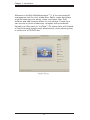
The Photo Viewer module is useful for browsing photos,
playing full-screen slideshows and making simple edits to your
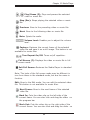
photos. The Photo Viewer controls include:
Best Fit (Ctrl+B): Makes the photo fit in the preview screen.
Actual Size (Ctrl+A): Shows the photo at 100%.
Zoom Out (-): Reduces the size of the active photo within
the Photo Viewer.
Zoom In (+): Enlarges the active photo within the Photo
Viewer.
Play Photo Book: Makes the photos in the current folder play
as a photo book in full screen.
Play (P): Makes the photos in the current folder play as a
slideshow in full screen.
Previous (Left Arrow, Up Arrow, Page Up): Goes to the
preceding photo file.
Next (Space Bar, Right Arrow, Down Arrow, Page
Down): Goes to the following photo file.
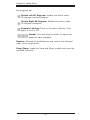
Attach Rating: Enables you to attach a rating to or unrate
the selected media files. You can also press a number (1-5) on
the keyboard to apply a rating.
Dynamic Lighting: Choose Dynamic Lighting to enhance the
image quality.
Auto De-Noise: This command automatically reduces the
noise effects in the image.
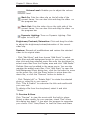
Automatically Remove Red-Eye: Automatically fixes redeye. If red-eye is not fixed, use the Easy Fix.
Automatically beautify the face: Automatically beautifies
the face. If the result is not satisfactory, use the Face Beautify
action.
47