1
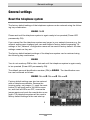
Installation Manual
(UK)
ISDN Telephone Systems
tiptel.com 410
tiptel.com 810
tiptel.com 411
tiptel.com 811
tiptel.comPact 42 IP 8
tiptel.comPact 82 IP 8
tiptel
Table of contents
Table of contents
Table of contents ........................................................................................... 3
Introduction .................................................................................................... 8
Notes .............................................................................................................. 9
Product package ........................................................................................ 10
Directions for the operation of the telephone system................................ 11
Environmental compatibility ....................................................................... 12
Functioning in the event of power failure ................................................... 12
Setting of country ....................................................................................... 12
Interfaces ........................................................................................................ 13
ISDN-ports (S0) .......................................................................................... 14
Analogue ports (a/b) .................................................................................. 14
Analogue FXO ports ................................................................................... 14
Network connection ................................................................................... 14
Terminals .................................................................................................... 15
Analogue telephones .............................................................................. 15
ISDN- and TIPTEL-system telephones ................................................... 15
First start-up ................................................................................................... 16
Connecting the telephone system................................................................. 17
Removing the cabinet cover ...................................................................... 17
Connecting the telephone system to an analogue exchange office ......... 18
Connecting the telephone system to an ISDN (NTBA) connection .......... 19
Connection of ISDN or system telephones................................................ 19
Connecting several ISDN telephones by using an ISDN switch............ 21
Connecting several ISDN telephones by using an S0 bus ..................... 22
Connection of ISDN telephones by using network cable ...................... 23
Changing S0 port settings .......................................................................... 24
Connecting analogue terminal devices .................................................... 25
Connection via TAE or western jacks directly at the telephone system 25
Connection by using installation cable .................................................. 26
Connection by using network installation cable .................................... 27
Connection of IP telephones ...................................................................... 28
Connecting the telephone system to the network ..................................... 28
Connection your telephone system to mains ............................................ 29
Testing the connection ............................................................................... 29
3
Table of contents
Configuration access ..................................................................................... 31
Identification of the IP address ................................................................... 31
Changing the IP address at a telephone ................................................... 32
Direct connection to a computer................................................................ 33
Web configuration access .......................................................................... 33
Trouble shooting ........................................................................................ 34
Necessary settings in your web browser (all operating systems) ......... 34
Network settings in Windows 7 .............................................................. 35
Network settings in Windows XP ............................................................ 37
The configuration wizard ............................................................................... 39
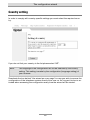
Country setting ........................................................................................... 40
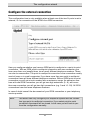
Configure the external connection ............................................................. 41
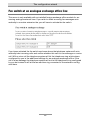
Fax switch at an analogue exchange office line ........................................ 42
External telephone numbers an call distribution for the S0 ports ............. 43
External telephone numbers an call distribution for the analogue exchange
office ports .................................................................................................. 44
Assigning the telephone number for outgoing calls .................................. 45
End.............................................................................................................. 45
Main Configuration Interface ......................................................................... 46
General ....................................................................................................... 46
Menu Settings ................................................................................................ 48
Settings ....................................................................................................... 48
Speed dialling ............................................................................................. 51
Service..................................................................................................... 51
Phonebook ................................................................................................. 52
Service..................................................................................................... 52
Call filter ...................................................................................................... 53
Applications............................................................................................. 55
Dialling control ............................................................................................ 56
Emergency numbers .................................................................................. 57
Call data ...................................................................................................... 57
Call analysis software ............................................................................. 58
Day/night switching .................................................................................... 58
Settings ................................................................................................... 59
Timecontrol ............................................................................................. 60
Public holidays ........................................................................................ 60
LCR ............................................................................................................. 60
Settings ................................................................................................... 60
Provider ................................................................................................... 61
Zone ........................................................................................................ 61
4
Table of contents
Timecontrol ............................................................................................. 61
Public holidays ........................................................................................ 61
Configuration examples .......................................................................... 62
Expert mode ............................................................................................... 63
Date / time ............................................................................................... 63
Service..................................................................................................... 63
Voicemail ................................................................................................. 65
SIP ........................................................................................................... 65
Menu: Ports .................................................................................................... 67
ISDN ............................................................................................................ 67
Settings ................................................................................................... 67
Entry of MSN/DDI .................................................................................... 68
Call forwarding external .......................................................................... 69
Analogue (FXOs) ........................................................................................ 69
Settings ................................................................................................... 70
Entry of Phone Number .......................................................................... 70
Analogue (FXS) .......................................................................................... 70
Settings ................................................................................................... 70
VoIP (SIP) ................................................................................................... 71
Subscriber list ......................................................................................... 71
Set-up SIP Account ................................................................................. 72
Entry of phone number ........................................................................... 74
Set-up SIP Provider ................................................................................. 74
Settings ................................................................................................... 75
Menu: Subscriber ........................................................................................... 76
General ....................................................................................................... 76
Groups ........................................................................................................ 76
Day/night Switching ................................................................................ 77
Group ...................................................................................................... 77
Select group member ............................................................................. 78
Allocation for incoming external calls ..................................................... 78
Call distribution ........................................................................................... 79
Subscriber – Sub-menu: Administrator ...................................................... 79
Copying a subscriber .............................................................................. 79
Modifying a subscriber ........................................................................... 80
Subscriber ............................................................................................... 80
Authorisations ......................................................................................... 80
Extensions allocated to subscriber......................................................... 81
Allocation for incoming external calls ..................................................... 82
Allocation for outgoing external calls ..................................................... 82
External PABX dial in (call through / call back) ...................................... 82
5
Table of contents
Subscriber .................................................................................................. 83
Settings ................................................................................................... 83
Call forwarding ........................................................................................ 85
Charge account ...................................................................................... 85
System telephone ....................................................................................... 85
Assignment of the functional keys .......................................................... 87
Remote dial-in............................................................................................. 92
Voice box .................................................................................................... 92
Activate voice box for an user ................................................................. 92
Settings voice box ................................................................................... 93
Uploading OGMs .................................................................................... 93
Settings Remote control ......................................................................... 94
Message transfer..................................................................................... 96
Set-up service ............................................................................................. 97
Remote configuration.............................................................................. 97
External dial-in ......................................................................................... 98
SMS ......................................................................................................... 98
Call Manager .............................................................................................. 99
Automatic switchboard ........................................................................... 99
Greeting and transfer .............................................................................. 101
Information system.................................................................................. 102
Menu: Network ............................................................................................... 105
Status .......................................................................................................... 105
Settings ....................................................................................................... 105
LAN .......................................................................................................... 105
IP-settings................................................................................................ 106
Name server addresses (DNS) ............................................................... 106
DHCP....................................................................................................... 106
STUN-server, WAN ..................................................................................... 107
Setting the type of WAN interface ........................................................... 107
General settings ............................................................................................. 108
Reset the telephone system ....................................................................... 108
Troubleshooting ............................................................................................. 109
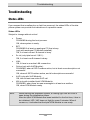
Status-LEDs ................................................................................................ 109
Description of possible malfunctions ......................................................... 110
An analogue terminal cannot be called .................................................. 110
Analogue terminal with no dial tone ....................................................... 110
An ISDN terminal cannot be called......................................................... 110
ISDN terminal cannot conduct external calls ......................................... 110
No incoming external calls possible ....................................................... 110
6
Table of contents
Tips and tricks ................................................................................................ 112
Function call-through / call-back................................................................ 112
Groups ........................................................................................................ 113
Different companies - one telephone system ............................................ 114
Greeting and answering machine .............................................................. 114
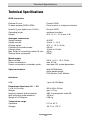
Technical Specifications ................................................................................ 116
Appendix ........................................................................................................ 117
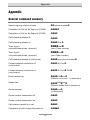
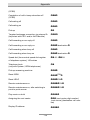
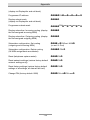
General command summary ..................................................................... 117
Function codes for analogue terminals ..................................................... 120
During the call ......................................................................................... 120
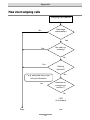
Flow chart outgoing calls ........................................................................... 121
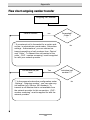
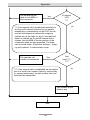
Flow chart outgoing number transfer......................................................... 122
Explanation of terms ................................................................................... 124
Service ........................................................................................................ 128
Guarantee ................................................................................................... 128
CE sign ....................................................................................................... 129
Ecological information ................................................................................ 129
Notes on care ............................................................................................. 130
Index ............................................................................................................... 131
7
Introduction
Introduction
Congratulations on your purchase of this ISDN telephone system - a future-proof solution,
Already prepared for Voice-over-IP (VoIP), (*)
Permits modern telephone calls to be made with the high performance telephone system,
An optional (*) Voicemail- and Callmanagement-Module not only provides
you with an individual answering machine for each subscriber. It also serves
as a professional cal management system,
Can be upgraded by two additional FXO-ports with an optional
FXO-Module (*)
Can be integrated in existing network environments which allows you
Configuration on end user level. Each subscriber is able to access and configure basic features via his/her PC, e.g. call forwarding, or playback of recorded messages.
Computer Telephony Integration (CTI) via TSPI(TAPI)-driver provided with
your telephone system (for Windows operating systems)
(*) Note: Included in tiptel.comPact 42/82 IP 8
8
Notes
Notes
We reserve the right to make changes to this User's Manual or the hardware described at any time and without prior notice. The current version of the User's Manual
is also available as a pdf file on the Internet at www.tiptel.com. The texts and illustrations of this user's manual have been compiled with the utmost care. However, errors
cannot be ruled out completely. The publisher cannot be held liable for any incorrect
information or consequences arising as a result.
Important: This manual reflects the telephone system, release 7.xx. If necessary,
perform an update.
© 2010 Tiptel.com GmbH Ratingen. All rights reserved.
9
Notes
Product package
Please check that you have received everything before starting installation. The delivery includes:
1 tiptel.com 410, 810, 411, 811, tiptel.comPact 42/82 IP 8, tiptel 41/42 Home
telephone system + AC adapter
1 ISDN connector cable
1 LAN connector cable for connection to a computer
1 Quick start guide
1 accessories kit with mounting material (2 wood screws, 2 raw plugs)
1 User's Manual
1 CD with manuals, Call Charges Analysis Software MicroBX, CTI-Software
„Estos ProCall“, TAPI-drivers
For CTI-enabled applications you can download the current TSPI drivers for the relevant telephone system from the download area at www.tiptel.com. These drivers enable you to implement all TAPI-enabled CTI applications via the network for computer-supported telephone calls (3rd party CTI).
Tiptel.com GmbH and ESTOS GmbH have certified their telephone systems and the
„Estos ProCall” CTI application (www.estos.de). You may continue using the timelimited full version on the attached CD if you buy a licence key. A new installation is
not necessary.
A full version of the „tiptel MicroBX” charge analysis software can be downloaded for
the relevant telephone system from the download area at www.tiptel.com. Same as
the version on the attached CD it is fully functional for a period of 6 weeks. When the
trail-period has expired graphic charts are no longer available. After purchasing a licence key you can continue using the unlimited full version „MicroBX“ (graphic
charts inclusive) or upgrade to a hotel version (with check-in, check-out, unlocking
guest room phones and - if applicable - a hotel booking software). A new installation
is not necessary. For details please refer to the User's Manual contained in the
download for further information.
10
Notes
Directions for the operation of the telephone system
This ISDN telephone system has been designed for use at ISDN connections according to Euro ISDN protocol DSS1. Using the system on other
connections can cause malfunctions.
This ISDN telephone system has been designed and manufactured in accordance with the „Information Technology Equipment Safety” standard (EN
60950). Only devices complying with this or an equivalent directive may be
connected to this ISDN telephone system.
Installation procedures must be carried out by a professional. Installation
procedures on the 230v mains network must be carried out by a qualified
electrician. VDE 0100 must be observed.
In case of any malfunction, please disconnect the unit from the line and detach all ISDN connection cables.
The ISDN telephone system may not be installed and operated in the following environments:
outdoors
in damp or wet rooms (bathroom, shower, swimming pool...)
in surroundings prone to risk of explosion
in locations exposed to direct sunlight
at ambient temperatures below 0 °C or above 40 °C
in locations subject to severe shaking or vibration
in dusty areas
Lay the connecting cables carefully to avoid any danger of tripping. The
connecting cables must not be subjected to excessive pulling or bending or
mechanical loading. All connecting cables must only be used indoors.
11
Notes
Environmental compatibility
No contact with substances harmful to human health can occur if the system is used
properly. The synthetic materials used in this device consist of partially recycled
granulate. Our packaging does not contain any synthetic materials. Only cardboard
and paper from partially recycled material is used.
Functioning in the event of power failure
If you want to guarantee that your telephone system is also available in the event of a
power failure, an uninterruptible power supply (UPS) is available as an optional accessory. This ensures that the system will continue to function for several hours in the
event of a power failure.
Setting of country
This telephone system can be used in most European countries. To use all the features the system must be set to the country in which you want to use it. This is done
either through the Configuration Wizard or in the main configuration at the point Administrator -> Settings -> Settings -> Setting of country.
12
Interfaces
Interfaces
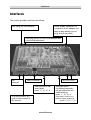
The system provides interfaces as follows:
Slot (long) for FXO-Module
Power supply connector for
connection to AC adapter (no
need to pay attention to polarity, but do not shift!)
Two slots (short) for one VCM-Module and
one VoIP-Module each
So
external
opt. FXO conn.
LAN-Connector
Analogue ports Western-jacks
ports 1 | 2 | 3 | 4
Only tiptel.com 810, 811,
tiptel.comPact 42/82 IP 8:
Analogue ports
2 screwing terminals
a/b per extension incl.
cable bushing
ports 1 | 2 | 3 | 4
Only tiptel.com 810, 811,
tiptel.comPact 42/82 IP 8:
So internal
ports 5 | 6 | 7 | 8
13
Interfaces
ISDN-ports (S0)
S0 external:
Connection to a point-to-point or multipoint interface according to Euro
ISDN (DSS1)
S0 internal (not included in tiptel.com 410, tiptel.com 810 and tiptel 41
Home):
Connection to multipoint interface for ISDN devices according to Euro ISDN
(DSS1)
Analogue ports (a/b)
The system provides Western-jacks for the first 4 analogue extension ports. In order
to be able to use the screwing terminals the cover has to be removed. For details
please see chapter „Installation“. Ports 5 through 8 are only available as screwing
terminals.
You can connect analogue telephones, cordless telephones, answering machines,
and fax machines with the first 4 ports via western jacks or screwing terminals.
TIPTEL strongly recommends not to us more then one terminal at the same port.
Those terminals would comprise a parallel circuit which makes it impossible to call
them individually. Also malfunctions might occur (terminals do not ring anymore,
caller's numbers are not be displayed, low volume). Please use a separate port for
each terminal.
Analogue FXO ports
This telephone system is ready for installation of an optional FXO-Module. Close to
the cable bushing for the power cord there are two extra western jacks. With no FXOModule installed, these jacks are not operable.
Network connection
The telephone system comprises one 10/100 Ethernet connector. Connection is established via a standard Ethernet cable (CAT 5). Cross-over will be detected automatically and switched accordingly.
14
Interfaces
Terminals
It is possible to connect analogue telephones, answering machines, fax machines
and PCs to the tiptel.com telephone system family. tiptel.com 411, 811, tiptel.comPact 42/82 IP 8 and tiptel 42 Home also support ISDN telephones and TIPTEL
system telephones. The range of operation and use of features depend on the terminal used. Please also observe the User's Manuals for the terminals.
Only CE-approved terminal units complying with standards ETSI TS 103 021 (analogue terminals) or CTR 3 (ISDN terminals) should be connected to the telephone
system.
Analogue telephones
Analogue telephones must comply with the following specifications:
DTMF telephones (dual tone multiple frequency):
The dialling information is transmitted via a tone sequence. In addition to the
-and keys, the „” and „” keys are also available.
Additionally, the following feature should be supported by the analogue telephones
in order to ensure full functionality of the telephone system:
CLIP and/or CNIP function:
Telephones that can display the caller’s number and/or name.
MWI-function (with VCM-Module installed)
Telephones that can indicate when new messages have arrived (Message
Waiting Indication). In most cases this will be indicated by an LED or on
the display, e.g. with tiptel 140, tiptel 160, and tiptel easyDECT 6600.
Note:
Pulse dialling telephones are NOT supported.
ISDN- and TIPTEL-system telephones
Telephones that can be operated on S0-ports according to Euro ISDN standard
DSS1. Only tiptel.com 411, 811, tiptel.comPact 42/82 IP 8 and tiptel 42 Home.
For this function, ISDN telephones require the associated internal subscriber number
(MSN). You need to enter the desired extension number (also to be configured in
your telephone system) as MSN at the telephone. The input procedure is described
in the User's Manual for the ISDN telephone.
15
First start-up
First start-up
This telephone system has been designed as a Plug & Play device, i.e. after connecting the terminals, connecting the telephone system to the mains supply and switching on the power supply, the system is ready to use. In case you wish to operate the
system at a point-to-point connection please dial from any
phone.
There is a difference between configuring the telephone system, e.g. by an administrator, and configuring by individual subscribers. The administrator defines subscribers by assigning call numbers. Using this call number or the user’s name and a
password, the subscriber can edit personal settings (e.g. set call forwarding) via a
browser. But only the administrator also defines the extensions for signalling and
which external MSNs are available.
Your telephone system has the following factory default settings (the following list is
not complete and only gives the settings necessary for configuration.
External S0 configured for Euro-ISDN point-multipoint and PP connection
(DSS1).
All calls will be signalled at all subscribers.
Only tiptel.com 411, 811, tiptel.comPact 42/82 IP 8 and tiptel 42 Home:
The internal S0 is configured for the Euro ISDN multipoint interface.
Subscribers (MSNs) 20 – 21 are preset.
The analogue extensions 1 – 8 are assigned to subscribers 50 – 57.
All subscribers have international exchange authorisation.
Standard exchange connection with the digit .
Charges are only displayed on ISDN terminals, not at analogue terminals.
The PIN (needed for important programming codes) is preset to 0000.
The Ethernet address is preset to 192.168.34.100.
The subnet mask is preset to 255.255.255.0.
The basic DHCP address is 192.168.34.100.
The username/password for the web-based configuration is admin/admin.
Note:
To enable full functionality of your ISDN terminal units you will have to
assign MSNs to them. The desired (and configured in the telephone
system) subscriber's telephone number is to be used as MSN for the
individual subscriber. For details on assigning those MSNs please consult the User's Manual for your ISDN terminal units.
16
Connecting the telephone system
Connecting the telephone system
Removing the cabinet cover
In case you wish to use port 5 through 8 with telephone systems comprising 8 analogue ports or you wish to jumper ISDN ports from internal to external or vice versa,
or you wish to install or remove terminations resistors of the S0 ports, or you wish to
install modules you will have to remove the cabinet cover.
Please pay attention to applicable safety regulations, in particular
EN 60950 und VDE 0100!
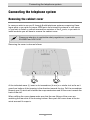
Removing the cover is done as follows:
1
1
2
2
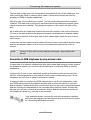
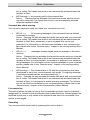
At the indicated areas (1) insert a slot screwdriver (4 mm) or a similar tool as far as it
goes from bottom of the housing in the direction towards the top. Pull the screwdriver
towards you (2) which will slacken the snap mechanism and lift the cover towards the
back of the unit.
When refitting the cover please make sure that the rear fittings of the cover are
matching the rear slots of the housing bottom. Now push the cover down at the terminal area until it snaps in.
17
Connecting the telephone system
Connecting the telephone system to an analogue
exchange office
In order to operate tiptel.com 410-811 at an analogue exchange office you need the
optional 2FXO Module. With tiptel.comPact 42/82 IP 4 this module has already been
integrated.
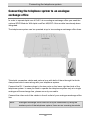
The telephones system can be operated at up to two analogue exchange office lines.
Take both connection cables and make a loop with both of them through the ferrite
clamp bead which came along with your telephone system.
Connect the RJ-11 western plugs to the two ports on the lower right had side of the
telephone system. In case you wish to operate the telephone system only at a single
analogue office exchange line, please use only one cable.
Connect the other end of the cables to the all outlet of your analogue exchange office
line.
Note:
Analogue exchange office lines can only be connected by using the
western ports of the telephone system, there are no screwing terminals.
18
Connecting the telephone system
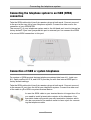
Connecting the telephone system to an ISDN (NTBA)
connection
Take the ISDN cable which has 8 pin western plugs at both ends. Connect one end
to the port at the very left of your telephone system. Connect the other end to the
connector of your ISDN NTBA.
The second S0 of your telephone system next to the left hand port is set to internal as
factory default. If you have jumpered this port to external you can connect the NTBA
of a second ISDN connection to this port.
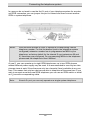
Connection of ISDN or system telephones
For system or ISDN terminal devices telephone systems tiptel.com 411, tiptel.com
811, tiptel.comPact 42 IP 8, and 82 IP 8 provide you with one internal ISDN port in
factory default settings.
Take the ISDN cable which has 8 pin western plugs at both ends. Connect one end
to the second S0 port from the left at your telephone system. Connect the other end
of the cable to your ISDN or system terminal device.
In case the ISDN cable to your terminal device is longer than 10 m
you need to install a termination resistor at the telephone. Your
specialist dealer will provide you with termination resistors which
can be connected to the network outlet to have a jack for connecting the telephone cable.
19
Connecting the telephone system
In case you do not want to use the first S0 port of your telephone system for an external ISDN connection you can jumper this port to internal and then connect another
ISDN or system telephone.
Notes:
ISDN terminal devices in order to operate a corresponding internal
telephone number. For this the desired (and in the telephone system
configured) extension number has to programmed as MSN in your
telephone; as factory default for the internal S0 port extensions 20 and
21 have been pre-configured. For programming MSNs to the telephone
please read the telephone's User's Manual.
At one S0 you can operate up to eight ISDN telephones, up to two ISDN phones
without external power supply may be used. It is recommended to use only two telephones since at each S0 bus there are only two channels (lines) available at any one
time. This means that only two devices are able to telephone at the same time. If you
wish to connect more than one ISDN telephone you can use an ISDN switch or install
an S0 bus with corresponding cable.
Note:
At each S0 port you can only operate one single system telephone.
20
Connecting the telephone system
Connecting several ISDN telephones by using an ISDN switch
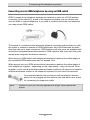
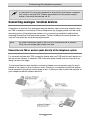
ISDN S0 buses of the telephone systems are installed as jacks for a RJ-45 western
connector. At the internal S0 buses of the telephone systems you can directly connect an ISDN or system telephone. If you wish to connect more than one telephone
you may use an ISDN switch.
This switch is connected to the telephone system's connector and provides you with
the option to connect a number of ISDN telephones. Such ISDN switches are available from two up to eight connectors. ISDN switches with two ports are available with
and without integrated termination resistors. ISDN switches with more than two ports
usually have integrated termination resistors.
When using an ISDN switch with integrated termination resistors the cable length of
the connected ISDN telephones may not exceed 10 m.
When using a two port ISDN switch without termination resistors the cable length of
both telephones together - depending on the cable quality - may not exceed 100 m
together. In this case at both telephones termination resistors will have to be installed
and the termination resistor at the telephone' system's S0 port has to be removed.
Your specialist dealer can provide you with termination resistors
which can be plugged into the network jack and which have a jack
for connecting the telephone cable.
Note:
At each S0 port you can only operate one single Tiptel system telephone.
21
Connecting the telephone system
Connecting several ISDN telephones by using an S0 bus
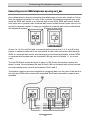
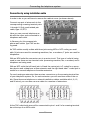
As an alternative to directly connecting the telephones you can also install an S0 bus
from the telephone system. In order to do so below the telephone system you must
install an ISDN wall socket or a universal wall socket. With ISDN wall socket outlets
both jacks are in parallel, with universal wall socket outlets the two jacks can be connected to separate cables. In case you installed a universal wall socket outlet below
the telephone system you can install two S0 buses at this outlet.
At pins 1a, 1b, 2a, and 2b (with a universal wall socket at pins 3, 4, 5, and 6) a telephone or network cable has to be connected. At the other end of the cable another
ISDN- or universal wall socket and starting form this where applicable further ISDNor universal wall sockets can be connected. Wiring has to be made 1:1 (no crossover).
The last ISDN wall socket will have to carry a (100 Ohms) termination resistor between 1a and 1b and between 2a and 2b each. With a universal wall socket termination are between pins 4 and 5 and between Pins 3 and 6.
Termination resistors are also available for plugging them into the jack of the last outlet, and also ISDN wall sockets with integrated (switched) termination resistors are
available.
22
Connecting the telephone system
The first wall socket has to be connected to the internal S0 port of the telephone system by using an ISDN or network patch cable. Further wall sockets are used for
plugging in ISDN or system telephones.
With this type of bus outlets are in series. The last outlet gets termination resistors
installed. The other side of the bus is terminated within the telephone system (termination resistors are installed). The telephone system in this case is the start of the
bus.
As an alternative the telephone system may also be located in the centre of the bus.
For this at the wall socket at the telephone system two telephone or network cables
have to be connected. At the other end of both cables again there are one or more
wall sockets.
In this case the last outlets at both cables will have to carry termination resistors each
and the termination resistor of the S0 port in the telephone system has to be removed.
Note:
At each S0 port you can only operate one single Tiptel system telephone.
Connection of ISDN telephones by using network cable
In case there is a network infrastructure with patch panel and network outlets close to
the telephone system you can also use this wiring for connecting ISDN or system
telephones.
Connect the S0 port of your telephone system to the patch panel and connect the
ISDN or system telephone to the network outlet in the corresponding room. At the
telephone you will have to install a termination resistor.
In case you wish to connect two ISDN telephones to one S0 port please use a two
port ISDN switch without termination resistors and connect this switch to you telephone system. Connect both jacks of the switch with the two jacks of the patch panel
and the connect the telephones to the corresponding network outlets. At both telephones you will have to install a termination resistor and the termination resistor at
the telephone system's S0 port has to be removed.
Your specialist dealer can provide you with termination resistors
which can be plugged into the network jack and which have a jack
for connecting the telephone cable.
23
Connecting the telephone system
Changing S0 port settings
As factory default setting the first (left hand side) S0 port of the telephone system is
set to external for operating at the NTBA of an ISDN connection, the second S0 port
(second jack from the left) is set to internal intern for operating ISDN or system telephones.
I you wish to operate the telephone system at two ISDN connections you can also set
the second S0 port to external.
In case the telephone system shall not be operated at an ISDN connection you can
also set the first S0 port to internal for connecting additional ISDN or system telephones.
In order to do so please remove the cabinet cover as shown above.
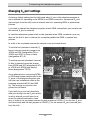
To set the first (standard: external) S0
bus to internal move the jumper from
JP504 and 502 (designation TE) to
JP503 and JP501 in front of them
(designation NT) (2).
2
3
To set the second (standard: internal)
S0 bus to external move the jumper
from JP509 and 507 (designation NT)
to JP510 and JP508 right behind
them (designation TE) (3).
4
1
As an alternative to connecting NTBA
or ISDN and system telephones to the
S0 ports of the telephone system you
can also use installation cable at the
screwing terminals KL501 and 502
(4). The pinning is printed on the
printed circuit board.
4
If you wish to go into two directions
with your wiring from an S0 port which
is set to internal you will have to remove the internal termination resistors. In order to do so please remove the two jumpers of JP505 (1) for the first S0 port
(left hand side) and the two jumpers of JP506 (1) for the second S0 port (second port
from the left).
24
Connecting the telephone system
In case both S0 ports are jumpered to internal the total power consumption must no exceed 2 W. Please pay attention to the power requirements of terminal devices fed via S0.
Connecting analogue terminal devices
Connection of the first four analogue terminal devices can be done by directly using
the TAE or western connectors of those telephones by plugging them into the corresponding jacks of the telephone system or by connecting installation cable at the
screwing terminals of the telephone system. Further analogue terminal devices can
only be connected by using screwing terminals.
Note:
All three connection types of the first four extensions are in parallel.
Only use one single type at any one time.
Connection via TAE or western jacks directly at the telephone system
For terminal devices with TAE connector please use one TAE jack for each device on
the top of the cabinet. In case the TAE cover has been closed you can remove it by
lifting it at the front edge.
For terminal devices with western connector please use one western jack for each
device in the centre of the connector array. Pinning is in compliance with the international standard using both centre wires as a/b. If need you can consult the supplier of
your telephone about cables that will fit.
25
Connecting the telephone system
Connection by using installation cable
In order to do so you will have to remove the cabinet cover (as shown above).
Connect one pair of wires each to the
corresponding screwing terminal pairs
1 through 8. Only used twisted pair
cable, type J-Y/ST/Y.
Here you can connect telephone cable with the other end connected to a
telephone wall outlet.
In Germany for this purpose telephone wall outlets type TAE are being used.
As TAE outlets usually outlets with three jacks using NFN or NFF coding are available. N jacks are used for answering machines, fax, or modems, F jacks are used for
telephones.
With an NFN outlet the connectors are in a series circuit. This type of outlet is being
used in case there are two terminal units (answering machine, fax, or modem) and a
telephone are being used.
With an NFF outlet the left hand jack is N and the centre jack is F coded for a secondary device and a telephone at one extension and the right hand side F coded jack is
meant for a second telephone of another extension.
For each analogue extension there are two connectors on the screwing terminal bar
of your telephone system, So, for each extension you will need two wires of the cable. Since there are telephone or network installation cables available with 4, 8, 12,
and 20 wired, you can also use one cable for a number of extensions.
At the TAE outlet both wires will be connected to pins 1 and 2 of a screwing terminal
bar at the top of an NFN outlet.
26
Connecting the telephone system
With an NFF outlet the first extension will be connected to pins 1 and 2 at the top
screwing terminal bar (using the left hand side N coded and the centre F coded jack)
and the second extension will be connected to pins 1 and 2 of the lower screwing
terminal bar (using the right hand F coded jack).
Note:
In other countries instead of TAE type outlets other standards are being
used for wall outlets.
Connection by using network installation cable
In case there is a network infrastructure with patch panel and network outlets close to
the telephone system you can also use this wiring for connecting analogue telephones.
Connect the RJ-11 jack of your telephone system to the patch panel and connect the
analogue telephone to the network outlet in the corresponding room. For both installations you need a cable with a 4 pin RJ-11 plug at one end and an 8 pin RJ-45 plug
at the other end. Your specialist dealer will provide you with such cables.
To integrate extension 5 - 8 in you patch panel wiring below the telephone system
you should install a UAE (Universal Anschluss Einheit-) wall outlet. Connect the two
wires of an analogue extension at the screwing terminal bar at your telephone system
by using an installation cable with terminals 4 and 5 of the UAE outlet. Now you can
connect the jack of the UAE outlet with the jack on the patch panel.
Note:
By using the circuit as explained above the two centre wires of the
patch cable and thus, also at the telephone are being used. This is correct with most telephones. A few telephones, however, do not use the
centre wires but instead are using the wires right next to those wires to
the left and the right. If this is the case with your analogue telephone
you must use terminals 3 and 6 of your UAE outlet instead of 4 and 5.
27
Connecting the telephone system
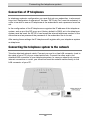
Connection of IP telephones
In telephone system's configuration you must first set up a subscriber, in whose settings und "Designation of extensions" the item "SIP Proxy Port" must be activated. In
order to be able to use an IP telephone at the subscriber's end a password must be
set.
In the configuration of the IP telephone as registrar the IP address of the telephone
system, and as port the SIP proxy port (factory default is 5062) set in the telephone
system must be used. As SIP ID or user name the internal telephone number of the
subscriber and as password the password of the subscriber has to be set.
After saving those settings the IP telephone will register with your telephone system
as telephone.
Connecting the telephone system to the network
Take the attached network cable. Connect one end to a free LAN connector (next to
the cable of your PC) of your router/switch/hub. Connect the other end to the
shielded LAN connector of your telephone system. In case you should not use any
internet connection or router, you should connect the network cable directly to the
LAN connector of your PC.
28
Connecting the telephone system
Connection your telephone system to mains
Connect your telephone system to mains by using the AC adaptor.
The "power" LED at your telephone system will start flashing. Different LEDs will come
on and off. The "power" LED will flash for some 90 seconds. After that it should be lit
permanently.
By all means wait that long. Only after that the telephone system will be in operation.
Testing the connection
Programme your connected ISDN or system telephones where applicable with the
corresponding telephone numbers (MSNs). Default setting in the telephone system is
20 and 21 at S02.
Now, pick up the handset at all telephones one after the other. You will hear a dial
tone. When there is no dial tone please check the connection of the telephone with
no tone.
Now, dial at one of the telephones all internal telephone numbers of the other telephones connected to the telephone system. Each telephone should ring.
Note:
With the analogue extensions telephone numbers 50 - 58 are factory
programmed. At the second S0 port for ISDN or system telephones this
is 20 and 21. In case you have set the first S0 port to internal, before using any telephones at this port a configuration in the telephone system
is needed.
If an ISDN or system telephone does not ring but you get a dial tone when picking up
the handset you have not programmed the internal telephone number to the telephone which is valid for the corresponding S0 port of the telephone system.
When this test was successful at the connected telephones please dial a 0 (zero) followed by an external telephone number. A connection will be set up to the dialled
subscriber. If external connections do work from analogue terminal devices but do
not work from ISDN or system telephones and after dialling the first digit of the external telephone number a busy signal, you have not programmed the internal telephone number to the telephone which is valid for the corresponding S0 port of the
telephone system.
29
Connecting the telephone system
Note:
The first S0 port of the telephone system is factory default set to ISDN
point-to-multipoint connection. If you have an ISDN point-to-point connection, at a connected telephone you must dial the digits
to set the port to point-to-point connection. Only after doing so external calls are possible.
In case you do neither have an analogue nor an ISDN connection and
you wish to telephone exclusively over the internet (VoIP) a certain configuration of your telephones system is necessary.
With factory default settings of the telephone system all telephones will ring with all
telephone numbers and for external calls a 0 (zero) must be dialled before the external telephone number. This can be changed in the telephone system's configuration.
30
Configuration access
Configuration access
Configuration of the telephone system is done via a web browser. There is no need
for any other software.
Most users have an internet access via a router with computers connected to that
router to which also the telephone system was connected.
A router usually has a DHCP server integrated, which assigns correct IP addresses to
all connected devices. The telephone system acts a as a DHCP client and obtains at
the start form the DHCP server of the telephone system automatically a correct IP
address. So, there is access to the telephone system's configuration without the need
of any modification of the computer's or the telephone system's configuration.
In case there is no DHCP server within your network, the IP address of the telephone
system must be set matching the IP address range of the network. This can be done
via a connected telephone.
If there is no network the telephone system can also be connected directly to the
LAN port of your computer. The telephone system has an integrated DHCP server
which assigns the computer automatically with correct IP settings.
If there is no network and the computer does not have any network adapter, as alternative configuration is also possible by using an ISDN connection (in order to be able
to do so the computer must comprise an ISDN adapter card) or via a serial interface
(in order to be able to do so the computer must comprise a serial port). Due to the
low speed network configuration should be preferred.
To access the configuration via network (LAN)you must know the telephone system's
IP address.
Identification of the IP address
This chapter only applies if the telephone system is connected to the network via a
router or a switch and the network comprises a DHCP server (usually in the router).
With all internet routers this is the factory default setting.
When starting up the telephone system it has been assigned with an IP address from
the network's DHCP server.
Enter at one or the telephones connected to the telephone system the digits
and pick up the handset. As an acknowledge signal of a valid string the
telephone system will answer with a positive prompt ("TaTaa"). Hang up the handset
after that prompt.
31
Configuration access
Some 10 seconds later the telephone system will call the telephone and show you
the IP address on the telephone's display. It should be an IP address from the address range of your network. Write down this IP address.
Note:
You can either use an analogue, an ISDN, or an system telephone to
query the IP address. However, the telephone must be equipped with a
display. IP telephones cannot be used for this purpose.
In case the telephone shows as an answer to your query the IP address
192.168.34.100, the telephone system has not received any valid IP address from
your network's DHCP server. In this case please check whether the LAN port of the
telephone system has been connected correctly to a LAN port of your router (or to a
switch connected to your router). Disconnect the telephone system's power supply
and then reconnect it. Wait for three minutes and then again query the IP address.
Changing the IP address at a telephone
This chapter only applies when your telephone system has been connected to a
router or a switch of an existing network, but there is no active DHCP server.
When there is no active DHCP server the telephone system could not obtain an IP
address at start up. In this case its IP address is 192.168.34.100 and its internal
DHCP server with the start IP 192.168.34.10 has been activated.
When you are experienced enough in network technology and you which IP address
you want to assign to your telephone system, you can do so by dialling
xxx xxx xxx xxx at any connected telephone. Instead of
"xxx" you will have to enter the four IP address segments. For example: Setting the IP
address 192.168.1.100 would be done by entering the string
.
After dialling that string and picking up the handset the telephone system would send
a positive prompt ("TaTaa"). Then hang up the handset. For verifying the IP address
please dial at any telephone with a display.
Factory default settings is a class C network with the subnet mask 255.255.255.0. If
needed you can change this by dialling xxx xxx xxx xxx.
With you can query the subnet mask.
Configuration access then can be achieved via the IP address set this way.
Note:
After changing the IP address the telephone system's DHCP server still
is active. If needed you can deactivate it via the web configuration.
32
Configuration access
Direct connection to a computer
If you do not have a network you can also connect the telephone system directly to a
computer which has a network adapter integrated. In this case connect the LAN port
of the telephone system with the LAN port of your computer by using the attached
network cable. After that power up the telephone system her, wait for three minutes
and then start up your computer.
The telephone system's IP address now is 192.168.34.100. Your computer has automatically been assigned with an IP address in this network range by your telephone
system.
Web configuration access
Now start your web browser and enter the IP address of your telephone system in the
address bar. So not use "www".
In the picture below the telephone system's IP address set via a telephone was
192.168.1.35. Instead of this address you must enter the IP address set by you, or - in
case the computer has been directly connected to your telephone system - you must
enter the factory default address 192.168.34.100.
A window for entering username and password will pop up. As factory default setting
both is admin. After entering username and password the web configuration can be
accessed.
33
Configuration access
Trouble shooting
If you do not see the window asking you for username and password after entering
the IP address, the telephone system has not been connected properly via LAN to
your network or computer of your computer's network settings are not correct.
In this case please connect your telephone system's LAN port directly to the computer's LAN port by using the attached network cable. The power up the telephone
system her, wait for three minutes and the start up your computer.
The IP address of the telephone system now is 192.168.34.100. Your computer has
automatically been assigned with an IP address by your telephone system in this address range. Now try again to access the telephone system's web configuration by
entering 192.168.34.100 in the web browser's address bar.
If you still do not see the window asking you for username and password, please
check your computer's network settings. Follow the instructions below depending on
your operating system used.
Note:
Here you will find instructions for the operating systems Windows 7 and
Windows XP. With other operating systems settings may slightly different.
Necessary settings in your web browser (all operating systems)
In case on your PC internet access has already been configured, first one setting in
your web browser will have to be reset.
In Internet Explorer please click on "Tools" then on "Internet Options" ... and finally on
"Connections".
Then check the box "Never dial connection".
With any other browsers please use the equivalent settings - if available - same as the
procedure described above. It is important that the browser is configured in such a
way that it does not automatically dial a (standard) connecting by itself when starting.
34
Configuration access
Windows 7
Windows XP
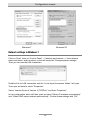
Network settings in Windows 7
Click on "Start", then on "Control Panel" -> Network and Internet -> View network
status and tasks” and the select on the left hand side "Change adapter settings".
Then you can see the LAN connection.
Double-click on LAN connection and the “Local Area Connection Status” will open.
There you will have to select "Properties".
Select "Internet Protocol Version 4 (TCPIPv4)“ and then "Properties".
In the configuration which will then open up select "Obtain IP address automatically"
and "Obtain DNS server address automatically". Confirm these settings with "OK".
35
Configuration access
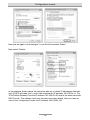
Now you are again in the dialogue " Local Area Connection Status ".
Now select "Details".
In the example shown above the computer was set to obtain IP addresses automatically (DHCP activated "yes"), and it has obtained the IP address 192.168.34.14. The
"IPv4 Default Gateway" has the IP address 192.168.34.100 and at the same time was
DHCP server. The settings must look the same as shown above, then you have access to the configuration under the IP address 192.168.34.100.
36
Configuration access
Note:
The IP address of the Computers will be different regarding the last
segment. The first computer connected will be assigned by the telephone system's DHCP server with 10, the second with 11 and so on.
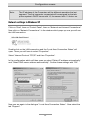
Network settings in Windows XP
Click on "Start", then on "Control Panel", then on "Network and Internet Connections".
Now click on "Network Connections". In the window which pops up now you will see
the LAN connection.
Double-click on the LAN connection and the "Local Area Connection Status" will
open. There you will have to select "Properties".
Select "Internet Protocol TCP/IP" and then "Properties".
In the configuration which will then open up select "Obtain IP address automatically"
and "Obtain DNS server address automatically". Confirm these settings with "OK".
Now you are again in the dialogue " Local Area Connection Status ". Now select the
tab "Support".
37
Configuration access
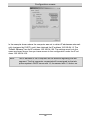
In the example shown above the computer was set to obtain IP addresses automatically (assigned by DHCP), and it has obtained the IP address 192.168.34.13. The
"Default Gateway" has the IP address 192.168.34.100. The settings must look the
same as shown above, then you have access to the configuration under the IP address 192.168.34.100.
Note:
The IP address of the Computers will be different regarding the last
segment. The first computer connected will be assigned by the telephone system's DHCP server with 10, the second with 11 and so on.
38
The configuration wizard
The configuration wizard
Start the web configuration by entering the identified IP address of the telephone system in the address bar of your web browser followed by /wizard/ e.g.
192.168.34.100/wizard/. As username and password enter admin each.
The configuration wizard allows you making the basic settings of the most important
data, i.e. distribution of external calls to the extensions as well as the assignment of
the extension's telephone numbers to the numbers sent with outgoing calls (important with e.g. charging). In order to do so it uses fixed extension numbers being fixed
assigned to the corresponding ports.
The telephone numbers 50 - 53 are fixed for the analogue extensions 1 - 4.
With telephone systems with 8 analogue extensions additionally the telephone numbers 54 - 57 are assigned also fixed to the analogue extensions 5 - 8.
With tiptel.com 411 and 811 additionally the telephone numbers 20 and 21 are assigned to the internal S0 bus 2. By all means programme your ISDN or system telephone with these numbers.
The configuration wizard can also be used after changing these fixed telephone
numbers (of course this is possible in the normal configuration. It will then also show
you the modified telephone numbers. But please observe warning messages in this
context.
39
The configuration wizard
Country setting
In order to comply with country specific settings you must select the required country.
If you do not find your country in the list please select "INT".
Note:
The language in the configuration will not be selected by the country
setting. This setting is made by the configuration (language setting) of
your browser.
Deactivate the box behind "Use wizard as cover page" in case you wish to access the
configuration of the telephone system directly from now on. As long as this box is activated when accessing the configuration every time the wizard will be started.
40
The configuration wizard
Configure the external connection
This configuration item is only available when at least one of the two S0 ports is set to
external, i.e. for connection to the NTBA of an ISDN connection.
Here you configure whether you have an ISDN point-to-multipoint or a point-to-point
connection. With an ISDN point-to-multipoint connection with one connection you
have more then one (usually three, ten at most) different telephone numbers. These
can also be consecutive. The point-to-multipoint connection is the connection usually
used at home or in small companies. If you have more then one point-to-multipoint
connection these will have different telephone numbers. With an ISDN point-to-point
connection you will get a trunk number with an extension range. As extension numbers with one ISDN connection you will get one digit extensions (0 - 9), with more
than one connection you will get two digit connections (e.g. 0 and 10 - 29). All ISDN
connections have the same telephone numbers.
In case of doubt consult the documents of your ISDN connection or your telephony
service provider.
Note:
The wizard can only configure your telephone system with the connection type point-to-multipoint connection. If you select point-to-point
connection the wizard will be closed. In this case you will have to perform the configuration manually.
41
The configuration wizard
Fax switch at an analogue exchange office line
This menu is only available with an installed foreign exchange office module for accessing analogue external lines. If you wish to divert incoming fax messages automatically to a certain extension the you will have to activate the fax switch.
If you have activated the fax switch as shown above the telephone system will automatically take incoming calls and verifies whether this call is a fax message or a voice
call. With a voice call the telephone system will let the telephones ring which where
configured by you in the additional settings for an analogue exchange office. If the
call is a fax message the telephone system will not let the telephones ring configured
by you but instead it will let the fax machine ring connected to the extension configured here.
42
The configuration wizard
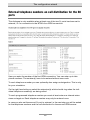
External telephone numbers an call distribution for the S0
ports
This dialogue is only available when at least one of the two S0 ports has been set to
external, i.e. for connection to the NTBA of an ISDN connection.
Here you enter the number of the first ISDN connection. You can enter up to telephone numbers. The number(s) have to be entered without area code.
To each telephone number you can optionally also assign a designation. This is only
for your orientation.
On the right hand side you select the extension(s) which should ring when the individual telephone number(s) are being called.
To each programmed telephone number you must at least enter one internal extensions as target an. Each telephone number may only be entered once.
In case you also set the second S0 port to external, in the next step you will be asked
for the telephone numbers and the call distribution for the second ISDN access.
43
The configuration wizard
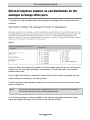
External telephone numbers an call distribution for the
analogue exchange office ports
This menu is only available when the analogue exchange office module has been
installed.
Here you enter the telephone number for the first analogue port (port 5, second connector from the left) and optionally a designation. The number has to be entered
without area code.
On the right hand side you select the extension(s) which should ring when the individual telephone number(s) are being called.
To each programmed telephone number you must at least enter one internal extensions as target an.
Note:
If you have activated the integrated fax switch, the internal connection
for the fax machine must not be selected here.
In the following step you will be asked for the settings regarding the second analogue exchange office port (Port 6 at the very right hand side).
44
The configuration wizard
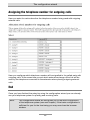
Assigning the telephone number for outgoing calls
Here you enter for each subscriber the telephone number being used with outgoing
external calls.
Here you configure which telephone number will be signalled to the called party with
outgoing calls. At the same time you set which external exchange office line will be
used by the telephone connected to the extension when placing outgoing external
calls.
End
Once you have finished the setup by using the configuration wizard you can already
use your telephone system for placing and receiving calls.
Note:
The configuration wizard will now guide you to the main configuration
of the telephone system (see next chapter). If the basic configuration is
sufficient for you for the time being you may now close the browser
window.
45
Main Configuration Interface
Main Configuration Interface
General
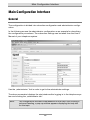
The configuration is divided into subscriber configuration and administrator configuration.
In the following we use the administrator configuration as an example for describing
the configuration procedures. The subscriber settings can be taken from the User's
Manual of your telephone system.
Use the „administrator” link in order to get to the administrator settings.
The above screenshot displays the start window after logging in to the telephone system and clicking the „administrator tab“.
Note:
The configuration includes comprehensive online help. After clicking a
coloured heading, a pop-up window appears displaying the help text
for this topic.
46
Main Configuration Interface
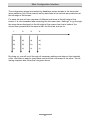
The configuration pages are marked by headlines shown as tabs in the horizontal
menu selection (top of the screen) and by web-links in the vertical menu selection at
the left edge of the screen.
For each tab you will see a number of different sub-items at the left edge of the
screen. It is recommended after selecting the first menu item „Settings“ to go through
the menu items displayed on the left edge of the screen from top to bottom You
should then proceed with the second tab, the third tab, and so on.
1.
2.
3.
4.
a)
a)
a)
a)
b)
b)
b)
b)
c)
c)
c)
c)
By doing so, you will scroll through all necessary settings and steps in the intended
order. And there is need to jump back and forth from one menu to the other. The following chapters also follow the rule given above.
47
Menu Settings
Menu Settings
This defines the main settings for the telephone system.
Settings
This menu plays a global role as you can enable or disable the basic functions of the
telephone system. Please use the online-help as it might be more up-to-date as this
User's Manual - in particular when the firmware of the telephone system had been
updated.
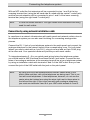
User name
Here you can enter a new user name for the administrator. The factory pre-set
user name is „admin”.
Password
Here you can enter a new password for the administrator. Please re-enter the new
password in the second entry field as confirmation. The factory pre-set password is
„admin”.
Voicemail system
Your telephone system supports the optional internal tiptel VCM-Module (included in
tiptel.comPact-models).
The individual voicemail boxes (personal answering machines) are assigned in the
subscriber menu.
Charges per pulse
The transmission of charge information at the analogue ports is realised via charge
pulses. Each pulse corresponds to a certain amount which has to be defined here. If
the rates are obtained from the exchange in the form of units, the base unit value has
to be entered here. This means that the value of one charge unit from the exchange
is identical to the value of one charge pulse.
Note:
Charge pulses will only be transmitted if AOCD has been enabled.
Time for delayed call forwarding
Each subscriber may programme a delayed call forwarding for his/her internal telephone number. The delay time may be globally set for every subscriber between 5
and 40 seconds.
48
Menu Settings
Area Code
Please enter the area code of your city here. This information is needed for crosschecking existing phone book entries with received CLIP information (caller's phone
number)
Setting of country
To satisfy country-specific requirements, it is necessary to select the desired country
here. If the required country is not included in the list, choose „INT”.
Note:
The language is not set when selecting the country code. The corresponding setting is applied based on the configuration (setting of language) of your browser!
Single-person operation (busy-on-busy)
This menu is used to enable the single-person operation mode. This is useful if you
are alone and unable to answer several calls at the same time. If single-person operation mode is enabled, each external caller hears the busy tone as soon as one extension is busy.
Note:
This is a global setting valid for the telephone system as a whole! But
you may set this function also for call groups only (please see menu
item“ Groups“ for details.
Call holding external
This menu is used to set whether calls are to be placed on hold externally within the
public exchange (call holding external enabled) or internally within your telephone
system (for each call placed on hold internally, one free B-channel must be available). If a call is placed on hold within your telephone system, the caller hears music
while on hold. Otherwise, the caller hears the announcement of your network provider.
Note:
To transfer an external call to another external subscriber the „call holding external - off” setting is required.
A three party conference cannot be set up with the „call holding external - on“.
„Call holding external“ is only available with a „point-to-multipoint“ connection.
Music on Hold (MOH)
It is possible to place external or internal calls on hold within your telephone system.
In this case, the caller on hold hears the internal music-on-hold. The following settings are available for this function:
49
Menu Settings
Off = no music played while call is on hold
Int = internal MOH is played back when a call is placed on hold
wav = the melody uploaded via the web interface is played when call is on hold (see
Uploading).
To listen to the recorded music, press the key code for any desired extension.
Note:
In order to allow problem-free functionality, it is recommended to use
the following data format: PCM, 8 kHz, 16 bit, mono. If the existing file is
available in a different format, it is possible to convert the file, e.g. by
using the „sound recorder” in Microsoft Windows. To do this, start the
„sound recorder” via „Start”, „Programmes”, „Accessories”, „Entertainment”, „Sound recorder” (depending on the version of the Microsoft
operating system). Then, select the requested file and choose the
„Save as” option. Using the „modify” button, you can select the following format: „PCM, 8,000 kHz, 16 bit, mono”. This new file can now be
transferred to the tiptel.com telephone system.
Use the „Upload” menu item in „Expert mode service“ to upload the file.
Call filter
You can switch the call filter function on or off here.
Day/Night switching
You can switch the day/night switching function for the complete device on or off
here. On delivery this function is deactivated. On activation you will see the applicable configuration menus.
LCR
Here you can activate or deactivate LCR for the telephone system as a. This function
is deactivated as factory default setting. On activation you will see the applicable configuration menus.
Use wizard as cover page
You can define whether the configuration wizard shall start automatically at access to
the web-configuration or not.
50
Menu Settings
Speed dialling
Your telephone system provides a speed-dialling list with a maximum of 100 phone
numbers, each consisting of 24 digits. The speed dialling numbers can only be used
to call external destinations. Consequently, you do not have to enter the prefix for the
exchange connection. For each speed dialling number a name consisting of a maximum of 20 digits can be entered.
Speed dialling numbers can be dialled at the extensions with the key sequence
(-).
Note:
The speed-dialling list can be exported or imported as a table in CSV
format. Each entry starts in a new line and is formatted as follows:
„name”, „phone number”
When entering data, observe the maximum text length for the name (20 characters)
and the phone number (24 characters).
Service
In the upper right corner on your screen you will find the tab „Service“. By clicking
this tab you will see a sub-menu which provides you with administration settings for
the speed dial directory.
Save speed dial list
The speed dial list may be saved here in CSV-format You may import these data to
Outlook Express by using the import option of that programme.
Upload (speed dial list)
The speed dial directory may be transferred from your PC to the telephone system.
You may also transfer a telephone book which has been exported from Outlook Express to your telephone system. In order to be able to do this you have to choose the
text file format. You may only export the items name and phone number.
Transfer all entries to phonebook
By clicking the button „Transfer“ the sped dial directory will be transferred to the
telephone book.
Delete speed dial directory
By clicking the button „Delete“ the speed dial directory will be deleted.
51
Menu Settings
Back
Back to the speed dialling menu.
Phonebook
You can save around 5000 entries with name and call number in the phonebook. You
can conveniently make and modify entries via the web interface. Functions „Modify“
or „Add“ enable you to change existing records or create a new entry. You search for
a name in the telephone book by clicking the „Search” button. If you enter only the
phone number the record for that phone number will be searched. By clicking the
„Delete“ button selected entries will be deleted. Clicking the button „Transfer“ will
have selected entries transferred to the speed dial directory.
Phonebook control
The telephone book may be controlled via an ISDN- or TIPTEL-system telephone. In
order to be able to display it your telephone must support „Display info“ while in the
dial state. In that dial state selection is carried out via the number keys of the telephone.
The buttons have the following functions:
Open telephone book
Search for entry
Delete letters
button
Insert letters
button
Switch between searching and
scrolling
Press 1 button
Scrolling
Start dialling
Note:
Dial 7
Enter letters via the number buttons
or button
Press button
With tiptel 82/83 system telephone it is also possible to use the cursor
keys to control the telephone book. System telephone tiptel 85 system
support menu guided control of the telephone book.
Service
In the upper right corner on your screen you will find the tab „Service“. By clicking
this tab you will see a sub-menu which provides you with administration settings for
the telephone book.
52
Menu Settings
Save phonebook
The phonebook may be saved here in CSV-format You may import these data to Outlook Express by using the import option of that programme.
Upload (phonebook)
The phonebook may be transferred from your PC to the telephone system. You may
also transfer a phonebook which has been exported from Outlook Express to your
telephone system. In order to be able to do this you have to choose the text file format. You may only export the items name and phone number. Special characters are
not allowed in the telephone book and will be deleted or replaced during the import
session.
Delete phonebook
By clicking the button „Delete“ the phonebook will be deleted.
Back
Back to the phonebook menu.
Call filter
This chapter is a brief instruction how to use your call filter.
Create Call filter
Your telephone system can manage up to 100 call filters Each call filter may be assigned to a phone number / MSN / DDI or to all calls. A call filter will be created by
clicking „Create“.
Select call filter
The call filter you wish to configure has to be selected here. In case you wish to
create a new call filter you may select subscriber „New“.
Delete call filter
Click „Delete“ next to the selection in case you wish to delete a call filter.
Name
The name for the call filter has to be entered here.
Filtering of incoming calls via following phone number / MSN / DDI of the telephone system
Select „All“ in case you want the filter to verify all incoming calls. Select a phone
number / MSN / DDI of the telephone system in case you want the call filter only to
verify callers who are calling this particular phone number / MSN / DDI of your telephone system.
53
Menu Settings
Exception phone numbers / MSNs / DDIs of the telephone system
Only enabled in case you selected „All“ first. You may define up to 3 phone numbers
/ MSNs / DDIs of your telephone system as exception, not to be verified by the call
filter.
Filter criteria
Caller without number = Call is being received without a phone number
transferred
Caller without number, except 3.1 kHz audio = Call is being received without a phone number transferred. Caller with identification 3.1 kHz (e.g. origin
from the analogue telephone network) will not be filtered.
Number suppressed = Call with identification „Restricted“
Caller's number = Here you may enter up to 10 phone numbers the filter
function shall apply to.
Area code of caller = Here you may enter up to 10 area codes the filter function shall apply to.
Remark:
The filter can only work orderly if your telecom provider supports the
needed features.
Caller's number
Enabled only in case you selected „Caller's phone number“ first. Here you may enter
up to 10 caller's phone numbers the filter function shall apply to.
Area code of caller
Enabled only in case you selected „Caller's area code“ first. Here you may enter up
to 10 area codes the filter function shall apply to.
Priority
Call filters with priority „1“ have the highest, those with priority „5“ have the lowest
priority. Selecting a priority is absolutely necessary when criteria of different call filters
you set are overlapping with respect to the same phone number / MSM / DDI of your
telephone system (or for all calls).
If filter criteria matches caller, then
Your telephone system will not accept that call. In case of an ISDN multipoint access
terminal units in parallel may accept that call.
Forward call to drop target = The call is being signalled only to one specific subscriber.
54
Menu Settings
Use standard call distribution = The filter function will be exit and the call will be signalled according to the call distribution set.
Applications
Unsolicited promotional calls
Most unsolicited calls have no caller id. Proceed as follows:
Select „Filtering of incoming calls via following phone number / MSN / DDI
of telephone system“ = „All“
Select filter criteria“ = „Caller without phone number“
Select „If criteria matches caller, then“ = „Ignore call“
Caller from abroad
In case you wish to forward calls, e.g. from the Netherlands to a caller speaking the
language, then proceed as follows:
Select „Filtering of incoming calls via following phone number / MSN / DDI
of telephone system“ = „All“
„Select filter criteria“ = „Caller's area code“
Enter „Caller's area code“ = „0031“
Select „If criteria matches caller, then“ = „Forward call to drop target“
Under „drop target“ select that subscriber who should pick up those callers e.g. a group
Callers from abroad with VIP customers from that country
In case you wish to forward calls, e.g. from the Netherlands to a caller speaking the
language. At the same time you want a particular Dutch VIP customer to be signalled
without that a.m. filter being applied.
Set up two filters:
Select „Filtering of incoming calls via following phone number / MSN / DDI
of telephone system“ = „All“
„Select filter criteria“ = „Caller's phone number“
Enter phone number of your VIP customer as „Caller's phone number“
Set „priority“ to = „1“
Select „If criteria matches caller, then“ = „Use standard call distribution“
55
Menu Settings
This filter makes sure that your Dutch VIP customer can reach you as usual. I.e. all
calls from that customer will be distributed according to the call distribution set.
Select „Filtering of incoming calls via following phone number / MSN / DDI
of telephone system“ = „All“
„Select filter criteria“ = „Caller's area code“
Enter „Caller's area code“ = „0031“
Set „priority“ to = = „2“
Select „If criteria matches caller, then“ = „Forward call to drop target“
Under „drop target“ select that subscriber who should pick up those callers e.g. a group
All other callers from the Netherlands will be signalled at the selected drop target.
Dialling control
The telephone system performs a dialling check for internal subscribers who have
enabled this feature. The dialled phone number will be compared with the blocked
numbers list. If there is a match, the number is then checked against the exception
phone numbers list. If the dialled phone number is contained in the blocked numbers
list and not in the exception numbers list, the connection attempt is stopped automatically. There is no dialling control for emergency numbers.
This feature can be individually enabled for each subscriber. The blocked numbers
list and the exception list contain 10 entries, each with name and maximum 24 digits.
You can switch between the two lists in the drop-down menu.
Example:
The phone number 01901234 can be dialled. All other 0190-numbers are blocked:
Enter the number 0190 in the blocked phone numbers list.
Enter the phone number 01901234 in the exception phone numbers list.
Requirement:
This feature must be individually enabled for each subscriber.
List of blocked phone numbers
Your telephone system provides a list for a maximum of 10 blocked phone numbers,
each consisting of 24 digits.
56
Menu Settings
List of exception phone numbers
Your telephone system provides a list for a maximum of 10 exception phone numbers consisting of 24 digits each.
Emergency numbers
Your telephone system provides a list for phone numbers that can also be dialled if
authorisation for external calls has not been enabled. Up to 10 numbers of external
subscribers (with 24 digits each) can be entered. This ensures that police, fire brigade, or other emergency numbers can be called from every extension.
Call data
Your telephone system has convenient features for logging call data. The telephone
system stores up to 1000 data records. This is a first in / first out system. Attempted
outgoing calls are not listed. Attempted incoming calls are listed. When signalling
several subscribers only the first subscriber on the list is displayed.
The following call data of external calls is logged:
date and time of the call
call duration in hours, minutes, and seconds
call direction (coming / going)
phone numbers of the telephone system
phone number of the external subscriber
subscriber, who placed or received the call
charges (if transmitted by the exchange office)
cost centre
Note:
The call data can be exported in the form of a table in CSV format and
can be edited with a suitable programme.
The cost centre must be stated before dialling or during the call using the digit sequence (digit number 00-12) (cost centre) - followed by the actual phone
number and the outgoing call prefix (when stating the cost centre before dialling.
With tiptel.com 411 and tiptel.com 811 you may enter the cost centre during the call
on an ISDN telephone via keypad. With tiptel 83 system you will only have to press
the left cursor key and select the option „keypad“, enter the code, and confirm the
57
Menu Settings
entry. tiptel 85 system support a menu guided operation and also supports a list with
project codes / cost centres.
Example for a three digit cost centre with the target phone number :
Note:
This function can be used very comfortably with computer-integrated
telephony. Use of project codes / cost centres is supported by a huge
number of CTI applications.
Call analysis software
Remote access to call data
The telephone system provides a special file to enable you to regularly query the call
data. This file is protected by its own password that you can configure here. The
query is usually made at „[hostname]/charges/charges.txt“. Hostname is e.g.
„192.168.34.100“ (factory default). The call analysis software MicroBX supports this
format and can read these data automatically.
Charge printer / server
Your telephone system also has the option of sending charge data directly. You can
send these data to the network (charge server).
Charge server
This setting supports the TeKoWIN charge analysis software. Enter the IP address for
the PC that runs the TeKoWIN software. The TeKoWIN application on the PC is addressed via the stated port.
Day/night switching
Note:
This menu is only available when it has been enabled in the „Settings“
menu.
Your telephone system has a convenient day/night switching function. After activation
you can open the configuration from the configuration icon. You can change the following settings using the day/night switching:
Call distribution
Call forwarding external
Authorisation to access an outside line
58
Menu Settings
Call deflection subscriber
Answering machine ready (only with tiptel VCM-Module installed)
Announcement of answering machine (only with tiptel VCM-Module installed)
With day/night switching enabled you can define up to 6 different profiles. This is
done via the corresponding configuration page with the above-mentioned settings
(e.g. subscriber settings).
On each of these configuration pages you will then find a new bar „day/night switching“ at the top. By clicking the corresponding profile the display of the current configuration page with the corresponding settings will change accordingly. All settings
of this page marked in yellow are dependent from the chose profile. Change of these
settings will only apply to the currently chose profile.
Note:
You may want to check the yellow marked settings in all profiles in case
switching between the profiles unwanted changes in subscriber configuration appears.
Settings
Profile name
There are 6 profiles available in the configuration. You can enter a different name for
each profile (e.g. day, night, break etc.).
Activating individual profiles (on/off)
Here you can switch individual profiles on or off. The activated profiles are available
for selection on the corresponding configuration pages. Switching between profiles
either takes place using the system buttons on the system telephone, through the
web interface or the time control.
Activated profile
Here you can activate the desired profile.
Timecontrol
Here you can activate the time-controlled switching of profiles.
Day/Night switching (web configuration)
Here you can set the authorisation to select a profile over the web. For this select the
desired subscriber. After dialling using the subscriber access data, the subscriber is
available on the relevant menu.
59
Menu Settings
Timecontrol
Using the time control you can switch between the various profiles for day/night
switching. Manual switching is retained until the next time for switching.
You can enter up to six switching times for each day of the week. At the switching
time the selected profile is activated for day/night switching.
Public holidays
You can enter up to 30 holidays here. These days are treated in the time control as
Sundays.
Note:
The sub-menu „Public holidays“ is identical between „day/night“ and
„LCR“. Data will have to be entered only once.
LCR
Note:
This menu is only available when it has been enabled in the „Settings“
menu.
LCR (least cost routing) means that the telephone system selects the cheapest provider depending on the time and call destination (prefix) and dials the relevant prefix
automatically.
Settings
LCR mode
Set the mode of the LCR module here. Normal or economical.
Normal
The router tries to dial via the provider set. If the connection is not possible
the connection is made automatically via the subscriber’s standard settings.
Economical
A connection is made only via the set provider.
Store LCR table
You can save the current LCR table on your PC.
60
Menu Settings
Upload (LCR table)
Select the file with the LCR table using the BROWSE button. To transfer click the
TRANSFER button.
In Germany up-to-date lists for your TIPTEL telephone system you may find on
www.telefonsparbuch.de for the time being. Pay attention to the download section of
your telephone system on www.tiptel.com.
Delete LCR table
You can delete the current LCR table here.
Provider
The connection set up via another telephone company (provider) takes place via a
special provider prefix. Enter the desired provider with the provider prefix here. By
selecting the ISDN port you can also determine which connection is used to make
the call. If you simply want to specify the connection, just leave the provider prefix
field empty.
Zone
You specify a range of call numbers for assigning providers with the tariff zones input. To do this the dialled call number is compared with the tariff zone. The best fitting tariff is determined for the assignment.
Example:
Tariff zone A 02102
Tariff zone B 02102428
For call number tariff zone B is specified.
Timecontrol
The time control permits the provider assignment to be switched in a time-controlled
manner. First select the desired tariff zone. Subsequently you can assign a provider
for the individual days and times. If you do not want to preset a provider for the selected tariff zone you simply select the „default” provider.
Public holidays
You can enter up to 30 holidays here. These days are handled in the time control as
Sundays. Enter the days in the format „dd.mm” (e.g. 31.12.).
61
Menu Settings
Note:
The sub-menu „Public holidays“ is identical between „day/night“ and
„LCR“. Data will have to be entered only once.
Configuration examples
Example 1:
You want to call in Germany with Arcor, but when calling Munich you want to use
your standard provider.
Under „Provider” define: „Arcor” provider name – provider prefix 01070.
Define two zones:
„Germany” with the call number 0
„Munich” with the call number 089
Select „Germany” as the tariff zone under „Timer control”.
Enter „Arcor” as the provider under time control for weekdays, Saturdays and Sundays/holidays.
Select „Munich” as the tariff zone under „Timer control”. Enter the value „default”
everywhere.
Example 2:
You have already programmed your LCR with your preferred providers, but you also
want to have the option of manually selecting another provider using call-by-call prefixes.
Under „Zone” define: Tariff tone, e.g. call-by-call – code 010
Under time control define the „call-by-call” tariff zone and enter the „default” value
everywhere.
Example 3:
You want all calls to the special number 0900 to be forwarded to your mobile phone.
Under „Provider” define and entry, e.g. „My mobile”. Enter your mobile call number
as the provider prefix. End the call number with the „#” character.
Under „Zone” define a tariff zone e.g. „0900” and enter the special call number 0900
for codes.
62
Menu Settings
Under „Time control” define the „0900” tariff zone and enter the „My mobile” value
everywhere.
Note:
The final „” character means that after replacing the code with the
provider prefix all numbers in the dialled call number will be ignored.
Expert mode
The expert mode is mainly intended to provide you with service functions.
Date / time
Your telephone system comprises a buffered clock module. The system time can be
set either via the web configuration or via the ISDN network (if available). The
date/time information is used for creating call information data records.
Requirement: Transfer of date and time via the ISDN telephone network depends on
whether or not that feature has been unlocked by your telephone network provider.
Service
Protocol trace
Tracing of the system protocol can be enabled or disabled here. With protocol trace
enabled internal processes will be save to a file. The protocol trace is meant for service purposes and should only be enabled if requested by our technical support.
Protocol file
You can save the protocol file to your PC. Eventually this file will be requested by our
technical support.
Configuration file
You can save the current configuration file to your PC.
Note:
This configuration file can also be used to transfer the configuration to
other tiptel.com telephone systems of the same type. This includes all
passwords. Out of security considerations you should handle this file
with care.
63
Menu Settings
Printable version of configuration
In this menu, all settings are saved in an HTML file. This file can be opened and
printed out from your web browser. Eventually this file will be requested by our technical support.
Software version
The software version of your telephone system is displayed here.
Upload (update/configuration)
Loading new operating software:
Here you have the option to import the current software version. To do this, select the
current software or file extension in .fls on your PC. You will find this file on our
homepage www.tiptel.com.
Note:
After a firmware update, the telephone system will automatically be restarted. The current settings remain unchanged. During the download
and the initialization phase of the telephone system, the power supply
MUST NOT be interrupted. Should the update fail, please contact the
support team of Tiptel.com GmbH.
Loading configuration data:
This menu is used to transfer the current configuration data to your telephone system. After a data backup, select the configuration file extension in .cfg on your PC.
Note:
After loading new configuration data, the telephone system will automatically be restarted. When transferring the data to your telephone
system, all call data records will automatically be deleted.
Loading WAV-file for music-on-hold
It is possible to record an audio file in WAV format and to save it in the telephone system. For recording or converting you can use the „Sound Recorder“ of your Windows
PC to be found under „Start”, „Programmes”, „Accessories”, „Entertainment”,
„Sound recorder” (depending on the version of the Microsoft operating system). Set
the volume under „Modify/Audio Properties“. In case you would like to change the
volume later you can use the corresponding function in the „Effects Menu“. After
completion of your recording, it is recommended to convert it to the following data
format: PCM, 8 kHz, 16 bit, mono. Then you can save the recording and transfer it via
the web interface to the telephone system The length of the recording must not exceed 90 seconds.
64
Menu Settings
Note:
The volume will be determined by the generated wave file. You may
want to adjust the volume by using the „Sound Recorder“. Note for recording studios: The factory default music in the telephone system has
a sound level of -12 dBm.
Telephone system restart
Use this function to restart your telephone system manually.
Voicemail
Note:
This menu is only available with a tiptel VCM-Module installed
Unassigned folder on the MMC
ICM and OGM from deleted subscribers or cancelled voice boxes are retained until
they are deleted manually. At this point you can assign the complete directory with all
of a subscriber's or services' ICM and OGM whose voice box is not yet switched on.
Please note that under some circumstances there is no access to ICM or certain
OGM if the subscriber or service does not use ICM or certain OGM.
Memory assignment
The memory occupancy lists all the voice boxes that are switched on and the memory space reserved for them. Please note that for technical reasons it is not possible to
reserve the whole space on the MMC for voice boxes. Unassigned directories from
former voice boxes also reduce the available memory space.
SIP
Note:
This menu is only available with a tiptel VoIP-Module installed
RTP Settings
This setting allows you to determine how long the device collects all speech data
packets that are to be sent before actually sending them. The shorter this time frame
is, the greater the necessary bandwidth. Reason: The speech data is sent in smaller
packets. For each packet, however, what is known as a header has to be calculated.
This header is sent less frequently in the case of larger speech data packets.
If, however, a larger speech data packet does not reach the recipient, this is noticeable due to an acoustic interruption.
Dejitter buffer size: Jitter describes the time fluctuation between the receiving of two
data packets. To compensate for time fluctuations, a buffer (dejitter buffer) is employed. When setting the size of the dejitter buffer, please keep the following effects
65
Menu Settings
in mind:
Too small of a dejitter buffer can result in speech interruptions if data packages with a
longer runtime are rejected.
If the buffer is too large, there may possibly be a perceptible echo.
Special Settings
QoS for SIP (TOS/DiffServ), QoS for RTP (TOS/DiffServ): These settings allow you
to influence the prioritization of speech data in the network/Internet.
Pause between 2 dialled figures: Using this setting you influence the maximum
amount of time that may pass between the last input of a dialled number and the
placing of the call.
Note:
You can accelerate the placing of the call by pressing the # button after
entering the last digit.
66
Menu: Ports
Menu: Ports
ISDN
At this menu external and internal S0-ports are configured
Settings
Your telephone system has up to two S0-ports which can be switched to external or
internal. For the external S0, you can choose between a point-to-point and multipoint
interface. If you choose the multipoint interface, you can additionally select „layer 2
always active”. This setting is required by some public exchanges. For a point-topoint connection, it is additionally necessary to enter the basic number of the telephone system. Enter the extension numbers for the point-to-point connection in the
„Entry MSN/DDI” menu.
Type/Status
For the external S0 you can choose between point-to-point and multipoint interface.
Layer 2 always active (only with multipoint access)
If you have chosen a multipoint interface, you can additionally define whether the
connection to the switchboard shall always remain active (layer 2 always active).
Thus, the connection can be monitored via the switchboard. With a point-to-point access, layer 2 is automatically always active.
CD external
If a subscriber activates call forwarding to an external destination, an external caller is
normally diverted via a second voice channel (B-channel). This has the following disadvantages, however:
The external destination receives CLIP information containing the call number of the telephone system and not that of the caller. However, you can
correct this by having the service „CLIP – no screening“ unlocked by your
telephone network provider. Please note that this service is liable to pay
costs. The telephone system supports this service by the option to programme any outgoing telephone number!
Two voice channels are occupied and therefore are no longer available for
other calls.
If no further voice channel is available for call forwarding, forwarding cannot
take place.
67
Menu: Ports
If the CD external function is activated, the call forwarding is carried out directly by
the external line. The disadvantages described above no longer occur. However this
service must be enabled.
Note:
This service is not supported by every telephony network provider.
When more than one subscriber is being addressed external CD will
not be carried out. In this case call deflection is being carried out via the
second voice channel (B channel). This makes sure that - despite a call
deflection is carried out - all other extensions will continue ringing.
Basic number (only point-to-point connection)
For a point-to-point connection, it is additionally necessary to enter the basic number
of the telephone system. Enter the extension numbers for the point-to-point connection in the „enter MSN/DDI” menu.
With this telephone system DDIs must not be identical with the internal phone numbers (extension numbers). You can, however, programme it this way.
Operator
In this menu you can select one subscriber for the switchboard function. The following calls will be routed to this subscriber:
calls for a DDI / MSN which has been assigned to no internal subscriber
calls for an unknown DDI
calls for this subscriber
Entry of MSN/DDI
In this menu you enter the corresponding MSNs for each external S0 connection. In
case of a multipoint interface, you are provided with up to 10 phone numbers (MSNs)
for each S0 connection. For a point-to-point connection, you have a basic number to
which extension numbers (DDIs) are added. Enter the requested DDI. One MSN/DDI
must not be assigned to several external ports. Furthermore you can assign a name
to each number. This name will be displayed in the „From/For Display“, which is
available with system phones and internal voicemail systems.
Example:
Caller John (name taken from phone book) calls subscriber 50 via external MSN
4280. The telephone displays the name „John“ in the first line while in the second
line „Call for MSN 1“ (MSN 1 = 50) is being displayed. If you e.g. assigned the name
„Private“ to MSN 4280, the telephone will display the name „Private“ instead of „Call
for MSN 1“.
68
Menu: Ports
Note:
External and internal numbers may be identical.
With this telephone system DDIs must not be identical with internal extension numbers. You can, however programme them this way.
In case you also received the DDI „0“ from your provider, you must assign this DDI to an extension by all means. This can of course also be
the extension which has been defined as operator.
Call forwarding external
Call forwarding can be set up for each MSN at a multipoint interface. The „number for
call forwarding” item informs you how many MSNs have call forwarding enabled. In
order to modify the call forwarding, select the desired MSN and enter the desired
data in the lower entry fields. Should several external S0-ports be used, individual
settings are possible for each S0. If the call forwarding is reprogrammed via a parallel-connected terminal unit, the settings of the telephone system will also be changed
accordingly, provided that the CFI ISDN feature is available. If the CFI feature is not
available, the reprogrammed parameters will automatically be reset within the telephone system after a short delay (depending on the exchange office).
You can choose among the following settings:
Call Forwarding Unconditional (CFU)
Call Forwarding On Busy (CFB)
Call Forwarding No Reply (CFNR)
Requirements: Connection to a multipoint interface. This feature has been enabled.
Entry of the external MSNs.
Call forwarding external (CFI)
Here you can set whether or not a query of the current call forwarding external
should be carried out. For public switches that do not support the call forwarding
function via the CF ISDN service, it is recommended to set the inquiry option to
„OFF”.
Analogue (FXOs)
Note:
This menu is only available with a tiptel 2FXO-Module installed
69
Menu: Ports
Settings
Operator
Here you can define the subscriber to be used as operator. With a not existing call
distribution the call will be signalled at the operator defined. This function will only be
needed with DDI-capable analogue exchanges.
Fax switch
With an enabled fax switch all calls will be accepted without exceptions. Upon accepting the telephone system will check whether or not the caller is a fax machine. If
yes, the call will be forwarded to the extension defined as fax. If no, standard call distribution will be carried out.
Note:
Please make sure that for the defined fax extension neither „Call waiting“ nor „Pick Up“ has been enabled.
Entry of Phone Number
Here please assign to every external port the corresponding phone number. In addition you may also want to assign a name to each phone number. This name will appear in the „From/For-Display“ applicable when using system telephones and/or the
internal VCM-Module option.
Analogue (FXS)
Here you define the analogue extensions per port.
Settings
Rhythm of ringing signal for internal call
Here you program whether or not call signalling with internal calls shall have another
signal sequence as with external calls.
Please note that the correct playback of the call rhythm depends on the settings for
the ringing signal with your analogue telephone. You should select a ringing signal
which can follow the call rhythm set.
70
Menu: Ports
Advice of charges
This menu is used to set whether charges shall be signalled at your analogue port“.
If a fax machine or a modem is connected, the charging signal should be disabled in
order to avoid the interruption of connections.
Call waiting signal allowed
This menu is used to allow or block the call waiting signal. The setting can also be
made directly via a telephone on an analogue extension by dialling *43# = on and
#43# = off.
If a fax machine or a modem is connected, the call waiting signal should be disabled
in order to avoid the interruption of connections.
Phone number transmission
This menu is used to allow or block the transmission of phone numbers. The setting
can also be made directly on the telephone at an analogue extension by dialling
*30# = on and #30# = off.
Outgoing MSN
Here you can select the desired outgoing internal phone number (for example subscriber 41). For external calls the subscriber will be transferred accordingly to the external MSN.
Kind of CLIP signalling
This menu is used to define whether the phone number shall be signalled at the analogue extensions via DTMF or FSK. In German-speaking countries, FSK is generally
used. The relevant information can be taken from the User's Manual of your analogue
telephones.
VoIP (SIP)
Note:
This menu is only available with a tiptel VoIP-Module installed
Subscriber list
The overview page shows you a window displaying the status of all SIP accounts that
have been set up.
Choose a name from the SIP Account column. A window with all of the SIP account
settings is displayed.
The Phone number column always lists the first telephone number of a SIP account.
71
Menu: Ports
The Status column indicates if a SIP account is registered or if an error has occurred.
Under Selectable SIP account a dialling code is listed that enables manual selection
of a SIP account. This is an alternative to the choices of the SIP accounts through the
outgoing phonenumber.
By selecting the symbol you can register the corresponding account with the SIP
provider again. If an error has occurred then you will be provided with additional help
after clicking on the symbol.
Note:
Please note that when checking for errors, the Network status as well
as the Network settings are checked.
Set-up SIP Account
Before you can use the device to place calls it is necessary to set up a SIP account.
Using the information contained in the SIP account the device is then able to log in to
the SIP provider.
Now check in „SIP settings“ under „Provider“ to see whether your SIP provider is
listed in the factory defaults. Click on the field „List of Providers“. A list of available
providers is shown.
Choose your SIP provider from the list. The provider that is selected is displayed in the right column.
The list displays all providers that you have created followed by those created ex factory. The providers created ex factory are also designated with a
country symbol. If you also want to list all foreign providers that were specified ex factory, you need to check „Foreign provider“.
If your SIP provider is not listed, you will next have to set up a new provider.
To do this, go to the menu „Internet telephony/SIP provider“.
If you would like to save changes for a SIP account, press the „Apply“ button. „Reset“ will restore the last settings that were changed as long as these
have not yet been transmitted to the device.
Note:
Depending on the changes that have been made, the device will automatically log off from the provider and re-registers itself with the new
settings. Any existing speech connections are terminated.
Account
Here you choose whether you would like to change an existing account or create a
new account.
72
Menu: Ports
Go to Account name and enter a name of your choice to designate the data record.
You can choose any name for the account as it is irrelevant to communications with
your SIP provider.
Note:
Changing the name of the account later will only change the existing
data record. No additional copy of the data record is created.
Using Account active (on/off) you can switch off the SIP account as necessary. The
SIP account is then temporarily logged off from the SIP provider. Then you will be
unable to make calls using this account.
SIP Settings
Provider: Choose your SIP provider from the list. The provider that is selected is displayed in the right column.
The list displays all providers that you have created followed by those created ex fatory. The providers created ex factory are also designated with a country symbol. If
you also want to list all foreign providers that were specified ex factory, you need to
check „Foreign provider“.
You can also create additional providers. To do this, go to the menu „Set up SIP provider“.
Name: In the case of some providers/devices the name of the person you are calling
is shown instead of the telephone number.
Username/SIP-ID, Password, Authentication: Please refer to the user registration
information provided by your SIP provider.
Note 1: The input fields for Name, User name/SIP-ID and Authentication in our
experience are called something different depending on the provider.
Often the authentication input is dropped altogether.
Note 2: After choosing an ex factory-defined provider, the input fields for Name,
User name/SIP-ID and Authentication are labelled in the same way
they are found in the registration documentation of the provider. This
should simplify the input of settings.
Operator: Here you can define the subscriber to be used as operator. Following calls
will be forwarded to that subscriber:
Calls being placed to a phone number which has not been assigned to any
subscriber.
Calls being place to an unknown phone number.
73
Menu: Ports
Use optimized parameter for fax: Here you can select a subscriber for fax connections. With this selection data transfer will automatically be optimized for a fax connection. A successful transmission depends on the quality of the connection and
therefore cannot be guaranteed.
Voice compression: Adjust the desired compression of speech data with this setting. Please note that the speech quality can deteriorate. In addition, the compression
you have selected has to be supported by the Internet telephony provider and by the
device. Choose the „off“ option if you would like to send or receive faxes.
Overview of settings for the selected provider
The settings for user-defined SIP providers can be changed under „Set-up SIP Provider“. The parameters for an SIP provider defined ex factory cannot be changed. In
this case, create a new SIP provider and make the desired changes.
Entry of phone number
Here please enter the phone number of your SIP account. The entered phone number will be treated the same way as a phone number at an external ISDN access.
Set-up SIP Provider
On this page you can create SIP providers yourself. If you would like to communicate
via a SIP server in your local network, you also create a SIP provider. The number of
providers is unlimited.
If you would like to save changes for a provider, press the „Apply“ button. „Reset“ will
restore the last settings that were changed as long as these have not yet been
transmitted to the device.
Note:
Changing provider data is applied immediately to the SIP accounts that
use this provider. Depending on the change that has been made, the
device will automatically log off from the providers and will re-register itself with the new settings. Speech connections in progress are terminated.
SIP Provider
Here you choose whether you would like to create a new provider data record or
change an existing user-created data record.
74
Menu: Ports
Enter the provider name to give the data record a designation. You can choose any
provider name as this is unimportant for communicating with your SIP provider.
Note:
Changing the name of the provider later will only change the existing
data record. No additional copy of the data record is created.
Provider settings
Your provider provides the addresses for realm, registrar, proxy server, STUN server.
Enter this data without spaces.
If you are running a SIP server in your local network, as an alternative you can also
enter the IP addresses. Example: 192.168.20.180
Note:
If your provider specifies a port for the STUN server that is not 3478, enter the port as follows: Provider:Port. Example: stun.Provider.net:10000
Settings
SIP client ports
Here you can change the port for the SIP control protocol. If you need to set up port
forwarding in your DSL router, do this for UDP ports.
Speech data is exchanged via RTP ports. In our experience you must define an individual RTP port range for each VoIP device. Specify the beginning of the range with
an even port number. Set up port forwarding for UDP ports in the DSL router for the
ports shown in green boxes.
Proxy settings
Please enter the port for service proxy server here. In case you wish to use that service from another network you will have to set up port forwarding for UDP for this
ports within your gateway.
75
Menu: Subscriber
Menu: Subscriber
General
The subscriber list shows all subscribers at a glance. Busy extensions / busy subscribers are marked red and those called are marked in yellow.
Subscribers who are notified at several extensions or who have the call-waiting signal
enabled can be called even if they are busy. If several subscribers have been assigned to one extension, this may result in congestion. In this case, a free subscriber
is not able to place a call. In order to access the configuration for one subscriber,
simply click on the name. Upon entering the password, the available settings are
shown. Additional settings can only be made by the administrator.
For better clarity, the subscriber list can be sorted as follows:
alphabetically: check „name/configuration”
according to phone numbers: check „phone number”
according to status: check „subscriber status”.
Note:
If you have enabled the „auto update” option, you can also use the
subscriber list in order to see currently busy extensions. However,
please note that an update interval of less than 5 seconds can severely
strain the network and your PC.
Same applies to the status display of the voice boxes (subscriber answering machines) with installed tiptel VCM-Module. By clicking the
status display you can also switch directly to the recordings for having
them played back.
Groups
It is possible to assign several subscribers to one extension (also to analogue extensions). Vice versa, a call for one subscriber can also be signalled at several extensions. Thus, group or team signalling is possible.
76
Menu: Subscriber
Day/night Switching
Day/night profile
Here you can select the day/night profile for which your settings should apply.
Group
Group selection
Select the group that you want to configure here. Create a new group using the
„New” setting or select an existing group. After the configuration you can create the
group with the button „Create“. If you wish to configure a group after the configuration click on the button „Save“.
Name
Enter a meaningful name for the group here.
Phone number
Assign a call number for the group here.
Group type
Select the group type here.
Open: The group can be reached internally and externally
Closed: The group can only be reached externally.
Group mode
Your telephone system distinguishes between dynamic and static groups. In the
static setting all group subscribers and call numbers are available. In the dynamic
setting the individual group subscribers have the opportunity to log in via
GroupsMSN or to log out via Group-MSN. After logging off the
relevant subscriber receives no call signals.
Call distribution (ACD)
Here you can set the various functions for automatic call distribution (Automatic Call
Distribution). The following functions are available:
Simultaneous
This option means that all group subscribers receive a call signal. If a rejection location has been defined for this group, the call is transferred to the rejection location.
Busy on busy
This option means a call is only signalled if no group subscriber is on the
77
Menu: Subscriber
phone. The caller hears the „subscriber busy” signal as a rejection or is
transferred to the entered rejection location.
Linear (chain call without time out)
this option means that only the first subscriber (Index 01) from the subscriber list receives the signal for a call. If this subscriber is busy, the next
subscriber on the list is called. If no other subscribers are available in the
list, the caller receives the „subscriber busy” signal or is transferred to the
rejection location.
Linear (chain call) with time out
This option means that only the first subscriber (Index 01) from the subscriber list receives the signal for a call. If this subscriber is busy or he does
not accept the call within 10s, the next subscriber on the list is called. If no
other subscribers are available in the list, the caller receives the „subscriber
busy” signal or is transferred to the rejection location.
Depends on breaks
This option means the subscriber who has not made a call for the longest
period of time receives the signal. If this subscriber is busy, the next subscriber on the list is called. The function is reset when a group subscriber
logs in. If no other subscribers are available in the list, the caller receives the
„subscriber busy” signal or is transferred to the rejection location.
Load dependent
This option means the subscriber who has the lowest total call time receives
the call. If this subscriber is busy, the next subscriber on the list is called.
The function is reset when a group subscriber logs in. If no other subscribers are available in the list, the caller receives the „subscriber busy” signal
or is transferred to the rejection location.
Central phone
Assign the rejection location for the group here. In case you want to reject to an installed tiptel VCM-Module, just install a pseudo subscriber and enable his answering
machine with a very short delay. Of course you can also reject to an existing subscriber with activated answering machine.
Select group member
Select the individual group subscribers here. For dynamic groups you can also specify the current status of the group subscribers. But please beware of the fact that this
is subject to change as group members are allowed to log on/off themselves.
Allocation for incoming external calls
Here you can set via which external MSNs or DDIs the group can be called.
78
Menu: Subscriber
Call distribution
You specify the call distribution when creating a subscriber under „incoming external
call assignment”. This indicates which subscriber is assigned to a particular external
call number (MSN/DDI). All subscribers are listed for each call number. The assigned
subscribers are marked accordingly. Here you can also change the call distribution.
You must activate or deactivate the desired subscribers with the mouse while holding
down the „Ctrl” button.
Note:
This menu not only gives you a quick overview, it also allows you to
change the call distribution for several subscribers in a comfortable
way. Settings performed here can also be found in the subscriber settings in the following menu item. Under that menu item performed settings can again be found under this menu. Those settings are redundant.
Subscriber – Sub-menu: Administrator
Here you can configure the individual subscribers. The administrator settings listed
as follows, however, cannot be changed by the individual subscriber.
Your telephone system can manage up to 48 subscribers. Each subscriber can be
assigned to one or several extensions. If you wish to save changes to a subscriber’s
settings, click on „OK, Save”. If you wish to save modified settings under a new subscriber’s name, click „Create”. When clicking „Reset”, the last modifications are not
stored.
Here you can choose a subscriber in order to change the settings. The selection is
always a combination of the internal number and name. If you want to create a new
subscriber, you have to select „New” subscriber.
Copying a subscriber
Existing subscribers can easily be copied.
To do this, select the corresponding subscriber you want to copy. Modify the name
of the subscriber, the internal phone number and other parameters / settings.
Using the „Create” button, the subscriber is now copied and created.
79
Menu: Subscriber
Note:
Name as well as the internal phone number may only be assigned
once.
Modifying a subscriber
From the subscriber selection options determine the subscriber you want to modify.
Modify the desired settings.
The modified parameters are stored by pressing the „Save” button.
Subscriber
Name
Enter the subscriber’s name here.
Phone number
The telephone system manages internal phone numbers consisting of 1 to 20 digits
each. It is recommended to standardise the number of digits for internal phone numbers. For a point-to-point interface, the DDI should be the same as the internal phone
number (subscriber).
Example: Main number 428 / internal number 12 => Number for subscriber 12 =
42812
Brief description
For documentation purposes you can enter a brief description here, e.g. the room
number.
Password
After accessing one subscriber’s configuration menu, you have to enter a user name
(subscriber name) and a password. Enter the desired password here. You may want
to inform the individual subscribers on their passwords, in order to grant them access
to their individual settings.
Authorisations
Exchange authorisation
Individual exchange authorisation can be assigned to each subscriber for outgoing
calls. The following authorisation levels are available:
80
Menu: Subscriber
No exchange authorisation
National exchange authorisation
International exchange authorisation
Special numbers (where available and released) and emergency numbers can override the exchange authorisation set.
Requirement:
An MSN/DDI for outgoing calls must be selected for the subscriber.
Call forwarding targets
This menu is used to programme the authorisation for call forwarding. In case of external call forwarding destinations, the restrictions via dialling control will be taken
into account. Exchange authorisation restrictions will not. The following authorisation
levels are available:
No call forwarding permitted
Call forwarding permitted only to internal destinations
Call forwarding permitted to internal and external destinations
Outgoing number (CID) in case of forwarded calls
Here you select whether the caller’s number or the system’s call number is to be
transmitted.
Dialling control
This menu is used to activate the global setting for the subscriber.
LCR
This menu is used to activate the global LCR functions for the subscriber.
Charge account, limit
It is possible to activate a charge account for each subscriber. As soon as the subscriber exceeds his / her charge limit, no further external calls (except emergency
calls) can be made. Active calls will not be interrupted after exceeding the charge
limit. A negative credit is indicated instead.
Day/night switching (web configuration)
This menu is used to activate the day/night switching for the subscriber.
Extensions allocated to subscriber
Here you can define at which extensions the selected subscriber is to be signalled.
Simply select the desired extensions in the table that is displayed.
81
Menu: Subscriber
Allocation for incoming external calls
Here you can set which external MSNs or DDIs are used to call the subscriber. Simply select the desired MSNs in the table that is displayed. Requirement: entry of external MSNs in menu „ISDN-access“ (see above).
Allocation for outgoing external calls
Here you have the option to choose between „random” and „according to allocation
table”. If you select „random”, an outgoing call will be routed through any random S0
port. If you select „according to allocation table”, an outgoing call will be routed via
the defined S0 port with the selected MSN.
It is also possible to select several S0 ports. In this case, the selection is made according to the order that was specified. First, the dialling procedure is initiated via the
S0 marked „1”. If this S0 is in use, the dialling procedure is initiated via the S0
marked „2”. The possible settings depend on the number of external ports and will
be of concern with optional modules such as a 2 a/b FXO-Module or a VoIP-Module.
External PABX dial in (call through / call back)
It is possible to realise remote access to your telephone system. After dialling-in, a
standard internal dialling tone can be heard. A certain extension or an external subscriber can be called via DTMF.
All authorisations correspond to your subscriber configuration. Even keypad functions, such as call forwarding via the key sequence destination are possible. . If you are using a tiptel VCM-Module, you may also directly reach and query
your personal voicemail box.
Note:
This service has to be configured in advance under „Set-up service”.
Call-back number
If you already know which external connection should be used to dial into the telephone system (e. g. calling the telephone system with a mobile phone), it is recommended to enter the appropriate call number in this menu. If this phone number is
transmitted as CLIP data, access to the telephone system will be available after the
dialling-in process. In this case, it is not necessary to enter the PIN code.
PIN
A four-digit PIN code has to be entered here. You will hear a request tone after dialling up the telephone system. Now enter the four digit PIN plus # (e.g. 1234#). The
82
Menu: Subscriber
correct entry is confirmed by a confirmation tone. You will then hear the internal or
external dialling tone. When the dialling tone can be heard DTMF detection is activated. Via DTMF you can now dial another extension or an external subscriber. With
activated callback the connection will be cut automatically after the confirmation tone
and you will receive a call back to the entered number (see below).
Call back
In order to register the charges incurred when dialling-in (e. g. for employees with
remote access), a callback can be activated. This callback is then made to the telephone number entered above. When the transferred CLIP information matches the
phone number, the call is not accepted. The callback is initiated within 15 sec.
Note:
The exchange authorisation for the corresponding subscriber must be
activated for a callback.
Subscriber
Note:
As an administrator simply select the desired subscriber in the administrator menus (see previous chapter). Then you will see additional menu
items on the left edge of your screen, inter alia also sub-menu „Subscriber“.
Each subscriber can change his/her settings with his/her user name and password.
The subscriber settings can be accessed provided that the subscriber logs on the
telephone system with his/her user name.
Settings
Automatic CO line access
After picking up the handset, the telephone system will automatically initiate a standard exchange connection, i.e. the telephone system dials „0” for you. If a free CO
line is available, you will immediately hear the external dialling tone. If all external
lines assigned to the subscriber are busy, you hear an internal busy tone. An automatic exchange connection is only executed for the first connection attempt. For further connection attempts – for example for an inquiry call – the internal dialling tone is
heard first. If a further external connection is to be made, the exchange must be dialled.
In case of an activated automatic exchange connection, it is possible to activate the
internal dialling process using the key combination „”. In addition, ten seconds
after the handset has been lifted, the telephone system is automatically switched to
the internal dialling tone. Afterwards, internal calls can immediately be held. Auto83
Menu: Subscriber
matic exchange connection is also executed if no exchange authorisation is available. This is necessary in order to ensure that emergency phone numbers can be
dialled. As soon as additional digits that do not belong to an emergency number are
dialled, the connection is terminated.
Note:
The „automatic exchange connection” feature must be enabled. The
required exchange authorisation must also be available.
Call pickup (Pick-Up)
Use this menu to define whether an incoming call may be picked up by another subscriber. Select the „answering machine” setting if you wish to operate an answering
machine at this extension. You are now able to pick up the call even after it has already been answered by the answering machine.
Follow me
This function allows you to transfer the call forwarding of your internal number to the
phone number of your current location.
Press the following buttons to apply call forwarding to the other extension:
(individual phone number)
Password
After calling up the configuration menu for a subscriber, you have to enter a user
name (subscriber name) and a password. Enter the desired password here. Every
subscriber is able to replace the password assigned to him by the administrator with
his/her own password. In this case the password in the sub-menu „Administrator“
assigned by the administrator no longer identical with the one entered here. As administrator you cannot see the password entered by the subscriber but you can
overwrite it any time.
Outgoing number
When placing a call to an external subscriber the telephone system will advise the
exchange via which MSN the call shall be established. The exchange will assign the
charges to this MSN. In case CLIP is activated that MSN can also be displayed on the
called party's telephone. Is that number, however, not known to the exchange, usually the base number will be used. Some exchanges - if ordered - will also transfer
unknown numbers transparently through to the called party. In order to be able to
use this service „ CLIP – no screening“, you will have to order this service from your
provider which is usually with costs. This service might be of interest for outgoing
transfer e.g. of service numbers (e.g.0180) or numbers of another subsidiary. But
please make sure not to violate the contract of with your provider concerning this
service.
84
Menu: Subscriber
You now have the option to enter that number. If you do not wish to change the presettings carried out by the administrator, just leave that field empty - which should be
the normal case.
Call forwarding
Call forwarding is executed within the telephone system and can be configured individually for every subscriber. It is possible to forward calls to internal and external
calling destinations. A maximum of two calls can be programmed for forwarding in
succession within the telephone system. An external phone number must always
contain the for exchange connection.
Call Forwarding Unconditional (CFU)
Incoming calls are immediately routed to the call-forwarding destination. Your own
terminal does not display a notification for the call. This setting is recommended for
business trips, holidays, etc.
Call Forwarding on Busy (CFB)
Incoming calls are forwarded to another extension when your terminal is busy.
Note:
In order for the CFB feature to operate properly, the call waiting signal
must be disabled at the relevant telephones.
Call Forwarding No Reply (CFNR)
In this case, the incoming call is indicated on your terminal for a specific period of
time. If the call is not taken during this time, it is diverted to the rejection destination.
It is also possible to enable call forwarding at individual terminals (refer to the User's
Manual for your telephone system).
Charge account
You can see the current credit on your charge account here. Without any credit with
an activated charge account it is not possible to place a call with costs.
System telephone
Note:
Disregard this chapter in case you are using tiptel.com 410 or
tiptel.com 810.
85
Menu: Subscriber
Your telephone system supports the „tiptel 82/83 and 85 system” system telephones.
An individual MSN has to be entered in each system telephone for identification purposes. If several MSNs are entered, only the first MSN will be used for identification.
The system functions are configured using the web configuration interface of your
telephone system. First, determine the desired system telephone using the
MSN/subscriber option. Afterwards, system functions can be assigned to the function
keys. The allocation of the functional keys cannot be modified by the user of the telephone. Exception: select the „free macro key” option.
Selection of subscriber
Select the subscriber for whom you want to configure the system telephone. Your
telephone system will already show all system telephones detected with their designations.
Select system phone
Select the model of the system telephone.
Copy Functional keys
Here you can copy current settings of one subscriber to other subscribers. In order to
be able to do this select the desired subscriber in the selection filed (with more than
one subscriber just hold down the CTRL key) and then click the „Copy“ button.
Labelling field
You can print out the telephone labels fields for your system telephones with the
print function.
Remote control of system telephones
With your system telephone functions like room monitoring, hands-free, or announcement can be activated remotely. The functions hands-fee and room monitoring are protected by PIN. Control is activated by the following key sequences:
Room monitoring (with p = PIN, n = MSN of the system telephone):
ppppnn
Hands-free (with p = PIN, n = MSN of the system telephone)
ppppnn
Announcement (with n = MSN of the system telephone)
nn
Here you can enter the necessary PINs. If you wish that function to be disabled just
leave the field empty.
86
Menu: Subscriber
PIN for hands-free mode
You can define a 4-digit PIN for hands-free operation here. The default value is
„0000”.
PIN for room monitoring
You can define a 4-digit PIN for room monitoring here. The default value is „0000”.
Assignment of the functional keys
Status CO-line access
For this function, the LED indicates whether a CO-line is available for an external call.
Those external S0 connections that have been assigned to the subscriber will be
taken into account. It is therefore possible that no external line is available even
though not all external S0 connections are busy.
LED on =>
Action: none
LED off =>
an external line is available
Action: pressing the key activates the hands-free mode and provides a CO
line (external dialling tone after standard exchange connection). The handsfree mode is not automatically activated when the handset is lifted.
LED flashing => outside line authorisation is withdrawn
Action: none
Note:
no CO line available
Do not assign this function to any key if the CO-line access for this subscriber has been blocked (menu item „exchange authorisation for outgoing calls”: none). Otherwise, this key will be flashing permanently.
For example, the exchange authorisation can be withdrawn because
the subscriber concerned has exceeded the limit of his charge account.
CO-line access with specific MSN/DDI (line key)
Here you specify which MSN/DDI of your telephone system should be used for an
outgoing external call. As the MSNs/DDIs are assigned to certain external S0 connections, you determine at the same time which port should be used for the telephone
call. The status is indicated by the LED as follows:
LED on =>
Action: none
LED off =>
Standby mode
Action: Pressing this key activates the hands-free mode and provides an external line (dialling tone after destination exchange connection). The handsfree mode is not automatically activated when the handset is lifted.
Note: This setting permits access for this subscriber to an otherwise blocked
this MSN/DDI is being used for the telephone call
87
Menu: Subscriber
outside line (menu option „outside line permission for outgoing calls”:
None) to an outside line via a special MSN/DDI!
LED flashing => an incoming call for this MSN/DDI
Action: Pressing the key activates the hands-free mode, and the incoming
call is picked up. The hands-free mode is not automatically activated when
the handset is lifted.
Internal destination
The subscriber’s phone number (internal destination number) has to be entered here.
The status is indicated by the LED as follows:
LED on =>
the subscriber is holding a telephone call
Action: Pressing the key activates the hands-free mode and the other subscriber’s call is picked up (condition: a call pick-up is allowed according to
the other subscriber’s settings, pick-up parameter: answering machine). The
hands-free mode is not automatically activated when the handset is lifted.
LED off =>
idle state
Action: Pressing the key activates the hands-free mode and the other subscriber is called. The hands-free mode is not automatically activated when
the handset is lifted.
LED flashing => an incoming call for this subscriber
Action: Pressing the key activates the hands-free mode and the incoming
call is picked up (pick-up parameter: on). The hands-free mode is not automatically activated when the handset is lifted.
Note:
If the same subscriber receives a second call during an active conversation (LED on), this status is indicated by a flashing LED. This means
that the second incoming call (waiting call) can be picked up.
Speed dialling key
It is possible to enter any destination number here. This destination number will be
dialled when the function key is pressed.
Call forwarding: unconditional
Enter the call number of the forwarding destination (internal or external) here. By
pressing the function key, direct call forwarding to the indicated subscriber is activated for your system telephone. Incoming calls are no longer signalled on your telephone. The status is indicated by the LED as follows:
LED on =>
call forwarding is active
LED off =>
call forwarding is not active
88
Menu: Subscriber
Call forwarding no response
Enter the call number of the forwarding destination (internal or external) here. When
the function key is pressed, your system telephone will engage a delayed forwarding
for the specified subscriber. The telephone rings for 15 seconds (pre-set parameter,
time can be set according to individual requirements) before the incoming call is forwarded to the programmed destination number. The status is indicated by the LED as
follows:
LED on =>
call forwarding is active
LED off =>
call forwarding is not active
Call forwarding: busy
Enter the call number of the forwarding destination (internal or external) here. When
the function key is pressed, your system telephone engages forwarding if the specified subscriber is busy. The status is indicated by the LED as follows:
LED on =>
call forwarding is active
LED off =>
call forwarding is not active
Call forwarding delayed & busy
This is a combination of the two functions mentioned above. Both call forwarding options have the same destination. If two different destination numbers should be entered, one key has to be assigned to each type of call forwarding.
Note:
When using multiple call forwarding keys, you have to take into account
that their functions might conflict with each other.
B-channel display
In this function the LED indicates the busy status of the individual voice channels (Bchannels) for the external S0 accesses. All available B-channels are shown in the selection list.
LED on => a call is taking place via the corresponding B-channel.
Action: none
LED off => idle
Action: none
LED flashing => a call is taking place via the corresponding B-channel.
Action: Pressing the key activates the hands-free mode, and the incoming
call is picked up. The hands-free mode is not automatically activated when
the handset is lifted.
89
Menu: Subscriber
Day/night switching
Here you can stipulate the individual profiles for day/night switching on the buttons of
your system telephone. When making the selection, please note that the selected
profile and day/night switching must be activated in advance for the function.
LED on => the corresponding profile is activated
Action: none
LED off => the corresponding profile is not activated
Action: Pressing the button activates the profile.
Voicemail box status on / off
The LED displays the relevant status of your voicemail box.
LED on =>
your voicemail box is active.
If the subscriber is busy or does not accept the call within 15 seconds, your
voicemail box answers the call.
Action: Pressing the key switches the voicemail box off. All incoming calls
are exclusively signalled on the subscriber’s phone.
LED off =>
your voicemail box is not active.
All incoming calls are exclusively signalled on the subscriber’s phone.
Action: Pressing the key activates the voicemail box. If the subscriber then is
busy or does not accept the call within 15 seconds, the call is accepted by
the voicemail box.
LED flashing => new incoming messages available in the voicemail box
Action: Pressing the key activates the hands-free mode and your voicemail
box is called. Refer to the „Remote query” chapter in the appropriate User's
Manual for information on the functions of your voicemail system that are
available now. The hands-free mode is not automatically activated when the
handset is lifted. Note: If there are new incoming messages in the voicemail
box it cannot be switched off. This ensures that messages are always heard.
In addition the voicemail box may receive other calls during the query (subscriber is finally busy).
Voicemail box pick-up
The pick-up option for the subscriber’s voicemail box is activated here. The status is
indicated by the LED as follows:
LED on =>
the voicemail box has accepted an incoming call
Action:
Pressing the key activates the hands-free mode and the call is
picked up from the voicemail box. The hands-free mode is not automatically
activated when the handset is lifted.
LED off =>
idle state
Action:
Pressing the key activates the hands-free mode and the voicemail
90
Menu: Subscriber
box is called. The hands-free mode is not automatically activated when the
handset is lifted.
LED flashing=> an incoming call for the voicemail box
Action:
Pressing the key activates the hands-free mode, and the incoming call is picked up. The hands-free mode is not automatically activated
when the handset is lifted.
Voicemail box status warning
You can set a display to notify you when your voicemail box is full.
LED off =>
All incoming messages in the voicemail box are deleted
(voicemail box empty).
Action: Pressing the key activates the hands-free mode and your voicemail
box is called. The hands-free mode is not automatically activated when the
handset is lifted. Now, parameters in your voicemail box can be programmed. For information on the functions available in your voicemail system, please refer to the „Remote query” chapter in the corresponding User's
Manual.
LED on =>
messages already played back are available in the voicemail box
Action: Pressing the key activates the hands-free mode and your voicemail
box is called. The hands-free mode is not automatically activated when the
handset is lifted. It is now possible, for example, to playback or to delete existing messages. For information on the functions available in your voicemail
system, please refer to the „Remote query” chapter in the corresponding
User's Manual.
LED flashing=> The voicemail box is full and the voicemail box has been
deactivated or set to the „announcement-only mode” (if outgoing message
1 has been programmed as ‘announcement-only’).
Action: Pressing the key activates the hands-free mode and your voicemail
box is called. The hands-free mode is not automatically activated when the
handset is lifted. It is necessary to delete incoming messages. For information on the functions available in your voicemail system, please refer to the
„Remote query” chapter in the corresponding User's Manual.
Free macro key
This setting allows the user to free up the corresponding function key for individual
assignment. In contrast to the abovementioned system functions, the assignment determined by the user is only saved in the telephone and has to be re-entered if the
device is exchanged.
Recording
You can record the current call by pressing this function button.
91
Menu: Subscriber
Remote dial-in
The dialling-in process of your telephone system enables you to log on to your telephone system externally via ISDN and to access the configuration user interface.
Note:
Please make sure that your ISDN adapter and CAPI driver have been
configured correctly.
Install the PPP data service for an external MSN and use a dial-in connection with the
settings indicated in the „PPP data service” menu.
After connection setup you can configure the telephone system as usual via the web
browser.
The subscriber authorisation for dialling-in by remote data transmission is set here.
The dialling-in process is then realised via the MSN which has been assigned in the
‘set up service’ menu. To prevent unauthorised access, the dialling-in process is secured by the user name and the password of the individual subscribers. Additional
limitations can also be activated here.
Dialling in control
To increase the system security even more, it is possible to activate the dialling-in
control in this menu. The telephone system now additionally verifies whether the CLIP
information transferred corresponds to the data entered under phone number 1 – 5
Note:
Please consider the lower speed (64 kbps) of an ISDN connection.
Transferring large data volumes can take quite some time.
Voice box
With the optional voicemail system, you have the facility for setting up a voice box for
each subscriber.
Note:
A tiptel VCM modul must be installed to see this menu.
Activate voice box for an user
Subscriber
You can set up a voice box for each subscriber in your telephone system. Select the
subscriber you wish to set up a voice box for here.
92
Menu: Subscriber
Voice box (function)
Activate the voice box for the selected subscriber here.
Maximum memory
Your voicemail system has a recording capacity of 3 up to 15 hours. Assign the desired recording capacity to the subscriber here.
Settings voice box
Stand-by mode
This switch toggles the telephone’s stand-by mode on and off.
Language
Select the language for the voice box's voice announcement here. The voice
announcement is required for the following functions:
For defined default OGMs
For voice OGMs via remote control
For voice OGMs via message transfer
Memory assignment
The free recording capacity is shown here.
Select OGM
Select the OGM that is to be played to the caller here. The default OGM is available
when the voice box is activated. Customized OGMs can be recorded on this configuration page (see below).
Time until call pick-up
Enter the time until the calls are answered.
Maximum recording capacity
Enter the maximum recording capacity here. At the end of the recording, the voice
box will play the end message and then switch off.
Uploading OGMs
OGMs can be created on a PC and uploaded to the telephone system. To record the
OGM, use your PC’s audio recorder (Programs/Accessories/Entertainment/Audio
Recorder). You can set the volume before making the recording in the audio recorder
93
Menu: Subscriber
with "Edit/Audio Properties". If you wish to change the volume later, use the corresponding function in the "Effects" menu. After recording or opening an existing OGM,
set the format conversion to "PCM (8kHz; 16Bit; mono)" under "Properties". You can
then save the file (OGM) and upload it to the telephone system via the web interface.
In this format, OGMs with a maximum length of 15 minutes can be uploaded.
Note:
If you wish to speak the OGM via a telephone, use the relevant function
in the remote control.
File selection
Select the desired audio file here. Then start the transfer via the web interface. You
will then find the OGM with the same name in the OGM selection menu.
Changing the name
Here, you have the option of changing the file name. First select the OGM you wish
to rename. Then enter the new name. After confirming the change, the OGM will be
stored with the new name.
Playback / delete
Here you have the option of having the OGM played back to you. To do this, the
OGM is transferred from your telephone system to your PC. Since this is a WAV file,
the audio player program will generally launch automatically.
"Memory full" OGM
Here you have the option of selecting a special OGM to be used in the event of the
voice box memory being full. The OGM will be activated automatically by your system.
End message
You can restrict the recording time allowed for each caller. Select the OGM here that
the caller is to hear after the allocated recording time has elapsed.
Settings Remote control
You can also configure or listen to your voice box via telephone. It is controlled via an
MFV (DTMF)-enabled telephone. You can access remote control mode under the following conditions:
You call from an external location and the outgoing MSN of your telephone is
identical to the QRC number on your answering machine.
You have activated the "remote access via 930" function. An internal call on 930
goes directly to the remote access. The answering machine is selected by the
94
Menu: Subscriber
caller’s outgoing MSN (subscriber 50 calls the 930 => subscriber 50's answering machine moves to remote access).
In configuration you have activated the remote access and entered a remote
access code. After a call you can now enter the remote access code during the
OGM to enter remote access mode.
QRC-(Quick Remote Control)
The QRC (quick remote access) number allows you to carry out remote access externally without entering the remote access code. For example, if you have entered
your mobile phone number and call the answering machine from your mobile you are
recognized as being authorized for remote access and can start up remote access
without entering the remote access code. It is not possible to enter an internal subscriber call number. You can use the "remote access via 930" function to remotely
control your answering machine internally.
Remote control using 930
You can activate a simple remote access to your answering machine here. After activation and calling 930 you can directly enter remote access for your answering machine. Authentication occurs via the outgoing MSN of your telephone.
Remote access code
The remote access code is a 1 to 4 digit number between 0 and 9999.
Remote control
You can switch remote access on and off here. This switch does not apply to remote
access via 930 or QRC.
Remote activation of VB
You stipulate here whether remote activation of telephone answering should be possible here. For the "Yes" setting the answering machine answers a call after 50
seconds even if telephone answering is switched off and waits for a remote access
code to be entered. This is how to switch on telephone answering remotely.
Note:
The answering machine now rings in parallel to the subscriber. A call
then receives a dial tone although the subscriber is busy and call waiting has been deactivated. The "call deviation on busy" setting is therefore not carried out.
Remote deletion
You can set here whether the "Delete ICMs remotely" option is activated or not.
95
Menu: Subscriber
Message transfer
Message forwarding gives you the opportunity to be informed of received messages
automatically.
Activate message forwarding
You can switch message forwarding on here. The following services are available:
1. SMS
After receiving a voice recording an SMS is sent automatically The following settings
are relevant for this function:
Target call number
SMS settings under "Set up service"
2. Call
After receiving a voice recording a stipulated destination is dialled automatically. As
soon as "other terminal ringing" is recognized the answering machine hangs up after
a 3s delay. If the target call number is busy the dialling is repeated three times at 3
minute intervals. The other terminal now detects that there is a voice message via the
Clip information in the call list.
Note:
In some cases the provider (e.g. a GSM or LCR provider) sends "other
terminal ringing" although the other terminal has not received a signal.
In these cases the "call" message forwarding does not work The dialling
of an LCR provider can be prevented by selectively dialling an external
line (dial #51# instead of 0).
3. Call with voice message
After receiving a voice recording a stipulated destination is dialled automatically.
When the target call number answers the OGM for message forwarding starts: "Automatic call, x incoming message(s), please collect remotely, I repeat …" or if you
have entered your own call number as identification "automatic call from subscriber
(own call number), x incoming message(s), please collect remotely, I repeat " The
OGM is fixed and in addition to the callers’ OGM It is possible to start remote access
for the recorded message(s) during the message. If the target call number is busy the
dialling is repeated three times at 3 minute intervals. If within the settable reminder
period (5 – 60 min) no remote access is carried out the answering machine calls the
target call number again as a reminder. Without remote access depending on the
setting your answering machine makes one, two or no reminders. After ending all unsuccessful messaging attempts the answering machine stops forwarding temporarily
until a new message is recorded. The following settings are relevant for this function:
Target call number
96
Menu: Subscriber
Repeating the OGMs
Message collection
Number of reminders
Reminder time
Target call number
You enter the number of the messaging here. The target call number can be up to 40
digits in length and must contain the outside line and area code for external destinations.
Repeating the OGMs
The frequency for stipulating the message forwarding OGM is stipulated here. You
can enter a number between 1 and 8.
Number of recordings (message collection).
You stipulate here whether the answering machine should forward the messages after 1, 2, 3, 4 or 5 messages.
Number of reminders
Enter the number of reminders here. Entries 0, 1 or 2 are possible.
Reminder time
You enter the necessary parameters here. An entry between 5 and 60 minutes is
possible.
Set-up service
Your telephone system provides the following services:
Remote configuration
Dial in (configuring the telephone system via ISDN (internal or external).
These services are accessed via virtual extensions.
Please note: The phone number 99 is pre-set and cannot be modified.
Configuration
Similar to LAN, the configuration is performed via a web browser. To do this, it is
necessary to set up a remote data transmission network on your PC. Select your
ISDN. Enter the following data for access to the system:
97
Menu: Subscriber
Call number: 99
User name: admin
Password: admin
The user names and passwords of individual subscribers are also permitted here: If
access to your telephone system from an external location is desired, it is necessary
to assign to the ISDN data service an MSN from one of your external S0 ports (allocation table: incoming external connections). External access to the telephone system
is then realised via this phone number.
In addition, it is possible to set the relevant rights for remote access individually for
each subscriber. After selecting the subscriber, you perform the configuration
through the ‘Dial-up remote access’ menu. The administrator generally does not have
authorisation rights for remote access. In this case, a subscriber’s password must be
used.
External dial-in
First, you will have to unlock your telephone system for external dial-in (CallThrough/Call-Back). For this purpose, enter the external MSNs that are to be used for
this dialling-in process. Subscribers who want to use Call-Through and/or Callback
must use these particular MSNs when dialling in.
SMS
Set up SMS
The SMS service allows you to send or receive SMS messages to/from other terminals. The messages are not transferred directly to the other terminal but instead are
sent to your telephone system's message centre. The SMS function in your telephone
system with an integrated voicemail system (answering machine) is used for SMS
message forwarding. The message is comprised of the date, time and caller’s call
number. You configure access to the message centre here.
External message centre
You have to register your telephone system for your network operator's SMS service
to receive fixed network SMS. You enter the necessary parameters here.
Provider Name
To provide a better overview enter the name of your provider here.
Call number provider
Enter the call number of your provider here. In Germany, for example, you can reach
the Deutsche Telekom message centre nationally by calling "0193010".
98
Menu: Subscriber
Log in call number
To log in and out you have to send an SMS to an address stated by the provider. The
target address for Deutsche Telekom is 8888 and is set as the default. The content of
the SMS is stipulated under log in and log out message. For Germany the default text
is set to ANMELD and ABMELD.
Carry out log in
Here you can send the SMS for logging in.
Carry out log out
Here you can send the SMS for logging out.
External SMS call number
Here you state the outgoing MSN to be used for logging in to the provider.
Call Manager
Note:
This menu is only available with a tiptel VCM-Module installed.
Automatic switchboard
The call uses the automatic switchboard function to decide the target with which he
wants to be connected by pressing a number on his tone dialling (MFV) telephone.
This makes your system into a direct dial system. In addition calls are removed from
any available switchboard as the caller himself can connect to the desired contact. A
total of 9 target connections are possible, each with an alternative target. A connection target may occur several times here. A classification can be made via the transferred names on the system telephone (e.g. target 1 with number 50 and the name
service, target 2 with the number 50 and the name sales)
Remark:
To avoid pending calls the pabx disconnects incomming external calls
via analogue ports automatically after one minute in some cases, e.g. in
idle state or if the called target does not pick up the phone.
Settings
The automatic switchboard can be entered in various ways. This gives you the option
of entering an automatic switchboard for several external MSNs. In the same way you
can activate various automatic switchboards depending on the time of day via the
day/night switching.
99
Menu: Subscriber
Automatic switchboard (function)
The selected automatic switchboard is activated via this switch.
Select Language
The position is announced in the holding loop depending on the position. You stipulate the language for the position here.
Maximum memory for OGM
Your voicemail system has a recording capacity between 3 and up to 15 hours for
announcements and messages. The desired capacity for announcements should be
assigned to the function „automatic switchboard“ here.
Memory assignment
The free recording capacity is shown here.
Name
You can change the name of the information system here to provide better clarity.
Phone number
Your automatic switchboard is also available internally for test purposes using the call
number stated here.
Brief description
For documentation purposes you can enter a brief description here, e.g. the room
number.
Default target
Here you should select a transfer target which will automatically be called in case the
caller does not make a choice.
Maximum number of simultaneous calls
Enter here how many callers should be accepted at the same time. In case you wish
to unlock external voice channels for other phone calls you will have to select a
smaller value here
Outgoing messages
Welcome message
A call is answered with the welcome message. During the message the caller can select a connection target using the 1 - 9 (MFV dialling) buttons on the telephone. The
message can be restarted by pressing 0. If no key is pressed after the message the
forwarding target of key 1 will be dialed.
100
Menu: Subscriber
Position message
After the welcome message the caller is transferred to the holding loop. This collects
all calls and if possible transfers them to the desired target. During this time the caller
is informed of the automatically generated position number. Press the 0 button to go
back to the welcome message.
Note:
The announcement of the queue position can be deactivated.
Enter targets
You state here the target that is to be connected for each number button.
Allocation for incoming external calls
Here you can set via which external MSNs or DDIs the subscriber can be called.
Simply select the desired MSNs in the displayed table.
Greeting and transfer
The greeting and transfer function transfers the caller directly to the connection target. During the signal the caller hears the welcome message. If the target is engaged
the caller is played the position message until they are connected.
Remark:
To avoid pending calls the pabx disconnects incomming external calls
via analogue ports automatically after one minute in some cases, e.g. in
idle state or if the called target does not pick up the phone.
Settings
WT selection
The greeting and transfer can be entered in several ways. This gives you the option
of entering a greeting and transfer for several external MSNs.
Greeting and transfer (function)
The selected greeting and transfer is activated via this button
Select language
The position is announced in the holding loop depending on the position. You stipulate the language for the position here.
Maximum memory for OGM
Your voicemail system has a recording capacity between 3 and up to 15 hours for
announcements and messages. The desired capacity for announcements should be
assigned to the function „greeting and transfer“ here.
101
Menu: Subscriber
Memory assignment
The free recording capacity is shown here.
Name
You can change the name of the greeting and transfer here to provide better clarity.
Phone number
Your greeting and transfer is also available internally for test purposes using the call
number stated here.
Brief description
For documentation purposes you can enter a brief description here, e.g. the room
number.
Target number for CF
Enter the subscriber here that is to be connected after the welcome message.
Maximum number of simultaneous calls
Enter here how many callers should be accepted at the same time. In case you wish
to unlock external voice channels for other phone calls you will have to select a
smaller value here.
Outgoing messages
Welcome message
A call is answered with the welcome message.
Position message
After the welcome message the caller is transferred to the holding loop. This collects
all calls and if possible transfers them to the desired target. During this time the caller
is informed of the automatically generated position number.
Note:
The announcement of the queue position can be deactivated.
Allocation for incoming external calls
Here you can set via which external MSNs or DDIs the subscriber can be called.
Simply select the desired MSNs in the displayed table.
Information system
Using the information system with 10 separate numbers of any length, the caller himself decides which information he wishes to hear by pressing a number on his toneenabled (MFV) telephone. Each company that wishes to give its customers various,
102
Menu: Subscriber
longer items of information over the phone (travel agent, weekly discounts, manufacturer's product information line) can use the „information system“ function so that its
staff do not have to constantly give the same standard information.
Remark:
To avoid pending calls the pabx disconnects incomming external calls
via analogue ports automatically after ten minutes in some cases, e.g.
in idle state or if the called target does not pick up the phone. A longer
information message will be played one time anyway.
IS selection
There are multiple instances of the information system. Here you can select the information system you wish to configure. This gives you the option of entering an information system for several external MSNs. In the same way you can change the call
distribution via the day/night switch in order to receive different information systems
at a particular external MSN depending on the time of day.
Maximum memory for OGM
Your voicemail system has a recording capacity between 3 and up to 15 hours for
announcements and messages. The desired capacity for announcements should be
assigned to the function „information system“ here.
Memory assignment
The free recording capacity is shown here.
Name
You can change the name of the information system here to provide better clarity.
Phone number
The information system is also available internally for test purposes using the call
number stated here.
Brief description
For documentation purposes you can enter a brief description here, e.g. the room
number.
Maximum number of simultaneous calls
Enter here how many callers should be accepted at the same time. In case you wish
to unlock external voice channels for other phone calls you will have to select a
smaller value here.
Outgoing messages
You can record the welcome message and the 9 information messages here. The
caller can use the 1-9 buttons to select an OGM during the welcome message. You
103
Menu: Subscriber
can switch to another information message from
inside any message by pressing the relevant button. The welcome message can be
played again by pressing the 0 digit button.
Allocation for incoming external calls
Here you can set via which external MSNs or DDIs the subscriber can be called.
Simply select the desired MSNs from the table shown.
104
Menu: Network
Menu: Network
Your telephone system has one Ethernet jack and provides the following network
functions:
A web server to configure the telephone system via a web browser
A DHCP server to automatically assign IP addresses
Status
Here you can see the current status of your telephone system. You can see whether
or not a static IP address is being used and which gateways or servers have been set
or enabled. You can edit those settings in the following menu.
With activated DHCP server you will find a list of network devices under „DHCP clients“ which have already an IP address been assigned to. Furthermore you can see
the network name and the MAC address.
Settings
Here you can configure the network settings of your telephone system.
LAN
MAC-Address
Here you can see the Ethernet address of your telephone system.
Network name
For easier location of your telephone system in a LAN you can assign a name to your
telephone system here.
IP-configuration mode
In case your LAN is equipped with a DHCP-server for assigning IP addresses to the
network clients you may use that server. In IP-configuration mode please select „Obtain IP-address automatically“
105
Menu: Network
IP-settings
IP-Address, subnet mask
In order for the network to communicate with the telephone system, the system must
be assigned an IP address and a network via the subnet mask. By default the IP address is set to 192.168.34.100 and the subnet mask to 255.255.255.0. In this menu
you can change the IP address and subnet mask as required.
If you want to set up a new network, you do not need to make the necessary
changes here. If you want to integrate the telephone system into an existing network,
you have to change the IP address and subnet mask of your network. The DHCP
server should be deactivated for integration in an existing network. In case of any
questions please contact your local network administrator.
Note:
The telephone system will automatically restart after a change.
Use of the standard gateway
This function is only to be used if you want to reach the telephone system via another
network (e.g. the internet) or when the telephone system should transfer information
to another network (e.g. a server application on telephone charges).
In this case the IP address of the external router must be entered in this field.
Note:
For these applications you should only use fixed IP addresses. And you
should disable the DHCP server integrated with you telephone system.
Name server addresses (DNS)
DNS-server
Under „Preferred DNS-server“ please enter the IP-address of the DNS-server to be
used. In most cases this is the address of the router/gateway used. But you can also
enter up to two different DNS-servers, which may be contacted by the device.
DHCP
You can also use your telephone system as your network's DHCP-server. This means
that computers in your network no longer require a fixed IP-Address. Instead they will
be assigned with an IP-address during the start-up of your telephone system. You
telephone system is capable of assigning IP-addresses to the number of clients you
enter in the corresponding field.
In order to be able to use the DHCP please tick the box „Enable DHCP-server“.
106
Menu: Network
Enable DHCP
Under „DHCP – IP-Base address“ please enter the first IP-address to be assigned.
Click „Save“ when you finished all settings.
Note:
In case there are clients in your network having fixed IP-addresses
these addresses must not be part of the address range of the DHCPserver.
Logged on DHCP-Clients
Here you can see which computers already have been assigned with an IP-address.
You can also see the network name and the MAC-address of those computers.
STUN-server, WAN
Setting the type of WAN interface
Here you set whether your DSL router works with a dynamic or static external WAN IP
address. You will find the correct setting in the settings or status page of your DSL
router.
If you do not find any clues here, perform this simple test: If the WAN IP address of
your DSL router changes each time you switch it on, the device works with dynamically assigned WAN IP addresses.
The factory default of the device is configured to use dynamic WAN IP addresses.
STUN server / operation with dynamic WAN IP address
A STUN server is used to determine the external WAN IP address of the DSL router
while accounting for an existing firewall. The WAN IP address is required for the
communication with the SIP providers. The WAN IP address is displayed in the status
window on the network page.
Choose the preferred and alternative STUN server. The STUN servers in the listing
come from the ex factory default providers and user-defined SIP providers.
STUN server / operation with static WAN IP address
Enter the static WAN-IP address of the standard gateway here. To find these, please
consult the documentation from your Internet provider or the status page of your DSL
router.
107
General settings
General settings
Reset the telephone system
The factory default settings of the telephone system can be restored using the following key combination:
PIN
Please wait until the telephone system is again ready to be operated (Power LED
permanently ON).
If you cannot find the telephone system any longer in your network because e.g. the
network setting were changed you can reset these to factory default separately. All
settings of the „Network“ configuration menu will be reset to factory default. All other
settings remain as they are.
The factory default network settings of the telephone system can be restored using
the following key combination:
You do not need any PIN for this. Just wait until the telephone system is again ready
to be operated (Power LED permanently ON).
The default personal identification number (PIN) is . The identification number can be altered as follows:
PIN old PIN new PIN new
Factory default settings can also be restored
with no telephone available. Remove the
housing cover, set jumper (1), push the resetbutton (2) left hand next to the LAN connector, wait until all LEDs are OFF, remove the
jumper again and push the reset-button once
again. The telephone system will be reset to
factory default settings at the next start-up.
2
108
1
Troubleshooting
Troubleshooting
Status-LEDs
If you suspect that a malfunction or fault has occurred, the status LEDs of the telephone system can provide first indications of a possible cause.
Status-LEDs
Subject to change without notice!
Power:
FLASHING during the boot process.
ON, when system is ready.
EXT:
FLASHING if at least on analogue CO line is busy
(only with analogue CO-Module installed).
ON, if at least one ext. B channel is busy.
So int (only tiptel.com 411/811):
ON, if at least one B channel is busy.
LAN:
ON, if there is an active LAN connection.
Online (only with VoIP-Module):
FLASHING, when all SIP-Providers active, but at least one subscription not
successful.
ON, when all SIP-Providers active, and all subscriptions successful.
VoIP (only with VoIP-Module):
ON, with at least one active VoIP call
VM (only with installed tiptel VCM-Module):
FLASHING, when there are new messages in at least one mailbox
ON, when VCM-Module ready.
Note:
When starting the telephone system, a rotating light over all LEDs is
seen during the initialisation phase.
After the tiptel VCM-Module has been installed for the first time, it has to
be initialised. LED „VM“ does not light for some 5 minutes. When it
comes on, it indicates that the tiptel VCM-Module is now ready.
109
Troubleshooting
Description of possible malfunctions
A number of possible errors and suggestions how to resolve them are listed below.
An analogue terminal cannot be called
Pick up the receiver of the terminal. If you hear a special dialling tone, the „call forwarding” feature is enabled. Deactivate this feature and check it again.
Analogue terminal with no dial tone
The terminal is probably faulty. Pull out the plug of the terminal and plug it into a
functioning extension. If the terminal does not work for this extension either, contact
your local dealer to replace the device.
If the terminal functions at the new extension, either the analogue connection is faulty
or there is a problem with the wiring. Please contact the company that installed your
telephone system.
An ISDN terminal cannot be called
Pick up the receiver of the terminal. If you hear a special dialling tone, the „call forwarding” feature is enabled. Deactivate this feature and check it again.
Check whether you have programmed an MSN in the terminal. Consult the User's
Manual of your ISDN terminal for information on querying and programming an MSN.
ISDN terminal cannot conduct external calls
If no external calls are possible (although the relevant authorisations have been assigned and the exchange dialling tone can be heard after dialling „0” and the call is
aborted after dialling the next digit), this normally indicates that MSN is incorrectly
programmed in the terminal. Check whether the correct extension number is programmed for the first MSN. Consult the User's Manual for your ISDN terminal.
No incoming external calls possible
If you hear a message that the subscriber’s line is temporarily unavailable,
check the connecting cable between telephone system and NTBA and replace it if necessary. If this does not solve the problem, check if your multipoint connection is functioning properly by doing the following.
110
Troubleshooting
If the telephone system is connected to a multipoint interface, remove the
system plug from the NTBA and plug the NTBA mains plug into a functioning mains wall outlet. Take an ISDN terminal and plug it into the NTBA. If
you hear a dialling tone in the receiver of your ISDN terminal, the multipoint
interface is functioning properly and the fault can only be within the telephone system or the wiring between NTBA and telephone system.
Check the S0 ports of your telephone system. If the S0 interfaces are functioning
properly, it is highly likely that there is a problem with the wiring. Please contact the
company that installed your telephone system.
Note:
For further questions please contact your specialist dealer who may
also provide remote servicing. The Tiptel Service Centre offers comprehensive support.
111
Tips and tricks
Tips and tricks
This telephone system provides you with a large number of functions. It is not always
easy to realise how a particular job can be done. Sometimes it is a number of functions that is needed to achieve the goal. Following please find some ideas on more
comprehensive solutions.
Function call-through / call-back
…and what else you can use it for.
When you are using the telephone number set by your administrator you will either
be identified by a PIN or by the telephone number sent by you (CLIP-information) by
the telephone system as an authorized person. This identification procedure uses
data that can be set for each particular user individually. The telephone system is always aware which subscriber the call-in belongs to. So, it is possible to use all original subscriber settings for that phone call.
In cased you dialled in from the outside the telephone system behaves exactly the
same as if you picked up the receiver of your local phone (your own extension that
is). E.g., if you have automatic exchange access activated at you extension the telephone system will provide you with an exchange connection automatically as well. It
will obey all rules set up for your exchange access and it will also use the outgoing
number assigned to your extension. Of course you will also get in internal dial tone
by pressing „“ same as if you had not activated your automatic exchange access.
Substitute for a dedicated line and charging via your company's account
Set up call forwarding for your extension e.g. from your office phone to your private
phone or your mobile phone. Enter the phone number of your private phone or your
mobile phone for call-through/call-back. All calls for your extension will be forwarded
without the caller becoming aware of this. Any calls you will place this way will send
your company extension as outgoing phone number vice versa.
Pretend being in the office
For service-oriented companies nowadays it is very important to be available to the
customer all the time. When calling back the customer cannot tell where you actually
are. In fact to the customer it looks as if you were at your desk in your company.
Remote log-on/off with groups (home office)
When your extension is routed to your home your colleagues as well as external callers will reach you via you normal office number. In case your extension is part of a
group in „dynamic“ mode you may log on or off to that group from your home. In
case of callback just call the dial-in number. The telephone system will call you back
112
Tips and tricks
after some 10 seconds and you will hear the internal dialling tone of your company's
extension. Then dial the code for logging on or off, *23*nn# or #23*nn# that is, with
„nn“ being the internal group phone number of your telephone system. You may also
log on or off to more than only one group.
Saving telephone costs while staying at a hotel
Ask for your hotel room telephone number before leaving the office or programme
that number later in your telephone system e.g. via remote configuration. Calling your
company's telephone system is usually not with costs as it will not be answered by
the system. However, pay attention to the telephone rates of your hotel! With some
hotels even unanswered calls are liable to costs! In case your company has a flat rate
contract with the telephone network provider even callback in not liable to costs. So,
even when staying abroad it could make sense to place calls via you company's
telephone system. And the called party will only see you office phone number and
not the phone number of your hotel room while you are on vacation.
Saving telephone costs using your mobile
In case you have a special rate when calling particular phone numbers or local numbers, it might be cheaper to use dial into your telephone system via call-through and
call other phone numbers with costs of the cheaper fixed network rate. Again the
called party will only see your office phone number and not the phone number of
your mobile phone.
Remote configuration via telephone
Once you are connected with your telephone system und you hear the internal dial
tone there are of course all programming options available to you (see annex)! You
can e.g. configure call forwarding in case you forgot to do this before leaving.
Groups
Time control for group members
The telephone system provides you with time-controlled assignment of groups to external phone numbers: Signalling callers at different times of the day with different
groups. That's why it is also possible to switch between „logged on“ and logged off“,
to change group type or mode, and to change subscribers.
Just set up a number of groups with different individually desired configurations.
Then assign the incoming number in different day/night profiles to the matching
group.
Integration of external subscribers in groups
If e.g. a service technician is often only available on his/her mobile, his/her extension
can be forwarded to that mobile, even when he/she is member of a group. This will
113
Tips and tricks
not have nay influence on other local subscribers. Forwarded calls will be treated like
internal calls, i.e. in case the mobile is busy it will jump on to the next extension. Logging on or off is possible as well (see above).
If you want to integrate someone into a group who has no local extension just set up
a new subscriber. This subscriber will not have to be assigned to a real existing
phone. Just set up call forwarding.
Voicebox as drop extension (with tiptel VCM-Module)
In case all subscribers are busy the last option is to forward the caller to a voicebox.
Just set up one more subscriber who does not have to be assigned to a real existing
phone. Just enable his/her personal answering machine. If possible use a very short
answering delay.
Different companies - one telephone system
With tiptel.com 411 or tiptel.com 811 the operator can see at a system telephone
which external phone number has been called and answer accordingly. A very comfortable solution is using the tiptel VCM-Module when e.g. you are only using one
phone number: The „Automatic switchboard“ option says hello to the caller and asks
him/her to dial a certain number to reach e.g. XYZ company or ABC company, technical support, hotline, etc. The target phone, however, is always the same as you e.g.
are alone in your office in the evening. It would help you just to see the dialled number as this will be always the same. The „Automatic switchboard“ option, however,
will replace the calling party's number with information on the number dialled to
reach the desired company or department. So, you can see on your phone whether
the called wants to talk to XYZ or ABC company, technical support, or hotline, whatsoever.
So-called „From - For“–display on TIPTEL system-phones also supports CNIP (name
display) - i.e. in the display you see something like „call from Miller LTD for technical
support of ABC LTD“.
Greeting and answering machine
The optional tiptel VCM-Module e.g. allows you to use an option called „Greeting and
transfer“. First thing the caller hears is a friendly message while the assigned phones
are already ringing. This way you can avoid repeating the same text again and again
and the called person will only have to say his or her name. In case the called person
has his/her answering machine running, it can happen that the machine will pick up
the call immediately after the greeting - depending on how long that address is. It is
advisable to programme the answering delay accordingly.
114
Tips and tricks
As an example for a complex configuration let's assume following customer requirement will have to be met:
During office hours automatic greeting and signalling the call to a three person
group. In case of subscriber busy or absent (not at the desk for a short period of
time) the call shall be forwarded to the company's voice mailbox.
Solution:
Two profiles are needed, time control and one group.
In „day“ profile „Greeting and transfer“ will have to be set up as well as group 20 with
subscribers 21,22, and 23. That group will have to operate in „Linear mode with
timeout“, drop subscriber will have to be subscriber 30 with activated personal answering machine (in this case: company's voice mailbox). All calls (MSNs) will have
to be assigned to „Greeting and transfer“.
In „night“ profile all calls (MSNs) will have to be assigned to subscriber 30. This
makes sure that outside the office hours only the company's voice mailbox will be
addressed.
Switching between the profiles can be either carried out automatically via time control, or manual via web interface, or with system telephones (tiptel.com 411 and 811).
115
Technical Specifications
Technical Specifications
ISDN connection
External S0 port:
S0 basic access (EURO-ISDN)
Protocol DSS1
Point-to-point or multipoint interface
Internal S0 port (tiptel.com 411/811):
Operating mode:
Supply:
Protocol DSS1
multipoint interface
40 V +5 % / -15 % max. 2 W
Analogue connections
Supply voltage:
Supply current:
Ringing signal:
Frequency of audible tones:
Charge pulse:
Max. length of connecting cable 0,6 mm:
Dialling mode (analogue):
40 VDC
24 mA +/- 10 %
45 V +/- 15 %, 50 Hz
440 Hz
16 kHz or 12 kHz
450 m
DTMF
Mains supply
Mains voltage
Power consumption:
Power consumption in standby mode:
230 V +6 % / -10 %, 50 Hz
max. 23 VA
less than 6 W, model dependent
Optional modules
tiptel VCM-Module,
under development:
FXO-Module, VoIP-Module
Interfaces
LAN:
1-port 10/100 Mbps
Dimensions tiptel.com 410 … 811
L x W x H (in mm):
Weight:
Housing material (wall mounted):
Wall mounting screw distance::
Weight of AC adapter:
260 x 240 x 50 mm
appr. 0.7 kg
ANS, fire protection class HB
162 mm
0.58 kg
Temperature range
Operation:
Storage:
0 °C to 40 °C
-20 °C to +70 °C
116
Appendix
Appendix
General command summary
Select outgoing internal number
internal number
Completion of Call on No Reply on (CCNR)
Completion of Call on No Reply off (CCNR)
Call forwarding always off
Call forwarding always on
Ziel
Team log on
(only with team mode „dynamic“)
nnn
(nnn=Team number)
Team log off
(only with team mode „dynamic“)
nnn
(nnn=Team number)
Call forwarding always on (follow me)
own phone number
Forward external connection off
(only Austria)
S0 Port
Forward external connection on
(only Austria)
S0 Port Ziel
Room monitoring
PINnnn
(PINuser room mon., n=extension)
PINnnn
Hands-free
(PINuser hands-free n=extension)
nnn
Announcement
(n=Extension)
Phone number transmission off
Phone number transmission on
Call number transfer for a call
Completion of call to busy subscriber on
117
Appendix
(CCBS)
Completion of call to busy subscriber off
(CCBS)
Call waiting off
Call waiting on
Pick-up
Targeted exchange connection via external S0
(important with FXO- and/or VoIP-Module)
Call forwarding on no reply off
Call forwarding on no reply on
destination
Call forwarding when busy off
Call forwarding when busy on
destination
Speed dial (from central speed dial register
of telephone system), 100 entries
00 - 99
Telephone book
(only with System / ISDN telephones)
Pick-up answering machine
Reset ISDN
PIN
Reset HDLC
PIN
Remote maintenance on
PIN
Remote maintenance on, after switching to
point-to-point access
PIN
Play music on hold
Assigning the cost centre
(cost centre digit number)
(cost centre) (destination call number)
Display IP address
118
Appendix
(display via Displayinfo and call-back)
Programme IP address
PINxxxxxxxxxxxx
Display subnet mask
(display via Displayinfo and call-back)
Programme subnet mask
PINxxxxxxxxxxxx
Display subscriber: Incoming routing (display
the first assigned incoming MSN)
Display subscriber: Outgoing routing (display
the first assigned outgoing MSN)
Subscriber configuration: Set routing
(outgoing and incoming MSN)
x PIN*ext. MSN
Subscriber configuration: Delete routing
(All MSN assignments are deleted)
PIN
Reset (telephone system restart)
PIN
Reset network settings (restore factory default
network settings only)
PIN
Reset factory settings (restore factory default
settings of all settings, all data will be lost!)
PIN
Change PIN (factory default: 0000)
PIN oldPIN new
(x=ext. S0 Port)
119
Appendix
Function codes for analogue terminals
During the call
Hold / inquiry
Reject waiting call
End active call and switch to call waiting
Hold active call, accept call waiting or switch
to held call
Start conference between held and active call
Forward call waiting (without accepting it)
Trace subscriber (MCID)
Parking a call
nn
nn = 2 digit park number
Reconnecting a parked call
nn
nn = 2 digit park number
120
Appendix
Flow chart outgoing calls
Outgoing call, external
Exchange
authorisation
No
Yes
Yes
No credit remaining?
No
Yes
Dialling
blocked?
No
* e.g. using line key or specific port allocation
selective exchange connection? *
Yes
No
LCR
(if activated)
Busy
Dial
121
Appendix
Flow chart outgoing number transfer
Outgoing call, external
Caller’s number
Yes
* If an external call is forwarded for a certain subscriber, in administrator mode under „Subscriber
settings - Authorisations“ you can choose between transmitting of call numbers from „Device“
and“ Caller“. To transmit the call number of the
caller, „CLIP - number screening“ must be applied
for with your network provider.
Call number as per
input
Yes
** In the personal subscriber configuration under
„Settings - Outgoing number“, you can enter any
call number (e.g. Service 180 numbers). To
transmit a call number that is not available from
the network provider for this connection, „CLIP number screening“ must be applied for with the
network provider.
122
Forwarded?
„Caller“?
*
No
Individual call
number? **
No
Appendix
Call number as per
table or first MSN of
the connection
B channel
LCR
***
Yes
No
*** If an external call is established explicitly via
an So port/B channel (function key for system
telephones or automatically via the LCR; the device will still attempt to transmit the outgoing
number as per the table (or any). If the table still
does not contain the So port/B channel that is
chosen, the first MSN of the connection of the
connection used will be transmitted. The table
can be found under „Subscriber settings – Outgoing call numbers“ in administrator mode.
The selected call
number is transmitted
Line
key?****
****
Yes
**** If an external call is established via the explicit
use of a certain call number (line key, function key
for system telephones), the call number that is selected will be transmitted.
No
Call number as per
table or any
Dial
123
Appendix
Explanation of terms
Exchange
connection
Method of setting up an external call. A distinction is made between manual,
automatic, destination and VIP exchange connection.
Exchange tone
Network operator’s dialling tone. Possibility to dial an external subscriber
number.
Call-waiting tone
Different signals are used for internal and external waiting calls.
Point-to-point
connection
This type of connection is also referred to as point-to-point operation (PP).
Point-to-point connection also allows you to connect a telephone system to
the S0 basic connection. It is possible to directly dial the destination
subscriber on this connection (refer also to DDI).
AOCD
Transferring charge information during the call.
AOCE
Transferring charge information at the end of the call.
Busy tone
This tone indicates that the line of the destination subscriber called is busy or
that there is no free line to establish the connection (lane occupied).
B channel
Refer to S0 interface
Clients
Computers or users who are connected.
DDI
„Direct Dialling-In”: This is a call number that is added to the system’s call
number in order to reach the person required (also referred to as „direct-dial
number”). The DDI does not have to (but can) be the same as the subscriber’
internal number.
DHCP
Dynamic Host Configuration Protocol. DHCP servers assign a free IP address
to connected computers on start-up.
Service identification With ISDN, incoming calls are subdivided according to different services.
Service identification ensures that terminals only signal calls for which they
support service identification.
D channel
Refer to S0 interface
DNS
Domain Name Server. IP addresses are translated into names using a DNS.
Dynamic IP address IP address that is assigned by an Internet provider that is only valid for the
dial-in period. When dialling in again a new/altered IP address is usually
assigned.
124
Appendix
Single person
operation
Busy-on-busy
Mode for operating the telephone system in which incoming external calls
receive a busy tone as soon as an extension is occupied.
Terminal
General term for a device connected to the telephone system. This can be a
telephone, fax machine, modem, PC card, etc.
Hold
Connection state whereby there is no voice connection. Required for features
such as Inquiry call.
http
Hypertext Mark-up Transport Protocol. Describes the method by which WWW
pages are transmitted over the network.
Internal traffic
Communication connection between two telephone system subscribers.
Internal connections are toll-free.
IP
Internet Protocol (TCP/IP = Transmission on Control Protocol/Internet
Protocol) for Internet data communication.
IP address
IP stands for „Internet Protocol”. An IP address contains four numbers
separated by dots and is used to identify an individual, distinct host computer
in the Internet. Example: 192.34.45.8.
ISDN
ISDN stands for „Integrated Services Digital Network”.
Keypad
Dialling process using special features in the network operator’s exchange.
Conference
Interconnection of a maximum of three subscribers to conduct a conference.
LAN
Local Area Network. Local network between computers for exchanging data or
joint use of drives or printers.
LCR
Least Cost Routing. Automatic selection of the network operator offering the
cheapest rate.
LED
Light-emitting diodes or indicator lights making it possible to monitor the
status of the system or individual terminals.
MAC address
Is saved firmly on the card and is distinct across the world. It is a unique serial
number for a network card.
Switching between Changing between two calls using the
lines
hold tone or music.
Mbps
key. The subscriber on hold hears a
Megabits per second. Measuring unit for data transfer rate (bandwidth) e.g. in
networks.
125
Appendix
multipoint
interface
This type of connection is known as multipoint interface. It enables the parallel
connection of up to eight terminals to one S0 bus.
DTMF
Dialling process where the dialling information is transmitted via a tone
sequence.
MSN
Message switching network. Also called multiple subscriber number. On a
multipoint interface, up to 10 random subscriber numbers can be allocated for
a basic line. The assignment of these MSNs to the terminals must be
programmed in the terminals by the user.
Extension
The extension is the physical connection to which the analogue or ISDN
terminals are connected. An extension can be assigned to several subscribers.
Network
Connection of several computers and other communication devices with the
aim of allowing several users to access such common resources as files,
printers etc.
NT
Network termination: Network connection at which the network operator’s
connecting cable ends and the building’s installation begins (also referred to
as NTBA).
PIN
Short for Personal Identification Number. Certain sensitive features can be
protected by a PIN.
Ping
Command for transmitting small data packets to check whether or not a target
IP address exists and/or is in operation
Port
Input/output channel on a network computer on which TCP/IP is executed.
Various Internet applications require certain ports for communication.
Programming tone Special tone indicating to the user that he/she is in the programming mode.
Protocol
Rules for transmitting and receiving data.
S0-Bus
An S0 bus (also known as ISDN bus) is the series switching of up to 12 wiring
boxes for ISDN terminals via a 4-core cable connected to the telephone
system. The connected terminal can be configured in any manner and a
maximum of 8 terminals can be connected to one bus.
S0 interface
Term for an ISDN connection. The S0 interface comprises two B(asic)
channels and one D(ata) channel. A connection can be set up on each of the
S0 interface’s B channels. The S0 interface is controlled via the D channel.
Server
A computer that is connected with the network and shares resources with
other network users.
126
Appendix
Stimulus
Key sequence entered via a telephone keypad to start or activate certain
features.
Subnet mask
A subnet mask is a string of 4 dot separated figures having the same structure
as an IP address. You may receive it from your internet service provider
together with TCP/IP-information. A subnet mask enables you to define IP
addresses limited to a certain network (in contrast to valid IP addresses being
recognized all over the internet).
Switch
Device to connect a number of computers to a network. Today switches have
replaced so called hubs.
TCP/IP
Transmission Control Protocol / Internet Protocol. Standard protocol for
transferring data on the internet.
UPS
Uninterruptible power supply. A device that enables operation of your
telephone system even in case of power failure for a limited time.
Dial tone
There is an internal and an external (exchange) dial tone.
WAN
Wide-Area-Network. Combinations of different LANs via fast long distance
lines are called WAN. The best-known example is the internet.
Access control
Protective measure to keep unauthorised persons from accessing your own
network.
127
Appendix
Service
You have purchased a modern product by Tiptel which was designed and manufactured in Ratingen near Düsseldorf. The high-tech manufacturing facilities „Made in
Germany” grant a continuous level of the highest quality. This is even underlined by
the certification according to DIN EN ISO 9001.
If, however, problems occur or you have questions on operating the device, please
contact your local dealer.
Guarantee
Please contact your local dealer or importer for details of guarantee for non EC countries.
Within the European Community the following guarantee regulation applies:
Your contact for services arising from guarantee obligations is the authorised dealer
where you bought the device.
Tiptel.com GmbH will grant a guarantee of 2 years from the date of handover for the
material and for the manufacturing of the telecommunications terminal unit.
Initially, the purchaser shall have only the right of subsequent performance. Subsequent performance entails either repair or the supply of an alternative product. Exchanged devices or parts shall become the property of the authorised dealer.
If the subsequent performance fails, the purchaser can either demand a reduction in
the purchase price or withdraw from the contract.
The purchaser shall notify the dealer immediately of any defects found. Proof of the
guarantee entitlement shall be furnished by standard proof of purchase (receipt or
invoice).
The guarantee entitlement shall expire if the purchaser or an unauthorised third party
interferes with the device. Damage caused by inappropriate handling, operation,
storage or by force majeure or other external influences shall not be covered by the
guarantee.
The guarantee shall not cover any consumable material (e.g. batteries) or defects
that only slightly impair the value or the usability of the device.
Claims for damage caused by transport shall be asserted to the delivery company.
128
Appendix
Notes on settlement:
Repairs can only be conducted by the Tiptel Service. A warranty repair does not
prolong the warranty period – neither for the replaced parts nor for the device. This
guarantee is not transferable and shall expire if the device is sold on to another party.
It shall also expire if the device is interfered with by third parties or if the serial number on the device has been removed or made illegible. There is a guarantee seal
on the device. Please do not damage or remove this seal because otherwise, your
guarantee will expire.
The General Terms and Conditions of Tiptel.com GmbH, which are part of the
contract for a dealer, shall also apply. In the event of a complaint, the defective
product shall be sent to the relevant Tiptel subsidiary, the importer or dealer along
with a description of the defect and the proof of purchase.
CE sign
This device is approved for the connection and use within the public telephone
networks in all EC countries – according to the European Requirements. Due to
technical deviations in individual countries, we cannot grant an unlimited guarantee
for the successful operation at all types of telephone accesses.
Tiptel.com GmbH hereby declares that the device complies with all fundamental
requirements of the European directive 1999/5/EC. This conformity is confirmed by
the CE sign on the device.
Further details on the declaration of conformity can be found under the following
internet address:
http://www.tiptel.com
Ecological information
During the normal use of the device you will not have any contact to substances
damaging to your health. The device is not battery-operated. The plastics used for
manufacturing this device exclusively consist of partially recycled granules. The
packaging materials do not consist of plastics but of partially recycled cardboard and
paper.
If you do not have further use of your device, Tiptel.com GmbH will take back the
device without any charge. The device will be properly taken to pieces for recycling.
129
Appendix
Notes on care
Your telephone system does not require maintenance. Clean the housing surface
only with a soft, slightly damp cloth or an antistatic cloth. Never use a dry cloth (electrostatic charges may result in malfunctions in the electronics). Please do not use
chemicals or abrasive cleaners.
130
Index
Configuration
Settings .......................................... 46
Configuration
ISDN access .................................. 67
Configuration
subscriber ...................................... 76
Configuration
Network ........................................ 105
Configuration file ................................ 63
Configure network settings .............. 105
Copying a subscriber ........................ 79
country code ...................................... 49
Country setting................................... 40
A
ACD ................................................... 77
Activate charge account .................... 81
Allocation for incoming external calls 78
Analogue exchange office ................. 18
Analogue telephones ......................... 25
Appendix .......................................... 117
Assignment table
extensions ...................................... 81
incoming external calls .................. 82
Authorisations .................................... 80
B
Basic number..................................... 68
Blocked phone numbers ................... 56
Busy on Busy ..................................... 49
D
Data Services ..................................... 97
Date/time ........................................... 63
Day/Night profile ................................ 77
Day/night switching ........................... 58
DHCP ............................................... 106
Dial-in control ..................................... 92
Dialling control via blocked numbers 56
DTMF telephone ................................ 15
C
Call analysis software ........................ 58
Call back ............................................ 83
Call data............................................. 57
Call distribution ...................... 43, 77, 79
Call forwarding ............................. 81, 85
unconditional ................................. 85
Call forwarding external ..................... 69
Call holding external .......................... 49
Call Manager ..................................... 99
Call number ........................... 77, 80, 82
Call-Back ........................................... 98
Call-Through ...................................... 98
call-through / call-back ...................... 82
CD external ........................................ 67
CE sign ............................................ 129
CFB .................................................... 85
CFNR ................................................. 85
CFU.................................................... 85
Changing the IP address ................... 32
Charge account ................................. 85
charge unit ......................................... 48
Command summary
analogue terminals ...................... 120
Command summary
general ......................................... 117
E
Ecological information ..................... 129
Emergency numbers ......................... 57
Environmental compatibility ............... 12
Exchange authorisation ..................... 80
Expert mode ...................................... 63
Expert Mode ...................................... 63
Explanation of terms ........................ 124
External dial-in ................................... 98
external dialling-in the telephone
system ............................................ 82
F
Factory default settings ................... 108
Fault ................................................. 109
Fax switch .......................................... 42
Follow me .......................................... 84
Funktionstasten ................................. 87
131
G
P
General settings............................... 108
Group mode ...................................... 77
Group selection ................................. 77
Group signalling ................................ 76
Group type ......................................... 77
Groups ............................................... 76
Guarantee ........................................ 128
Packaging materials ........................ 129
Password ............................... 48, 80, 84
Pick-Up .............................................. 84
PIN ............................................... 82, 87
Power failure ...................................... 12
PPP-data service ............................... 97
printout of configuration data ............ 64
Product package ............................... 10
Protocol file ........................................ 63
Protocol trace .................................... 63
H
hands-free operation ......................... 87
Holidays ............................................. 60
R
I
record MOH ....................................... 64
Recording .......................................... 91
Rejection location .............................. 78
Remote dial-in .................................... 92
Remote service ................................ 111
Removing the cabinet cover .............. 17
Reset the telephone system ............ 108
Restart................................................ 65
Room monitoring ............................... 87
Interfaces ........................................... 13
Introduction .......................................... 8
IP address .......................................... 31
ISDN access ...................................... 67
ISDN connection ................................ 19
ISDN switch ....................................... 21
ISDN telephones ................................ 19
L
S
LCR .............................................. 50, 60
Loading configuration data ............... 64
Loading operating software ............... 64
S0 bus ................................................. 22
S0 ports .............................................. 24
Select group subscribers................... 78
Service ............................................. 128
Settings .............................................. 46
single-person operation ..................... 49
SMS ................................................... 98
Software version ................................ 64
Special numbers ................................ 57
Speed dial .......................................... 51
Start-up .............................................. 16
status inquiry (CFI)............................. 69
Status Network settings ................... 105
Status-LEDs ..................................... 109
Subscriber.................................... 76, 83
Create ............................................ 79
Subscriber name ............................... 80
Subscriber selection .......................... 79
Subscriber selection .......................... 86
System telephone .............................. 85
M
Malfunctions .................................... 110
Modifying a subscriber ...................... 80
MOH .................................................. 49
MSN/DDI ............................................ 68
Music on Hold.................................... 49
N
Name ................................................. 77
Network ............................................ 105
network settings ............................... 105
Notes ................................................... 9
Notes on care .................................. 130
O
Operating the telephone system ....... 11
Operator............................................. 68
Outgoing MSN ................................. 122
Outgoing telephone number ............. 84
Outside line ...................................... 121
T
TAE wall outlets.................................. 26
132
User name ......................................... 48
Team signalling.................................. 76
Technical specifications .................. 116
telephone book .................................. 52
Terminals ........................................... 15
Time control ................................. 60, 61
Tips And tricks ................................. 112
Troubleshooting ............................... 109
V
Voicemail ........................................... 65
voicemail system ............................... 48
W
web configuration .............................. 33
Wizard ................................................ 39
U
Update ............................................... 64
UPS .................................................... 12
133
Tiptel.com GmbH Business Solutions
Halskestraße 1
D - 40880 Ratingen
Tel.:
0900 100 – 84 78 35*
Vanity Tel.:
0900 100 – TIPTEL*
Internet:
www.tiptel.de
International:
Internet:
www.tiptel.com
*(gebührenpflichtig)
Tiptel GmbH
Tenschertstraße 5
A - 1230 Wien
Tel.:
Fax:
E-mail:
Internet:
01 - 616 78 71
01 - 616 78 71 - 22
[email protected]
www.tiptel.at
Tiptel AG
Bahnstrasse 46
CH - 8105 Regensdorf
Tel.:
044 - 843 13 13
Fax:
044 - 843 13 23
E-mail:
[email protected]
Internet:
www.tiptel-online.ch
Tiptel B.V.
Camerastraat 2
NL – 1322 BC Almere
Telefoon:
0900 – BELTIPTEL of
0900 – 2358478 (niet gratis)
Fax:
036 – 53 678 81
E-mail:
[email protected]
Internet:
www.tiptel.nl
Tiptel NV
Leuvensesteenweg 510 bus 4
B – 1930 Zaventem
Telefoon:
0903 99 333 (1,12 Euro / min.)
Fax:
02 714 93 34
E-mail:
[email protected]
Internet:
www.tiptel.be
Tiptel sarl
23, avenue René Duguay-Trouin
F – 78960 Voisins-Le-Bretonneux
Tél. :
01 / 39 44 63 30
Fax :
01 / 30 57 00 29
e-mail :
[email protected]
Internet :
www.tiptel.fr
(UK) 06/2010