1
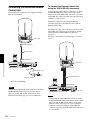
Connecting the RM-BR300 Remote
Control Unit
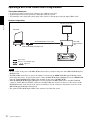
Use the RS-232C connecting cable supplied with the
Remote Control Unit.
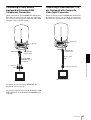
To connect the Remote Control Unit
using the VISCA RS-422 connectors
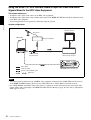
You can use the VISCA RS-422 connectors to connect
the RM-BR300 Remote Control Unit to the camera
instead of the VISCA RS-232C connectors. Use of the
VISCA RS-422 connectors allows the connection up to
1,200 m (3,937 feet) away.
Prepare the connecting cable using the RS-422
connector plugs that come with the camera and the
Remote Control Unit.
to AC outlet
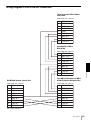
For making the cable, refer to the pin assignments of the
VISCA RS-422 connector (pages 80 and 81) and the
wiring diagram of VISCA RS-422 connection
(page 83).
For the use of the RS-422 connector plugs, see back
cover.
VISCA RS-232C IN
RS-232C cable*
VISCA RS-232C
Installation and Connections
to AC outlet
RM-BR300 Remote Control Unit
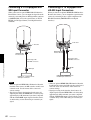
VISCA RS-422
DC IN 12V
AC power cord*
to AC outlet
VISCA RS-422 cable
AC power adaptor*
* supplied with the RM-BR300
VISCA RS-422
Note
When using the VISCA RS-232C connectors, check that
the BOTTOM switch on the bottom of the camera
(page 19) and the DIP switch on the bottom of the
Remote Control Unit (page 23) are set to RS-232C.
RM-BR300 Remote Control Unit
to AC outlet
Notes
• When using the VISCA RS-422 connectors, check
that the BOTTOM switch on the bottom of the camera
(page 19) and the DIP switch on the bottom of the
Remote Control Unit (page 23) are set to RS-422.
• When the connections using the VISCA RS-422
connectors are made, the VISCA RS-232C connection
is not available.
58
Connections