1
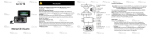
7. Body Clamp: Attach the included body clamp to
PMD-901V here, and use it to secure PMD-901V to
your clothes, belt, etc.
8. Display: This display shows the image captured by
the lens and/or other status information. See the
Operation > Display section for an overview of
what information is shown here.
9. Play/Pause ( ): While playing video, press this
button to rewind. Press it additional times to
increase the rewind speed. While not recording,
press this button to play/view the last-recorded file.
While playing audio, press this button to return to
the start of the file. While browsing through options
in the display, press this button to move up/left
one option.
10. OK: Press this to confirm a selection shown in PMD-901V’s display.
Press and hold this button for 2 seconds to turn the laser pointer on/off.
Press this button once while not recording and then enter your password
to browse and play any of the video, photo, or audio files in PMD-901V’s
memory (see Settings to learn how to set and enter your password).
11. M: Press this button to access PMD-901V’s Settings menu (see Settings
to learn more about this). While playing video, press and hold this button to
fast-forward. Press it additional times to increase the fast-forward speed.
While browsing through options in the display, press this button to move
down/right one option.
5