1
Spidertracks Website User Guide
Spidertracks website user guide, correct at time of production – 1 October 2014
Spidertracks Website: An Overview
Welcome to the user manual for the spidertracks website. It covers all aspects of the website, from
registering as a user on the spidertracks system, through to configuring your Spider settings and
managing your fleet. Please search for Spider Instructions for the Spider User Guide.
1 2 3 4 5 6 7 Website Architecture Create a User Account Creating an Organisation Managing an Organisation Using the Website iPhone Viewing Application Support 3 5 6 7 16 19 19 It is intended that this user guide contains sufficient detail to set up and mange an account. If any
further assistance is required please contact our support staff by email at [email protected]
2
1 Website Architecture
The spidertracks website has three types of users. Each user type has different permissions. The
three types of users and their permissions are detailed below.
Each user in the spidertracks system needs to be associated with at least one Organisation. Any user
is able to create an Organisation, and once created that user will become the Owner of that
Organisation.
The Owner of the Organisation is then able to add other Members to the Organisation. These
Members can also have Admin permissions, whereby they become Admin members of the
Organisation and have the ability to make the same settings changes as the Owner.
Users can be Members of more than one Organisation, and can fill different roles in each
Organisation.
3
By way of example, in the diagram below, the Owner of Organisation 1 has been assigned the Admin
role as a member in Organisation 2. In this role, Org 1 Owner will be able to administer the Aircraft
and Members of both Organisation 1 and Organisation 2.
Further, Org 1 Admin has been assigned the Member role in Organisation 2. In this scenario, Org 1
Admin will be able to administer the Spiders of Organisation 1, and will be able to view the Tracks of
Organisation 2.
Spiders are associated with Aircraft, so each Spider in an Organisation will need to be associated with
an Aircraft that is created within the Organisation. Spiders and Aircraft can only be associated with
one Organisation.
4
2 Create a User Account
Create your user account on spidertracks by going to https://go.spidertracks.com and filling out the
sign up form.
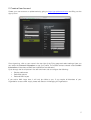
Once signed up, click on your name in the top right of the Flying page and select settings. Here you
can select the Personal Information to see your profile. The mobile number entered under Contact
Information will be where all SMS text notifications are delivered.
Cycle through the list of options in the left hand menu tab to configure the following:
•
•
•
Display preferences
Password options
Personal KML Layers
If you add a KML Layer here, it will only be visible to you. If you require all Members of your
Organisation to see a KML Layer, please see Section 4: Managing an Organisation.
5
3 Creating an Organisation
Organisations are where Aircraft are created, and once an aircraft has been created a Spider can be
registered to each aircraft. To create an Organisation, click on Settings and then Management under
the Organisations header. From here you will be able to Create New Organisation.
You can create as many organisations as you like. This is useful in the case of larger fleets or
companies with multiple locations where billing of ongoing data subscriptions needs to be kept
separate.
If necessary, aircraft can be created in separate organisations and members provided access to both.
Each organisation will have its own billing settings, aircraft, members, SOS settings and Spiders.
Spiders cannot be moved between organisations.
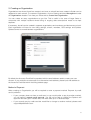
By default the Accounts Email field is populated with the email address used to create your user
account. If you would like invoices sent to an alternative email address, please input that address to
the Accounts Email field within the billing address page.
Method of Payment
When creating an Organisation you will be required to enter a payment method. Payment by credit
card is preferred.
o
If your company does not have a credit card, or you would prefer to pay by another method,
you will need to request credit approval. You will not be able to register the Spiders until
approval has been given. Please note, this make take up to 10 business days.
o
If you currently pay by credit card but would like to change to another method, please email
[email protected].
6
4 Managing an Organisation
Once you have created your organisation, you can add Members, Aircraft, Spiders (to your aircraft),
set up Notifications, and manage tracks through the Organisation management page.
Go to Settings > Organisations > and click Manage below your organisation to configure your
settings. When managing your organisation you can go back to your user account by clicking ‘Use As
<your name>’ in the top right of the website.
Adding Members to an Organisation
You can provide visibility of your tracks to others by adding them as members to your organisation.
Do this by selecting Members under the Profile header.
Enter the email address of the person you wish to add. If they are already registered as a user on
spidertracks, you can immediately add them as a Member to your Organisation. If they are not
registered as a user, you will need to add their details, so they can be invited to sign up a user
account. If they do not receive the email invitation, check the email address you have entered, and
their spam filter. If they have still not received the invitation, they can signup an account and they will
automatically be added to your organisation.
There is no charge to be a member and you can add as many people as you need. Always ensure
that phone numbers are entered in the correct format, once you’ve selected the correct country code
from the drop down list. Examples are given in the table below where a leading 0 is always omitted.
Number
International Format
What to enter in spidertracks
NZ number 021 123 456
+6421123456
21123456
AU number 0401 234 567
+61401234567
401234567
UK number 07425 123 456
+447425123456
7425123456
US number (720) 287-0054
+17202870054
7202870054
7
Visibility
Visibility allows you to specify which Members from within your Organisation can view the tracks
made by aircraft registered, and which tracks they can not see.
You are able to allow selected members in your Organisation to see all aircraft by selecting the “All
Aircraft” option in the drop down, then select the members you wish to have access to all aircraft.
By default, any member that is in the list to view ‘All Aircraft’ will be able to see any new aircraft that is
added to the system. If you want specific members to only view specific aircraft, select the aircraft in
the dropdown and then select individual members. Make sure you click save.
Any member that has the permission to see ‘All Aircraft’ will automatically be selected in the list of an
individual aircraft with a grey tick and they can not be deselected. If the member has a grey tick next
to their name under an aircraft that you do not wish them to see, you will need to remove them from
the list of members that can see ‘all aircraft’.
New Organisation members will not see any aircraft until their visibility settings are updated. Please
Note – Members will only be able to see tracks after they have been added to the visibility of that
aircraft. They will not be able to see tracks from before they were added.
8
SOS Settings
Any administrator to the account can select which members receive tier one and tier two SOS
messages and whether that member receives an email, SMS, or both. The SOS messages can go to
members for all aircraft or for specific aircraft.
For ease of use you can apply the same settings to all of your aircraft or you can select individual
aircraft by clicking the dropdown menu. Under each aircraft you can choose what type of notification
each member will receive, unchecking the box and clicking save will activate this.
The owner is assigned as the default SOS recipient. If an SOS contact is set at the all aircraft level,
they will be greyed out when viewing individual aircraft, as they can only be removed by unchecking
them on the All Aircraft selection.
Tier one support people are the first group to receive an SOS message. In the event of Watch SOS or
a pilot activated SOS, these people will receive an email and text message with the SOS details. Tier
one people should attempt to make contact with the pilot and either resolve or escalate the SOS
within 15 minutes. They may be required to call search and rescue authorities as the authorities are
not automatically informed of an SOS.
Tier two support people are the second group to receive an SOS message. In the event of a Watch
SOS or a pilot activated SOS, these people will receive an email and text message with the SOS
details fifteen minutes after the tier one people have been alerted, but only if the SOS remains
unresolved. Tier two support people should make contact with the tier one support people as well as
the pilot. They may be required to call search and rescue authorities
9
KML Layers
KML Layers allow you to add overlays onto the maps. A KML file can define shapes and points, which
can be used to define boundaries of airspace, training areas, current weather, or waypoints that are
not on the Google Map standard display. Tracks can then easily be compared to these features. If
you would like to add a KML layer to your map view, you can do this by selecting KML under the
Profile header. Either upload the desired KML file or enter the URL of a hosted file. Once installed, the
KML Layer will be visible within each member’s Flying Page.
The spidertracks support team can customize a KML Layer to your requirements, however, this is not
a free service. Development costs are assessed on a case-by-case basis. Please contact our support
team if you would like to know more about this.
10
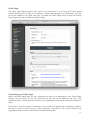
Public Page
The public page allows people to see most of the functionality of your Flying and Tracks pages
without requiring them to login to the website. A public page belongs to an Organisation only and
cannot be created for any other user type. To enable the Public Page function, select the Enable
Public Page box under the Publics Settings header.
Customising your Public Page
Within the Public Name field, you can customise the name to be displayed on your Public Page.
Similarly with the Public ID, you can customize the text that will be added to the end of the
spidertracks URL. If these fields are left blank, your Organisations name will be used as the default for
these.
The Public ID must be entered in lowercase. It can contain only alphanumeric characters, hyphens,
and has to have a minimum length of three characters. The Public ID can only be used by one
Organisation and it must be unique within the spidertracks system.
11
Changing the Public ID will not change the publicity of the existing tracks, and all tracks that were
made under the previous Public ID (URL) will be visible on the new Public ID (URL).
Enabling Full Point Information
By default, track points shown for an Organisations tracks will only show the aircraft name, location,
and time. The Organisation must explicitly enable full point information if they would like to show
altitude, speed and direction. To do this, select the Show Full Point Info box. This will take effect
immediately.
Showing KML Layers on your Public Page
An Organisation can choose to make KML layers public. This makes them visible on the Public Page
maps. Public KML layers are visible by default on the Public Page and can be turned off by the viewer
of the page. The Organisation can change the visibility of KML Layers from either the Public Page
settings, or KML Layer settings. Changing the publicity of KML Layers is effective immediately.
Selecting Aircraft To Make Public
Once an aircraft is made Public, all new tracks generated by this aircraft will be viewable on the Public
Page. If a public aircraft is made private whilst it is actively generating a track, the current track will not
be made private. Only new tracks started from that point forward will be private.
You can select which aircraft will be shown on the Public Page at any time. If an aircraft has tracks
that are being displayed on the Public Page, and the settings are reconfigured to private, any public
tracks will remain on the Public Page. These can be made private from within the Organisations
Tracks page. Please see managing track publicity below.
Sharing your Public Page
Within Public Page settings, there is a Share section that provides links to the Organisations Public
Page, and an option to send the link via email.
Public Page URLs have the format https://go.spidertracks.com/fleetpro/public/yourpublicID
There is a standard Public Page and a Public Page that shows the map only.
Standard: Default Public Page with the ability to view Flying and Tracks options.
Map only: This is just the map, with the Organisations public name shown in a box in the top right
corner of the map. The ‘map only’ Public Page is designed for embedding in other pages via an
iframe. The sidebar is not available on the map only public page.
Managing Track Publicity
The Organisation tracks page has an additional filter - Public Tracks. This enables administrators to
quickly find all tracks that are publicly viewable. The Public Tracks filter can be used in conjunction
with the Dates filter.
12
Private Track
Public Track
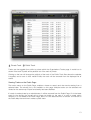
Tracks can be toggled from public to private within the Organisations Tracks page. A world icon is
shown if the track is public and a padlock icon if the track is private.
Clicking on the icon will change the publicity of the track. If the Public Track filter above the calendar
is applied, and a track is then made Private, the track will be removed from the displayed list of
tracks.
Viewing Tracks on the Pubic Page
The tracks menu on the Public Page, enables a viewer to search and view tracks starting from a
selected date. The aircraft list is not available on this page. Multiple tracks can be selected and
viewed on the same map. Export functionality has been disabled.
If a track is made private by an administrator, it will be removed from the Public Page. If it is the latest
track for the aircraft, the aircraft will no longer be visible on the map. If a track is made public
however, it is not added to the Public Page, even if it is the latest track for an aircraft. It will show on
the Public Map the next time it makes a public track.
13
Adding Aircraft
Add your aircraft by selecting Aircraft Settings under the Aircraft menu. Fill out the appropriate fields
with your aircraft details. Add all aircraft in your fleet at this stage by selecting Add Another Aircraft.
To upload an image of your aircraft, click on the picture box and select the appropriate source file.
Once you have added your aircraft to the system, you can then register a Spider to the aircraft.
Adding a Spider
Click on Add Another Spider in the Assign Spider field.
Enter the 10-character serial number from the underside of your Spider and continue. Note that the
serial number does not contain the numbers one or zero. These are O and I and should be entered as
O (Oscar) or I (India), respectively.
Continue to select the appropriate pricing plan for your situation. If you experience any trouble with
adding your Spider please contact our support staff. Please note, you can select a low value pricing
plan, or the Flexible Plan, and move up to a more expensive plan within 12 months however you can
not go to a less expensive plan within the first 12 months of your contract.
Note: Please allow up to 1 business day for new registrations to become active on the Iridium
Satellite Network.
14
Spider Reporting Settings
Use the pull-down menus in the Aircraft Settings and Assign Spider to move Spiders between
aircraft.
You can set the Spider to send position reports on a time, distance, or a combination of the two. The
Spider will send one position report on powering up, and then at the interval selected.
If you select Automated Watch, your Spider will send one position report on powering up, and then
no more until a threshold speed of 40 knots (or the transition speed selected) has been reached. The
spidertracks system will actively monitor your flight and send points at one or two-minute intervals.
Upon safe conclusion of your flight, you must turn Watch off by pressing the blue Watch button on
your keypad. If the Spider is powered down without turning off active monitoring an SOS alert will be
generated. If you are flying with Watch turned on, and the website stops receiving position reports for
a period of more than 15 minutes, the website will send out a tier one SOS alert to your Members.
The Spider S4 has a Radius function where transmission of position reports within a selected radius
will be suspended when the radius is activated on the unit. This is done through the Spider Keypad.
Enabling the transition speed point will mean every time the Spider transitions through the defined
speed, a notification point will appear on the track. A minimum speed of 15 knots is required.
If you have a Spider S3 or later, you will be able to enable heading change points between 1 and 180
degrees. The heading of the last position report sent is compared to the current heading (measured
every two seconds). If the heading changes by more than the entered amount, a position report will
be sent.
Notifications
Select Notifications under the Aircraft header.
Select the aircraft that you wish to set up notifications for from the pull-down menu. Select an event
and create the desired message within the Message field. Notifications associated with Mark buttons
1 – 4 are triggered by sequentially pressing the Mark button on your Spider keypad the associated
number of times. Add the members who are to receive these notifications and also additional delivery
methods (SMS or email). Please note that all notification messages will be listed on the maps within
the Flying and Tracks page.
15
5 Using the Website
The Flying Page
The Flying page is the default page when you login and shows an overview of all aircraft locations. If
you are a member of more than one Organisation you will see the aircraft from all Organisations that
you are a member of.
Click on the arrow icon in the top left to open the sidebar. This will show a list of all aircraft you can
see. Click on an aircraft to centre on the aircraft location, and to bring up the position details box.
Click on the aircraft icon to show only active aircraft, ones that are or have been flying in the last 15
minutes.
Click on the layers icon in the top left corner of the map to view different options for map display
including sectional charts. You can also view your KML overlays from this dropdown.
Click on the zoom icon to go back to the default zoom.
Click on the point icon to toggle between the full track and the last point in the track.
Finally, click on the full screen icon to expand the map to full computer screen.
16
The Tracks Page
View a list of tracks by selecting Tracks from the menu bar. By default, all tracks will be shown.
Tracks from a specific aircraft can be listed by selecting that aircraft from the left sidebar. To view
tracks from a specific date, click on a date in the calendar. All tracks from that date backward will be
displayed. To view a list of the latest track for each aircraft, click on Latest at the top of the left menu
bar. Click All to return to the default view with the most recent tracks at the top.
Please note, that scrolling down the page will load progressively older tracks, irrespective of the
calendar setting.
To view a single track, click anywhere on the track row itself, or check the box corresponding to the
track row, and then click View.
Viewing Multiple Tracks
If you would like to open multiple tracks, check the boxes beside each track and click view at the
bottom of the page. By using the view options, the selected track(s) can be exported to a
spreadsheet or a KML file to view within another application.
17
Deleting Tracks
If you would like to hide a track from your list, but still wish for other members of your organisation to
retain visibility of it, you can select the track as described above within the Tracks page and then
select the delete option from the drop down menu next to view.
If you would like to delete a track completely from the system, go to Settings > Organisation >
Manage the Organisation and then select Tracks from the menu bar at the top of the page. Here
you will see the organisation tracks page. If you delete a track from the organisation management
page it will delete it from all Members view.
18
6 iPhone Viewing Application
From the Apple App Store, search for spidertracks and install the app. Please note the App is free to
install. From 1 April 2014 there will be a fee of $2 per aircraft per month to be able to use the
application.
There is currently no application for Android or other devices.
7 Support
Should you have any questions or issues when using the spidertracks system, there is a lot of
information on support.spidertracks.com, just enter you question into the search box. If you can’t find
the answer please send through an email to [email protected] and we will be in contact
within one business day.
There are also forums on the support website where you can make suggestions for improvements to
the website, hardware, or system as a whole.
19