1
- 1 -
INTECH IWB User Manual
Xiamen Interactive Technology Co. Ltd
INTECH Infrared Interactive Whiteboard
User Manual
- 2 -
INTECH IWB User Manual
Content
Accessories List....................................................................................................................4
1. General Introduction.........................................................................................................6
1.1 What’s infrared interactive whiteboard?................................................................6
1.2 About this User Manual........................................................................................7
2. Preparation for using........................................................................................................7
2.1 How does the IWB work?.....................................................................................7
2.2 Requirements of the PC system...........................................................................7
2.2.1 The minimum system configuration...........................................................7
2.2.2 Requirement of the Operation System.......................................................7
2.2.3 System configuration recommended........................................................7
2.3 How to install the Infrared IWB?.........................................................................7
2.3.1 Installation for the mobile stand...............................................................8
2.3.2 Installation for the wall mounting................................................................9
2.4 How to install the infrared IWB software?...........................................................10
3. Basic using of the infrared interactive whiteboard………………………………….…11
3.1 Basic attributes of the infrared IWB software………………. …………….……11
3.2 Establishing Communication between the Board and Computer…………….....11
3.3 Locating the Infrared Interactive Whiteboard………………………………..….11
3.4 How to write on he board?..................................................................................12
3.5 How to erase the board?....................................................................................12
3.6 How to print on the board?.................................................................................12
3.7 How to capture a snapshot of the board?..........................................................12
4. Starting with the INTECH software tools……………………………………………13
4.1 A General Picture of INTECH software............................................................. 13
4.2 INTECH Software Toolbar.................................................................................13
4.3 Drop-Down Menus........................................................................................... 15
4.4 How to import images from the gallery?...........................................................19
4.5 How to show, hide and move the toolbar...........................................................19
4.6 How to modify and move objects?….................................................................20
4.7 How to move the screen?.............................................................................20
4.8 Backdrops and photo galleries provided by INTECH software..........................20
4.9 How to set for whiteboard ..............................................................................20
4.10 How to create a new file?................................................................................21
4.11 How to save a file?..........................................................................................21
4.12 How to input text?...........................................................................................22
4.13 How to use the screen record? ………………………………………………22
4.14 How to use Screen Capture?.........................................................................24
4.15 How to use Intelligent Pen?…………………………………………….……24
4.16 How to use elastic?…………….……………………………………………24
4.17 How to use the Spotlight tool?………………………………………..………25
4.18 How to use the Screen Cover tool?…………………………………….……26
4.19 How to use the Highlight tool?........................................................................27
4.20 How to use the Screen Arrow tool?………………………………….………27
4.21 How to use Screen Write function?…………………………………….……28
4.22 How to play a video?………………………………………………..………29
- 3 -
INTECH IWB User Manual
4.23 How to change the layers of pictures?.............................................................30
4.24 How to realize the rebroadcast function?…………………………….………30
4.25 Special Tool………………..………………………………………….………31
4.25.1 Random selection……………………………………………….……..31
4.25.2 Calculator………………………………………………………….…..31
4.25.3 Magnifier…………………………………………………….…….…..32
4.25.4 Clock…………………………………….…………………..….……..32
4.26 Measure Tool…………………………………………….……………………33
5. FAQ……………………………………………………………………………………33
6. Technical Parameters………………………………………………………............….35
INTECH IWB User Manual
- 4 -
Welcome to INTECH Interactive World
Warning: In order to unleash the extraordinary potential of your INTECH IWB, please
read this easy-to-understand “user manual ” before using. After reading, please keep it for
reference in the future.
Accessories List:
The following accessories should be included in the box:
—
—
—
—
—
—
—
USB cable
4 intelligence pens
pointer
4 wall mounting brackets
user manual
software CD
8 setscrews
—
mobile stand with wheels (optional)
—
wireless module (optional)
If you find something destroyed or shortage of accessories, please contact with
the local distributor.
This manual is used for all Infrared Interactive Whiteboard products.
All the symbols and notices in this manual as below:
Description: the additional instruction about software.
Attention: the problems always happening when using, and here advising how to avoid
them.
Warning: The process of using the product may cause harm to human or non-standard
use may damage the product itself.
Warning:
— When using the interactive whiteboard, the user should avoid fire and electric shocks,
also need to avoid prolonged sun exposure
— After installation of whiteboard, user should ensure it firm.
Warning:
— When using projector with IWB together, may not look directly at the projector beam.
Important Attention:
INTECH IWB User Manual
- 5 -
— Please make sure that the whiteboard, projector, computer’s power supply grounding,
to avoid accidental damage to electronic products.
— Please make sure the whiteboard and computer cable is connected correctly to ensure
the normal power supply.
Attention:
—
If the IWB mounted on the wall, it must be straight with the wall.
—
Do not use sharp or sturdy thing to cut or carve the board surface or frame.
- 6 -
INTECH IWB User Manual
1. General Introduction
Welcome to the interactive world of INTECH!
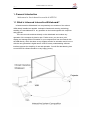
1.1 What is Infreared Interactive Whiteboard?
Infared Interactive Whiteboard is a comparatively new member of the vairous
IWBs widely installed and applied. It adopts infrared matrix sensing technology,
enabling the touchableness of any operation on the board together with computer
and projector.
The user can write and draw directly on the whiteboard and conduct any
operation of the computer by hand or pen. Further more, you can save, print ,
display and manage all the information in your computer and from the internet with
the IWB directly, which has been a very modern solution for education and is in tune
with the new generation’s digital nature. INTECH’s easy-understanding software
interface ensures the simplicity of use and operation. You will find that learning how
to use INTECH software would be a very happy journey.
INTECH IWB User Manual
- 7 -
1.2 About this user manual
This user manual introduces the usage and functions of INTECH infrared IWBs
and illustrates how to operate on the infrared interactive whiteboard with INTECH
software in details,as well as the installation details of the IWB and INTECH
software.
2. Preparation for work
2.1 How does the IWB work?
It’s quite simple to use INTECH infrared IWB. If you can use computer, it is just
that easy to use INTECH interactive whiteboard. This touchable board connects
your computer with projector, and displays the screen of computer. You can use
your finger, intelligent pens, pointer or any other non-transparent object to control
computer through the IWB. Also you could write on the board with an ink pen
directly, which is available only for the infrared IWB.
It adds fun and inspires your students and audience during lesson or speech
with INTECH infrared IWBs!
2.2 Requirements of the PC system
2.2.1 The minimum system configuration
• PC with 300MHz x 86 processor
• 128M EMS memory
• Display card support 256 colors and above
• 10M applicable hard disk space
• Display resolution:1024×768、1280×800、1280×1024
• An available USB port
• CD-ROM drive
2.2.2 Requirement of the Operation System
• Windows 98, VISTA, 2000, or XP
2.2.3 System configuration recommended:
• PC with 1GHz x86 processor
• 256M EMS memory or above
• Display card support 256 colors and above
• 10G applicable hard disk space
• Projection display resolution: 1280×800
• An available USB port
2.3 How to install the Infrared IWB?
Please follow the ways below to install the infrared IWB.
⑴ Mobile stand mounting. (Optional)
⑵ Wall mounting.
- 8 -
INTECH IWB User Manual
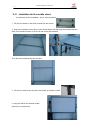
2.3.1 Installation for the mobile stand
It’s quite easy for this installation. Only a wrench needed.
1. Fix the four wheels on the base of stand with the wrench.
2. Plug the two beams into the slots of two vertical poles, and then plug the vertical poles into
slots in the middle of bases. Fix them all with screws and washers.
Then the stand would be like this as below:
3. Fix the four small screws into the screw holes on the back of IWB.
4. Hang the IWB on the finished mobile
stand by the screws fixed.
INTECH IWB User Manual
- 9 -
5. Make it firm with screwdriver.
Then the installation finished.
Description: 1. Turn the position control button of wheels into “Lock”. Make the wheels static,
not shift.
2. Do not fix the screws too tight, to avoid damage on any stand.
2.3.2 Installation for wall mounting. (Photos for reference)
You may need tape measure, wrench and drill for installation.
1. Choose the right place to install the board, which is convenient to connect the
computer..
2. Mark the drill positions on the wall according to the different models of products.
3. Drill 8 fixing holes on the wall according to the mark.
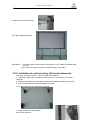
4. Fix the brackets on the wall with 8 setscrews.
5. Hang the board on the brackets
with correct positions.
- 10 -
INTECH IWB User Manual
Then the installation finished.
Description: You could place all the intelligent pens on the right side.
2.4 How to install the infrared IWB software?
Connect the computer and the whiteboard by USB cable, (the following
installation example is the installation under WINDOWS XP, a slight difference
maybe in other operation systems).
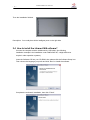
Insert the Software CD into your CD-ROM, then please click the Software Setup icon.
Then choose the language you prefer and click “Next” to install the software.
Complete the software’s installation, then click “Finish”.
- 11 -
INTECH IWB User Manual
If the driver installed properly, the USB indicators of the whiteboard will light in red. Then
the IWB would be available after some simple setting. Just click the “InteractiveBoard”
icon on the desktop, which is our application software.
3. Basic using of the infrared interactive whiteboard
3.1 Basic attributes of the infrared IWB software
Hand-Gesture Recognition: Support single finger, multi-touch.
Write: By finger, pen or ink marker.
Touch: At working status, the whiteboard is a touchable interactive board of high
preciseness. The finger or pointer can substitute mouse, and click or drag any objects on the
screen conveniently to achieve various operations.
Annotation: Annotate directly on various files and videos, available file formats such as PPT,
WORD, EXECL, AVI, MEPG, JPEG, and etc.
Energy saving: Consuming less than 0.5W and no need for external power supply.
Individualized setup : Background, paintbrush text inserting, default screen can be set at
individual preference. Various writing interfaces( black or white background) availble.
3.2 Establishing Communication between the Board and
Computer
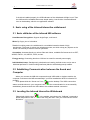
When you connect the IWB with computer through USB cable or wireless module, the
computer could sense the IWB automatically if you have installed the INTECH software CD
properly.
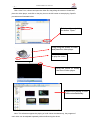
Then please click the “Server.exe” icon
on the desktop. The IWB’s connection
status would be shown in your computer’s taskbar. If the communication is not successfully
established, please recheck the USB cable or the wireless module connection .
3.3 Locating the Infrared Interactive Whiteboard
Please right-click the icon
in the taskbar, and choose the “Calibrate” command to
define the position of the IWB before the using the IWB. Then you would see the screen
like below:
INTECH IWB User Manual
- 12 -
Click the center point of the black cross
precisely.
by pen or finger to define the position
Attention:
1. The calibration is necessary only at the first time the whiteboard or other hardware is
used.
2. Re-calibration is required only if the IWB or projector has been adjusted or relocated.
Description: If bad connection occurs, the connection icon in the taskbar would change
its indication of status as below.
means the connection is failed.
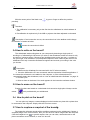
3.4 How to write on the board?
The whiteboard sends writing data to your computer by detecting a single point of
touching or of reflected light. Whenever you write on the whiteboard, make sure there is only
one point of contact at a time. Choose a pen (intelligent pens on the pen tray) , a pointer or
use your finger, even all kinds of non-transparent objects to write. Select a pen color on the
whiteboard icon strip. Interactive Software recognises and records your writing in the color
you choose.
Description:
1. Make sure the whiteboard is connected with the PC when necessary.
2. Once the IWB and the PC are connected, start the Interactive Software application. If
the Interactive software is not installed on the computer, or if the software does not
automatically detect the whiteboard, refer to “How to install Interactive Software” on page 10.
3. Choose a pen.
4. Write or draw on the board. Your work appears in the Interactive software window.
3.5 How to erase on the board?
Erasing functions are based on a calculated circle around a single point. Always use the
eraser
that is provided with your whiteboard.
3.6 How to print on the board?
You can print any image or content displayed on the board at any time with a printer that
is connected to the computer. Simply click the Print icon to start.
3.7 How to capture a snapshot of the board?
The Interactive software records all the activities conducted on the whiteboard. Capture a
snapshot image of the current screen, then you can save for further usage within the computer.
Click the Snapshot icon
to get the capture, then you can write, draw and erase on the
picture as well as move it around, or zoom it in and out.
- 13 -
INTECH IWB User Manual
4. Starting with the INTECH software tools
4.1 A General Picture of INTECH software
INTECH software main tool bar holds a full combination of the most frequently used
tools as illustrated below. You can move the main tool bar to any where you prefer or hide
it as you want to.
4.2 INTECH Software Toolbar
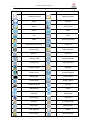
INTECH software toolbar includes the following:
INTECH IWB User Manual
- 14 -
Button
Function
Button
Function
Create document
Open document
Save
Save as
Export
Send e-mail
Undo
Redo
Cut
Copy
Paste
Clone(copy+paste)
Delete selected content
Select All
Screen Roam
Page reposition
Zoom in
Zoom out
Layer go TOP
Layer go Bottom
Layer go Up
Layer go Down
Property setting
Spotlight
Screen cover
Screen highlight
Break page
Screen arrow
Screen write
Screen capture
Screen recorder
Back up
Rebroadcast
Pause
Continue
Reset(stop)
Select object
Solid pen
Soft pen
Fluorescent pen
Stripe pen
Intelligent pen
Line segment
Elastic
Insert image
Text recognition
INTECH IWB User Manual
- 15 -
Eraser
Rectangle
Ellipse
Isoceles triangle
Trapezoid
Circle
Parallelogram
Rhombus
right-angled triangle
Hexagon
Pentagon
Five-pointed star
Sector
Arc
Cuboid
Tetrahedron
Cylinder
Ellipsoid
Prism
Octahedron
Cone
Frustum cone
Dihedron
Full screen capture
System setting
Screen keyboard
Random selection(Dice)
Magnifier
Clock
Calculator
Compass
Ruler
Trangle ruler
Protractor
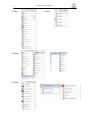
4.3 Drop-down Menus
There are lots of hidden submenus in the drop-down menu as the following:
1. File
- 16 -
2. Edit
4. Draw
5. Tools
INTECH IWB User Manual
3.View
- 17 -
6. Record
8.File Browser
INTECH IWB User Manual
7.Help
Index Pages
- 18 -
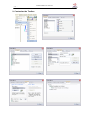
9. Customize the Toolbar
INTECH IWB User Manual
- 19 -
INTECH IWB User Manual
4.4 How to import images from the gallery?
INTECH software offers a picture gallery, in which there are hundreds of images categorized
to different subjects. Use these pictures to animate a class or presentation in a vivid and
easy way!
Instructution:Click the icon
, or click “draw- image”, we will enter the image gallery.
Select a picture, click “open”, then drag out the picture on any position of the board. You will
see the picture shown with some controlling point as the following:
Drag the white point to
zoom in and zoom out the
picture.
Drag the green point to
rotate the picture.
4.5 How to show, hide and move the toolbar
In the tab “view”, we can select what toolbar to be shown or hidden by ticking on or
ticking off.
By dragging something like this
, we can move the toolbar to any position.
- 20 -
INTECH IWB User Manual
4.6 How to modify and move objects?
Click the icon
to select any object on the board, then we can see the object is
surrounded by a few controlling points through which we can move, zoom in/out, rotate the
object. This the same as controlling a picture as mentioned in “4.4”. What’s more, we can
modify the object in the “Attribute”.
4.7 How to move the screen?
Touch and drag on the board with two or more fingers at the same time, then it will
appear the icon
on the board, which suggests that we are moving the screen on the
board now.
Another way, we just need to click the Roam function
screen with only one finger.
, then we can move the
Being able to move the backdrop is very meaning, which can supply us unlimited
writing space. When the current page is fully written, we just need to move the backdrop,
so as to get new blank for writing. The original written content is still be on their position.
Each position will be indicated in the left-top corner.
4.8 Backdrops and photo galleries provided by INTECH
software
Intech software supports all the pictures from different resource, not only we can use
the original pictures coming with the software itself, but also we can use the pictures
coming from the user’s computer. That means the image gallery can be enriched
unlimitedly. And the backdrops can be customized to be any picture from the image gallery.
4.9 How to set for whiteboard
We can set for the whiteboard in “system setting”. There are many ways to open the
“system setting”.
● Click the icon
● Right click(touch and hold for 2 seconds on the board), then choose “system
setting”.
● Click the “edit” tab and choose “system setting”.
In the “system setting”, we can set the property of the solid pen , soft pen, fluorescent
pen, stripe pen ,geometry shape and measurement tools.
- 21 -
INTECH IWB User Manual
4.10 How to create a new file?
Click “new” in the “file” tab or the icon “new” to create a new file. The system will
question you whether to save the current document. After choosing “yes” or “no”, a new file
will be created.
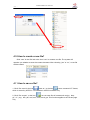
4.11 How to save a file?
1. Click” file—save”or the icon
/”save as “ or the icon
to save contents inYT format,
which is owned by INTECH. It is available in INTECH software only.
, we can save files in formats such as jpg,bmp,
2. Click” file—export” ,or the icon
gif,tif,png,htm, pdf, wmf, emf, word, excel, ppt. This function applies to the current page
only.
- 22 -
INTECH IWB User Manual
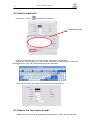
4.12 How to input text?
Click “draw — text “or
, you will see the following:
Handwriting Area
In the red handwriting area, your writing will be converted to standard text.
Besides the “write recognize”, we can use the “keyboard” to input text.(we can also find
the keyboard tool in this way: tools-special tool-screen keyboard)
Note: we can change the setting of the text as demonstrated below:
4.13 How to use the screen record?
Screen record can save all the operation on the board into a video, through which the
- 23 -
INTECH IWB User Manual
students
are enabled to review the lesson easily. The operation is as the following:
Click tools - screen record or the icon
Click to start REC, and you will
see this button,
click it to stop REC, and start to choose
the saving route.
Note: it’s available to open multiple
screen record to REC the content at
different time.
, then we will see
Click to
stop
playing
video.
Click to open the
former saved vide
- 24 -
INTECH IWB User Manual
4.14 How to use Screen Capture?
Screen capture is like a camera, we can use it to capture anything into a picture.
We can find Screen capture in “tools- screen capture” , the icon is
. We can
choose to use full screen capture or region capture.
Note: The picture captured can be zoomed in/out and rotated.
4.15 How to use intelligent pen?
We can find it in “draw- intelligent pen”, the icon is
.
Intelligent pen is very smart and useful, which brings convenience to your lesson and
presentation. It can recognize the following random shapes into standard shapes:
4.16 How to use the Elastic tool?
Select the Elastic function from the tag Draw, or click the icon
directly. Click/ touch
the whiteboard to select the starting point, click or drag the rest corner based on the selected
starting point, and double click the mouse or simply the whiteboard to finish the drawing of
INTECH IWB User Manual
- 25 -
an irregular polygon. As illustrated below:
Click each
one by one
Click to start
point
Double click to end
Re-edition of the drawn polygon is allowed. To revise its shape, it is done with absolutely
simplicity by dragging either the corner-point or the side to change its shape.
4.17 How to use the Spot Light tool?
Spot Light acts as a highlight tool, it can draw the attention of students to focus on
particular contents on the whiteboard.
Click the icon
, or click it in “tools-spotlight”. We can drag the spotlight circle to
any position to highlight anything as we wish.
Operation can take place within the spotlighted area.
Hold your finger on the dark screen for two seconds or click the menu on the right
bottom of the whiteboard for attibute menu. Set the attributes through the pop-up menu and
sub-menu. As illustrated below:
Move the spotlighted
area by dragging the
screen cover at will.
INTECH IWB User Manual
- 26 -
4.18 How to use the Screen Cover tool?
Screen cover can make the covered content seemed mysterious, students will be eager
to see the content when revealing the cover slowly.
Click the icon
, or “tools- screen cover”, then the cover will appear with four
arrows as illustrated below:
Drag the arrow to unveil the
cover.
Hold your finger on the screen cover for two seconds or click the right button of the
mouse or click the menu on the right bottom of the whiteboard, so as to set its attributes
through the pop-up menu and sub-menu. As specifically illustrated below:
- 27 -
INTECH IWB User Manual
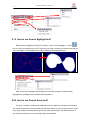
4.19 How to use Screen Highlight tool?
Select Screen Highlight through the Tool tag in “tools- screen highlight”, or click
icon to cover the present screen first. Then use your finger / mouse to circle the area that you
want to highlight. The highlighted area will be displayed as illustrated below:
4.22 如何使用屏幕箭头?
可
Note: The Screen Highlight and Spotlight are of similar functions. Contents either
highlighted or spotlighted can be edited and operated on.
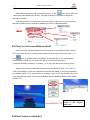
4.20 How to use Screen Arrow tool?
On many occasions, teachers will walk down from the platform to interact with students.
The screen arrow can be used to identify the the main points or the on-going contents. In this
way, every student can easily follow up with the class, and teachers can avoid influence of
any exterior interference on the teaching quality and schedule.
INTECH IWB User Manual
- 28 -
Select Screen Arrow through “tools-screen arrow”, or click
icon, then you will see
a red arrow in the middle of the screen. Drag the head part of the arrow to change its
direction or position.
Click the right button of the mouse or hold your finger on the arrow for two seconds to
activate its setting menu to change its attributes or to exit. As illustrated below:
4.21 How to use Screen Write function?
One of the many important features of this software is to annotate on WORD, EXCEL,
PPT, the screen, and even a video. Select Screen Write through “tools-screen write”, or
click
icon, an operating menu will display on the right bottom. The default state of
Screen Write is “write”, we can switch the state to “clear”(erase contents), to
“computer”(operating computer), to “setting”, or to “exit” (exit the Screen Write function).
When we are writing on Microsoft Office files such as WORD, EXCEL, PPT , we can
click “office embed” to insert our handwriting into those files. Note: To save the handwriting
into WORD, EXCEL, PPT, please switch to “computer” firstly, so we can click the “save” icon
of the Microsoft office files. The saved handwriting can be edited and deleted in the WORD,
EXCEL, PPT.
All the writings could be
saved in the original
Office file.
4.22 How to play a video file?
- 29 -
INTECH IWB User Manual
Click “video” icon, choose and open the video file, drag along the screen to locate and
place the video player, and click on the play icon on the left bottom to start playing. Specific
procedures as illustrated below:
Select a video and click
the button “Open.”
Drag along the screen to locate
and place the video player.
Click this button
to play the video.
Drag the points to modify
the size of video player
Support the playing of multi
videos simultaneously.
Note: This software supports the playing of multi videos simultaneously, the progress of
each video can be adjusted separately without influencing the others.
INTECH IWB User Manual
- 30 -
The size of the player window can be enlarged or contracted through the dragging of its
controlling points around the window.
Screen Write function can be used to make annotation when playing the video.
4.23 How to change the layers of pictures?
When a few pictures are piled up together, each picture takes up a different layer. Clicking
Top, Bottom, Up One Level, Next Level from the “Edit” tag or click
on the
toolbar, we can easily change the layers of pictures or texts or geometry shapes as illustrated
below:
1
2
3
2
3
1
Current layer is as following:
Top - rectangle.
Between- triangle
Bottom- circle
Select the rectangle, and click “Bottom”.
The new layer will become:
Top - triangle
Between - circle
Bottom - rectangle
Note: To continuously switch the layers of selected object, please just simply repeat the
click of Up One Level or Next Level. No need to reselect the object.
4.24 How to realize the Rebroadcast function?
The whole operating process on the board can be redisplayed by the following buttons:
Back up: Display the operating process backwards, say from the end to the
beginning.
Rebroadcast: Display the operating process forwards,say from the beginning to the
end.
Pause: Pause the rebroadcasting progress. Annotation or explanation can be made
on the displayed content at this status.
Continue: Continue to play from the pause. This function is in accordance with the
Pause function.
INTECH IWB User Manual
- 31 -
Reset: Stop rebroadcasting. Note: After rebroadcasting, please do click this button
to end the application before conducting other operations.
Speed setting: Adjust the speed of rebroadcasting.
4.25 Special Tools (Random Selection, Calculator, Magnifier,
Clock, Screen Keyboard)
4.25.1 Random Selection:
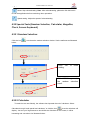
Click the icon
to activate the random selection window. Set the attributes as illustrated
below:
Click “OK”
setting.
to
finish
Click“OK”to generate
the random selection
result.
4.25.2 Calculator
To make it more user-friendly, the software has imported the tool of calculator. Select
Calculator through “tools-special tool-calculator” or click the icon
, then the calculator will
display. Just use your finger/mouse to touch/click the Calculator on the screen, it will be
interesting and convenient. As illustrated below:
- 32 -
INTECH IWB User Manual
4.25.3 Magnifier
It’s easy to enlarge any part on the screen with the help of the Magnifier. Just select the
Magnifier though “tools-special tool-magnifier”, or click
icon directly to activate the
magnifier window. The part centered around the cursor can be enlarged in adjustable
proportion. The attributes of the Magnifier can be set by Magnifier controlling menu. It is
illustrated as below:
NOTE: Drag the magnifier to move around, click Exit to quit the function.
4.25.4 Clock
The Clock shows the time of the system, and can be used to count down or count time.
The Clock window can be moved to any location, and its properties can be adjusted in the
Setting.
- 33 -
INTECH IWB User Manual
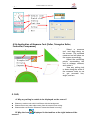
4.26 Application of Measure Tool (Ruller, Triangular Ruller,
Protractor,Compasses)
Select a measure
tool, and drag along on
the screen. The selected
measure tool will show on
the screen accordingly.
Adjust the controlling
points surrounding the
tool to enlarge, contract,
and rotate it.
Use any writing tool
to draw along the scale of
the measure tools, so as
to get accurate line,
angle, and arc.
5. FAQ
A. Why my writing is unable to be displayed on the screen?
z
Please try another color which is different with the background.
z
Please remove any other object away from the screen when writing.
z
Please make sure that the software of Interactive Board is running.
B. Why the Icon
screen?
displayed in the task bar at the right bottom of the
- 34 -
z
INTECH IWB User Manual
The USB cable is in poor connection between the whiteboard and computer. Please
make sure the connection is not loose.
z
The USB cable is not of the original packing. The USB cable adopted is made of superior
quality materials for Interactive Whiteboard application, which can not be substituted.
z
Abnormal situation appears during installing the software. Please uninstall the software
and restart the computer, then install the software again.
z
USB cable connection between the computer and whiteboard is improper. Please refer to
the user manual and correct the connection.
z
If the icon
is not displayed in the taskbar at the right bottom of the screen,
please re-start the server.exe and InteractiveBoard.exe.
C. Is it necessary to do the position “locate” operation again after
reinstalling the software of interactive whiteboard?
No, it’s not necessary. The system has remembered your last parameter of position
locating.
D. Is the content which is covered by window of “index page” lost?
No, the content still exists there, it’s just temporarily covered.
E. How to know the working state of Whiteboard?
When there is any touch on the board, If the light at the right bottom of the board will turn
blue. It shows the whiteboard is working correctly. If the light keep still to be red, it shows the
whiteboard may have problem in hardware.
F. Why sometimes no change happens after changing the background
color?
It’s probably that the background color is covered by another big size picture. So we can’t
see the color is changed.
G. What kind of projector is required to equip with the whiteboard?
All the projectors will be ok if only they meet the following 3 points:
(1) it is front projector.
(2) it can support the resolution of computer.
(3) luminous flux ≧ 500 lumens, specific requirement depends on the room size.
H. How to clean the Whiteboard surface?
Gently wipe the whiteboard surface by clean wet cloth.
Note: Do wring the wet cloth, make sure the water won’t soak into the frame.
- 35 -
INTECH IWB User Manual
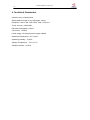
6. Technical Parameters
Induction way: Infrared Sensor
Writing Method: finger or any object(pen, ferule)
Resolution: 1024 x 768, 1280 x 800, 1280 x 1024, etc..
Touch Accuracy: 4096*4096
Electrical consumption: ≤70mA
Connection:USB2.0
Power supply: No external power supply needed
Operating Temperature: -20℃ to 60℃
Operating Humidity:10-90%
Storage Temperature:-40℃ to 70℃
Storage Humidity:20-93%